#Windows installed in CSM (in theory) doesn't show up in Grub, Dual Boot
76 messages · Page 1 of 1 (latest)
 hardy nymph
 carmine idol
first confirm it is for sure. in Windows, type in a Run box: msinfo32
and check the BIOS mode:
if it indeed confirms it to be Legacy, then I think there's a way to convert it.
you should back up all the files you really value to an external drive anyway first as backup
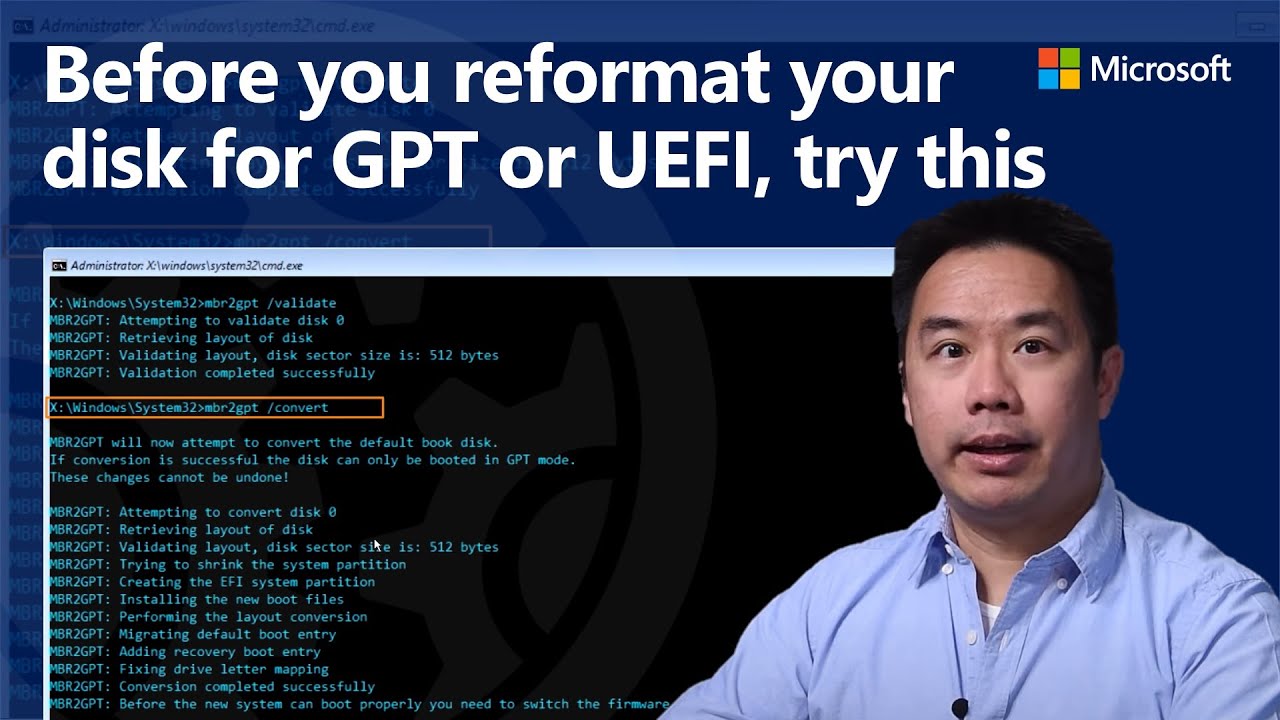
You can change your partition schema from MBR to GPT and move from BIOS to UEFI without reformatting your hard drive and reinstalling Windows using the built-in MBR2GPT Windows tool. This process can also be used to prepare for Windows 11 upgrades.
In this video, Windows Program Manager, Desmond Lee, shows you how with the MBR2GPT disk conversi...
hardy nymph
carmine idol
first confirm it is for sure. in Windows, type in a Run box: msinfo32
Oh well, I'm actually on Linux
I can't boot on Windows because there's no Windows Boot Manager in UEFI, that's the problem. I think Grub corrupts it (?)
also yeah it's gpt

Before I updated to windows 11 and it appeared on grub but I reinstalled linux to make a few ui changes and it's gone
hardy nymph
carmine idol
windows 11 demands GPT-style drive AND UEFI
But that's not the problem because Windows 10 was GPT but Legacy
So my guess is that it's still legacy
carmine idol
either reinstall both fresh
hardy nymph
I can try to update again since it fixed it 🤷♂️
carmine idol
and turn off csm/legacy in bios
hardy nymph
Alright
carmine idol
or try supergrub2
it's a bootable usb "loader"
that u can use to find and boot ur windows install
then convert it as per the video
hardy nymph
carmine idol
that u can use to find and boot ur windows install
Even without the Windows Boot Manager?
carmine idol
 bronze bobcat
hardy nymph
Even without the Windows Boot Manager?
bronze bobcat
hardy nymph
Even without the Windows Boot Manager?
if you don't have windows boot manager, the issue is seperate Nd grub can't do anything either. grub just chainloads the wbm.
carmine idol
hardy nymph
Even without the Windows Boot Manager?
yes u use its orange screen to boot an OS, it scans all drives and finds bootable items. in ur case probably NOT EFI files for windows
hardy nymph
bronze bobcat
if you don't have windows boot manager, the issue is seperate Nd grub can't do a...
How is the issue seperated? Grub isn't responsible for breaking it?
bronze bobcat
hardy nymph
Even without the Windows Boot Manager?
you can see what stunner said. but it may be quicker to just use Linux, mount the windows EFI (skip this if it's shared between windows and linux) and look in /.../efi/EFI/Microsoft/[].efi or for a shared one, /boot/efi/EFI/Microsoft
bronze bobcat
hardy nymph
How is the issue seperated? Grub isn't responsible for breaking it?
WBM suddently disappeared from your firmware after you installed linuxmint?
hardy nymph
carmine idol
yes u use its orange screen to boot an OS, it scans all drives and finds bootabl...
Before updating it
I was able to access to the legacy boot manager of windows
There was WIndows 10 and Windows 7 (restored) and I couldn't boot Windows 10 and gave me an error, it was like it couldn't load winload.exe, something like that
hardy nymph
bronze bobcat
WBM suddently disappeared from your firmware after you installed linuxmint?
I'm not using Linux Mint but endeavouros
bronze bobcat
still
carmine idol
two OS's MUST be in the same mode (both installed as, started as, and run as) in order to work harmoniously thru GRUB
also if u do fix it, make sure to turn Windows Fast Startup off for proper reliable dual-boot
hardy nymph
carmine idol
two OS's MUST be in the same mode (both installed as, started as, and run as) i...
Yeah I think that's the overall problem
I think updating it again should work
hardy nymph
carmine idol
also if u do fix it, make sure to turn Windows Fast Startup off for proper relia...
I don't remember if I have fastboot on, maybe I do
But when I fixed it, it was able to load WBM
carmine idol
u may try booting linux mint off a usb and use its boot repair tool
otherwise see the suoergrub link and the video
bronze bobcat
hardy nymph
But when I fixed it, it was able to load WBM
can you do efibootmgr in the terminal just to confirm?
carmine idol
or get mx linux fluxbox version, it's abit smaller ISO to download, and has boot repair tool too
hardy nymph
bronze bobcat
can you do `efibootmgr` in the terminal just to confirm?
BootCurrent: 0005
Timeout: 1 seconds
BootOrder: 0005,0000
Boot0000* GRUB HD(1,GPT,aabd290a-6bbb-495f-b25d-47fd86121e29,0x1000,0x200000)/\EFI\GRUB\GRUBX64.EFI
Boot0005* UEFI OS HD(1,GPT,aabd290a-6bbb-495f-b25d-47fd86121e29,0x1000,0x200000)/\EFI\BOOT\BOOTX64.EFI0000424f
bronze bobcat
do look what stunner said
hardy nymph
bronze bobcat
do look what stunner said
I actually think that updating windows again could work
I will stay on UEFI mode
Also it's easier for me
bronze bobcat
hardy nymph
I actually think that updating windows again could work
I will stay on UEFI mode
what are you even updating
just reinstall windows
hardy nymph
bronze bobcat
what are you even updating
cuz it worked before
hardy nymph
bronze bobcat
just reinstall windows
I can't format it
bronze bobcat
hardy nymph
I can't format it
why?
hardy nymph
bronze bobcat
why?
Important stuff and like the 75% of the 1tb is taken
bronze bobcat
hardy nymph
Important stuff and like the 75% of the 1tb is taken
make a backup, then.
hardy nymph
bronze bobcat
make a backup, then.
Ask my father for that 😭, the hard drive isn't mine
hardy nymph
carmine idol
should have a backup at all times anyway
Quick update, fuck Grub
bronze bobcat
hardy nymph
Quick update, fuck Grub
grub will do what you tell it to and if it's physically possible
no one updates their system from win7 to 11, they just reinstall.
such upgrades almost always will break something, because of how much things change between windows versions
it you don't have a windows bootloader, then grub won't be able to boot it either.
there's a reason why legacy boot is depracted
hardy nymph
bronze bobcat
it you don't have a windows bootloader, then grub won't be able to boot it eithe...
but seems like possible?

for systemd-boot
hardy nymph
bronze bobcat
grub will do what you tell it to and if it's physically possible
When there was W10, there were always random errors of dll popping up randomly
bronze bobcat
hardy nymph
for systemd-boot
systemd-boot is uefi-only
hardy nymph
bronze bobcat
systemd-boot is uefi-only
oh I dunno then
bronze bobcat
hardy nymph
oh I dunno then
brother, just install windows 10 or 11 LTSC and move your files there if you hate backups so much
hardy nymph
bronze bobcat
brother, just install windows 10 or 11 LTSC and move your files there if you hat...
LTSC is strictly English I think
bronze bobcat
hardy nymph
LTSC is strictly English I think
no, LTSC is just windows but long-term support channel
so localised builds exist too.
hardy nymph
NOO HE LEFT
Hey stunner, thanks for helping but I was able to fix it alone
@carmine idol
Now it runs on UEFI mode completely and Grub recognizes it correctly
Instead of winload.exe now it's winload.efi
I basically ran the windows media installation USB, used CMD to find the windows boot and then "guided" windows to use the correct one