#installed mint alongside windows and now i dont want windows anymore
210 messages · Page 1 of 1 (latest)
 trail granite
 visual lagoon
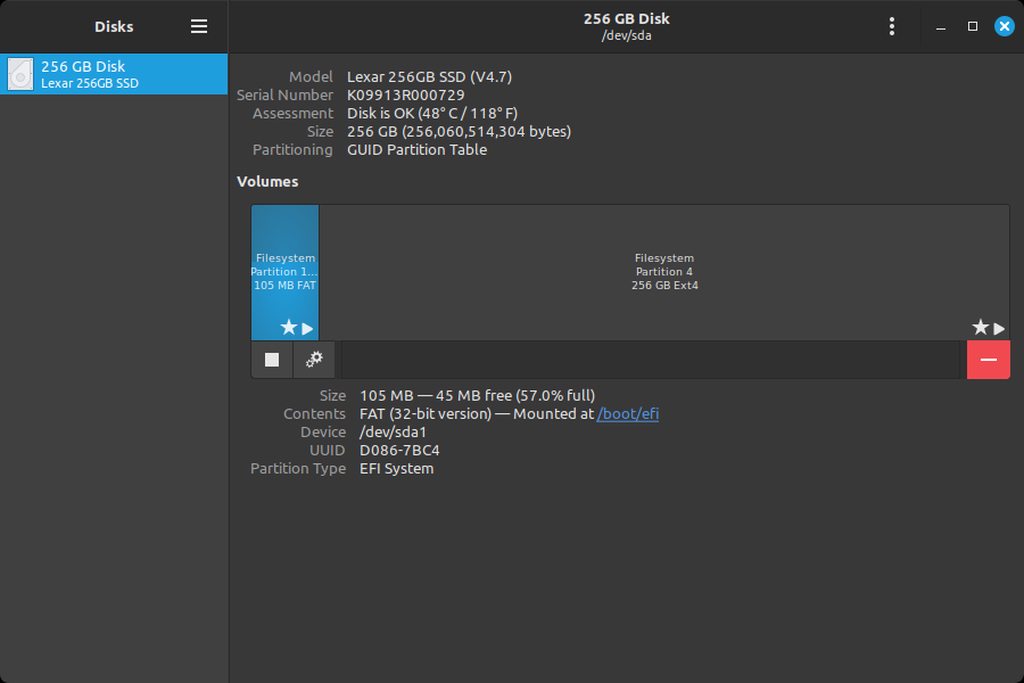
ok open up the Disks application. select the drive with Mint.
if you're on Discord there, in the installed environment, use alt-shift-prnt to do windowed screenshots and share here.
visual lagoon
trail granite
deleted all the partitions related to windows and tried to remove windwos boot m...
.
trail granite
give me a sec
i have to upload through imgur because my upload will just fail if i try to do it through discord
visual lagoon
try again on here
in main newbs aren't allowed to put pics
simply drag the picture onto this message
trail granite
yeah the upload is stuck at processing
visual lagoon
did u do it like I said with keyboard?
that results in a small file, unlike many cameras these days
trail granite
visual lagoon
did u do it like I said with keyboard?
yes
visual lagoon
alright .. if it's still stuck, use imgur
 eternal patio
trail granite
https://imgur.com/a/BIBX9An
eternal patio
trail granite
https://imgur.com/a/BIBX9An
Mint or windows drive??
trail granite
eternal patio
Mint or windows drive??
mint
eternal patio
trail granite
mint
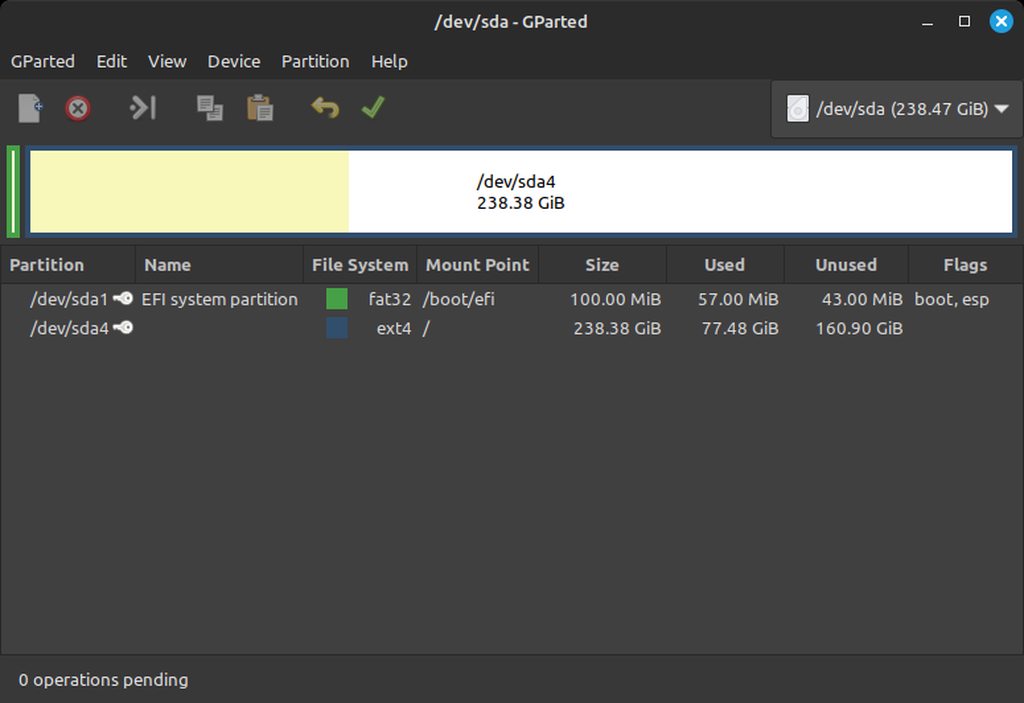
Open gparted for me
visual lagoon
well the layout is tidy n simple. that's good
trail granite
dont have it give me a sec
eternal patio
visual lagoon
well the layout is tidy n simple. that's good
Yes but his “windows drive” is missing so I’m confused
visual lagoon
eternal patio
Yes but his “windows drive” is missing so I’m confused
he deleted the partition, and likely stretched the linux one overtop
trail granite
 visual lagoon
it all boots, except can't set the boot priority, and Win Boot Mgr. insists on sticking around, and being first
eternal patio
visual lagoon
he deleted the partition, and likely stretched the linux one overtop
Oh then it’s no longer dual boot the issue is solved I think
trail granite
visual lagoon
he deleted the partition, and likely stretched the linux one overtop
exactly
visual lagoon
I'm gonna see if that tutorial can work if we go step by step
eternal patio
trail granite
exactly
Ok now I know what to help with
trail granite
sry if the tags are misleading i didnt really know what to put there
eternal patio
trail granite
https://imgur.com/a/084xNV1
In that drop down is the sda 256 gb drive the only drive?
trail granite
eternal patio
In that drop down is the sda 256 gb drive the only drive?
yeah its a laptop
eternal patio
trail granite
yeah its a laptop
Hmm
I’m thinking
Ig if the extra 5 or so gb for boot loader isn’t an issue storage wise the easiest solution is to just set default boot in bios
My idea, but stunner is good at this stuff
visual lagoon
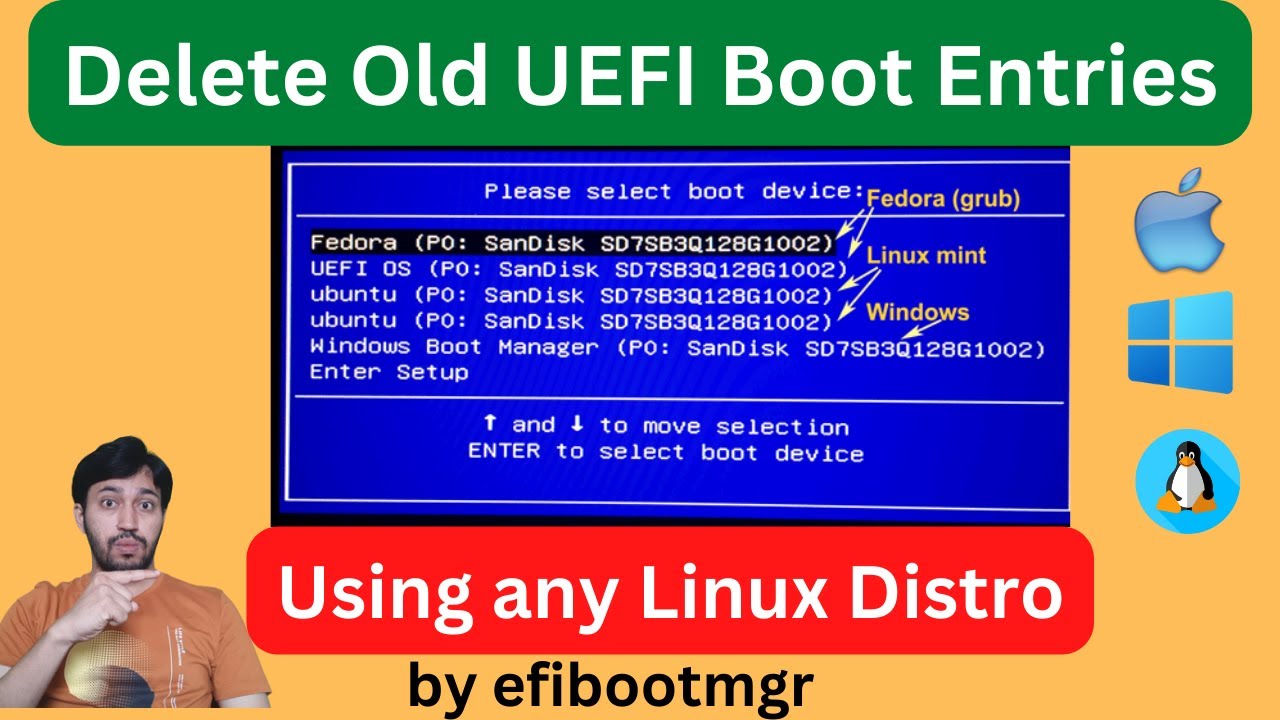
Here I have shown how to delete old or obsolete UEFI Boot entries in the BIOS that are not useful or active. The are boot entries of previously installed OSs. I have used the app called efibootmgr. It is a free command line tool to change UEFI BIOS configurations.
Also using this package you can create/add boot entries, change boot order or chan...
I'm right at the timestamp here.
trail granite
yeah i watched that
eternal patio
I mean… my laptop literally has a drive that idles at 96c
trail granite
 eternal patio
I’m not that good at this stuff
visual lagoon
trail granite
https://imgur.com/a/IygPWMj
ty. one moment as i study it
eternal patio
eternal patio
I mean… my laptop literally has a drive that idles at 96c
Btw I never fixed this @visual lagoon
trail granite
eternal patio
I mean… my laptop literally has a drive that idles at 96c
i can get burns from around my usb port if i leave a flash dirve in for too long
visual lagoon
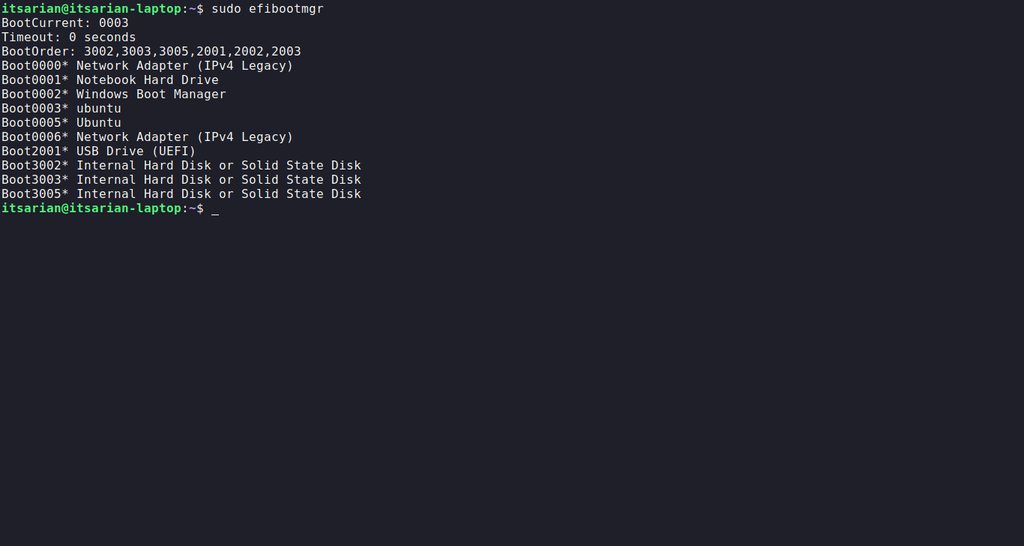
ok @trail granite You see the results.. very top shows booted from 0003 (ur current install)
let me forward the video a bit
eternal patio
visual lagoon
ok <@813072593308352552> You see the results.. very top shows booted from 0003 ...
It’s trying to boot 0002 (windows) <- nuke this one
I’m trying
trail granite
eternal patio
It’s trying to boot 0002 (windows) <- nuke this one
tried to nuke it but it coems back after restart
eternal patio
sudo apt purge windows jkjk
visual lagoon
ok so the command to put is as follows:
sudo efibootmgr -b 2 -B
since windows is the list number 0002
trail granite
done
visual lagoon
do that @trail granite
eternal patio
visual lagoon
`sudo efibootmgr -b 2 -B`
What do -b & -B do
visual lagoon
ok.. next we'll see to do with the ORDER
visual lagoon
eternal patio
What do -b & -B do
one selects, one deletes
eternal patio
visual lagoon
one selects, one deletes
Oh
He got that recursive windows boot man or sumn
It just has more
visual lagoon
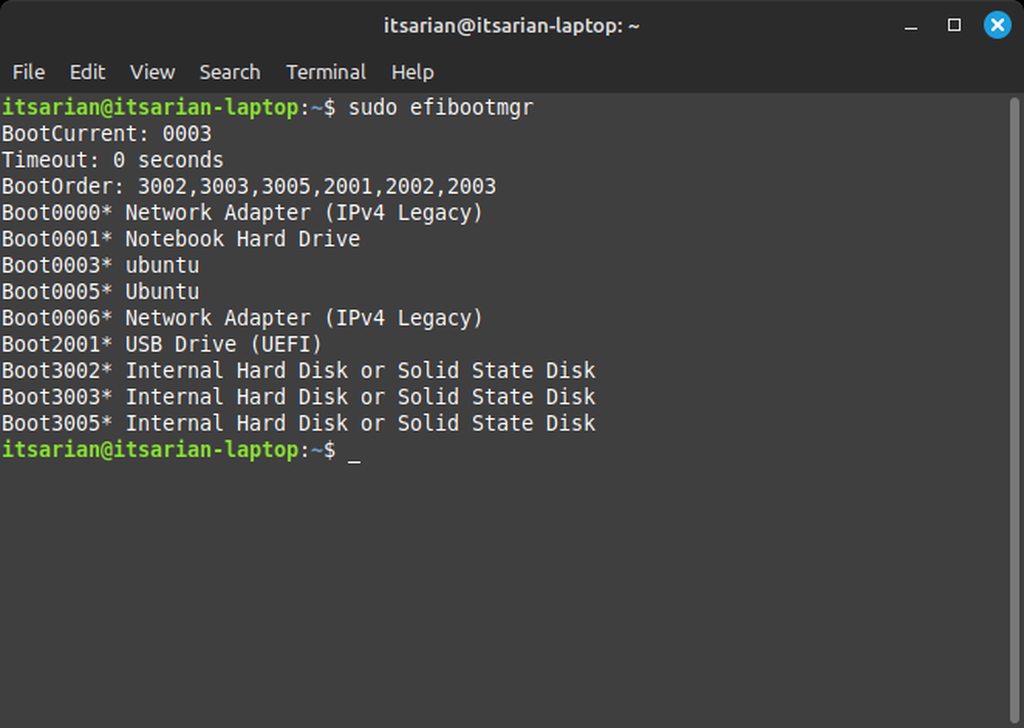
ok just to confirm @trail granite press the up arrow, the last command will come up.. then delete the flags, just so as to run efibootmgr command again.. and that will let u verify that the entry is gone
then show a pic
i wanna see what numbers lie where
trail granite
 visual lagoon
ty
eternal patio
I also am curious what the new order is after windows got nuked
trail granite
visual lagoon
ty
this is with csm enabled btw
visual lagoon
i can tell
eternal patio
I think Ubuntu boot loader is gonna be first boot after a usb stick if one inserted
visual lagoon
now just have to change the boot order
cuz i suspect the legacy ones will TRY and go, then u'll get messed again
eternal patio
eternal patio
I think Ubuntu boot loader is gonna be first boot after a usb stick if one inser...
Idk tho I just guessed
eternal patio
visual lagoon
cuz i suspect the legacy ones will *TRY* and go, then u'll get messed again
Also slows your speed
visual lagoon
yeah the one that's labelled 0003 is the current running session, THAT ubuntu one must be put to the very first.
visual lagoon
@trail granite type efibootmgr -h to get a help printout and see if a command flag there shows how to sort the ORDER
trail granite
its --bootorder i think
eternal patio
visual lagoon
<@813072593308352552> type `efibootmgr -h` to get a help printout and see if a ...
That command is goofy I expected a readout to be -v for verbose
trail granite
-o | --bootorder XXXX,YYYY,ZZZZ,... explicitly set BootOrder (hex)
visual lagoon
ahh ok.. then set that up.. use all 4 digits. follow the convention if it uses commas, then u use commas... if it's just spaces, just put spaces.. bottom line: 0003 must be first
ok so sudo efibootmgr -o 0003, xxxx, xxxx, xxxx
sorry no spaces after commas!!
trail granite
what do i put for the other ones
visual lagoon
let me check pic
eternal patio
I’d reccomend usb stick as 2nd one in case you end up bricking your bootloader
trail granite
eternal patio
I’d reccomend usb stick as 2nd one in case you end up bricking your bootloader
i mean i can always boot from usb from the boot menu
eternal patio
trail granite
i mean i can always boot from usb from the boot menu
True
visual lagoon
then 0001 for notbook HDD
trail granite
okay
trail granite
itsarian@trail granite-laptop:~$ sudo efibootmgr -o 0003,2001,0001,3002
visual lagoon
that's it
after it completes, just arrow up, and just run command again without any flags, to view the updated order
trail granite
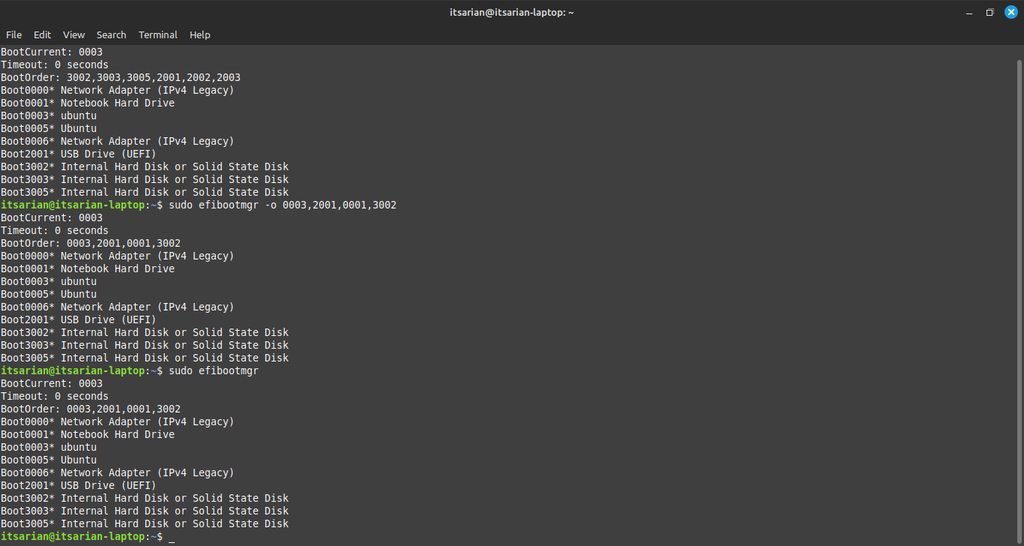 visual lagoon
ok, safely eject your USB drive now
then sudo reboot in terminal, or do it from the start menu
trail granite
i dont have any usb devices connected
trail granite
booted into windows boot manager again
trail granite
same thing
eternal patio
trail granite
booted into windows boot manager again
Ew
trail granite
eternal patio
Ew
disgoosting
trail granite
im in the desktop
visual lagoon
ok open nemo
trail granite
done
trail granite
done
visual lagoon
it mounted right?
trail granite
yeah
visual lagoon
wat it say in info for "mounted at"?
trail granite
it says /media/mint/D086-7BC4
visual lagoon
ok in nemo, right click space
then open as root
then enter for password
if any asked
trail granite
didnt ask
visual lagoon
then go to that exact location
trail granite
mhm
trail granite
i have 2 folders: efi and boot
visual lagoon
check in each
trail granite
microsoft foldeer is in efi
visual lagoon
delete any MS ones
trail granite
i have an hp one too
visual lagoon
see in BIOS folder
visual lagoon
ok. just back out a few.. check thoroughly if any other MS ones.. if not.. just reboot.
trail granite
cant i just search for microsoft
visual lagoon
it should skip the usb drive automaticlly, and boot the ubuntu thing and start mint
visual lagoon
trail granite
cant i just search for microsoft
sure. go to top level folder and try (ctrl-F)
from /media/mint/D086-7BC4
trail granite
nope nothing
visual lagoon
i think we're good.. have another quick look thru the first two subfolders urself
then try a reboot
trail granite
visual lagoon
it should skip the usb drive automaticlly, and boot the ubuntu thing and start m...
IT DID
visual lagoon
worked?
trail granite
yeah
visual lagoon
alright good. there u go then
trail granite
tysm man
eternal patio
visual lagoon
from /media/mint/D086-7BC4
I added very biased information
visual lagoon
if u ever need to boot USB, just remember the boot-menu key to bring up temp boot devices up
visual lagoon
eternal patio
I added very biased information
🙂
trail granite
this has been bugging me since i installed mint
eternal patio
visual lagoon
🙂
Shit oops sry for reply
visual lagoon
pity the darn bootmanger thing in terminal didn't cleanse it.. hopefully it remembered the order at least.. and now u know how to check, @trail granite
trail granite
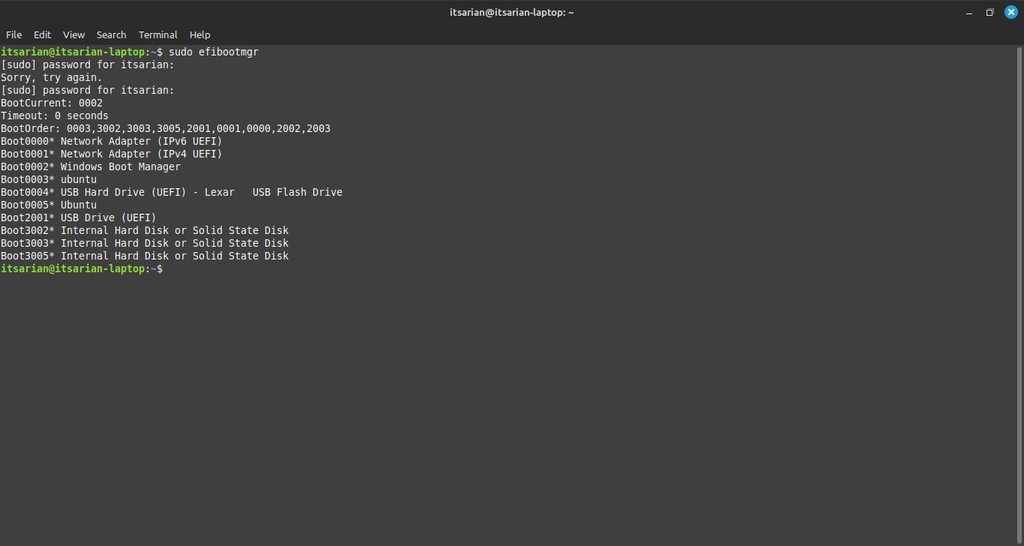
windows is still in the grub manager
eternal patio
trail granite
this has been bugging me since i installed mint
I can vouch, stunner goated like that
visual lagoon
trail granite
windows is still in the grub manager
the grub thing should autohide from now on.. if not.. run boot repair from the live usb... do SUMMARY, then read the summary what its recommended automatic course of action is.. and likely do it after.
trail granite
 trail granite
visual lagoon
pity the darn bootmanger thing in terminal didn't cleanse it.. hopefully it reme...
trail granite
visual lagoon
pity the darn bootmanger thing in terminal didn't cleanse it.. hopefully it reme...
it didnt lel
visual lagoon
trail granite
https://imgur.com/a/lLooB41
yeah at least the bugger's gone
just need to os-prob and update grub now.. pretty sure Boot repair will do that for u, without resorting to doing CLI commands
make sure ur able to boot up the UEFI USB.
trail granite
alright
trail granite
visual lagoon
if u ever need to boot USB, just remember the boot-menu key to bring up temp boo...
yeah os boot manager is gone
visual lagoon
pretty sure the boot repair will autohide menu in its summary.. if not, it should at least rewrite the stuff
trail granite
my lap is being melted
visual lagoon
take a break idk
trail granite
visual lagoon
the grub thing should autohide from now on.. if not.. run boot repair from the l...
create a bootinfo summary ?
visual lagoon
yupp
trail granite
reinstall grub of sda4
additianal repair: unhide-bootmenu-10s use-standard-efi-file restore-efi backups
yep its gone
visual lagoon
just check with lsblk that sda4 is your linux partition or the fat2 one
or with DISKS
trail granite
visual lagoon
just check with `lsblk` that sda4 is your linux partition or the fat2 one
its my linux parrition i already know
visual lagoon
yeah u can prob go into advance repair settings, and dial the timer down to a couple seconds if u want.
I think.
then do the repair.
trail granite
isnt grub supposesd to show up only if i hold shift?
trail granite
visual lagoon
then do the repair.
already did
visual lagoon
yeah but this was a dual boot earlier.. idk see now how it goes.
trail granite
whats the reason behind 2 ubuntus being in the boot menu?
visual lagoon
im gonna wild guess one is legacy-compliant, the other is uefi.. i noticed different capitalization used
visual lagoon
in case u wanna put the timer lower, or hide it.. change where it says 'menu' to hidden
trail granite
think im done with this ticket
visual lagoon
ok mark it solved plz
trail granite
byebye