#kap140 16x2
1 messages · Page 1 of 1 (latest)
 amber snow
 teal junco
Post a screenshot of your output config so we can see what you tried to do


 teal junco
Post a screenshot of how you configured the display in the modules dialog. Use WIN+SHIFT+S to take the screenshot then paste it in discord, so we can read it. Cellphone photos are tough to read
 amber snow
Neil I created a new output config and now is working.. doing fine tunning, I can change HDG /ROL in same fields doing comparassion but no NAV and switch between those 3 ( first 3 fields first line) any help i will appreciated.
 sleek swan

In this tutorial you will learn how to configure a transponder with MSFS 2020 using a minimum number of devices, and we use them with MobiFlight.
The tutorial explains some cool tips and tricks for your next project:
00:00 Introduction
01:15 Tutorial Overview
02:27 Transponder Operations
07:26 LCD Screen Configuration
12:38 Transponder Mode
17:...
this might be helpful - the user interface has changed a bit since this video (many of the things are now grouped under "Modify" tab in the output configuration window)
but the concepts are the same
So "Compare" is under "Modify" -> Add modifier -> Compare
but the transponder is a bit similar logic and it might give you ideas how it could be done
amber snow
Thanks Tuomas still compare is hard to get it for me.. ill digging and see if i can work it out.
😉
sleek swan
you can also do Compare with Transform by doing if($=1,'one','not one')
 dark pelican
amber snow
Thanks Tuomas still compare is hard to get it for me.. ill digging and see if i...
dark pelican
amber snow
Thanks Tuomas still compare is hard to get it for me.. ill digging and see if i...
Question, can you get any fixed text in the LCD screen form to display on the second line or nothing at all?
What are the values of @@ and ?? In the display field. Do you see those values in their respective output configs on the Output column?
amber snow
I did a new output config and now is working.

I set @@@ as NAV and AAAA, V/S Ft values. I know is not the proper way.
amber snow
sleek swan
you can also do Compare with Transform by doing `if($=1,'one','not one')`
but how can loop between those 3 different values HDG/ROL/NAV and avoid to see "NAV in second line. can i set , 'or" ? in if($=1,'one','not one')?
sleek swan
you can chain modifiers
if 0, do this, else $
if 1, do that, else $
if 3, do yet another thing, else $
just need to see that the checks are specific enough
so that two lines dont match
amber snow
ok nice homework.. thanks Tuomas.. soon get home I lltry and see if can do it..
amber snow
sleek swan
if 0, do this, else $
if 1, do that, else $
if 3, do yet another thing, else $
sorry Tuomas, not luck.. I doing by feel not by knowledge and I can not deduct from video and apply to my kap1`40. Thant loop is only with baro display to finish it. and is driving me crazy.
if i see maybe i can n fix the idea..
sleek swan
ok so what are you trying to do exactly?
you have an output config with autopilot states as numbers?
amber snow
i need to loop hdg/rol/nav in my display
sleek swan
ok do you have your autopilot state somewhere?
like values you are trying to change to the text labels?
amber snow
value of alt and vs works not issues , with my encoder
sleek swan
you mean the numbers work?
amber snow
yes
sleek swan
but not the "APR / HDG / ROL" etc?
how do you have your autopilot state read?
and, is this msfs2020 or 2024 or xplane?
amber snow
if you see the KAP-140 the 3 first field of 16 in first line. are ussed by HDG/ROL/NAV. ai can switch with compare hdg/rol just 2 not 3
msfs2020
i want to add NAV when nav is activated..
i set form example in HDG

i would like to add NAV
amber snow
mlet me get pic
sleek swan
and then you need to have one "combined" output config
amber snow
 sleek swan
that brings all of those different modes as config reference
yes
so one of those is 1 at a time I guess
amber snow
ok in this case i create KAP display
sleek swan
ROL / NAV / APR / HDG
and then ALT and VS etc are separate thing in the KAP I think
so lets do the steering modes (rol/nav/apr etc)
amber snow
ok lets try
sleek swan
you make "steering modes" output config
you dont have any simvar for this, we construct this ourselves
amber snow
k
sleek swan
add each AP mode as config reference
amber snow
ok i will add this vocabularyu..
sleek swan
HDG / ROL / NAV I guess?
amber snow
okne for each tewx field
sleek swan
I mean, I am not sure if this is exactly accurate name but I mean, "turn left or right" autopilot modes
 sleek swan
yeah for example
amber snow
k
amber snow
yes..
sleek swan
but bring those three in as config references
amber snow
ok..
sleek swan
gimme a sec to recreate similar here
sleek swan
yeah
need to have those be simvars that they turn 1 or 0 based on autopilot state
let me also load the 172 with KAP140
 sleek swan
use NAV1 LOCK
seems to wrok
but it also shows when in ARM state
but lets not worry about that now
sleek swan
HDG works for me, ROL works (WING LEVELER)
sleek swan
now add all those as config reference to the "steering mode" output config
sleek swan
yea now it gets a bit tricky,
because some of those symbols are problematic
our code is:
if(?=1, 'HDG', $)
for first Transform
amber snow
let me copy that
sleek swan
now the symbols cannot be any syntax characters in the transform code
and by default one of the symbols is !
and != means "not equal" so it wont work
so lets do this
amber snow
nicee..
sleek swan
ok duh, maybe it now works
amber snow
giv 5. my wif called uff
sleek swan
yeah no worries
still trying to figure why it doesnt work here 😄
I am rusty
hm, I gotta dig into this tomorrow
for some reason my formulas fail
what I am trying to do is to chain the if() formulas to check one reference after another if it is 1 and set the value to 'NAV', 'ROL' or 'HDG' accordingly
but I need to look into this tomorrow as it fails somehow with syntax error and I think there is a conflict with the character used as reference and the code syntax but I cannot figure out why
so I will look at it tomorrow
I will paste my idea here
maybe someone can spot the error
but remember this is NOT WORKING as it is now
so this has a brainfart somewhere
 amber snow
haha no problem take your time.. she called for dinner... but THANKS A LOT for you help Tuomas... ima stuck and a few stuff in my cockpit this is one of them.. sned a pic after
sleek swan
but this is the idea
yeah, lets dig into this and we'll sort this out
have a good dinner, I will get sleep 🙂
amber snow
you set XYZ up there right? to avoid ussing symbols
sleek swan
I need to see this wtih fresh eyes, and someone else might also spot the issue
amber snow
jaime will take a pic for sure.
amber snow
not many.. and if one but 3 years old
post 3 yeras old
year
she called againj lol.. beetr go upther if not ill sleep with -15 now..
haha thanks]
😄
sleek swan
the weird part is it works with the test toolbar
amber snow
In 3 hours ill try...
 cyan sable
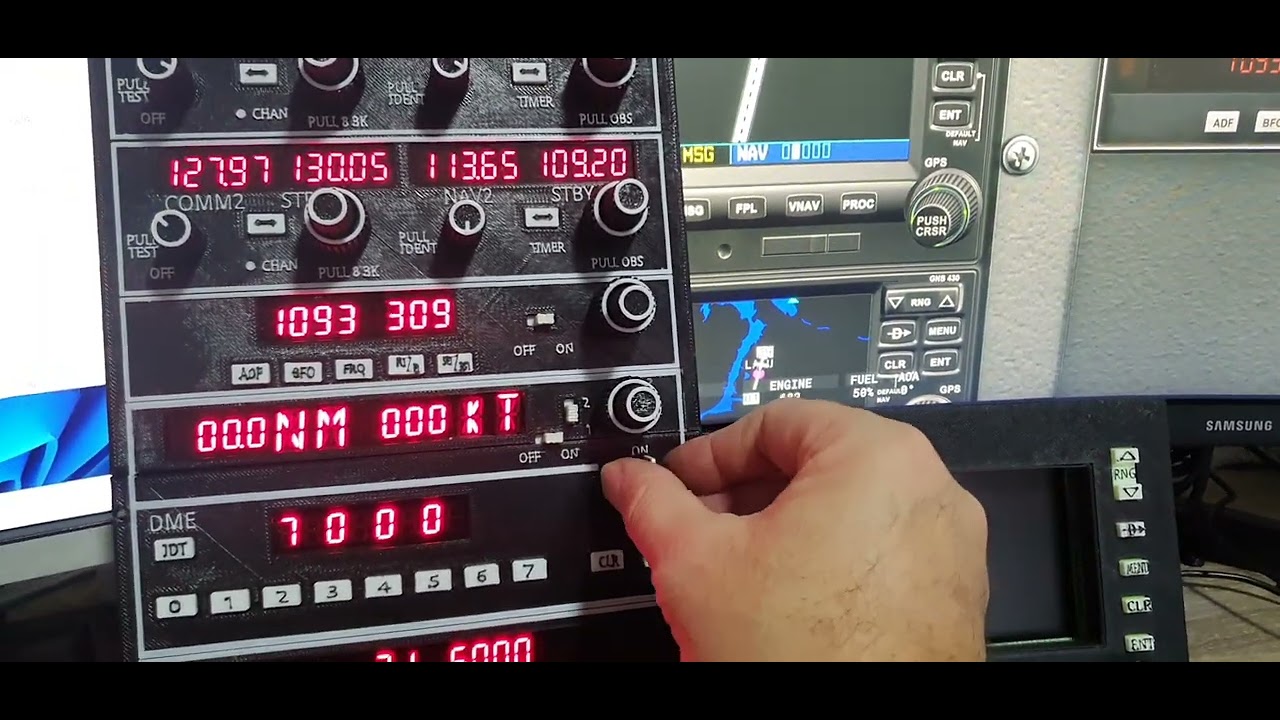
All working as expected
This is how I have conigured mine.
And the transponder
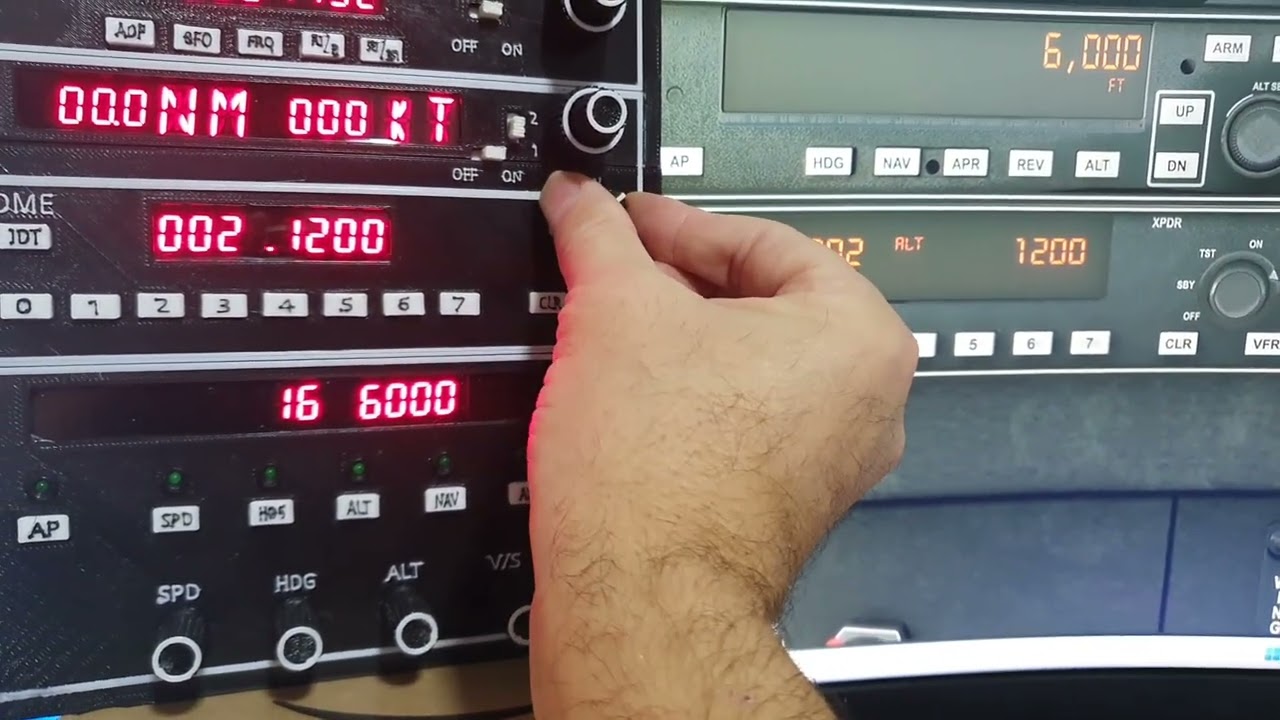
A little update on the transponder mobiflight configuration.
 dark pelican
It is because the value passed is a string. Remember these are not variables, just placeholders.
Mobiflight simply replaces the $ with whatever the value is. If it is a string, it requires the single quotes
Don't ask how I know all this. Lol
Actually, our friend @chrome smelt taught me this.
sleek swan
oh right since you have chained several of those
one works without
@cyan sable thanks!
amber snow
hi Tuomas hi Jaime.. just wondering wich "simbols" I have to set in my display , X?Y? or Z? in my steering mode? or is irrelevant? i I will try now..
ok first test. display show "1" if i set HDG or "0" if ROL is applied.. NAV do not show at all.. just to let it know, just edit in my steering, and set XXX first 3 field, first line..