Hi there.
I searched and read ... and found nothing.
There are some guys having a MCDU but noone tells how to wire and to connect it to an Arduino Mega without (!) a manufactured PCB.
I found a brilliant and free STL-Set to print and want to build it on my own from scratch.
Beside the fact that soldering / wiring 78 buttons could be a nightmare, i don't know how to connect them to Mobilflight on a Mega.
I assume to use two Mulitplexer Boards (more is not possible as far as i know) with which i can address 64 buttons and to connect the remaining 14 buttons directly to the Mega, right?
Any hints are welcome!
#MCDU wiring
1 messages · Page 1 of 1 (latest)
 carmine imp
 desert mauve
carmine imp
Hi there.
I searched and read ... and found nothing.
There are some guys having ...
desert mauve
carmine imp
Hi there.
I searched and read ... and found nothing.
There are some guys having ...
Karl of 737DIYSim has this wired up. Please see here for reference. https://youtu.be/e7K3BXWmipk?si=uUdF9yREOHEtNmSx
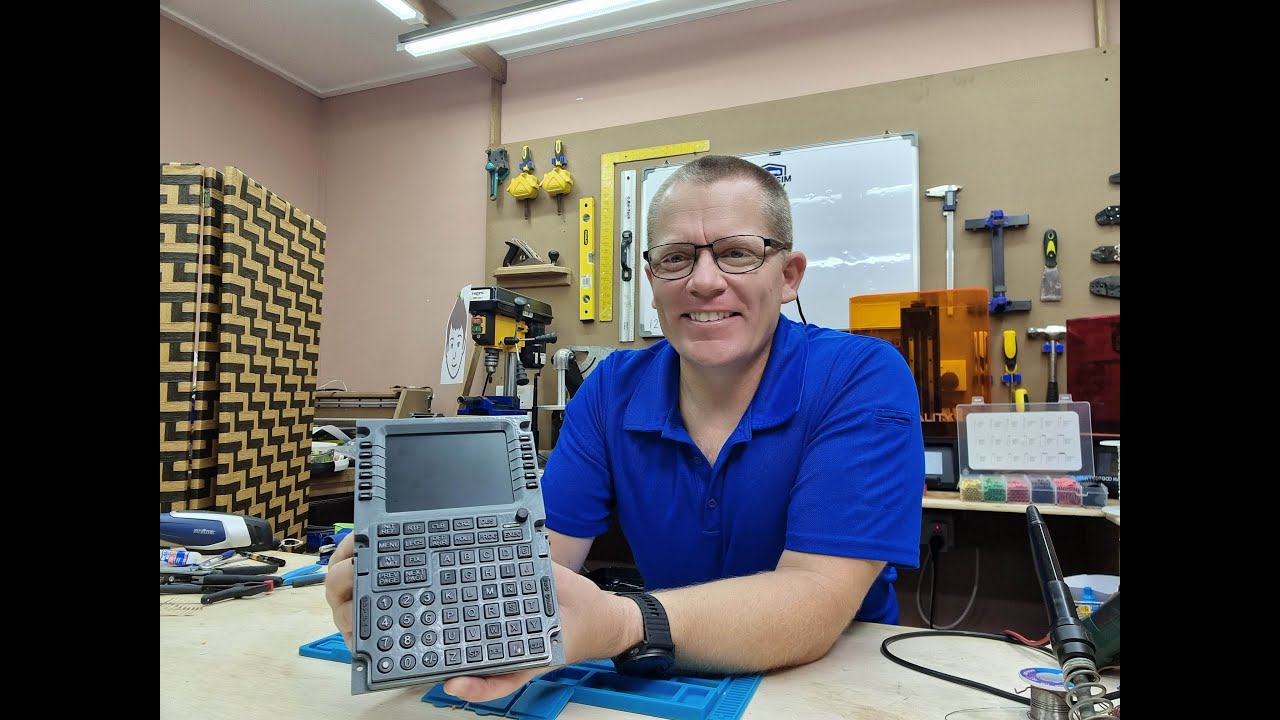
Hello All,
This turned out to be a phenomenal build and I could not be happier with the results. The amount of R&D in this one item is literally insane.
This video has taken a serious amount of time to create and is extremely long and boring unless you are building this unit. I appreciate there is too much in-depth footage, but this is a bui...
 desert needle
I'll be honest, I would wait a little bit and order the WinWing FCU: https://x.com/WINWING_SIM/status/1872386907742867672.
And this is coming from someone who hand built two full custom MCDUs for the CJ4, including a custom PCB. If that product had existed when I did my project I just would haev bought two of them.
WINWING Launches the MIP Series Airline Panels — MCDU and Panel of Flight Plan (PFP 3N, PFP 7, PFP 4).
- Full-Scale Structure for Maximum Authenticity
- 28.5mm Panel Thickness
- Fully Backlit with Adjustment across Multiple Panels and Game Sync Support
- Realistic Light Sensors

 Twitter
·
Twitter
·
 somber stag
carmine imp
Hi there.
I searched and read ... and found nothing.
There are some guys having ...
somber stag
carmine imp
Hi there.
I searched and read ... and found nothing.
There are some guys having ...
Agree with @desert needle The Winwing MCDU looks like a very good alternative to building one.
If you still want to build, then you can daisy chain up to 6 16-bit multiplexers. I think 4 is enough for an MCDU.
Yes, hand wiring 69 buttons and leds will be a nightmare.
But not impossible.
 sick folio
soldering to pcb this amount of buttons also isn't fun. 🤣
 kindred ember
The winwing mcdu does have the unknown part of how the display is done. Looking at the talk about "no gpu performance impact" and "no hdmi cables" it might indicate they are doing some stuff in their own app to extract the display contents of the FMC from the sim.
And while this might be a solution for some cases, it would not mean an open solution, allowing for community profiles for the unit, if it requires a) using the non-open simapp pro with admin rights on your PC and b) would likely need winwing to explicitly support every aircraft type and add-on.
"The initial release will be compatible with Fenix and PMDG."
carmine imp
Sounds interesting, but i will have a deeper look into it.
At least, when i see the price for the FCU (below 100€) it could be an alternative.
In the meantime i plan further design to make it on my own. Worst case "for nothing".
But @somber stag, as far as i know Mobiflight only supports 4 Muxer. Therefore: 64 buttons on MX, the remaining on dedicated ports of a Mega.
And yes, soldering will be a nightmare.....
somber stag
here is a clip from the mega board json file

multiplexers are limited to 6
for a mega board
the limit was increased from 4 to 6 over a year ago.
carmine imp
Ups ... i think i missed this information.
When i'm right, each Multiplexer-Board from Mobiflight can hold 2 Muxer and need (beside Channel 1-4) 2 data-pins. Every additional board connects daisy-chain-like the the channels and needs also two data-pins.
And as now 6 Muxer are possible, 3 Multiplexer-Boards are possible.
Right?
somber stag
Not quite.
Up to 6 muxes share the four address lines wired in parallel. Each mux requires additionally one data pin.
So 6 muxes consume 4+6 = 10 total pins.
Mux = abbreviation for multiplexer.
carmine imp
somber stag
Not quite.
That's exactly what i meant. But thanks, now it's a little clearer to me.
Anyhow, i need 72 buttons, so it could make more sense to utilize two Mux-Boards and wire the remaining 8 directly to the Mega. A third board (or fifth Mux) would be like shooting sparrows with cannonballs.
desert needle
A third board (or fifth Mux) would be like shooting sparrows with cannonballs.
You have accurately described cockpit building. Just throw another board at it 😆