#Completely in over my head.
68 messages · Page 1 of 1 (latest)
 unreal citrus
 viral notchBOT
unreal citrus
I can't seem to get my quad to arm. (RX_Failsafe MSP) I am getting the followin...
viral notchBOT
unreal citrus
I can't seem to get my quad to arm. (RX_Failsafe MSP) I am getting the followin...
✨AI-Generated response✨
Make sure you have the arm switch on AUX1 and that it's set to ~2000us when armed. The receiver and transmitter must also be bound/communicating. Check out modes and model configuration for more guidance.
-# {'cause': 'thread creation'}
 tidal basin
- update to betaflight 4.5.2
- you do not have your ports tab configured.. i.e. no uarts are set to Serial RX (the uart where the receiver is)
- overall, this config is wacky, at best.
@unreal citrus is this a self-built drone or it's a fully-built drone when you got it?

 tidal basin
unreal citrus
Receiver and FC wirinf
tidal basin
unreal citrus
Receiver and FC wirinf
so you should have Serial RX enabled on UART 2 in ports Tab..
unless of course the receiver has solid LED light when the TX is OFF
unreal citrus
Fast blinking LED on the receiver with the FC pluged into Betaflight and Battery pluged into the ESC. No TX.
tidal basin
unreal citrus
Fast blinking LED on the receiver with the FC pluged into Betaflight and Battery...
fast blinking means it's in wifi mode..
turn off drone, unplug usb, unplug lipo
power up tx, power up receiver/drone
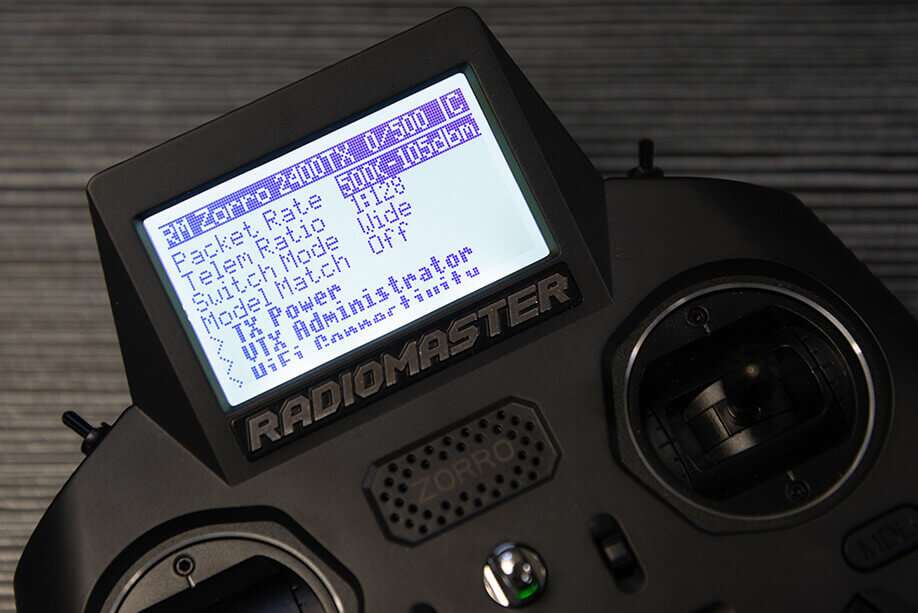
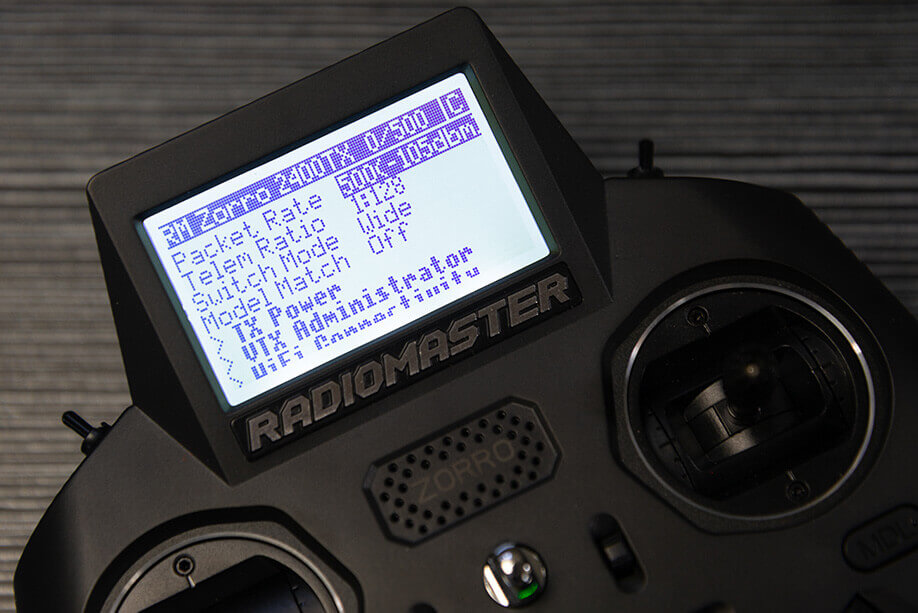
then load the expressLRS Lua Script and post a photo/screenshot of that screen.. a C should be present in the top right corner, if the tx and rx are talking
like in this example here:
https://www.expresslrs.org/assets/images/tx-internalLuaCheck.jpg
 unreal citrus
Yes, have a C in the upper right corner
 tidal basin
unreal citrus
Yes, have a C in the upper right corner
tidal basin
unreal citrus
Yes, have a C in the upper right corner
have you configured your ports tab yet per my recommendations above?
unreal citrus
Yes, Just the RX.
tidal basin
unreal citrus
Yes, Just the RX.
and are you getting channel movements in the receiver tab now?
unreal citrus
Yes, but the image shown my quad doing barrel rolls.
tidal basin
unreal citrus
Yes, but the image shown my quad doing barrel rolls.
then make sure that the Channel Map setting matches the order of the channels in your radio's Model Menu, Mixes page
e.g. if your mixes page has the order
Aileron
Elevator
Throttle
Rudder
then your Channel Map(in Receiver tab) should be set with AETR1234
unreal citrus
Yea, Throttle is on the aileron stick.
tidal basin
on your radio, go into the Model Menu, Mixes Page.
use the order of the channel there and match it with your Channel Map Setting in betaflight's receiver tab
you can simply type the channel order in the Channel Map setting
tidal basin
unreal citrus
Still shows Arming flag, MSP on the set up page.
MSP is because you are connected to betaflight configurator/usb
that is normal
should disappear once you disconnect from usb
unless there's other flags, then you should be able to arm
unreal citrus
Awesome, What stick goes where to arm?
tidal basin
unreal citrus
Awesome, What stick goes where to arm?
uh.. nope.. you have to configure an aux channel for arming, in the modes tab

What's the Bench Test? How to set Aux1 for Arming? RSSI dBm and Link Quality on the OSD? Setting up ExpressLRS Telemetry? You're in the right place!
unless of course you haven't configured any other switches in the radio.. which of course you have to configure too..
https://www.expresslrs.org/quick-start/transmitters/tx-prep/#switches-and-aux-channels
unreal citrus
Oh ok. I haven't configured anything. I gotta run. So this will be this afternoons project. THANK YOU for all the help. I was ready to give up. Be back later today.
unreal citrus
Progress, I can see the Arm/Disarm switch working in the mode tab. Managed to get the motors to spin manually in the motor test mode. Still can not get them to spin using the TX.
 midnight juniper
Did you run through that first flight guide and setup all your other correct swtiches and stuff as per deadbyte suggestion first?
unreal citrus
Yes, I set the arming switch to AUX 1. The rest was about telemetry and FPV. I'm not using this as an FPV ship and not concerned about the RSSI strength.
unreal citrus
OK, I give up. It shoulden't be this difficult. BetaFlight and the ELRS system just refuse to play nicely together. I was hoping a new system that wasn't 10+ years old would make life easier. WRONG..... Starting to think it was a waste of money.
 tall forum
Betaflight and ELRS work great together. What is the problem?
unreal citrus
tall forum
Betaflight and ELRS work great together. What is the problem?
The motors start when armed/disarmed. They spool up with the TX (WooHoo) But then they don't stop when the throttle goes back to zero. When they do slow down, they are not all at the same RPM. (some at 10% some at 45-60%) They do respond to stick inputs, Yaw, roll and pith. It's like they have a mind of there own. Every time I try and do a firmware update, it says unable to open the port.
 severe epoch
unreal citrus
The motors start when armed/disarmed. They spool up with the TX (WooHoo) But the...
severe epoch
unreal citrus
The motors start when armed/disarmed. They spool up with the TX (WooHoo) But the...
As you've noted, communications between your radio and the FC are working fine, so there are no problems with ELRS
It does have a 'mind of its own', its called the PID loop(s). All you're seeing is I term windup, which is expected
So there is nothing wrong based on your description
Other than perhaps the firmware update, what are you trying to update?
unreal citrus
severe epoch
It does have a 'mind of its own', its called the PID loop(s). All you're seeing ...
It was sugested that I update to betaflight 4.5.2.
unreal citrus
Motors spinning when they are not supposed to and not spinning when they should. Motors are not reaching full RPM's at full stick movement, BUT when the throttle is returned to idle, the motors stay around 30-40% of the last motor run. Tried calibrating the ESC with the motors tab, no change. The only flying this thing is going to see is when I throw it across the shop into a trash can. Very frustrating.
tall forum
unreal citrus
The motors start when armed/disarmed. They spool up with the TX (WooHoo) But the...
Everything you have described here is normal. What is the problem?
unreal citrus
tall forum
Everything you have described here is normal. What is the problem?
So when I arm this thing, it is supposed to take off and fly on it's own with the throttle at idle? How am I supposed to get it down if the motors keep running when I pull the throttle back? Throw rocks at it? I'm sorry, but this doesn't seem normal to me.
tall forum
unreal citrus
So when I arm this thing, it is supposed to take off and fly on it's own with th...
Do you have props on?
The motors will spin at arm, yes
unreal citrus
tall forum
Do you have props on?
No, I'm not quite that crazy.
tall forum
unreal citrus
No, I'm not quite that crazy.
Then again, all completely normal
unreal citrus
tall forum
Then again, all completely normal
So if I understand you right. This thing will act differently with the props on compared to sitting on the bench?
tall forum
As @severe epoch said, the motors are controlled by the FC, not the sticks. The PID loop is trying to maintain the commanded rate of rotation or angle. If there are no props, it cannot do that
unreal citrus
OK, I don't get it. But I will take your word for it.
unreal citrus
It has a mind of its own.
midnight juniper
@unreal citrus I think there is more than 1 thing going on here.
- Yes, without props the FC and PID loops cannot compensate accurately so experience bench no props, vs bench (or floor) with props is different.
- Throttle full down, turn on arm - blades. will be spinning, slowely, but spinning. Disarm - full stop. Blade stop.
Stepping through video.> is that Left top far back switch ARM or Throttle HOLD?
and when it reves up and flips over, we cant really ssee sticks.. so what occured at htat point on the transmitter, I make no assumptions , asking.
_ did you move any stick (even a tiny amount)
- flick any switch
OR - is this flip just the drone suiddnely, a few seconds after arm.. doin this rev up and flip.
- if this is the case, nothing was touched -then no its not normal.
 tall forum
If you read here, you are really cool!
Join my Patreon if you want to be even cooler :)
https://www.patreon.com/limon_fpv
00:00 - wtf? lol
00:58 - Short version
01:55 - Step 1 - check props
03:16 - PROPS OFF!
03:45 - FC Alignment
04:51 - 8 years in the hobby
06:48 - Only fans
07:30 - Motor direction is reversed?
08:34 - Motor order
10:01 - Mo...
Also the hardware you are dealing with is ancient
But the flip over is caused by the FC not being configured correctly
midnight juniper
hahah thanks @tall forum never seen that before.. its gold at this video timestamp ! https://youtu.be/H0wFSTdpIWM?t=1164
unreal citrus
midnight juniper
<@960316609912791150> I think there is more than 1 thing going on here.
1. Ye...
Yes, upper left switch is for the arm-disarm. Props spin slowly when armed and stop when disarmed. The throttle was barely touched, and you see what it did.
midnight juniper
unreal citrus
Yes, upper left switch is for the arm-disarm. Props spin slowly when armed and s...
Has to be one of those things then, in the video above or similar, One of those things, step by step, piece by piece and check everthing (better yet, get someone, clujb member, friend to go over it with you .. 2nd pair of eyes and all that) - following video and guides - and then ,, i guess could be a faulty\damaged unit especialy if its hard a hard crash but it looks freaklishly like many of the videos on youtube like the one above about miss-configured drone.
unreal citrus
midnight juniper
Has to be one of those things then, in the video above or similar, One of those ...
No hard crash. Everything is new. Only old parts are the motors and frame.
unreal citrus
I am officially done with Betaflight and open source.
I have been trying for almost 3 weeks to get this quad in the air. No luck. I’m tired of staring at a computer screen for hours on end only to make no progress.
It is very depressing to have a bunch of new parts that are completely useless.
I’m going back to fixed wing flying. Less BS to deal with.
midnight juniper
unreal citrus
I am officially done with Betaflight and open source.
I have been trying for al...
Sorry to hear this, understandable if you dont make progress despite people helping on forums and discord and things, my only other advice was someone in person in your area to assist, but all the best in the future.
 shut horizon
unreal citrus
I am officially done with Betaflight and open source.
I have been trying for al...
shut horizon
unreal citrus
I am officially done with Betaflight and open source.
I have been trying for al...
Learning something needs time, especially if you are doing it on your own and have no good teacher to explain things or show it to you. Please just keep in mind that it is very very likely not Betaflight's (nor open-source in general) fault that your drone is behaving erratically, but that you have not yet grasped how things work. Either further time is needed on your part to learn it or you need access to more expert teacher that can explain it to you better and/or walk the steps of building and configuring the drone better with you.
unreal citrus
New motors are on. This is the best it’s done yet. Now to turn down the sensitivity a bit. (More like a lot)
shut horizon
unreal citrus
New motors are on. This is the best it’s done yet. Now to turn down the sensitiv...
You might also want to find a bigger larger open space for the tests... By watching your video I was afraid to see how the props chop the chair leg...
unreal citrus
shut horizon
You might also want to find a bigger larger open space for the tests... By watch...
Agreed 1000%. It's pouring rain out side right now. I would rather kill something in my shop than the wife's China cabinet. LOL
midnight juniper
True, but your also in a lot of ground effect there, once outside or more open - if your feeeling its ok .. pop it up a bit more.. the sensors will keep overcompensating with the ground effect with that hard congrete floor as well. I realise you trying to save it from a horribly bad crash from height, but it looked good until the sensors started compating the downwash. -and yes the sensitivity