#can't bind pavo 20
136 messages · Page 1 of 1 (latest)
 regal solar
 regal solar
flashing blue LED light instead of green.
are you looking at the correct LED?
 dark nexus
regal solar
> flashing blue LED light instead of green.
are you looking at the correct LED?
dark nexus
regal solar
> flashing blue LED light instead of green.
are you looking at the correct LED?
Maybe I wasn't looking at the correct LED lights when I first plugged in the battery for the WiFi
dark nexus
regal solar
> getting an error message saying memory full.
did you perhaps extracted/unzippe...
I don't think I did. I did build instead of flashing.
regal solar
dark nexus
I don't think I did. I did build instead of flashing.
are you using the latest configurator?
because Build should give you a firmware.bin.gz
dark nexus
I just did the update today. Last week when I was binding the drone I was on the other version before it updated
regal solar
dark nexus
Thanks, I'll check it out
dark nexus
Know it's back to flashing green when I plug the battery in and not showing Expresslrs on the WiFi
regal solar
dark nexus
Know it's back to flashing green when I plug the battery in and not showing Expr...
is it in wifi mode?
dark nexus
I don't think so because it's not showing up on my computer like it did the first time
regal solar
dark nexus
I don't think so because it's not showing up on my computer like it did the firs...
well, it has to be in wifi mode FIRST before it show up in your network list (if it's not set to connect to your wifi router)
does it go in wifi mode or not?
dark nexus
That's what I am trying to figure out 😆
regal solar
dark nexus
That's what I am trying to figure out 😆
reboot the FC.. let it be for a minute.. see if receiver LED would blink very fast which indicates it's in wifi mode
dark nexus
Do reboot the FC in beta flight?
regal solar
dark nexus
Do reboot the FC in beta flight?
unplug lipo, unplug usb, both or whichever you plug in to power it up
dark nexus
It was flashing green because the battery was dead lol 🤣
So know it's back to flashing blue leed light with a solid green light
regal solar
dark nexus
So know it's back to flashing blue leed light with a solid green light
is the radio powered up?
dark nexus
I just turned on the radio
regal solar
turn off radio please
then post a photo of the flight controller, both sides if possible


 regal solar
dark nexus
regal solar
dark nexus
from these photos, can you clearly see the flight controller?
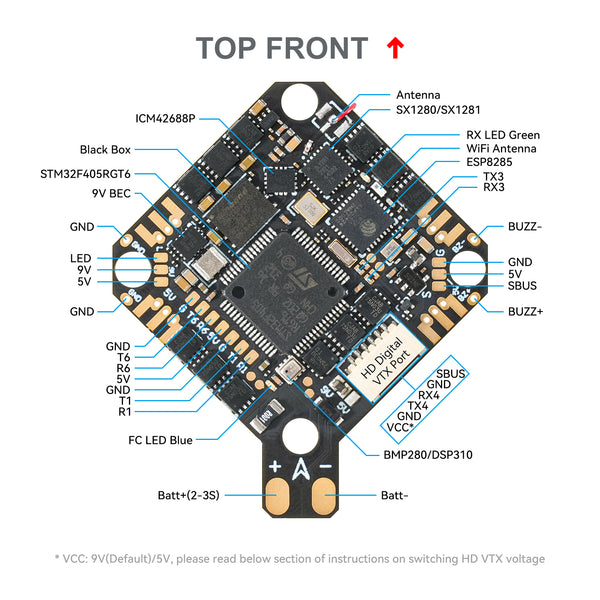
your air unit, do you have its sbus wire connected to the flight controller? if you do, disconnect it
 regal solar
dark nexus
Yeah there is a cable plugged in for the air unit
regal solar
dark nexus
Yeah there is a cable plugged in for the air unit
is the sbus wire from the air unit connected to the flight controller?
have you tested with the air unit unplugged?
dark nexus
No I haven't tested yet with out the air unit
regal solar
dark nexus
No I haven't tested yet with out the air unit
unplug the air unit
test
see if the receiver LED blinks
if the air unit's SBUS wire is still present, !depin it from the harness
 mellow turretBOT

If your device has too many wires in the connector - this most often happens on FC-ESC cables, but also on analog and digital VTXs. DJI especially has an issue on the Air Unit, Vista, and O3 Air unit with the SBUS signal messing up other connections and devices, and you may need to remove it if you're not using the DJI Remote Controller 2.
It m...
dark nexus
regal solar
unplug the air unit
test
see if the receiver LED blinks
if the air unit's SBUS w...
I see thanks I'll try that out

This is the other cable that came with it but it's for beta flight
dark nexus
Got it thanks
Okay so I completely unplugged the air unit and it's still blinking blue lights
regal solar
dark nexus
Okay so I completely unplugged the air unit and it's still blinking blue lights
I'm more interested on the receiver led, which I think is the green LED
dark nexus
regal solar
reflash the receiver via passthrough following this !aio procedure
mellow turretBOT
AIO with Serial ELRS receiver recovery flash instructions:
- Disable Telemetry in Betaflight
- Unplug everything
3a) if there are two boot buttons, hold down the receiver boot button, plug in USB, and click flash in ELRS Configurator
3b) if there is only one boot button, hold it down, plug in USB, open Betaflight, click "Exit DFU mode", close Betaflight, click flash in ELRS Configurator - Re-enable telemetry in Betaflight after successful flash
https://cdn.discordapp.com/attachments/798006228450017290/1238518416181166100/betafpv5A1sAIO.jpg?ex=6640e528&is=663f93a8&hm=2bfe322bcb84c6e83fb65629013384f3708c4ef9ca45bb3c69cfee39716713a6&
https://cdn.discordapp.com/attachments/798006228450017290/1238518416583950467/exitDFU.jpg?ex=6640e529&is=663f93a9&hm=d810384bcf0daceaa83d9336dd62cda17595dcd263075a914773e6f1d0a80e5e&

 dark nexus
regal solar
I'm more interested on the receiver led, which I think is the green LED
dark nexus
regal solar
I'm more interested on the receiver led, which I think is the green LED
Yeah it's gotta be it
regal solar
 dark nexus
thanks ill look into this
 regal solar
dark nexus
Is this why I can't bind it? Other then the removing the two wires?
regal solar
dark nexus
Is this why I can't bind it? Other then the removing the two wires?
these settings are correct.. they aren't the reason..
regal solar
dark nexus
I removed the two wires and still no luck
have you reflashed the receiver yet with the steps I have provided above via the bot?
dark nexus
Yes I tried to reflashed the receiver and no luck
regal solar
dark nexus
Yes I tried to reflashed the receiver and no luck
so where's the log of that attempt?
save the !log into a file and post it here


 regal solar
dark nexus
regal solar
dark nexus
yes
dark nexus
That's weird because I did try to reset it but it didn't work
regal solar
dark nexus
That's weird because I did try to reset it but it didn't work
what didn't work?
were you able to see an EXIT DFU button in yellow in the firmware flasher tab of betaflight configurator?
dark nexus
 dark nexus
Right WiFi but it not showing up on WiFi
mellow turretBOT
AIO with Serial ELRS receiver recovery flash instructions:
- Disable Telemetry in Betaflight
- Unplug everything
3a) if there are two boot buttons, hold down the receiver boot button, plug in USB, and click flash in ELRS Configurator
3b) if there is only one boot button, hold it down, plug in USB, open Betaflight, click "Exit DFU mode", close Betaflight, click flash in ELRS Configurator - Re-enable telemetry in Betaflight after successful flash
https://cdn.discordapp.com/attachments/798006228450017290/1238518416181166100/betafpv5A1sAIO.jpg?ex=6640e528&is=663f93a8&hm=2bfe322bcb84c6e83fb65629013384f3708c4ef9ca45bb3c69cfee39716713a6&
https://cdn.discordapp.com/attachments/798006228450017290/1238518416583950467/exitDFU.jpg?ex=6640e529&is=663f93a9&hm=d810384bcf0daceaa83d9336dd62cda17595dcd263075a914773e6f1d0a80e5e&
dark nexus
 regal solar
unplug usb
press and hold the boot button on the fc
plug into usb
release button
receiver LED, green will be solid.. that's the only LED lighting up on the fc
go into firmware flasher on betaflight configurator
click the exit dfu button
green led still solid, the other leds light up
close betaflight configurator
open expressLRS configurator, select via Passthrough, flash as normal
dark nexus
Do I hold down the boot button and plug in the USB at the same time?
regal solar
dark nexus
Do I hold down the boot button and plug in the USB at the same time?
press and hold the button
plug into usb WHILE the button is still held
release the button AFTER plugging into usb
green led is solid
dark nexus
Okay it's solid green know
It's not letting me click on the firmware flasher and exit dfu mode even though the light is green
regal solar
dark nexus
It's not letting me click on the firmware flasher and exit dfu mode even though ...
is betaflight configurator detecting your FC as DFU bootloader?
(top right corner, near the Connect button)
 regal solar
dark nexus
regal solar
dark nexus
are you on a windows machine?
dark nexus
Yes
regal solar
dark nexus
Yes
what does device manager say? is it detecting an unknown device?
regal solar
that doesn't mean it's detecting the FC properly in that state
regal solar
dark nexus
I don't see anything in device manger saying unknown device
use the ImpulseRC driver fixer, linked in the welcome tab of betaflight configurator, to install dfu drivers
 regal solar
dark nexus
Installed the impulserc driver
regal solar
dark nexus
Installed the impulserc driver
does windows now detecing DFU bootloader?
dark nexus
I'll check it out
regal solar
you can also just use betaflight configurator
dark nexus
Does look like windows detecting the dfu bootloader
dark nexus
regal solar
you can also just use betaflight configurator
How do I do that?
regal solar
unplug usb on the FC
press and hold the button
plug in usb
receiver LED goes solid green
release button
check firmware flasher tab if you now have exit dfu button and the top right corner reads DFU bootloader
dark nexus
I still can't click on firmware flasher
regal solar
dark nexus
I still can't click on firmware flasher
or do you mean Exit DFU button?
dark nexus
Yes
regal solar
dark nexus
Still nothing
run impulseRC driver fixer again, with the FC in bootloader mode
dark nexus
I didn't open the file when I downloaded it my bad 😕
Know the exit dfu is there
Know it is reading dfu bootloader on the top right hand corner
Okay I exited out of the dfu bootloader
Know it's blinking blue lights on with solid green light
regal solar
I've already posted the steps/procedure..
regal solar
post the log if it's failing
dark nexus
It's back to flashing green light know and the Expresslrs WiFi is know showing up
Know it's flashing lights and beeping after the update
 dark nexus
I got it to bind and it was flying but know it's not
dark nexus
Cancel that . It's blinded up know it's my battery
dark nexus
I am having another problem 😔
My DJI 03 air unit green light is not on whe battery is plugged in the drone
regal solar
dark nexus
My DJI 03 air unit green light is not on whe battery is plugged in the drone
is it connected to the FC properly? inspect the harness