1 messages · Page 1 of 1 (latest)
 sour helm
I'm new to fpv and don't know what to do next. would anyone find time to help me? Regards
I got this drone yesterday and after 7 hours of work to connect it, nothing changed
 floral rivet
sour helm
I got this drone yesterday and after 7 hours of work to connect it, nothing chan...
floral rivet
sour helm
I got this drone yesterday and after 7 hours of work to connect it, nothing chan...
it that 7 hours, have you at least checked the ExpressLRS website?
put both tx and rx into wifi mode and post screenshots of the webUI options tab from both devices
!webui
 crude nacelleBOT
Connect to your transmitter's or receiver's WiFi network to access the web UI:

 sour helm
If someone decides to help me, I am able to provide anydesk code to make the work more convenient
sour helm
floral rivet
it that 7 hours, have you at least checked the ExpressLRS website?
Thank you for the help, I will try:)
I'll answer you in 15-20 minutes, because I'm going to the parcel locker to get my goggles
sour helm
floral rivet
put both tx and rx into wifi mode and post screenshots of the webUI options tab ...
What is web ui?
floral rivet
sour helm
What is web ui?

The ExpressLRS Web UI is an essential part of the ExpressLRS ecosystem. WiFi Updates and Configuration can be done through it.
floral rivet
what I'd need is the screenshot of the Options Tab from both TX and RX
floral rivet
these aren't the Options Tab
sour helm
Oh
floral rivet
sour helm
Can I give you a code from Anydesk? It will be more efficient
I'd prefer posting the image here.. you've already posted one.. how hard is it to just post another one..
floral rivet
sour helm
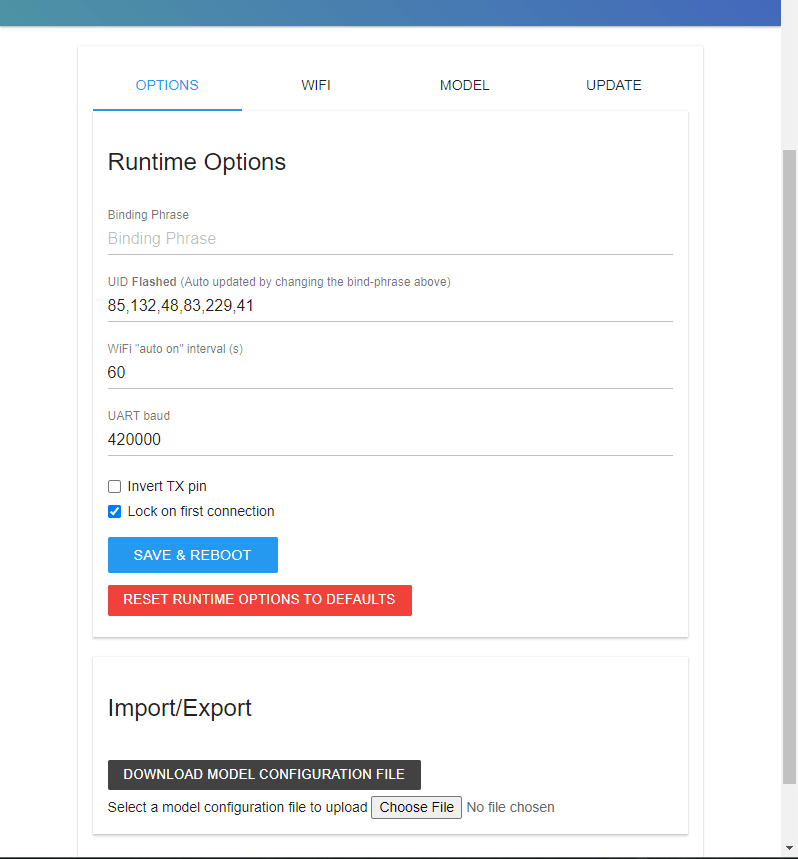
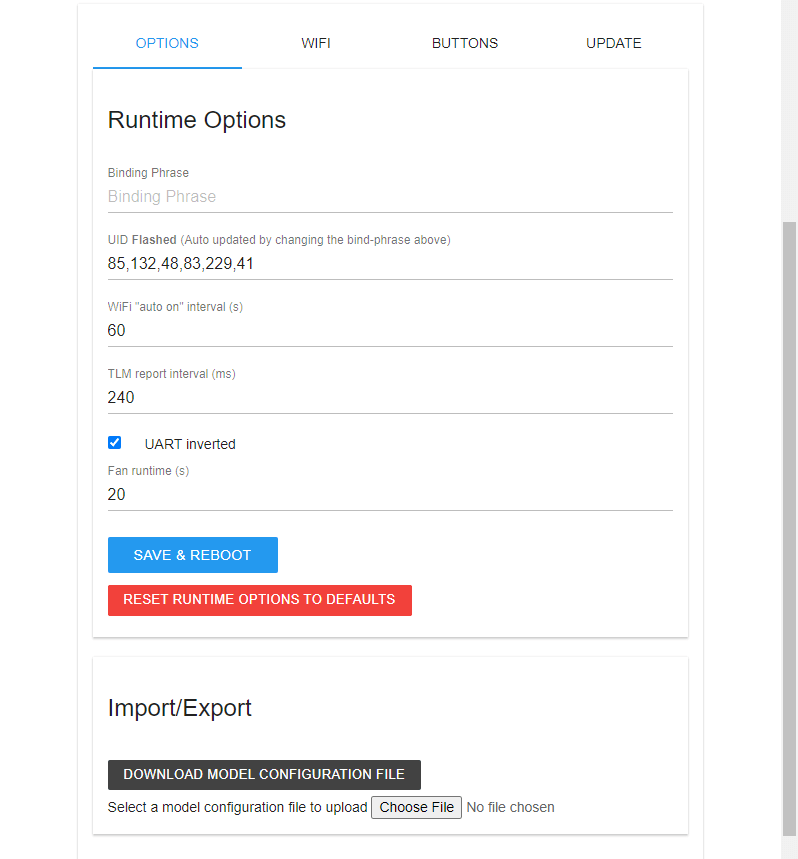
based on this screenshot, the UID numbers do not much, hence why they aren't binding/syncing..
type in your Binding Phrase on both so that the UID numbers match.. once they do, click the Save and Reboot button..
floral rivet
yes
sour helm
I tried again and same thing
floral rivet
sour helm
I tried again and same thing
one reason the webui parameters don't show up is because the wifi connection is flaky.. i.e. the wifi signal is bad
sour helm
Mine wifi or drone wifi?
floral rivet
sour helm
Mine wifi or drone wifi?
the device wifi
(receiver, in this case)
are you connecting to the receiver wifi via its access point?
or does it connect to your local wifi network?
floral rivet
sour helm
I am connected from his wifi
then either move the receiver closer to the device you're using to connect to it, or move the device closer to the receiver..
floral rivet
sour helm
I think I can’t
have you tried with your smartphone?
floral rivet
sour helm
I have something like this
this is the expressLRS website..
not the webUI
sour helm
But I typed 10.0.0.1
floral rivet
sour helm
But I typed 10.0.0.1
were you connected to the access point though?
sour helm
Why he is beeping
Like beeper
He started beeping after I plugged in the battery
When I am connected I don’t have internet
Can I bind it with other way?
Like from Betaflight or something?
Something is wrong with my drone or I am new and I don't understand some things?
floral rivet
sour helm
Why he is beeping
if your drone is powered up (your esc primarily) in 10mins without any activity, it will beep.. "motor beacon"
or do you have beeper mode active?
floral rivet
sour helm
Can I bind it with other way?
the binding phrase would be the best way to bind..
you've properly loaded the receiver webui earlier, didn't you? you're able to post a screenshot above afterall.
sour helm
floral rivet
the binding phrase would be the best way to bind..
you've properly loaded the r...
I don’t know what is that
I don’t understand some things because I am doing it first time
floral rivet
#1128259036920434761 message
sour helm
?
floral rivet
tx here: #1128259036920434761 message
you simply need to update the binding phrase on your devices via the webUI until they match.. and you'd get a bind..
sour helm
Okay, but how can I do this
floral rivet
I don't quite understand why it would suddenly not load for you..
floral rivet
sour helm
Okay, but how can I do this
put the device into wifi mode, load the webUI, type your binding phrase into the field, then click Save and Reboot..
sour helm
WebUI is this 10.0.0.1?
floral rivet
do that on both devices.. perhaps one-at-a-time
sour helm
Okay, I will try But this is not saving
floral rivet
if you're connecting to the access point, then do it one-at-a-time
sour helm
Because the trone is creating wifi without wifi
floral rivet
e.g. receiver first, then tx
sour helm
Okay, I will try
If I have my home internet o cable I need to unplug it?
Or I can connect to wifi with my internet?
floral rivet
your laptop has both wired and wireless connection..
you can use both at the same time..
you can still be connected to the internet via LAN while also being connected to the ExpressLRS device' WiFi Access Point.
you can also connect to the access point via your smartphone..
you connect to it by activating wifi on your phone and selecting the ExpressLRS Access Point.. then using your phone's browser, access the webUI
sour helm
Okay
I will try

Everything is good here?
this is RX
Idk what is this 30 and 420000
And I am asking is it okay, because It was like this
I need to select this boxes below?
floral rivet
sour helm
I need to select this boxes below?
just check Lock on First connection, and retype in your binding phrase to make sure it'll match with that of the TX.. leave the other fields as is...
though I would suggest using at least 8 characters for your binding phrase.. unless this is already working with other devices
sour helm
If I will change this, I need to reflash my controller?
Because I have this 8dbbdb on my controller
floral rivet
sour helm
If I will change this, I need to reflash my controller?
no.. you can simply do the same thing..
load the webUI for the TX, update the binding phrase so it matches that of the receiver, then save and reboot..
unless it's already set and showing the exact same UI numbers already
sour helm
Okay
Can i click save & reboot? Because I didin't click anything after i sent you a ss
floral rivet
sour helm
Can i click save & reboot? Because I didin't click anything after i sent you a s...
Yes..
sour helm
Okay
floral rivet
unless you don't want to save it and we go round and round on this..
sour helm
I clicked it and nothing happened. Like i clicked it and It was like It was
I know why
floral rivet
sour helm
I clicked it and nothing happened. Like i clicked it and It was like It was
and were you still connected to the access point?
sour helm
It disconected to internert
I will do this again faster
I think I did it, because led on my drone is pulsing
Oh Its flickering now
I will try on phone
I need to type 10.0.0.1 on phone too?
floral rivet
sour helm
I need to type 10.0.0.1 on phone too?
on a browser, yes
floral rivet
sour helm
Can we do some other method?
you can try reflashing the firmware..
sour helm
Okay
I need ExpressLRS configurator I think
I have it already
Whats next
I unpluged Drone for now
floral rivet
what do you mean what's next?
floral rivet
Flashing Guide: https://www.expresslrs.org/quick-start/receivers/iflight2400/

ExpressLRS aims to provide the best completely open, high refresh radio control link while maintaining a maximum achievable range at that rate with low latency. Vast support of hardware in both 900 MHz and 2.4 GHz frequencies.
sour helm
Should I have the drone connected to the computer with a cable during the whole process?
floral rivet
sour helm
Should I have the drone connected to the computer with a cable during the whole ...
depends which flashing method you're doing.. it's all in the guide though..
sour helm
betaflightPassthrought
Okay, I did that
And I am waiting
And after that It will be connected to my Controlle?
floral rivet
sour helm
And after that It will be connected to my Controlle?
if it did update the binding phrase
and it's the same as that of the tx
floral rivet
sour helm
this isn't your binding phrase though.. this is the git hash of the firmware version
your binding phrase is a phrase YOU select and set to both devices
floral rivet
unless you set that as your binding phrase
sour helm
 floral rivet
ExpressLRS will not expose your binding phrase.. although it is not meant to be for security or anything.. it's just meant to be used to bind/sync both tx and rx

Binding ExpressLRS is easy! With the Binding Phrase, no button presses are needed! Manual Binding is also available if pressing buttons is your thing.
sour helm
them if i pressed there is a flash button and i gave this code there can i add code to the controller and it will also work?
 floral rivet
sour helm
them if i pressed there is a flash button and i gave this code there can i add c...
floral rivet
sour helm
them if i pressed there is a flash button and i gave this code there can i add c...
yes..
but as I mentioned, an 8-character binding phrase is preferred..
sour helm
Okay I will create it again
floral rivet

Configure your Flight Controller for ExpressLRS with the help of this guide.
sour helm
Thanks
floral rivet
what did you spend your 7 hours on?
sour helm
On taking informations and flashing it 4 times a row
floral rivet
I would suggest starting over, using the guide here:
https://www.expresslrs.org/quick-start/getting-started/#what-should-i-do-first
sour helm
I read this like 3 times
floral rivet
sour helm
I read this like 3 times
but did you followed those steps?
sour helm
Yes
sour helm
I know but you know, Its my first time and I think I messed up something
floral rivet
sour helm
I know but you know, Its my first time and I think I messed up something
the guides are tailored for first-timers, imho.. I've simplified it several times now so it's easier to follow this time around..
the fact you've not set up your flight controller with its basic settings tells me you've not really FOLLOWED the guide..
sour helm
I set my controller but I think not in 100%. I did CRSF internal modules and more… I will do this second time
In tutorial someone has ISM2G4

I have CE_LBT
floral rivet
sour helm
I have CE_LBT
and?
floral rivet
it's your regulatory domain.. the one you have selected and set.. according to where you are, based on the regulation of the location you're in
sour helm
Okay
floral rivet
sour helm
And I don't have "C" on my controller
did you flashed the receiver with a binding phrase?
floral rivet
sour helm
But It says I need to flash it first time without binding phrase
did you though?
but as mentioned in the guide: you're gonna flash the receiver anyway, so why not just use a binding phrase..
imho, a binding phrase is the best method to bind devices..
sour helm
Okay
sour helm

I typed this 8 numbers code and nothing changed

I think I have some problems with this
floral rivet
please decide what you wanna do..
then stick to your decision and see it through, following the steps that's already in the ExpressLRS website
floral rivet
sour helm
I just want to change binding phrase for TX and for RX
if this is all you wanna do, then provide a stable wifi connection to both tx and rx, and update their binding phrases one at a time..
the order is not important.. as long as their UID numbers would match..
sour helm
Okay, but when I connect to wifi, with rx, it does not give internet connection at all
floral rivet
sour helm
Okay, but when I connect to wifi, with rx, it does not give internet connection ...
because it will not.. it's simply an adhoc wifi access point without internet access..
sour helm
Okay
I know what I did wrong
I selected EdgeTXPassthough
I need to select WIFI
Now you know why It costs 7 hours
I understand this whole system of connecting RX to TX as follows: In the Express LRS application, I first fill in all the fields and then press Build (I do it via WIFI). Then I connect to the WIFI Controller, and on the 10.0.0.1 page I upload what I downloaded. I don't know if after that I will have my 8-digit code already uploaded, or after that I still have to go to the 10.0.0.1 page again and enter this 8-digit code and click Save & Reboot.
floral rivet
sour helm
I understand this whole system of connecting RX to TX as follows: In the Express...
when you flash the receiver, with your Binding Phrase set, you do not need to re type it into the webui..
sour helm
This is my understanding of how to change this 8 digit code in the controller
floral rivet
sour helm
This is my understanding of how to change this 8 digit code in the controller
which is incorrect..
sour helm
?
floral rivet
you can CHANGE the already set binding phrase via the WebUI without reflashing..
floral rivet
sour helm
Without clicking this Save&reboot?
well, you obviously need to SAVE the setting.. and reboot so it will resume its functions
floral rivet
sour helm
Only Import thie file?
what file?
sour helm
After importing file
floral rivet
you're not following the Flashing Guide, are you?
was it ever mentioned you have to change those parameters?
sour helm
This file is what I get when I click Build in the Express LRS configurator
floral rivet
sour helm
This file is what I get when I click Build in the Express LRS configurator
yes.. and what does the guide say about that file?
you upload it into the device.. via the Update tab..
that is all.. there's no mention of changing parameters in the Options Tab
sour helm
I am following this one. Is it good?
 floral rivet
what do you mean "is it good?"
sour helm
Is this what you mentioned
floral rivet
sour helm
Is this what you mentioned
yes.. this is the flashing guide for your radio internal module..
what do you mean is it good?
it's good if you follow it
sour helm
Ok
Now the file is building in ELRS Configurator
After hour

And the same with RX
Is there an option to check the binding phrase in the controller?
floral rivet
sour helm
Is there an option to check the binding phrase in the controller?
what do you mean check? are you not sure you've typed it in correctly?
the webUI should show you the equivalent UID numbers
sour helm
No, I typed it correctly
This 8dbbdb is not binding phrase right?

I just want to be sure
floral rivet
sour helm
This 8dbbdb is not binding phrase right?
No. it is the Git Hash for the Version number to easily cross-reference it to the Release
sour helm
Okay
sour helm
so it is not possible to check the binding phrase in this small monitor on the controller?
floral rivet
3.2.1 - 8dbbdbe
these two can be found just below the Release Name
sour helm
Okayyyy
sour helm
sour helm
so it is not possible to check the binding phrase in this small monitor on the c...
.
floral rivet
it is not possible to know the binding phrase from any of the screens..
sour helm
Okay
floral rivet
some people are questioning whether it being secured or not, and here we are having some form of security by not showing it.. and you're wanting to see it.. the binding phrase you yourself typed in
sour helm
So now I have to do the same with the RX. I do everything in Express LRS and in 10.0.0.1, should I specify HOME_WIFI_SSID? Or not?
sour helm
floral rivet
some people are questioning whether it being secured or not, and here we are hav...
Now I understand
floral rivet
sour helm
So now I have to do the same with the RX. I do everything in Express LRS and in ...
Flashing Guide is here:
https://www.expresslrs.org/quick-start/receivers/iflight2400/
ExpressLRS aims to provide the best completely open, high refresh radio control link while maintaining a maximum achievable range at that rate with low latency. Vast support of hardware in both 900 MHz and 2.4 GHz frequencies.
Home WiFi SSID and Password is completely optional..
if you know MDNS is working on your system or network, then you can set these parameters without future issues..
however, with a non-working MDNS, it could prove troublesome, more so if you don't know what's wrong..
sour helm
Okay, I will turn it off
After the update, I should see the letter c in the upper right corner of the apparatus? (I have a literadio 3 pro)
floral rivet
sour helm
After the update, I should see the letter c in the upper right corner of the app...
if tx and rx connects and bind..
sour helm
Okay
It started blinking slowly after update, but after 10 sec it started blinking as fast as in WiFi mode
And it’s not connecting still
floral rivet
were both device NOT in wifi mode?
recheck the UID in the webUI.. and if they do not match still, then that explains why they aren't syncing.. in which I simply ask that you type in your binding phrase in the field and clicking save and reboot in the webUI
sour helm
floral rivet
were both device NOT in wifi mode?
I first did the TX, it was in WiFi mode while updating, RX same
floral rivet
I'm not asking when you updated..
I'm asking NOW..
if any of these device were in wifi mode, then they will not be able to sync up
sour helm
Now they are turned off
floral rivet
and if they are not in wifi mode, and still not syncing up, then check their UID numbers in the webUI and update it if need be
sour helm
Ok
In wifi style? Or I I don’t need to plug anything
I just need to paste the 8 letters?
floral rivet
the webUI will only come up if the device is in wifi mode..
sour helm
Oh, I am dumb
floral rivet
your binding phrase need not to have EXACTLY 8 letters..
but it sure is better if it has AT LEAST 8
floral rivet
a binding phrase can have 6 or more characters in it.. doesn't have to be all numbers, doesn't have to be all letters.. don't need to be a password, don't need to be complicated.. it's JUST a binding PHRASE
e.g. deadbyte
or bindingphrase
or pleasebind
or mybindingphrase
or notyourbindingphrase
sour helm
Okay, I have 8
floral rivet
or 123mybindingphrase
or bindingphrase456
what's important is that this binding phrase be THE SAME on both the tx and rx.. and that their corresponding UID numbers match
sour helm
I did it and nothings work
And when I paste binding phrase to webui and when I click save and reboot, nothing changed
floral rivet
for now, check whether the UID numbers match on both devices..
what configurator version were you using when you're flashing these devices?
sour helm
floral rivet
what configurator version were you using when you're flashing these devices?
3.2.1
floral rivet
sour helm
3.2.1
that's the firmware version.. not the configurator version..
should be shown at the top of the ExpressLRS Configurator app
floral rivet
sour helm
How to search that
it's at the TOP of the ExpressLRS configurator
sour helm
V1.5.10
floral rivet
sour helm
V1.5.10
could you uninstall this version and install 1.6.0-RC1, then reflash your devices with it..
sour helm
Okay
I need to do same thing but with other version, right?
Building and import file
floral rivet
sour helm
I need to do same thing but with other version, right?
build and same version of the firmware.. just using a newer version of the configurator
floral rivet
Follow the Flashing Guide
sour helm
Can you sand me link? i closed it by missclick
floral rivet
sour helm
Thank you
I will send you 2 screens of my binding phrase (If someone will broke again in the futuer)

I don't need to download lua script right?
floral rivet
sour helm
I don't need to download lua script right?
no.. you do not have to since you already have it
sour helm
Yes I have it
I updated controller
And after that i just need to change info in boxes froBetaflight 2.4GHz to iFlight 2.4GHz. And one box below from Betafpv Literadio 3 pro to iFlight 2400RX
I need to turn off and turn on my controler or something after that?
floral rivet
what?
you will need to flash the correct target to your receiver..
it is different from that of your radio..
follow the flashing guide
sour helm
floral rivet
follow the flashing guide
Can you send me link?
floral rivet
you just have to scroll up..
#1128259036920434761 message
sour helm
k
Guide says the same think I said. I need to build file for RX and TX and after that connect RX and TX with my pc with Wifi, and import htis file to 10.0.0.1
Okay, i flashed controller and drone with the same binding phrase
Whats next
floral rivet
sour helm
Whats next
make sure none of them is in wifi mode and see if they'll sync up..
if you did things right according to the flashing guide using the 1.6.0-RC1 configurator, they should bind now..
floral rivet
sour helm
Drone and controller is not i wifi mode and still not working
could you take new sets of WebUI options tab from both devices please..
kinda suspicious it isn't working..
sour helm
Sorry, but I am a bit stresses. My drone is not working
floral rivet
sour helm
Sorry, but I am a bit stresses. My drone is not working
not a good excuse to simply forget how to do things you've been trying to do since earlier though
sour helm
But then I did it alone. Now I have special help and not working still
floral rivet
this is nothing special..
sour helm
TX
 floral rivet
sour helm
TX
floral rivet
sour helm
TX
this is the RX's
floral rivet
the binding phrase is not the same on these devices still
based on their UID numbers
floral rivet
type in the binding phrase on the Binding Phrase field and click save and reboot..
floral rivet
I'm not really sure why the binding phrase on your devices aren't the same despite flashing them multiple times, unless you're not really able to update them.. or that you're purposely setting different binding phrases to these devices..
it's your receiver that has the wrong binding phrase
sour helm
 sour helm
floral rivet
I'm not really sure why the binding phrase on your devices aren't the same despi...
sour helm
floral rivet
I'm not really sure why the binding phrase on your devices aren't the same despi...
I am not touching binding phrases because They are saving
You see, both has same UID
why they are not binding
Now you know how i spent 7 hours on this
floral rivet
have you already save those updated binding phrases?
because this one has a different UID:

THIS IS what's actually saved into your receiver..
BEFORE you type in your binding phrase
sour helm
floral rivet
have you already save those updated binding phrases?
When I click save, it looks like the system hangs. It doesn't show any progress bar or anything. There is a button click animation and that's it
floral rivet
it will show you a "Reboot" popup.. and did you clicked reboot?
sour helm
floral rivet
BEFORE you type in your binding phrase
? Idont understand anything
sour helm
floral rivet
it will show you a "Reboot" popup.. and did you clicked reboot?
I selected save&Reboot
floral rivet
sour helm
I selected save&Reboot
then it should show another popup with the Reboot button
sour helm
I will try third time
floral rivet
if this still doesn't work, means something's wrong with this receiver..
floral rivet
I will suggest reflashing it via Passthrough or via UART through the web flasher with the Erase Flash First option..
these images do not prove anything
sour helm
I know
floral rivet
the WebUI will not show the flashed/saved Binding Phrase in the field..
it will only show the saved UID numbers..
like in this photo here:
!webui
crude nacelleBOT
Connect to your transmitter's or receiver's WiFi network to access the web UI:
floral rivet
sour helm
But I have the same UID
reboot your receiver and put it back into wifi mode after reboot..
then post another webUI options tab screenshots WITHOUT typing in your binding phrase..
i.e. take a screenshot of it as it has loaded.. DO NOT put in your binding phrase..
like here:
 sour helm
floral rivet
reboot your receiver and put it back into wifi mode after reboot..
sour helm
floral rivet
reboot your receiver and put it back into wifi mode after reboot..
How to reboot it?
floral rivet
sour helm
How to reboot it?
power it off then power it back on..
sour helm
Just unplug cable and plug it again?
floral rivet
sour helm
Just unplug cable and plug it again?
turn off the receiver and turn it back on.. however you do it..
sour helm
k
But I am plugin it only when I need his internet, it is not always turn on. Maybe this is the problem
Now I don't need to touch TX because He is working good right?
floral rivet
sour helm
But I am plugin it only when I need his internet, it is not always turn on. Mayb...
you need the receiver powered up to sync with TX.. but since their UID numbers/binding Phrases do not match right now, they won't bind..
you don't have to touch the TX for now..
sour helm
 floral rivet
what's this?
floral rivet
huh?
sour helm
I need to Import firmware.bin too? Or just iFlight_2400_RX-3.2.1.bin
floral rivet
I asked you to reboot so you can put it back to wifi mode and repost a fresh screenshot of the webUI options tab so we can determine whether you indeed updated the binding phrase..
floral rivet
I never asked you to reflash via wifi..
if you want to reflash, do it via betaflight passthrough instead.. or via uart using the web flasher, with the Erase Flash First option..
floral rivet
See this first image? it DOESN'T have the same UID numbers that's equivalent to your binding phrase.. hence why it changes when you type in your binding phrase..
and clicking Save and Reboot doesn't seem to do anything and doesn't save it.. unless you're not saving it properly
so I would suggest reflashing the receiver via other methods, I've already mentioned above
sour helm
Not with WIFI?
floral rivet
sour helm
Not with WIFI?
No.. I never mentioned wifi, didn't I?
sour helm
no no, I just thought the WiFi is one of this options
floral rivet
Yes. it is one of the options, but it doesn't seem to be working for your right now.. unless you're doing it wrong of course..
sour helm
Have you had any cases where it didn't work?
floral rivet
sour helm
Have you had any cases where it didn't work?
personally? No.. always have worked for me..
for others, changing the Binding Phrase via the webUI always worked.
see here for an example: https://discord.com/channels/596350022191415318/1128324326664450081
sour helm
Maybe I will just give you the screen share and You will see, Because its going too long and maybe I am doing something wrong. I think It will be the easiest. And It will be just 3-5 mins
Please...
I am tired of binding process
floral rivet
and how do you suppose I flash your devices with just a screenshare?
sour helm
You will just look what I am doing because Maybe I am doing something wrong while flashing
floral rivet
you're not that stupid are you?
sour helm
I think I am doing everything good, but You told me you didn't have any cas WiFi not worked
floral rivet
are you not that confident you're following the guide?
which is why I am suggesting you reflash the receiver via Passthrough
sour helm
floral rivet
are you not that confident you're following the guide?
Yes, I read this 4 times and I am not confident
sour helm
floral rivet
which is why I am suggesting you reflash the receiver via Passthrough
But you asked me about this 2 times
floral rivet
and have you done so?
floral rivet
via betaflight passthrough?
you have flashed the receiver via betaflight passthrough?
twice?
sour helm
oh wait, you didn't asked me but I did it too
floral rivet
where's the log?
sour helm
I saw tutorial on yt about every method
floral rivet
either way, should be easy to redo it now since you've done it twice already..
so how hard it is to do a third time with the 1.6.0-RC1 configurator?
sour helm
yes, that's what I meant
sour helm
floral rivet
so do it once again..
Okay
floral rivet
and post the log after.. so I know it has succeeded and the receiver was flashed..
!log
sour helm
Maybe it will work with new verion of ELRS Configurator
floral rivet
unless of course you still haven't set up your flight controller
#1128259036920434761 message
sour helm
TX Ready

After that the same with drone? Becase I didn't think about this
Joshua Bardwell not mentioned about RX
floral rivet
did I asked you to reflash your radio?
sour helm
floral rivet
so do it once again..
.
sour helm
floral rivet
and post the log after.. so I know it has succeeded and the receiver was flashed...
.
floral rivet
sour helm
.
Receiver was flashed
sour helm
Then I need to do the same thing with my drone
floral rivet
TX do not "via Betaflght Passthrough" flashing method..
sour helm
Yes/No
floral rivet
you only need to reflash your RECEIVER.. you DIDN'T have to reflash your Radio/TX
sour helm
Oh okay
floral rivet
#1128259036920434761 message
sour helm
I need to do something with TX now? Or just leave it and I didn't smash anything?
floral rivet
sour helm
I need to do something with TX now? Or just leave it and I didn't smash anything...
what you flashed earlier is the TX..
what you need to reflash is the receiver, via betaflight passthrough.. of which I haven't seen the log as of yet..
you DO NOT,
I repeat
DO NOT have to reflash your TX... at least at this point
floral rivet
sour helm
I need to connect drone? Because Joshua didin't mentioned about this
should I link the Flashing Guide from the OFFICIAL ExpressLRS website yet again?
sour helm
I will find
floral rivet
sour helm
I already got that.
Wait
I didn't touch ANYTHING in Betaflight program
Maybe this is the problem

I think Its need to be CRSF
floral rivet
Already linked this earlier..
https://www.expresslrs.org/quick-start/receivers/configuring-fc/
Configure your Flight Controller for ExpressLRS with the help of this guide.
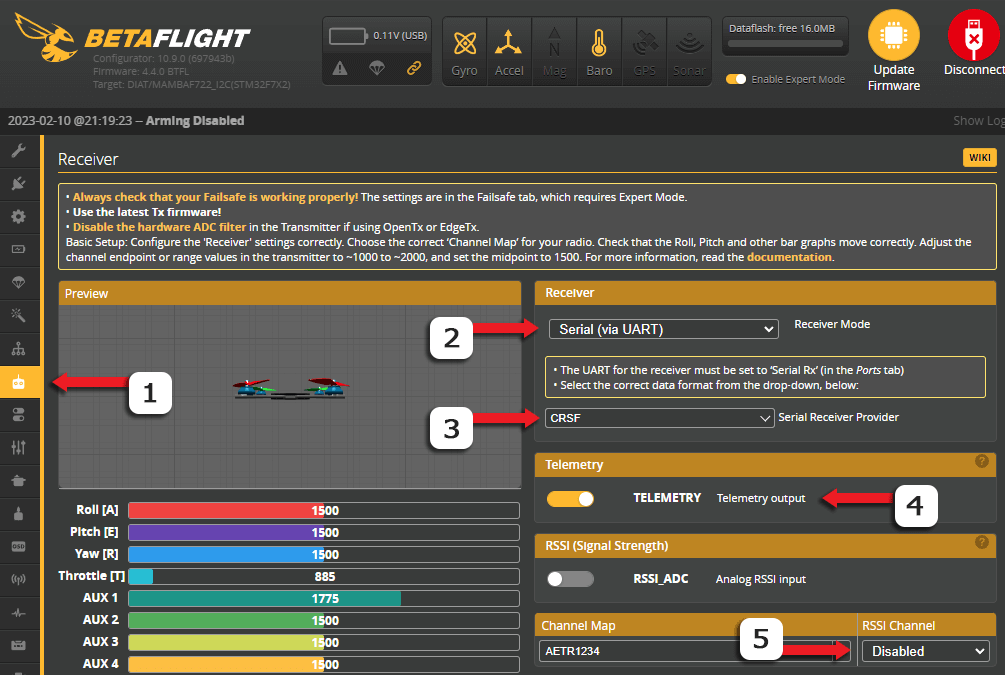
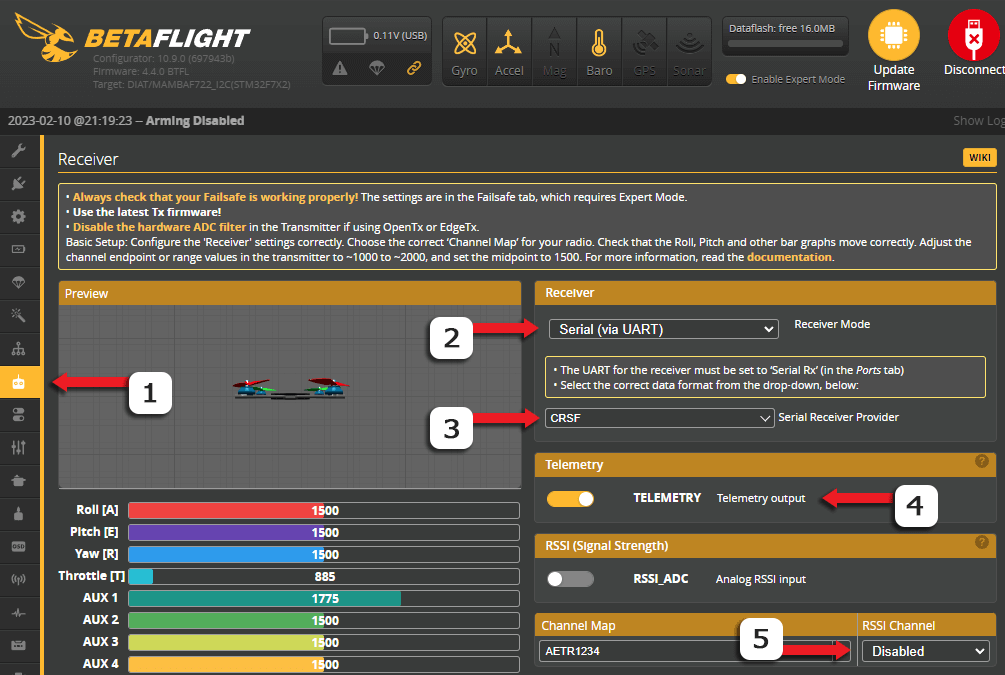
sour helm
floral rivet
Already linked this earlier..
https://www.expresslrs.org/quick-start/receivers/...
I know but i have problem with this
I clicked CRSF when you linked me this
But After clicking Save It didn't save
Now too
I will restart PC
Give me sec
floral rivet
well, your flight controller has 4.2.11 and you're using 10.9.0 configurator
try using an earlier betaflight configurator version.. like 10.7.0
floral rivet
yes. I think so.. would I suggest otherwise?
should I stop trying to help you since you I do not have your confidence and trust, it seems
sour helm
floral rivet
should I stop trying to help you since you I do not have your confidence and tru...
Thank you for your help, and I am VERY SORRY for me. I'm an idiot because I started this when I was 15, I must be older to understand it better. Anyway, thank you again and sorry. I think this hobby is for older people then me...
floral rivet
sour helm
Thank you for your help, and I am VERY SORRY for me. I'm an idiot because I star...
we've already spent that much time..
why not try and flash the receiver via Passthrough, using all the guides I have linked.. and if that still didn't work for you, then decide your next steps
sour helm
I already did it
floral rivet
sour helm
I already did it
where's the Log from the successful flashing via Passthrough?
sour helm
How to find it? I will send you
floral rivet
!log
sour helm
I didn't click that
floral rivet
use the disk icon from the build log window to save the log into a file..
upload the file here
sour helm
With RX an TX?
floral rivet
sour helm
With RX an TX?
with just the RX which you can flash via Betaflight Passthrough
floral rivet
(you can't flash the Tx via betaflight passthrough; and which I have been telling you you need not flash at this point)
floral rivet
sour helm
But The drone is not connecting still with TX
where is the log of the successful flashing via passthrough
sour helm
You are asking me about screenshot rn?
floral rivet
you have saved from this button shown above
sour helm
I told you, I didin't click this folder button while flashing
floral rivet
sour helm
I told you, I didin't click this folder button while flashing
so reflash as you have alluded you'll do again earlier
sour helm
I need to flash it one more time while clicking this button
floral rivet
no.. flash it, then after it's done, do not click the button at the bottom..
sour helm
ohhh
floral rivet
instead, click the disk icon up top to save the log into a file and upload the file here
sour helm
Okay
floral rivet
once you've saved the file, then you can go back to whatever page you want..
sour helm
I need to give it some time
sour helm
floral rivet
once you've saved the file, then you can go back to whatever page you want..
I didn't know
click it when it will show a green box with the word success
 floral rivet
sour helm
click it when it will show a green box with the word success
floral rivet
sour helm
click it when it will show a green box with the word success
yes..
upload the file here
sour helm
okay, You need to give it some time
Bruh...

I learned that, If I will do this second time it will work
Can I click retry? It will show succes
floral rivet
have you reconfigured your flight controller?
seems you haven't set up your flight controller for ExpressLRS..
sour helm
I am not touching controller
floral rivet
and I asked for the log.. you still posted the screenshot..
floral rivet
sour helm
I am not touching controller
and I'm not asking you to..
I'm asking about your betaflight Flight Controller
sour helm
Because It showed error
sour helm
floral rivet
have you reconfigured your flight controller?
I changed for CRSF and one more thing
floral rivet
so could you post the log so I can look what the cause of the error message is so it can be rectified/corrected?
floral rivet
!!! Serial Receiver Protocol is not set to CRSF! Hint: set serialrx_provider = CRSF !!!
i.e. you've not set up your Flight Controller with the correct receiver protocol..
also, were you really using the 1.6.0-RC1 configurator? could you show a full screenshot of the ExpressLRS Configurator you're using please..
this isn't your flight controller
sour helm
Sorey, not Herę
sour helm
Sorry, not here
floral rivet
Configure your Flight Controller for ExpressLRS with the help of this guide.
sour helm
floral rivet
also, were you really using the 1.6.0-RC1 configurator? could you show a full sc...
With this error? Or I can close it?
floral rivet
sour helm
With this error? Or I can close it?
close it.. I already have the log
sour helm
Wait...
I typed in internet ELRS Configurator
And I installed the newest verion
And I have 1.5.10
floral rivet
I did asked you to install 1.6.0-RC1
sour helm
 floral rivet
if you weren't able to find it.. you should've asked where it is..
sour helm
floral rivet
I did asked you to install 1.6.0-RC1
YES
sour helm
floral rivet
if you weren't able to find it.. you should've asked where it is..
I found it
floral rivet
Cross platform configuration & build tool for the ExpressLRS radio link - ExpressLRS/ExpressLRS-Configurator
floral rivet
sour helm
I found it
so all these time, not only you've not set up your flight controller properly, you're also not using the configurator I asked you that you use..
sour helm
floral rivet
so all these time, not only you've not set up your flight controller properly, y...
I TOLD YOU, I DOWNLOADED IT. I SENT YOU MY HISTORY
floral rivet
I did ask you to download and installed ExpressLRS Configurator 1.6.0-RC1, right?
sour helm
YES
floral rivet
this screenshot doesn't prove anything.. you said the installed configurator you're using still says 1.5.10
did you not?
you're not the only one spending time here mate..
I did told you to install the 1.6.0-RC1 configurator earlier..
sour helm
But are you auditioning me now or what? I told you. I installed 1.6.0-RC1
You need to understand that
floral rivet
sour helm
But are you auditioning me now or what? I told you. I installed 1.6.0-RC1
okay.. then post a screenshot of the ExpressLRS Configurator you're using please
sour helm
I'm not here to ruin your life, just to make my drone work
sour helm
floral rivet
okay.. then post a screenshot of the ExpressLRS Configurator you're using please
Now I am installing this new one SECOND TIME
Give me a sec
floral rivet
sour helm
Give me a sec
I've already given you 6 hours of my life mate.. sure I can still give you a sec
sour helm
When I downloaded it first time asses section is showing
Nvm I got it
After that I need to change everything in Betaflight?
floral rivet
sour helm
After that I need to change everything in Betaflight?
even if you reflash the receiver via wifi, you need to update your flight controller configuration so it will work as your control link
sour helm
Okay, I will build everyting again
But first I want to change everything in Betaflight okay?
floral rivet
here's the steps for setting up the receiver side for ExpressLRS use:
https://www.expresslrs.org/quick-start/getting-started/#receiver-side
It involves wiring the receiver properly, if applicable (self-built drone)
and setting up the flight controller
sour helm
floral rivet
here's the steps for setting up the receiver side for ExpressLRS use:
https://ww...
YOu send me this like like 6 times
floral rivet
via Passthrough Flashing method also mentions these previous steps..
floral rivet
sour helm
YOu send me this like like 6 times
I will send it several more.. if you're still asking what to do
sour helm
Okay, I will read everyting again
floral rivet
sour helm
Okay, I will read everyting again
No.. don't just read it.. follow it
sour helm
Okay, I changed everyting In Betaflight
floral rivet
sour helm
Okay, I changed everyting In Betaflight
did it got saved this time?
you've rechecked and confirmed?
sour helm
floral rivet
did it got saved this time?
Yes, I clicked Save and Restart
And everyting is good


I changed this 2 things
floral rivet
are you reading the text on those pages or just following what's shown on the images?
floral rivet
sour helm
Now I am on Checking FW Version
you need not to check.. you already know..
sour helm
?
I am reading
Now ESP-based Receiver Updating Methods
Okay
I am ready
I have everyting good in TX?
floral rivet
again with the Tx..
if you're not sure, go ahead and go throught the steps for the TX
sour helm
Its just connecting to Wifi
TX

Now I need to Open Express LRS Configurator, Select my Rx, Click build. After that Import to 10.0.0.1
I think I understand that correctly after your lessons
floral rivet
All I did is ask you to follow the guides..
floral rivet
you rather have me type in caps?
floral rivet
sour helm
What is this gz
that's the firmware file you'll upload into the webUI to update/flash the receiver
sour helm
I know
floral rivet
sour helm
I know
you know? so why ask?
sour helm
But always it ended at .bin not .bin.gz
floral rivet
sour helm
But always it ended at .bin not .bin.gz
which is because you're not using the old configurator
sour helm
Okay
floral rivet
this is how it will be with the next release
floral rivet
sour helm
When I Updated it, It will remember Betaflight settings?
the betaflight settings isn't stored in the receiver..
it's in the flight controller
so whether you flash/update the receiver, the betaflight settings will not be affected
sour helm
Okay
It has the same UID
I reeboted the TX
I will Reboot RX and everything will work
I entered when I am connected to RX wifi
 floral rivet
sour helm
I entered when I am connected to RX wifi
floral rivet
sour helm
I entered when I am connected to RX wifi
the wifi connection is flaky..
sour helm
Me RX is not blinking, it’s steady

Wait
It’s working

C
HEY HEY
PLEASE HELP ME WHAT I NEED TO DO FOR FLYING
I REALLY WANT TO TAKE OFF FIRST TIME NOT IN LIFTOOF GAME
PLEASE
SEND ME TUTORIAL OR SOMETHING IN YOUR STYLE
TOU CAN JUST TELL ME OR SEND ME TUTORIAL
PLEASE
floral rivet

What's the Bench Test? How to set Aux1 for Arming? RSSI dBm and Link Quality on the OSD? Setting up ExpressLRS Telemetry? You're in the right place!
sour helm
THANK YOU
floral rivet
I must rest for now. it is 1am where I am..
sour helm
Okay
Thanks for the help
Idk why but I am connected, but in Betafpv when I am moving the gimball its not moving
What?
floral rivet
sour helm
Idk why but I am connected, but in Betafpv when I am moving the gimball its not ...
in which uart do you have wired the receiver?
and which uart did you set Serial RX to in Betaflight Ports Tab?
could you post a photo of the receiver wiring to the FC please..
sour helm
floral rivet
could you post a photo of the receiver wiring to the FC please..
What is Fc because I don't remember
floral rivet
sour helm
What is Fc because I don't remember
FC is flight controller
sour helm
Okay
floral rivet
it's not your Radio
floral rivet
post a photo please
sour helm
 floral rivet
receiver wiring to the flight controller
sour helm
The led it stable, he is not blinking
floral rivet
I want to see a photo of the RECEIVER wiring to the Flight Controller
sour helm
floral rivet
receiver wiring to the flight controller
On beta flight?
floral rivet
here's an example

 floral rivet
post a PHOTO of the receiver WIRING to the Flight controller, like so:

 sour helm
I can't open drone
floral rivet
sour helm
I don't think so I can
if you can't I'll just sleep since I can't be of much help without such photo
sour helm
 floral rivet
confirm which uart the receiver is wired to and adjust your Ports Tab setting accordingly
sour helm
 sour helm
Ok
 crystal galleon
without that, it's infeasible for us to help any further
floral rivet
sour helm
Ok
do you at least know which flight controller you have?
sour helm
I flight 2.4GHz
floral rivet
sour helm
I flight 2.4GHz
that's your receiver..
sour helm
floral rivet
do you at least know which flight controller you have?
Beta flight?
floral rivet
I'm asking which model of the flight controller you have
sour helm
Radio?
crystal galleon
no
sour helm
Give me sec
floral rivet
Flight Controller, what model is it? who made it?
sour helm
 floral rivet
your flight controller manual is here:
https://geprc.com/wp-content/uploads/2022/05/F411-35A-AIO-USER-MANUAL2.pdf
if what's here is actually your flight controller
if the wiring guide was followed, receiver should be in uart2, NOT in uart1
sour helm
Tutorial said uart 1
floral rivet
sour helm
Tutorial said uart 1
so you're not reading
sour helm
Should I deploy this drone or not
floral rivet
In the example below, the Receiver is wired to UART1 (Tx1 and Rx1 pads), and so the Serial RX column should be enabled on UART1 in the Ports Tab.
floral rivet
sour helm
Should I deploy this drone or not
deploy?
sour helm
 sour helm
floral rivet
deploy?
sour helm
floral rivet
deploy?
Open his roof
floral rivet
sour helm
Open his roof
if you're able to determine which uart the receiver is wired up without taking the top of and you're able to clearly provide the photos I've asked, then go ahead
crystal galleon
I can understand Polish to some extent if there's a language barrier btw
floral rivet
and I'm able to see which wires is which from your photo?
crystal galleon
the yellow and white wire, where are they going to?
 sour helm
I eill not open it
crystal galleon
what are the pad labels where the yellow and white wire are going?
crystal galleon
guessing by the BF Configurator, you speak Polish, right? Just verifying.
floral rivet
receiver is on uart2
sour helm
Nie ma opcji ze będę teraz rozbierał tą żółtą taśmę
floral rivet
however, I can't verify from the images posted whether the wiring is correct or not.. (rx to tx, tx to rx)
sour helm
To jest przymocowane na trytytke
sour helm
floral rivet
however, I can't verify from the images posted whether the wiring is correct or ...
I bought this drone from someone, he is not new and this guy said he is working
crystal galleon
So, in BF Configurator, go to Ports tab, and send a screenshot of how it's set up right now.
floral rivet
sour helm
I bought this drone from someone, he is not new and this guy said he is working
so adjust your Ports Tab setting so that Serial Rx is ENABLED on uart2 instead of UART1
sour helm
Can I repair my drone now?
sour helm
floral rivet
so adjust your Ports Tab setting so that Serial Rx is ENABLED on uart2 instead o...
Okay
Can I?
floral rivet
sour helm
Can I repair my drone now?
not yet..
floral rivet
until you've verify it's al working
we still don't know whether the receiver is wired properly..
I can't see where those wires go in the receiver side
sour helm
It’s working
I see
It’s working
I am sobering throttle
I will quick see is everything okay here
Okay
Throttle roll pitch and yaw is set correctly
crystal galleon
@sour helm to explain
The receiver wires are wired up to R2 and T2
R2 and T2 are the Receive (listening) and Transmit (speaking) sides of UART2
sour helm
 sour helm
crystal galleon
<@543506987564924940> to explain
The receiver wires are wired up to R2 and T2
R2...
sour helm
crystal galleon
<@543506987564924940> to explain
The receiver wires are wired up to R2 and T2
R2...
okay, thanks
floral rivet
sour helm
are the aux channels also move when you toggle those switches in your controller?
crystal galleon
AUX1 channel (aka CH5 on the radio) is what MUST be used for ARMing
and the drone MUST be armed when AUX1 is at ~2000 @sour helm
just FYI
crystal galleon
the drone is armed when AUX1 is at 2000?
sour helm
 crystal galleon
cool
floral rivet
guess I'm done here
crystal galleon
👍
crystal galleon
floral rivet
guess I'm done here
Go get some sleep, good work 🙂
sour helm
But wait
crystal galleon
Oh no, part 2
sour helm
I just need one of us
crystal galleon
Say what you need 😄
crystal galleon
Go to Nadajnik video on the left side of BF
sour helm
I BOUGHT THIS DRONE YESTERDAY
crystal galleon
and send a screenshot
crystal galleon
sour helm
I BOUGHT THIS DRONE YESTERDAY
You forgot to buy the education to go with it >.>
sour helm
 crystal galleon
it's free except for the time investment
crystal galleon
send a screenshot from Ports tab
crystal galleon
and gimme a minute
floral rivet
set smartaudio to uart1.. in the peripherals.. last column
crystal galleon
idk if the VTX is SA or TRAMP @floral rivet 😄
wanted to check before yoloing it xD
floral rivet
yeah.. I just checked
sour helm
floral rivet
set smartaudio to uart1.. in the peripherals.. last column
What is Smartradio
crystal galleon
@sour helm na UART1, ustaw Urzadzenia Peryferne na coś "IRC Tramp"
i kliknij Zapisz
floral rivet
sour helm
What is Smartradio
tramp and smartaudio are two different vtx control protocols
sour helm
mam ustawić tramp w wyjście telemetrii?
crystal galleon
sour helm
mam ustawić tramp w wyjście telemetrii?
nie, w Uradzenia Peryferne
sour helm
Mam
crystal galleon
i kliknij na zapisz
sour helm
I włączyć to UART 1 by ten przełącznik był żółty tak?
sour helm
Tak?
 crystal galleon
tak
floral rivet
might want to disable Soft Serial in Configuration Tab to free up some resources
sour helm
A co daje to tramp?
crystal galleon
floral rivet
might want to disable Soft Serial in Configuration Tab to free up some resources
will take a look at it, go sleep xD
crystal galleon
sour helm
A co daje to tramp?
Daje jednotce sterującej kontrole nad nadajnikiem videa
sour helm
k
crystal galleon
nie wiem czy to sa korektne slowa, jest to 13 lat temu co ostatnio po polsku mowilem lol
sour helm
co zrobić by nie było ostrzeżen
sour helm
crystal galleon
nie wiem czy to sa korektne slowa, jest to 13 lat temu co ostatnio po polsku mow...
K
crystal galleon
otworz v BF Nadajnik video, i daj novy screenshot
sour helm
 sour helm
moge już sobie drona składać?
crystal galleon
tak
sour helm
crystal galleon
ale kurwa nie jest tabela VTX...
źle cos wyslalem?
crystal galleon
sour helm
źle cos wyslalem?
nie, brakuje części konfiguracji
muszę to znaleźć w sieci
sour helm
k
crystal galleon
jeszcze minute
crystal galleon
chcesz video?
crystal galleon
chcesz miec video v goglach?
crystal galleon
pobierz ten plik
W nadajnik video kliknij na Wczytaj plik
i wybierz ten plik
mail bys widziec jak sie tam naczyta tabela
sour helm
juz
crystal galleon
daj novy screenshot
crystal galleon
Kliknij na Zapisz
Nastepnie, u gory ustaw Pasmo BOSCAM_A, Kanal 1 i Wlacz 25
i kliknij na zapisz
crystal galleon
Uwaga: 25 to najniższa moc transmisji, do latania będziesz chciał więcej, ale technicznie rzecz biorąc w Polsce więcej niż 25 nie jest legalne.
(google translate xD)
crystal galleon
Co masz za gogle?
crystal galleon
Wiesz jak ustawic pasmo i kanal na tych goglach?
sour helm
Nie
crystal galleon
Chcesz Pasmo A i Kanal 1
crystal galleon
Czesto to jest zapisane tak: "A1"
crystal galleon
Dron widzi napiecie z USB i mysli ze to jest bateria
sour helm
mam odłączyć od komputera i iść zobaczyć
crystal galleon
ale widzisz video?
sour helm
poczekaj
włączyłem go i uderzył o sufit lekko
i upadł na łóżko
a tylko go zarmowałem
arm
co się stało
crystal galleon
najpierw zkontroluj wideo
crystal galleon
I upewnij sie ze masz gogle ustawione na A1
nic innego
musi byc A1
jest mozlive, ze uwidzisz video na innej kombinacji, ale niebedze to dzalac dobrze
crystal galleon
piekne wideo ale masz zkontrolovac to A1 😄
sour helm
Jest
sour helm
mam gimbala na maxa w dół a pokazuje że troche wysoko jest
 sour helm
crystal galleon
zobacz, czy 3D dron kreci sie tak jak realny dron
sour helm
crystal galleon
zobacz, czy 3D dron kreci sie tak jak realny dron
Nie kręci si, stoji
dopiero jak go ruszę to sie rusza
crystal galleon
masz nim krecic ty 😄
crystal galleon
levo = levo, tyl = tyl, i tak?
sour helm
Tak
sour helm
nie, ale jak go podnosze to schodzi na bok
sour helm
crystal galleon
Silniki