#Game won't start after the update.
1 messages · Page 1 of 1 (latest)
 timber otter
Looks like they accidentally reintroduced the bug that came with the release of the PC client lmao
I have this issue too
 candid crag

 thin hawk
pretty annoying, was a bug with AMD processors specifically
thin hawk


 restive hare
candid crag
<:lolithinkin:882154033509457950>
restive hare
candid crag
<:lolithinkin:882154033509457950>
same but mine's keeps on cheeking local files
 peak ocean
They need to fix this bug again.
thin hawk
found a workaround
launch the game, go to task manager, right click details on PGR.exe in task manager, then right click on launcher, set affinity, make sure only cpu 0 is ticked.
candid crag
thin hawk
launch the game, go to task manager, right click details on PGR.exe in task mana...
huh?
 thin hawk
https://www.thewindowsclub.com/processor-affinity-windows?utm_source=feedburner&utm_medium=feed&utm_campaign=Feed:+TheWindowsClub+(The+Windows+Club//
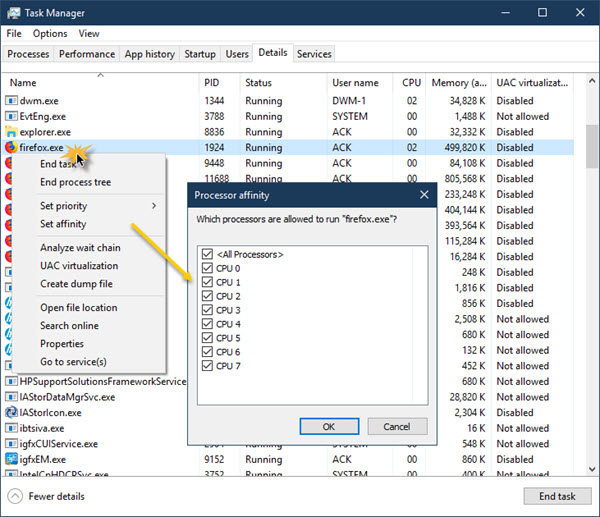
The Windows Club
Learn how to set Processor Affinity in Windows 11/10. We have also explained what Processor Affinity, and if it is useful to improve performance.
peak ocean
thin hawk
launch the game, go to task manager, right click details on PGR.exe in task mana...
Doesn't work for me

 dreamy flint
have the same issue. Game refuses to start. Work arounds from above don't work sadly
thin hawk
dreamy flint
have the same issue. Game refuses to start. Work arounds from above don't work s...
i just tried setting affinity via launcher agian today and it didn't work, however if start PGR.exe from the console (cmd.exe) using "start /affinity 1 PGR.exe" it worked.
dreamy flint
thin hawk
i just tried setting affinity via launcher agian today and it didn't work, howev...
oh this sounds promising. I'll try it out later and hope it works
dreamy flint
thin hawk
i just tried setting affinity via launcher agian today and it didn't work, howev...
the affinity 1 didn't work. Just gives me an error but I found my own work around thx to you.
if i type start pgr.exe (uppercase crashes) it actually works. Thx for the help
thin hawk
dreamy flint
the affinity 1 didn't work. Just gives me an error but I found my own work aroun...
Odd, if it doesnt work again let me know what error it is, dont think it should give error. Glad you got it running though
dreamy flint
yeah pgr.exe works fine. Tested it a few times, but PGR.exe crashes, so kuro screwed up somewhere in the files
hope they fix it soon
candid crag
i'm not quite sure what this whole thing you're talking about is
i'm new to all this pc stuff
is this what you meant?
i cant do it while its running in the background either
dreamy flint
candid crag
i cant do it while its running in the background either
you have to change the file path first with cd "file location path" in my case it would look like this:
cd C:\Games\Punishing Gray Raven\Punishing Gray Raven
then
start pgr.exe
on another note. My hotfix from yesterday stopped working today
candid crag

dreamy flint
tried the start /affinity 1 and doesn't work either. rip
candid crag
I think I found a way
nevermind
it ran for the first time, didn't work the second time
dreamy flint
is there a chance that the bug is also tied to your internal clock?
tried to do start pgr.exe again and now it works
candid crag
it would be nicer if they'd just fix it man
dreamy flint
roughly around the same time as yesterday
candid crag
it's kind of a pain to keep playing on phone
dreamy flint
feel you
I connect my ps4 controller up to my phone but 27" vs +6" is still a huge difference
candid crag
if I use my xbox controller w my phone the RT and LT (basically R2 and L2 for you) buttons don't work
dreamy flint
hm weird, PS4 controller works fine on my end
well lets hope they release a hotfix asap
 wanton wedge
Reddit
Explore this conversation and more from the PunishingGrayRaven community
work for me
 timber otter
No solutions I've found worked yet for me
candid crag
Try the one I did in the video?