Hi, I’ve been drawing for many years, mostly animals by traditional, recently I started drawing humans on digital and I really can’t get rendering skin, to it look clear, full of value, color. I’ve watched many tutorials on insta, TikTok or YouTube but non of them rly helped me… please drop me your ways or maybe your tutorial that helped you.
Thanks
#How do you render skin?
27 messages · Page 1 of 1 (latest)
 dapper forum
Tbh my rendering process is kind of chaotic and can be best described as “trust the process and keep going until it looks right” but if I tried to make it streamlined it goes something like this:
- Value work, identifying the darkest shadows and the lightest lights, working on defining shapes and volume
- Color variation. It’s a good idea to set it up on your base like on the guidelines here but I find that it kind of gets lost in the rendering process so I often have to reapply it. I also do this with layer modes. This one is most impactful for impactful for skin feeling “full of life”
- Reflections, subsurface scattering, details. This is also a step where you work on texture if you want to and if it’s not already included in your process beforehand.
Also here’s a tutorial I love (the only one I remember on the topic tbh): https://youtu.be/V_E1ARR_AAg?si=_--8yu5tRG3YMPTe

Finally examining the surface of all this anatomy stuff with a bunch of tips to help you approach painting skin tones in an easy way.
! Upcoming 2022 Brainstorm class links !
Postrealistic Digital Painting: https://www.brainstormschool.com/prdp
All painting in this video was done in Corel Painter. Brushes publicly hosted for free on my Patre...
Also guidelines for color variation


 wintry crane
Thank you for the tips, I saw this YouTube video and it didn’t really helped me much :(( maybe I’ll try to watch it a couple of times more since English is not my first language and maybe I didn’t understand some things right,
Or I need maybe to see the process without speedpaiting but slowly showing all of this information
wintry crane
dapper forum
Also guidelines for color variation
I tried this theory but it’s hard for me to find colors that match but are around those yellow red blue values, everytime I try to apply a slightly blue-grey color it kinda looks like a shaved beard… and that’s not what I’m loooking for any tips for that?
dapper forum
wintry crane
I tried this theory but it’s hard for me to find colors that match but are aroun...
- Play around with layer modes
- For me applying vibrant color with a very low saturation always works
- If you are doing this application of color variation then the zones should be smaller than the ones shown on the guidelines or at least have differing intensity of color
- Idk if that one is good advice but sometimes I just add little swipes of color with very low saturation just based on vibes not on those guidelines. Like the are eyelids very close to the eye can have hints of red, chin and eyelids has some yellow on it, top and sides of a forehead have a greenish or bluish color. Skin has more subtle variety then these guidelines show
wintry crane
Could I maybe see your art with rendered skin to see ?
dapper forum
Otherwise I would recommend doing master studies of artists whose way of painting skin you admire or keeping them as reference at least
dapper forum
wintry crane
Could I maybe see your art with rendered skin to see ?
Yeah, sure!


Hope you don’t find me lacking lmao
wintry crane
Omg! That’s amazing art !
Oke I Think i see my problem, I think i took the „yellow red blue” part wayyyy tooo far, on your art, the skin looks normal, on mine it starts to reminding rainbow… so I guess I gotta put some value to the reddish?
dapper forum
wintry crane
Thank you for the tips, I saw this YouTube video and it didn’t really helped me ...
Sorry to hear it:(
Hope you find something fitting for you. Sadly it’s been a while since I’ve researched this topic so I don’t have any other recommendations
Maybe check out some text based tutorials? I can check if I have some saved
dapper forum
wintry crane
Oke I Think i see my problem, I think i took the „yellow red blue” part wayyyy t...
Do that on a separate layer and lower opacity if it’s too vibrant, it’s easier to control this way
Though brushes with default low opacity work too
dapper forum
wintry crane
Omg! That’s amazing art !
Thank you!!
wintry crane
dapper forum
Sorry to hear it:(
Hope you find something fitting for you. Sadly it’s been a w...
That would be great if you had some
Thank you for your help, I really appreciate that
wintry crane
dapper forum
Do that on a separate layer and lower opacity if it’s too vibrant, it’s easier t...
Omg! I never thought about this
Sounds like a game changer
So I put base color of skin, and on another layer the yellow rwd and blue then I play with opacity and blend modes right ?
dapper forum
https://pin.it/4V6BfXSY6
here are some
Turns out I don’t have a lot saved
(First one is a link bc it’s a bunch of pictures)


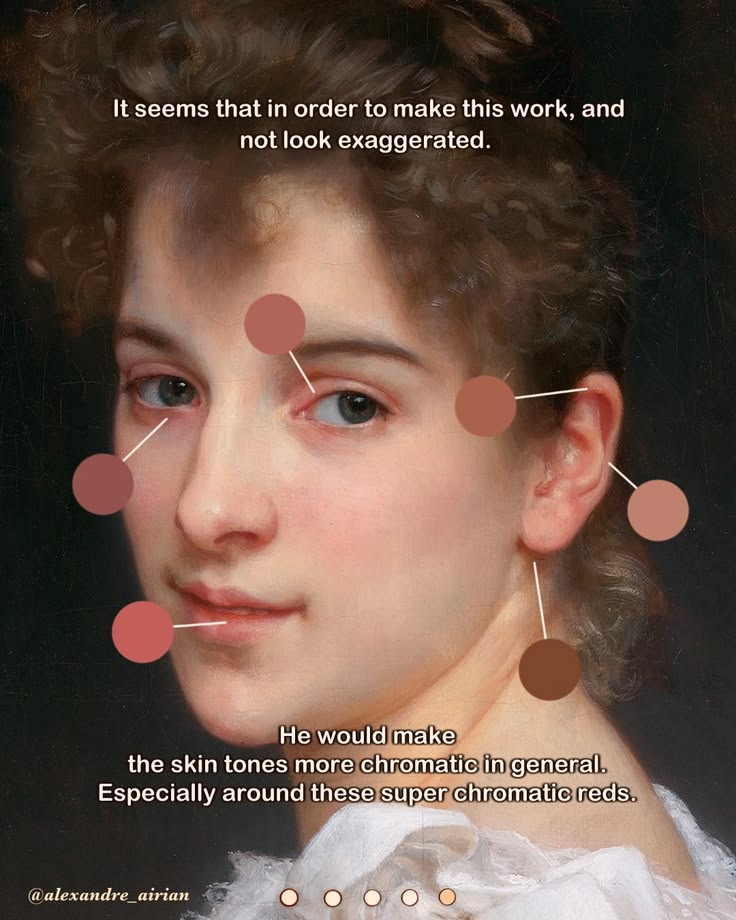
Feb 17, 2026 - 6,202 likes, 49 comments - alexandre_airian on February 3, 2026: "More thoughts about this one👇🏻 Alright this is something that I noticed while looking at his work. I’m not really sure why, but it seems that when you saturate your shadows and add these super chromatic reds, it ends up giving that pearly/luminous look…
dapper forum
wintry crane
So I put base color of skin, and on another layer the yellow rwd and blue then I...
Yeah
Though you can do that after working on values
Otherwise the color variation can get lost in the rendering process
Though I suppose you can always do it twice
dapper forum
wintry crane
Sounds like a game changer
Glad to be of service!
Tbh that reminded me that I definitely didn’t pay enough attention to color variation on skin in some of my pieces
wintry crane
dapper forum
https://pin.it/4V6BfXSY6
here are some
Turns out I don’t have a lot saved
(Fir...
OMGGGGG oh dear! Thank u so so so much