#Animation
30 messages · Page 1 of 1 (latest)
 tacit stream
 sour moss
Since your animation is 6 fps, that’s the main reason it feels choppy.
- Increase FPS (biggest upgrade)
For walk cycles and flowing fabric:
● Try 12 fps for beginner-friendly smoothness
● 24 fps is industry standard but more work
You don’t always need to draw more frames, you can also:
Duplicate some frames
Or use “onion skin” and add in-betweens between your key poses
Think of frames like stepping stones. Right now they’re too far apart.
- Use Keyframes → Then In-betweens
For a walk cycle:
Draw these first:
● Contact pose (foot touches ground)
● Down pose (body lowest point)
● Passing pose (leg passes middle)
● Up pose (body highest point)
Then add small drawings between them to soften the motion.
This alone makes animation look 10x smoother.
- Dress movement should lag behind the body
Clothes don’t move with the body instantly. They:
□ Follow after the movement
□ Overshoot a little
□ Then settle back
So when the body goes left →
The dress should go right slightly →
Then follow left →
Then bounce back gently
This is called follow-through & overlap and it makes fabric feel alive.
- Turn on Onion Skin (if your app has it)
This lets you see previous and next frames faintly.
Absolute lifesaver for:
■ Smooth motion
■ Consistent proportions
■ Flowing dress animation
Lastly,flip your animation constantly
Play it again and again while fixing tiny things.Pros literally watch their animation on loop like detectives.
Thats it if you need for help just dm me!
tacit stream
Omg that’s a lot of helpful information tysm
OKAY I JUST READ OVER IT THAT HELPS ALOT IM GONNA GO TRY THAT
sour moss
sour moss
Thats it if you need for help just dm me!
.
 solar frost
@tacit stream hey just wanna inform u kaeya got banned cuz he used chatgpt to generate that feedback for u
Its good advice tho but totally ai generated
tacit stream
solar frost
<@1079524679766773911> hey just wanna inform u kaeya got banned cuz he used chat...
Oh ew I just thought he was genuinely some kinda pro 🙁
solar frost
Yeahhh :/
 worthy mauve
solar frost
<@1079524679766773911> hey just wanna inform u kaeya got banned cuz he used chat...
worthy mauve
solar frost
<@1079524679766773911> hey just wanna inform u kaeya got banned cuz he used chat...
Do not discuss ai in any capacity in this server. Its against the rules
solar frost
worthy mauve
Do not discuss ai in any capacity in this server. Its against the rules
Not discussing at all just pointing out they should atleast know the feedback wasnt actually from a real person
worthy mauve
solar frost
Not discussing at all just pointing out they should atleast know the feedback wa...
Mentioning it is a form of discussion. Its a controversial topic and it is against the rules
tacit stream
worthy mauve
Mentioning it is a form of discussion. Its a controversial topic and it is again...
Am I allowed to keep this open until I’m done with my animation? Maybe get tips throughout the entire process?
worthy mauve
tacit stream
Am I allowed to keep this open until I’m done with my animation? Maybe get tips ...
You can keep the thread open. Just dont discuss or mention ai from this point forward
tacit stream
worthy mauve
You can keep the thread open. Just dont discuss or mention ai from this point fo...
Okeyy i wasn’t even the one talking about it but okii 🥹🥹
Added arms 🤞🤞
 knotty raptor
tacit stream
Added arms 🤞🤞
knotty raptor
tacit stream
Added arms 🤞🤞
this is so irrelevant but the way you draw bases is so fricking cute
 pine shard
tacit stream
Added arms 🤞🤞
pine shard
tacit stream
Added arms 🤞🤞
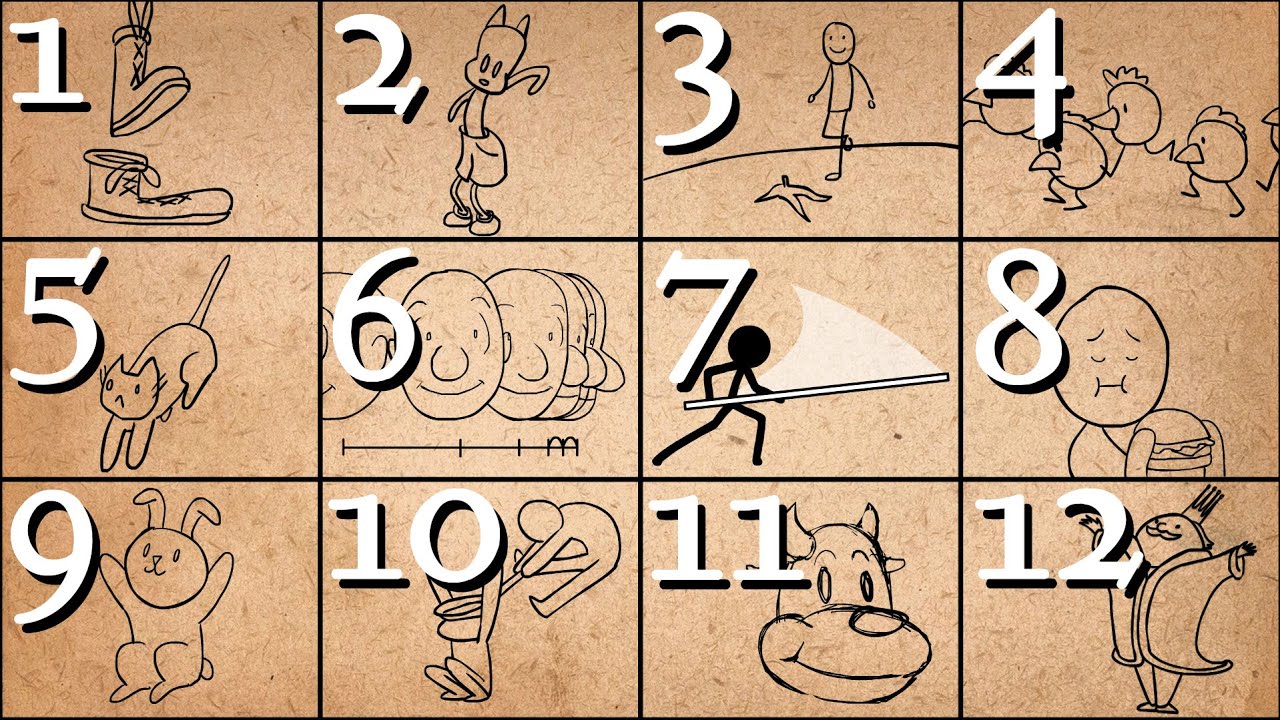
Further Animation Learning: http://bit.ly/2dleXfH
Full playlist: https://www.youtube.com/playlist?list=PL-bOh8btec4CXd2ya1NmSKpi92U_l6ZJd
(0:10) 1. Squash and Stretch
(2:07) 2. Anticipation
(4:14) 3. Staging
(6:33) 4. Straight Ahead/Pose to Pose
(9:14) 5. Follow Through & Overlapping Action
(11:17) 6. Slow In & Slow Out
(12:57) 7. Arcs
(14:38)...
Here is a great video I got sent a while back about animation
tacit stream
knotty raptor
this is so irrelevant but the way you draw bases is so fricking cute
AWW TYY
tacit stream