355 messages · Page 1 of 1 (latest)
 broken kestrel
I have this printer that I spent almost $3000 sitting in my basement for months. Someone was nice enough to build it for me, but now they aren’t able to flush the firmware on for me, so I try to do it, but I have no clue how to do it, and I need help. I’ve tried using the Rat OS manual, but I just couldn’t install it. I have zero clue what I’m doing, and if someone could give me step-by-step help, that would be greatly appreciated. I am willing to compensate them in return. I couldn’t figure out how to flash firmware, especially because I’m using a Mac, that might be part of the issue, but it would be great if someone can help me.
EDIT: I have nothing against the RatRig, and I believe they make amazing printers. I just want to get it printing.
 lost orbit
Get this for Mac
https://etcher.balena.io/#download-etcher
Have you downloaded the RatOS image?
broken kestrel
I tried it let me show you what happens
@lost orbit Hold on what RatOS should I download?
Which version should I download?
And also, what file
I could’ve downloaded the wrong file
@lost orbit Which file should I download


What should I do?
lost orbit
You want the rpi32.img.xz file. The one that is 1.79 GB
Sorry, I'm out running errands and will reply slowly
broken kestrel
lost orbit
Sorry, I'm out running errands and will reply slowly
I totally understand that’s fine.
broken kestrel
lost orbit
You want the rpi32.img.xz file. The one that is 1.79 GB
@lost orbit I’ll try again using that file.


@lost orbit Now what?
 lost orbit
I know for PC there is an issue with more recent versions of balena etcher. Didn't think it would extend to Mac but here we are
Try grabbing 1.18, or Google around for a better Mac alternative
broken kestrel
@lost orbit Will this work?
 lost orbit
Yes, but don't change any defaults
broken kestrel
is this good?
 lost orbit
Looks good so far. Hope for no errors 🙂
 timid rock
I’m assuming the person that built it did not flash the Octopus v1.1 board. You will probably want to put in some ear plugs or disconnect the part cooling fan before you power up, other wise it will run at 100% speed until you get the main board and tool boards flashed. It is really loud.
Eject the microSD card from your computer and install it into the RaspPi.
It will take a few minutes to boot, but you should eventually see a “RatOS” WiFi signal show up on your computer. When it does, connect to it using the password “raspberry”.
From there you should be able to follow the commissioning guide.
broken kestrel
timid rock
I’m assuming the person that built it did not flash the Octopus v1.1 board. You ...
@timid rock @lost orbit Where do I put the SD card?


???
lost orbit
What have you done to try and find where the microSD card slot is ona raspi?
broken kestrel
lost orbit
What have you done to try and find where the microSD card slot is ona raspi?
I don’t see a SD card on the Raspberry Pi.
 lost orbit
That wasn't my question
broken kestrel
lost orbit
That wasn't my question
I’m sorry I didn’t understand. Can you please explain your question?
lost orbit
What steps did you take in order to try and find where the slot on the raspberry pi is for the sd card?
broken kestrel
I just looked for a SD card slot.
lost orbit
Visual inspection is a good first attempt, for sure. You could then have tried to find more pictures of one, or a diagram.
To cut that short though, i'll tell you it is on the back.
in the top right in the pic to be precise. You may find it easier to unmount it from the electronics panel to see exactly where it is to plug in the sd card.
After the first time you should be able to do it by feel
broken kestrel
lost orbit
Visual inspection is a good first attempt, for sure. You could then have tried t...
@lost orbit I inserted the SD card. Now I wait for the hotspot to appear like the instructions say?
lost orbit
yep 🙂
broken kestrel
@lost orbit OK, but the sd card has been in the Raspberry Pi for over 30 minutes, and it doesn’t show up.
lost orbit
do you have it the right way up? it's easy to put in wrong
lost orbit
can't tell from the pic, sorry. Try flipping it around and rebooting
Bout to head out for the evening, but I'll try and check in
timid rock
Doesn’t look like the card is fully seated in the socket.
I would turn off the power, unbolt the Pi board from the mount so you can flip it over and see how the card is seated.
broken kestrel
@lost orbit @timid rock Thanks, I’m not home now, but when I get home, I will finish.
lost orbit
I'm not near mine to check if it's right. Do yes it go further in, and did you try flipping it around to see if it fit?
broken kestrel
@lost orbit @timid rock

🚨 Urgent Help Needed! 🚨 I’m stuck flashing RatOS and could really use an expert hand.Please help🙏
 foggy notch
 foggy notch
broken kestrel
<@77052760171753472> <@484552679809351681>
foggy notch
broken kestrel
<@77052760171753472> <@484552679809351681>
You can see the clip there
You were right the first time
broken kestrel
THANK YOU
@foggy notch Do you know what I should do since the Raspberry Pi hotspot isn’t showing up?
foggy notch
Is the pi getting power?
broken kestrel
How do I tell?
foggy notch
Should see LEDs
broken kestrel
On the raspberry pie?
foggy notch
Ye
broken kestrel
there is no LEDs showing on the raspberry pi
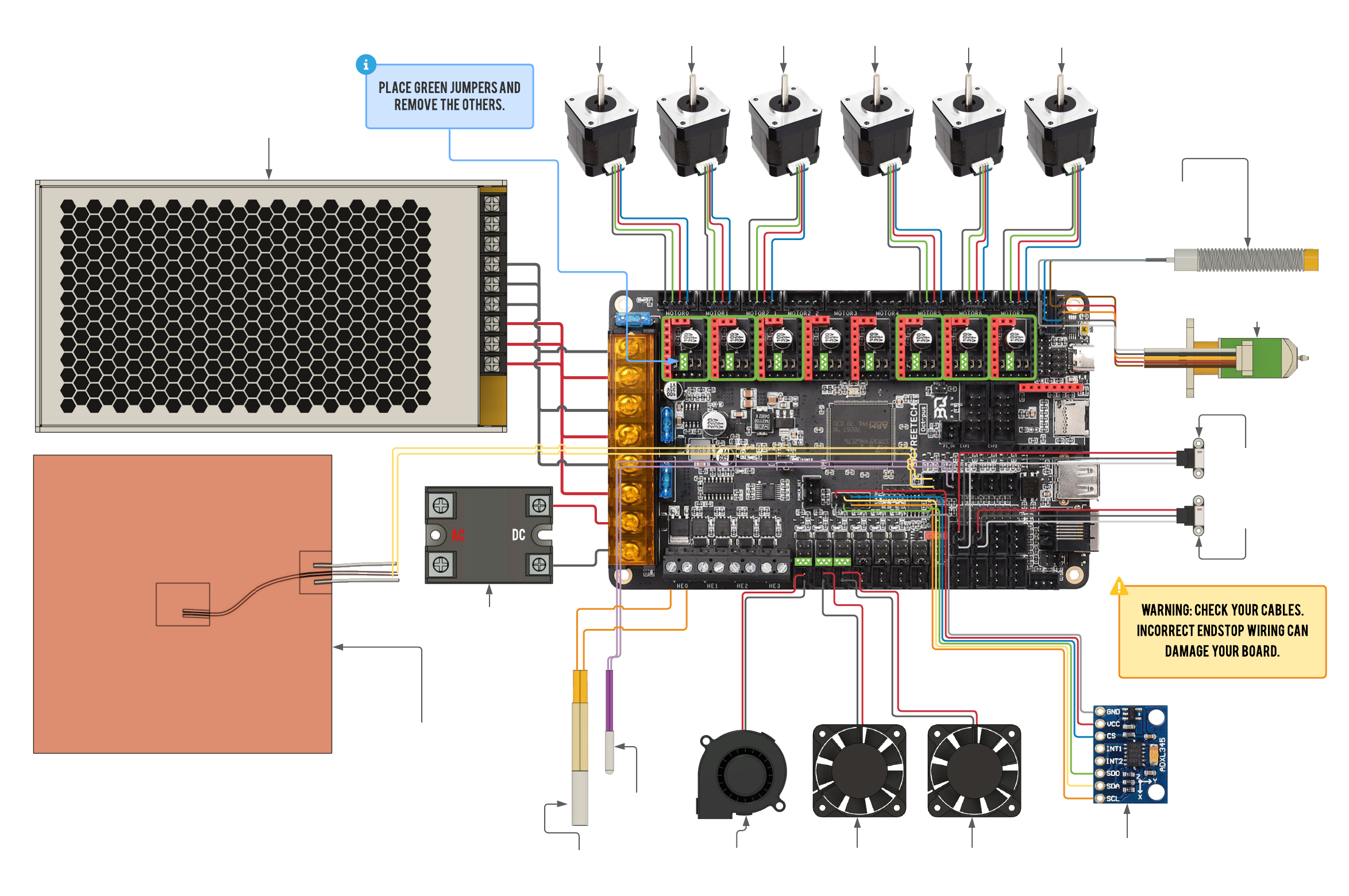
Now, what do I do? How do I give a power? Can I send a photo of the wiring?
broken kestrel
I did not plug it in. I’ll do it now.
I did plug it into my computer, and it says it takes too much power, but I didn’t realize what It meant.
broken kestrel
foggy notch
Plug everything else out
What do you mean? I should unplug everything?
foggy notch
 foggy notch
broken kestrel
What do you mean? I should unplug everything?
foggy notch
broken kestrel
What do you mean? I should unplug everything?
From the pi
Mark those 2 wires hard wired onto it
 foggy notch
broken kestrel
<@484552679809351681> <@77052760171753472>
foggy notch
broken kestrel
<@484552679809351681> <@77052760171753472>
Dont loose track of them!
broken kestrel
I should unplug those two
foggy notch
Ye
broken kestrel


 foggy notch
Ok it looks somewhat alive
broken kestrel
 foggy notch
👍
broken kestrel
I need it to show up on my computer, though.
foggy notch
You can login a link it to your wifi
Connect to the hotspot with password
raspberry
broken kestrel
It shows on my phone but not on my computer.

Now, what do I do?
And also now I wanted to thank you so much for spending your time to help me do this. I really appreciate it.
broken kestrel
What do I press? reboot what?
OK
now, what do I do?
@foggy notch I Pressed OK and It close the tab
foggy notch
Unpower the pi and reconnect the USB cables
Leave the 2 wires disconnected and just use the USB for now
You can mount it back on the printer
broken kestrel
Does it matter the order of the USB cables since there are two blue USB-A ports and two black ones
foggy notch
Not really
Some trial and error if there are issues down the line with a camera or whatever
 broken kestrel
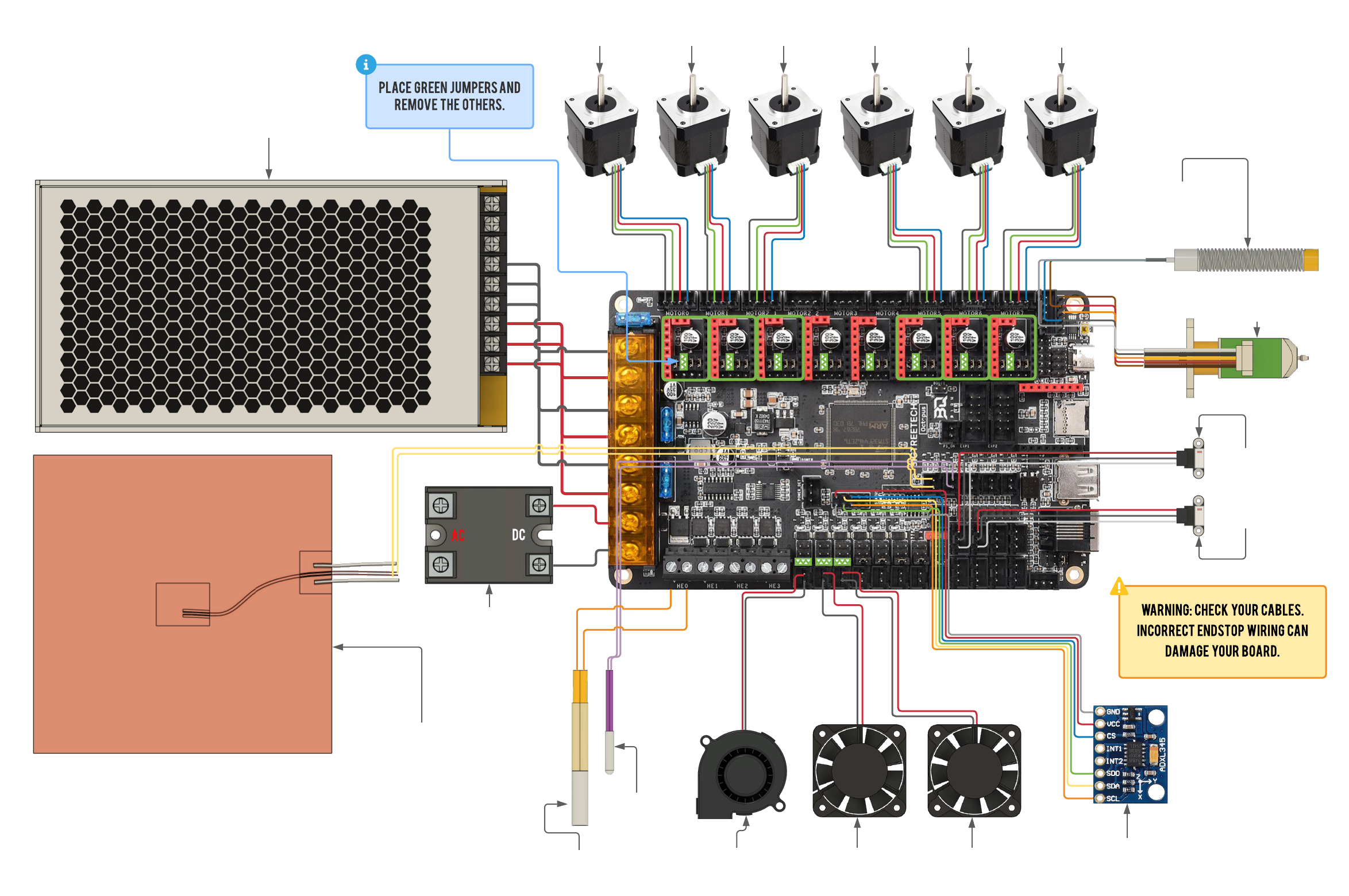
Can I give you a picture of the wiring and you’ll tell me if it’s correct?
broken kestrel
My brother is the one who built it and he said he did perfect wiring, and triple checked it
But everyone can make mistakes
This is the board


@foggy notch Is that the same one in the picture?
broken kestrel
Can you maybe send me photos for reference because I don’t know what parts I need or what wires I need since as I mentioned it at the beginning of this post I did not build this printer and that’s why I’m struggling with the firmware
foggy notch
Does it have a toolboard do you know?
broken kestrel
Does what have a tool board?
broken kestrel
I do have a bunch of printer parts, but that’s for a different project, but I can still use it if I need them
 broken kestrel
foggy notch
Little board on the toolhead
broken kestrel
foggy notch
Little board on the toolhead
What should I do with it?
foggy notch
You can probably go through the steps on the config commissioning now
broken kestrel
It doesn’t work when I try clicking on the website the rat rig OS
foggy notch
A list of what your ordered will help. You have to tell the ratos what parts are installed
Ratos.local?
broken kestrel
It doesn’t work when I try going on these two websites
 broken kestrel
foggy notch
A list of what your ordered will help. You have to tell the ratos what parts are...
broken kestrel
foggy notch
A list of what your ordered will help. You have to tell the ratos what parts are...
Like the electronic parts
foggy notch
Ye what hotend etc.
broken kestrel
I know some of them are the top of my head
broken kestrel
But I can’t access RatOS.local
foggy notch
broken kestrel
Should I plug in the Raspberry Pi?
foggy notch
You might need to find the ip of the pi
foggy notch
broken kestrel
Should I plug in the Raspberry Pi?
Yes
broken kestrel
foggy notch
You might need to find the ip of the pi
How?
broken kestrel
foggy notch
Yes
So should I unplug everything again?
foggy notch
No plug the charger into it
broken kestrel
Ok
foggy notch
You in?
broken kestrel
Is this good it’s flashing red the status icon thing
It didn’t show up in the Wi-Fi yet
 foggy notch
Once there is no smoke we’re happy
foggy notch
Click on the configurator
foggy notch
No 🔥?
foggy notch
Ok. The heated bed is cold?
broken kestrel
Yes, it is
broken kestrel
broken kestrel
Which one do I click on?
foggy notch
There is an order to to it
broken kestrel
foggy notch
https://docs.ratrig.com/v-core-4-0/commissioning-guide#C-configuration
I use this Guide, correct
foggy notch
 foggy notch
broken kestrel
I use this Guide, correct
foggy notch
broken kestrel
I use this Guide, correct
Ye it should be good
broken kestrel
foggy notch
That’s not an option
 foggy notch

This is preliminary documentation for the upcoming v2.1.0 release. The work is still ongoing and the documentation is not yet complete.
foggy notch
broken kestrel
That’s not an option
Hit the back button
In the browser
Or just ratos.local
Goes through it all there in the ratOS docs
I’m need to sleep but you are nearly there.
Might be best to commission the electronics with a fresh head.
broken kestrel
Thank you so much for all the help and all the time you have gave me I couldn’t thank you enough
I really appreciate it
foggy notch
And also someone who owns a v core 4
broken kestrel
What do you mean?
broken kestrel
Wait before you go I have one last question. What website do I use?
broken kestrel
foggy notch
https://os.ratrig.com/docs/installation
This or
broken kestrel
The other one
foggy notch
I used both…
broken kestrel
Ok
foggy notch
They should follow each other roughly!
There are some youtube videos on the vcore 4.
foggy notch
Have a look first
broken kestrel
I hope you have a great night. Thank you for your time and effort.
foggy notch
broken kestrel
Do I click this?
I think just do ratos first one sec
Update RatOS packages first.
If you see both ratos and ratos-configurator in the list (RatOS prior to V2.1.0-RC4), start by updating ratos first, then ratos-configurator.
If you see only ratos-configurator (mainsail v2.12 or below and/or RatOS prior to V2.1.0-RC4) or RatOS Core: Configuration & Configurator (mainsail v2.13 and RatOS V2.1.0-RC4 and above) in the list, update only this package.
Rather than update all
broken kestrel
foggy notch
Update RatOS packages first.
If you see both ratos and ratos-configurator in the...
OK, I don’t really understand but whatever
foggy notch

Time to start the open source rat race with the V-core 4 hybrid 400mm³.
Let's start by unboxing it and building the frame.
My review policy:
https://docs.google.com/document/d/1lp8Ne11e4BvtMaB8qq7OMc9kgeQ14vXy/edit?usp=sharing&ouid=113304722051570605205&rtpof=true&sd=true
You can support my work doing the following:
Become a member to support...
foggy notch
broken kestrel
I hope you have a great night. Thank you for your time and effort.
Best of luck with it.
timid rock
broken kestrel
Do I click this?
No. Click “Abort”
Scroll on that list and find the one that is labeled “RatOS”. Update only that one. RatOS must be updated first or you have to reflash the card. Old version of RatOS will not recognize the other packages if they go before it and then you are stuck.
broken kestrel
timid rock
No. Click “Abort”
Scroll on that list and find the one that is labeled “RatOS”....
UH OH
 timid rock
If RatOS is still working, maybe it is ok. I have not seen that error before.
Click on the invalid arrow and see what it says
lost orbit
Reflash the SD card and start over is the easiest
 lavish furnace
Your pi power was not wired correctly. Sorry just found this post. Should look like below picture


Step by Step Guide on how to assemble and wire the electronics on the V-Core 3.
broken kestrel
lavish furnace
https://ratrig.dozuki.com/Guide/14.+Wiring+Firmware+&+RatOS/167
Oh, you’re forgetting this is the V-Core 4 not the V-Core 3
Does this still apply though
lavish furnace
still applies. I'm on vcore4
timid rock
Interesting. Must have changed recently. The V-Core 4 I built earlier this year was only two jumpers
lavish furnace
The pi 4 has always been 5v power on pin 2 and/or 4. While technically speaking a pi can be powered from only 1 it is not recommended unless you have a dedicated stable 5v supply that can provide constant power without experiencing voltage drop which can occur while running the pi from another circuit board. In this case the octopus board. By supplying power to both you compensate for the potential power drop. Also earlier models of the pi 4 have a poly fuse. By using both pins you bypass said fuse. The pi 4b should not have this fuse and pin 2 and 4 should by physically linked.
lavish furnace
Also since it was pointed out that I linked vcore 3 document. Here is vcore4 https://ratrig.dozuki.com/Guide/13.+Wiring/316 steps 38 - 41 has 5v wired same way.
 timid rock
Looks like I will have to make a couple more power wires. The new kit I received a few months ago also only had one pair. Have only had 2 or 3 instances of “Low voltage throttle” warnings in the 1,500+ hrs we have on the first printer, so far.
I’ll fix the first printer after the second printer is up and running.
 hybrid wagon
Hello
 potent horizon
@broken kestrel make sure you use a download manager to make sure you have the complete download with no corrupted files, I had to that extra step of downloading this way because it would fail my download always at 99%
That connection for power on raspberry pi mist also survive vibrations later, I ended up soldering my connections
hybrid wagon
im the one building the printer for @broken kestrel
and th eprinter only came with 2 cables for the pie so i cant do what u showed me
im aslo going to flash it for him bc he wawsnt able to secseed
lost orbit
Good luck
hybrid wagon
would u be able to help
lost orbit
What's the current issue you're tackling?
hybrid wagon
i only have 2 wires to connect the pie to the motherboard not 4 so what do i do
lost orbit
For what, power? What are the connectors?
hybrid wagon
yes for power
lost orbit
Are you having trouble finding the connectors?
Buy connectors, buy wire, buy crimpers, make your own cable
Or power the raspi over USB
 winter sand
Hello good people! I am now starting to build my vcore4 electronics and I am seeing some trouble with ratOS and rpi5... I choosed that one exactly... Is there support for that rpi? Any good will help.
lost orbit
No, ratos is not built for raspi5
If you have other questions, please open your own thread
hybrid wagon
what shoud i put in this config

 lost orbit
which part?
I know you didn't build the machine, but you do have it in front of you, yes?
And hopefuly the order form?
hybrid wagon
i did build it but i just want the exelaroniters and endstops
foggy notch
hybrid wagon
i did build it but i just want the exelaroniters and endstops
Accelerometer?
lost orbit
No, because I don't know what you have
hybrid wagon
how can u help
lost orbit
Ask specific questions, and have knowledge of what your machine is equipped with.
hybrid wagon
i ma also triing to reconetct to it how do i do that?
lost orbit
What are you trying to connect to? How are you trying? What error messages are you getting? What is the screen you expect to see?
hybrid wagon
in just trying to connect to the printer where do i go to do so thx for the quick response
lost orbit
If you haven't connected it to your wifi, then you should be able to see it making a hotspot. Do you see it in your list of wifi?
hybrid wagon
yes
lost orbit
Follow these instructions carefully.
https://os.ratrig.com/docs/installation#wifi-or-ethernet
This is preliminary documentation for the upcoming v2.1.0 release. The work is still ongoing and the documentation is not yet complete.
hybrid wagon
nvmd i its not showing up
lost orbit
Is it turned on?
hybrid wagon
yes
lost orbit
Try opening a browser and opening http://ratos.local/configure
hybrid wagon
i could be bc i was in middle of what is end earlyer and the pi got unplugged is that an issue
lost orbit
It could cause issues, yes
If it isn't creating the ratos hotspot, and it isn't connecting to your wifi, then I would reflash it.
hybrid wagon
ok
lost orbit
I'm headed to bed, good luck
hybrid wagon
im stuck here i tried loading the beacon in config but it still keep sending me tonthis screen
 hybrid wagon
?
timid rock
Most of the time that is the connector not being installed fully.
lost orbit
Do you mean in the configurator?
hybrid wagon
Yes, the configurator
lost orbit
Is the beacon plugged in? Does it have a light?
hybrid wagon
Yes but idk what u mean by the light
lost orbit
I believe the beacon has a small led that will light up if it is powered
hybrid wagon
yes that was the issue i think but now its shoing this😩
 timid rock
hybrid wagon
yes that was the issue i think but now its shoing this😩
timid rock
hybrid wagon
yes that was the issue i think but now its shoing this😩
Did you or @broken kestrel add anything to the RatOS.cfg?
 rotund matrix
hybrid wagon
yes that was the issue i think but now its shoing this😩
rotund matrix
hybrid wagon
yes that was the issue i think but now its shoing this😩
That line should be in printer.cfg not Ratos.
broken kestrel
timid rock
Did you or <@1314361621593981020> add anything to the RatOS.cfg?
I did not
broken kestrel
hybrid wagon
yes that was the issue i think but now its shoing this😩
What should i press?
hybrid wagon
anyone know what to do
timid rock
It seems like it doesn’t like that line of code. I’m not sure if that is telling you it is in RatOS.cfg or if that RatOS is a sub section in printer.cfg.
RatOS.cfg should never be tampered with. All code overrides need to be in printer.cfg
If anything was added to allow unsupported slicer code, I would remove the lines added, then save & restart.
lost orbit
might also just need to update some stuff, but should be done in the right order.
Can we get a screenshot of the Update Manager?
hybrid wagon
 lost orbit
Start over with flashing. Not sure what you did to get those in an invalid state.
foggy notch
It was never confirmed if it was re flashed after hitting ‘update all’
foggy notch
hybrid wagon
You need to follow the instructions in the docs.
Update RATOS and the configurator first essentially.
lost orbit
2. Connect to hotspot
3. Setup wifi through configurator (and let it reboot)
4. Go to /config
5. Refresh update manager
6. at this point nothing should be invalid, all green. IF THAT'S NOT THE CASE stop here and post your moonraker.log
7. Update only the RatOS package(NOT configurator).
8. Update RatOS configurator (this takes awhile, if the mainsail output of the update process hangs, let it sit for 10 minutes and then refresh the page, Ctrl+Shift+R)
9. Restart moonraker service (click power icon in the top right of mainsail, click the refresh button next to moonraker under "service controls")
10. Reload mainsail (Ctrol+Shift+R)
11. Refresh update manager
12. "RatOS" should be gone from the list. Everything should be green and have several updates except RatOS configurator (ignore the klipper errors). If it's not, stop here and post your moonraker.log.
13. Click update all.
14. Done.```how do i post my moonraker.log
 rain nova
Get ratos-debug.zip under configurator.
Everything is included there.
hybrid wagon
@lost orbit this is insane. I have flashed my printer over 20 times and keep just getting these stupid errors.
 lost orbit
that error is easy, the extruder thermistor either isn't plugged in, or has the wrong type selected. Likely the latter.
timid rock
Or the jumper is not installed
Could also be a damaged/poorly connected wire for the thermistor. I have replaced 3 from the wire breaking where it goes into the hot end block.
hybrid wagon
what jumper
im having so much truble with this printer is this usual

ive had this built for months now but have never used it
lost orbit
That says the raspi isn't hooked up to the mainboard.
broken kestrel
Anyone able to help?
foggy notch
broken kestrel
Anyone able to help?
Did you reflash the OS to the SD card after you incorrectly hit ‘update all’ on initial startup?
broken kestrel
I’m currently on vacation. Sam Scam will continue this when I get back.
broken kestrel
I am back
broken kestrel
Sam Scam is the one building/flashing the printer
I am not
Can somone tell me all the parts that are broken?
lost orbit
At this point I don't trust any part, nor anyone that has had their hands on it.
broken kestrel
what do you mean?
Sam Scam is my brother. He is now flashing that he told me parts are broken, and now I am asking what parts are broken.
broken kestrel
lost orbit
At this point I don't trust any part, nor anyone that has had their hands on it.
@lost orbit Why
lost orbit
Too many errors, responses from everyone have been slow, and lacking detail. Questions asked show a lack of knowledge of printers, klipper, or how to read documentation. I realize this is going to be rude, but I've washed my hands of this thread weeks ago.
broken kestrel
I own and bought the printer my brother built for me and is now flashing it for me.
However, he does take forever to get things done, so that’s why you experienced these issues. I apologize if I caused you any trouble.
What do you suggest I do now?
lost orbit
Read documentation, test assumptions.
broken kestrel
lost orbit
Read documentation, test assumptions.
I will do as you said
How long does it take to flash?
@lost orbit
Because my brother flashed, should I restart everything or continue where he left off? Right now, I see this.
 lost orbit
What does that error message mean to you? Do you have any guesses?
Have you tried googling it?
broken kestrel
Yes, I just don’t know where the thermistor is.
broken kestrel
lost orbit
What does that error message mean to you? Do you have any guesses?
I assume the problem is based on the thermistor not being plugged in or it being broken.
lost orbit
those are the most likely, yep
broken kestrel
@lost orbit Would you be able to help me find the thermistor? I cannot find it.
broken kestrel
?
foggy notch
what hotend do you have?
broken kestrel
Rapido Phatus 2
foggy notch
google that + thermistor/diagram etc. until you find what you need.
broken kestrel
ok
 fierce ore
I'm curious,is he still alive or did he burned the house down? Is the printer printing now?
broken kestrel
@fierce ore No it’s not printing