
#configuration
160 messages · Page 1 of 1 (latest)
 distant thunder
 lost tusk
Please upload printer.cfg
distant thunder
ok downloading discord in the pc .. its really old pc hope it work
lost tusk
Take screenshots and upload if its easier
distant thunder
thats will take many .. give me sec and i will install discord
by the way its without (1) but upload it 2 times
lost tusk
You have not selected a probe?

 distant thunder
thats getting hard to understand . but how i know which one will work with me .. what info you need to answer me
lost tusk
Im on phone doing nightshift with baby so cant go to PC.
If you have a BL tell the firmware that by using the config
distant thunder
lost tusk
Im on phone doing nightshift with baby so cant go to PC.
If you have a BL tell ...
oh sorry .. appreciate ur help and time
lost tusk
distant thunder
oh sorry .. appreciate ur help and time
Np,is it working now?
distant thunder
got anther msg
lost tusk
Shoot
distant thunder
 lost tusk
What probe you have? Need to tell printer how to address it by selecting pin option in the pic you sent (i think,not running BL myself)
distant thunder
i use bltouch
and about probe u mean bltouch or super pinda like that ? or you mean endstop?

 distant thunder
ok you choose the first one because u use super pinda maybe .. but how i know which one i chose for bltouch ?
ok same
lost tusk
Try the same
distant thunder
same not working
lost tusk
What does it say?
distant thunder
 distant thunder
distant thunder
distant thunder
same
lost tusk
Cant help you then 🤷♂️
lost tusk

 distant thunder
no
lost tusk
distant thunder
https://teamgloomy.github.io/images/btt_octopus_1.1_pins.png
RatOS renames pins
lost tusk
Send the printer cfg you got now please
distant thunder
lost tusk
@plucky slate you got a sec?
distant thunder
i can give u full acces to my pc if. u want

 plucky slate
lost tusk
<@106015610344886272> you got a sec?
plucky slate
lost tusk
<@106015610344886272> you got a sec?
sure what's up
lost tusk
Would you have a look at the cfg and see if anything is messed up,doing it from phone on the web is pita 🫣
plucky slate
sure
@distant thunder
#####################################################
# BL Touch
[include config/z-probe/bltouch.cfg]
# Inductive/Capacitive probe
[include config/z-probe/probe.cfg]
You can't use both a bltouch and probe
distant thunder
plucky slate
sure what's up
i got ratrig v3 400 and i have zero experience how to set the congf 🙂
plucky slate
Same on line 194-201
rest looks fine
You just need decide which you want to use.
What is actually on your printer?
distant thunder
rat rig v3 400
plucky slate
distant thunder
rat rig v3 400
What probe is on your printer? Is it a bltouch or an inductive probe?
distant thunder
bltouch
plucky slate
distant thunder
bltouch
then comment out line 199 and 201 and 63
And you should be good to go
You're having problems because you're configuring both a bltouch and an inductive probe at the same time. That's like wearing boots and slippers at the same time, it doesn't work very well.
lost tusk
No error is a good start 🦖
plucky slate
distant thunder
yeah serial
Flash your board with RatOS firmware
plucky slate
distant thunder
where i put the serial id ?
you don't
This is not a voron
All of this is automated.
distant thunder
yeah for that i am lost with it
plucky slate
distant thunder
yeah for that i am lost with it
Yeah you're thinking too much. Its easiest if you just follow the instructions.
Anyway
I'll send you the binary
you went way past the compilation step
distant thunder
i did but lost with it
plucky slate
distant thunder
i did but lost with it
Where did you get lost?
distant thunder
with config
plucky slate
distant thunder
with config
You barely have to do anything with the config
You just pick what's on your printer
Anyways
distant thunder
aha
plucky slate
What board are you using? Octopus v1.1
distant thunder
yeah
plucky slate
Aight gimme a sec
distant thunder
ok
distant thunder
ok
plucky slate
Steps are in the docs for formatting the card if you need them.
Check that firmware.bin is renamed to firmware.cur on the sd card.
https://os.ratrig.com/docs/boards/btt/octopus-11#firmware-installation from step 5. tells you all you need to know.
 distant thunder
thanks alots
it shown me FIRMWARE after flash in the sd card
is that mean it flashed ?
lost tusk
 distant thunder
i think it flashed every thing work
lost tusk
Just follow the instructions and its easy,dont overthink it.
Im off the bed wish you luck
distant thunder
heat up the nozzle work and moving the axis work
distant thunder
lost tusk
Just follow the instructions and its easy,dont overthink it.
Im off the bed wis...
thanks alots dude gn8
distant thunder
plucky slate
Steps are in the docs for formatting the card if you need them.
thanks dude
plucky slate
distant thunder
thanks dude
YW 🙂 have fun with your new printer!
distant thunder
plucky slate
YW 🙂 have fun with your new printer!
its 1.3 years old but now got time to work on it 🙂 hope i can understand the next step like lvling bed etc ... thanks for ur help
plucky slate
distant thunder
its 1.3 years old but now got time to work on it 🙂 hope i can understand the ...
New old printer then 😂
Everything is set up for you, all you need to do is use the start and endprint macros (check the docs, if you're not using one of the official presets for superslicer or prusaslicers). Set up your z_offset first of course, but that's all.
distant thunder
thanks checking it after i clean the real and grease them again
is there bed mesh ?
distant thunder
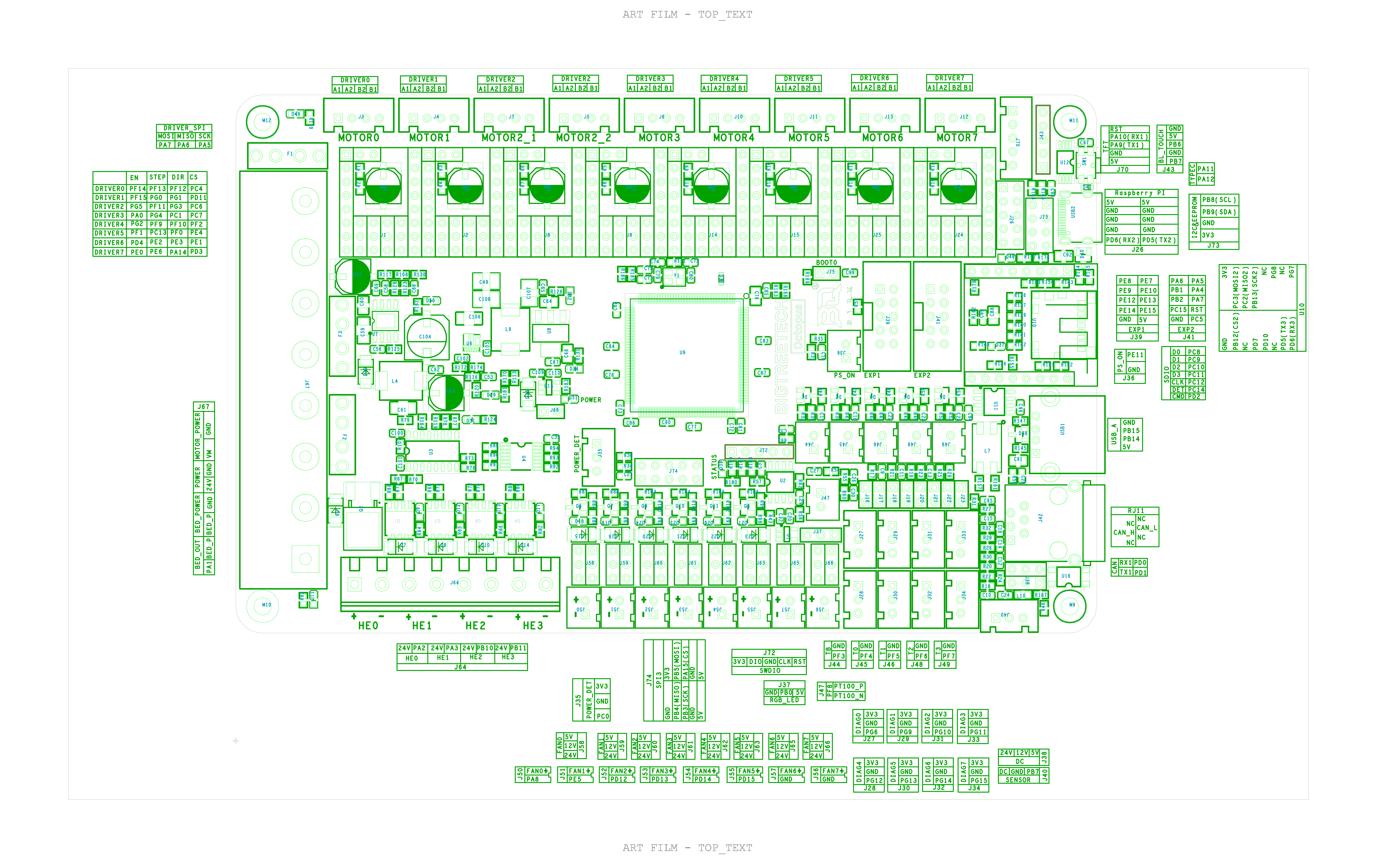
@plucky slate got question about the fans .. i used 24V fans do i need remove the jumper from V5 slot to V24 ?
my jumper in grean side which it 5V do i need to remove it to blue side ?
 lost tusk
distant thunder
my jumper in grean side which it 5V do i need to remove it to blue side ?
lost tusk
distant thunder
my jumper in grean side which it 5V do i need to remove it to blue side ?
The jumpers for fan voltage is above that output pinout,3 jumper option on every fan header.
lost tusk
No
distant thunder
i read it is for the fans like 5/ 12 /24 voltage

 distant thunder
lost tusk
distant thunder
lost tusk
yeah got it
but do u see where i mark on right side
there is jumper on the grean side do i leave it or remove it
lost tusk
Leave as documented
distant thunder
in document they said remove it and i forget to remove it . my bad
lost tusk
This assumes you use 24v fans move jumper according to the V you want

For 4028 follow that documented guide
distant thunder
yeah i saw that parts but i thought they was talking about that suction which i marked
coz in voron u need to move the jumper for which Voltage you use such V5 V12 V24
lost tusk
🤷♂️ i know nothing about vron
distant thunder
even me .. my knowledge not that much too .. but i got friend using voron he was try to help me yesterday then he got confused until you guys help me yesterday all work perfect
i try fan was working heating too work moving work good but what i am missing now is how to use bed mesh and lvling but i saw on document it will do bed mesh before each print .. and the s offset i need to press home then in the ratos page there suction for set the Zoffset hope i am not wrong
plucky slate
distant thunder
<@106015610344886272> got question about the fans .. i used 24V fans do i need ...
yes
distant thunder
plucky slate
yes
so i move it to blue right ?
plucky slate
distant thunder
so i move it to blue right ?
The ones you've painted over on that image is for a probe port you're not even using, not the fans.
plucky slate
distant thunder
so i move it to blue right ?
As @lost tusk said, the voltage selectors for the fans are above the fan headers.
distant thunder
oh not the fan so i leave it
or remove the jumper
yeah got it then fans all good .. only that i send there is jumper do i need to remove it ?
sorry guys for that tons of questions .. but i dont want to do something wrong that will burn my workshop 😦
distant thunder
horizontal_move_z can't be less than probe's z_offset
distant thunder
extruder when i print it reverse
lost tusk
distant thunder
extruder when i print it reverse
Add a ! In the config will change rotation
Its all in the docs
distant thunder
done
work very well
not got anther problem the tension wheel on extruder not touching the filament 🙂
lost tusk
distant thunder
not got anther problem the tension wheel on extruder not touching the filament ...
Cant help you with that one 😂
lost tusk
What extruder do you run? Is it for 1.75?
distant thunder
orbiter 1.5