#No trigger on Y after full movement SOLVED

37 messages · Page 1 of 1 (latest)

distant remnant
#

Hi,
Is anyone able to help me? I feel like I gonna burn it.
I have a vcore 300 just built, when I am homing the printer the x axis is homing but the gantry is moving 10mm on y axis and after that in console I have no trigger on y after full movement.
The endstop is working, I test it and is shows triggered when pressed.
Can someone please guide me a bit?
Thanks!

endstop_pin: x_endstop_pin
step_pin: x_step_pin
dir_pin: x_dir_pin
enable_pin: !x_enable_pin
rotation_distance: 40
microsteps: 64
homing_speed: 100

homing_retract_dist: 5.0
position_endstop:0
position_min: 0
position_max: 300

##############################
##############################

STEPPER Y

##############################
##############################

[tmc2209 stepper_y]
uart_pin: y_uart_pin
run_current: 1.1
stealthchop_threshold: 0
interpolate: False
[stepper_y]
endstop_pin: y_endstop_pin
step_pin: y_step_pin
dir_pin: y_dir_pin
enable_pin: !y_enable_pin
rotation_distance: 40
microsteps: 64
homing_speed: 100

homing_positive_dir: True
homing_retract_dist: 5.0
position_endstop:-50
position_min: -51
position_max: 300

#

If I set the y endstop position to 300 is working but this is not normal is it?

royal sentinel
#

Are you using ratos? Can you upload your full printer.cfg?

distant remnant
#

I am not using ratos, while working on it I noticed that if I set the endstop position at 300 is it working but it is not normal to home at x 0 y 300, I will send you now the cfg

#

thanks for helping !

#

homing positive direction is True , the second file is the right one

royal sentinel
#

How did you create this printer.cfg?

#

lines 72-86 are just wrong for the most part. You have sections but no settings under them...

distant remnant
#

I created them from scratch... cause I have two printers and ratos is not working with two printers

royal sentinel
distant remnant
#

yes

#

If I change it to False the gantry is moving oposite way of the endstop

distant remnant
#

direction*

#

one sec to read it

royal sentinel
#

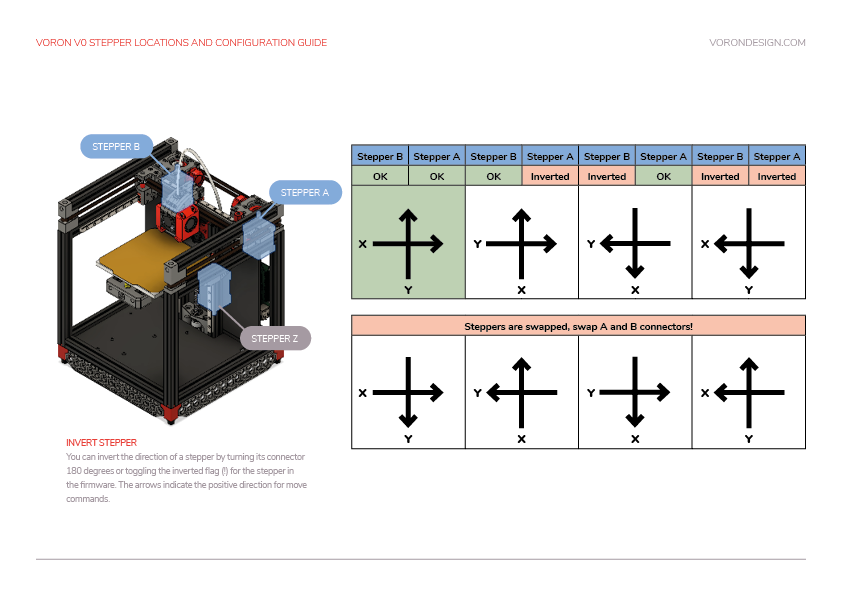
you have the motors wrong. Swap where they are plugged into

distant remnant
#

so the picture represents the direction while homing?

#

but x is moving in the right direction...

royal sentinel
#

look at the bottom right, X is moving correctly and Y is opposite. Above it, the picture tells you they are swapped

#

ohh wait

#

sorry, should be the bottom left photo

#

but still same thing applies - swap the motor connectors

distant remnant
#

I am doing it right away

#

I really apreciate your help!

royal sentinel
#

I would still clean up your config file as I mentioned you have a bunch of sections but without settings

#

that is only going to cause you trouble

distant remnant
#

I just set it up today and wanted to check that the motion is fine, I will work on it but this motion issue is driving me crazy

#

pfff you are godlike, it is moving fine now

royal sentinel
#

well, having a messed up printer.cfg isn't going to help with that either

distant remnant
#

I will sort them now, there is a whining noise from the stepper motors, any idea why?#🤦‍♂️ it was present before as well

#

are you talking only about the lines you mentioned at the start?

royal sentinel
#

anything that has [] but then nothing under it should be removed. I didn't dive deep into your config to see if there are other issues, that is for you to work out

distant remnant
#

thanks!

distant remnant
#

No trigger on Y after full movement SOLVED