#cth-history
1 messages · Page 87 of 1
 shadow anchor
 south bronze
Elgato HD60X
south bronze
Elgato HD60X
is it plugged directly into the back of the PC? or into a USB Hub?
 gray depot
Does anyone have experience with a Mac Laptop and Elgato HD60S+ set up on a Nintendo Switch? I'm still trying to capture my gameplay through StreamLabs OBS but it's not capturing or registering the elgato. I make sure either one of the applications is closed but only elgato’s software reads the switch. If anyone can help I’d appreciate it.
shadow anchor
south bronze
USB Hub
it should be plugged directly into the back of the pc
south bronze
shadow anchor
it should be plugged directly into the back of the pc
Ok why am i getting such weird Sound then?
shadow anchor
Don't know. Post how you are setup.
south bronze
What do you mean setup?
shadow anchor
what are you capturing? How are your cables run, etc
shadow anchor
@fickle pulsar captures the Switch. Maybe she has some tips for you.
south bronze
I can show it in a stream like how fucked up the audio problems are when I plug it in from behind
 fickle pulsar
shadow anchor
<@476160810457235466> captures the Switch. Maybe she has some tips for you.
fickle pulsar
shadow anchor
<@476160810457235466> captures the Switch. Maybe she has some tips for you.
I’ll be avail in an hour
south bronze
Just trying out my Ps5 as well
It'S connecting and disconnecting all the time

Having this screen for 1 Sec and then going back to this

thinking about getting an Elgato HD60 S+ but does it truly output in 60fps? ive used other capture cards on the market (who shall not be named) but none of them would output live in 60fps
 rose pumice
Anyone else notice that the "OBS studio" plugin for the stream deck stopped working? It says this in the screenshot, but I tried re-installing streamdeck software and nothing worked.

Plus, when I go to search for "OBS Studio" in the plugins tab, nothing shows up. As if it was deleted off the plugin store.
So I don't even have an option to delete just the plugin and reinstall it.
rose pumice
Upon a deletion of ALL files, uninstalling and re-installing, it still thinks I have "OBS Studio" and "Twitter" plugins. I looked on the plugin store for both of them by search, and neither are on the store. So I'm soft-locked with these on my list, even after fresh installs.
 south bronze
Could somebody help me with setting this up? I cant stream my ps5 for example and when im streaning my switch there are so many Audio issues
So I managed to stream my PS5 but I encounter the same issue just like with my Switch I have really disturbed Audio
south bronze
nvm got it fixed by using obs
the only issue I have now is a slight audio delay if anyone has any Ideas I'd be glad but not necessarily thanks to the people that were available to help
fickle pulsar
south bronze
are you bios/drivers updated?
south bronze
fickle pulsar
are you bios/drivers updated?
I fixed that I just gave up on the programm and doing it through OBS now
fickle pulsar
south bronze
I fixed that I just gave up on the programm and doing it through OBS now
oh, i thought you were using OBS. What were you using before?
south bronze
4k Utility Program
Now I got a Audio Delay as I said and I don't know how to fix it
fickle pulsar
south bronze
Now I got a Audio Delay as I said and I don't know how to fix it
I'll send some stuff after stream!
south bronze
fickle pulsar
I'll send some stuff after stream!
Thanks 😄
 acoustic stratus
im trying to record by switch with elgato on obs, but for some reason it has like a 3 sec delay and with that my audio is delayed by like 3 seconds and when im playing i just get delayed audio, can anyone help?
fickle pulsar
south bronze
Thanks 😄
on the audio, are you have it setup as an audio input in obs?
south bronze
fickle pulsar
on the audio, are you have it setup as an audio input in obs?
I dont think so
Sorry i Fell asleep
fickle pulsar
south bronze
Sorry i Fell asleep
No worries. Mute the video capture source, and add it as an audio input source. Monitor and output, in advance audio mixer. Should be working, as a few others have confirmed this works.

 steep sundial
Hi! My camera connected to my camlink is very jerky, around 20 fps. How can I solve? Thanks
@misty sonnet
 odd notch
I recently got an HD60S+ but the recording seem blocky, any one know how I can solve this? here are my current recording settings https://i.imgur.com/mqGwo8s.png
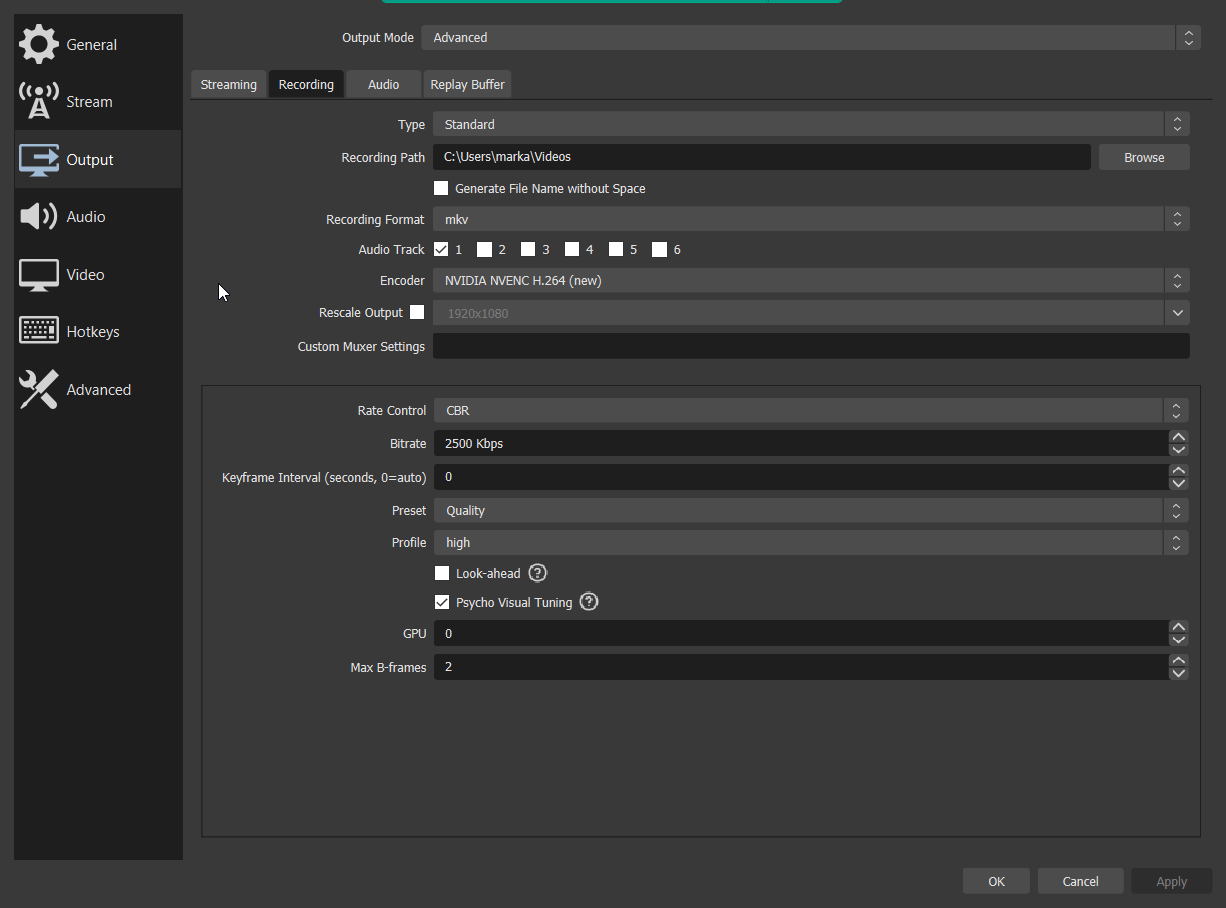
 viral cradle
Hi. I recently purchased a 4k60 s+ and having trouble with audio streaming from my ps5. I connected the 4k60 s+ to my PS5 and PC as directed, but even I open the 4k utility software the audio is cracking. Please can someone help?
 lavish badge
Hey everyone im having some bad input lag on my elgato when i open my OBS can someone help me out please?
fickle pulsar
south bronze
How do I do that?
so i was asleep, select your capture card. via audio input.
fickle pulsar
odd notch
I recently got an HD60S+ but the recording seem blocky, any one know how I can s...
I have a video for OBS in #community-resources however, I'm going to make smaller segments soon!
fickle pulsar
viral cradle
Hi. I recently purchased a 4k60 s+ and having trouble with audio streaming from...
"Your system seems to be having difficulty handling real-time audio and other tasks. You may experience drop outs, clicks or pops due to buffer underruns. One or more DPC routines that belong to a driver running in your system appear to be executing for too long. One problem may be related to power management, disable CPU throttling settings in Control Panel and BIOS setup. Check for BIOS updates."
odd notch
fickle pulsar
I have a video for OBS in <#837073573981323314> however, I'm going to make small...
You got a link to the post?
fickle pulsar
odd notch
You got a link to the post?
it's in #community-resources
fickle pulsar
viral cradle
Hi. I recently purchased a 4k60 s+ and having trouble with audio streaming from...
If you have an Nvidia GPU "Try re-installing the latest Nvidia driver from Nvidia, not the studio version.
Choose Nvidia driver without Experience, then Custom (Advanced), uncheck everything except Driver and PhysX, also choose clean installation. You don't need the Nvidia HD Audio component and I have seen it cause problems in the past.
The clean installation will reset any Nvidia driver personal settings you may have."
odd notch
I can't find it
fickle pulsar
lavish badge
can i dm?
yes
viral cradle
fickle pulsar
If you have an Nvidia GPU "Try re-installing the latest Nvidia driver from Nvidi...
Thanks, I will give that a try
south bronze
fickle pulsar
so i was asleep, select your capture card. via audio input.
,

I don't find it tho
fickle pulsar
south bronze
I don't find it tho
are you using 4k capture utility or game capture prior to OBS?
fickle pulsar
viral cradle
Thanks, I will give that a try
another this, one person had to change the PCIe slot for their GPU and then it worked. So try all options. 🙂
south bronze
fickle pulsar
are you using 4k capture utility or game capture prior to OBS?
No I'm not
fickle pulsar
south bronze
No I'm not
ok, so in sound capture, make sure it's outputing the audio from your capture card, and in obs under audio input add the line in sound capture. in the audio mixer advance settings, monitor and output.
fickle pulsar
south bronze
,
I was checking a few things. OBS seems to now only show the audio as a Video Capture Source, vs a separate input for Audio with some capture cards. HD60X for another person was showing up as an input, but maybe try is as an Audio Output Source, if it still doesn't show up there, then it's only going to have it as 1 source under video. You'll need to monitor an output that source, in the audio mixer's advance settings in OBS. as for the crackling sound, or latency, try these. https://streamdecklabs.com/🧯-how-to-disable-windows-10-11s-usb-selective-suspend-setting/ , "Your system seems to be having difficulty handling real-time audio and other tasks. You may experience drop outs, clicks or pops due to buffer underruns. One or more DPC routines that belong to a driver running in your system appear to be executing for too long. One problem may be related to power management, disable CPU throttling settings in Control Panel and BIOS setup. Check for BIOS updates."& If you have an Nvidia GPU "Try re-installing the latest Nvidia driver from Nvidia, not the studio version. Choose Nvidia driver without Experience, then Custom (Advanced), uncheck everything except Driver and PhysX, also choose clean installation. You don't need the Nvidia HD Audio component and I have seen it cause problems in the past. The clean installation will reset any Nvidia driver personal settings you may have." These seem to resolve most of these issues.

Once you complete these steps, Windows will no longer power off USB devices connected to your computer, which will fix any problem are experiencing as a result of this Windows feature. Windows 10+ includes the USB selective suspend feature that lets you automatically put USB devices in a very low-power state when they’re not actively… Continue r...
viral cradle
fickle pulsar
another this, one person had to change the PCIe slot for their GPU and then it w...
I updated my bios, reinstalled Nvidia drivers and it was the same. I have a having laptop so I have not tried changing pcie slots. I did go to your video to set up OBS with hopes I could set up my capture card as an audio device but it isn't showing up for me. I've gotten the video to show through game or window capture.
 fierce kestrel
Is there anyone able to help me understand audio sources with my elgato products? I'm currently running two PC set up. I use the Elgato XLR and the hd60 s as a capture device. I was able to play Dead by daylgith just fine hearing it, but now launching Minecraft, I don't know how to figure it out :
 patent mason
hey there i was hoping someone could help me with changing the output device my monitor mix is set to be on wave link. when i click the drop-down menu, it only shows the earbuds connected to my wave3 mic. it doesnt pick up my arctis pro wireless or any other output devices that windows is registering.
 patent mason
for reference, id like the option to also choose this device, which is working fine on my sound manager:

and all of my other programs recognize the other playback devices i have enabled, including discord. its just not appearing in wave link

id greatly appreciate some help if anyone has any potential fixes, please @ me :)
 muted ruin
fierce kestrel
Is there anyone able to help me understand audio sources with my elgato products...
muted ruin
fierce kestrel
Is there anyone able to help me understand audio sources with my elgato products...
In wave link software, click the option for app settings with sound and check that Minecraft is also set to output via the XLR? I'm no expert so I could be wrong but I had to do this with each PC game I play with my wave 3 and it fixed for me. If it's via the capture card, it could be as simple as changing the audio output to the capture card within sound settings, going to the individual sound settings for each app and selecting the capture card as the output? I don't play Minecraft but maybe there's an audio setting within the game to output to either the capture card or XLR, depending on your setup?
fierce kestrel
muted ruin
In wave link software, click the option for app settings with sound and check th...
yeah so that's what I used to do when I didn't have two PCs anbd that's what I had to do to get DBD to play sound. Clicked on the 4k capture part and changed it to the setting that I have. I have sound on YT and everything. But for some reason when I opened Minecraft, it doesn't capture ANY sound. It's really weird.
muted ruin
fierce kestrel
yeah so that's what I used to do when I didn't have two PCs anbd that's what I h...
I'm running a dual pc setup too, but my wave 3 is connected to the streaming pc rather than gaming pc. So I've had to manually go into the settings and change the audio output for each game to the capture card. But a couple games wouldn't show up in the list unless I loaded it and tabbed out OR the audio output setting was within the game itself and that usually worked. The one setting I can't get through myself though is my browser audio, it plays to my speakers no matter what so I do get the frustration! Hopefully someone more knowledgeable can help, sorry I wasn't any myself!
 marsh scroll
patent mason
hey there i was hoping someone could help me with changing the output device my ...
marsh scroll
patent mason
hey there i was hoping someone could help me with changing the output device my ...
How are you plugged into the pc from the DAC?
patent mason
marsh scroll
How are you plugged into the pc from the DAC?
the DAC of my headset is plugged directly into my PC, ive tried different USB slots. Mic is directly connected as well of course
fickle pulsar
viral cradle
I updated my bios, reinstalled Nvidia drivers and it was the same. I have a havi...
some cards are allowing an audio input, and some are only working through video capture. If it’s video capture, then you’ll go to your audio mixer advanced settings, monitor and output. Also, laptops, could be limited.
fierce kestrel
muted ruin
I'm running a dual pc setup too, but my wave 3 is connected to the streaming pc ...
Yeah all of my audio and stream stuff are plugged into the stream PC. Wave XLR, stream deck, etc. But it's weird because it should be playing sound since it does for everything else lol. But no worries ty for even replying ❤️
 lyric night
Is anybody here? I came to this Discord for some help regarding my HD60 S+.
I just recieved my HD60 S+ to record gameplay on my Switch but I'm haivng some problems while trying to use it.
I want my Capture Card to record audio and video which it does perfectly but it does it by making the audio and video separate files.
 green vector
trying to change my default playback device and my pc keeps changing it back to wavelink speakers. cant hear anything now as a result.
i was intending to use wavelink solely for my mic and just listen to my pc through my headphones themselves for no delay since theyre wireless and wave link adds delay for me there
scratch that, i can still hear now, my test video just had no audio lol, still want to change defaults tho
fickle pulsar
lyric night
I want my Capture Card to record audio and video which it does perfectly but it ...
try using OBS. 🙂
 warped scaffold
Hiya, I'm trying to use my Nintendo switch with an HD60s+ and OBS, yet I am not getting any audio from the capture card in OBS (although the TV does receive audio, so the switch is definitely outputting audio). Any ideas on what could be causing this?
 fickle pulsar
warped scaffold
Hiya, I'm trying to use my Nintendo switch with an HD60s+ and OBS, yet I am not ...
fickle pulsar
warped scaffold
Hiya, I'm trying to use my Nintendo switch with an HD60s+ and OBS, yet I am not ...
audio mixer, advance settings, monitor and output.
warped scaffold
I have done that. The issue isn't monitoring, but OBS not receiving any audio in the first place as far as I can tell (the levels in the mixer remain at 0)
fickle pulsar
warped scaffold
I have done that. The issue isn't monitoring, but OBS not receiving any audio in...
it should work in obs without issues, since this capture card is plug n play.
warped scaffold
Elgato's capture software also didn't receive audio 
 devout quartz
Hey guys, I got the game Capture HD (the old one) and its not being detected by my PC. Any tips?
warped scaffold
warped scaffold
Elgato's capture software also didn't receive audio <a:hmmst:462013190759251988>
I'll try updating OBS but since the issue also exists in elgato's recording software, doubt that'll work. In the meantime I'll connect the card to my laptop to see if the same thing happens there
Turns out it works fine on my laptop, but not desktop (which is where i need it to work), so it's not a problem with the card. Another thing I noticed is that the audio device is a single channel and not stereo for some reason
 muted ruin
warped scaffold
Turns out it works fine on my laptop, but not desktop (which is where i need it ...
muted ruin
warped scaffold
Turns out it works fine on my laptop, but not desktop (which is where i need it ...
I doubt this will work but have you tried going into the sound settings and ticking "listen to this device" for the HD60S+ on your desktop?
devout quartz
i figured out my problem btw
 warped scaffold
muted ruin
I doubt this will work but have you tried going into the sound settings and tick...
warped scaffold
muted ruin
I doubt this will work but have you tried going into the sound settings and tick...
Turns out the HD60S+ was disabled in sound settings for some reason, it works now!
Thank you!
muted ruin
warped scaffold
Turns out the HD60S+ was disabled in sound settings for some reason, it works no...
Yay!!! Glad it's fixed! Have fun with your capture now ☺️
marsh scroll
 stoic beacon
i even tried plugging it in
stoic beacon
i even tried plugging it in
I would try unplugging and plugging back in. I have had that issue with my Wave:3 a couple of times and that seemed to fix it.
stoic beacon
marsh scroll
I would try unplugging and plugging back in. I have had that issue with my Wave...
tried doing so
thanks though
marsh scroll
Have you tried doing a restart yet?
 worn anvil
Unfortunately it didn’t worked 😦 still no stream output in my OBS.
 limber wing
Hi, i've submitted this issue on Reddit, dose anyone encountered the same issue ? Passthrough is working fine, 5 FPS on elgato 4k capture utility, arround 20 FPS on OBS, no sound output at all, and MISSING OPTIONS ON 4K CAPTURE UTILITY, for exemple i cannot change the audio settings in "device"
I cannot see a lot of options
reddit
1 vote and 0 comments so far on Reddit

My device options

And this are my friend devices options


Same for image tab
(elgato game capture is not disabled in sound devices)
I'm using Hd60s+ same for my friend
 rare elm
limber wing
I'm using Hd60s+ same for my friend
rare elm
limber wing
I'm using Hd60s+ same for my friend
What are your pcs specs?
limber wing
I7 7700k overclocked to 5ghz with good temps (stable)
RTX 2070
Asus Z370F motherboard
Nvme storage
And i use Go XLR with a wireless headset
I'm using win 11
The biggest issue is that i have settings missing in the software, and i get no audio output, even in the 4k capture utility, microphone input is working fine
And i can hear my microphone if i check the monitoring option
And 32gb of RAM ddr4
Tried multiple USB 3 ports, even some ports that are not coming from the motherboard, the issue is not coming from there, tried changing HDMI cable, no improvement
muted ruin
limber wing
Tried multiple USB 3 ports, even some ports that are not coming from the motherb...
Do you have another USB C cable you can try? If your friend has the same device, have you tried borrowing their USB cable and see if anything improves? I'm just wondering if perhaps your USB C cable with the device is having issues?
limber wing
Didn't try that
I will try asap
Also, i bought this device from a pro second hand store
What i'm suspecting is that the firmware has been badly flashed or something, i don't know
As you can see i have the lastest firmware, my friend's firmware is older
I heard that firmware should never be updated because it easily bricks the device
But it's really strange, those who bricked their devices don't have these issues
They just can't use the game capture at all, and i still can get a decent render on OBS (~25 FPS), it's watchable i mean
 drowsy oracle
hey hey, is there a way to download a 2160p (4k) EDID? in the 4k60 pro EDID(Internal) I don't see any 4k, and i want to duplicate a 4k 144hz ... but the 4k capture utility captures it as 1080p
and i want to capture at 4k 60
limber wing
Just tried using an other USB C cable, i'm having the exact same result
drowsy oracle
limber wing
Just tried using an other USB C cable, i'm having the exact same result
it's 4k60 pro, internal capture card.
limber wing
drowsy oracle
it's 4k60 pro, internal capture card.
I'm talking about an other issue, unfortunately i don't know much about your issue because i'm using a hd60s+
 toxic tundra
Anyone else having an issue with the HD60 X where it doesn't work at all once you load a game? If I'm on the dashboard of my Xbox Series X, it displays. If I load into a game, it immediately gives me a "No Signal"
I've done the firmware update (ctrl + cogwheel click) & still nothing resolves it
fickle pulsar
toxic tundra
I've done the firmware update (ctrl + cogwheel click) & still nothing resolves i...
try a different usb 3.0 port on your streaming pc.
fickle pulsar
limber wing
Tried multiple USB 3 ports, even some ports that are not coming from the motherb...
in your sound, properties, check listen for this device.
fickle pulsar
drowsy oracle
and i want to capture at 4k 60
dual pc, dual monitor, or dual monitor console, and pc?
limber wing
fickle pulsar
in your sound, properties, check listen for this device.
Already done
fickle pulsar
limber wing
Already done
still same issue?
fickle pulsar
limber wing
Already done
open a ticket with #official-tech-support
limber wing
yep, already opened a ticket
drowsy oracle
fickle pulsar
dual pc, dual monitor, or dual monitor console, and pc?
dual pc
muted ruin
limber wing
They just can't use the game capture at all, and i still can get a decent render...
That would be a legitimate concern but in all cases I've seen on Reddit with people accidentally bricking it with firmware updates, the device doesn't even work on passthrough and the software gets stuck on initialisation. I guess it's possible? Hopefully support can help! Out of curiosity, did you try your device on your friends computer, and vice versa? Just to rule out a computer issue? If theirs has same issue on your pc but not theirs, or yours has no issue on their pc, then maybe the issue is the pc somewhere?
fickle pulsar
drowsy oracle
dual pc
Not sure on setups with dual, but there are guides on how to set it up.
limber wing
muted ruin
That would be a legitimate concern but in all cases I've seen on Reddit with peo...
i'll try that on my other older computer with a AMD FX8350 and RTX 2060
also older motherboard
but the computer is in french
maybe it has something to do with the chinese translated version of the app ? 🤣 i guess not
i think it's a hardware issue
i'll test
muted ruin
limber wing
i'll test
That's a good idea but I think you should try on your friends computer or theirs on your computer too. Because then its the same variables in terms of the specs, just literally swapping the hardware. I suspect its the card too but since you know the friend's pc definitely works fine with HD60S+ and I assume a language you can understand, it would be a good control test and help pinpoint the issue
limber wing
i'll test first with the older computer and if it still doesn't work, then i'll try to see if i can test it on my friend's computer
👌
south bronze
Hi all, will open a ticket either way here, but I wanted to check with the community to see if there was anything i'm doing wrong; I'm also noticing a lot of issues with the HD60S, so it could just be the card. I'm trying to capture from my desktop (Ryzen 5-3600x, 16GB DDR4 @3200, 1070Ti) to my laptop, Eluktronics P65xHP (i7-7700HQ, 16GB at 2666, 1060 mobile), I have verified every port is running at least at 3.0 speeds, the cable is modern 3.1 standard C-C, I have also tried a few 3.0 A-C cables, but I either get "Card needs 3.0 cable to function properly" or forever stuck on "Please wait" if I set OBS input as Elgato software. If I just select the card directly it's just black screen. HDCP turns off when I try to capture, and audio works the entire time. Thank you in advance for any help
ah right, regardless of input method I always have to set resolution manually on OBS
 acoustic flume
Any one know why my keylight brightness is randomly changing ? i set it to 13% but it keeps going to like 50%
drowsy oracle
fickle pulsar
Not sure on setups with dual, but there are guides on how to set it up.
I don't need a guide on how to set up, i just need the edid .bin for 4k 60 ... that's all!
fickle pulsar
drowsy oracle
I don't need a guide on how to set up, i just need the edid .bin for 4k 60 ... t...
which capture card?
fickle pulsar
acoustic flume
Any one know why my keylight brightness is randomly changing ? i set it to 13% b...
did you link all of them?
fickle pulsar
drowsy oracle
I don't need a guide on how to set up, i just need the edid .bin for 4k 60 ... t...
I would suggest opening a ticket with #official-tech-support that way they can help with the needed files etc.
green vector
whenever i try to change my output device, it automatically goes back to this speaker device. is there a way I can get past this?
 patent mason
could anyone help me troubleshoot why only one of my playback devices is recognized in monitor mix for wavelink? im trying to change the feedback from the aux on the mic to my headset

 acoustic flume
fickle pulsar
did you link all of them?
acoustic flume
fickle pulsar
did you link all of them?
I only have the one and its linked... i think i may have sorted it
fickle pulsar
green vector
whenever i try to change my output device, it automatically goes back to this sp...
sound capture is always on. Unless you close it via task manager. Any reason you use game capture hd vs OBS, or 4K Capture Utility?
green vector
i use obs, i think i just have the software from the capture card
fickle pulsar
green vector
i use obs, i think i just have the software from the capture card
which capture card do you use?
fickle pulsar
green vector
i believe it was hd60s
I just helped someone with game capture hd installed, with sound capture. This cause double audio, and a delay. You can use 4K capture utility instead. Once sound capture was uninstalled, and pc rebooted, audio was great on OBS. As for your audio it should work normal after. Try this see if it helps!
 daring moth
Hey guys!
So I'm having an issue where I want to play sounds from the streamdeck, that my stream can hear.
I use a GoXLR as well so what you'd do here is use somehting like EarTrumpet to route sounds from the streamdeck into "Stream mix" right.
But it's not working 😦
 strong elbow
I'm trying to capture footage on the 4K Capture Utility app and it works fine, but once I launch the game the app shows a black screen and there's no sound, but I can still see the picture on my other monitor
I'm playing on my PS5 and capturing using the HD60 S+
It works fine on other games, but once I launch MLB the Show 22, I get this problem
daring moth
Figured it out. 🙂
odd notch
Anyone know why OBS sometimes just stops the recording?
fickle pulsar
odd notch
Anyone know why OBS sometimes just stops the recording?
Might want to reach out to an OBS forum, or discord on that one.
fickle pulsar
strong elbow
It works fine on other games, but once I launch MLB the Show 22, I get this prob...
HDCP is off?
strong elbow
yes
fickle pulsar
strong elbow
yes
odd. I'll research it.
strong elbow
I think it might be when my monitor switches to HDR, i turned it off on the PS5 but I cant seem to turn off the HDR on my monitor
fickle pulsar
strong elbow
I think it might be when my monitor switches to HDR, i turned it off on the PS5 ...
is there a switch?
strong elbow
Yeah but it only switches from cinema HDR to game HDR
cant seem to find an off button
fickle pulsar
strong elbow
cant seem to find an off button
what's the monitor info?
strong elbow
ASUS ROG Strix XG279Q
fickle pulsar
strong elbow
ASUS ROG Strix XG279Q
thanks, let me check. granted HDR should be fine.
fickle pulsar
strong elbow
ASUS ROG Strix XG279Q
seems like HDR is auto on the monitor, and can be controlled via windows.
strong elbow
i'll try that out and see it how goes
odd notch
fickle pulsar
Might want to reach out to an OBS forum, or discord on that one.
I think I have sorted it, before I had the streamdeck I setup hotkeys and I was most likely pressing them 
 uneven steppe
Hey all! I've been using a HD60 S with a Switch, and I've been having some issues with the passthrough. It's noticeably more pixelated at a glance (def seems like more like 720p or something rather than "the capcard taking some of the data" or whatever Elgato's site says, I forgot lol) and the colors are duller. I have yet to assess if the actual capture is affected in the same way. I'm fairly certain that it's not the HDMI cables as they work just fine sending 1080p video directly to the monitor. Does the HD60 S do this to the passthrough normally, or do I have a faulty unit or something? (probably doesn't matter either way since I got this over a year ago, but it's been bugging me and I'm really curious lol)
muted ruin
uneven steppe
Hey all! I've been using a HD60 S with a Switch, and I've been having some issue...
I think it's still worth submitting a support ticket for it, I had an issue last year with mine but it was 4 years old. Support still helped me so don't let it's age put you off submitting a ticket!
 oblique shuttle
anyone know how i can fix the Driver error: Error creating bus dice::Driver Error: loading driver: for the goxlr
 sacred surge
Anyone can help me with my new Elgato 4K60 Pro MK.2.. for some reason my PC do not recognize the device
I already tried everything I found online
rare elm
oblique shuttle
anyone know how i can fix the Driver error: Error creating bus dice::Driver Erro...
goxlr is not an elgato device
oblique shuttle
rare elm
goxlr is not an elgato device
lmao i clicked the wrong discord XD my bad haha
 slender dagger
I'm not sure if this is the right channel for this question so if its not someone please correct me but I need a good free editing software for my laptop so i can edit videos
fickle pulsar
slender dagger
I'm not sure if this is the right channel for this question so if its not someon...
I use davinci resolve.
slender dagger
Okay thanks : D
fickle pulsar
slender dagger
Okay thanks : D
You're welcome!
 velvet slate
when the capture is running, does it fill up disk space? is there a way to not save the input ?
 abstract edge
I've been fighting with my HD 60 for a few days now, trying to make it work with my PS4. Everything hooks up fine, we've downloaded the proper drivers, but I can't figure out how to get the audio to work with a headset, if I'm able to- or if I'm able to use party chat audio at all.
I have windows 11, and since the aforementioned attempt at using the capture card with the ps4, I can now not use any other device for audio other than the capture card (suddenly i can't change the primary audio to another device).
Anyone have any clue on what might be happening? or if there's any way to fix both issues.
 serene vector
yo anyone know why i cant get passthrough to work from my elgato hd60s + with my ps5 to see the game on my monitor ?
 slow canyon
Please respond here
Don't want to cause confusion. Any Help Is Welcome.
plz:)
and i see your list of things to do for this situation. Guess I need to file a ticket... Oh well.
muted ruin
Its my turn to need help! I'm not sure if this is the correct channel but I have Wave 3 and I use wave link, or rather I want to. I originally installed it on my gaming PC before realising I need it for the streaming PC instead. Every time I boot my streaming PC, the wave link makes me set it up again like I've only just connected it. On gaming PC though, it remembers my settings and outputs how I want. Its getting annoying having to re-set it up each time. I was hoping someone else either has this problem, knows the problem or has a fix they can suggest?
 rough nebula
muted ruin
Its my turn to need help! I'm not sure if this is the correct channel but I have...
rough nebula
muted ruin
Its my turn to need help! I'm not sure if this is the correct channel but I have...
I dont know if this helps at all but you should make sure at least Wave Gain Lock is enabled in wave link. Are you switching the cable between the two computers?
muted ruin
rough nebula
I dont know if this helps at all but you should make sure at least Wave Gain Loc...
No so originally I connected and installed it to the gaming PC but quickly noticed my mistake so I switched the cable to the streaming PC after installing wave link. I've only unplugged the wave 3 to plug back into the gaming PC to confirm the loss of settings isn't happening on there. It was set up exactly as I had left it. So it stays connected to the streaming PC full time, I just shut down my PC via windows. But when I boot up again, it thinks it's a new device again. I'm not knowledgeable with this stuff so I didn't know that was a thing, I'll Google it now and check. Thank you for the reply!
 winter rivet
Hey guys, i hope this is the right channel, otherwise i guess camera chat could be the other option.
I recently purchased an Elgato Facecam and have big problems with flickering all across the camera.
I tried different shutterspeed and to adjust my lighting but it does not seem to be solved. Its always the question between "how bad is it today".
if you have any idea on how to fix it or which info to provide to get a better view on the situation just lemme know. Thanks in advace! 
muted ruin
rough nebula
I dont know if this helps at all but you should make sure at least Wave Gain Loc...
So I've looked it up and it seems that this setting is just for locking in your gain settings but my entire wave link software goes through set up each time I boot up. It makes me choose the monitor mix and set up each audio channel every time I boot up and I'm not sure why when that issue isn't present on the gaming PC when I tested it to confirm. Thank you though!
fickle pulsar
muted ruin
Its my turn to need help! I'm not sure if this is the correct channel but I have...
do you have any pending updates, are your bios/drivers up to date?
muted ruin
fickle pulsar
do you have any pending updates, are your bios/drivers up to date?
Windows is fully updated, I checked. I even checked for updates within the wave link software but it says I have the latest version. I've updated my Nvidia drivers too. The only thing I haven't done is bios because I don't know how, and even following a video I'm still stupid enough to mess it up. I've heard messing with bios can cause issues if you don't know what you're doing? Not sure if it's relevant but on the PC that doesn't have this issue, all my USB ports remain powered even when the PC is shut down whilst the streaming PC doesn't power anything while off so I thought maybe it's a power issue but again I'm stupid and need help! Thank you for taking the time to reply
fickle pulsar
muted ruin
Windows is fully updated, I checked. I even checked for updates within the wave ...
Try this! Also, have you uninstalled, rebooted, reinstalled the software?
Once you complete these steps, Windows will no longer power off USB devices connected to your computer, which will fix any problem are experiencing as a result of this Windows feature. Windows 10+ includes the USB selective suspend feature that lets you automatically put USB devices in a very low-power state when they’re not actively… Continue r...
muted ruin
fickle pulsar
Try this! Also, have you uninstalled, rebooted, reinstalled the software?
I haven't actually! When I'm uninstalling and booting up, I assume I unplug the mic until I reinstall again?
fickle pulsar
muted ruin
I haven't actually! When I'm uninstalling and booting up, I assume I unplug the ...
first uninstall the software, reboot your streaming pc, reinstall. 🙂
then plug in mic
muted ruin
fickle pulsar
first uninstall the software, reboot your streaming pc, reinstall. 🙂
So unplug mic, uninstall, reboot PC, reinstall and then plug back in. Gotcha! Thank you so much, I'll also check out the link too!
fickle pulsar
muted ruin
So unplug mic, uninstall, reboot PC, reinstall and then plug back in. Gotcha! Th...
exactly! You're welcome!
muted ruin
fickle pulsar
https://streamdecklabs.com/%f0%9f%a7%af-how-to-disable-windows-10-11s-usb-select...
That setting was enabled!! Disabled now. Should I try rebooting first now before the uninstall process or just carry on with that anyway?
fickle pulsar
muted ruin
That setting was enabled!! Disabled now. Should I try rebooting first now before...
carry on! 🙂
muted ruin
fickle pulsar
carry on! 🙂
Thanks!
fickle pulsar
muted ruin
Thanks!
You're Welcome!
serene vector
yo anyone know why i cant get passthrough to work from my elgato hd60s + with my ps5 to see the game on my monitor ?
 novel fossil
Hello all, I have been experiencing an issue with my StreamDeck ! Every time I turn on my pc, a tab is opening in my browser to Approve its functionality! WHY ?

 velvet pelican
For those using Wavelink on Mac: Anyone else experiencing random distorted audio and coreaudiod using several hundred % of CPU? It happens occasionally since the latest update of the wavelink software? I’m experiencing this on both an M1 mac and on an intel mac. So I don’t think it’s specific to either. I didn’t use to have these issues before.
slow canyon
Hello again I'm in need of a little help.
To Start with, I'm running an elgato HD60S with obs software in order to record videos.
It ran well with the first two recordings, however I only recorded in-game audio. I looked into buying a chatlink cable to use as a simple solution. I got it hooked it up and started a recording session.
As i was going into obs I am only able to see a Black screen that's flickering color bars every now and then.
If anyone can help with this problem I'd Greatly Appreciate it.
 tacit niche
Hello guys! I was wondering why I have to turn off and on my Lights each time I power on my computer, it seems like ElGato Center does not detect them after restarting my computer. Any idea? Thanks!
fickle pulsar
serene vector
yo anyone know why i cant get passthrough to work from my elgato hd60s + with my...
is hdcp turned off?
fickle pulsar
slow canyon
Hello again I'm in need of a little help.
To Start with, I'm running an elgato ...
chatlink, is your audio in analog in obs?
serene vector
yes ! @fickle pulsar 😦
fickle pulsar
serene vector
yes ! <@476160810457235466> 😦
is In connected to your console, OUT connected to your gaming monitor/tv, and USB-C connected to your streaming pc's USB 3.0 port?
shadow anchor
A USB-C 3.x cable. USB-C is a connector type not a USB version. Just in case.
serene vector
yo tried my friends and it worked on his elgato, guess my hdmi out is fried on minee
fickle pulsar
serene vector
yo tried my friends and it worked on his elgato, guess my hdmi out is fried on m...
yeah, hdmi cables can be an issue. try some other ones
serene vector
nawh it was just the elgato
same hdmi worked on my friends for my setup
gonna go through support and get a replacement if possible
 copper iron
Hey guys, I just got a Elgato 4k60 Pro MK2 capture card today. I have an asus laptop (stream pc) and a pc (game pc), I can get everything to work on the game pc's end but when it comes to stream pc I connected the hdmi and downloaded all of the drivers plus updates and restarted multiple times. Does anyone have any ideas?
fickle pulsar
serene vector
gonna go through support and get a replacement if possible
doesn’t sound like it’s the card, but an issue with the pc. I’d say open a ticket with #official-tech-support and have them run a diagnostic. Then they can see what the issue is.
fickle pulsar
copper iron
Hey guys, I just got a Elgato 4k60 Pro MK2 capture card today. I have an asus la...
can’t work on a laptop, unless the laptop was a gaming laptop, that you are connecting to a pc that has a pcie port.
copper iron
I thought the hdmi from the hdmi out of the Elgato goes to an hdmi port on the streaming pc
@fickle pulsar do you need two elgatos then?
rare elm
copper iron
<@476160810457235466> do you need two elgatos then?
The Elgato needs to be installed on your streaming pc. There is no way to connect the 4k60 to a laptop
 jovial bear
Does anyone know what happened to the Sound capture app?
copper iron
Thanks
 proud peak
Hey I have a problem whenever I try and record my gameplay it does everything nice but when I go back an watch it I can’t hear anything
Do I need a second microphone to connect with it or can I use the headphones I use for my console so I can still talk to my friends
 lofty cosmos
does anyone use instant gameview with the the hd60s? is possible to play a propper fps or fighting game off of it?
fickle pulsar
jovial bear
Does anyone know what happened to the Sound capture app?
I think it evolved into Wave Link... J?K but it feels like it. I think only people with legacy cards are currently still using Sound Capture, or Game Capture HD. Most have moved to 4K Capture Utility, OBS, Streamlabs, XSplit, etc...
fickle pulsar
proud peak
Hey I have a problem whenever I try and record my gameplay it does everything ni...
what program?
fickle pulsar
lofty cosmos
does anyone use instant gameview with the the hd60s? is possible to play a propp...
you may experience lag. It's recommended to use a gaming monitor, or TV for instant game footage, vs live preview. remember it's doing all the work, and some pc specs may cause a delay.
 somber meteor
My Cam Link 4k is suddenly giving me very laggy framerate for my camera. Was working just fine last night but tonight it just decided to lag. A reboot, disabling the device in both device manager and OBS did not fix the problem. Video output is 1080p from the camera and the video is smooth on the camera when not plugged into the camlink. Any thoughts on what could be causing this issue?
 runic vine
My webcam isn't working on my desktop and only on my laptop. It's a 3.0 port and it just doesn't register on my desktop
muted ruin
proud peak
Do I need a second microphone to connect with it or can I use the headphones I u...
What device do you have? How do you have it set up? On the computer try going to sound settings and find the device and select "listen to this device" and see if that helps. If you use a headset into the controller on PS4 or ps5, I believe that re-routes the audio to the headset instead of the hdmi, meaning the capture device can't grab audio. You can either get a chat link cable for this, a second mic for the console or move your chat to something like discord for ease. I guess you could also change the audio setting to only play chat through your headset rather than all audio, but then the chat won't be captured. However if you're using Xbox, you should be able to have audio to both headset and hdmi and capture everything
 south dove
Hey guys, I have a wave 3 and cannot add any audio input into wave link (like Nvidia Broadcast) for example.
south dove
I sorted it out. :) Do you have to mute the mic of elgato and add vst filters to the NVIDIA broadcast input? Is that how it works? Just so I understand correctly it's my first day using it
lofty cosmos
fickle pulsar
you may experience lag. It's recommended to use a gaming monitor, or TV for inst...
alright, thanks
 wooden cliff
Quick question:
I have a ElGato 4k 60 Mk2
I am using it with my Xbox Series X but in the settings it limits me to 4k 60fps, is there a way (maybe a splitter?) to run 4k @ 120 on my display and just let elgato capture it in 60? Like a 4k 120hz passthru esentially?
 onyx blade
Hi guys - I have a question. Is it possible for me to play one of my sound effects on my Stream Deck, but for example via the button F12 on my keyboard/MMO mouse?
marsh scroll
wooden cliff
Quick question:
I have a ElGato 4k 60 Mk2
I am using it with my Xbox Series X bu...
For this to work, you would need a video splitter capable of running 4K 120. It will need to be a one in two out. One out would go to your monitor and the other to the Capture Card.
marsh scroll
onyx blade
Hi guys - I have a question. Is it possible for me to play one of my sound effec...
Yes. You just need to set a hotkey for the sound effect and then run a hotkey command from the SD.
rare elm
Not necessarily, could need an edid or change the edid settings, depends on the setup
marsh scroll
rare elm
Not necessarily, could need an edid or change the edid settings, depends on the ...
Edid?
wooden cliff
marsh scroll
For this to work, you would need a video splitter capable of running 4K 120. It...
Any suggestions (preferably amazon), all I am finding is splitters that do not support 2 displays at once.
marsh scroll
wooden cliff
Any suggestions (preferably amazon), all I am finding is splitters that do not s...
I have found several that are 4K60 but am trying to find one that is 4K120. I will let you know as soon as I find one.
wooden cliff
That was my issue, or 4k120 but with a single display out, not 2. The tech may be too new still.
marsh scroll
wooden cliff
That was my issue, or 4k120 but with a single display out, not 2. The tech may ...
I found one that works for Display Port at 4K120, but nothing for HDMI.
wooden cliff
That's ok, I may just hang tight for now and play 4k @ 60 until a new capture device comes out which supports 4k 120
marsh scroll
wooden cliff
That's ok, I may just hang tight for now and play 4k @ 60 until a new capture de...

Cable Matters Triple 4K DisplayPort Splitter (Triple Monitor Mini DisplayPort Hub) DisplayPort 1.4 Enabled for 8K and 4K 120Hz HDR - Compatible with Windows Only

8K Flexibility Across Standards Bridge the gap between 8K DisplayPort and HDMI with the Cable Matters 8K DisplayPort to HDMI cable. Effortlessly connect an HDMI television or monitor to the DisplayPort port on a desktop PC. Maintain support for the latest HDMI standards, including 4K 120Hz and 8K...
onyx blade
marsh scroll
Yes. You just need to set a hotkey for the sound effect and then run a hotkey co...
This might be a really silly question, but how do you do this? I could not figure out how to set a hotkey for the sound effect @marsh scroll
marsh scroll
Depending on the program you are using, you can attach a hotkey to trigger the sound. If you don't have a program, I would recommend VoiceMod or something similar. These programs allow you to add sounds to a sound board and then attach said hotkey. Once you have a hotkey linked to the sound effect, you can go into SD and add a hotkey button that will then trigger the sound effect attached to said hotkey.
onyx blade
Thanks for that @marsh scroll I shall give it a go!
shadow anchor
onyx blade
Hi guys - I have a question. Is it possible for me to play one of my sound effec...
No. You will need to use your mouse software to play the sound.
jovial bear
So did they get rid of Sound capture?
 tribal zenith
Just got a Wave3 and when I set the input on windows to the Microphone FX I lose audio in my headphones
I can set it to mic in but wanted to get the EQ effect across everywhere
rare elm
wooden cliff
Any suggestions (preferably amazon), all I am finding is splitters that do not s...
proud peak
muted ruin
What device do you have? How do you have it set up? On the computer try going to...
I have to Elgato hd60 s+
proud peak
muted ruin
What device do you have? How do you have it set up? On the computer try going to...
I have the chat link pro cable
south dove
If using nvidia broadcast do we add vst filters under that instead of the elgato mic?

 night temple
hello can someone help me with my hd60x please? it shows as no signal
fickle pulsar
night temple
hello can someone help me with my hd60x please? it shows as no signal
Is IN connected to your Console/Gaming PC, OUT connected to your Gaming Monitor/TV, and USB-C connected to your Streaming PC's USB 3.0 port? Is HDCP turned off on console? Have you tried a different USB 3.0 port? Please tell me you're not using a USB hub, and also check your HDMI cables. 🙂
night temple
fickle pulsar
Is IN connected to your Console/Gaming PC, OUT connected to your Gaming Monitor/...
I have confirmed both hdmi cables are secure, I'm using a 2 pc setup for streaming... Im not sure how to turn off HDCP on my pc nor do I know what it is. I will try a diffrent usb C port though
night temple
fickle pulsar
Is IN connected to your Console/Gaming PC, OUT connected to your Gaming Monitor/...
In is connected to my gaming monitor, out is connected to my other pc's monitor
fickle pulsar
night temple
I have confirmed both hdmi cables are secure, I'm using a 2 pc setup for streami...
Consoles usually have HDCP. Dual setups aren't my forte.
night temple
fickle pulsar
Consoles usually have HDCP. Dual setups aren't my forte.
Oh alright,
fickle pulsar
night temple
In is connected to my gaming monitor, out is connected to my other pc's monitor
reverse those.
night temple
thanks for trying tho
night temple
fickle pulsar
reverse those.
oh rlly?
fickle pulsar
night temple
oh rlly?
yeah IN is for an input, and your need your gaming pc to be a source, out is for projecting that source.
night temple
So it should be my out is connected to my gaming pc (monitor) and in is connected to my streaming pc (monitor)?
fickle pulsar
night temple
So it should be my out is connected to my gaming pc (monitor) and in is connecte...
in should be connected to your gaming pc
fickle pulsar
night temple
in?
your gpu...
fickle pulsar
night temple
yes
ok, so in is connected to your gpu gaming pc?
night temple
im not sure what you mean by gpu (sorry im not good with pc's
But I have an HDMI chord connected to the IN slot on my HD60x that is also connected to my gaming monitor, the one that I play the games on.
fickle pulsar
night temple
im not sure what you mean by gpu (sorry im not good with pc's
your graphics card
night temple
Yes I know what a gpu is, but I do not understand the relevance to this situation.
fickle pulsar
night temple
But I have an HDMI chord connected to the IN slot on my HD60x that is also conne...
In needs to connect to your PC's gpu.
fickle pulsar
night temple
Yes I know what a gpu is, but I do not understand the relevance to this situatio...
your gpu is like a console.
night temple
So it's not supposed to be connected to my monitor, it's supposed to be connected to my pc?
fickle pulsar
night temple
So it's not supposed to be connected to my monitor, it's supposed to be connecte...
yes
fickle pulsar
night temple
So it's not supposed to be connected to my monitor, it's supposed to be connecte...
your pc is the source that's outputting data.
night temple
Ok, thankyou... that's where I screwed up, I appreciate the help. And the out hdmi is to my streaming monitor? Or my streaming pc
fickle pulsar
night temple
Ok, thankyou... that's where I screwed up, I appreciate the help. And the out hd...
out is to your gaming monitor.
night temple
Ok thanks, I really appreciate it. Sorry for being annoying
fickle pulsar
night temple
Ok, thankyou... that's where I screwed up, I appreciate the help. And the out hd...
this may help you! https://dweebhub.com/how-to-setup-dual-pc-with-the-elgato-hd60s/#:~:text=How to setup a Dual PC Stream –,Adding capture card source to OBS Studio.

How to set up a Dual PC Stream using an Elgato HD60s. A step by step guide on how to use an external capture card with Dual PC's.
night temple
I'll take a look at it asap, thanks
fickle pulsar
night temple
Ok thanks, I really appreciate it. Sorry for being annoying
you're not annoying. Follow these steps, except instead of the hd60s replace that verbiage with HD60X
fickle pulsar
night temple
I'll take a look at it asap, thanks
you're welcome!
night temple
Alright, thanks. Have a great day, (or night).
fickle pulsar
night temple
Alright, thanks. Have a great day, (or night).
thanks, you too!
shadow anchor
fickle pulsar
thanks, you too!
Stop typing so much. I am trying to gain ground here.
 quasi flume
Is this the place to pose questions that serve to exemplify my complete technological incompetence?
I'm try to help my father discern whether his computer will work with the Elgato HD60 S+.
He has a Foundation PC - H510 Edition desktop, and wants to be able to use the Elgato HD60 S+ capture card. Given said machine's lack of a GPU, it it's AMD Ryzen 5 5600G CPU sufficiently powerful for said capture card? Any insight you can provide would be greatly appreciated, as I am thoroughly confused.
fickle pulsar
shadow anchor
Stop typing so much. I am trying to gain ground here.
I can’t help it, I love helping!
fickle pulsar
quasi flume
He has a Foundation PC - H510 Edition desktop, and wants to be able to use the E...
what kind of info are you looking for?
quasi flume
He has a Foundation PC - H510 Edition desktop, and wants to be able to use the Elgato HD60 S+ capture card. Given said machine's lack of a GPU, it it's AMD Ryzen 5 5600G CPU sufficiently powerful for said capture card?
shadow anchor
quasi flume
He has a Foundation PC - H510 Edition desktop, and wants to be able to use the E...
It requires a dedicated GPU
@quasi flume does that answer your question?
quasi flume
This is where I'm confused. "This means that if your computer doesn't have the graphic cards stated above, then your processor will need to be very powerful. Video encoding will then be done by the software alone, and not by the graphic card."
I'm of the understanding that, devoid of a GPU, as powerful CPU can be sufficient. Incorrect?
- a powerful
shadow anchor
From the specs you posted, I wouldn't think it would work to your satisfaction. But your interpretation is correct. However, I would invest in a dedicated GPU first.
Nvidia 10xx or above
That would be my recommendation.
quasi flume
Thank you for your time and input, I appreciate it.
shadow anchor
quasi flume
Thank you for your time and input, I appreciate it.
Anytime!
night temple
Yo, does anyone have any recommendations for good hdmi port splitters
fickle pulsar
night temple
Yo, does anyone have any recommendations for good hdmi port splitters
haven’t used one in a couple of years. the market has changed on that. 🤷🏻♀️
night temple
fickle pulsar
haven’t used one in a couple of years. the market has changed on that. 🤷🏻♀️
Yeah I realized I don't have two ports
fickle pulsar
night temple
Yeah I realized I don't have two ports
two ports for what?
night temple
Hdmi
fickle pulsar
night temple
Hdmi
so the gpu on your gaming pc doesn't have a hdmi?
night temple
It has 1 which I'm using for my monitor
fickle pulsar
night temple
It has 1 which I'm using for my monitor
are you able to connect your monitor by display port to your gpu, and hdmi to your in on the capture card?
night temple
What's display port
fickle pulsar
night temple
What's display port
it's a cable that connects to most gpus, and gaming monitors.
night temple
Is that the one that looks similar to hdmi, but only 1 side has the dent
fickle pulsar
night temple
Is that the one that looks similar to hdmi, but only 1 side has the dent
I hope this helps!
 night temple
Yeah that's it, does if still work the same? Would it effect my performance at all?
fickle pulsar
night temple
Yeah that's it, does if still work the same? Would it effect my performance at a...
honestly I prefer it for PC gaming, vs HDMI. I can use a refresh rate of 165 due to my monitor. Where as using my HDMI I'd get 120hz so yeah, display ports are ideal for PC, and the hdmi can then transfer to your capture card.
night temple
Great solution, thanks!!
fickle pulsar
night temple
Great solution, thanks!!
you're welcome! the display cables aren't too pricey ether.
night temple
sounds good, and hopefully i have one too.
fickle pulsar
night temple
sounds good, and hopefully i have one too.
yeah, if not amazon has some inexpensive ones, but go for the ones that click in and lock, and have a push to release button, vs the ones without.
the ones without can easily detach, and fall out.
night temple
fickle pulsar
the ones without can easily detach, and fall out.
ty
for the advice
and help
fickle pulsar
night temple
ty
you're welcome!
night temple
My display isn't being detected @fickle pulsar
Using the display port
Wait nvm I got it
fickle pulsar
night temple
Using the display port
connect your display port to your monitor.
night temple
Hello, hi, yes me again. @fickle pulsar, I have another problem. On my main monitor, the tabs I'm using don't show up. But they do on my capturing software on my other pc.
fickle pulsar
night temple
Hello, hi, yes me again. <@476160810457235466>, I have another problem. On my ma...
what do you mean the tabs don't show up?
night temple
fickle pulsar
night temple
i'm not sure on that part.
fickle pulsar
night temple
Maybe I'll restart my pc
ok
night temple
Rips it's not working
fickle pulsar
night temple
Rips it's not working
does it pick up the game?
fickle pulsar
night temple
I will show u 1 sec
ok
fickle pulsar
night temple
Yes but no
when you say yes but know, i see it working. can you explain a bit more?
night temple
so the first monitor I showed, was my main monitor, the one I play games on.... and the capture card is working properly, but I cant view the tab that the capture card is capturing, only can see it on the capture software
night temple
night temple
same in this vid
the second monitor is the capture software that shows what is being captured, but the first one is the actual stuff but nothing is showing up
fickle pulsar
night temple
so the first monitor I showed, was my main monitor, the one I play games on.... ...
i'm lost on what you mean tab though. the software is open, and working. 🙂
fickle pulsar
night temple
the second monitor is the capture software that shows what is being captured, bu...
oh ok, so your 1st monitor isn't showing anything.
fickle pulsar
night temple
its not
hm... ok so streaming pc is working fine, it's the gaming pc that's half way working?
night temple
Yes that's correct
fickle pulsar
night temple
Yes that's correct
ok checking something.
fickle pulsar
night temple
Ok I somehow managed to invert the issue,
are you playing with the capture card settings or nvidia?
night temple
In the capture card software is what I'm changing
But now the issue is

I can see it on gaming pc, but not streaming pc
fickle pulsar
i'd suggest reverting the setting changes you just made for now.
night temple
Ok
fickle pulsar
night temple
Ok
follow these steps except omit game capture, and sound capture, make sure you follow the nvidia setup correctly on this one.

How to set up PC Recording with the Elgato Game Capture HD60 S
▼ HD60 S Highlights:
- Stream and record your Xbox, PlayStation, or Wii U gameplay
- Stunning 1080p quality with 60 fps
- Built-in live streaming to Twitch, YouTube & more
- Instant Gameview: stream with superior low latency technology
- Stream Command: add webcam, overlays, and mo...
night temple
ok
fickle pulsar
night temple
ok
did you set your monitors to mirror or duplicate?
this is done in windows
night temple
fickle pulsar
did you set your monitors to mirror or duplicate?
what does that mean
 night temple
i had the minimize windows when a monitor is disconnected turned on
I turned it off tho
fickle pulsar
night temple
ok
also, in this video, didn't seem like anything was changed in the nvidia control panel. seems easy. 🙂
fickle pulsar
night temple
ill re watch
ok
night temple
could it have something to do with the speed of one of my hdmi cables?
fickle pulsar
night temple
could it have something to do with the speed of one of my hdmi cables?
possibly. however, test them out. 🙂
fickle pulsar
night temple
or duplicate
i think it's duplicate on this 1 monitor, and the elgato capture card should pick it up. and pc display settings via screenshot above. I'm gonna call it a night, cause I have work tomorrow.
 silver iron
hello i have a problem which i just cant find any fix for.
i tried recording my samsung galaxy s10 with the elgato hd60s + and it worked fine ( video signal was there ) , but the video was very laggy. so i found out that with the EDID mode i could fix the herz rate so that it would also fix the lag. but no matter what i do the 4k utility software shows that my phone as the video source is in 2060p and i dont have the EDID dropdown menu at all.
Maybe someone knows a solution or am i just stupid? 😄
 night temple
fickle pulsar
i think it's duplicate on this 1 monitor, and the elgato capture card should pic...
night temple
fickle pulsar
i think it's duplicate on this 1 monitor, and the elgato capture card should pic...
alr thanks for ur help
fickle pulsar
night temple
alr thanks for ur help
you're welcome!
 hoary elk
I am having a problem with my HD60S. I just moved and I’m setting my computer back up. Before I moved I was using my HD60S through my computer and Switch with no problems at all. I’m trying to set it back up now, and every USB port on my computer is now giving me the message “Game Capture HD60S needs to be connected to a USB 3.0 port to function properly.” I don’t remember which port I had it plugged into before I moved, but I’ve tried every single one my motherboard has to offer and they all give me that message.
I have 3 USB 3.0 ports on my PC yet all 3 give me the error message
fickle pulsar
hoary elk
I have 3 USB 3.0 ports on my PC yet all 3 give me the error message
If you are having trouble with your USB 3.x Devices in USB 3.x ports on Windows 10, You can try the following to correct the issues… Option 1: Update your drivers and BIOS. Check with your Motherboard manufacturer for instructions to update your BIOS. Option 2: If you are using a Laptop. Laptops use their… Continue reading 🧯 USB 3.x Troubleshoot...
wooden cliff
With 4k60 Pro MK2 I have a odd issue where everywhere outside of the 4k software my colors get washed out badly if using 4k or hdr, any fix for this?
 boreal current
Howsit Everyone!
Just need some help please, in Streamlabs its showing that my elgato is capturing my game sound from my ps4 and the bar movies showing.. however the moment I stream to twitch there's absolutely no game sound, only sound i have is when i speak through my mic.. anyone perhaps know the issue that could cause this? THANKS
rare elm
boreal current
Just need some help please, in Streamlabs its showing that my elgato is capturin...
Make sure your audio is set to monitor and output in the stream labs mixer settings
boreal current
rare elm
Make sure your audio is set to monitor and output in the stream labs mixer sett...
COuld you go into abit more detail for me please as ive been struggling for 4 months now
fickle pulsar
boreal current
COuld you go into abit more detail for me please as ive been struggling for 4 mo...
in your aduio mixer, right click, select advance settings, and monitor and output. same thing obs does
 boreal current
issue now is i have game sound but im hearing it double for some reason in my headset
 topaz carbon
"The Elgato remote control is missing. Please reinstall stream deck, then try again" error im getting. If I uninstall then Reinstall, will I lose allllll the page on my stream deck
 kindred apex
yeah so... this window popup tells me there is a new update but i cannot close the window nor go to the update

it covers the entire width and the only way i can close is by going to the task bar
it happens every time i open the elgato bar
update: i just go to the website and downloaded the newest version there
shadow anchor
topaz carbon
"The Elgato remote control is missing. Please reinstall stream deck, then try ag...
“Elgato Remote Control Plugin is Missing” Error… Elgato Remote Control Plugin Is Missing Troubleshooting: Elgato Stream Deck – OBS integration https://help.elgato.com/hc/en-us/articles/360028239431–Elgato-Stream-Deck-OBS-integration- Elgato Stream Deck – How to Fix “Elgato Remote Control plugin is missing” error: https://help.elgato.com/hc/en-us...
 timber wind
I'm having some issues with my newly purchased HD60 X. The LED indicator is flashing red, about once every second. It does appear in the capture devices dropdown in the 4K capture utility, but doesn't display any video/audio. Same issue with all of my consoles; the Series X, PS5 and the OLED Switch. Has anyone had similar issues with it?
worth mentioning that I've had this issue ever since it arrived a couple of weeks ago
shadow anchor
timber wind
I'm having some issues with my newly purchased HD60 X. The LED indicator is flas...
timber wind
shadow anchor
https://help.elgato.com/hc/en-us/articles/360027954492-Status-lights-on-Elgato-G...
Don't think it applies in this case, as it's not mentioning the constant flashing of the red light. it's not a short sequence of seven or whatnot as described in that article. the HD60 X also don't have the same "light strip" on top like the S/ S+, just a single indicator on front of the device.
fickle pulsar
timber wind
Don't think it applies in this case, as it's not mentioning the constant flashin...
unplug it for 1 min.
fickle pulsar
timber wind
Don't think it applies in this case, as it's not mentioning the constant flashin...
when you reconnect, make sure IN is connected to your console, OUT to your TV/Gaming Monitor. Make sure the USB-C is connected to your Streaming PC's USB 3.0 port.
south bronze
Real quick does anyone use the stream deck pedal for push to talk in games? I'm currently trying to set it up for Valorant and so far nothing is working for push to talk.
fickle pulsar
south bronze
Real quick does anyone use the stream deck pedal for push to talk in games? I'm ...
hm... i haven't tried in games, but for my discord.
i'll test it out.
 lost wharf
Would someon mind telling me why the hd60s+ keeps losing audio half way through my stream?
south bronze
fickle pulsar
i'll test it out.
yeah i tried a few things and nothing seems to even work for Valorant however things worked for Minecraft, might be because I run Valorant as an Admin but who knows
fickle pulsar
south bronze
yeah i tried a few things and nothing seems to even work for Valorant however th...
maybe. I was trying to do this for FC6, and couldn't figure it out. lol I'm gonna play with it after work tomorrow. going to bed, but I think there's an in game audio plugin elgato has. try this see if this is a solution
 south bronze
fickle pulsar
maybe. I was trying to do this for FC6, and couldn't figure it out. lol I'm gonn...
south bronze
fickle pulsar
maybe. I was trying to do this for FC6, and couldn't figure it out. lol I'm gonn...
might try it out now and see what i can do
fickle pulsar
south bronze
might try it out now and see what i can do
let me know if it works. personally, i just have my buddies use discord to make things easier.
south bronze
fickle pulsar
let me know if it works. personally, i just have my buddies use discord to make ...
i’d do the same but anything past 3 people in a vc and i barely get heard 🥲 so i gotta use voice comms for the other 2
fickle pulsar
south bronze
i’d do the same but anything past 3 people in a vc and i barely get heard 🥲 so ...
you can adjust the vol on them. 😉
south bronze
fickle pulsar
you can adjust the vol on them. 😉
they don’t heard me i should clarify
fickle pulsar
south bronze
they don’t heard me i should clarify
oh!
 fickle pulsar
south bronze
they don’t heard me i should clarify
fickle pulsar
south bronze
they don’t heard me i should clarify
are they defening you?
south bronze
nah they just don’t listen half the time
i’m used to it and have given up for the most part
fickle pulsar
south bronze
nah they just don’t listen half the time
shame on them! lol
south bronze
ima find friends that listen no cap
fickle pulsar
south bronze
ima find friends that listen no cap
yeah, it's good to have people who interact, but allow the time for each person to speak.
south bronze
fickle pulsar
yeah, it's good to have people who interact, but allow the time for each person ...
honestly, that's why i stick to 3 people, whenever someone starts speakign and someone else speaks, both stop and allow the other to continue until one days
fickle pulsar
south bronze
honestly, that's why i stick to 3 people, whenever someone starts speakign and s...
it’s all about a good flow of communication. 
south bronze
fickle pulsar
it’s all about a good flow of communication. <:ElgatoHeart:775854031826190346>
truly
south bronze
fickle pulsar
maybe. I was trying to do this for FC6, and couldn't figure it out. lol I'm gonn...
didn't try that audio mute but i tried something else out, yeah it seems that if the game is ran as an admin, it won't register any keybinds if you use System Hotkeys, so no plugins.
Does anyone know if there is a way to Change my Steam Display name from the Elgato Stream Deck? Not sure how to do that or if it's even possible
 native furnace
Hello!
Need some assistance here. I have a 4k60s+ set up for a dual PC deal. I have it all hooked up correctly (HDMI in from GPU, and USB to the stream PC). I use SLOBS to stream with and using the Video Capture Device to capture my game PC screen, I would typically have to hit the record button for it to be active. However now it won't go into that mode. I double checked 4k utility to verify it works there and it does, but for some reason I can't get the blinking red light to show and get it active on SLOBS. Am I missing something or am I in the wrong place for this?
 rocky pendant
Has anyone else had the HomeCorrupter VST crashing Wave Link after you play with the effects for a while? Couldn't really find anything online about it and I really liked the VST 🤔
 frosty sonnet
Hello, I'm having significant issues with my Elgato Wave XLR this morning. It's not recognizing any of my inputs (mic, browser, music, etc...). I tried checking for updates, restarting my pc, and uninstalling/re-downloading the software but nothing has worked. Can someone assist me with troubleshooting my issue?
 opaque rose
anyone who knows where to change language of Camera Hub?
i despise my own language. I need english 😛
 echo maple
So I’ve plugged all my stuff in for my Sony a6000 but everytine I load it up in slobs all I get is a black box? Anyone able to help?
 wise lagoon
is it a bug that my facecam doesnt save the exposure compensation and always resets itself to 0 but still shows the old value in the software? have to toggle between values to make it go back to the saved value, newest software and firmware
 hallow dune
I need help setting up dual pc with elgato. It’s only showing my gaming pc
@anyone? Lol
hallow dune
Nobody?
 radiant owl
hallow dune
Nobody?
radiant owl
hallow dune
Nobody?
You might want to post more details about what problems you are having or what isn't working. If you are looking for help setting up everything for the first time it might be good to look for a walkthrough on YouTube where someone has done a tutorial
With more specific details it can help people understand what you are trying to accomplish and what might be causing the problem. Hope that helps 👍
hallow dune
So I have two PCs, 3 screens.
1 screen is display port to gaming pc.
2nd screen is hdmi to gaming pc.
3rd screen is hdmi to OUT on elgato
IN in elgato goes to gaming pc
Usb goes to streaming pc.
I’m only showing my gaming pc on all 3 monitors. Why doesn’t it show my streaming pc on one
I’d like to hop in a call with someone to Make it easier
rare elm
it doesnt seem that you have a screen connected to the streaming pc at all
rare elm
hallow dune
I’d like to hop in a call with someone to Make it easier
you can call #official-tech-support
rare elm
which capture card do you have? i can try and make a sketch
hallow dune
Elgato hd 60
rare elm
okay give me a few minutes
hallow dune
 tribal zenith
Was uninstalling powertoys cause it was showing when I muted my mic and while I uninstalled its now seemed to of bricked the wave
I cant hear anything through monitor mix and have reinstalled all the wave software and also software for my headphones SteelSeries Arctics 5
If I speak into the mic I can see levels in stream mix but absolutely nothing in monitor mix
But if I swap to listen to stream mix then the monitor mix starts getting levels
gonna try delete settings
tribal zenith
How can I get rid of the keyboard noise? I have a noise gate but still picking it up
 onyx raft
anyone know how to get the goxlr plugin to actually download for streamdeck? I click download it acts like it is downloaded with the %. It doesn't add anything to the menu for streamdeck so I look up the plugin again and it didn't actually download.
rare elm
onyx raft
anyone know how to get the goxlr plugin to actually download for streamdeck? I c...
make sure you're on at least version 4.1 on the stream deck software, and reach out to TC Helicon for further assistance if needed https://www.tc-helicon.com/
TC Helicon was founded in 2000 and focuses on vocal effects processors, portable audio interfaces and microphones. We are 100% dedicated to the performance needs of singers.
hallow dune
Anyone good with the audio side of dual pc setup? I get no audio in my headset from my gaming pc. Also my mic won’t work in game chat on my gaming oc. It’s plugged in my streaming
 pearl zenith
Hey yall any one having issue with the hd60x capturing audio from astro a40 mix amp?
fickle pulsar
tribal zenith
How can I get rid of the keyboard noise? I have a noise gate but still picking i...
renegate works well for this.
 shell cloak
Hello just wondering if anyone could assist. I have the hd60+ and the party chat link pro. The audio sound great I can hear my game, my friends in the party but my Audio is so low I cannot be heard. Please please anyone can help out
fickle pulsar
shell cloak
Hello just wondering if anyone could assist. I have the hd60+ and the party chat...
you’re in analog audio right?
shadow anchor
beep this conversation is being recorded to improve Customer Service
shell cloak
@fickle pulsar Yes … I even have a test video on my page that you can barely hear me when I turned game audio down
 mellow bloom
So today I got my hd60x and am trying to set it up with my switch, but I’m having a few issues with it. The first is that it’s not showing up in obs or Streamlabs when I add it as a video capture device, only when I add it as a window capture. Second the audio coming out of the 4K capture utility is the switch audio, but it’s messed up. The best way I can describe it, is that it sounds like the audio is being passed through a cheese grater. Please help
 spring pasture
Any body can help me? I’m confused. My monitor is 21:9 120hz, and I use hd60s+, the problem is at first it can work, and my computer can show 21:9 120hz on the monitor , but the one cannot received the voice. So I think maybe it is the cable problem because it is 2.0, so when I change another cable which is 2.1, and the monitor cannot show anything without I change the settings to 1080p120hz. And I wanna change back, I use the 2.0cable. It also cannot show the 21:9 120hz
 hallow dune
Could use some assist on making the audio work between my two PCs. Anyone here?
shell cloak
Lol I think we are all in line 🚶🏽♂️🚶🚶🏼♀️🚶🏽♂️🚶🏼♀️
hallow dune
Nobody answers lol
rare elm
This is community tech help, if yall want official assistance contact #official-tech-support
I am only one person 
radiant owl
hallow dune
Could use some assist on making the audio work between my two PCs. Anyone here?
How are you trying to connect your audio?
rare elm
spring pasture
Any body can help me? I’m confused. My monitor is 21:9 120hz, and I use hd60s+, ...
the hd60 s+ does not support ultrawide resolutions
rare elm
mellow bloom
So today I got my hd60x and am trying to set it up with my switch, but I’m havin...
what are your PC specs?
spring pasture
But the thing is it supports at the first time
rare elm
spring pasture
But the thing is it supports at the first time
It shouldn't
Maybe if you are using the Nvidia control panel you can force it, but this isnt supported and wont always work
mellow bloom
rare elm
what are your PC specs?
amd ryzen 5 3600 nvidia 3060 16 gb ram. idk if that would be sufficient info, and thank you for your help
rare elm
spring pasture
But the thing is it supports at the first time
The only Elgato cards that support ultrawide are Elgato Game Capture 4K60 Pro and the Elgato Game Capture 4K60 Pro MK.2, and none of our cards support hdmi 2.1 at this time
rare elm
mellow bloom
amd ryzen 5 3600 nvidia 3060 16 gb ram. idk if that would be sufficient info, an...
kk i'll look into it
mellow bloom
rare elm
kk i'll look into it
sweet thank you so much
 harsh trench
that saying that, what im suppost to do?
 spring pasture
Wtf
A 30dollars no brand capture card can support the ultra wide
And the legato cannot support it?
harsh trench
harsh trench
that saying that, what im suppost to do?
can someone help me pls
 spring pasture
🙃
spring pasture
So I
Solve this
I use typed to external another hdmi
And use that to connect hd60 and then choose copy the 21:9 screen
 hallow dune
anyone able to hop in a call to help with audio issues
rare elm
hallow dune
anyone able to hop in a call to help with audio issues
our phone lines are open for a few more hours #official-tech-support theyre also open on weekends!
 timber yew
Is anyone else having some issues with the Wave Link software, when I try to update inside the software it download and says there is an error and when I click the website it tells me I am missing a .dll file. Not sure if anyone else is having the issue with this update.
harsh trench
Can someone help me plsss
that say me that, and when i accept that say me that


 hardy bluff
Hi everyone, I'm currently streaming and have an issue with my wave 3 that does a weird crackling or distorted noise every like 10 secs. I have fixed the buffer settings. Anyone know what it could be?
harsh trench
harsh trench
Can someone help me plsss
that say me that, and when i accept that say me that
why making a discord serv if nobody answ ....
marsh scroll
harsh trench
why making a discord serv if nobody answ ....
If I could read what it was saying, I would be more able to help... But that is a foreign language to me.
rare elm
harsh trench
Can someone help me plsss
that say me that, and when i accept that say me that
#official-tech-support offers French support, very little of the community speaks French and may not be able to assist you
harsh trench
rare elm
<#842491937038925865> offers French support, very little of the community speaks...
ty for you answ, but what im suppost to do now?
cause i try to find in official stream deck site, some forume and els and din't find, iv try to open the link with google and els, still not work, can you tell me what to do pls
harsh trench
rare elm
<#842491937038925865> offers French support, very little of the community speaks...
This site is inaccessible
127.0.0.1 does not allow connection.
Here are a few tips :
Check connection
Proxy and firewall check
ERR_CONNECTION_REFUSED
Check your internet connection.
Check all cables and restart any routers, modems or other network devices you are using.
Allow Opera to access the network in your firewall or antivirus settings.
If it is already listed as a program allowed to access the network, try removing it from the list and then adding it back.
If you are using a proxy server…
Check your proxy settings or contact your network administrator to make sure the proxy server is working. If you don't think you need to use a proxy server: Go to the main menu > Settings > Change proxy settings… > LAN settings and uncheck “Use a proxy server for your LAN”.
 dawn tiger
I’m having severe issues with my ring light standing up right. All I have attached to it is the elgato face cam and if I tilt it down even the slightest angle of just falls over constantly. Any recommendations?
fickle pulsar
dawn tiger
I’m having severe issues with my ring light standing up right. All I have attach...
It’s pretty heavy, this is normal. Mine does the same. I haven’t found a way to have it stay with an angle. No matter how tight I make it.
fickle pulsar
timber yew
Is anyone else having some issues with the Wave Link software, when I try to upd...
uninstall, reboot, reinstall from the website via download.
fickle pulsar
hallow dune
anyone able to hop in a call to help with audio issues
avail atm
 fossil pulsar
can someone help me please...
so I just got elgato for the first time and already fixing the lag screen gameplay then turns up my screen goes like this

is there any solution to fix this?
fickle pulsar
fossil pulsar
is there any solution to fix this?
unplug it for 1 min, unless it’s a pcie, then try a different slot.
Also, have you tried 4K capture utility?
fossil pulsar
no
fossil pulsar
fickle pulsar
unplug it for 1 min, unless it’s a pcie, then try a different slot.
and which cable do I need to unplug? the hdmi?
nvm
thank you for the solution, dude.
fickle pulsar
fossil pulsar
and which cable do I need to unplug? the hdmi?
all of it for 1 min to power it down.
fickle pulsar
fossil pulsar
thank you for the solution, dude.
I’m a Lady! You’re Welcome!
 main vessel
Using hd60x with obs studio, most dialogues are just muffled like this while in kh1, I don't hear them at all, any way to fix that? (Audio on TV is all fine in comparison)
harsh trench
harsh trench
This site is inaccessible
127.0.0.1 does not allow connection.
Here are a few t...
can someone help me pls, when i start my pc i got a notifs for link youtube to elgato, when i acces that say that
 spring quail
do you have to link youtube to elgato?
 mystic glacier
anyone else having issues with Camera Hub software immediately being unresponsive when opening
timber yew
The update finally worked however now I cannot get any sound coming through my wave link, I am using Razer Nari headphones.
 solemn badge
anyone know why my stream deck won't connect to the stream deck software? it also isn't even showing up on my computers device list 😖
 prisma sand
Anyone know or have a tutorial for android Elgato HD60 X help??
fickle pulsar
timber yew
The update finally worked however now I cannot get any sound coming through my w...
Razer audio has to be closed, it interferes.
fickle pulsar
solemn badge
anyone know why my stream deck won't connect to the stream deck software? it als...
try another usb port
rare elm
prisma sand
**Anyone know or have a tutorial for android Elgato HD60 X help??**
Many androids are not supported due to HDCP encryption. Connect your android via HDMI to a tv or monitor, if you do not get a signal contact your phones manufacturer to see if hdcp can be disabled
shadow anchor
solemn badge
anyone know why my stream deck won't connect to the stream deck software? it als...
Make sure it is plugged into a USB 2.0 port in the back of the computer (The ports are usually black)
prisma sand
rare elm
Many androids are not supported due to HDCP encryption. Connect your android via...
Okay I'll give that a try thank you.
 raw hemlock
anyone have a link to fix stream deck loading browser to sign in with elgato stream deck then "This site can’t be reached127.0.0.1 refused to connect."
disconnected my twitch and reconnected it
prisma sand
rare elm
Many androids are not supported due to HDCP encryption. Connect your android via...
I mean technically I don't know if you would say it doesn't get a signal it does get a signal but it's not the screen on my mobile it looks like some default screen or something
 raw hemlock
prisma sand
I mean technically I don't know if you would say it doesn't get a signal it does...
raw hemlock
prisma sand
I mean technically I don't know if you would say it doesn't get a signal it does...
 south bronze
Anyone here use the Elgato Capture HD, the older one?
I’m having a huge stuttering issue when not streaming even just in the preview menu.
south bronze
does anyone know if there's a fix for Wave Link randomly closing on its own?
main vessel
wow this channel is useless
shadow anchor
south bronze
does anyone know if there's a fix for Wave Link randomly closing on its own?
Try running both of these commands: https://streamdecklabs.com/🧯-troubleshooting-software-installation-problems-not-plugins/
If SFC didn’t help or was unable to repair the corrupted files, it’s time to use DISM. This is another system utility that helps in repairing Windows system images and other files. Users should keep in mind to only use DISM after exhausting all other options. To run DISM do the following: Click on Start… Continue reading 🧯 Troubleshooting Stream...
 visual nest
Hey legends - I'm wanting to get a Stream Deck + Wave:3 mic for a laptop streaming setup but I only have 2 USB-C ports available. Will these devices work if I use a USB C to USB C cable instead of the provided USB C to USB A cable? Or perhaps even a USB A to C adapter? Just wanted to confirm before buying anything I might not be able to use. Would appreciate the advice!
 cerulean kestrel
fickle pulsar
I’m a Lady! <a:Lol:916496820472000563> You’re Welcome!<:ElgatoHeart:77585403182...
cerulean kestrel
fickle pulsar
I’m a Lady! <a:Lol:916496820472000563> You’re Welcome!<:ElgatoHeart:77585403182...
Still a homie tho
fickle pulsar
cerulean kestrel
Still a homie tho
thanks!
 empty arch
visual nest
Hey legends - I'm wanting to get a Stream Deck + Wave:3 mic for a laptop streami...
empty arch
visual nest
Hey legends - I'm wanting to get a Stream Deck + Wave:3 mic for a laptop streami...
Just my personal experience- My wave3 works with usbC to usbC, but my stream deck (and facecam) did not
 wind ivy
Hey, is the voicemeter / NDI only way to send audio to streaming PC with HD60 S+
 cerulean garden
Alright, not really tech related but still. I got these Elgato wave extension rods, but I want to separate them? How do I do that? They are too tight together and give too little grip to do it with hand

Is my only solution to go to the gym and try again in a year?
fickle pulsar
cerulean garden
Is my only solution to go to the gym and try again in a year?
just keep trying! It will loosen.
odd notch
Is the music on the streamdeck store music that we can use on our stream with no copyright issues?
marsh scroll
odd notch
Is the music on the streamdeck store music that we can use on our stream with no...
Yes!
odd notch
marsh scroll
Yes!
Thanks 
visual nest
visual nest
Hey legends - I'm wanting to get a Stream Deck + Wave:3 mic for a laptop streami...
Anyone have a clear definitive answer on this one? Thanks for sharing your experience Tom
shadow anchor
visual nest
Hey legends - I'm wanting to get a Stream Deck + Wave:3 mic for a laptop streami...
Answered in #stream-deck-showcase
shadow anchor
odd notch
Is the music on the streamdeck store music that we can use on our stream with no...
Yes, that is what is there for.
topaz carbon
can anyone help me use stream deck to I am able to mute my mic only in Fortnite but not in OBS or stream from restream.io
fickle pulsar
topaz carbon
can anyone help me use stream deck to I am able to mute my mic only in Fortnite ...
you could mute your mic in the stream deck as ling as you setup the audio button in stream deck.
 mossy gulch
Streamdeck XL
All buttons are white and the actual function icons are very faded
shadow anchor
mossy gulch
Streamdeck XL
All buttons are white and the actual function icons are very fade...
put in an #official-tech-support ticket
 languid briar
Hey guys I'm having some trouble with the Camera Hub and was seeing if anyone could help me out?
So, I successfully uninstalled the Camera Hub after getting the message of "There is a problem with this Windows Installer package." Now whenever I download the installer again, I'm getting the same message of when I was trying to uninstall it in the first place.
languid briar
Never mind, just did a clean restore of Windows.
south bronze
shadow anchor
Try running both of these commands: https://streamdecklabs.com/%f0%9f%a7%af-trou...
appreciate it!
 untold cloak
Why when i try to connect my phone (and ipad) to the PC app it doesnt work?
"The operation couldn't be completed. (Network.NWError errow 0.)"
 tall skiff
HeIIo 
I can't seem to get my 4k Cam Iink working on my pc. I did some research and a whiIe back some said its not compatible with Ryzen CPUs. Is this stiII the case? I couIdnt find out what eIse it couId be after foIIowing a few different videos and aII
 modern mural
The Wave Link Plugin won´t activate on my streamdeck software
I tried reinstalling Streamdeck and Wave Link but it just wont work
 runic swift
can i make a hotkey to cycle through 3 sources ? i cant get it to work with more than 2 through OBS, i also have a stream deck m.2

 plucky mountain
How do you get audio for the Nintendo Switch ?
runic swift
plucky mountain
How do you get audio for the Nintendo Switch ?
YMMV but these are my settinsg

i use it through obs and not game capture
runic swift
plucky mountain
How do you get audio for the Nintendo Switch ?
oh also may have to do this
 slender dagger
Whats a good free editing software
 magic hill
slender dagger
Whats a good free editing software
magic hill
slender dagger
Whats a good free editing software
DaVinci Resolve
 solar iron
Anyone here on a mac able to actually get icons to download to your stream deck?
 formal yoke
raw hemlock
anyone have a link to fix stream deck loading browser to sign in with elgato str...
formal yoke
raw hemlock
anyone have a link to fix stream deck loading browser to sign in with elgato str...
im having this issue with youtube
slender dagger
https://www.blackmagicdesign.com/products/davinciresolve/# is this the website to dowload davinci cause i just want to make sure
Professional video editing, color correction, visual effects and audio post production all in a single application. Free and paid versions for Mac, Windows and Linux.
 sterile summit
Is anyone having issues updating the firmware for the ring light? Control Center says it fails and to reset the light then try again. I do so and it still fails.
south bronze
Alright I've had a looong history of recordings getting glitchy or corrupted through elgato software. Owned the original game capture hd, hd60 pro, now on a 4k60 s+ with 4K capture utility. For context before the obvious is asked, there's absolutely no way my pc cannot handle what I'm trying to record as it has a Ryzen 5900x and RTX 2080 Super with the library set to a NVME M.2 SSD. Plenty good enough to handle 4K60 150mbps with HDR disabled. I'm also connected with the exact cables that were provided, so USB 3.0 and the included HDMI cables.
In this case, recording through 4K capture utility (which I attempt very rarely because this happens to every recording I've done through it on multiple versions for the past year or so I've had it), they're always ruined, usually when going to/from a black screen like this or from in-game scene changes where a lot of pixels change quickly. Recording through the SD Card has been 100% reliable, but that makes my job harder when it comes time to transfer the files to PC which takes quite a while, as well as color correcting the footage because it's washed out when I record on the SD card.
Anyone have an idea what could be causing this? I've looked everywhere before coming here and couldn't find anything
spring pasture
did u solve?
my problem is similar to you, i'm using laptop to playing games, and use HD60s+ to connect to my macmini(m1), but it doesn't have any sound, including my laptop and the microphone.
 native marten
I’m having an issue losing hdmi audio after 30-45 minutes of live time. Happens on both mynPC stream and my Xbox series X. The audio mixer on streamlabs still shows the sound bars working in sync with what the audio is, but it’s lost in the output. My voice comes through fine on stream.
Elgato hd60S +
fickle pulsar
modern mural
The Wave Link Plugin won´t activate on my streamdeck software
I tried reinstalli...
If you are still having issues re-installing, Clear the Elgato Plugin Store Cache Close and exit out of the Stream Deck software completely. Press Win+R and paste %APPDATA%\Elgato\StreamDeck\PluginStoreCache and press Enter. Delete all files in this folder. (They will be recreated when you go the Elgato Stream Deck Plugin Store again.). Restart ...
fickle pulsar
formal yoke
im having this issue with youtube
If SFC didn’t help or was unable to repair the corrupted files, it’s time to use DISM. This is another system utility that helps in repairing Windows system images and other files. Users should keep in mind to only use DISM after exhausting all other options. To run DISM do the following: Click on Start… Continue reading 🧯 Troubleshooting Stream...
fickle pulsar
solar iron
Anyone here on a mac able to actually get icons to download to your stream deck?
from the plugin store or where? i've never had issues.
fickle pulsar
sterile summit
Is anyone having issues updating the firmware for the ring light? Control Center...
close out the software, relaunch it, power off the ringlight for 1 min, and then try again. also make sure your wifi is 2.4
fickle pulsar
south bronze
Alright I've had a looong history of recordings getting glitchy or corrupted thr...
not sure on this one, but have you tried OBS for rec.?
fickle pulsar
native marten
Elgato hd60S +
have you tried a different HDMI cable?
south bronze
I have an Elgato HD60S+ and I connected it to OBS. I can hear the audio from my Nintendo Switch with the capture card in OBS, but it also picks up in my desktop audio for some reason, so the audio is doubled. I set the Audio Monitoring in the Advanced Audio Properties for the Elgato to Monitor Only (mute output) but the audio still comes through in the desktop audio as well. I don't know how to fix this.

 solar iron
fickle pulsar
from the plugin store or where? i've never had issues.
solar iron
fickle pulsar
from the plugin store or where? i've never had issues.
Yeah. The icons download. But they aren’t in the library. Then I go back to the store and it’s like I never downloaded them
native marten
fickle pulsar
have you tried a different HDMI cable?
I have. But I guess I’m gonna have to chang them all out again.
fickle pulsar
south bronze
I have an Elgato HD60S+ and I connected it to OBS. I can hear the audio from my ...
maybe you have something setup in your sound settings.
fickle pulsar
solar iron
Yeah. The icons download. But they aren’t in the library. Then I go back to the ...
Have you uninstalled the software, reboot, and reinstall?
fickle pulsar
native marten
I have. But I guess I’m gonna have to chang them all out again.
Try that first.
solar iron
fickle pulsar
Have you uninstalled the software, reboot, and reinstall?
I think so, will try again when I get home.
 rare kiln
yo can some legend help me out, i found my old as elgato game capture hd and im wanting to display my switch to my pc on windows 10 (thru obs or elgato software) when i connected my elgato it said like device not recognized or something on windows and yeah ive only got a cable running into hdmi INPUT as i just want it to show on the software is that ok?
i also tried installing game capture hd driver windows 10 from elgatos website
yeah usb device not recognized
 whole kite
So I updated to the newest version of control center. Both my key light airs and light strip all accepted the firmware update but my ring light will not. Anyone else having this issue. I am currently on the latest version of Windows 11 have had no connectivity issues prior to the last 48 hours
whole kite
 fickle pulsar
rare kiln
yeah usb device not recognized
fickle pulsar
rare kiln
yeah usb device not recognized
Is IN connected to your Console/Gaming PC, OUT to your TV/Gaming Monitor, and USB-C connected to your Streaming PC’s USB 3.0 port?
fickle pulsar
whole kite
close out the software, relaunch it, power off the ringlight for 1 min, and then try again. also make sure your wifi is 2.4
whole kite
fickle pulsar
close out the software, relaunch it, power off the ringlight for 1 min, and then...
How can I verify the WiFi is 2.4 I believe it may be transmitting both. Because I have tried closing the software restarting both the light and my PC
fickle pulsar
whole kite
How can I verify the WiFi is 2.4 I believe it may be transmitting both. Because ...
does your router let you separate them?
whole kite
fickle pulsar
does your router let you separate them?
I don’t believe so it’s just a rented modem/router from Comcast
fickle pulsar
whole kite
I don’t believe so it’s just a rented modem/router from Comcast
there's usually a way to do it in the modem menu. if not call them and ask.
whole kite
fickle pulsar
there's usually a way to do it in the modem menu. if not call them and ask.
Thanks
rare kiln
fickle pulsar
Is IN connected to your Console/Gaming PC, OUT to your TV/Gaming Monitor, and US...
ya but its that old type of usb cable not c but yerha it shows on the screen etc and if i unplug it from pc it wont display switch on externalk screen
but nothjin shows up inside pc (game capture software) and gives error when pluged in
fickle pulsar
rare kiln
but nothjin shows up inside pc (game capture software) and gives error when plug...
what about in OBS?
south bronze
south bronze
Alright I've had a looong history of recordings getting glitchy or corrupted thr...
Bump
No I’m not gonna use OBS instead.
rare elm
Testing in OBS or a different software is helpful as it helps narrow down where the issue lies.
 opaque abyss
alright so i have learned a lot about OBS lately but ive got a capture card now and now im struggling with it. its the HD60s+ and the capture is coming thorugh really lagged and the audio is behind
fickle pulsar
opaque abyss
alright so i have learned a lot about OBS lately but ive got a capture card now ...
you’re not connected to a usb hub are you?
opaque abyss
shouldnt be but ill confirm
no im not. connected straight to usb. will the capture card support type c to type c connection?
ive got a type c port open that i can run into if itll still work?
pearl zenith
opaque abyss
ive got a type c port open that i can run into if itll still work?
I had it setup over ubsc to usbc it worked great not sure it will solve the problem but it does work.
fickle pulsar
opaque abyss
ive got a type c port open that i can run into if itll still work?
should work, as long as the cable matches the same power.
fickle pulsar
opaque abyss
HUZZAH!! thanks yall!
You’re Welcome!
 coral rapids
Morning, I have question.. Using a Dual PC do I want all my wave3 with the software mixer it comes with on my Streaming PC or Gaming PC? Also, I am assuming Webcam & Stream Deck also directly to Streaming PC?
 slate herald
coral rapids
Morning, I have question.. Using a Dual PC do I want all my wave3 with the softw...
slate herald
coral rapids
Morning, I have question.. Using a Dual PC do I want all my wave3 with the softw...
im having the same question. cant get my game pc sound to my stream pc and how about the mic?
radiant owl
@coral rapids @slate herald I don't have a 2-PC setup, but I would imagine you want the software and the mic on the streaming PC since I think most people have their discord, music, sound effects etc., on the streaming PC so it would be easier to mix everything that way with your game audio as one of the wave mix channels as well.
coral rapids
Any help is appreciated BRUV!!
radiant owl
Might get tricky if you need to use in-game voice chat. I have seen some streamers who have a second mic specifically for in-game voice chat, but maybe there is a better solution for that
That extra mic would be connected to the gaming PC
Also, webcam and stream deck would be easier connected to streaming PC since that is where the streaming software is on. Generally people use the streamdeck for controlling stuff on the streaming software like scenes and media and stuff
coral rapids
Thank you for insight
slate herald
coral rapids
Thank you for insight
Elgato needs to fix this asap or do we need to switch to XLR 
slate herald
muted ruin
I'm running a dual pc setup too, but my wave 3 is connected to the streaming pc ...
How is your wave3 setup? Do you have a 2e mic for you gaming pc or?
muted ruin
slate herald
How is your wave3 setup? Do you have a 2e mic for you gaming pc or?
Wave 3 is connected to streaming PC and I have a secondary mic connected to gaming PC for in game chat
 simple crest
Can i use the chat link pro to get the Nintendo switch sound in the laptop?
formal yoke
fickle pulsar
try this! https://streamdecklabs.com/%f0%9f%a7%af-troubleshooting-software-insta...
is this real? and it didnt work either way
fickle pulsar
formal yoke
is this real? and it didnt work either way
yeah it’s real.
 frail dune
Having an issue with Elgato Camlink. When I start my PC I get a black box that wont remove from both of my monitors. When I power on my camera, the image shows up in the black boxes. If I open up OBS, the camera is in use. I've checked all Elgato drivers and they are up to date. The only way I can disable this black box on my screen is disabling the USB Camlink device in device manager.
 rare kiln
fickle pulsar
what about in OBS?
rare kiln
fickle pulsar
what about in OBS?
Trying but not sure
fickle pulsar
rare kiln
Trying but not sure
what's happening in OBS?
rare kiln
I’m just opening obs now but I think the issue is Windows just can’t detect the Elgato properly it keeps throwing unknown USB etc
Lemme see
What option do I select for source on legato
I mean OBS
fickle pulsar
rare kiln
I mean OBS
video capture device
 brave cosmos
Hello everyone, I have a question. Does 4K60 Pro will work for me to record directly from my phone? Like ios and android?
rare kiln
fickle pulsar
video capture device
hello sir im trying now again
so i selected elgato game capture hd
which shows up inside obs
but it just black screen
brave cosmos
Make sure to check your sources to where it’s being captured to. @rare kiln
In the OBS.
rare kiln
brave cosmos
Make sure to check your sources to where it’s being captured to. <@7811052443805...
what do u mean
i just added a source
video capture device
selected the elgato
but nothing, and in windows device manager it shows
it dont even show up in device manager* now
but
brave cosmos
Well show me what’s you are looking at in the OBS real quick.
rare kiln
if i unplug the usb from the elgato
the screen will go black so i know its passing the hdmi thru
okay
 brave cosmos
Alright so, right click on your sources and click properties.
Which is video capture device.
rare kiln
 rare kiln
nintendo switch
it displays on the tv / monitor
and if i unplug from pc the usb cable it stops displaying
so the elgato si getting power
idk O.0
brave cosmos
you don’t mind me asking, which capture card do you have right now?
brave cosmos
I see, try to use the sources for Display Capture and Game Capture.
To see which one works.
rare kiln
both dont work
they dont list elgato as an option
i found a video onlien apparently people jhave had to open theirs up to fix it
they are soldering it back
the pins
lmao
brave cosmos
Oh yikes
rare kiln
i bought a 60 dollar capture card off amazon ytd maybe ill try that
ceebs soldering let alone buying a solder (we moved house cant find that shit)
ill see if its any good this capture card probs laggy af cos its 60 dollar amazon trash
brave cosmos
Alright, give that try. I don’t ever have this kind of stuff before. Because I’m new to realm of capture cards. I’m trying to figure out if the 4K60 Pro allow me to record or hope to display my phone to the pc. @rare kiln 😅
brave cosmos
I could, but I think it’s be best to get capture card. And I’m hoping that I made a right decision. Because I have spent $250 on this capture card. So I’m hoping that it’s does.
rare kiln
lmao i jus go it
the real issue is
elgatos hardware roke
broke
years down the line
for many people
i just looked it up
and so many ppl do the soldering thing
R I P
brave cosmos
Oh, you just got it. Im sorry. I didn’t know lol
Shit. I don’t even have soldering stuff.
Because I ain’t no fucking expert.
😂
rare kiln
just got what?
oh yeah nah
nah i just boguht it litttrely ytd
and it came today
cos my elgato wasnt working
but iw as gonna return it if i fix my elgato
T_T
brave cosmos
You know, I have known about elgato for some decent amount of time. I heard of my favorite content creator like Nanogenix, TmarTn, DaTruthDT. And Rhymstyle. And all I see when they give out a little tour was the fact that they have capture card in form of elgato based products.
rare kiln
haha yea
nah they work good when they work but my tech is old as and i think it was only this one that had a flaw
anyone know how to hide all the bits and bobs around the obs screen
the are distracting but i still want windowed mjode
 fair folio
hope for some help
i have a stream deck xl
i plug in the stream deck, the logo pops up, once I open the app the buttons go blank and I'm unable to get it to do anything
if i try and add another page it says "adding a new page requires a Next Page action to be added. Please delete some actions in this page to allow the creation of the new page"
i'm unable to delete anything because nothing is showing up.
the deck works fine on my other pc
i've tried uninstalling and reinstalling the app as well
fickle pulsar
rare kiln
hello sir im trying now again
I’m a Lady!
fickle pulsar
rare kiln
but it just black screen
Is your IN connected to your Console/Gaming PC, OUT connected to your TV/Gaming Monitor, and USB (Not sure which type for that capture card) connected to your USB 3.0 or possibly 2.0 on your Streaming PC?
fair folio
not sure what the issue was I uninstalled every plugin and it's working again
 quartz summit
just curious, has anybody tried using the stream deck with a KVM? i see poeple have tried with USB splitters. but im curious if it would act the same way as unplugging the stream deck and the plugging into another system, the software on each system having its own profiles. seems over done ik. but i plan on using the KVM for other things as well, just wanted to know if i could include that on the list of items i can use.
modern mural
frail dune
Having an issue with Elgato Camlink. When I start my PC I get a black box that w...
Seems like nvidia overlay to me. Hit ctrl z
fickle pulsar
quartz summit
just curious, has anybody tried using the stream deck with a KVM? i see poeple h...
only one way to find out. You could test it out, but my experience, it’s been 1 pc at a time.
 obtuse bison
Hi there, my new isp does not provide 2.4ghz. is there anyway I could just have the elgato light at the default settings?
fickle pulsar
obtuse bison
Hi there, my new isp does not provide 2.4ghz. is there anyway I could just have ...
can you bridge your modem to a router so you can get 2.4?
runic swift
can i make a hotkey to cycle through 3 sources ? i cant get it to work with more than 2 through OBS, i also have a stream deck m.2
 marsh scroll
runic swift
can i make a hotkey to cycle through 3 sources ? i cant get it to work with more...
marsh scroll
runic swift
can i make a hotkey to cycle through 3 sources ? i cant get it to work with more...
As far as I am aware, you can't have one hot key do more than one change, however, you can do a multi-action so that if you want it to cycle through your scenes, you press the command on your stream deck and it will cycle through each scene for a predetermined time by using the delay feature as well.
 tropic imp
Does the original Game Capture HD (not the HD60) deinterlace analog 480i video signals to 30fps progressive?
I'd like to capture 480i video over component but keep it as an interlaced file, and apply a different deinterlacing algorithm in post (QTGMC)
south bronze
So I'm trying to install the "nate1280.streamerbot.sdPlugin" to use streamer.bot with my mini and it doesn't show the popup. it literally just has a loading animation then nothing... anyone know a solution?
 hidden portal
does anyone have a fix for the audio stuttering in wave link ? like my spotify after few mins stutters.
 celest vale
I have an Elgato HD60 S+ that I'm trying to connect to my laptop to capture my gaming PC window so I can have a streaming PC. I've got the HD60 S+ plugged into an HDMI cable from an HDMI out in my 3090 GPU and it's plugged into the streaming PC via USB. OBS picks up that it's plugged in but I can't get a picture. Any suggestions? I've tried opening OBS on my gaming PC and trying to use projector and pick that up on the streaming PC but I've got nothing. It's like the HD60 S+ just isn't able to pick up a signal from the gaming PC at all.
 ancient timber
EpocCam Pro not connecting, I tried usb and wifi and restarting my laptop but doesn't work. I connected it last week with no problems.
 spark panther
ok, so im not sure what is the cause, but it seems like every time my yeti x/logitech ghub gets an update, i have to redo the toggle audio device on my streamdeck with the yeti x to get it to work again. is there a way to not have to do this every time or is that something based on yeti/logitechs end
prisma sand
I do have a special request for the team behind this channel if they are in this Discord or staff can foward the request can you please create tutorial similar to the switch - HD60X video listed here BUT for mobile android!
https://youtu.be/fsnx50U9SYk

In this video we show you how to set up your Game Capture HD60 X with Nintendo Switch.
▼ Click "Show More" for details and features.
▼ HD60 X Highlights:
► 4K60 HDR10, 1440p120, 1080p120, 1080p240, VRR passthrough.
► High resolution 4K30 or 1080p60 HDR10 capture.
► No watermarks, no time limits, no subscriptions.
► Play in HDR while capturin...
 olive yoke
So I have an odd issue.
Here are 2 Images. Both using Elgato HD60 S+
But One was with OBS, the other was with the Elgato Capture Software
I took random clips during gameplay to show
OBS: NOT Blurry (Second Image)
Elgato: Blurry
(First Image)
Some may ask why don't you just keep using OBS? Well, because it's easier if I can just use Elgato for Medal.tv
Elgato settings:
Device: Game Capture HD60 S+
Video Input 1080p 120
Audio: HDMI Audio
HDMI Color Range: Bypass
Input EDID Mode: Internal
EDID (Internal): 1080p
It's a lot more noticeable watching the actual clip
Is there something I need to change?


 scarlet solar
can someone help me whenever i Alt tab from full screen game it freezes for like 10 seconds and turns black with capture card how can i fix this issue?
 pallid jewel
Got a question maybe u guys n gals can help me with...I recently got the hd60x, and it's setup n works fine BUT if I touch it even the slightest..it pretty much shorts out my computer makes it flash n screws up all my sound...doesn't seem normal does it?
marsh scroll
pallid jewel
Got a question maybe u guys n gals can help me with...I recently got the hd60x, ...
I would file a ticket in #official-tech-support
pallid jewel
Thanks..I'll most likely do that .figured I'd try here first 😀
marsh scroll
olive yoke
So I have an odd issue.
Here are 2 Images. Both using Elgato HD60 S+
But One was...
Change your settings to 1080p 60 and see if that helps.
pallid jewel
Ya it's literally done it since before even set up..
I'll start a ticket with them n see if I can get some answers ..thank you
marsh scroll
pallid jewel
I'll start a ticket with them n see if I can get some answers ..thank you
Absolutely. Happy to help!
rare elm
prisma sand
**I do have a special request for the team behind this channel if they are in th...
Androids are not supported as many are HDCP encrypted and cannot pass through to our devices
olive yoke
marsh scroll
Change your settings to 1080p 60 and see if that helps.
Didnt seem to fix it. Still appears blurry

I did a search in this chat and noticed a few people have had this issue over the years. Where OBS its fine but on the Elgato Capture its blurry. Unfortunately it didn't look like they got a resolution here from what I saw
 nimble gyro
anyone know why when I start up my PC, every time, it asks me to login to Google and Twitter (2 separate windows). I've done it multiple times but it always pops up. Seems like a recent software update changed something
runic swift
marsh scroll
As far as I am aware, you can't have one hot key do more than one change, howeve...
i wnat it to permanently toggle, no delay. not possible? i tried muti action but its eitehr all 3 on or all 3 off
marsh scroll
runic swift
i wnat it to permanently toggle, no delay. not possible? i tried muti action but...
You would have to set an individual toggle for each. Sorry.
marsh scroll
runic swift
i wnat it to permanently toggle, no delay. not possible? i tried muti action but...
The only other option would be for it to switch scenes to each one on a constant rotation via multi-action
runic swift
damn. hope this can be added later. i dont understand why multi switch is limited to 2
 lunar island
hi guys
is anyone of you receiving any kernel error 41 with elgato wavelink installed?
somehow i keep getting BSOD crashes when the drivers are installed
just wondering if anybody is facing the exact same issue
fickle pulsar
lunar island
just wondering if anybody is facing the exact same issue
not at all. maybe open ticket with #official-tech-support
south bronze
Does anyone know why my Discord buttons (Mute and Deafen) on my Stream Deck are no longer working?
 bronze onyx
So just checking in to see if there was a answer for ultra wide monitors when capturing to streamlabs in full res yet?
Do we yet have a solution for this?
rare elm
bronze onyx
So just checking in to see if there was a answer for ultra wide monitors when ca...
You can use the 4K 60/ 4K60 Mk 2 to do this
bronze onyx
4K60 i cant install it inside would this be a external device @rare elm but also will it capture 5120 X 1440 to streamlabs without stretching
jovial bear
Can someone help me PLEASE
WHAT HAPPENED TO THE SOUND CAPTURE software?
 atomic nova
hey is anyone aware if the streamdeck supports looping of multi action buttons?
 knotty delta
QUESTION to anyone: Someone sent me a mic to review. Will Wave Link software continue to work without the mic? If not, should I connect 2 mics (wave 3 and new mic for review?). I really need the wave link to work while I review a different mic. thanks!
fickle pulsar
south bronze
Does anyone know why my Discord buttons (Mute and Deafen) on my Stream Deck are ...
at times to you have to reauthorize.
fickle pulsar
bronze onyx
Do we yet have a solution for this?
I know @shadow anchor uses Twitch Studio, and Streams in Ultrawide.
fickle pulsar
atomic nova
hey is anyone aware if the streamdeck supports looping of multi action buttons?
no, but you have to create the multi-action 1 by 1 to cause the loop effect. I recently did this with VBI CTA's.
fickle pulsar
knotty delta
QUESTION to anyone: Someone sent me a mic to review. Will Wave Link software co...
wave link will only work with wave devices. wave:1, wave:3, wave xlr.
shadow anchor
bronze onyx
Do we yet have a solution for this?
I stream in 32:9 5120x1440. But I do not use a a capture card. I have 2 x 3090's.
I scale it in Twitch Studio.
But maintain the same aspect ratio
atomic nova
fickle pulsar
no, but you have to create the multi-action 1 by 1 to cause the loop effect. I r...
Ah dang - so you mean to copy paste the actions within the multi action over and over for the desired time?
simple crest
Can i use elgato products in usb hubs?
fickle pulsar
atomic nova
Ah dang - so you mean to copy paste the actions within the multi action over and...
exactly! I just did this for my video. 🙂 you can see it in #community-resources rinse and repeat
atomic nova
fickle pulsar
exactly! I just did this for my video. 🙂 you can see it in <#837073573981323314...
Perfect! I wish it was a little more streamlined, im trying to get scene switches, source visibilities and a whole lot of timers to get ready for a "Study with me" type of scene
I appreciate the help
Also - i dont suppose you know how get bar raiders timers to restart on every multi action by chance?
fickle pulsar
atomic nova
Also - i dont suppose you know how get bar raiders timers to restart on every mu...
no, i actually don't have any barraider plugins atm.
atomic nova
fickle pulsar
no, i actually don't have any barraider plugins atm.
Well then - copy pasting this 4 times will be immense fun 
 fickle pulsar
atomic nova
Well then - copy pasting this 4 times will be immense fun <:chibilul:73484693817...
fickle pulsar
atomic nova
Well then - copy pasting this 4 times will be immense fun <:chibilul:73484693817...
I felt the same way when i had to redo it in the beta. lol
atomic nova
Its - pain...

 atomic nova
Well.. yes - but actually, its broken about 5 times out of 7 tests 
fickle pulsar
atomic nova
Well.. yes - but actually, its broken about 5 times out of 7 tests <:tomstare:58...
are you on the beta too?
radiant owl
simple crest
Can i use elgato products in usb hubs?
I think it might be better directly connected to your mobo, but I use my streamdeck on a hub and it seems to work fine. Some products require USB 3.0 so you gotta make sure on those ones.
fickle pulsar
atomic nova
Well.. yes - but actually, its broken about 5 times out of 7 tests <:tomstare:58...
Did you delay after each action to give it enough time?
atomic nova
fickle pulsar
are you on the beta too?
yep kek
atomic nova
fickle pulsar
Did you delay after each action to give it enough time?
i did yeah, im messing around with it some more, so far they are on 10 second intervals just to see if the sources activate properly + the timers activate properly etc
simple crest
radiant owl
I think it might be better directly connected to your mobo, but I use my streamd...
Okay but i have a laptop on my eyes and it haves 2 type a and 2 type c inputs.
fickle pulsar
atomic nova
i did yeah, im messing around with it some more, so far they are on 10 second in...
keep doing it until the desired effect. mine has 71 actions. tedious.
 summer berry
I am picking up M1 Mac Mini, and a HD60X.
I've read the white papers on El Gato that say it connects and works without known issues.
Is there anything I need to be aware of before my purchases?
fickle pulsar
summer berry
I am picking up M1 Mac Mini, and a HD60X.
I've read the white papers on El Gato ...
congrats!
summer berry
fickle pulsar
congrats!
Thank you, i've read El Gato doesnt have UVC support, is there native software support for current Macs?
fickle pulsar
summer berry
Thank you, i've read El Gato doesnt have UVC support, is there native software s...
OBS is ideal! 🙂
shell cloak
I have owned the elgato face cam for about month. Recently it’s been freezing, cutting off. I have switch ports, made sure I’m using a 3.0 and idk how to fix the issue. Can anyone assist before I put in a ticket
south bronze
Good afternoon
I have a question with the 4k60 pro Mk II.
I will mirror my main display to it. However my main display has G-sync enabled. Will this give any issues for the mirror?
 void anvil
hey guys can you help me whit this ?
fickle pulsar
shell cloak
I have owned the elgato face cam for about month. Recently it’s been freezing, c...
sound like power bandwidth. have you updated your bios/drivers?
fickle pulsar
south bronze
Good afternoon
I have a question with the 4k60 pro Mk II.
I will mirror my mai...
not sure, but you could test it out. See if it works. 🤷🏻♀️
fickle pulsar
void anvil
hey guys can you help me whit this ?
@shadow anchor any ideas?
shadow anchor
void anvil
hey guys can you help me whit this ?
It appears to be plugged into a USB 3.x port or a USB hub. It must be plugged directly into the back of the computer into a USB 2.0 port.
 silver violet
Does anyone here get a black screen for a few seconds while streaming with Elgato Capture card HD60S+? My game and camera stays connected on stream it’s just the game capture and audio that goes dark for a few seconds. Any idea why? Thx in advance!
void anvil
shadow anchor
It appears to be plugged into a USB 3.x port or a USB hub. It must be plugged di...
how can i reconise a usb 2.0 port ?
shadow anchor
They are usually black. USB 3 ports are usually blue or red.
void anvil
shadow anchor
They are usually black. USB 3 ports are usually blue or red.
yeah it's on black one...
and the problem still the same
and what the diferance between those 2 ? (2.0 and 3.0)
shadow anchor
After changing ports you will need to reboot
shadow anchor
void anvil
and what the diferance between those 2 ? (2.0 and 3.0)
Why? Isn’t USB 3.x backward compatible? In theory, USB 3.x is backward compatible and should work just fine with USB 2.0 Devices. But the reality is, a lot depends on your device, the drivers provided for the device, your BIOS, etc. If you try to connect a device that uses USB 2.0 to a USB… Continue reading 🧯 Stream Deck Classic/MkII/Mini on USB...
 void coral
Man, been trying for days now. What is the secret to getting 3440x1440 60 to work in 4KCU? I'm using the included custom EDID. 4k pro mk2 in passthrough
south bronze
I cannot select 144hz. What am I doing wrong?

 loud raven
you need to fiddle with some settings in the 4K capture utility because 144hz is not a standard refresh rate, there's more info on the support page here: https://help.elgato.com/hc/en-us/articles/360033795231-Elgato-Game-Capture-4K60-Pro-MK-2-Supported-Resolutions-and-Frame-Rates

Elgato
Elgato Game Capture 4K60 Pro MK.2 supports many different resolutions and frame rates between 1080p and 2160p (4K). We have tested the common resolutions, but not every possible resolution and fra...
south bronze
loud raven
you need to fiddle with some settings in the 4K capture utility because 144hz is...
Thanks, exactly what I needed
 winter ocean
i am trying to get the streamdeck discord plugin to work ,for some reason there is not an authenticate button when to intergrate with discord. I have reinstalled everything and uninstalled everything and it wont show up. is there something im missing?
 loud raven
it should just ask for permissions in your discord app the first time you use it
winter ocean
it does not however that is the problem i am contacting elgato support now but i wasn't sure if someone else got the issue as well
 sleek briar
Wave link vst doesn't work on obs?
So I used OBS studio and put a recording on loop and listened to it and adjusted eq the way I like it then I set everything up on wave link like the gate eq and comp but when I did test recordings it seems like none of the vst were active. This was for stream labs and OBS studio.
But when I in OBS directly put a gate filter on the audio source then the gate the. Only those work
So I don't understand why the vst I set up on wave link doesn't work with OBS
south bronze
Capture card works fine then at an random time it splits the screen like this. Any idea how why?

 proud zealot
Tried to ask this in the live HD60 X thread but apparently that’s not the place for HD60 X questions.
Whenever I start up my HD60 X, from either a fresh boot or waking from sleep, I have to unplug the USB-C and plug it back in the keep the image from blacking out every few seconds. Is there a fix for this?
south bronze
winter ocean
it does not however that is the problem i am contacting elgato support now but i...
Just wanted to say I also have this issue, I've tried uninstalling and reinstalling the Discord plugin, as well as Discord. I've also removed all authorized apps in Discord but I just can't get the plugin to trigger the authentication popup.
south bronze
south bronze
Capture card works fine then at an random time it splits the screen like this. A...
It is driving me nuts. I the issue is that my screen is at 144hz while their EDID profile is at 144.21Hz.
I managed to extract the EDID of my main monitor to use this one. However the capture card is going crazy once I choose the 144hz option with this EDID.
I would like to try one last thing before sending it back and this is using someone else EDID which has exactly 144hz. Anyone has one? It seems to be almost impossible to find one online.
 winter ocean
south bronze
Just wanted to say I also have this issue, I've tried uninstalling and reinstall...
winter ocean
south bronze
Just wanted to say I also have this issue, I've tried uninstalling and reinstall...
They weren’t able to figure it out over phone I have to submit a windows event report to them and they are gonna look at it , I’ll keep ya updated if they fix it
rare elm
south bronze
It is driving me nuts. I the issue is that my screen is at 144hz while their EDI...
what capture device are you using?
south bronze
rare elm
what capture device are you using?
Elgato 4K60 pro MK II
rare elm
south bronze
Elgato 4K60 pro MK II
disable freesync or gsync if in use
south bronze
Still the same crazy things as above when freesync is disabled
south bronze
winter ocean
They weren’t able to figure it out over phone I have to submit a windows event r...
Thank you, I appreciate it!
rare elm
south bronze
Still the same crazy things as above when freesync is disabled
submit a ticket at #official-tech-support pls and we'll look into it further
south bronze
what all cords came with the elgato hd60 s? ik the hdmi cord but what other cords are there
 sick ferry
any help? my elgato 4k60 was working fine i put in my new graphics card 3080ti and now it does this, when i switch it too 1080p it works fine but for some reason doesnt work on 1440p anymore

also have tried to reset the pci slot and made sure the hdmi cords have 18gbs passthrough
i have now noticed that it doesnt show up as elgato anymore in my monitor names
when i set the edid mode to merged it works and recognizes it but wont go 1440p
 chilly whale
Just got a windows 11 update and now I my sound won't work with the WaveLink software???
 magic pivot
So for some reason my streamdeck is no longer muting my elgato wave 3 mic, any suggestions how to fix this?
 coral birch
Not sure if anyone here would be able to help, but I am having the worst trouble ever with Wave Link and OBS. My Wave Link MicrophoneFX Mix is not being routed through OBS, and I cannot, for the life of me, figure out why. Any suggestions for fixing this? (DISCLAIMER: This is an issue on MacOS.)
 cyan hound
Can someone help me setup these vst on my xlr im about to have aneurysm.
radiant owl
cyan hound
Can someone help me setup these vst on my xlr im about to have aneurysm.
It's been a while since I set mine up, but I just remember following the instructions on Elgato's website. Have you followed those steps yet? If so, what part are you stuck on?
spring pasture
i'm using hd60s+, did someone know why it cannot capture the voice
native marten
Hd60s+ brand new cables (both hdmi and the USB). Hdmi audio works for about an hour and a half, then cuts out. Streamlabs still shows it moving and working. The sound passes through the Elgato to the monitor. It does not display on stream. All other audio sources are still working.
I’ve already checked to make sure the sampling rates are correct
It usually works fine for about an hour before it cuts out
spring pasture
native marten
Hd60s+ brand new cables (both hdmi and the USB). Hdmi audio works for about an ...
bro how can you use the hdmi audio
 grand summit
So there is no "Hotkeys" under System in my Stream Deck app.... How do I fix this?
 iron acorn
is it "normal" that it takes several (above 4) for it to redirect me? 🤔

and clicking on the blue text doesnt redirect me as well 🤔
iron acorn
and then after a pc restart just now... stream deck desktop app tells me to log in again on my twitch???
and when tapping on a scene button my phone, a green triangle with ! appears. if only i knew what is happening here 😞
iron acorn
iron acorn
and when tapping on a scene button my phone, a green triangle with ! appears. if...
😞 😞 😞
 shadow anchor
grand summit
So there is no "Hotkeys" under System in my Stream Deck app.... How do I fix thi...
shadow anchor
grand summit
So there is no "Hotkeys" under System in my Stream Deck app.... How do I fix thi...
Click here where circled and look to make sure it is checked.

 grand summit
shadow anchor
Click here where circled and look to make sure it is checked.
grand summit
shadow anchor
Click here where circled and look to make sure it is checked.
TY!!
Sorry I was away
iron acorn
and what about my issues @shadow anchor ?
shadow anchor
iron acorn
and what about my issues <@234517444826234880> ?
what plugin is asking to redirect you?
iron acorn
shadow anchor
what plugin is asking to redirect you?
the stream deck plugin? not sure if you mean that.. otherwise... please elaborate?
shadow anchor
iron acorn
the stream deck plugin? not sure if you mean that.. otherwise... please elaborat...
I can't help if I don't know what plugin you are using.
iron acorn
shadow anchor
I can't help if I don't know what plugin you are using.
i am not sure what you mean with "plugin"?? i am only using Stream Deck for my pc, connecting with Twitch/Streamlabs OBS, then trying with my phone. and that really is it!
shadow anchor
iron acorn
i am not sure what you mean with "plugin"?? i am only using Stream Deck for my p...
for the Twitch reauthorization issue, remove you Twitch account from the stream deck and remove from Twitch authorized apps. Reboot. Add your Twitch account back in the Stream Deck software.
as far as changing scenes issue, I still don't know what plugin you are using. The button you press that doesn't work is from what Stream Deck plugin?
@iron acorn
 pseudo sonnet
I'm using Wave Link 1.4.1.2726 and have just discovered that one of the many crashes that Wave Link has had has caused all of my VST settings to reset to default. The plugins (ReaPlugs) are still appearing in each channel, but are all at default values... and the ReaJS plugins I use for Downward Expander, Desser, Exciter and Presence EQ aren't selected now.
sleek briar
how come my wave link vst doesnt work with slobs? i set up all the vst on my wave link but it just doesnt work, not even the noise gate
iron acorn
shadow anchor
as far as changing scenes issue, I still don't know what plugin you are using. T...
i do not have the SLIGHTEST idea of what you mean by "plugins"?? i am not using ANY type of "plugins" whatsoever
native marten
I’m live atm. Exactly 1 hour 30 minutes in I lose game audio. Every time. It begins lagging behind. Gets progressively worse the man dies completely
shadow anchor
iron acorn
i do not have the SLIGHTEST idea of what you mean by "plugins"?? i am not using ...
Circled in RED are plugins, Circled in BLUE are actions. Which did you use to make the button you are pressing?
 iron acorn
Neither? Let me open up my deck
shadow anchor
iron acorn
Neither? Let me open up my deck
the button had to come from somewhere
can you screen shot the configuration page for the button?
iron acorn
i would but…
i made a backup of both profiles, and now i cant import the backup with my deck settings on my pc
 small plaza
Does any one have the issue where stream deck does not recognize wave link. It tells me to launch wave link but it is already launched. I have closed out and started again as well as run as admin. Please help.
shadow anchor
iron acorn
i made a backup of both profiles, and now i cant import the backup with my deck ...
Ok, try the method I described to fix the Twitch authorization error and see if that fixes your issues
 warped lichen
Hi, for some reason since today when I have my capture card enabled i cant tab back into my games - like it wont let me whatsover. When my streaming pc is off = capture card off it works fine. Why?!
plucky mountain
Hey, sorry if this a stupid question haha, but how are you meant to play Switch games with a capture card? Do you just play through OBS?
native marten
I have my case in Elgato support now. Uploaded the support diagnostic hopefully it doesn’t have to go to senior techs
radiant owl
plucky mountain
Hey, sorry if this a stupid question haha, but how are you meant to play Switch ...
I have my HDMI go from the Switch to the capture card IN port and then another HDMI go from the OUT port of the capture card to my monitor.
plucky mountain
Right, but to visibly see the game you can only see it through OBS right?
like to actually play the game
 fleet owl
Heyy can I use this with the elgato hd60s
Apple MacBook Air 13" M1 256GB Space Gray Laptop Bundle https://www.hsn.com/products/apple-macbook-air-13-m1-256gb-space-gray-laptop-bundle/20491000?utm_source=iosshare&cm_mmc=social-organic-_-iosshare-_-sharingsite-_-product_electronics&utm_content=product_electronics&utm_medium=social-organic&utm_campaign=sharingsite

HSN
Shop Apple MacBook Air 13" M1 256GB Space Gray Laptop Bundle 20491000, read customer reviews and more at HSN.com.
 lyric mural
Hi I can't open Discord with the stream deck.
I need to open Update.exe (see picture)


why it puts me the update.exe while I take the Discord.exe
loud raven
sent an actual ticket to support but figured I'd see if anyone have any tips here, every time I have attempted to create a stream marker using the stream deck "Create Stream Marker" action for Twitch it just gives the little error icon and fails to create the marker. (yes I try while live, I've disconnected and reconnected my twitch account, tried at various times during stream, just kind of slamming my head against the wall on this one) If anyone's run into this and been able to solve it I'd love to hear how
fickle pulsar
loud raven
sent an actual ticket to support but figured I'd see if anyone have any tips her...
@shadow anchor any ideas?
fickle pulsar
lyric mural
why it puts me the update.exe while I take the Discord.exe
Update.exe is the discord app. It’s just the oddity in the app.
shadow anchor
lyric mural
Hi I can't open Discord with the stream deck.
I need to open Update.exe (see pic...

Right click and “save as” to download Icon Select Plugin ▼System ➜ Open In the App/File field, enter: C:\Users\AppData\Local\Discord\Update.exe --processStart Discord.exe Replace with your Windows Username.
shadow anchor
loud raven
sent an actual ticket to support but figured I'd see if anyone have any tips her...
Do other Twitch actions work on your Stream Deck?
loud raven
Create Clip sometimes acts up but all the others seems to work fine
shadow anchor
loud raven
Create Clip sometimes acts up but all the others seems to work fine
I will have to test this as soon as I get a chance to see if it is broken for everyone or just you. If the other actions work, then it is not your account pairing. I will get back to you. But it will most likely be in the morning EST.
loud raven
cool, I appreciate it. I'm in no real rush personally
 mortal hill
hi, I'm having a hard time connecting my 2 elgato key lights to my phone and it's communicating but not connecting, and I don't really have any instructions either, it wants me to connect to the Wi-Fi config but to what, my Wi-Fi? it's a light, it shouldn't need Wi-Fi, I swear I'm doing everything right and it just doesn't wanna connect.
fickle pulsar
mortal hill
hi, I'm having a hard time connecting my 2 elgato key lights to my phone and it'...
make sure you're on you're 2.4 wifi
mortal hill
fickle pulsar
make sure you're on you're 2.4 wifi
2.4 wifi is 50-70 down, i have way more than that
fickle pulsar
mortal hill
2.4 wifi is 50-70 down, i have way more than that
are your phone and the key-light paring on the wifi 2.4 network?
mortal hill
fickle pulsar
are your phone and the key-light paring on the wifi 2.4 network?
i get to the point where they talk and it wants me to connect to wifi config with 1 of the lights but i try connecting to my wifi and says cannot connect
opaque abyss
using hd60s+ and the game audio is very choppy and distorted. checked pc audio bitrate and its 16bit 48000. any other ideas?
i see someone says set obs to 44100 but how do i do that. cant find anywhere
iron acorn
i was told this by Krabs:
or the Twitch reauthorization issue, remove you Twitch account from the stream deck and remove from Twitch authorized apps. Reboot. Add your Twitch account back in the Stream Deck software.
but what i dont understand is; what do they mean with "reboot"? reboot what? 🤔
fickle pulsar
mortal hill
i get to the point where they talk and it wants me to connect to wifi config wit...
reset the lights, then try again
mortal hill
fickle pulsar
reset the lights, then try again
i did 😦
fickle pulsar
opaque abyss
i see someone says set obs to 44100 but how do i do that. cant find anywhere
48 should be fine.
fickle pulsar
iron acorn
i was told this by Krabs:
or the Twitch reauthorization issue, remove you Twitch...
reboot your pc.