#cth-history
1 messages · Page 73 of 1
 hearty yacht
Why does razer take so long to update 😭
@safe bronze I guess ur right
brb
gonna redo some shit
 shadow anchor
lol, good luck! (good catch @safe bronze)
hearty yacht
Lets goooo
everything seems to be working
now to find a use for 64 stream deck buttons 😄
 safe bronze
haha
shadow anchor
@hearty yacht HWINFO and Stream Deck plugin HWINFO will take up one XL screen.
@hearty yacht
 safe bronze
I make use of pages a lot


these are my examples
pages for creative apps, page for streaming, page for general use
hearty yacht
interesting
I don't stream or do anything creative
but the emote button seems fun

 hearty yacht
safe bronze
it has all my custom emotes
hearty yacht
safe bronze
it has all my custom emotes
who made those for u
safe bronze
A friend
shadow anchor
@safe bronze the page left and right being vertical is causing my OCD to explode! Lol!
safe bronze
shadow anchor
<@!190855924368277508> the page left and right being vertical is causing my OCD ...
haha
I prefer it
makes navigation easier
safe bronze
haha
hearty yacht
so how do I setup HWINFO
shadow anchor
the plugin has instructions
shadow anchor
one sec
shadow anchor
hearty yacht
Where?

GitHub
Monitor sensor readings with this HWiNFO64 Stream Deck Plugin - GitHub - shayne/hwinfo-streamdeck: Monitor sensor readings with this HWiNFO64 Stream Deck Plugin
hearty yacht
welp time to get pro hwinfo
shadow anchor
lol
hearty yacht
can you have pages within a folder?
hearty yacht
hm
I guess I'll have a seperate page for emotes and such
I think that's probably the easiest
What are all of these?

What is the Cosair CLCP?
safe bronze
Fan or RGB controller?
hearty yacht
Probably... but what would it be measuring
btw How do I install pro version of hw info
I shall figure it out 😄
huh
how'd it know I have pro version
without me putting in a key?
shadow anchor
magic 🪄
hearty yacht

I take it I should turn off cosair link?
how I do that
not sure I even have it installed tbh
shadow anchor
no, what sensor showed that?
shadow anchor
nah, skip it in HWINFO
hearty yacht
Kinda wanna read how many turtles per minute Im killing with this pc tho
shadow anchor
a lot
hearty yacht
true
shadow anchor
if there are any left after i cut on mine
hearty yacht
😂 so
each hwinfo module on the stream deck
acts as a single sensor
for yours
you have like 20 of them each reading their own sensors?
shadow anchor
yes
hearty yacht
How'd you get the text for sysinfo?
shadow anchor
and hard drive space, etc
shadow anchor
hearty yacht
How'd you get the text for sysinfo?
It is a hotkey plugin with no hotkey assigned. Just set the Title.
or use a website plugin with no website entered... or the open plugin, etc, etc.
or the Text plugin if you dont intend to ever do anything with it
hearty yacht
Thanks 😄
shadow anchor
They are under the System category
shadow anchor
 hearty yacht
shadow anchor
use that image
hearty yacht
shadow anchor
use that image
Thanks
shadow anchor
@hearty yacht you can also use this one:
 hearty yacht
what do you use that one for?
shadow anchor
lol
hearty yacht
how'd you make the text bigger on the sensors?
shadow anchor
for my plugins
 shadow anchor
hearty yacht
how'd you make the text bigger on the sensors?
shadow anchor
hearty yacht
how'd you make the text bigger on the sensors?
It is in the settings for each sensor button
hearty yacht
because for me I can only get the usage per core?
shadow anchor
under font sizes
shadow anchor
hearty yacht
because for me I can only get the usage per core?
Should be a listing for "CPU [#0] Intel Core i9 blah blah" or whatever processor type you have

 hearty yacht
The viewing angle on stream decks aren't great huh?
shadow anchor
yours is the first one in the screenshot you just sent
shadow anchor
hearty yacht
The viewing angle on stream decks aren't great huh?
I don't have an issue with it
hearty yacht
shadow anchor
I don't have an issue with it
oh well
for me it's kinda
not a bad viewing angle
but the plastic reflects the screen on it's angle??
hearty yacht
oh I guess
by dimm temps
u mean the tempature of the individual ram sticks right?
shadow anchor
yes
shadow anchor
my mobo only supports 2 x ddr 4
hearty yacht
u got ddr5?
shadow anchor
 shadow anchor
it says it right there in the screenshot: "% GPU Core Load"
hearty yacht
howd I miss that
but what's the difference between
that and what's at the bottom?
shadow anchor
Video Engine load?
hearty yacht
Total GPU power %
shadow anchor
thats how much electrical power is being used in percent
shadow anchor
for GPU?
hearty yacht
yes 😄
shadow anchor
% GPU Termperature
hearty yacht
is there a way to make the font bigger for the actual lists?
shadow anchor
the lists in the plugin settings? No.
Well... you could use this: To quickly turn on Magnifier, press the Windows logo key + Plus sign (+) . To turn off Magnifier, press the Windows logo key + Esc.
shadow anchor
reading is "°C CPU package"
 shadow anchor


 shadow anchor
I don't remember why the CPU Package one was more useful. But I didnt pick it at random
 shadow anchor
You may not have that sensor on your mobo
use the CPU one
Avg effective clock speed is fine
hearty yacht
fine not the best?
shadow anchor
HWiNFO Forum
It has become a common practice for several years to report instant (discrete) clock values for CPUs. This method is based on knowledge of the actual bus clock (BCLK) and sampling of core ratios at specific time points. The resulting clock is then a simple result of ratio * BCLK. Such approach...
but, in short... yes
its the best
hearty yacht
aight
lets gooo

so far so good
What is the Load on ur drives?
read or write?
shadow anchor
total activity
hearty yacht
and tempauture and remaining space
 shadow anchor
ok
hearty yacht
then space?
 open blade
im running into an issue with my stream deck, it just stays on the screensaver, i uninstalled the stream deck app, removed the drivers and downloaded it back and still it stays on the screensaver. any advice on what i could do next
 fossil grail
Hello! Please, i need to know if my camera Nikkon D7100 is compatible with ELGATO Cam Link.
 visual yarrow
fossil grail
Hello! Please, i need to know if my camera Nikkon D7100 is compatible with ELGAT...
visual yarrow
fossil grail
Hello! Please, i need to know if my camera Nikkon D7100 is compatible with ELGAT...
You can check here: https://www.elgato.com/en/cam-link/camera-check But in general, as long as the HDMI out is clean and it doesn't have a sleep mode you can't turn off, should work.
 fossil grail
Thank you! I have one more question, i need to plug a larger HDMI cable because the one who came whit CAM LINK is short. Is it possible?
 rare elm
fossil grail
Thank you! I have one more question, i need to plug a larger HDMI cable because ...
rare elm
fossil grail
Thank you! I have one more question, i need to plug a larger HDMI cable because ...
This link is for older devices, but the information is the same; https://help.elgato.com/hc/en-us/articles/360028232631-What-is-the-longest-USB-HDMI-or-Component-cable-I-can-use-with-Elgato-Game-Capture-HD-or-Elgato-Game-Capture-HD60-
tldr; A standard quality Category 1 HDMI cable can be up to 5 meters (16.4 feet) long without signal attenuation problems. A higher quality Category 2 HDMI ("High Speed") cable may be able to reach up to 15 meters long - check with the HDMI cable manufacturer for more details.
shadow anchor
open blade
im running into an issue with my stream deck, it just stays on the screensaver, ...
Is the Stream Deck Software running in the task tray?
 rustic aspen
anyone else having issues with wave 3 mic volume not picking up or picking up very faintly? My wife and I stream and we are about 5 ft away from each other, very bad echo and chat can barely hear us
 remote mulch
hey guys so a random question. Every time I connect my stream deck there is some sort of lag when I try to edit sources or move them in SLOBS (it takes a couple seconds to react to my inputs). Every time I'm live I have to close the stream deck program and edit sources then turn it back on. Anyone experience something like this too? I have tried contacting support but haven't received a response
 modest trench
Any update on a fix for this? It has broken so many of my links to iCue macros that I use for just about everything.
 fickle pulsar
modest trench
Any update on a fix for this? It has broken so many of my links to iCue macros ...
fickle pulsar
modest trench
Any update on a fix for this? It has broken so many of my links to iCue macros ...
Did you downgrade like the email said? That was the fix until the plugin is updated. They are working on it.
 modest trench
fickle pulsar
Did you downgrade like the email said? That was the fix until the plugin is upda...
modest trench
fickle pulsar
Did you downgrade like the email said? That was the fix until the plugin is upda...
I haven't but I guess I will if it's going to take awhile for a fix to be posted. Thanks
 topaz lotus
Any ideas? Trying to capture my gaming desktop but get this. I have a 2070 super

iv googled and nothing helps and most of it is for consoles (my CC is the HD60S)
fickle pulsar
topaz lotus
Any ideas? Trying to capture my gaming desktop but get this. I have a 2070 super
did you change the Input EDID?
fickle pulsar
topaz lotus
lmao idk what that is
 topaz lotus
is that the same for the HD60S
fickle pulsar
topaz lotus
is that the same for the HD60S
Dual PC?
topaz lotus
yea
fickle pulsar
topaz lotus
yea
topaz lotus
iv done everything as i did before getting this new cord
fickle pulsar
topaz lotus
iv done everything as i did before getting this new cord

Streamlabs
Using higher refresh monitors for PC gaming and streaming is becoming ever more popular, yet most capture cards do support native inputs of 120Hz or...
topaz lotus
thats the thing iv tried so many HDMI cables, different setups
fickle pulsar
topaz lotus
thats the thing iv tried so many HDMI cables, different setups
the first one is directly from elgato. Try following that one first, as a guide.
topaz lotus
is it cause its a display port to HDMI cable?
fickle pulsar
topaz lotus
is it cause its a display port to HDMI cable?
idk if that's an issue, but do you have another type of cable just in case?
topaz lotus
144hz refresh rate that its saying no signal
nope
my GPU has 1 HDMI and 3 display ports lmao, iv tired the one HDMI port and same issue: no signal
as one of my monitors only supports HDMI and my other 2 have HDMI and DP
fickle pulsar
topaz lotus
as one of my monitors only supports HDMI and my other 2 have HDMI and DP
if you can follow the guide from the first one with the cables suggested, I think you'll be ok. if not maybe someone with a dual PC can help.
topaz lotus
the DP to HDMI works fine iwht my avermedia capture card but i wanted to switch back, iv always had this issue and had to use one of these
 fickle pulsar
topaz lotus
the DP to HDMI works fine iwht my avermedia capture card but i wanted to switch ...
fickle pulsar
topaz lotus
the DP to HDMI works fine iwht my avermedia capture card but i wanted to switch ...
idk about avermedia, but for elgato requirements are
 topaz lotus
but now its broken or not enough power drwa 😂 and flickers between signal and no signal
uhh i have like 7 HDMI cables and idk what one is the original
fickle pulsar
follow the guide, and it should help.
topaz lotus
i technically dont need the second HDMI cable as im duplicating my display to the "4th" display
topaz lotus
neither worked so i hope someone knows my issue 😂
topaz lotus
no need to help anymore! i found a barrel plug that had enough watts to power the device and now it all works!
 low finch
Hey I could really use some help.
Earlier this week I was streaming on my HD60S using an A/V to HDMI converter for my original Xbox.
I changed the input from the Xbox over to the Switch, and suddenly I got crackling audio and sometimes skipping frames when things got too busy.
I checked on two PCs and they both have the issue.
Using the card as a throughput to the TV does not put crackling audio on the TV, only the computers.
 pseudo sonnet
Hi, do I need to submit a ticket to send crash logs?
pseudo sonnet
low finch
Hey I could really use some help.
Have you tried disabling the buffering in the device properties in OBS?
shadow anchor
pseudo sonnet
Hi, do I need to submit a ticket to send crash logs?
I would think so to give context to what you are submitting
pseudo sonnet
That's what I thought. Wave Link keeps crashing. Thanks.
 native furnace
Could use some direction here. So I have a HD60 S and I recently upgraded to a 1440p 144hz monitor.
Since I got my new monitor, I haven't been able to play games at 1440p (locked at 1080p). My stream PC is a gaming laptop (running a dual PC setup). Is there any settings or direction where I can play at 1440p and stream at 1080p or should I get a 4k60 S+ as a capture card? Thanks!
 floral jetty
native furnace
Could use some direction here. So I have a HD60 S and I recently upgraded to a 1...
floral jetty
native furnace
Could use some direction here. So I have a HD60 S and I recently upgraded to a 1...
I found this work around on reddit https://www.reddit.com/r/ElgatoGaming/comments/8k8nga/comment/e3rzcdz/?utm_source=share&utm_medium=web2x&context=3
reddit
1 vote and 9 comments so far on Reddit
native furnace
floral jetty
I found this work around on reddit https://www.reddit.com/r/ElgatoGaming/commen...
Awesome! I'll check it out. Thanks!
Looking into it, since I use SLOBS, it should still have the same outcome?
floral jetty
Should be. But not 100% as I have not done that.
 lusty wadi
Hello guys! I have concern. The circled part on the picture i am sending, i've tightened it but my ring light falls off. Is it covered in the warranty? If not, can I buy a replacement for the encircled part?
Thank you so much

 broken zenith
lusty wadi
Hello guys! I have concern. The circled part on the picture i am sending, i've t...
broken zenith
lusty wadi
Hello guys! I have concern. The circled part on the picture i am sending, i've t...
put in a support ticket at elgato.com. the staff is great when it comes to these things
low finch
pseudo sonnet
Have you tried disabling the buffering in the device properties in OBS?
I have indeed. No change.
The issue persists both in OBS and in the normal Elgato recording software.
low finch
I'm beginning to think the device is broken, but it's super weird that it would break after using it normally and just changing the input signal it recieved.
lusty wadi
broken zenith
put in a support ticket at elgato.com. the staff is great when it comes to these...
thank you. how?
broken zenith
lusty wadi
thank you. how?
lusty wadi
broken zenith
http://e.lga.to/help
thank you so much
 dreamy basalt
Someone help me out in making my capture card work cause this thing is not working as mentioned and am unable to stream on 1080 60fps with
My Rig is:
Ryzen 5 2600x
GTX 1060 3GB
16GB RAM
Am looking for someone who can directly help me out and not share a elgato support link
low finch
An odd thing has come to my attention regarding this crackle thing.
If I use the KanexPro AV to HDMI converter, the crackle goes away.
But on anything that's a direct HDMI connection, the crackle returns.
safe bronze
dreamy basalt
Someone help me out in making my capture card work cause this thing is not worki...
This rig should be perfectly capable of streaming at 1080p60…
What are your encoder settings?
low finch
So my KanexPro has the option to change resolution from 720 to 1080.
And while it has no issue on 720, when I switch to 1080, the crackle comes back.
And every HD console I own does the same thing.
It's very confusing and seems to make no sense.
It seems to be related to when the input video is 1080p.
Yeah, changing my PS3's resolution to 720 removed the crackling audio.
 safe bronze
dreamy basalt
Here are the settings in obs
safe bronze
dreamy basalt
Here are the settings in obs
Curious… that’s should be fine…
I do have one note… 3500kbps is not enough for 1080p60, it’ll look like shit, 720p60 is better at that bitrate.. even twitch’s max bitrate isn’t good enough for a 1080p60 stream
dreamy basalt
I can do 5,000 but in game when am streaming am getting 20-30 fps
My internet speed is 150Mbps
I have few of my friends who stream at 1080 60 without a capture card with same gpu and vram I am clueless what’s wrong with mine
low finch
Okay, so the audio crackles in the live preview, but not when I'm recording.
The recording I just made of the crackling audio issue doesn't have it appear.
safe bronze
dreamy basalt
I can do 5,000 but in game when am streaming am getting 20-30 fps
what game?
dreamy basalt
Valorant
safe bronze
hmm
dreamy basalt
Even a intel uhd will get you 60 mine does give me 150+ fps when when streaming at 720 but a huge dip when ramped up to 1080 with or without capture card
safe bronze
well a capture card is supposed to have no difference unless youre using a second PC...
but i have no idea why you're getting such a perofrmance hit given ur specs
dreamy basalt
Exactly one of my friend has a Ryzen 3 with same gpu no capture card and still gets 120+ fps when streaming at 1080
safe bronze
is it your GPU or CPU thats bottlenecking? do you know?
dreamy basalt
Does applying new thermal paste and cleaning gpu from internally will boost performance?
safe bronze
dreamy basalt
Does applying new thermal paste and cleaning gpu from internally will boost perf...
it could but only marginally
dreamy basalt
Both are great haven’t seen anyone of it touching well over 60% when streaming and gpu usage is lower than 30-40%
When playing valorant which I stream all the time
safe bronze
thats curious
at least your GPU should be pegged especially if youre playing uncapped framerate
can you check your power plan?
dreamy basalt
Oh and three this red dot when streaming from game capture it says cannot render 60 fps
Power plan?
safe bronze
 safe bronze
it shouldnt rlly effect performance as bad as ur describing but its the only thing i can think of
dreamy basalt
Is it because of the motherboard or motherboard bios updates?
safe bronze
unlikely
unless you have a broken mobo or buggy mobo bios
(which is also unlikely)
dreamy basalt
I don’t know how to update bios which I haven’t since I got my pc (3 years)
safe bronze
You shouldnt have to
I used to have little issue streaming 1080p60 when I was running an i5 4690k and rx480... so your hardware should be plenty for streaming valorant
dreamy basalt
I lowered all my settings in game to least
Any solution?
I’ll share my screen see if you find any flaws in my stream settings or windows settings, what say?
dreamy basalt
safe bronze
So you were right about this I had it set on power saving mode by default after formatting and now it’s fine am streaming at 1080 60 without capture card and it’s working great just small ignorable
stutters
safe bronze
oh awesome!
 analog night
My discord is freezing up every time I try screen-sharing or attempt to screen-share, I have a lumix G7 camera and the elgato cam link, every time I screen share discord it freezes and crashes.
The elgato cam link crashes, the discord freezes for 2 second every 4 seconds with screenshare open
Idk what’s up and I’m so stressed cause I just bought all this shit and now I’m struggling
I reinstalled discord, even tried the ptb version to see if anything changed and nothing changed, I made sure every driver was up to date..
I thought it may be a ram issue so I literally bought another 32gb of ram
Still having the same issues
Help Someone Please 😂
dreamy basalt
safe bronze
oh awesome!
Just out of curiosity, so if I use capture card will it reduce my gpu load and make my streams better?
 north gorge
question do i need a dummy battery when using a DSLR with a camlink?
safe bronze
dreamy basalt
Just out of curiosity, so if I use capture card will it reduce my gpu load and m...
no
but the load on your GPU is minimal anyway
dreamy basalt
At what bitrate should I stream? Am thinking to bump it up to 7k as it my speed is 150Mbps
safe bronze
capture cards litterally just capture the video, OBS still has to render it
dreamy basalt
Or 5k is perfect?
safe bronze
dreamy basalt
At what bitrate should I stream? Am thinking to bump it up to 7k as it my speed ...
6K is ideal, and is tiwtch's max
and I'd recommend streaming at 1600x900 insteadi of 1080p, as it would look better at that bitrate
dreamy basalt
And YouTube will still show it as 1080?
dreamy basalt
Yes
safe bronze
in that case
dreamy basalt
Oh shoot I did not mention that 😅
dreamy basalt
Aight
analog night
analog night
Help Someone Please 😂
dreamy basalt
Oh and is it recommended if I give admin access to obs?
rare elm
north gorge
question do i need a dummy battery when using a DSLR with a camlink?
That depends on your camera. These links may help; https://www.elgato.com/en/cam-link/camera-check https://help.elgato.com/hc/en-us/articles/360028243051-Cam-Link-4K-Is-Your-Camera-Compatible-
topaz lotus
anyone know why my FPS is at 20 on the elgato software?
laptop has a 1050
and using the HD60S
 nova storm
where do i find the ip adress from my nanoleaf to connect my nanoleafs with my streamdeck?
low finch
So, my crackling audio issue is still happening, but with an interesting wrinkle to it.
It doesn't happen when I record footage.
I guess any clip I show wouldn't help but they don't show the crackle for some reason.
So I don't know where it would be.
analog night
Yk with how many issues people have you’d think that elgato would make better products
My discord is freezing up every time I try screen-
sharing or attempt to screen-share, I have a lumix G7
camera and the elgato cam link, every time I screen
share discord it freezes and crashes.
The elgato cam link crashes, the discord freezes for 2
second every 4 seconds with screenshare open
Idk what's up and I'm so stressed cause I just bought
all this shit and now I'm struggling
I reinstalled discord, even tried the ptb version to see
if anything changed and nothing changed, I made
sure every driver was up to date..
I thought it may be a ram issue so I literally bought
another 32gb of ram
Still having the same issues
Help Someone Please
rare elm
analog night
My discord is freezing up every time I try screen-
sharing or attempt to screen-...
Are you using a dummy battery with the camera?
analog night
Yes
I have to come out the Lumix G7 Panasonic camera requires a dummy battery
@rare elm
rare elm
If you use a different software like OBS or SLOBS and add the camera there, does it still crash, or only with discord?

 rare elm
topaz lotus
rare elm
topaz lotus
could you submit a screenshot instead please
 rare elm
topaz lotus
i was running it through an HDMI switch and an HDMI splitter 😂
rare elm
topaz lotus
i was running it through an HDMI switch and an HDMI splitter 😂
does this happen without them?
topaz lotus
a simple question: does having the USB 3.1 gen 2 cord teh 10gb cord in a red USB slot thats gen 2 make any difference?
safe bronze
topaz lotus
a simple question: does having the USB 3.1 gen 2 cord teh 10gb cord in a red USB...
The difference is that you won’t get full usb 3.1g2 speed
topaz lotus
isnt red USB 3.1 gen 2?
my gaming pc ports are all gen 2
aside from the front 2 case USB ports that are normal 3.0
 median haven
How can I switch my audio from headset to my speakers. My wave link software isn't registering my speakers.
visual yarrow
median haven
How can I switch my audio from headset to my speakers. My wave link software isn...
Verify the device you want to use is recognized by Windows - restart the software.
pseudo sonnet
low finch
I'm beginning to think the device is broken, but it's super weird that it would ...
Is it connected to a USB 3.x port?
low finch
It was.
I ended up just getting a new one.
Turns out it was just broken beyond fixing.
 atomic nova
Hey - to anyone with a Wave XLR , just got mine in today and was curious about a little issue ive been having
I cant seem to hear any audio whatsoever
pseudo sonnet
I'm guessing you've installed Wave Link
atomic nova
pseudo sonnet
I'm guessing you've installed Wave Link
Managed to find a fix - had to completely uninstall and reinstall
pseudo sonnet
Does anybody use Wave Link with Stream Deck, and if so... do Wave Link actions work inside of Multi Actions? I have a Set Input Volume action with a 3 second fade for Music and a Mute Input for the Wave:1 in a multi action but they don't appear to be triggering. The actions do work normally though, outside of multi actions.
fickle pulsar
pseudo sonnet
Does anybody use Wave Link with Stream Deck, and if so... do Wave Link actions w...
I haven’t tried it with Multi actions, but now I feel excited to try it.
pseudo sonnet
That's weird. It appears the Wave Link actions need to be at the top of the multi action otherwise they won't trigger.
Or just above a Stream Deck -> Switch Profile action
 wanton shuttle
hello, does anyone have any experience in setting up and elgato for Nintendo switch?
i keep getting a no capture device found problem
 pearl smelt
my 4k60 pro mk2 isn't being detected by the computer. I just bought a new m.2 to pciex4 riser cable and it's picking up the HD60pro, but not the 4K60
pearl smelt
now it is picking up, but my series x is saying the tv does not support 4k
the properties says pcie gen 2 x 4. is that an issue?
im also getting audio lag
theres less lag in the 4k capture utility, but i want to use obs. the 4k issue is happening in both apps
 glass tundra
yo, I can't use F13 - F24 on my streamdeck unless the software is running elevated
but It can't start at boot elevated by itself :(
my solution was to use the task scheduler to get rid of the annoying UAC prompt and it works, but now there's two little issues
- the software forgets my twitch credentials upon reboot
- can't figure out the correct arguments to start it in the system tray
any ideas?
pseudo sonnet
glass tundra
yo, I can't use F13 - F24 on my streamdeck unless the software is running elevat...
How do you set up F13-F24? I haven't been able to find anything about it, without having to use something like AutoHotKey
 old rivet
4k60 pro, getting a green line on the left hand side about 10pixels wide the whole height. Also sometimes getting what looks like tearing. Used to be fine.
pearl smelt
it seems to lag when I set it to output to desktop, but when set to capture only the audio is fine it seems
getting some framerate drops in the capture though.
 quiet saffron
pseudo sonnet
How do you set up F13-F24? I haven't been able to find anything about it, withou...
quiet saffron
pseudo sonnet
How do you set up F13-F24? I haven't been able to find anything about it, withou...
I use Hotkey - if you click on the arrowhead you get all the F keys available
 wanton shuttle
i keep getting a no capture device found problem
wanton shuttle
wanton shuttle
i keep getting a no capture device found problem
Fixed it, I had the wrong program lol
pseudo sonnet
quiet saffron
I use Hotkey - if you click on the arrowhead you get all the F keys available
How do you set those in OBS though?
I wish games would implement those too... it would make easy for binding voice lines and emotes
old rivet
Rust does ;D
quiet saffron
pseudo sonnet
How do you set those in OBS though?
press the stream deck key 😉
shadow anchor
pseudo sonnet
How do you set up F13-F24? I haven't been able to find anything about it, withou...
shift+F1 = F13. shift+f2 = F14, etc, etc. You should not need elevated privileges to use them. Never heard of that being the case. All keyboard key are available regardless of windows privileges.
shadow anchor
glass tundra
yo, I can't use F13 - F24 on my streamdeck unless the software is running elevat...
That will happen if you run the stream deck as another user (in this case, as the admin user).The settings are attached to your windows user. You should not need to run with elevated privileges just to use any keyboard key. Shift+F1 = F13, shift+F2=f14, etc.
 junior adder
My stream deck software just keeps crashing since a few days and I dont know what to do. I already contaced support but they couldn't help me :/
shadow anchor
junior adder
My stream deck software just keeps crashing since a few days and I dont know wha...
Which Stream Deck model?
junior adder
the normal one
 junior adder
that still doesnt work
shadow anchor
if you just changed it, you will have to reboot
junior adder
i also did that but it didnt work
shadow anchor
ok, but it is plugged into a USB 2.0 port right now, correct?
junior adder
yes
shadow anchor
@junior adder ok, press the windows key and type event viewer
junior adder
okay
shadow anchor
@junior adder Open event viewer and click on Windows Logs > Application
junior adder
okay
shadow anchor
@junior adder In thie pane pictured above, look for any Error entries

@junior adder Around the time of your last crash
junior adder
okay
shadow anchor
@junior adder Cut and Past the text from the bottom pane here for any error
junior adder
There aren't any errors from that time, but a warning from "PerfProc"
shadow anchor
@junior adder paste it here
junior adder
Das Auftragsobjekt "\BaseNamedObjects\WmiProviderSubSystemHostJob" kann nicht für Abfragezugriffe geöffnet werden. Der aufrufende Prozess besitzt möglicherweise keine Berechtigung zum Öffnen dieses Auftrags. Die ersten vier Bytes (DWORD) des Datenabschnitts enthalten den Statuscode. (its in german i can translate it for you if you want to)
shadow anchor
@junior adder I got it
@junior adder Is your Stream Deck Software installed on your C:\ drive?
 terse patio
Hello! I hope somebody can help! I got the GoPro 9 hero black with a Media Mod and wanted to use it with the 4k Camlink, when plugged in tho, the offered video is really bad looking tho :/
- when the camlink is plugged in, it somehow interferes with my wireless mouse? Can anybody help? 🥺
junior adder
shadow anchor
<@!896513574443286640> Is your Stream Deck Software installed on your C:\ drive?
yes
shadow anchor
@junior adder 1 - Press the Windows key to open the Start menu.
2 - Type "Command Prompt", right-click on the result and click the “Run as administrator” option.
3 - After opening the Command Prompt window, execute the "chkdsk /f /r" command.
4 - Next, type “Y” and press the Enter key on your keyboard.
5 - As soon as you confirm the schedule action, you will see the "This volume will be checked the next time the system restarts" confirmation message.
6 - Close the command prompt window and reboot.
7 - Allow the chkdsk command to run and fix any errors on the disk.
8 - See if that solves your issue with the Stream Deck software.
junior adder
alright!
shadow anchor
terse patio
Hello! I hope somebody can help! I got the GoPro 9 hero black with a Media Mod a...
Is the wireless mouse receiver dongle near the usb cable for the camlink or both plugged into a hub?
@terse patio If so, Both ends of a USB 3.0 Cable, and to some extent the cable itself, generate interference, especially in the 2.4GHz range. This is most likely what is causing your mouse interference. Try moving the wireless mouse receiver dongle away from a USB 3.0 cable.
@terse patio I have experienced this same issue and had to move my wireless headset dongle to a different port and off of my USB hub.
junior adder
shadow anchor
<@!896513574443286640> 1 - Press the Windows key to open the Start menu.
2 - Typ...
it still doesn't work :/
shadow anchor
@junior adder what did support say?
@junior adder I looked back through our previous conversation and I am running out of ideas.
junior adder
shadow anchor
<@!896513574443286640> what did support say?
They told me to uninstall the streamdeck software, then rename the %appdata%/Elgato/StreamDeck folder and then reinstall the software
junior adder
shadow anchor
<@!896513574443286640> I looked back through our previous conversation and I am ...
its fine 😅
shadow anchor
@junior adder you did that and it didn't work?
junior adder
yeah
shadow anchor
@junior adder I am out of ideas. It certainly seems like between today and our previous DM convo, that we covered everything I can think of. Let's see if someone else has any ideas.
@junior adder It seems to be exactly like your problem
@junior adder Pleases let me know if anything there solves your issue!
junior adder
ill try that, thanks!
terse patio
shadow anchor
<@!417045455814393857> I have experienced this same issue and had to move my wir...
yeah I think that did the trick. Any help with the video of it tho? cause it still looks liek shite
shadow anchor
terse patio
yeah I think that did the trick. Any help with the video of it tho? cause it sti...
I am not a streamer, I am a plugin developer... So, I am a little weak in this area. However, I will mention @safe bronze & @fickle pulsar. They will receive a notification. One of them will definitely be willing and able to help you!
I Beetlejuiced Jami!
safe bronze
@terse patio you might have to set a setting on the camera
terse patio
safe bronze
<@!417045455814393857> you might have to set a setting on the camera
You mean on the gopro? I had the seetting '4k 60fps' or what do you mean?
safe bronze
terse patio
You mean on the gopro? I had the seetting '4k 60fps' or what do you mean?
so basically, for the gopro to have a "clean hdmi" which means its full resolution and doesnt have icons on the screen, you need to make a selection in the camera settings, ill have a look at how to do this on a gopro for ya gimme a sec
terse patio
and thats how it looks with it
terse patio
safe bronze
so basically, for the gopro to have a "clean hdmi" which means its full resoluti...
oh oki thank you!
safe bronze
follow this video form this point https://youtu.be/UIMYZrhBeOw?t=184
might get ya a better video
Thanks for the support on this channel. It is funny how I spent a day shooting a completely different video only to be more excited to share a different video. This started off somewhere different and thanks the comments for helping spark ideas of what to create!
music channel: https://youtube.com/dannyblackmusic
https://www.facebook.com/wherei...
terse patio
shadow anchor
i saw a train!
LMAO, yeah I live right at a trainrail XD
safe bronze
One note I'd like to say about that video though... the shutterspeed should be at least the same as your FPS (so 1/60 at 60fps), but preferably double (so 1/120)
safe bronze
terse patio
and thats how it looks with it
thing is, this is about as good a quality as i think a gopro would be indoors
junior adder
shadow anchor
<@!896513574443286640> I am out of ideas. It certainly seems like between today ...
this worked, thank you so so much!!
shadow anchor
junior adder
this worked, thank you so so much!!
Awesoome, I will make sure to note it so I can help someone else if they have this issue!
terse patio
safe bronze
thing is, this is about as good a quality as i think a gopro would be indoors
ok I'll try that out thanks. What else would be a good indoor cam? I stream art and wanted something easy to have at my desk for streaming it :/
safe bronze
terse patio
ok I'll try that out thanks. What else would be a good indoor cam? I stream art ...
because there is a lack of light indoors, you want something with a larger sensor...
or you want a lot of light
I'd suggest getting one or two elgato keylights or keylight airs, that way you should be able to get very good quality out of your gopro
Otherwise you’d want a camera with a larger sensor
Such as a mirrorless camera from Sony or canon
 graceful shard
i have my new elgato facecam now, but everytime i use it, it goes to huge delay on it for me, what could be causing that to happen, i am using the elgato facecam on OBS studio
fickle pulsar
shadow anchor
I am not a streamer, I am a plugin developer... So, I am a little weak in this a...
I was asleep, was the issue fixed?
shadow anchor
@fickle pulsar yes
fickle pulsar
graceful shard
i have my new elgato facecam now, but everytime i use it, it goes to huge delay ...
Do you have anything else open other than obs?
graceful shard
i have my firefox broswer open
fickle pulsar
graceful shard
i have my firefox broswer open
Try a different usb port.
 tacit niche
Hello guys!
I just upgraded mi 4K60p to the new 4K60p MK2 but 4k Capture Utility app its not recognising it
Could Anyone help me? ty!
rare elm
tacit niche
Could Anyone help me? ty!
make sure you have the latest drivers installed; https://help.elgato.com/hc/en-us/articles/360027961152-Elgato-Gaming-Hardware-Drivers
tacit niche
rare elm
make sure you have the latest drivers installed; https://help.elgato.com/hc/en-u...
Yes,I uninstalled them and reinstalled them after changing it
I also reinstalled the 4k program
Elgato Game Capture 4K60 Pro MK.2
Latest Elgato Game Capture 4K60 Pro MK.2 Drivers
I installed these drivers
It is so weird, old capture was working fine
And this one is acting weird, I didnt manage to make it work, it says there is no device detected, and when my PC is on I cant see my ps5, but when its turning off It detects my Ps5! I cant understand anything... Also the ELGATO lights are turned on when my pc is on
rare elm
tacit niche
And this one is acting weird, I didnt manage to make it work, it says there is n...
could you submit a support ticket please http://e.lga.to/help and reply with your ticket so i can help you further
 limber ether
Can someone help me really quick
I’m trying to stream on twitch through my Xbox using the Elgato HD60S but the audio for my voice won’t go through
My game audio works
rare elm
limber ether
My game audio works
are you trying to capture your mic audio through the xbox headset or from a commentary mic like the Wave?
limber ether
Through the headset
I have a splitter that’s plugged in my Xbox that also has my headset plugged into.
rare elm
limber ether
I have a splitter that’s plugged in my Xbox that also has my headset plugged int...
Like a chat link or a y-splitter?
limber ether
Ye chat link
I tried using it on stream labs Obs but no audio for my voice, the game audio worked
rare elm
You'd set up mic monitoring on your Xbox for that
If you dont want to hear your voice, adding a second mic is suggested
limber ether
I don’t got the money for that
rare elm
Then mic monitoring is the way to go
limber ether
How would I set that up?
rare elm
limber ether
How would I set that up?
DMing you the steps
limber ether
Thank you
 shrewd lake
Hey, I'm thinking of getting a capture card for my pc... last time I had an elgato hd60s I wasn't able to display the 144hz on my monitor as it was limited to 60hz on the capture card.. Has that changed since then and can I do it without taking up a monitor just for the elgato... please ping me
 frozen fern
anyone know if the HD60 S works with wave link or does it have to be HD60 S+ ?
 potent sandal
Anyone using the stream deck as a soundboard with a dual pc setup?
rare elm
frozen fern
anyone know if the HD60 S works with wave link or does it have to be HD60 S+ ?
Neither, the Wave Link is for the Wave microphones, not the capture cards.
fickle pulsar
rare elm
Neither, the Wave Link is for the Wave microphones, not the capture cards.
oddly enough when open in OBS the audio for the HD60S+ routes to System default unless you change it, to route to another input
 autumn marsh
i need help
 feral gate
I am Having issues hearing my Stream Alerts, and Twitch Sound alerts plugin, I can see it coming into OBS, but I cannot here it myself. I have that source set to monitor and not output, and my monitor is set to Aux 1. It was working before but now it's not, and I have no clue what happened.
 frozen vortex
What’s up ya’ll
I have the Logitech stream cam and looking to replace with my Elgato Facecam. Anyone have similar experience and will it be a big difference
frozen vortex
feral gate
I am Having issues hearing my Stream Alerts, and Twitch Sound alerts plugin, I c...
Do you Elgato wave link?
I remember in Streamlabs someone was having a similar issue
 narrow dust
I recently got the HD60 S+, I'm trying to play the PS5 while testing it out, The HDMI out is not showing up on my TCL tv, whats wrong?
I mean I'm getting no signal from the elgato to the tv
 south bronze
when I try to add a scene and it just shows this blue line when in reality it should be all my scene names, can someone help?
 atomic nova
Hey -
Anyone sure if headsets like the Astro A50's or the Steelseries Pro Wireless headsets can work with the Wave 3?
Maybe using the aux cable fromt he receiver into the Wave XLR base?
Ty
feral gate
frozen vortex
Do you Elgato wave link?
Yes. I have the Elgato Wave 3 which uses the wave link. I have the Aux 1 active and unmuted in wave link as well.
 tardy whale
I can't get sound on stream labs
frozen vortex
I have Streamlabs Prime and someone on there discord at this same issue. @feral gate
I want to say that the alerts are NOT System Sounds (which I think you have figured that out). I am working right now, but I don’t mind trying to help you figure it out.
tardy whale
How do I set up elgato game capture for to connect to my ps4
frozen vortex
tardy whale
I can't get sound on stream labs
I use Streamlabs and went through a lot getting my sound working
tardy whale
I can't get it to work at all
frozen vortex
Oh …are you trying to get game chat AND sound for game ?
tardy whale
Only sound
frozen vortex
Well , you will need the Elgato Chat Link cable
frozen vortex
I have a PS5 and for whatever reason, you need the Chat Link cable if you want to have game sound for viewers and for you and also game chat. It’s a wierd setup. Are you just trying to get game sound?
frozen vortex
I am not near my computer right now, as I am at work, but make sure your running streamlabs as admin
It’s the same as PS5
PlayStation just does sound differently than Xbox when it comes to streaming
tardy whale
I am
frozen vortex
Ok I can help you when I get to my computer for sure but I will try now…go to sound preferences or properties
It’s the little box that pops up when you hit sound options on windows
tardy whale
When I set up a audio input capture it shows 4 things
frozen vortex
Using Windows right
frozen vortex
So me screenshot of the mixer sound settings
In windows
It’s the little box where you set what sound you want coming from where…sorry that was worded horribly
I can def help when I get home
tardy whale
Ok
frozen vortex
Sorry for jumping all around but I used Elgato capture card with my machook pro when I streamed on my XB1 X
tardy whale
Ok
frozen vortex
What pops up when you add the capture card? In Streamlabs
When you said it worked before, I am guessing everything looks the same
Sometimes windows updates change default settings
tardy whale
As video capture device?
frozen vortex
I can’t remember if you add the capture card as a source…but what do you remember doing before
tardy whale
I got it to work through elgato video capture not obs
frozen vortex
Ahh ok, you mean Elgato game capture ?
tardy whale
Yes
frozen vortex
Elgato’s interface they have
Yea that’s what I used on my MacBook Pro. I did that cuz it was so simple to set it up
tardy whale
How do I do it?
frozen vortex
What capture card you have
tardy whale
Hd60 s
frozen vortex
Elgato game capture is not OBS
tardy whale
Ok
frozen vortex
So your using Elgato game capture still?
tardy whale
Yes
frozen vortex
Ahh ok, one moment sorry for confusion
Ok first connect PS4 to your TV or display
Without the capture card
tardy whale
I did
frozen vortex
Did you enable HDCP
tardy whale
On ps4?
frozen vortex
Ok, I am still here. I am at work so trying to juggle multitasking.
frozen vortex
Yes
Trying to figure out where the problem is
We’ll figure it out. It might be about an hour before I get home but I’ll do my best to help you now and then
tardy whale
Ok
frozen vortex
Hook up Capture card and see if it #works
tardy whale
It doesn't
frozen vortex
What do you see? Do you have video?
frozen vortex
Ok
tardy whale
1 sec
frozen vortex
Screenshots be easier to see while working
I just need to see the game capture setup like the screen and it might refresh my memory
Make sure PS4 HDMI is connected to HDMI IN
Make sure TV HDMI is connected to HDMI out
tardy whale
Imma restart my pc
frozen vortex
I want to say that should do it
What does the game capture software look like after restarting everything
Make sure cables are connected
frozen vortex
Oh ok
Do you have USB C connection on your PC or are using a Hub
What did you use before? Like how were you streaming ?
tardy whale
I wasn't streaming I had sound on it and I screen shared on discord with sound
Restarting didn't work
 thick nova
Can anyone help me with a simple question about my capture card?
thick nova
It's about input lag.
fickle pulsar
tardy whale
Just game sound
in streamlabs under audio mixer advance properties, try monitor and output. You don’t need chatlink, unless you are planning to have party chat. in that case you’d have to change settings to analog, but if it’s just game audio no chat link is required.
fickle pulsar
thick nova
It's about input lag.
Sure which card?
thick nova
@fickle pulsar 4K pro and i was wondering should i connect my PS5 directly to my monitor while i'm not streaming for a better lag?
fickle pulsar
thick nova
<@!476160810457235466> 4K pro and i was wondering should i connect my PS5 direct...
honestly I have 0 lag even when connected to the capture card. Question, you have OUT connected to your Gaming Monitor/TV? IN connected to your PS5?
 fickle pulsar
 earnest tide
Hi guys
earnest tide
Hi guys
close out the capture card software, when using obs only one program at a time can use the capture card.
thick nova
fickle pulsar
honestly I have 0 lag even when connected to the capture card. Question, you hav...
Yep. One of my friends told me that he got 2 outputs and while he is streaming he uses the direct output from PS for 0 lag.
fickle pulsar
thick nova
Yep. One of my friends told me that he got 2 outputs and while he is streaming h...
You can always plug directly from console to monitor/tv for 0 lag when not streaming. For me, I’ve never had to do that.
native furnace
floral jetty
Should be. But not 100% as I have not done that.
So I now finally have had the time to mess with it, but the only issue I'm dealing with is that I can't get the elgato to recognize in obs under the full screen projector (had to duplicate screens to get the elgato to recognize)
 ornate rock
Hey, anyone available to run through some settings with me? i got a new cap card and it should have been as simple as plug and play given that it's the same model as my old one
but something in the settings is wrong, i can't get the cap card to stay at the right refresh rate, and it keeps freezing and crashing
visual yarrow
ornate rock
but something in the settings is wrong, i can't get the cap card to stay at the ...
Is it USB or PCIE? If usb, try unpluggin and using a different port. If that doesn't work, or it's PCIE do the following:
-Remove the card, fully uninstall device drivers and software, reboot, re-add card reinstall.
ornate rock
USB, i'll try the port swap but i really think the issue may be in the settings.
i have no issue until i launch a game, it seems like the settings won't stay put so the game is overriding the refresh rate.
@visual yarrow
visual yarrow
Ah. in that case I'm not too sure. Limited in my exp as I only use cap cards for video devices.
thick nova
So i didn't get any clear answer 😦
 modern pecan
Hey, I've been experiencing a problem when I try to record where the screen glitches a bunch. Is there any way to fix this problem?
Here is a video for an example
fickle pulsar
thick nova
Like FIFA
no, but I play Dead by Daylight online
safe bronze
fickle pulsar
no, but I play Dead by Daylight online
Same
fickle pulsar
ornate rock
i have no issue until i launch a game, it seems like the settings won't stay put...
are your drivers/bios updated?
fickle pulsar
modern pecan
Here is a video for an example
have you tried a different USB port, or HDMI cable?
thick nova
fickle pulsar
no, but I play Dead by Daylight online
Hmm.. I will try to play FUT now i will updae if i feel any changes
modern pecan
fickle pulsar
have you tried a different USB port, or HDMI cable?
i have tried both. The strange part is that if i try the to record through streamlabs instead with the capture card it works fine. This problem only happens when using 4k capture utility
Along with that, this problem has only started today because when i was recording a few days ago it worked fine
thick nova
Well. I think directly connecting PS to the monitor has a sligthly better latency or it's just me.,
 spice river
 fickle pulsar
modern pecan
i have tried both. The strange part is that if i try the to record through strea...
fickle pulsar
modern pecan
i have tried both. The strange part is that if i try the to record through strea...
have you uninstalled the software, rebooted, and reinstalled?
spice river
im having this issue thats full screen fit to screen
fickle pulsar
thick nova
Well. I think directly connecting PS to the monitor has a sligthly better latenc...
passthrough should be working when connected to out. how many secs on latentcy?
spice river
recently I reinstalled my win 11 and yesterday it was fine
fickle pulsar
spice river
so your video if off? check your display properties, and see what your monitor configuration is.
spice river
fickle pulsar
so your video if off? check your display properties, and see what your monitor c...
no its on capturing the ps4 but it cut it off
 fickle pulsar
spice river
no its on capturing the ps4 but it cut it off
fickle pulsar
spice river
no its on capturing the ps4 but it cut it off
I understand that, but I think someone previously had a similar issue, and the display settings fixed it on PC. I think it’s something to do with the screen size.
fickle pulsar
fickle pulsar
I understand that, but I think someone previously had a similar issue, and the d...
possibly maybe in 4k utility you might be able to change the screen size to maybe fix as a work around
spice river
my monitor is 1440p at 144
fickle pulsar
spice river
my monitor is 1440p at 144
yup, I think that’s what the other person had too.
spice river
my pc is a 1440 the ps4 is on a 4k monitor
fickle pulsar
spice river
my pc is a 1440 the ps4 is on a 4k monitor
I understand, I’d say try those options, just as a process to rule out.
fickle pulsar
spice river
my pc is a 1440 the ps4 is on a 4k monitor
is obs outputting 1080p 60fps?
spice river
yes
fickle pulsar
spice river
yes
then it’s ether your display that needs the adjustment, or the capture card settings
 small tartan
Hey guys I'm just gonna ask what's the best way to connect the Elgato HD60 to the ps3? Most of what I find is that using an hdmi splitter is the best.
The issue is that there is no definite hdmi splitter to use. It's a toss up on whether it works. The hdcp issue is what concerns me.
modern pecan
fickle pulsar
have you uninstalled the software, rebooted, and reinstalled?
yea I have
thick nova
fickle pulsar
passthrough should be working when connected to out. how many secs on latentcy?
Not sure but it look smoother
spice river
fickle pulsar
then it’s ether your display that needs the adjustment, or the capture card sett...
I got it working all I did was uninstall the drivers and the 4K program and reinstalled them an restart pc and ps4 it's just so frustrating anymore when technology doesn't work
fickle pulsar
modern pecan
yea I have
open a support ticket with #official-tech-support
fickle pulsar
spice river
I got it working all I did was uninstall the drivers and the 4K program and rein...
yeah, I totally understand. Glad you fixed it!
 turbid arch
I have no signal in my 4k capture utility app but can still hear audio in the app and see the screen on my monitor, I have a 4K60 Pro MK2 and it's worked perfectly until today randomly. I've tried all the troubleshooting and I can't seem to fix it, I don't know what else to try
 molten rampart
turbid arch
I have no signal in my 4k capture utility app but can still hear audio in the ap...
molten rampart
turbid arch
I have no signal in my 4k capture utility app but can still hear audio in the ap...
Have you tried unplugging the hdmi and plugging the, back in
turbid arch
molten rampart
Have you tried unplugging the hdmi and plugging the, back in
Yes many times
south bronze
4k capture utility keeps making my monitor 240hz when its 144hz
modern pecan
Found a fix to the problem i had earlier, apparently the cord was plugged in upside down
 queen adder

 lean dock
Has anyone ever heard of a capture card sending video but no longer sending audio?
 lunar kernel
My HDMI Splitter just died, anyone know where I can get an HDCP bypassing HDMI cable?
small tartan
Does Rocketfish 2-Output HDMI Splitter have an HDCP bypass so I can capture PS3 gameplay with HD60?
atomic nova
Hey - anyone with a Wave XLR or Wavelink in general , Im wanting to use a wireless headset like the Arctis 7 , anyone familiar with using familiar wireless headsets and/or did you have any issues with using wavelink (latency for example)
shadow anchor
Question was answered in #camera-chat!
fickle pulsar
atomic nova
Hey - anyone with a Wave XLR or Wavelink in general , Im wanting to use a wirele...
I don’t have artics, but I have a virtuoso, and I didn’t encounter latency.
 slate grail
Hello everyone, I am looking for the right Elgato product. I would like to use a Sony alfa 5100 as a webcam and stream my games via the capture function. Can I use the Elgato 4k60 pro or do I also need an Elgato Camlink? Please mark me when someone replies thank you Amah
safe bronze
slate grail
Hello everyone, I am looking for the right Elgato product. I would like to use a...
You only need an elgato camlink 4K
This allows you to use a hdmi cable between your alpha 5100 and the camlink 4K which plugs into your computer via USB and supports up to 4K30/1080p60
safe bronze
slate grail
But i need two of them right?
No
Unless you intend to use two webcams
Oh
Wait do you need to capture from a console and from your webcam too?
safe bronze
And you want to capture your console in 4K60?
slate grail
HD would be okay but if i buy it new would be better 4K for future
safe bronze
Then you could buy a 4K60 pro and a camlink 4K
slate grail
Thanks 4 your help
safe bronze
Np
 gleaming ice
If you are capturing an HDR source, the Elgato Game Capture HD60 S+ will convert the signal automatically to SDR in order to be compatible with OBS Studio. This is known as Tonemapping. Doesn't look like HD60S+ does the tonemapping when I have my PS5 in HDR. Is this true?
 bold needle
Is it worth buying a new stream deck mk2 for 160 dollars or should i buy an used mk1 for 90 dollars?
bold needle
?
safe bronze
bold needle
?
the new one has a longer detachable USBC cable, a sturdier but less adjustable stand and a removable face plate for customistaion
bold needle
soo what should i go for?
safe bronze
bold needle
soo what should i go for?
make that decision urself
are the things i stated above important for you and worth 70 dollars?
bold needle
yes
safe bronze
in that case go for the mk2
 wooden flax
bold needle
Is it worth buying a new stream deck mk2 for 160 dollars or should i buy an used...
wooden flax
bold needle
Is it worth buying a new stream deck mk2 for 160 dollars or should i buy an used...
idk I just bought mk2 since it's the latest one. I'll use it for a long time so....latest for longer support.
 modern kite
Hello guys does anyone why my pc won’t open the streamdeck software or anything for that matter ?

 indigo flame
im trying to make it so my wave 3 will not pick up my keyboard and mouse any help?
shadow anchor
modern kite
Hello guys does anyone why my pc won’t open the streamdeck software or anything ...
Have you installed and reinstalled?
modern kite
Yeah the pc won’t open any internet pages it just closes them
 pseudo linden
hello, I need some help with an issue with 4k Capture Utility
While capturing, whenever sound is passed through, the screen shakes.
Here is the example of what is happening
Please help
shadow anchor
modern kite
Yeah the pc won’t open any internet pages it just closes them
Describes how to use the System File Checker tool to troubleshoot missing or corrupted system files in Windows 8.1, Windows 8, Windows 7 or Windows Vista.
fickle pulsar
pseudo linden
Here is the example of what is happening
I think you're the 2nd person with this issue. Does this happen with other software or just 4k Capture Utility?
 burnt barn
welp, looks like support won't tell me what board is used internally so no linux support
any recommendations for alternative capture cards that do provide linux support?
safe bronze
Have a look at Avermedia, their cards might support Linux but I’m doubtful
burnt barn
or should I just buy one from the company that provides the PCI cards to elgato instead (since apparently they do support linux)
safe bronze
Could do
burnt barn
meanwhile as for the internal board, I'd guess it's the SC5C0N2-L HDMI based on the shape, but that one doesn't support passthrough (according to the website). The other option is SC5A0N2-L HDMI which does have passthrough but it's too long to match the HD60 Pro
the only other option is a custom, proprietary board but that doesn't sound like something a company like YUAN has the ability to do very easily
oh this is wack
the board is by plotech
but it's based on yuan technologies
or does plotech only make the base boards and does yuan make their product based on that
I dont even know anymore
 mystic crag
Hey ! With the Wave XLR, if i add VST to my mic, from what i've read/watch, the VST will be applied only on the stream mix
Is there a way so that on discord, people can hear me with VST Applied ?
burnt barn
found it: SC570 N1L HDV:PCIe 高清影像擷取卡
 wooden palm
i picked up a HD60+ and theres like a 1 second delay. any solutions to fix this delay?
visual yarrow
mystic crag
Is there a way so that on discord, people can hear me with VST Applied ?
In the latest version of the beta, there is an additional output Microphone FX. You can grab it in #archived-wave-link-beta
fickle pulsar
wooden palm
i picked up a HD60+ and theres like a 1 second delay. any solutions to fix this ...
is it only in software? Is OUT connected to your TV/Gaming Monitor, and does lag happen on OUT?
 weary portal
Why does my flashback do this. Also for some reason, it forces 4:3 recordings and when I share the HD60 S to a discord call its 4:3. Is there anyway to fix that I want it to be 16:9
pseudo linden
fickle pulsar
I think you're the 2nd person with this issue. Does this happen with other softw...
it is only happening with 4k Capture Utility right now. But to be fair, that is the only Capture software I use besides OBS
pseudo linden
fickle pulsar
I think you're the 2nd person with this issue. Does this happen with other softw...
It happens regardless of the input as well. I can have it connected to a PS5, Xbox SX, and a Switch... but it still shakes. Please Help
earnest tide
😦
fickle pulsar
pseudo linden
It happens regardless of the input as well. I can have it connected to a PS5, Xb...
open a support ticket, with #official-tech-support but try reinstalling the software.
spice river
rip
 wooden palm
fickle pulsar
is it only in software? Is OUT connected to your TV/Gaming Monitor, and does lag...
wooden palm
fickle pulsar
is it only in software? Is OUT connected to your TV/Gaming Monitor, and does lag...
wait its supposed to be connected to my monitor
that might the issue. but my monitor is only HDMI and im already using it. im getting a new monitor anyways soon so ill abt that
fickle pulsar
wooden palm
wait its supposed to be connected to my monitor
yeah
fickle pulsar
wooden palm
that might the issue. but my monitor is only HDMI and im already using it. im ge...
ok, do you have a TV you can use out to for now?
wooden palm
probably my second monitor
it has hadmi so ill see about that.
i connected it to my pc instead of monitor so thats probably the issue
wooden palm
connected it to my second monitor and the delay is still happening @fickle pulsar
 errant ether


 graceful shard
quick question is there anyway to use the wave 3 mic without using the wave link program with it at all
fickle pulsar
graceful shard
quick question is there anyway to use the wave 3 mic without using the wave link...
yeah just close out wave link, or uninstall. it’s plug and play
graceful shard
i tried that and it does not work for me
fickle pulsar
wooden palm
connected it to my second monitor and the delay is still happening <@!4761608104...
is the delay on monitor or software?
fickle pulsar
graceful shard
i tried that and it does not work for me
try shutting down for 1 min, and reboot
graceful shard
will the plug and play stuff work with the headphones plugged into the wave 3 mic
graceful shard
help me
fickle pulsar
wooden palm
4k capture utility
that’s normal then. Reason for OUT is so you can play using passthrough with no lag on your tv/monitor.
fickle pulsar
graceful shard
will the plug and play stuff work with the headphones plugged into the wave 3 mi...
Try it, and see! I’m at work, so I can’t test it out right now.
graceful shard
i did try it, it does not work with the plug and play with the headphones plugged into the wave 3 mic
wooden palm
fickle pulsar
that’s normal then. Reason for OUT is so you can play using passthrough with no ...
but its like rlly laggy and the delay is very annoying
like the fps is really bad
fickle pulsar
wooden palm
but its like rlly laggy and the delay is very annoying
if OUT passthrough is working, then it’s working correctly with your pc limits.
fickle pulsar
graceful shard
i did try it, it does not work with the plug and play with the headphones plugge...
may want to open a support ticket with #official-tech-support
wooden palm
anything i can do to fix the delay and the low fps? i have a solid gaming pc
 bold meteor
im trying to use the 4k capture utility, and when it is capturing the screen is flickering, but when ever I fullscreen its fine. it looks like its trying to fullscreen then reverting to windowed. If anyone has any ideas lmk.
 rugged mesa
Why is my Camlink Pro capture so blurry? Anyone else had this issue
 dawn fulcrum
Help: I'm using the most recent beta build of wavelink. checked the firmware and selected to update. The screen got stuck on 10%. How do I rollback or restore factory settings?
I have a Wave:3

Actually nevermind. I figured it out. I uninstalled the beta version and redownloaded the stable build, and the firmware finished updating. Maybe the beta version wont let your download the latest device firmware?
 copper wigeon
@tepid cosmos @bold ember 🙏🏾
fickle pulsar
copper wigeon
<@123831608976474113> <@!72645962819964928> 🙏🏾
I don't think you can tag staff, but looks like it's an HDR issue.
fickle pulsar
copper wigeon
<@123831608976474113> <@!72645962819964928> 🙏🏾
have you opened up a support ticket yet with #official-tech-support , also have you updated the firmware?
fickle pulsar
copper wigeon
<@123831608976474113> <@!72645962819964928> 🙏🏾
I know 4k Capture Utility had a recent update too.
fickle pulsar
wooden palm
anything i can do to fix the delay and the low fps? i have a solid gaming pc
not in software as some capture cards do have a lag 1.0 sec to 2.5 depending, but PUT is so you can game and not worry about the software lag. Also keep in mind when streaming, your viewers wont see it happen with a good internet connect usually 10 secs later at min.
graceful shard
I just want my elgato wave 3 mic to work without using the wave link program
pseudo linden
fickle pulsar
open a support ticket, with <#842491937038925865> but try reinstalling the softw...
I have. Noone has gotten in touch with me yet. although they said it might take 3-4 business days. I have reinstalled the software as well... but with no avail
pseudo linden
fickle pulsar
open a support ticket, with <#842491937038925865> but try reinstalling the softw...
Thanks for the help
once I get an answer... I will let you know
 half stirrup

i got all elgato devices , my keylights are always getting disconnected
the strip lights to
this is getting weird
 gusty dragon
just had all my inputs in my wave link disappear. and now that I have everything re added the sliders are not working. If i have them linked and touch the stream mix side the monitor side goes straight to zero. anyone ever have this issue? I reinstalled wave link once and restarted too
fickle pulsar
half stirrup
this is getting weird
try uninstalling the plugin, and reinstalling the plugin. This is for users with multiple lights using control center.
fickle pulsar
gusty dragon
just had all my inputs in my wave link disappear. and now that I have everything...
unplug the mic, uninstall, power down pc for about 1 min, reboot pc, reinstall, connect mic.
graceful shard
why
gusty dragon
fickle pulsar
unplug the mic, uninstall, power down pc for about 1 min, reboot pc, reinstall, ...
I just did exactly that, but the sliders are still not working properly and I am not getting any movement on my stream mix
fickle pulsar
gusty dragon
I just did exactly that, but the sliders are still not working properly and I am...
Wave:1, Wave:3, or Wave XLR?
fickle pulsar
graceful shard
why
?
fickle pulsar
graceful shard
I just want my elgato wave 3 mic to work without using the wave link program
found it. Sorry, been a busy day. I think you may first want to update the firmware in wavelink. Uninstall wavelink, then try to use the mic. See if that works. Most of the time out of the box it should work.
mystic crag
Hey, do you know if one day Elgato will make something like the GoXLR?
copper wigeon
mystic crag
Hey, do you know if one day Elgato will make something like the GoXLR?
like a physical device huh. that would be dope.
safe bronze
mystic crag
But it's only software
If they implement midi support, you’d be able to adjust volumes using third party hardware sliders, sadly it doesn’t have midi support yet
mystic crag
safe bronze
If they implement midi support, you’d be able to adjust volumes using third part...
do you think that hey will add a midi support ?
safe bronze
It’s a possibility, they did just add vst support
safe bronze
Honestly I’d say go for the wave XLR and hope, the goxlr is bulky expensive and is quite an old product so new competition is coming up anyway
 worldly pine
Hey all, hoping someone can quickly clarify something for me.
I have a streaming PC (previously been using NDI) , wanting to make the change to a pass through capture card and have the opportunity to buy a 4K60 Pro MK1
My streaming PC specs I7 4770k / GTX750ti
Looking at the capture card specs it's stating an I7 gen 6 cpu and a GTX 10x card, although I've seen a video of a GTX750ti working with the 4k60 pro MK1 and I've seen a few reddit posts of users replying stating that they are using the 4k60 pro on older gen CPU's etc.
I just wanted to double check before I make the purchase if anyone can confirm streaming specs can handle the following
Gaming PC playing at 1440p / 120hz
Streaming PC encoding at 1536x864 @ 60
mystic crag
safe bronze
Honestly I’d say go for the wave XLR and hope, the goxlr is bulky expensive and ...
i mean, the go xlr have submixes etc (goxlr will have it in the next updates so 50/50 here), the only things that could make me buy a Wave XLR is a MIDI Mixer compatibility
Is there a dev/admin who know if they will add it ? :/
 spring pagoda
Hey, does anyone know if I can get an elgato spare usb mini cord for the hd60? mine stopped working 😦
safe bronze
mystic crag
Is there a dev/admin who know if they will add it ? :/
Not even the devs know if they’re adding it yet
floral jetty
spring pagoda
Hey, does anyone know if I can get an elgato spare usb mini cord for the hd60? m...
you should be able to get a USB 2.0 A-Male to Mini-B cord to work.
I would try one from amazon since its easy returns if it doesnt work
spring pagoda
And it wouldnt affect streaming?
floral jetty
it shouldn't.
spring pagoda
okay thank you!
mystic crag
floral jetty
it shouldn't.
Hello, i've seen that you are a Moderator from Elgato, do you know if the dev might add the ability to control the per app Mix (so for example Spotify StreaMix and Headphone mix) with a MIDI Mixer like Behringer X Touch Mini ?
So that for example, we can control (for example) Spotify StreamMix volume directly from this
floral jetty
mystic crag
Hello, i've seen that you are a Moderator from Elgato, do you know if the dev mi...
I do not know, I would recommend filling out a #feature-request
mystic crag
Okey thanks
fickle pulsar
worldly pine
Hey all, hoping someone can quickly clarify something for me.
I have a streaming...
it's been done before I don't rule out the possibility it will work, but i'd hate for you to waste money on a "let's see if it works" hunch I'd say open a support ticket for this inquiry.
worldly pine
fickle pulsar
it's been done before I don't rule out the possibility it will work, but i'd hat...
hi Vics, thanks for the reply, I've taken the plunge already as the deal was a limited time offer so had to make a decision 🙂
From what I've seen it should be possible (hopefully) with the passthrough and encoding resolutions I'm looking at.
Worse case scenario, I sell it onto a friend that is also looking to make the switch, no money lost either way*(but he has min reqs on his streaming pc so shouldn't be an issue for him regardless)*
I've nudged a couple of mods on the elgato reddit shortly after posting on here,
Will report back in a few days once I've received the card, fingers crossed.
 graceful geyser
Hello everyone, Im new here and Im debating of grabbing a Wave XLR. But Im having a hard time finding an answer to this question. Is there any way to have mic monitoring on a wireless headset with the Wave XLR?
floral jetty
@mint vault please use youtube or a twitch clip. not a file that needs to be downloaded
 mint vault
floral jetty
<@!715245345017298967> please use youtube or a twitch clip. not a file that need...
mint vault
floral jetty
<@!715245345017298967> please use youtube or a twitch clip. not a file that need...
oh oops - of course, thanks
Hey friends - I'm using a 4K60 pro capture card to stream from Switch. I'm experiencing an issue where the image in the 4k utility is distorted/flickering. However, the imagine coming through to Streamlabs OBS is good, which makes me think the issue is isolated to the utility (not a hardware issue). I've updated and uninstalled/reinstalled the 4k utility software, and restarted the PC several times. The settings in the utility are all set to defaults. Anyone else seeing this? Thanks!
 fickle pulsar
graceful geyser
Hello everyone, Im new here and Im debating of grabbing a Wave XLR. But Im havin...
fickle pulsar
graceful geyser
Hello everyone, Im new here and Im debating of grabbing a Wave XLR. But Im havin...
I use a wireless headset, but it's not directly connected to the XLR, I use a wave:3 and use a standard usb port on my pc, and route the monitor mix to my headset, but you can use an aux cable from the back if you want

 unkempt sorrel
Hello Guys
I have problems with my stream deck for a long time now where it dosent want to load the profile i have made for the stream deck until i unplug it and plug it back in. Have anyone else had this problem and how do i fix it ??
shadow anchor
unkempt sorrel
Hello Guys
I have problems with my stream deck for a long time now where it dos...
What happens when you select the profile?
unkempt sorrel
shadow anchor
What happens when you select the profile?
The profile changes if i have inplugged and plugged it back in
shadow anchor
is the profile set as default?
unkempt sorrel
yes
shadow anchor
what profile does it change to? Can you screenshot your profiles configuration page?
unkempt sorrel
it just changes to the profile that is set as default when i unplug and plug back in
 shadow anchor
unkempt sorrel
it just changes to the profile that is set as default when i unplug and plug bac...
shadow anchor
unkempt sorrel
it just changes to the profile that is set as default when i unplug and plug bac...
That is what it is supposed to do
do you want profile 1 to be your default?
unkempt sorrel
But the problem is when i startup my system the profile does not Load until i unplug it
shadow anchor
click on profile 1 and screenshot please
unkempt sorrel
There is nothing on profile 1 @shadow anchor i use the Default profile
fickle pulsar
unkempt sorrel
There is nothing on profile 1 <@!234517444826234880> i use the Default profile
have you removed profile 1 if not used?
unkempt sorrel
No but i have now 😄
fickle pulsar
unkempt sorrel
No but i have now 😄
is it working now?
shadow anchor
@fickle pulsar Sorry, I was afk. @unkempt sorrel I think the SD software is not starting on windows startup. Can you reboot and look in the task tray and see if the Stream Deck Software is running on startup?
 main imp
why stream deck cant switch obs profiles ?
 unborn jay
I don't get it. iCue and SD software are BOTH completely up-to-date
 fickle pulsar
unborn jay
I don't get it. iCue and SD software are BOTH completely up-to-date
fickle pulsar
unborn jay
I don't get it. iCue and SD software are BOTH completely up-to-date
The most recent iCue update isn’t compatible with the plugin yet. They are working on it.
fickle pulsar
unborn jay
I don't get it. iCue and SD software are BOTH completely up-to-date
Thank you for contacting Elgato Support.
We are sorry to hear that you are having issues with the Elgato Stream Deck software.
Our Developers are investigating this problem.
Please uninstall the current version of iCUE and then install the following version:
https://downloads.corsair.com/Files/CUE/iCUESetup_4.15.153_release.msi
 native sail
Hey guys. I'm having an issue with my 4k60pro MK2 - The device is not being recognized in my PC through device manager, nor does it appear in the 4k capture utility software
My HD60s+ and HD60s show up just fine in the software, but the 4k60pro mk.2 does not. Additionally, the card does indeed pass through signal, although my monitor is only receiving a 1440p60hz signal - not 1440p144 - although both input and output cables have been tested and confirmed to work with 1440p144.
One more thing, the output signal is detected as "Elgato1440HDR" on my monitor, so the card functions
Troubleshooting I've done already:
• set PCIE to gen 2
• manually installed drivers from website
• cold booted
• disabled fast boot in windows and bios
• unplugged and replugged the card
I have also tested the PCI slot that it's plugged into and confirmed that it works (I unplugged my GPU from it's current slot, and placed it where I want the 4k60pro, and it booted just fine in both slots)
There are no m.2 drives in my board (all present slots are empty) and I'm running an ASRock fata1ity itx board with bifurcation enabled, (and again I've tested both ports of the riser and they work)
It doesn't show up in device manager at all (I've seen posts where it can show up as "multimedia device" or "elgato sound capture") but nowhere in the device manager is it found even after I install the drivers (and they "successfully" install)
Any help will be appreciated!
Bios settings for reference

 prime pebble
Hello, can anyone please help me. Im trying to use my game capture HD60 S with my nintendos witch but it keeps saying this. And i really dont know what to do. Its been updated to the latest version but still nothing is happening.
 unborn jay
Having yet another issue. Stream deck software is not installing the wave link icon pack. The store page will show it downloading and look to be installed, but it doesn't show up on the list of icons when trying to choose one. And going back into the store, that same icon pack shows an install button again.
Literally no other packs are giving me this issue
prime pebble
prime pebble
Hello, can anyone please help me. Im trying to use my game capture HD60 S with m...
Would love someone to help me with this please its driving me nuts
 summer osprey
Hey there, I've got a bit of an issue. For some reason when I'm streaming on my PS5 through my Elgato 4K Capture Card (internal, since I do have a gaming rig). There's a buzzing sound that people hear on my stream. I've had to mute the capture card so the only thing they hear is the music coming from my desktop (and the music is DMCA safe). However when a few people have asked about it, I've had to unmute the card and completely shut the sound in the game off (I'm playing Destiny 2 at the time) to prove that there's a buzzing sound. Kick is, there's no buzzing sound when I'm playing on the Nintendo Switch, it's only happening with the PS5, and I don't know why it's happening in the first place. I'm Hoping that someone can help me with this. Thanks.
gleaming ice
Seems like this audio delay is a normal thing in capture cards? HD60S+ I noticed in all my streams from beginning to end there is an audio delay with the game. For example when I’m shooting. You can see it happen in the video but the shooting sound happens like a second or even a millisecond later. Most people probably wouldn’t notice or care but I do. Any ideas on a fix? I was thinking to just use offset for the device or I read maybe buffering to enabled can help? I’m not sure which one is the better method. Everything is perfect apart from that tiny delay. Thanks.
 gritty axle
Hello! I'm trying to see if I can get some help with an issue regarding my Elgato Cam Link 4k, my Sony A7III, and OBS? This issue has been plaguing me off and on for the past few months and I can't seem to figure out where the problem lies. While streaming sometimes my camera will just go black and turning the camera off and on then deactivating and reactivating the source for my Cam Link in OBS would fix the problem temporarily before it would happen again. I would just have to do multiple times during stream. I've tried switching the USB ports, buying a new Cam Link, and buying a new HDMI cable for my camera, but the problem persists. I'm going to try buying a new dummy battery and buying a fan in case my camera is overheating. I feel like there are many potential components to my problem and so I'm trying to figure out how I can rule out my Cam Link being the issue. As anyone ever experienced this? Does this sound like it could be a Cam Link related issue?
south bronze
So I have the HD60 S+ 4K capture card, I’ve only used it with my Switch so far and it worked fine, until yesterday the screen on the 4k live capture started flickering like crazy. I checked the cables and replugged things. Still happening. I also tested a recording and the flickering doesn’t happen in a recording so it’s only the software UI
 sweet trout
For some reason, recording through shadow play, you can only hear your voice through the left channel, can't hear myself at all on the right so i need to switch the audio from stereo to mono in VLC for example (using the beta MicrophoneFX) (Wave 1)
fickle pulsar
south bronze
So I have the HD60 S+ 4K capture card, I’ve only used it with my Switch so far a...
uninstall the software. unplug the capture card, reboot your pc, install the software, plug in your capture card. in that order please. let me know if any changes.
fickle pulsar
summer osprey
Hey there, I've got a bit of an issue. For some reason when I'm streaming on my ...
what kind of headset are you using, and is audio analog?
rare elm
gritty axle
Hello! I'm trying to see if I can get some help with an issue regarding my Elgat...
if you connect your camera directly to a tv or monitor does the output still turn off?
summer osprey
fickle pulsar
what kind of headset are you using, and is audio analog?
I'm using the Astro A50 headset, and I've got an adaptor on it since the PS5 doesn't have an optical port at all, and no it's digital audio.
fickle pulsar
summer osprey
I'm using the Astro A50 headset, and I've got an adaptor on it since the PS5 doe...
I think I just saw a video on connection for this. Let me find it.
summer osprey
fickle pulsar
I think I just saw a video on connection for this. Let me find it.
I used the video that Astro made for the adaptor. However there was never anything about a buzzing sound. Plus I've also got the headset plugged into the computer as well, I need it there for when I'm streaming and can hear the alerts.
fickle pulsar
summer osprey
I used the video that Astro made for the adaptor. However there was never anythi...
put your audio in analog, see if the hum goes away.
summer osprey
fickle pulsar
put your audio in analog, see if the hum goes away.
I'm looking it up, but I actually don't know how to change it over to analog?
rare elm
summer osprey
I'm looking it up, but I actually don't know how to change it over to analog?
on your base station there should be an option
summer osprey
rare elm
on your base station there should be an option
Not for the current gen A50 headset with base. The only switch that happens to be on there now is to switch between PC and PS4/5
 gloomy pendant
I have an Elgato HD60 S+ which works great but when I switch from one console game to another, it cuts out the picture source on Streamlabs OBS - I have to deactivate the capture card (on my sources on Streamlabs OBS) and activate it again to get the picture back.
Anyone have any ideas why this is and how do I fix? Thanks to all replies in advance! 🙏
summer osprey
fickle pulsar
what kind of headset are you using, and is audio analog?
Also, the buzzing that is happening, I don't hear. It's being heard through my stream, it's going through the internal 4K Capture Card. I don't hear the buzzing at all. However those that have been watching my stream when I'm streaming my PS5 through the 4K Capture are hearing the buzzing. It's literally got nothing to do with the headset at all.
 sturdy kelp
Question: I saw someone had a white wave :3. .and I was wondering if yall had tips on painting it??
safe bronze
sturdy kelp
Question: I saw someone had a white wave :3. .and I was wondering if yall had ti...
You’d have to dismantle it fully and paint the outer casing
sturdy kelp
safe bronze
You’d have to dismantle it fully and paint the outer casing
Do you have tips on dismantling it? 
native sail
(reposting this - submitted a ticket to official tech support but still haven't received anything back)
Hey guys. I'm having an issue with my 4k60pro MK2 - The device is not being recognized in my PC through device manager, nor does it appear in the 4k capture utility software
My HD60s+ and HD60s show up just fine in the software, but the 4k60pro mk.2 does not. Additionally, the card does indeed pass through signal, although my monitor is only receiving a 1440p60hz signal - not 1440p144 - although both input and output cables have been tested and confirmed to work with 1440p144.
One more thing, the output signal is detected as "Elgato1440HDR" on my monitor, so the card functions
Troubleshooting I've done already:
• set PCIE to gen 2
• manually installed drivers from website
• cold booted
• disabled fast boot in windows and bios
• unplugged and replugged the card
I have also tested the PCI slot that it's plugged into and confirmed that it works (I unplugged my GPU from it's current slot, and placed it where I want the 4k60pro, and it booted just fine in both slots)
There are no m.2 drives in my board (all present slots are empty) and I'm running an ASRock fata1ity itx board with bifurcation enabled, (and again I've tested both ports of the riser and they work)
It doesn't show up in device manager at all (I've seen posts where it can show up as "multimedia device" or "elgato sound capture") but nowhere in the device manager is it found even after I install the drivers (and they "successfully" install)
Any help will be appreciated!
safe bronze
sturdy kelp
Do you have tips on dismantling it? <a:SCyes:841886073519996979>
Nope sorry
fickle pulsar
summer osprey
Also, the buzzing that is happening, I don't hear. It's being heard through my s...
wonder if it's gain from your mic
summer osprey
fickle pulsar
wonder if it's gain from your mic
It's not. I actually called Elgato and got help through there. Turned out to be the Astro HDMI adaptor for the PS5. We did some testing, and found out that the buzzing was coming from there. After I plugged the HDMI cord directly into the PS5 the buzzing stopped. I've already reached out to Astro about it.
fickle pulsar
summer osprey
It's not. I actually called Elgato and got help through there. Turned out to be ...
yay! good to hear! You should probably do a video on it, and put it in #community-resources to help others with the same setup. 😊
 vague charm
how do i reinstall to streamdeck plugin?
my obs crasehs on boot half of the time because of it
summer osprey
fickle pulsar
yay! good to hear! You should probably do a video on it, and put it in <#8370735...
I was thinking about it, problem is, I don't have any editing software to be able to do any editing at all.
south bronze
fickle pulsar
uninstall the software. unplug the capture card, reboot your pc, install the sof...
hi so I tried this and it did not change anything, still flickering sadly
I followed the steps in order
I'm pretty baffled especially since it doesn't come across in a recording
 floral plaza
Is there any help available for me?
south bronze
I mean specify the help you're looking for, I think this is the general help channel...explain your problem
floral plaza
south bronze
I mean specify the help you're looking for, I think this is the general help cha...
I purchased a capture card for my DSLR camera to stream about 3 months ago. It was working fine yesterday. At this moment it's giving me a no signal. I also tried connecting the PS4 to the card and I still get no signal
south bronze
ok, I don't know the fix - but you could try uninstalling the software, unplugging the capture card, restarting the computer, reinstall software and plug the capture card back in - seems to be the common first troubleshooting steps for these
I don't generally help here so someone else may suggest something
floral plaza
That would be much appreciated.. any help I can get would be awesome
south bronze
@fickle pulsar for my issue here is a visual, had to record with my phone since recording it doesn’t show the flickering
that seems mild but the flickering goes pretty crazy if I move anything with the controller
rare elm
floral plaza
I purchased a capture card for my DSLR camera to stream about 3 months ago. It w...
try with a different hdmi cable
floral plaza
rare elm
try with a different hdmi cable
It's a special hdmi cable... standard to mini hdmi
main imp
@neon parcel beter fix it.

@native sail if they dont fix software errrors i ts be my last elgato capture card in pc before i have plans to upgrade to mk2 version
fickle pulsar
south bronze
hi so I tried this and it did not change anything, still flickering sadly
did you try any new hdmi cables?
fickle pulsar
floral plaza
That would be much appreciated.. any help I can get would be awesome
try unplugging the card for about 1 min, then try plugging back in. Make sure your bios/drivers are updated, and try new HDMI cables.
south bronze
the cables are brand new and haven't been in use for very long...and wouldn't the distortion come through in the recording if they were?
also a brand new laptop relatively maybe 3 weeks old
the cables also worked fine for the last week or so
floral plaza
fickle pulsar
try unplugging the card for about 1 min, then try plugging back in. Make sure yo...
I have removed the pci card but only a few seconds. It is a new cable (15$) so I am uncertain if that would change but it is an option. As for the Bios/Drivers, I am uncertain how to do that
native sail
native sail
(reposting this - submitted a ticket to official tech support but still haven't ...
Update on this btw
Changed my PCI bifurcation from x8 + x8 to x8 + x4 + x4
fickle pulsar
floral plaza
I have removed the pci card but only a few seconds. It is a new cable (15$) so I...
your Motherboard manufacturer will have the updates.
fickle pulsar
summer osprey
I was thinking about it, problem is, I don't have any editing software to be abl...
there’s a bunch of free ones out there. I use OBS to record, and iMovie on my Mac.
fickle pulsar
south bronze
hi so I tried this and it did not change anything, still flickering sadly
what about a different USB 3.0 port? Also, are your bios/driver for your Motherboard updated?
summer osprey
fickle pulsar
there’s a bunch of free ones out there. I use OBS to record, and iMovie on my Ma...
Right, and that's what I was going to use in order to record the whole thing, but then I realized that I don't have an editor for the things that need to be added in post, namely naming everything and anything else that needs to be added to the screen that would be in post.
fickle pulsar
main imp
<@!183995125049982977> if they dont fix software errrors i ts be my last elgato...
I think someone a week or so back had a fix for this. You may have to scroll up a bit.
fickle pulsar
summer osprey
Right, and that's what I was going to use in order to record the whole thing, bu...
You can probably make a diagram, or photos and add them in the timeline. I do that too.
fickle pulsar
south bronze
the cables also worked fine for the last week or so
have you tried a different USB 3.0 port?
fickle pulsar
floral plaza
Am I in the right place ?
yes
rare elm
floral plaza
I have removed the pci card but only a few seconds. It is a new cable (15$) so I...
Ate you getting a signal to the passthrough?
floral plaza
Sorry for the late reply..
This is my situation: I have the elgato 4k pro capture card which I use a dslr camera for streaming.
The camera, capture card and HDMI/Mini HDMI cable were purchased 3-4 months ago. I have been using everything with no issues. The last time I used the camera was 2 days ago. When I was viewing my OBS, I notice the window for the camera indicated: no signal. When I looked at the camera, there is an image on the back screen. I also removed the PCI capture card, HDMI cable and reinstalled them. With no success as it still gives me the No Signal.
And this is why I'm here looking for help so that I can understand what's going on.

 nimble quarry
Hey guys, im finding that i get a slight delay on the audio that comes from my 4K60pro mk2... This audio is in sync with the video which is great but the output via obs is delayed.
Does anyone know if its possible to get this audio without a delay ?
I have another audio IN from the source which I then send OUT to my headphones which has NO delay so surely it should be possible to capture the hdmi audio without a delay ?
thanks in advanced
rare elm
floral plaza
If you close OBS and open 4K capture utility do you also get "no signal?"
floral plaza
rare elm
If you close OBS and open 4K capture utility do you also get "no signal?"
Yes I do
 floral plaza
Is it possible the capture card is already defective?
fickle pulsar
floral plaza
Is it possible the capture card is already defective?
I think they are seeing all options before having you open a ticket with #official-tech-support
floral plaza
fickle pulsar
I think they are seeing all options before having you open a ticket with <#84249...
I appreciate any help from the team 
tardy whale
It won't let me switch from elgato sound capture to my headset on my computer
I can't remove it from my computer either
floral plaza
fickle pulsar
I think they are seeing all options before having you open a ticket with <#84249...
Was there any news since ?
fickle pulsar
floral plaza
Was there any news since ?
not that I’m aware of. If you have issues still, please open ticket with #official-tech-support
 stark mountain
Is there anything I need to do before resetting my pc? Ive got a HD60 S and I want to know if theres anything I need to do before resetting my pc, just incase if I reset it, the capture card doesnt work for some reason.
shadow anchor
stark mountain
Is there anything I need to do before resetting my pc? Ive got a HD60 S and I wa...
You should just need to follow the setup and installation instructions again.
I am assuming by resetting, you mean a clean install of Windows/MacOS
shadow anchor
you will just need to follow the setup instructions again.@stark mountain
shadow anchor
stark mountain
where can i find installation guide
stark mountain
thank you sir
shadow anchor
@shadow anchor everything you need should be there
shadow anchor
stark mountain
thank you sir
You are welcome!
 obtuse shadow
i have an issue with the elgato wave 1, its not a microphone issue, its a headphone issue, when ever i use the elgato mic on discord i get the option to use the mic, but the headphones just dont appear so i cant use them i even tried setting them to default and it still wont work
does anybody know a fix for this issue?
shadow anchor
obtuse shadow
i have an issue with the elgato wave 1, its not a microphone issue, its a headph...
Do your headphones show up when the Wave 1 isn't the mic?
obtuse shadow
hmm, they dont seem to
but i dont think they are broken or anything, they work perfectly with the mic outside of discord
@shadow anchor
they do work outside of the mic in discord if i set them to default
shadow anchor
@obtuse shadow This seems to not have anything to do with the Wave 1. It's a Discord issue.
@obtuse shadow have you looked at the sound mixer settings for the Discord App in Windows App Volume and device preferences?
obtuse shadow
are you talking about this?
 shadow anchor
@obtuse shadow no
obtuse shadow
i thought it was an elgato issue, because only with the mic discord cant find it
shadow anchor
obtuse shadow
i thought it was an elgato issue, because only with the mic discord cant find it
I asked you and you said Discord couldn't find it even without the Wave 1 set as the mic?
obtuse shadow
i managed to fix it by setting my mic to default
i meant that there is no fix with the elgato headphones
even if i set them to default or what ever
they just dont work
shadow anchor
@obtuse shadow is it working now?
obtuse shadow
well idk if i want to use my headphones on discord i have to plug my headphones into my pc and set them to default
otherwise they wont work
shadow anchor
Try this:
- Go to Windows Search and type sound mixer
- Open the Sound Mixer options
- Under App volume and device preferences, locate Discord and check the output device.
see if it shows up there
obtuse shadow
it says default but if i try to change it, it does show up
shadow anchor
@obtuse shadow Well, if you want use a specific setup, try setting the input and output there
@obtuse shadow then in Discord both should be set to default
@obtuse shadow Let me know if that helps...
 clear pasture
Hey I'm trying to update the firmware on my wave mic but its stuck on 10% updating, & the mic is flashing red, im wondering what to do ?
shadow anchor
- Disconnect the microphone from the USB cable
- Quit the Wave Link software
- Connect the Wave microphone again
-Now Start Wave Link. You should see a screen that looks like this - https://i.imgur.com/uWJR1b1.png - Click on Repair
- Wait for the firmware update to finish and it should be back to normal.
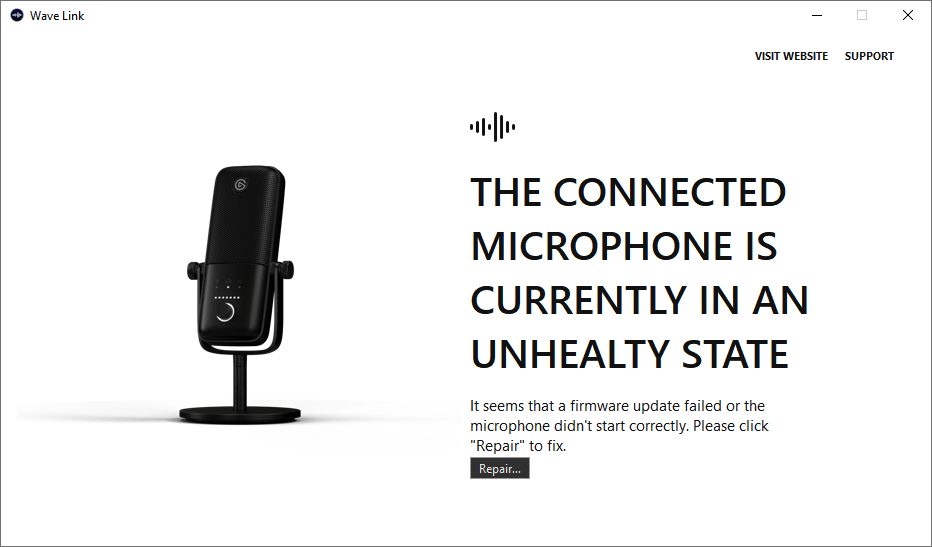

 clear pasture
I have done that but nothing
shadow anchor
Put in an official support ticket here #official-tech-support
 old tendon
Hey, all! Does anyone who uses Wave Link + SLOBS know how I can listen to capture card audio through my headset?
wooden flax
Does anyone know what preamp Wave XLR uses inside?
 versed dagger
I have the canon m200 with the cam link and any know why when I get up sometimes it freezes and then won't turn back on in obs even though the camera and cam link is on?
fickle pulsar
old tendon
Hey, all! Does anyone who uses Wave Link + SLOBS know how I can listen to captur...
monitor and output in Streamlabs OBS audio mixer’s advance properties.
old tendon
fickle pulsar
monitor and output in Streamlabs OBS audio mixer’s advance properties.
Thanks. Do I set it to anything in Wave Link or just my headset?
fickle pulsar
stark mountain
Is there anything I need to do before resetting my pc? Ive got a HD60 S and I wa...
You shouldn’t have to reset your PC. What’s going on with your capture card, you could backup your files etc… if needed, but it shouldn’t come to that.
fickle pulsar
old tendon
Thanks. Do I set it to anything in Wave Link or just my headset?
Just your headset. Also, your monitoring device in Streamlabs OBS is your headset too?
old tendon
I think so


This is what I set but doesn't seem to be playing the audio through my headset.
south bronze
Something really peculiar happened. I today installed a new HDD in my pc no other changes everything as expected. I open wave link to see all my channels are gone and even the Wave 3 i currently use isnt recognised
I added back all the channels but no audio is displayed as coming trough them
Anybody heared of this before?