#cth-history
1 messages · Page 70 of 1
 raven quarry
 dusty breach
Thats interesting that it will work for at least a few seconds with SLOBs but not at all with the 4K Capture Utility. My main recommendation is always to disconnect everything, let the card sit for a minute powered down, restart the console and PC, and reconnect everything. If that doesnt work, next is to check HDCP on the console (should be off by default with the Xbox Series S. Next verify resolution settings for the capture card.
dusty breach
raven quarry
Hello, I need help with a problem with the HD60s capturer, well the problem is t...
Run through a similar process as my response directly above. Disconnect everything from the console, card, and PC; restart everything, and verify you are using the appropriate cords and ports. You can also ensure you have the most up to date drivers for your USB controller. Here is a link to Elgato's site with further detail
https://help.elgato.com/hc/en-us/articles/360042141431-Troubleshooting-USB-3-is-required-for-this-device-Windows-10-
 wraith vortex
sorry just saw this, like every application when theyre on dedicated fullscreen has a large delay with elgato plugged in
 granite dock
Hey, Im having some issues with my Elgato HD60 S
My input device settings are just stuck on “Xbox one”
No matter what console I change it to the color correction doesn’t change. This basically just messes up what my recording looks like compared to what I’m actually seeing on my monitor
raven quarry
dusty breach
Run through a similar process as my response directly above. Disconnect everyth...
Keep putting the same on me, I'm going to cry
granite dock

On the left is my elgato
On the right is my monitor with the 360 hooked up to
Usually switching input devices would change the color correction but it’s just permanently messed up
 ivory sentinel
Anyone Else's Stream Deck Oversaturate Bright Red?
granite dock
Someone please help if they know anything about this
raven quarry
granite dock
Someone please help if they know anything about this
Murfs you, when you first downloaded the Game capture HD application, did you use the capture device the first time or did you have to download other drivers to make it work?
Is that mine does not suit me
granite dock
I didn’t need drivers to ever make it work
I thought that was the initial problem so I deleted the program and redownloaded, but that didn’t change anything
raven quarry
Ok, thanks, it's because it tells me that I need to connect it to a 3.0 port and I already have it connected, I have done everything: update the bios, windows and nothing
 ruby gyro
does anyone else run into issues with their website buttons not working?
I have a website button to open a specific website that I need for when I stream but it never opens the website when I click it. I've tried having it set with the Get background box checked and when it isn't checked and it doesnt work either way
 kindred harness
dusty breach
Run through a similar process as my response directly above. Disconnect everyth...
kindred harness
dusty breach
Run through a similar process as my response directly above. Disconnect everyth...
i got it to work on the 4k capture utility program, but it still freezes. could it be my usb port?
dusty breach
kindred harness
i got it to work on the 4k capture utility program, but it still freezes. could ...
It's worth a shot to try out other compatible ports if you have them as well as verify they have the most up to date drivers.
 grim steeple
hi i have a stream deck and im having a problem with it. The issue is i set it up to send a message/s into my youtube live stream chat and i can only use the set message/s once or not at all. This has only started happening since the last update i did for it. Any ideas how to fix it ?
 frosty holly
hello, I recently got an HD60 and want to start streaming/recording with it but have an issue where the game audio is there, but it's overtaken by a loud buzzing sound. What can I do to fix it?
 drowsy roost
Is it possible to use a PCIE capture card in an eGPU thunderbolt 3 or PCIE riser usb 3.0? This is for a laptop setup
 acoustic grove
Is it normal that the Stream Deck always starts with these Wallpaper? If I like to use it, I have to reconnect the USB Cable. Is there any way to fix that?

 shadow anchor
acoustic grove
Is it normal that the Stream Deck always starts with these Wallpaper? If I like ...
shadow anchor
acoustic grove
Is it normal that the Stream Deck always starts with these Wallpaper? If I like ...
That is the default wallpaper. It will appear when you lock your computer or the Stream Deck goes to sleep. You can set the sleep timeout in Settings. If you want to trigger it manually, there is a sleep plugin under the "Stream Deck" category. This will create a button to put the Stream Deck to sleep, thus triggering the that wallpaper.

 whole quartz
need help with my hd60s+ i try to capture my switch but the hdcp is enabled and i dont know why
i dont have youtube on my switch and there is just 7 lights every time i try to do this
7 red lights
hi how did you get your thingy to work? im struggling to get it to work and i dont want this to be a waste of £200
 fickle pulsar
grim steeple
hi i have a stream deck and im having a problem with it. The issue is i set it u...
fickle pulsar
grim steeple
hi i have a stream deck and im having a problem with it. The issue is i set it u...
you may have to delete the button, and do a new one. However, if it’s a plugin issue, this may help if per BarRaider
On Windows all the data is stored in %appdata%\elgato\streamdeck\
Mac is ~Library/Application Support/com.Elgato.StreamDeck/
Deleting that folder will erase all of the profiles, plugins, etc.
whole quartz
vic do you know how i can fix this i just got the elgato so i hooked it up but the hdcp is triggering even though my youtube/hulu isnt open on my nintendo switch
fickle pulsar
It’s a separate product, so it doesn’t come the capture card. It’s like 10.00 USD
there’s an update to 1.1.4 via wave link. Not sure of there’s a firmware update, but it may resolve your issue.
fickle pulsar
whole quartz
vic do you know how i can fix this i just got the elgato so i hooked it up but t...
Switches usually are adaptable, and should change based on app/game open. try unplugging your capture card for 1 min, via all cables. Then when connecting, make sure your IN is connected to your Console, and your OUT to your gaming tv/monitor, and the USB-C to a USB 3.0 port on the PC it’s the blue port.
whole quartz
ok.
fickle pulsar
frosty holly
hello, I recently got an HD60 and want to start streaming/recording with it but ...
are you using chatlink?
whole quartz
im using a laptop @fickle pulsar so where do i plug in the out port
fickle pulsar
whole quartz
im using a laptop <@!476160810457235466> so where do i plug in the out port
it’s a blue usb 3.0 port
fickle pulsar
drowsy roost
Is it possible to use a PCIE capture card in an eGPU thunderbolt 3 or PCIE riser...
There is this! https://youtu.be/1ChBo65TMz0
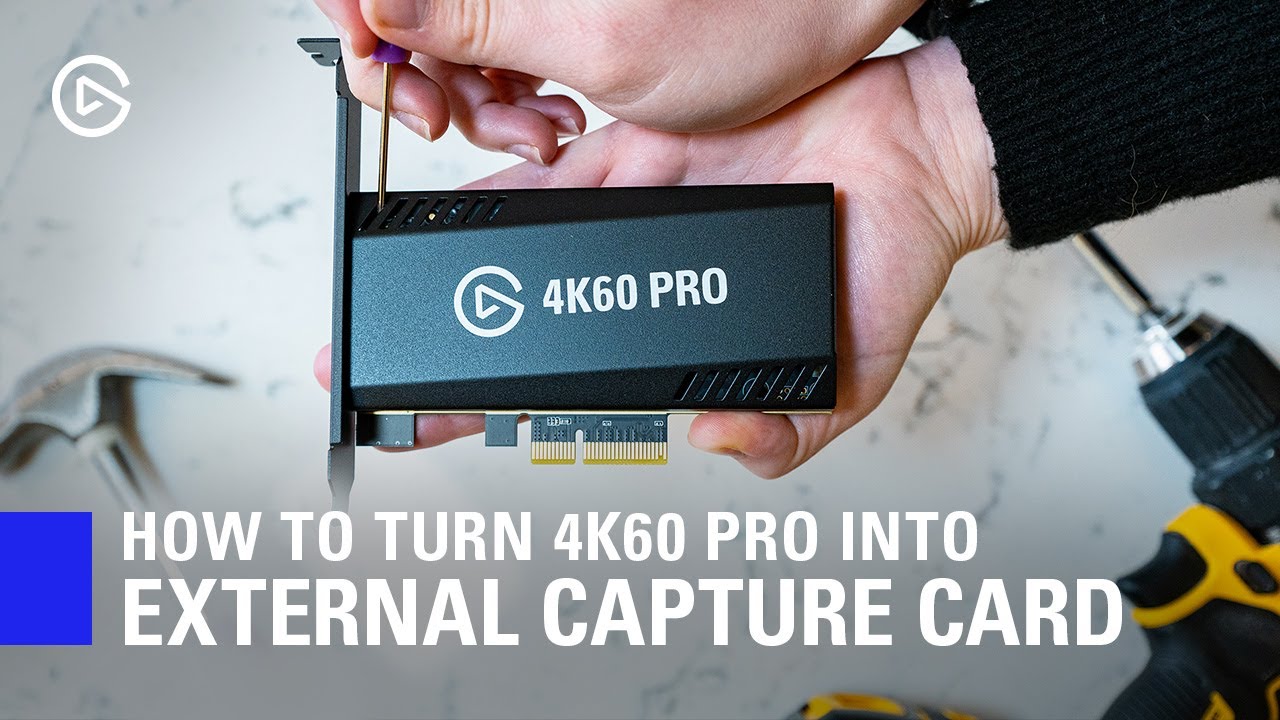
In this video, we show you how you can easily turn your 4K60 Pro MK.2 into an external Thunderbolt 3 capture device.
► Elgato 4K60 Pro MK.2: http://e.lga.to/4K60proMK2
► HighPoint RocketStor https://www.bhphotovideo.com/c/product/1413496-REG/highpoint_rs6661a_rocketstor_6661a_thunderbolt_3.html
▼ Follow Elgato Gaming:
Twitter: http://www.twi...
whole quartz
are you able to help me out in like a vc itll be easier for me to understand
fickle pulsar
whole quartz
are you able to help me out in like a vc itll be easier for me to understand
Sorry, I’m actually still asleep. I just popped on for a quick min, it’s 6:30am on a Sunday, and I’ll be up by 7:30
whole quartz
i dont know what the blue 3.0 port is
fickle pulsar
whole quartz
i dont know what the blue 3.0 port is
it looks like this on your laptop
 fickle pulsar
whole quartz
i dont know what the blue 3.0 port is
fickle pulsar
whole quartz
i dont know what the blue 3.0 port is
There’s a diagram on #community-resources
fickle pulsar
whole quartz
thanks
@rustic mesa had posted this a while back, but still very useful and relevant. https://tech-fairy.com/what-is-the-meaning-of-the-different-usb-port-colors-blue-teal-blue-yellow-red-black/
fickle pulsar
whole quartz
havent got one on my laptop
So your laptop may have their own color for aesthetics. try each port to see if you see a Switch Picture.
whole quartz
ok
fickle pulsar
whole quartz
ok
Going back to sleep for 1 hour.
grim steeple
fickle pulsar
you may have to delete the button, and do a new one. However, if it’s a plugin i...
ok thank you 🙂
fickle pulsar
grim steeple
ok thank you 🙂
You’re Welcome!
 acoustic grove
shadow anchor
That is the default wallpaper. It will appear when you lock your computer or the...
acoustic grove
shadow anchor
That is the default wallpaper. It will appear when you lock your computer or the...
Yes, but when I unlock my PC, the Stream Deck doesn't start even when I press a button. I always have to pull out and plug it in again or restart the Windows PC.
That is a Bug, isn't it?
 echo ether
Hey guys, I am running and xbox series x with astro a40 + mixamp and the elgato hd60 capture card.
I have the video coming through obs but no microphone input sound.
I have the sound set through hdmi on the xbox and the hdmi plugged into the capture card, capture card USB is plugged into laptop, optical cable is coming out of the tv into the mixamp.
The problem im facing is I have no microphone sound on obs but its recording all game sounds.
Does anyone have any ideas where I have gone wrong?
Thankyou in advance.
fickle pulsar
 gloomy willow
got a elgato capture card I connected it to a usb 3.2 port and I got this
gloomy willow
got a elgato capture card I connected it to a usb 3.2 port and I got this
Do you have a 3.0 vs 3.2?
frosty holly
fickle pulsar
are you using chatlink?
Just seeing this, but I was able to fix the issue yesterday sorry
fickle pulsar
frosty holly
Just seeing this, but I was able to fix the issue yesterday sorry
Yay! 🙂
drowsy roost
fickle pulsar
There is this! https://youtu.be/1ChBo65TMz0
Thanks, I saw this beforehand where he’s using Thunderbolt 3, what about USB 3.0? Do you know if that works?
fickle pulsar
drowsy roost
Thanks, I saw this beforehand where he’s using Thunderbolt 3, what about USB 3.0...
Not that I’m aware of, but I suppose you could try it. Though, I usually stay 100% to what’s provided by elgato. I wouldn’t want you to ruin your capture card. 🥺
drowsy roost
fickle pulsar
Not that I’m aware of, but I suppose you could try it. Though, I usually stay 10...
Worth the experiment! I’ll take one for the team haha, I think this could help really low budget streamers, like myself haha
fickle pulsar
drowsy roost
Worth the experiment! I’ll take one for the team haha, I think this could help r...
Good Luck! 😅
 hexed snow
Ok so, im trying to connect my ps4 to streamlabs, using my HD60 S+, and its not detecting it, is there something i can do to fix this? Cause its connected to my tv and working fine
 south bronze
hey guys i have a HD60 S and apparently i need a USB 3.0 type C for it to work, where would i buy one? i can’t find any online
would this one work?

it says 3.1
 timber meadow
god i hate to be this guy.... no clue what the fish happened ... software was working just fine moments ago with camlink4k and panasonic gh5 via HDMI ... now its not ... checked and everything is up to date but no idea what the heck is going on and why its not being recognized .... any help would be immensely appreciated
fickle pulsar
hexed snow
Ok so, im trying to connect my ps4 to streamlabs, using my HD60 S+, and its not ...
did you add it as a source in Streamlabs? Are you connected to a usb 3.0 port on your PC?
fickle pulsar
south bronze
hey guys i have a HD60 S and apparently i need a USB 3.0 type C for it to work, ...
elgato support could probably sell you the official cable needed. You didn’t get one in the box? open a support ticket here. #official-tech-support if you’re gonna buy outside of elgato, look up usb-c to usb 3.0
south bronze
no i didn’t
they didn’t give my friend one i bought it off of him
he thought it was broken because no other USB worked
south bronze
south bronze
he thought it was broken because no other USB worked
Yea, all usbs are not the same.
timber meadow
or is there anyone here who may be familiar with someone or a separate discord who can assist in setting up streamlabs obs settings? on the verge of ripping my hair out LOL
south bronze
timber meadow
or is there anyone here who may be familiar with someone or a separate discord w...
Sent you a friends request.
When you open a new game do you full screen or window borderless?
 solar iron
Quick question about the Wave XLR. Is it possible to route the inputs to different outputs? for instance Mic and Game to two different channels in OBS that way I can edit the audio in post?
 fickle pulsar
south bronze
Yea, all usbs are not the same.
fickle pulsar
south bronze
Yea, all usbs are not the same.
agreed!
fickle pulsar
 noble trellis
Bruh why do customer service be a total 1*
noble trellis
Bruh why do customer service be a total 1*
are you referring to phone, or email vs here?
fickle pulsar
noble trellis
email tickets
Well, I’m sure with the pandemic, as most companies are pretty busy. To top off, 4th quarter via end if year is usually a peak for most companies. I’m sure they will work it as quick as they can.
noble trellis
That's the issue
They work so quick they don't even read what my problem is
I've had to reference the first ticket so many times as I was detailed as heck
fickle pulsar
noble trellis
That's the issue
Jus be patient, and if you need help while waiting ask here. 🙂
Someone here is bound to know.
noble trellis
Doubt
fickle pulsar
noble trellis
Doubt
maybe lost your issue here. Perhaps we can try, while support researches too. 🤷🏻♀️
south bronze
I have a question, I have spoken with the people at SLOBS and they say that what I am trying to do is possible to do but with a caviot,
I am trying to find out if I can stream, with a dedicated stream machine, multiple computer sources to one twitch channel. Basically, one computer that is dedicated to processing the sources from three other computers to the streaming computer. The guys at SLOBS say it can be done if I have either a single capture card with multiple input ports, or multiple capture cards in one system.
My question is, is it possible to have multiple capture cards in one computer?
A lot of explaining for one small question.
Is there anything special I have to do?
Sweet thank you very much @south bronze
 finite gazelle
Pau no cu
south bronze
How can I get audio on my obs using the elgato game capture hd
 strong orbit
Hey! Anyone had it where wave link suddenly doesn’t detect the mic? I have power to my wave 3, but it’s gone as an input device in windows & no longer connects to wave link. I have tried re-installing wave link aswell as running the driver set up again in files/elgato/firmware
south bronze
Hi guys , Im streaming CoD Mobile from my phone to obs with the elgato card, I'm using an external Mic and headphones, everything works well, i can hear the game through the headphones and use my external mic, but the problem start when i turn ON the in game voice chat, at that point the sound from headphones switch to my phone speakers...any tips? ( sry for the long post )
 timber shard
Well, I might have bought the wrong item but I'm hoping for a little help. I have the HD60 S+ and wanted it to stream through the computer from my Xbox One and use OBS (and my overlays). However as I'm sure everyone knows it also starts recording... which I DON'T want. I want to turn on record if I want to and not have it just start automatically.
I also had an issue trying to get game sound in my ear through my headphones and not over the TV which was being picked up with my mic. But I had it working before so I'm going to play with it a little to see if I did something wrong. (all new OBS settings so I just need to play).
 half falcon
Why is it that every time I do screen link it's incredibly laggy?
fickle pulsar
timber shard
I also had an issue trying to get game sound in my ear through my headphones and...
i made a video on configuring obs in #community-resources I hope it helps!🙂
 hard wigeon
Hello. I own a Game Capture HD (yes, that older one) and windows recognizes it but it doesn't work. when i go to device manager it says there's an issue. I've tried different USB cables with no luck. It has worked on this exact PC in the past with no issues (though in a different instalation of windows).
 frail magnet
Changed my streamdeck to USB 2.0 instead of 3.0
Exact same outcome
Works for 10m~ of my streams on YT, then gives me the hazard error on message button clicks
I dont understand why this randomly started happening after weeks of it working great.. But its extremely discouraging and making my purchase a sour experience
 vernal bough
No I know it is probably impossible, but with any of the captures is there any way to push my audio setup on my PC back towards my PS5 for multiplayer games or am I looking at a secondary audio setup?
 old jackal
Hey guys I have a question about using the wave 3 mic as a secondary mic to my stream. I currently use the GoXLR with a rode Podmic but I've been streaming games with my son and he needs his own mic. So I bought the wave 3. I use OBS. I'm not exactly sure how to use both the GoXLR and wave 3 at the same time. Can I get some help?
frail magnet
Why is stream deck broken for YouTube live streams
fickle pulsar
frail magnet
Why is stream deck broken for YouTube live streams
Did you reconfigure the profile, account, and remap the buttons on the stream deck software? Usually when I see an error, or a warning, I remap/reconfigure. Usually no issues after.
fickle pulsar
vernal bough
No I know it is probably impossible, but with any of the captures is there any w...
are you asking for the pc audio to route to ps5, or the opposite?
frail magnet
fickle pulsar
Did you reconfigure the profile, account, and remap the buttons on the stream de...
I’ve done everything but totally scrap the buttons
It will always work for like 10 minutes
Then i have to log out and in
fickle pulsar
frail magnet
Then i have to log out and in
have you at any point check your bios/drivers see if they need updates?
frail magnet
They do not
shadow anchor
@frail magnet is the issue you are having with one plugin or the entire Stream Deck? I think I am reading that it's with just the one plugin?
frail magnet
shadow anchor
<@392481311807504405> is the issue you are having with one plugin or the entire ...
With the streamdeck mini
Worked fine for a while.. Has not made it through an entire stream in months now
shadow anchor
@frail magnet all buttons stop working? Or just a certain plugin?
@frail magnet I will be glad to help you, just let me know when you have some time to do it.
vernal bough
fickle pulsar
are you asking for the pc audio to route to ps5, or the opposite?
PC mic through to PS5.
 cobalt stirrup
Hi everyone! I'm having a small issue that I just can't seem to figure out with my Streamdeck XL. On one of my rows of keys I have a line that shoots straight across all the keys and I can't get rid of it, even after I change the keys. Any ideas what's causing it? I attached a pic to show the issue. Thx in advance to anyone that can help.

And don't worry, once I get this resolved, I'll be filling up the keys lol
frail magnet
shadow anchor
<@392481311807504405> all buttons stop working? Or just a certain plugin?
Message buttons flash hazard
shadow anchor
cobalt stirrup
Hi everyone! I'm having a small issue that I just can't seem to figure out with ...
This looks like a hardware issue. Open a support ticket here #official-tech-support .
shadow anchor
frail magnet
Message buttons flash hazard
Message buttons from what plugin?
cobalt stirrup
shadow anchor
This looks like a hardware issue. Open a support ticket here <#84249193703892586...
Thanks
frail magnet
shadow anchor
Message buttons from what plugin?
Stream deck. I’m not sure what you’re asking
The stream deck software
shadow anchor
frail magnet
Stream deck. I’m not sure what you’re asking
So the stream deck is blank when you first got it. You added some plugins from the right hand side. What is the plugin name. (or open the stream deck software, select one of the buttons so it shows the configuration window, and screenshot it)
shadow anchor
@frail magnet OK awesome. Give me a minute.
@frail magnet I have done some research on that issue. It seems that after the last update to the YouTube Plugin many people are having this issue. You should open an official support ticket for this in #official-tech-support . They may be able to tell you when a fix is coming or how to workaround the current issue.
 tribal spade
Not sure where to ask this but I'm trying to get my elgato capture card to connect with my ps4 to record things from there, when I set everything up the tv just is a black screen for some reason
I also use OBS Studio for streaming
fickle pulsar
vernal bough
PC mic through to PS5.
wave 1, or wave 3?
vernal bough
Not a wave.
I have an audio interface through to my system. Without unplugging it from my rig I want to pass the mic through to my PS5. I'm just wondering if it's possible with any of the Elgato tools.
tribal spade
Is elgato known to be difficult with OBS? I've spent hours today trying to get everything working
Just to simply record game and audio from the PS4 through the capture card
dusty breach
tribal spade
Is elgato known to be difficult with OBS? I've spent hours today trying to get e...
all of my elgato stuff was more or less plug and play between my PS4 and Streamlabs
fickle pulsar
tribal spade
Just to simply record game and audio from the PS4 through the capture card
I have a video on OBS via #community-resources I hope it helps!
fickle pulsar
vernal bough
I have an audio interface through to my system. Without unplugging it from my ri...
Not at this time. Only update I’ve seen is the wave1,3 actually working on PS5 after the update. There’s no way to pass audio from pc to console, but you can capture console through PC.
tribal spade
It’s so frustrating, spent all day today trying to get everything working and now I have most things working but the audio just isn’t wanting to cooperate
fickle pulsar
tribal spade
It’s so frustrating, spent all day today trying to get everything working and no...
My video can help with audio!
fickle pulsar
tribal spade
Which one?

I decided to make an in-depth video of setting up OBS. I've recently helped people setup up things, basic things that most videos usually don't cover. I'm currently using The Swift Animated Overlay from PremadeGFX. The link is below. It's a long video, but short enough that you are able to follow along. You can pause at any time to set up OBS. N...
tribal spade
So is this chat link able to record my voice as well as the other voices in a party or is it just the other voices in the party?
fickle pulsar
tribal spade
So is this chat link able to record my voice as well as the other voices in a pa...
From what I understand just your party’s chat, but your mic to your viewers could be from obs as a separate audio input. That’s what I do, and did when using chatlink. I now use Discord for all my party chat so that way I don’t have to use chatlink anymore.
acoustic grove
My Stream Deck doesn't unlock if I unlck my PC. Does anyone knows a solution?
 shadow anchor
acoustic grove
My Stream Deck doesn't unlock if I unlck my PC. Does anyone knows a solution?
shadow anchor
acoustic grove
My Stream Deck doesn't unlock if I unlck my PC. Does anyone knows a solution?
If you are having trouble with your Stream Deck freezing, crashing, or strange display artifacts/behavior,
Please read the following:
- a Stream Deck HAS TO BE plugged into a USB 2.x port (They are white or black).
- a Stream Deck should NOT be plugged into a USB hub.
- a Stream Deck should **NOT **be plugged into a USB 3.x port (They are blue).
If you use a USB Hub or a USB 3.x port for your Stream Deck, you will experience intermittent/constant issues.
 tacit niche
Guys I am having a problem with twitch extension, when I try to play an add from my streamdeck a warning triangle appear, I dont know what to do.
cobalt stirrup
shadow anchor
**If you are having trouble with your Stream Deck freezing, crashing, or strange...
Is this the same for the Streamdeck XL?
shadow anchor
@cobalt stirrup Yes.
fickle pulsar
on the audio drift can you tell me does it fade in and out, or like a delay?
fickle pulsar
 real badge
I think my Cap Card straight up broke...
real badge
I think my Cap Card straight up broke...
what’s wrong with it?
fickle pulsar
tacit niche
Guys I am having a problem with twitch extension, when I try to play an add from...
you might have to reconfigure that button.
tacit niche
fickle pulsar
you might have to reconfigure that button.
Tries deleting that one and creating a new one
fickle pulsar
tacit niche
Tries deleting that one and creating a new one
did it work?
tacit niche
Nop
 agile sun
Why is there no multi app support on the hd60 s+ and the camlink 4k on Pc!?! I did this with no problem on my Mac but built a pc for way more horsepower. If anyone can help me figure this out I’m willing to pay for your time and help.
 simple salmon
Can someone help me? My capture card seems to be wonky with the resolution of the capture

Is there something I can do to help fix this? It also "flickers"--sometimes it goes "No Signal" but then back again.
Could this be a problem with the HDMI cable?
fickle pulsar
how bad is the delay?
fickle pulsar
Let me research a bit, see what I can find!
 tender quartz
@fluid aurora when does it freeze
 fluid aurora
randomly, when i switch tabs.. or just after a few seconds. i have to deactivate and then activate
tender quartz
fluid aurora
randomly, when i switch tabs.. or just after a few seconds. i have to deactivate...
I think I know the reason. I had similar issue. I'll come back in an hour ish to explain
 quasi tinsel
so a lot of the time when recording clips with Elgato Game Capture when i bring up the clips in editing software the game audio is not in sync with the game. Why is this happening?
 vivid nexus
hello friends-- i dont know if this has already been answered before, however i'm struggling to use the camlink 4k in discord is this just software limitation?
 devout oyster
Does anyone use Malwarebytes? I getting a malware notification with ucore.exe.
vivid nexus
devout oyster
Does anyone use Malwarebytes? I getting a malware notification with ucore.exe.
ucore.exe seems to be associated with something with Fractal Audio Systems. I'd just whitelist it.
It's a false positive

 idle sonnet
hello does anyone know what are the best settings for streaming 2pc setup? Best obs filters for maximum picture quality?
On elgato 4k card Thx
tender quartz
fluid aurora
randomly, when i switch tabs.. or just after a few seconds. i have to deactivate...
please correct me if i am wrong,
you are using facecam in obs and when you switch scenes the camera will freeze or unload?
fluid aurora
streamlabs obs and obs, it will freeze.. then i have to deactivate and activate it
 floral jetty
fluid aurora
streamlabs obs and obs, it will freeze.. then i have to deactivate and activate...
floral jetty
fluid aurora
streamlabs obs and obs, it will freeze.. then i have to deactivate and activate...
Since facecam is such a new product I would recommend submitting an official ticket
tender quartz
floral jetty
Since facecam is such a new product I would recommend submitting an official tic...
i have an answer though... but you may be correct. a ticket may find a software fix for the issue.
tender quartz
fluid aurora
streamlabs obs and obs, it will freeze.. then i have to deactivate and activate...
so im going to assume you brought in face cam as a camera source and placed that same source into multiple scenes
ive had issues with this as well. it seems obs or facecam doesnt enjoy when the facecam is in multiple scenes
my solution was to make a scene just for facecam and then embed that scene into the other scenes i needed the camera.
so facecam>camera scene> gaming scene
this is a preferred method when using OBS anyway.
fluid aurora
I wanna say im only using one scene with the webcam
My regular face cam works i replace the elgato so it has to be something with the settings or usb im thinking
tender quartz
fluid aurora
My regular face cam works i replace the elgato so it has to be something with th...
you may want to try the embed scene setup , the camera scene shouldnt get reloaded since you dont ever go to it directly. may be a bandaid until you figure out the deeper issue.
the face cam uses a ton of data so you may be on the right track with the usb. if you have multiple items on the same usb controller it could be bottle necking some how. i would say follow Shadys advice and file an official support ticket. http://e.lga.to/help
agile sun
Hey if someone can solve my issue I'm willing to pay up to $300
I need to get my 4 elgato capture devices into two applications. This worked on my mac book and juts built this crazy pc and can't do it? no way there has to be a way. I also posted this in camera chat.
agile sun
🥺 somebody please help
dusty breach
agile sun
🥺 somebody please help
What kind of capture cards are you working with and what applications are you looking to feed them into?
 modern tinsel
i got a question i just made a facebook profile and stuff on obs.live and switched back to twitch but now my stream deck is popping up a yellowish green triangle with a exclamation mark what is that
 modern tinsel
well fixed that issue how to i get it to switch my scenes for facebook instead of twitch
modern tinsel
i got a ? i made 2 different profiles and scenes 1 is twitch and 1 is facebook which i just made on on obs.live and when i made new profile on stream deck with facebook and hit the different keys it switches back to twitch and changes those scenes so what am i doing wrong
 left python
So, they even posted, on Twitter, that the 4k60pro can capture 3440x1440. Why does it not work then? And why did they not reply when multiple people responded saying that it doesn't work to capture that resolution? 3440x1440 does absolutely not work with the 4k60 pro mk2.
 dark folio
When i switch between folders on my Stream Deck, my processor goes up to 100%. I also reinstalled the software. Can someone help me?
shadow anchor
dark folio
When i switch between folders on my Stream Deck, my processor goes up to 100%. I...
If you are having trouble with your Stream Deck freezing, crashing, or strange display artifacts/behavior,
Please read the following:
- a Stream Deck HAS TO BE plugged into a USB 2.x port (They are white or black).
- a Stream Deck should NOT be plugged into a USB hub.
- a Stream Deck should **NOT **be plugged into a USB 3.x port (They are blue).
If you use a USB Hub or a USB 3.x port for your Stream Deck, you will experience intermittent/constant issues.
simple salmon
shadow anchor
**If you are having trouble with your Stream Deck freezing, crashing, or strange...
Why is it doing worse on a USB3?
shadow anchor
simple salmon
Why is it doing worse on a USB3?
Because it is designed to go into a USB 2.x port. USB 3.x is supposed to be backwards compatible, but it isn't always.
 somber belfry
Hey everyone...
I have a CamLink and every time I restart/start my PC, the CamLink becomes unrecognizable by Windows. I have to unplug the USB cable and then plug it back in for the CamLink to start working.
Is there any way for the CamLink to always stay connected/recognized by Windows? Im kinda tired of having to keep playing with the USB every day before stream.
south bronze
Hi, does anybody have issues with the wave 3 on a M1 Mac by any chance?
fickle pulsar
south bronze
Hi, does anybody have issues with the wave 3 on a M1 Mac by any chance?
Did you update your firmware, and software recently?
south bronze
fickle pulsar
Did you update your firmware, and software recently?
Yeah, I just bought the mic like last week. I checked 3 times that it was updated
fickle pulsar
So I found a guide for the 4K60 Pro MK.2 and it mentions audio settings so there is no stuttering. Please see if this might be your issue. https://help.elgato.com/hc/en-us/articles/360037206051-Elgato-Game-Capture-4K60-Pro-MK-2-OBS-Studio-Setup

 fickle pulsar
south bronze
Yeah, I just bought the mic like last week. I checked 3 times that it was update...
fickle pulsar
south bronze
Yeah, I just bought the mic like last week. I checked 3 times that it was update...
To 1.1.4? Also the firmware?
south bronze
I don’t record on obs, only stream and yes
fickle pulsar
south bronze
I don’t record on obs, only stream and yes
That was for someone else with an issue I was researching for audio with the 4K60 Pro MK.2… Still, I would suggest for your wave:1, wave:3, wave XLR try another USB port, make sure your Mac OS is updated, possibly reboot, or reinstall Wave Link if needed.
south bronze
I already try all of those except for reinstalling the wavelink software
Will let you know, thank you for now
fickle pulsar
south bronze
I already try all of those except for reinstalling the wavelink software
See if the reinstall helps.
dark folio
shadow anchor
**If you are having trouble with your Stream Deck freezing, crashing, or strange...
I don't have my Stream Deck connected to a 3.0 Port, but to a USB port, that's connected to a 9 Pin on my mainboard (https://i.zmasterskill.de/h1kv3.png)
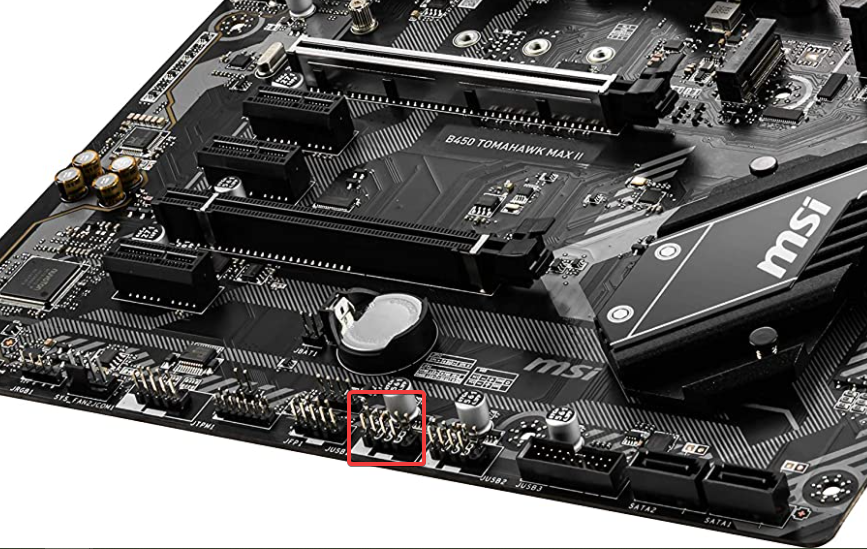
Should i try plugging it directly into one of the USBs of the mainboard?
shadow anchor
@dark folio Plug it into a USB 2.0 port on the mainboard. The USB PORT will be black or white. Do not use any ports that are blue.
dark folio
I just did. The processor is still going up to 100% when i switch folders. The folders are loading super slow too.
shadow anchor
dark folio
I just did. The processor is still going up to 100% when i switch folders. The f...
I will DM you
shadow anchor
It is written into the plugin unfortunately. So it can't be turned off by the end user. You can always put in a Feature Request with Elgato: https://e.lga.to/FeatureRequest.
the multiaction plugins
it is still a plugin, just one provided by Elgato
it was installed by default
this is the community tech support channel
correct
p.s. I dont like the indicators either
probably not the best way to get it done, I would submit it once. I am positive you are not the only one who has requested it.
You may be surprised. They are pretty responsive. Now, when it will get done is another question.
 autumn flax
Question! I'm using HD60 Pro and i've been using Digital Vibrance for some games. But with recent Nvidia updates, Digital Vibrance doesnt transfer to the capture card when playing games in fullscreen. This is obviously a nvidia update and not on elgato, but is there a way to solve this?
 hallow pebble
Been having an issue with certain plug-ins for the streamdeck.
Some barraiders plug-ins as well as others have trouble reestablishing a connection once the streamdeck software has been closed down.
So for example, I can get obs tools to work the normal way but if I close down and reopen the streamdeck can't reconnect back to the network and the only way I can get the plug-in to work again is Uninstall, restart the deck and install the plug in again.
Wonder if anyone has encountered an issue like this?
 dry latch
Hello I just got my new Elgato HD 60s+, I connected it with my pc and with my ps5, but there's a huge delay and it's lagging for some reason?
-May I get some help/settings etc?
I want to be able to show 1080p/60fps nothing more nothing less, so far from that what I have seen is not looking good.


Yes I removed the hdsometing option on the ps5
fickle pulsar
dry latch
Yes I removed the hdsometing option on the ps5
are you using OUT connected to a gaming monitor/TV?
dry latch
fickle pulsar
are you using OUT connected to a gaming monitor/TV?
in is connected to the ps5, out is connected to yes the gaming monitor
fickle pulsar
dry latch
in is connected to the ps5, out is connected to yes the gaming monitor
Is the gameplay on the monitor lagging too? Or just in OBS?
dry latch
fickle pulsar
Is the gameplay on the monitor lagging too? Or just in OBS?
I would say the monitor only
I have not recorded anything yet.
fickle pulsar
dry latch
I would say the monitor only
So OUT is lagging?
dry latch
fickle pulsar
So OUT is lagging?
I would say yes
fickle pulsar
dry latch
I would say yes
I’d suggest a full reboot, but before you do. Unplug the capture card for 1 min, power off your PC. plug in the Capture Card, make sure it’s connected to USB 3.0 on your PC, not a hub. Power on your PC. If that doesn’t work, make sure your bios/drivers are updated. IN should be to your console/gaming PC
 cold hazel
Can you record with the capture card on the mobile phone?
dry latch
fickle pulsar
I’d suggest a full reboot, but before you do. Unplug the capture card for 1 min,...
I think I found the problem
I suppose there was some sort of error because I was on 240hz monitor
now Ill put it on 60hz
and I should be good to go
but, there's another issue


its not on my obs at all ;D
and I cant really capture it
another big thing is I saw on the net , ppl are with Source 1080p 60fps?
I am with 2160p 59fps? I dont even have a 2160p monitor ? 😄
 shadow anchor
hallow pebble
Been having an issue with certain plug-ins for the streamdeck.
Some barraiders ...
shadow anchor
hallow pebble
Been having an issue with certain plug-ins for the streamdeck.
Some barraiders ...
Posted an message about this in #stream-deck-showcase
 tardy acorn
i lost my USB C cable (or my gf stole it) and i can’t seem to find one that works. it says there isn’t enough power to provide pass through
Does anyone have recommendations for a cable that would work?
dry latch
fickle pulsar
yikes!
what? ;D did I mess things up?
fickle pulsar
dry latch
what? ;D did I mess things up?
no, just odd you’re isn’t matching your monitor.
dry latch
fickle pulsar
no, just odd you’re isn’t matching your monitor.
Any ideas how to fix that?
Idk I spent a lot of money on this capture card and its lel not properly working, half of the problem is done thx to you( by restarting and unplugging it somehow got rid of the deley) but i cant get the screen working on my obs ;D
looked at 3 yt videos with same error - nothing helped XD
tardy acorn
so anyone have recommendations for a cable for my hd60s?
fickle pulsar
dry latch
looked at 3 yt videos with same error - nothing helped XD
i have to wait for my PC to come in, because I’ll be using this one too.
dry latch
fickle pulsar
i have to wait for my PC to come in, because I’ll be using this one too.
ok ill wait for your help!
fickle pulsar
dry latch
ok ill wait for your help!
I’m gonna research your issue, but I think there may have been someone who posted something like this last month. You might want to scroll the history. 🙂
 analog igloo
any idea why I get double audio when I start up my set up but then I unplug my capture card and restart wave link it fixes it?
version 1.2.2.2476 btw
fickle pulsar
analog igloo
version 1.2.2.2476 btw
not sure about double audio, but what is your configuration?
timber meadow
Key light not being recognized anyone else have this problem? I followed the reset instructions and everything, control center not identifying new accessories 😭
 upper path
quick question... You do not need to install any software for the HD60s+ to work on Win10, correct?
I am helping a friend with an issue of video is fine, but there is no audio.
We verified that audio is present in the signal going to the Elgato, but, there is noting coming though in OBS.
I know with the older HD60/HD60s, they would have no audio unless they had device drivers installed.
Thanks for your ideas!
fickle pulsar
timber meadow
Key light not being recognized anyone else have this problem? I followed the res...
are you on 5 or 2.4 via wifi? Also, have you tried mobile phone setup?
timber meadow
fickle pulsar
are you on 5 or 2.4 via wifi? Also, have you tried mobile phone setup?
Idk how to answer that wifi question but I went ahead and followed through with the mobile setup, and that worked!! Thank you for your help 🙏🏽
 rich garnet
Any idea how to create shortcuts that don't interfere with other software? Ex. i tried using F13-F24 (which is recognized by windows but some games and apps does not recognize). Other ideas on which buttons/combinations to use?
 edgy turret
So I’ve been having quite a few issues with my CamLink. In order for it to even work to begin with I have to unplug and replug it from my USB slot on my computer. On top of that, it also initially goes to my memory as if I’ve plugged my camera into a USB rather than an HDMI. To top everything off, it really only works for an hour before it freezes and leaves a still or blank black box where it used to be. Anyone have any tips on being able to fix it?
dry latch
@fickle pulsar I fixed everything actually everything the obs, the fkn delay, the ourput sounds what a toy to play with XD
You guys from Elgato rly should hire this guy up: https://youtu.be/fIbwH7KSPYw

In this video I explain
- how to disable HDCP,
- how to get HDR working on Playstation5,
- how to brigthen up HDR for your stream when activated
- how to get audio working on PC
- how to fix black screen issues
- how to extend elgato cable when Playstation 5 and PC are not next to each other
T...
After 3hrs of watchtime of useless idiotic videos I found this guy and oh boy please ping this video somewhere so people dont waste time finding this like I did.
fickle pulsar
dry latch
After 3hrs of watchtime of useless idiotic videos I found this guy and oh boy pl...
glad it’s resolved! I’ll check it out and see. I’ve never encountered the delay.
 sturdy kelp
guys, I think im going something wrong xd my stream output isnt showing a sound bar when I have obs open. .I have it open currently, but I cant move the bars on the stream side for each input.

 kindred spoke
Hello guys! Not sure I'm in the right place. Just wanted to ask if there are any news about Elgato HDMI 2.1 support / new product release.
 manic ingot
Good morning from America everyone!
I have a question for those who are experienced with the IFTTT plug.
I am trying to get webhooks I had made with the plugin and nothing is happening.
 dense depot
Hey does anyone know why my wavelink isnt picking up on valorant voice coms when people talk in game chat. I noticed on my stream it wasnt picking up when the team was talking.
edgy turret
<@&581565551495741448> sorry for the ping but didn't know if you missed this one
 hot rune
Thank you
 hexed rampart

fickle pulsar
kindred spoke
Hello guys! Not sure I'm in the right place. Just wanted to ask if there are any...
none of know anything until an announcement. 🤷🏻♀️ I’m waiting too!
kindred spoke
fickle pulsar
none of know anything until an announcement. 🤷🏻♀️ I’m waiting too!
Thank you for the reply!
fickle pulsar
kindred spoke
Thank you for the reply!
You’re Welcome!
What’s the issue? Is it having issues capturing?🤷🏻♀️
fickle pulsar
I see your screen shows 4K capture utility. only one or the other can be used. Can you show me in OBS?
 tough lodge
Hi guys, please i have question. its possible to record or stream my voice from ps4 with HD60 pro ? because i can hear my friends in the videos when i record with elgato on my computer but in dont listen my voice. i have astro A50, ty
 vagrant forge
Hey everyone! Can I used the Elgato Wave Shock on any Mic Arm?
vagrant forge
tough lodge
Hi guys, please i have question. its possible to record or stream my voice from ...
tough lodge
@vagrant forge ty for the answer. I've already tried this, but as there is written at the top of the page you sent me "This setup does not record your own voice, you will need a separate microphone connected to your computer for your own commentary." so now i know i need to buy a new one mic for rercord my one voice to the elgato. ty
vagrant forge
tough lodge
<@!614577191526596627> ty for the answer. I've already tried this, but as there ...
You’re very welcome and I apologize for sending this without carefully reading the title
tough lodge
vagrant forge
You’re very welcome and I apologize for sending this without carefully reading t...
no np bro, thanks to you now I know what I have to do and I will not look for hours of unnecessary adjustments ^^
dense depot
Hey does anyone know why my wavelink isnt picking up on valorant voice coms when people talk in game chat. I noticed on my stream it wasnt picking up when the team was talking.
 stiff vigil
How do you remove a device (mobile & mini) from the Stream Deck list?
timber meadow
would an additional flex arm be able to attach to the solid arm piece? just remove the knob that comes with solid arm and then attach the flex arm end to it? or am i thinking incorrectly?
 hidden jolt
Anyone have this weird problem where your streamdeck randomly stops sending YouTube chats?
I had to restart my SD software 3 times during my stream.
 shrewd thorn
Good day. Hope someone can help me. My question is whether I can do something a little later on the stream deck. E.g. that he automatically sets the chat to subscription only after 5 minutes in the stream. Is this possible? There is an extra plugin for the action or whatever you call it. I use a google translator
agile sun
I need knowledgeable support and am willing to pay for your time. Let me know if anyone is interested/available to help me. I need to figure out this issue today.
 thick nova
Hi. I need help with my 4K pro can anyone assist me?
fickle pulsar
thick nova
Hi. I need help with my 4K pro can anyone assist me?
I can try, but what’s the issue?
fickle pulsar
shrewd thorn
Good day. Hope someone can help me. My question is whether I can do something a ...
Maybe a multiaction
fickle pulsar
agile sun
I need knowledgeable support and am willing to pay for your time. Let me know if...
What are you needing help with? If you just tell us what’s the issue, anybody will chime in and help.
thick nova
fickle pulsar
I can try, but what’s the issue?
Sometimes it wont see my ps5 and i need to restart my pc
fickle pulsar
stiff vigil
How do you remove a device (mobile & mini) from the Stream Deck list?
Top left in the software lets you choose, and I believe remove it. I am currently waiting on PC, so no screenshots right now, but I have done it before.
fickle pulsar
thick nova
Sometimes it wont see my ps5 and i need to restart my pc
which streaming software?
fickle pulsar
thick nova
4k pro gets no signal
are your bios/drivers updated?
fickle pulsar
thick nova
Only solution i found is to restart my pc
power off the PC, remove the card, reinsert the card, make sure the card is connected securely, and then start it back up. Also make sure your using the correct HDMI cables too.
thick nova
already did those
fickle pulsar
thick nova
already did those
You’re not using a riser cable are you?
vagrant forge
Good morning / afternoon everyone! I am using the HD60 S+ from my HP OMEN laptop to my Series X. I noticed on my latest VOD that the game chat audio was muted and never gotten this issue. Any help / tip will be appreciated 💪🏼
thick nova
fickle pulsar
You’re not using a riser cable are you?
nop
agile sun
hey all i just installed a second 4kpro mk 2 and now my first one doesn't work
wtf
plz help
fickle pulsar
thick nova
nop
have you tried a different pcie slot?
fickle pulsar
thick nova
nop
Does your PC meet these requirements? https://help.elgato.com/hc/en-us/articles/360027964112-Elgato-Game-Capture-4K60-Pro-System-Requirements
thick nova
i got amd 5600x
fickle pulsar
thick nova
i got amd 5600x
have you updated the amd chip?
thick nova
yep i recelty got the pc but my old pc had the same issues it had i7
agile sun
is elgato support iopen on the weekend
agile sun
they are
 opal charm
I have an elgato hd60pro and a 4k60 pro mk.2 In the past I've had everything working fine where in the Game Capture HD software I had my hd60 configured with my dxlr going into it. And in the 4k capture utility I had my 4k60 pro mk.2 configured.
For some unknown reason the game capture utility now only shows the 4k capture device and says it doesn't support the device and to use the 4k capture app. No where in the app can I get it to select the 1080p capture card.. Anyone know how to fix this?
 gaunt lion
Currently having trouble connecting my cam link to my wii, it works perfectly in my tv but when I connect it every 5 seconds it glitches out a bit
 loud birch
Hi,
Does anyone know why I get a green triangle with exclamation mark when I attempt to play a soundbite?
It used to work but now it doesn't.
The other things work though... such as scene change.
I am using the mobile phone app
 weak birch
Looking for a bit of help.. Have two systems, one is my main running at 3840x2160 UHD 4K I send video to a second machine in 1920x1080 that has a 4K60 pro mk2 card in it and from that I stream to twitch.
The problem is, some games I am having the problem where the stream itself looks great but my MAIN machine video stutters badly. I have tried everything I can think of all the way to using the lowest settings to resetting routers. It does NOT do it for all games, just some of the more high end stuff. And sometimes on the stuff it has problems with, it actually works fine.
Anyone have any idea of the cause? Network btw, is a gig across all machines and routers.
BTW I should mention that it does this without the stream even being live at all, just boot the machines, load a game and my game system itself gets visual stutter in it.
 warped apex
I am currently having an issue with my microphone audio. My Elgato is connected to my Xbox and my PC. I have a chat link cable but it won’t capture any audio from my friends or myself.
loud birch
loud birch
Hi,
Does anyone know why I get a green triangle with exclamation mark when I att...
Anyone?
loud birch
It's working now...
Weird...
Anyone know what the issue was? And how I can fix it quicker if it happens when I am live?
vagrant forge
warped apex
I am currently having an issue with my microphone audio. My Elgato is connected ...
Morning! Did you found a way to fix the audio?
Good morning everyone! It’s been 2 days that my Elgato HD60 S+ has not captured Game Chat on WarZone and yes I had game chat audio without using the chat link cable.
 stark mountain
I have the sound capture currently open, and on pc gaming, at the bottom where it says 'Which output is your elgato game capture connected to, there is no elgato device option, please help.
 viral forum
Hello, I have an old HD60 and I am trying to play it back in VLC, but its not detected. I can see it in Game Capture HD, but there is too much latency there.
Any ideas?
 late oracle
Elgato's YouTube Plugin for the Stream Deck has a weird bug. I keep having to reconnect my account. It seems to happen at random. Any advice?
vagrant forge
I hope there’s a new update coming soon. I also have my HD60 S+ connected to my Series X to my PC and I don’t have any game chat sound for the past 2 days
stiff vigil
vagrant forge
I hope there’s a new update coming soon. I also have my HD60 S+ connected to my ...
Do you connect party chat via console or pc?
stark mountain
stark mountain
I have the sound capture currently open, and on pc gaming, at the bottom where i...
anyone?
vagrant forge
stiff vigil
Do you connect party chat via console or pc?
I don’t used party chat only game chat because other has PS5. I have game chat audio working before with no problem without any chat link cables
stiff vigil
vagrant forge
I don’t used party chat only game chat because other has PS5. I have game chat a...
ah, okay
vagrant forge
stiff vigil
ah, okay
Yeah, thanks buddy!
stark mountain
could someone help me out
vagrant forge
stark mountain
I have the sound capture currently open, and on pc gaming, at the bottom where i...
Try to set your audio on your 4K software to Elgato capture card.
stark mountain
ok i’ll try that
vagrant forge
stark mountain
ok i’ll try that
no problems hope it helps
late oracle
Please make the ALL Task Bar Icons be White over Black (Like the Stream Deck icon). For people who don't like Dark Mode, it's impossible to see the icons.
-_-;;;

 halcyon gust
so i got a cam link pro and I was wondering how I could plugin my computer but have a 1440p 144hz without the capture card capturing at 4k 30p and capture at 1440p 60fps?
Im duplicating the monitors
 barren storm
Hi - Go XLR question: Is it it true it has an audio loop that means you hear back your stream audio (slightly delayed), by design?
halcyon gust
for your voice yeah
but you can fix that in the audio routing table

change the mic routing for your headphones
this table is really nice
barren storm
Really? So directly from the headphone out you hear a delayed mic loop??
halcyon gust
its in real time
I like it because i use closed back headphones
so its nice to hear myself so im not getting introuble
barren storm
Thanks - Ok - so I just want to monitor my stream audio, mic and everything with no delay of any type. But I'm reading and watching that it has a latency that causes a delayed loop back.
Is this incorrect or correct?
halcyon gust
o odd
i haven't had that issue
maybe i could recreate it?
the audio table is pretty "idiot" (for lack of a better word) friendly
and doesnt usually let you have loops
maybe its a software issue
barren storm
I hear you, pardon the pun
Just I'm an audio tech and that kinda thing, if correct, really would put me off getting one
it's bad enough it doesnt have a proper headphone volume, but if it then has a delayed loop, I'm out.
halcyon gust
barren storm
it's bad enough it doesnt have a proper headphone volume, but if it then has a d...
I use m50x with them and it seems fine for me (im no audiophile) and I have dt990s that i have used with an amp and my go xlr and again seemed fine
I've used behringer mixers in the past and although those aren't amazing and it was the xenyx 1024 or whatever. the go xlr is so amazing
this routing table is exactly what i was looking for
the changable sources on each fader is neat
the mic is good with the compressor and what not
I just wish i could use it on linux
barren storm
So you can monitor your mic in you headphones with zero issue?
halcyon gust
yes
 fringe path
can anyone help me with the epoccam?
halcyon gust
barren storm
I heard how some people dont monitor their mic, why!? 🙂
yeah i dont get why people dont. I guess as a comsumer they dont understand nor are used to hearing themselves even if its in realtime
fringe path
I can't seem to remove the black bars from the side watched all the videos read the forums, nothing seems to wotk
i am updating my phone at the moment
halcyon gust
ok
fringe path
halcyon gust
ok
phone update didnèt work
halcyon gust
like updating the phone or the app?
id just uninstall and reinstall the app
and see if that works
fringe path
I just did my phone! I'll try the app
halcyon gust
fringe path
I just did my phone! I'll try the app
lmk if it works
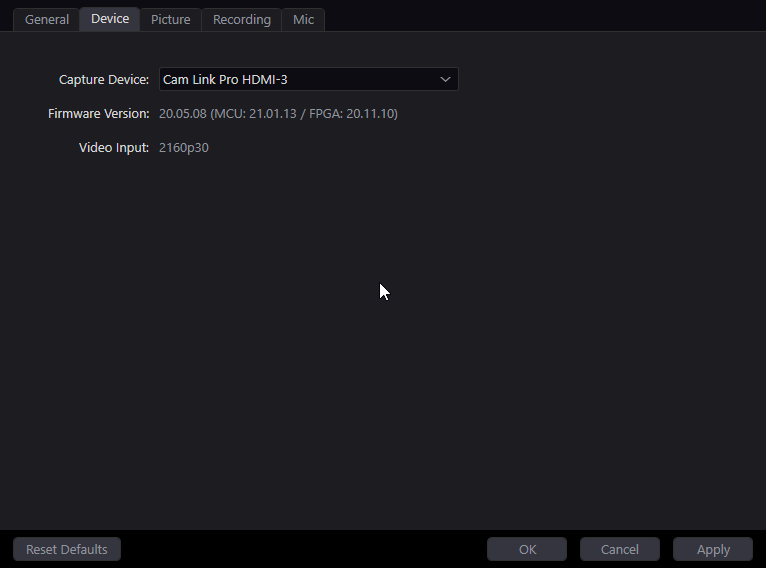
Ugh why cant I change the video input setting
so annoying
fringe path
no same out come
halcyon gust
no what sound?
fringe path
i got the black bars around my camera


 halcyon gust
O ok
so you cant have the screen orientation locked
the app is running in the normal phones layout
and the app thinks the same
you need to make it landscape
fringe path
it's always the simple things! lol
halcyon gust
lol it really is
halcyon gust
@barren stormone thing i dont like about the go xlr is it doesnt have a submixes
which I'd really like
thick nova
fickle pulsar
Does your PC meet these requirements? https://help.elgato.com/hc/en-us/articles/...
I think i got the solution. I changed my EDID (Internal) to default and no problem since ^^
 bronze pine
hey wsp I was wondering does the elgato take up space when its plugged in and im not recording anything?
coz I wanna play games when im not streaming but I dont want to plug it into my laptop and it ends up taking space when im not recording anything or streaming
 raven lily
hey everyone i have an issue where game capture hd outputs 30fps when i drop the resolution to 720p
it says it outputs at 60fps
but it definitely doesnt and i have no idea how to fix it
fickle pulsar
thick nova
I think i got the solution. I changed my EDID (Internal) to default and no probl...
Nice!
 silk panther
is there any way to restore old profiles? I had to have my comp reset windows cuz of a virus. and had a techie move some files over. I didn't ask to move over stream deck file because I thought the profiles were online or on the stream deck itself. these are the files I have:

inside elgato folder. but couldn't find any "backup" profile folders that i could load. as I don't think I made any.
 compact warren
silk panther
is there any way to restore old profiles? I had to have my comp reset windows cu...
compact warren
silk panther
is there any way to restore old profiles? I had to have my comp reset windows cu...
Did you create a backup before you got a virus?
silk panther
compact warren
Did you create a backup before you got a virus?
no.
compact warren
silk panther
no.
Hm then theres no way did you save it anyway, and did you wipe your computer
silk panther
compact warren
Hm then theres no way did you save it anyway, and did you wipe your computer
Yes I wiped my pc. no I didn't back it up, been trying to recreate the profile from memory but I spent a lot of time making it.
compact warren
silk panther
Yes I wiped my pc. no I didn't back it up, been trying to recreate the profile f...
Since you didnt save anything and you cleared all data of your computer theres no way to get it back, sorry
silk panther
compact warren
Since you didnt save anything and you cleared all data of your computer theres n...
but the techie that wiped my pc saved my elgato folder. wouldn't that be enough?
compact warren
silk panther
but the techie that wiped my pc saved my elgato folder. wouldn't that be enough?
you didnt save any of your keys (aka a save a backup), so it wouldnt of saved any keys
anyway, backups save to your downloads as far as i can remeber
just tested and it does, then you just import the file into the app
the elgato folder (i think) just contains files to make the deck work
silk panther
compact warren
the elgato folder (i think) just contains files to make the deck work
That's unfortunate :(
silk panther
compact warren
Mhm, viruses are annoying
atleast this made me back up stream deck every day if i added stuff.
compact warren
silk panther
atleast this made me back up stream deck every day if i added stuff.
Aha good idea, learn from mistakes i guess
speaking of backups i think i should make one 💀
stark mountain
On sound capture, im on the pc gaming tab and on 'which output is your elgato game capture device connected to' i do not have a elgato capture card option.
any advice?
 ebon kindle
I just setup my HD60 Pro and noticed that it provides a copy of the audio output that appears under recording devices in microsoft sound settings.
This is really convenient for getting game audio from my Switch into my desktop headphones however I've noticed it seems to have some random 'skipping' and distortion when im monitoring it. This happens sorts sporadically and otherwise the audio sounds fine.
Any ideas what may be causing this, possible a faulty capture card itself?
weak birch
Recommendation, DO NOT install the beta update... It messed up most of my decks and causing other issues with games even that used keymaps.
compact warren
weak birch
Recommendation, DO NOT install the beta update... It messed up most of my deck...
i'd just make a backup instead (just in case)
weak birch
Yea, well I didn't as I did not figure this huge an alteration for a patch update... But this should be a new version with all the changes they made to the beta.. because it really messed up decks etc...
compact warren
weak birch
Yea, well I didn't as I did not figure this huge an alteration for a patch updat...
Yes, thats why its in beta, as there could be major bugs
Phil did say in the msg at the top of #archived-stream-deck-beta
⚠️ This is beta software and may contain unknown bugs and issues. Please backup your Stream Deck profiles before updating to Stream Deck 5.1 Beta and read the known issues to ensure your workflow is not negatively impacted - #archived-stream-deck-beta message
weak birch
I expect bugs, but as I said, this is actually a major revision.... Bugs I deal with, this is a change in actual function of the software and streamdeck itself... I was not expecting that.
compact warren
weak birch
I expect bugs, but as I said, this is actually a major revision.... Bugs I deal ...
Mhm makes sence, probably should back your streamdeck up anyway cause someone a few hours ago got a virus and didnt backup so they couldnt get their deck back
compact warren
silk panther
is there any way to restore old profiles? I had to have my comp reset windows cu...
.
Ofc you didnt expect this though
vagrant forge
Good afternoon everyone! I hope someone can help what I want to do with my Voice Mod. I am streaming from Slobs with my Xbox Series X with a Elgato HD60 S+ through my Laptop.
What I am trying to do is have VoiceMod capture on my stream while having the VM played on my Game Chat / Xbox Party. So the people I play with / Death com can hear sound effects. How can I do that? Thank You Guys!
compact warren
vagrant forge
Good afternoon everyone! I hope someone can help what I want to do with my Voic...
I dont know much about voicemod so if this doesnt work idk what to do
But try making sure the input mic on your xbox is set to voicemod virtual audio device
vagrant forge
compact warren
I dont know much about voicemod so if this doesnt work idk what to do
But try m...
I have both voicemod & party chat coming in my mic but unfortunately people can hear my gameplay on their headphones. That’s where I stand and lost 😞 😅
stark mountain
vagrant forge
Try to set your audio on your 4K software to Elgato capture card.
how do i do that?
compact warren
vagrant forge
I have both voicemod & party chat coming in my mic but unfortunately people can ...
So it should work but it isn’t?
vagrant forge
compact warren
So it should work but it isn’t?
My issue is that people can hear my gameplay audio with my voice mod and my voice alone so there’s no many audio going at once . I just want to have my voice alone audio and voicemod only. 😅 trust I am trying to explain this so everyone can understand 😅
stark mountain
On sound capture, I have selected pc gaming and on the output setting it does not show the elgato capture card any advice?
compact warren
vagrant forge
My issue is that people can hear my gameplay audio with my voice mod and my voic...
Ok so your game sounds coming through your mic from voicemod?
vagrant forge
compact warren
Ok so your game sounds coming through your mic from voicemod?
Yes!
compact warren
vagrant forge
Yes!
And your voice?
compact warren
compact warren
And your voice?
(And effects from voicemod)
vagrant forge
compact warren
(And effects from voicemod)
Alright let me send you a screen shot
vagrant forge
vagrant forge
Alright let me send you a screen shot
Just give me a few
compact warren
vagrant forge
Just give me a few
Ok!
vagrant forge
compact warren
Ok!
BTW, thanks for helping! Just got to take care something
compact warren
vagrant forge
BTW, thanks for helping! Just got to take care something
Dw about it
vagrant forge
stark mountain
how do i do that?
Sorry Q! On your 4K capture is it on HDMI?
vagrant forge
stark mountain
audio is on hdmi
Okay what I am figuring out is what exactly is the issue. My bad bro just wanted to have a better understanding
stark mountain
im not sure what the issue is
is it suppose to be where i can hear both pcs through 1 headset?
vagrant forge
stark mountain
is it suppose to be where i can hear both pcs through 1 headset?
You have slobs?
vagrant forge
Yes
stark mountain
yes
vagrant forge
Probably there a chance that you have both monitor on the same scene in stead having one
stark mountain
can i use slobs to hear both pcs with 1 headphone?
vagrant forge
stark mountain
can i use slobs to hear both pcs with 1 headphone?
Tbh I can’t answer that because I am in a similar situation unfortunately sorry
stark mountain
oh okay
vagrant forge
vagrant forge
Probably there a chance that you have both monitor on the same scene in stead ha...
Like you have “starting now” then “main” prob in that main tab you have both monitors on that same main.
stark mountain
my main goal is to hear both pcs with 1 headset
but can i use an elgato app or something like slobs to do that
vagrant forge
😔 I am really scratching my head on that one tbh. I understand and again I’m kinda similar to your situation
stark mountain
ah okay
vagrant forge
I really wish I can help honestly
stark mountain
because im not sure whether i need to buy something to allow me to do that
vagrant forge
Probably like a splitter
stark mountain
k
 main imp
in obs how to fix it
 fickle pulsar
This doesn’t look like OBS.
 devout steppe
anyone know the reason I see "No capture devices found" on my streaming pc? Using the 4K60 Pro Mk.2
Gaming PC: rtx 2060
Streaming PC: GTX 1070
Gaming PC is setup correctly. But I have no idea if I am connected correctly to my streaming PC. I ran the HDMI OUT to my streaming PC graphics card, is that what I should be doing?
Additionally, my NVIDIA Control Panel shows no second display on my streaming pc, not sure if that is relevant information
fickle pulsar
devout steppe
anyone know the reason I see "No capture devices found" on my streaming pc? Usin...
IN should be to your Gaming PC/Out to your Gaming Monitor/TV Capture Card should be in your Streaming PC.
devout steppe
The capture card needs to be in the streaming pc?
@fickle pulsar
If so that's hilarious. I bought a refurbished unit so no directions were attached, and most tutorial videos don't specify 😂
fickle pulsar
devout steppe
If so that's hilarious. I bought a refurbished unit so no directions were attach...
Are you doing a dual setup, or single?
devout steppe
Dual
fickle pulsar
devout steppe
Dual
Then yeah, Streaming PC needs to have the Capture Card installed.
devout steppe
Thanks for the help!
I'll let you know if I have any further issues. Appreciate it!
fickle pulsar
devout steppe
I'll let you know if I have any further issues. Appreciate it!
You’re Welcome!
fickle pulsar
vagrant forge
Good afternoon everyone! I hope someone can help what I want to do with my Voic...
VoiceMod can’t do that to console, but PC def. can do the mods to stream. Also to Discord VC.
 last plank
Hello everyone lately I have been having issues with streaming my ps2 with the Elgato
I use a pound converter to convert to HDMI
whenever I play for an hour I start getting a static noise
Here is a clip as an example
https://clips.twitch.tv/ObeseCulturedFriesPeoplesChamp-5GM7g1_p6-F3cT1u

I'm hoping someone can help me cause this has become a major hindrance now
vagrant forge
fickle pulsar
VoiceMod can’t do that to console, but PC def. can do the mods to stream. Also t...
I can go Xbox Party chat on PC
fickle pulsar
vagrant forge
I can go Xbox Party chat on PC
Ok, I think it may work that way. What issues is voicemod doing?
fickle pulsar
vagrant forge
I can go Xbox Party chat on PC
Are you using wave link as well?
vagrant forge
fickle pulsar
Are you using wave link as well?
I really don’t understand how to use wave link
vagrant forge
fickle pulsar
Ok, I think it may work that way. What issues is voicemod doing?
The issue with this is that not only they hear me and the voicemod. They also hear my game play and that’s where I am stuck
fickle pulsar
vagrant forge
The issue with this is that not only they hear me and the voicemod. They also he...
I can find a guide that helps you setup voicemod, but are you using a headset for gameplay or speakers? Also, are you streaming, or just gaming/recording?
fickle pulsar
vagrant forge
The issue with this is that not only they hear me and the voicemod. They also he...
Here’s the guide for voicemod. https://help.elgato.com/hc/en-us/articles/360060269412-Using-Elgato-Wave-3-Wave-1-and-Wave-Link-with-Voicemod
vagrant forge
fickle pulsar
I can find a guide that helps you setup voicemod, but are you using a headset fo...
Using my headphones for gaming and streaming on Slobs with a Elgato HD60 S+.
vagrant forge
fickle pulsar
Here’s the guide for voicemod. https://help.elgato.com/hc/en-us/articles/3600602...
Thank you! I will book this so I can read and learn how to use wave link tomorrow
vagrant forge
fickle pulsar
Here’s the guide for voicemod. https://help.elgato.com/hc/en-us/articles/3600602...
THIS IS IT!!! Thank You so much @fickle pulsar
fickle pulsar
vagrant forge
THIS IS IT!!! Thank You so much <@476160810457235466>
You’re Welcome! I figured it would be!🙂
 coarse hemlock
So im having issues with my stream deck regarding the accounts connected. But i've tried deleteing local appdata/Elgato, and i've reinstalled the stream deck. But after a PC restart and an install of the stream deck, it still somehow remembers the malfunctioning accounts connected. Where are these stored? How do i hard reset those?
(@me on replies, ty)
tacit niche
Guys why is my Elgato 4k not detecting my ps5 but it is detecting my nintendo switch?
 near igloo
hey guys having a problem with my wave 3/wavelink software:
the lights dont come on when windows starts and it seems to be random when they actually turn on
and some programs seem to just ignore the channel i tell them to use for example i set streamraiders to use the elgato wave link game channel and it STILL just uses whatever i set the windows default sound device each time
can anyone advise as to how to fix this?
fickle pulsar
near igloo
hey guys having a problem with my wave 3/wavelink software:
the lights dont come...
have you downgraded to 1.2 and then updated to 1.4?
near igloo
fickle pulsar
have you downgraded to 1.2 and then updated to 1.4?
i think im just running the latest version
i just used the download link for v1.3.0 from the website
fickle pulsar
near igloo
i think im just running the latest version
uninstall, reboot your PC, downgrade to 1.2 via install 1.2, then update from 1.2
fickle pulsar
near igloo
i just used the download link for v1.3.0 from the website
Here’s the links to 1.2 https://help.elgato.com/hc/en-us/articles/360043289491-Elgato-Wave-Link-Software-Release-Notes
near igloo
thanks just uninstalling the latest version now
fickle pulsar
near igloo
thanks just uninstalling the latest version now
You’re Welcome!
last plank
fickle pulsar
You’re Welcome!
Would this possibly fix sound issues?
vagrant forge
fickle pulsar
Here’s the guide for voicemod. https://help.elgato.com/hc/en-us/articles/3600602...
Now, once I am done setting up the voicemod with my Wave 3 and wave link, which Wave 3 I should put as my default?

 naive summit
Hey, I'm thinking of running a CoOp stream with my wife and I'm wondering, If we get a 4k60, plug it into my pc and put a HDMI from her pc into my card. Would that work? would she still be able to use multiple monitors and all that? Thanks for any help 🙂
late oracle
FaceCam keeps jamming. It was working fine for a couple weeks but now cant run for more than 2 min. Don't think I changed anything with my CPU. Can someone link me to the doc that the latest update had about this issue? Thank you.
I have two USB hubs. One on my MB and one PCI. I moved all my USBs into the PCI and just have the CamHub on the MB one and it seems fine. Thanks!
 trim cloak
hey guys, i just have a quick question in regards to the standard 15 button streamdeck. Every once in a while if i play music through it, random tracks can all of a sudden stop playing after playing for so long. In order to fix this i have to right click app in bottom right corner and close it fully down then reopen it again. Would be much appreciated if anybody knows how to fix this issue? Thanks
 broken marsh
@fickle pulsar did you ping me recently? I got a notification that said you pinged me but I can't find anything
fickle pulsar
vagrant forge
Now, once I am done setting up the voicemod with my Wave 3 and wave link, which ...
Voicemod
fickle pulsar
broken marsh
<@476160810457235466> did you ping me recently? I got a notification that said y...
Weird!
fickle pulsar
vagrant forge
Now, once I am done setting up the voicemod with my Wave 3 and wave link, which ...
is this in the voicemod app or wavelink?
vagrant forge
fickle pulsar
is this in the voicemod app or wavelink?
No that’s slobs
 simple lake
Hello, is store freezing some common issue? i just bought stream deck and it keeps freezing and crashing eventually when i open store. It worked for 1 day and no solution after that. I made complete fresh install with appdata wipe etc and still freezing whenever i open store. I see someone said use usb2.0 but what if i dont have 2.0 on my motherboard?
 languid galleon
Hello i got a elgato hd60 S + can someone help me with audio issue im trying to stream pc to pc
simple lake
do i have to return my streamdeck because i dont have usb 2.0?
languid galleon
languid galleon
Hello i got a elgato hd60 S + can someone help me with audio issue im trying to ...
Never mind i got it 😅😅
 lean dock
I just moved and all of the sudden, I am having audio issues with my dual PC setup. My streaming PC isn't picking up any audio through my Elgato HD60S. I know that it is correctly set up so I think it might be a setting within Elgato Sound Capture. Any help?
simple lake
is there anyone out here who could help me? is store freezing some common issue? i just bought stream deck and it keeps freezing and crashing eventually when i open store. It worked for 1 day and no solution after that. I made complete fresh install with appdata wipe etc and still freezing whenever i open store. I see someone said use usb2.0 but what if i dont have 2.0 on my motherboard? do i have to return my streamdeck because i dont have usb 2.0?
fickle pulsar
vagrant forge
No that’s slobs
ok then the mic you’d choose as primary is the wave link stream. that way it outputs your stream audio
 unkempt kernel
uninstalled the streamdeck software with the intention of reinstalling it and now it doesnt let me install it all the way it gets to the end of the install the program even opens up but then i get a thing popping up saying im not the admin of the PC when i am and it rolls back and deletes the software

 bright coyote
hey im having a issue where my elgato isnt picking up my voice chat on ps5 through obs does anyone have any recommendations
fickle pulsar
unkempt kernel
uninstalled the streamdeck software with the intention of reinstalling it and no...
Reboot your pc, then try again
fickle pulsar
bright coyote
hey im having a issue where my elgato isnt picking up my voice chat on ps5 throu...
You using party chat?
bright coyote
fickle pulsar
You using party chat?
Yes on the ps5
Do I need another microphone for my pc to record my voice on obs?
fickle pulsar
bright coyote
Do I need another microphone for my pc to record my voice on obs?
Maybe, but is OBS in analog?
bright coyote
fickle pulsar
Maybe, but is OBS in analog?
How do you do that?
 lean breach

New facecam, not working. Sits on Initializing for 30+ min, ive tried everything i can imagine, ran as admin, restarted, different usb ports, checked for updates. Not sure what else there is.
Plugged it into my laptop and it worked lol. That being said i have no idea what the issue could even be.
I can literally open it in the camera app but the software itself will not work.
vagrant forge
fickle pulsar
ok then the mic you’d choose as primary is the wave link stream. that way it out...
So it should be Wave Link Stream (Elgato Wave:3) got you!
fickle pulsar
vagrant forge
So it should be Wave Link Stream (Elgato Wave:3) got you!
yes! 🙂
vagrant forge
fickle pulsar
yes! 🙂
Vic, appreciate your support buddy! Plus just purchase the Chatlink so I can have game chat on my stream is well!
fickle pulsar
vagrant forge
Vic, appreciate your support buddy! Plus just purchase the Chatlink so I can hav...
only when using chatlink, make sure you put your audio in analog. Then switch it back when not using chatlink. 🙂
vagrant forge
fickle pulsar
only when using chatlink, make sure you put your audio in analog. Then switch it...
This is on 4K app for the HD60 S+
fickle pulsar
vagrant forge
This is on 4K app for the HD60 S+
Which capture card are you using?
fickle pulsar
vagrant forge
This is on 4K app for the HD60 S+
4K Capture Utility has a way to switch from HDMI to Analog, and then it just works via OBS for the HD60S+ but HD60S requires you to Switch in OBS to Analog. Just depends on your capture card. https://help.elgato.com/hc/en-us/articles/360050373852-Elgato-Game-Capture-HD60-S-Chat-Link-Setup-Analog-Line-In-Audio-in-3rd-Party-Apps-OBS-XSplit-SLOBS-
 silver flame
Hi all, I need to use an extension for my second pcei since my GPU is too thicc. Does something like this do the trick?
https://www.amazon.co.uk/Pxyelec-Flexible-Express-Riser-Extender/dp/B07FB3KPZL/ref=asc_df_B07FB3KPZL/?tag=googshopuk-21&linkCode=df0&hvadid=309909333117&hvpos=&hvnetw=g&hvrand=17104813617888990699&hvpone=&hvptwo=&hvqmt=&hvdev=m&hvdvcmdl=&hvlocint=&hvlocphy=9045883&hvtargid=pla-696265211426&psc=1
Cheers

Pxyelec Flexible PCI Express 1x Riser Card Extender Cable for PC
vagrant forge
fickle pulsar
4K Capture Utility has a way to switch from HDMI to Analog, and then it just wor...
Gotcha!!!
 slate cipher
can the overlays in the elgato stream software be edited? i want to add my socials but cant
trim cloak
Music I’ve assigned to the streamdeck keeps stopping playing half way through randomly cuts off? Does anyone know how to fix
fickle pulsar
silver flame
Hi all, I need to use an extension for my second pcei since my GPU is too thicc....
Yeah, it’s a riser cable, but a riser cable could cause a delay. Just keep that in mind, hopefully you don’t have lag. 🙂
silver flame
Cheers. A decent quality one should be very minimal which I can love with 👍🏽
fickle pulsar
slate cipher
can the overlays in the elgato stream software be edited? i want to add my socia...
Are you using Game Capture HD? If so then Yes. If you’re using 4K Capture Utility then no.
fickle pulsar
lean breach
I can literally open it in the camera app but the software itself will not work.
are you connected to a USB 3.0 port, and using elgato’s provided cable?
fickle pulsar
bright coyote
How do you do that?
bright coyote
fickle pulsar
If you’re using Chatlink https://help.elgato.com/hc/en-us/articles/360050373852-...
I’m using the Astro a50 no chat link
fickle pulsar
bright coyote
I’m using the Astro a50 no chat link
Let me check a few things! I think that headset has a mixer/amp
fickle pulsar
bright coyote
I’m using the Astro a50 no chat link
which capture card are you using?
slate cipher
Yeah I'm using the game capture HD
bronze pine
My game capture says HDCP next to it and says no signal when I have everything connected properly and have changed the settings
My elgato starts showing on my screen when I close elgato app but when I open the app it says it’s not connected
bright coyote
fickle pulsar
which capture card are you using?
Hd60 pro
lean breach
fickle pulsar
are you connected to a USB 3.0 port, and using elgato’s provided cable?
Yes and yes
fickle pulsar
lean breach
Yes and yes
Try a different port, see if any changes, also maybe see if bios/drivers are updated, and if so, then it may be power bandwidth issues.
fickle pulsar
bright coyote
Hd60 pro
Thanks, researching it!
bright coyote
fickle pulsar
Thanks, researching it!
Thank you
fickle pulsar
bright coyote
Hd60 pro
Can you see if the PS5 has optical audio.
bright coyote
It does I have a hdmi adapter for optical cable
fickle pulsar
bright coyote
It does I have a hdmi adapter for optical cable
Try this setting, but for ps5 and see if it helps. 🙂 https://help.elgato.com/hc/en-us/articles/360028237111-Recording-PlayStation-4-PS4-party-chat-with-Astro-A50
bright coyote
fickle pulsar
Try this setting, but for ps5 and see if it helps. 🙂 https://help.elgato.com/hc...
Ok I’ll lyk what happens
 nimble nova
Hello I was wondering are you have problems with elgato PS5 audio problems
lean breach
fickle pulsar
Try a different port, see if any changes, also maybe see if bios/drivers are upd...
Tried different port and all bios and drivers are updated to my knowledge. As far as power bandwidth, it doesnt seem to be the webcam thats the issue its the software, it works on 2 other PC's

never leaves this screen but the webcam works in all other apps (Choppy which i read online is fixed within the software) So for some reason the software will not load through.
fickle pulsar
lean breach
Tried different port and all bios and drivers are updated to my knowledge. As f...
Have you updated the firmware on another pc?
bright coyote
fickle pulsar
Try this setting, but for ps5 and see if it helps. 🙂 https://help.elgato.com/hc...
I did it but I’m still having the issue where I can’t record my voice through obs but I can record party chat voice
lean breach
fickle pulsar
Have you updated the firmware on another pc?
no but i might try that
lean breach
fickle pulsar
Have you updated the firmware on another pc?
Updating now.
Dang still no dice after firmware update.
fickle pulsar
lean breach
Dang still no dice after firmware update.
Open a support ticket with #official-tech-support see if they can run diagnostics on the pc it’s not working on.
lean breach
fickle pulsar
Open a support ticket with <#842491937038925865> see if they can run diagnostics...
Already ran em and sent em in haha xD
 gritty copper
is there no way to get the HD60S+ to record at 1080p60 whatever im playing on a monitor that is 1440p144
because i have only figured out how to do it by mirroring whats on the screen over onto the elgato "monitor", but then that just kills fps on my main.

@ me if you have help for me
 magic onyx
gritty copper
because i have only figured out how to do it by mirroring whats on the screen ov...
magic onyx
gritty copper
because i have only figured out how to do it by mirroring whats on the screen ov...
you can do it with obs. gaming with 1440p and recording with 1080 in obs
halcyon gust
is the cam link pro UVC drivers?
 stable marsh
anyone think they can help me with my HD60s? (No ps4 Display on monitor but the el gato sofware picks up my ps4)
lean dock
Does anyone know what the yellow hazard triangle next to Elgato Sound Capture in the Game Capture screen means? Is that always there?
fickle pulsar
stable marsh
anyone think they can help me with my HD60s? (No ps4 Display on monitor but the ...
is you IN connected to console, USB - C connected to the PC’s USB 3.0, and OUT to your TV/Gaming Monitor, and HDCP is off?
stable marsh
Yes to all of that
fickle pulsar
stable marsh
Yes to all of that
Are your bios/drivers updated?
 viral river
Guys, I'm looking for stream deck support. My twitch chat clear is not working anymore and also every now and then I get a message coming up to connect to Twitter, strange thing is.. I already am! Send help!
stable marsh
Yeah @fickle pulsar
fickle pulsar
stable marsh
Yeah <@476160810457235466>
have you tried different usb 3.0 ports
stable marsh
Yeah I’ve tried the old ones i used to have and new ones I bought
fickle pulsar
stable marsh
Yeah I’ve tried the old ones i used to have and new ones I bought
via pcie? on your motherboard, or a usb hub?
 surreal cave
I got a question
stable marsh
What does that mean?
fickle pulsar
stable marsh
What does that mean?
you said new ones, i was thinking new pcie usb ports, or a usb hub. are you connected directly to the PC or a hub?
fickle pulsar
surreal cave
I got a question
what’s up?
surreal cave
fickle pulsar
what’s up?
If I'm playing a game on let's say xbox or ps4, is it possible to stream it straight to discord using an elgato or no?
fickle pulsar
surreal cave
If I'm playing a game on let's say xbox or ps4, is it possible to stream it stra...
I’ve experience mine shows up as a cam, however, you can enter fullscreen via 4K Capture Utility and stream via sharing just the app, like a game. Or other’s have learned to do a virtual cam through obs to discord.
stable marsh
Directly to the PC
fickle pulsar
stable marsh
Directly to the PC
are you using the elgato provided cables?
fickle pulsar
stable marsh
Yeah
open a ticket with #official-tech-support since you’ve tried everything.
stable marsh
Alright thank you! Appreciate the help!
fickle pulsar
stable marsh
Alright thank you! Appreciate the help!
You’re welcome!
south bronze
I have a labtop and I was wondering which elgato device should I purchase
I want to play on labtop and stream on pc
Is it possible
fickle pulsar
south bronze
I want to play on labtop and stream on pc
So a dual PC setup, or just using the laptop for both?
 violet jackal
Hi, i'm using the Elgato Facecam and everytime i change scenes it freezes and i have to deactivate/reactivate. Has anyone else had this issue?
fickle pulsar
south bronze
Game on labtop and stream from pc
So you are using 2 computers, one is a laptop for gaming?
south bronze
yes
fickle pulsar
south bronze
yes
If you are using a dual setup, and you have space in your pc build for an internal PCIE, ether HD60 Pro, or 4K60 Pro MK.2 can be ideal, if not HD60S+ as an external is great.
 scarlet depot
hi, maybe someone can help me out here, I have this issue where it says that the audio is playing but I don't hear it in my headphones, they work perfectly fine on their own, but if the sound goes through wave link it doesn't work, any help?
 fickle pulsar
scarlet depot
hi, maybe someone can help me out here, I have this issue where it says that the...
fickle pulsar
scarlet depot
hi, maybe someone can help me out here, I have this issue where it says that the...
It outputting to your hyper x virtual surround sound
fickle pulsar
scarlet depot
hi, maybe someone can help me out here, I have this issue where it says that the...
Is that the device you’re using to listen?
scarlet depot
yes
fickle pulsar
scarlet depot
yes
Ok, close out of wave link, and relaunch it.
scarlet depot
doesn't work
naive summit
Hey guys, would anyone know If I can use the 4k60 to capture my partners pc screen to add them to my stream? Will she still be able to use multiple monitors as well? 🙂 thanks in advance
scarlet depot
fickle pulsar
Ok, close out of wave link, and relaunch it.
I've tried that and restarted my PC and reinstalling Wave link
It always worked fine
fickle pulsar
scarlet depot
It always worked fine
Did you make any changes?
scarlet depot
No changes
but yesterday I had to force shut down my PC and I think that's when it started giving me issues
not sure it's that
fixed it
I had this disabled for some reason

thanks for the help though
ruby gyro
When I am on my Wave Link profiles, I click on the Home button (which is a switch profile button) it just switches to the next Wave Link profile, it doesn't go to the profile I have set for it. Is this an error?
vagrant forge
Good afternoon everyone! I have the Astro A40’s with the Mixamp Pro for the Series X. Before I never needed chatlink to get lobby chat and game chat audio on my stream but as in this week my stream hasn’t capturing the lobby/game chat audio. Is there a fix?
fickle pulsar
scarlet depot
thanks for the help though
yay glad it’s working! you’re welcome 🙂
fickle pulsar
south bronze
Thank u
You’re Welcome!
fickle pulsar
naive summit
Hey guys, would anyone know If I can use the 4k60 to capture my partners pc scre...
Not entirely sure, but it sounds like it would run, via dual pc setup.
naive summit
fickle pulsar
Not entirely sure, but it sounds like it would run, via dual pc setup.
I guess I'll have to bite the bullet and find out the expensive way haha, thank you 🙂
fickle pulsar
naive summit
I guess I'll have to bite the bullet and find out the expensive way haha, thank ...
oh no? what’s the expensive way?
naive summit
fickle pulsar
oh no? what’s the expensive way?
Buying the thing and trying it out haha
fickle pulsar
naive summit
Buying the thing and trying it out haha
oh, I thought you already had it. 🤦🏻♀️
naive summit
fickle pulsar
oh, I thought you already had it. 🤦🏻♀️
Haha no, Wanted to see if someone has tried it beforehand before I go buy one, But hey I guess I'm a pioneer of something now.,
south bronze
So i am streaming on my xbox with and elgato hd60 and my stream can hear my game audio but not my game chat through modern warfare. does anybody know how to fix this?
south bronze
@fickle pulsar
 surreal apex
Anyone run into this problem??? It happens to me almost everyday... 4K capture utility shows No Signal BUT i have passthrough signal on my game monitor... SW up to date and restarting it does not work - actually sometimes makes it show a full green window - only fix is to Reboot PC - which sucks when i notice this just before stream or worse during stream...
Edit - its a 4k60Pro M2

 river arrow
So I'm looking into getting an HD60 S+ for my PS5 but I had a quick question first. Currently when I play I have an aux cable going from my PS5 controller to the line in on my PC so I can hear PC/Discord audio and PS5 audio at the same time. I'm wondering if I get an HD60 S+ would I be able to keep this same setup and still capture game audio or would I need to switch things around a bit? I saw people saying you need an Elgato Chat link cable but I don't need to capture PlayStation party chat, only game audio so I don't think I'd need that. If anyone knows anything about this I would really appreciate it, thanks!
 magic hill
river arrow
So I'm looking into getting an HD60 S+ for my PS5 but I had a quick question fi...
magic hill
river arrow
So I'm looking into getting an HD60 S+ for my PS5 but I had a quick question fi...
I play on PS4 and use the HD60 S+. The console audio is captured along with the video through HDMI. You only need the Chat Link cable if you want to use in-game chat.
river arrow
magic hill
I play on PS4 and use the HD60 S+. The console audio is captured along with the ...
Ok great that’s exactly what I needed to know! Thank you so much for your help
fickle pulsar
south bronze
<@476160810457235466>
wave link?
fickle pulsar
surreal apex
Anyone run into this problem??? It happens to me almost everyday... 4K capture u...
um… looks like you got OBS and 4K capture Utility open at the same time. I believe one or the other will work at a time.
fickle pulsar
river arrow
So I'm looking into getting an HD60 S+ for my PS5 but I had a quick question fi...
it would capture through hdmi audio like normal, without chatlink. as for the aux, idk if that will route the way you’d want. I usually just have all my audio go to my headset from pc via wavelink.
river arrow
fickle pulsar
it would capture through hdmi audio like normal, without chatlink. as for the au...
ah I see that makes sense. Well I was only using the aux to get the PS audio to come through my PC but if it's coming through the HDMI via the capture card instead that's totally fine. I just want to be able to play PS5 games with audio and stream to friends in discord at the same time
fickle pulsar
river arrow
ah I see that makes sense. Well I was only using the aux to get the PS audio to ...
then you don’t even need to worry about aux. HDMI audio will route to your OBS. 🙂
fickle pulsar
river arrow
perfect that's awesome!
Yeah, I do this, and add discord for party chat vs console party chat. However, bought a chatlink pro for the nights we don’t do discord.
fickle pulsar
river arrow
I'm excited
I’m excited for you! Stream is gonna be lit!
river arrow
thank you!
river arrow
fickle pulsar
Yeah, I do this, and add discord for party chat vs console party chat. However, ...
what is chatlink pro?
i think i've only seen regular chatlink
fickle pulsar
river arrow
what is chatlink pro?
new product for ps5, and nintendo switch solutions for party chat, and audio issues with the switch via headset use. and exciting for those who charge their controllers or have wired controllers so they don’t hear the hum via analog audio.
fickle pulsar
river arrow
thank you!
You’re Welcome!
river arrow
ooo I see that's pretty sweet!
well if I ever need to capture party chat I will def have to look into that
fickle pulsar
river arrow
ooo I see that's pretty sweet!
yeah it’s pretty cool! I actually followed up with someone who I thought this was a perfect solution for them cause they used wired. So elgato did good today!💗
river arrow
oh hell yeah that's awesome!
I think i've had issue's with a hum when using line in audio in the the past with switch but I have some adapter that helps with grounding i think? that seems to do the trick
fickle pulsar
river arrow
well if I ever need to capture party chat I will def have to look into that
yeah, I’m just using it for console party should the day come we don’t use discord, but highly doubt it. lol
fickle pulsar
river arrow
I think i've had issue's with a hum when using line in audio in the the past wit...
this does just that, to get rid of the hum!
river arrow
awesome! well it's very nice to know there's a solution directly offered by elgato for those sorts of things
fickle pulsar
river arrow
awesome! well it's very nice to know there's a solution directly offered by elga...
yes! it’s pretty awesome! 🙂
south bronze
fickle pulsar
wave link?
So i am streaming on my xbox with and elgato hd60 and my stream can hear my game audio but not my game chat through modern warfare. does anybody know how to fix this?
fickle pulsar
south bronze
So i am streaming on my xbox with and elgato hd60 and my stream can hear my game...
are you using wave link?
south bronze
fickle pulsar
are you using wave link?
no
fickle pulsar
south bronze
no
then you should be able to route your desktop audio in OBS as an input so you can have party chat there. 🙂
south bronze
fickle pulsar
then you should be able to route your desktop audio in OBS as an input so you ca...
oh forgot to add its on xbox not pc
fickle pulsar
south bronze
oh forgot to add its on xbox not pc
🤦🏻♀️ lol you’ll need chatlink for it, but I can research a few things for you.
fickle pulsar
south bronze
oh forgot to add its on xbox not pc
 cyan laurel
idk if this is a common problem but my elgato facecam is delayed after the audio
surreal apex
@fickle pulsar the 4k60 pro should allow for dual outputs. And I use the Stream Link in the 4k sw to transmit good HDR color to obs. It works flawlessly when it works correctly
 graceful shard
would a elgato pull greenscreen work by putting it on a bed at all incase someone streams from there bed
graceful shard
i tried greenscreen sheets for my greenscreen and my headsets always gets fuzziness on it
@floral jetty i need help
floral jetty
@graceful shard please don't tag mods or employees for tech support.
graceful shard
how can i fix up my greenscreen problem then
floral jetty
Not sure, haven't used a green screen in years. But could be a lighting issue.
shadow anchor
graceful shard
i tried greenscreen sheets for my greenscreen and my headsets always gets fuzzin...
Bringing the green screen closer will help, But fixing the lighting is the answer.
graceful shard
Krabs do you think i might need a second elgato keylight then
graceful shard
@shadow anchor help me
floral jetty
I believe you would want a minimum of two keylights (not air) to properly light up the green screen. The key lights should be pointed at the green screen to remove any shadows on it. Any additional lights get me used to light your self up.
graceful shard
my first keylight is pointed at me all the time
floral jetty
That's probably why you have fuzziness. The green screen needs to be an even color. If it has shadows it won't chroma key correctly
This is kinda what you want.

Not my image so ignore the terms. But what they labeled at "screen lights" should be elgato keylights, and what they labeled as "key light" can be that or the air/ring
graceful shard
would the elgato pull out greenscreen need 2 keylights at all
floral jetty
you really want two at a minimum for any chroma key situation. If it is not light up correctly you will get shadows and that will cause issues with how chroma key works.
 safe bronze
A smarter chroma key solution could help, for example in davinci resolve, there is a tool to intelligently key a background out, taking into account shadows and such
shadow anchor
floral jetty
Not my image so ignore the terms. But what they labeled at "screen lights" shoul...

 shadow anchor
floral jetty
you really want two at a minimum for any chroma key situation. If it is not ligh...
shadow anchor
floral jetty
you really want two at a minimum for any chroma key situation. If it is not ligh...
I redid the image for you in case you need it again
floral jetty
shadow anchor
I redid the image for you in case you need it again
Thank you!!
floral jetty
shadow anchor
fickle pulsar
shadow anchor
Can we get this in #community-resources please! 🙂
shadow anchor
fickle pulsar
Can we get this in <#837073573981323314> please! 🙂
Put it wherever you would like for whatever. No need to attribute me, but if you do, please remember to include a link to: https://www.streamdecklabs.com/ with .my name.

To get Plugin Support, Development help, or to help others: Join Our Stream Deck Community & Developer Forums!
shadow anchor
fickle pulsar
Can we get this in <#837073573981323314> please! 🙂
I will post a transparent background one in a few so it can be used on any color background.
 fresh geyser
Afternoon. I was looking to get some information on the Elgato Flex Arm mount
that I can't find on the website
shadow anchor
Tranparent Background
 floral jetty
sorry, please dont add download files. But that looks great thank you
shadow anchor
NP
fresh geyser
I'm trying to figure out if I can mount a webcam to the FlexArm, I can't find a listing as to what size the mountint post is, or if anyone has tried it.
Yes, all I have is a webcam to use with this ... for now.
floral jetty
fresh geyser
I'm trying to figure out if I can mount a webcam to the FlexArm, I can't find a ...
1/4" to 3/8" and 1/4" to 5/8" Adaptors
under technical specs on the site its under the "in the box" section
fresh geyser
thanks, I must have missed it somehow. So in theory I should easily be able to mount a webcam or two to it. Awesome.
naive summit
fickle pulsar
yeah it’s pretty cool! I actually followed up with someone who I thought this wa...
Hey, just wanted to let you know I got confirmation from Elgato that it's possible 🙂
fickle pulsar
naive summit
Hey, just wanted to let you know I got confirmation from Elgato that it's possib...
awesome!!!
naive summit
Having a problem where my hue bridge wont get shown in the streamdeck software it states that it pairs sucessfully but I can't select it from the drop down menu
south bronze
If I have a wireless headset for my xbox series x and an elgato hd60? does the hd60 pick up my voice? also is there anyway to make twitch record in-game mics on xbox seems it doesn't with xbox
 true sinew
Hello there!! i have a tech question, i need to share 12 screens for a tournament and i dont know what i need to do such thing. I was thinking about using a cam link 4k for each computer and a stream deck. Maybe you guys can help me with this
safe bronze
The cam link pro has 4 hdmi inputs but uses a pci-e interface
Would be perfect imo
You’d be able to capture 12 screens with 3 cam link pros
But you’d need 3 pcie slots
Alternatively, you could find a software solution allowing you to stream the screens of 12 PCs to a streaming pc and taking those streams combining them into the one you stream to twitch or YouTube or wherever
Or record or whatever you’re doing with the result
For example: https://obsproject.com/forum/resources/obs-studio-send-an-udp-stream-to-a-second-pc-using-obs.455/
OBS Forums
Instead of using OBS in the usual way of sending out an rtmp stream, the custom ffmpeg output offers us even more output protocols that we can use. In this guide I will use UDP as an example. (A full list of supported protocols can be found here...
@true sinew
true sinew
thank you @safe bronze!!
safe bronze
true sinew
thank you <@!190855924368277508>!!
I’m curious are you more interested in the 3x Cam Link Pro solution or the software solution?
true sinew
safe bronze
I’m curious are you more interested in the 3x Cam Link Pro solution or the softw...
im interested in the 3x cam link pro but i need to check the mother board, i think its easier
safe bronze
Yeah good idea
Most motherboards I think have enough slots
It’s only a 4x PCIe
So if you’re lucky your mobo will have 2 16x, and 3 4x
 tiny jacinth
hello there!
having a recurrent issue, this week...
I'm using a wave xlr with the wavelink software, so I utilize elgato's system output and my earphones as a monitoring device to normally use my PC.
The issue is.. basically my audio will go out entirely. This is solved by unplugging and replugging my Wave XLR.
Any ideas? Thanks in advance
true sinew
thank you @safe bronze you are the best
safe bronze
true sinew
thank you <@!190855924368277508> you are the best
Np
safe bronze
true sinew
thank you <@!190855924368277508> you are the best
Oh sorry I just realised a lot of motherboards have 2 16x and 3 1x not 4x, so you might be out of luck unless you have a higher end motherboard with 3 16x
 hot shell
Hello everyone. i downloaded the drivers for the elgato 49pro mk2, but the elgato does not recognize them as useful drivers and it does not make me recognize the hardware from windows. I need urgent help please
fickle pulsar
hot shell
Hello everyone. i downloaded the drivers for the elgato 49pro mk2, but the elgat...
uninstall, shutdown pc, remove the capture card. turn on pc install software. power down pc, install capture card. Power on PC, and see if that helps.
south bronze
got the product but there is a dilemma
my graphics card only has hdmi port
for the pc
and do i download the software on both devices
 bronze robin
hello everyone, I was kindly looking for, if anyone have a video tutorial on how to improve the sound and voice like radio with my elgato wave3 microphone.. thank you
 spare geyser
Hello all! Trying to find a solution to an annoying issue - I've noticed lately that I'm getting intermittent crackling/stuttering audio in the feed from both my PS5 and Switch on an HD 60 Pro - I also noticed the issue persists regardless if testing on a Cam Link, Razer Ripsaw, or if swapping between HDMI cables. I assumed then it must have been software, so I tried swapping off VM Potato to straight audio as well as flowing through OBS rather than Elgato's Game Capture HD - same issue. Swapped from the PCIe 8x slot to a PCIe 4x slot that was more isolated to see if it made a difference but had no luck + the fact that it persists on USB based solutions tells me its probably not the slot that is the problem. Any other ideas on things I could try? Further context - there is an HDMI spiltter on one end and when the system runs straight to the TV it does not have the same issues. For reference - the MB is a GA-Z77X-DH3.
EDIT: on a whim I decided to disable "Allow 60 fps" on the profile which immediately fixed the problem. Why this would be correlated, I'm not sure - the GTX 1060 3gb should be more than enough to handle encoding for 1080p at 60.
fickle pulsar
bronze robin
hello everyone, I was kindly looking for, if anyone have a video tutorial on how...
I have how to setup wave link in #community-resources but I have my mic on gain lock and 20db
bronze robin
ok.. thank you... @fickle pulsar
fickle pulsar
bronze robin
ok.. thank you... <@!476160810457235466>
you’re welcome!
hot shell
fickle pulsar
uninstall, shutdown pc, remove the capture card. turn on pc install software. po...
i tried everything ... old drivers. remove the digital signature. the beauty is that the elgato 4k pro works, but m2k does not. I don't know what the problem could be ... the elgato remains unknown as a multimedia device
 hazy mauve
how come VRR gets disabled when using the 4K60Pro cap card on my Series X. this is normal right?
south bronze
There is no sound coming from elgato and I have to duplicate screen to pick up capture
fickle pulsar
hot shell
i tried everything ... old drivers. remove the digital signature. the beauty is ...
bios/drivers are updated?
fickle pulsar
hot shell
i tried everything ... old drivers. remove the digital signature. the beauty is ...
did you try a different pcie slot?
fickle pulsar
hazy mauve
how come VRR gets disabled when using the 4K60Pro cap card on my Series X. this ...
No capture can do vrr at this time.
hazy mauve
ok just making sure i didn’t do anything wrong
fickle pulsar
south bronze
There is no sound coming from elgato and I have to duplicate screen to pick up c...
on obs? did you in the audio mixer go to advance properties, and select monitor and output for it?
hazy mauve
i’m having troubles displaying my PC game captures tho, kinda odd. did everything correct to. SLOBS just won’t pickup any steam game i launch
fickle pulsar
hazy mauve
ok just making sure i didn’t do anything wrong
you’re good! I’m sure once elgato has a new product we’re all gonna be like moths to a flame. 🤷🏻♀️🤣
hazy mauve
if i do a Display Capture that works but i really don’t want to show my entire desktop
south bronze
fickle pulsar
on obs? did you in the audio mixer go to advance properties, and select monitor ...
Does obs have to be on the gaming pc or streaming pc
fickle pulsar
hazy mauve
if i do a Display Capture that works but i really don’t want to show my entire d...
you can do it per game, like an app capture or window capture. I prefer desktop, because I do fullscreen via my games for display capture.
fickle pulsar
south bronze
Does obs have to be on the gaming pc or streaming pc
streaming PC.
hazy mauve
yea i play full screen
so should i just do display capture since game capture doesn’t work? lol
fickle pulsar
hazy mauve
yea i play full screen
then is should only capture that 1 display you set the properties in obs too via your game monitor. I have dual monitors for this reason, 1 for my pc stuff, other for gaming.
hazy mauve
yea i got dual monitors
fickle pulsar
hazy mauve
so should i just do display capture since game capture doesn’t work? lol
anytime I do PC i use display capture. any time I do console, I use my capture card.
hazy mauve
okay cool yea i’ll just display my desktop idc
fickle pulsar
if I had a dual pc then I would use my capture card, but display capture fits my pc streaming needs. I don’t see the need for my capture card to be used outside of console.
south bronze
Does the streaming pc have to in port or out port
fickle pulsar
south bronze
Does the streaming pc have to in port or out port
IN connects to your Console/Gaming PC and OUT to your Gaming monitor. The Streaming PC needs to be connects via USB or PCIE to the capture card
south bronze
And you said audio mixer on obs
bronze robin
Uhmmm @fickle pulsar maybe I need equalizer software or similar program for pro sound mic 🎤
fickle pulsar
south bronze
And you said audio mixer on obs
right!
fickle pulsar
bronze robin
Uhmmm <@476160810457235466> maybe I need equalizer software or similar program f...
what mic you using? I use the wave:3
bronze robin
I use mic wave 3… I like sound Shure mic, it possible recreated I’m wave 3 with a program software?
hazy mauve
yea @fickle pulsar i just stream from my PC and use the cap card for the console lol
fickle pulsar
bronze robin
I use mic wave 3… I like sound Shure mic, it possible recreated I’m wave 3 with ...
not entirely sure, but give a try, the worst it can do is not work. Trial and error, and maybe it may work. I would assume the process is like Voicemod.
hazy mauve
11th gen i7 11700F and a RTX 3070
fickle pulsar
hazy mauve
yea <@476160810457235466> i just stream from my PC and use the cap card for the ...
that what I do too!
fickle pulsar
hazy mauve
11th gen i7 11700F and a RTX 3070
Nice!
fickle pulsar
hazy mauve
display capture won’t cause anything to lag right?
No, your card should be ok to handle it.
hazy mauve
ok
fickle pulsar
hazy mauve
ok
if anything do a test recording prior to stream. If pixelated, reboot, then try the recording again. Usually works good after a reboot, per someone else here who had an issue but with a 3080.
hazy mauve
i’m waiting on this 7pack of hexagonal nanoleafs to get here lol
fickle pulsar
south bronze
Nothing is working
did you select monitor and output?
fickle pulsar
hazy mauve
i’m waiting on this 7pack of hexagonal nanoleafs to get here lol
nice!!!
hazy mauve
thanks for the help vics. it’s weird tho that game capture doesn’t hook onto a game and display it
south bronze
fickle pulsar
did you select monitor and output?
Let's start from square one
fickle pulsar
hazy mauve
thanks for the help vics. it’s weird tho that game capture doesn’t hook onto a g...
there is another type in source, sadly no pc at the moment, but it’s possible to just capture the game. I forgot what it was, but when new pc arrives, I’ll make a video!
south bronze
Where is audio mixer at
fickle pulsar
south bronze
Let's start from square one
audio mixer is the audio on obs from green to red.
hazy mauve
yea i finally upgraded my pc last week lmao. came from a i7 4790k gtx 970
huge upgrade
south bronze
None of them are lighting up
fickle pulsar
south bronze
None of them are lighting up
I’m wondering if you changed anything in the audio settings vs the mixer. 😯
south bronze
Is the hd60s+ only for streaming
Tried 5 tutorials videos and nothing
Audio mixer ain't never move
Do I plug the elgato in the gpu of the streaming pc or the desktop
 split cipher
anyone who uses the elgato hd60s+ on xbox series x/s, could u pls hmu i need some help : )
fickle pulsar
south bronze
Do I plug the elgato in the gpu of the streaming pc or the desktop
No, just the USB 3.0 port on your PC
fickle pulsar
split cipher
anyone who uses the elgato hd60s+ on xbox series x/s, could u pls hmu i need so...
What’s happening?
south bronze
fickle pulsar
I’m wondering if you changed anything in the audio settings vs the mixer. 😯
No outport should be plugged in
split cipher
fickle pulsar
What’s happening?
i do everything right, but when i start streaming, colors go all weird and their washed
its hard to explain
fickle pulsar
south bronze
No outport should be plugged in
IN goes to your console, OUT goes to your TV/Gaming Monitor USB-C to a USB 3.0 on streaming PC
south bronze
I have a labtop and a streaming pc
fickle pulsar
split cipher
i do everything right, but when i start streaming, colors go all weird and their...
You could check in 4K Capture Utility and see if the picture settings are all at 0
I’ll pop back on after stream y’all give me about 2 hours.
 frozen vortex
whats main difference between chat link and chat link pro
 snow cloud
is there a reason my wave 3 light dont turn on when i turn my pc off and on. its working and is doing audio just no lights after reboot i always have to replug it
hidden jolt
my streamdeck has been acting up for months. I randomly have to force quit and restart the SD software 2-3x per stream... Or the YouTube Chat connection drops and stops sending YT messages.
fickle pulsar
snow cloud
is there a reason my wave 3 light dont turn on when i turn my pc off and on. its...
some have had issues with no lights via 1.3 but did you update?
fickle pulsar
hidden jolt
my streamdeck has been acting up for months. I randomly have to force quit and r...
have you logged out of youtube, via profile and accounts, and logged back in?
For chatlink pro It’s best explained in this video by elgato. https://youtu.be/HLA2DFkLdEU
Introducing Elgato Chat Link Pro
Audio Adapter for PS5, PS4 and Nintendo Switch.
▼ Click "Show More" for details and features.
► Learn more: https://e.lga.to/ChatLinkPro
▼ Chat Link Pro Highlights:
► PS5, PS4, Nintendo Switch audio adapter.
► Capture voice chat gameplay sound.
► Plugs into PS5 controller, PS4 controller, or Nintendo Switch...
fickle pulsar
south bronze
I have a labtop and a streaming pc
did you get it sorted?
hidden jolt
fickle pulsar
have you logged out of youtube, via profile and accounts, and logged back in?
Yep, twice
I backed up and removed the profile even
fickle pulsar
hidden jolt
Yep, twice
i’d suggest opening a support ticket with #official-tech-support if it’s been consistently doing that. Usually the work around logout, login resolves it.
fickle pulsar
hidden jolt
But I no longer stream there
Did you try the workaround with Twitch too? Did Twitch work too or no?
hidden jolt
Yea. I'm on the most recent stable build according to check for updates
fickle pulsar
hidden jolt
Yea. I'm on the most recent stable build according to check for updates
So Twitch works, just not YouTube?
hidden jolt
I dunno I don't stream to twitch anymore
fickle pulsar
hidden jolt
I dunno I don't stream to twitch anymore
Try backing up this folder to your desktop, and deleting the files in the location. See if that helps. If not you can move your backup back. C:\Users\you\AppData\Roaming\Elgato\StreamDeck
fickle pulsar
hidden jolt
cause ive already also tried a reinstall
backup these files to your desktop in case, and delete the files in the folder location. then open stream deck, see if any improvement.
fickle pulsar
hidden jolt
cause ive already also tried a reinstall
if no improvement, open a support ticket with #official-tech-support
hidden jolt
delete entire folder or just contents?
hidden jolt
ok, won't know till my next stream if it works since yt chat doesn't work unless ur live iirc (which won't be till next weekend haha)
 solid rivet
if anyone can help me, I would really appreciate it...
long story short - I've been using the same settings with my camlink 4k since I bought it new over a year ago. nothing about my set up has changed. but all of a sudden I went to record some footage today, and anytime I have my camlink active the in game performance just TANKS. no changes made to OBS, obs is also running as admin. I legit have no idea what to do.
it's also doing it with my backup FaceCam as well. it's as if the usb bus is getting overwhelmed, but I'm using a USB add in card with it's own controller.
5900x, 32gb memory, 3060ti...like..I know I shouldn't be having these issues lol I streamed last week and everything was fine.
 tepid vault
Can anyone help me with the below error I see on my 4K Capture software?
I have the HD60 S+ connected to 1 PC then I have the software installed on a different PC that I use for streaming.
I can't seem to find where on the Gaming PC where to change the output from 1080p130
 south bronze
Does elgato hd60s record your own mic input on xbox? if you have a wireless headset
south bronze
fickle pulsar
did you get it sorted?
Nope
 hot bone
Quick Question, thinking of buying Stream Deck MK2 in Japan. Is this the right version? https://www.amazon.co.jp/-/en/CORSAIR-ELGato-STREAM-Content-Controller/dp/B06W2KLM3S?th=1 The coding they're using are not making it easy (10GAA9901)

Elgato STREAM DECK 10GAA9901 Live Content Controller Switcher USB3.0 LCD Buttons: 15 PCS
fickle pulsar
hidden jolt
delete entire folder or just contents?
The contents inside of it please!
fickle pulsar
hidden jolt
ok, won't know till my next stream if it works since yt chat doesn't work unless...
No worries!
hot shell
fickle pulsar
bios/drivers are updated?
yes. bios update, and the pci is good. the another elgato its good
fickle pulsar
hot shell
yes. bios update, and the pci is good. the another elgato its good
when you say mk2 doesn’t work, can you tell me which product.
 fervent dragon
can I hook up a firestick 4k to the Elgato HD60 Pro Capture Card?
 clear sundial
Hi, can anyone tell me the difference between Elgato Master Mount L and S?
 vapid lava
Hello! I have an HD60 (not HD60 S) and when there's a sound starting to play, it doesn't play. I connected it to my Switch and my laptop running Windows 10. How can I fix this? Thanks.
That only happens on my monitor.
Just noticed that this only happens in the game select menu of the Switch, when I open up a game, there's no audio issues at all O_o
Turns out it's not an Elgato related problem at all! Almost thought that I bought a broken capture card 😅
https://www.reddit.com/r/NintendoSwitch/comments/80pj7p/docked_system_menu_sound_issue/
safe bronze
fervent dragon
can I hook up a firestick 4k to the Elgato HD60 Pro Capture Card?
Theoretically yes, but a fire stick might have DRM enabled which would cause the capture card to refuse to capture video
instead you would have to use a HDMI splitter as some of them remove the drm
tiny jacinth
A recurrent issue I have is clicking on the mix output option and nothing appearing... A workaround is usually moving the window to another monitor or restarting the application.
Does this happen to anybody else?

 bitter vigil
anyone else having issues with wave link not being able to change stream audio levels and not being able to swap to stream output
fickle pulsar
bitter vigil
anyone else having issues with wave link not being able to change stream audio l...
what version are you on?
hidden jolt
@fickle pulsar did not fix. Doing an unlisted test stream to test replay buffer rn
fickle pulsar
hidden jolt
<@476160810457235466> did not fix. Doing an unlisted test stream to test replay ...
Ok
hidden jolt
anything else I can test while test streaming or no? I've tested the main games I play and so far no issues with replay buffer
 solid veldt
I keep getting the yellow error triangle when trying to create sound effects through Soundboard. Can anyone help please?
river arrow
I'm having an issue where the game capture is appearing in the 4K Capture Utility but not on the passthrough TV. When I switch the monitor to the HDMI input that the HD60 S+ is plugged into it's just blank and actually my monitor typically gets stuck here and wont let me use menu functions or change input. I have to unplug the HDMI to get it to go back to the displayport input from my monitor. Any help would be greatly appreciated! I'm using an HD60 S+ with PS5 and the monitor I have is the Gigabyte M28U. HDMI cables that are being used are the ones that came with the PS5 and HD60 S+@fickle pulsar
I've tried everything in this article and no luck so far :/
I had to turn off HDMI 2.1 on the monitor to get the game capture to show up in software
but maybe there's another setting I need to change to get the passthrough to work? not sure if it's something on the TV or in the capture utility tho
also tried changing input EDID mode to merged on the 4K capture utility but that didn't help either
 mighty fog
Does anyone have the issue when turning on your cpu for the first time, the wave 3 lights don't come on or show on the face of the microphone?
fickle pulsar
river arrow
I'm having an issue where the game capture is appearing in the 4K Capture Utilit...
You IN should be connected to the Console. Your OUT should be connected to the TV/Gaming Monitor. Your USB - C should be connected to a USB 3.0 port in your PC’s Motherboard. HDMI 2.1 should actually be backwards compatible. Do you have HDCP on your PS5 turned off?
fickle pulsar
mighty fog
Does anyone have the issue when turning on your cpu for the first time, the wave...
It was a noun issue with 1.3 were the lights wouldn’t work. You could probably try downgrading this offer the 1.2 and then update
fickle pulsar
hidden jolt
anything else I can test while test streaming or no? I've tested the main games ...
not that I can think of, but if you are still having issues at this point you’ve tried everything you can go ahead and open up a Support ticket with #official-tech-support
 grim sigil
I have a friend thats got the 4k pro card few days ago. Every time he restarts his pc and his stream pc he gets no signal in elgato 4k software . why is that? what can be the problem?
 timber ember
Hi, of my buddys is trying to help me set up a few stream deck keys for OBS. When we tried it its saying "The Elgato Remote Control Plugin Is Missing, Please Reinstall Stream Deck, They Try Again." But when iv looked in my files i do have the OBS plugin installed. Can anyone help ?


 hardy flume
Ps5 is set to 1080p 60fps. Any idea why obs is fine with it but 4k capture has a hissy fit?
 fickle pulsar
hardy flume
Ps5 is set to 1080p 60fps. Any idea why obs is fine with it but 4k capture has a...
fickle pulsar
hardy flume
Ps5 is set to 1080p 60fps. Any idea why obs is fine with it but 4k capture has a...
The 1080p71 may be the issue, you can set it to 60 and see if that works,
fickle pulsar
timber ember
Hi, of my buddys is trying to help me set up a few stream deck keys for OBS. Whe...
vagrant forge
Hey everyone! So I finally got the first version of the chatlink. I connected the chatlink to the Elgato and the other end to the Astro Mixamp pro. Now the issue I am having is that now my voice is coming out from my Astro headset & my Wave 3 mic. Is there a fix for my voice audio to be muted on the headset ?
timber ember
fickle pulsar
Hopefully this guide helps! https://help.elgato.com/hc/en-us/articles/3600356202...
Yes thank you very much 👍🏻
river arrow
fickle pulsar
You IN should be connected to the Console. Your OUT should be connected to the T...
That’s exactly how I have it set up. HDCP is turned off as well.
reddit
2 votes and 3 comments so far on Reddit
This article is the one that recommended turning off HDMI 2.1 on the monitor. That must’ve done something right because with HDMI 2.1 on the 4K utility wasn’t showing any game capture at all it was just no signal.
hot shell
fickle pulsar
when you say mk2 doesn’t work, can you tell me which product.
elgato 4k60 pro mk2
fickle pulsar
hot shell
elgato 4k60 pro mk2
in your message I’m confused cause you stated that the 4k60 works, but the mk.2 doesn’t. It should just be 1 product.
hot shell
fickle pulsar
in your message I’m confused cause you stated that the 4k60 works, but the mk.2 ...
yes. 4k60 work, mk2 doesnt work
fickle pulsar
hot shell
yes. 4k60 work, mk2 doesnt work
what are you referring to via the mk2, can you elaborate more please.
river arrow
@fickle pulsar any more ideas for troubleshooting steps I can try? If not maybe I should just open an official ticket
fickle pulsar
river arrow
<@476160810457235466> any more ideas for troubleshooting steps I can try? If not...
Not that I can think of.
river arrow
fickle pulsar
Not that I can think of.
Alright no worries, thanks for trying to help me out anyways I appreciate it!
south bronze
What's the best capture card right now for PS5? I don't really care about 4k, mostly just HDR and 1440p, is it better to just wait for a new capture card?
solid veldt
solid veldt
I keep getting the yellow error triangle when trying to create sound effects thr...
Anyone?
shadow anchor
solid veldt
I keep getting the yellow error triangle when trying to create sound effects thr...
Can you give more detail? What kind of sound files mp3? Wave?
shadow anchor
solid veldt
I try to change the output but nothing works. Same yellow triangle appears
I am a plugin developer and not a streamer. I don't use soundboard. Try cross posting this in #stream-deck-showcase . I will look into it as well.
 quartz depot
i have a ps5 and a elgato hd60 s and i was wondering if i can hear the audio from my ps5 and also my pc sound from my pc will that work? thanks
surreal cave
I dont know if anyone can help me with my situation but I just got an HD60 S and everytime i put the the wire into the 3.0 port my mic doesn't work anymore
the audio doesn't work either
fickle pulsar
quartz depot
i have a ps5 and a elgato hd60 s and i was wondering if i can hear the audio fro...
yes! if you have audio to hdmi, if doing party chat, the chat link pro is ideal, and change your audio to analog via 4K capture utility.
quartz depot
fickle pulsar
yes! if you have audio to hdmi, if doing party chat, the chat link pro is ideal,...
thx another question do i need to open obs or will it just play from my windows pc
fickle pulsar
quartz depot
thx another question do i need to open obs or will it just play from my windows ...
You’d have to ether use elgato software for recording, unless you want to do recording/streaming via obs.
this is a great idea for #feature-request
quartz depot
fickle pulsar
You’d have to ether use elgato software for recording, unless you want to do rec...
how about i dont want to stream or record do i still need obs ot the elgato software open or will it just play via my px
fickle pulsar
surreal cave
I dont know if anyone can help me with my situation but I just got an HD60 S and...
Hi, just to make sure… IN is connected to your Console/Gaming PC OUT is connected to your TV/Gaming Monitor, and USB-C connected to your Streaming PC’s USB 3.0 port. HDCP is off on console?
surreal cave
fickle pulsar
Hi, just to make sure… IN is connected to your Console/Gaming PC OUT is connecte...
I just bought the ps4...should i set it up first?
fickle pulsar
quartz depot
how about i dont want to stream or record do i still need obs ot the elgato soft...
Yes, it requires the software open to have it activated for use.
quartz depot
fickle pulsar
Yes, it requires the software open to have it activated for use.
ok thank you
fickle pulsar
surreal cave
I just bought the ps4...should i set it up first?
Yes, and make sure HDCP is off.
fickle pulsar
quartz depot
ok thank you
You’re Welcome!🙂
fickle pulsar
surreal cave
okay give me a minute
Sure thing! If you need help via VC I’m avail for 9 more mins. After that, Sleep I must.
fickle pulsar
river arrow
Alright no worries, thanks for trying to help me out anyways I appreciate it!
You’re Welcome! 🙂
river arrow
I filed support tix with both elgato and gigabyte so hopefully they'll get back to me
if not i may just have to return the HD60 S+ and get a different capture card instead
fickle pulsar
south bronze
What's the best capture card right now for PS5? I don't really care about 4k, mo...
Well, I got mine via 4K60 Pro MK.2 as a gift, but honestly I’m holding out for a new one with HDMI 2.1 and was using my HD60S+ for the longest.
fickle pulsar
river arrow
if not i may just have to return the HD60 S+ and get a different capture card in...
Ok, did they RMA it?
fickle pulsar
river arrow
if not i may just have to return the HD60 S+ and get a different capture card in...
I am wondering if maybe the cables are bad… Have you tried new cables?
Not that I’m aware of.
surreal cave
fickle pulsar
Yes, and make sure HDCP is off.
where do i find HDCP
river arrow
fickle pulsar
Ok, did they RMA it?
not sure yet they received the ticket but haven't responded yet.
fickle pulsar
surreal cave
where do i find HDCP
I believe in the PS4 video settings
river arrow
fickle pulsar
I am wondering if maybe the cables are bad… Have you tried new cables?
the PS5 HDMI works great but there's a chance the one that came with the elgato isn't working right. But I think the passthrough worked fine on my 1080p monitor so I'm thinking it has something to do with the gigabyte 4k monitor. cant hurt to try different cables tho
surreal cave
Okay i just turned it off
fickle pulsar
river arrow
the PS5 HDMI works great but there's a chance the one that came with the elgato ...
is there any setting that you can change on your monitor and see if maybe it’s just the monitor?
fickle pulsar
surreal cave
Okay i just turned it off
now that it’s turned off you should be able to start setting up on your computer. 🙂
surreal cave
Do you mind if we go into a vc real quick since we're short on time?
damn he got off 
fickle pulsar
surreal cave
Do you mind if we go into a vc real quick since we're short on time?
sure
river arrow
fickle pulsar
is there any setting that you can change on your monitor and see if maybe it’s j...
potentially. I guess I could try turning the resolution down to 1080 and see if it works with that? but i'm not sure what other settings to change
surreal cave
oh nvm