#cth-history
1 messages · Page 55 of 1
 vestal topaz
just bought elgato 4k60S+ and i bought a SD UHS-II 128GB Card V60 –Up to 130MB/s Write Speed and 250 MB/s Read Speed could someone tell me the right settings for the following recording bitrates by default are the next ones EGC_MAX_KBITRATE_2160=80000
EGC_MAX_KBITRATE_1080=60000
EGC_MAX_KBITRATE_720=40000 // Im want to record with the best quality that i can to upload it to YouTube
 magic onyx
its fine, ho do you record, with obs or something else?
vestal topaz
No pc just the capture card.
Nvm another person just answered to my question, thanks anyways
 south bronze
Hello!
Someone can help me? 🙂 If i use Elgato Chat Link Cable with my HD60S+ and i use OBS program.. I can use my Headset what i pluged in to Chat Link for main Mic for stream or video recording? I playing on TV and the computer far away, i want to use my headset for Mic at the same time. 🤔
 hazy glen
can anyone help me with my stream deck? My issue is that no matter what I do the stream deck freezes on bootup, before months ago it would just work when my computer turned on, now i have to manually press the stream deck launcher to use it. Does anyone know how to fix this? Priority is set to high, in a usb 3.0 slot too. All the recommended advice online has been useless so far...
 quiet linden
south bronze
Hello!
Someone can help me? 🙂 If i use Elgato Chat Link Cable with my HD60S+ a...
quiet linden
south bronze
Hello!
Someone can help me? 🙂 If i use Elgato Chat Link Cable with my HD60S+ a...
I’m guessing you are on PS4 correct? You could just buy an extension cord, but I’m not sure if they sell aux cords that long
 strong mountain
hey all, I just puchased an Elgato HD60 S for use with Nintendo Switch and OBS. I have plugged all the required cords into the device (HDMI In going from my switch to the device, HMDI out going from the device to my TV, and the USB cord going from my PC to the device). The problem I am facing is that currently, the HDMI in and out are working just fine. I am able to see my switch home screen on my TV and i'm able to play games, ect. However, on the Elgato HD Game Capture Software, I am getting the "No Capture Devices Found" error and it is not recognizing the device. Also, on OBS when I add the Elgato HD60 S as a video source, it simply comes up as a black screen on my OBS layout.
I have tried unplugging and replugging everything back in, updated windows, downloaded the latest drivers for HD60 S, ect. Is this a problem with my USB hub on my PC?
also to add to this, when the elgato powers on and im able to see my switch home screen, the device briefly flashes with white light a couple times, then it gives off a single red light.
 obtuse grail
using the song a 6000 with the cam link. any idea how to stop this from popping up

 jovial salmon
Just got a key light. can't connect it to my 2.4 wifi neither via Windows or Android. Known issue? Any troubleshooting guides?
 minor saffron
@magic onyx Hmmm, I'll have to switch the hdmi-cables around and see. The only new hdmi-cable in my setup is the elgato one, so I guess I'll replace that and see how it does. Also, switching resolutions has nothing to do with it really as the problem is only on the monitor. If I take a print-screen and move it to the other screen it is fine
 tame burrow
Does anyone know if the Key Light Air can be mounted on a regular boom arm? I don't have the desk space for the base.
magic onyx
minor saffron
<@!549283386246823956> Hmmm, I'll have to switch the hdmi-cables around and see....
any improv?
magic onyx
obtuse grail
using the song a 6000 with the cam link. any idea how to stop this from popping ...
overlay?
quiet linden
strong mountain
hey all, I just puchased an Elgato HD60 S for use with Nintendo Switch and OBS. ...
Is it plugged into a USB 3.0 port
 real charm
Hello, I aquired 2 ElGatoKey lights. I plugged in the first and sincronized without any issues. The second one I could not connect it to my network. Tryed on several devices, and still no luck even after several resets. I read on reddit, someone with a similar issue and the solution was a replacement. So I asked for a replacement for the one i could not connect and it arrived today. I still can't connect this one to my network. If I reset the one that works and try to connect it again, no issues, the the second one.. no luck. I Am starting to think it's not the light. Any suggestions?
strong mountain
quiet linden
Is it plugged into a USB 3.0 port
yes
strong mountain
quiet linden
Is it plugged into a USB 3.0 port
my PC has multiple usb 3.0, i tried every single one
real charm
real charm
Hello, I aquired 2 ElGatoKey lights. I plugged in the first and sincronized with...
don't need help anymore. After LITERALLY 27 resets, it connected.
 half compass
strong mountain
hey all, I just puchased an Elgato HD60 S for use with Nintendo Switch and OBS. ...
half compass
strong mountain
hey all, I just puchased an Elgato HD60 S for use with Nintendo Switch and OBS. ...
I have the same issue with the 4k60 S+, the game show up on my monitor but black screen in the software. Im getting multiple red flashing lights but yet can still play the game.
strong mountain
i just ended up returning it to where I got it from and got the HD60 Pro instead
gonna try this out and see what happens 🤔
 paper torrent
Hey. I’m setting up my elgato hd60 s with my ps5 but I’m having audio issues. I can’t hear in game audio only my voice.
quiet linden
strong mountain
i just ended up returning it to where I got it from and got the HD60 Pro instead
That should work better
half compass
strong mountain
i just ended up returning it to where I got it from and got the HD60 Pro instead
I love the HD 60 pro, but im gettin the Ps5 and now on the road a lot so i need the portability that the 4k60s+ offers, hope someone can help me out with this.
quiet linden
you do need a power supply that plugs into a wall outlet.
which it comes with
other than that, protabality is there. ill say its better than carrying around a laptop for the Hd60s+
but, it depends if you are streaming, what resoultion you are playing at, etc
half compass
I have the usb into my Pc
but i can plug it in the wall see if that makes a difference but i don't see why it would if i can get power from the pc
magic onyx
easy
half compass
but why does it work when getting power from pc, but now i cant get it to work?
magic onyx
which capture card do you have xactly? whats your setup
half compass
my bad i do have it plug in the outlet, its connected to my pc to stream and record. 4k60 s+, been using it for months now.
magic onyx
half compass
my bad i do have it plug in the outlet, its connected to my pc to stream and rec...
driver updates perhaps?
magic onyx
half compass
my bad i do have it plug in the outlet, its connected to my pc to stream and rec...
you use ps5, and stream with a pc correct?
half compass
ps4 as of right now, but yes it will be on the Ps5 soon. and yes stream with my pc.
i mean it works but el gato software isnt getting a picture so im getting a black screen on slobs and 4k capture, but my monitor recognize it as a source.
red flashing light
magic onyx
you use the HD 60 pro or the 4k60+?
half compass
4k60 S+
magic onyx
you see it in 4k but nto in obs correct?
half compass
my monitor picks it up, 4k Capture Utility is not picking it up, nor is Slobs. My status light is flashing red.
magic onyx
half compass
my monitor picks it up, 4k Capture Utility is not picking it up, nor is Slobs. M...
 prime light
Hey everyone. I’m having issues getting my sound alerts to come through my headphones while playing on the PS4 so I never know when someone subs or anything until way later. And I’ve searched for hours for a fix. Does anyone here know anything? Feel free to dm me?
 outer moat
Anyone know why my audio settings default to my Wave 3 Output? Even though I changed the Output in Windows for some reason it still switches over. I found the only fix to be just unplugging the mic in general.
magic onyx
prime light
Hey everyone. I’m having issues getting my sound alerts to come through my headp...
have a chatlink?
prime light
Yeah
half compass
magic onyx
https://help.elgato.com/hc/en-us/articles/360038801672-Elgato-Game-Capture-4K60-...
yea ive read all that before asking in here. Ty for the link though. But the red light is flashing or staying on but the monitor picks it up, but 4k capture is not. not us an SD card because im connected to my pc. im following the instructions for pc recording that came with the card.
magic onyx
half compass
yea ive read all that before asking in here. Ty for the link though. But the red...
check for driver updates like nvidia or check at devce manager
magic onyx
prime light
The hd 60 s+ doesn’t use driver updates
nope hehe 😛 check htis link it will help ya: https://help.elgato.com/hc/en-us/articles/360027964412-Elgato-Chat-Link-Manual-and-User-s-Guide
prime light
Thanks let me look real quick
magic onyx
prime light
Thanks let me look real quick
it has to do with your audio settings
magic onyx
half compass
yea ive read all that before asking in here. Ty for the link though. But the red...
do you use the original cables?
half compass
yes, the ones elgato provided with the card
magic onyx
half compass
yes, the ones elgato provided with the card
whats change last? it doenst stop from nowhere
prime light
magic onyx
it has to do with your audio settings
Yeah I can’t figure this out for the life of me
I get every sound but the alerts that’s the only problem
magic onyx
prime light
Yeah I can’t figure this out for the life of me
but when you playing music on your stream device, you can hear it?
prime light
The viewers can hear it but I can’t
magic onyx
prime light
The viewers can hear it but I can’t
again. when you playing music with your streaming device can you hear it then?
prime light
As in slobs, obs? No not through my headphones
magic onyx
prime light
As in slobs, obs? No not through my headphones
make ss from your settings
prime light
magic onyx
make ss from your settings
Sorry, ss?
magic onyx
prime light
Sorry, ss?
screenshot
prime light
magic onyx
screenshot
Of the audio?
 magic onyx
prime light
Of the audio?
magic onyx
prime light
Of the audio?
sound capture
prime light
magic onyx
sound capture
Can’t even touch anything on it now. Plus this keeps popping up when I open it even though it still works and the driver comes with it and everything works

 magic onyx
prime light
Can’t even touch anything on it now. Plus this keeps popping up when I open it e...
magic onyx
prime light
Can’t even touch anything on it now. Plus this keeps popping up when I open it e...
sent you a dm
 strange dragon
aye anybody got experience with the elgato 4k cam link freezing?
It barely connects at times, very randomly and then works for few seconds
here we have it randomly working for one second, I sit down after positioning it and then freeze

longest I got it to last was 2 minutes and 40 seconds on the 4K capture utility app
fresh out of the box paired with a sony A6000 that is working fine
strange dragon
The light turns on, is steady, the app says its being used by another software yet I got nothing else that says it's using it in the pc system camera setting
hazy glen
can anyone help me with my stream deck? My issue is that no matter what I do the stream deck freezes on bootup, before months ago it would just work when my computer turned on, now i have to manually press the stream deck launcher to use it. Does anyone know how to fix this? Priority is set to high, in a usb 3.0 slot too. All the recommended advice online has been useless so far...
seems like no one has figured out how to get the stream deck to actually boot up like its supposed to
that or no one here knows how to fix it xD
 chrome tulip
hey guys!! im absolutely new to elgato as a whole and recently got my HD60 S shipped. trying to stream with nintendo switch
i plugged the included HDMI cable from my dock to the HDMI "IN" port on the HD60 S and have the elgato plugged into my PC with the included USB cable (I don't currently have a second monitor and with being new to elgato i would definitely like to test using the preview on the game capture application)
however, when opening the application it says no device found
when I plug in the USB cable from the HD60 S to the computer it flashes white then red if that info is needed
really hoping nothing was damaged during shipping (please @ ping with reply)
chrome tulip
aaaaaaaa
 upper lake
Hey folks,
Just bought an HD60 Pro for my birthday from Best Buy and was super excited to get it plugged into my computer so I could be hella lazy and play my Switch through OBS without ever having to move from my computer.
The problem is after about 10 minutes of playing (if that), my computer locks up, and restarts itself. Has anyone seen this before? Here are my PC specs:
Motherboard: ASUS PRIME B450-PLUS
CPU: Ryzen 5 3600
GPU: 5700XT
PSU: 650W
RAM: 16GB
Capture Card: HD60 Pro plugged into PCI slot
Two monitors, 1 is 1080p from 2008, the other is 1440p from 2020
Mouse: Logitech G Pro Wireless
Keyboard: Anne Pro 2
USB: Logitech StreamCam, Xbox Wireless Adapter, Akai MPK Mini MK3
Please let me know if there's anything other information I need.
Additionally, I have the Switch plugged into the "IN" port on the HD60 Pro, but nothing in the "OUT" (doubt this would affect anything, but figured it might be worth mentioning).
minor saffron
@magic onyx This is so strange, I don't get any output with any other cable between the computer and the elgato
Bleh, now I can't get my image back to the elgato...
Sigh, aight... Back to square -1
What can be the reason for getting a black screen with the elgato when it has been running fine (except blurry) for three weeks?
Hmm... So... I figured out a solution for the bluriness
My graphics card has three outputs. One display-port and two hdmi-ports
So I connect one of my screens straight from one of the hdmi-ports
Whereas I connect the second screen straight from one of the other hdmi-ports AND the third output I connect to my elgato and to the second screen on the second screen port
That way I get super crisp output on both screens, and from what I can see in OBS on the other computer, the screen looks fine there aswell
This wouldn't mean a performance hit on my GPU though?
Oh wait, crap, I would somehow have to make Windows think my third connection and my second connection is the same monitor, hmm
Oh, that's possible! Excellent 🙂
magic onyx
minor saffron
Bleh, now I can't get my image back to the elgato...
great you figured it out by yourself 🙂
magic onyx
upper lake
Hey folks,
Just bought an HD60 Pro for my birthday from Best Buy and was super ...
if it automati restarts, you an turn that off in a windows option. also if there is a failre you need to fix it aswell.
minor saffron
@magic onyx I just found out a problem though, some games make me have to deactivate/activate the elgato when I switch to them
@magic onyx Do you mind if I PM you, I've got some quality settings I think I need to check
magic onyx
minor saffron
<@!549283386246823956> Do you mind if I PM you, I've got some quality settings I...
sure
 mild geyser
Got a total noob question. I’m streaming from my Xbox into my capture card on twitch. You can’t hear my party on the stream. Is there something special I need to do?
 severe torrent
How can I suppress my background noise , you can hear everything Even the car which drives past my house. on the Elgato Wave 3
chrome tulip
chrome tulip
hey guys!! im absolutely new to elgato as a whole and recently got my HD60 S shi...
if anyone can still help 
 severe fjord
Can i use streamdeck mobile with USB?
upper lake
magic onyx
if it automati restarts, you an turn that off in a windows option. also if there...
I'm not sure you're following. It's not an option in windows - the computer locks up, there's no BSOD, the screen just goes black, and then restarts. I've tried a different PCI slot, uninstalled and reinstalled the Elgato drivers, flashed my mother board to the latest drivers, and tried with the elgato software, OBS, and VLC. All of them cause the PC to crash and restart.
@magic onyx And I'm genuinely not sure what you mean by "if there is a failure you need to fix it as well." Like, of course? That's literally why I'm posting here lol.
mild geyser
mild geyser
Got a total noob question. I’m streaming from my Xbox into my capture card on t...
Any advice on this would be amazing.!! thank you!!!
 echo shard
Hi, i have a problem with the toggle "open"... I want to open spotify app. I choosed the route but when press the button doesn't work... someone to help? (sorry for my english  )
)
magic onyx
upper lake
I'm not sure you're following. It's not an option in windows - the computer lock...
send a dm
magic onyx
mild geyser
Any advice on this would be amazing.!! thank you!!!
yes, get a chat link 😛
severe fjord
Is there a plugin just exactly the same as CPU but for RAM and GPU?
I dont want HWinfo
 polar ermine
so ElGato, I have emailed you guys 4 different times since your automated Bot online doesnt answer the obvious question - Does the Key Light Air work with the Master Mount so I can mount the light to the desk and not utilize the base?
I have never received a response from any e-mail and today I get an email asking to answer a survey on your customer service. Want to step in?
 minor tendon
polar ermine
so ElGato, I have emailed you guys 4 different times since your automated Bot on...
minor tendon
polar ermine
so ElGato, I have emailed you guys 4 different times since your automated Bot on...

I wouldn't expect an Elgato response here.
magic onyx
polar ermine
so ElGato, I have emailed you guys 4 different times since your automated Bot on...
minor tendon
Why cant you just ask here? That's what this channel is for...
 limpid linden
Can my Elgato HD 60s+ enable and record HDR footage on OBS?
 floral jetty
@odd solstice You can post your issue here, please don't ask users just to DM you with out context
limpid linden
magic onyx
https://help.elgato.com/hc/en-us/articles/360036367411-Elgato-Game-Capture-HD60-...
I have windows 10
magic onyx
limpid linden
I have windows 10
good
limpid linden
magic onyx
good
So if I use my HD 60 S+, it'll record hhdr
magic onyx
limpid linden
So if I use my HD 60 S+, it'll record hhdr
if you meet the requirments then yes
limpid linden
magic onyx
if you meet the requirments then yes
What about on OBS?
magic onyx
limpid linden
What about on OBS?
what about it
limpid linden
magic onyx
what about it
Can it record HDR footage? Like let's say I add me elgato hd 60s + as a source, will it record HDR?
magic onyx
limpid linden
Can it record HDR footage? Like let's say I add me *elgato hd 60s +* as a source...
not sure i didnt think so i they changed it. but ask that question in the obs forum
limpid linden
magic onyx
not sure i didnt think so i they changed it. but ask that question in the obs fo...
Obs forums? Know where I could find it?
magic onyx
limpid linden
Obs forums? Know where I could find it?
google it
limpid linden
magic onyx
google it
Thanks
 echo crane
Why does my wavelink keep deleting all its settings for me for no good reason?
this is like the fifth time it has happend -.-
its also constantly changing my mic...REALLY annoying
echo crane
no support here ever ? whats up with the wavelink? its so messy its not even funny^^
 willow hinge
Suddenly I can't switch profiles on my GoXLR deck from my Streamdeck anymore. This seems to break with every second software release from either Elgato or GoXLR. Any tips on how to remain immune from this?
 loud python
Hey there. I've got a problem with both of my stream decks (regular and since yesterday, I also got a XL!). There's a frustrating delay on the soundboard, that goes up to 1 second I think, which is already too much for samples. Whenever I press a sound clip button, the sample first seems to load, then launches, which didn't happened few weeks ago. I believe it's since the last update, but I can't confirm if there's a correlation as I didn't touch other settings and the issue also seems to happen on my Stream Deck XL which is brand new. Someone help please?
 stray pelican
ANYONE figured out how to get a bunch of games to actually go through the Wave Link? Elgato email support been pretty useless and not responding for weeks.
Games like: Farming Simulator 2019, Stardew Valley, Wolfquest and others have no sound even though I have it all set up correctly like other games.
echo crane
stray pelican
ANYONE figured out how to get a bunch of games to actually go through the Wave ...
no idea, but i do know wavelink is being kinda bad atm...and no support on top of that..
stray pelican
yeah I know. I've emailed several times over the last 5 months about this issue. no response.
kinda ridiculous
echo crane
i cant even get thru the install atm..i even did a fresh wipe on my whole pc, still doesnt work xD
and my PC is 1 day old ^^
stray pelican
Its great having several games I can't play or stream due to this issue and not getting a response to the......8 emails I've sent about it.
echo crane
the games wont go thru AT ALL or just not on the correct tab?
some games just wont go thru "game" ive noticed, it only works on system ^^
and sometimes i need to start the game, set it on system, leave the game and set it on game for it to even understand xD
that while streaming is a nono xD
stray pelican
Not going through at all. Just certain games like I listed. Others are just fine
on ANY of the tabs
echo crane
yea i can see how that would be annoying ^^
chrome tulip
how would i go about streaming the capture to discord? (not the game capture software, but the actual capture itself)
unless there is some way to hide the settings in the software
 odd solstice
I have a dual pc and im using the elgato 4kpro i play 240hz and i just bought a new screen today, im trying to plug it but i still dont get any image out of that screen i tried putting it on my brothers computer with the same hdmi cable that im using for the dual pc and had no trouble playing 240hz i dont undersdtand whats wrong
 broken wedge
4k Capture card, Nothing but Black screen in OBS and, 4k Capture utility,... However, Zoom and Teams work FINE. (Obv Win10) I have tried multiple different cameras, and cables etc. Support has been totally useless. I have reinstalled, tried diff slots, Drivers, and much more,... etc.. Any other suggestions?
 dreamy flint
Got a new pc and ever since my camera has been freezing inside obs, i use the camlink 4k and didnt have any issues on my last pc
 steep turret
Hey, I've got a problem where I have an HD60 S Game Capture Device that is connected to my Nintendo Switch, TV, and Computer. For me to listen to the audio I have a headset connected to my computer but for some reason I hear no audio at all. Even when doing other games/team chats just on my computer I can no longer hear the from anything audio. I tried changing audio outputs but was to no avail. I'm relatively new to Elgato so if you have any suggestions for me, that will be greatly appreciated, thank you!
magic onyx
steep turret
Hey, I've got a problem where I have an HD60 S Game Capture Device that is conne...
change to analog
magic onyx
dreamy flint
Got a new pc and ever since my camera has been freezing inside obs, i use the ca...
try insert the camlink directly in the slot instead of using a cable
dreamy flint
huh
magic onyx
dreamy flint
huh
 timber turtle
Good morning. I’ve tried using the latest version of the Wavelink software. I get it all set up. Works fine. The I’ll shut down the PC and when I reboot it can have lost all the settings and sources. Any ideas how up stop it doing this ?
I have logged a ticket with Elgar’s but wondered if anyone had had this and fixed it.
 icy turtle
yo
can someone help me?
when using my elgato hd60 s to record my pc
everything except my voice is echoed really loud
but my audio is perfectly fine
really annoying , i dont know what to do to fix it
 dawn lava
Hey I got the elgato game capture hd shit and it isn't working quite properly. The screen keeps flickering and turning black with a bunch of weird graphical errors and my device doesn't show up in the Game Capture HD software. Does anybody know how to fix my problems?
 runic turret
Hello, I stream a game but I haven´t got any game sounds. I think the problem is OBS, but I watched the video to do this and did it but I don´t hear in the stream game sounds. In Wave Link I hear the sounds. Can somebody help me?
 spring timber
When using the Elgato 4k Mk2 on 120hz, my audio is stuttering. Any solutions?
loud python
loud python
Hey there. I've got a problem with both of my stream decks (regular and since ye...
Bump
 wary oriole
With the Wave three is anyone getting complaints of static or robotic sounding voice, when in a voice chat in game and in video chat's I'm getting complaints of just that from other parties even though I can't hear it.
I use my mic on PC and want to make sure that I can solve this so it won't happen on recordings or streams and stop complaints in game and video chats. Thanks in advance for any help!
 thick mantle
i'm not getting static or robots
could be that something in your setup is compressing the audio
if the stream is overcompressed then could distort the audio for recipients but not for you when monitoring
I'm having a different issue, my mac won't open elgato control centre
i just bought a M1 mac and the key light air
and so trying to make this work
oh well it works with my phone
but not with my computer
broken wedge
So I want to use a FireTV as an NDI Monitor, into my ATEM Mini,... but I can't find any NDI Monitor app for Android! Can anyone help? (iOS is avail, but my AppleTV's are only Gen3, so no external apps.)
south bronze
My Wave 3 is just blinking red and doens't work. What shell I do now?
south bronze
What is like normal wifi upload and download speed in mbps?
 potent plume
Yo I cant get epoc cam to work
 azure sun

 sleek shell
Hiya ! I've been struggling with my 4k60 pro !
Sometimes , when i start the capture software i get a giant green tear (look a pic below). I usually get to fix it by just restarting my pc, but obviously, i'd rather not have to do that.
I've tried to reseat the piece and i had rebooted + reinstalled the drivers and software to no avail.
I also tried a different HDMI to make sure the issue wasnt cause by it.
Im running a switch and a ps5 on it usually, both set to the correct settings and all.

Please do @ me if you have any idea on how to resolve it
broken wedge
sleek shell
Hiya ! I've been struggling with my 4k60 pro !
Sometimes , when i start the cap...
I can't get mine to work either!
 steep briar
Hey guys been having issues with mine too first I had a green flash followed by no signal
And now it’s saying it doesn’t support 3440x1440 60
Which doesn’t seem right
I’m gonna be calling support tomorrow but any ideas?
I have it plugged into a pc if that helps
R53600
Nvidia 3070
36gb ram
Asus motherboard
 hasty pendant
Just received my Wave 3 mic today but I have found out that I can't have wave link open and use my webcam, only one at a time works. The webcam I have is a Logitech C920. When I have closed down wave link, my webcam works like normal. Anyone else have this issue and know a fix? Both devices are plugged directly into my PC.
steep briar
hasty pendant
Just received my Wave 3 mic today but I have found out that I can't have wave li...
If I had to guess you’re probably overloading your usb controllers try different ports or I believe there is a program that can show what’s going where. So I would try that
 quiet saffron
I've found Elgato support to be slow, but they do respond - did you go via this web page? https://help.elgato.com/hc/en-us/requests/new
 torn inlet
Hello everyone! I plan to build 2 PCs for streaming via a video capture card. I plan to stream at 4k 60 FPS. At the moment, I'm already streaming in 4k, but through 1 PC.
I wanted to know if it will be enough for 2 PCs:
Motherboard: Asus X99 Pro Usb 3.1
Processor: Intel i7 6850K @ 3.6Ghz
RAM: HyperX 4x8 32GB DDR 4
SSD: Samsung NVM m.2 950 Pro 256GB SSD
Video card: 1050ti
If I wrote to the wrong chat, I apologize. I'm in the process of exploring your server :)
quiet linden
it should be just fine
steep briar
torn inlet
Hello everyone! I plan to build 2 PCs for streaming via a video capture card. I ...
Don’t bother tho because I don’t believe a single streaming service allows 4k60 unless you’re partner and even then
south bronze
Does anybody else find wave link software crashes intermittently, stops responding when you’re not using it at all? Mines been doing that consistently for months now and I figure if it was widespread it would have been fixed by now, so might be something with my setup
I also have a streamdeck, but no wave link control on it and it still happens, and one other usb audio device
I’ve not tried disabling that other audio device to be fair, so think I’ll start with that and see what happens
 hardy cosmos
when i use the audio switching plugin for the streamdeck, it shows in the sound settings that it is switching between my speakears and headphones, but still only plays through my headphones and dosnt switch to speakers even though it shows it is, anyone know how to fix?
 low forge
Okay so i'm running obs on my 2020 m1 mac mini, im playing on an xbox series x and im capturing my gameplay with an Elgato HD60 S+, its not picking up any audio at all from what i can tell, game play or my headset, im using astro a40's with the Mixamp pro! any help is appreciated!
loud python
loud python
Bump
Bump. I've got some news in case you have the same problem as me, but bad news, I don't know how to resolve it (depending on your samples). My mate who is a pro devloper tried to investigate and said that it might be because the Stream Deck software uses Qt and the toolkit could have had some issues to decode .MP3 files. For now, it seems that I have no latency issue with my .WAV sound clips, but whenever it comes to .MP3 files, I encounter a "small" delay of 0.5 to 2 seconds, which is kind of important when it comes to samples. Anyone here knows how to report the issue? Thanks in advance!
floral jetty
loud python
Bump. I've got some news in case you have the same problem as me, but bad news, ...
You can report issues with a ticket at http://e.lga.to/help.
 dusk crypt
i got a stream deck mini but it does not work with USB hub
):
any trouble shooting tips?
hardy cosmos
dusk crypt
i got a stream deck mini but it does not work with USB hub
):
any trouble shooti...
really?
mine is in a usb hub and works perfectly
maybe ensure the hub is working correctly?
floral jetty
is your usb hub powered or unpowered?
floral jetty
okay, I would say your best bet is to try a powered one. That one looks like it could do it
but they could be hit or miss as again its not the recommended way
dusk crypt
Ok, thanks
Just went to micro center exited and this ruind my mood tho
i gtg 4 now
ty
floral jetty
np
hardy cosmos
floral jetty
okay, I would say your best bet is to try a powered one. That one looks like it ...
i mean i think his hub isnt good
my hub isnt powered and works perfectly with my stream deck
floral jetty
yeah its hit or miss, not really recommended for a hub from what i saw. but they can work
 mellow ginkgo
Hey everyone! So I have the LG 27GN950-B, a dual pc setup, and I am using the Elgato 4k60 Pro. However, when I try to capture it, it changes my game play resolution and I cannot the full res and use outta this new monitor. I am currently within the Preferences, and I see EDID Internal. Is there a way to create a 3840X2160 EDID so I can actually use the resolution on monitor? I am stuck.
 late field
need some help using streamdeck the program makes my pc lock up...?
 unreal crow
Hello community Elgato. I need some asistance with my Wave Link I can't seem to put the spotify, Google Chrome, etc. Someone kindly please help me out. THank you
 harsh plinth
Hey, I'm looking into the Elgato Strip Lights, and the Strip Dimensions say 78.74 and then I'm guessing inches? Am I looking at that correctly? https://www.elgato.com/en/light-strip

elgato.com
Light Strip goes beyond regular RGBW strips to provide maximum scope for color blending and light you can actually work with.
 plucky matrix
Hey, is it possible to change the window size of the Wave Link software? I'd prefer not to have to scroll to see all of my audio sources
 fleet hollow
Hi, I just bought the elgato wave 3...and it's awesome, especially the software.
I did hear that you guys were working to integrate vst, eq ect...
Do you guys have a road map or approximate date when these features are released?
dreamy flint
my camera is constanly freezing using the elgato camlink
im on a new pc and it never did this on my old one
im gonna flip out cant stream without it freezing every couple of seconds
 vivid harbor
dreamy flint
my camera is constanly freezing using the elgato camlink
vivid harbor
dreamy flint
my camera is constanly freezing using the elgato camlink

Elgato
These steps can be tried when Elgato Cam Link 4K video freezes in Elgato 4K Capture Utility, OBS Studio, or other software.
Troubleshooting steps:
Double Check The Port
USB cable
USB Controlle...
There are a few different things, but freezing camlink video is typically related to too many items on the same USB3 root hub
The section "Advanced troubleshooting - Change USB transfer mode" helped me with mine until I moved devices to different root hubs
 static dust
Hi! I have a HD60S+ and i just can't get any audio from it with my switch. Lost count on youtube videos and websites to troubleshoot it and it still just doesn't work. On the preview and on OBS. Losing my mind here.
 solemn rain
static dust
Hi! I have a HD60S+ and i just can't get any audio from it with my switch. Lost ...
solemn rain
static dust
Hi! I have a HD60S+ and i just can't get any audio from it with my switch. Lost ...
Are you refering to the HD 60+ not recording sound or that you can not hear sounds while playing? For me i have both the Elgato and OBS software open.
static dust
both
 simple locust
Hey. So I think some (maybe dust?) blew into my wave 1 and I’m not sure if
- I should get it out.
- If I can get it out.
Can anyone help me? Thanks!
 magic onyx
static dust
Hi! I have a HD60S+ and i just can't get any audio from it with my switch. Lost ...
magic onyx
static dust
Hi! I have a HD60S+ and i just can't get any audio from it with my switch. Lost ...
Elgato
The Nintendo Switch console was released on March 3, 2017, and comes with a Dock (base station), that has HDMI out.As of Day One, there was a 2.0.0 update to the Nintendo Switch.The Nintendo Switch...
static dust
magic onyx
https://help.elgato.com/hc/en-us/articles/360027964092-Nintendo-Switch-and-Elgat...
yh saw that a few days ago still nothing
magic onyx
how did you got it all connectd? and do you use the original cables?
 coarse hemlock
My stream deck keeps opening up the login pages for twitter and youtube to connect everytime i start my pc. Though from what i can tell its already connected. And it doesnt stop after i log in and it says its connected. (@me)
mellow ginkgo
Hello, I have the LG 27GN950-B and the 4K 60 Pro Mk.2. I want to my display to be in it's native res and hz, but my capture card isn't playing nice. Does anyone here use a 4k Monitor 144hz? How do you have yours setup with a DUAL PC setup?
static dust
magic onyx
how did you got it all connectd? and do you use the original cables?
Yh original cables, i got the switch docket with the HDMI conntected to the elgato HDMI in, then i have the elgato connected to my pc. Preview works fine and all, just no sound, both on the preview and on the obs
magic onyx
static dust
Yh original cables, i got the switch docket with the HDMI conntected to the elga...
video but no sound. check your audio settings in elgato or obs/pc
static dust
magic onyx
video but no sound. check your audio settings in elgato or obs/pc
i did, went trought all that with videos etc. HDMI audio output etc
echo crane
Seems like wavelink and Battlefield 4 is not really working together, any one know a solution to this?
ive tried both "games" and "system" none of those will give me sound :/
magic onyx
static dust
i did, went trought all that with videos etc. HDMI audio output etc
read the troubleshooting from the link i sent you.
echo crane
Great..rebooted the PC and now all my setting vannished from the wavelink...Question, when will this be fixes ?
 fleet abyss
Anyone have the issue of the stream deck not working when Chrome is the active window?
 unique oyster
Hi. I have a streamdeck I'd like to be able to flip between two computers through a KVM switch. What are the requirements of a KVM switch to support a streamdeck?
 timid belfry
Hey, i'm not able to connect my Epoc Cam Pro with usb cable to my computer. it only works over wifi. is there a solution to this?
magic onyx
timid belfry
Hey, i'm not able to connect my Epoc Cam Pro with usb cable to my computer. it o...
what changes as last? any pdates you did
harsh plinth
Are the Elgato strip lights actually only 78 inches long, or am I reading that incorrectly?
timid belfry
magic onyx
https://help.elgato.com/hc/en-us/articles/360048448692-EpocCam-Not-detected-as-a...
what do you mean?
 zinc summit
Hey folks I am having problems with Elgato Sound Capture. It has stopped receiving audio from Discord and I can no longer hear my friends from it. It was working earlier this week. The game audio is fine, the live commentary is fine. Streaming live is working perfect. Only Discord is not working. Does anyone have a "For Dummies" guide so I can try that before I really ask for help?
EDIT: It is more than that. Whenever I try to get Sound Capture to work, it kills audio on Game Capture coming through my headphones too
simple locust
Hey. So I think some (maybe dust?) blew into my wave 1 and I’m not sure if
- I should get it out.
- If I can get it out.
Can anyone help me? Thanks!
 low forge
Ive got a HD60 S+ and ive got a couple of problems, first of all, its giving my monitor some weird whitewash effect where theres no proper colour on the screen, and secondly im not getting any game audio from my xbox series x into obs
would appreciate if someone could hop in a call with me quickly to try and sort this out as ive got a big stream tonight that i'd love this to work for
well either my cable is broken which i doubt or theres a problem with the capture card because its gone from being whitewashed to being purple 😆
 icy turtle
can someone help me
low forge
only started last night with the elgato
was working fine for like three hours before
then screen went black and switched to this
magic onyx
low forge
only started last night with the elgato
check for updates. and try other screen and cables to be sure
low forge
How do you check for updates on the capture card?
switched over the cables and still the same thing, looks fine in my obs its just the actual monitor that looks weird which tells me its not the xbox and that its not obs
Ill be switching from xbox to pc over the next week or so, so its not essential but id like to have it working anways
magic onyx
low forge
Ill be switching from xbox to pc over the next week or so, so its not essential ...
try other monitor
low forge
Its defo not the monitor because ive gone back to the old way of xbox straight to monitor and now its working fine aha
static dust
magic onyx
read the troubleshooting from the link i sent you.
i did, multiple times, nothing
 steady ivy
the folders on my stream deck wont open is there anything that i have to do to make them work?
 cursive girder
Can someone PLEASE help me route my audio so I can play n64 and not call customer service
 floral jetty
you probably shouldnt have the same device for desktop audio 1 and 2
also what is the audio issue you are having in general
cursive girder
Just no sound being routed from the n64 to my computer, i did it last night.
before i could hear game sound from n64 being played on obs
floral jetty
do you see the bars moving for the elgato and n64?


 floral jetty
that looks fine. in the mixer on obs when a game is playing you dont see the bars bouncing on the elgato one?
cursive girder
nope
it did at one point but not anymore I just bought the device new
Its not capturing for some reason
floral jetty
ok, i would try reseating your cables. as the elgato source should atleast bounce around whe there is a signal
cursive girder
apparently unplugin and plugin back works..
thank you sir
god damn lil bomerman
floral jetty
np
prime light
I’m still having problems with game audio. Everything was working before and out of the blue it stopped working. When the headphones (and chat link) are plugged in I get such a small volume it’s not hearable. When I unplug the headphones it automatically goes up. This is all through the PS4. No changes were made or anything and I’ve spent at least 10 hours looking up fixes but everyone online with this same problem never finds an answer. Please, if you can, help me out.

 floral jetty
please post it as an image
 dusk crypt
it does not work with the ELGATO STreamdeck
it resives power
power
but does nto identify to the app
floral jetty
is that the surface power block?
dusk crypt
yea
floral jetty
yeah, thats just a usb charging port its not connected to the surface as a usb device. its meant to charge a phone
prime light
prime light
I’m still having problems with game audio. Everything was working before and out...
Okay well if anyone can help me with the above problem please dm me. It’s been a super long time trying to fix it. Thank you so much
 worldly junco
Hey all - updated 4k capture software today for my 4k60 pro mk2, and it no longer captures my phone. I updated because im moving to a 4th generation ipad air, and it wasnt showing the captured video, even though the sapture card showed up on the ipad as a source
 quartz night
So being able to hear my Switch, and my PC at the same time without having any audio delay is what I want to do. Would it be better to use my capture card and the software to do this? Or would it be better to use my audio interface (that I'm new to) to do this task?
fleet hollow
Hi, I just bought the elgato wave 3...and it's awesome, especially the software.
I did hear that you guys were working to integrate vst, eq ect...
Do you guys have a road map or approximate date when these features are released?
 fickle lotus
Hello,
Has anyone had any issues with OBS Studio not picking up output audio from the Wave Link software??
I have tried a bunch of things but nothing has seemed to have fixed it so far.
quiet linden
low forge
How do you check for updates on the capture card?
dont update capture card! you only update it if you are under supervision of support
 shut jacinth
Does anyone know if the 4kpro can capture, or i guess pass through a 5120x1440 resolution at 60hz? Couldn't find any definite answers online
Or if any of elgato's capture cards are capable of that?
 deft tapir
Guys I have a problem with Stream Deck and Wave Link. Whenever I use the Deck to lower volume in Wave Link and I have the linked volume option enabled it disables.
To reproduce: use the default buttons for lowering volume of the mixer in Stream Deck, press it twice or more. Wave Link will disable the link option


This is the button

It doesn't disable the linking option when setting the volume higher (at least I didn't notice)
But it does when lowering it (almost 100% of the times). Happens on every mixer device. Is this some kind of software bug?
Related Reddit post: https://www.reddit.com/r/elgato/comments/m6c89y/linking_volume_option_disables_itself_when/ Versions: 4.9.3.13222 for Stream Deck and 1.1.7 (2328) for Wave Link.
reddit
2 votes and 4 comments so far on Reddit
low forge
quiet linden
dont update capture card! you only update it if you are under supervision of sup...
Yeh haven’t been contacted by support yet, not really sure how long it normally takes😬
 proven elm
So Im having issues getting the Elgato HD60 S setup for a dual PC stream and Im unsure of who to contact to get support
I can connect the device but it only acts as an extra monitor, I cant get it to show the game or the audio for my PC at all on the streaming PC
floral jetty
have you mirrored your gaming monitor and the hdmi that goes to the elgato?

 floral jetty
@midnight folio which part?
 midnight folio
giving the file to fix my elgato
 proven elm
As of now I have the HDMI running from my Gaming PC to the elgato and the USB going to the Streaming PC, but in my display settings I cannot duplicate the Main Display it only acts like an extra monitor
floral jetty
midnight folio
giving the file to fix my elgato
in the email the second link should be for upload if you cant send it as an attachment
proven elm
I can find the card on Streamlabs but it just shows an empty desktop and no audio
midnight folio
i sent them and they are unable to get it
floral jetty
yeah in windows or the graphics card control panel on your gaming pc you have to duplicate the game display and the elgato
midnight folio
?
floral jetty
midnight folio
i sent them and they are unable to get it
I would reach out to the tech over email than.
floral jetty
you
midnight folio
oh
proven elm
zIve tried to duplicate but it wont duplicate the main screen just all my other screens
Super annoying lol
midnight folio
i already downloaded
 floral jetty
its not helpful here as this isnt monitored by support. Emailing the tech you are speaking with is the easiest solutions.
floral jetty
proven elm
zIve tried to duplicate but it wont duplicate the main screen just all my other ...
which spot did you try to duplicate them at?
magic onyx
do you get any signal in the elgato software?
proven elm
So I figured out duplication but now audio isnt getting picked up
floral jetty
is your default audio device the elgato or headphones?
proven elm
In streamlabs I mean audio doesnt work
Also in the elgato software no sound is being registered
floral jetty
do you see the audio bar moving? if not on your gaming pc is the default audio the elgato?
proven elm
Not at all
floral jetty
where are you planning to use your headset? gaming or streaming pc?
proven elm
It added a bar when I created the source but 0 audio shows up
On my gaming PC, Id prefer all my audio came in via my gaming PC and just gets captured over to the Streaming PC
floral jetty

Streamlabs
Using higher refresh monitors for PC gaming and streaming is becoming ever more popular, yet most capture cards do support native inputs of 120Hz or...
follow the audio part at the bottom
you will need to install game capture on your gaming pc to get sound capture there, and use sound capture to split the audio to headset and elgato
 marble wind
Hey there, I recently brought the Wave:1, and set up WaveLink today. During a game of Overwatch the sound lagged for about 3 seconds, an then shut down completely. Everything I hat set up in WaveLink got resetted. Is this a known issue, or have I done something wrong? I'm using v1.1.7
 slender fulcrum
yo i need help wit hmy volume
So I have my headphones in the wave link software but i cant increase the volume cause windows automatically sets them to 100%. If i want to change the volume i have to change the audio device to my headphones and do it manually cause on how i have it setup
plucky matrix
Hey, is it possible to change the window size of the Wave Link software? I'd prefer not to have to scroll to see all of my audio sources.
slender fulcrum
plucky matrix
Hey, is it possible to change the window size of the Wave Link software? I'd pre...
are you talking to me?
plucky matrix
Just anyone, asking for help 😄
unreal crow
Anyone here available to help me out set up my Elgato 4K Pro?
south bronze
hello, would someone be able to help me fix audio issues when capturing footage?
 normal quiver
Does anyone know how to fix my external mic capturing stuff from far away? Like my stream used to be able to hear my parents watching dishes downstairs or a car zoomin past my room. (I say used to as I haven’t streamed in a year and j want to get back into it)
 young gate
@E4RTL3SS do you have a noise gate installed?
 barren storm
Hey - all can the old "Game Capture HD" take s-video directly from a console?
I keep reading about a s-video adapter (separately sold to the component adapter that came with it) but cant find anything online for it. Thanks
normal quiver
young gate
@E4RTL3SS do you have a noise gate installed?
I only have a pop filter
slender fulcrum
yo i need help wit hmy volume
So I have my headphones in the wave link software but i cant increase the volume cause windows automatically sets them to 100%. If i want to change the volume i have to change the audio device to my headphones and do it manually cause on how i have it setup
young gate
normal quiver
I only have a pop filter
A pop filter will only help with the exploding sounds like "p" when you speak. I'd suggest looking at a noise gate & configuring that so external sounds, like you've described, are not picked up.
steep briar
How long does elgatos support take to get back I was told I might need a custom Edid
But I haven’t heard back yet
south bronze
Hello! I'm having some issues with my Wave Link and Stream Deck software.... the're not launching anymore in PC. In Mac they're working
steep briar
normal quiver
So there isn’t a way to not hear all the extra stuff without one?
What are you using if it’s Obs just down load reaper plug ins and go watch Harris hellers video on how to use them
That’s what I use and it’s great
normal quiver
steep briar
What are you using if it’s Obs just down load reaper plug ins and go watch Harri...
Well I use elgato to capture my Xbox gameplay and to stream
Idk about Obvs
Obs*
steep briar
normal quiver
Well I use elgato to capture my Xbox gameplay and to stream
What software do you use to stream?
steep briar
Oh yea then there no way I know of that would work I would recommend just downloading Obs using the elgato as a capture source and then adding in the filters needed to take out the background noise
normal quiver
steep briar
Oh yea then there no way I know of that would work I would recommend just downlo...
I see
Thanks
I’ll figure somethin out eventually
 undone sand
Does someone else having an issue with the Light Strips to display green or colors that require green? Allready updatet my Light Strips to the newest Firmware.
Could it be a software issue or is my hardware broken
 tidal kite
Hey folks, is anyone else having an issue with the elgato sound capture?
Everytime I turn on "Default Device for playback" my computer's sound becomes distorted
tidal kite
this happened to me ever since I installed the latest windows 10 update
 warm umbra
undone sand
Does someone else having an issue with the Light Strips to display green or colo...
warm umbra
undone sand
Does someone else having an issue with the Light Strips to display green or colo...
Maybe a bad controller or faulty LEDs?
Anyone else with Master Mounts and Flex Arms have issues with the tightening screws not holding up the weight of something unless you really crank them down hard? Is there an easy fix for this?
undone sand
warm umbra
Maybe a bad controller or faulty LEDs?
Could be either one. Hoped it could be a software issue
unreal crow
Can someone help me set up my 4k60 Pro MK.2?
 brittle musk
hi, is there a link about what camera that link on camlink?
 high zenith
Hi! I just finished setting up the Elgato Wave 3. I've put it on an arm with the shock mount and pop filter. But I'm still picking up background noise even my fans and mouse clicks.
The microphone is pointing directly towards me. Its sort of side on to my keyboard and the mouse / fans are directly behind the mic.
I've turned on the clipping + enhanced low freq filters. And the gain is set to 0% yet I can still clearly hear my keyboard and mouse, and the fans are quiet but constant in the background.
Have I missed a setup or something, can someone help me get rid of the background noise more?
(I did try the RTX broadcast software, but the test clips I made had absolutely no effect what so ever)
high zenith
At least thats the case with the wave link playback :/
 alpine gorge
@high zenith as far as I can tell, with all condenser mics, you'll never get the noise isolation you get with dynamic mics, so you have to use filters in OBS to clean up the audio.
For my setup, I take out the mic from the stream and monitor mix, and add it as a separate audio capture device in obs, add a noise suppression, noise gate, compressor and limiter filter sequence, and add back the monitoring of the mic input through obs.
Kinda complicated, but means you get to listen to the cleaned up mic signal as well as the monitor mix, and further separate the volume of mic/stream mix for flexibility on stream.
Really hope they add support for vst plugins (noise suppression at least) for Wave link sometime soon
Thanks for coming to my Ted Talk
high zenith
@alpine gorge thanks! Doesn't the Wave 3 already do the compressor and limiter?
 dry tapir
I just got a webcam for discord, is there a way for me to set up a button to enable and disable it? maybe using some other software too like obs or something?
 timber shore
Hi, having an issue with my Elgato. My audio while trying to capture the switch was totally garbled, and after messing with setting, I'm not getting any audio at all, even garbled audio
steady ivy
guys my stream deck folders won’t open and won’t work, can someone please mention me if they know a fix or what’s wrong.
 paper dune
My capture card just failed after an elgato Game Capture HD update, HELP PLEASE.
undone sand
brittle musk
hi, is there a link about what camera that link on camlink?
Check this site https://www.elgato.com/en/cam-link/camera-check
 alpine gorge
@high zenith it does the limiter bit, but if you want your stream audio levels closer to where they need to be for no sound editing needed to convert recordings to YouTube, it's worth adding the compressor
 rugged wind
Hello I'm new in the world of streaming, I would appreciate your help. I want to buy elgato hd60s+, but i dont know if my laptop can run it, i've AMD Ryzen 5 3500U and AMD RADEON VEGA 8. I actually use the elgato hd capture (legacy). Thanks!
deft tapir
deft tapir
Guys I have a problem with Stream Deck and Wave Link. Whenever I use the Deck to...
Can you help guys?
 near glade
i have a real problem with wave link. game sound go to system and not to game, but in windows he is supposted to go in game
when game is starting, the sound go to "game", but 5 seconds after, the sound go to "system" (default)
magic onyx
rugged wind
Hello I'm new in the world of streaming, I would appreciate your help. I want ...
 magic onyx
near glade
i have a real problem with wave link. game sound go to system and not to game, b...
magic onyx
near glade
i have a real problem with wave link. game sound go to system and not to game, b...
Elgato
In some cases it may be possible that your Wave Link software may be stuck at Connect Wave Microphone or Launching Audio Engine.
This may be happening when the drivers aren't installed correctly or...
magic onyx
deft tapir
Guys I have a problem with Stream Deck and Wave Link. Whenever I use the Deck to...
Elgato
Wave Link can be controlled by Stream Deck using the Wave Link integration.
The Wave Link integration requires Stream Deck 4.8 or later. You will have to separately download the latest Stream Deck...
deft tapir
magic onyx
https://help.elgato.com/hc/en-us/articles/360045140511-Wave-Link-Stream-Deck-Int...
Wave Link works fine, it's the volume link feature that disables itself when using Stream Deck
near glade
magic onyx
https://help.elgato.com/hc/en-us/articles/360049552732-Wave-Link-Stuck-launching...
Not my problem
is detected but if i link a game with a wavelink profile he dont put the sound on
 coarse zinc
Yo guys, what's going on! wondering if any of you can help me out, I've got a stream deck and it's been awesome so far but i'm having a problem when i'm trying to add a second account to it for my twitch bot, it doesn't seem to work when i use the twitch chat feature, the command registers but no message is entered to my chat? my first account works fine but whenever i switch over to my bot account it stops working.. anyone got any idea on how to fix this? TIA
 polar plume
May i ask is anyone using the retrotink2x and can maybe help me
south bronze
Hey i bought an tplink usb wifi thingy and in the begin it worked and it was amazing now its just back to how to how it was before and my wifi is really slow again? ive had it for like a week? Am i not connected right?
rugged wind
magic onyx
https://www.elgato.com/en/game-capture-hd60-s-plus
Is that a yes? I can use it?
 keen rapids
hi, i've been having an issue regarding my elgato tab within streamlabs. quality seems lower than hd but is at 1080p and still looks bad. I know that its the game capture because my camera and overlays are perfect hd. Any help?
steady ivy
Does anyone know why my stream deck folders wont open
 ember void
Could anyone help me with a quick issue regarding my wave 3
losing my mind lol
I'm using a 2 pc setup. following this https://help.elgato.com/hc/en-us/articles/360044557892-Elgato-Wave-3-Dual-PC-Streaming-Setup
The 3.5 jack doesn't appear to be sending audio or the pc isn't picking it up
I had this working before, but had to format due to the latest windows update ruining my pc
I must be missing a setting somewhere
Elgato
Wave:3 can be used in a two PC setup, where the gaming PC is only gaming, and a streaming PC is dedicated to streaming. This way, Wave:3 is used as the microphone for streaming/recording, and as th...
warm umbra
Can anyone tell me if the elgato LED strip lights can be used with 90 degree adapters? like these: https://www.amazon.com/GIDERWEL-Connectors-Solderless-Connection-Lightstrip/dp/B07WFTS3KV
 toxic dove
so need some help. I am using wavelink and voicemod. however, i cant get the voice mod to work without having the hear me button active. I've looked at all the youtube videos i can find and none of them help lol. hopefully someone can hook a brother up.
undone sand
high zenith
Hi! I just finished setting up the Elgato Wave 3. I've put it on an arm with the...
When you record with e.g. OBS you can set the mic as wave:3 mic in and the rest is your stream sound. Afterwards you can apply filters to your mic via obs https://m.youtube.com/watch?v=noqKxopwp74

How to setup your Microphone professionally in OBS Studio for your Twitch or YouTube Gaming Livestreams. In this video we go into detail looking at the OBS Microphone Filters: Noise Suppression, Compressor, Noise Gate and Gain Filter.
⏩ Timestamps, click to skip ahead!
0. Introduction 0:00
- Basic Audio Setup 2:40
- Noise Suppression 4:36
3....
 versed frost
Hey, so I've been experiencing that for a while: basically epoccam keeps disconnecting from pc every 1-2 mins
through usb cable connection
any idea?
versed frost
if it can help this error is occouring multiple times

ik that you guys acquired the software from kinoni
but the issue was there since before
so you'll probably need to fix the code
versed frost
versed frost
apparently this appears when unplugging and re-plugging the lightning cable
so it's not when the camera stops working
 silver agate
Hey! I was just wondering if anyone knew how long the Light Strip is.
 brittle rivet
Can I attach a multimount arm to the key light air's base to give an L bend to the key light air?
quiet saffron
silver agate
Hey! I was just wondering if anyone knew how long the Light Strip is.
this is on the page https://www.elgato.com/en/light-strip

elgato.com
Light Strip goes beyond regular RGBW strips to provide maximum scope for color blending and light you can actually work with.
polar plume
okay i got my N64 to work on my Flat screen TV with the Elgato and everything just since i usually play these Consoles using a CRT how would i do it? i already own Composite Splitters and still get no Pictures
keen rapids
I’m hoping someone can help as I’m starting to get frustrated! I’m by no means a tech guy so I’m finding it hard to get my 4k60 pro mk2 set up and running smoothly with my PS5. How do I play in 120hz but capture in 60hz? As soon as I play in 120 the capture stutters and my stream echos that? Is there something I’m not doing correctly? Any help would be greatly appreciated
silver agate
quiet saffron
this is on the page https://www.elgato.com/en/light-strip
Thanks, I appreciate it! 🙌🙌
 weak nacelle
So this happens every couple of days:
Wave Link decides, upon startup, to remove all audio inputs from the software and resetting any advanced audio options in control panel to default.
Has anybody else experienced this, and if you've been successful, how have you resolved it?
vivid harbor
toxic dove
so need some help. I am using wavelink and voicemod. however, i cant get the voi...
I have a video on YouTube, but it was more about using it with stream deck and it could probably stand some updating. Let me know if you need the link to it
 inland basin
Hello all! I am debating between spending close to $500 for a GOXLR or $150 for Elgato Wave3. (already own a streamdeck). My main reason to buy either or is to be able to control certain audio. This is my situation and maybe someone can shine light on it. I run a dual pc streaming:
Gaming desktop and streaming laptop
Capture card Avermedia LGP2
Currently using Voicemeter Banana
Streamdeck XL
A40 headset w mix amp
Blue yeti mic
My blue yeti Mic is the one connected to game chat and my A40 headset is the one being use for streaming(smh). I am unable to figure out how to mute my game mic(yeti) so that they dont hear me yelling while I engage the stream chat. How will I do that with ElGato Wave 3. Should I connect it to the streaming PC along with streamdeck and let it run its course? If so, how will I then mute the game chat? This audio stuffs really grinds my gears🤣. Thanks in advance!
 dawn tiger
If I wanted to capture next gen (PS5+Switch) gameplay and my PC gameplay (not at the same time, just when I’m playing one or the other) what capture card would be best?
magic onyx
dawn tiger
If I wanted to capture next gen (PS5+Switch) gameplay and my PC gameplay (not at...
i suggest hd60 s+ but that's my opinion its external and you can bring it with you everywhere
dawn tiger
magic onyx
i suggest hd60 s+ but that's my opinion its external and you can bring it with ...
True. I wouldn’t need to bring it anywhere since it wouldn’t leave. I just want something that can still capture 240hz for my monitor if that’s possible with it.
magic onyx
dawn tiger
True. I wouldn’t need to bring it anywhere since it wouldn’t leave. I just want ...
4K60 Pro then
warm umbra
inland basin
Hello all! I am debating between spending close to $500 for a GOXLR or $150 for ...
Personally, i’d invest in the GoXLR. Better pre-amp, more features and doesn’t restrict you to a single microphone. You get your choice of mic, mic cable and it’s easier to route audio with a dual PC setup if you have that or plan to have in the future
brittle rivet
dawn tiger
If I wanted to capture next gen (PS5+Switch) gameplay and my PC gameplay (not at...
If you're talking about an easy way to capture all 3 without having to unplug and replug everything each time you want to play a game from one of the specific platforms? An HDMI switch box that can do up to whatever resolution and refresh rate you want. I personally found one that can do 1440p 144hz(it can go 4k but like 60hz iirc). So that way I just hit a button and it switches.
No matter what capture card you get it will accept one input. I personally have an H60 Pro for my switch and PS4(not pro) because it only does 1080 and got a 4k60 Pro for my PC to do 1440p144hz
 plush canyon
Hey guys, so I'm having a little issue with my 4K60 Pro (streaming on PC) and/or the Elgato Wavelink software.
So I am trying to stream Danganronpa v3, I changed the audio output to Wavelink game but I get no game audio.
I've tried restarting my PC... reinstalling the game... pretty much everything.
I even tried streaming it using my 4K60 Pro, like I do from my Xbox. I get video but no game sound (so no different from before).
If anyone can help me, I'd greatly appreciate it.
Another note:
Is it possible to use a Wave:3 without the wavelink software?
I may have to do that for a bit to fix this issue.
 inland basin
warm umbra
Personally, i’d invest in the GoXLR. Better pre-amp, more features and doesn’t r...
inland basin
warm umbra
Personally, i’d invest in the GoXLR. Better pre-amp, more features and doesn’t r...
Thanks for the feedback. So am I going to be restricted to one mic? Am I able to mute functions like mute the game chat so I can talk to the stream?
dawn tiger
brittle rivet
No matter what capture card you get it will accept one input. I personally have ...
Right that makes sense. I don’t have a problem with plugging and replugging anything. I just wanted to be able to provide the best visual experience for viewers. I was debating on getting the 4k60SPLUS but I know that doesn’t support 240hz for PC. I typically just use window capture in SLOBS but wanted to see my alternative options that would be the best overall option for both since plugging and replugging isn’t a problem for me.
 meager aurora
Hello all! I just received my HD60S+ today and I'm having issues with it. I have the latest MacBook Pro model and I had the HD60S+ hooked up directly into my USB-C ports, but it kept me here for a while:

I grew impatient so I closed Game Capture HD and reopened it. Then, it said this:

So I used my adapter and plugged it in this way:

And now I’m getting this:

Please help!
 lament meadow
does anyone know if it is possible to connect your elgato HD60 S to the PS5 with the VR?
warm umbra
inland basin
Thanks for the feedback. So am I going to be restricted to one mic? Am I able to...
Yep. My sliders are mic, discord vc (and game vc if the game can assign vc to an output), music, and system. So, I use a Windows app called Ear Trumpet to manage my source and outputs. I assign music apps and web browser audio to “music”, and keep my game audio to “System”. The GoXLR app also allows you to route audio pretty much however you want as well. There’s even a dedicated stream output channel that you can use as a single source in OBS that mixes all audio channels together. There’s also more audio channels than there are physical sliders (like a Sample channel). It’s much more powerful than the Wave:3.
inland basin
warm umbra
Yep. My sliders are mic, discord vc (and game vc if the game can assign vc to an...
Got you. Thanks!
lament meadow
lament meadow
does anyone know if it is possible to connect your elgato HD60 S to the PS5 with...
i really need to know
lament meadow
nevermind got it working
magic onyx
meager aurora
Hello all! I just received my HD60S+ today and I'm having issues with it. I have...
got it fixed it yet?
 desert spindle
I'm tryna use 4k game capture with my HD60 S+ and my switch but every time it starts working with 4k game capture after 30 seconds or so it freezes and stops streaming the switch
 candid knoll
I was wondering if there is anyway to turn the switch sound down while using OBS without turning OBS itself down. I'm using a HD60 Pro
meager aurora
magic onyx
got it fixed it yet?
Yes, I did. I just Googled it since I came up empty here 😔
 zealous jacinth
so i got a elgato hd 60 pro installed it but i cant figure out my sounds and its driving me crazy
 celest vessel
Hey, anyone I can dm for some assistants? my capture is acting wacky, it connects for a couple seconds then disconnects. I am assuming its a faulty usb cable cause its not working on any of my ports. I can provide a video that can just show whats going wrong
 rancid gazelle
Hey everyone! I’m using the Elgato stream deck on my pc (AMD Ryzen 9 Windows 10) and am getting an error message when trying to use the stream deck (was working before - not sure what changed)
The error message says: “LoadLibrary failed with error 87: The parameter is incorrect”
Any ideas what is causing the error and how to fix it?
 random night
hey all ... anyone having an issue downloading the plugins for Stream Deck?
I cannot get Control Center to download.
any help here would be amazing!
https://streamable.com/orq2w5

 gloomy viper
random night
hey all ... anyone having an issue **downloading the plugins for Stream Deck?**
...
gloomy viper
random night
hey all ... anyone having an issue **downloading the plugins for Stream Deck?**
...
Nope not me
Worked perfectly
 dense cradle
So with my Xbox series x hooked up to my pc with a 4k60 pro, I have to have 2 mics right? One for team chat and one for stream?
 sudden lily
dense cradle
So with my Xbox series x hooked up to my pc with a 4k60 pro, I have to have 2 mi...
sudden lily
dense cradle
So with my Xbox series x hooked up to my pc with a 4k60 pro, I have to have 2 mi...
Depends on what you're setup is really. In order to use the same mic you would need something that would route your audio to both the console and the PC at the same time. A common solution for this was optical mixamps, but since Microsoft didn't include an optical port output on the Xbox Series consoles you would need to turn to analog routing such as the Elgato Chat Link Cable, which are handy but also susceptible to interference, as all analog is.
In all honesty, two mics is the way to go anyway. A desktop mic will offer better audio quality, even if it's just USB, and the audio from your voice and the audio from the game will be on separate tracks, allowing you to adjust and edit them independently.
 hardy flume
For some reason, whenever I start up obs the elgato now looks like this. I have to deactivate it and unplug it then plug back in and reactivate for it to go back to normal. This happens everytime I start the program fresh.
 dawn lava
Hey I got the elgato game capture hd card and it isn't working quite properly. The screen keeps flickering and my device doesn't show up in the Game Capture HD software. Does anybody know how to fix my problems?
dense cradle
@sudden lily thanks for the info. Didn't want to have to use 2 mics from a convenience factor but there's already one on my headset anyways so I guess I'll just stick with that.
 hoary bridge
i dont use it anymore but i used to have a issue with epoccam (i was using the premium version but idk if this makes a diffrence) on my device i installed eveything and the drivers for windows but i got a blue screen (bsod) around 1-3 times a day with an error code "kionivid.sys" which is a part of epoccam. has this issue been resolved yet?
please ping me if you respond 🙂 ^^
 patent stream
hello all!
My PC had an update a couple of nights ago and now for some reason I am unable to hear anything through my headphones when they are plugged into my PC. I can hear all the channels fine when plugged into the Wave 1 mic but I'd like to be able to hear everything if I plug them into the PC again.
The software is picking up the sounds because the levels jump up and down, I just can't hear anything, I have just updated the Wave Link software to the latest version but still no luck. Is there anyone that is able to help me please?
Thanks in advance
patent stream
patent stream
hello all!
My PC had an update a couple of nights ago and now for some reason I...
UPDATE:
I have just rolled back to my previous Windows 10 version and that has solved it!
 timber marsh
Anyone know what would cause a 4k60 to constantly change resolution as if I'm alt-tabbing in and out of a game? It's just looping back and forth whenever I have the HDMI plugged into the card.
 quiet linden
 hazy reef
Any software I try to download from the elgato site won't download.
hazy reef
Any software I try to download from the elgato site won't download.
Run as administrator
See if they works
celest vessel
Hey can anyone tell me why my HD60 S is doing this, when the screen goes black it says its connected but it just disconnects and reconnects again to a black screen, DMS are opening if you know how to help
 wheat elk
Recently every once in a while my capture disconnects which makes my monitor go black for a few seconds then comes back, sometimes when this happens my PC can't recognize the capture card until I restart streamlabs or the PC itself, does anyone know why this might be happening?
 crude spruce
Hello guys, I'm sorry to bother you with maybe a stupid question... but I can't find what to do to fix my problem.
I have an Elgato 4k60pro mk2 everything works well except the audio. It is simple I have a delay between the audio and the video on the screen (my elgato is plugged to my monitor using the passthrough)
I want the sound on my computer so I use the audio monitoring of streamlabs to get it as it is explained on the screen I added.
The audio is fine on the record/stream, but I have a delay (like 300/400ms) with the passthrough video on my monitor (so just for me)
I can't find anything about that on the web... and I'm not even sure that it is solvable

 lusty jolt
Hey! 🙂
I am trying to stream on my hd60s (streaming ps4) through streamlabs.
I got a new headset, which i want to plug into my laptop for me to use my mic on stream.
But that means my audio of the game will have to play through my TV.
If i turn my tv volume down, will the elgato still capture game audio as if nothing happened? This means that the game audio won't be heard twice, through my mic AND the game.
 echo maple
anyone about to possibly give me a hand with something?
brittle rivet
Is it normal for the 4K Capture Utility to cause OBS encoding lag even though it should be using software(built-in) encoding?
brittle rivet
lusty jolt
Hey! 🙂
I am trying to stream on my hd60s (streaming ps4) through streamlabs.
I ...
TV audio is separate of the audio the console puts out. The only time this would be affected is if you're streaming a PC and the windows audio volume you're adjusting is what's being sent to the capture card.
So your console will be fine. But can't you just have the audio play through your PC so you hear it in your headphones?
sudden lily
lusty jolt
Hey! 🙂
I am trying to stream on my hd60s (streaming ps4) through streamlabs.
I ...
This isn't one that we can give a definitive answer for because it's going to be dependent on factors unique to your situation. Volume of the TV, sensitivity of the headset mic, the proximity between the mic and the speakers.
If the game you're playing isn't overly reaction sensitive then you can probably get away with listening from the software playback, though this will hold some delay. Other options would be a different mic for the stream (headset mics are sub-par quality, so I would consider upgrading when you can anyway), using a separate pair of headphones to listen to your game (earbuds under your headset sounds silly, but it is a workable solution for some) or to use a optical mixamp with an analog output. This last method allows the mixamp to receive audio from both the game and the headset mic separately and route the appropriate audio tracks to the console and the PC.
 sinful horizon
I posted this on Reddit and was wondering if anyone in the server could help.

 quiet garden
often when i boot up my og xbox with the hd 60 pro i either dont have sound or the video is distorted and i have to reset the software to get it to clear up, is there something i can do to make it more reliable every time because when i stream it is not ideal to have to troubleshoot this
 sudden lily
sinful horizon
I posted this on Reddit and was wondering if anyone in the server could help.
sudden lily
sinful horizon
I posted this on Reddit and was wondering if anyone in the server could help.
The Folder action needs to be set up first. You can find it under "Stream Deck" on the actions sidebar.
Once you've placed a Folder Action into the desired space you can drag and drop new or existing actions onto the folder and release to place them inside.
To view the folder from within the Stream Deck software and edit the contained actions you can double click on the Folder Action. Once inside the folder the first space will be designated as a return to previous menu button. Double clicking this will bring you back to your basic profile layer.
sinful horizon
sudden lily
The Folder action needs to be set up first. You can find it under "Stream Deck" ...
Thank you
 opaque ivy
How to stop audio files output device on my stream deck resetting to default device?
 novel tinsel
Hello, i just got my HD60 S yesterday and when i first plugged it in everything was working fine with my switch, i just happened to have some audio problems so i went to update the firmware. After downloading the firmware and restarting everything seem to go downhill. My status lights on my HD60 S does even light up anymore which i think is the main problem but my computer is detecting its connected. I have disabled it and re-enabled it. I have re downloaded the software and firmware, even tried older versions and nothing is working. Has anyone else had this problem?
 quiet linden
novel tinsel
Hello, i just got my HD60 S yesterday and when i first plugged it in everything ...
quiet linden
novel tinsel
Hello, i just got my HD60 S yesterday and when i first plugged it in everything ...
Do you update the firmware on the elgato?
If so, you aren’t supposed to do that. Only with support supervision
quiet linden
Do you update the capture card or the software
novel tinsel
the software
novel tinsel
i think there is only type of firmware, it was through the game capture software. didnt even know there was on for the card
floral jetty
fyi they do have it on the site not to update firmware unless asked to by tech support.
novel tinsel
oh well, it was the only way to fix anothing problem but made another
i ordered another one anyways its all good
quiet linden
novel tinsel
i think there is only type of firmware, it was through the game capture software...
So you updated the software (on your Computer) and it stopped working?
 river fiber
Hello, I just purchased an HD60S and downloaded OBS link with the NDI plugin, but NDI source is not showing up at all. I've downloaded and redownloaded and restarted multiple times, still not working. Please, any help would be greatly appreciated!
magic onyx
river fiber
Hello, I just purchased an HD60S and downloaded OBS link with the NDI plugin, bu...
why you use ndi?
celest vessel
celest vessel
Hey can anyone tell me why my HD60 S is doing this, when the screen goes black i...
anyone?
river fiber
magic onyx
why you use ndi?
When it had me download obs link, it said i needed the ndi plugin to feed hd60s capture to "NDI source" under add sources
I am on a macbook pro.. so that might be why. Video Capture is not letting me feed HD60S straight to OBS
I have a whole setup on my Windows HP laptop but super lags when streaming gameplay to twitch
magic onyx
river fiber
When it had me download obs link, it said i needed the ndi plugin to feed hd60s ...
nope you only need elgato software
river fiber
Okay, i have that downloaded too, still not showing up on add video capture source
magic onyx
river fiber
Okay, i have that downloaded too, still not showing up on add video capture sour...
are you using original cables? and software?
magic onyx
when there no video signal it has nothign to do with obs
whts your setup? and is there a lght on the elgato?
river fiber
Thanks for helping me!! No light on the elgato... What setup details do you need? (noob here)
The feed shows up fine to the game capture software, too. Not sure why OBS is not picking it up
My ps4 menu screen is currently on game capture HD
 pale grove
Where can I download sound files for the stream deck?
magic onyx
river fiber
Thanks for helping me!! No light on the elgato... What setup details do you need...
did it ever worked?
river fiber
No 😭
river fiber
magic onyx
did it ever worked?
Still not working, hd60s worked on windows but not on my M1 mac
 sweet falcon
hey guys
my cousin just got an hd60+ and i was looking for a way we could turn off the flashback recording feature
he is using 4k capture software
gloomy viper
I just got a StreamDeck and I'm trying to connect Discord with it, but the plugin I installed needs access to my Discord to edit my voice settings. Everytime I try to authorize my application, the app doesn't show up in Authorized App and the plugin says Authentication_failed. Does anybody know why Discord won't let me authorize?
sudden lily
river fiber
Still not working, hd60s worked on windows but not on my M1 mac
So, I understand that you downloaded OBS Link, but there is a separate plugin for OBS itself that allows it to use NDI sources. OBS Link relies on this plugin being installed to OBS. Did you install this plugin separately?
If not, you can find it at the following link: https://github.com/Palakis/obs-ndi/releases
You'll see multiple links on that page under Assets. The one you'll need is obs-ndi-4.9.0-macOS.pkg.
You may also need the latest NDI Runtime installed. You can get that here if needed:
https://ndi.palakis.fr/runtime/ndi-runtime-4.5.1-macOS.pkg

GitHub
NewTek NDI integration for OBS Studio. Contribute to Palakis/obs-ndi development by creating an account on GitHub.
sudden lily
sweet falcon
my cousin just got an hd60+ and i was looking for a way we could turn off the fl...
Click the gear icon in the software to bring up the settings page and then select the Recording tab. There will be a checkbox toward the bottom of the window titled "Enable Flashback Recording". Simply uncheck this and Flashback will be disabled.
 abstract arch
hi so i have the HD60 S and im trying to hook it up in order to use it for my Nintendo Switch, i didnt have the original cords that came with the device just the capture card itself. When i run the Capture software on my pc it tells me i have no signal... am i doing something wrong? everything is plugged in correctly.
sudden lily
abstract arch
hi so i have the HD60 S and im trying to hook it up in order to use it for my Ni...
No signal indicates that the device is being recognized by the software but is not getting a usable signal from your source. Double check your HDMI cables and make sure the switch is set to the desired resolution (I suggest selecting directly, don't use automatic).
It could also happen if the computer in use is not powerful enough, even if the signal from the Switch is otherwise usable. Make sure that your computer meets the required specs.
abstract arch
the pc meets the specs, and i tried the resolution but it still continues with no signal...
river fiber
sudden lily
So, I understand that you downloaded OBS Link, but there is a separate plugin fo...
Yes, everything was right about my endless downloads and redownloads and connectivity but the one thing that was not right was the hardware, HD60S! Apparently not compatible with M1 Chip, but the + is.. sorry for all the fuss, and thanks sooo much for everyone's help!!
 autumn depot
river fiber
Yes, everything was right about my endless downloads and redownloads and connect...
autumn depot
river fiber
Yes, everything was right about my endless downloads and redownloads and connect...
well im pretty sure the hd60s is compatible using obs link i (i say this cause it has worked for people that ive helped). the issue is getting it connect with the link.
i mean its possible im way off but i do think its possible
river fiber
autumn depot
well im pretty sure the hd60s is compatible using obs link i (i say this cause i...
Yeah I couldn't seem to figure it out 😫
autumn depot
omg your right, after digging deeper i found this https://help.elgato.com/hc/en-us/articles/360052527791 where it says that the link is not compatible,
sudden lily
river fiber
Yes, everything was right about my endless downloads and redownloads and connect...
Ah, hadn't realized you were on the M1 chip. Hopefully you'll be able to swap out for the HD60 S+ and get your captures going.
river fiber
No problem at all, I went ahead and purchased what I needed and will be returning this one lol. Thank you all!
chrome tulip
is there a way to hide the sidebar in the game capture software without going fullscreen? streaming on discord is a toughie
please @ with reply
 meager basin
I have a question I hope someone can answer, I use the multifuntion on my streamdeck to start my streams. The past few days, it hasn't been updating the stream title and game before going live. Is there a way I can get it working again?
brittle rivet
Does anyone know why my HD60 Pro audio crackles?
 zealous owl
just bought the elgato 4k mk2, why is the capture utility such a downgrade from the game capture software?
have to go trough 50 folders before I can find my recorded mp4, game capture software doesn't have that
Now I can't do anything without stuff crashing, what a shit software in comparison to game capture
 lone raft
What's the minimum specs needed for hd60s using a laptop?
 white grove
Can anybody help me? Im trying to use my Stream deck as a sound board through voice mod the software thinks that voice mod is not open when it is so I cant do anything.
It is open though

 jovial forge
alright boys I need your help! been putting off an update on my laptop for weeks. finally decide to let it update last night and now i’m ready to stream but I can’t get my elgato to come up. idk what this update did but i’m going crazy. just got sub badges too 😭 was excited to show them off
quiet linden
jovial forge
alright boys I need your help! been putting off an update on my laptop for weeks...
Did you update the software for the program, or did you update the firmware on the elgato
jovial forge
quiet linden
Did you update the software for the program, or did you update the firmware on t...
I tried to update the drivers but they said they were up to date. then I uninstalled elgato from my devices and tried to add it back and no luck.
quiet linden
jovial forge
I tried to update the drivers but they said they were up to date. then I uninsta...
go back into your devices and see if you can maunlly install the drivers for the elgato
jovial forge
quiet linden
go back into your devices and see if you can maunlly install the drivers for the...
i’ll have to mess around with it again later tonight I gave up. when I tried to install new drivers it said they were up to date.
 feral jay
So I have footage on cassettes that were recorded with a digital camera. I purchased a RCA to HDMI converter and was wondering if the HD60 S would be able to receive the input footage and send it to my PC so I can record and save on an external drive?
quiet linden
If the camera can output a signal, it should
feral jay
I have a rca to hdmi converter
so the plan is to plug that into the camera and connect it to the elgato
 limber thicket
Hi, so to add context I'm a full time streamer and have been using my 1440p 144hz monitor with the Elgato 4K60 Pro in a dual PC setup fine for a couple of years.
This week I ugraded my monitor, I moved from a Acer XG27HU to a Gigabyte G32QC. The G32QC is listed to be able to achieve 165hz but I'm only interested in 144hz (as that's the cap for the 4K60 Pro passthrough))
For some reason when running 1440p at 144hz with the Input EDID Mode set to "Internal" in 4K Capture Pro, the monitor will display a poor image with flickering artifacts, however on OBS/4K Capture Pro the image and audio will be fine. I can solve the image quality and flickering by switching the Input EDID Mode to "Display", but that results in no audio for 4K60 Pro/OBS.
Switching the monitor to 120hz will solve this issue for some reason, 120hz works perfectly.
Do I potentially need new HDMI cables as this monitor is a LOT newer than my old one (manufactured Sep 2020) and potentially the extra 24hz is too much info for the current cables bandwidth?
Would a custom EDID .bin file be needed for 4K Capture Pro maybe?
Any help would be greatly appreciated!
 feral gate
I am having an issue with my Wave 3, where all of a sudden it just stops working, and sound is all messed up on my pc. I can't even get wavelink to open. I have tried unplugging and plugging the mic back in, and that gets the mic to turn on, but I am stuck on Launching Audio engine.
 red stone
Hello, I'm having a problem with my Streamdeck since few weeks..
As you can see on the picture it always happens.
It gets stuck for 2-3 seconds, struggle to change scenes sometimes, etc..
Also when I used to use the audio mute plugin from Fred Emmott I was getting muted for no reason sometimes, even without clicking on it.
What I tried : creating a new profile, deleting old profiles, plug/unplug, reinstall the whole software, deleting all the additional plugins.
Thank you in advance, this bug ruins my whole experience with the Elgato Stream Deck.

 desert ferry
hey uh can anyone explain is there a way to fully turn off the stream deck while its powered, i know it has a sleep mode but i can still see images on the display with it albeit dark like the backlight is off, im just concerned it'll burn these images in overtime and figured here was a good place to ask?
lament meadow
Hey guys I was hoping to get some help. So the audio to my game capture is just not playing. I only get the audio from my tv. Am I missing something? I have an Elgato HD60S
limber thicket
So does anyone actually reply to help?
 potent sandal
I absolutely resent this hardware and this company.
floral jetty
red stone
great example of customer service 😼
I mean it says up top this is not official support. That if you need elgato support to place a ticket.
limber thicket
Where would I place a ticket? I've already DM'd on Twitter and opened a thread on reddit, no replies.
 potent trellis
limber thicket
Where would I place a ticket? I've already DM'd on Twitter and opened a thread o...
potent trellis
limber thicket
Where would I place a ticket? I've already DM'd on Twitter and opened a thread o...
This is a place where customers help each other, just the same as Reddit. If you want to open a ticket, follow the support links on their website.
In response to your original question HDMI cables are notoriously difficult at higher refresh rates and if you are using either cheaper or older cables they could conceivably cause the issues that you are experiencing. If you have access to some alternative cables then consider trying those and see if the issue still persists before opening a support ticket.
quiet saffron
white grove
It is open though
I think you'd be better off asking the Voicemod people - they're on discord, too
south bronze
do u need wave link running to use the clip guard feature?
potent trellis
south bronze
do u need wave link running to use the clip guard feature?
From what I can tell it is built into the mic itself, though wave link is so damn useful I'm not sure why you wouldn't want it running
 oak path
Does anybody have any knowledge of elgato products (specifically external capture cards) my elgato was perfectly fine in my old pc but after upgrading the picture will show in stream labs for half a second and the picture will freeze solid? Everything is updated and and up to date as far as I’m aware?
timber marsh
Does anyone know what causes this?
 floral jetty
limber thicket
Where would I place a ticket? I've already DM'd on Twitter and opened a thread o...
floral jetty
limber thicket
Where would I place a ticket? I've already DM'd on Twitter and opened a thread o...
 languid belfry
When I leave my pc in sleep with the Elgato hd60s when I wake up there is no audio or video but there is output and when I understand lug it or change the source I get a blue screen
“Page fault in non paged area”
south bronze
does the elgato wave 3 pop filer made of metal or regular material that is use on many pop filter?
vivid harbor
south bronze
does the elgato wave 3 pop filer made of metal or regular material that is use o...
Feels like metal mesh, but plastic frame
white grove
It says there is no sounds when there is in voice mod?
 chrome tulip
is there anyway to get the game capture software (4k capture / game capture using elgato hd60 s) to run without the sidebar in windowed mode? stream performs better windowed but gets cluttered by the sidebar and stuff
streaming on discord not using OBS/SLOBS
feral jay
chrome tulip
is there anyway to get the game capture software (4k capture / game capture usin...
The elgato hd60 s doesn't support 4k
 terse pawn
I recently built a new PC and my El gato HD 60s+ wont work anymore. It wont detect the device more than half the time and when it does detect it the 4k capture software will freeze after about 30 seconds. I also cant stream to any software without the capture freezing. Does anyone have any ideas how to resolve this issue?
It will work on my old PC though
feral jay
terse pawn
I recently built a new PC and my El gato HD 60s+ wont work anymore. It wont dete...
try different ports or cables and see if that changes anything
terse pawn
Ive tried different ports. Its not the cable as it works perfectly on my old PC. Ive also tried nuking my drivers for my GPU and also using older versions of the 4k Capture software.
I can get it to work on a Mac I have laying around and my old windows machine just not the new PC.
feral jay
Is it only for the 4k capture or the 1080p as well?
terse pawn
I've tried downloading and using the Game capture software but it tells me that it is not compatible with the HD60s+
So I use the 4k Capture utility
 solid escarp
I have the Hd60 S and when I try and hook it up with my ps be it just flashes from different shades of black and won’t work
 rose current
cant get my stream deck mobile to connect.. tried everything on the help page
anyone have any advice ?
 rich torrent
Hi,
Having issue trying to get my key light air to connect to control center on Android. This is the pop-up bubble I get after resetting the light and this is on a loop. Why would Key Light show up as wifi?

 young hinge
Hi Could anyone explane my how i set Up My Overlay?
 little shale
Hi there, i was wondering if there is another way of capturing console audio through HD60 S (internal capturecard) without the chatlink as im getting feedback
 lofty spoke
Since I upgrade to the latest wave link software, I got errors over time so it stops working and I can't see the problem. It happens always I start a game.
It works before without any issue
 robust citrus
Hello I have a question. I just got my shock mount and master mount. I didn't not see the adaptor for the 1/4 or 1/2 in my shock mount box. Did it just not get in there? How do I connect the shock mount to the master mount then?
little shale
Hi there, i was wondering if there is another way of gathering console audio to elagto captrue card without using cable link/chat link
 unique jungle
Friendly reminder

Customer Support does not monitor this channel. This channel is meant for our community to help one another when they are free, but it does not guarantee that someone from our community can help/answer your questions.
For official support, you can contact Elgato Support via phone or by filing a ticket.
To contact Elgato Support via phone visit http://help.elgato.com/hc/articles/360028242811-How-do-I-contact-Elgato-support-via-phone-.
To file a support ticket visit http://e.lga.to/help.
unique jungle
unique jungle
**Friendly reminder**
<:Line:775854332498804736><:Line:775854332498804736><:Line...
solemn rain
In regards to the 4K60 S+ is it possible to record both game play and commentary? does the mic go into the in port?
 fickle junco
So I bought the EpocCam Pro app and even though I use wire, it still has a delay. How can I fix this?
 echo solstice
Hey all,
Was wondering what y’all who have the green screen MT used to mount it to the ceiling?
Regards,
A creator not trying to have a tiny secret tunnel to the attic
solemn rain
fickle junco
So I bought the EpocCam Pro app and even though I use wire, it still has a dela...
Are you using Mac or PC? What device are you using for it?
 tawdry spindle
I have a quick question I am hoping someone can help me with. I have my PS4 run into an HD60 and it has worked perfectly since I got it. For some reason now the only thing getting signal is the Game Capture HD app. The TV says no signal when I go the the console channel, OBS says no signal from the device... I am really confused and don't know how to fix this issue.
Everything was working fine until I launched OBS and then closed it. Now nothing gets signal from the capture card except the Game Capture HD program
I take that back now the Game Capture app says no signal as well
solemn rain
I would double check the HDMI cables. Plug out/back in.
tawdry spindle
I did that, no luck. I have switched ports, unplugged power to everything, turned everything back on... if I unplug the power to the HD60 and plug it back in while Game Capture is open it will receive signal sometimes, others not, but as soon as I close that program I lose signal from the capture card.
brittle musk
What best hook for green screen mount
sudden lily
little shale
Hi there, i was wondering if there is another way of capturing console audio thr...
Depending on which video source you're using you may be able to use an optical mixamp with a 3.5mm Line Out port. The Astro A40 is a popular choice for this,.
Note that these mixamps and audio interfaces generally do not work with the latest gen consoles because these consoles do not have Optical Outputs.
sudden lily
robust citrus
Hello I have a question. I just got my shock mount and master mount. I didn't no...
The Shock Mount comes with a 1/4" to 3/8" adapter and a 3/8"to 5/8" adapter. If you need to fit a 1/2" thread then you'll need to look for another solutions
The adapters come nested in the Shock Mount itself. Look for the bronze colored portion on the connection end. Technically, the 3/8"to 5/8" comes threaded into the 1/4" to 3/8" and the 1/4" to 3/8" comes threaded into the Shock Mount.
Grab yourself a screwdriver and you should have them off in no time.
sudden lily
solemn rain
In regards to the 4K60 S+ is it possible to record both game play and commentary...
The 3.5mm port on the 4K60S+ is a Line level port, so you can't just connect an analog microphone.
Analog mics generally use mic level audio which then needs to be boosted to appropriate listening levels through a pre-amp. Line level audio travels at listenable level, meaning the signal voltage is considerably higher. It also means that the ports designed to receive line level audio are much less sensitive, and are mot likely to pick up mic level signals.
If you could find a way to send your voice to this point at line level then it can work, but may require more inventive solutions.
Finally, if you do manage to get line level audio of your voice to this port, don't forget that you need to change the settings in the settings.txt to use both HDMI and Line-In audio.
 dry frost
 south bronze
Will a i5-3470 and gtx 1060 run the elgato Hd60s? I currently use a laptop with i7-4600u
little shale
sudden lily
Depending on which video source you're using you may be able to use an optical m...
i have a steel series wireless headset but i use the wireless setting for pc gaming and not console. do you have an example on how to use a optical mixamp for connection?
 vagrant tusk
anyone here 4 help in german?
 amber bramble
hi i have an elgato hd60 pro and it will not pick up any signal i have changed hdmi cables disabled and enabled the device updated drivers uninstalled the software and reinstalled it coold booted my pc removed it from its dim and reinstalled it and it still will not work the only thing it does do is make a millisecond of sound coming from my attached console as game capture opens up then go back to having no signal
quiet linden
south bronze
Will a i5-3470 and gtx 1060 run the elgato Hd60s? I currently use a laptop with ...
** Windows 10 (64-bit)
• 4th generation quad‑core Intel Core i5 CPU (i5-4xxx or comparable)
• Intel HD, NVIDIA GeForce GTX 600 series or VCE 3.x compatible AMD graphics (or better)
• 4 GB RAM, built-in USB 3.x port
• Internet connection**
you might be able to get away with it
but your laptop might be just fine too
vivid harbor
I've recently had an issue where my headphone output levels are auto-muting on the wave. I don't know what is causing it, but I'd love to figure it out
 opal granite
amber bramble
hi i have an elgato hd60 pro and it will not pick up any signal i have changed h...
opal granite
amber bramble
hi i have an elgato hd60 pro and it will not pick up any signal i have changed h...
Same thing
Mines shows as a monitor in geforce control but doesn’t show a signal at all in obs or elgato software
 torn inlet
if monitors with different resolutions 4k gaming and 1080pc stream, will there be problems?
 dull juniper
Pls help me. I cant ause my ,,quelles,,

 dense estuary
I have Voicemod running but all the buttons are blank even though I programmed them and it worked fine for months. When i click a button in the program it says Voicemod needs to be running. How do I fix this? I have tried closes and relaunching both Streamdeck and Voicemod.
 molten mortar
Has anyone run both the mobile streamdeck app -and- a physical stream deck at the same time?
potent trellis
Do you really need that many buttons?
 fervent idol
Hey guys. Anyone have experience with Corsair iCue software? Just installed 3 QL120s and none of them are lighting correctly but they're all consistent. Anyone wanna dm me?

 ashen parcel
Make sure to:
- Identify which fans are which (Fan 1, 2 3, 4, ETC.)
- Make sure the firmware is up to date
- If the issue continues, reinstall icue or rearrange the fan connectors on the hub.
 shell goblet
potent trellis
Do you really need that many buttons?
shell goblet
potent trellis
Do you really need that many buttons?
There's always that one guy that's super helpful. Yes as a matter of fact I do. Do you ask the folks using the XL version if they need that many buttons? I have my regular stream deck that controls all stuff stream related. I also have my ipad setup which I run to monitor all of my hardware info. I used to have them on separate machines because I gamed on one and streamed on the other. I want to do it all from one machine now and still maintain info on the 2 different devices as they serve different purposes.
potent trellis
shell goblet
There's always that one guy that's super helpful. Yes as a matter of fact I do....
Wasn’t trying to be awkward. Just wondering what use someone would have for more buttons. And no I wouldn’t ask someone who had the XL the same question
shell goblet
potent trellis
Wasn’t trying to be awkward. Just wondering what use someone would have for more...
Cool Cool. well you have to be aware how it came across. I came asking for help, not sarcasm as to why do I need what I'm asking for. I bought my stream deck before the XL was a thing. My physical streamdeck is fine, I simply want to add my ipad to the side of my monitor with all the hardware info. it worked no problem when the ipad was setup on the gaming PC and the physical streamdeck was setup on the streaming PC. I'm eliminating the streaming PC as my current gaming rig is has more than enough power to do both jobs. I'm simply trying to figure out how to get both devices functional, if it's possible.
potent trellis
shell goblet
Cool Cool. well you have to be aware how it came across. I came asking for help,...
I have never attempted to use more than one device as a stream deck so can’t help I’m afraid. Good luck in your quest though
fervent idol
ashen parcel
Make sure to:
1. Identify which fans are which (Fan 1, 2 3, 4, ETC.)
2. Make s...
Installed my Commander pro and plugged them into it and the lighting node. Lights are working perfect now but the fans are running really loudly
 icy fractal
is there a way to open a stream deck folder from another action, example would be hit a button it will switch profiles on 2nd stream deck while opening a stream deck folder on the 1st stream deck? I have looked into using profiles to do this but I would end up with to many profiles to manage.
south bronze
@turbid jolt Hey, im David. Im using the elgato hd60s+ with the chatlink cable on ps5 and i have one huge issue with that setup.
what issue are you having? I use an HD 60 S with a PS5
 hidden jolt
What's the average delay I should add to my cap card source in OBS for it to be in sync, to start with?
4k60 Pro Mk2 -> Switch
Mic & audio seems to be ahead a lil bit
 turbid jolt
south bronze
<@!648121809996087298> Hey, im David. Im using the elgato hd60s+ with the chatli...
turbid jolt
south bronze
<@!648121809996087298> Hey, im David. Im using the elgato hd60s+ with the chatli...
in my stream you cannot hear me. anything else works with the sounds except myself. you can hear game sounds as well as my party members. not me
south bronze
turbid jolt
in my stream you cannot hear me. anything else works with the sounds except myse...
What headset are you using? If I'm not mistaken, PS5 doesn't allow for you split your mic input to talk to your friends in game and talk to your chat. The Chatlink is only for capturing your friends voices and game audio (whatever is coming into your headset), you would still need a separate mic plugged into your computer to capture your voice.
^disregard the headset question. I would use a Steelseries and with the PS4 I was able to connect it via the optical cable to hear the game audio and friends chat while having the USB plugged into my computer. But I was unable to chat with friends
ashen parcel
fervent idol
Installed my Commander pro and plugged them into it and the lighting node. Light...
Is there the option to control the fans within icue? Or is that not working?
fervent idol
ashen parcel
Is there the option to control the fans within icue? Or is that not working?
I figured out a temporary fix for now by setting a custom curve based on GPU temp. Weirdly if I set it in Auto or 4-Pin modes, the fans howl like banshees. If I set them in 3-Pin mode, they sit around 500rpm. But I set that custom curve and they're great now
ashen parcel
fervent idol
I figured out a temporary fix for now by setting a custom curve based on GPU tem...
Good to hear that works for now, hopefully there is a more permanent fix you will find in the future.
turbid jolt
south bronze
What headset are you using? If I'm not mistaken, PS5 doesn't allow for you split...
Im using a Razer Headset plugged in my Controller. So this Chatlink is pretty much useless unless i have another Mic only for my stream to hear me? Because in game my party members can hear me perfectly. And they can be heard on stream as well.
turbid jolt
south bronze
^disregard the headset question. I would use a Steelseries and with the PS4 I wa...
Problem with that is the ps5 doesnt have an optical port
south bronze
turbid jolt
Problem with that is the ps5 doesnt have an optical port
Yeah, that's why I said disregard...I hate that they took the optical port off. Honestly you would need your headset + chatlink (which seems to be working fine), and a separate mic to get your voice in stream
turbid jolt
south bronze
Yeah, that's why I said disregard...I hate that they took the optical port off. ...
ok, thats some kind of bs to be honest..
south bronze
turbid jolt
ok, thats some kind of bs to be honest..
It sucks, I know this was my biggest issue with PS4 and now with PS5
turbid jolt
south bronze
It sucks, I know this was my biggest issue with PS4 and now with PS5
the ps5 itself is an awesome piece of work. but this streaming setup kinda sucks..
 fossil pawn
so my brand new 4k60 pro mk.2 keeps flickering and i cant stop it
 chrome dragon
I've recently purchased a 4k60S+ and cannot get my Switch's full output to my computer
opal granite
torn inlet
hello, the stream machine does not recognize Elgato 4k60 Pro mk
Does anyone know how to fix this problem
 real totem
Has anyone all of a sudden have an audio delay issue with the HD60 S and OBS? My audio is behind my video when I am trying to project through OBS.
 quasi sable
I'm stumped on what to do so I thought leaving a message here would be beneficial.
I have a HD60 S that was working fun the last few days, yet as of now, its completely and utterly stopped working. After some reddit research and reinstalling and uninstalling things over and over, I can only verify a couple of things.
The biggest thing I've come to notice is that upon connecting and reconnecting the USB portion of it, I come across it being recognized as WestBridge with no drivers being recognized or installed. Looking at it in my Device Manager shows it as having a code 28.
Unfortunately that is all I can really provide. If anyone wants to help me with that, I'd appreciate either a DM or an @
 finite island
Hi i use a Elgato Wave mIC 3 and my mixer wont recognise JackBox Party even After Hard Reset and Ear Trumpet that used to work for Fall Guys
 nova vault
yo
sudden lily
quasi sable
I'm stumped on what to do so I thought leaving a message here would be beneficia...
This would be something I recommend you open a ticket for: http://e.lga.to/help
It sounds as though you wandered into a firmware update that was unsuccessful.
quasi sable
Thanks. I'll check in with them. Thought I could figure something out before I resorted to a ticket.
stray pelican
STILL can't get Stardew Valley and several other games to go through Wave Link. Can you PLEASE address this?! I've been asking here for MONTHS about it and sent in several tickets and haven't gotten any responses.
magic onyx
stray pelican
*STILL* can't get Stardew Valley and several other games to go through Wave Link...
stray pelican
magic onyx
https://help.elgato.com/hc/en-us/articles/360044566172-Wave-Link-First-Time-Setu...
useless. I have had the wave since September. I know how to set it up. There are several games that do not go through the Wave Link and just mute if I link them. Nothing in that link tells me how to fix this.
"Some games do not adhere to the audio output selection in Windows or do their own thing. Based on this, the suggestion is to route all game audio through Wave Link via the System input. This will also make the overall setup easier, as the games' audio settings do not need to be changed every time a new game is played.
-
Click on the speaker icon at the bottom right of Windows
-
Click on the speaker name and a setting menu will appear
-
Scroll through the list and select Wave Link System as the audio output
All audio from your computer will now play through the Wave Link System channel. "
When I do this everything just ends up muted.
I've been trying to fix this for MONTHS.
magic onyx
stray pelican
useless. I have had the wave since September. I know how to set it up. There are...
did it ever worked?
stray pelican
magic onyx
did it ever worked?
You don't read do you? of course not.
magic onyx
stray pelican
You don't read do you? of course not.
im not gonna read 1000 messages but suit yourself. im not gonna help you anymore.
stray pelican
magic onyx
im not gonna read 1000 messages but suit yourself. im not gonna help you anymore...
Perfect, you weren't helping anyway since you didn't actually read what the problem was ❤️
echo crane
Hey!
Why does wave link keeps stopping ALL my sounds, i mean everything on my PC when i sometimes boot a game from steam? I have to restart the wave link everytime...
stray pelican
echo crane
Hey!
Why does wave link keeps stopping ALL my sounds, i mean everything on my PC...
This has been happening to me too the last week. Only happens once a day or so.
Haven't been able to replicate it consistently
echo crane
its freaking annoying...
stray pelican
tell me about it. try streaming then having your whole sound just wiped and your stream gone dead XD
echo crane
i buy a mic for alot of money, and i need a program for it, and the crap has not been working properly since i downloaded the software^^ GG Elgato
i mean monts^^
magic onyx
echo crane
Hey!
Why does wave link keeps stopping ALL my sounds, i mean everything on my PC...
its a windows 10 thing unfortunately. you can try EarTrumpet
echo crane
i have that
stray pelican
tbh this issue has only been happening to me the last week. since September its worked fine. Apart from a ton of games not linking through Wave Link properly but yanno, customer support is pretty shit
echo crane
the problem is not that it resets all my settings, eartrumpet fixes that. this problem is that whenever i boot a game from steam, wavelink turns of everything regarding sounds on my PC. its like its not even there. ^^ rebooting the software fixes it, but i then have to restart the game too since wavelink cant recognize the sound, then i have to start the game again and go figure, it erases my sounds again and the process starts over xD
stray pelican
^ yup. all through wave link shutting off. wonder what they did in the last update that fcked it.
They really have dropped the ball on this. They created a good mic and software only to abandon it shortly after to make shit like green screen mousepads and wall foam XD
echo crane
yea, it used to work (kinda good) but now its just all over the place sadly. i don't normally complain or bash on stuff, but i have never ever has this much issues with something. its just an ongoing headache at this point ^^
stray pelican
Yeah I was so happy with the Wave when I got it. Everything worked great, ever since though its just been problem after problem. Yet instead of fixing their stuff they just go on to making new products to grab more money XD
echo crane
and i do realize typing here wont fix it xD i just dont wanna wait for 2 weeks on an answer over at support ^^
stray pelican
at least you get answers.
echo crane
hehe, that is true 😛
echo crane
yea, that seems to be the thing people say about support sadly :/
echo crane
stray pelican
I have unaswered tickets from november.
thats pretty bad ^^
stray pelican
Yup. Making me regret buying the mic now. Should have just saved for a real one and a mixer.
definitely not buying anything else from elgato after this anyway
echo crane
hehe, the mic is awesome, the software tho needs to be worked on. since that's why we bought it in the first place (me alteast)
stray pelican
the mic is completely useless without the software though since its built in? XD
stray pelican
But yeah, definitely lost a customer for sure. They can bet I'll be letting everyone know to stay clear too after this. Months of no responses, software just straight up stopping working how it should be and no fixes? Atrocious behaviour from such a big company.
echo crane
idd, i can't recommend this either anymore, already did that to my brother, he hates me now xD
 ancient hill
Hey everyone, I have a question that I cannot seem to find the answer to online anywhere... Just to give you the run down on my set up. I have MacBook Pro, Xbox Series X, a benq 2455 gaming monitor, and a Hd60s+. Now I am able to get my video from my Xbox to pop up into Game Capture HD/OBS with no problem at all on my computer. My problem arrives when ever I start a game, basically the monitor that I use for my Xbox goes completely black (only when inside the game, if I go to my Xbox Home Screen or settings the video returns) The video continues to work however on my MacBook flawlessly. Does anybody know how to get my Xbox monitor to not go black when in a game?
potent plume
Can someone help me with epoc cam? it NEVER works since elgato took over kinoni
 glass sundial
Is 4K capture utility has HUGE latency compared to OBS/old Gaming HD capture?
Was it ever fixed
Using HD60 S
magic onyx
ancient hill
Hey everyone, I have a question that I cannot seem to find the answer to online ...
what have are your settings from video sttings in the xbo?
magic onyx
glass sundial
Is 4K capture utility has HUGE latency compared to OBS/old Gaming HD capture?
yes, i suggest stick to obs
ancient hill
@magic onyx I actually just fixed it, I had to go into my Xbox video settings and check “Allow YCC 4:2:2
magic onyx
ancient hill
<@549283386246823956> I actually just fixed it, I had to go into my Xbox video s...
i knew it nice man! 🙂
ancient hill
@magic onyx haha thanks, I appreciate you trying to help
 tranquil granite
So... just setup a dedicated stream pc... have a 4K60 Pro in it and am using a Dell U3417W monitor... for some reason, I cannot select the monitor's native resolution of 3440 x 1440 when using passthrough
magic onyx
tranquil granite
So... just setup a dedicated stream pc... have a 4K60 Pro in it and am using a D...
tranquil granite
I was explicitly told by Elgato (via twitter) that 3440x1440 would work.
magic onyx
tranquil granite
I was explicitly told by Elgato (via twitter) that 3440x1440 would work.
change our screne resolutions to it. and ur console/gaming pc
tranquil granite
magic onyx
change our screne resolutions to it. and ur console/gaming pc
I'm not really sure what you're saying to do. I cannot select 3440x1440 on the Game PC as a resolution. It doesn't show as an option when passthrough on the 4k60
It appears that the 4k60 is stuck at 1920x1080... I cannot set any other resolutions in OBS.
magic onyx
tranquil granite
I'm not really sure what you're saying to do. I cannot select 3440x1440 on the G...
south bronze
whats the difference of the wave:1 and the wave:3? whats best for quality
tranquil granite
magic onyx
https://www.youtube.com/watch?v=EVFjNC5BzeI
https://www.youtube.com/watch?v=KPK...
I understand now... I cannot use the passthrough and have to use 2 outputs with a mirroring.
 naive onyx
my Wave Link program keeps on crashing, taking all sound with it. Anything I should try?
starting the software again fixes it, but if it happens mid game (worse, mid fight) it sucks a ton. No error message or anything to speak of, using Windows 10 OS Build 19042.867
echo crane
naive onyx
my Wave Link program keeps on crashing, taking all sound with it. Anything I sho...
crashes or just removes all sounds?
naive onyx
echo crane
crashes or just removes all sounds?
If I move my mouse to the wave link icon in the tray the logo immediately disappears, which means to me that it crashes.
echo crane
oh, i see. yea it seems like the wavelink software has all kinds of issues lately. i have issues of my own aswell tbh 😛
mine doesnt crash tho, it just removes every sound output my PC has everytime i start a game ^^
naive onyx
I have had this issue for a while now and I just now noticed that there's an update since I last checked. Will be on the lookout if that fixes things, but it's been happening at least once daily for a month or so
 red hornet
Hey does anyone know if the normal hd60 will record ps5 and Nintendo switch
naive onyx
if it has HDMI Output it can be recorded
red hornet
That is what I thought I just wanted to make sure before I bought it
naive onyx
The PS5 might be a bit more funky than the Switch since it supports HDMI 2.1, now that I think about it
better wait for another answer, but the Switch won't be an issue
 vestal nest
Not sure if this belongs here or in feature request but is there/could I request there be Logitech integration? purchased a stupidly overpriced , non-refundable, Logitech keyboard for macro purposes only to find Logitech G-keys and Stream Decks are incompatible.
quiet linden
vestal nest
Not sure if this belongs here or in feature request but is there/could I request...
magic onyx
red hornet
Hey does anyone know if the normal hd60 will record ps5 and Nintendo switch
nope the ps5 need hd60s or higher
quiet linden
magic onyx
nope the ps5 need hd60s or higher
Is that just the ps5 has hdmi 2.1
magic onyx
quiet linden
Is that just the ps5 has hdmi 2.1
quiet linden
But why can’t it work with the older cards
If you want to do 1080p 60
Says it will work
With any card
naive onyx
magic onyx
https://help.elgato.com/hc/en-us/articles/360051987511-PlayStation-5-and-Elgato
This says the opposite of what you said

 static tapir
I got a HD60 S+ and on the 4k Capture Utility I can see some latency but that doesn't seem to be the case on OBS. Anyone else had this problem?
magic onyx
naive onyx
This says the opposite of what you said
alright nice then 🙂
magic onyx
static tapir
I got a HD60 S+ and on the 4k Capture Utility I can see some latency but that do...
yes
 zenith glacier
So I just set up an HD60 but I'm no longer getting any display on my main monitor, any thoughts?
 wraith tangle
I have a question: I recently got the Razer kitty headset, and i'm noticing a REALLY BAD delay now with my mic, can someone please help me??? Thanks!
 bitter mica
this is elgato, not razer, i recommend getting in contact with razer's support team for help with their products
 hybrid void
Hey everyone! Does Streamdeck will work with GoXLR? It wasn't working so I uninstalled....then when I went to go find it and install it again it wouldn't appear. Any thoughts?
floral jetty
hybrid void
Hey everyone! Does Streamdeck will work with GoXLR? It wasn't working so I uni...
it does. i believe when you install the goxlr software it will prompt to install the streamdeck addin
hybrid void
I actually found the answer...there's a GoXLR folder on the c drive that contains the program...once you click on it, it installs it to your streamdeck
south bronze
zenith glacier
So I just set up an HD60 but I'm no longer getting any display on my main monito...
What system are you connecting to?
my friend has a HD60 S and is stuck on "Initializing" was wondering if anyone had this issue, we have tried unplugging it, reinstalling drivers and software, restarting computer, disabling it in device manager and re-enabling it, and still nothing, thanks in advance for any help anyone can provide ❤️
south bronze
south bronze
my friend has a HD60 S and is stuck on "Initializing" was wondering if anyone ha...
What system are you connecting to? Also, is this IN the Capture Software?
south bronze
south bronze
What system are you connecting to? Also, is this IN the Capture Software?
Switch and it isn't being detected in any software, obs, elgato HD game capture, etc
south bronze
south bronze
Switch and it isn't being detected in any software, obs, elgato HD game capture,...
Is the Switch dock connected to the AC power adapter and connected to a power adapter? Switch is in the dock? HDMI going from the Switch dock to the Elgato and another HDMI cable from Elgato to monitor/TV?
 terse peak
I just recorded my gameplay for atleast 1hour, cant find it in my designated folder. I know I saw the recorder number rolling. Whats happening?
south bronze
south bronze
Is the Switch dock connected to the AC power adapter and connected to a power ad...
sorry for late reply, yes to everything besides the hdmi going into something, but that isn't required as i don't have it doing that and mine functions fine, i play on the game capture software itself we are going to try getting a new USB cable and seeing if thats the issue, and if it isn't then see about returning it, as he just got it and it worked once but then the second day he went to use it it wouldn't connect
sudden lily
south bronze
sorry for late reply, yes to everything besides the hdmi going into something, b...
Can I ask what type of computer they're using? This particular error means that the software detects video information but isn't able to make use of it for one reason or another. Most often it is caused by performance issues, and a system being below the system requirements is a fairly common cause for this issue.
If the computer does meet the system requirements then I would encourage you test that USB cable you mentioned. Be sure to test when there are no other devices connected the computer via USB, and the HD60 S uses roughly 1/2 the theoretical bandwidth provided by USB 3.0 ports.
south bronze
south bronze
sorry for late reply, yes to everything besides the hdmi going into something, b...
Hmm that is strange, I regularly use my HD60 S with a Switch and a PS5 and have not had an issue. I would follow the advice given by Slyghtly Cynical and post the results.
Also, make sure the Game Capture software is set to Nintendo Switch input. Sometimes it can just be a small mistake.
opal granite
My elgato 4kpro isnt detected as hardware in the device manager but shows inside of nvidia control panel and also it doesnt have any signal in elgato or obs.
i have the mk2 version


 magic onyx
opal granite
My elgato 4kpro isnt detected as hardware in the device manager but shows inside...
feral jay
magic onyx
opal granite
My elgato 4kpro isnt detected as hardware in the device manager but shows inside...
feral jay
The below text is a solution to everyone experiencing the following issue: "needs to be connected to a USB 3.0 port to function properly" . I spent 3 hours troubleshooting it and hope people come across this as a reference point when troubleshooting. My motherboard has multiple USB 3.0 ports but none of them seemed to work with the Elgato. Make sure the following is done:
- Allow the computer to turn off this device to save power (Device manager USB properties)
- Disable USB selective suspending from Power options > Advanced Settings
- Restarting your PC is required
- Unplug all the cables from the Elgato and end all task related with it from the task manager (Game Capture/ OBS/ CamLink etc.)
Start by opening the program again (there should be no devices detected). Plug ONLY the type-C cable in the Elgato. By now, the app should recognize the device and no longer display the USB 3.0 error but instead "No HDMI Signal". Connect the OUT HDMI first, followed by the IN one. I'm baffled by the amount of researching I did and nowhere did I find a note about the order in which you should plug in the cables. Hope that helps someone, if so leave a Reaction to this message :)
quiet linden
Never thought the order would on which you plug in things will help. I just plug everything in and it works automatically
But I am using a newer laptop
 gray ridge
Hey guys,
I got an issue with my SD when my PC is shut down.
Sometimes it's like in the image, or just white like that without the stripes. But it's not shutting down completely.
Hope you can help me or guide me to the right direction 🙏
 opal granite
magic onyx
https://help.elgato.com/hc/en-us/articles/360027961152-Elgato-Gaming-Hardware-Dr...
opal granite
magic onyx
https://help.elgato.com/hc/en-us/articles/360027961152-Elgato-Gaming-Hardware-Dr...
I did that
Still no change
sudden lily
south bronze
Hmm that is strange, I regularly use my HD60 S with a Switch and a PS5 and have ...
If you're talking about the Input selection in the Devices section of GCHD, that doesn't actually change anything regarding whether or not you'll get a signal. They're just pre-labeled preset templates. So if you select PS4 and set everything up, then switch to Xbox and set things up for that, when you switch back to PS4 it will remember the settings you selected.
 tulip geyser
Hello, elgato wave link software is shutting down by itself every 5 minutes. Please help.
 stuck kestrel
Elgato HD 60 is showing what looks like to be pink lights any idea what the problem could be?
 viral gyro
So, is there any way I can use headphones with my console, record audio, and NOT need the ElGato Chat Link, or is that just a mandatory piece of hardware?
floral jetty
Which console?
viral gyro
Switch specifically, but same for any console
tranquil granite
I am having the weirdest bug... using the OBS Studio "Source" action... I can hit a button for one source on a scene and it will toggle a completely differently named source on that one scene. I've even tried renaming them, using different slots on the stream deck... it's baffling.
I've deleted both source's actions and recreated them... it happens every time.
south bronze
sudden lily
Can I ask what type of computer they're using? This particular error means that ...
sorry had to wait for the new USB cable, we tried everything you said and nothing worked, i wouldn't imagine its the card itself as it did work and he didn't touch it after that, but its beginning to seem that is the only option, tho reading back into the past it seems as tho it could also be a driver issue due to a windows 10 update, but i have 0 clue how to fix that
 stiff phoenix
Hello everyone, I'm new and new to Elgato, any help is appreciated.
I have tried everything. I bought Elgato HD60S from Amazon and just picked it up brand new this weekend.
The issue is that I connected everything to my Switch Dock to my laptop, but it says "No Signal".
My laptop have USB 3.0. I restarted but it didn't help. I made the HDMI from my Switch goes into Output. USB C to USB and HDMI to HDMI in input are connected to my laptop. Everything is updated. I changed settings in my Switch. Opened and closed the Game capture software. Changed from 720p and 1080p in Gamecapture software. It is set to Nintendo Switch.
I connect the cables from my Switch to my TV and everything works fine, so I know my cables are not worn down or faulty.
Yet it says "No signal". I followed Youtube tutorials online from Elgato and Wulff Den, nothing.
What am I doing wrong? Did I miss anything in the settings?
My laptop has the power, it is an AERO 17 inch, with Core i7 10th Gen, RTX 2080 Ti MaxQ, 32 GB RAM and a monitor of 144Hz. I use OBS Studio and it records everything with 60 FPS no issue.
I just want to take a break from college once in a while and upload Switch videos for fun, it sucks that Elgato is being annoying with technical issues.
Any help is appreciated, I'm new here. I want to record gameplay and upload to my Youtube channel showing off some game clips for fun.
Here are some pics


 south bronze
stiff phoenix
Hello everyone, I'm new and new to Elgato, any help is appreciated.
I have trie...
south bronze
stiff phoenix
Hello everyone, I'm new and new to Elgato, any help is appreciated.
I have trie...
Hello! So after reading the issue and seeing your pictures, you actually don't need the HDMI cable connected to your laptop.
From the Switch Dock, connect the AC adapter to the power outlet. HDMI cable from Dock into the INPUT side of the Elgato, and the the USB cord from the Elgato to your laptop. Making sure your Switch is in the dock and the dock is powered on (as if you were going to play on a tv), open the Elgato Game Capture software. Your video should show up.
If you need more help feel free to DM me and I can help you via voice call.
south bronze
@merry badger Are your monitors 4K monitors? If not, I would just go with the HD60 S
 vapid geyser
How do you submit bugs to elgato... Everytime I launch Dead By Daylight my Wave Link Software and PC remove all audio sources from my PC until I restart it the software
 merry badger
@south bronze I got a new laptop and it's Asus vivibook 17 with ryzen 7
@south bronze I thunk its 4k
But my TV might be 4k
south bronze
merry badger
<@456226577798135808> I thunk its 4k
But my TV might be 4k
With a regular PS4 and a Switch, max output is 1080p, so a HD60 S is fine.
merry badger
Ok should I order from elgoto or amazon
south bronze
merry badger
Ok should I order from elgoto or amazon
Wherever is cheaper, Amazon/BestBuy sometimes have sales. Amazon can also get you faster shipping if you have Prime.
merry badger
Ok cool I order one tomorrow
@south bronze streamlabs obs and the twitch studio is what I use
@south bronze would that be ok
south bronze
merry badger
<@456226577798135808> would that be ok
Streamlabs OBS is perfect, that's what I use!
 shadow coral
Heya, anyone know if there's a new model of the hd60 s or if there are just fakes going around or something?
I see others have hd60s's that have the short light bar on the top rather than one that goes from port to port
stiff phoenix
south bronze
Hello! So after reading the issue and seeing your pictures, you actually don't n...
Thank you, I'll try it out. If it still doesn't work, can I DM you? I would appreciate it a lot, thank you
stiff phoenix
south bronze
Hello! So after reading the issue and seeing your pictures, you actually don't n...
It still didn't work :/
 willow crown
I’m trying to hook up a dual pc stream with streamlabs OBS and a 4k60 pro and I am having a hard time getting the audio set up
Can anyone help?
 idle hollow
can i get some help
i wanna stream ps4 and also share the ps4 party and also use my usb microphone
ping me if u have any ideas
potent trellis
stiff phoenix
Hello everyone, I'm new and new to Elgato, any help is appreciated.
I have trie...
"I made the HDMI from my Switch goes into Output", this here I would suggest is your problem. To the HD60S the HDMI from your Switch needs to go to INPUT and the OUTPUT connects to your TV
 hoary zinc
How do I change language for 4k capture utility?
magic onyx
idle hollow
can i get some help
you need a chatlink
 twilit temple
Hello, so I have been having a lot of trouble getting my Elgato HD60s with my gaming pc and my switch set up. My pc does not read or recognize my Elgato HD60s and it does not work at all. I have my elgato connected to a USB 3.0 port and nothing works. I tried resarting my Game Capture HD software and unplugging then plugging back in my elgato into my pc. I opened device manager and went to Sound, Video, and game controllers section and i do not see my elgato video game capture device HD 60 s. The only thing i see that is related to elgato is Elgato Sound Capture. I am using a nintendo brand switch dock. i tried installing the driver for the hd 60 s, restarted my pc, and plugged my elgato back into my pc and went on to my switch but it still is not working.
stiff phoenix
potent trellis
"I made the HDMI from my Switch goes into Output", this here I would suggest is ...
Thank you, I finally got the video to work on the Switch last night 😄
twilit temple
potent trellis
"I made the HDMI from my Switch goes into Output", this here I would suggest is ...
i even did this
 unborn jay
So we have a problem.
A friend of mine got a new stream deck, and it works perfectly fine...Except every time his computer is turned on, the software does not see it, though Windows 10 recognizes the device with no problem. I tried it on my own computer and my software has no problem with it
The only solution we've found was reinstalling the stream deck software every time his PC is turned on, which gets annoying real fast
potent trellis
stiff phoenix
Thank you, I finally got the video to work on the Switch last night 😄
Glad you got sorted
south bronze
I have a hd60 pro
And when I try to put my
Overlays and browser sources for alerts
They arent png
theyre black
Do you guys know how to fix this
They arent transparent*

 halcyon blaze
I recently got the elgatto HD60S and everything works fine for about 15 to 20 minutes when my tv starts to freak out and get staticy and then my game stops working on the tv has anyone else had this happen? If so how did you fix it?
 woeful latch
I cannot, the admins and mods are not the customer support team. This is where you would find the best help outside from official tech support which is linked in the pins of this channel.
south bronze
k
 merry osprey
Is it possible to bluescreen by plugging the usb into the wrong port? because i think i just accidentally did that 😅 luckily my computer rebooted perfectly fine but i was definitely freaked out
actually it might've not even been the wrong one lol. in which case i have no clue what caused it
Update: I got it to work, BUT the image is only showing on my TV, not my Game Capture software.
 frosty whale
any idea as to why this happens https://streamable.com/h4ostd It records desktop fine, then when I launch apex or Cod it does this, but when I launch diablo 3 its okay? Secondly, I opened the 4k capture app and this error on screen says does not support 1080p120? idk why it says that for just those games but everything else works fine?
This is on a 2 pc streaming setup and I am not running an out back to my monitor, I'm cloning my main monitor to the elgato

just fyi I did the same exact thing with my hd pro yesterday and it worked fine. did have some lag issues which is why I replaced it today
I run a 240hz monitor. does the hdpro really allow me to capture everything but this newer hd60s+ doesnt?
quiet linden
frosty whale
any idea as to why this happens https://streamable.com/h4ostd It records desktop...
Go in the settings in the games an make sure you have the resolution 1080p 60hz
frosty whale
eh not gonna do that. Its actually nvidia being weird because of the hd60s+. I can't change the refresh rate in desktop size and blablabla while its being cloned but my hd60pro works so
guess im gonna deal with that and return this
 pallid silo
Hi. I am having issues with my Wave Link. When I reboot my pc I loose all my settings anyone else having this issue. Is there a way to backup settings to be able to restore them? I am running 1.1.7(2328) and this isn't the first version that has lost my settings on reboot.
 abstract laurel
Hello I plan on doing a duel setup
What are the requirement
I already have my current rig which is gonna be my gaming , and then I’m building my second rig . I know I need a capture card , which capture card would I need
quiet linden
abstract laurel
I already have my current rig which is gonna be my gaming , and then I’m buildin...
4k60 pro m2
abstract laurel
U sir is gorgeous , thank you for the help
Also
For audio
For the stream to hear discord
And stuff
Do I need a go xlr ?
I have a focusrite Scarlett
quiet linden
I’m not entirely sure what’s the best way to go. You can do it digitally or through a mixer
Anyone here that specializes is dual pc setups?
 rare kraken
@abstract laurel I typically run discord on my streaming pc
abstract laurel
Oh and my audio technica 2035 goes to my streaming of ?
rare kraken
my setup is a bit complicated.... let me see if I still have a pic
abstract laurel
Streaming pc
rare kraken
okay, this is a bit old, but was the last version I did of my dual pc setup. https://i.imgur.com/30xLxkM.jpg
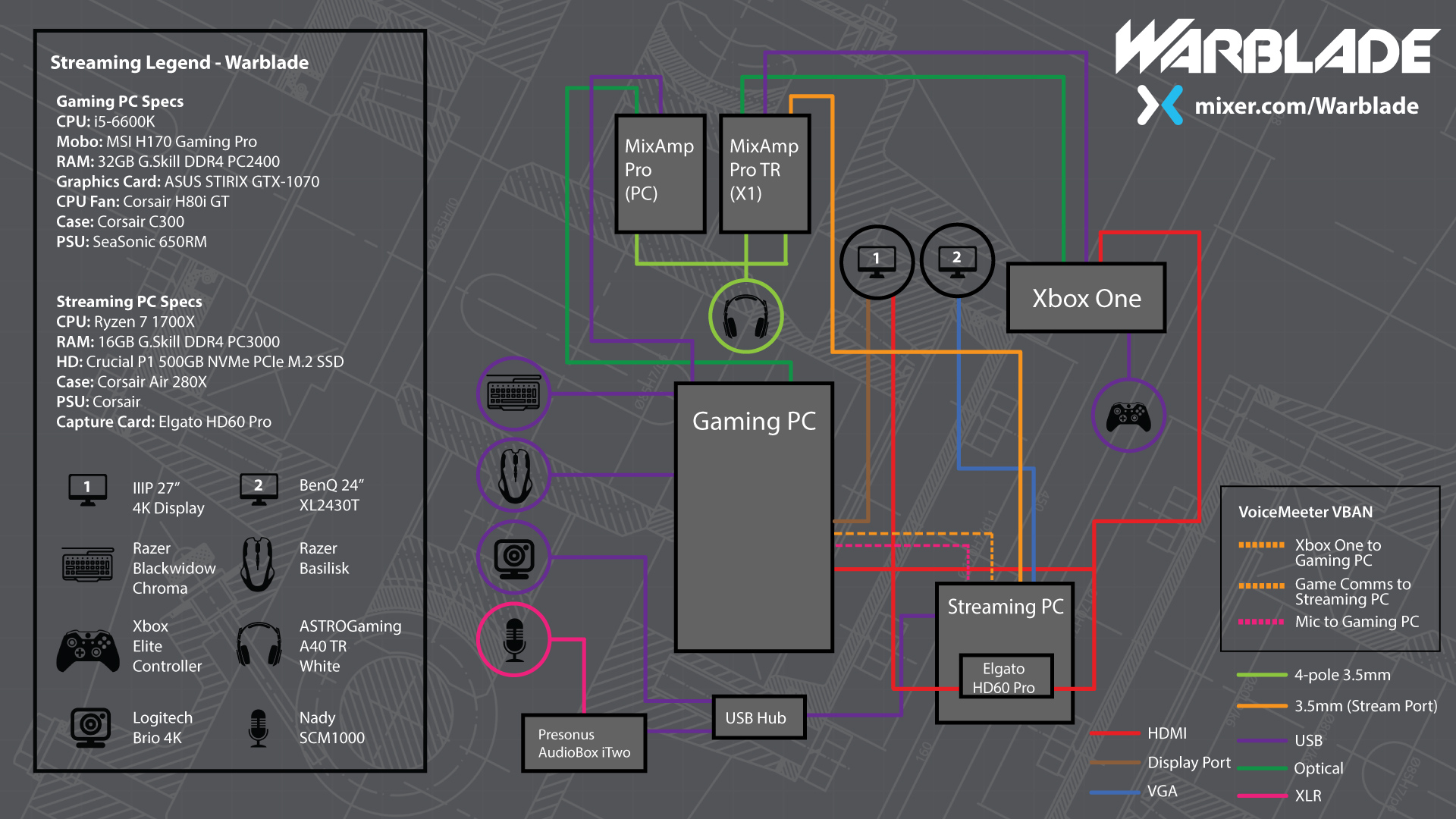


I should refresh that... have different capture cards and consoles now. 😛
and well... Mixer's long gone
rare kraken
abstract laurel
Oh and my audio technica 2035 goes to my streaming of ?
the mic would go to your streaming pc (and discord). I use VoiceMeeter and VBAN within Voicemeeter to send the mic signal to the gaming PC
(for voice comms in games)
sudden lily
south bronze
sorry had to wait for the new USB cable, we tried everything you said and nothin...
Hey. You can uninstall the driver from your Apps and Features list. It will be listed as the name of the card. Elgato's Game Capture HD software will also be listed, so don't get confused (look for the full product name). Once you have it uninstalled you can install the appropriate driver form the following link: https://help.elgato.com/hc/en-us/articles/360027961152-Elgato-Gaming-Hardware-Drivers
Elgato
Elgato Gaming Hardware Drivers - Windows 10
When you install Elgato Game Capture HD software for Windows 10, or Elgato 4K Capture Utility, the necessary drivers should automatically be instal...
abstract laurel
I also wanna stream 120hz on Xbox series x , I would need the 4K pro
@rare kraken I’m guessing
rare kraken
the 4K60 Pro has 1080p240 or 1440p120 passthrough, but no capture.
and that's really only possible for the XSX if your monitor has HDMI 2.1
(which not many monitors use. TVs on the other hand do)
south bronze
Do you guys know why my browser sources in elgato software arent transparent?
sudden lily
vapid geyser
How do you submit bugs to elgato... Everytime I launch Dead By Daylight my Wave ...
You can reach out to their tech support team by phone or email: https://help.elgato.com/hc/en-us/requests/new
They may ask you to run a diagnostic reporter to gather more direct information or may gather info verbally or through email discussions.
rare kraken
from the looks of things from your gaming rig and your pcpartpicker link you sent, the monitor's likely aren't HDMI 2.1
south bronze
rare kraken
from the looks of things from your gaming rig and your pcpartpicker link you sen...
Do you know for my question?
And how to make em transparent
Like i have a browser source for alerts
But when there isnt alerts
Its black not transparent
rare kraken
does it utilize a green background?
or is there a way to set the background color for the alert to green/a specific color?
if so, you can just throw a chroma key filter on that browser source
(you could do it for black, but it'll also affect if there's black in the alerts that pop up)
south bronze
rare kraken
(you could do it for black, but it'll also affect if there's black in the alerts...
Ye this is what happens
Do you know how to fix it
sudden lily
shadow coral
I see others have hd60s's that have the short light bar on the top rather than o...
Neither. Elgato just changed manufacturing of the USB devices. Both models use the same hardware, it's just a slightly different form factor
sudden lily
abstract laurel
Yea I plan on getting a 240hz
This is where the distinction of frame rate vs refresh rate comes into play. No matter what your refresh rate, the capture card will only record or stream 60 frames per second. Frames are a capturable metric, refresh rate is not.
sudden lily
pallid silo
Hi. I am having issues with my Wave Link. When I reboot my pc I loose all my s...
Elgato recommends using EarTrumpet with WaveLink in order to smooth these issues out: https://help.elgato.com/hc/en-us/articles/360046234831-Wave-Link-Sound-Routing-Using-EarTrumpet
Elgato
Wave Link can mix up to eight inputs together. These inputs can be a variety of software sources like games, voice chat, music, web browser and hardware sources like other microphones.
Wave Link r...
rare kraken
@south bronze in the properties of that browser source, did you delete the custom CSS? It should already have had things there that make the background transparent.
body { background-color: rgba(0, 0, 0, 0); margin: 0px auto; overflow: hidden; } is what is typically there
abstract laurel
sudden lily
This is where the distinction of frame rate vs refresh rate comes into play. No ...
Oh yea if the stream captures 1080p60 that’s fine , I just wanna make sure I get 144 frames or 240 frames , or set it to my monitor refresh rate
south bronze
rare kraken
<@456226577798135808> in the properties of that browser source, did you delete t...
Which CSS?
rare kraken
south bronze
Which CSS?
 south bronze
rare kraken
south bronze
rare kraken
Im using game capture hd
Cuz obs recordings are laggy af compared to game capture hd
Which is elgatos software
Idk why
Ill just watch tutorials and try to get obs to work
 kind ravine
Has anyone else had issues with their streamdeck freezing when they press soundboard buttons?
 stable thunder
hey is there a certain way to stream using an elgato on a mac?
 scenic tinsel
ok so I got a wave mic but for VR I need to use my wireless headset mic. I can't just change the mic input since it seems like there's no audio coming out of the headset mic. is there a work around?
 blazing raptor
i got my switch setup to stream with the elgato HD 60 S and it works fine, but i want to stream my ps3 for a bit. what do i need to do
 tacit glacier
Hello! Due to the instability of the GoPro webcam software I recently purchased a media mod (for connecting HDMI) and an Elgato Cam Link.
When starting the GoPro, the startup screen is the GoPro photo library. And when entering camera mode, the HUD displays the battery level etc. However, I would like the GoPro to start in camera mode instantly, and without the HUD. Any ideas, so I don't have to change that every time I use the cam?
In addition, in both 1080p, 4K etc, the image is kinda grainy, even with natural lighting and two Elgato Key Light Airs. OBS plugins helps a bit, but I would appreciate any tips regarding the issue.
Thanks!
 twilit bloom
plz help dose anyone know whats going on??? plz tag me
 merry osprey
Update: I got it to work, BUT the image is only showing on my TV, not my Game Ca...
merry osprey
merry osprey
Update: I got it to work, BUT the image is only showing on my TV, not my Game Ca...
I ended up fixing it, for those wondering.
chrome tulip
is there a way to use the 4k capture utility without recording? i just want a screen of my live gameplay
 sacred talon
Hi, are there any good tutorials on how to create our own Stream Deck actions ?
 normal terrace
HI guys ive got an issue elgato software recording in vr i get a load of echo when using oculus link and i dont know why ive allready turned off the main echo things off so i dont know why it is causing an issue as it doesn't do it in obs.
normal terrace
chrome tulip
is there a way to use the 4k capture utility without recording? i just want a sc...
yes just leave the software open
and have preview enabled
chrome tulip
normal terrace
yes just leave the software open
after playing for like a week with the capture software i look in my videos folder and there's about 8 gb of video saved
despite me not hitting record for hours
 sterile falcon
Been having a big problem with my never-used HD60S. Game Capture keeps giving me an error when I plug it in, saying the device needs to be connected to a USB 3.0 port to function properly. Thing is, my new laptop has nothing but 3.1 USB ports, so I assume it should work on those. I've tried plugging it into all three ports, restarting the computer, getting the drivers and Game Capture HD up to date, but no luck. Is there something else I can try?
rare kraken
sterile falcon
Been having a big problem with my never-used HD60S. Game Capture keeps giving m...
are you using the same USB cable that came with the HD60S?
steady ivy
is a 10900k/3080 good enough to stream
rare kraken
steady ivy
is a 10900k/3080 good enough to stream
yes, especially if you use OBS with the NVENC.
steady ivy
ok thanks
south bronze
sterile falcon
Been having a big problem with my never-used HD60S. Game Capture keeps giving m...
Try this:
The below text is a solution to everyone experiencing the following issue: "needs to be connected to a USB 3.0 port to function properly" . I spent 3 hours troubleshooting it and hope people come across this as a reference point when troubleshooting. My motherboard has multiple USB 3.0 ports but none of them seemed to work with the Elgato. Make sure the following is done:
- Allow the computer to turn off this device to save power (Device manager USB properties)
- Disable USB selective suspending from Power options > Advanced Settings
- Unplug all the cables from the Elgato and end all task related with it from the task manager (Game Capture/ OBS/ CamLink etc.)
Start by opening the program again (there should be no devices detected). Plug ONLY the type-C cable in the Elgato. By now, the app should recognize the device and no longer display the USB 3.0 error but instead "No HDMI Signal". Connect the OUT HDMI first, followed by the IN one.