#cth-history
1 messages · Page 50 of 1
 brazen wigeon
 verbal comet
Hello everyone, anyone have a fix for this? 1440p monitor 4k60 Pro MK.2 (when i alt tab games it captures like this: (dual pc)
brazen wigeon
It shouldn't you'd want to keep it on all time. It didn't take away from picture quality or anything
Try turning it on and seeing if you get screentearing still
I do not know whats going on there Skee but is this a ultra wide monitor?
verbal comet
not ultrawide
brazen wigeon
What refresh rate is the monitor you're trying to capture at?
verbal comet
144hz
brazen wigeon
Is that just in game or also on the desktop?
brazen wigeon
Then I'm lost sorry man. my thinking was the game refresh rate and the desktop refresh rate was different somehow.
verbal comet
it just started doing this today while I needed to minimize the game
Appreciate it though 😉
 polar plume
hello chat may i ask did anyone of you any experience with the retrotink mini for example as i either get a balck screen or no detection at all with ym elgato hd60s
 spice garden
@brazen wigeon i appreciate your help im gonna try this again and see what happens. now should my input edid mode be merged internal or display? on the 4kcu
brazen wigeon
spice garden
<@!162797470341005313> i appreciate your help im gonna try this again and see wh...
Merged if that doesn't work try display.
spice garden
cool cool and clone my displays on gaming pc
brazen wigeon
verbal comet
I just noticed something try setting the input EDID to merged
verbal comet
I have it set up like this for a very long time, it's fixed now though
brazen wigeon
spice garden
cool cool and clone my displays on gaming pc
From my understanding of the set up Yes you clone the display. I don't use my elgato like that so my knowledge is limited. I use mine for Consoles
Oh okay good glad everything is working Skee
verbal comet
😉
brazen wigeon
polar plume
hello chat may i ask did anyone of you any experience with the retrotink mini fo...
I've got experience with the OSSC (Open Source Scan Converter) kinda the same in concept
What are you trying to record and do you know what Res its trying to display at?
verbal comet
I use this method: Using 4K60 Pro with a display that does not have HDMI 2.0 so I have to set it to internal 😉
brazen wigeon
Skee if you don't mind Kurb may need your help cause it seem you too have the sameish setup going on.
verbal comet
@spice garden windows display on 240hz ?
spice garden
@verbal comet yes
under desktop size and position should my scaling be set to display or my gpu?
verbal comet
GPU
verbal comet
I have it like this ( i do not have 240hz but it should work the same)
both main and elgato
spice garden
okokok i wasn't changing my aspect ratio last time
verbal comet
😉
verbal comet
in the 4k capture I have this:
polar plume
@brazen wigeon i wanna record my super nintendo,N64;Gamecube,PS2 and NES
 amber silo
how do i get sound game sound to pick up on 4k capture and to my headset (usb)
without playback
brazen wigeon
polar plume
<@!162797470341005313> i wanna record my super nintendo,N64;Gamecube,PS2 and NES
Are you having issues with all of those are just a couple of them?
 dusk edge
hey so im having a problem with my elgato HD60S and cant really explain it in text, can someone join a vc so i can show them?
 south bronze
@brazen wigeon i meant the hd60 s yes, im sorry
brazen wigeon
south bronze
<@!162797470341005313> i meant the hd60 s yes, im sorry
Were you able to fix the issue?
south bronze
theres not really an issue i just have to know what plugs into where
brazen wigeon
There is text on the Hd60s itself to help with this
south bronze
i wanted to know before it comes thats what i mean
its coming tmrw
@brazen wigeon dats wut i meant lol
brazen wigeon
Basically you've got two sides one with a output and the other with input and a USB C port. Plug the USB into your PC and the console into the Input (they are both on the same side) then the output goes to your Display. Super Simple stuff you'll be fine
brazen wigeon
dusk edge
hey so im having a problem with my elgato HD60S and cant really explain it in te...
I can't really hop into a VC but if you want to try and explain it then I might be able to help
south bronze
its ok i got it
 kind yoke
So nobody knows why this EpocCam from ELGATO is bluescreening computers?
south bronze
me have no clue
 fickle tartan
Guys
I need some help please. Hi put my HDMI for my TV in the output and I put my switch HDMI in the input, then the flash drive wire (That is next to the input) and I plugged it to my computer and I get this. I have been trying to fix this for two hours now and it sucks because I’m trying to make a video. I also used this video (https://youtu.be/EV2by5OlMdQ) to help me but it still doesn’t work!
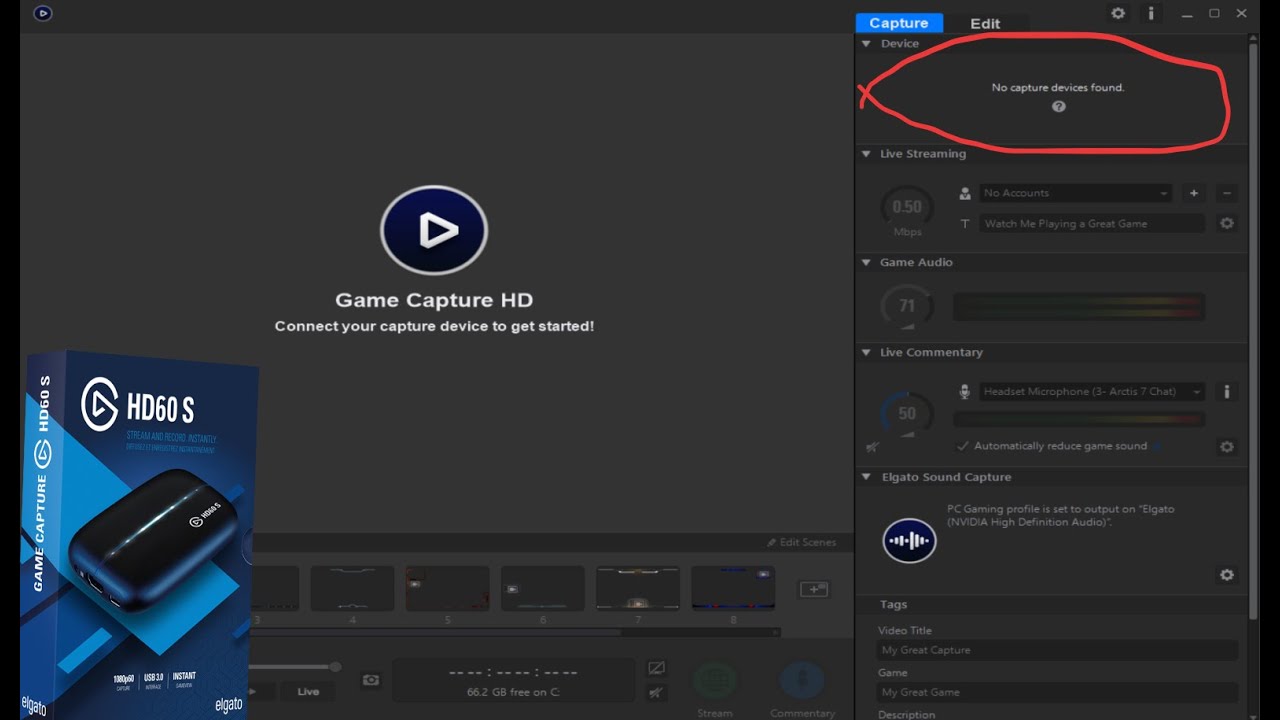
Socials:
🎬 Twitch : https://www.twitch.tv/Beeesu
🐦 Twitter : https://twitter.com/Beeesu_
📸 Instagram : https://www.instagram.com/Beeesu_/
👥 Discord : https://discordapp.com/invite/9GkNFGP
Stream Schedule:
Sunday - Monday - Off
Tuesday - Saturday - 8pm CST
Is there anything I’m missing?
 fleet coyote
Just got the 4k60 pro mk2, obs and the 4K capture is showing everything ok, but the 4K passthrough has about 1.5 sec delay and the movement is spongy. Any ideas?
brazen wigeon
fickle tartan
It seems that the USB cable isn't plugged into a 3.0 port
They are almost always Blue like the plastic inside them is blue sometimes red, but never black
fickle tartan
brazen wigeon
It seems that the USB cable isn't plugged into a 3.0 port
i fix it
thx for your help tho
brazen wigeon
fleet coyote
Just got the 4k60 pro mk2, obs and the 4K capture is showing everything ok, but ...
4k pass through what do you mean by this? like on your TV?
No problem Soggy I'm glad that issue is fixed

brazen wigeon
amber silo
how do i get sound game sound to pick up on 4k capture and to my headset (usb)
I'm not sure if I replied to this at all but what are you trying to capture. It looks like you are trying to capture your PC right?
fleet coyote
brazen wigeon
4k pass through what do you mean by this? like on your TV?
yes, like in Minecraft, in OBS i can pin point stop, but on the TV it slow to respond, then glides past where i want to stop
this is from the Xbox one X running 4k
brazen wigeon
That really weird, I've never had this issue. I'd say it your TV but that doesn't make since. You said you are using OBS have you tried 4kCU?
fleet coyote
ah found the issue, had to hard set game mode on the tv for the input. now no lag
 fair marsh
I need help. I cant seem to use my streamdeck to change the scene on OBS. Whenever I drag the OBS studio scene plugin it says "The Elgato Remote control plugin is missing, Please reinstall Stream Deck, then try again." I have tried repairing it and reinstalling it and nothing is working.
 long heath
Hello! I just wanted to ask if there was any software for the original Elgato Game Capture HD device, and how to find it. Specifically the device that actually allows for capturing Playstation 3 stuff
brazen wigeon
long heath
Hello! I just wanted to ask if there was any software for the original Elgato Ga...
The normal capture software should still work with the original Elgato
I can't personally test cause mine is broken beyond repair
long heath
lmao sorry to hear that. Also, thank you!!
south bronze
i have a question: im capturing my xbox with my capture card, where does my headset plug into and how do i capture the fortnite audio? if someone can hop in a vc with me itll help
@brazen wigeon u got any idea? u helped last time
dam
brazen wigeon
Its fine I used it for many years, If you want to get a newer Elgato and record PS3 you can do that you just need something to strip the HDCP signal from the PS3.
brazen wigeon
That was to the other guy
south bronze
oh
if u have an answer for me then it owuld help
would*
oof
DAMN U STILL GOING
STOPS AND GOES AGAIN
LMFAO]
brazen wigeon
So I never record audio from my Xbox for party chat or game chat its always through discord. Elgato sales a cable that will split the audio coming from your party and send it to the elgato while also sending it to your headphones. If you don't want to buy that I'd recommend setting it to play through your speakers. If you are talking about just hearing game chat you should be able to just plug your headphones into your computer and have monitoring on within the Elgato Capture software.
Hey man I'm just trying to help here. I've got a lot to say

south bronze
lol
spice garden
is anyone aviable to help me with my issue with screen tearing on my 2 pc setup?
still having issues @brazen wigeon
brazen wigeon
I don't know sadly. You'll have to wait till Crest shows up. They are a admin here and they help when they have the time for it.
Sorry Kurb
 spice anvil
i need some help... I'm connecting to a game to my PC in streamlabs OBS, but can't find a way to hear the game output without getting terrible audio latency
i can see on the different audio levels that without the specific setting turned on the latency is fine
 unkempt gull
This is my problem https://www.reddit.com/r/elgato/comments/kv43k3/screen_link_post_3/

 sweet eagle
hey i could use some help i want to setup my stream deck to be able to control my smart life connected light
i want to be able to dim the lights change the color etc
 wind nebula
Hallo 🙂 i got my Sony alpha 6400 connected with camlink and i allways get either blackscreen or "no signal" in obs and the software. the cam works fine in discord so i dont think its a hardware problem. Thanks in advance!
 weak nacelle
Alright guys? Does anybodys Wave: Link software delete any of the inputs that you've selected, when you open the program? I'm sick of having to add each track to the software every couple of days.
 glass sundial
Is there a way to see which out of 3 gives less input lag on HD60 S?
Game Capture HD, 4K capture utility or OBS preview without buffer?
Specifically for instang gameview
brazen wigeon
glass sundial
Is there a way to see which out of 3 gives less input lag on HD60 S?
Game Captur...
The only way off the top of my head to see this would be the 240p test suite. It was made to test older consoles and their input lag on displays.
You'd have to figure out a way to use it on something to go into your HD60s though
glass sundial
Oh man :c
south bronze
Hey guys, is there any way to use EpoCam app for Slack?
brazen wigeon
I don't think any would make a difference though Shale. As I believe it a hardware limitation not a software one
glass sundial
I feel like OBS has least latency
4K capture highest
and game capture HD in the middle
But that might be placebo, idk
brazen wigeon
I kinda want to test this now, I have a 4K60 pro Mk2 so not the same capture card but I'll see if there is a difference between OBS and 4KCU
glass sundial
There was this guy testing stuff https://obsproject.com/forum/resources/capture-card-documentation-latency-decode-modes-formats-more.777/
OBS Forums
TABLE OF CONTENTS
Intro/Overview
Decode Mode Support
Notes on RGB Color Space
Format Support
Notes on Scaler Support
Input Latency Testing
Notes on “Bitrate” support
Testing Methodology
Limitations & Future Improvement
How to submit capture...
brazen wigeon
glass sundial
There was this guy testing stuff https://obsproject.com/forum/resources/capture-...
You are a 100% right at least about 4KCU and OBS
OBS is much much faster its probably like 0.2ms off but so close I barely notice
glass sundial
I wish there was some instant gameview optimization
So it would try to reduce latency even more or something
 wanton spire
Yo i have 4 Philip Hue bridges on my internet
Can someone help me just connect 1 to streamdeck
 fossil storm
hey guys having a issue with my wave link software to where it randomly freezes up and is very annoying to try and fix after it happens cause ill have to restart the software like 5 times for the mic to finally work agian
 calm kite
Heyhey. I have an El Gato HD60 S+ and I'm plugging it into a Samsung S20 Ultra and Galaxy Tab S6. When I plug it in, the devices themselves begin to have graphic lag, even on the home screen.
I've tried using the Uni USB hub and the QGeeM hub as well to see if it's a hub issue....
Any thoughts?
(going through search right now to see if there was a previous answer)
 fallow beacon
Hi all! My name is Sydney and I stream on twitch using OBS studio. I have a Sony a6000 and use the elgato 4K capture card to stream. I have been having pretty bad issues with the feed freezing or going black while streaming. I have yet to find a solution to fix this. Any ideas?
 hushed thistle
I need some help. I recently bought a Elgato 4k 60 pro Mk2 to begin doing dual pc streaming. I set it up in my spare pc and everything works except for sound. Not an ounce of sound goes to it.
Now I've tried things like VM Banana and that only caused more issues like apps on my pcs having audio failures and such.
I've also watched tons of videos and followed them step by step with no luck.
Does anyone know what I can do to get my stream up and running again?
Edit: if I select the elgato playback option on my gaming pc I can get it to send audio to my streaming pc. But by doing that I lose the ability to hear discord/the game ect.
Essentially I wanna be able to hear my game audio, discord and things like music via Chrome being played on my PC.
Pc specs
GAMING RIG
Cpu: 3800x
Gpu: 5700xt
Mobo: x570 plus wifi
RAM: 32gb corsair rgb ram (forgot model)
Streaming rig
CPU: 2700x
Gpu: evga 1050ti
Mobo: B450 Ds3h
Ram: 32gb corsair vengence
Capture: Elgato 4k 60 Pro mk2
 calm creek
Greetings all. I'm here because I'm trying to seek help and possible answers for some elgato problems I'm having.
So what happened is that I have a Kaico HDMI adapter for my dreamcast, making it play in HD obviously, and it works fine. My elgato wich is an HD60 also works fine. I decide I want to stream some gameplay to a few friends, so I decide to get the elgato and I hook up everything like I would any console with HDMI. I download the app to my laptop, connect the console and capture card, wait, and then it says it has no signal. So at first this was because it was on another console setting, so I go to the settings and put it on Other, what with the console of choice not being on the list. So I try again, it now says 640 X 480 not supported and to change the video output format on my video device, wich I'm assuming meant in the elgato settings. So I go there and there is nothing telling me that I can change output, only input. Can someone tell me how to fix this and if it's because I'm using a Kaico HDMI adaptor?
wind nebula
wind nebula
Hallo 🙂 i got my Sony alpha 6400 connected with camlink and i allways get eithe...
is someone there who can help me, pls
 half falcon
Hello! for some reason my elgato makes the controles extremely late
 tacit bone
anyone know if I can use my go pro 7 black as a webcam for streaming using the elgato 4k60 pro mk2. Also can I do 4k with the go pro 7 black as webcam?
weak nacelle
tacit bone
anyone know if I can use my go pro 7 black as a webcam for streaming using the e...
Yeah, I think Harris Heller had a video on them at one point
 rustic fox
Hey guys, question. I just bought my elgato capture card, and set it up today. I have an iPhone 11 connected as my gaming source. I spent the past seven hours trying to figure out this issue, watched every video possible, read every article, and I have yet to find the solution. My elgato sound works, the stream sound and video are perfect, but for some reason, in my headset, when I’m playing the game there is a 1 second delay. For example, I shoot a shotgun shot, I hear that shot register one whole second later. I’ve tried screwing around with differnt ms delay, both negative and positive, none of those solve the problem. Can anyone help me out?
south bronze
my monitor is manchmal black
 delicate compass
Hey everyone, my new streamdeck has decided to flip the entire LCD display and is now barely functional?
All i did was unplug the usit to move it to the new desk and suddenly Its done this?
As you can see its not just the images that are inverted but also the boot logo which means the entire LCD unit is flipped on the X and Y axis
Anyone got any tips? ive uninstalled all the software, re-installed it and checked for firmware updates, if I pulg the unit into the pc while its off the boot logo will still show inverted
 lofty spoke
I have a wierd problem, since I used Wave Link I have problems with the sound which comes out from winamp (mediaplayer). I linked Wave Link "Musik" to winamp program, but since I did this, the media player is crashing if I stop listening to music and continue a bit later (program freeze, I had never such a problem since I used Elgato Wave Link Setup . Does anyone have these issue and which Program you use to listen to your music on PC?
 dapper mortar
How do i download and setup the mobil elgato app?
 quiet saffron
dapper mortar
How do i download and setup the mobil elgato app?
quiet saffron
dapper mortar
How do i download and setup the mobil elgato app?

elgato.com
With Stream Deck, take full control of your content and focus on what matters most: your audience.
and the same windows/Mac software as used for a "real" streamdeck works
 graceful magnet
hi, I can't get my audio passed through when recording my Iphone. I have it capturing HDMI audio but I can't here anything. I want to have voiceover come out of my pc headphones, Voiceover is the screen reader that blind people uses, does someone know why it's not capturing any audio?
south bronze
graceful magnet
hi, I can't get my audio passed through when recording my Iphone. I have it capt...
Does your phone/laptop audio work
I have a elgato hd60s and I plug it in my MacBook and is say that a usb 3 is required, I plug a usb 3 port in, and it still says the same stuff, plz @ me if you know how to fix plz
 fringe mason
Good morning friends. I recently setup my Xbox One with the Elgato HD60 s+ and I got the video capture going through OBS but there's no audio in the capture card channel. would someone be able to help me out?
graceful magnet
@south bronze yes, youtube audio from my phone does get picked up via the card
south bronze
graceful magnet
<@456226577798135808> yes, youtube audio from my phone does get picked up via th...
Sorry I’m not really much help, but if no one responds here, then try asking elgatohelp website or Reddit
 cosmic vine
south bronze
Sorry I’m not really much help, but if no one responds here, then try asking elg...
cosmic vine
south bronze
Sorry I’m not really much help, but if no one responds here, then try asking elg...
plugging a 3.0 usb hub into a 2.0 usb does not make it a 3.0 usb. It needs to be plugged directly into a 3.0 on your computer
 vivid tundra
Has anybody discovered a solution to lowering the Elgato Ring Light to a lower height? I have removed the ball mount and put the camera straight om the light and it STILL is too high. Looks like the Multi-Mount is just as high.
 viral gyro
hey, my HD60S is recording just fine, but the image im seeing on my personal display goes out of bounds
I "can" play like this, but id prefer to fix it somehow.
Ive messed with settings and tried to google this, but no luck.
Any ideas?
 clever mesa
i plugged in my ps4 to my hd60s and it's not registering on it? any ideas what's going on?
 waxen thunder
Hi my friend is using a stream deck and it's lagging audio for him by a second bug not on stream and he's a FPS streamer so he needs the sound on point to play properly in game and in competitions he streams
Any idea on how to fix
 brittle furnace
Someone assist me
calm creek
calm creek
So what happened is that I have a Kaico HDMI adapter for my dreamcast, making it...
Someone help me with this, anyone?
 wide isle
hey guys!
anyone available to help?
Just need help, setting up my microphone, i've checked a few videos, nothing so far works.
@cosmic vine maybe xD
cosmic vine
wide isle
<@!226922383590555648> maybe xD
I'm in class at the moment
wide isle
oh, sorry! Get them notes done!
haha i fixed it, didn't realize u have to have commentary on, which is so obvious, im oblivious to so much. lol.
 hoary crystal
hey, is there any reason as to why my key lights and ring light arent detecting a wifi conection? im able to get online, and the control center detects all 3 of the lights, but i cant get it to connect.
hoary crystal
ive reset the lights, my router, my pc... when i clicked on choose network, my wifi network doesnt show up, but the key lights do. my control center is up to date pc is up to date...
brittle furnace
Ok guys
So I wanna record videos with friends
But idk how to get the voice audio
We usually talk via discord
So idk
 manic hedge
Can someone help me in PM pleaaaase
brazen wigeon
brittle furnace
Ok guys
Are you recording a console or like your PC? I'd suggest using OBS. While Elgato makes a software for this use, I don't personally find it very good and more annoying then anything.
brazen wigeon
clever mesa
i plugged in my ps4 to my hd60s and it's not registering on it? any ideas what's...
This more then likely due to a thing called HDCP disabling it will allow you to record the console but prevents you from watching movies or using TV/Movie apps. You can disable it by going to the Settings and display should be in there.
calm creek
calm creek
So what happened is that I have a Kaico HDMI adapter for my dreamcast, making it...
Can anyone help me with this? This is genuinly confusing me.
brazen wigeon
Funny enough I was just reading your issue
Give me a second cause I'm trying to think whats happening
brazen wigeon
viral gyro
hey, my HD60S is recording just fine, but the image im seeing on my personal dis...
What are you trying to record? Both the Xbox one and the PS4 have safe area control so you should be able to adjust this and then crop it out in Elgato Game Capture via the crop button
brazen wigeon
calm creek
Can anyone help me with this? This is genuinly confusing me.
My guess its due to how the Dreamcast displays a VGA signal (if this cable is even trying to pull that), Try setting it to PC (if that is a option I haven't use that software in forever)
Next best thing is using OBS personally when capturing older hardware like that I have better luck in OBS
calm creek
brazen wigeon
My guess its due to how the Dreamcast displays a VGA signal (if this cable is ev...
PC doesn't work it seems. I will try using OBS.
brazen wigeon
calm creek
In OBS make sure to use the input that as the word Elgato (something) Camera) This will take a direct feed of what the Elgato is seeing. At least from my understanding.
brittle furnace
brazen wigeon
Are you recording a console or like your PC? I'd suggest using OBS. While Elgato...
I’m recording my Nintendo switch
Can it also record my own laptop?
brazen wigeon
brittle furnace
Can it also record my own laptop?
Do you mean Audio wise?
brazen wigeon
Yeah in OBS you can do that you can also record your switch through the Elgato
 blazing pewter
does anyone know how to fix this?
brazen wigeon
blazing pewter
does anyone know how to fix this?
Close Geforce Experience that should fix it. It looks like Shadow play is trying to hook into the Elgato software
calm creek
There is no option for input I can see, so I tried go to sources instead. it doesn't work either. What am I doing wrong?
brazen wigeon
So you need to go to properties and and there should be a second Elgato source that isn't that one. This going off of my experience with the HD60s
I'm not at my Desktop so I'm not able to show you right now.
blazing pewter
brazen wigeon
Close Geforce Experience that should fix it. It looks like Shadow play is trying...
thank u so much man helped me alot appreciate u
brazen wigeon
No problem, Glad I was able to help someone.
calm creek
The only two other options are OBS Virtual Camera and Bison Cam, wich I never seen before.
viral gyro
brazen wigeon
What are you trying to record? Both the Xbox one and the PS4 have safe area cont...
Crop button! Ingenious, lol. That's helpful, i'll try that tomorrow, thanks
brazen wigeon
calm creek
The only two other options are OBS Virtual Camera and Bison Cam, wich I never se...
I'm sorry I'm genuinely lost for why this isn't working. cause you aren't doing anything wrong. \
brazen wigeon
viral gyro
Crop button! Ingenious, lol. That's helpful, i'll try that tomorrow, thanks
Hopefully it works out let me know.
blazing pewter
i have every thing hooked up but now my monitor wont turn on and it says this.
wide isle
yo anyone can help rn?
how do i get the greenscreen working on elgato.
i have my webcam up, just cant find anything about greenscreen
anyone?
 rustic crater
Can anyone help me out with this I can’t seem to make it display my screen from my Xbox
brazen wigeon
rustic crater
Can anyone help me out with this I can’t seem to make it display my screen from ...
Its plugged into a USB 3.0 port right? If so have you tired other USB 3.0 ports?
rustic crater
Yes I have it plugged into a 3.0 port but I don’t know if it my be the elgato itself bc I’ve already tried changing the cable already with 2 others but don’t really seem to find the right one, it is also reading as it is the only option for the capture setting.
 hearty scroll
Hello is anyone else having issues with the stream deck connecting to OBS.Live?
i get this message;
The Elgato Remote Control plugin is missing. Please reinstall stream deck, then try again.
They are both installed on the C: drive and ive reinstalled them both.
 placid rune
using the Advanced Launcher Process Killer, is there any way to make it so it can close an entire application? doesn't seem to work on Medal. Or am I not supposed to select the shortcut one
hearty scroll
placid rune
using the Advanced Launcher Process Killer, is there any way to make it so it ca...
this replying to me?
placid rune
no
 lunar nexus
Anyone running an HD60 S on a new M1 Mac mini?
 lone current
hey guys, any news on the android cam app?
 compact warren
lone current
hey guys, any news on the android cam app?
compact warren
lone current
hey guys, any news on the android cam app?
Nope, to be honest, I dont think admins know either
compact warren
wide isle
i have my webcam up, just cant find anything about greenscreen
What are you using to record?
compact warren
hearty scroll
Hello is anyone else having issues with the stream deck connecting to OBS.Live? ...
What things aren't working with the stream deck?
compact warren
rustic crater
Yes I have it plugged into a 3.0 port but I don’t know if it my be the elgato it...
Try unpluging, repluging, reinstall driver, reboot
Btw if anyone replies to my previous replies (trying to help) i'll be 2 hours to reply lol
 wintry kettle
Don't know if this is the right channel but don't know where else to ask but is there any news on when/whether the Green Screen are going to be back in stock?
 versed pine
I have a bit of an ongoing issue. I purchased an Elgato 4k60Pro Mk2 about December of 2019. I have no issues with streaming, in fact it's worked flawlessly while paired with my OSSC for PS2 streams, however recording is where I've noticed a bit of an issue and I'm not sure what's causing it. What seems to happen is that the recordings will freeze at random points for no particular reason. At first I thought it was a lack of ram so I upgraded to four sticks of 8gb ram totaling to 32gb. This slightly fixed the issue but not entirely. The freezing still occurs but not as severely I would say. Next I tried upgrading my gpu thinking it may have been an issue with the encoders. This did nothing. I've tried updating the 4k capture software drivers, again nothing, I've tried uninstalling and reinstalling the software with no luck. So I'm not really sure what else I can do. Also I did notice that on some rare occasions the capture care software was eating up an unnecessary amount of ram forcing me to close if for a short period of time and this is with 32gb worth. I'm not sure why it would have like 98% utilization.
compact warren
wintry kettle
Don't know if this is the right channel but don't know where else to ask but is ...
nobody knows
wintry kettle
compact warren
nobody knows
Bummer...
compact warren
compact warren
Could be 10000 years
btw that was a joke admins/ mods
compact warren
versed pine
I have a bit of an ongoing issue. I purchased an Elgato 4k60Pro Mk2 about Decemb...
Im replied now, but if this doesnt work, i wont reply for a while after.
Try unpluging, repluging , reinstall driver, reboot
also make sure its properly in
versed pine
compact warren
Im replied now, but if this doesnt work, i wont reply for a while after.
Try u...
See I've tried most of that. Would moving it to a different slot make a difference?
compact warren
versed pine
See I've tried most of that. Would moving it to a different slot make a differen...
Give it a go
versed pine
compact warren
Give it a go
I'll give it a go later today then. I gotta get ready for bed soon. Will give a follow up later in this channel.
compact warren
versed pine
I'll give it a go later today then. I gotta get ready for bed soon. Will give a ...
Ok, have a good sleep
versed pine
Thanks
 void plume
this might be an easy fix but I don't know what to do lol
when I save my replays its not in full screen
anyway to fix it?
 sudden lily
versed pine
I have a bit of an ongoing issue. I purchased an Elgato 4k60Pro Mk2 about Decemb...
sudden lily
versed pine
I have a bit of an ongoing issue. I purchased an Elgato 4k60Pro Mk2 about Decemb...
Where are you saving your videos to? Did you leave it on the default C: drive?
Saving to external drives can be problematic and it's recommended you both install the capture software to and write the videos directly to the C: drive, or at the least not to a motherboard.
sudden lily
wide isle
i have my webcam up, just cant find anything about greenscreen
This somewhat depends on what capture software you're using. Try searching the name of the application plus "chroma key" and let me know if you don't find anything
void plume
oh wow I should probs take note of that too
versed pine
sudden lily
Where are you saving your videos to? Did you leave it on the default C: drive?
...
If I respond late it's because I fell asleep so I do apologize in advance. Um no I do not save my files on my boot drive, nor do I save them onto an external, I have two other drives that I use in my PC they 2TB and 4TB HDDs. Not sure if that makes any significant difference.
sudden lily
It may be worth testing whether saving to the boot drive resolves the issue. If not it's a simple adjustment back.
versed pine
sudden lily
It may be worth testing whether saving to the boot drive resolves the issue. If ...
Keep in mind I don't believe it's an issue with drives considering that I have noticed at least on rare occasions that the software was having 98% utilization of ram. While I'll take it into consideration I have my doubts this is what's causing the issue I'm having.
 dusty elm
Im having an issue where it wont connect wirelessly
Today i turned on my camera, it messed up my discord so bad
I reinstalled it with the newest drivers and its just not working wireless anymore
Both my phone and pc are on the same 5GHZ network
 slow rose
My Elgato HD60s is suddenly not connecting properly only on Game capture HD
Still works fine in OBS and Streamlabs OBS
but this on the Elgato software
is the most recent version bugged or something ?
 pulsar tusk
Good Morning! I was wondering if anyone has had a similar issue to the one we're facing. I'm mod for a streamer, and he needed to uninstall and re-install SD software. Now when he goes to drag and drop all the options on the right side menu are grayed out. I've searched everywhere, If anyone has any insight it would be much appreciated. Also, I apologize if this is a repeated question.
 humble spade
Is anybody having issues with their cam link blinking and then shutting off? I can get the cam link to pull up in the 4k software, but for some reason obs will not show my cam link. I've even uninstalled all elgato software and downloaded it again.
blazing pewter
Does anybody know why when i plug my elgato in turn my xbox on but my monitor dosent turn on and theres no connection on the software
wide isle
anyone know why theres a little bit of a staticy sound in my stream?
and it comes and goes
cosmic vine
wide isle
anyone know why theres a little bit of a staticy sound in my stream?
and it come...
It depends. Static can come from a fan or that your mic's gain is too high and your too far away from your mic. It could also be a magnet is too close such as a speaker or headphones.
cosmic vine
blazing pewter
Does anybody know why when i plug my elgato in turn my xbox on but my monitor do...
That sounds like a connection issue. make sure everything is connected properly, you may need to swap out your HDMI cable.
blazing pewter
cosmic vine
That sounds like a connection issue. make sure everything is connected properly,...
Do i need the hdmi that came with it or no because im pretty certain i have everything conneted good
cosmic vine
blazing pewter
Do i need the hdmi that came with it or no because im pretty certain i have ever...
You can use a different HDMI cable, they tend to go bad quickly, especially if they get pulled in and out often.
blazing pewter
cosmic vine
You can use a different HDMI cable, they tend to go bad quickly, especially if t...
ok ill try using a different one thx m8, now i just need to find one
cosmic vine
Thats always the trick. I have a bag full of new ones and can never find it when I need it
cosmic vine
humble spade
Is anybody having issues with their cam link blinking and then shutting off? I c...
What kind of camera are you using? Is HDCP turned off on it?
 tight heart
Hello, I was hoping to be able to get some help. I've recently acquired an HD60 S+ and I have hooked it up with my PS4 Pro. In the 4k Capture Utility Software I have video, but no sound. All the youtube videos have not done the trick so I figured I would reach out here. Anyone have an idea?
cosmic vine
tight heart
Hello, I was hoping to be able to get some help. I've recently acquired an HD60 ...

Elgato
Elgato Game Capture HD60 connects to the PlayStation 4 using HDMI. It can passthrough video to a TV set also using HDMI. An HDMI cable is included in the box.Before you set things up, make sure t...
make sure you turn HDCP off on the playstation
tight heart
Okay I do have the HDCP off, but I will look at this link. TY
cosmic vine
no problem. 🙂
Also make sure your audio is set to stereo, HD60 can't capture dolby RTS
tight heart
Yeah I have Linear PCM selected too.
brazen wigeon
Do you not have any audio for the recording or monitoring?
tight heart
No audio coming through at all
Ah, I think it may be because my processor is so old. I'm currently building a new one and waiting for GPUs to be in stock.
brazen wigeon
This going to sound stupid but just keep unplugging and plugging in the HD60s+ from the unit its self until it has sound come through. I've had this issue on my HD60s non + and thats what fixed it was that. Its annoying.
Whats your CPU?
tight heart
Doesn't sound stupid at all, but my processor is, it's an AMD FX-8350 🤣
Gonna have a Ryzen 7 3700x in my new build
brazen wigeon
Yeah your CPU could be a issue but it shouldn't be giving you no sound
tight heart
That's what I figured.
I'll try the plug/unplug method lol
Thanks for helping out, I appreciate it
cosmic vine
If that doesn't work I would suggest opening up a ticket with tech support
manic hedge
I have a huge sound problem. So Everytime i start capture card the sound is like buzzing and when my friends talk they have chipmunk voices It’s on Ps4. The image is perfectly fine but the sound is just horrible. i tried everything unplugging all cables reconnect reinstall the software i don’t know what’s the problem for a time when i bought it, it worked fine
I have capture card HD60 S
I tried to put everything on 48'000khz too
nothing changed
 sweet kite
Good evening from Germany you guys. I had an issue with Streamlabs last night using my Wave 3 / Wave Link. Sound overall was fine but my media sources, which I turn on/off with my deck, had duplicate sound... In Settings-Audio I have "Wave Link Stream 4-Elgato Wave3" set to Mix/Aux Device 1. Everything else is set to Disabled. My first question is, what Audio monitoring should the Wave Link Stream and all the other media files have?
cosmic vine
manic hedge
I have a huge sound problem. So Everytime i start capture card the sound is like...
Is it buzzing all the time? Do you think the audio is playing too fast? Check your PS4 settings. Make sure HDCP is turned off and your sound is on stereo
cosmic vine
sweet kite
Good evening from Germany you guys. I had an issue with Streamlabs last night us...
Is this a new setup?
manic hedge
@cosmic vine It's buzzing all the time but it's different when i stream it. When i stream it, people hear the sound cutting every 1 second. The video is still perfectly fine but the audio that they get is different from what i get (buzzing all the time). Can i send you a link for you to see whats the problem i have ?
cosmic vine
manic hedge
<@!226922383590555648> It's buzzing all the time but it's different when i strea...
I don't do links for security purposes unless it's YouTube or something. It sounds like it's struggling to process the sound with the image. I would go back and make sure your settings didn't change before an update which is common.
manic hedge
@cosmic vine it's a link to a twitch clip
brazen wigeon
cosmic vine
Is it buzzing all the time? Do you think the audio is playing too fast? Check yo...
So I was trying to help Lam in DMs yesterday and I couldn't help them. The sound is completely broken. things are either higher pitch and sound like Alvin and the chipmunks or a sort of choppyness to them.
manic hedge
@brazen wigeon yeah it's better if you look at it on the twitch clip @cosmic vine for you to understand better
brazen wigeon
Also Hi Lam sorry the issue still isn't fixed.
manic hedge
@brazen wigeon Hi ^^ it's been months im really desesperated but thank you for your help ^^
sweet kite
cosmic vine
Is this a new setup?
No, not at all.
cosmic vine
Honestly, I would contact customer support. I know it's not what you want to hear but they are way better equipped to help you. I think it's a setting on your computer's end because sound has been a thing the last couple of days and Windows had an update
brazen wigeon
Hey @cosmic vine I've had a issue for the last couple weeks where Flashback recording doesn't work. just creates glitchy mess of video but recordings are completely fine. This didn't start until a update ago for 4KCU. Have any idea about what would cause this? I've contacted support and am currently waiting for a response. Its one of the issue I came here about
cosmic vine
sweet kite
No, not at all.
This article helped me alot when I was setting up and learning the wave link and how to set up different sounds with different software.
cosmic vine
brazen wigeon
Hey <@!226922383590555648> I've had a issue for the last couple weeks where Flas...
It could be alot of things. Thats why one of the first things they have you do is run and send them a diagnostics. The send that to a product engineer to find out whats going on and they will either tell you a setting to change or push an update.
sweet kite
cosmic vine
This article helped me alot when I was setting up and learning the wave link and...
...which article? Do you have streamlabs yourself?
cosmic vine
sweet kite
...which article? Do you have streamlabs yourself?
sorry https://help.elgato.com/hc/en-us/articles/360044566172-Wave-Link-First-Time-Setup-for-Windows-10
Elgato
This guide will walk through a basic first time setup of Wave Link on Windows 10.
Sections:
Installing Wave Link
Configuring Wave
Configuring game and system sound
Configuring music
Configuring ...
I used streamlabs for a time but switched to twitch studio
sudden lily
tight heart
I'll try the plug/unplug method lol
Do you happen to have a headset connect to the PS4? If so then it's the source of thw issue: https://help.elgato.com/hc/en-us/articles/360028243811-How-to-Record-PlayStation-4-PS4-Audio-When-Using-Headsets
If you aren't using a headset then I would check for the HD60 S+ in Windows Sounds control panel and make sure it's enabled on the Recording tab
Elgato
This video will help you connect the PlayStation 4 (PS4) to Elgato Gaming hardware, and various types of headsets.
The PS4 has a software limitation where it disables HDMI audio when a headset...
cosmic vine
I am going to get lunch and get ready for class... if you need me, uh, don't need me.
brazen wigeon
cosmic vine
It could be alot of things. Thats why one of the first things they have you do i...
Fair enough, thanks Marine
sweet kite
Thanks @cosmic vine but unfortunately it didnt answer my question 😦 @all... Any of you using Streamlabs OBS with Wave and could tell me what you guys have set within the Mixer advanced settings?
sudden lily
versed pine
Keep in mind I don't believe it's an issue with drives considering that I have n...
Hey Bio, my thought is that if the software has any trouble writing to disk then things may get backed up in the encoding process, potentially causing the processor to dump resources to memory as it queues the next set of instructions.
It's just spit balling and hypothesizing, but worth checking whether it's a solution
 knotty fjord
So I was going to start streaming but when I started talking onto the egato wave 1 I sounded really bad , how do I fix this
calm creek
So I had a talk yesterday with @brazen wigeon about my problems with the elgato, and I did have some things just now coming to mind. Is it possible that the T.V. I'm using or the cable being USB 2.0 and not 3.0 could be the problem? If it is the Kaico cable though, I'm wondering how others recorded footage when reviewing the cable.
humble spade
cosmic vine
What kind of camera are you using? Is HDCP turned off on it?
I'm currently using the Sony a6000 up until last week it worked perfectly fine. So I'm not sure as to why all of a sudden it has decided to take a dump on me.
brazen wigeon
calm creek
So I had a talk yesterday with <@!162797470341005313> about my problems with the...
Do you mean the cable between your capture card and the computer?
calm creek
Yes
brazen wigeon
If so yes it should be 3.0 not 2.0 and that probably is your issue
calm creek
Oh thank god.
tight heart
sudden lily
Do you happen to have a headset connect to the PS4? If so then it's the source o...
I do not have a headset plugged into my ps4 controller and in the sound settings on Windows the Elgato is enabled and "Ready".
calm creek
Hopfully it isn't as complicated as replacing the cable, so I'm gonna do that as soon as I can.
calm creek
Anyone know where I can get one? All I can find are 2.0 or cables that are entirely different from what I'm looking for.
 eternal abyss
so i have a HD60 pro mounted in a graphics card slot, but i have smaller ones available, is there any problem having it there ?
versed pine
sudden lily
Hey Bio, my thought is that if the software has any trouble writing to disk then...
Yeah I know it wouldn't hurt to try and see at the very least if that's the issue. I just hope it's not like worse case scenario like my CPU being a bottle neck or worse. But we'll see.
calm creek
@brazen wigeon So question. Doesn't Elgato HD60 come with a 3.0 cable? I ahve to ask because it's just odd that the cable didn't work when I tried using it.
brazen wigeon
calm creek
<@!162797470341005313> So question. Doesn't Elgato HD60 come with a 3.0 cable? ...
Yeah it does at least from my understanding.
brazen wigeon
eternal abyss
so i have a HD60 pro mounted in a graphics card slot, but i have smaller ones av...
There shouldn't be as long as the smaller slot fits and also is to spec with the HD60
Check the Elgato Website and your Motherboard manual
calm creek
I ask because the cable it came with looks to be a 2.0
Luckily I bought another online just now, but I just find it odd.
 compact barn
Yes, I have wave link started. Even with wave link open, it still shows the error of wave link needs to be started. Only goes away after I repair the streamdeck software.
calm creek
So I found a recent Amazon review on the Kaico cable I'm using, and people are saying that it is not compatible with elgato. Is there a way I can record using Kaico, because I've seen people record gameplay with said HDMI adaptor.
 versed nebula
can someone tell me why my hd60 s shows a red light and i cant get it to connect to my nintendo switch dock and work on the game capture program?
 polar pond
Hello, how do i put EpoccamPro* on portrait mode?
calm creek
calm creek
So I found a recent Amazon review on the Kaico cable I'm using, and people are s...
So update for all my problems. It seems that it's possibly my HD60 just isn't compatible with the Kaico HDMI adaptor sepcifically. I asked some people who reviewed the adaptor, they said they've had internal capture cards or the HD60 S. So this means because it's an old unit, I gotta upgrade.
amber silo
anyone know bout duel pc streaming? that can help me
amber silo
So I built me a gaming pc not to long ago and want to get it to streaming and recording I bought a elgato 4k60 pro mk2. And I want to build a cheap streaming setup so I can professionally run streams and record what’s my best and cheapest build I can go with to run a elgato to capture? And any tips and recommendations? In my case I’d run my (gaming pc gpu output) to the (elgato in the streaming pc then output to my monitor. My discord is ImHigh#2536
lofty spoke
I think you will find a lot of tutorial about this on Youtube. Did you checked it out already?
polar plume
brazen wigeon
Are you having issues with all of those are just a couple of them?
yes im having issues with all of them but only because it seems lie teh retrotink doesnt pick it up
 stoic palm
It's possible to use a hd60 S+ with nintendo switch?
 burnt zinc
Hello. Will Elgato produce DisplayPort capture cards? And somebody knows why there are no DP capture cards on market?
amber silo
stoic palm
It's possible to use a hd60 S+ with nintendo switch?
Should be. If I can you my Xbox I don’t see why not I’m using a 4k60 pro mk2 on my Xbox one (1st gen)
brazen wigeon
stoic palm
It's possible to use a hd60 S+ with nintendo switch?
Anything that uses HDMI can be recorded by the HD60s+ so yes you can record your switch with it
brazen wigeon
burnt zinc
Hello. Will Elgato produce DisplayPort capture cards? And somebody knows why the...
I wouldn't count on it just cause Elgato seems for focused on consoles unless they move to HDMI you wont see a DP capture card from a well known brand. It also doesn't help that DP is kinda like DVI it never reached the main stream and only stuck to PC monitors
 ashen stratus
hello guys !
i have a problem with my Elgato Hd60s +
when i'm making a record there's the sound just on the record but not in my headphones (i'm using Obs )
 fading sun
is there anyone on that might be able to help getting a Cam Link and a HD60 Pro working is Streamlabs OBS
HD60 Pro Just says being used in another program and Cam Link Cuts out
south bronze
just got the stream deck i need help useing it with my ps4
 uncut coral
I use a MacBook Pro 2015 with the elgato hd60s+ and I have been receiving the 3.0 is not recognized and the one moment please message, I also have had the stream freeze on me a lot lately, I have switched USB ports and uninstalled software but still have troubles
I have streamed 90+ hours last month and the last three days have been bad. What do you suggest
 marsh maple
ashen stratus
when i'm making a record there's the sound just on the record but not in my head...
marsh maple
ashen stratus
when i'm making a record there's the sound just on the record but not in my head...
click the gear, click advanced audio properties, then turn audio monitoring to monitor and output
ashen stratus
marsh maple
click the gear, click advanced audio properties, then turn audio monitoring to m...
can you make some screen to show me ? my Obs is in french ^^'
 tame plank
Hi i just bought the Elgato HD60 S+ and i am trying to capture game footage but it often flickers or loses color for a frame. Is this a bug or a feature and if its a feature does anybody know if i can get a refund because this was NOT worth the money
 graceful shard
I need help with my stuff please
why do elgato products always break down
i need help right now
i have been trying to fix this problem on my own all day todya
why'why
 thorn peak
someone recently bought me the hd60 s and ive been struggling with audio issues as well
wide isle
if anyone got time to help me out a bit that'd be amazing
graceful shard
@cunning latch i need help
 cunning latch
graceful shard
i need help right now
cunning latch
graceful shard
i need help right now
Call us http://e.lga.to/phone
Elgato
Telephone Numbers
Below are the telephone numbers for Elgato Support:
United States
☎ 1-888-726-8134
Toll Free Monday-Sunday – 8:00 AM to 8:00 PM PST (Pacific Standard Time, United States)...
 tepid osprey
Hey all. having a problem with a new Streamdeck XL. I have one that I use on my streaming pc that functions perfect, but I just got a new one for my gaming pc and the software identifies it as a regular Streamdeck not an XL, so it isnt possible to properly map the keys. If anyone knows a solution thatd be great.
tame plank
“Estimated wait time is 2 minutes”
Sooo by the looks of it this “community help” channel is a lot more community than help isnt it?
thorn peak
it took maybe 10 mins to get help as well but i finally got through the guy I got did help me understand alot tho
tame plank
When I finally got “help” ten minutes later and it took the guy 30 minutes to tell me that he couldn’t do anything about it and had to send me something that doesnt even work properly
cunning latch
tame plank
When I finally got “help” ten minutes later and it took the guy 30 minutes to te...
We have a lot of call traffic coming in due to it being post holiday.
Was it the reporter utility that you downloaded and wasn't working?
tame plank
Yes. I downloaded and ran it about 5 times before the Zip file actually showed up on my desktop
 next plover
Hey, I'm new to all this, I found a capture card at the thrift store and need to know how to use it
This one
I downloaded the latest software and tested it with my wii, switch and wii u but none of them would connect, what do I do?
Do I need an old version of the software?
versed pine
compact warren
Give it a go
@sudden lily Okay so I moved the card just to see if that would change anything after a fresh install and driver update. Moving the card did seem to minimize how often it would happen but it did not get rid of the issue per say from the test that I ran. I really hope its not because my CPU is causing some kind of bottle neck. I have a i7 6700 but as far as I was aware on Elgato's official page on the 4k60 Pro Mk2 it need an i7 in the 6000 series to run it.
next plover
Please ping me if you have info
sudden lily
versed pine
<@!668680017504370698> Okay so I moved the card just to see if that would chang...
Well, the CPU meets requirements, but it's not giving the most wiggle room. What input resolution are you using? I know the PS2 does a max 1080i60, but is that being upscaled by the OSSC?
Your processor should handle 1080p60 without much issue assuming your GPU is equivalent. If you're deinterlacing the signal in software this will use a bit more resources, but shouldn't be too crazy. It might be worth backing off your setting a bit to see if it improves. If it does then it indicates performance troubleshooting is the way to go. If it doesn't improve then there is likely another factor at play
sudden lily
next plover
Do I need an old version of the software?
OG HD is a good find for retro consoles if you got the breakaway cables, but you never know if things work when buying used.
The device is still compatible with newer versions of thw software so long as you're running Win 10 or macOS 10.12 or later (I think as far as the Mac goes, might double check Elgato's version history there).
As for advice, knowing the specifics of what you're experiencing would help (what do you see, any error messages, etc) but I would start by testing different cables if you can.
next plover
It just won't show anything it says connect an imput
I had everything plugged in im pretty sure
sudden lily
next plover
I had everything plugged in im pretty sure
Well the good news is the software recognizes your device then. You can confirm this by looking in the Device section along the right hand side of the App. It should show a picture of your capture card.
I'd still say test you video cables, especially if they came with the device
versed pine
sudden lily
Well, the CPU meets requirements, but it's not giving the most wiggle room. What...
So for context recently I was recording games from my PS4 Pro. If I do record footage for my PS2 or original Xbox they're usually outputting at 480i & 480p respectively just upscaled and deinterlaced via the OSSC to 960p which I record through OBS. I don't record in 4k only because I don't have monitors to see it and mostly got the 4k60 Pro Mk2 to future proof myself in case I did get 4k or even 1440p displays. In terms of my settings it seems to not really make any difference if I drop the bit rate or not this also applies to any other settings I've intentionally lowered just to see if it would make any difference. The recordings seem to be mostly consistent where they just drop at very random points. From what I know off the top of my head the Elgato 4k60 Pro Mk2 needed an i7 6000 series CPU, 16gb of ram, at least a 10 series GTX card along with windows 10. My rig has an i7 6700, Asus GTX 1660 Super 6GB card, 32gb of ram and windows 10. I'm going to get a small clip showing an example of the issue in a moment.
versed pine
@sudden lily Here's an example of what happens. Like I said it happens at random. It's not an issue to the point where I can't use recordings but it is noticeable especially when I have to use 30 mins to 1 hour's worth of footage for a podcast.
sudden lily
versed pine
<@!668680017504370698> Here's an example of what happens. Like I said it happens...
So, it looks as though it's dropping frames pretty heavily here, but not consitently. You're using NVENC for your encoder? Streaming and recording at the same time?
I would normally consider frame drops to be performance/encoding issues, especially if this isn't present on the passthrough. I think it might be your best shot to reach out to Elgato Support proper on this one, as you've indicated that you've already updated GPU drivers and tried reducing settings.
In the meantime, some things that might be useful to know:
Does it happen in other applications?
Does it happen with previous versions of the application you're using?
Does it happen with all video sources?
sudden lily
next plover
I misunderstood before. It looks like the app isn't recognizing the device. Some things you could try:
Test another USB Cable
Test other USB ports
Make sure you have the driver for the device installed (it's supposed to install with the app, but doesn't always work and I'm not sure if the setup hosts drivers for old capture cards)
You can find the drivers to download and install at this link:
https://help.elgato.com/hc/en-us/articles/360027961152-Elgato-Gaming-Hardware-Drivers
Elgato
Elgato Gaming Hardware Drivers - Windows 10
When you install Elgato Game Capture HD software for Windows 10, or Elgato 4K Capture Utility, the necessary drivers should automatically be instal...
I've got to go grab some dinner, but I'll check back a bit later. Good luck in the meantime
next plover
Alright
versed pine
sudden lily
So, it looks as though it's dropping frames pretty heavily here, but not consite...
Yes I am using the nvenc encoder (and I have even tried changing this with nothing changing). I do not record while streaming personally. Yes if I use OBS to record retro consoles with my OSSC. Yes previous versions seem to have this same issue. And yes it happens to pretty much every one of my consoles that I do record footage for.
next plover
Thank you!
versed pine
@sudden lily Also thank you so much for taking the time for trying to help me.
 finite stream
evening evryone. have a question about audio issues i'm running into with my ps5. While attempting to stream a game on my ps5 to twitch through OBS, people watching my channel were unable to hear the game audio but were still able to hear me speaking and the music I was playing on my PC. I use a goxlr mini to route all of my audio so in order for me to hear the audio on my ps5 I have to utilize another headset thats connected to my ps5 controller. Iv'e watched a couple of tutorial videos but they haven't helped. After messing with some of the audio settings on the ps5 I was able to switch who can hear the audio between me and my stream but never both at the same time. Any info would be appreciated guys. Thanks in advance.
finite stream
whelpI guess I kind of figured it out lol while streaming I also have the elgato software open with my ps5 running and enlarge the screen preview to fit my screen on one monitor and on the other have OBS open and utilize the screen capture option. this allows my stream and myself to hear the audio. if it works it ain't stupid right lol
versed nebula
would any of you be able to know why my Elgato HD60Sisnt working all im trying to do is use it to stream gameplay from my Nintendo switch, i cant update driver cause it doesnt show on my pc,and the el gato shows a red light when i plug it in. any ideas? please someone help ive been at this for days
 still flower
Need help using a kinivo 501bn hdmi switcher with the elgato hd60. Switcher is connected to the elgato input and the elgato output is connected to my samsung monitor. ps4 and xb1 is connected to the switcher. Uninstalled and reinstalled software as it was not being detected, now it shows up. However, when i use either console, it just shows up on the right side with no signal. HDCP is disabled. The preview screen just flickers and goes to is the console connected and powered on?
versed nebula
Why i even ask when I wont get support...
south bronze
can someone help me with my hd60 ? im streaming on obs..... and i have Hangs . like fps drops but i have 2 good pcs
 torn spindle
does camlink 4k work with FaceTime on macOS?
and does it pull in audio from the camera's mic?
 final lichen
I just plugged in the Elgato, downloaded the drivers, and this is all I can get. Any ideas on fixing it?
there aren't any hubs either, it's a direct connection
 dire geyser
You need to plug your elgato into a USB 3 port @final lichen
you'll find the USB 3 port is usually blue
let me know if it helps 🙂
manic hedge
Hi Guys, I have an elgato Capture Card HD60 S and The sound is completely broken. things are either higher pitch and sound like Alvin and the chipmunks or a sort of choppyness to them. The video is perfectly fine. It's just the audio that is awful.
Can someone help ?
compact warren
final lichen
I just plugged in the Elgato, downloaded the drivers, and this is all I can get....
If it’s the cable that came with the device, it should work. If it doesn’t, I recommend just buying a UCB 3.0 cable of Amazon or something
compact warren
manic hedge
Hi Guys, I have an elgato Capture Card HD60 S and The sound is completely broken...
Try unpluging, repluging, reinstall driver, reboot. Works most of the time.
By the way Alvin overpowered 
compact warren
torn spindle
does camlink 4k work with FaceTime on macOS?
Sorry, but as far as I know, this won’t work
I don’t use Mac so I could be mistaken
compact warren
versed nebula
Why i even ask when I wont get support...
You just gotta wait mate, this isn’t customer service, I’m about to help if I can
compact warren
 grand crow
I'm stuck on this
grand crow
I'm stuck on this
Try unpluging, repluging, reinstall driver, reboot
manic hedge
compact warren
Try unpluging, repluging, reinstall driver, reboot. Works most of the time.
By ...
I already tried everything
compact warren
manic hedge
I already tried everything
Do it in that order though
compact warren
versed nebula
would any of you be able to know why my Elgato HD60Sisnt working all im trying ...
Try unpluging, repluging, reinstall driver, reboot. Works 90% of the time
compact warren
still flower
Need help using a kinivo 501bn hdmi switcher with the elgato hd60. Switcher is c...
Try unpluging, repluging, reinstall driver, reboot. Works 90% of the time
compact warren
versed pine
<@!668680017504370698> Okay so I moved the card just to see if that would chang...
Sorry I’ve not been active for a while, had a bit of tech troubles. If you’ve not already been helped/ solved, you probably need a bit more RAM
versed pine
compact warren
Sorry I’ve not been active for a while, had a bit of tech troubles. If you’ve no...
I have 32gb of ram though....
 hard compass
Hello! I'm sure this has been answered before but I was just given a Nintendo Wii and the sound coming from it when recording is distorted. Its an original Wii and I'm using a Portholic "Wii2HDMI" but it also doesn't say "Full 1080p HDMI Support" on this one so could that be the problem?? I've never tried recording Wii games until now.
 feral wigeon
Question, i just bought the elgato hd60 and i'm gonna stream my ps4 will the chat link cable works to game lobby with the gaming headset have with it? Or i need another mic to talk people in game? I'm planning to buy cheap streaming mic. I'm just a little confused on how it works looked up so many videos and some didn't have what I'm looking for :( so thats why I was asking you all about it
 dawn tiger
feral wigeon
dawn tiger
feral wigeon
Well, i may found a way to talk to viewers now with my bluetooth audio for my hearing aids stuff but i'm not sure about game chat stuff yet
 eternal wyvern
Few short questions. I can see my mic/webcam in El Gato, but it is not outputting it to Twitch for some reason.
 golden cradle
Question: On my hd 60 S+ the game appears on the tv but not the Macbook why is this happening?
It says connect you device to get started but the capture card is connected
 hallow yew
Anyone have any idea if you can pair a device for Stream Deck Mobile to the PC app without a camera? The device I want to test it out on has a busted camera...
 teal cypress
Hello, i bought an elgato hd60 S+ for my switch for the purpose of streaming switch games to my friends on discord. however, no audio is playing with 4k capture utility. How do i get audio? i'll provide any detail i need to get this sorted
(please @me when answering so i don't miss the message. thanks)
 toxic sail
Does anyone know if the Master Mount Large can support the weight of a glide gear teleprompter and an iPad?
teal cypress
also, here is a screenshot of ssbu here
there are bars at the bottom right that suggest audio should be playing, but none is
 worn fog
The microphone extension rod is stuck and cannot be opened. Is there a way to open it?
 unkempt otter
I had got the wave microphone yesterday, and set it up fine, and I reinstalled windows today and now im stuck on the wave link install on this:
ive uninstalled it, repaired it, cant get it to fix any help would be appreciated
 wet nova
My HD60s does not capture my game sound from my mobile device, any help? I've uninstalled and installed in for the past 4 hours now. HD60s just capture my device screen but not the game sound lol
final lichen
dire geyser
You need to plug your elgato into a USB 3 port <@!416091918167048192>
I already plugged in the usb3. It was the same cord that came with the elgato, and the message didn't change.
...unless that's just the power.
my Mac doesn't have a usb3 slot in it, but the elgato does.
the usb-c cable that came with the elgato has a usb-b type end, which is plugged into the computer.
Anyone else got any ideas?
(I've had this thing for a month and can't get it to work. Life is pain)
wet nova
final lichen
the usb-c cable that came with the elgato has a usb-b type end, which is plugged...
Did you try out the usb hub?
feral wigeon
Is there a way to get all audio import to elgato chat link to my headset? So i don't have to use 2 headset to hear one game and donations and stuff?
dire geyser
final lichen
my Mac doesn't have a usb3 slot in it, but the elgato does.
There's your issue, you need a USB3 slot available or it simply won't work
Elgato only works with USB3, so you'll need to upgrade your Mac to support USB3
The USB cable is both for power and the ability to transmit video from the card to your Mac
Unfortunately you can't just go and buy a hub, your Mac needs to support USB3 in the first place or it simply won't be able to run the Capture card
@final lichen
final lichen
wet nova
Did you try out the usb hub?
I don't have one, sadly.
The elgato always gives a light signal which (according to the website) shows that the device is connected to the PC. And the game capture software still doesn't function.
The mac we have here is a 2016 model, which has two thunderbolt 2 ports in place of thunderbolt 3/usb 3 slots.
anything else I can try aside from buying more cables?
In addition, whenever I start the capture hd while the elgato is connected, the program immediately freezes.
The device also doesn't send out the "Capture software started" signal.
 naive zenith
hi, why with elgato wave 3 the microphone input drops automatically? how do i deactivate it because from 60% suddenly I find it at 30%
compact warren
final lichen
The elgato always gives a light signal which (according to the website) shows th...
If the wire that came in the box isn’t working, I recommend buying a new USB 3.0 wire of Amazon or something
compact warren
wet nova
My HD60s does not capture my game sound from my mobile device, any help? I've un...
The HD60 S isn’t designed for mobile, so this is not surprise.
If you want to record your screen to your computer, go on the App Store and search:
Elgato screen link
Follow the steps on the app!
compact warren
unkempt otter
Is it plugged into a USB hub, or straight into the computer?
compact warren
teal cypress
Hello, i bought an elgato hd60 S+ for my switch for the purpose of streaming swi...
Can your friends hear it on discord? Or is it just you who can’t hear it?
Or can you hear it and not them?
compact warren
toxic sail
Does anyone know if the Master Mount Large can support the weight of a glide gea...
It probably can
compact warren
hallow yew
Anyone have any idea if you can pair a device for Stream Deck Mobile to the PC a...
Don’t think so sorry
teal cypress
@compact warren after fiddling around, turns out i had to download game capture hd in addition to 4k capture utility. because game capture hd comes with sound capture to install, whereas 4k capture utility didn't
🤷
feral wigeon
Is there away to import audio like donations and stuff to my chat link cable to my gaming headset?
compact warren
teal cypress
<@!733647238110380046> after fiddling around, turns out i had to download game c...
Ahahah! Everything always sorts it out by itself
compact warren
feral wigeon
Is there away to import audio like donations and stuff to my chat link cable to ...
That’ll be in your computer/ OBS/ headphones settings (that I don’t know how to use lol)
feral wigeon
Ahh
versed nebula
compact warren
Try unpluging, repluging, reinstall driver, reboot. Works 90% of the time <:Elga...
ive done that like 10 times and the driver doesnt show up on my pc.
compact warren
versed nebula
ive done that like 10 times and the driver doesnt show up on my pc.
Wait you can’t see the app?
Can you?
feral wigeon
If anyone know how to get stream alerts to elgato chat link please let me know i can't firgure out how to do it :(
final lichen
compact warren
If the wire that came in the box isn’t working, I recommend buying a new USB 3.0...
again, the computer doesn't have standard USB 3 ports, it just has thunderbolt 2 ones.
You'd think that would mean I'd just have to buy a thunderbolt/usb-3 cable, but I haven't seen any in my searches yet. Any idea where I might find one?
feral wigeon
So when I stream can i hear people in game chat can my viewers hear it? With chat link? And i can talk to people in game? With same cable?
 unreal rover
I have been having issues with my ps3. I have brought a splitter and there is a buzzing noise when I play most titles. What do I do?
 mellow grotto
im using my elgato hd60 s after 6 months and it doesnt seem to display on obs even though it is on my tv
wet nova
compact warren
The HD60 S isn’t designed for mobile, so this is not surprise.
If you want to r...
But then when I search for instruction on how to connect iOS device to HD60s. It's pretty straight forward then? Just plug in HDMI input with the output :)) so far the only thing that work is the video is passing over but not the sound bro
 formal epoch
Hey guys Mac user here, got a HD60S and using OBS Link through streamlabs. When I monitor the sound it is fine. But the second I start streaming the audio cuts out after 5 minutes on both the stream and my monitor. Can i please have some help?
Or any suggestions
 turbid kettle
Hooked up my elgato to my PC so when I stream I can record the gameplay and then upload it to youtube etc etc
However my elgato does not want to pick up any game sound at all. It picks up my mic but does not pick up anything from my PC.
Any help?
 acoustic wigeon
windows+L does not work on my stream deck. why?
 glacial tundra
So, I have the Astro A40s with the white TR MixAmp. I just an XBOX Series X and had to do the firmware update to support USB for all sound.
I am going through Astro Command Center on Series X and PC to make adjustments to output sources, mainly the stream port. For the stream port, I have Game audio muted, Chat Audio at the default level, and Microphone at the default level. I still capture all party chat, microphone, AND IN-GAME audio even though I have it turned off. The analog volume is also at max because if it's not on at all, it captures no output.
Any ideas as to why game sound is still coming through even though it is muted on the stream port? I'm assuming this could be related to USB sound for all now. Any updates planned?
I'm going through line in or Mic In when sending it to live commentary capture. Anyone else experiencing this?
(To clarify, all audio is coming through the live commentary when it should just be game chat and microphone due to settings)
 chrome tulip
hey guys!! im entirely new to capture card streaming and before purchasing a capture card of my own for my Nintendo Switch, i had a few questions about how capture cards in general work in terms of both hardware + software
so the HDMI output from the gaming system goes into the capture card, right? how exactly is that video output going to something that can be recorded on my computer using a recording software such as OBS?
(please ping with response ^^)
 placid root
So my Elgato Key Light arrived today, but I am having trouble with the clamp as you all can see in this video
-
Am I just stupid?
-
Am I not strong enough?
-
Product defective?
-
Is it supposed to be this hard to just loosen it?
compact warren
final lichen
again, the computer doesn't have standard USB 3 ports, it just has thunderbolt 2...
You could get one of bestbuy, Amazon, eBay, really any online store
compact warren
wet nova
But then when I search for instruction on how to connect iOS device to HD60s. It...
Once again : The HD60 S isn’t designed for mobile, so this is not surprise. I don’t think it’s fixable cause I’ve never done it/ seen anyone done it
If you want to record your screen to your computer, go on the App Store and search:
Elgato screen link
Follow the steps on the app!
compact warren
placid root
So my Elgato Key Light arrived today, but I am having trouble with the clamp as ...
-
No your not
-
See 4.
-
?
-
It’s hard to loosen, and if you try it’ll be hard to tighten. This is because it needs to stay in place, and since it’s a big light, it needs a strong base to keep it up.
 merry flume
Anyone here use elgato 60hd pro on PC with dual monitors and radeon gpu?
If anyone here is a PC user that is able to help me, I’d greatly appreciate it. I just got the ElGato HD60 Pro and it’s just frustrating trying to play games. I have an 144hz ultra wide monitor and I enable it to split so it splits into two different monitors. The issue I am having is when I try to play on my monitor it plays as if i am running a 60hz monitor rather a 144hz
Anyone know how to fix tthis
placid root
compact warren
1. No your not
2. See 4.
3. ?
4. It’s hard to loosen, and if you try it’ll be...
To lossen (lower) the clamp, you turn it clockwise, right?
cuz i tried it for an hour before I passed out from boredom and sleepiness
placid root
I bought two of em, brand new sold AND shipped by Amazon. I'm almost positive I'm not supposed to spend an hour just trying to loosen it and it still not loosen...
 austere matrix
hello. how do i record ps4 audio? what i can see on google it says to switch audio output to hdmi. i only have tv as an option
if it helps. i am using obs
i just downloaded 4k utility thing. sound came through. but i want to use obs
nvm it seem to be working now
 balmy lynx
Hi! Does anybody know if you can control elgato KeyLights from a Google Assistant? Thanks in advanced.
 calm saffron
can anyone help me with my hod 60 s +, it goes to black screen sometimes and take a bit to come back up
 sharp oasis
About the wave link app, Is there any way to gguarantee the game will keep sending its audio to the wave game channel without having to manually re-add it. I feel like having to re-add it all the time defeats the purpose of the entire thing. It's so much hassle
compact warren
placid root
To lossen (lower) the clamp, you turn it clockwise, right?
cuz i tried it for a...
Righty tighty, lefty loosey (aka left)
compact warren
final lichen
Do you think this one might work?
https://www.amazon.com/Kanex-Thunderbolt-eSATA...
Probably
 normal terrace
who has an elgato 4k60s+ ya boi is STUGGLIN rn
 fallen oar
Is there incompatibility between voicemod 2.5 and elgato stream deck 4.9.2.13193? When trying to add a voice change button to the deck I get App Status: Voicemod needs to be running. This is after a restart of the computer and fresh reinstall of stream deck. (voice mod was installed only today) I also posted this to voice mod's support discord. Hoping somebody has an answer on one of the sides.
compact warren
balmy lynx
Hi! Does anybody know if you can control elgato KeyLights from a Google Assistan...
You would need a smart plug
compact warren
sharp oasis
About the wave link app, Is there any way to gguarantee the game will keep sendi...
Not that I know of
compact warren
fallen oar
Is there incompatibility between voicemod 2.5 and elgato stream deck 4.9.2.13193...
Voicemod does need to be running for it to work
fallen oar
compact warren
Voicemod does need to be running for it to work <:ElgatoHeart:775854031826190346...
It is running.
sharp oasis
compact warren
Not that I know of <:ElgatoHeart:775854031826190346>
it's really frustrating. Adds so many extra steps to transition between games when streaming etc
It really defeats the purpose
compact warren
sharp oasis
it's really frustrating. Adds so many extra steps to transition between games wh...
Yeah it can be annoying
You can have everything
fallen oar
sharp oasis
it's really frustrating. Adds so many extra steps to transition between games wh...
I use node-red to connect a lot of devices to each other easily.
compact warren
@fallen oar 1 sec mines not working now I need to have a look
Yea redit says the new update doesn’t work with it @fallen oar
fallen oar
sharp oasis
what's the deal
on second thought it's a bit technical - more for the type who might google it when hearing about something than just asking what's the deal, heh. No offense.
sharp oasis
no offense taken
I can follow tutorials and am a bit knowledeable, but I don't really code
just s ucks that elgato doesn't look like they want to deal with this
like
fallen oar
compact warren
Yea redit says the new update doesn’t work with it <@356525862981730305>
Oh interesting - so far I have only found talk of issues with 4.6.x
sharp oasis
you enter on the windows audio settings, and the specific app is supposedly playin its audio on the wave gagme channel
but wave link app is not really picking it up unless you link it again
compact warren
fallen oar
Oh interesting - so far I have only found talk of issues with 4.6.x
Ye same, it’ll probably be fixed by next update
It’s not a stream deck problem, it’s a voicemod problem
I really did help that much but ye
fallen oar
compact warren
Ye same, it’ll probably be fixed by next update
It’s not a stream deck problem,...
Oh actually, that does help because I hadn't considered rolling back voice mod, only stream deck.
 nimble stag
When I try to use a plugin the whole stream deck app turns transparent
Should I send a screenshot?
I've tried uninstalling everything, using a different version
I honestly don't know what the issue is
nimble stag
If you want I can show a video as well
The apps that it comes with works
But the plugins make the app transparent
I just got my elgato today so I don't know
Maybe it's a defective one
It's weird
nimble stag
Yeah I have
I've even got rid of all the excess files and folders
and I've tried using a different version
Still no luck
I'm pretty sure it's the app
Because it looks like the streamdeck itself works fine
There's not much about it online
 wide zephyr
My Elgato Wave Link software won't communicate with OBS as of yesterday. From the software's end it appears to be working just fine but I can't get it to come out of the Mic/Auxiliary Audio within OBS. Can try to provide pictures and/or videos if necessary.
wet nova
compact warren
Once again : The HD60 S isn’t designed for mobile, so this is not surprise. I do...

How to set up iOS Devices with the Elgato Game Capture S
▼ HD60 S Highlights:
- Stream and record your Xbox, PlayStation, or Wii U gameplay
- Stunning 1080p quality with 60 fps
- Built-in live streaming to Twitch, YouTube & more
- Instant Gameview: stream with superior low latency technology
- Stream Command: add webcam, overlays, and more
- B...
 oblique sun
Hey everyone! I'm pretty new to messing around with my elgato stream deck and I was curious if someone had an answer to a question I have...
I have a corsair keyboard that supports elgato actions but I was wondering if the stream deck supported icue actions?
 floral jetty
If I remember there is icue integration. There should be a plug-in under the more actions item on bottom right? I think
oblique sun
I'm not finding anything under "icue" or "corsair" 🤔
Nevermind I found it!
Thanks for the help 
Now if I wanted to make an animated icon that counted down the amount of instances an icue action is going to run, where can I look into how to go about that?
 odd shoal
does anyone have the control center app working on mac when I try to open it i get this
 shut snow
is there a way to get the elgato to not act as a second display
 hollow adder
Hey, so after doing some changes in OBS, my stream deck told me it was missing a plugin, and that I should redownload the software. So, I did exactly that, and it still has the same issue. Any ideas why?
placid root
compact warren
Righty tighty, lefty loosey (aka left)
For one whole minute I turn it clockwise (right), then for one whole minute I turn it counter-clockwise (left)
I bought two Key Lights, both clamps are like this
If you can't tell, it is neither tightening or loosening, it jus twists forever no matter which direction I turn it
chrome tulip
chrome tulip
hey guys!! im entirely new to capture card streaming and before purchasing a cap...
if anyone could answer my question ^^
 stuck gull
chrome tulip
so the HDMI output from the gaming system goes into the capture card, right? how...
stuck gull
chrome tulip
so the HDMI output from the gaming system goes into the capture card, right? how...
the elgato capture cards plug into the computer with a usb C cable. its a normal usb for the computer, and a C for the capture card. after that you can use the elgato software, or obs, to pick up the video feed from the capture card
you dont even need to run the HDMI through as passthrough, because you can make the screen fullscreen
i highly reccomend using the elgato app for this specifically because with OBS, the video and audio would eventually desync on me, wheras i never have this issue with the elgato software
stuck gull
of course! i was gonna ask my own question but i figured i'd answer yours first since i use my capture card on a daily pretty much
chrome tulip
oh, one more thing-- when streaming and/or recording, would i be able to use the game capture software to play with, or is another monitor recommended?
stuck gull
so with OBS you can set a screen as fullscreen on any specific monitor, but with the elgato software you can only use the one screen for it. however, i have not tested how recording/streaming functions in the elgato software, i'd imagine its not too bad
chrome tulip
alright, thank you!! you've helped a bunch
stuck gull
of course!
 main dirge
Hello,
So I was using the mobile app on android and I got refunded and the app doesnt seem to be available anymore? Was it discontinued? Is it still available on IOS?
unkempt otter
My elgato wave 3 randomly stopped picking up sound yet it's on, any help?
it gets picked up in wave link but nothing else
unkempt otter
so if i change that it stops it working in everything other than wave link, this normal?
 civic nova
any reason why my streamdeck buttons just randomly stop doing what its supposed to do? like the buttons show what are programmed into them but when i click them nothing happens, ive uninstalled the program and reinstalled it, worked for about a week and stopped again. why would this be
 polar ermine
Looking at the Key Light Air. I am a fan of the C Clamp base on the regular Key Light...is there any compatibility with the master mount for the Air or a way to utilize it without the 8x8 base?
 tough trail
Hello elgato peeps! Experiencing an issue with my hd60 pro. Had to move it to a different pci spot on the mother board, will display an image on the output monitor but nothing in software or obs. Anyone else experience this problem?
 dire hound
Hey, I need help with the EpocCam Pro
dire hound
I believe it has something to do with me not having KinoniSvc, but I don’t know how to get that safely
compact warren
Wow ok, I’d go to https://e.lga.to/help and make a ticket, as I can see it’s a bit rubbish for you @placid root
compact warren
tough trail
Hello elgato peeps! Experiencing an issue with my hd60 pro. Had to move it to a ...
Make sure you check the wires.
If it’s still doesn’t work try: Unplug, replug, reinstall driver, reboot.
compact warren
polar ermine
Looking at the Key Light Air. I am a fan of the C Clamp base on the regular Key...
I don’t think you can use the clamp on it sorry
tough trail
compact warren
Make sure you check the wires.
If it’s still doesn’t work try: Unplug, replug, ...
Done and done! Moved it to another spot, works perfectly. Thanks @compact warren !
compact warren
tough trail
Done and done! Moved it to another spot, works perfectly. Thanks <@!733647238110...
Woop woop!
Np
compact warren
civic nova
any reason why my streamdeck buttons just randomly stop doing what its supposed ...
Ah, this is a common problem, all you have to do is open the stream deck app (the one that you customise the buttons on) and it works straight away
versed nebula
compact warren
Can you?
yeah i cant see the game capture app on my device manager and i cant see hd60s on game capture
 lethal axle
Any help available? My HD60 Pro keeps changing it's color... I will quickly explain. I have to completely uninstall elgato game capture from my stream PC then restart the PC and re-install it. After that I do my stream and everything is perfect all colors are spot on but after I end the stream the HD60 Pro decides that it wants to mess all the colors up i.e gray becomes a light brown etc etc and I basically have to perform all of the previously mentioned EVERY day I stream.
 true hearth
I'm having the issue of the music in my headphones being significantly louder than it is on the stream output. Is there a way to adjust that? I'd like to be able to gauge what the stream is hearing while live and making adjustments.
 meager vault
mellow grotto
im using my elgato hd60 s after 6 months and it doesnt seem to display on obs ev...
meager vault
mellow grotto
im using my elgato hd60 s after 6 months and it doesnt seem to display on obs ev...
My 4K HD60 Pro Mk2 internal card is behaving just like that. Thought that I might have had a dead card, ordered a new one and it arrived today. Same issue.
Passthrough works (all resolutions and all EIED seetings... but the software will not capture HDMI output form my xbox series x OR my samsung HDMI out cable from my phone.
I've deactivated, uninstalled reseated... just a perpetual blackscreen of death. Did you ever figure it out?
meager vault
south bronze
Windows dosent detect it and, balck screen outpout (on tv)
Have you tried different USB ports (specificly any that are usb 3.0)
south bronze
hey have elgato removede the android app ore
 viral breach
Tried to get my elgato to work for the switch got it yesterday downloaded obs and elgafo capture software it won't even turn my monitor on. I have everything set up properly and have spent 8 hours trying to fix it. I have already tried reinstalling software multiple times and camera and microphone settings. It worked for 2 miniutes then never worked again don't know the problem...
south bronze
meager vault
Have you tried different USB ports (specificly any that are usb 3.0)
tryed
not working as well
south bronze
@meager vault i have only 2.0 ports
south bronze
im having a issue where discord thinks my hd60 s is a camera
 swift skiff
Is there an option for transitions with game capture HD on Mac?
dire hound
Hey, I need help with the EpocCam Pro
 shell cosmos
I just bought the S+ and it records just fine. I just cant hear any audio of the game (on a switch console) until i view the recording. Streams also dont play the sound of the gameplay.
 turbid mica
Im really confused on why this message keeps popping up when I try to move a video I made on Mac to my movies folder does anyone know why this is happening or how I could fix this?
glacial tundra
meager vault
My 4K HD60 Pro Mk2 internal card is behaving just like that. Thought that I mig...
Not sure of your issue exactly, but mine blanks out my TV when I boot up games sometimes (then shows on capture but not on TV).
I hop into El Gato 4k, go to picture and switch EDID to Display, click ok, then open again and switch to Merged. And everything is good to go again.
Give it a shot, but it may not help you at all.
unkempt otter
Elgato wave 3 consisntently turns off and stops working randomly, any help?
 tall laurel
Hey today out of nowhere, my wave 1 stopped working, it literally stopped the white light mid usage, turned red and i cant access any of my sounds anymore. Driver are updated, i even uninstalled and reinstalled, seems to just half work, its not detecting the diffrent audio tracks, echoes my mic into my headset even i turned it off in wave link, somethings weird
tall laurel
alright, 5 windows restarts later, it hit me with a driver update, which i looked for before already, but its working as it should now
Or not, now discord can't detect it anymore
 lament spade
Hey! I want to have in our studio a GoPro in the back, and than connect it with a camlink to the stream. Only thing I am thinking, how long can a cable be? And are there any other options if GoPro isnt suitable
 arctic grove
Hey, my wavelink software is trying to update today, and it just keeps going unresponsive, any ideas?
tall laurel
arctic grove
Hey, my wavelink software is trying to update today, and it just keeps going unr...
Had the same problem reinstalling solved it
arctic grove
are there folders somewhere i can save that will keep the setup i have? if i reinstall it that is
tall laurel
It asked me if i want to save the current settings before uninstall
And it actually worked, theyve been still up
Not sure about folders though
compact warren
lament spade
Hey! I want to have in our studio a GoPro in the back, and than connect it with ...
The cable can be as long as you want, as long as it has an HDMI port at the end
compact warren
arctic grove
Hey, my wavelink software is trying to update today, and it just keeps going unr...
Wavelink takes a long time to update, if it takes too long, uninstall and reinstall wavelink
arctic grove
it never starts the update for me, it just goes unresponsive
compact warren
unkempt otter
Elgato wave 3 consisntently turns off and stops working randomly, any help?
Make sure its not in a USB hub, also make sure its connected well
compact warren
arctic grove
it never starts the update for me, it just goes unresponsive
Uninstall and reinstall, it'll work then
compact warren
turbid mica
Im really confused on why this message keeps popping up when I try to move a vid...
Has this problem got anything to do with elgato? 
arctic grove
is there somewhere i can save the config files or soemthing so i don't lose my setup?
compact warren
Not that i know off 😦
lament spade
compact warren
The cable can be as long as you want, as long as it has an HDMI port at the end<...
Is it possible to use a hdmi to micro hdmi adapter with the camlink?
unkempt otter
compact warren
Make sure its not in a USB hub, also make sure its connected well <:ElgatoHeart:...
Didn't work, it worked completely fine first time but i reinstalled windows and thats where all the problems showed up
compact warren
lament spade
Is it possible to use a hdmi to micro hdmi adapter with the camlink?
1 end needs to be a normal HDMI but the other end doesnt matter
compact warren
unkempt otter
Didn't work, it worked completely fine first time but i reinstalled windows and ...
Restart the computer
unkempt otter
I have multiple times.
I really don't know whats going on with it since it worked perfectly beforehand
compact warren
When was the last time you shut down for over 5 hours?
unkempt otter
about 5 hours ago
compact warren
lol
Have you uninstalled and reinstalled the software
?
If you haven't , do that
unkempt otter
Yeah I have
it seems to be mostly working normal atm, but it was doing that yesterday before it borked again so i'll see how it goes from now, thanks for your help 🙂
compact warren
unkempt otter
it seems to be mostly working normal atm, but it was doing that yesterday before...
IF it brakes again, ping me
unkempt otter
ok 🙂
 rich kayak
Hello, i just got my new elgato wave 3, yet i have a problem with wave link. When i open a game and put it through the elgato wave link settings to play in the source game, no sound comes from it. Can you help me?
unkempt otter
@compact warren Hey, so when i go in advanced on sound settings it no longer shows up as an option to change to 96000 Hz 24 bit rate
only two options showing now
south bronze
Hey have elgato removed the android app stream deck ?
turbid mica
compact warren
Has this problem got anything to do with elgato? <:Elgato:583443571307184129>
Im not sure that’s why I’m so confused I don’t know why this is happening and I just wanted to know if anyone knows how to fix this problem or tell me what’s the cause of this.
 feral flare
Hi, i just bought a Wave 3 but it doesnt detected any sound from me, i checked all the solution in the site, what can i do ? ( iam french)
unkempt otter
feral flare
Hi, i just bought a Wave 3 but it doesnt detected any sound from me, i checked a...
Does it detect it on the wave link software? it does for me but nothing else
feral flare
yes its detected, i just hear some snow in the mic but i dont hear my voice
i know the headset its at 0
but when i talk the green bar dont go up
unkempt otter
Yeah i havent had much luck fixing that, it only happened for me after reinstalling windows beforehand worked perfectly
feral flare
reinstallating all windows ?
feral flare
oh ok
i just received it today
i can hear my computer with my headset plug in the mic
but the mic dont detecte my voice
unkempt otter
ngl im still having problems after a full reinstall of windows again
im getting ready just to send it bacl
I can no longer change the default format or smth
wont let me change it to 96000 Hz anymore
 soft tinsel
Hi everyone. I keep changing League of Legends and VALORANT to the "Wave Link Game" channel but when it's running it's showing under the "System" column. Any ideas?
 sage leaf
i just updated wavelink and it broke everything when i've had it work flawlessly for months. It cant complete the install, and wavelink is gone? but like i can still see the wavelink output devices. i have no idea how to completely uninstall D:
well i was just dumb and didnt see that i had to disconnect the wave mic during install. but now all my settings are gone 😦
 keen leaf
Also just had to update Wave Link, it failed. So I had to download and install, now all settings are gone, and I can’t get game auto working anywhere 😭
sage leaf
i feel the pain D: think i got everything working again tho.
i shouldn't have problems with game audio? i just leave it on default instead of using the game audio channel. i will have to test. i just make sure my default is wave link system.
 modern ridge
Hi, I was wondering if there will be support to assign hotkeys to the software to change volume/mute on the fly without opening the app
feral flare
Someone know why i don't hear my voice in my mic but i hear some noise ?
 twilit verge
Will paypal someone 20$ if u can help my issue
My 4k pro card when I installed in the pci express won’t allow windows to boot up
freezes on windows boot logo
When I remove the card it works fine
keen leaf
is your bios up to date?
modern ridge
twilit verge
When I remove the card it works fine
Remove the card then :P. On a serious note, did you try using the pci for something else before? and did it cause an issue?
unkempt otter
Ngl im abt to just return wave 3
 buoyant mauve
anyone know how to work minecraft audio with the wave link software?
rich kayak
Hello. My general system audio doesn't play on wavelink. Can you help me?
twilit verge
Everything I tried
twilit verge
keen leaf
is your bios up to date?
Yeah it’s an old mobo but should still work
twilit verge
modern ridge
Remove the card then :P. On a serious note, did you try using the pci for someth...
Nah all I have is my RTX 3090 gpu in the slot and nothing else in orhers
modern ridge
I see you flexin on us. Maybe try something else in the slot to see if there is any problems with it and maybe try the card in another pc to see if the card is causing the issue.
 finite jacinth
@unkempt otter I had the same issue. I found the only way to use 96000hz is to uninstall the Wavelink software and the drivers that get installed with it.
unkempt otter
it isn't appearing anymore for me though
it's vanished
and theres only 48000 hz now
finite jacinth
do you have wavelink installed?
unkempt otter
Yep
finite jacinth
Well there is your issue
finite jacinth
the drivers that get installed with wavelink are buggy in my experiance
unkempt otter
It's stupid because it was working perfect before
finite jacinth
Even if you had the 96hz option it wouldn't work if you have wavelink installed
working before you had wavelink you mean?
unkempt otter
When i had wave link it was working perfectly
I had re-installed windows 10 and thats when all of the problems started
finite jacinth
As soon as you install wavelink it defaults back to 48hz if you had 96hz set prior
feral flare
i got the same problem but i just receive my mic today
unkempt otter
Honestly this is so stupid
finite jacinth
I agree
The good thing is that no program you will probably use is going to support frequencies above 48khz including discord, obs, teamspeak etc. Only one that you might use that would support it is probably audacity. But if you are using that you probably wouldn't need wavelink anyway.
feral flare
Profilic can you help me my mic doesn't received my voice i just hear some noise
unkempt otter
now i uninstalled the drivers and wave link it isnt showing up at all on my pc
finite jacinth
you probably have to restart as well
@feral flare did you set your mic as your default in windows sound settings?
feral flare
both ?
finite jacinth
yes
feral flare
how can i put 2 mic in default ?
finite jacinth
you can only have one mic set as default.
feral flare
my wave link stay like that, the little green its just the noise i hear
unkempt otter
my mic wont even show up at all now i uninstalled wave link and drivers
finite jacinth
unplug it and plug it back in.
unkempt otter
doesnt work
finite jacinth
do you see it in device manager?
unkempt otter
nope
finite jacinth
plug it into a different usb port
unkempt otter
nop
unkempt otter
i see it now in hidden devices
finite jacinth
now look for all the places where you see elgato wave 3
unkempt otter
says it needs to update drivers
finite jacinth
Right click all the entries the hit uninstall
after you do that plug back in your mic and it will recognize it
Wave 3 will be in several places
sound , usb, game controllers maybe others
finite jacinth
it will install the drivers after you uninstall the device and plug it back in
@feral flare I am not experienced with wavelink but I think if you want to use that you should set wave stream as your defualt device but I am not sure
unkempt otter
A bit confused what you telling me to do sorry
i uninstalled drivers, plugged it back in, now its only showing up in "other devices" and says it needs to update
finite jacinth
screenshot?
finite jacinth
you can try hitting update driver and see if windows can get the driver for you
unkempt otter
it says windows cant get the drivers
finite jacinth
okay unplug the mic again
unkempt otter
ok done
finite jacinth
show hidden devices, then right click all wave 3 devices and and hit uninstall device
not uninstall driver
after you have done that to all wave 3 entries in device manager restart your computer
then plug in your mic
How did that work for you?
unkempt otter
Hey im back
96000hz is available now 🙂
So discord and such isn;t compatible with 96000hz?
So what uses is 96000hz? @finite jacinth
finite jacinth
discord will work with it but it will only sample at 48hz I think
unkempt otter
so what is it useful for?
south bronze
finite jacinth
it is useful for recording locally in audacity for podcasts and such but that is about it. @unkempt otter
96hz sampled at 48hz maybe sounds better (or worse) then straight up 48hz. but I don't know if anyone has tested or can say for certain if there is any benefit or non-benefit.
 fading pollen
Need some help finding out how to use a product made for ps3 ps4 and xb1
It's really old and I couldn't find it on the website so I was wondering if anyone here would know.
true hearth
Trying again for help: Music plays significantly louder in my headphones than the output to my stream, even with faders at 1%. I'd like to be able to properly adjust my stream music volume. Is there a way to fix this?
This is using the Wave link software with a Wave 3 mic.
 worldly tundra
Can someone please help me?
So my HD60 came in today, and I have everything setup to OBS Studio, but I can't hear my PS4 audio with the capture card.
I need my PS4 audio to be in my PC, for my OBS Studio streams.
south bronze
anybody can help
 drowsy linden
i was wondering if anyone might have experience with using an elgato wave3 with macOS. Specifically I'm having issues with feeding Minecraft to an input channel, it just doesn't show up. with the latest update earlier today it had a note about some games such as fall guys having some settings that they couldn't override to feed it through their software, but I was wondering if MC might be another game affected by this issue or if it's a problem on my side, additionally if there's any workaround other than reinstalling soundflower for example. this is the only game or app i've been having this issue with so far. Thanks in advance!
worldly tundra
Can someone please help me?
So my HD60 came in today, and I have everything setup to OBS Studio, but I can't hear my PS4 audio with the capture card.
I need my PS4 audio to be in my PC, for my OBS Studio streams.
soft tinsel
Hello! I think there is a problem with my CamLink and Wave Link communicating or something. My computer and mic audio are really modulated at times. Then, when I turn my camera source off in Streamlabs the audio IMMEDIATELY fixes. If I turn the camera back on in Streamlabs the sound issues happen again. Any thoughts?
floral jetty
worldly tundra
Can someone please help me?
So my HD60 came in today, and I have everything setu...
Only have a few mins to help. Are you using a headsest plugged in the the ps4 controller?
worldly tundra
Nope
floral jetty
So headset is on pc?
worldly tundra
Yeah
floral jetty
Ok, in I believe advanced audio settings did you configure monitor on the elgato source?
worldly tundra
Where do I find that?
floral jetty
Not at a pc but at the top one of the drop downs should mention it
Or I think the gear next to mixer will have it as well
worldly tundra
In OBS?
floral jetty
Yeah
floral jetty
Yeah, for your elgato source put the audio monitor to on
worldly tundra
K
Should I do monitor only with mte output or monitor and output
those are the 2 choices
floral jetty
I think you can monitor and mute. Sorry been a while since I've setup obs 😔
 slow umbra
hi, i just got the wave 3 mic and tried to download wavelink but it wouldn't let me install it, i am using windows 10 and the installation said it won't instal cuz im not using windows 10, but i can insure you i am using windows 10
also i wish you have some VC so i can test out my new elgato mic and the devs can guide me what needs to be changed to improve qulity
 frozen vortex
I use Wave Link Software with Elgato Wave 3. I updated and for some reason, I can only get sound through my headphones. I can select my wireless headphones through wave link and they work fine. However, when I try to select my left or right monitor, no sound comes out. HOWEVER, wave link shows there is sound being produced based on the levels, but I am not hearing anything. I uninstalled using Revo, which gets everything , and then restarted. I then installed Wave Link directly from the website. Then restarted My computer.
Still nothing. I am sure there is something, like a setting or configuration in sound control panel possibly. I have Elgato System and Elgato stream both set to default in sound panel settings. Volume is up on the monitor.
Let me know
frozen vortex
slow umbra
hi, i just got the wave 3 mic and tried to download wavelink but it wouldn't let...
Are using the full version of Windows
 uneven bone
Hey
So I use a HD60 Pro and its not recognizing pc audio while using game chat through Sound Capture
Any trouble shooting tips
thank you in advance :)
 cunning glacier
Hello everyone. I have been having an issue since the wave 1 was first released where launching any game from a third party launcher, i.e battle.net and steam, and it will not output to a different audio channel. It will only default to what i have set for the system default. I reached out prior and was told to install ear trumpet and output to Wave System audio channel until there was a permanent fix. After installing the recent version of wave link, by completely uninstalling and reinstalling, I am sad to say I have still having the same issue. As you can see in the screen shots i have it pointing to my game channel but the audio is only coming from the system channel.
 covert moth
anyone with an elgato hd60 S+ know how to fix stuttering while recording 1080p HDR footage? and before you ask, my pc is a ryzen 9 3900X, 32 gigs ddr4, 1200 watt psu with an RTX 2060 super on a gen 3.2 usb 3 port
cunning glacier
cunning glacier
Hello everyone. I have been having an issue since the wave 1 was first released ...
cunning glacier
cunning glacier
When I do it with a standalone game it works fine
cunning glacier
cunning glacier
When I do it with a standalone game it works fine
that is the audio lvls moving where it should be with runescape, where a game from steam will only come through system and not game.
slow umbra
how will i know its the full version of windows, where do i go to check
i just got the wave 3 mic and tried to download wavelink but it wouldn't let me install it, it said it won't instal cuz im not using windows 10, but i can insure you i am using windows 10
frozen vortex
How much did pay for Windows ? Or did you buy a Windows key
slow umbra
my grandfathur gave it to me so i honestly don't know
so update, it terns out im still on windows 8, i just checked properties on my computer, how do i update to windows 10?
eternal wyvern
How do I get Discord to display Streaming as my status. I got it to work once but i streamed for two hours and nothing happened. I already have it linked to Twitch and put it to Streamer mode.
 spice coral
Hi guys. I have an Elgato HD Game Capture, and I am trying to accommodate for the lag with my webcam and microphone, but I can't get the number right. I got up to 7500 ms but that was too high, and 7450 was too low, and when i tried going in-between, it was acting all buggy. Would anyone be able to help?
spice coral
I just thought of something. Should I only be adjusting the delay to the webcam and microphone and not the elgato?
 pulsar nymph
Hey everyone, I just got the Wave: 3! I'm having difficulty setting the mic as my primary mic for streamlabs OBS and having my headset mic for game chat, discord, etc.. When I have messed with the input and output settings, I have lost sound in my headset or the mic doesn't register. I'm on windows 10 pro and mostly playing Warzone at the moment. I know I could set the mic as primary for everything and then just use push to talk in game but I don't like PTT when things get hectic in game and I don't have a foot pedal.
Second, my mic is very quiet through streamlabs OBS and I don't know if it is a mic setting because my webcam mic and headset mic both were loud and clear through streamlabs. The voice audio is at like a level 1/100. Any suggestions?
 gusty hare
true hearth
Trying again for help: Music plays significantly louder in my headphones than th...
gusty hare
true hearth
Trying again for help: Music plays significantly louder in my headphones than th...
have you tried the Elgato Sound Capture software?
 mental root
Hey, I want to buy the 4K60 Pro MK.2 PCI card to capture one PC to another PC, and I wanted to know what the device manager of the machine im capturing report the display as.
Will it work as a full pass and report the actual screen? will it report the capture device back to the machine?
feral flare
Hi everyone, i really need help with my mic cause it don't work, if someone who is really good with the wave 3 can help me in vocal plz guys (im french sorry for my english)
 rancid gazelle
Does the Elgato HD60 S+ work with twitch studio or streamlabs on Mac? I see it’s on the list for PC but I’m a Mac user.
 sly pelican
Hello everyone. Using Elgato streamdeck with OBS Studio and every time I switch scenes the sources are re-arranged somehow, can anyone help?
 vestal furnace
Hey everyone! I got an HD60 S for my ps5, and Ive downloaded OBS, and voicemeeter to be able to stream it to my friends in discord. Ive gotten the Image to show on OBS and it shows fine when i stream it to discord, but I cant for the life of me figure out how to do the audio.
I just have no idea how to configure the voicemeeeter (recommended by some friends that said I needed to it stream audio via OBS) and have no idea how to use OBS really. Just checking if someone here has experience with setting it all up
 calm pewter
Hello, can i use hd60 on ps5 with this specs?: Ryzen 5 3600, rtx 2060, 16 gb ram, 1tb ssd
 proven drift
Hey im having trouble with the Wave Link app using the Wave 3 for Streamlabs OBS
 livid heron
Hello, I recently tried to set up my elgato HD60 S. And when I use Streamlabs, it shows a blank screen.
calm pewter
livid heron
Hello, I recently tried to set up my elgato HD60 S. And when I use Streamlabs, i...
what specs do u use?
 vivid harbor
livid heron
Hello, I recently tried to set up my elgato HD60 S. And when I use Streamlabs, i...
vivid harbor
livid heron
Hello, I recently tried to set up my elgato HD60 S. And when I use Streamlabs, i...
Did you turn off HDCP on the console? I had to do this on both the PS5 and PS4
 hallow relic
hi i just got an elgato today and im having a hard time setting it up. could some one help me?
 ember glen
Hello everyone! I was trying to use my stream deck mobile but i'm not being able to connect it... Any known issues for android? (ib: Running Win10 in a Ryzen 5, multiple addons and android 10)
 tawny relic
Hello I am having the same problem as Tchello. I am on IOS and my Stream Deck Mobile is not connecting. I have tried all of the trouble shooting steps and still no luck. I am running the latest version of windows and the latest version of the Stream Deck software. Can someone please help.
(I am cancelling my subscription till this is resolved.)
 pliant hearth
Hey Can someone help I bought the HD 2060 s capture card yesterday but when I connect it to the program with my Playstation 4 Pro it keeps disconnecting every second no idea why it is doing that I have checked everything I hope that someone can help me Thanks in advance
 lost monolith
Trying to clone my 4K 120hz display to my 4k60 Pro running at 1440p120hz.
Everytime I try, even If the source is set to my 4K display, the resolution for both gets capped at 1440p
 safe cedar
Above is the Elgato 4K60 Pro through OBS with tonemapped HDR. Below, is SDR. How come the tonemapping looks overblown through OBS?
 solemn bronze
Hey, it seems that sleep mode on my stream deck doesn't completely turn off the LEDS. They are still slightly visible, and its not a screen burn in issue because I moved the buttons around and it adjusts accordingly
 vestal pebble
I have searched high and low. it seems to be a common issue that never gets rectified. I use a PS5 with HD60S+ and getting the 1-2 second audio delay issue. Has anyone managed to resolve this as of late.? I am using Wave Link as i am using my Wave 3 microphone. no issues on XBOX SERIES X or anywhere else, just PS5
 jaunty girder
Hey do any of the mics work for PlayStation
 odd solstice
Hi i have a problem im streaming using a double pc and when i stream the quality's good except when something mooves fast it blury and unprecise if anyone would know whats the problem or have an idea just hit me up! thx
 edgy gazelle
Would an I5 10th gen processor be enough to use the Elgato4k60?
 faint nexus
Would you consider EpocCam Pro worth it over the free version?
 thorn mountain
I just bought the HD60 S to record games with my friends on Xbox One and I am having some serious audio issues. I have a razer headset and a chat link but my voice echos when I play the test videos. Does anyone have a solution?
tame plank
Well theres your first problem. You bought an El Gato 😂
jaunty girder
Does anyone know if the wave 3 works in PlayStation or any other good streaming mics for PlayStation
floral jetty
@tame plank do you see the issue on what ever you play on?
tame plank
Nope
floral jetty
are you recording or streaming or both?
tame plank
I am recording. It doesn’t show until after i have recorded it. Ive tried 3 different HDMI cables, updated windows downloaded a new driver, set my performance plan to High, tried every usb slot on my pc etc, etc.
floral jetty
which software are you using?
tame plank
The 4k Capture utility?
floral jetty
ok, and which card?
tame plank
HD60 S+
floral jetty
ok, have you tried obs? brb
tame plank
Not to record
 violet jackal
Do i need to power down to install the 4k60 pro?
floral jetty
Try obs for the recording to see if it helps
Yes you need to turn off and remove the power cable to install anything on the motherboard
violet jackal
kk ty
tame plank
Im still new to this and dont really know how to set it up
I see the audio is going but there is just a black screen
floral jetty
sorry was away for a min. send a screen shot of your obs window please
tame plank
floral jetty
can you scroll audio mixer down and show the properties on the switch source
tame plank
floral jetty
i see you have switch and video capture device sources.. are these different sources? I.E the elgato and a webcam or something?
tame plank
No webcam. I was just putting everything i thought would help on the sources.
floral jetty
ahh ok, so go ahead and remove the video capture source
you can leave the switch source
tame plank
Alright
floral jetty
in the audio mixer side click the gear on the switch source and bring up its properties
tame plank
I exited out and the switch source is gone and i dont know how to get it back
tame plank
floral jetty
ok remove video capture device as well
tame plank
alright
floral jetty
once everything is gone hit the plus sign under sources
add a video capture device.
name it what you want
tame plank
Okay
floral jetty
elgato or switch or what not
when the properties window comes up, under devices select your elgato
tame plank
Okay
floral jetty
Turn your switch on and see if you get any video
tame plank
Nothing
floral jetty
send a screenshot
tame plank
floral jetty
ok if you right click on the switch source, go to transform, fit to screen. Just to make sure it expanded.
tame plank
red square around the black box
floral jetty
ok, and still nothing?
tame plank
nothing
floral jetty
switch hdmi is going to the in on the capture card? is the sound bar on the switch input moving?
floral jetty
ok try unplugging the hdmi from the elgato and putting it back in. also try unplugging the usb and plugging back in
tame plank
i did and nothing. It shows up on the 4k capture utility
floral jetty
can you close the 4k capture utility, close obs, and open obs
tame plank
Alright now it is up
floral jetty
ok, so for recordings are you editing videos after or just uploading?
tame plank
I am editing afterwards
floral jetty
ok, are you normally editing mp4 or other container?
tame plank
I don't entirely know what that means.
floral jetty
ok, its the video source... well go with mp4 to start. so on the right side of obs go to settings. go to output, in recording set where you want your videos to save. change format to mp4. adjust your quality as needed. what cpu/gpu do you have?
tame plank
south bronze
discord thinks my elgato is a camera and i cant screen share because of this
floral jetty
once you make those video changes @tame plank try recording and see what it looks like. we can adjust quality as needed.
tame plank
alright it doesn't look like it is flickering anymore. The quality is a bit low still but ill see what i can do about that. Thanks a lot for your help. I appreciate it
floral jetty
np, there should be a drop down in that recording area in obs you can increase the quality there. or we can switch output to advance and go through the more advanced changes
 teal arch
Can someone help me bc this keeps showing up and its reallyyy annoying that I cant connect my obs
compact warren
teal arch
Can someone help me bc this keeps showing up and its reallyyy annoying that I ca...
Have you reinstalled stream deck?
teal arch
compact warren
Did you completely uninstall it?
yes
compact warren
teal arch
yes
Unplug and replug, you tried that?
compact warren
Ye, now open the stream deck app
compact warren
What’s the stream deck plugged into (ucb hub or computer)
 patent mist
So I recently upgraded my capture card from the hd60 to the hd60s, for some reason the footage looks very choppy and laggy. Does anyone know how to fix this?
teal arch
compact warren
What’s the stream deck plugged into (ucb hub or computer)
hub
lemme do it once more
compact warren
teal arch
hub
Try straight into the computer
compact warren
Can you send me the uncropped screenshot
teal arch
No I cant
compact warren
Try uninstall and reinstall OBS
compact warren
Ok
teal arch
Thanks
compact warren
faint nexus
Would you consider EpocCam Pro worth it over the free version?
100% worth the money
compact warren
edgy gazelle
Would an I5 10th gen processor be enough to use the Elgato4k60?
Yes
compact warren
vestal pebble
I have searched high and low. it seems to be a common issue that never gets rect...
Are you using OBS, or what?
compact warren
solemn bronze
Hey, it seems that sleep mode on my stream deck doesn't completely turn off the ...
Sleep mode:
You can insert an image and I puts that on:
My phone can’t pink up the brightness but you insert an image @solemn bronze