#cth-history
1 messages · Page 32 of 1
 south bronze
 lofty spoke
hmmm do you have a friend who can bring his switch to your place
south bronze
Well not right now
lofty spoke
you need to make sure if your switch is the problem
never heard of this issue
it might be your switch
south bronze
Yeah it might just be my switch it didn't age too well
south bronze
Anyways thanks for the help I appreciate it
lofty spoke
Tried my best, you need to make sure which kind of source cause this problem, before we can go further
south bronze
K got it
lofty spoke
wish you the best
south bronze
I need some assistance
I am streaming off of a single monitor, therefore I use an hdmi switch to toggle between my ps4 and my PC, but my elgato is capturing whatever source I am on and not bringing my PS4 to my PC.
Pretend “>” are HDMI cords
Monitor > Elgato
Elgato > HDMI Switcher
HDMI Switcher >PS4/PC
Where am i going wrong?
 sudden acorn
Hello. I've connected my Elgato Video Capture to my MacBook (running Catalina) and a VCR, but the Elgato software says "no signal". I tried OBS but it doesn't even detect the device at all. I'm sure there is nothing wrong with the VCR because it shows up fine on the TV. Could anyone help me out with this?
 sour spoke
hi i got an issue with obs streamlabs/obs studio and elgato stream link... everytime im starting stream link on my iphone obs crashes... im also running cam link and hd60 s+ on different usb root hubs... they working fine
anyone know any help or got an idea? it used to work fine some days ago but now constantly crashes as soon as i turn camera capture on
sour spoke
sorry i meant "screen link" not stream link lol
 deep heath
New to the pc world and I have a Ryzen 7 and a GTX 1650 Ventus XS 4G graphics card, do I meet the requirements to use the 4K60pro?
I stream to my pc from my Xbox One X and my main goal is to future proof myself for the Series X. Limited to gaming in 1080p now due to the HD60s+
 fossil light
Hopefully a simple question - can the output of a soundboard playback (via Stream Deck) be set to something other than "system default"? I'm wanting to set my soundboard audio to pipe into Discord chats during multi-player streams without a possible audio loop back issue.
 reef crescent
Hey guys can someone help with an audio problem
 rare kraken
@south bronze It sounds like you're wanting to utilize playing the PS4 on the monitor while still being able to use/see the PC?
 bronze whale
Without making a multi function button, anyway to simulate pressing ENTER for a Text Input key? I want to issue 2 commands for 1 key push.
!editcounter bumps 0
!editcounter drops 0
is what I am trying to do
and have that sent to chat
rare kraken
@deep heath you have the HD60 S+? It does support 4K60 HDR 10 passthrough, but only 1080p60 HDR capture (for streaming). So you could still utilize a 4K monitor/tv and play on it with it.
deep heath
I have a 2K Monitor , womp womp @rare kraken
@rare kraken would like to be able to play at a higher Hz on my One X as well.
rare kraken
@fossil light on Windows, the output can be selected via the dropdown menu.
@deep heath well it does sound like your Ryzen 7 GTX 1650 setup would work fine for the 4K60 Pro. What kinda mobo are you using and do you have an open PCIe x4/x8/x16 slot?
deep heath
@rare kraken B450 Aorus M AM4
rare kraken
@bronze whale I don't believe you can use the return key. Is there a reason you don't want to use the multi action button?
@deep heath small board, but yeah, as long as you can utilize that bottom PCIe x16 slot, you should be good.
deep heath
@rare kraken how would I be able to quickly tell if that’s available or not, I can send a pic if that would help
rare kraken
sure, just post a pic here of your mobo in the PC.
fossil light
@rare kraken - Thank you for the quick response. I appreciate it.
deep heath
@rare kraken
rare kraken
yeah, should be fine with the x16 PCIe slot
I probably wouldn't use the x1 slot, haha
deep heath
No idea what any of that means haha! My friend is going to install it for me
rare kraken
the x16 slot is the larger PCIe slot near the bottom (same kinda slot the GPU goes into)
the x1 is the small slot that's just above that. I said I wouldn't suggest using that slot for anything else as it would likely block the fan on the GPU
 fleet tiger
Anyone have a solution for getting game chat with hd60s to stream? I have a wireless headset as well. Thanks in advance!
 weary ridge
Right, im getting pissed off now with my 4k60 pro, why does it lock to 60fps when i start streaming?!
 tidal sand
@cunning latch
@cunning latch Heard anything back about those files?
I'm still having the issue :\
So are a lot of people on the OBS forums.
bronze whale
@bronze whale I don't believe you can use the return key. Is there a reason you don't want to use the multi action button?
@rare kraken cause they get sent too close together and OBS takes a little longer... anyways to add a sec or two delay using multi action folder?
rare kraken
@bronze whale yep, just use the delay action
bronze whale
worked just fine @rare kraken thanks again
rare kraken
@bronze whale np. glad it worked for ya. 🙂
 molten kindle
Problem: Elgato 4k60 pro mk2
Hi, my elgato 4k60 pro mk2 doesnt work like it seems to be doing! i have it inserted in my stream pc and connected to my main pc with hdmi! but when i try to go in a game the game only shows fps up till 125 fps... how is this possible? because when i disconnect my capture card the fps is back to over 300fps
if it helps here are some specs of my main and stream pc!
Main pc specs:
Amd ryzen 7 2700x, Aorus rtx 2060 super, ASUS ROG Strix X470-F, G.Skill 4x8gb 3200mhz ram, ssd 250gb, ssd 1tb, hdd 1tb.
Stream pc specs:
CPU: Ryzen 7 2700, GPU: ASUS Gtx 1050ti, Motherboard: Aorus b450 elite AM4 chipset, Ram: Corsair rgb 2x8gb 3000mhz, SSD: 240gb crucial
south bronze
@rare kraken yes
rare kraken
@molten kindle I assume you're using displayport for your monitor on your gaming pc? For the Nvidia settings, clone your monitor output to HDMI (it has to be in the nvidia settings though, very important). The HDMI settings will then be capped at 60hz, while the displayport should be 144hz (or 240hz depending on what your display is).
@south bronze not an easy way to use the PS4 while still seeing your PC on one monitor.
south bronze
Well my plan was to pull the PS4 to my pc via elgato and use my pc to actually play the game
rare kraken
via a kinda remote play to PC?
molten kindle
@rare kraken iknow i did that but its not that problem! its not my hz its litterly my fps in game
it will instant cap on 125fps
for random reason
rare kraken
yes, you're using a 2x1 HDMI switch, it's one or the other for what's sending a signal
tidal sand
@molten kindle Are you having any issues with audio buffering in OBS by any chance? I have the same capture card and I keep losing audio while streaming OBS
molten kindle
i use a GoXLR for the audio so i have no idea sorry @tidal sand
try turning of Buffering maybbe
tidal sand
@molten kindle Thank you, I did turn it off, no dice 😦 Day 9 of this problem.
I've tried everything besides reinstalling Windows.
molten kindle
hmm
tidal sand
OBS Forums
Hello, I recently built a second computer for streaming and I started to have problems with audio sync inside OBS. The wierdest thing is that the problem shows up only after 1~2 hrs of streaming. Before that, I also used capture cards on my main computer and everything was fin...
molten kindle
weird maybe updating you audio drivers or reinstalling the elgato 4k60 pro mk2 driver
tidal sand
Here's a thread of someone having the same issue, and have tried every single thing I've tried.
Done it all, sadly. :
I've been in the OBS discord for 3 days and they're as stumped as I am.
molten kindle
did you try slobs?
south bronze
But I captured it before
tidal sand
I'm using a 2.0 cable. Also this doesn't happen in any other software.
molten kindle
like a month ago
tidal sand
Could you explain your issue again? If I can help I would love to.
molten kindle
Problem: Elgato 4k60 pro mk2
Hi, my elgato 4k60 pro mk2 doesnt work like it seems to be doing! i have it inserted in my stream pc and connected to my main pc with hdmi! but when i try to go in a game the game only shows fps up till 125 fps... how is this possible? because when i disconnect my capture card the fps is back to over 300fps
tidal sand
Are you cloning your main deisplay?
tidal sand
Nvidia or amd driver
molten kindle
nvidia
tidal sand
Your fps is locked at 125? Or the screen goes blank when you hit 125?
Go into the nvidia control panel and under desktop size and position, make sure scaling is set to disabled, and set scaling device to GPU.
tidal sand
Damn.
What EDID are you using on the capture card?
Also, what's your monitors native resolution?
molten kindle
res is 1920x1080
edid on the capture card is standing on intern or something like that
tidal sand
Change the EDID to internal 1080p
molten kindle
wait for some random reason i can see the capture card is standing on 240hz now on my main pc whut
tidal sand
Hmm..
Is vsync set to off in your nvidia settings?
Make sure vsync is forced off in the nvidia control panel, as well as in the game your playing.
molten kindle
yeah vsync is off
tidal sand
So now, same problem, but 150fps.
molten kindle
yup
tidal sand
Try a restart.
better yet.
shut down. unplug the pc, then press and hold the power button for 5 seconds.
molten kindle
i might found the problem, i use a mouse plugin that lets you go from 1 pc to another... it might be that problem
tidal sand
That will purge all stored power from the system. Sometimes that's a fix for stuff like this.
molten kindle
ill try that too
tidal sand
Do you use input director>
molten kindle
on what?
tidal sand
That's a program that lets you use your mouse cursor on multiple PCs from one PC via your network.
molten kindle
does that work without a license?
and can i drag and drop stuff from 1 to another pc?
i now use the stupid sharemouse plugin
molten kindle
oh ill try that in a sec
tidal sand
😉
rare kraken
(Synergy also works great as one mouse/kb for many computers)
molten kindle
@tidal sand is there a way that when i am in a maximazed screen de mouse wont go out of the maximazed screen?
weary ridge
i have the similar issue except mine gets stuck at 60
molten kindle
You probably have the hd60 pro then?
thats normal then because it can only go up to 60hz/fps
weary ridge
nah i have the 4k60 pro
but its odd, when i hit start streaming, it goes to 60fps on the gaming monitor
molten kindle
maybe you havent set it to 144hz? or 240
weary ridge
Yeah it's set to 144hz, that mouse software you had, what was it?
molten kindle
input director
tidal sand
I'm sorry, I just saw this
@molten kindle I'm not sure what you're asking.
In input director?
like full screen in a game?
molten kindle
when i am in a game... and i turn left my mouse goes out of the game into my 4e screen
tidal sand
Ohh... That's weird. Is the game in full screen mode/
molten kindle
nope its not because dont rlly like playing in fullscreen while streaming
tidal sand
You'll have to be in fullscreen. Honestly, fullscreen is optimal as you'll have reduced input delay and better fps.
molten kindle
iknow but its kinda anoying when you have 4 monitors that you use all the time 🙂
tidal sand
:\ I'm not sure how to remedy that issue otherwise unfortunately. Besides attaching those monitors to your other PC and using input director to control them. That'd work, then you could just use your primary display for gaming and cloning to your capture card.
molten kindle
i found something that worked! ik kan set de switch to only beable to switch whn i press a key
tidal sand
Oh.... You were talking about with input director!!
I thought you were talking about just in windows in general.
Yes, input direct will allow you to set a hotkey to use for swapping monitors. I personally use ctrl+alt.
You can also set a hotkey to snap the cursor back to the main PC. I use ctrl+alt+left shift for this.
Sorry about that, I didn't realize you were speaking in reference to input director. xD
tidal sand
So, is your issue resolve now? Are you able to record at the desired refresh rate
\fps
tidal sand
@molten kindle Do you use low latency mode when you stream?
 cunning latch
@tidal sand 1) Make sure OBS is set to 48Khz in audio settings.
2) Please try uninstalling the 4K60 Pro MK.2 driver through device manager like we discussed and then afterwards reinstall this driver: https://edge.elgato.com/egc/windows/drivers/4k60-pro-mk2/Game_Capture_4K60_Pro_MK2_1.1.0.187.2.exe
- There is also a couple new OBS 25 hotfixes out since you ran your version, I'd try that as well. Because I've seen lots of audio buffering mentions with the new 25 OBS even without our cards
Also I saw you're using the MK.2 on a system with an FX8350 and RX580. Is that correct?
Make a new OBS Scene collection and profile and just do a test recording with light settings, see if the issue comes up in 25.0.4 https://github.com/obsproject/obs-studio/releases/tag/25.0.4

GitHub
OBS Studio - Free and open source software for live streaming and screen recording - obsproject/obs-studio
tidal sand
It is
I did
and I did
happens on very fast, and fast with JUST the capture card.
cunning latch
Your supportinfo says you're on the 189 driver
tidal sand
It happened on the driver I had before that one, that's the one you're telling me to download, right?
Do you think the 'TCP Pacing' and 'enable network optimization' options in OBS could be causing an issue ?
cunning latch
No. I don't. That's all the suggestions I have for you. the 187.2 driver was never implemented into 4KCU. Only via a direct driver download. So you would have been on maybe 1.1.0.186.0 probably before this.
If you don't want to install 1.1.0.187.2, then email us here: http://e.lga.to/help and the team will look at your situation.
tidal sand
I will download it and try it, sorry I was mistaken.
Question, if I have the 4k capture utility installed, is that the same as installing this driver you linked me to?
Like, can I still use 4kcapture utility to manage the EDID settings?
@cunning latch It's installed, doing a test stream now.
tidal sand
@cunning latch So, what changed between the 187.2 driver and now that could possibly be causing this issue?
Like, in the change log?
tidal sand
@cunning latch Well, the buffering issue usually happens like clockwork 1 hour and 15 minutes into my stream. On this older drive I've been test streaming for 1 hour 45 minutes so far. I just checked and my stream is in perfect sync.
Hopefully this is the end of the issue... I'm so exhausted.
 cyan coyote
All right. My dumb ass bought the mk2 and it won't fit in my motherboard...
I guess my PCIe slots only fit 1.0.
or whatever.
What exactly am I missing out by downgrading to the 4k? The main reason I want either of these that I like how good it looks for me as well as the viewers, but mostly for me. That and the low latency. Will I be expecting a lower quality on my TV if for the non-4k HD pro?
tidal sand
The 4k and mk2 use the same slot, you'll have to get the hd60
If you aren't gaming at 1440p, 4k, or 1080p at higher refreshrate than 60hz, the 4k60 isn't really going to benefit you.
If you're just gaming on console, the hd60 will be plenty. Consoles don't output in true 4k anyway.
sour spoke
Ok guys maybe someone can help me:
I got a cam link with sony a6300 (on 4k) and game capture hd60s+ with a sony a7sii
Audio is running thru a focusrite interface...
Delay on audio is ~ 300ms
Delay on cam link a6300 ~ 1000ms
Delay on hd60s+ ~ 100ms
So i added the missing ms on global audio and on the hd60s+
But now comes my problem: everytime i switch between both cameras the a7sii (hd60s+) is freezed at the beginning an starts working after the amount of ms i added as delay
Its like the cam is in freeze mode... it stays on the same frame it was when i switched to the other cam... even 2 min later
Any idea how to fix this?
Anyone?
cunning latch
@cyan coyote Do you mean your slot is too small? the MK2 and original use an x4 or 4 lane PCIe slot.
@tidal sand I'm not on the development team so I wouldn't be able to tell you what changed. If the issue remains then I can only suggest the ticket as I've gone through all of the suggestions I can think of at the moment
tidal sand
Well, I
@cunning latch Why did you suggest that driver?
just curious.
@cunning latch Also, it appears to be working. The max buffering has been happening at 1 hour 15 minutes into my stream every time. With the old driver installed, I've been running a test stream for 2 hours 50 minutes now with zero buffering. I also pulled my twitch stream up and did a clap test, the audio and video are in perfect sync. It appears to have fixed the issue. I can't believe it.
cunning latch
Then I'll let one of our developers know that the 189 may be causing something
I suggested it because you simply said the issue came up about a week ago, and we launched this update about a week ago. Essentially that.
tidal sand
I'm hoping it's fixed. It either fixed it, or slowed the issue WAY down. I feel like it fixed it though. The longest it EVER went before was 2 hours. This is the most progress I've made in 10 days of troubleshooting.
Yeah, definitely let them know, because I can't be the only one having this issue.
If this works, I'm never updating the driver again lol
cunning latch
Check back with me in a couple days and let me know how it's doing. I'd also avoid updating 4K Capture Utility as well then.
cyan coyote
@cunning latch Are you sure? The non 4k pro looks like it's slightly smaller.
tidal sand
I will certainly touch base with you, and don't you worry. If this works I'm not touching anything lol
One question. When did the 4k capture utility start including the capture driver?
Because, I have the latest version of the 4k capture utility installed, but the older driver.
Would it matter which version of the 4k capture utility I had installed so long as I had this older driver installed?
cyan coyote
The HD60 pro looks as if I can fit it in my PCIe slot.
cunning latch
Could you post a picture of the slot in your system?
rare kraken
Looks like it's just a PCIe x1 slot in your machine
so you could use the HD60 Pro, but not the 4K60 Pro
tidal sand
Yeah, that's a 1x slot. HD60 would fit, it's gonna be damn hot that close to your GPU though. I would mount a fan near it.
Your GPU might run a little bit hotter as well with that first fan choked off by the capture card. Just keep an eye on temps, that looks like a small enclosure.
@cunning latch Does it matter which version of the 4k capture utility I have installed, so long as I have this working driver installed on my system?
I don't 'need' the 4k capture utility for anything other than changing the EDID.
cyan coyote
I was shocked I had so few.
tidal sand
Looks like you have an m-atx motherboard, most of them only have a 16x and 1 or 2 1x slots.
cunning latch
Yep, that's a 1x slot. so HD60 Pro would be fine in there.
@tidal sand Once you overrode the driver, it doesn't matter what version you have. Not all versions push a new driver.
cyan coyote
I actually might not be able to fit even the pro in there.
The graphics card is so goddamn big...
And my motherboard is really puny, I guess.
molten kindle
@tidal sand the issue has not been fixed yet! Still gotta find the way
 pure fable
My Elgato Game capture cant find my HD60 S when starting up. I need to unplug the capture card and restart the PS4 every time.. Any help on this ?
tidal sand
@cunning latch I left my stream going all night, it streamed for 12 hours. I just woke up, pulled my stream up on my other PC and did a clap test. It's fine, no sync problems, no errors in my OBS log file. There are DEFINITE major problems in the new driver.
@molten kindle Hmm... What all have you tried so far?
molten kindle
Drivers checked, different streaming software, different kabels
Other settings in streaming software or in 4k utility
tidal sand
So, where are you right now with the issue? Still locked at 150fps?
molten kindle
Jup
tidal sand
What capture card are you using again?
@cunning latch I could be mistaken, but I feel like the latest driver is sending timestamps to OBS, whereas this later driver is not. I believe the timestamps are causing the issue. And there isn't an option to disabled time stamps for HDMI audio in OBS.
I'm just glad it's fixed and I can move on with my live, what a nightmare this was.
@molten kindle What capture card are you using again?
molten kindle
elgato 4k60 pro mk2
tidal sand
Did you download and try this driver : https://edge.elgato.com/egc/windows/drivers/4k60-pro-mk2/Game_Capture_4K60_Pro_MK2_1.1.0.187.2.exe
(sorry for the delay)
@cunning latch I would like to apologize for not taking your advice sooner. I let my ego get the best of me. Thank you for your recommendation, as it has fixed my problem.
cyan coyote
I'm aware that the older Elgato models lower the quality of the image, but is that for the TV(my display) or the stream(viewer's display)?
 tacit niche
I updated my 4k Capture Utility and now I am not able to record
its not detecting my game any more
tidal sand
@molten kindle Hey man, I'm sorry I got caught up doing something. I wasn't ignoring you.
@tacit niche The new driver that comes with the 4k capture utility is effed. Download this one : https://edge.elgato.com/egc/windows/drivers/4k60-pro-mk2/Game_Capture_4K60_Pro_MK2_1.1.0.187.2.exe
I had the latest driver for my 4k60 pro mk.2 and audio would buffer and drop out in OBS. Rolling back to 1.1.0.187.2 fixed everything!
Turn off auto updates and keep an eye on your capture cards driver version after any and all Windows updates!
I drove myself crazy for 9 days, and the whole time it was a bad driver release from Elgato.
tacit niche
Hope it works! I started my stream like always and then i noticed that the capturer was not working...
Not working neither 😓
It says that I already hate that friver
@tidal sand Sorry for tagging you
tacit niche
Where can I find the driver list to see all of them??
tidal sand
@tacit niche You're fine, no apology necessary. Just click this link and start the download : https://edge.elgato.com/egc/windows/drivers/4k60-pro-mk2/Game_Capture_4K60_Pro_MK2_1.1.0.187.2.exe
tacit niche
I unninstalled 1.7 and installed 1.6.3 like I was used to have
I already have that drivers version 8runie
but it is working neither
tidal sand
Are you getting a blank scree, or the Elgato 'no signal' grey screen?
tacit niche
tidal sand
You are using the 4k60pro mk.2 right?
tacit niche
not detecting my capture
Yes
This happened after updating the program yesterday. It was working perfectly
tidal sand
Okay, shut down the PC. Unplug the power from the mains, then press and hold the PCs power button for 10 seconds. Plug it back in and try that.
That's fixed this issue for me before.
Ill cross my fingers for you
 halcyon locust
So I stumped the support team today with my issue, maybe someone here knows...
I am working from home due to COVID. I use my OG Stream Deck on both my home desktop and my work laptop. Due to my desk setup, I remote into my laptop over my home network to prevent using a dock and switching monitor inputs for my 3 monitors.
The stream deck is not recognized over the remote connection like my webcam is. If I plug the streamdeck into my work laptop, it pulls my icons but is unresponsive due to it being "locked" locally.
Windows 10 on both PCs. Streamdeck software on both PCs. Looking to be able to use the deck over RDP. Scoured google for the fix and didnt see anything.
tacit niche
@tidal sand Didnt work...
Should I try with an older driver version?
I tried unplugin and pluging the capturer and didnt work neither
tidal sand
Sorry, my internet just crashed.
@tacit niche How are you uninstalling your software\driver for the capture card?
tacit niche
using the control panel
I am pretty sure that it will fix itself If I install an older version of the driver
tidal sand
@tacit niche Open device manager, click on sound and audio devices. Right click on elgato 4k60pro mk.2 select uninstall. When the dialog pops up, select 'remove driver for this device'. Once that's finished, go to control panel and uninstall 4kcapture utility. Also uninstall Bonjor and there should be an entry called capture card driver, uninstall that too. THEN, go into your C:\programsfiles and delete the elgato folder. Then go into C:\users(yourPCname)\app data\roaming and delete the Elgato folder. Then restart
Once you've restarted, install the 4k capture utility. Once that's installed, install the older drive and restart.
tacit niche
I dont understand this bit
where is that?
@tidal sand
Done everything
YESSSS
FINNALLYYYYY
Thanks a lot!!!!
tidal sand
@tacit niche I'm so sorry, my internet keeps crashing. Did you figure it out?
@tacit niche Is it working correctly now?
 hearty grove
Here's a streamdeck question / bug:
While streaming, if I navigate out of my obs scenes folder to do something else, then try to go back in - when I open one specific folder (for me it's just my Twitch folder and no other folder) my OBS freaks out and all camera inputs disappear for a few seconds. OBS loses the signal for every camera input as well as my image layers, media layers, and alerts. Everyone watching my stream tries to refresh bc they think they lose connection to the broadcast. Not sure why this happens when I open a folder on SD?
 surreal ginkgo
Good evening,
I have the following problem: I own 2x Elgato Key Light. I have connected both lights to the Control Center. When I switch on the lamp (switch position 1) the lamp appears in the Control Center and a few seconds later it disappears. However, my router shows that it is hanging in the network. If I now set the switch back to 0 and wait 10 seconds and then back to 1, then it appears again for a few seconds and then disappears again. I have reinstalled the program several times, reset the lamps several times and the same happens on my mobile phone.
Can you help me?
Thanks and best regards
Dennis from Germany
 glad moat
Hello. I have a HD60 s and tried streaming to YT. I connected an iPad Pro via hdmi to usb c adapter. It streamed everything right. But when i saw the playback later, the video was kinda blurry. Any ideas why its not capturing in good quality?
 slow vessel
Hello, quick question i have the HD60pro and i used it to stream with 2 pcs on Streamlabs OBS, When i enable the capture device i get 2 options - El Gato Game CaptureHD and Game Capture HD60 Pro (Video) (#01), Does anybody know if it matters what i use and what one is better? 🙂 thx
tidal sand
I would use the one which says HD60pro
cunning latch
@tidal sand I'm not sure on the details of what was changed. It's possible that there was an issue in 187.2 that 189 tried to fix but it caused other issues. I let development know that 189 was causing your issue. It's going to be looked at.
@cyan coyote The 4K60 Pro, 4K60 Pro MK.2, and HD60 S+ pass through an untouched image to the TV.
tidal sand
@cunning latch Thanks a lot dude, and thank you for your time and assistance. I hope this helps someone else get back to streaming\recording!!
 whole coral
I cant install The Stream Elements Plugin on the Stream Deck
 rigid bane
what are the performance differences between the hd60 s and the hd60 pro?
 blazing steppe
Can someone help me with dual pc stream setup?
 tribal fox
Has anyone had any experiance with Sound Capture being greyed out and not available to select on your gaming pc? Each time I open it, it says "Could not Initialize Elgato Sound Capture"
 vapid helm
Does anyone have experience streaming video from a GoPro (Hero7?) to a MacBookPro?
 wooden remnant
Does it have clean HDMI out even?
vapid helm
The Internet suggests it should be possible, but the best I've managed is ~3fps at terrible resolution, it seems to be mirroring the LCD display on the back.
Yes, micro-HDMI.
wooden remnant
Start out by playing with it on the telly, is my suggestion
See if it has the fps issue there as well
vapid helm
I'm using an Elgato CamLink4k to connect the HDMI into my MBP
oh I had no idea that was an option, good idea! I'll try that now.
Yup That's the problem. I can't even get the GoPro outputting HDMI videostream. I'll work on that. Thanks for isolating.
wooden remnant
Did you get it to work @vapid helm ?
If not, try and look at this: https://community.gopro.com/t5/Cameras/Hero-7-Black-no-HDMI-output/td-p/332279
I just purchased and updated software on a HERO7 Black, so it's running 01.70 firmware. When I attach the micro HDMI cable the screen goes black and the icon on front changes to the square thing with the triangle at the bottom but 2 different monitors I've attached say 'NO HDM...
whole coral
I cant install The Stream Elements Plugin on the Stream Deck any ideas
tribal fox
Looking for assistance.
Recently switched to a dual PC set up. I have an Elgato HD60 that’s ran from my streaming computer to my gaming computer.
OBS captures my gaming computer sound just fine, however when I do this, I have no game audio in my headset.
When I change where the sound is coming into my headset, my Elgato and OBS doesn’t capture the game sound.
I’ve seen a lot of videos showcasing the Sound Capture on two computers to help this, but when I click into the Sound Capture software on my gaming computer, I cannot press anything and it’s all greyed out.
Can anyone assist on this? I’ve been troubleshooting for four days.
 west bay
Hey Guys. Is it possible to split the Elgato HD60S via a USB Splitter so that I can switch between PCs more easily?
ATM I plug it into my Gaming PC to capture my nintendo switch when I am playing off stream. I then have to unplug it from Gaming PC and then into my Streaming PC for my evening streams. Any thoughts? Can I split the main usb cable of the HD60S?
rare kraken
@tribal fox have you tried using VoiceMeeter on the gaming PC to send a signal to multiple outputs? It's typically the easiest way.
tribal fox
Yes I have @rare kraken I’ve used A1 for Astro’s and A2 for Elgato and Vice versa to no success. I’ve made the Voice Meeter the Default device as well to see if that was the issue and that didn’t work either
rare kraken
@tribal fox can you do a screenshot of the VoiceMeeter window?
tribal fox
Yes I can but it’ll be when I am home from work unfortunately. I’ll send it and tag you @rare kraken
tidal sand
@Ademdemed Did anyone ever answer your questions?
 ionic tusk
Hey, is it normal, that my Streamdeck lags with gifs?
I mean it's optimized for gifs
Oh, my type is 15 Keys
molten kindle
(Not fixed!)
Problem: Elgato 4k60 pro mk2
Hi, my elgato 4k60 pro mk2 doesnt work like it seems to be doing! i have it inserted in my stream pc and connected to my main pc with hdmi! but when i try to go in a game the game only shows fps up till 150 fps... how is this possible? because when i disconnect my capture card the fps is back to over 350fps
tidal sand
@molten kindle What is your EDID mode set to in the 4k capture utility? (I'm sorry, I forgot if I already asked you this or not)
molten kindle
set to 1080p i think so
tidal sand
@molten kindle Double check that it is, and then open the capture card properties in OBS and click on video properties, that should open an Elgato windows and show your how many fps the card is sending out. It sounds like the card is only sending 150hz to me.
You're shooting or 240hz, right? Which that card should be able to do at 1080
it does 1080 240 1440 144 and 4k 60 based on the stock EDID files.
molten kindle
i have a 144hz monitor and de capture card is set to 240hz
tidal sand
That's the problem.
Since the card is cloned with your monitor it's ONLY letting it send 144hz
molten kindle
why? it should work at 240hz with a 144hz monitor
tidal sand
To my knowledge, in cloned mode the lowest source will take presidence.
molten kindle
thats not true because a friend of mine has it set to 240hz as well when he only has a 144hz monitor and he runnes the games at 240fps
molten kindle
yes
tidal sand
Hmm... Have you spoke with Crest?
molten kindle
Crest?
tidal sand
One of the admins here.
molten kindle
no i havent yet
tidal sand
In your nvidia control panel, go to the monitor scaling screen.
See what the capture cards refresh rate is set to there.
also, is it greyed out?
(the refresh rate that is.)
you have scaling disabled and set to gpu as well, correct.
molten kindle
yes its greyed out and its set to 144hz
tidal sand
Theres the problem. Your monitors refresh rate is overriding your capture cards. In order to run capture card at 240hz, you will have to use it in extend mode. Cloning the display with the capture card is limiting the cap card to 144hz.
molten kindle
how do i extend it?
tidal sand
To my knowledge the only way to remedy this is to run the capture card as an extended display. If that's not ideal for you, try it and see if you can make it 240.
Go to 'setup multiple monitors' in the nvcpl.
right click on your coloned devices and select 'extend these displays'
You're already running your games in windows mode anyway, so you don't really have a need for cloning
molten kindle
yeah iknow but it now doesnt see my main screen
molten kindle
yeah
tidal sand
It wont, because your capture card is acting as an extension of your primary desktop. You will have to drag your games over to that window and full screen them there.
molten kindle
ýeah okay but then i cant see the game
tidal sand
You'll have to treat your capture card as a secondary monitor. That's the only way, besides buying a 240hz monitor to capture and play in 240hz in cloned mode.
Open your game up
I got u
wait...
no, hold on
molten kindle
okay
i kinda find this a weird design of elgato or nvidia.... because your forced to buy a better monitor then....
tidal sand
I don't think there is a way to make this work at 240hz dude. At least not in cloned mode
Well, they're not forcing you to buy anything.
molten kindle
well a friend of mine has it so idk how he did it then
molten kindle
nope he has been offline for a few days now
tidal sand
For instance, if I set my monitor to 60hz, and then cloed it with my capture card, my capture card would ONLY do 1440p 60hz, because it HAS to match the refresh rate of the display it's cloned from
UNLESS
Hmm...
You could set the Elgato as your primary display and run the out from the capture card to your monitor.
That would work
But I don't know if you'd be able to output a 240hz signal from the capture card to your monitor over HDMI
However, that would technically work
molten kindle
hmm
but doesnt that give me a delay? i have my capture card in my stream pc
and i use display port instead of hdmi for my main monitor
tidal sand
No, there should be no delay from the 4k60 pro mk.2 output
Yeah, the only thing you can do right now is either find a way to make it work with your capture card set as an extension of your primary display, or get a 240hz monitor. :\ I'm sorry, but that's just how it works.
Set your display to 120hz, and you'll notice that the capture card goes down to 120hz with it. Each display has to have the same refresh rate.
Before I had the 4k60, I had an HD60, and it would cap my display to 60hz in cloned mode.
I know this sucks, and if your anything like me, you WANT to use your captur card but I have a suggestion that would mitigate the issue for you. You could use NDI to send your video signal to your streaming PC.
Just curious, why do you need to record at 240fps?
or stream
molten kindle
not 240 just above 180
because playing at 144hz means you can best play at a littl higher fps
tidal sand
Okay wait.
whats your monitors refresh rate
molten kindle
144hz
but how is t possible i can get the fps when i screen share my game in discord?
tidal sand
but the problem is that your fps is being limited, right
tidal sand
Okay, so when you have the capture card cloned to your display your fps gets limited.
Do you have gsync enabled.
molten kindle
yeah and no i dont
rare kraken
... just because your game is saying it's reaching 300fps doesn't mean that that is what is going to display on your monitors...
molten kindle
well if your nvidia overlay says it to i am pretty sure i get it
tidal sand
Okay, I'm sorry @molten kindle I think I've been misunderstanding your probme
SO. What it sounds like is that for some reason the capture card is limiting your fps.
molten kindle
jup
tidal sand
Have you installed nvidias latest driver?
molten kindle
but when i screen share on discord my game i can reach the fps ez
tidal sand
Also, do you use DDU when installing new GPU drivers?
molten kindle
yep
tidal sand
This is strange.
I have the same capture card, and run it in cloned with a 144hz display and my fps goes way above 200
wtf.... I'm gonna grab a coffee, start my stream and think and research this for you.
I want to help you.
I have some techie friends, I'll have them think on this as well. It sounds like it's definitely driver related.
Send me a screenshot of your capture card's properties in OBS please.
whole coral
I'm trying to download the Stream Elements OBS live integration for my stream deck but it wont install? any ideas?
 brittle furnace
hey all, did anyone have their game capture card suddenly quit working
went to play xbox
it's worked fine before, plenty of times
but suddenly not passing the signal through
 spice river
@brittle furnace same here it worked all this time 2 days ago stopped dark screen nothing updated the 4k utility worked until last night today dark screen
didnt change any setting been having off on issues with elgato tech love the support but capture and sometimes the deck not so much
spice river
I just did the utility only
brittle furnace
ok, i'm going to see if the game capture has an update as well
brittle furnace
i updated the 4k capture but its still not detecting anything :/
i'm going to try and restart the computer brb
spice river
we did have a window update I think
brittle furnace
the capture card just flashes red and says no signal
spice river
idk dude mines just a black screen and i feel your pain
molten kindle
@cunning latch Hi, is there a possible way you could make me a custom 1080 at 240hz EDID file? that might fix my problem!
brittle furnace
supposedly it has to do with the usb port? but it seems odd that yours and mine died around the same time @spice river
nope, still says no signal
spice river
mines the 4kpro pcie and I was having issues before where it switched names like it would be game capture 1 it would show game capture 2 and work for a while then stop they sent a used replacement worked great till today
cunning latch
@molten kindle Is the one included in 4KCU not working for you?
Sorry I haven't been keeping up with the discussion here. Discord and Reddit is on backburner right now to keep up with our normal tickets.
molten kindle
i have the 4k60 pro mk2 but it doesnt let me get the full 240 fps when using a 144hz monitor... that shouldnt be a problem right?
cunning latch
The card isn't directly affecting your FPS.
that's independent of the refresh rate, unless you have some other software interaction going on which is tying it to the refresh rate like Vsync or something
cunning latch
Is this in a cloned setup, extended, or passthrough?
Does your monitor support HDMI 2.0?
brittle furnace
@spice river reinstalled all the software, rebooted, still not working
😦
its only one month old
i don't understand why it is so difficult to get it to work
spice river
Yup had that too
brittle furnace
also disabled the device in the device manager, rebooted, then enabled it
still nothing
 glacial valley
Hey all, tried to google but need some help please! Streaming a PS4 through a HD60S to my PC and everything is fine, except for the sound at (most) times being a bit... stuttering. Not laggy or very bad but just like the cable is a little bit loose or of bad quality. Have seen there are more severe issues out there but a much more annoying experience for everyone than it has to be so any assistance is very much welcome!
spice river
is buffering off on obs capture settings @glacial valley
glacial valley
... I did find a reddit post saying unplugging, replugging and deactive/active fixed it for him and seems it did here too 👀
Buffering is on auto-detect.
spice river
@glacial valley turn that off I always do
glacial valley
Done! Thanks
spice river
try that if not idk sorry
@brittle furnace omg its working now I just restarted idk whats happening
 uneven bone
Ok so
I have a HD60S plugged up to my switch and projected onto my tv
When I try to listen to it through earbuds connected to my laptop there’s a very annoying white noise that’s present when using hdmi or analogy audio. But when just using headphones on my switch it isn’t present
 tardy cobaltBOT
PLEASE NOTE: Customer Service does not monitor this channel. If you are unable to solve your issue, please file a ticket at http://e.lga.to/help.
We also have staff available by phone 12hours a day. 8AM to 8PM Pacific every day of the year if you have quick questions and there isn't someone here to help you. http://e.lga.to/phone

Elgato
Below are the telephone numbers for Elgato Support:
United States☎ 1-888-726-8134
Toll FreeMonday-Sunday – 8:00 AM to 8:00 PM PST (Pacific Standard Time, United States)United Kingdom☎ 0330 808 44 9...
 final terrace
So I just saw the new Elgato youtube video 5 ways to use stream deck at work and wondering how do you control what an app will take which monitors place and size it?
tribal fox
@rare kraken here are the configurations for Voice Meeter from our earlier conversation
rare kraken
@tribal fox So I see your ASTRO MixAmp is set up for A1 and it's likely your Elgato capture card is set up as A2 or A3, but you don't have whatever's setup as your desktop outputting to the Elgato (A2 or A3)
typically the desktop/game sound will be coming through one of the Virtual Inputs (not a hardware input), so the 4th and 5th row from the left
if you turn the A2 or A3 on those (depending on which it is for your elgato), then it should be sending sound via HDMI out to the capture card
tribal fox
It’s crazy because I got back into this software and I toyed with the Virtual Inputs and I got it to work actually! @rare kraken you wouldn’t know anything about why Astros aren’t working in a game chat on MW would you? Lol
rare kraken
@tribal fox which ASTROs? and what kinda system? PC? or console?
(I used to work for ASTRO Gaming actually. =P)
tribal fox
@rare kraken I have the A40s with a Mix Amp. Used for PC and Console. I used them for my PS4 for a long time
rare kraken
but I mean how are you expecting the game chat to work now in CODMW, is it on PC? or platform?
tribal fox
Oh sorry. MW is on PC @rare kraken
rare kraken
and your MixAmp is from at least 2011 and on? (That's when they added USB support for PC)
If plugged in via USB, it should show up as a separate sound device as well in VoiceMeeter (it may actually be what A1 is currently set to, as it's displaying ASTRO MixAmp there, so this could be sending the sound to the "Voice" channel of the MixAmp. You can test this by rolling the dial all the way over to Game and see if you still hear it)
The Game input for the MixAmp comes from the optical/SPDIF input.
(this is the preferred way, as it wasn't until I think the MixAmp TR that they added dolby digital 5.1 and dolby headphone support for via the USB/Voice channel.
cunning latch
@molten kindle So you're looking to have the 4K60 Pro run at 240hz? Why not set the internal EDID to 1440p, this will mirror it to your 144hz display.
I'm really not sure why you'd see FPS issues, but it must be something with the GPU during the cloning process. What is the model of monitor you're using?
tidal sand
@cunning latch I was thinking the same thing, it doesn't make sense that the streaming PC's capture card would affect the frame rate of a game on the gaming PC. There has to be something going on at the driver level on the gaming PC.
@cunning latch @molten kindle Also, Crest's suggestion about the 1440p EDID is a good one. Then you could capture a 1440p signal from your streaming PC and it'd look even better when you downscaled it for your stream. The bigger your source the better.
and you're stuck at 144hz anyway.
 pliant warren
please i need help
This happens a LOT when ever I try to record with the 4k60 pro mk2 with dual pc running with 240 hZ.
The bottom of my screen is at the top it happens a lot it’s a bug that I don’t know how to fix for good
@cunning latch
cunning latch
@pliant warren Try updating to this driver https://edge.elgato.com/egc/windows/drivers/4k60-pro-mk2/Game_Capture_4K60_Pro_MK2_1.1.0.187.2.exe and then rebooting your system.
Let me know if it continues.
pliant warren
it says "a newer driver is already installed are you sure you want to install an older version?"
do i click yes? @cunning latch
cunning latch
Do you know what version you have installed right now? You can go into Device Manager, go to Sound, Video, Game Controllers and then go to the properties of the 4K60 Pro then go to the drivers tab.
pliant warren
oh i just clicked yes
cunning latch
Ok well that isn't bad. There is also a new driver we can provide if this fails too
pliant warren
ok ill let you know if it happens with this one i just downloaded
molten kindle
@cunning latch ihave the asus rog strix xq27vq as monitor
 lone snow
Hello all, I need some help. Probably a simple soloution. How do I use the elgato capture card to capture a specific window? I'm using streamlabs obs. I used to use game capture to only capture my game window and I'm trying to do the same using the elgato
south bronze
Why is it that I always have to start up my gaming pc twice to make sure that the elgato 4k60 pro mk.2 is running?
ionic tusk
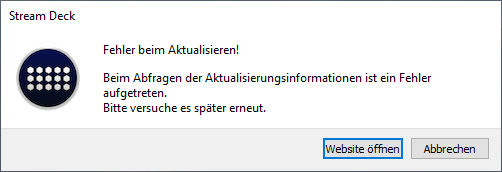
HELP! Can't update my Streamdeck
Idk if anyone speaks german here, but here's the error message: https://i.imgur.com/UjItDem.png
 tidal sand
@pliant warren I also have this issue sometimes with my mk.2
Alt tab out of, and then back into your game and it should fix it.
@pliant warren Make sure in your video card drivers settings that you have screen scaling set to GPU and not display. That might help mitigate the issue.
rare kraken
@lone snow You can't use a capture card to only capture a specific window/app in Windows, it only captures a full HDMI signal.
south bronze
@pliant warren I have that issue as well with the screen being messed up, also 4k60 pro mk2 and 240hz
@pliant warren do you also have to startup your gaming pc twice?
 woeful latch
@prisma totem Please ask in here.
PLEASE NOTE: Customer Service does not monitor this channel. If you are unable to solve your issue, please file a ticket at http://e.lga.to/help.
We also have staff available by phone 12hours a day. 8AM to 8PM Pacific every day of the year if you have quick questions and there isn't someone here to help you. http://e.lga.to/phone
 prisma totem
I wonder if anyone knows the problem here
I bought Elgato hd60pro and I want to mirror my phone screen. I tried the cable but it didn't. phone model Xiaomi note 8, help
whole coral
I'm trying to download the Stream Elements OBS live integration for my stream deck but it wont install? any ideas?
 quartz prairie
my elgato is lighting up but my video capture app is saying it doesn't recognize a device
cunning latch
@whole coral I'm not sure what may be happening here. Is the Stream Deck software fully updated to 4.6.2+?
hearty grove
Here's a streamdeck question / bug:
While streaming, if I navigate out of my obs scenes folder to do something else, then try to go back in - when I open one specific folder (for me it's just my Twitch folder and no other folder) my OBS freaks out and all camera inputs disappear for a few seconds. OBS loses the signal for every camera input as well as my image layers, media layers, and alerts. Everyone watching my stream tries to refresh bc they think they lose connection to the broadcast. Not sure why this happens when I open a folder on SD?
^ Also happens when not streaming - opening this folder while OBS is running causes my whole scene to freak out and kill video signal for ~5-10 seconds
 lament dome
When I connect my elgato to my tv I’m getting an error saying format not supported
Is there anyway to fix this?
lament dome
Nvm I fixed it
 frigid basin
I currently have a 4k pro connected from one pc to another into obs. Is there a way I can capture my microphone through the sound capture software and have that on my stream pc obs like the game audio?
 tidal vapor
Hi team, I am wondering about the 4k Capture Utility. I have just purchased a HD60S + capture card and I need to use the 4k utility which is fine. But when I open it, it start to record automatically. Is this normal behavior? If it is, is there a way to change it so it doesnt automatically start recording. When I press stop on the record button, it just starts recording again. Any thoughts?
tidal sand
@tidal vapor Yes, this is normal. There is a setting in the 4kCU called 'enable flashback recording' disabled that and it will stop that behavior 😉
Not sure why they have that enabled by default anyway....
cyan coyote
Any idea why the screen tears so much with the flashback recording?
 opaque nova
Hello, i'm having an issue with my stream that i believe is related to my elgato hd60s, but not familiar enough with capture cards to fully diagnose if it is the cause of my problem. It's kind of difficult to describe but i can do my best here or in a dm if preferred.
the console feed going into my computer hangs for about half a second that it does this roughly every 5 to 10 seconds.
and you can clearly see it in the stream and recorded videos. i've already checked to make sure my elgato software is up to date and checked to make sure it is plugged into one of my USB 3.0 ports.
 tired surge
Does anyone know how to fix window 10 not recognizing an elgato hd60 s ?
 shy viper
@tired surge I typically just unplug and replug in the USB to reboot the hd60. Turning it off and on again usually fixes any issues I have with it.... eventually....
tired surge
@shy viper I've done that so many times and even tried replacing the usb cord and it still doesn't recognize it.
shy viper
Does it allow you to change settings in Game Capture HD?
Or does it just not show at all?
tired surge
it doesn't show at all
shy viper
You're beyond me then. Might have to wait for a mod or hit up Elgato support directly
tired surge
Thanks tho !
shy viper
Anyone here use VoiceMeter and have a slight audio delay while using Game Capture HD? With VoiceMeter on the video has no visible latency but the audio is about 150-250 ms delayed. If I bypass VoiceMeter then I get the audio instantly with the image however then I have no audio on my stream machine... (2 box setup as I usually stream PC VR ends up as a 3 box setup while using a console. There's probably a better way, I know.)
tidal vapor
Ahhh right. Thanks @tidal sand
 wispy root
Hello, I'm using the Elgato HD 60 Pro with the included Game Capture HD software and I'm noticing an audio stutter that happens after a while. Reopening the program fixes the issue, but I'd rather fix the issue entirely. Any idea as to what is causing the issue?
 green timber
That's not our USB cable. Do you have the original USB cable?
@cunning latch No, is there anywhere I can get that.
cunning latch
@green timber This one will work for you: https://www.amazon.com/gp/product/B01GGKYS6E/ref=ppx_yo_dt_b_search_asin_title?ie=UTF8&psc=1
I use it myself.
We don't sell our included cable, just comes bundled.
green timber
Alright thanks
south bronze
Hey all, not sure where I should ask this, though does anyone know a way to change the opacity of a source in OBS via Streamdeck? I could just have multiple levels of source (an image / colour source) and then use the stream deck to add and subtract them as required, though looking for a tidier option if there is one.
 dawn oracle
Anyone else having pc performance issue when camlink is plugged after reboot but it fixes its self once u unplugs replug
 split grotto
Is there a way to connect the 4k60 pro capture card to a laptop via usb-c?
dawn oracle
A external pcie adapter comes to mind as possible soultion
But not tryed it my self
@split grotto
cyan coyote
So, the 4k60 pro mk2 is great and all, but I can't help but think the framerates is worse, also, so you guys prefer the 4k utility capture software of the original Elgato software?
dawn oracle
i personally prefer the obs to be honest
cyan coyote
Right now I'm simply using this capture card to screen-share video games to friends. Which do you think would be better?
Also, I just got this 4k60 mk2 and I hear static sound every now 'n then.
Okay, it seems lowering my volume slightly fixed the static audio issue.
Is that a common solution?
south bronze
wth is wrong with my sound. i woke up and it wont play. i had the downloads on. i looked at my settings it said elgato. how i fix that. i uninstalled everything and it still wont work
 worldly sigil
Sounds like you have Elgato Sound Capture installed.
worldly sigil
Ok, check your sound tab.
south bronze
ok nothing happen
worldly sigil
In control panel that is.
south bronze
it was workign untill i installed it
worldly sigil
Try setting your default to a different device.
https://www.digitalcitizen.life/how-change-default-playback-recording-audio-device
How to change default sound devices in Windows 10 (playback ...
 worldly sigil
Ok, go to your list of installed programs and look for Elgato Sound Capture
south bronze
i dont have it installed anymore
worldly sigil
Alright, so which Elgato device is it showing as default in sound?
south bronze
i just uninstalled every elgato thimg. idk
worldly sigil
Alright, try rebooting your PC now.
worldly sigil
What's it saying the default device is?
south bronze
Speakers (High Definition Audio Device)
worldly sigil
Like here's my sound settings. AMA Game is my default device, with AMA Voice as my default comms
south bronze
i have headphones
worldly sigil
What other devices is listed in your Sound tab?
south bronze
there is just 2 Speakers (High Definition Audio Device) 1 is for my headphone the other is for pc sound
worldly sigil
Can you provide a screenshot (use Alt + Print Screen to grab the active window)?
Once you have grabbed the active window, just Ctrl + V it in here
worldly sigil
Ok, show us your Audio inputs and outputs section of device manager please, and Sound, video, and game controllers
worldly sigil
Alright, so back to the sound settings, click properties on those 2 devices you have (both Speakers), and check the volume
worldly sigil
No
south bronze
ohh sound setting
worldly sigil
This window, click properties, then Levels
worldly sigil
Alright, try setting the other "Speakers" device to default, and check the levels
worldly sigil
alright, has it been set to default?
south bronze
yes
worldly sigil
and still no sound from either device?
worldly sigil
Then at this point, it's not an Elgato issue. I would consider uninstalling the sound devices in device manager and rebooting, so that they are reinstalled.
south bronze
how i do that
worldly sigil
south bronze
how do i reinstall it
worldly sigil
Rebooting the PC
Since when you reboot and login, it'll automatically find the drivers and install them
south bronze
like reboot restart or reboot reboot
worldly sigil
As in restarting the entire PC
south bronze
ok
worldly sigil
if that doesn't work, then the problems are more serious and it's beyond my ability to be able to help you
 civic violet
Hello I need a Tech to help me with the audio issues of elgato.... If someone is down to help me out send me a message on private
south bronze
1080
dawn oracle
@south bronze 1080p as p = progressive and I = interlaced
U believe I and p region depend tho somone can correct me but usually u want p
woeful latch
@civic violet Ask in here. 🙂
PLEASE NOTE: Customer Service does not monitor this channel. If you are unable to solve your issue, please file a ticket at http://e.lga.to/help.
We also have staff available by phone 12hours a day. 8AM to 8PM Pacific every day of the year if you have quick questions and there isn't someone here to help you. http://e.lga.to/phone
Elgato
Below are the telephone numbers for Elgato Support:
United States☎ 1-888-726-8134
Toll FreeMonday-Sunday – 8:00 AM to 8:00 PM PST (Pacific Standard Time, United States)United Kingdom☎ 0330 808 44 9...
 burnt wolf
Hello!
I have a problem with Streamlements action of Streamdeck (clicking on More actions...). When I click install, the animation start and finish but appear Install anyway. There is a solution to solve this problem?
 heavy spade
Hello! Hoping this is the right spot for this question, I don’t have an issue but am wondering about the compatibility of the 4K60 Pro. Are the system requirements listed what it would take to output 4K, or will the hardware literally not work without that level of CPU? I’ve got a crazy deal available on one of these and am wondering if I’ll have to upgrade my PC to run it. Thanks in advance!
 fathom hollow
So, My nam is Harm and i am searching for staff that can help me out. prefer in dutch if possible
wooden remnant
Just ask your question Harm
If you specifically need a staff, then official support is your best bet: https://help.elgato.com/hc/en-us/requests/new
fathom hollow
Then i will contact them over there
 pale crane
I often find my k95 G keys stop responding with my stream deck... anyone know what could cause this issue?
wispy root
Hello, I'm using the Elgato HD 60 Pro with the included Game Capture HD software and I'm noticing an audio stutter that happens after a while. Reopening the program fixes the issue, but I'd rather fix the issue entirely. Any idea as to what is causing the issue?
civic violet
I’ve a sound issue: When I have the elgato software open, I can hear the game audio on my headsets perfectly, but when I open OBS I can’t hear the game audio on my headsets, but the obs can track the sound waves of the game audio with the game audio bar
whole coral
@cunning latch yes it is
 floral jetty
@civic violet you need to go in to advance audio properties and select monitor on the elgato device.
 dull rover
Hey i want to use "elgato sound capture" for my 2 pc setup. But when i try to see if audio goes to the other pc, its only the pc audio that i hear and not the mic audio. I have set the audio input in the advanced menu tho, so i'm lost.
 burnt dust
My cam link 4 and Sony 6400 keeps freezing when I’m live. I use elgato game chapter works fine and streamlab for pc. Before that I used Mac 💻
Captor *
 balmy gate
I want to set up my elgato with my switch, but when I go to OBS and add the "Video Capture Device" source and go to "Configure Video" but on the top, I see the message saying "No capture devices found"
 errant pine
Hey guys! I am having an issue with my dual pc set up. I have a hd60 pro in my streaming pc and for some reason the audio from my gaming pc isn't going over to the streaming pc. It shows on my gaming pc that the audio is going to the capture card but no sound can be found on my streaming pc. Any tips?
south bronze
I'm having problem wit my 4k60pro. I put my laptop in as the input source but when i put in the source in obs all i get is a green screen, and when the resolution is 4k, it's mostly green but flickeirng up top with part of my desktop on there
Also my PC does recognize the 4k60 as a device, so i'm not sure if i did something, or if there's something going on with the capture card itself
south bronze
would anyone happen to know why I drop below 60FPS with the Elgato HD60 S but when I stream with NDI 1080/60 works perfectly fine?
My second PC has a 4790k and 970
 sleek coral
having an issue with my hd60s where the tv will show the gameplay, but game capture hd just says one moment please. anyone know a fix?
 vestal wolf
would anyone know if this issue https://www.reddit.com/r/ElgatoGaming/comments/fiqokq/downloading_streamelements_obslive_plugin_for/ is with the stream deck or with streamelements
reddit
5 votes and 3 comments so far on Reddit
 karmic latch
hi there im having problems with my capture card once again
 robust cosmos
hello my ifttt plugin is not working pls help
 dusty vault
Honestly..I wouldn't use IFTTT at all. That thing is broken. What do you use it for?
robust cosmos
I'm using it for smart lights
the two links that i created for turning on and turning off the lights are working but but the plug-in is not working at all and I don't know why
karmic latch
what are the system requirements for the Elgato HD60 S and the S+
dusty vault
I use Lumia Stream for smart lights and it's infinitely better/more responsive
I highly recommend and would suggest trying it out! You might be thinking that it's a tad tedious to switch now, but it might save a ton of headache in the future (the reason why I stopped using IFTTT)
cyan coyote
Hey guys, has anybody used the camera settings on Discord to stream an Elgato to friends? It only seems to work on capture cards that integrate into your computer through the motherboard.
dawn oracle
that interesting
split grotto
Can someone try using the 4k60 pro capture card on a usb to pci riser card?
 still canyon
good idea @cyan coyote
sleek coral
got game capture hd to start realizing the cc is there, but it wont actually pick up anything from it
everything is hooked up exactly like it should be, so im just completely lost now.
tardy cobaltBOT
PLEASE NOTE: Customer Service does not monitor this channel. If you are unable to solve your issue, please file a ticket at http://e.lga.to/help.
We also have staff available by phone 12hours a day. 8AM to 8PM Pacific every day of the year if you have quick questions and there isn't someone here to help you. http://e.lga.to/phone
Elgato
Below are the telephone numbers for Elgato Support:
United States☎ 1-888-726-8134
Toll FreeMonday-Sunday – 8:00 AM to 8:00 PM PST (Pacific Standard Time, United States)United Kingdom☎ 0330 808 44 9...
 lone river
hey im using an elgato hd60s to record my laptop screen, i want to be able to record my face alongside my screen but issue is the whole screen is being recorded and not the square in which i can put my camera in. so for example if i exit the elgato window while recording my camera will not be seen on the recording. any kind of help would be apreciated
burnt wolf
@Dez#9306 I have the same problem: https://discordapp.com/channels/581549424518365226/581551435074764810/698578980105879674
 wooden arrow
Question: How many keystrokes are allowed when defining hotkeys?
Eg, I'm trying for "Ctrl Alt Shift L F E +" but only get up to "Ctrl Alt Shift L"
Is there a limit and or limitation?
 graceful flax
Hello, I need some help with some audio issues. Im using the Elgato hd60 to stream via OBS with a ps4. The first thing is that I couldnt have game sound while streaming, but now I fixed it by plugging in a aux cable in the back of my computer in the Line In port. I do have game sound now and im using audio input capture on OBS to get that sound on my stream. The only thing is that the video of my elgato and the audio of my ps4 is out of sync. I tried to delay the audio via advanced audio settings but that didnt fix it. Please help me out
Whenever im in the game capture software of elgato the sound is also out of sync
final terrace
I'm wondering if someone can help me with this question but I saw the new Elgato youtube videos on the Work Studio and wondered how do you use Elgato Stream Deck to choose which monitor opens and app and choose windows size?
 twilit verge
I have a serious issue where there is static/crackling coming from my microphone when I'm trying to record gameplay via the elgato game capture HD. I feel like it could only happen after it gets exported. Does anyone know what I can do to resolve this?
 sullen marten
Have a question??.. or issue I guess lol... I have the stream deck (15 button) and stream to mixer .. but almost everyday I have to log out of my linked mixer account on the stream deck and re log back in for it to work for my mixer commands ( like chat messages ect ) ... is there a fix for this or something I’m doing wrong ?
 sour ingot
On my Stream Deck I'm trying to use the Twitter Change Name feature. It doesn't work at all... won't change the name. The Tweet feature works fine though, so I know it is connected properly. Any suggestions?
 acoustic talon
I had a multiaction button to open a command terminal (cmd) and type some stuff over there, which requires me using the PATH environment variable from windows.
It was working until the last update, I noticed that whenever I tried to open the cmd with streamdeck, echo %PATH% didn't correctly list everything as my windows environment variable has, but opening a cmd manually does the job.
Was wondering where might streamdeck be pulling that path list from..
whole coral
would anyone know if this issue https://www.reddit.com/r/ElgatoGaming/comments/fiqokq/downloading_streamelements_obslive_plugin_for/ is with the stream deck or with streamelements
@Dez#9306 trying to figure that out too DM me if you figure it out
reddit
5 votes and 4 comments so far on Reddit
 charred bluff
Hey does anyone know how to fix capture card not working in OBS? I have the HD60 s+ and it says no signal - on top of that Theres not an actual option to select my capture card
Hope that makes sense : )
( ^ I’m on Xbox )
 barren storm
Hey all - can another help me figure why the audio on my stream starts to go out of sync after awhile?
It’s starts out ok and then starts to slip, only slightly but I’m a stickler for making everything work as best I can.
I use the elgato Game Capture HD.
Thanks
cyan coyote
Does anybody know why when I'm using the 4k utility software the colors are all over saturated? I haven't touched the picture settings as they are all at their default.
cyan coyote
Also, why does my PS4 game look better on the capture card software versus my TV.
barren storm
@cyan coyote if you’re tv is older it possibly won’t give as high a quality image as you computer screen would. Another reason might be the screen settings on you tv might not be set to give you the best picture. Many variables.
wooden remnant
I wonder if the latency for the HD60S+ is low enough for me to be able to use it for casual games 
 drowsy flicker
How do you mean @wooden remnant ?
drowsy flicker
Oh I see what you mean, I have one and I couldn’t play that way I think and don’t quote me it’s about 1/4 of a second delay something like that but it’s too much to game
Out of internet why would you want to play that way?
Interest*
 quaint knot
Anyone here who is experienced in using an Elgato HD60 connected to a single monitor with two video inputs (DisplayPort & HDMI) Displayport is used for my PC (streaming and gaming) and HDMI to connect the HD60 and any console connected to it. My issue is sending the sound from the Elgato HD60 to my PC Headset whilst the audio is actually being sent via HDMI to my monitor. My stream has no sound delay but I do have when playing on the HDMI port of the monitor. This doesn't have delay when using the monitor speakers ofcourse but that's not an option to use for me as it would make it impossible to use my headset for other things in the meanwhile.
wooden remnant
Because I don't have a secondary monitor as of yet
quaint knot
Bastian do u already use another Elgato or just checking if the HD60S+ is something for you to start streaming because you could help me out if you already stream on one monitor 🙂
Because my trip through FAQ's and youtube already told me that the one you are looking for is able to play in preview mode in OBS or Elgato software without input lag or audio lag. I sadly am on the older hardware from Elgato and have to find a workaround for my audio issue
drowsy flicker
@quaint knot do you have an optical input on the PC you use?
quaint knot
I'm not sure, I see an SPDIF Out and two small in or outputs that require a screw on and have some sort of wifilike symbol above them
wooden remnant
I currently don't have a capture card, just wondering how to prepare for the one to come
quaint knot
if u have the money go for something u can plugin to a PCI slot for minimal input lag on video and audio
drowsy flicker
If you have or can get (usb sound card with optical input) then in theory you could run audio from the console via the optical out to the optical in on the pc then route that sound to come via headset that way it wouldnt matter what input you use on the monitor. There may well be another way but that’s how I would first try it out
quaint knot
ah ok, but my consoles are more retro and don't have optical audio ports
going from SNES Classic to Gamecube and Wii/Wii U & Switch
drowsy flicker
Ahhh ok then that’s different mater
quaint knot
Yeah, it's a difficult to find topic when trying to get your audio from the console via the elgato to your PC audio output
to get it all in sync for stream and to play yourself is the PITA
as my pc streams and runs all software but I also use my PC monitor on a different output to play the games
i have no input lag with what i do with my games but the sound coming back from my PC has a second or two delay which really puts me off when playing Mario or stuff like that
drowsy flicker
I’m sure there is a way just need to get my head round it lol
quaint knot
I had this working by letting the monitor use a headphone jack to my microphone in jack from the PC but it has a humm on it so I'm looking for another workaround but I'm afraid there isn't any
wooden remnant
if u have the money go for something u can plugin to a PCI slot for minimal input lag on video and audio
@quaint knot requires a PC with PCI
drowsy flicker
Is there such a thing as a hdmi to display port adaptor?
quaint knot
easiest way I can think of right now i use an audio jack splitter to let my headset for my PC use both the monitor headphone jack for sound and split it to my PC for audio
it probably exists
drowsy flicker
That way you could switch them round? Would that help
quaint knot
not sure because the audio would still go to the monitor from the Elgato HDMI
quaint knot
the monitor's output headphone jack is my way to fix it so I guess an audio jack splitter would help out rather than looping the audio from the monitor to my PC first I can just use my headphones green jack to split off into monitor and PC for direct sound
drowsy flicker
Worth a shot and probs only a few bucks at most to try it 👍
quaint knot
yea will look into it as I think the humm is coming from the PC mic in jack
not from the monitor audio out jack
drowsy flicker
Best of luck hope it work for you 👍
quaint knot
thanks!
quaint knot
@drowsy flicker u still around?
drowsy flicker
@quaint knot yep
quaint knot
do u have any experience with stereo mix to get it working ?
drowsy flicker
Sent you a DM @quaint knot
 warm haven
Has anyone else been having HDR issues since upgrading to version 1.7 of the 4K capture Utility?
warm haven
Like the colors becoming WAY over saturated.
warm haven
It doesn't for me.
cyan coyote
Restart your 4k utility program.
warm haven
@cyan coyote Didn't work.
cyan coyote
Not sure what's up. Whenever I close mine and reopen, it works.
green timber
@green timber This one will work for you: https://www.amazon.com/gp/product/B01GGKYS6E/ref=ppx_yo_dt_b_search_asin_title?ie=UTF8&psc=1
I use it myself.
@cunning latch Hey, it doesn't ship to Ireland. Do you know of any other ones that might ship here?
cunning latch
@green timber Doesn't have to be that specific cable. But if you can ensure you're using a USB 3.0 Type A to Type C cable it should work.
Many included A to C cables with phones are 2.0 only just for charging
Do you get shipments from Amazon.co.uk?
green timber
Yes
 wooden galleon
im having issues with my elgato 4k60 mk2 card.. in the 4k capture utility program, everything works perfectly, starting a fullscreen program/game etc, everything works. But in Obs Studio, whatever the resolution i put the elgato "source" to, i either get a green screen 100% of the time, or it works when im in desktop, but goes green screen when i start up a fullscreen game.... any tips anyone? 🙂
EDIT: I have put the 4k60 to the right EDID etc in 4k utiliity settings btw
EDIT2: I tried going back to slobs, and there everything works perferctly.... something up with obs studio, will investigaterru ^^
green timber
I'm gonna get this one and hopefully it works, thanks so much for your help, Crest!
https://www.amazon.co.uk/JUNWER-Devices-including-MacBook-ChromeBook-Black/dp/B011995DDO?ref_=fsclp_pl_dp_1
cunning latch
Wait looks like amazon.co.uk has the cable I pointed to: https://www.amazon.co.uk/dp/B01GGKYS6E
That would be my recommendation only because I literally use it myself.
But the other one you linked says it should work based on the description.
 pseudo sierra
Hi! I just boach a Stream Deck and it freezes after 15 mins, I need to reconnect it a few times for it to get go back to normal again. Sometimes the buttons work but dont change, so I need to guess whats under it. Any tips?
bought*
 zinc moth
hi guys i have a question about Camlink4k
We are planning to set up a mini studio for live stream and for a reasons we need to be looks very pro. The question is
We are going to get picture from a DSLR camera and the sound is coming from a audio mixer and do we need to handle any sync issue with that ? is there a better alternative to do someting like this ?
is there a going to be lag between real time and the picture ended up on our screen ?
And the camera we are going to use is d7100 and why it shows as in compatible i don’t get it
 thorny geode
hi, looking for help with my 4k capture utility for windows. when i try and record i get a message saying that my radeon vega 8 driver needs to be up to date or not being used. when i checked, my driver is up to date, any solutions?
rare kraken
@zinc moth there always could be some small audio sync issues in OBS. I recommend using one of those video where you can test the audio sync (https://www.youtube.com/watch?v=LXY69tuBfV4)
Download here - http://obsaudiosync.com
The OBS Audio and Video Sync Tool has been designed to answer the important question of how much audio delay an Open Broadcaster Software user should apply in their live streaming system. The tool is a video that combines a visual scal...
zinc moth
@rare kraken the problem is we are probably have to use zoom or skype to communicate with other peoples and need to sync that video feed too
rare kraken
(I use an interesting setup with OBS Link into OBS with a HD60 S on my Mac with a separate audio interface)
rare kraken
I only know of an audio delay sync in OBS (either windows or mac)
not sure of one that could be used with something like zoom or skype unless you're also then sending your OBS output as a webcam source
but not sure if that would actually render correctly...
zinc moth
i believe even the normal webcam such as c920 has that video delay right if we use our own microphone ?
thorny geode
would love some help as well once yall are done if you can 🥺
pliant warren
@cunning latch its still doing the thing
 uncut flame
Hey there just got my Elgato in today. I set it up and have picture but there doesn't seem to be any sound for some reason. Does the Elgato move sound channels to somewhere else or should this not be happening?
I haven't tried setting up an actual recording mind you this is just me setting it up and getting a picture.
 twilit ether
Can you design an XL profile while owing a regular SD or Mini?
rare kraken
@twilit ether nope. The other keys won't appear until you plug in an XL
twilit ether
I know there are community creators that would like to make versions of their profiles for XL but can't afford the 249 upfront. Thanks for the tips
rare kraken
@twilit ether you can do the first 15 keys, or 14 keys, and put the additional ones within a folder
then once you get the XL, copy and paste
uncut flame
My problem got fixed after I downloaded game capture. Got video capture initially by mistake.
 hidden jolt
Does anyone know if the twitch "Clip" button functions the same as the one on the video player? 25s before and 5s after? I'm using barraider's plugin to post to chat rn and it seems to end right as the button is pressed
sullen marten
Why does my stream deck always disconnect from my mixer account ?
 balmy magnet
Hi!! After I downloaded the new stream deck update, the goxlr plugin stopped working. It says "Waiting for info" and unfortunately restarting the apps and plugin didn't work. Fix?
wooden remnant
Have you restarted the computer?
west bay
Hey guys, will a USB 3.0 Switch work with Elgato to 2 PCs. 1 PC is my Gaming PC which I use during the day and my Streaming PC I use at night. Rather than having to switch the USB of my HD60S between PCs, I'd like a switch to ease the process. Anyone done this / is it supported?
 vestal ravine
Anyone know why when I drag a image to streamer come up with a question mark but then if I do a different one it work, it use to work before
vestal ravine
Sorted the image was to big im guessing because I made it smaller and it worked
cyan coyote
Anyone know a good way to show my friends on Discord my gameplay through the elgato?
I've used just screen-share, but sometimes it lags.
I want to use the camera settings for Discord because they pick up my elgato, but there's no audio.
south bronze
So the new update to stream deck is now not finding my voicemod. ⚠ Voicemod has to be launched ⚠ ... although it is launched! I have restarted my PC after the update. Uninstalled and reinstalled the plugin.. please help.
How can I go back to the previous version. I dont like this one 😦
 steady oyster
Hello... I just installed the software version on my ipad and i installed the pc version on my pc... i am trying to use the voicemod plugin on the app but it is telling me... voicemod has to be launched.. confused...
i have it launched
steady oyster
nevermind i just uninstalled it i'll stick with what i am using.
 raven hull
can you have the stream deck work on two seperate computers if you have a 2PC stream setup?
 mental nymph
My mixer buttons stopped working in Stream Deck out of the blue. This has happened on multiple occasions, almost as if account settings expire after two weeks. Is this a known issue? I am setting up my various accounts with the "Remember me" checkbox ticked. Any suggestions on how to prevent this? Funny thing is, without having made any changes (just updated to recent version) it started working again. Must be an issue with the Mixer api?
west bay
can you have the stream deck work on two seperate computers if you have a 2PC stream setup?
@raven hull I believe you will need a USB switch, or just another stream deck
raven hull
gotcha... was hoping some buttons would be able to work on one comp while others work on another
floral jetty
@candid reef
 candid reef
?help
tardy cobaltBOT
PLEASE NOTE: Customer Service does not monitor this channel. If you are unable to solve your issue, please file a ticket at http://e.lga.to/help.
We also have staff available by phone 12hours a day. 8AM to 8PM Pacific every day of the year if you have quick questions and there isn't someone here to help you. http://e.lga.to/phone
Elgato
Below are the telephone numbers for Elgato Support:
United States☎ 1-888-726-8134
Toll FreeMonday-Sunday – 8:00 AM to 8:00 PM PST (Pacific Standard Time, United States)United Kingdom☎ 0330 808 44 9...
 drowsy jolt
anyone know how to roll back this update?
this stream deck update broke the GOXLR integration...
floral jetty
did you update the firmware as well?
drowsy jolt
I did
I reverted back to the 4.5.1 update and it works, but all the icon images are upside down...
floral jetty
ah ok, do they stay upside down if you change out the image again?
floral jetty
i'd say give elgato a call at the above. Not sure you can revert firmware.
 flat elm
hey great job guys this morning update completely killed the GO XLR functions for the stream deck. smh... if i uninstall will i loss all my icons i set up already?
@drowsy jolt there is a way but i wanna find out if you lose all of your icons you already setup, i have the XL stream deck and i have over 100 icons that ive made and setup, not trying to lose 5hr or setup over a uninstallation.
 wild lily
@flat elm i lost my goxlr icons had to set them up again
flat elm
thats the only thing you lost?
if so then i might just do it. bc i cant stream with out that plugin honestly
wild lily
i have one other custom icon that didn't need fixing
flat elm
bet that, thanks a million man
wild lily
no prob gl
@flat elm create backup of profiles from setting first
just to be safe but also dont know if that save custom stuff as never needed to import my backup
drowsy jolt
@flat elm i didnt lose any icons (except goxlr ones) or settings by reverted back to the 4.5.1... only problem I've had is all my icons are upside down... tried re uploading them by they are still upside down...
south bronze
No fix for this issue yet then...
I need to revert back to the old patch then but I don't want my images to be upside down 😦
drowsy jolt
yeah I dont want mine upsidie down either, but I cant find a way to revert to old firmware... so currently, I guess Ill just have to leave it alone... or update back to "new" update and not have goxlr integration work... Hoping Elgato rolls out a patch today
south bronze
Yeah I rely on my voicemod app quite a bit -_- guna make things janky
ah well
I take it Elgato don't acknowledge these issues and the admin/mods don't talk?
drowsy jolt
^^^ I have no idea... I would imagine they know by now some of the issues...
candid reef
perhaps someone here has a fix for that, i cant select my ssid in the control center app to install my keylight. my ssid shows up for a split second and then disappears. i rebooted my router, resetted the keylight, changed my ssid name and reinstalled the app.
south bronze
Hello, since the new update im not able to use some OBS Studio buttons
source (quelle) theres nothing to choose anymore

wow i scrolled up and realized this update nearly killed all of the users settings 😄 why do they launch such an update if its not working!?! lets wait
 dry kestrel
heyy, so I have the elgato camlink and it always worked perfectly, but now all of a sudden it's lagging as hell. Does anybody know what the problem could be? I haven't changed anything that I know of.
south bronze
Hi do I need a usb 3.0 cord for elgato hd 60s or can I use a regular cord
worldly sigil
The Elgato HD60S requires a USB 3.0 A-C cable due to the bandwidth it uses.
 fallen bluff
Hey there.
Happen to stumble on a weird problem.
Elgato just updated and after it did it seems to not recognize my voicemod as being on
already restarted pc and nothing, has anybody also faced this issue?
Seems like new update has brought in a couple of problems
south bronze
@worldly sigil where can i buy the cable from
south bronze
ok
worldly sigil
Please also do not DM me about it.
 signal musk
FYI We're aware of issues with certain plugins in the Stream Deck 4.6.3 update and are working on a fix. Here's how to roll back your update:
https://twitter.com/ElgatoSupport/status/1250126735460290562

Steps to downgrade to a previous Stream Deck version (Windows):
- Quit the Stream Deck software by right clicking on the Stream Deck app icon in the system tray
- Using the Windows uninstall menu, uninstall Stream Deck (Profiles will be saved)
 Twitter
signal musk
signal musk
**FYI** We're aware of issues with certain plugins in the Stream Deck 4.6.3 upda...
south bronze
Twitter
signal musk
signal musk
**FYI** We're aware of issues with certain plugins in the Stream Deck 4.6.3 upda...
south bronze
 royal badger
hey can someone tell me whats the difference between 4k60pro and the 4k60 pro m.2#
floral jetty
Elgato
Elgato Game Capture 4K60 Pro MK.2 has a few differences between it, and the original Elgato Game Capture 4K60 Pro.
Differences Between The Two Models
Here is a photo of the new Elgato Game Ca...
signal musk
@fallen bluff @south bronze @flat elm @drowsy jolt @south bronze @balmy magnet see my pinned post
fallen bluff
aight, thanks @signal musk
 proper spear
Glad I came here to double check on a hunch I had, which this place confirms. After searching up 'new driver' in the search bar and reading conversations about the newest driver, it definitely seems the new driver is messed up. For us, the game video and audio disappears for a second in OBS w/ 4K60 Pro Mk 2. I submitted a ticket about it and also made a reddit post here with clip examples https://www.reddit.com/r/ElgatoGaming/comments/g0k5uv/no_signal_at_random_during_streaming_on_obs/ (which also includes 2 other users reporting same issue)
For now I uninstalled the newest drive and went back to last years driver. I'm sure it'll be fine now but since it wa a random occurance I won't know for sure. But seeing the discussions had here makes me more confident that ElGato just put out a bad driver

reddit
2 votes and 2 comments so far on Reddit
 rugged blaze
im having trouble with voicemod on my stream deck i keep getting the error "voicemod has to be launched" even though its launched??
floral jetty
@rugged blaze please see above post for rolling back software
rugged blaze
@floral jetty which one?
floral jetty
the pinned one. check the pin its the top one
whole coral
Has anyone figured out the deal with the Stream Elements Plug in
south bronze
for me reparieren solved ALL ISSUES!!! dont need to deinstall it. just click on repair
 inner ocean
@signal musk is there any information for plug-in creators in relation to the issue, so they can be aware if their plug-ins are effected?
signal musk
Not at the moment, but if you hear your plugin is affected, feel free to ping me and I'll get you connected with our devs @inner ocean
 marble lotus
I have an issue with my HD60 Pro, I plug it in, the computer sees that it is plugged in, but there is no output. I plug in the hdmi and the screen is just black, but it knows that something is plugged in? I am lost..
 mortal monolith
i'm having the same problem.
I would suggest going into device manager, disabling it, restarting the computer, then enabling it and immediately starting OBS or Game Capture HD
I'm seeing an issue where the HD60 Pro is being taken by another piece of software so it appears as In Use to Game Capture HD or OBS.
This started when I had to remove my webcam.
It also was not fixed with a full format and reinstall of Windows.
 dawn copper
the Screen Link Pro app doesn't connect
Just gets stuck on "connecting to source"
I got it working once before I bought it , of course ><
But since then, nothing
signal musk
@dawn copper I'd recommend filing a ticket at http://e.lga.to/help or call us at http://e.lga.to/phone
Elgato
Below are the telephone numbers for Elgato Support:
United States☎ 1-888-726-8134
Toll FreeMonday-Sunday – 8:00 AM to 8:00 PM PST (Pacific Standard Time, United States)United Kingdom☎ 0330 808 44 9...
marble lotus
Yeah, so after a couple more hours of tinkering, my computer wouldn't start with the hd60 pro inside, once I took it out, turned on again. I have to return it, sorry
 grave girder
Hi all! I’m having an issue. I’m attempting to use a GoPro Hero 7 as a webcam with my HD60 Pro. I can see video in the Elgato software, but it’s not showing up in Streamlabs OBS. Is this an issue for this discord, or should I go to the Streamlabs discord?
 lavish heath
Black screen when using hd60s+ ps4 and pc laptop....
Any suggestions?
Using slobs studio.
 mellow ginkgo
Team, I have been working on my issue for over 2 weeks now. I have the Elgato 4K60 MK2 Capture Card and it is causing audio clipping while streaming. I have no idea how to fix it. Any suggestions? I have done many things.
tardy cobaltBOT
PLEASE NOTE: Customer Service does not monitor this channel. If you are unable to solve your issue, please file a ticket at http://e.lga.to/help.
We also have staff available by phone 12hours a day. 8AM to 8PM Pacific every day of the year if you have quick questions and there isn't someone here to help you. http://e.lga.to/phone
Elgato
Below are the telephone numbers for Elgato Support:
United States☎ 1-888-726-8134
Toll FreeMonday-Sunday – 8:00 AM to 8:00 PM PST (Pacific Standard Time, United States)United Kingdom☎ 0330 808 44 9...
 shut summit
Hello , currently I use the HD60 to film my iPad but I'm not the one say in my audio headset ... Mas on the live twich is good but not for me .... How can I do that?
 hollow sun
HELLO I NEED HELP
karmic latch
Ok so i have a question about the elgato HD60 S and the HD60 S+
what are the system requirements for these too capture cards
signal musk
@drowsy jolt are your icons still upside down? Could you provide the following:
What product are you using? What is the software and firmware where this happened? If you update to the newest update this should all be fixed now. Let me know if you are still experiencing issues.
karmic latch
Yes i needed to know because im having major problems with my HD60 S+
worldly sigil
@karmic latch however it doesn't have to be minimum 4th gen, for example I have a 3rd gen i7 (3770K), which handles the S just fine.
karmic latch
I have the S+
south bronze
When i plugin my elgato my screen will be a lot darker, how could i fix this?
worldly sigil
I think the S+ would be the same as the S.
karmic latch
where can i send videos
dawn oracle
There some difference I render I can factually say what they where
But it was either to do with hdr or the pass through port
worldly sigil
Yeah, the S+ has HDR
south bronze
Hi, I was wondering if someone could help me with a Elgato game capture HD color question? (about the colors from tv to pc monitor)
 split cargo
If I have a 4K60 S+ does my monitor have to be a 4K monitor? I’m trying to record my Xbox One S
@tepid cosmos
mellow ginkgo
Hello, I am still looking for help! Audio is clipping while using the 4K60 MK. Happens with both Streamlabs and OBS. I have a link via reddit that goes into more detail, but I am not sure I can post links here.
rare kraken
@split cargo I don't think the 4K60 S+ can record 4K while doing a 1080p passthrough
might be the other way around
HD60 S+ plays 4K via passthrough, records 1080p
there's not a way to set up the Xbox one S to output 4K to your capture card, then have it downscale to 1080p. You can do so with a different device, but the 4K60 S+ doesn't do this.
 gaunt lion
alright, so i had a hd 60 pro and i use that as my "cam link" since i dont actually have a cam link and i cant waste more money on it, but when i use it, there's a slight 1 second delay on every movement that i do, is there anyway to fix that?
cyan coyote
Why does my 4k60 mk2 look better on my 4k utility software then my TV?
wooden galleon
Hi fellow gamers!
Im struggeling with my new Elgato 4k60 mk2. When ever i alt tab or enter a fullscreen application, almost always the image gets displaced or turns green and purple (as shown in the GIF).
I have updatet the card to the latest firmware, put it on the correct settings regardin EDID etc. I feel ive tried every possible solution there is (on the interwebs), so i really hope ive just missed a simple box tick....
https://gyazo.com/2cf3eaa1d3f8fdd6af0e5dc1d3e0011b
I am running a dual pc setup btw
Anyone out there that can help me? 😄
 tardy cobaltBOT
PLEASE NOTE: Customer Service does not monitor this channel. If you are unable to solve your issue, please file a ticket at http://e.lga.to/help.
We also have staff available by phone 12hours a day. 8AM to 8PM Pacific every day of the year if you have quick questions and there isn't someone here to help you. http://e.lga.to/phone
Elgato
Below are the telephone numbers for Elgato Support:
United States☎ 1-888-726-8134
Toll FreeMonday-Sunday – 8:00 AM to 8:00 PM PST (Pacific Standard Time, United States)United Kingdom☎ 0330 808 44 9...
 celest field
Hello I am having trouble with my elgato capturing sound from my gaming pc. When I have my ps4 running through the capture card it picks up the sound fine. When I switch over to my PC all I get is popping and low grade static I am using an Elgato hd60 I bought 4-5 years ago
 wild spade
Guys I have issue with HD60 S, when fullscreen there is a very thin line on the right side of monitor, it's from sidebar, when not fullscreen it's not there
only on fullscreen
hard to screenshot as it's on the edge, but it goes away when you move mouse then when it's in windowed mode it's not there https://i.imgur.com/7oIYlTR.png


Yeah nvm definitely doesn't show in that, just looks like black line but it's a grey line like it's the actual side of the sidebar (can I remove sidebar permanently or something? Becomes when it becomes "hidden" with right click or auto it still shows the border on right
green timber
Hi, I actually found the original USB C cable it came with but it still doesn't work. https://discordapp.com/channels/581549424518365226/581551435074764810/695803021883342970
 fallen thistle
Can someone please help me? I got a new Elgato HD60s for streaming, but when I startup my elgato software, my monitor switches to a black screen and also my software don't show anything.
 quasi tinsel
so the newest streamdeck update broke Control Center functions for Key Lights?
worldly sigil
@quasi tinsel it hasn't for me. My Key Lights still function fine on StreamDeck
worldly sigil
I've tried adjusting temperature and brightness, that works fine too
quasi tinsel
inside the streamdeck app for my power on/off of the lights it says accessory not found
worldly sigil
You'll want to check the Control Center app then. Are they still showing there? Because before and after the update, they've worked fine for me
quasi tinsel
i can control them from my phone app
worldly sigil
Check on the PC
quasi tinsel
on PC says accessories not found
worldly sigil
Ok, so that means that somehow they've ended up on a separate network to your PC
Check that when you're doing them on your phone, you're on the same network as your PC. Consider resetting them and reconnecting them to the network your PC is on (use your phone for this if needed)
quasi tinsel
my pc is on wired
worldly sigil
Yes, but the network your phone is connected to vs your PC could be different
south bronze
I've bought Stream Deck and like to use it for streaming. I use OBS. I've got one scene set and within it, I've got 3 sources, - left monitor, right monitor and game capture. Can you help me with this damn stream deck configurator please. I want to have 3 buttons, each one responsible for one scene, but when I select a source in the configurator, it makes 1button to work in two ways. One press, have game capture, a second press of the same button, change the source to the right monitor. But there isn't possible to make any selection which source the button will choose. Therefore I'd prefer to have 3 buttons. But which action should I choose in this configurator? Cause the selection regarding OBS is very limited:(
worldly sigil
It's worth checking though either way
quasi tinsel
so how do put a wired ethernet connection on the same wireless network?
worldly sigil
Make sure the Ethernet cable connects to the same router that provides the WiFi
quasi tinsel
it is
i just restarted modem and router now the control center on PC shows the lights
but my buttons still don't work on streamdeck
worldly sigil
Try to remake them now Control Center on PC shows them
 fervent briar
Good morning, I'm having an issue in regards to an RMA request, looking for some assistance, have a case number if anyone is available to assist. Thank you.
 small oak
Same problem
wild spade
I asked last night but has anyone had an issue with a grey line (edge of sidebar) showing on far right side of monitor when fullscreen with elgato capture (shows on discord screenshare or if showing monitor on obs)
Doesn't show when in windowed or fullscreen with sidebar on screen, only shows when you right click and hit "hide sidebar" and game fullscreens
 ruby tartan
Can somebody help me fix my Elgato Hd60s, it just keeps saying connect your capture device,
Y It can’t find my Elgato please help
green timber
https://discordapp.com/channels/581549424518365226/581551435074764810/700320280614141964
It detects it for like a second but then goes back to connect to proper USB 3.0
ruby tartan
Mine doesn’t detect at all
 agile sigil
Hey! I’m having some sound issues. My stream can hear my sound but I can’t I’m using Streamlabs
worldly sigil
What is your audio output mode set to?
(SLOBS for the most part is just a reskinned OBS so the screenshot will still work from OBS Studio)
hidden jolt
Not sure if this is Streamdeck's fault or Twitch's?
Every so often my 'twitch chat' message does not work and gives the "!" error, I press it like 20 times, then a minute or so later all of a sudden those messages appear 20 or whatever times really fast.
 cyan robin
Hi Folks, I'm currently running into the infamous issue of the USB 3.0 needed for the Game capture HD60S.
On first try, it worked for about 10 minutes, then when I decided to disable the FlashBack recording, everything got refreshed and it stopped working with this error. From then, it was impossible to make it work again 😭. So I know it CAN work, but just doesn't, whatever i'm trying.
Here is what I tried :
- Uninstall and reinstall everything with a reboot in between
- Unplug and plug everything
- Update, reinstall, check all USB drivers + chipset drivers
- Changing the cable
- Tried every USB 3.0 hub possible (I got 5)
 dense estuary
I have the Streamdeck 15 button model and this happened today when I started my stream. Streamdeck is latest model, drivers are current, PC is up to date. What will happen is anything that is a SLOBS button or a SLOBS scene in a multi-action button it won't do those certain things (change scenes, mute, unmute, etc). Reinstalling, unlinking Twitch and relinking, unlinking SLOBs and relinking have done nothing to fix it. The only solution I have found is to manually go into each button and select the scene name again in the button setting. Obviously doing this for over 50 different buttons (some with several in each button) is very time consuming. This happens I'd say every few months without any warning and no reason for the cause. I was hoping to eventually get the XL model but right now with this having issues as you can imagine I am very hesitant. How can this issue be fixed and prevented?
 ashen salmon
Can any one help me with my stream deck. I am trying to use the android version of stream deck with windows 10 but no matter what i do if wont connect. PLEASE HELP
green timber
Hi Folks, I'm currently running into the infamous issue of the USB 3.0 needed for the Game capture HD60S.
On first try, it worked for about 10 minutes, then when I decided to disable the FlashBack recording, everything got refreshed and it stopped working with this error. From then, it was impossible to make it work again 😭. So I know it CAN work, but just doesn't, whatever i'm trying.
@cyan robin Ive the same issue!! 😫😫😫
 thin leaf
Okay so i have the astro a40 mix amp that should allow me to directly plug an AUX cable from the mixamp into the elgato for audio but every time i do it, it does this buzzing sound.
 sturdy crown
Is there a way with the Streamdeck to turn on/off OR disable/enable the video feed from a camlink?
worldly sigil
@torpid fox first things first, can you see it if you press this button?
Because here's what happens when I press it. StreamLabs OBS becomes visible there
 torpid fox
worldly sigil
torpid fox
worldly sigil
Alright, press that button I said to press
torpid fox
Hi @worldly sigil
worldly sigil
Does it show up when you press the 3 bullet points button?
worldly sigil
Alright, then I think that means SLOBS is a Windows only StreamDeck integration
Yep, from what I'm reading it's Windows only. Try grabbing the OBS Studio software instead of SLOBS.
torpid fox
Obs works fine but I’ve started using streamlabs obs as seems easier
Apart from this problem I’ve run into
@worldly sigil thanks for your help
worldly sigil
I'd recommend watching some tutorials on OBS Studio then. For the most part, OBS Studio and SLOBS work very similar.
 polar pollen
My Stream Deck XL is having an issue where it will intermittently spam random buttons without me touching it. Is this some sort of setup issue or is this hardware related? Do I need to send it in for repairs?
 high python
I have a small bug.
Game Capture HD don't keep the audio output that i put in the windows setting.
When i reopen it, it's still marked on the one i've set, but it dosen't output on it and reset on the main output.
 bright lotus
My elgato is being very silly, it keeps giving me either the ‘one moment please’ the ‘plug it in to a 3.0 port’ (when it already is) or the actual elgato keeps flashing red and the capture software just keeps going on and off of the no signal screen
Any help will be appreciated
Have now discovered it works with my Xbox. Possibly a PS4 issue then
 upbeat pelican
I'm having a really strange issue with my Elgato capture card in 4K Capture Utility and OBS. The capture card will passthrough a video feed to my display on the first cold boot but neither pieces of software will capture video/audio but rather show a black screen. If I reboot my PC, either piece of software will function as intend but I can't always reboot when I fire up my PS4 Pro.
This is a recent issue that's happened within the last week or so as well.
Just tested a cold boot with the PS4 Pro already booted, rather than being in rest mode, and the 4K Capture Utility plus OBS work as intended.
wild spade
Does anyone get answers in here? My capture software randomly stopped playing sound
It doesn't show it coming through anywhere in sound playback devices, I don't know where else to look
tardy cobaltBOT
PLEASE NOTE: Customer Service does not monitor this channel. If you are unable to solve your issue, please file a ticket at http://e.lga.to/help.
We also have staff available by phone 12hours a day. 8AM to 8PM Pacific every day of the year if you have quick questions and there isn't someone here to help you. http://e.lga.to/phone
Elgato
Below are the telephone numbers for Elgato Support:
United States☎ 1-888-726-8134
Toll FreeMonday-Sunday – 8:00 AM to 8:00 PM PST (Pacific Standard Time, United States)United Kingdom☎ 0330 808 44 9...
 thorn raven
Hello! Audio not coming out of program from switch and elgato capture card need some help! Anyone got any ideas?
 wide quest
Have You Picked Your Audio?
thorn raven
@wide quest mind elaborating? Still a little new haha
thorn raven
@wide quest Elgato HD60S
wide quest
Perfect!
So On Right Side There Should Be Audio Inputs
Your Microphone And Your Device Audio
thorn raven
in the game capture application?
wide quest
Elgato Sound.
wide quest
Ok