#general
1 messages · Page 99 of 1
 neon hatch
 hybrid hare
I use StreamLabs OBS and don’t even have my streamdeck setup fully for streaming. I got a bunch of random stuff on it
neon hatch
and you can even get started with programming the buttons (of a regular) before owning it
hybrid hare
^
Quick question for anyone, I was using my Elgato HD60 and I loaded up Streamlabs.. its not responding to it. The Elgato Game Capture software see's it working but yet still no signal on Streamlabs. I readd it..... Dissapears. Not even a "Using elseware" Type thing popping up D:
 deft cairn
Afternoon everyone! Hope your Monday is wrapping up well!
hybrid hare
Awesome thank you Helveticat
 honest tinsel
@deft cairn yep going okay
hybrid hare
Going good, got a new camera today, bouta play some video games.. really did nothing today haha
honest tinsel
@hybrid hare ohh nice what camera did you get?
deft cairn
Good to hear! Same question lol
hybrid hare
A6000, never had a camera before this so im bouta have to learn.. decided why not use it for streaming as well since i wanna get back into that
deft cairn
Ayy! That’s my streaming camera too
hybrid hare
Any tips?
honest tinsel
im thinking about getting the canon EOS 4000D later on in the year
hybrid hare
Oh Snap
deft cairn
Definitely a great camera, I think my tips really are rather generic, but it’s really all about the lighting. The camera is pretty decent in low light so it doesn’t need the most lighting just a touch of elegant lighting... just so you can keep it at a nice like f5.6 - 7 so that maybe you can get a bit of that bokeh effect behind u.
Sorry for the photo speak. I’m a photographer, so it’s what I do lol
hybrid hare
its all good i understand what you mean haha
honest tinsel
TYLER what does verified next your profile mean?
hybrid hare
Absolutely nothing haha
honest tinsel
haahhaha
hybrid hare
people ask me that all the time
deft cairn
I tried using the A7, (a6000 big brother) for a face cam and theres like literally no visible difference in that scenario, so I like the a6000 simply because it’s got such a smaller footprint 🙂
hybrid hare
wahhhtttt
I wanted the A7ii or iii for photography and videography but i said nahh i need to learn
honest tinsel
do you stream on twitch tyler?
hybrid hare
I will be again soon yeah
honest tinsel
you affialte?
honest tinsel
haahha
as soon as i get my payout from twitch ill be getting a streamdeck mini for sure 
deft cairn
I can use that to your advantage to find a better spot for it in your setup, (dependent on what you need) because it’s so small, that’s y I love it, I don’t have the most room lol.
The camera means nothing in terms of the fun, all about the one who holds it. If u need any tips, I’m always here, and seemingly always available under current circumstances 😂
hybrid hare
I love my SD, I don't even use it for streaming because idk what to add to it xD but i have soooo much random stuff that I use on the daily on this bad boy
deft cairn
Same lol. I use mine mostly for quick commands in photoshop
deft cairn
I mean I’d like to think it helps speed up the workflow, especially with how big my files r these days lol
Every bit helps when I’m waiting on load times when I’m done... or at least that’s what I tell myself
lol
hybrid hare
Secretly looking on reddit for a Streaming Profile on StreamDeck
xD
very true! I dont have to sit and look/remember or slide the mouse over and find the button im looking for haha
deft cairn
It for me is the quick commands... when I got photoshop certified I had to memorize all these keystrokes... when I passed I forgot the complicated ones, so I googled and made keys for them 😂
hybrid hare
lmao i have to google stuff all the time to remember what it was
I feel your pain but not as hard
deft cairn
I had to remember something like 50 for the test?? I honestly have no clue how I passed that it is painful lol
hybrid hare
omg!
 lethal plaza
hey wondering if someone here can help me w some tech stuff?
deft cairn
Possibly! Shoot.
lethal plaza
alright cool! so i just got an elgato hd60s+, when i open the game capture hd app it told me i had to download the 4k capture utility, so i did. now when i try to record on 4k capture utility app it says that my radeon vega 8 graphics card has to be up to date or not being used.... any solutions?
and when i checked to see if its up to date, it said it was, so im stumped
deft cairn
Can you do a forced update?
That would be the first thing I’d attempt to do would a forced update on the card I feel like... lemme see if I can get someone who knows a bit more than I do.
lethal plaza
thanks, not too sure how to do a forced update tbh. researching it now
hybrid hare
hmm, anyone know why elgato shows up in the Game Capture software but not obs?
 sleek spoke
Hey cole
Did you see my message from earlier? If you know if I can please lmk before I buy lol
hybrid hare
Another example of my problem is that this config wont let me change anything :/
deft cairn
Oh! I did not. Honestly, I’ve never even heard of a card that can capture VHS. Might need someone a bit more knowledge than I I’m afraid. I’ll see if I can snag someone.
@sleek spoke
sleek spoke
Alright sounds good, thanks though. I just wanted to record my Wii / GameCube for YouTube but didn’t wanna buy it if it would only work for VHS
But I don’t see why not
As long as I have the red, yellow and white cables for it, it should work I believe
 random tinsel
Hi guys
random tinsel
Cool
 atomic blade
ues
 solemn terrace
yaaay, i beat minesweeper ♡
 glass falcon
It's not beat until you get a "You Won" :P
Don't forget to long-press the keys with mines to trigger a mine "Flag"
 rich hamlet
did elgato stop selling the stream deck yesterday?
cant buy it from them on amazon or on their site
hybrid hare
Darn, just thinking that the Cam link is coming back end of April 😭 Ima get me a late birthday present 
muahahaha
 drowsy merlin
@rich hamlet they've not stopped selling it permanently, but atm supply is out the window due to coronavirus
 drowsy merlin
Woohoo! Streams are gonna be upgraded to 60fps
 shadow sky
YOOO Pengo!!
Could anyone btw be interested in a turnip price tracker for OBS? 
I'm thinking of making one, sounds super simple
 gray vigil
Happy Tuesday everyone!
 little rover
let's go they added siri support
shadow sky
To Streamdeck app?
That was a few weeks ago, I even did a writeup: https://www.inuk.blog/elgato-siri/

Inuk Entertainment
New Strem Deck update for iOS allows for Siri Shortcuts integration, here's how to use it.
random tinsel
hi guys
 limpid frigate
Is there a way to have the stream deck work on 2 seperate PCs?
 fresh notch
Good morning folks
 ancient spruce
Not at the moment Bambham.
And morning :)
gray vigil
Morning TBBiT!
honest tinsel
good afternoon guys
does anyone know when the cam link 4k will be back in stock here in UK
 upper mist
@somber trout Howzit! You a fellow streamer from Hawaii??
ancient spruce
My mount has shipped. Woot. 
 rare breach
@limpid frigate Can you elebarate? I have my main PC with my XL plugged in, and then I have a Wacom Companion that I use Microsoft's Mouse Without Borders program so I can use both my mouse and keyboard on the Wacom via my network. I installed the Stream Deck software on my Wacom as well as copied the profiles over to it and am able to use it on my 2nd computer.
 tawny orchid
Hello, since the new update im not able to use some OBS Studio buttons
source (quelle) theres nothing to choose anymore
limpid frigate
@rare breach hi! I have no idea what a wacom is. But I think were talking the same thing. I want the stream deck to run all the stream macros on the stream pc and then run the utility macros, like spotify, youtube, and adobe with shortcuts for video editing all on the gaming pc
rare breach
Look into this: https://www.microsoft.com/en-us/download/details.aspx?id=35460

Microsoft Download Center
Mouse without Borders (http://aka.ms/mm) is a product that makes you the captain of your computer fleet by allowing you to control up to four computers from a single mouse and keyboard. This means that with Mouse without Borders you can copy text or drag and drop files across ...
The Stream Deck will only work on which ever PC is focused at the time, so you can't be working on one computer and have macros automatically work on another.
at least as far as I know.
drowsy merlin
If you effectively want that, you're gonna need another StreamDeck. Be it the mobile version or hardware, so there's a StreamDeck per PC
tawny orchid
I need help
drowsy merlin
@tawny orchid please go to #cth-history for that.
 wicked surge
hey can someone tell me whats the difference between 4k60pro and the 4k60 pro m.2
upper mist

Elgato
Elgato Game Capture 4K60 Pro MK.2 has a few differences between it, and the original Elgato Game Capture 4K60 Pro.
Differences Between The Two Models
Here is a photo of the new Elgato Game Ca...
Newer one is smaller, and cheaper, HDR, and simultaneous multi application support.
 static copper
 tawny orchid
minesweeper is easy prove me wrong
if the number is 1 then there is 1 mine in the surrounding space
and so on
you can solve almost any minesweeper puzzle
or at the very least play the statistics
honest tinsel
does anyone when the streamdeck mini and cam link 4k be back in stock?
ancient spruce
@tawny orchid ...did you beat it on the streamdeck?
 woven tusk
@rough sphinx Should say inside of Game Capture HD or 4K Capture Utility.
 lost bolt
Is Elgato delivering currently, or have they stopped due to COVID-19? Is there some way to track a package? Since I have to WFH I ordered some stuff.
 silk dagger
I ordered a few days ago and got my deliveries today. So, yeah seems to be ok
tawny orchid
@ancient spruce nope I have beat a 96 by 96 grid minesweeper countless times on ubuntu
I think i have a solve rate of 96%
drowsy merlin
Try bearing a 1'000'000x1'000'000 grid with 5'000'000'000 mines in it.
lost bolt
Is there any way to track a package? You know how amazon, allows you to see update status, does Elgato do that?
shadow sky
I've been told by thw store I ordered my HD60S+ from, that Elgato has a lot in their Chinese Warehouses, but they can't exit the country. 😢
 hot tinsel
@hollow aurora Poof a shirt! (Concept design)
gray vigil
Morning!
shadow sky
Uhh I like that!
 pseudo rampart
Hello, I will have a technical question with my HD60 can I speak?
 carmine heath
You can always try, but maybe in #cth-history ?
honest tinsel
after noon guys
drowsy merlin
Definitely going to be investing in better tech after this lockdown is done.
shadow sky
Afternoon james!
 vast sparrow
so i was about to buy a 2nd stream deck XL it's out of stock
honest tinsel
@shadow sky good afternoon 
drowsy merlin
@vast sparrow I haven't decided what size I'm gonna get for my secondary StreamDeck
Will either be OG or XL though
vast sparrow
100% XL for me. With the stuff i have planned for 3Ds max XL is needed
It depends what you'll be using it for
drowsy merlin
Streaming. I already have an XL
Gonna have a game PC StreamDeck, and a stream PC StreamDeck
vast sparrow
i have an Xl and the way i set it up i have 1 more space left
drowsy merlin
I go 4 folders deep nested with my XL
shadow sky
what's the app icons for? Launching stuff?
drowsy merlin
vast sparrow
ffs. my profiles are insane
drowsy merlin
That's just my homepage
vast sparrow
drowsy merlin
Ah, I do things with folders instead of profiles
vast sparrow
i like it organized. so a profile is for that game/software
drowsy merlin
Though I do have a few profiles
vast sparrow
i must be the only person who has the stream deck like what i do
the question is what is the other 8 spaces on the top are going to be
drowsy merlin
I am gonna be developing that Coding Profile further though, may move the Unity actions into a separate profile
vast sparrow
what software do you use?
shadow sky
also that GH action doesn't work
vast sparrow
i need a metric crap ton of icons
drowsy merlin
ah, multi-action switches, need to configure those at some point
shadow sky
I use Safari, Xcode, VSCode and Discord a lot
drowsy merlin
I have... quite a few categories
shadow sky
But those are always open
drowsy merlin
Oh, there's Elite Dangerous actions?
drowsy merlin
Oh nice, I wonder if there's something similar for ETS2/ATS that isn't just a profile
shadow sky
the unity action isn't for mac 😦
vast sparrow
i would love one for all my games and one for 3Ds Max
drowsy merlin
Some of those actions would be useful after all for me. I have a HOTAS, but it'd be nice to see "Are my hardpoints deployed or not?"
Here's one of the plugins I have installed too 😛
vast sparrow
yeah. i have a profile for youtube just for quickness
when i'm just relaxing and watching videos
drowsy merlin
I'd also love one for ETS2/ATS that isn't just a profile, so I can see "Hmm, are my things on that shouldn't be?" - perhaps an action to see current cruise-control speed, etc
vast sparrow
yeah. i would love to see one programmed for F1 with multi actions just to press it and let it run
the question is what other games/software do i need to put into the stream deck. apart from the stupidly huge 3Ds Max profile
carmine heath
I think I will need XL as well, but both are working together right? I mean Stream Deck normal size + Stream Deck XL
Not sure how it will work I mean how it look like to set it up
vast sparrow
yeah and i know how i'd use it but it's not normal
 static moat
Hello everybody! how are you all doing today?
Im about to buy legato 4k60 S+ I wish I could have a discount to buy it (to pay the shipment  )
)
shadow sky
If only they did discounts 😦
I tried to seranade my way to a cheaper Thunderbolt 3 Dock Pro
yeah, but even that
I tried getting anything off 😄
Still a fan of the brand, got the dock
static moat
I wonder if partners of crosshair have a discount code to share 
shadow sky
Cosair partners and Elgato partners aren't the same afaik
static moat
Opps mistake i was trying to say elgato
shadow sky
Even though Cosair is parent company, it pretty much feels like two seperate companies
honest tinsel
hey guys does anyone when the cam link 4k will back in stock?
drowsy merlin
@shadow sky I know a Corsair partner. You also get money off Elgato products with their code.
Well, sponsor rather than partner.
She's trying to convert me to Corsair, but I'm still in the Cult of Razer 😂
drowsy merlin
I had SteelSeries, but then found Razer
The thing stopping me from considering Corsair is two fold:
- no keypad like the Tartarus V2
- no answer to the streamer companion software
And a nice to have but by no means required to consider Corsair: a mouse with interchangeable side plates (for different amounts of side buttons)
shadow sky
currently, only my dekspad is from a gamer brnad
I use the MX Master as a mouse, and the last full sized wired apple keyboard
honest tinsel
hey guys does anyone when the cam link 4k will back in stock?
drowsy merlin
Once production is able to ramp up again @honest tinsel... we have no idea when that will be
honest tinsel
so it could be awhile yet then @drowsy merlin
i heard it could be towards the end of the month or something
neon hatch
I think I've used so many different game company products for kb/m...
For Mice, I started with Logitech in the late 90s (Wingman, Wingman Elite), had a Microsoft Intellimouse Optical, then a Razer Boomslang, back to Logitech (MX 500, MX 510, G500), then to a Razer Diamondback, then a Corsair M65, now finally on a Razer Basilisk...
Keyboards, been mainly on Logitech (Gen 1 G15) to some cheapo keyboards, then got a Razer Black Widow a few years ago. Looking at the Logitech G915 keyboard though.
 hollow aurora
@honest tinsel it's in the pins - Cam Link 4K will be available again towards the end of the month.
tawny orchid
Hi, I just got the Elgato game capture HD, and while it plays really smooth (no lag, no audio issues, video looks good) I have one concern I was just trying to find out. Should my TV display look exactly like my computer monitor preview / recording? I'm playing say Switch online on my TV, but on my monitor the colors look slightly lighter, less deeper (like reds, blues, etc).
I tried researching this but can't find much, was just hoping someone could tell me if they look at their tv and pc monitor if it looks exactly the same
tawny orchid
I dunno Riley sorry, I'm hoping someone comes around who uses this stuff alot to help us
honest tinsel
@hollow aurora orite thanks i will look forward to buying it when it come in stock
tawny orchid
For me, I'm just hoping someone can look at their tv (whatever they are previewing) and look at their PC screen and just tell me if the colors match exactly. I'm wondering if they are suppose to or not, or maybe its cause my monitor is old
neon hatch
@lost bolt yeah, the 4k60 s+ should work fine on Xbox One s.
@visual peak there are some settings in the game capture or 4k capture utility that let you adjust the colors/saturation on your monitor/capture
tawny orchid
Thanks war but I just wish someone could take one second just to look at their TV, then the PC monitor and just tell me if what both screens are showing look exactly alike (i mean exactly). For me, the PC screen where it's showing the capture software, recording, looks slightly lighter (reds, blues, not as dark).
if i knew it didn't matter and it was just the monitor it would save me a lot of trouble. Like I played one of the videos back on my own galaxy mobile, and they actually look darker on there
The problem with the El gato settings, is say I change the hue, contrast or color or whatever on the Elgato software. The TV will in turn, also change, so it's never exactly the same if that makes sense.
honest tinsel
i dont know what to get a streamdeck mini or a cam link 4k?
tawny orchid
4k link
tawny orchid
I'm willing to try out that microphone they're working on
vast sparrow
Idk where to buy another XL amazon is sold out and I'm assuming so is Argos
 indigo vector
Just expect everything non-essential to be delayed/on back order. It is, what it is folks! I’d recommend signing up for e-mail notifications for whatever you’re trying to purchase on whichever site you’re looking!
 quick yarrow
anyone know of a place that has multi mounts in stock? I have had no luck so far
 leaden apex
OMG @hollow aurora You really react to every single message #introduce-yourself
 honest tinsel
Good morning
 cunning agate
Good afternoon
tawny orchid
Hi:) I've got Stream Deck(15button) and I'd like to use it for streaming. I stream with OBS, have one scene and within it, 3 sources. but streamdeck has button for source working as switching to 2 sources. what settings should I choose in stream deck configurator to have 3 buttons I can press? cause in official configurator, section OBS is very limited
honest tinsel
@cunning agate damn what time is it for you?
 chrome lodge
Alvar sounds spanish to me. Would be 3:15 p.m. if my guess is right. Would be the same timezone I am in, too.
drowsy merlin
Ok, well I may need to invest in Elgato Screen Link in the near future
I could be swapping from my Nokia 7.1 to the new iPhone SE
cunning agate
15:18 right now @honest tinsel
 ancient hazel
Does the stream deck have any uses for YouTube?
 fleet mesa
Can anyone find out why the Camlink is sold out on the elgato website when literally anyone with a DSLR needs one? All the ebay ones are jacked up over double the price because of this...
Over $300 for a camlink like wtf
 civic falcon
@fleet mesa will be back in stock at end of month
fleet mesa
Yikes. I just ordered a camera and planned on getting one the same week (next week). Would have planned better if this info was posted somewhere.
 stiff eagle
@fleet mesa Always check the pins for more info, as what shady said is correct
honest tinsel
Guys what are the Benefits of having the game capture HD60s + over the HD60S?
 coral pond
woven tusk
coral pond
woven tusk
@fleet mesa because everyone wants one. And takes time to replenish with more units.
@honest tinsel HDR10. 4K 60Hz input/passthrough. UVC like Cam Link so it has excellent support on MacOS and can be directly be used in OBS Studio on Mac.
honest tinsel
I don’t use a 4K monitor I currently use a HD60S connected to Streamlabs For my streaming stuff @woven tusk
woven tusk
If you don't care about playing your console games in 4K, don't care about HDR10, and are using a Windows PC then there isn't much reason to upgrade to the S+.
S will do the job then
honest tinsel
Do I need a 4K monitor to get the most out of HD60 +
woven tusk
If you wish to play on your console in 4K, the monitor or TV would also need to be 4K.
 echo rain
Alright everyone i have a question, specifically for the higher ups of Elgato. I submitted an entry to the twitter giveaway hours prior to it closing. I updated my birthday on my account so it would be visible to Elgato and Canon, twitter proceeded to delete my account permanently since I wasn't 13 at the time of account creation (I'm 18, almost 19 now). I re submitted after midnight on 4/17 under a new account. Am I considered disqualified from this giveaway then?
I didn't want to send this under tech support as it isn't a tech related question..
shadow sky
@velvet falcon what're you up to?
I'm implementing an A* algorithm, which is made for maps and the likes
It's not necessarily the easiest in the world
 velvet falcon
not much just chilling on this rainy day, was think of trying out FF14 today, how are you @shadow sky ?
shadow sky
I'm ripping my hair out over this stupid assignment
velvet falcon
oh no!
shadow sky
"But you're supposed to know this" Yeah, when will I ever implement my own A* algorithm in favour of just DL'ing one of the gazillion existing ones?
tawny orchid
Someone told me about a awesome feauture on stream deck... Now I want it even more!!!
shadow sky
get the mobile app 👀
 naive ibex
Hi, anyone knows, if the Streamdeck / XL has new Buttons? Do they also get burned in text?
 sweet sinew
Hi guys, I’m new here. For some reason I don’t have (streamlabs obs) available on my stream deck. I’ve updated a number of times but nothing. Could anyone help? Thanks
drowsy merlin
Let's move to #cth-history
tawny orchid
I have around a quarter of what I need to buy a stream deck mini but I wont buy it cuz I need to upgrade my pc first... Wish I could buy pc upgrade and stream deck mini rn but I cant...
 fresh fern
I feel stress for tomorrow lol
I gotta record a PC build guide
But the PC case arrives /very/ early.
So I have to mount the TV on the wall even /earlyer/.
tawny orchid
Youre a ytber?
 lime thicket
Does anyone know when the winners are chosen? Like what time?
stiff eagle
If you're talking about the recent giveaway, the winners have already been picked, seeing the tweet now
lime thicket
Thanks
tawny orchid
i didnt participate ooof
I was about to this afternoon but completely forgot
Do I still have time?
@stiff eagle
stiff eagle
Seeing the winners were picked already on twitter, no.
civic falcon
@stable inlet camlinks should be in stock towards the end of the month.
tawny orchid
@fresh fern ?
fresh fern
?
tawny orchid
Did I tag you or something?
fresh fern
Uhm you asked me a question, if you scroll up a little bit..
tawny orchid
Ah kk
Nice
IDK what to do... I need to get $ for stream deck mini and pc upgrade but ye...
upper mist
yooo, HD60s+ will be here on sunday!
HYYYPE
that makes 2 elgato capture cards, and a streamdeck in my setup
 compact nest
hello everyone
honest tinsel
quick question can i stream with the old HD60 which is now being discontuied ?
@compact nest hey there
neon hatch
@honest tinsel you can stream with it. There's a delay with the capture, so you'd want to set your audio delay at around 650ms if you're using just a mic and no camera. Not sure if you can set a delay for the camera to match game play, I don't think you can though.
honest tinsel
ok thanks
cunning agate
Good afternoon!
 viral raven
Hello everyone
 neat hornet
Good Afternoon, I have a question regarding my Elgato Game Capture, I'm on Xbox One and on the Elgato Software, the feature "Game Audio" is that feature primarily the "GAME audio" for example All Audio from ingame from Call of Duty, Apex, whatever the game is, does the feature only capture the game audio despite what level the metre is. I'm on Xbox One and I record the Xbox Party with "Play through tv and speakers" so the Elgato records the party audio as well, basically my question is that if I lower the "Game audio" metre will the Xbox live party audio level record the same levels as well?
compact nest
@honest tinsel hai
i cant really answer any questions because today will be my first stream
drowsy merlin
ok, so 6000kbps isn't enough for 720p60fps it seems... so blurry 😦
upper mist
Ah, the older NVENC chips aren't great
drowsy merlin
And my i7-3770K can't handle x264
upper mist
Ahh I see
not even on veryfast?
you might have luck if you try setting the affinity of the cores in task manager
drowsy merlin
Not even on the fastest setting
My CPU also has to run StreamDeck, GoXLR, do chromakey, etc
It just does not have the oomph to do it
upper mist
It sounds like an upgrade is in order
drowsy merlin
Yeah... but I'm sorting out camera equipment first
Fortunately, the switcher I'm getting for my cameras is also able to stream directly to streaming sites, so that should make a difference
I'm doing that first because I'm sick of the problems with Logitech Camera Settings (and I don't think XSplit Broadcaster plays nicely with Logitech G Hub for camera settings, and no I will not switch from it, I don't like OBS anywhere near as much, can't get on with it). And since the switcher will also handle encoding, it means I can start sending my PC to it too via the HDMI switcher/extractor I've got to use GoXLR
fresh fern
Hey guys, I got a genuine question.
Ive been using OBS for a while now, but I see Elgato has their own capture software
Would it be an upgrade or a downgrade to switch to the Elgato capture software?
fresh fern
So what can I do on OBS that I cant do on Elgato’s capture software?
drowsy merlin
Well for example OBS allows you to add multiple audio sources. Including as a source in the scene.
fresh fern
Ah alright
Thanms
Also
I want to use different software for livestreaming / video recording. I heard about XSplit, is it free like OBS?
drowsy merlin
XSplit Gamecaster is. Not XSplit Broadcaster though.
fresh fern
This so I dont constantly have to switch between settings in OBS
Btw isnt it possible to have both OBS and OBS SL installed at the same time?
drowsy merlin
I... Think so?
fresh fern
Is OBS SL free though
drowsy merlin
Yes.
fresh fern
Great
So would OBS SL be best for livestreaming on twitch and OBS for video recording or otherway around tho?
drowsy merlin
Depends, who do you use for alerts, tips, etc? StreamLabs? StreamElements?
If you use StreamLabs for that, then SLOBS is better for streaming.
fresh fern
I really dont know yet
Now that the stress around COVID-19 is settling down, I want to have a weekly saturday livestream on twitch
Just dont know what to use for it yet
 mental heron
I've used both SL OBS and OBS before and it worked for me, SL OBS has always made my computer slower than OBS though
It's definitely a quick solution if you want to have completely separate settings/layouts for switching between different streaming/recording setups
drowsy merlin
I'm the awkward one here that ues XSplit Broadcaster
fresh fern
Also I got this weird thing with my PC
I think my periphials are demanding too much power from the motherboard
Lol
Sometimes it takes ages for my keyboard, streamdeck and mouse to light up
Ohwell
My upload scheme is too small for me now. I got three videos waiting to be uploaded but I upload only twice a week
mental heron
I started with Xsplit for a few months because I didn't understand OBS yet and Xsplit was easier to understand at first, but the second I actually tried OBS... there's no going back.
drowsy merlin
I've used OBS Classic, OBS Studio, XSplit Broadcaster, and XSplit Gamecaster. And I went back to XBC
Despite using Classic for about 2 years, and Studio for about a year
fresh fern
I will be honoust
Switching from classic to studio
Was a pain in the *ss
But when I took the time one day to actually learn how to do stuff
It got pretty easy
drowsy merlin
It's not that I don't know how to get things done in Studio. I just prefer how XBC does it
Such as the Facebook integration and multiple encoders, to give 2 examples.
Facebook Gaming is a janky mess for streaming. XSplit Broadcaster handles most of that jank for you.
fresh fern
Im never gonna do streaming on facebook lol
I got my hands full with YouTube and Twitch
drowsy merlin
For example: instead of having to grab your stream key for every stream (because every new stream has a new stream key on Facebook if you want VODs), XSplit just has you select your scheduled stream or make a new live stream. And when you do hit "Go live" instead of having to go to Facebook to then actually start broadcasting to your followers (instead of it just being a mod preview), XSplit can also automate that when you start broadcasting
tawny orchid
I’m new and I don’t know if could be making questions here but it’s something I would like to know. Can I listen to the PS3/PS4 audio with a HD60S via the elgato software on my pc?
 lapis glade
I think the OBS.Live plug-in for OBS Studio lets you create a new FaceBook Live Stream?
drowsy merlin
I have OBS.Live and it still doesn't bring the stream key across automatically
And I have five encoders configured in XSplit Broadcaster
 chrome tiger
Hi all.
Just wondering if I get an Elgato S+ for my laptop that's got good specs but is relatively old, will I be okay to run it?
To give some context, I can currently stream a web browser window, Unity game engine and Visual Studio with Streamlabs OBS with a little bit of lag on my end but no delay and good stream quality.
Would streaming the Elgato software, with a web browser open with Streamlabs OBS be too much?
drowsy merlin
@chrome tiger if you're gonna be sending the footage to the same PC as the one you're recording from it'll make it worse
If you've got a separate PC to send the footage to however, then a capture card could very well work
drowsy merlin
It will but it'll use even more resources on your PC
So basically, stick with what you've got, but potentially replace SLOBS with OBS Studio, I believe OBS Studio is a bit leaner on resource usage than SLOBS
If you were going to go down that route of using a capture device though, then you'd need a way to get it to a separate encoder. A separate PC is one way, but there's also things like the ATEM Mini Pro, or a Webcaster X2
However I believe neither would require the use of a separate capture card as you're just feeding the HDMI to them. The ATEM would also allow you to feed in a camera via HDMI, not sure about the Webcaster.
Though do note that the delay you're seeing on stream is most likely a result of the delay of the streaming service itself and therefore not something you can fix. Facebook for example has a ten second delay.
tawny orchid
I’m new and I don’t know if could be making questions here but it’s something I would like to know. Can I listen to the PS3/PS4 audio with a HD60S via the elgato software on my pc?
someone could help?
 stray echo
Hey guys I have the old elgato HD60 I would like to know does the passthrough only affect resolution or does it cap fps output to 60fps? I am trying to stream with two PCs using one as the gaming and another for the stream.
tawny orchid
Does anyone know how to stop the streamdeck/voicemod playing through your mic and OBS because its making the sounds duplicate and sound bad on stream.
neat hornet
Good Afternoon, I have a question regarding my Elgato Game Capture, I'm on Xbox One and on the Elgato Software, the feature "Game Audio" is that feature primarily the "GAME audio" for example All Audio from ingame from Call of Duty, Apex, whatever the game is, does the feature only capture the game audio despite what level the metre is. I'm on Xbox One and I record the Xbox Party with "Play through tv and speakers" so the Elgato records the party audio as well, basically my question is that if I lower the "Game audio" metre will the Xbox live party audio level record the same levels as well?
neon hatch
Hey guys I have the old elgato HD60 I would like to know does the passthrough only affect resolution or does it cap fps output to 60fps? I am trying to stream with two PCs using one as the gaming and another for the stream.
@stray echo Only the 4k60 Pro allows for a higher FPS passthrough via HDMI
stray echo
Ah that sucks ass
Would it be possible to actually buy a spliter for the hdmi and send one signal to monitor and the other to capture card?
civic falcon
yes thats how i do it.
 waxen tulip
What is Elgato
fresh fern
My default profile, when not using it 🥳
chrome tiger
Have all the shop now buttons on the site been disabled?
i dont want to buy from amazon as itll take ages
tawny orchid
Can I listen to the PS3/PS4 audio with a HD60S via the elgato software on my pc?
please someone help.
 midnight lodge
 abstract panther
Evening all. Silly question - is this motherboard too old to upgrade in order to support an El Gato HD60S? https://www.gigabyte.com/Motherboard/GA-Z68MA-D2H-B3-rev-10#ov

GIGABYTE
Supports for LGA1155 2nd Generation Intel® Core™ ProcessorsSupports Virtu™ GPU virtualization software for extreme displayTouch BIOS™ delivers No Need for R...
I’m thinking that the LGA1155 socket is too old to support even the bottom tier quad-core CPU that the HD60S needs.
Secondly, does anyone stream from a MacBook Pro? If the motherboard above won’t support a HD60S, I’d like to look into upgrading my MacBook Air (I know won’t support a HD60S).
Thanks!
tawny orchid
@midnight lodge i dont think that has to do with what I meant
isn't the chat link used to record party audio or something?
 empty widget
abstract panther
empty widget
abstract panther
Morning
 polar turret
abstract panther
polar turret
abstract panther
They won’t know.
 crimson blaze
Is there a way to make a toggleable loop on the streamdeck?
neon hatch
a process that keeps looping until you press it again?
gray vigil
How's everyone today.
crimson blaze
@neon hatch yup, I need to loop a mouse function, or if it's not possible I then just need to loop some keystrokes
hollow aurora
HAPPPPPPY MONDAY 💪 💪 💪 💪
 dusky venture

static moat
Today ill be getting elgato HD60 S+ / i was looking to buy the new one 4k 60 S+ but it looks like still having some problems with OBS? Until then ill stick with the HD60 S+
Good bye HD 60 😆 im going to miss this one.
abstract panther
@gray vigil I'm ok - getting ready to write a megapost about what to do with my situation above on /r/elgatogaming
gray vigil

tawny orchid
just got a hd60s+ today
ordered it actually
hope it works on my laptop with an i3-7th gen
tawny orchid
could that be a problem?
abstract panther
hope it works on my laptop with an i3-7th gen
@tawny orchid
Is it a quad core?
:blobnervous:
@gray vigil
Hardware Purchase for HD60S https://reddit.com/r/ElgatoGaming/comments/g4zi3v/hardware_purchase_for_hd60s/
No way I can put all of this in Discord. 😂
Take a look at the El Gato FAQ area?
gray vigil
Ahaha
 bleak sparrow
@fresh fern here is my default when not in use 🙂
static moat
Thank you for the help?!?!
carmine heath
Uff
tawny orchid
@abstract panther i don’t think it is man, is that really bad?
abstract panther
@tawny orchid Possibly.
@abstract panther i don’t think it is man, is that really bad?
@tawny orchid
Elgato
Here are the general Elgato Game Capture HD60 S System Requirements. Windows:
• Windows 10 (64-bit) • 4th generation quad‑core Intel Core i5 CPU (i5-4xxx or comparable) • Intel HD, NVIDIA GeFor...
 unkempt tundra
Hello. i bought a 4k60 pro mk2 and was wondering if it plugs into your gaming pc and send picture over to streaming. or does it plug into streaming pc and receives picture from gaming pc.
@here
 west spruce
Anyone know any streamers who have a 1440p ultrawide and stream?
neon hatch
@unkempt tundra you have your capture card installed on your streaming pc and it receives a signal from your gaming pc or console
 desert otter
abstract panther
desert otter
abstract panther
Hey @neon hatch - you were very helpful when I spoke with you a bit ago. Can you give me your feedback on the link I posted?
Ahaha
@gray vigil I said that with good intentions by the way. 😂
neon hatch
@abstract panther Took a look at your link. I actually have a 2015 15" 2.2Ghz MBP as a work machine. Loaded up my HD60 and used my Canon EOS RP as a source.
It's able to capture, but it's not able to get a full 60 FPS
(note the yellow warning thing on the upper right)
this is likely due to the processor being too weak.
(in Activity Monitor, the Game Capture HD app was using between 90-125% of the CPU)
abstract panther
an HD60S is going to be even harder on the CPU. Oof.
neon hatch
err, sorry, was the HD60 S that I was using, not the HD60
abstract panther
that's good actually, the HD60S is what I have.
so an excellent baseline
just to confirm - the work laptop is a MJLQ2LL/A?
because price-wise, I'm not finding anything close to my price range for Mid-2015's, from the 2.2 on up.
I'm actually looking now at refurbished Dell Optiplex machines since Windows is going to be the way I'm headed. I've so far out of the PC building circle that I'm hesitant to building a machine exclusively to stream content from a PS4.
this is what caught my eye so far
MJLQ2LL/A
Dell Refurbished OptiPlex 5040
CPU checks out, RAM checks out, HDMI out, 2GB dedicated GPU, and 6x USB 3.0. Price point is a little high, but it's a single package and has a minor warranty.
tawny orchid
hey guys
neon hatch
@abstract panther
uploaded again without my serial number, lol
looks to be the same MBP 15" you listed
 whole orchid
Upgraded to a 4k60 Pro Mk2 from an HD60S. I have to say, while the HD60S was extremely plug and play, paired with the a solid software in Game Capture HD.. Im a little disappointed with the issues Ive encountered with the sound crackling I am experiencing sometimes with this brand new Mk2
4K Capture Utility has a 50/50 chance of crashing when exiting the passthrough's fullscreen mode, which sucks because thats the only way to check to see if you are recording in the 4K Capture Utlity
Whereas in Game Capture HD, you had the REC overlay, plus you could move the mouse in fullscreen to peak at your controls, and they would go away after you stopped moving the mouse
Anyway, if anyone knows how to recover the last 30 minutes of gameplay I lost, it would be appreciated. The file is the full size, but wont open in any program, including handbrake.
In order to go back and record that part of the game again, I have to load my last manual save from hours back. Really frustrating. Rant over
 gleaming locust
is this chat the appropriate place to ask questions about the hardware?
echo rain
Is there an estimate on when more Cam Link devices will be available?
echo rain
Nevermind, just gonna pick up another hd60 pro and use it instead
 elder finch
good morning 😊
cunning agate
Good afternoon
shadow sky
My HD60S+ is on its way 😄
 tawny orchid
Project wave?
dusky venture
👋
echo rain
What do you guys think project wave is?
 dusk swallow
Surf board with stream deck buttons?

 ornate birch
Hey guys this is just out of curious sike, ik these are laptops so I don’t expect much but would a MacBook or surface book have better performance for elgato/dolphin gameplay performance etc
shadow sky
That's cruel Helvi XD
I just got the confirmation that my store I ordered my HD60S+ is sending my HD60S+ soon!
little rover
for the #announcements can the review be on stream deck mobile?
hollow aurora
It would be for physical products @little rover
little rover
kk ty
 manic socket
I would but I wouldn't benefit from the Mobile, so I'll wait to give others a chance
@hollow aurora are you going to make an announcement when those 50 slots are filled? I'll do some afterwards on 60s, 4kpro, and a streamdeck
 rugged parcel
Can't find the review button on the site on both desktop and mobile
 jade helm
Same, there is no review place neither on the site nor in the form
hollow aurora
Just go to the product page and click write a review at the top. I'll announce when the 50 have been rewarded.
manic socket
Ty
hollow aurora
Which product @rugged parcel ?
rugged parcel
HD60 S
 restive forge
I must be blind... I can't find the review button... HD60 S, Stream Deck, Stream Deck XL...
jade helm
lol) so on any Elgato product?
rugged parcel
I think it doesn't show up for me because the Elgato store isn't available on my region
restive forge
Hmmm...
rugged parcel
Button's greyed out
hollow aurora
What regions are you in?
restive forge
USA
rugged parcel
Currently in Chile
restive forge
Guess what... my ad blocker was killing it.
 haughty zealot
Thanks for that info @restive forge
rugged parcel
Haha you're right
stiff eagle
@restive forge I was just going to suggest turning off adblocker.
I had the same problem till I turned my adblocker off
 zealous mica
Lets pull out some old Elgato stuff 😂
so funny to see that they still sell analogue video capture devices 😄
pretty sure, i still have it. recorded some VHS and Hi8 tapes to SD over 10 years ago
now, where is the review button? 😂
crimson blaze
ngl I can't be bothered to try to think of an actual review for any of the Elgato products I have, also 50 is a low number I'm not that fast lol
 brave venture
mine was next to shop now
zealous mica
(it was a joke 😐 [asking for the button ..])
 hollow sequoia
you trying to make me do a review?
how about the product work first!
how about that!
#announcements what a joke
hollow aurora
You never know @crimson blaze! They have to make sure to submit the form to redeem too
zealous mica
if you have a problem, why dont you contact support? 🤔
crimson blaze
I mean, you can leave a bad review if you think it's bad, that's the entire point of reviews @hollow sequoia
stiff eagle

hollow sequoia
@crimson blaze
I love the products
but the service is awfull, i just paid 200 euros for a brand new hd 60 +
 icy hazel
Think about it. How often do you read reviews when buying a new product? I myself always do, so i try to remember to post reviews of the products i buy too, to help others 😊
hollow sequoia
and its not working like thats awfull
zealous mica
as long as the name elgato is on the product, i really can't complain, its been 16 years now. bought over 60 products and everything is working (or was when i used it the last time)
stiff eagle
Have you submitted a ticket in to support?
crimson blaze
My HD60S+ is working fine, it took a bit to set up because OBS was being funky with it but that's just OBS
icy hazel
I couldnt get my capture card installed on my old mac, and had an amazing guy from support trying to help me with it! My experiance with support is at least really great, and it lead me to make a list of more products to buy from elgato 👍🏻😄
rugged parcel
I dunno if it's against the rules but I linked to an unboxing I did of the HD60 S I did back in 2018 in the review
crimson blaze
Out of the 3 products I have I've only paid for 1, the two others I won in a giveaway lol
Recommended the streamdeck to someone, but did say the price is maybe a bit much on the mini compared to the regular one
zealous mica
lucky you! really nice 🙂
i just found 4 more tv capture cards from elgato. i really have a problem 😄
 last bolt
Haha I could have went for winnin a giveaway or two. Have all 3 stream decks, the old HD60, a 4K Pro and that key light
crimson blaze
Also still no idea how to loop actions or have mouse actions in a button
haughty zealot
@hollow sequoia - The best place to get support for your capture card is emailing our support team via https://help.elgato.com/hc/en-us/requests/new - please keep in mind that during these times, we have been receiving a lot more emails/calls/etc. since more people are working from home and sending in questions about our products etc. Reddit/Discord are not official support channels so while you might be able to get some help from fellow community members here it's not a guarantee. It sucks your product isn't working as intended but I just want to make sure you know the best way to get in touch with us so we can resolve the issue. And I hope you can understand that it might not be instant because of everything going on in the world right now.
zealous mica
wow (honestly)
 manic lintel
Is it true that elgato doesn't skip green screen right now because of everything Whats going on around the world?
hollow aurora
Green Screen should be back in stock early May
hollow sequoia
@haughty zealot Thankyou, sincerely for helping as much as you can. I will go that route asap
manic lintel
Thanks :)
crimson blaze
So I was just typing a message about a thing I tried that didn't work but then realised maybe I should try it again before saying it doesn't work
tawny orchid
who names a company THECAT
zealous mica
who names a company Apple
tawny orchid
there was once a gay many in germany that created a code that nobody could figure out during world war 2 he was being arrested when they found out he was gay so he bit into a apple filled with cyanide
that is the story anyway
so the apple with the bite out of it
his name was turing
the same person that the Turing architecture is named after
jade helm
Is it possible to use the same Stream Deck Mobile Subscription on multiple android devices?
 iron gazelle
@jade helm yes
jade helm
Wow, it actually gives a new life to all android phones/tablets
 undone kite
does it take a lot to run?
tawny orchid
not really
 summer elk
hey can i be unbanned from corsair discord
undone kite
idk if you’re supposed to be asking that @summer elk
undone kite
not here ¯_(ツ)_/¯
summer elk
where then
quick yarrow
anyone have a lead on a multi mount? No ETA on restock from Corsair store and I cant seem to find a place that has it
I got my flex arm yesterday 😛
tawny orchid
Wish I had a legato product I could get 1 year of stream deck mobile
hollow aurora
We're still accepting reviews. This is cross posted with Reddit so once we hit 100 we'll start reaching out.
 why do you need a 4k144 capture card
 thick plinth
@undone kite so I don't have to deal with windowed borderless games reverting to 60Hz refresh rates
I have a 144Hz monitor and want to stay at 144Hz
For some reason windowed borderless games show up as 60Hz instead of 144
Wondering if it's because of the capture card and 2nd 60Hz panel I have connected
Nvidia control panel says 144Hz but the game says 60Hz
 steep kernel
So when is Elgato going to make a robot buddy for lonely gamers? :p
steep kernel
Also re: the review thing: How long will it take for people to get their yearly thing if they're one of the 50?
shadow sky
@hollow aurora I can't see a place on the home page to leave a review, and I only have 1Password as extension
undone kite
@shadow sky you have to go to the product
@steep kernel I got a response saying after 100 are accepted they’ll start sending them out
shadow sky
@undone kite do you know if it's only some pages which have reviews?
I can't see anything on the Pro Dock page
undone kite
@shadow sky has to be a physical product, it should be around the buy button
steep kernel
@shadow sky Go to the product page, then click on "write a review." It will not show any if you have any ad blockers enabled.
undone kite
it’s to the right next to the review stats
shadow sky
I don't see any "write a review"
steep kernel
Then you have an adblocker enabled somewhere.
This, for example, is right on the page for the stream deck.
shadow sky
Okay I see it on the HD60S+ page, but it's not on the PRo Dock page
There's no stars either
shadow sky
Might be
Welp, then I'm just going to have to continue and being a paying mobile user
steep kernel
Iunno, maybe ask one of the admins?
hollow aurora
I checked with the team, reviews are currently not setup for Pro Dock at this time. @shadow sky
shadow sky
And I don't want to be dishonest
So I'll have to pass on this otherwise great opportunity
TY Helveticat for checking!
hollow aurora
No worries, thanks for trying!
 leaden cliff
When do you recieve your free 1yr of stream deck?
steep kernel
Apparently after they hit the 50? I asked but got no official response.
undone kite
@steep kernel @leaden cliff after they hit 100responses they’ll start sending out emails
leaden cliff
okay
I just want a streamdeck 😂 i've been waiting for 4 years and even then this is just 1yr of streamdeck
$150 though for a regular one and $100 for the mini, can't afford it
undone kite
well good luck to you!
hollow aurora
Yes this is cross posted to Reddit as well hence the 100 responses. We also have to wait for the reviews to be approved and then we'll manually reward them. You'll receive an email if you were awarded.
shadow sky
Can I tweet kind and encouraging votes on the Pro Dock, and apply through that, I wonder?
@undone kite I saw your message on #introduce-yourself, what do you code? 👀
shadow sky
So JS stuff and maybe a little C++?
undone kite
it’s lesser known than Unity/Unreal but I think it’s better in my opinion
shadow sky
Oh?
Please enlighten me
I'm personally learning Unity, but I've been spoiled to death by functional frameworks
So these Objective Oriented frameworks has me itching my scalp
undone kite
Godot does stuff that just makes sense
I haven’t really used unreal/unity
but like, just making a camera follow the player, instead of writing the script
just put it under the player in the object tree
and it’ll follow what the player does
undone kite
lmao at least on apple all the bad reviews I’ve found are because it costs money
@jade fulcrum
people are so  some times
 jade fulcrum
I imean, I'd be the same.
I wouldn't pay a cent for it either.
Rather get the actual thing than pay monthly.
At first I was like, oh cool. But when they made it a sub based thing I was like, nah.
shadow sky
I'd personally prefer to pay once, but it's not cheap to pay engineer who maintains it
undone kite
and the reviews are JUST COST
jade fulcrum
People complain about limited options.
jade fulcrum
Bigger grid.
And a ton of people also complain that it crashes a lot, doesn't work half the time.
I'd never spend money on that with those reviews.
shadow sky
I've never had a issue personally
jade fulcrum
Rather use my trusty ol' regular Streamdeck.
shadow sky
The Grid I can see
jade fulcrum
jade fulcrum
I've had 2 actual ones for a month and that was nice.
undone kite
I need an actual one
but I also need money for an actual one
and thus, the cycle continues
shadow sky
I'm using the app for the time being
jade fulcrum
The only task my Streamdeck has is to mute my mic and nothing else lol.
undone kite
lmfao
shadow sky
I very much like that it doesn't take additional space on my desk
jade fulcrum
I have shortcuts set for Discord and Steam but never use them xd
shadow sky
The only task my Streamdeck has is to mute my mic and nothing else lol.
@jade fulcrum I wonder how I could steam this
 undone kite
btw is it wireless or wired (mobile)
jade fulcrum
undone kite
what’s the peepo toilet for
shadow sky
Mobile is going over WiFi
jade fulcrum
music, sound effects and some streaming stuff
shadow sky
So you'll have to be on same local netowkr for it to work
 undone kite
ngl I wouldn’t mind a wired version if you could have custom plugins and stuff
shadow sky
But your pc is probably on the same network as your wifi AC?
jade fulcrum

shadow sky
Custom plugins work
undone kite
same router = same network
jade fulcrum
No idea, and yes plugins.
shadow sky
They're just websocket clients
jade fulcrum
But for me, the majority don't work that well.
The only good one I use is the HWiNFO one.
 muted lion
tawny orchid
muted lion
tawny orchid
is the hd60s+ supposed to be used with the game capture software or the 4k?
upper mist
4k capture utility
tawny orchid
thanks
undone kite
F
undone kite

gray vigil
Morrrrning!
hollow sequoia
hey guys
how do i increase audio gain
in 4k utility pro?
@haughty zealot it is now recording and getting a signal! Only problem now is with the chat link, audio on the software is very quite but on headset loud
i have a question everyone
Both Game Capture HD and 4K Capture Utility software support analog audio capture from specific capture devices. The analog audio level can be changed in the software settings.
this is what it sais on the website
Both Game Capture HD and 4K Capture Utility software support analog audio capture from specific capture devices. The analog audio level can be changed in the software settings.
@hollow sequoia
but how to i actually edit and increase the sound in my software
without using an external programlike obs (gain reduces quality of the sound)
can someone please help me with this simple issue?
wicked surge
Hey
can someone help
my hd60 pro says initializing and has been stuck like this for like 5-10 mins?
undone kite
I just noticed it took almost 12 hours for the review to actually be accepted

hopefully that didn’t affect my chances
 plucky root
Hey folks! It's on Twitter but Steam has a security vulnerability this morning: https://i.imgur.com/rvjZEhR.png
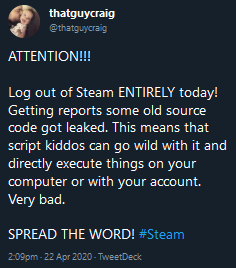
Spread the word!!
Would not want to work for Valve today...
 slim turtle
Why are the capture cards so expensive
I legit need something to capture what is on my switch
shadow sky
@undone kite no harm in doing it regardless, force updating and all that
But that's not how "leaked source code" works
undone kite
I did some research
and it’s not all of steam
it’s only Source Engine games
completely different
shadow sky
OpenTTD has their source code readily available, and there's no remote execution or anything
it’s only Source Engine games
@undone kite That also used to have source readily available
random tinsel
Hi guys
 trim fulcrum
hello
 trim fulcrum


 south aurora
hello i am having issues in hd60s its not dtecting
detecting my capture card
will you help me
shadow sky
good morning o/
 uneven lake
morning
shadow sky
My HD60S+ arrives today!
uneven lake
nice
shadow sky
it's in a hub not too long from where I live, I could just take the train for 20 min
If only they allowed that XD
uneven lake
lol
 hasty tiger
good morning! i am doing good how are you ? :)
 shadow sky
It's in the postal office
 gray vigil
Where i can adwest server?
shadow sky
I got my capture card, and I love it!
tawny orchid
If I would buy the DSLR Sony A5100 camera to stream with, what do I need to buy extra to make sure everything works?
BROOOO.... Forgot about the stream again
Wednesday stream
shadow sky
@tawny orchid something like the elgato CamLink should do
tawny orchid
@shadow sky holy crap, totally forgot about that 
shadow sky
also just a nitpicky thing, since the A5100 doesn't have a mirror, it's not a DSLR
 kind sage
 grand patrol
Hey everyone ! does any of you use FL Studio 20 ?
Because i'm looking for 2 things : Bagpipe/Celtic pipe and the same kind of "heavy" drums we hear in this song https://www.youtube.com/watch?v=eLfz9ScpVc0. But i can't find anything free because it's always too expensive.

All rights belong to Disney.
★★★ Lyrics: ★★★
Tatou o tagata folau vala'auina
Le atua o le sami tele e o mai
Ua la ava'e le lu'itau e lelei
Tapenapena
Aue, aue
Nuku i mua
Te manulele e tataki e
Aue, aue
Te fenua te malie
Nae ko hakilia kaiga e
We read the wind and the sky ...
honest tinsel
hey guys i just bought and new tripod for when i do buy the cam link 4k attaching my cameras is this a good buy/
shadow sky
neewer is reasonable yeh
abstract panther
GTX 970 4GB vs. GTX 1060 3GB - which would@be better for NVENC use with an El Gato HD60S on a streaming machine (streaming from a PS4) ?
CC: @neon hatch
neon hatch
the 10XX series is better for NVENC
abstract panther
@neon hatch thanks man. I owe you one.
Any major NVENC swings in performance between 1060 3GB vs. 6GB for streaming?
neon hatch
hrm, I don't believe so. On all of the Nvidia cards, NVENC uses a separate chip which shouldn't affect your main GPU speeds at all

Configure OBS to get the most quality out of your stream.
NvEnc is NVIDIA’s encoder. It’s a physical section of our GPUs that is dedicated to encoding only. This means that your GPU can operate normally regardless of whether you use this region to stream or record. Other encoders, such as x264, use your CPU to encode, which takes resources away from other programs such as your game. That’s why using NvEnc allows you to play games at a higher framerate and avoid stuttering, giving you and your viewers a better experience.
In the last two GPU generations we have made great improvements to NvEnc, helping deliver best-in-class output quality. NvEnc in the GTX 10-series GPUs provides superior quality than x264 Very Fast, the most commonly used x264 preset. And in the new RTX 20-series, NvEnc performs better than x264 Fast and on par with x264 Medium, a preset that requires an expensive dual PC setup.
One thing that is great about NvEnc on the RTX 20-series is that all GPUs have the same NvEnc with the same performance and quality, from the RTX 2060 to the RTX 2080 Ti.
but that last bit is only with the RTX 20XX series
NVIDIA Developer
HW accelerated encode and decode are supported on NVIDIA GeForce, Quadro, Tesla, and GRID products with Fermi, Kepler, Maxwell and Pascal generation GPUs.
abstract panther
Got it.
I think.
So, nVidia is suggesting to use OBS as the software to use. I suppose Game Capture HD from El Gato is considered substandard for streaming nowadays?
tawny orchid
yes
 odd wedge
Idk if i should get hd60 or hd60+
shadow sky
What computer you rocking @odd wedge ?
 vapid stream
odd wedge
vapid stream
odd wedge
its a lenovo ideapad l340 with a amd ryzen 3 3200U with radeon vega mobile graphics card.
@shadow sky
 hazy gulch
do many people use the live view thing to play their games from?
shadow sky
I do
odd wedge
shadow sky
@odd wedge I think the biggest difference is UVC (over whatever the HD60S uses) so better compatibility with non-Windows platforms and 4K passthrough
odd wedge
Whats werid that it doesnt say anything about wii u
odd wedge
Like will it work for them too?
odd wedge
How?!?
shadow sky
The newest iPad has USB-C which carries a HDMI signal
shadow sky
Also the older lightning model has HDMI
There's an AV adapter

Apple
The Lightning Digital AV Adapter mirrors what you see on your iPad, iPhone, or iPod so you can enjoy it on your widescreen TV or another HDMI-compatible display.
hazy gulch
hd60s or hd60 pro? i have a desktop tower so
shadow sky
I'd go for one of the PCI cards then
odd wedge
200$
odd wedge
Eh im more into the hd60s
shadow sky
How come?
shadow sky
This is a handy dandy k-base article: https://help.elgato.com/hc/en-us/articles/360034171071-Elgato-Game-Capture-HD60-S-What-are-the-differences-between-it-and-the-older-Elgato-Game-Capture-HD60-S-
Elgato
Elgato Game Capture HD60 S+ has a few differences between it, and the original Elgato Game Capture HD60 S.
Differences Between The Two Models
For Elgato Game Capture HD60 S+:
• It can reco...
odd wedge
And i dont think my laptop is 4k
shadow sky
that's not what 4k passthru means
odd wedge
I dont get it
shadow sky
The computer will receive a max 1080p60 signal
(max because you can go as low as you want)
but if the device you're capturing supports 4K, it'll go through to the telly no issue
hollow aurora
@odd wedge HD60 S will be back in stock early May
undone kite
do any of you admin bois know how many submissions there are to the review thing?
hollow aurora
We're going through them today. Some people have already been rewarded based on approved reviews, but not all the reviews have been processed yet. There will be an official email tomorrow to those who have already received their award and then another wave next week after all reviews have been processed 😊
About 60/100 (was cross shared to reddit so we did 100 total) have been awarded but there are still about 40 waiting for approval
 stiff blaze
Thanks so much your the best guys i just got a WHOLE year for free ♥️♥️
I do have a question though - will it auto renew or not after a year? 🤔😁
woven tusk
@shadow sky @odd wedge Besides PS3, it will capture essentially any of the major consoles.
odd wedge
hmmmm well i cant wait to buy your capture card in may
hazy gulch
do people who do play from live area on elgato software, do you notice the delay or not?
mostly for people who are using hd60 pro/S
 winter violet
-- Whats the best/recommended way to strip HDCP? --
@hazy gulch I'd say there's still a slight delay. It's fine for most games, but if you play competitive fighting games, FPS games, or things like Shovel Knight/Hollow Knight where timing is everything, I'd recommend using a monitor or tv that's plugged into the output.
steep kernel
^
The delay is usable for anything but the most timing-critical games. Super fast platformers, FPS games, fighting games'... you'll want to use the passthrough.
shadow sky
@woven tusk thanks for your responses!


 velvet falcon
yeah i did, how are you doin?
hybrid hare
Key Light or Air? Hmmm 🤔
civic falcon
Depends.. doing green screen or not?
hybrid hare
Eventually
civic falcon
if you plan to do a green screen the Key light is the one recommended
hybrid hare
Probably won’t for like a year or so
Do you think I should get 1 or 2 of the key lights?
civic falcon
For even lighting you will want 2. Uneven brightness can effect how the software will see your green screen. Also shadows will become a pain.
hybrid hare
Sounds good, thank you
civic falcon
np
shadow sky
@civic falcon is the air bad for chroma keying?
civic falcon
Looking at Elgato's website they do recommend the Keylight over the Keylight Air for Chroma Key. I assume it will work but its not their recommended item for it.
civic falcon
1400 lumens vs 2800
hybrid hare
Lol wym
shadow sky
2800 lumens is much brighter than the 800 in my smart bulbs
So I'm saying I'll replace my apartment lighting with Key Lights
civic falcon
lol
hybrid hare
Can link is back in stock at the end of this month right?
hybrid hare
Oops didn’t even notice my auto correct hates me
chrome tiger
Hey guys, my Elgato keeps telling me I need it connected to a 3.0 port to function properly.
I've got it connected to a USB, how come this wont solve itself lol
stiff blaze
Arrhh my android won't connect to stream deck pc
 wary schooner
hey guys quick question. i recently just purchased a rebel t7 and hooked it up to the elgato cam link 4k but im not familiar with the camera yet and dont know how to remove the white box that it displays on the screen when trying to stream with it, do you all know how to remove it?
abstract panther
I've got it connected to a USB, how come this wont solve itself lol
@chrome tiger silly question... is it a USB 3.0 port you’re using?
chrome tiger
Yeah I fixed it but I cant use the software without it lagging like absolute hell
I really should've paid attention to my friends warning that it wouldnt run properly for me
I have a 6 year old i7 machine with 4GB of ram
tawny orchid
@chrome tiger whats your gpu?
 indigo moth
So my stream deck is here! I'm a little concerned though because it looks like the seals on the package arrived broken
Other than that though looks like everything is undamaged and in the box
fresh fern
Be sure to inspect it e bit extra with more attention to detail.
Someone clearly opened that box.
indigo moth
Doesn't look like anythings missing, and nothing looks scuffed up luckily
Definitely gonna keep an eye out though... All that's included is the deck + stand + manual+ USB C cable, right?
 desert iron
aah ooh someone wanted that
indigo moth
Wanted it but then didn't I guess 😂
hollow aurora
@indigo moth where did you purchase from?
indigo moth
@hollow aurora Amazon
Everything looks untouched for the most part, even the layer of thin cloth was still sealed
hollow aurora
New from Corsair on Amazon?
indigo moth
Should be new, yes I'll double check though
hollow aurora
Let me know, I'll share with our team so theyre aware 🙂
hollow aurora
Shared this with the team, let me know if you experience any issues with it.
indigo moth
@hollow aurora So considering the return. Isn't until May 31st I think that means it's new as they usually they don't honor a return window that long for used products, right?
It was on sale for like $200, and I even double checked to make sure I wasn't buying used, used was listed for $202 haha.
So per my knowledge I bought it new... Is there any way to check the warranty on the elgato website?
Thank you so much for your help :)
Sorry for all the pings!
hollow aurora
I believe that's an Amazon agreement - you're welcome to reach out to support via http://e.lga.to/help or http://e.lga.to/phone
Elgato
Below are the telephone numbers for Elgato Support:
United States☎ 1-888-726-8134
Toll FreeMonday-Sunday – 8:00 AM to 8:00 PM PST (Pacific Standard Time, United States)United Kingdom☎ 0330 808 44 9...
indigo moth
Thank you, I appreciate the attentiveness a lot! I'll be sure to reach out at some point either today or tomorrow. 😃
 harsh bison
You can even send back to Amazon when it's a year old or something, they don't care
You just need to chat with the support then
But when you're in the timeframe you can always send it back
no matter what
indigo moth
Yeah, I think as long as everything is working I don't mind keeping up, but I definitely want to chat with support and make sure everything's up to par and what not
 sweet crown
how long will it take for us to receive our stream deck mobile for leaving a review?
 wise garnet
Hello everyone 🙂
I have a question regarding my 4k60 pro deciding to stop detecting audio on my two PC setup. Has anyone else run into a similar issue recently with the 4k capture utility? It still records video perfectly, but it seemingly randomly decided to stop tracking audio and I've tried everything I can think of to fix it at this point.
tawny orchid
hello guys, i wanna know if is theres any problem by using standard speed hdmi cables with the HD60S+?
tawny orchid
@stiff eagle Can I please appeal a ban?
stiff eagle
Please do not tag me.
And please do not discuss what has happened on other servers.
If there was a ban, the ban is firm by the other server.
tawny orchid
lol