#camera-prompter
1 messages · Page 2 of 1
 wide flint
 raven basin
fair enough! good to know
wide flint
Personally recommend Nvidia broadcast as it works really well for background removal.
 native jackal
raven basin
fair enough! good to know
native jackal
raven basin
fair enough! good to know

In this video we cover the 3 methods you can use to achieve background blur on your webcam or camera for live streaming, video chats, and more.
▶ How to connect DSLR/Mirrorless cameras to your computer to use as a webcam: https://www.elgato.com/us/en/p/cam-link-4k
▶ Nvidia Broadcast App: https://www.nvidia.com/en-us/geforce/broadcasting/broadc...
funny I thought you could just set it in camera hub and let er rip in obs, I'm sorry again
ugh, thats just as annoying as the nvidia noise remove ngl...
why even have a save button if you cant save the blur to your cam 
 wide flint
native jackal
why even have a save button if you cant save the blur to your cam <:KEKW:7384813...
wide flint
native jackal
why even have a save button if you cant save the blur to your cam <:KEKW:7384813...
Input is the raw camera. It then outputs it to the virtual cam.
Like how Wave link works.
You can use the Wave device but if you want the VSTs applied you need to use the stream mix or micFX output.
wide flint
 I didn't make it!
 full hawk
hi i have a question. i have an elgato facecam which i wish to mount on the otherside of my room. to do this i need a longer cable than the one which comes with the device. from what i understand any USB A to USB C 3.0/3.1/3.2 cable will work. is this true?
native jackal
full hawk
hi i have a question. i have an elgato facecam which i wish to mount on the othe...
I don’t have facecam but I believe it’s a usb c to usb a (3.0 or better) cable. Community recommends cables no greater than 10’.
full hawk
thank you
 drowsy parrot
Anyone know how to fix a Cam Link Pro that makes my camera freeze every 30 seconds to a minute? I’ve not seen much about that only the Cam Link 4K. Actually happens on anything hooked up to it
 narrow elk
drowsy parrot
Anyone know how to fix a Cam Link Pro that makes my camera freeze every 30 seco...
narrow elk
drowsy parrot
Anyone know how to fix a Cam Link Pro that makes my camera freeze every 30 seco...
How many inputs do you have? What software is it freezing in?
 coarse wharf
Why cam link pro only runs at 1080p 30fps in windows app "camera" and at 1080p 60 in obs
Is there any way I can reconfigure it?
😉
And google chrome also only 30
coarse wharf
Ok so I have a problem that my cam link pro loses fps for 1 second from 60 to 40
Probably for this reason I will have to cam link to return to the merchant
And I will have to go back to cam link 4K (usb) and buy a second cam link for 4k usb because of the second camera
Here my problerm
problem
stuttering
native jackal
@coarse wharf is this how you’re setup?
https://www.youtube.com/watch?v=7JwxHIBmUuM&pp=ygUdZWxnYXRvIGNhbSBsaW5rIHBybyBvYnMgc2V0dXA%3D

In this video, learn how to set up Cam Link Pro in OBS Studio.
▼ Click "Show More" for details and features.
► Learn more: http://e.lga.to/camlinkpro
▼ Cam Link Pro Highlights:
► PCIe capture card with 4 HDMI inputs
► Capture DSLRs, computers, laptops, tablets, etc.
► Stream live or record in 1080p60 or 4K30 quality
► Control video feeds sep...

These requirements met or exceeded?
coarse wharf
Yes
I have a ryzen 9 5950x
Rtx 3090
Msi x570s tomahawk max wifi
2 SSD m.2

These problems do not happen on the usb card
 native jackal
So is it setup in obs the way the video explains? I don’t have a cam link pro but maybe it’s got something to do with the way it’s setup in obs. Okay good to know but theoretically this is the better version of the cam link (usb) so that’s interesting
coarse wharf
I have it set up the same way
native jackal
Hmm okay, I might try giving Elgato a call then and seeing if they can help you diagnose what’s going on better then as I know you’ve been struggling to find some help here.
coarse wharf
Okay
native jackal
#official-tech-support has the information for contacting them directly.
native jackal
Yeah I understand that 100% but hopefully someone can help you determine what’s going on. May just be a defective unit too hard to tell honestly.
 undone jacinth
Question. I have the 1080p60 Elgato. When i connect to OBS and have all camer settings to auto, the color of my skin is really red. Nothing around me is causing reflection; its the camera/settings. It is clear looking at the screen on OBS but not watching back a recording. What would fix this?
 native jackal
undone jacinth
Question. I have the 1080p60 Elgato. When i connect to OBS and have all camer se...
native jackal
undone jacinth
Question. I have the 1080p60 Elgato. When i connect to OBS and have all camer se...
what type of camera are you using and how is it configured in obs?
 eternal dome
Sup y'all ✌🏿
Would anyone know why my OBS can't see EpocCam Pro as a source?
It use to work fine before the Pro update, but now i can't see it. Help 😅
 narrow elk
eternal dome
Sup y'all ✌🏿
Would anyone know why my OBS can't see EpocCam Pro as a source?
...
narrow elk
eternal dome
Sup y'all ✌🏿
Would anyone know why my OBS can't see EpocCam Pro as a source?
...
Can you use it in Camera Hub, or no signal there either?
eternal dome
narrow elk
Can you use it in Camera Hub, or no signal there either?
thx for your reply! I can use it in the Camera Hub
 devout wind
i use my camera on like omegal is suck at 720p (elgato face cam)
narrow elk
eternal dome
thx for your reply! I can use it in the Camera Hub
Hm, you may have to reinstall OBS or make sure its up to date
undone jacinth
native jackal
what type of camera are you using and how is it configured in obs?
its the 1080p60, auto everyting pretty much
narrow elk
devout wind
i use my camera on like omegal is suck at 720p (elgato face cam)
Are you able to get higher resolutions in other software?
 cinder moon
hi guys im having issues capturing my camera with the camlink, any help?
Its not showing, i dont know why
 native jackal
is the source currently being used somewhere else, obs, or game capture, 4k capture utility?
cinder moon
well searching i figure that you have to hold CTRL and click on the settings in the app so it allows you to download the driver
cinder moon
native jackal
is the source currently being used somewhere else, obs, or game capture, 4k capt...
it seems it was that about the driver for the CamLink4K, when downloaded it worked just fine
But thanks still
native jackal
Awesome, glad you got it sorted!
cinder moon

devout wind
narrow elk
Are you able to get higher resolutions in other software?
Yeah
devout wind
narrow elk
Are you able to get higher resolutions in other software?
The face cam goes up to 1080 trying to use it buts it like super pixelated
 heady forge
Hands down the Face Cam Pro is the best webcam
native jackal
heady forge
Hands down the Face Cam Pro is the best webcam

 kind turret
I'm using the Elgato Webcam, non stop freezing. I bought a second one and same issue. My Mac software is updated, my Camera Hub updated and non stop freezing, is this something i'll have to deal with? 2 minutes and freezes right away
With the FaceCam, I can still change things with the settings but the video constantly freezes. This is now on two different facecam
native jackal
Hmmm tell us more about your setup is the usb plugged directly into a 3.0 port (or higher) on your motherboard @kind turret
kind turret
native jackal
Hmmm tell us more about your setup is the usb plugged directly into a 3.0 port (...
It's plugged directly into the Mac mini (2023 model)
native jackal
These all met? Not sure what mac you have

It’s my understanding the m2 chip macs have some limitations with regard to Elgato hardware/software
kind turret
Awesome so more money wasted and makes sense now sadly. I'd use my Razer but auto focus is jacked up and no software to control it manually. Thank you for finding that
native jackal
Yeah no problem sorry if it isn’t compatible with your system tho!
kind turret
No I rather know it's not me than something I'm doing so I appreciate it and I just sent for delivery for Walmart to bring a Logitech cam. Fights on tonight can't leave house lol
 dim venture
kind turret
It's plugged directly into the Mac mini (2023 model)
dim venture
kind turret
It's plugged directly into the Mac mini (2023 model)
I'm using Facecam with Mac Studio M1 max works well, I did have to make sure the firmware was up to date on the cam , I used the cables that came with it, in the correct ports with no hub and the camera hub software was installed. M series chips require the latest camera firmware out of the box my had issues until I updated it.
kind turret
dim venture
I'm using Facecam with Mac Studio M1 max works well, I did have to make sure the...
tried all that, ended up returning. No amount of troubleshooting would fix it. Also, it wasn't just 1 it was 2.
dim venture
kind turret
tried all that, ended up returning. No amount of troubleshooting would fix it. A...
Thats is strange, it is a good webcam. Maybe a bad batch. Its bad with very low light, key lights do sort that. The pro version on paper is better with the light issues obviously more money
kind turret
dim venture
I'm using Facecam with Mac Studio M1 max works well, I did have to make sure the...
That's even weirder, 1 was from Best Buy, other was from Amazon, lol.
 unreal pivot
yay i got a facecam finally! Booo before i could set it up the cable grew legs and disappeared. Where can i get a replacement?
wide flint
unreal pivot
yay i got a facecam finally! Booo before i could set it up the cable grew legs a...
 unreal pivot
wide flint
https://www.elgato.com/us/en/s/spare-parts
unreal pivot
wide flint
https://www.elgato.com/us/en/s/spare-parts
thank you
 lyric tree
Hey guys... I have an elgato Facecam and Im using it in OBS but it keeps powering off. I got rid of a bunch of sources, even ordered a new cord, but it is still powering off and freezing. Any ideas on how to fix? Thanks in advance.
native jackal
is it plugged into a usb hub?
Would recommend plugging it into your motherboard usb 3.0 (or higher) port.
 lyric tree
native jackal
Would recommend plugging it into your motherboard usb 3.0 (or higher) port.
lyric tree
native jackal
Would recommend plugging it into your motherboard usb 3.0 (or higher) port.
yes it's plugged into a 3.0... it works fine the camera hub, but when i close out and open OBS it just freezes up.
native jackal
Can you show how your source is added in obs? Also maybe your pc specs?
 scenic fiber
Are you using the virtual cam by any chance @lyric tree
 autumn plank
Hey guys 🙂 I am using a camlink with a sony cam for streaming with OBS and
I have an issue when I turn on my PC and open OBS , my cam does not work , I have to unplug and plug back again my camlink for it to work.
-
So far I have checked if the camlink is in the same ubs root of other conflicting devices and switched the ports
-
I have turned off every other softwares using my cam
-
I have the same cam in my scenes
I do not know what is going on if you guys have an idea
 strange stratus
I will need some info please when I plug in my elgato it tells me the camera is disabled and additionally it needs to be plugged into a USB 3.0 port. yet I connect them correctly. I have pictures if you want to understand better. Help me please.
scenic fiber
autumn plank
Hey guys 🙂 I am using a camlink with a sony cam for streaming with OBS and
I h...
What cam are you using?
scenic fiber
strange stratus
I will need some info please when I plug in my elgato it tells me the camera is ...
Device:
Software & Version:
Windows/Mac Version:
Mobile App/Device:
Question/Issue:
scenic fiber
autumn plank
Hey guys 🙂 I am using a camlink with a sony cam for streaming with OBS and
I h...
Device:
Software & Version:
Windows/Mac Version:
Mobile App/Device:
Question/Issue:
strange stratus
scenic fiber
**Device**:
**Software & Version**:
**Windows/Mac Version**:
**Mobile App/Devic...
elgato hd60s
pc gamer
windows 11
my problem is the following I think my usb3.0 cable bugs a lot because the elgato app asks me to connect my equipment when it is already connected.
 amber estuary
Hey I’m trying to purchase the webcam pro I get it in my cart, I put all my information in and it’ll say processing payment but it’ll just bring me back to payment option page…. So I was wondering are you got out of stock?
autumn plank
scenic fiber
What cam are you using?
I am using a sony ZVE10
autumn plank
scenic fiber
**Device**:
**Software & Version**:
**Windows/Mac Version**:
**Mobile App/Devic...
Cam link
used on OBS
Windows 11
PC
I have an issue when I turn on my PC and open OBS , my cam does not work , I have to unplug and plug back again my camlink for it to work. ( details are just above 🙂 )
 hearty hull
I have the feeling that the Facecam Pro has a bit of delay even on MJPEG (4k60) or am i the only one?
scenic fiber
autumn plank
I am using a sony ZVE10
The ZVE10 doesn'tseem to be on the list of compatible cameras, do you use a dummy battery?
That being said, I see some reddit posts that do have the camera listed as compatible.
Maybe you can reach out to #official-tech-support and submit a ticket
scenic fiber
strange stratus
elgato hd60s
pc gamer
windows 11
my problem is the following I think my usb3.0 c...
are you using your hd60s to get your camera to work? or help me out real quick, how does your cam set up work.
scenic fiber
(mind you I dont use camlink myself, so I'm not SUPER knowledgeable
strange stratus
scenic fiber
are you using your hd60s to get your camera to work? or help me out real quick, ...
basic I use it to put the screen of the game that I play on my capture software
scenic fiber
strange stratus
because my concern and just that it gives me a black screen and tells me that my élgato is not plugged into usb3.0 when I know
 brave valve
hello why there is no webcam elgato how can you fix it or something needs to be changed to make it here


 solar crater
Hello everyone, I have the problem when I set the virtual camere with the greenscreen in obs and start a game hangs the camera. Can anyone tell me if there is a solution for this?
native jackal
honestly, best solution is dont use virtual camera, but I know that may not be suitable option for many. Do you have a physical green screen or youre using the nvidia filter and then bringing that all into obs?
solar crater
I think I have found the problem. The GPU load is very high due to the virtual camera, which may be causing the problems. I have solved it differently now.
native jackal
Yup, thats very typical of virtual camera unfortunately.
autumn plank
Hey guys, I hope you are doing well, I still have the same issue with my camlink and OBS.
When I open my OBS, my cam does not show ( black screen) I have to unplug and plug back my camlink and then it works. Would you guys have an idea why ?
I have checked the UBS root to make sure the camlink link is separated from other devices , my OBS is updated , my cam is the same for every scenes
I have already posted this on the OBS forum but we did not find a fix
native jackal
Only time my cam doesnt appear in obs is when its in use elsewhere, so I'd check to see what else is running at the time of starting up OBS
autumn plank
native jackal
Only time my cam doesnt appear in obs is when its in use elsewhere, so I'd check...
I did and OBS is the only soft using my cam
autumn plank
native jackal
Only time my cam doesnt appear in obs is when its in use elsewhere, so I'd check...
 native jackal
your camlink plugged into a USB 3.0 port directly connected to the motherboard (not via hub)?
autumn plank
native jackal
your camlink plugged into a USB 3.0 port directly connected to the motherboard (...
yes directly to the motherboard on a 3.0
autumn plank
native jackal
your camlink plugged into a USB 3.0 port directly connected to the motherboard (...
And it works, but only when I unplug it and plug it back
native jackal
autumn plank
And it works, but only when I unplug it and plug it back
ensure usb selective suspend is disabled: https://streamdecklabs.com/🧯-how-to-disable-windows-10-11s-usb-selective-suspend-setting/

Once you complete these steps, Windows will no longer power off USB devices connected to your computer, which will fix any problem are experiencing as a result of this Windows feature. Windows 10+ includes the USB selective suspend feature that lets you automatically put USB devices in a very low-power state when they’re not actively… Continue r...
autumn plank
native jackal
ensure usb selective suspend is disabled: https://streamdecklabs.com/%f0%9f%a7%a...
Okay just did it still does not work
native jackal
did you restart once applying that setting?
autumn plank
native jackal
did you restart once applying that setting?
Nope I will do this right away
autumn plank
native jackal
did you restart once applying that setting?
Okey done still does not work unfortunately
native jackal
Is it displaying anything when opened using 4k Utility?
autumn plank
native jackal
Is it displaying anything when opened using 4k Utility?
I do not see my camlink in 4k utility apparently the soft does not support the camlink anymore
but I have something new
native jackal
oh ok, which camera do you have hooked up to it?
autumn plank
if I turn on my cam before turning on my PC , and then I open OBS it works
that is weird
autumn plank
native jackal
oh ok, which camera do you have hooked up to it?
I use a sony ZVE10 , and it worked like a charm until now xD
native jackal
yea that is a bit backwards but a good work around, did something change? 
autumn plank
native jackal
yea that is a bit backwards but a good work around, did something change? <:p9kT...
nothing actually it's really weird
If my cam is turned off when I turn on my PC, and when I turn it on before launching OBS
it does not work
hum
that is really strange
What is even more strange is that if I close OBS, and turn my cam off, when I turn it on again with OBS it works
I do not understand anything at all
native jackal
i dont blame you
autumn plank
native jackal
i dont blame you
Well thank you for trying to help me 🥹
 deep cedar
Does anybody know why my facecam pro changes by itself back to 1080p in Camera Hub?
Might it be related to the stutterring I'm seeing in OBS? 🤔
native jackal
deep cedar
Does anybody know why my facecam pro changes by itself back to 1080p in Camera H...
are you saving once you setup in camera hub?

what firmware are you using?
deep cedar
Hadn't explicitly saved, but hadn't even closed camera hub either
Latest firmware
I'mma try to explicitly save
When changing the resolution in Camera Hub the "Save" button doesn't change
native jackal
hmmm okay, I just realized I'm on 1.6 of the camera hub app, gonna check out 1.7 and see if it holds my 2160p60 setting.
deep cedar
I'm wondering if it is related to OBS in any way though because it stays 4k while I tinker in Camera Hub
native jackal
okay updated, youre referring to this preview format correct:
 deep cedar
Yep
native jackal
is your camera set to 1080p in obs?
I think mine is set to max res... so if thats the case that may be the reason but unsure
native jackal
oooo okay, maybe switch it up to custom and max it out, its gonna move all your camera boxes though :(
or settle and just adjust it anytime you go into camera hub manually.
I do believe 1080p is likely the device default though, oddly enough
 wooden wind
I run a CamLink 4K on my Streaming PC to capture the video from an DP output in my Gaming PC and I duplicate my Gaming Monitor Screen to the CamLink 4K. It works fine as long as I'm not gaming. As soon as the game starts I get really weird artifacts and like 30hz on the Gaming Monitor, but if I unplug the CamLink 4K it stop immediately. Anybody know what could be the issue?
deep cedar
native jackal
or settle and just adjust it anytime you go into camera hub manually.
Yeah, I can do that np
native jackal
I mean as long as your cam is lookin crispy in OBS thats all that matters in the end right 
deep cedar
Working on that cause it's a stutterfest in OBS
native jackal
are you using virtual camera?
deep cedar
I thought "alright, teams, it doesn't quite support 4k60 video AFAIK", but OBS is... interesting
mhm
native jackal
thats your problem, virtual cam is sucking the life out of your pc by way of resources
I'm not sure why its so terrible either, its weird.
deep cedar
.____. I don't wanna use windows' crappy camera controls
native jackal
updating camera hub killed my frame presets buttons in stream deck for a hot minute just now too lol
deep cedar
ouch
native jackal
are you sporting an nvidia card 20 series or greater? you could give nvidia broadcast a shot, I've read thats a bit easier on peoples systems...
deep cedar
4080 but I think you're right, camera hub is the reason for stutter
Shame because I quite like Camera hub's image controls
native jackal
yeah, if I'm just bringing in my facecam pro to obs as the source its great, any other method seems to cause chaos
deep cedar
obs is the easy one cause it's got the filters & whatnot
teams, however - eh
native jackal
oh yeah, with teams or zoom set your expectations cause you aint getting what you put into it LUL
deep cedar
with nvidia broadcast at least it consumes 4k60 without stuttering though
native jackal
That being said @deep cedar I just adjusted the settings on my facecam pro, saved, closed camera hub, opened OBS and the setting is set when just using the facecam pro as the source:

(intentionally making it look like crap )
so I think its just a matter of filters/effects not being accessible in obs
deep cedar
native jackal
That being said <@446367006787239960> I just adjusted the settings on my facecam...
Cool
It seemed that way to me, but I couldn't be sure
 minor oriole
Does someone has tutorial to get the best image quality from combo Ringlight+ Facecam(not Pro)?
scenic fiber
minor oriole
Does someone has tutorial to get the best image quality from combo Ringlight+ Fa...
Low ISO double shutter speed of your frames
I use 0 contrast, and around 40/50 saturation
minor oriole
scenic fiber
I use 0 contrast, and around 40/50 saturation
what about white balance and sharpness?
scenic fiber
White balance is up to you, what I do to WB my cam is to hold up a piece of white paper and grade it correctly so that the white is the same, sharpness I'd like to go +2/+3
 tough forum
Hi guys, just want to report, im using EppocCam with 13 Pro Max USB Cable Connection and the image is flickering in Streamlabs
My Elgato Camera Hub version is 1.7, however this issue doesn't occur with older version 1.6.0, but the image connection is not stable, for unknown reason after 20-30 minutes ongoing
 worldly ether
While playing certain games, I've noticed that my Elgato Facecam experiences periodic freezing for several seconds when I'm tabbed into the game. This freezing pattern repeats, with the camera working for a brief moment and then freezing again. Interestingly, this issue doesn't occur when I tab out of the game; the Facecam operates smoothly then. I'm currently playing Red Dead Redemption 2, and it's worth noting that I didn't encounter this problem with my previous webcam.
I'm wondering if there's a solution to this. It's worth mentioning that when I'm tabbed out of the game (even if the game continues to run in the background at full capacity), the Facecam functions properly.
I've already attempted the following troubleshooting steps:
Switching between USB modes (bulk vs. isochronous).
Changing the USB port at the back.
Uninstalling and reinstalling the Facecam software.
Launching the software as an administrator.
Ensuring that USB settings are configured to prevent sleep in the power plan.
Confirming that the Facecam is running the latest firmware.
System Information:
CPU: i7 13700k
GPU: RTX 3090
Is there any advice or further steps I could take to address this issue?
wide flint
worldly ether
While playing certain games, I've noticed that my Elgato Facecam experiences per...
Question 1: Are you using the Virtual cam?
If so the answer is to stop using virtual cam.
worldly ether
wide flint
Question 1: Are you using the Virtual cam?
If so the answer is to stop using vi...
I dont think I am. I am looking at the camera through the Elgato Camera hub.
tough forum
i got same issue
worldly ether
It doenst seems to affect all game. Im playing now FF14 and i don't have the issue in this game.
 plush stratus
Hello, could someone help me plz? I've been having this problem with my Camlink 4k where after some time i get this "hue-shift" / "black/white" thingy (picture below) Does anyone know how to fix this?
Extra Info:
- The Camlink is new
- The Camera is a ZV-E10 running at 4k30fps
- The Camlink is plugged in an USB 3 port
(edit) - It also keeps flashing a green screen
- As far as I know it only happens on Ome.tv Update: It happens everywhere
(edit 2) - I tried using the Bulk and Isochronous mode in the Camera Hub -> didn't work
(edit 3)
I just found out this can be triggered when switching my input device from "2- Cam Link 4k" to "Yeti Classic"
 scenic fiber
tough forum
Hi guys, just want to report, im using EppocCam with 13 Pro Max USB Cable Connec...
scenic fiber
tough forum
Hi guys, just want to report, im using EppocCam with 13 Pro Max USB Cable Connec...
Do you have any LED light sources in the room?
 signal gust
I have the Elgato Facecam and I'm trying to use the Camera Hub and it keeps stopping on the "Initializing Video Engine" screen. I'm running Camera Hub 1.7.0.1124
scenic fiber
signal gust
I have the Elgato Facecam and I'm trying to use the Camera Hub and it keeps stop...
Replug and restart computer fixes it for me
signal gust
scenic fiber
Replug and restart computer fixes it for me
That doesn't really help. Also, this occurred after a restart.
 dense lake
Do I need a headset and a separate mic for an elgato?
scenic fiber
signal gust
That doesn't really help. Also, this occurred after a restart.
I usually boot up my pc, if this happens those are the steps it takes to solve them on my side. Sorry I couldn’t be more helpful
scenic fiber
dense lake
Do I need a headset and a separate mic for an elgato?
What do you mean?
To use a elgato cam?
dense lake
scenic fiber
To use a elgato cam?
native jackal
signal gust
That doesn't really help. Also, this occurred after a restart.
Is it reoccurring after every restart. Was it working before and just started happening? That looks like the most recent version of camera hub but just want to make sure you’ve got the latest software and firmware installed
I would definitely ensure your connections are solid as MVRIK mentioned (unplug and plug back in) also make sure your plugged in at the motherboard and not a usb hub. Restart and see if the problem persists.
scenic fiber
dense lake
Do I need a headset and a separate mic for an elgato?
Do you have an integrated headset mic? Or not?
dense lake
scenic fiber
Do you have an integrated headset mic? Or not?
I’m using this headset
 scenic fiber
And are you using a chat link?
 stray blaze
anyone have a sony a6000 and have to manually select movie mode with the button on the back everytime they want to capture from it?
 jovial shale
Curious to see if anyone might be able to give me some guidance on why my camera might be freezing while streaming using OBS. This was my first time giving the facecam a try during stream and it would continuously freeze after a few minutes. I'm not sure if it's also because I have a CamLink 4k running at the same time but that does not freeze up at any time and was running fine for last nights stream and has been running fine for a few years now. I'm also not sure if it matters, but the camera is facing down and being used as a hand camera.
Device: Facecam
Software & Version: Camera Hub software v. 1.7.0.1124 (says up to date when checking). Camera firmware v. 4.09. OBS v. 29.1.3
Windows/Mac Version: Windows 11 Pro v. 22H2
Connected via USB-C cable & also using a USB 3.0 extension to motherboard USB 3.2 Gen 2 port
 celest summit
jovial shale
Curious to see if anyone might be able to give me some guidance on why my camera...
celest summit
jovial shale
Curious to see if anyone might be able to give me some guidance on why my camera...
Did you check https://www.youtube.com/watch?v=b5tsgnP9jqg ?

Elgato Facecam Freezing? (Do This NOW To Fix It)
My YouTube Studio Setup (affiliate links) 👇
📹 Elgato Facecam: ➡️➡️➡️ https://geni.us/elgatofacecam1
🎙️ Blue Yeti Blackout: ➡️➡️➡️ https://geni.us/blueyeti1
🎤 Gator Frameworks Mic Boom Arm: ➡️➡️➡️ https://geni.us/gatorboomstand
💡 GVM 100W Bi-Color LED Light: ➡️➡️➡️ https://geni.us/gvmlighting
💡 El...
native jackal
I'm curious what that does exactly and why its so well hidden 
narrow elk
native jackal
I'm curious what that does exactly and why its so well hidden <:larrs5WHUT:74141...
We have an article that goes over it more: https://help.elgato.com/hc/en-us/articles/4681224843917-Elgato-Facecam-How-To-Change-USB-Transfer-Mode

Elgato
This guide goes over how to change Elgato Facecam or Facecam Pro USB transfer mode between Bulk and Isochronous.
USB 3.0 includes two different types of transferring data, known as USB transfer m...
native jackal
awesome, thank you!
jovial shale
Thanks for the links to this. I'll update the settings and see how things go tonight!
scenic fiber
jovial shale
Curious to see if anyone might be able to give me some guidance on why my camera...
Do you have several usb devices fighting for bandwidth, and are you running virtual cam in OBS?
jovial shale
scenic fiber
Do you have several usb devices fighting for bandwidth, and are you running virt...
For the camera, it was using the elgato facecam and not the virtual camera. It's only use is for a handcam so no fancy effects are needed. As for bandwidth, including the mouse & keyboard, there's only 6 devices plugged in so nothing should be fighting for bandwidth to run properly.
jovial shale
Looks like changing the setting over to bulk did the trick. Went 5.5 hrs tonight with 0 freeze
 cobalt wave
Stuck here since half an hour  Pluged in facecam pro for first time

 vale swift
hey i'm struggling with camera hub
i'm using the epoc cam app on an iphone
and i cannot choose what type of connection i want
(my wifi isn't good on my phone and i'm looking to connect via USB (3.0 plugged on motherboard)
so how do i connect using usb plz
undone jacinth
I'm running the Elgato 1080p60 camera and when i go back to watch videos that I've recorded using OBS my picture quality is crap and the colors look terrible. I have everything set to highest quality from what i can see. What could I be missing to maker it look better in my recordings?
 minor oriole
Are you planning adding Face Filters to Facecams? Or it is limited to the Epocam only?
scenic fiber
undone jacinth
I'm running the Elgato 1080p60 camera and when i go back to watch videos that I'...
You might have your recording settings messed up.

What kind of encoder settings are you running?
hearty hull
Any reason why my Facecam Pro has a delay when it runs in 4k?
I am using USB C to USB C and my controller isnt overloaded at all.
native jackal
"controller"? using a usb hub? Or you running your camera directly from obs or through virtual camera?
hearty hull
Also is there a way to change the transfer mode on the pro? cant seem to find it...
hearty hull
native jackal
"controller"? <:larrs5WHUT:741417750949265429> using a usb hub? Or you running ...
directly into my mainboard
:)
native jackal
ok good 
Yes you should be able to follow that video to change the transfer mode, I was able to
hearty hull
Well it isnt a option for me
native jackal
native jackal
updated firmware and software?
hearty hull
Yes :)!
native jackal
mac or win?
 hearty hull
 native jackal
?
 hearty hull
Maybe EU Version who knows :D
native jackal
Thats the software version I'm running, I only ask because maybe an update breaks it...
hearty hull
But there is no update button for me only when i was setting it up
native jackal
I'm not certain theres a difference between US/EU software versions... but maybe
hearty hull
So do you have any more suggestions for me to try :)?
Like i never had issues with the camlink pro so far only the facecam pro
:(
native jackal
hearty hull
So do you have any more suggestions for me to try :)?
I mean if its not appearing and nothing on this site works: https://help.elgato.com/hc/en-us/articles/4681224843917-Elgato-Facecam-How-To-Change-USB-Transfer-Mode you may need to conisder an official ticket regarding changing the transfer mode. As for your cam lagging a little more information how your set up may help
Elgato
This guide goes over how to change Elgato Facecam or Facecam Pro USB transfer mode between Bulk and Isochronous.
USB 3.0 includes two different types of transferring data, known as USB transfer m...
are you using both?
native jackal
I wonder if you unplug the camlink pro if that transfer input button would appear... maybe its preventing it from showing up
native jackal
oh sorry, not the usb camlink 
native jackal
how bizarre, definitely an official ticket for that then, unless youre in the mood to try a reinstall but not sure thats necessary.
hearty hull
We will see thanks alot for your input :D!
@native jackal ah i got it btw
But both modes seem to have the delay tbh

i tried both
Bulk should be for Windows ikik but idk xd
native jackal
I'd set it to bulk per elgato's rec and restart.
native jackal
your pc
hearty hull
Ok i will give it a shoot later on, thanks alot!
hearty hull
native jackal
your pc
Remember me?
Thanks alot for all the help btw, seems like it improved!
Just a small delay left (like 0.2-0.5ish) but thats better then before :D!
Kudos to you kind sir!
native jackal
Very happy to hear it! @hearty hull
hearty hull
native jackal
Very happy to hear it! <@238234522318012416>
A small update on this btw, when i dont stream it seems fine, as soon as i start streaming its back on delaying again :(.
Any idea :D?
native jackal
using OBS? are you bringing the camera in as a virtual camera or just as the source itself?
hearty hull
native jackal
using OBS? are you bringing the camera in as a virtual camera or just as the sou...
OBS, yes correct. And i use it as source.
native jackal
What are you properties settings on the source? can you post a screenshot?
hearty hull
native jackal
What are you properties settings on the source? can you post a screenshot?
Sure, moment please.
i am currently in a game after that round i will post it ASAP!
sorry :D

There you go!, sorry that it took a moment :D.
hearty hull
@native jackal so what do you think :D?
hearty hull
Already followed this btw https://help.elgato.com/hc/en-us/articles/4407763187597-Elgato-Facecam-OBS-Studio-Video-Desync
Elgato
This guide will cover how to resolve audio and video desync when using Facecam in OBS Studio.
Set Facecam to 60 Frames Per Second
If Facecam is set to output 30 frame per second (fps) video,...
native jackal
seems like thats all in good shape, maybe try turning off hardware decoding, I dont have that enabled on mine.
hearty hull
native jackal
seems like thats all in good shape, maybe try turning off hardware decoding, I d...
I hate to admit it... it helped!
You are like a savior holy...
native jackal
haha no worries!
 dense dagger
Hey, anyone know why my Shutter Speed keeps resetting? I put it on 1/32s and it goes back to 1/60s after just a second
native jackal
set your preview format to 30 fps first and it'll stick @dense dagger

if youre previewing at 60 fps its gonna kick the shutter speed back up
dense dagger
To better the image quality
its like flickering
also any reason why I cant turn on Processing?
native jackal
are you set to 50 or 60hz ?

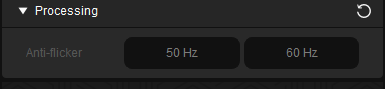

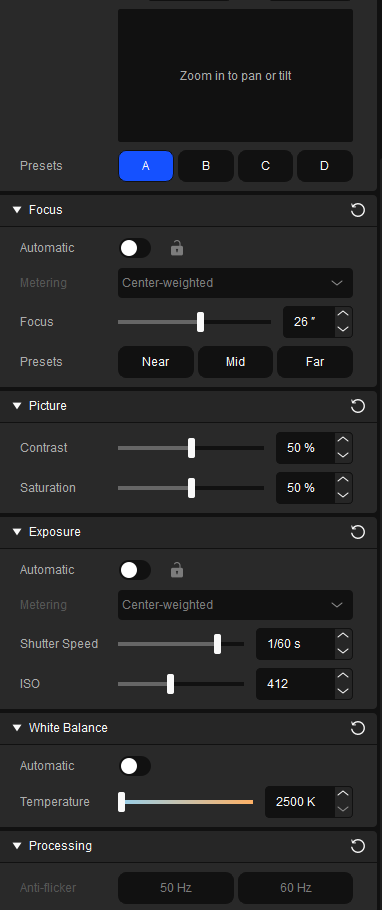 native jackal
hmmmmmmmmmmmmmmmmmmmmmm
maybe its because its not set to auto then
yup the exposure setting
dense dagger
Oh I see
native jackal
if you set that to auto you'll get the processing back, sorry!

thats how mine is currently setup, lighting will vary
dense dagger
Whats the best processing?
 native jackal
oh interesting, are you EU?
dense dagger
Yes
native jackal
ah thats why
dense dagger
hmmm
native jackal
sorry, Im US
for whatever reason its different, just like everything else I suppose
 My image still looks really grainy/noisy. I feel like its not getting the 4K
native jackal
My image still looks really grainy/noisy. I feel like its not getting the 4K
native jackal
grainy noisy where? in OBS or camerahub?
native jackal
could be a number of factors between light, settings, camera placement, your eyes lols... if youre preview format is set to 2160p60 though you're looking at the best picture quality it'll give and you can tweak from there as you see fit.
I can tell you compared to the old logi stream cam I had this one has much more clarity
dense dagger
I see
Ill have to upgrade my lights  I only got one roof lamp rn that is very yellow
native jackal
ah, yup, that may be the culprit, hard to say from this side of it all!
hearty hull
dense dagger
Hey, anyone know why my Shutter Speed keeps resetting? I put it on 1/32s and it ...
Had the same issue before, had to replug my camera. After that it didnt bugged out.
I think Six should be paid for this work here xD
jovial shale
Coming back to this, I've noticed that my facecam has frozen a few times over the past few streams, what OBS settings do people use? I'm thinking that it's something with what I have set up through OBS. Any suggestions if there's something I should change?
 scenic fiber
Are you using any hubs
jovial shale
Nope it's connected direct to my PC
 true stone
hey all why dose my facecam always look like this no matter what setting i use even with lights on full power its always fussy/pixelated/grainy
 scenic fiber
true stone
hey all why dose my facecam always look like this no matter what setting i use e...
scenic fiber
true stone
hey all why dose my facecam always look like this no matter what setting i use e...
What’s your ISO values at?
scenic fiber
jovial shale
Nope it's connected direct to my PC
Have you tried changing the transfer mode
jovial shale
scenic fiber
Have you tried changing the transfer mode
Yeah I updated the transfer mode that was linked earlier over to bulk
scenic fiber
Otherwise it might be worth checking out the support ticket
I always run my Facecam through Nvidia broadcast, you could explore that path too
scenic fiber
true stone
hey all why dose my facecam always look like this no matter what setting i use e...
And what color is the light on the cam
jovial shale
ISO I leave set to 100 since I have it pointing towards an ipad as a handcamera
scenic fiber
jovial shale
ISO I leave set to 100 since I have it pointing towards an ipad as a handcamera
Oh no that was to the other person complaining about quality
Oh no hold on
Isochronous transfer not values
jovial shale
Should it be set to isochronus even tho it's on a windows PC and not a M1 Mac or Microsoft Surface?
scenic fiber
jovial shale
Should it be set to isochronus even tho it's on a windows PC and not a M1 Mac or...
Doesn’t hurt to give it a shot
true stone
scenic fiber
And what color is the light on the cam
iso at 269 light on cam blue leds at 5100k at 100 %
scenic fiber
I would suggest opening a ticket to Elgato in #official-tech-support
true stone
scenic fiber
I would suggest opening a ticket to Elgato in <#842491937038925865>
ok thanks
scenic fiber
If you can tag me with the outcome I can help the next problem with the issue! @true stone
 feral hamlet
 remote wedge
My cam is so laggy when I play Overwatch or Sea of Thieves. Why?
remote wedge
My cam is so laggy when I play Overwatch or Sea of Thieves. Why?
Limit your games fps/lower settings, your pc doesn’t have enough resources to render your camera at full frame rate
remote wedge
feral hamlet
Limit your games fps/lower settings, your pc doesn’t have enough resources to re...
I think its my GPU…RTX 3050
scenic fiber
You should give us a little info about your setup. Should be in the pinned sections!
What USB port are you running, any hubs?
 woeful breach
My Elgato Face cam Pro/Virtual Camera is freezing and stuttering while streaming with Streamlabs OBS. Updated everything! Tried different ports, changes usb transfer modes. I’m trying to run background blur using camera hub. Any fix to this?
PC specs : i9 1300k Intel
Asus Rog Strix z790
Asus Tuf 4090 OC
DDR5 6400
The ports on this mother board for the type C is way fast enough so I’m not sure why virtual camera keep freezing and stuttering while streaming. It’s not my hardware…
 strange marlin
Hello, I am a user of the "EpocCam" app for live streaming now I notice that when I use the app in Twitch studio it just films 16:9 but when I use the app with OBS it streams in aspect ratio 1:1 and I don't see the possibility to adjust the aspect ratio anywhere (I use the free version I don't know if that also plays a role) can someone help me how to solve this so that I can still stream 16:9 in OBS
scenic fiber
woeful breach
My Elgato Face cam Pro/Virtual Camera is freezing and stuttering while streaming...
Virtual camera has been notoriously bugged, if you have a facecam pro you should be able to use regular blur in your settings
Another alternative is running the facecam pro through Nvidia broadcast
woeful breach
scenic fiber
Virtual camera has been notoriously bugged, if you have a facecam pro you should...
I thought even with Face cam Pro in order for me to use the blur I have to use Virtual Camera in OBS. What do you mean regular blur in my setting?
scenic fiber
Can you send me a screenshot of your settings? @woeful breach
woeful breach
Sure. Give me a minute.
woeful breach
@scenic fiber


Plugged into Type C 20ghz speed port. Asus z790 E gaming Motherboard
scenic fiber
Alright try running the Facecam through the Nvidia broadcast @woeful breach
I was under the impression the pro had a adjustable f. What happens if you adjust the focus?
woeful breach
The auto focus’s is great 👍 no issues with that.
Is running through Nvidia Broadcast a better option?
scenic fiber
woeful breach
The auto focus’s is great 👍 no issues with that.
Is running through Nvidia Br...
Just to see if it adjusts a blur level @woeful breach
If you have a nearby focus, if it will blur out the background
scenic fiber
woeful breach
The auto focus’s is great 👍 no issues with that.
Is running through Nvidia Br...
I run my facecam for blur through Nvidia broadcast as a seperate program to avoid the virtual cam
woeful breach
Ok I’ll try. So I can run blur through nvidia broadcast and Streamlabs obs without using virtual camera?
scenic fiber
Yes
If that doesn’t work have a check on how your encoding settings load the system
woeful breach
Ok I’ll try it out THANK YOU.
One more thing. I thought elgato intergrated Nvidia broadcast into Camera Hub? Or I guess it’s two separate apps now? Or is the one in elgato camera hub a different Nvidia broadcast?
woeful breach
So…I just found out that using Nvidia Broadcast is in a way better with Elgato Face cam Pro because I can use a 4k 60 signal with background blur in Streamlabs obs vs Elgato camera which limits you to a 1080p 60 signal using the “buggy/laggy virtual camera”
scenic fiber
woeful breach
So…I just found out that using Nvidia Broadcast is in a way better with Elgato F...
You’re welcome
Streamlabs sucks btw

woeful breach
Does it? Why? Is OBS better?
wide flint
scenic fiber
woeful breach
Does it? Why? Is OBS better?
Cause streamlabs slurps resources. They also regularly steal stuff from other companies and pretend it’s theirs
 woven sparrow
Has anyone bought a longer cable for the Facecam Pro? I've gotten 2 and neither of them have worked so far.
scenic fiber
woven sparrow
Has anyone bought a longer cable for the Facecam Pro? I've gotten 2 and neither ...
There’s a max limit to 10m
As long as it’s 3.0 data transfer you should be fine
woeful breach
What if I have a 240w cable 20ghz
Data transfer speeds will that work with face cam pro
scenic fiber
woeful breach
What if I have a 240w cable 20ghz
Data transfer speeds will that work with face...
Give it a shot, let me know
But I think 10 was the max
woeful breach
scenic fiber
Give it a shot, let me know
I tried the new cable with Face Cam Pro last night. 240w 20ghz speed and it worked better than the regular cable I get less laggy/freezing.
scenic fiber
Whats the length?
woeful breach
I think its a 6ft cable. The 3ft were sold out.

 woeful breach
Oh that’s what you meant by 10m Hahaha 🤣. Thank you for clarifying that.
 violet hawk
Also, I just wanna say it's not ghz, it's gbps 🙂
woeful breach
Oh in addition to this @scenic fiber I decided not to use Nvidia broadcast because streaming and using 4k60 is eating up so many resources. My game lags even with my 4090. Massive frame drop.
scenic fiber
Good to know
woven sparrow
woeful breach
I think its a 6ft cable. The 3ft were sold out.
Awesome! Thank you dude!
 devout falcon
has anyone had the issue where their elgato facecam has random lag spikes where it stutters for a few seconds?
scenic fiber
devout falcon
has anyone had the issue where their elgato facecam has random lag spikes where ...
Can you post some details? Should be in the pinned
 pale siren
Ugh. When using my iPhone 12 Pro thru EpocCam pro in stream yard it seems to be “laggy/choppy”. However looking at the camera thru camera hub, it is much smoother. I’m paying for streamyard pro so I have 1080p supported. It’s just very odd how choppy it is in stream yard yet the camera hub preview is flawless. The quality of the image is still great, it’s just when i make any movements it tends to lag. It’s not my internet either. I have a great upload speed. I’m wondering if anyone else has ran into an issue like this
 unreal burrow
I just unboxed and plugged in an Elgato Facecam Pro and for some reason all I get is a brief green light and then it seemingly powers down. Camera Hub won't recognize it. I tried on my desktop and laptop -- both plugged directly into the USB-C port using the provided cable. Any thoughts?
scenic fiber
pale siren
Ugh. When using my iPhone 12 Pro thru EpocCam pro in stream yard it seems to be ...
Try connecting with a usb cable
pale siren
scenic fiber
Try connecting with a usb cable
Yes. I’ve done usb and wifi. Both have same results
I’m really not sure what it could be.
The preview in camera hub looks great. Even the quality of the picture or stresmyard looks great. Just seems to lag slightly
scenic fiber
pale siren
The preview in camera hub looks great. Even the quality of the picture or stresm...
And how is it setup on OBS?
pale siren
scenic fiber
And how is it setup on OBS?
I am not sure. I don’t use obs. Streamyard has its own proprietary software
It’s web based
Only reason I use streamyard over obs is because the people k stream with all use this software. Others who use EpocCam do not have the same issue
scenic fiber
So how is the camera selected in stream yard @pale siren
woeful breach
@scenic fiber any advice on how to eliminate the pixelated/ghosting effect that happens when I’m playing fps games? I stream at 7500 bitrate with excellent lighting conditions. Shutter speed 120 and ISO 400.
scenic fiber
@woeful breach gonna need some pictures or clips
scenic fiber
woeful breach
<@123127235811999745> any advice on how to eliminate the pixelated/ghosting effe...
Though I might have an idea what you mean, whenever things are moving fast your camera blurs out a little bit
 silk garden
Hello, Im hoping for some help here. So in Camera Hub i no long have Virtual Camera anymore and it has stopped working across All programs. Can only access the regular Facecame. Ive Already uninstalled and reinstalled CamHub and the SDK files. Any suggestions? Trying to use this with Twitch Studio.
scenic fiber
silk garden
Hello, Im hoping for some help here. So in Camera Hub i no long have Virtual Cam...
Any particular reason you’re not using regular facecam
silk garden
scenic fiber
Any particular reason you’re not using regular facecam
simply looking to replace the background that is my really cramped room with the Nvidia SDKs. Only thing that will work is the camera on its own
scenic fiber
silk garden
simply looking to replace the background that is my really cramped room with the...
I’m not sure if you can do background replacement with Nvidia broadcast, but give that a shot!
silk garden
scenic fiber
I’m not sure if you can do background replacement with Nvidia broadcast, but giv...
my problem is that in CameraHub is i used to have Face Cam and the Virtual Cam in drop down but after restarting today it vanished and now i can utilize it
pale siren
scenic fiber
So how is the camera selected in stream yard <@456319171035267083>
It’s selected as EpocCam iPhone
I’ll read the exact one when i boot it up, but I’m definitely choosing the correct output
pale siren
silk garden
simply looking to replace the background that is my really cramped room with the...
I wish there was a way to use the nvidia broadcast software with my 1080ti or the MacBook Pro I just spent way too much money on
scenic fiber
silk garden
my problem is that in CameraHub is i used to have Face Cam and the Virtual Cam i...
I know, so the way you bypass this
Is by downloading Nvidia broadcast
And you can select the regular facecam
And have the background removed
silk garden
scenic fiber
And have the background removed
hmmm okay will give a go then. Thank You
i should be able to fwd this to Twitch Studio or is this only capable through Nvidia Broadcast?
scenic fiber
Tag me and let me know if it works
silk garden
scenic fiber
Tag me and let me know if it works
👍
silk garden
scenic fiber
Tag me and let me know if it works
It Worked! Thank You!
scenic fiber
Hell yea @silk garden
pale siren
I just got wirecast, this may be a gamechanger for my stremdeck
scenic fiber
What is it? @pale siren
pale siren
scenic fiber
What is it? <@456319171035267083>
Amazing livestream software with tons of features. https://www.telestream.net/wirecast/overview.htm?creative=653401852494&keyword=wirecast&matchtype=b&network=g&device=c&utm_campaign=&utm_source=google&utm_medium=cpc&utm_content=g--653401852494&utm_term=g----wirecast--b&gad=1&gclid=Cj0KCQjwusunBhCYARIsAFBsUP_RimpWQk39zQD7j7IlJaZ-Ut99zljnDroRriJmoouXScJ8buTzocYaAqlREALw_wcB
Live video streaming production software that allows you to capture, stream video from multiple sources simultaneously. Download and try for free.
I know this is the camera thread, however, there are multiple plugins and features for streamdeck whilst using this software
Check out a few youtube tutorials on the software, its intriguing
Its really some professional level software, however its very "user-friendly" (i hate that word)
scenic fiber
What’s the kinda things that it do that obs don’t? @pale siren
 wind wraith
Device: Facecam
Software & Version: Firmware 4.09 (ISP 160.53), Software 1.7.0 (1124)
Windows/Mac Version: Apple M1 Max 16-inch, 2021 Macbook Pro, running MacOS Ventura 13.4.1
Hey folks. I'm using Elgato Facecam and I've noticed (only recently) a sort of flickering that started appearing on my streams lately, specifically around some wall/ceiling areas. I suspected my key light at first but now it looks like the flickering happens even with regular room lights (though it's more subtle and more difficult to notice).
The flickering appears in the top right corner of the captured footage. One of the videos has a bunch of extra overlays and colors so I made the other clip where it's just the regular room light.
I'm on the latest software and firmware and I only started experiencing the issue a few months ago.
Sometimes I don't see the flicker at all and then I am not sure why or when it returns.
Can anyone help with directions on how to even troubleshoot / isolate the issue?
It's simialr to a video I found from someone on Reddit (the white walls flicker) https://share.cleanshot.com/Fn8OBVblZCwTibOy65Y1 though I think they said that opening Camera Hub solved it for them while it didn't for me.

 brisk magnet
Hi, I've had Win 11 since yesterday, my PC now only has USB 3.2 connections, does the cam link still work or does it have to be a 3.0 connection, have a 12-generation CPU, thank you very much for your help
scenic fiber
wind wraith
**Device**: Facecam
**Software & Version**: Firmware 4.09 (ISP 160.53), Softwar...
What’s your shutterspeed at?
wind wraith
scenic fiber
What’s your shutterspeed at?
I had automatic on, I then tried manual but I couldn't find a value where the flickering didn't happen. At least as far as I could tell, there were extreme values where the image was too dark or too bright to tell.
scenic fiber
wind wraith
I had automatic on, I then tried manual but I couldn't find a value where the fl...
Where are you from?
wind wraith
scenic fiber
Where are you from?
Israel.
wind wraith
scenic fiber
What’s your shutterspeed at?
for the shutter or the noise reduction?
scenic fiber
If it’s not shutterspeed, you can double check by turning off all lights and see if it happens
scenic fiber
wind wraith
for the shutter or the noise reduction?
Shutterspeed, not iso
1/50 or 1/100
I know dimmable lights also contribute to cameraflicker
And some cheap LEDs too
wind wraith
You mean in the exposure part switch off automatic and try the manual setting?
 scenic fiber
wind wraith
You mean in the exposure part switch off automatic and try the manual setting?
scenic fiber
wind wraith
You mean in the exposure part switch off automatic and try the manual setting?
Yes. As you see it’s set at 120 right now
wind wraith
My original issue was happening with just an Elgato key light as the only source which wasn't cheap.
scenic fiber
wind wraith
My original issue was happening with just an Elgato key light as the only source...
I know, I got em as wel 
wind wraith
scenic fiber
Yes. As you see it’s set at 120 right now
That's not from my settings, I was just looking for a capture of the part of the screen from someone else's video.
I will try playing with shutter speed tomorrow. But I don't understand why the anti flicker wouldn't cover it. Shouldn't it be exactly for this?
 wind wraith
It's going to be interesting to try and set it up manually but mainly I hope I find the setting that eliminates the issue.
scenic fiber
But judging from your story it doesn’t seem to do much
Its the way electricity moves through your household lamps
Cameras are set up to catch it if they’re not on the same frequency
wind wraith
The weird thing is that automatic settings worked perfect for like almost a year. Same house, same setup.
scenic fiber
Nah it could randomly change
If you don’t trust the device any more, just type in a #official-tech-support ticket and see if it’s broken
wind wraith
Thanks for your help @scenic fiber much appreciated.
scenic fiber
But try the 50 shutterspeed, if it’s too dark, lower some contrast
And raise ISO or key light %
Once you tried out some settings lmk with a lil tag @wind wraith
wind wraith
Thanks!
brave valve
hello when you introduce such a thing to elgato streamcam that was an option as on this stick for the phone that you have filters snapamery will give advice to such a thing to introduce
We need it very much
And I need the same
wind wraith
scenic fiber
Once you tried out some settings lmk with a lil tag <@701423819058839642>
@scenic fiber I tried the 50 / 100 shutter speed but it doesn't work - stil getting the flicker.
wind wraith
scenic fiber
Dimmable lights?
No dimmable lights.
This is what I have right now
 scenic fiber
And lights off?
wind wraith
You mean if I make my room dark?
wind wraith
When I do that the image becomes so grainy I can't tell.
scenic fiber
And the key light only?
wind wraith
When I try the key light or the regular overhead room light I see the flicker. But it's the evening now so maybe you meant I should check it without lights in the daytime?
scenic fiber
Just try it without overhead
Only light being the key light
And then the other way around
wind wraith
I see the flicker for any of them.
scenic fiber
Both?
Try 60hz to completely rule out shutter if you can
I’ve checked on Google and Israel seems 50
Otherwise it might be a lil quick #official-tech-support
wind wraith
I guess it'll have to be that :/ I couldn't find any setting where it didn't happen.
 clear delta
I did the update today to the latest for the cam hub and now it says no camera detected. I have tried every port of the PC that is 3.0, with 2 different cables that I know for a fact worked yesterday. Other devices work fine with no issues. I tried the previous versions of hub and it still won't detect camera. After several reinstalls and PC reboots I am stumped.

 narrow elk
 exotic berry
or this one?
exotic berry
or this one?
The second
exotic berry
okay thanks
clear delta
Where can I find the drivers for camera hub? I checked both the C:\Windows\System32 -> Drivers as well as C:\Windows\System32 -> DriverStore and can't find what they would be listed under.
 weary beacon
I got a facecam pro today and it keeps going back to 1080p is there a reason for this? I’m using streamlabs
 blissful atlas
 open cliff
How do i change the orientation from portrait to landscaape?
open cliff
How do i change the orientation from portrait to landscaape?
By turning the phone, if its orientation isn't locked
open cliff
Oh I’m such a dumbass thank you
woeful breach
weary beacon
I got a facecam pro today and it keeps going back to 1080p is there a reason for...
Are you using Virtual Camera with Blur? It’s switches automatically from the 4k60 source is you do that.
I still can’t fix this Freeze and stutters with Virtual camera w/blur while streaming on streamlabs obs. Got no type c cables and switched usb transfer modes from Isochronous and bulk and still get freezes and stutters every now and then. Why hasn’t Elgato put a update to fix this yet?
weary beacon
woeful breach
Are you using Virtual Camera with Blur? It’s switches automatically from the 4k6...
I think I was but I’ll try without, so if I use the normal camera it should stay 4K? Cause In streamlabs is only shows 1080p no matter what from what I could see
woeful breach
In camera hub set to 4k60 and in Streamlabs choose Elgato Face cam pro not virtual camera. Change resolution to custom and pick 3840x2160 “4k” change fps to 60 / video format to MJPEG and color space to full and disable buffering. You’re good to go 👍
 sleek jetty
Hey guys, I've noticed this several times now when I start a game, e.g. Valorant, my Elgato Camlink pro crashes.. I use the Sony Alpha 7iii with the Elgato Camlink Pro, it's only connected with a micro HDMI to HDMI cable, can someone please tell me help ???? THANK YOU!!!

 desert pendant
I literally can't uninstall the app and it's not launching wtf ? What can I do ?
 desert pendant
@dense knotIs there any way you can help me it's important because I Have to stream soon and it's not working
I'm really sorry for pinging you
 wheat sun
Has anyone had issues with their camera freezing and shutting off while streaming starfield? The camera is the elegato facecam
scenic fiber
wheat sun
Has anyone had issues with their camera freezing and shutting off while streamin...
Virtual cam?
 sand fossil
desert pendant
I'm really sorry for pinging you
sand fossil
desert pendant
I'm really sorry for pinging you
Hi, please don't ping the admins. Anyone in here who knows will help. 🙂
sand fossil
desert pendant
I literally can't uninstall the app and it's not launching wtf ? What can I do ?
Have you tried going to the app data folder and removing all things elgato, and then rebooting, then try the intall.
desert pendant
sand fossil
Have you tried going to the app data folder and removing all things elgato, and ...
It says that I need permission from the distributor ?
"You don't have the authorisation to proceed"
sand fossil
desert pendant
It says that I need permission from the distributor ?
have you tried running the install in admin mode?
sand fossil
desert pendant
Yes
still not working? @solemn lark think you can help with the part, of the installation issue?
desert pendant
sand fossil
still not working? <@234517444826234880> think you can help with the part, of th...
Yep still not working
sand fossil
desert pendant
Yep still not working
Checking with Krabs to see if he might know.
desert pendant
Okay thank you
 solemn lark
desert pendant
I literally can't uninstall the app and it's not launching wtf ? What can I do ?
solemn lark
desert pendant
I literally can't uninstall the app and it's not launching wtf ? What can I do ?
What does this say in English?
desert pendant
solemn lark
What does this say in English?
Problem detected in this Windows installer package. A program required for this installation could not be run. Contact your technical support or the package publisher.
solemn lark
desert pendant
Problem detected in this Windows installer package. A program required for this ...
The troubleshooter helps fix problems that: Corrupt registry keys on 64-bit operating systems. Corrupt registry keys that control the update data. Prevent new programs from being installed. Prevent existing programs from being completely uninstalled or updated. Block you from uninstalling a program through Add or Remove Programs (or Programs and...
Follow the instructions there.
desert pendant
solemn lark
https://streamdecklabs.com/%f0%9f%a7%af-cannot-find-stream-deck-msi-during-insta...
You're a legend bro thanks!
Been struggling with this since yesterday morning
solemn lark
desert pendant
You're a legend bro thanks!
Right? You are welcome.
desert pendant
@sand fossilYou too thanks a lot !
wheat sun
scenic fiber
Virtual cam?
No I was not using virtual cam
scenic fiber
wheat sun
No I was not using virtual cam
Any hubs?
 fervent jackal
weary beacon
fervent jackal
weary beacon
I know it varies with lighting and what not but is there some settings that would make my Facecam Pro look better? I use a ring light but prefer to reflect it onto the wall as it's less harsh but don't have a sheet to make it actually reflect all that well.
I watched some youtube videos and people say to lower the shutter speed and ISO but it looks so dark then so I'm a little confused and lost.
scenic fiber
What’s your light setup looking like @weary beacon
And the wall behind it can bounce light
But depending on where you are set your shutter to 50/60
And then lower the ISO to have a nice image
I recommend snapping a pic with the facecam on those setting and color grade it in davinci or photoshop
You can then import a lut to obs
If you however dislike the camera movement blur you get with lower shutter, double it! Which is overall the best setting
But 50/60 is good for decent light setups
weary beacon
scenic fiber
What’s your light setup looking like <@274157028388110337>
It’s just a simple ring light facing the wall but it’s lilac so it isn’t the best reflective wise
 weary beacon
scenic fiber
You can then import a lut to obs
weary beacon
scenic fiber
You can then import a lut to obs
That’s language I do not know 🤣 all I know how to do is edit the settings
I think I set my ISO to 490 and the other thing to 120 and that seems like the best for me but I feel like it could look better, you sadly can’t tell the difference from a Logitech c922 to the Facecam pro

Smaller right one is c922
weary beacon
I’ll give it a go when I’m back on le pc!
I basically wanna make it look similar to the Logitech one but in 4K aha
scenic fiber
Yea I see you
scenic fiber
weary beacon
I’d just aim it at you if it’s the only light you got and no good reflections
And then just tone it down if it’s bothersome
 thorny iron
I need help cuz my Elgato face cam is lagging/choppy in OBS IDK What I missing
scenic fiber
thorny iron
I need help cuz my Elgato face cam is lagging/choppy in OBS IDK What I missing
Are you running virtual cam, if yes > Try not to and run Nvidia broadcast.
If no>
Are you using usb hub, 2.0 usb port or a cable that isn’t the default?
thorny iron
No I not running Virtual Cam
When I open Elgato Cam Hub is not lagging but when I open OBS is laggin & choppy no idea why is start it like week ago
@scenic fiber
scenic fiber
thorny iron
When I open Elgato Cam Hub is not lagging but when I open OBS is laggin & choppy...
Hubs etc? Happens when streaming or also when you’re not live?
thorny iron
Not live before start streaming @scenic fiber
scenic fiber
thorny iron
Not live before start streaming <@123127235811999745>
any usb hubs?
Default cable too?

 thorny iron
I think USB Hub 2.0
scenic fiber
Your USB ports are 2.0?
Are you using any device that increase the amount of USB slots you have?


 thorny iron
You see it @scenic fiber
 jolly sundial
thorny iron
You see it <@123127235811999745>
jolly sundial
thorny iron
You see it <@123127235811999745>
The Facecam requires a USB 3.x port to work, if all you have is USB 2.x it will work, but it will lag and stutter. It also requires a certain amount of power, so if your USB ports aren't providing enough, you will get the same issues.
scenic fiber
^
thorny iron
F it switching my old camera is Logitech
Elgato Face Cam is lagging & Choppy in OBS
I try Logotech camera is not lagging choppy in OBS
desert pendant
jolly sundial
The Facecam requires a USB 3.x port to work, if all you have is USB 2.x it will ...
I kinda have the same problem but when I put my camera directly on OBS it works fine, when I put the virtual camera it starts freezing and lagging
scenic fiber
desert pendant
I kinda have the same problem but when I put my camera directly on OBS it works ...
Virtual cam bugged
Use Nvidia broadcast
 vocal bane
Anyone have any idea why I might not be able to see the "USB Transfer Mode" settings when I hold CTRL+the Advanced device settings button in Camera Hub for my Cam Link 4K? I'm trying to troubleshoot dropouts and all these guides I'm watching say to set this to Isochronous mode but I can't access the setting. Including image of my options. I'm on latest version, everything's up to date, etc.

Oh, and I've also tried downloading the 4K Capture Utility app to see if I could change it there, and that app isn't even RECOGNIZING my cam link... (the down arrow doesn't do anything, no options available)

 glacial tiger
My camera isn't detecting.
The light doesn't turn blue.
Even when I restart my PC and unplug and replug.
Which is what usually fixes it.
 waxen silo
Is it safe to assume the Camera Hub only works with Elgato hardware and/or cameras run thru Camera Link?
scenic fiber
glacial tiger
The light doesn't turn blue.
Do a #official-tech-support ticket!
narrow elk
waxen silo
Is it safe to assume the Camera Hub only works with Elgato hardware and/or camer...
yep
 surreal echo
is anyone running a camlink 4k and a sony a6000
sleek jetty
Hey guys, I have a question for you and I've been doubting it for a long time
I have the Elgato Camlink Pro and would like to use my Sony Alpha 7 iii camera in my streams and other platforms, but I'm not receiving a signal? Cable is neatly inside MicroHdmi - HDMI full speed cable also suitable for 8K but it just doesn't work please can someone help me?
narrow elk
surreal echo
is anyone running a camlink 4k and a sony a6000
Please explain your issue in more detail or with the pinned template
narrow elk
sleek jetty
Hey guys, I have a question for you and I've been doubting it for a long time
I...
Does the camera work properly when directly connected to a tv or monitor?
 sweet canopy
Recently got a Facecam, but when i plug it in, after a few minutes my streamdecks turns off, and my wavelink too
sleek jetty
narrow elk
Does the camera work properly when directly connected to a tv or monitor?
yes on a tv or monitor its no problem
narrow elk
sweet canopy
Recently got a Facecam, but when i plug it in, after a few minutes my streamdeck...
Are you connecting it to a hub?
narrow elk
sleek jetty
yes on a tv or monitor its no problem
Is this your only source connected to the camlink pro?
sleek jetty
yes
narrow elk
sleek jetty
yes
Not working with any of the inputs?
sweet canopy
narrow elk
Are you connecting it to a hub?
the decks are, and the wave, yes
narrow elk
sweet canopy
the decks are, and the wave, yes
We ask that you do not use hubs with stream decks or facecams. This may be bandwidth related, so remove the hub from use for now and make sure each item is directly connected to the pc
sleek jetty
narrow elk
Not working with any of the inputs?
no, none of them work
narrow elk
sleek jetty
no, none of them work
Whats your mobo?
sweet canopy
I'll see if there is space 😄 Thanks for you help 🙂
sleek jetty
narrow elk
Whats your mobo?
what u mean with mobo ?
narrow elk
sweet canopy
I'll see if there is space 😄 Thanks for you help 🙂
no prob, lmk if it persists
narrow elk
sleek jetty
what u mean with mobo ?
whats your motherboard
sleek jetty
ASUS ROG CROSSHAIR X670E HERO
narrow elk
sleek jetty
ASUS ROG CROSSHAIR X670E HERO
cool, give me a few minutes. do you have another slot to mount the cam link pro to in the meantime?
sleek jetty
narrow elk
cool, give me a few minutes. do you have another slot to mount the cam link pro ...
No, unfortunately only one ...
narrow elk
sleek jetty
No, unfortunately only one ...
no prob, let me look into this and i'll get back to u
sleek jetty
narrow elk
no prob, let me look into this and i'll get back to u
But it used to work, that happened from one day to the next. I even reset my entire PC because I thought I had done some setting wrong, but it still doesn't work
 sweet canopy
narrow elk
no prob, lmk if it persists
sweet canopy
narrow elk
no prob, lmk if it persists
Now my cam freezes after 30 sec, in obs.
sleek jetty
narrow elk
no prob, let me look into this and i'll get back to u
u found this problem .. 😵💫
narrow elk
sleek jetty
u found this problem .. 😵💫
check for nvidia updates, if that doesnt help, open a ticket #official-tech-support
narrow elk
sweet canopy
Now my cam freezes after 30 sec, in obs.
what are your pc specs?
sweet canopy
narrow elk
what are your pc specs?
rtx 3070
AMD Ryzen 5 5600X 6-Core Processor
narrow elk
sweet canopy
rtx 3070
AMD Ryzen 5 5600X 6-Core Processor
Using the cable that came with the camera?
sweet canopy
narrow elk
Using the cable that came with the camera?
Yes
narrow elk
sweet canopy
Yes
Try connecting it to the ports in the front, if its already in the front, try the back ports
exotic berry
Hello, is it normal that the cam link 4k gets hot? Second question can i use it as an capture card if i know how?
narrow elk
exotic berry
Hello, is it normal that the cam link 4k gets hot? Second question can i use it ...
It can get hot if you use it for long periods of time, and yes it can be used as a capture card. You just wont have an hdmi out option
exotic berry
narrow elk
It can get hot if you use it for long periods of time, and yes it can be used as...
Ok thanks
woeful breach
@narrow elk virtual camera while streaming in obs still gets stutters and lag while streaming and gaming. I changed usb transfer modes and got new cables. Also tried different ports. Still same issue.
scenic fiber
woeful breach
<@565042173360209920> virtual camera while streaming in obs still gets stutters...
Have you tried Nvidia broadcast yet
woeful breach
scenic fiber
Have you tried Nvidia broadcast yet
I have. But elgato camera HUB already has it integrated with Virtual camera.
scenic fiber
woeful breach
I have. But elgato camera HUB already has it integrated with Virtual camera.
I know, but that part is bugged
So the alternative is Nvidia broadcast
woeful breach
Ok ill try it out thank you. Ill let you know how it goes
woeful breach
@scenic fiber I’m just going to use the 4k60 signal instead of virtual camera. Thank you though. I hope they release a update so I can use that amazing blur and stream without buggy stutters.
scenic fiber
woeful breach
<@123127235811999745> I’m just going to use the 4k60 signal instead of virtual c...
Why not use the Nvidia broadcast then? It does what you need
woeful breach
scenic fiber
Why not use the Nvidia broadcast then? It does what you need
I could be wrong but does it use a lot of resources that affect the stream? Stutters, lag? I mean I have i91300k / Asus 4090 z790 Rog Strix motherboard. Should be fine?
scenic fiber
woeful breach
I could be wrong but does it use a lot of resources that affect the stream? Stut...
Easily
Try it before you knock it bro
woeful breach
Ok I’ll actually go set it up now
woeful breach
@scenic fiber by any chance did you try streaming and gaming with nvidia broadcast w/background blur? No issues? Stutters,freezing ect…
It doesn’t bug out like camera hub virtual camera software?
scenic fiber
Yea. its what I mainly use @woeful breach
woeful breach
scenic fiber
Yea. its what I mainly use <@424751045705596938>
Ok I will try it next time I stream and game. 💚
 fervent vale
Trying to setup my facecam but not being recognised I am using the facecam pro also. I want to use both but the facecam isn’t working??
 glass spoke
Got my first camera I know it's a streamer starter but I'm ready. It's a Cannon m200. I bought the dummy battery, micro hdmi to hdmi a cheap cap card that I hope will put out 1080 60. And a mount for it. Do yall know if I'm missing anything else?
scenic fiber
glass spoke
Got my first camera I know it's a streamer starter but I'm ready. It's a Canno...
Anything elgato
 lunar cargo
ee
 acoustic hornet
How can i record my cam and my gameplay seperatly so i can edit sometimes in my video that it zooms in and other effects
acoustic hornet
The virtual camera doesnt work in obs
scenic fiber
acoustic hornet
How can i record my cam and my gameplay seperatly so i can edit sometimes in my ...
Are you using a cam link?
scenic fiber
acoustic hornet
The virtual camera doesnt work in obs
Virtual cam is like 50/50 chance to be bugged, i use Nvidia broadcast
scenic fiber
acoustic hornet
How can i record my cam and my gameplay seperatly so i can edit sometimes in my ...
But in general, if you can record your gameplay+camera baked in you can easily just put zoom effects on the footage
glass spoke
Do my mount ca.e but i didn't now the cam hole is not the same as a mic hole. Now I need a new cam mount. @scenic fiber u didn't till me the correct thing
scenic fiber
glass spoke
Do my mount ca.e but i didn't now the cam hole is not the same as a mic hole. No...
Excuse me try again. I didn’t understand at all what you meant
glass spoke
scenic fiber
Excuse me <:MingLee:890648995045715988> try again. I didn’t understand at all wh...
It ok s the my order coming today. I thought had everything set.
scenic fiber
What did you order?
glass spoke
scenic fiber
What did you order?
 scenic fiber
glass spoke
scenic fiber
glass spoke
And what products from Elgato?
glass spoke
I have 4k mk and the 60
 woeful breach
glass spoke
Thats what <@123127235811999745> said
woeful breach
glass spoke
Thats what <@123127235811999745> said
Oh 
woeful breach
I need to get a arm for my camera
glass spoke
The pic shown above the youtube said u can have a cam on it
I did my research
And I failed but I'm getting better
scenic fiber
glass spoke
Thats what <@123127235811999745> said
I said: Anything elgato
As in, any elgato products to finish the setup
scenic fiber
glass spoke
I have 4k mk and the 60
You got this one? https://www.elgato.com/us/en/p/game-capture-4k60-pro

Elgato
4K60 HDR capture and passthrough. Refresh rates up to 240 Hz. Elgato 4K60 Pro lets you create the most stunning content on the planet. Period. Power your workflow with ultra low latency technology. Live stream to Twitch or YouTube while recording 4K HDR10
glass spoke
scenic fiber
You got this one? https://www.elgato.com/us/en/p/game-capture-4k60-pro
Along with. The non 4k version
scenic fiber
Alright bet, well if you have any cam questions be sure to ask
And any capture cards in #capture-cards
scenic fiber
glass spoke
Along with. The non 4k version
👍🏽👍🏽
glass spoke
Wong room
hearty hull
Cant be normal

 subtle scarab
Can someone help me with the elgato facecam?
subtle scarab
I can't get my facecam to look decent. And I see settings online that say shutter speed should be around 1/64s to 1/32s and that's not even an option
scenic fiber
subtle scarab
I can't get my facecam to look decent. And I see settings online that say shutte...
Shutterspeed is dependant on location for video
Where are you from, and can you send me a setting of your camera hub settings
subtle scarab
scenic fiber
Where are you from, and can you send me a setting of your camera hub settings
I can send it to you when I get home. I'm in Texas
scenic fiber
So texas needs 60/120 HZ
subtle scarab
So question. Why can't the cam link 4k work with the gopro 11 hero? It has the micro hdmi output on the case
 woeful breach
scenic fiber
So texas needs 60/120 HZ
woeful breach
scenic fiber
So texas needs 60/120 HZ
@scenic fiber what about Vegas what should that be at?
scenic fiber
woeful breach
<@123127235811999745> what about Vegas what should that be at?
also 60/120
Its the electricity frequency against flickering
Europe is 50/100 and NA is 60/120
woeful breach
Interesting didn’t know that.
scenic fiber
More you know!
woeful breach
I recently got a neon led sign with my logo on it and I was trying for hours to find the right shutter speed on my Face Cam Pro to get rid of the banding and flickering I was getting from the Neon led sign.
woeful breach
scenic fiber
Yea some cheap leds have a really bad time with video
Interesting enough I found that 1/250 completely got rid of the banding and flickering. So did 1/60 but not completely unlike 1/250.
You think Face cam Pro 1/250 while streaming on Twitch would be ok?
scenic fiber
Uhm. Personally I wouldn’t
But that’s the required iso / light to make it look pretty
scenic fiber
woeful breach
Interesting enough I found that 1/250 completely got rid of the banding and flic...
Try 120 or 240 if anything
And full brightness on the left if you can
woeful breach
scenic fiber
Try 120 or 240 if anything
Tried 1/120 it was bad. Can’t do 1/240 only 1/250
Why full brightness on the left? How do you mean?
scenic fiber
woeful breach
Why full brightness on the left? How do you mean?
On the led sorry
Sometimes it’s the brightness of the light that messed with the electricity

Introducing Elgato Light Strip.
Light Strip goes beyond regular RGBW strips to provide maximum scope for color blending and light you can actually work with.
▼ Click "Show More" for details and features.
► Learn more: http://e.lga.to/lightstrip
▼ Light Strip Highlights:
► Intuitive Control: adjust light settings via the app on Mac/Windows/iP...
This one explains it a little
woeful breach
I need to get me some light strips!
But how would this help fix my neon light issue?
scenic fiber
woeful breach
But how would this help fix my neon light issue?
Its the concept that a bad light sucks
woeful breach
Yup. I had to turn on the neon sign brightness 🔆 max to get the banding and flickering away at 1/60 shutter speed (face cam pro)
scenic fiber
woeful breach
Yup. I had to turn on the neon sign brightness 🔆 max to get the banding and fli...
Happy to help my man
woeful breach
Thanks to you I’m buying those Elgato LED Strips 🤣
scenic fiber
woeful breach
Thanks to you I’m buying those Elgato LED Strips 🤣
 I think they are EOL
But it was a nice product
woeful breach
EOL?
scenic fiber
End of life @woeful breach
woeful breach
Nooooo 
scenic fiber
Or smth
woeful breach
Ok…what’s smth?
scenic fiber
woeful breach
Ok…what’s smth?
Something
 glacial breach
Is there any special software needed to use my El Gato Cam Link Pro ( PCIe )? I have my camera plugged in but I'm not having it register in OBS as a source. I downloaded the 4k Capture Utility, installed it & I installed some drivers I saw also listed on the website but it doesn't work.
glacial breach
still looking for a solution to this. i cannot get my OBS to recognize the 4 inputs of my PCIe Cam Link. dont know what is wrong
devout falcon
hey, my friend has the elgato face cam, every once and a while it just starts freezing and stuttering. is there a fix to this or did he just get a faulty camera?
scenic fiber
devout falcon
hey, my friend has the elgato face cam, every once and a while it just starts fr...
Is your friend using a Virtual Camera by any chance
scenic fiber
glacial breach
Is there any special software needed to use my El Gato Cam Link Pro ( PCIe )? I ...
What camera are you using?
exotic berry
Hello, I have an cam link 4k and i'm having issue with it: when i connect it to my camera it only outputs 1920x1080 25fps in obs but when i connect it to my monitor it outputs 1920x1080 60fps. Is there way to fix this?
could be the issue that the camera output setting is set to 1080i?
devout falcon
scenic fiber
Is your friend using a Virtual Camera by any chance
what do you mean?
scenic fiber
devout falcon
what do you mean?
Have you friend tag me here
devout falcon
he doesn’t wake up til very late, i think of you explain i’ll understand
just not sure what ya mean
glacial breach
scenic fiber
What camera are you using?
Sony alpha 5100 - I use to use the singular cam link but upgraded to three cams & this cam link pro doesn’t register
scenic fiber
devout falcon
he doesn’t wake up til very late, i think of you explain i’ll understand
I can’t explain it easier then mentioning the name.
The virtual cam is a output
scenic fiber
glacial breach
Is there any special software needed to use my El Gato Cam Link Pro ( PCIe )? I ...
Are you using a dummy battery?
glacial breach
scenic fiber
Are you using a dummy battery?
Yessir
scenic fiber
In this video we show you how to properly configure a Sony A5100 for live streaming with Elgato Cam Link 4K!
▼ Product Links:
Sony A5100: https://www.amazon.com/Sony-16-50mm-Mirrorless-Digital-Camera/dp/B00MHPAFAG/ref=sr_1_3?keywords=Sony+A5100&qid=1583787629&sr=8-3
A5100 Dummy Battery: https://www.amazon.com/AC-PW20-Adapter-Coupler-Gonine-Repl...
Did you set it up like this one?
Cause if the old link worked, new one doesn’t it might be a hardware issue
scenic fiber
devout falcon
he doesn’t wake up til very late, i think of you explain i’ll understand
He’ll just reply whenever right
Cut out the middleman
 devout falcon
scenic fiber
He’ll just reply whenever right
devout falcon
scenic fiber
He’ll just reply whenever right
he’s not even in this server, was just trying to help him out. but thanks for the help
scenic fiber
devout falcon
he’s not even in this server, was just trying to help him out. but thanks for th...
Then answer the question 😂
glacial breach
scenic fiber
https://youtu.be/THS1Jit2N64
The old USB 3.0 Cam Link still works when I hook it up. The PCIe Cam Link does not work. I purchased this Cam Link Pro on Amazon 9 months ago...is it possible to get it repaired if its broken?
scenic fiber
glacial breach
The old USB 3.0 Cam Link still works when I hook it up. The PCIe Cam Link does n...
I’d say hit up the #official-tech-support
 sage ledge
hey does anyone here having the same problem as me? the elgato camera hub app not working/not opening. I uninstalled and removed settings then reinstall still not opening
 quasi marsh
sage ledge
hey does anyone here having the same problem as me? the elgato camera hub app no...
quasi marsh
sage ledge
hey does anyone here having the same problem as me? the elgato camera hub app no...
My process of elimination would take me into processes to see if it's opened in background. Also, does your facecam pop up in OBS, Streamlabs, or zoom? If it doesn't, then it's not camera hub. Facecam requires a a USB 3.0 port to operate. If Camera Hub can't recognize your facecam, it won't open.
sage ledge
quasi marsh
My process of elimination would take me into processes to see if it's opened in ...
its not opened in the background. i checked the task manager i dont the camera hub. the facecam is working when i use the regular camera tho
when i open OBS it says open camera hub
i even run it as admin but it just gives me loading icon then gone
quasi marsh
sage ledge
its not opened in the background. i checked the task manager i dont the camera h...
Dumb question, I know, but are you trying to open camera hub while another application is utilizing facecam?
Also, how many elgato products are hooked up to your USB ports? It could be that. Maybe disconnect one or two, then try again.
One more thing could be bandwidth or lack thereof.
sage ledge
quasi marsh
Dumb question, I know, but are you trying to open camera hub while another appli...
before i open camera hub i close all the apps the going to utilize facecam. only 1 elgato product so far and its the Facecam. I opened OBS the camera is working But i cant open the camera hub to use the settings for it. i can use the camera settings from obs while using facecam.
quasi marsh
sage ledge
before i open camera hub i close all the apps the going to utilize facecam. only...
Alright... Could any of the other suggestions I provided as it pertains to other elgato products taking real-estate in your USB Ports or Bandwidth be a possibility as to why you're unable to access camera hub?
sage ledge
quasi marsh
Alright... Could any of the other suggestions I provided as it pertains to other...
i dont think there is any
quasi marsh
Keep in mind that elgato components take up bandwidth. So if you have a few hooked up to your PC, turn off camera hub, remove one or two elgato components, and see if that allows camera hub to open.
sage ledge
i only have 1 elgato product that im using only facecam
btw thank you for answering my questions i really appriciate it
quasi marsh
sage ledge
btw thank you for answering my questions i really appriciate it
I'm just trying to help, @sage ledge... I know how frustrating it can be. I've had this same problem, and this is my process of elimination, and it seems to work fine. BTW, what GPU make & model do you currently have installed on your PC? the minimum requirement for camera hub is Nvidia GTX 750 Ti.
sage ledge
just recently switched to 4060rtx
sage ledge
quasi marsh
I'm just trying to help, <@198062662402179072>... I know how frustrating it can ...
yeah its so frustrating im getting annoyed XD
quasi marsh
sage ledge
just recently switched to 4060rtx
That's most definitely not the problem, lol...
Is your facecam connected to a USB 3.0 PORT? If not, definitely connect it to a USB 3.0 port.
Also, if you're on a laptop, make sure to remove permissions from the built-in camera.
Are you on Windows 10 or 11? I ask cause the software was wonky on 10. I have 11 now, and I no longer have issues.
Other than that, I'm crapped out of suggestions.
sage ledge
quasi marsh
That's most definitely not the problem, lol...
Is your facecam connected to a U...
yeah idk whats wrong everything you suggested todo i did yet still the camera hub for elgato still not opening but the facecame works tho XD
anyways im going to let it go for now bc its frustrating me lol. i may pop up again soon when i do want to use the camera hub app
thank you so much for lending your time to help me. enjoy the rest of your day 
quasi marsh
sage ledge
thank you so much for lending your time to help me. enjoy the rest of your day <...
Wait... Camera Hub App... Have you right-clicked the app and checked the "Run As Admin" box?
sage ledge
quasi marsh
Wait... Camera Hub App... Have you right-clicked the app and checked the "Run As...
i did still not opening
the one i having problem is the elgato camera hub app
quasi marsh
That's what I meant, the camera hub app.
subtle scarab
I think it has to do with the cam link 4k but everytime I am using my camera my whole pc freezes and skips around. Sometimes it stops but most of the time I have to restart my pc. It's like it makes windows explorer crash or something
Didn't start till after I started using camera hub. I've reinstalled windows and drivers and it still happens
 static sail
How do I also get a second camera working for my hands cam my pc can't run more then 1 camera plugged in a time.
 celest charm
Hi I'm trying to set up my Iphone12 to use Epoccam. I have the most recent camera hub and it connects no problem to the the software. My issue is that OBS is not seeing it. I can select Elgato Virtual Camera but I get no video
celest charm
celest charm
Hi I'm trying to set up my Iphone12 to use Epoccam. I have the most recent camer...
I figured it out. Had to uninstall and reinstall the camera hub software
New issue - The camera hub shows everything under frame, exposure, white balance grayed out. Are those only available via USB or PRO?
scenic fiber
@sage ledge are you using the virtual camera
 soft sable
Hello Guys, so recently i discovered that i dont have as many options to customize my video settings in the Camera Hub as other people can

I only have these two options is there any way to get the other settings like noise reduction etc.
narrow elk
soft sable
Hello Guys, so recently i discovered that i dont have as many options to customi...
These settings are changed on the camera. If you have too much noise the answer is usually more lighting is needed.
soft sable
narrow elk
These settings are changed on the camera. If you have too much noise the answer ...
yeah but other people have these settings in camera hub just not me
scenic fiber
soft sable
yeah but other people have these settings in camera hub just not me
The cam link settings you’re looking for are camera settings
So if you have too much noise on your real camera, you need to light your self out better
soft sable
nevermind i just realised that the settings i was looking for were for the facecam pro cam but not for camlink 4k
 violet gate
Hello i have a problem with my elgato face camera every time i use my elgato face camera it keeps on freezing on obs studio how do i stop my elgato face camera freezing every time any feedback would be great thank you
 neon mason
small issue, not sure with facecam and other stuff, but epoc via usb, when camera hub is open as a window, the bottom of the camera is stretched, but when minimized to taskbar it disappears. in the video camera hub is open then 4 secs in i sent it to taskbar
 gloomy wave
Why isn't my camera connecting? I have a Sony Alpha 6000
 wide flint
gloomy wave
Why isn't my camera connecting? I have a Sony Alpha 6000
wide flint
gloomy wave
Why isn't my camera connecting? I have a Sony Alpha 6000
I dont speak the language but it appears the answer is there on the screen. You need to connect it to a USB 3.0 port.
 cunning oar
Where can I control Facecam settings?
I bought a camera from ALGATO, but its quality is bad, the graphics are poor, and its price is high!
scenic fiber
cunning oar
I bought a camera from ALGATO, but its quality is bad, the graphics are poor, an...
What’s your setup looking like, and your settings
Can you send me a screenshot
cunning oar
scenic fiber
What’s your setup looking like, and your settings
My settings are from the application that I downloaded from the ALGATO website
scenic fiber
cunning oar
My settings are from the application that I downloaded from the ALGATO website
Can you screenshot me your camera hub
cunning oar
scenic fiber
Can you screenshot me your camera hub
Do you mean this interface?
 scenic fiber
cunning oar
Do you mean this interface?
scenic fiber
cunning oar
Do you mean this interface?
Perfect! And a picture from you with it to show me the quality
And can you tell me what your light set up is like
 hushed lynx
scenic fiber
And can you tell me what your light set up is like
hushed lynx
scenic fiber
And can you tell me what your light set up is like
light actually can make a HUGHE difference
scenic fiber
hushed lynx
light actually can make a HUGHE difference
For real
 slow wing
Hi! I was tightening my Elgato Facecam and the clamp fell off, It seems like the wheel to tighten it is stuck so whenever I try to put it back in it just won't work and stays loose/immediately falls off again, please help.
 scenic fiber
slow wing
Hi! I was tightening my Elgato Facecam and the clamp fell off, It seems like the...
scenic fiber
slow wing
Hi! I was tightening my Elgato Facecam and the clamp fell off, It seems like the...
Otherwise my instinct tells me glue
slow wing
scenic fiber
Otherwise my instinct tells me glue
Glue on the screw bit in the middle?
scenic fiber
Idk what part is broken tbh
That’s just the dumb guy in me that says glue it btw
Not official advice
slow wing
scenic fiber
That’s just the dumb guy in me that says glue it btw
Yeah dw
slow wing
scenic fiber
Idk what part is broken tbh
Your guess is as good as mine and I've got the thing here physically sooooo
¯_(ツ)_/¯
hushed lynx
slow wing
Your guess is as good as mine and I've got the thing here physically sooooo
ok from the professional point of view: i can't say glue it - with alot of adhesive and probably zip ties - i can not - that's no recommendation, there will be no guarantee... it looks for me like you ripped off the screw thread out of the cam - the brass part should be on the other side... remember: after very tight comes loose again
 gray sedge
Hi, is there a mic in the face cam?
feral hamlet
no
 tiny tinsel
Hey guys! Soooo is there a way to keep my camera on auto focus, using the cam link from elgato. But get rid of this wonderful box?
 narrow elk
tiny tinsel
Hey guys! Soooo is there a way to keep my camera on auto focus, using the cam li...
narrow elk
tiny tinsel
Hey guys! Soooo is there a way to keep my camera on auto focus, using the cam li...
The box is caused by the camera. If thats how your camera does auto focus, then no.
 hexed tree
this is indicative of a non dslr camera. You would have to manually hit the settings to have the box removed
brave valve
Hello, I'm sitting on Omegle and I have the webcam fired up in OBS and the problem is that when I hang up with some person, he turns off the camera for me, he can check if there is something wrong with Elgato or with the webcam code or something in the webcam software because it's terribly weird, he jams the webcam or turns it off for me
please help

I put it in the software to factory settings and the camera just got stuck
sand fossil
brave valve
that photo hurts my eyes…
sand fossil
brave valve
I put it in the software to factory settings and the camera just got stuck
are they controlling your pc?
brave valve
well, I don't know what's going on with this
I just have disabled my remote desktop and server completely I have custom Windows 11
and I don't know what's going on, it's just that the camera cuts off or turns off at random times, or when I enter the elgato software, it restarts to factory settings, it also happens like that
sand fossil
brave valve
and I don't know what's going on, it's just that the camera cuts off or turns of...
what do you mean custom win 11? Usually it’s home or pro.
brave valve
pro
Sometimes I still get black dots or all over the screen it does and turns off my camera
but it's done too fast and I just can't take a picture of it because if I do, it's not in the picture
sand fossil
brave valve
pro
so usb 3.0 is the proper port for it to function, but my question is since usb ports come in 2, is anything else connected next to the camera? try removing what’s in that port.
sand fossil
brave valve
usb 3.0
I want you to try this. reboot, and then we’re gonna tweak a setting. https://streamdecklabs.com/🧯-how-to-disable-windows-10-11s-usb-selective-suspend-setting/
Once you complete these steps, Windows will no longer power off USB devices connected to your computer, which will fix any problem are experiencing as a result of this Windows feature. Windows 10+ includes the USB selective suspend feature that lets you automatically put USB devices in a very low-power state when they’re not actively… Continue r...
brave valve
my camera turned off again on its own, just why is this happening, you can't fix it, it's some mega problem, some expoit on elgato
sand fossil
brave valve
my camera turned off again on its own, just why is this happening, you can't fix...
no, just seems like something isn’t working as intended. Don’t let paranoia get the best of you.
brave valve
and if I have an RTX 3060 I can somehow use this camera more to have some cool effects, can you help
sand fossil
brave valve
and if I have an RTX 3060 I can somehow use this camera more to have some cool e...
possibly, follow that first, and reboot.
brave valve
and in order for you to have a snapcamera program and for the virtual elgato camera to work in this program you can help me with this
sand fossil
brave valve
and in order for you to have a snapcamera program and for the virtual elgato cam...
idk anything about snap


 sand fossil
brave valve
sand fossil
brave valve
did you follow the steps I gave?
brave valve
And it's not possible to somehow have effects in the Elgato camera with snapcameras, but not to just use snapcameras, there is no such option at all, because there is already such an option on the phone, and I don't have it on the computer, when it will be available
I'll do that right away, but just answer me to this post what I mean
sand fossil
brave valve
And it's not possible to somehow have effects in the Elgato camera with snapcame...
hinestly don’t know this. I can just help with trying to get your camera working.
brave valve
and what is this camera because I do not fully understand
sand fossil
brave valve
and what is this camera because I do not fully understand
you’re needing help with facecam/pro and camera hub correct?
brave valve
well in general sometimes this camera works strangely somehow
there is no good lighting and no matter what other options are where entered, it is not possible to upload some software or run a program so that you can check if any logs can be sent to you and how to do it
sand fossil
brave valve
there is no good lighting and no matter what other options are where entered, it...
I’m not that techy, I can help with basic troubleshooting. Please follow those steps, and we can try to help.
brave valve
I mean, in the app on your phone, on this stick, you have the snapcamera filters, and on the computer, it's gone, why is it like that or how is it, how to turn it on
sand fossil
brave valve
I mean, in the app on your phone, on this stick, you have the snapcamera filters...
you’re talking about the Epoccam app?
brave valve
yes
There you have the SnapCamera option and on the computer in the Elgato app this is no longer there why is it not there
sand fossil
brave valve
yes
I can’t answer for that, but I am aware the app, and camera hub have the same filters. I don’t know anything Bout the snap part.
brave valve
And how to enable it on the computer, what do I have to install the application somehow, or what do I have to do to have in the application what in EPO I want to have these effects in Elgato on the computer
sand fossil
brave valve
And how to enable it on the computer, what do I have to install the application ...
you can connect via wifi or cable, and camera hub needs to be open.
brave valve
but I don't have a camera from my phone or epocam I want to do it on an elgato facecam just or won't I be able to do it
I just want to do it on this webcam
sand fossil
brave valve
I just want to do it on this webcam
did you download this? https://www.nvidia.com/en-us/geforce/broadcasting/broadcast-sdk/resources/

NVIDIA
Download resources for NVIDIA Broadcast software integrations.
 bitter geyser
my camera hub doesn't save my elgato facecam's settings
 torn hinge
bitter geyser
my camera hub doesn't save my elgato facecam's settings
torn hinge
bitter geyser
my camera hub doesn't save my elgato facecam's settings
Having the same issue
exotic berry
Hello, I wanted to ask if a Cam link 4k would work with a PremiumCord fiber optic hdmi cable 2.0 50m?
sand fossil
exotic berry
Hello, I wanted to ask if a Cam link 4k would work with a PremiumCord fiber opti...
only one way to find out is to test it out.
narrow elk
exotic berry
Hello, I wanted to ask if a Cam link 4k would work with a PremiumCord fiber opti...
We don't suggest anything longer than 15m
exotic berry
Okay thanks I will try to use an 15m
celest summit
Did I read that correctly? The new Elgato Prompter is compatible to Facecam Pro but the older Facecam is not mentioned and therefore not compatible?
hexed tree


There is a faceplate that you can use (very easy) to switch from camera to facecam pro
exotic berry
narrow elk
We don't suggest anything longer than 15m
So I connected it with 50m fiber optic hdmi and it worked so thats great!
narrow elk
celest summit
Did I read that correctly? The new Elgato Prompter is compatible to Facecam Pro ...
There are many cameras not shown, including the Facecam, that are compatible. Theres a page you can check for compatibility: https://www.elgato.com/us/en/s/prompter-camera-check

This is incorrect, the Facecam is compatible.
👍 , you'd use the universal backplate
hexed tree
narrow elk
This is incorrect, the Facecam is compatible.
The faceplate when I tried it was specific to the pro. If it is, and I trust you that it is I’m assuming it’s the universal adapter
narrow elk
yup
hexed tree
Apologies
narrow elk
np
hexed tree
Alyssa. I don’t want to share publicly but there is one small issue I need help addressing
 cunning crown
It will work with literally any camera, it’s whether you can mount your camera to the actual device or not is what you may need to consider. Webcams shouldn’t be an issue. It comes with a ton of step up rings that you can use directly on your camera lens. Aside from that you just need to put your camera behind the device and that’s it.
 snow atlas
narrow elk
This is incorrect, the Facecam is compatible.
snow atlas
narrow elk
This is incorrect, the Facecam is compatible.
Is the Fuji xt4 Aps c format with a sigma 16mm f1.4 compatible with the new prompter
Or will it have Vignetting
narrow elk
snow atlas
Is the Fuji xt4 Aps c format with a sigma 16mm f1.4 compatible with the new prom...
Should be compatible with the universal lens. Check https://www.elgato.com/us/en/s/prompter-camera-check and https://assets.ctfassets.net/h50kqpe25yx1/4MeJAluahzXkZAVfrCl2oq/61e780f185ddd931df17775995a47fb0/Elgato_Prompter_QSG.pdf for more info
brave valve

why can't i select any filter what do i still need to do
There are Snapchat filters here and there are none of them, which I still need to install
 gritty shale
anyone have a recommendation for a Facecam Pro privacy cover (one that folds back flat on the top of the camera preferably) thanks!
narrow elk
gritty shale
anyone have a recommendation for a Facecam Pro privacy cover (one that folds bac...
etsy has some
 inner moth
Aloh. Does someone know if the Prompter works with Facecam NO pro? Thanks :]
narrow elk
inner moth
Aloh. Does someone know if the Prompter works with Facecam NO pro? Thanks :]
You mean the regular Elgato Facecam? Yes, it is compatible with the Universal adapter.
We have a page that shows compatible cameras with the Prompter https://www.elgato.com/us/en/s/prompter-camera-check
narrow elk
narrow elk
We have a page that shows compatible cameras with the Prompter https://www.elgat...
inner moth
narrow elk
You mean the regular Elgato Facecam? Yes, it is compatible with the Universal ad...
Thanks a lot:]
So, I have another question... But I don't know where to ask. Is there any way to buy directly to Elgato? Because I live in Mexico and there is almost never stock or the people who sell it overprice a lot. I don't mind paying shipping but I don't know where. In the website if I go to buy to a retailer Mexico is always empty. I hope there is an answer.
narrow elk
inner moth
So, I have another question... But I don't know where to ask. Is there any way t...
You can try the website https://www.elgato.com/us/en

Elgato
A leader in audiovisual technology for creators and WFH pros, Elgato builds premium webcams, microphones, Stream Deck controllers, capture cards, and more.
inner moth
narrow elk
You can try the website https://www.elgato.com/us/en
I would, thanks :]
quasi marsh
my epoc cam wont connect to my computer and they are both on the same network
 limber tree
Hello, I’m using a Nikon z6ii connected to a cam link 4k and my camera won’t go under 800 iso. I contacted Nikon and they claim it’s the capture card, which I don’t exactly believe, but has anyone else had an issue like this when using a mirrorless camera and the cam link? All settings are manual, I can change the iso if I disconnect the hdmi cable, but as soon as it’s plugged in my iso goes up to 800 and can not be lowered.
 raven sigil
Has anyone got EpocCam working via USB with an Iphone15? I can't get a connection.
sand fossil
raven sigil
Has anyone got EpocCam working via USB with an Iphone15? I can't get a connectio...
I have once before. I can try in a bit.
raven sigil
A reboot seems to did the trick haha
 elder hinge
raven sigil
Has anyone got EpocCam working via USB with an Iphone15? I can't get a connectio...
elder hinge
raven sigil
Has anyone got EpocCam working via USB with an Iphone15? I can't get a connectio...
my epocCam also don't work but with a iphone 14 pro max... at first the free version worked fine for over a month after a month i upgraded to the PRO version but noting works anymore or it works for a min or 5....
raven sigil
are you using the driver or the Camera Hub app
I got it working via wifi with the Camera Hub (But I had to restart after the update)
elder hinge
raven sigil
are you using the driver or the Camera Hub app
i am using usb-c connection as the wifi connection is a no go for me it lags and has a huge delay.. now after the update it crashes my camera hub app on windows and losses connection with i tunes than i need to restart all the apps and plug out-in my usb-c cable after it works for a couple of seconds
hexed tree
My camera hub is freezing multiple times per use. For context I have the Facecam, Facecam pro, prompter, epocam all connected. Is there a known fix? Or is it just how camera hub is? (Rebooted upon setting up the prompter yesterday)
limber tree
Hello, I’m using a Nikon z6ii connected to a cam link 4k and my camera won’t go under 800 iso. I contacted Nikon and they claim it’s the capture card, which I don’t exactly believe, but has anyone else had an issue like this when using a mirrorless camera and the cam link? All settings are manual, I can change the iso if I disconnect the hdmi cable, but as soon as it’s plugged in my iso goes up to 800 and can not be lowered.
 mighty spoke
can i install the prompter over a 14 inch notebook on the table that has much space behind the notebook before the edge comes?
celest charm
When using Epoccam plugged in via USB should it be charging the phone at the same time?
 soft tangle
Hello, I'm using a BMPCC 4K with a Lumix G 25mm lens and want to know if it will be compatible with the Prompter? Anyone able to help me?
violet hawk
If your objective fits any of these, then yes
STEP-UP RINGS
49, 52, 55, 58, 62, 67, 72, 77, 82 mm
soft tangle
Wouldn't that mean it's not compatible then as my lens is 25 mm?
I'm well versed with cameras but not with Prompter's so in this scenario I feel rather out of my depth and am trying to make sure it'll all work lol
violet hawk
this is a measurement of the physical objective afaik, your lens is not 25mm in diameter right? 🙂
soft tangle
Oh my god I am so tired, I completely lost track of thought for a bit there LOL
violet hawk
Hehehehe 
I'm pretty sure Steggy said most objectives would fit with the different stepping rings
soft tangle
I believe it's around 52mm so yeah, I presume it should be good to go.
Final question then, is the Elgato ring light capable of supporting the weight of the prompter? I'm planning to switch to key lights with an actual mount at some point but I have not done so yet.
soft tangle
Awesome to see, I'm hopeful that it'll all work without issue then!
violet hawk
Prompter looks SO amazing, I really wish to have one, even if I use a pleb webcam, just being able to have the chat on it and being able to talk directly to chat is incredible
soft tangle
Yeah, it's definitely going to help a lot with improving my workflow and avoiding staring at my monitor when I'm working on a video 🙏
Most of my setup is pretty high spec but I've been looking for a teleprompter for FOREVER and could never find a good one, so I was shocked to see that Elgato dropped a Prompter and was really excited!
Also looking for advice on switching my camera from using the ring light to mounting it on a stand on the floor but having it high enough to be above my head when sat at my desk and also capable of rising because my desk is a standing desk. Any idea what I ca ndo?
violet hawk
Why not just a Heavy base and mount and have it on the desk? Then it would move automatically up or down with the desk ^^
soft tangle
I have a rather limited amount of desk space if I am entirely honest with you, it might be problematic to squeeze any more onto it.
violet hawk
A C-stand would work great, they're used in movieproductions etc but they're not cheap at all
Previous suggestion is a lot more budgetfriendly ^^
violet hawk
What I'd do first is get a better micstand, like the Elgato LP
Then a monitorstand
Must be a lot of vibrations being picked up with that deskstand for the mic
soft tangle
So I actually have a full arm stand, but it recently broke so this is a very temporary solution.
Though it is not noticable at all and has not affected audio quality.
violet hawk
Ahh 🙂
 agile kelp
Has anyone seen an STL file so we can 3d print an plate to adapt a standard facecam to the prompter? Very disappointed after being such a huge Elgato fanboy that they would not include adaptor for one of there most popular products. (Yes I did search all over before posting this, and thanks!)
violet hawk
regular facecam can use the universal bracket
agile kelp
I know, and it looks very dumb imo. I have stuck with the elgato ecosystem because everything's is spoused to work together. On the live stream them mentioned an STL would be in the marketplace but have not seen it.
violet hawk
Can't see it either so probably not released yet
sand fossil
I've been stalking the Marketplace for it.
agile kelp
Me too, still disappointed this is even an issue, think Elgato needs to hand out a big discount on FaceCam Pro for this oversight 😆 I guess trying to get people to upgrade to the Pro was there plan on not including the standard FaceCam backplate.
hexed tree
Yall the universal adapter is suited for the regular facecam. It’s what I use
The one with the black cloth background
It’s working great
agile kelp
Think we all know that, and that is what I am doing now. it is not a very clean look like the Pro would get, and worried about cooling the cam. To me it's more about why they included one for the Pro, they have a 3d print for the standard but did not post it or just do the right thing and include it with the box. Hell I would take just being able to buy it off the parts store.
hexed tree
Tbh I can’t blame them. There is a use case for a ton of different camera options. I don’t think it looks less clean and because I’m the only one looking at the prompter. I understand that’s my personal situation and I agree an option to buy off parts store is ideal but have to start somewhere
agile kelp
yeah it is a very personal, OCD type of thing for me 😀 I have 8 Elgoto things as a part of my setup, I am drinking the Kool-Aid! Just a little disappointed that I go all in and have to hang a rag over my Elgato equipment for Elgato equipment....
hexed tree
I get it I’m ocd as well
 olive spade
soft tangle
Final question then, is the Elgato ring light capable of supporting the weight o...
olive spade
soft tangle
Final question then, is the Elgato ring light capable of supporting the weight o...
I ended up using a separate mount, the weight of the ring light + prompter + facecam pro at the end of an extension did not like staying in the position I had it at without resting the bottom of the prompter on top of my monitor. I wanted to bring the prompter screen a little lower so used a separate mount and moved my ring light slightly off set. Definitely a lot of adjusting/rearranging to figure out where you like it best.
Meant to attach some pics for reference

 olive spade
Anyone noticing with the prompter upon boot up that the display is dim until you go into Camera Hub and set the prompter to something else (Text/Chat) then back to Display?
 frosty kraken
So I'm still having some issues with my elgato facecam and using the virtual facecam part of it that works with nvidia's sdk. The issue is while streaming after about an hour or so the camera turns off and says to use the camhub, which is already running btw. If I turn off/close camhub and open it back up it works again but then after a bit gives the same issue. I have been in contact with elgato support for 3 months and with replacing the facecam and sending all support infomration, nothing has fixed it yet. Running a 7800x3d and 4070, so would think I can run it. Any suggestions to check? I've changed the usb transfer rate as well and usb slot.
scenic fiber
frosty kraken
So I'm still having some issues with my elgato facecam and using the virtual fac...
Download Nvidia broadcast and use that instead of the virtual cam
frosty kraken
scenic fiber
Download Nvidia broadcast and use that instead of the virtual cam
Is there a actual issue with the virtual cam, as i've already thought of this issue but just another program to run instead of just using the camhub that is already being used.
scenic fiber
frosty kraken
Is there a actual issue with the virtual cam, as i've already thought of this is...
As far as I’m aware it’s a virtual thing