#wave-audio

1 messages · Page 57 of 1

solemn wyvern
#

None of the plugins "should" distort your audio... I'm suggesting that something could be misbehaving and you turn them off and reintroduce them one at a time to see.

But now that you show me this, you should not be stacking noise filtering plugins. Voice focus is fully superior to the old noise removal plugin. You can remove that one. Just use voice focus only. and as much or as little of the DSP effects as you like the for the sound you want.

#

Stacking noise removal plugins can cause artifacts. Without hearing an example of the issue you're having I can't comment on if that could have been the problem... but you shouldn't stack them anyway.

serene jungle
solemn wyvern
#

Where did you read that?! Voice focus can be at any setting you want to get the desired amount of isolation. It's very good at leaving the voice without artifacts. I have mine at 100% all the time.

If you use a microphone and you want to not hear your keyboard, strongly recommend you get quieter switches for your keyboard. Also makesure you're close to the mic and adjsut gain accordingly, but I assume you've done that already.
Voice isolation processors will reduce the keyboard sounds, but you shouldn't expect them to remove it completely. If you care about background sounds in your room you can take steps to quiet those sounds and/or move them away from the mic.
If you don't want to do that, then turn voice focus up to 100% and accept the results.

As for the DSP effects, you adjust them to taste. it's about how you want to sound. You can use them all, adjusting them to your voice.

#

in my opinion the only reason to have voice focus at less than 100% is if you have a pretty quiet room (or are ok with hearing some of it in the mic) and prefer a less "close" sound to your voice.
Since voice focus does reverb reduction and some light spectral shaping at the same time, making you sound close to your mic.

serene jungle
solemn wyvern
serene jungle
#

But if you want, I can make some audio recordings for you. I'm at 26 dB and I'm speaking 10-15cm from the mic, that's loud.

rapid bramble
#

Just turn down your mic gain if it’s too loud.

solemn wyvern
# serene jungle

What would be useful for me to hear is the distortion issue happening, if it still is.
Use that sound check record/playback feature to fine tune your dsp section of effects to how you want your voice to sound. Use as much or as little of each as you want.

magic lava
#

It's a bug in WL3, happens to me even on a fresh install of Windows and only Wave Link installed. No Stream Deck actions or other settings that would affect my mic gain. Using Wave XLR and experienced this thru multiple installs and on a Wave DX and Shure MV7+

#

Gain goes from 47 to 49 or 45 to 47 etc.

solemn wyvern
#

User said they had it with WL2 previously... ¯(°_o)/¯

#

Not meaning to police the conversation; that's interesting to know. And sort of makes sense, because with gain lock enabled, wave link should be the only thing that can change the gain...

stuck lily
# solemn wyvern User said they had it with WL2 previously... ¯\(°_o)/¯

The behaviors were very different, on WL2 it only did it when I had my gain on 45, it would just change to 46, any other gain would be fine, on WL 3 it will do it on 90% of the DB I choose, with a few being outlier, in most cases the db would always go up 1-3 db, but when I was messing around closing and opening the app, there were 2 points where the gain would go down, one of those was 57 db, if I set it to 55 it would jump up to 57, and if I set it to 59 it went down to 57, there was another point I saw do that but I dont remember at which db it was.

solemn wyvern
#

If (either of you) haven't contacted #official-tech-support so they can collect your logs and stuff, you should.

stuck lily
#

I will once I get home, that way I can detail things better

magic lava
#

I'll start a thread in official today after my hike

#

It's quite reproducible for me, just exiting the WL3 app and reopening it I'll see the change in my gain

wary perch
#

Hey everyone, I'm having some issues with Wave Link. I updated Wave Link to version 3.1 today, and now I can't enable the app to launch automatically when I start up my PC. Is this a known issue?

solemn wyvern
wary perch
topaz sage
serene jungle
wary perch
# topaz sage i cant start minet at all 🙂

I couldn't open it either a little while ago, but I fixed it by going to Windows Settings > Apps > Installed apps > Wave Link. I first clicked “Restore” and then “Reset” (the second option will delete all your data on Wave Link).

topaz sage
#

i completely uninstalled/reinstalled delted drivers, deleted files, restarted pc everytime, tried what you suggested, it wont open for me 🙂

fiery vessel
#

Does anyone have the changelog for 3.1? I wanna read into it while I'm here at work before I install it tonight LOL

solemn wyvern
wary perch
solemn wyvern
#

If you're having trouble uninstalling, or think there might be leftover files carrying through... remove the wavelink folder in $user/appdata/.../elgato/ and then restart

fiery vessel
wary perch
serene jungle
fiery vessel
wary perch
fiery vessel
#

But hoping this update fixes it

wary perch
solemn wyvern
wary perch
#

If I download version 3.0 and install it, will it automatically downgrade while preserving the routing and VST settings, or do I need to uninstall it and then reinstall version 3.0?

gritty jackal
#

Release notes will probably update soon, the release notes page gets manual updates iirc, so sometimes lags behind the built in updates and main downloads.

#

I would expect 3.1 to preserve settings normally, but I haven't had a chance to check the notes yet.

#

Hm. In app updater is giving me release notes for 3.0.1 - that doesn't seem right

wary perch
#

Everything seems to be working fine, except for the automatic startup when the PC boots up.

serene jungle
solemn wyvern
# serene jungle I don't think anything related to hardware effects is relevant, because what are...

Those are all perfectly ok to use.
When we were looking at some kind of distortion or errors in the sound, I still am not sure what it sounded like so I was suggesting turning off your plugins one by one to try to find if any of them were the cause.
But in general, you can use as many of those as you want.
The lowcut should definitely be on, to reduce rumble through the mic arm from your desk (might slightly help reduce keyboard sound)

#

Voice tune you should play around with to see how you like it. Described simply, it will make your voice more intense or more exciting as you turn up the intensity. More like a radio broadcaster.
With more voice tune, you might find you need need less compressor and less eq.

After that, the expander can lower the background level when you're not talking. Be gentle with it, but it can help.

Compressor and EQ to fine tune the dynamics and tonal balance.

As I say, use the sound check feature at the bottom of that window to play back your voice sample on a loop and adjust all your effects while listening to the result.

serene jungle
#

In essence, it's the same as the MK1. I actually changed my microphone thinking my robotic voice was due to my Wave 3 being outdated, but no @solemn wyvern

vague halo
#

I'll install it and see if it still crashes under Windows.

solemn wyvern
topaz sage
#

and the drivers arent even listed in my drivers

elfin vale
#

guys im having issued with the new wavelink update 3.1

i didnt find the channels and and cant add new channels also wavelink app is not recognizing my stream deck :/

i tried to downgrade it back to 3.0 but didnt work

anyone facing the same issues ?

trail kayak
#

the new 3.1 is good or better wait?

elfin vale
trail kayak
#

then i wait

#

hahhaa

faint berry
rain prawn
#

my stream deck and wave link stop comunicate

elfin vale
faint berry
#

after the 3.1 problem I down graded but now mine is not working

#

I swtich back to 3.03 still the same

#

audio wont play on my monitor (my headphone)

wary perch
solemn wyvern
#

If the update shiped a new driver, you would probably need to remove the driver and start over from scratch, to roll back.

#

But I'm just guessing, here.

topaz sage
wary perch
gritty jackal
#

Have you restarted? There may be background processes for the driver install/update that are pending yet

faint berry
#

I've deleted (uninstall) both wavelink and the virtual driver and restart everyhting

elfin vale
faint berry
#

I then reinstall 3.03 which work fine before. but now my 3.03 wont work either

wary perch
wary perch
#

It scans your hard drive and cleans everything up, don't worry, it won't touch the files your PC needs. Be sure to empty the Recycle Bin before restarting.

#

If you're not sure what to do, send me a DM and I'll tell you what to do. Unfortunately, I just turned off my computer and left the house, hahaha

serene jungle
solemn wyvern
serene jungle
solemn wyvern
#

I don't know. It works fine for me. 100% all the time for years.
I think it's likely that adding the old noise removal on top of voice focus is likely to cause some unplesant artifacts or at least some reduced audio quality.

But you have to test. Find when the robotic sound is happening and toggle some things one by one to see if any of them are at fault.

faint berry
solemn wyvern
#

wave link itself doesn't make any sound. It receives sound to it's channels and from apps, and it routes sound to devices and it's virtual outputs. So I don't think it should matter what that fader is set to.

vague halo
#

Restart the pc than comes sound

topaz sage
wary perch
faint berry
#

it is just the app not the whole driver maybe? I dunno

wary perch
# topaz sage yeah it jsut tried to target all my streamerbot files, no thanks on that one

If the app is open when you run the scan, it won’t delete anything necessary for the app to function (even if it’s closed). It simply deletes unnecessary and temporary files, which the app will recreate on its own if needed. I’ve always used RevoUninstaller and it’s super reliable. In any case, if you’re unsure, you can always choose which files to delete and which to keep from the list that appears, no problem.

solemn wyvern
#

I don't really know.
If it's actually effecting anything, then I think that slider is a symptom; not the source of the problem.
Some combination of failed driver and software installs that need to be cleaned out and redone, restarting at every step, or bugs.

topaz sage
wary perch
wary perch
topaz sage
#

required to function and storing important data are two different things though lol

wary perch
#

Regarding Wave Link, do you still see the app or drivers in the list of installed apps?

faint berry
topaz sage
#

i would now since i'm trying to reinstall it, its on the startin elgato wave link, onemoment we are prepareing eerythign for you but the license agreement is still up and everytime i press accept on the license agreement the app wont open so i am just sitting here, staring at it, menacingly.

#

Like i have to stream in 20 minutes and i'm gonn ahave zero sound, so excited!

wary perch
wary perch
topaz sage
wary perch
#

Nice🤣

faint berry
#

mine works

topaz sage
#

I'm actually gonna lose my mind lol

faint berry
#

I did that and everything work

wary perch
faint berry
#

I am using 3.1

#

but I lost all my wavelink setting (all mycustom vst setting too) 😂

topaz sage
#

i soo dont care about resetting it up, if only the app would open

wary perch
wary perch
faint berry
#

yes, you know wave link update always burn me from time to time

#

custom audio route for obs, soundpad etc

#

oh well it is working

#

wave link upate scared me lol

wary perch
wary perch
#

One update and the whole system goes haywire

faint berry
topaz sage
#

i'm about to go to a different program

#

i'm so done with this

wary perch
topaz sage
#

my husband literally found the 3.0 version and that is downloading and working already

#

fricc updates

chilly latch
#

Does the low cut filter work? I constantly see my voice monitor ring light up when keys are pressed on my keyboard and if the desk is tapped in the slightest if its on or off. I am on the new wave xlr mk2 and I am new to elgato audio products in general.

wary perch
#

To be honest, I've tried a lot of programs, but Wave Link was the only one I really liked.

faint berry
faint berry
chilly latch
#

so the expander?

faint berry
#

lcf only cut the bottom frequency like 80hz bellow or whatever your lcf setting

lyric silo
#

since the update i cant use wave link anymore

wary perch
lyric silo
#

all of my mixes are gone and i cant reactivate them

#

when i click the + nothing happens

chilly latch
#

misleading info then with this because these are the things its picking up

lyric silo
#

i restarted my computer severel times

faint berry
wary perch
faint berry
#

you'll need a noise gate vst for that

#

then you can set at what db the mic start "working"

lyric silo
#

even after reinstalling i cant use the plus

chilly latch
#

yeah I am aware of what a noise gate is and how it works. I think its funny that even with the lcf on, nothing chages. Almost like whats the pooint of having it there if it doesnt do what it says its going to do.

#

idk

#

user error maybe

#

or not

wary perch
faint berry
lyric silo
chilly latch
wary perch
feral thistle
#

Hi, is there any fix for the update to the latest beta version?

fiery vessel
#

Elgato can't catch a break with their Wavelink 3+ software ;-; lol

wary perch
# wary perch Try to unplug and replug with Wave Link open

If nothing work for you I recommend downloading RevoUninstaller, it thoroughly cleans up every file and registry key when you uninstall an app. Run an advanced scan, and delete all the files it finds, then try installing it again.

fiery vessel
#

RevoUninstaller is primo stuff

lyric silo
#

now it kinda loads for ever

wary perch
wary perch
wary perch
lyric silo
#

it worked. Now i have to setup wavelink to go live. Stressed AF 😄

#

but thanks bud

hollow lake
#

the 3.1 update messed up the channel in my software. e.x. in discord the "browser" source is now routed to "voice chat". anyone else with the same problem?

wary perch
wary perch
wary perch
#

You Can't figure out the routing?

limpid cloak
#

hey does anyone know why this happened happened i updated my driver for wave link and now it says my XLR dock isnt connected

hollow lake
# wary perch You Can't figure out the routing?

no i didnt touch anything. just after the update the "voice chat" isnt working anymore in discord but if i chose "browser" i can see on my streamdeck that the sound goes through "voice chat"

hollow lake
wary perch
#

I recommend downloading RevoUninstaller to uninstall (I recommend for every software to uninstall), it thoroughly cleans up every file and registry key when you uninstall an app. Run an advanced scan, and delete all the files it finds, then try installing it again.

#

Before installing, empty the Recycle Bin, as some files will likely end up there.

hollow lake
#

yeah i think the driver updated messed something up

wary perch
limpid cloak
#

ok i will try thank you

wary perch
# limpid cloak ok i will try thank you

Sorry, I missed your message, hahaha. Anyway, you should try doing that too. Otherwise, it might be enough to just unplug and plug everything back in while the app is open. But doing it this way could solve all the underlying issues, especially if you uninstall it using RevoUninstaller, which lets you perform a completely clean installation.

limpid cloak
wary perch
#

RevoUninstaller is the best app out there for uninstalling any software, whether you just need to uninstall it or uninstall and then reinstall it. It removes all traces from your PC.

heavy cedar
#

Hello, I have an issue when I stream on Discord: people can hear my voice twice. This started happening since I installed Wave Link 3. Does anyone know a solution?

brazen forum
#

I've been noticing that Wave Link 3.0 is using up 1.5gb of ram for some reason

robust lynx
#

is there a way to remove a audio plug in from wavelink because i cant do it

#

my noise suppression is not working

livid crater
#

hello, i am been using wave link for a wile, but i encounter the problem, that every time i restart my Pc Hands-Free Telephony turns on automaticly, this wasnt a problem before using wave link. Hands-Free Telephony halves the audio quality.(My Headphones dont even have a microphone)
Pls help me, this is getting a routine an i hate it

feral thistle
#

How can I update?

ripe heath
#

Hello dear Elgato Team,

I installed the new update today and now the software can't find Wave 3. What can I do now? Regards,
Markus

edgy nacelle
mystic plaza
#

Device: Wave Link
Software & Version: 3.1.0 (2941)
Windows/Mac Version: Windows
Question/Issue: My issue is two-fold. Since updating to 3.1.0, the "Elgato Noise Removal" audio effect plugin is no longer working properly. Before the update the noise gate setup I had for it would block out the clicking of my mouse and keyboard, but now both the mouse and keyboard are making my mic input light up (I'm using a HyperX Quadcast mic). On top of that, I tried to download the Simple Noise Gate audio effect plugin from the Marketplace, but for some reason it refuses to show up as an audio effect for my mic. Anyone have any solutions?

vale orbit
#

This update is a joke. After it, nothing works. I have 20 devices, 2 Game-Devices, 4 Mic-Devices, but hey... no system-device

mystic plaza
vale orbit
mystic plaza
#

Like these:

vale orbit
#

I think i uninstall it and didnt use it any longer

mystic plaza
wise sand
#

I could not hear any audio that's not the system after updating to 3.1.0, had to delete the outputs and readd them with a different name

vale orbit
#

If can do what i want... now, i have 3 Game-Devices, 2 System-Devices, 4 Mics... over 20 (!!!) Devices in the list...

#

But in WL, i have delete everything!

#

Reboot... nothing... still over 20 Devices

#

This Software is ... trash

#

I go back and manage everything in OBS again... so muich better

molten bane
#

guys i need an help, i'm settung up my wave 3 but idk where is my mic output elaborated with all the filters

solemn wyvern
mystic plaza
pine vault
#

The recent update scrambled my settings and now my audio is going through just my music tab. I've tried to mess around with my settings so it goes through individual settings like I had previously but nothing is working. Please help, I'm not techy and not good with this stuff T-T

molten bane
#

guys i need an help, i'm setting up my wave 3 but idk where is my mic output elaborated with all the filters, i tried everything i could using all the guides i can find but anything seems to work...- help me plz

solemn wyvern
molten bane
solemn wyvern
#

Older than a couple months? Doesn’t have the dsp effects chip?

molten bane
solemn wyvern
#

Ok yup.

So whichever mix contain just your mic. That’s what your computer should use as its mic input.

lone copper
#

Yeah I am having issues with the new update too. Nothing is working. Uninstalled and reinstalled and now the application will not evn launch

molten bane
molten bane
#

sorry for my english is not my first language

molten bane
solemn wyvern
#

Then you might have some vst plugin muting it.
Or the microphoneFX device might be muted in windows sound settings

#

Or it could be a privacy setting in windows

molten bane
#

how i can check if i have some vst plugin installed?

solemn wyvern
#

The button near the bottom of the mic channel is where plugins are set. If it’s green you have some plugins on that channel

#

Looks a bit like a sound wave

solemn wyvern
# molten bane i have this

Oh I’m confused because this is wave link 3, but you have a microphoneFX so you just have renamed it

#

Ok first of all you have a lot of doubles there.
You don’t need any other noise removal plugins on top of voice focus.
Voice focus is the best.

#

Then can I see a screenshot of your mixer.

molten bane
molten bane
solemn wyvern
#

Yes. Voice focus should be your only noise removal

#

They can cause artifacts and lowered sound quality if you stack more than one

molten bane
solemn wyvern
#

Noise removal wouldn’t change that. I think you’re doing something wrong.
Need to see your wave link window

lone copper
#

yeah idk what this update did but mine just isn't luanching I will hold for a patch at this point and migrate off for a bit

molten bane
#

if I remove noise removal I can hear my voice in continuous reverberation through my headphones if I keep the channel to hear my voice active

solemn wyvern
molten bane
solemn wyvern
#

You must be routing the mic to your headphones.

molten bane
#

i tried to chage the routing but if i activate the microphone FX audio to the headphone it happens all the time

solemn wyvern
molten bane
#

@solemn wyvern now i'll send you a video but im' warning you, lound noises incoming, REALLY LOUD

wary perch
# molten bane

Elgato Wave Link 3.0 - Full Setup Guide For Streamers

5% off all Elgato products using the code "NIGHTOWL" https://elgato.sjv.io/Nightow1

Learn how to set up Elgato Wave Link 3.0 for streaming in this complete beginner guide!
In this tutorial I’ll walk you through how to use Wave Link 3.0, set up your audio channels and mixes, and connect ev...

▶ Play video

Transform Your Microphone Quality with Elgato Wave Link 3.0 - Best Settings

5% off all Elgato products using the code "NIGHTOWL" https://elgato.sjv.io/Nightow1

It's a new year and a new version of Wavelink, so let's get your audio right! This guide will show you how to use elgato wave link for optimal sound. We'll cover essential settings, inc...

▶ Play video
solemn wyvern
molten bane
solemn wyvern
# molten bane

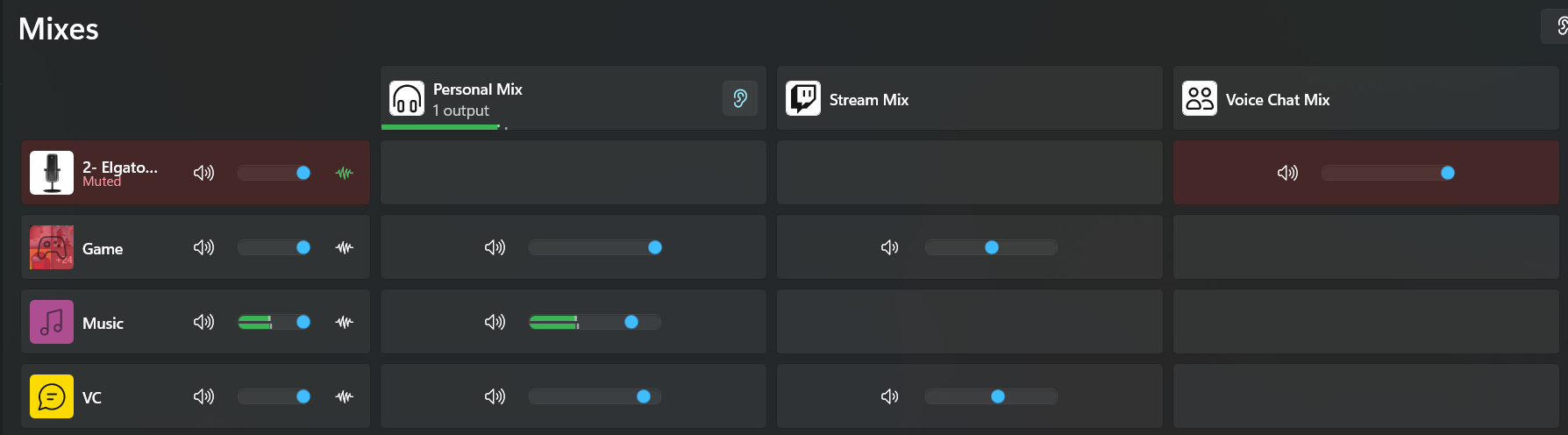
Yeah those ear icons are on the two mixes you don’t want to listen to.
It should only be on the personal mix since that’s the only one you want to hear.

lost lintel
#

welp, I installed the new update and now i have no sound from anything. No activity from any mixes at all. So I tried uninstalling and reinstalling and my mixes are gone. It wont even detect my mic anymore, stays stuck in "Detecting audio devices"

lost lintel
#

yes

forest nimbus
#

Hi, i have an issue with wave link 3. So when i share on screen, friends hear my mic on it. The mic that they hear is without any fx, so they hear mic in elgato wave 3

ashen chasm
hollow fulcrum
lost lintel
#

i managed to do a repair on the wave link software which seems to have fixed the problem (hopefully), but all of my mixes are gone so i have to go in and reconfigure everything

solemn wyvern
lost lintel
#

had a bunch of stuff too

hollow fulcrum
molten bane
solemn wyvern
molten bane
forest nimbus
ashen chasm
hollow fulcrum
solemn wyvern
forest nimbus
molten bane
#

ok problem solved

pure wing
solemn wyvern
spark fern
#

what's the fix for wave link all of a sudden not even opening? thanks all!

chrome palm
#

hey all i keep having an issue with my audio where i have my switcher allocated to my headset and my speakers but they'll both start playing if i try to switch

#

this is my current set up where my game audio is set for my astro a50x as game, my speakers as my speakers and voice is set for my headset voice output

magic lava
#

since updating the wave link driver my mixes got reset and clicking the + does not add the mix to my channel

#

also isnt showing my headphones that are plugged into my wave xlr

smoky wharf
#

hello, i have a wave xlr 2.0 with the shure sm7b and there is a lot of latency before i talk/it picks up my mic. how do i fix it ?

vapid coral
#

Why does audio double on screen share in discord ?

hard crown
#

hello,
does the newest wavelink 3.1 fixed an microphone become left only?

solemn wyvern
solemn wyvern
#

So remove the permanent assignments of outputs on your mixes, and just use the box at top to switch the personal mix between speakers and headphones.

heavy coyote
solemn wyvern
# vapid coral Why does audio double on screen share in discord ?

It’s because discord hooks the full system audio when doing a whole screen share. And they don’t give an option for audio source.
You can either share an individual app, or you can share a device, where they then give an option to select which audio source for the device share.
Use OBS virtual camera to create the device.

south vector
hard crown
south vector
fiery vessel
#

Updated to 3.1 last night.

:sus_eyes:

Seems to be working so far...

#

No crackles or pops yet. I can't help but be highly cautiously optimistic lol

solemn wyvern
#

That’s good news. There were many reports of in-place update failures that take a lot of uninstall shenanigans to fix.

smoky wharf
#

@solemn wyvern can you assist me with my issue by any chance ?

solemn wyvern
#

Scrolling up; this is about latency?
"Before it picks up my mic" I'm not totally sure what this means so let's try to clarify.

Exactly where in signal chain do you hear/see latency?

#

And we should define what "a lot" is

distant sparrow
#

Hello everybody i have an urgent issue and hope someone can help

#

i just bought a Wave XLR and a Wave DX and somehow my Driver crashes right after opening

distant sparrow
vague halo
#

Please uninstall it. Then run disk cleanup and reinstall it; with luck, it will work then.

vague halo
distant sparrow
smoky wharf
#

so if i go quiet for like 1 minute, and i say one word. it wont pick it up

#

but then if i keep talking it will pick up mid sentence

vague halo
solemn wyvern
solemn wyvern
distant sparrow
solemn wyvern
smoky wharf
solemn wyvern
distant sparrow
#

i tried that and it wants me to wait 2-3 days

smoky wharf
distant sparrow
#

after spending couple hundred dollars on elgato products its quite frustrating

smoky wharf
#

if i go " HELLO HELLO HELLO HELLO HELLO HELLO" it will only pick up the last 2 hellos

#

if that makes sense

#

it basically takes some time for the mic to pick up my voice

#

i plugged my focusrite back in and it didnt have that issue

solemn wyvern
smoky wharf
#

it as in the XLR

smoky wharf
#

im kind of new to all of this

#

have you heard of my issue before? i looked on the internet all over and could not find anyone with the same issue

solemn wyvern
#

No. I haven’t heard of it. That’s why I thought it was probably a noise gate or something wrongly routed.

Anyway, no, I can’t show you a picture. Just your wave link window. Just look at your mixer and see the meters moving.

vast magnet
#

im trying to use Wave Link but my mic which is a logitech headphone mic thing isnt getting any audio thru and i have no idea why its not letting any audio thru

solemn wyvern
vast magnet
#

this?

solemn wyvern
#

Yeah… have you done any basic troubleshooting like restarting the app, computer, deleting and re-adding the mic channel?

vast magnet
#

idk why i didnt think of that first, ill be back if the issue persists my fault

solemn wyvern
#

Click the mic channel icon to show its settings. One of the tabs is for effects.

smoky wharf
#

is this for wave link 3

#

sorry if thats a dumb question

spark moon
#

anyone have a fix for the app exponentially opening at like 150% the window size that i closed it at every single time i open and close the app itself for wave link 3?

solemn wyvern
smoky wharf
magic lava
solemn wyvern
magic lava
#

when uninstalling Wave Link, do you need to also uninstall Volume Controller?

solemn wyvern
#

Volume controller is a streamdeck plugin.
Nothing to do with wave link

magic lava
#

okay

vast magnet
magic lava
#

what the hell man, i just uninstalled the program and restarted my PC

magic lava
#

wl3 crahses upon installation finish as well :/ 3.1 update is struggling

#

actually now i cannot open the program at all after a fresh install, instantly crashes...

#

finally got it sorted after 2 reinstallations.. and 4 restarts. seems unncesseary but oh well

fiery vessel
smoky wharf
#

can i use the old version of wave link with the xlr 2.0?

vague halo
#

the new xlr?

smoky wharf
#

ye

vague halo
#

this is for wave link 3.0

#

not for wave link 2.0

smoky wharf
#

well wave link 3.0 is buggy thats why i was asking

spare oyster
#

I've avoided the 3.0 build since even on initial release post-betas, it did not meet my needs and 2.0 met them better. Does 3.1 allow more than like 20-25 apps on a single channel? I have like 30-40 games (possibly more) installed.

smoky wharf
solemn wyvern
solemn wyvern
spare oyster
solemn wyvern
#

You have more non-games than games? I’d be shocked but you do you!

spare oyster
#

bcuninstaller says 387 uninstallers, so yea, I have a lot of programs. lol

#

over 300 if I hide system & MS apps

#

at least 30 games I'd want routed to Game. maybe more

solemn wyvern
#

GARRETJUDGE I dunno what to say to that, so I think this emoji says it haha!

#

Your computer is used differently than mine

spare oyster
#

I can do that on 2.0, but yea, windows and obs break after every windows update

solemn wyvern
#

I suppose that’s probably common. My game computers are totally separate and in a totally different part of the building from my studio, which does have many non-game applications…

#

But my game computer has been happily running with game channel as default for years.

spare oyster
#

Yea, eventually I'm gonna get a Neo to be dedicated to OBS so at that point, my windows rig could maybe change

hasty plaza
#

yoo may i ask something about Wave link in this Channel?

magic lava
#

my mic reaches around -6db in OBS meanwhile my music is in green but my mic still sounds quiet on stream

solemn wyvern
#

Use a compressor on your mic to bring up the average level and loudness while keeping your peaks under control.
And balance your music to the rest of the sound in the program by ear, not by meter.

magic lava
solemn wyvern
#

Most meters don’t show average. Some have a peak and then some slower decay.
You would need to add a loudness meter to actually measure loudness.

Probably more than you want to get into.
I’d suggest just using the compressor and your ears.
Compare to pro streamers you like the sound of to fine tune your balance the way you want.

magic lava
solemn wyvern
# magic lava Thanks for always helping. I was listening back to my stream thru my iPhone w/ A...

That means you’re being influenced by the playback speakers. It’s the same audio in both cases!
So this is why I say compare to streamers you like the sound mix of.
Compare both you and them on AirPods, and on your other headphones. Just make it a fair comparison: same speakers for both. Now the difference you hear is actually the sound mix, and you can use that info to make changes to your mix, if you decide you want to.

#

Ideally… you like how your stream sounds on all speakers.
If your mix only sounds good on big headphones, there are probably some improvements you can make to have a mix that translates well to any speaker.

#

That’s a video idea….

magic lava
#

It is a significant difference when listening thru my AirPods and my headphones. on my AirPods my voice sounds suuuuper thin. I've applied only Voice Focus at 75%, RoughRider3, and Elgato EQ presets.

solemn wyvern
#

Guessing on text alone: could be that your mix relies on very low frequencies that smaller drivers aren’t efficient at reproducing, and the mix lacks some low mids that would fill out the sound in the absence of those very low bass frequencies.
The larger drivers that can reproduce deep bass sound fine.

That’s why checking on a variety of speakers is a good idea.

#

But again, you learn a lot more by comparing your mix against one or two other streamers to get some reference points.

magic lava
#

I will be doing that. I am getting somewhere.. do you know why having a fast attack on my compressors makes my voice sound weird? don't I want a fast attack on my compressor?

weak anvil
#

hey anyone having issue with some games saying adio unavailable on wave 3.1

#

nvm update fixed it lol

solemn wyvern
# magic lava I will be doing that. I am getting somewhere.. do you know why having a fast att...

Do you want the 1 paragraph version or the university course version? 😎 you’re accentuating the transient at the start of consonants because that tiny peak makes it through the compressor and then it clamps down super fast after that. Give it some breathing room for a more natural sound. (Slower attack and release)

8ms is still quite fast. 2ms or less is brickwall limiter territory so no, you don’t really want that as your “evening out my level” compressor. Try something in the 8 to 15ms range, but it also depends on how much reduction your compressor is doing, and the ratio comes into play. The defaults in the Elgato compressor are a good starting point for voice.

magic lava
solemn wyvern
# magic lava yeah the defaults on the elgato seem decent, anytime i drag the attack below lik...

There’s another parameter for a compressor called “knee” which is often hidden. I bet rough rider has a softer knee, while the elgeto one might be much harder, or have no knee at all.
Knee basically starts to compress at a lower ratio a little before the threshold, and kind of curves into the eventual set ratio over a bit of time/level.
Complicated but a way to soften the sound of a compressor in a slightly different way than just attack time and ratio alone.

charred patio
#

Hi, since I got my Elgato mic and installed my Elgato audio driver, I keep getting random audio cuts . It's really annoying, especially during streaming. How can I fix ?

crimson aspen
#

Hello, I have a VSD inside stream deck and recently installed El Gato Wavelength now I can not hear my sounds from my soundboard. How can I fix this?

lost lintel
#

still have issues to where when my pc goes to sleep and i wake it up, i have to restart wave link in order for it to work, even after installing the update

austere gate
#

I'm trying to download the Compressor VST3 plugin for my Wave DX in the Wave Link software, I installed it directly from the marketplace, but it's not showing up in Wave Link. I can't re-download it, as it says I already have it, and I can only open it in Wave Link, however the effect just isn't there when I try to add. Any solutions?

solemn wyvern
austere gate
cerulean ingot
#

Hey guys. Where can I check to verify if I got the latest wave link audio driver?

solemn wyvern
austere gate
solemn wyvern
#

Vst3 file is what you’ll download. What folder?

austere gate
#

When i manually download it gives me a zip file, inside it there's a file folder with a bunch of stuff, a x86_64-win folder, a arm64-win folder, as well as a resource folder

charred patio
#

And uninstalling and reinstalling won't change anything

#

I did it like 10 times, I'm still having this issue

solemn wyvern
cursive willow
#

Hello fellows creators !
I'm coming here to ask a question, yes to you !
I'm currently using an ELGATO wave III Mk1 with wave link 2.0.6 (3780)
I tweaked a LOT of parameters and effect and all to make my mic crispy and all, BUT !
I don't know how to make it better at all, my knoledge in sound design and theory and tweaks and all is almost 0...
So I think I get to the max of the max of what I'm capable of, but i'm not certain...
Could one or some of you try to help me there ? I'm having some issues.... The first is : I don't know if my quality of sound is great or just kinda bad ? I find it great, but as said, I'm not an expert at all.
the second one is : If I yell (witch happen a lot on stream...), the mic is just... turning off ? Like, You can here I start screaming before completely stop hearing anything until i calm down lmao

#

For reference : here's what i'm using :

#

On the volume on the mic itself I'm at 2 out of 7

#

Annnnd here's what i sound like with these settings

#

Thanks by advance :D
||If someone respond here sometime, don't hesitate to mention me||

cerulean ingot
#

Had wave link audio driver installation problem. So I un-installed wave link app and the driver. Downloaded 3.1.0 again but the app would crash when I tried to open it. download 3.1.0 a second time and it crashed once more. So i Had to download past months version (3.0.3) and everything worked, updated it to 3.1.0... So my question is, does un-installing and re-installing the driver 3 times cause any issues due to duplicated files or does it just overwrite them

real ingot
#

Where on earth is wavelink storing its config? Doing a full uninstall and reinstall with restart inbetween, and checking appdata folders for anything related at all and couldn't see anything but wavelink still is clearly keeping specific non-default settings that I'd set prior to uninstall and reinstall

#

specifically device visibility is a telltale, though that's less bothersome than totally broken channel names

spare oyster
#

So I installed 3.1. I haven't been able to really 'trust' WL 3.0 since it was extremely buggy even on the first initial 'stable' release. 3.1 so far seems to be mostly better, but now it's picking up my mouse clicks and keyboard sounds more frequently when the same compressor and EQ settings were not picking up those sounds?

spare oyster
#

okay so there's one thing that's worse in 3.0. It doesn't remember my audio output. When I disconnect my airpods from my win pc, it loses that and I have to go back into WL to re-add them.

vague halo
spare oyster
vague halo
spare oyster
#

Ah, I use magicpods since it adds a lot of the native functionality to windows

vague halo
#

ah ok

spare oyster
#

even has some extra driver-level stuff that can shave another 20ms or so off the BT latency

vague halo
#

i have no problems with the norm windows settings with the latency. But that varies from person to person.

spare oyster
#

Yea, if I connected it via windows bt, I think I'd lose some of the other features of magicpods

#

if the 'audio output' could just keep it in there, even if the device "disconnects" temporarily, that'd be nice

#

I may have to go back to 2.0.x, since that one doesn't have this issue

tacit nexus
#

Hello all, I have a strange issue with my Steelseries Nova wireless headphones and WaveLink. Basically when i wake the pc from sleep and reconnect my headphones the audio simply doesnt work. WaveLink behaves like normal but nothing is heard.

Only fix I found is to exit wave link and restart it, which takes 20 seconds sure but still.

Again only when waking from sleep, not on a fresh boot.

charred patio
#

Hi, since I got my Elgato mic and installed my Elgato audio driver, I keep getting random audio cuts . It's really annoying, especially during streaming. How can I fix ?

quartz loom
#

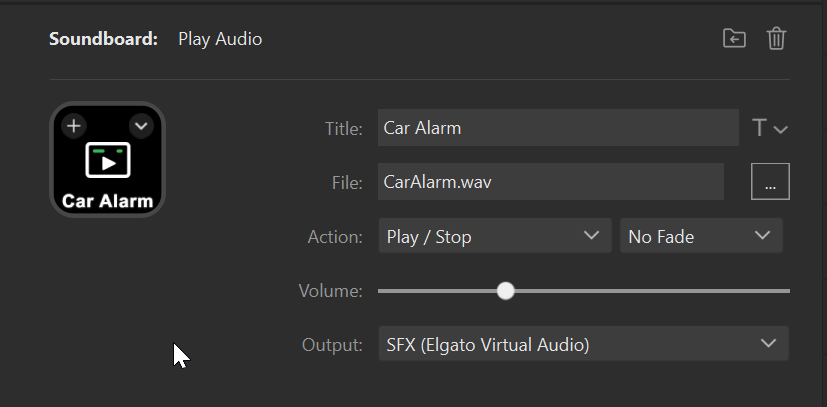
Hi! I’m having an issue with Wave Link + Stream Deck.

I use Stream Deck actions (Play Audio) routed through Wave Link. Everything works fine initially, but if I disconnect the Stream Deck (USB-C) from my MacBook and then reconnect it, the Play Audio actions stop working through Wave Link.

After reconnecting, pressing the buttons still triggers the action, but no sound plays via Wave Link. The only way to fix it is to fully quit and relaunch Wave Link.

Is this expected? And is there a way to make Wave Link properly reconnect to Stream Deck after unplugging/replugging without restarting the app?

Also, more generally: what’s the correct way to set up Play Audio sounds so they reliably go through Wave Link?

fading stirrup
#

Hey, Recently upgraded to Wave Link 3.1 and i got some issues and wondering if anyone else have these?
I use Wave Link for the full audio-experience, so all my audio gets their own channels (sometimes via groups) and it outputs. (Got XLR-dock)

I got two things that has started to annoy me a bit:

  • New games (installed after Wave Link opened) doesnt appear in the Apps selection.
  • My screen that got a separate output group disconnects the audio output when it goes into sleep (Cant figure out if its Nvidia or Screen that does this) then Wave Link doesnt know that the output via screen is available. (See screenshot) - This worked in Wave Link 2, but as i know Wave Link is fully redesigned, so there might be missing components still
zenith hornet
#

WaveLink 3 just had an update for my windows audio drivers
So I made the update. Everything worked fine so far.

After that nearly everyhing was "broken"
All my Audio Outputs in Windows do have the wrong names.
So for example my "Voice Chat" in WaveLink is now "Games" in Windows.
If I rename the Channel in WaveLink there is no "renaming" in Windows.*
In my Streamer.Bot I do have now nearly 20 "disconnected" Audio Outputs.

Is there any solution to this? Did this happen to anybody else?
It looks like everything was messed up and routet wrongly...
Is the only solution to deinstall everything and start clean?! O.o

EDIT: And in addition my StreamDeck WaveLink Button to switch between the audio outputs (Speaker / Headphones) is working, but the icons also do not change anymore.

solemn wyvern
# zenith hornet WaveLink 3 just had an update for my windows audio drivers So I made the update....

What basic troubleshooting have you done before coming here?
Restarts, etc.

Stream deck plugins commonly need updates to stay current with changes to wave link, and driver updates commonly require setting up virtual devices and routing again. So I’m not surprised.

There were many reports yesterday of issues with in-place updates. Fully removing software, drivers, settings; and starting from scratch might solve issues related to that.

zenith hornet
#
  • Multiple restarts
  • Windows Device Manager checked (also hidden objects)
#

driver updates commonly require setting up virtual devices and routing again. So I’m not surprised.
There should be a warning for that. Also that all virtual devices got messed up is freakin me and my whole setup

#

And regarding StreamDeck - When there is a "Driver Update" for WaveLink then it should on the one hand easily work with the actual StreamDeck Plugin OR there has to be an update for the StreamDeck Plugin at the same time meanwhile it's from the same developer

#

I've set a channel for "System Audio" and made this also the "Default" in Windows
Now.... in WaveLink when something is on the Windows Default "System" Audio Channel -> In WaveLink my "Voice Chat" Channel is triggered.
It seems that the biggest mistake was to rename the channels in WaveLink with my own names.

hidden meteor
#

So. My wave link software updated and all of my settings were removed like I just installed the app

cosmic jetty
#

anybody have the link to the feedback thing? need the add app button at the top cause it's annoying as a variety streamer

#

oh i found it, sorry

bleak zodiac
#

anyone else getting this kind of visual feedback on their Stream Deck for Wave Link channels? I feel like this just started to show up for me. As you can see, the channels are at zero where they're supposed to be, but the visual representation is clearly not correct.
Not game breaking, but annoying at a glance.
Using Wave Link 3.0.0.287 and Stream Deck 7.41

solemn wyvern
#

You’re a few patches behind on wave link, for what that’s worth.

#

Maybe I shouldn’t say a few.

It’s on 3.1 now

#

I don’t know how many patches happened in between there

finite canyon
finite canyon
#

There's an update to Wave Link, just in case no one knows.! 🙂

#

hoping that fixes the problem I'm having! 🤞

#

and it did!! 😄

livid crater
#

hello, i am been using wave link for a wile, but i encounter the problem, that every time i restart my Pc Hands-Free Telephony turns on automaticly, this wasnt a problem before using wave link. Hands-Free Telephony halves the audio quality.(My Headphones dont even have a microphone)
Pls help me, this is getting a routine an i hate it

solemn wyvern
gritty jackal
#

Bluetooth profile I'm assuming by the name. Not really something Wave Link should touch as they don't make any wireless products.

#

I've had some headsets in the past where you have to disable that or when the mic gets activated it switched t modes and the audio quality gets lower due to split bandwidth. It's probably Wave Link turning on the mic if you're not outright disabling the hands free profile in the advanced Bluetooth settings for the device

bleak zodiac
agile plover
#

glad i only went to v3 a week ago

agile plover
agile plover
#

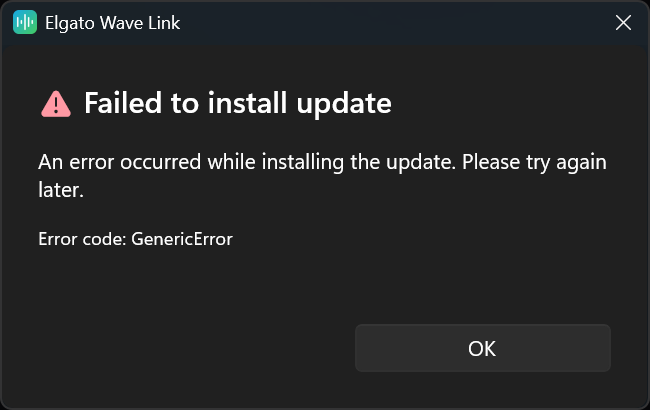
...lol the update to 3.1 is refusing to install

agile plover
agile plover
#

second icon also lets you visually see if the current focused app is on said channel as well

cosmic jetty
#

neat

#

thanks for the tip, that's really helpful

agile plover
#

it helps me a lot too :) no problem!

agile plover
#

damnit

fossil storm
#

can anyone help me with the wave link app?

#

its not working

#

whenever I try to open it, it just instantly closes

serene jungle
#

Hey everyone,

I'm having a frustrating issue with my Wave:3 that I can't seem to fix. My mic cuts out mid-sentence.

My setup:

  • Elgato Wave:3
  • Wave Link 3
  • Astro A50 Gen 4 (connected via base station USB)
  • Windows 11
  • Sample rate: 48000 Hz, 32 bits

What I've already tried:

  • Disabled noise gate in Wave Link
  • Disabled Clip Guard
  • Set sample rate to 48000 Hz in Windows sound settings
  • Disabled "Allow applications to take exclusive control" on both devices
  • Closed Discord completely while playing
  • Plugged Wave:3 directly into motherboard USB port (no hub)

The issue:
The mic cuts out right in the middle of a sentence. The monitor mix (what I hear back) sounds perfectly fine. The cut only happens on the output that others hear.

Has anyone experienced this with the Wave:3 specifically? Could it be a conflict between the Wave:3 and the A50 base station on USB? Any Wave Link setting I might have missed?

Thanks

#

My voice is broken :/

spare oyster
#

Yea, I still can't use wave link 3.1. Still does not work with my setup. Unfortunate, the mixer improvements are nice, but it does not remember my airpods connected via magicpods app. I have to restart wave link when I connect my airpods to my pc to get them to show up. Back to 2.0 I go.

serene jungle
solemn wyvern
serene jungle
solemn wyvern
past furnace
# finite canyon

Do you mean like the button functionally works but the icon isn't changing?

Since the update, one of my input buttons does not appear correct when muted.

wind geyser
#

Hello everyone. Is there also a German version of the Elgato Wave Link 3?

wind geyser
vague halo
#

nur englisch und japanisch ob noch andere sprachen folgen weiß ich nicht.

wind geyser
vague halo
#

Ne glaub nicht. Aber das Programm ist eig leicht zu verstehen.

wind geyser
#

ok danke.

valid ledge
#

how can I backup my settings of WaveLink ?

vague halo
#

aber wave link 3 ist noch recht buggy und crashed gerne

valid ledge
#

I need to completely uninstall Stream Deck app but I'm afraid of losing my settings

solemn wyvern
valid ledge
solemn wyvern
#

Stream deck and wave link are totally separate apps, with separate settings files.

You will likely have to rebuild your streamdeck keys, but there is probably no preventing that through a reinstall.
Hopefully the “send to streamdeck” automatic profile builder will speed you up.

astral hinge
#

WaveLink 3 opening on its own, on the mac. Has anyone encountered such behaviour???

valid ledge
finite canyon
solemn wyvern
#

Delete the ones you want to delete.

serene jungle
#

If I have a problem with my routage in one application how I can fix that

#

My problem with my mic is only on fivem

#

Discord valorant and other game and other app is good

solemn wyvern
# serene jungle My problem with my mic is only on fivem

If your issue is a specific app not using the correct input device as your mic… then it’s up to them to play nice with audio devices. Ask them?

Make sure your computer’s default input is set to the right thing, and if the app has internal settings for input device, be sure to set that, too.

#

If that doesn’t answer the question or I misunderstood, then I guess I need more info

serene jungle
solemn wyvern
serene jungle
solemn wyvern
quick flax
#

Hey ya'll, I recently upgraded to Wave Link 3.0 on macOS Tahoe and I'm running into a scenario where the window keeps automatically opening and foregrounding interrupting what im currently doing. It happens regularly (Every 10 minutes or so) but not enough for me to pin down what could potentially be causing it. Has anyone else heard or experienced this?

agile plover
#

no idea why the wavelink update to 3.1 failed 20 times yesterday, it installed now

grand timber
#

hi how do I adjust the volume for an Program in wavelink if it is in a channel with other apps ??

agile plover
grand timber
agile plover
#

i do not see an option to do so, no.
if you're referring to Window's own app volume system, i genuinely have never used it and wavelink does override windows's settings

jade swift
#

Is wavelink better than using normal stream deck? im trying to play back audio through mic, but i also wanna hear it myself when i do

agile plover
jade swift
#

maybe my brain is too tired, because i understood half of what that meant xD

agile plover
#

haha i also barely understand yours, let's go back to the beginning xD

#

What did you mean with the stream deck and why is wavelink a question mark to you :)

jade swift
#

ok, im trying to record and playback sound, through both mic and headset at the same time. and i cant make it working using stream deck (sound deck). i only allows for either mic, or headset

#

So i wonder if Wavelink will make it easier/work

agile plover
#

well, wavelink does have a direct playback function, that plays back as soon as you speak

#

although my setup allows me to use the headphone jack on the mic itself, you should also be able to listen to the channel where the mic is playing

jade swift
#

lets say it like this. i want to setup a soundboard that i can hear, and that plays through my mic at the same time

agile plover
jade swift
#

time to setup wavelink i guess. man im tired xD

agile plover
#

well i had staff here tell me even though i used wave link for over a year now, i still had stuff setup incorrectly, so i wish you great luck :D

jade swift
#

i tried using voicemeeter banana, but just couldnt get it to work

agile plover
#

in short you basically

  • Create all channels you want/need
  • Create all mixes you need (usually personal, voice mic (which will include SFX channel) and in my case VOD mix for Twitch)
  • Set the soundboard audio output on the Stream Deck to output to the SFX channel
    ..profit?
agile plover
jade swift
#

i will try it straight away

agile plover
#

do notice though when installing wavelink, EVERYTHING will be controlled through wavelink and Windows's sound settings will practically become useless

jade swift
#

shoot. do i have to have the destination under elgato? since im running out of space xD

agile plover
#

including any physical keyboard buttons that handle windows sound settings if you have a keychron or razer board like me xD

agile plover
jade swift
#

thats where i have lack of space xD

agile plover
jade swift
#

i actually have more space than i thought i did

agile plover
#

yeah well, make sure to keep 20% free on the drive at all times

#

windows update archives, cache, all that kinds of stuff needs the 20%

wise stone
#

Hey there, we don't allow text files like that for safety reasons. You are always welcome to post the guide in a different format that doesn't require a download.

odd halo
#

I’m having trouble installing wave link

#

App installation failed with error message: Common::Deployment::MsixvcStagingSession::GetManifestReader in MsixvcStagingSession failed with error 0x80070570. (0x80070570)

wary perch
#

A .txt file is ok? don't need to download it, you can expand it directly from the Discord chat.

#

You could also open the .md file directly from the chat. I mentioned downloading it simply for "convenience." Unfortunately, there's a 4,000-character limit on Discord 🥲

wary perch
tame ore
#

Updated Elgato Wave 3 MK.2 Mic via a firmware update (1.0.1) through Elgato Wave Link Software. Any idea what changes were made? Can't seem to find anything online

#

Was the update for all Wave Mic's or just the MK.2 model??

#

WOuld anyone mind helping me test my audio with some of the different hardware effects? I stream but normally dont get any viewers so I dont have anyone to give me any feedback

#

please

tame ore
wise musk
#

Apologies if this was already discussed, but does anyone else experience issues with the built-in sound check not applying any effects? It only plays back raw audio; no changes with EQ or anything take place. I seem to be having issues with the software entirely, even after a clean uninstall/reinstall.
It's near impossible to troubleshoot my audio.

somber raptor
somber raptor
#

You can only monitor your raw audio wirelessly

wise musk
#

No, I am wired directly in. But nothing is working like it's supposed to. I am honestly at a loss

somber raptor
#

A lot of people seem to be having multiple issues with 3.0. I’m definitely not the guy to start troubleshooting with you but I usually do a fresh restart of wavelink and see if that helps. Then I end up messing through settings and mixes until I get it. Someone else with more knowledge will definitely be able to help you out though

wise musk
#

Appreciate it.

somber raptor
#

There is a checkbox for direct monitoring or live monitoring or something too. Make sure that is checked off

wise musk
#

Yep, it is. I am just accepting the fact that Wave 3 is full of bugs

somber raptor
#

Haha I’m sorry man

wise musk
#

It's all good man lol. I've been having this weird audio bug too where music sometimes souunds distorted/wavy/phasey. I don't recall version 2.0 doing that, think I am just gonna go use my mk2 device on 2.0 for now. I'll wait a few months and come back to 3. 😄

Edit: Nevermind, wave 2 crashes as soon as I select my mk2 mic. I just gotta deal with all the issues for now.

hollow vigil
#

For what it's worth, reinstalling the app every few days seems to keep half of the issues at bay

#

Except for the whole "every channel has the wrong name in windows" thing, that seems to just be a constant for me at least

#

Somehow, my "gaming" channel is actually the input for my microphone

#

Seems like I need to just manually rename them every few days, since that fixed it

slender escarp
#

in need of some help here gang just purchased my stream deck plus and xlr dock combo, switching from goxlr mini and im having some slight set up issues. Just curious why when streaming in discord and sharing audio with the stream why my voice is being heard double by anyone viewing the stream??

odd halo
#

I have an elgato wave 3

flint turret
#

im using IEM plug to wave xlr. How can I add EQ for the audio?

dusty hull
#

Hello, im trying to use the Wave Link for setting up the mixers, when I try and add in Spotify to the mixer on the Muic one it comes up saying unavailable, any idea why that is?

rotund ember
#

just got my xlr dock mk2 today, do i need to uninstall 2.0 before i get 3.1?

solemn wyvern
solemn wyvern
solemn wyvern
rotund ember
#

just delete in the settings yeah ?

solemn wyvern
rotund ember
fading stirrup
solemn wyvern
#

The installer is supposed to do this for you.
But some users have issues and find remnants of the old still hanging around so, apparently on some configurations it doesn’t work automatically.

Could be anything like user permissions structure, or maybe some apps running with elevated privileges.

#

So just do it manually to be sure

rotund ember
#

is 3 stable now?

solemn wyvern
# rotund ember is 3 stable now?

It’s not working on my studio Mac yet; I have a specific show stopper issue there. So I turn it on to check whenever they have a patch. (It might be specific to my UAD interface, but volume is 24dB lower than it should be there. Which makes it unusable)

Not tried it on windows. I know many people are using it there will little or no issues, but they don’t tend to post here because they aren’t having issues. So I don’t know what the numbers are like who have stable setups.
Only what you see here for reported issues.
And you can give some attention to the bug reporting thread linked in pins.

dusty hull
#

Another quick question how do I make it so that all my audio routes through Wave Link as im using this for streaming, and want to be able to turn on and off elements for streaming as such, as im trying to currently use it with TiKTok Live Studio and im having some issues, or is this still work in progress as I know 3 is still new ish

#

Here is how I currently have it set up, so my stream is on a different mixer , however if I have system on the personal one, it can still be heard through my streaming software, if that makes sense. I think I have this sorted now

hybrid lotus
#

Has anyone found a way to integrate Streamer Bot into Wave Link 3 audio?

solemn wyvern
dusty hull
solemn wyvern
#

Chat mix is intended to be what your computer uses as its microphone, so add your mic to that. And set it as your system’s input device, and disc or donut device.

jade swift
#

time to finally setup my wavelink, anything i should know beforehand?

jade swift
#

I tried to follow a guide, but he skips a bit ahead and i cant seem to add my mic. when i talk no volume is showing up as coming through

rich bear
south vector
#

they need to add this feature

rich bear
south vector
jade swift
#

Anyone know how i can play soundboard through my mic but also hear it as the same time, for some reason im not getting any signs that my mic is being picked up in wavelink

past furnace
solemn wyvern
# jade swift Anyone know how i can play soundboard through my mic but also hear it as the sam...

Input channels are the rows, output mixes are the columns.

Your mic and your soundboard are inputs, so click add input channel and pick them from the list if they don’t already have their own row.

Personal mix is for your ears.
Chat mix is to be used as the mic for your computer and apps.

So include sound board in personal mix and chat mix. (So you can hear it and any app using your mic can hear it)
And add your mic to the chat mix. (So it’s sent to apps using the mic but not in your personal mix.

tepid pasture
solemn wyvern
tepid pasture
#

Yeah I've relaunched and rebooted multiple times, thank you I'll look for the link

#

My whole audio setup got screwed up after the driver/app update a few days ago

#

was working amazingly until then!

solemn wyvern
#

From what I’ve seen, 3.1 had pretty common in-place update issues. Some people had to wipe it all out and start from fresh install, but then seems to have improvements once it’s installed right.
For what that’s worth

tranquil oxide
#

Screw this Wave 3 app. Elgato used to be the only company that actually had their act together and made software that worked without any issues. Unlike their parent company Corsair. Those guys can’t get hardware or software right to save their lives. Honestly, calling their software "garbage" is a massive understatement. I was so worried when Corsair bought Elgato that the software would turn into a total mess, but I spent two years praising Wave Link. It was perfect. You set it up once and it actually worked. But ever since they made the app "free to use" and pushed that overhaul, it’s been a total disaster. It looks clean and organized, no question. But it’s nothing but a headache now. The Stream Deck plugin takes a literal eternity to load. Switching outputs shows "Not Available" about 90% of the time, whatever the hell that’s supposed to mean. And now for the absolute peak of this nightmare. My PC crashes and Wave Link completely resets itself. Thanks a ton Elgato. Now I get to spend hours of my life redoing everything just to get my setup back to how it was. And thanks so much for the amazing backup feature. Not.

hidden meteor
#

hello, so i have a issue with the wave software or soemthing idk but i added one of my games into a channel and it doesnt let me control the audio nor does it even detect it for some reason

tranquil oxide
hidden meteor
#

alr done

#

still doesnt work. do u have any other tips?

#

the thing is it used to work but idk this whole new wave link has been a buggy mess

tranquil oxide
#

Do you have anything like that? With my music client, the software itself is separate from the audio, which runs through a web view. Maybe it’s the same with Roblox—what you’ve created there is just the launcher, not the game itse

hidden meteor
tranquil oxide
#

And why do you even have a separate channel for Roblox instead of a game channel?

#

This is how it looks on my end. The game channel is routed to the personal mix. Output to headset.

slender escarp
#

does anyone have any advice on what could be causing people in my discord stream to hear me double while viewing my sream in discord?

lunar ridge
#

Every minute or solo Wavelink just puts itself in the middle of my screen. I minimize it and repeat it happens again.

solemn wyvern
slender escarp
earnest orchid
#

wanted to ask about a feature of whether anyone has requested this, in wave link when i add a non-elgato microphone, is there a way that when i mute the mic from the knob on the stream deck+ that it also mutes the mic directly within windows, (just like it does with an elgato microphone ?)

Thanks

strong storm
#

Hello everyone, good evening. I am currently struggling to get "Elgato Noise Removal" despite it has already been installed. I had also removed and re-installed wave link 3.1 software but the same issue. So I had to go with "" elgato Voice focus ai-coustics" and "Basic Noise Gate" from Videophile. I like "Elgato Noise Gate" and it helps in clear mic audio. Please help. I am attaching a screen shot where "Elgato Noise Gate" is installed and is appearing in menu but whenever I select this, it doesn't appear in "Software effects". I even completely reset and clean installed my PC.

solemn wyvern
# strong storm Hello everyone, good evening. I am currently struggling to get "Elgato Noise Rem...

Don’t know why that particular plugin is not working, but I have seen several reports of this same issue.

The only thing I could say about it is that voice focus is objectively superior to that old “Elgato noise removal” plugin which is based on the open source RNnoise processor.

And another suggestion is that if you chose to use a noise gate, it should be a near the start of your signal chain, rather than the end.

regal vortex
#

the headphones plugged into the aux port on my wave xlr suddenly won't register in the stream deck app - Windows can see them, and the Wave app can see them, but when I try to create a button to switch outputs, they don't appear in the list like they used to

violet lintel
#

I'm trying to hear my windows sounds and it doesn't seem to play when I have my output to system mix

rich bear
#

Does anyone know if Wave Cast makes it possible to offload the DSP processing of VST's on a 2nd machine?

And can it be used to have Mic + audio interface plugged into 2nd PC with plugins running and then output that mic to the gaming PC as a mic source?

glad vine
#

When I stream on discord using as input Chat Mix, people hear me double (one time from voicechat and another from the stream sound), and I don't hear it.
Any solutions?

warm sinew
#

Does anyone know how I can sync my window's output audio with the wave link audio? Wave Link 2.0 had a "same as system" but 3.0 doesn't. Is there any way to fix this?

solemn wyvern
maiden star
#

How do Presets work for wave link 3?

last obsidian
#

hello, im tryna use rnnoise for noise suppression on my mic but it only plays on the left side, anyone knows how to fix this?

solemn wyvern
last obsidian
trail kayak
#

Why, with the XLD Dock MK2 (as well as the V1) and the Wave XLR MK2, can I hear a fizz in my direct monitoring, but when I record something in OBS, it sounds fine (i dont have any filters in obs)

solemn wyvern
#

What headphones are you using?

trail kayak
#

With or without extender sounds the same

solemn wyvern
#

Well you could look up the model to see what it’s impedance is.

#

But if they are lower impedance than the amp is expecting it can cause extra hiss.

Could also be that your mic is picking up room noise that is being processed out of the recorded signal by voice focus and stuff.
But that effect isn’t being monitored.

Could be a combination of these things.

#

See if the impedance settings change anything

trail kayak
#

i use hyperx HX-HSCEB-RD i try some iems but they always sound to sharp ingames and that make me sick later headphones hurt my head

#

my room noise ngl is = 0 maybe the fans but they sound super low like even without earphones u cant hear them

#

Also, the fizz only happens when I talk (both with direct monitoring and without it), and when I raise the input gain to +60 dB. Right now I have it at 50 dB, but if I lower it to 40 dB, the fizz is mostly gone however, then my voice is too quiet in OBS like i see a lot of videos that the best is being on the middle of -12 -18 normal speaking

solemn wyvern
#

I can’t even find specifications for those headphones.
Could just be cheap and have a lot of self noise. Not sure.
(But no room is zero noise)

trail kayak
#

on the photo i never touch yellow zone if my input gain is -40

#

i mean there is always sound im not gonna say i have the quietest room on earth but is quiet

solemn wyvern
#

This all sounds like noise in your room.

If it’s only when you talk, then it’s a combo of self noise from the mic, and noise in your room.

And the noise gate is muting it when you don’t talk

#

That detail is good

#

The noise gate is muting it…. Then it’s your room and mic. 100% for sure. The noise gate proves that

trail kayak
#

noise gate? i dont have that effect on

#

i used to

solemn wyvern
#

If it only happens when you talk, then something is muting it when you don’t talk

trail kayak
#

expander?

solemn wyvern
#

Yes expander is a fancy noise gate

#

Fancy, more gentle: better.
But it’s doing the same job.

trail kayak
#

ok look with renegate default with expander off

#

thats how loud is the ambience

#

or even like this

#

so its practically 0 can this little make this big diff?

solemn wyvern
#

What are you trying to prove to me? That it’s not noise in your room?

If it mutes when you don’t talk, then the noise is in your mic….

Bypass the expander to prove that

trail kayak
#

i have noise but this little can make such a difference?

solemn wyvern
#

Yes.

#

I mean, you’re the one listening to it.

trail kayak
#

also like i say its only when im in direct monitoring later in a obs record doesnt sound

solemn wyvern
#

A compressor or other effects could be adding more gain later

trail kayak
#

and in obs i dont have any effect just the mk2 effects

solemn wyvern
#

Yeah so probably some voice isolation processor is cleaning it up in recordings.
Voice focus is too much latency to monitor, for example

#

What mic is it?

trail kayak
#

shure sm7b

#

sorry for late response

solemn wyvern
#

Alright, so 50 or more db of gain is totally normal for that mic.
I wouldn’t even be surprised if it’s 60, if you’re a quiet speaker.

#

Make sure you are right on top of it. Practically touching the foam with your lips.

trail kayak
#

also another question the xlr dock v1 doesnt have the high power mode right? or was enable by default i say cuz i see the option and idk which one i should select

#

i say cuz wave xlr mk2 have it

solemn wyvern
#

Yeah I think high power mode is a mk2 feature.

Both are headphone amp settings so they only impact the monitoring.
High power would only be for high impedance headphones. Like big, 600ohm headphones.

Probably yours will sound best either in low impedance mode or just normal.
But feel free to experiment. Whichever sounds best to you is the right setting

#

But since the hiss mutes when you don’t talk, I think it’s in your mic path, not the monitoring path.
Or I mean… that’s the source.

trail kayak
solemn wyvern
#

Really seems like noise in your room, to me.

I would be using the built in expander in the dsp effects, though. Before renegate or whatever that thing is called

#

Then you can be monitoring it

trail kayak
#

but i wish i could put 40db cuz like that i dont hear the fizz but later i dont get the -12-18 range

#

ye i use the expander lit i buy the mk2 for this plugin/effect

solemn wyvern
#

You could lower the gain on the mic, but then you’ll have to add that gain back later in the compressor to have the same voice level.
So it will just come back

trail kayak
#

but idk how i can reduce more the sound of my room like the only thing that makes sound apart of me is the pc but is sooo low

solemn wyvern
#

Move sources of noise away from the mic. Orient the mic so it’s pointing away from noise.
That’s all you can do

trail kayak
#

also ty for the help ^^

#

have a great day

solemn wyvern
neon river
#

I'm going crazy here, are the channels messed up with what it's paired to in Windows? For example, Aux 1 (named in Windows) outputs to my Mic channel in Wave Link.

I just tried to reinstall the app and driver and restarted the PC, then completely redid my Wave Link configuration and I'm still having this issue.

#

The only solution I've found is to rename the sound devices in Windows, so now they're matching - but this was not happening before and now I'm concerned it'll undo itself somehow next time I update.

solemn wyvern
neon river
#

I've recreated the channels, the old (incorrect) names were retained so I renamed them myself inside Windows settings.

strong storm
dawn lily
#

Hi guys, i am reaching out because I am experiencing a severe audio issue with my current setup (Elgato Wave DX + Wave XLR).

Here is the exact problem:

When I turn on the PC and use only the Wave Link software, everything works perfectly. My microphone and system audio are crystal clear.

However, as soon as I open OBS Studio while Wave Link is running, all of my PC's audio starts crackling and popping heavily.

This distortion affects everything: my microphone input, Google Chrome, YouTube, and all other system audio. It sounds completely distorted and unusable.

Could you please help me troubleshoot and fix this issue?

shut osprey
#

So I set my gain to 40 dB, but after every restart it resets to 43. Any idea why or how I could fix it?

mighty talon
#

my wave cast usually works but now wont connect to my streaming pc says "No remote PC found" is there anything I could check or fix to help me?

solemn wyvern
dawn lily
solemn wyvern
#

🧐

#

There aren’t any by default

dawn lily
#

Im at work rn i cant specify exact ones but i will tey to show you

solemn wyvern
#

Ok well, my thinking is that depending on which encoder OBS is using, it would be stressing the GPU or cpu, and causing any plugins also using that to have buffer overruns.

OBS should be using GPU based encoding, and wave link should do the opposite; coy based plugins only.
So if that old nvidia plugin is in there… remove that.

Or just disable your plugins to test if any of these coincide with the issue.

dawn lily
#

Can i send you direct message so i contact you later?

solemn wyvern
#

Message here, please.
I don’t accept dms. It would get much to much, and keeping the help in public helps others.

dawn lily
#

😔okay

robust narwhal
#

can anybody help with wave cast? i had it set and was running without error and now since the update it is super choppy and cracking

mighty talon
#

my wave cast hasnt been connecting to my streaming pc since yesterday any fixes??

robust narwhal
#

mine took a minute to connect as well, i just closed everything and ended task and then it all reconnected.. but now the audio sucks

fluid lynx
#

Hey do we know when the white wave panels will be avalible again on amazon and on B&H?

unkempt estuary
#

Hey, just reporting a bug I noticed after today’s Wave Cast update.

When using “All Audio” under application audio, the sound has a noticeable fuzziness/distortion, like a repeating static break every ~300–400ms. It’s very consistent and easy to hear.

If I switch to selecting a specific application, the issue immediately disappears and the audio is completely clean.

I recorded two clips for comparison:

Clip 1 – All Audio: clear fuzziness/distortion at regular intervals
Clip 2 – App Selected: clean audio, no distortion

You can also see it in the waveform:

The “All Audio” clip shows uneven/distorted peaks
The app-selected clip looks smooth and consistent

Notes:

This wasn’t happening before today’s update
Same setup, same source—only the audio selection setting was changed

Just flagging this in case it’s something introduced in the latest patch.

robust narwhal
unkempt estuary
#

Follow-up – Additional Audio Level Issue

I also noticed another issue related to the same update:

When switching between “All Audio” and selecting a specific application, the audio levels are not consistent.

With “All Audio” selected, volume appears normal
With a specific application selected, the volume drops significantly (roughly half)

I can clearly see this in my mixer, where the audio levels are noticeably lower when using app-specific selection.

So currently:

All Audio: normal volume, but has fuzziness/distortion
App Selected: clean audio, but reduced volume

Just adding this as a follow-up in case it helps track down the issue.

arctic shadow
#

Hey all. I just updated to Stream Deck 7.4.1 and Wave Link 3.1.0.

I want to recreate a multi-switch action that toggles my output audio from Speakers to Headphones and vice versa.

My IEMs are plugged into the 3.5mm jack on the XLR Dock MK.1.

Within Wave Link, my headphones are visible as an output option and are functioning correctly. However, when I use the Wave Link plugin for Stream Deck, they are not listed as an output option.

Am I setting something up incorrectly? This is basically the only thing I use my Stream Deck for, so it is pretty frustrating.

dawn lily
#

@solemn wyvern hello brother im
Home now are you there?

solemn wyvern
#

Aye

solemn wyvern
#

If you renamed you wave xlr to sure SM7b then there’s your problem

dawn lily
#

can you hear the crackling

arctic shadow
dawn lily
solemn wyvern
#

I hear some buzzy sounds that seem like they are part of the music…

#

Voice sounds good

dawn lily
#

Whenever I open the Wave Link app alongside another program, like OBS for example, the audio starts to distort and crackle heavily. The only way to stop this from happening is by completely uninstalling the Wave Link software and the drivers for my microphone and the Wave XLR. However, doing that causes the audio to lose a lot of quality.

dawn lily
#

but its true i cant hear cracling when i open the video with my phone

solemn wyvern
#

Maybe if you had a recording of it… but I can only guess without hearing it and, my first move was to disable plugins to see if it changes. Seems like you already did that.
Loud crackling could be clipping I guess… since you don’t have clipguard enabled.
But that wouldn’t change when other programs are active.

dawn lily
#

i can record with my phone wait

#

idk why is not doing it anymore

#

xd

solemn wyvern
#

Unless you had plugins on there which have now been removed… maybe just a reboot thing.

dawn lily
#

i dont have anything, like i just installed again the software

#

and still doing the same crackling

#

what do you think about latencyMon

#

@solemn wyvern first image is before i open obs 2 image is after

mighty talon
#

Anyone have any idea why my TikTok studio isn’t picking up any of my audio when I’m pretty sure I set everything up perfectly?

solemn wyvern
#

Or some plugin or something? What if you start a totally blank OBS profile?

unkempt estuary
#

just roll back to update, i left file in 2nd post

vivid briar
unkempt estuary
#

after you install the older build, go into settings and turn it off - auto update setting.

#

automagically install update - set to off on both pc.

vivid briar
unkempt estuary
#

Temporary Workaround

As a potential workaround, you can try uninstalling Wave Cast and reinstalling an older version.

Uninstall Wave Cast
Disconnect from the internet
Reinstall the older build
Disable automatic updates before reconnecting

This should prevent the app from updating back to the latest version when you restart your PC or go back online.

#

At this point, all we can really do is hope the developers see these reports in Discord and push out a hotfix for whatever’s going wrong in the latest update.

I’m not sure when a fix will come or what their timeline looks like, but for now I’ll be sticking with older versions until it’s resolved.

Based on what others (including you) are reporting here, it seems like this is a fairly common issue across different setups.

vivid briar
#

Yeah now it fixed it! Thanks! 🙂

unkempt estuary
#

np

upbeat ridge
#

Anyone having a problem when rolling back the build they won’t start up 😫

kind ermine
#

This is still present and annoying. (3.1.0 (2334))

rich bear
solemn wyvern
#

Dev teams don’t regularly check this discord; it’s community help.

They do farm feedback on Reddit. Link in the pins

lunar torrent
#

Good morning gang, anyone else in here a Windows hibernator?

I have to launch or end task/re-launch Wave Link to get my audio outputs working again multiple times every day.

I used to use sleep mode but I have a gremlin app that wakes up the PC randomly and haven't identified it yet.

IIRC though, Elgato apps don't play nicely with sleep mode either.

Thanks 🙏

solemn wyvern
#

I don’t use hibernation or sleep. They commonly cause problems with peripherals.

#

It’s not just Elgato. It’s an inherent windows / x86 platform problem. Difficult to fix, apparently.

#

I let the displays go to sleep, but I shut down if I want the computer to be off.

If you want to a clue what’s keeping your computer awake you can start a powershell instance in admin mode and type
powercfg -requests

dawn lily
#

@solemn wyvern you asked for a video yesterday i took a clip from my streaming

#

Cn you hear the crackling

solemn wyvern
# dawn lily Cn you hear the crackling

Yes I hear that…
And it’s only while OBS is encoding, right?

You could check different usb ports for the wave device.
Also what encoder setting is OBS using?
And does it still do this if you create a new, blank OBS profile and start that encoding. (Just for testing; doesn’t include any of your stuff

dawn lily
#

I created a new profile in obs and does the same, im using nvidia hvec 264 or smth like that

#

Also tried different usb ports

solemn wyvern
#

Don’t know then. Seems like you’ve checked all the basic stuff.

I suspect something in your cpu or chipset on the motherboard. Maybe something with the system power plan settings…
Not sure.
You should ask #official-tech-support so they can connect your logs and get to the bottom of it.

lunar torrent
solemn wyvern
#

I don't think that matters. Not sure if it ever really mattered, but certainly hasn't for a few decades.

#

Actually, I bet if there was any validity to that idea, it would be more to do with hard disk drives.... Spinning rust. If you don't have any... don't worry about it.

lunar torrent
hot topaz
gaunt vine
#

Hello, anyone got problems with audio after updating wave cast?

hot topaz
#

Absolutely and nothing worked, I can recommend scrolling up to get the previous version of Wave Cast and install it offline to make sure it doesn't update again

gaunt vine
#

ok, i installed but now it's blocked in starting up screen

#

i did it, with 1.1.4

molten basalt
#

omg reinstalling to 1.1.4 fixed it thank god i was having so much trouble with noise cracking noise all day after updating to the new version

#

thanks @gaunt vine for the file

gritty fern
#

i keep getting this pop up everytime im trying to update it does anyone know how to fix it

mighty talon
#

Im sending audio from my gaming pc to my streaming pc through elgato wave cast but how do I also get audio from my streaming pc like spotify/stream alerts back into my gaming headset on my gaming pc

unkempt estuary
#

@mighty talon So I run a similar setup, just a bit flipped in how I handle audio.

In my case, my gaming PC sends all its audio over to my streaming PC, which I treat like my audio mixer. My headset is plugged into the streaming PC, so I hear everything—game audio, Spotify, alerts, Discord—all in one place with full control.

Ideally, your gaming PC should only be outputting your game audio, while everything else (Spotify, alerts, Discord, etc.) runs on the streaming PC.

You can try sending audio back from the streaming PC to your gaming PC/headset, but it gets messy. Wave Cast basically outputs a single mixed signal, so everything ends up combined instead of staying on separate channels.

Unless you’re using something that can specifically route audio to separate outputs (like forcing individual apps down their own audio lines), you’re usually just pulling in all audio—or one selected app—without much control between sources.

That’s why I recommend handling everything from the streaming PC. In my setup, I’m using a BEACN mixer, which lets me control exactly what I hear versus what goes to OBS. It gives you much better control over your audio and what your audience actually hears.

At the end of the day, you can set it up however you want—this is just the simplest and most reliable way I’ve found.

Small extra note: you can also send your mic from the streaming PC back to the gaming PC as an input. That way, games on the gaming PC (like Squad, Call of Duty, etc.) still pick up your voice for in-game chat. It keeps everything clean while still letting you communicate in-game without issues.

mighty talon
#

thanks so much

livid plume
#

Hey guys, I'm having an issue with Wave Link thinking audio is coming from somewhere it's not. I have this setup and I'm playing World of Warcraft. WL thinks the WOW audio is coming from Spotify instead of battle.net like it's supposed to(and has been). When I play Spotify, WL shows it correctly coming from the Spotify app but because WL thinks WoW is coming from Spotify, I can't adjust the audios separately. I tried deleting the Spotify source and while that did get WL to show the WoW audio coming from Battle.net, as soon as I added the Spotify source back, it's back to doing this.

livid plume
gritty jackal
#

(since by default WoW uses the default Windows device, if that changes because a new device was added, WoW when loaded will use that - it only switches on load in or when manually changed though unlike some games)

#

So on reboot it probably reset your devices back

mighty talon
mighty talon
#

version 1 . 2 . 1

unkempt estuary
#

there a bug on that build right now, that giving audio crackle and pop, few have degrade to older build to fix it.

#

make sure to go offline and turn off the auto update, then go back online to unlock the program.

loud brook
#

In lost all my mix settings after the update? Anyone else have the same issue?

hollow fulcrum
valid ledge
#

My WaveLink software is always resetting the Voice Focus settings and I don't know why... Everytime I reboot I have to go and change it manually.. Any idea to save it ? it's getting very annoying*

solemn wyvern
#

It’s supposed to save

#

You’re not doing anything wrong

valid ledge
#

Well it's not and I don't know what to do x)

#

If I exit WaveLink, the settings are saved until next boot

solemn wyvern
#

Reporting bugs is the only move we have

heady night
#

What is the best EQ preset in your opinion for the Fifine AM8?

solemn wyvern
heady night
#

I don't know much about audio processing, would there be any AI to listen to my voice and give feedback?

light dawn
#

Hey yall. I just bought the wave:3 Mk2. But the wavelink installation is stuck at 15%
I tried downloading the windows app spk, unplugging all wave devices, and restarting my pc. But nothing has really worked.
Any solutions?

dire summit
#

Is there a way to like "force a refresh" on wave link 3.0? instead of like just fully shutting it down similar to the likes of discord. It keeps disconnecting my browser for whatever reason

warm quarry
#

Hi, installed an update today & now all my settings are gone from what i added to what channel mix and all the effects? Any way to get this back?

dire summit
#

WHy is wave link just randomly renaming stuff ....

#

Its made YT Music now voice chat

#

Yeah NONE of these apart from game and the top are the same ... what even

hybrid lotus
#

Has anyone been able to link StreamerBot to Wave Link 3? I am legit unable to use my Wave 3 MK.2 due to this and purchased on launch day.

If I can’t hear my notifications the mic isn’t worth using for me

solemn wyvern
#

I don't use streamer bot but I've seen this question float by a few times, so I expect it's not respecting the routing assignment for some reason.
Does it have an internal audio output setting? Does it only follow OS default device?

solemn wyvern
hybrid lotus
#

I’m not able to even find StreamerBot as a listed program in the Wave Link app is my issue 🙁 even though I ensure the application is open, and have manually scrolled through available programs in case it is named as something else

solemn wyvern
#

.... so... what about the audio device selection....

#

if an app has internal settings... those will tend to override windows/wave link routing. Prefer using those if they exist.

hybrid lotus
#

Okay let me check that out! I didn’t think the audio settings in StreamerBot would prevent Wave Link from being able to locate the app so hopefully that’ll help! Will test out now ElgatoHeart

solemn wyvern
#

Having an internal device selection in apps like this (and discord, for example) is usually a good idea for that kind of app, since not all users have a software mixer to help them... So they likely need that selection.
But this does cause them to override routing, or at least fight with it. Keep that in mind for any app that has internal device selections.

#

They might also be split, like discord is.
Discord voice chat output device can be routed within the app, while clicking to route discord in wave link can separately route it's notification sounds and stuff to a different channel; since discord has two separate audio paths in the system.

hybrid lotus
#

Okay I changed it in StreamerBot and still cannot find the application to add into Wave Link, but I’m gonna keep trying things. You have been super helpful tysm! I’ll let you know if I figure out a way. You’re a legend for all the help you’ve been giving 🙏🏼

solemn wyvern
#

you're still misunderstanding

#

there is nothing to do in wave link once you've selected where the app is sending it's audio. You should be done then; the audio will go to the channel you selected.

hybrid lotus
#

OHHHHHHH

solemn wyvern
#

What channel did you select?

hybrid lotus
#

Omgosh. You are incredible.

#

Thank you so much for bearing with me hahahaha

#

That’s going to help me out a LOT with getting everything setup. I appreciate the heck out of you.

hybrid lotus
solemn wyvern
hybrid lotus
vale field
#

did anyone face this problem? im muted but the mic is on!!

gritty jackal
warm quarry
#

bro their update messed up all settings, wtf

patent arch
#

I recently downloaded RØDE Unity to help setup a friends mic.
I also downloaded wave-link 3 (ive been using 2)
Now my mic doesnt work anywhere (though it shows as receiving audio) and i can't even get into wave link anymore.
What did i do wrong?

oak narwhal
#

restart ur pc might fix it if that doesnt work reinstall rodecaster first then wavelink 3

solemn wyvern
fathom reef
#

hey all has anyone got any ideas how to help me basically my wave DX and wave mic no matter what I use like add-ons picks up background noise of the TV even if the mic's straight in my face my tv is tucked behind like half a wall anyone got any ideas what I could use

solemn wyvern
patent arch
solemn wyvern
#

Wave link 3 is unlocked; doesn’t need any specific hardware.

rugged cedar
#

Hi there, I think I'm encountering issues due to insufficient buffer size but I don't see any way to set the buffer size in the new Wavelink?

solemn wyvern
#

I think they have not implemented a buffer size setting.
I don’t know for sure, but some of the language they used in some dev discussions makes me think they might be doing some dynamic buffer stuff behind the scenes.
But there’s no way to adjust it that I know about.

patent arch
#

i fixed it by updating stream deck software, but he obviously doesnt even have this

solemn wyvern
#

We don’t have much for troubleshooting at this time. Besides standard stuff like reboots and reinstalls.

Besides that, report bugs (link in the pins), wait for the team to get things more stable, and contact #official-tech-support directly if you want to.

patent arch
torn dock
#

hello anyone here use the Elgato wave cast? cause the audio i am getting my gaming pc is coming in static and did not do that earlier today. My connection is thru hardwire ethernet. I also restarted both my gaming pc and streaming pc as well and still get a static noise

solemn wyvern
deep igloo
rare geyser
#

Question for those that are smarter than me.

I've had this issue since I switched to the newest wave link when it came out, but wanted to fix it now.
Basically the issue is, when I stream on discord, peoples voices come through... I have it set up very very similarly to how I had the old wave link setup, and it didn't happen on that.
Was wondering if anyone experienced this/knows how to fix it?

If screenshots of anything are needed, let me know and I can provide those.

torn dock
#

so i have a question your output device is your capture card or your headphones?

patent arch
torn dock
#

i have a question, why when i do a recording on obs on gaming and streaming it seems like when i playback recording i get a echo

torn dock
sick lily
#

I have a routing question: I need to put my spotify and my micophone out hrough my vrchat microphone on SteamVR, any ideas?

solemn wyvern
snow anvil
#

When I use the wave link stream on nvidia overlay for replays, does my mic use the fx effects? I find it doesn't sound the same

solemn wyvern
#

If you're recording an output from wave link, then yes. If it's recording your mic directly, then no (unless it's a mkii wave device)

solemn wyvern
west canopy
#

@mint scroll the update of Wave cast broke the connection from Gaming PC to Stream PC. I used to have WaveLink as an option here and now I don't. I can't send audio over to the streaming PC which kinda ruins the whole two PC thing. In Wave Link it doesn't show up as an available output.

I Can't downgrade to 1.14 because it crashes when it loads up and auto-installs 1.2

mild glade
#

hello so recently I broke my 3.5mm headphone jack on my pd400x microphone and instead of getting it fix i planned to buy an xlr hub for it but what I aim for is that 0 latency on the monitoring, Does the elgato wave xlr have 0 latency monitoring? and also should I wait for the new elgato xlr or go with the old version

solemn wyvern
west canopy
mild glade
mild glade
#

Nvm i can’t find anyone who’s sellin the elgato wave mk.2 in my country 😭

crude trout
earnest river
#

is there an option to hide the dock icon and keep only the menu bar icon for wave link app?

rotund ember
#

any reason why the dsp eq only has 4 bands ?

solemn wyvern
rotund ember
solemn wyvern
rotund ember
wet shuttle
#

Good Morning,

I had to uninstall El Gato Wave Link on my PC due to it confusing Inputs for Outputs. After removing it and now trying to install it again its giving me issues installing. First it says "Windows Stopped Working And Cant Launch". Now its not even populating. It starts and then goes away. Has anyone else had this happen?

solemn wyvern
#

Besides that, I don’t know about your installation issues.

Make sure all previous versions were fully removed including the drivers, restart and try again from scratch.

wet shuttle
solemn wyvern
#

If you add a channel to the mixer, like a game channel or voice chat channel for sending your game sound or discord voice chat sound to….
That will appear as an output device to your system. Otherwise games and discord will not be able to send sound to it.
That’s how it has to work. (And how it’s always worked)

wet shuttle
#

Interesting. I might not be remembering well. Then how would I get Audio to my headset then? Because I would have to change the output from "Headphone" to "Steam Music". Does that make sense?

solemn wyvern
#

All your audio sources. (From various apps, and the system default device) should be set to channels in wave link.
Then wave link main output should be your listening device; headphones or whatever.
The personal mix (is what it’s called by default; but whichever mix you’re listening to) click on to set the ear icon there. Assigning it to be monitored on the main output you set at the top.

#

Sounds go into wave link, get mixed to the outputs.

wet shuttle
#

Okay thanks for taking the time to explain this. I will give this all a shot when can get WaveLink to re-install.

#

I have cleared all of the drivers and I am still having th e issue.

gilded nest
#

anyone have any luck getting audio from wave cast through their go xlr?

patent arch
#

I have a stream deck + wave xlr with a shure sm7b, and no issues with static noise.
My friend just got a røde streamer x with a shure sm7b, and has alot alot of static noise when using wave link (and nothing on streamer x).
we tried changing gain in every direction. what could be the issue?

solemn wyvern
#

Does the noise change when you’re adjusting the gain on the preamp?

white lily
#

is there any way to download the previous Wave Cast version until it gets fixed?

azure onyx
#

Guys, obs and other apps capture my voice incorrectly, user hears me only on a left ear

solemn wyvern
trail sorrel
#

when i play music thru my mic in games shouldn't it sound kinda crisp ?

#

thought it should sound a lot better and smoother

solemn wyvern
trail sorrel
#

chat mix put on spotify play in game it makes it into the game but it does not sound like good audio its a bit mid and cuts out

#

i thought it would be good and sound like smoother like some quality

solemn wyvern
#

Probably the apps you’re feeding into are doing some voice isolation processing.
Because they want clean voice channels without background noise.

trail sorrel
#

hmm so it depends on the games ?

#

if i try it on discord and disable filters etc or enable whatever it always cuts out and is too loud even with lowering or making it higher discord i thought would be good at least ?

solemn wyvern
#

I mean, that’s what matches the description you’re giving.
That’s what discord does. And people who try to play sound effects into discord run into it sound weird or being cut out almost completely…. Until they defeat all the processing discord tries to clean their voice channels with.

trail sorrel
#

how do like others do it tho when it sounds super crisp and u can hear it nice and clear i dont get that

solemn wyvern
#

Unless the app you’re feeding the mic into is changing it somehow, then it will be clear.

As I say, I can’t speak for whichever game it is and if they do any voice isolation on the mic inputs. But discord does by default because they want voice channels to be clean and clear. and the result is what you describe.

If you disable those processings then whatever you play into your mic will be the same as what you hear.

#

…personally… when I want to play sounds or music into a voice channel in discord (which I do some during some podcast live broadcast creation) I do it from a separate discord instance so that one can be set with the input totally open and unaltered.

And then my actual mic can be in voice detect mode so it’s not just open all the time.
And I process my mic in wave link to clean it up, of course… but voice detect is still nice to have instead of having the channel open all the time.

clever bolt
#

would anybody be down to call me and help me please im desperate my audio is not working i just downloaded wave link

sharp rampart
#

Does anyone know if there is a way to change sample/bit rate of Wave Link 3.0?

#

Only asking because I remember in 2.0 you could change the buffer size but I can't find that setting anywhere within 3.0

solemn wyvern
#

I’m pretty sure buffer size settings have not been implemented.
And the sample rate is for the mic, so it was only part of wave link in so much as if there was a wave device associated with it.

This wouldn’t be different in wl3 except that if your mic is not a wave device, then its settings controls will obviously not be in the wave link app.

sharp rampart
#

Sounds good, thanks for the info!

raven anvil
#

is there any news on low latency mode for wave link 3.0? I searched "latency" in chat history, nothing about it was mentioned for the past months that I could find.
Currently I have to route my games directly to my headphones. Going through wave link 3.0 adds a very noticable delay.

wise plank
#

Hello, im curetly using wave link to route audio and a stream deck to control it all.

sadly the stream deck becomes useless when my monitors keep being invalid due to these numbers changing. how do i get rid of these or make them never change again

solemn wyvern
solemn wyvern
wise plank
#

I am using the oddsey but anytime i turn the monitor off wave link goes "ive never seen that a day in my life" when the number changes designation next time it turns on.

#

justed turned off the lg one tho

solemn wyvern
#

Don’t turn them off?

wise plank
#

I don't have a choice

i play in vr so i want to turn the screen off sicne its an oled and i dont want burn in, and if i only turn the screen off it flicks back to life randomly every 15-30 mins witch in turn messes up my vr and sometimes crashes steam vr.

The only fix i've found is un plugging the display cable or turning on second screen only mode via win-p.

#

is this wired windows bs i cant escape at this point?

sour flint
#

hi, im new to wave link, and none of the mixes i made on wave link 3.1 is providing any input on discord, despite the audio meter moving in the program itself.

#

not sure if this is an easy fix or if i did something wrong, but i really need help as i’m completely lost on how to fix it

magic lava
#

How would I make it so when I play a sound effect it plays thru my microphone without me having to manually hold my push to talk button in games? (Example: people playing full songs on the mic while running around in-game)

solemn wyvern
solemn wyvern
solemn wyvern
#

It would be obvious in the ui of wave link.
You can post a screen shot

queen nest
#

where is the folder for backups in wavelink 3? mine isnt booting and when it repairs the drivers nothing is fixed

solemn wyvern
#

Backup/restore isn’t implemented in v3 yet.

A user created a script that claims to do it, but nothing official.
Look in #1291136160676188172

queen nest
solemn wyvern
#

Depends if that script works and if you use it, I suppose.

queen nest
#

in what universe was a good idea to release wave link 3 without a way to restore backups, i cant believe they released this in this buggy mess and no official way to restore backups.

wheat leaf
solemn wyvern
eager tangle
raven anvil
ember wedge
#

Hi everyone,
I'm facing a critical issue with my Elgato device. After the recent update, the device suddenly entered DFU mode. I installed the latest version of the Wave Link app, but now I'm stuck on the screen that says: 'Starting Elgato Wave Link... one moment we are preparing everything for you'.
The main problem is that the device itself is completely unresponsive—no lights are on, and it appears as if it's disconnected, even though it's plugged in. I've tried changing USB ports and restarting the software, but the app remains stuck and won't recognize the device to finish the firmware repair.
I rely heavily on this setup for my daily work and need to get it back up and running as soon as possible. Any help or guidance on how to force the firmware update or bypass this screen would be greatly appreciated.
Thanks in advance!

solemn wyvern
# sour flint

Only your mic is included in every mix, and none of them are assigned to the main output. (Which I also can’t see because it’s cropped)

wet shuttle
#

Hello -
I was here a couple of days ago: I am still having issues with my WaveLink APP. I cant download it. I have downloaded all of the other El Gato Apps to try and see if there is an issue, and everything else downloads fine. I keep getting the error message shown below.

solemn wyvern
wet shuttle
sour flint
#

still giving the no input warning when i test the chat mix for example in discord mic test

solemn wyvern
#

You’re monitoring the chat mix to your speakers.
That should be the personal mix. And it should have everything except the mic in it.

If chat mix isn’t working as the input device in discord you probably just need to restart.
Or it could be a privacy setting

sour flint
#

thank you! i’ll try that

rotund ember
#

went to wave link 3 and i noticed voice focus doesnt have the power it once had, then once i setr up my sm7b i was good for about 5 minutes then go no audio whats so ever, i think ill be rolling back to 2.0 now, cant be bothered with it, not sure why voice focus is more powerful on 2.0, but when live monitoring on 3.0 it wasnt doing anything when i turned it on and off

visual zodiac
#

reinstalled windows after a long time, and trying to setup wavelink, but everytime i try to launch the app it flickers adn then closes almost immediatly

#

welp that shows that windows is still stupid

#

somehow, the program, didnt get permissions to use the microphone

turbid ivy
#

Hello everyone 🙂 Hopefully someone knows the answer to this. In the wave link 3 software I have some vst's added to my mic. My question is, does the software utilize the vst's in the order that they are listed? My mic has the Elgato noise removal 1st in the list, then compressor and de-esser. So I am hoping it is processing my sound in that order I mentioned.

solemn wyvern
meager salmon
#

Anyone know if there is something stopping you from hiding wavelink in the doc on mac while keeping open?

I feel like it's pretty weird that it's always in the dock

turbid ivy
solemn wyvern
meager salmon
sour flint
rotund ember
#

why does voice focus always lower itself on wave link 3.0

past skiff
#

i just bought a wave 3, but even after i plugged in my headphones theres absolutely no system audio at all

like i can hear sounds coming into my mic but i cant hear anything through my headphones

plucky merlin
#

Hi. I have an Elgato Wave XLR, used to run it with WaveLink 2 for a long time, no issues. Today no sound coming in. I uninstalled Wave Link 2, and installed Wave Link 3, and sill, absolutely no audio incoming.

If I set MicIn level to 100%, I get static, but nothing else either

ember wedge
#

Guys any help on this im stuck in loop can someone please help me with this

#

My Wave XLR lighting is no longer working. I’ve tried every possible solution: I reinstalled the software, downgraded to older versions, and even went as far as completely formatting my PC, but the issue persists. What else can I do

solemn wyvern
solemn wyvern
plucky merlin
solemn wyvern
#

Or your mic needs phantom

plucky merlin
#

Il will try tho

plucky merlin