#capture-cards
1 messages · Page 80 of 1
 lone crypt
 past basin
The icon for that side panel could really use an update to better indicate it's more settings I think
 dire plover
past basin
The icon for that side panel could really use an update to better indicate it's ...
dire plover
past basin
The icon for that side panel could really use an update to better indicate it's ...
100% 😆
 simple roost
Curiosity, any suggestions on brand/number of inputs etc? And thanks!
lone crypt
simple roost
Curiosity, any suggestions on brand/number of inputs etc? And thanks!
I don’t, sorry.
 queen zephyr
Had help with Chris C. from Elgato with problem encountered, would like to say a big thank you, helped resolve the situation. 10/10 service. Many thanks, Sam
 drowsy condor
Dual PC streaming - 1440p60 capture options?
Looking to capture 1440p 60fps from my gaming PC to my laptop (streaming PC). Is the 4K X my only option for this resolution/framerate, or would something like the HD60 X work?
I already own a 4K X but it’s currently dedicated to my mirrorless camera setup. Trying to figure out if I need a second 4K X or if there’s a more budget-friendly alternative that handles 1440p60 passthrough/capture.
past basin
HD60 X can do 1440p60, yes. As can 4K S, 4K X and 4K Pro
There sre some more limits with HDR, but for SDR they can all do 1440p60 capture
lone crypt
drowsy condor
Dual PC streaming - 1440p60 capture options?
Looking to capture 1440p 60fps from...
You already have a top capture card, why not pick up a cam link for your camera, since it doesn’t need all the features of a full capture card?
 topaz garden
in elgato studios my 4k s is running 1080p144 im tryna run 1080p120 how do i fix this
past basin
Set your source to 120 Hz. The card only takes what signal is given for that
I'm assuming that's a gaming PC to get 144, so set it in the advanced section of display settings
past basin
Huh, Xbox shouldn't support 144 at all. That's odd
topaz garden
and on my pc my refresh rate is 60
topaz garden
past basin
Huh, Xbox shouldn't support 144 at all. That's odd
are yall allowed to take payment?
i been trying to figure this out for a week
if anybody can help ill pay
past basin
Nah they don't do payment here
If you use another app like Meld Studio do you get same issues?
topaz garden
downloading it now to see
past basin
topaz garden
but wont give me the 120
Are you in game when checking that? iirc, the Xbox main menus are only 60 Hz, so you'd need to be in a game running 120Hz to get 120 on the capture card
 deep coral
I am struggling getting audio on to my streaming PC from my other PC using the HD60X. Seems like alot of info out there but most of it is for the older stuff.
 craggy relic
Hi. I have a gaming laptop a PS5 Pro and a Desktop PC. What I would like to know is what kind of HDMI Switch would you recommend so I can run an HDMI from both the gaming laptop and the PS5 and alternate between the 2 depending on what device I will be using on any give day? I have 3 monitors. One for the gaming laptop, one for the PS5 and the other for the desktop. 2 monitors are 1440p with a refresh rate of over 200hz and I use them for the games. The other is a 1080p which I will use for OBS etc.
The reason I ask this is because I want to have all 3 screens on at the same time, regardless of whether I am on the gaming laptop or the PS5. So I guess a switch that has 3 in 3 out simultaneously will do the job, but there are so many around, it gets very confusing.
I hope that all makes sense. Cheers
btw, its a 4K S capture card
Just realised the usb c slot on the laptop has video out, so can I buy a cable suitable and run that into a switch which will in turn go to the Elgato? I will still then have the hdmi from the laptop to the monitor, so basically having 2 outputs on the laptop at the same time
past basin
deep coral
I am struggling getting audio on to my streaming PC from my other PC using the H...
What specific issue are you running into? Also how are you trying to get your audio over right now? Are you splitting it with something like Voicemeeter or Wave Link, a hardware mixer, or something else entirely like using Wave Cast to broadcast it over the network? There are many ways to route the audio between PCs so knowing where you are with it right now would help a lot.
past basin
craggy relic
Hi. I have a gaming laptop a PS5 Pro and a Desktop PC. What I would like to know...
If you need something like a 3x3 HDMI switch, it's called a Matrix at that point. That said I'm not sure why you'd need three outputs? The PS5 is only going to drive one screen at a time, so the other two would likely always be on the laptop. From my understanding of the setup you only need to switch the the signal on one monitor so a standard single output one attahced to that specific monitor would generally work, they just leave the other two screens as they are
past basin
craggy relic
Just realised the usb c slot on the laptop has video out, so can I buy a cable s...
USB-C out on the laptop may be driving by internal graphics not discrete ones on some setups. Check your laptops documentation if possible (or connect the adapter and see which GPU your screen shows up under if you already have a cable). I'm not sure why you'd want the laptop hooked to the same monitor here twice though? I'm assuming you mean to remove the second laptop connection and plug the PS5 in there and switch inputs with the monitor controls?
 lean bison
Hi! It's me again.
I have an issue that's driving me crazy and I need help. I have 2 pc using elgato 4K Pro and I'm streaming in Youtube vertical and Twitch. The gameplay in youtube is fine, fluent, smooth... amazing. The gameplay in Twitch is awful it's kina laggy or choppy. No, it's not my gpu fault. No, it's not my pc can't handle the stream. I'm missing a config in elgato capture card or obs that makes twitch stream be laggy.
I have been told that color range in OBS and Capture Card source have to be "limit/partial" instead of "full". It's still happening.
Some days ago I found a fix changing EDID from display to intern and custom EDID to 1080. It was a temporary fix. I really need help with that because I don't know where is the problem. I have been having this issue since november/december.
youtube stream: https://www.youtube.com/live/r7ifD8UCMSg?si=TizFQoR2g2Jyp_QH&t=9247
twitch stream: https://www.twitch.tv/videos/2685271244?t=02h33m43s
craggy relic
past basin
USB-C out on the laptop may be driving by internal graphics not discrete ones on...
Thanks for the reply. The reason I want this is because during a stream, I want to alternate between the gaming laptop and the PS5. I just want to simplify it so I don't have to keep swapping cables around.
I should of mentioned that. I of course could not be thinking straight, which is probably the case haha.
And the reason why I want the gaming laptop screen on when streaming on the PS5 is because it's at eye level and it would be easier to read the chat.
I've ordered a USB c to hdmi cable. I'll see what occurs when that arrives
lone crypt
lean bison
Hi! It's me again.
I have an issue that's driving me crazy and I need help. I ha...
Is YouTube and twitch the same capture card as source? What app or plugin is doing the dual stream?
I’m on my phone, but I don’t see a difference between these two links besides the layout.
If you didn’t tell me I was looking for one of them to be less smooth I would have not any idea that there was an issue at all.
But if this is being dual streamed from OBS then the problem isn’t with the capture card; it’s the same video feed in both, after all.
Must be an issue with OBS plugin that’s doing the second layout and stream. Because if you say one of them is smooth, that’s the only difference.
simple roost
lone crypt
I don’t, sorry.
All good!
past basin
craggy relic
Thanks for the reply. The reason I want this is because during a stream, I want ...
I was more looking for clarification on what "this" actually was. I'm still unsure why you were looking at a switching device with three outputs if you only need to alternate the gaming display so I'm thinking there's some confusion somewhere here on my part or yours
lean bison
lone crypt
Is YouTube and twitch the same capture card as source? What app or plugin is doi...
Oh my god... It's true. In twitch app the stream runs smoothly. I promise that in website the stream is laggy
At least I have a answer about the problem but no idea about the solution. Yes, it's multi stream from obs and both stream are using the capture card source. Even in YouTube stream the capture card is duplicated, it's the blurred background. I don't think it's about multistream plugin because i had the issue before I started multistreaming
lone crypt
lean bison
Oh my god... It's true. In twitch app the stream runs smoothly. I promise that i...
So it’s something about how you are watching twitch then. Maybe whatever you’re using to watch isn’t using hardware decoding. But being as it’s only the playback when not using the app, that confirms that your setup is working fine, it’s just an artifact of how you are watching playback.
 buoyant moss
Okay so I'm running into some issues with my 4K X again...
I've read that the ASmedia USB controller is causing issues with it (mainly, constant audio crackling / drop-outs) so I've tried moving it to another USB C port at the back that is on the AMD USB 3.10 eXtensible Host Controller and it works mostly fine.
No more audio crackling, BUT I now have a very rare capture card freeze in OBS. (nothing in the logs either)
Deactivating and activating it fixes it though. Tried a few different things in the OBS settings already - 4K 60 was causing stuttering even so I dropped it to 1440p 60... Not sure what else I could try 🙁
Drivers are all up to date, I also updated my BIOS yesterday...
I've checked via. USB Tree View to see which device is connected to which port / controller. The only other device on this controller is the Elgato Foot Pedal
Haven't used it the last few streams so I could try with that unplugged
 quartz tiger
So I have the 4k60 Pro mk.2 capture card. I have it connected to my PCl port in my streaming PC.
Now as I turn my streaming PC ON as my gaming PC is ON. Gaming PCs Display turns into SDR footage and 8 bit color range on. Otherwise it is HDR and 10 bit color range.
Now this is what figured it had something to do with dublicating my gaming PC dashboard to the capture card. And in Gaming PC Display settings I see 1|2 and my Gaming PC goes to SDR. Now if I separate them game won’t show on stream but my gaming PC screen is perfect HDR.
In 4k capture utility I found solutions that EDID had to be merged and HDR passthrough on by checking the box.
But today everything went to SDR again… I am completely hopeless with this situation….
Can someone help?
 spark granite
is there anyway around this? im trying to clone my main monitor to my elgato 4kx and i have 3 other monitors but it wont let me have all of them active even though the elgato is cloning my main display which is # 2
 past basin
quartz tiger
So I have the 4k60 Pro mk.2 capture card. I have it connected to my PCl port in ...
past basin
quartz tiger
So I have the 4k60 Pro mk.2 capture card. I have it connected to my PCl port in ...
This is a windows limit - if you clone a display in Windows, you lose HDR.
If you need to clone a display and maintain HDR you'll have to do it in software - eg OBS Fullscreen Projector with an OBS session setup to capture the first screen and configured for HDR Support
quartz tiger
What is the limit?
past basin
That's the limit. Windows won't let you clone a display while using HDR
If you do cloning, duplication, you can't set HDR
 past basin
spark granite
is there anyway around this? im trying to clone my main monitor to my elgato 4kx...
past basin
spark granite
is there anyway around this? im trying to clone my main monitor to my elgato 4kx...
That usally means you capped out the available display bandwidth. Try reducing resolution or refresh rates on one of the other screens. there's a cap total on how many pixels the GPU can push in a given time essentially, so if you're using high res, high refresh display setups you cap your total monitor count quicker.
past basin
quartz tiger
But I got it to work yesterday with this.
It likely bugged the reporting. Windows, in this case the gaming PC, literally CANNOT do HDR on a cloned/duplicated screen.
SDR should work fine, but not HDR
If you setup in passthrough instead of cloning that also works
But you've indicated you're seeing 1|2 in windows so you're on a cloned setup.
Passthrough is instead hooking the HDMI OUT of the capture card to your monitor, so GPU to card, card to monitor
In a cloned setup you leave the HDMI OUT empty
quartz tiger
I have only gaming PC going to the IN port
past basin
Then you're on a cloned setup - you can't clone at the GPU level and keep HDR. So if you want to keep doing it that way, set up an OBS copy on the gaming PC, configure it for HDR, and then clone your screen to the caputre card (set in extended dsiplay mode in the Windows settings so it shows as another monitor) using the Fullscreen Projector mode
Cloning the screen with software instead of the GPU is the only workaround if you want to maintain HDR and don't want to switch to a passthrough setup
quartz tiger
What do i have to do for the passthrough setup?
past basin
You hook the GPU to the HDMI IN, then the HDMI OUT goes to your monitor. The same way you'd setup a console
quartz tiger
So Now I have Display cord going from Gaming PC GPU to my monitor. So do i ahve to take it off for it to work?
past basin
buoyant moss
Okay so I'm running into some issues with my 4K X again...
I've read that the A...
Ah, ASmedia USB chipsets. My mortal enemy.
I'd check first if you're seeing the same freezing in another app like Elgato Studio or Meld Studio. There are instances were OBS itself might bug on the input so it's a good idea to rule out the software before you spend too much time on hardware. Studio will also let you check for any firmware updates for 4K X which might also help here (it has newer firmware than the old 4K Capture Utility in many cases as that hasn't been updated in a while).
past basin
quartz tiger
So Now I have Display cord going from Gaming PC GPU to my monitor. So do i ahve ...
yes
You're passing the signal through the card instead, hence the term passthrough
Card bascially has a bulit in splitter - one copy to HDMI OUT, and one copy (the capture copy) over USB
(or PCIe in this case - mixed up the card for a moment)
quartz tiger
Yes. My first aim was to have the gaming Pc to be like a console. But then i also wanted to play with it without turning streaming PC ON hahaahah!
past basin
Ah, yeah with that card only workaround there is if you're motherboard keeps the card powered on while the PC is off (not all do that), as the card only needs power for passthough, but the data.
quartz tiger
So I would need a different CC to get it like that?
buoyant moss
past basin
Ah, ASmedia USB chipsets. My mortal enemy.
I'd check first if you're seeing th...
I'll have to see how to do a longer test with Elgato Studio, seeing as it happened like... 3-4h into my stream today (and I'd also like to still stream haha)
Also yeah, I checked the firmware through it, it's on the latest version already
And yes, I've read in here and on a bunch of reddit posts that ASmedia is causing a bunch of trouble hah... very unfortunate
I did try on another usb c port at the back that's (according to my motherboard manual) going to the x870e chipset, but that was causing even worse audio issues, so I switched back to one going to the cpu
past basin
Yeah, I would up buying a PCIe USB card for me backup machine to test those cards with. Had a AS3242 in it. Took a weekend to get things looking right because there was both a driver and a firmware update from the OEM that I had to track down :/
buoyant moss
Ouch, yeah that's annoying
past basin
That said I can't say I've run into issues in the x870e board. But i think I'm on the USB4 connection on mine. The audio issue is usually limited to the 10 Gbps USB ASMedia designs
(and rebadged ones for AMD)
buoyant moss
hmm
I got an msi x870e carbon wifi in my stream pc, which... pretty much only has 10gbit ports hah..
so can't even test 5gbit
page 24 and 25 mention to ports and which controller / "chip" they're on
https://download-2.msi.com/archive/mnu_exe/mb/MPGX870ECARBONWIFI_English.pdf
past basin
Yeah that's the same board I'm on
buoyant moss
Aaah
past basin
Two of the USBC should be USB4
I think there's some 5 Gbps headers on the board too if you wanted to get a backplate for them, but I'd have to double check the manual for that
buoyant moss
Hmm... I currently have it in #14 (so 3rd usb c from the left), and that's causing the occasional freeze
#17 is causing massive audio issues, and either of the #13 ones cause occasional, but noticeable and annoying, audio issues
past basin
Huh, never noticed the realtek chip in there tbh
buoyant moss
#3 you mean? RTS5420?
buoyant moss
yeah those are causing the occasional dropouts / crackling for me sadly
past basin
I'd have to pop back and check though because I've also got it passing through a Anker USB4 dock
buoyant moss
aaah
I assume you have the audio from the capture card added normally in wave link?
I'm using the "listen to this device" method in windows since that lowers the latency a bit more (rhythm games be damned)
past basin
buoyant moss
I assume you have the audio from the capture card added normally in wave link?
I...
I was actually running it mostly through Studio at this point. I haven't really done many long recording sessions on this since I put the tower together last month, so I haven't passed the audio thorugh any other apps other than direct to Studio or direct to OBS yet
Especially as I've been flipping between Wave Link 2 and 3 for testing stuff for folks
past basin
quartz tiger
Got it to work again '
It's actually reporting HDR?
buoyant moss
ah I see, yeah bit of a shame there's no low latency in wave link 3 yet either - hoping whatever the issue with bringing it back is is solvable
past basin
Are you still cloning the display or did you just bump it off to extended mode, and play through the streaming setup?
quartz tiger
past basin
It's actually reporting HDR?
Yeah!
past basin
buoyant moss
ah I see, yeah bit of a shame there's no low latency in wave link 3 yet either -...
Probably - I suspect it was probably Windows related. Seemed it was mostly Win 10 setups where things broke. Though I imagine they'll be pinning down the basics before trying to add more enchancements.
quartz tiger
These are the settings on my Streaming PC 4k capture utility.

 past basin
quartz tiger
These are the settings on my Streaming PC 4k capture utility.
past basin
quartz tiger
These are the settings on my Streaming PC 4k capture utility.
But how did you get it setup on the gaming PC? That's where the limit with cloning the screen comes in, since it's Windows OS limit
buoyant moss
past basin
Probably - I suspect it was probably Windows related. Seemed it was mostly Win ...
feature parity and bug fixing of what they have right now first probably, yeah - hoping that it'll be coming back though 🙏
past basin
quartz tiger
These are the settings on my Streaming PC 4k capture utility.
That's not reporting HDR
quartz tiger
 past basin
IF it was it should saying Video Input 2160p HDR
 past basin
quartz tiger
past basin
quartz tiger
What does it show for the 4K60 Pro Mk2 on the gaming PC for those advanced settings?
quartz tiger
past basin
What does it show for the 4K60 Pro Mk2 on the gaming PC for those advanced setti...
Yeah! Utility jsut separated the monitors it saw it SDR again
past basin
If you separate them, they're no longer cloned. 4KCU woudln't do that though, it would be Windows on the other PC. Though if you change EDID settings Windows on the gaming PC may see the card as a different device and reset everything
quartz tiger
Now I got it to work and now 4k utility says HDR

So What I did was I made the CC as Primary monitor
and from Display setting I set Show only on 2
And Vola done!
past basin
Yeah, if it shows only on one screen that'd remove the cloning, and thus the clone limit
Glad you got it working

 dense owl
anyone be able to help me set up my capture card as ive got the elgato capture card neo and i cant get the audio to work on any of the platfroms like obs and the discord for some reason and im new to this
deep coral
past basin
What specific issue are you running into? Also how are you trying to get your a...
I have tried wave link and going through and setting sounds up in control panel for playback and record/listen. I had the sound at one point going to the stream PC but it wasn't recording sound. So I tried a few more things and now I have lost sound on the stream PC and issues to where my steel series sonar isn't working now on the gaming PC now.
 strong folio
Has anyone gotten an Elgato 4ks to work with Switch(2) audio? I have the Switch set in stereo mode, but both analog and HDMI input on the 4ks have terrible distorted audio that's unusable.
past basin
strong folio
Has anyone gotten an Elgato 4ks to work with Switch(2) audio? I have the Switch ...
Do you have an audio sample? Also is the host PC macOS or Windows?
past basin
deep coral
I have tried wave link and going through and setting sounds up in control panel ...
I would try turning off Sonar in the GG app first and rebooting to see if you can sort things out then - Sonar has a history of not playing nice with other audio apps, and likes to reset certain settings like your default audio device on reboots. It's useful for a single audio setup, but doesn't always play nice when you need more than a basic setup.
past basin
dense owl
anyone be able to help me set up my capture card as ive got the elgato capture c...
Folks are in and out through the day - what actually issues are you hitting with when trying to setup Neo?
strong folio
past basin
Do you have an audio sample? Also is the host PC macOS or Windows?
Windows. Happens in Elgato Studio and OBS Studio. Seems to be a hardware/firmware issue?
past basin
strong folio
Windows. Happens in Elgato Studio and OBS Studio. Seems to be a hardware/firmwar...
Happen to have a longer clip? I'm not actually sure what that's supposed to sound like there to be able to tell what's wrong
There are system level audio settings that can trip things up too though, such as Windows Audio Enhancements - that's a somewhat common issue.
strong folio
past basin
Happen to have a longer clip? I'm not actually sure what that's supposed to sou...

There don't seem to be any audio settings for the 4ks other than letting applications take exclusive control, which I tried turning off
past basin
That sounds familiar. What motherboard do you have? If you run USB Device Tree Viewer https://www.uwe-sieber.de/usbtreeview_e.html what is the controller (green card icon) that your capture card is listed under?
There's some ASmedia/AMD 10 Gbps USB controllers out there with buggy UAC audio support if not fully updated (and depending on the board updates may or may not be availabe). They can result in this kind of audio glitching
If that's the case, usually plugging the card into a 5 Gbps port (or 20/40, etc) on the motherboard instead of a 10 will clear up the audio and confirm if it's related to the USB controller
past basin
strong folio
There don't seem to be any audio settings for the 4ks other than letting applica...
Also did you check both the old options and the new Windows Sound options? Depending on your Windows version and build they moved the audio enhancements setting between the old control panel for sound, and the new Windows Settings options for sound (and for some reason didn't keep it in the old place, just to make it all the more confusing)
strong folio
past basin
There's some ASmedia/AMD 10 Gbps USB controllers out there with buggy UAC audio ...
Huh it does appear to be an ASmedia controller. Plugging it into my GPU's USBC port makes the audio normal. Would you happen to know if there's upgraded drivers out there somewhere?
 past basin
strong folio
Huh it does appear to be an ASmedia controller. Plugging it into my GPU's USBC p...
past basin
strong folio
Huh it does appear to be an ASmedia controller. Plugging it into my GPU's USBC p...
Depends on the board. Check the motherboard manufacturer's site for updated motherboard chipset drivers, and UEFI/BIOS updates generally.
You may also find USB Firmware or ASMedia Firmare on the support site for the board
Since that one is reporting as actual ASMedia and not AMD it's not likely directly in the motherboard chipset but added to the board
If your board has the updates available for both firmware and drivers that will usually help resolve the issue. The only one I've personally tested it with was an ASM3242 on a PCIe add in card though
strong folio
past basin
You may also find USB Firmware or ASMedia Firmare on the support site for the bo...
Looks like I'm SoL for getting that USB port to work, but thank you for your help in finding the root issue!
past basin
Wish I had a solid fix for it, but yeah, at least the isssue is narrowed down. Maybe the support site for the board will have an update for it down the road to get it running on that port too
strong folio
I'm right at the cutoff for Win11 support. Asus isn't going to go back and fix stuff lol
 narrow heart
strong folio
https://youtu.be/CkSCtQ1AKv8
narrow heart
strong folio
https://youtu.be/CkSCtQ1AKv8
I've occasionally had weirdness happen with the Switch audio through the Chat Link Pro when connected directly to the headphone jack on the Switch itself. Unplugging and plugging it back in seems to fix it. Still annoying.
Is anyone else having an issue with video distortion after the most recent software and firmware updates on the 4K S when using a Mac?

 limber mist
strong folio
Huh it does appear to be an ASmedia controller. Plugging it into my GPU's USBC p...
limber mist
strong folio
Huh it does appear to be an ASmedia controller. Plugging it into my GPU's USBC p...
afaik asmedia did not update their drivers in years, older ones are made for win 8 (mostly) they did not have new WHQL certified ones, but you can find one of the last (not certified) here - be aware they can show issues - and if the exe installer doesn't work for you unzip the exe with 7 zip and manually select the driver: https://www.dell.com/support/home/de-de/drivers/driversdetails?driverid=68pnm
past basin
Based on the ASM3142 I've got here that I tested with, the new drivers also we can have new issues if the firmware for the USB controller isn't updated too. I'm hoping that's not the same with all their chipsets, but it looks like a lot of motherboard and even PCIe expansion card OEMs don't provide all the required updates at times :(. Those ASMedia setups can be a right mess for one of the most popular setupsv out there. That card was also fun because of the PCIe lanes aren't sufficent it reports as the older ASM2142 to be able to run at the slower spec which makes sorting the right update a headache.
past basin
narrow heart
Is anyone else having an issue with video distortion after the most recent softw...
Can't say I've run into that yet. To confirm you're on the latest version of Elgato Studio and the firmware versions match this?

Do you get the same distortion with other apps like Quicktime, OBS or Meld Studio? It'd help narrow down if it's a software/setup hiccup or something hardware level
Does changing the soruce resolution on whatever you're capturing affect it?
narrow heart
past basin
Can't say I've run into that yet. To confirm you're on the latest version of El...
My MCU isn't the same. Checking with QuickTime Player now. I tried changing different settings in the Studio when it was happening yesterday, but they all eventually froze video but never audio.


It also doesn't interrupt the passthrough to the monitor I'm using to view the Switch 2 for play. I did unplug it overnight to see if that would help, so we'll see what happens today.
narrow heart
Here's the issue as recorded in QuickTime Player. https://youtu.be/pvJp82GxVO0

Recorded in QuickTime Player.
Firmware:
Base: 25.7.23
MCU: 25.12.3
The issue also persists if it occurs in one app and you open the feed in another
past basin
narrow heart
My MCU isn't the same. Checking with QuickTime Player now. I tried changing diff...
Yours is newer than mine - seems I'm the one with an out of date firmware. I'll have to sort that when I have a moment later. That's likely my own doing as I forcibly downgraded it a while ago to test something, guess the auto update only got half of it after
What if you change resolution on the Switch 2 though, does anything change? At 4K60 a 4K S has to change encoding to MJPEG, so in curious if stepping it down which should switch it to NV12 has an effect
craggy relic
past basin
I was more looking for clarification on what "this" actually was. I'm still uns...
Sorry for the late reply. I managed to sort it. That usb c hdmi cable worked from the gaming laptop. Now I can extended the displays and have the game running through the elgato and the other screen on the monitor.
I appreciate your input
past basin
Glad you were able to sort it out
craggy relic
So basically, the 3 input 1 output switch is adequate for what I want
past basin
Ah, yeah, I figured 1 output would be enough. way cheaper than trying to sort a 3x3 matrix
past basin
past basin
Yours is newer than mine - seems I'm the one with an out of date firmware. I'll...
Oh, nevermind there's actually a new version of Studio that came out in the last few days that I'm behind on with the new firmware. Just a build update to 1.0.4 instead of a completely new version.
There's a new build of Studio available now if you tell it to check for updates, with a firmware fix for 4K S regarding the black speckling at 1440p120.
narrow heart
past basin
What if you change resolution on the Switch 2 though, does anything change? At ...
It's been running for 30 minutes at 1080p60. Hopefully I can change it back and have it still work, since I bought the thing to record 4K.
past basin
Yeah, if it doesn't it at least gives us an idea where things are breaking down. My main setup isn't a mac but when I'm off work I'll try to move my 4K S over to my mac and see what results I get after updating to the latest firmware, at 4K60
narrow heart
I spoke too soon. It froze at 1080 p at 32 minutes.
past basin
I'd check with a different app then too - make sure we're not dealing with two overlapping issues
(especially if you were testing with Studio that just got updated the same time as the 4K S firmware)
narrow heart
Did the same thing in QuickTime after about 10 minutes.
 ancient kernel
Hai, just got a capture card 4KS today when I use it there no signal showing up and the small dot light show no lights even plugged into my Macbook Thunderbolt port, but the software reconize the card just no signal
lone crypt
ancient kernel
Hai, just got a capture card 4KS today when I use it there no signal showing up ...
Are there any errors showing in Elgato studio?
HDCP disabled on the source device?
Privacy settings allow use of cameras?
More than one app open at a time?
limber mist
past basin
Can't say I've run into that yet. To confirm you're on the latest version of El...
we will push an update in the next time, it's in testing
past basin
limber mist
we will push an update in the next time, it's in testing
There was a firmware update when I updated Studio yesterday, release notes indicated it was for the black artifcating/speckling probem. Does that mean there's another update in testing for that video distortion that that user was seeing on macOS?
limber mist
past basin
There was a firmware update when I updated Studio yesterday, release notes indic...
just got the raw files yesterday, maybe that was already done in the meantime mcu 20251203?
past basin
Yeah
 limber mist
mcu seems right, my base is one month older... and the edid was updated too
past basin
6.27 right? I had that back when I was testing firmware downgrade to see if that'd help with the issue #capture-cards message but the newer one was also part of the last update
I'll hopefully have some time to play with the update later today, but sadly still digging out from the snowstorm, and have to replace a UPS the consoles are on that went out in the last storm.
ancient kernel
lone crypt
Are there any errors showing in Elgato studio?
HDCP disabled on the source devic...
Yes HDCP is disable, all settings allow
limber mist
past basin
6.27 right? I had that back when I was testing firmware downgrade to see if tha...
looks like they are pushing it already, my internal one is still 6.11 - but i'm mostly running windows...
past basin
Same. I've got a macbook here that when I'm hoping to hook up this afternoon to see if I can replicate what the other user was seeing yesterday
But normally it's all on PC
limber mist
ancient kernel
Yes HDCP is disable, all settings allow
in and out are connected the right way? does the passthrough show picture?
past basin
Are you running Studio or a different app? 4K S should at least have a white light for power (and blue for good signal, red for problems). If you're running Studio are you on the same firmware I've got linked up above there?
ancient kernel
Yes only studio app from Elgato
past basin
Also if you check the mac's System Report, in the USB section, is it connected at 5 Gbps, / 5000 Mbps?
ancient kernel
🤔 I think so
past basin
4K S has some USB 2.0 support, but if it's using the original cable and a TB 4 port, it should be getting 5,000 Gbps. If it doesn't it can tell us if there's a potential cable issue because USB 3.0 cables have more wires than 2.0 and tend to drop down to 2.0 cables when there's a problem with them
Did you check the firmware too, as above?
ancient kernel
Like if I updated yes, the software I did an update, no idea if I Brick it when I accidently disconnected the cable between the device and the mac while updating the software
past basin
ancient kernel
Like if I updated yes, the software I did an update, no idea if I Brick it when ...
That could cause an issue, but if the app is still seeing the card it's a good sign. Usually that means if you have to you can reflash the firmware again.
Do you know if the light on the front of it ever worked? It'd be good to know that before we look too closely at potential issues with a firmware flash, since it could also be a bad light (Though I've never seen that before it's possible)
ancient kernel
No they never show any light on the device light if the light was dead
past basin
Yeah, could be firmware issues then, especially if you interrupted the update before.
I don't recall where on a mac the firmware files wind up though. Give me a few moments, I've got to go dig out the macbook and see if I can find that.
ancient kernel
Thank you so much, for taking for your time
past basin
ancient kernel
Thank you so much, for taking for your time
So if you open Studio and go to device info, click on updates on the left and hold down command and click Devices, it should force the update firmware button up even if it thinks you're up to date, If you run that does it try to update again?
There's a way to force it again if it doesn't but I"m still trying to figure out where the files for that are on macOS
ancient kernel
sorry for the french but here how it looks like

Oh yeah I see the button now!
CustomFirmwareDialog.selectFile.title
past basin
Yeah should be popping up there if you were holding command when you clicked back on the devices section

I do not like that yours doesn't list firmware or serial though, that's weird
past basin
If running the update in auto mode doesn't work you might need to reach out to #official-tech-support on this one. I can't figure out where the firmware files are stored on MacOS for manually selecting a file
If the firmware load originally got interrupted might be a result of corrupted firmware, yeah
ancient kernel
❤️ Thank you anyway for you time and help
past basin
Yeah, with any luck support can get that sorted out for you
Worse case if it needs an RMA or other warranty coverage they can set that up too
If I do find the firmware after I'll let you know, but I've got to start getting ready for work there now
ancient kernel
Same thing😅
past basin
(That said if you've got Windows machine kicking about I know where to find the files on that for updating it)
ancient kernel
I don't have windows anymore
limber mist
help.elgato.com tickets are faster IF you want an rma
past basin
Yeah, that's the same link in the #official-tech-support channel above
 buoyant sail
hi I'm having some stuttering on the clips I record from Studio. This is on macos 14.6.1, M3 max. The card is the 4K X
is this a common thing with macos?
lone crypt
buoyant sail
hi I'm having some stuttering on the clips I record from Studio. This is on maco...
Not that I know of.
This might depend on just what kind of stuttering. Could it be a frame rate mismatch that isn’t interpolating well? Or is it encoding lag? (Which I doubt)
I assume it’s the clip you’re watching and not the preview, right?
I think the first thing I’d check is try a different app like OBS, to see if we can narrow down if it’s software.
 warped ledge
lone crypt
Not that I know of.
This might depend on just what kind of stuttering. Could it...
warped ledge
lone crypt
Not that I know of.
This might depend on just what kind of stuttering. Could it...
OBS is ideal on Mac OS, you have a little more control on the settings for the outcome.
lone crypt
On mac I’ve never used anything other than OBS. For context of “not that I’m aware of”
🤔
warped ledge
I've tried OBS, Studio, Meld Studio, and Stream Labs. OBS is ideal.
Meld Studio lacking in a few feature via Mac OS, but a close 2nd. I mean very close
 robust cradle
Does anyone know why the Elgato 4kx records in 4k super laggy? Recorded using Elgato 4K X on 4K60. Preview is smooth, but playback (VLC, etc.) is choppy — clearly dropped/duplicate frames in the file.
Setup:
Monitor: MSI MPG 321URX QD-OLED 32" 4K 240 Hz
PC: i9-10900K, RTX 3080 (driver 591.86), 128 GB RAM, Windows 10 22H2, Seagate FireCuda 520 NVMe SSD
Elgato 4K X connected via official 10 Gbps USB-C cable to rear USB-C port (confirmed SuperSpeedPlus / 10 Gbps in USB Tree Viewer)
HDMI 2.1 certified 48 Gbps cables
HDR off everywhere (Windows + PS5), G-Sync/VRR off
Tried:
Reinstall Studio + 4K Capture Utility
Different USB ports/cables
Buffering on/off
Bitrate 60-80 Mbps CBR, NVENC, NV12, Full range
Remux files (still laggy)
Unplugged PS5 HDMI from monitor (no change)
Same exact setup records perfectly smooth on my much weaker laptop. Rig should destroy this — feels like Studio/NVENC driver conflict on Windows 10 + 30-series.
Any known fix, beta firmware, or driver rollback recommendation? Thanks!
lone crypt
robust cradle
Does anyone know why the Elgato 4kx records in 4k super laggy? Recorded using El...
There was a conflict with an nvidia driver; I don’t know which version. Might be what you’re having here.
buoyant sail
lone crypt
Not that I know of.
This might depend on just what kind of stuttering. Could it...
Yup I've done all sorts of tests including capturing from OBS. Studio capture gives the highest framerate, but there's a constant stutter every 1 second. It's not in the source but it is in the Studio preview, and in the saved files. I'm guessing I'll need to file a ticket with elgato
lone crypt
Why is your frame rate higher in studio. Set OBS canvas and video capture source to the desired frame rate so you can compare.
Rhythmic pulses in frame rate timing sounds like what I see if I try to capture higher than 1080p at 60hz on my hd60S+. If I feed a 1440p60 source into it, the card has to use 2160p30 mode. And the result of the video capture source into OBS set to 60hz looks like a pulsing frame time error.
 gilded imp
hey guys i need some help , i have just started using a elgato hd60 x and hooked that up to my xbox to capture my gameplay and got that sorted through obs , i a now using an elgato chat link pro plugged into my controller and have tried even plugging it into my laptop , but when i use them i can hear the audio from xbox parties and discord ect but cannot pick up game audio and have tried so many youtube vids and tutorials and cannot find a reason why i cannot hear my game audio in obs and only party chats
if anyone can help please dm me
lone crypt
gilded imp
hey guys i need some help , i have just started using a elgato hd60 x and hooked...
To clarify: you can’t hear the game in the headset? Or on the recording?
Xbox has the ability to send audio to hdmi and headset at the same time, so I wonder if party chat is routed to the headset while game audio remains routed to hdmi.
The capture card can only choose the digital audio from hdmi or the analog audio from its analog port. Not both.
gilded imp
lone crypt
To clarify: you can’t hear the game in the headset? Or on the recording?
Xbox ha...
so i can hear it in my headset but not in the recording
lone crypt
gilded imp
so i can hear it in my headset but not in the recording
Check what I suggested
gilded imp
sorry im new to this what should i do sorry, on the elgato app i swwapped to analag
analog*
lone crypt
If you set the card to analog then it’s listening to only the analog port.
So now go to the console audio settings. Make sure it’s sending game audio to the headset, not hdmi. And that the audio is stereo (not surround)
The chat link cable makes a copy of what you hear, so as long as console is sending stereo audio, then if you hear it the capture card hears it.
After confirming that, if your captured video still hears voices but not game sound… are you sure you don’t hear some game sound even if it’s muffled or low and weird?
gilded imp
I’ve got a video of everything being correct it picks up the microphone fine still no game
Like not a singular bit of game audio is being picked up
 lone crypt
But you hear it in the headset that is connected to the chat link cable? Does the jack fit all the way in?
That is… electrically impossible. The chat link is a splitter.
The last possibility I know about is that the system is applying voice isolation effect to the capture card audio device. As if it’s a microphone.
So check windows control panel, system, sound settings, properties of the capture card audio device and make sure all enhancements are disabled.
Hold on, what is that “windows sonic… something about?
 lone crypt
I googled it.
Windows sonic for headphones is a spatial effect.
Means it’s not stereo or it’s simulating surround or something.
Stereo
As I said, you need stereo
lone crypt
Can you show me the jack from your headset?
gilded imp
The picture above
The jack goes into the controller and the headset into the circular split into my headset the other into my laptop
Or sorry
Into the elgato
 lone crypt
Yeah it’s just electrically impossible for the capture card to not hear the same thing as your headset. The wires are carrying the same sound.
Unless they aren’t connecting correctly.
Your headset should have 4 conductors, same as the one that connects to the controller.
while the jack going to the capture card should have 3
gilded imp
Because it picks up my microphone perfectly and the audio from discord or Xbox party chat or even YouTube videos but no game audio at all
lone crypt
The capture card will not hear your microphone.
Chat link makes a copy of what you hear. Not your mic, just what’s coming to your ears.
lone crypt
Do you hear your mic in your own ears?
gilded imp
Yeah
lone crypt
Is your headset enabling that?
Chat link shouldn’t be able to do that
gilded imp
No that’s a audio feature on Xbox

If I put it up I hear myself more down I don’t hear myself at all
lone crypt
Hmm ok. That must be latent and annoying to hear. But ok.
gilded imp
Yeah for recording I thought it might be practical so when recording it hears me and who I’m speaking to but I don’t get game audio at the same time
lone crypt
Well I think the jack may not be fitting correctly or something.
Can you take a picture of the headphone jack and the chat link jack that plugs into the controller?
gilded imp
 lone crypt
And do you hear things correctly if your plug right into the controller instead of using the chat link cable?
gilded imp
 gilded imp
lone crypt
And do you hear things correctly if your plug right into the controller instead ...
gilded imp
lone crypt
And do you hear things correctly if your plug right into the controller instead ...
Yeah
lone crypt
No, sorry, I want to see the actual jacks. Pull them out so we can see the conductors.


 lone crypt
Those are all correct…
I don’t get it.
And if the mic monitoring feature is off… it still doesn’t hear game audio?
gilded imp
Yes when it’s off still doesn’t
To be fair I use a gamesir controller let me try with a normal xbox controller two seconds
lone crypt
But the chat link is a splitter. It makes an electrical copy of what you hear in the headset.
So whatever you hear the capture card hears.
Same electrical signal.
So the controller shouldn’t matter. If it sounds right in the headset.
gilded imp
I see
lone crypt
So maybe there’s something I’m missing but it’s midnight here and I’ve just got done work like a half hour ago. 13 hours of sessions today. Im not good to anybody I guess.
Good luck, sorry I couldn’t solve it
gilded imp
It’s okay thank you for your help have a good sleep
If anyone is available that would be great to I will check in tomorrow
gilded imp
See I just checked aswell if I go onto YouTube it picks up the audio but then when I go into games it doesn’t pick up that audio
 mystic hollow
I am going to copy and paste the text of my post I made in the Elgato Reddit here in hopes someone can help me
I recently got the Neo, my first ever capture card. I have my switch 2’s dock connected to it with an hdmi cable, and a usbc data cable that I know for a fact is 40gbps connecting it to my iPad, with the Elgato app open. Despite this, it simply will not display on my iPad. It only comes up saying no signal with the Elgato logo. I was sure that the GBps of the cable was the problem, since I stupidly lost the cable it came with. But despite this, it still just won’t work. I’m really frustrated because I was so excited to record Kirby Air Riders gameplay with it. Does anyone have any pointers that could help?
It’s worth mentioning I turned off ALLM, 120hz, and match tv power state on my switch 2
past basin
mystic hollow
I recently got the Neo, my first ever capture card. I have my switch 2’s dock co...
What specific iPad are you using? The standard A14 and A16 ones are capped at USB 2.0 speeds and will result in issues that can include the no signal screen
 opal nest
Do I understand that correctly? it I play on a 1440p240Hz monitor, I will only be able to capture or stream my screen at 720p240?

(This is 4k PRO)
lone crypt
opal nest
Do I understand that correctly? it I play on a 1440p240Hz monitor, I will only b...

Elgato
8K60 passthrough, 4K60 capture. VRR and true 10-bit HDR. 4K Pro turns your high-end PC or dual PC setup into the ultimate streaming machine.
240 hz can be passthrough up to 1440p and captured up to 1080.
If you reduce your capture to 120hz then you can capture up to 1440p
Passthrough is still 1440p240
opal nest
Gotcha
gilded imp
lone crypt
https://www.elgato.com/us/en/p/game-capture-4k-pro
Hey I tried everything last night and nothing worked is there anything else that could transfer my audio from Xbox to a recording software or capture card?
lone crypt
Switching Xbox back to hdmi. And the card to digital.
But everything last night still is true. This would just be a hopefully informative test
The chat link cable copies what you hear. So all I can imagine is the cable isn’t fitting right
past basin
Adding to what JnTracks was talking about last night but got distracted from as well, check Windows Audio Enchancements. It's possible you're getting the sound but there's noise cancellation removing it. Most of those on Windows use the Windows Audio Enhancements system, so disabling that if it's on can clear it up.
Windows Audio Enchancements can be located in one of two places depending on your version and build of Windows.
First, you can check if enhancements are on by going into modern Windows Settings and checking under System > Sound and find your capture card. Go into it, and check at the bottom for any mention of audio enhancements or spatial audio (usually towards the bottom) and turn them off.
If audio enchancements aren't there there, check the old Windows Sound Settings instead. Press Windows Key + R, type mmsys.cpl in the box that comes up and press OK. Go to the recording tab, find the capture card then go to properties. Check for any enhancement or spatial audio tabs and disable anything in there, and check the advanced tab to see if there's any enhancements or spatial audio options to turn off there as well.
Based on your audio hardware, software and Windows version and updates, enhancements could be in either of these locations, both or none. If they're not in any of them, you can assume enhancements are off - though you may also want to check if your system shipped with any other audio apps that might be applying effects without using it (most use the Windows options for it, but not all)
gilded imp
past basin
Adding to what JnTracks was talking about last night but got distracted from as ...
I’m confessing my love to you
It worked
Thank you so much
 ruby rover
Hey team, question about my hd60s. I typically wake up my computer, open OBS, and most times than not my capture card is bugging out. A lot of times it’s producing static noise in my headset, other times the source is inactive. Only way to fix issues are to disconnect usbc cable and reconnect. Then I’m back to normal
past basin
gilded imp
It worked
Nice, glad it's working!
 keen cloud
Yes can 3.2. Gen 2 usb c work with elgato HD60X ?

 past basin
keen cloud
Yes can 3.2. Gen 2 usb c work with elgato HD60X ?
past basin
keen cloud
Yes can 3.2. Gen 2 usb c work with elgato HD60X ?
It will work but only at USB 3.0 speed (5 Gbps) as HD60 X only supports USB 3.0 / 3.2 Gen 1 speeds.
(but since the card itself only runs at 5 Gbps that should be fine)
 latent merlin
anyone knows why my Switch 2 doesn't show in the Capture Utility or Game Capture app?
past basin
What specific capture card are you using it with? Is there a display in the HDMI out of your card and if so does that get a signal?
latent merlin
HD60 Pro
And yes, there is a display in the HDMI out of the card, but doesnt get a signal
past basin
What resolution is your Switch 2 set to? HD60 Pro will cap out at 1080p60 SDR. If the resolution is higher, or if docked mode HDR is enabled, you won't get a signal
In some cases the Switch 2 dock may need powercycling after firmware updates too, to reset it - that's done by leaving it unplugged form AC power for about 30 seconds and reconnecting it (preferablly with the console off dock)
latent merlin
I think I've disabled HDR and capped the resolution at 1080, and it still doesn't give a signal
latent merlin
past basin
In some cases the Switch 2 dock may need powercycling after firmware updates too...
I'm going to try this
latent merlin
latent merlin
I think I've disabled HDR and capped the resolution at 1080, and it still doesn'...
Something like this, right?

 latent merlin
I'm going to try this
latent merlin
latent merlin
I'm going to try this
And nothing...
past basin
Remove the display in the HDMI out and reboot the console
Let's make sure there's not a mode conflict between that and the display
latent merlin
Like a remove the HDMI from the display in the out of the card??
Sorry if I don't understand very well, or if I explain myself poorly. English is not my native language.
past basin
unplug it from the card (or the display, doesn't matter which end is unplugged, we just want to see if it changes things without that in the equation)
past basin
Any luck then after restarting the Switch 2?
latent merlin
Nope
past basin
What app are you using it with right now? Does it show any Source signal spec in the top right, even if the main screen says no signal?
latent merlin
Capture Utility, and this is what it shows
 past basin
Does it work with anything other than the Switch 2?
latent merlin
I can't check it because my PS5 isn't in the house I'm in right now
past basin
hm. If you go into settings, under the device tab, does it show the update firmware button?
latent merlin
Nope
 past basin
If you install the latest driver from https://help.elgato.com/hc/en-us/articles/360027961152-Elgato-Hardware-Drivers and reboot, does anything change?
Elgato
Elgato Hardware Drivers - Windows 10/11A UVC (USB Video Class) device is plug-and-play hardware that uses built-in Windows drivers, eliminating the need for proprietary installations. Devices like ...
latent merlin
Nope, i did before i asked here
I thought that would be it, and it was my last hope before asking.
past basin
Only other thing I can think of is to cold reboot the computer to reset the card. Shut it down entirely, unplug AC (or turn off the power supply), leave it 30 seconds before powering back on. Restart the Switch 2 again while doing this
You could also try that reset defaults button in the settings if it still doesn't work after that
past basin
Might have to check in with #official-tech-support - they might be able to see what's going on in the logs.
Does the Switch 2 work with that same HDMI cable when hooked up to a TV or monitor?
latent merlin
Yep
I'm submitting a ticket to official technical support, and what should I put in the "Part Number" field?
past basin
Hm. It'd be the SKU of the card iirc
Guessing you don't have the packaging about or feel like pulling it out to check
Let me see if I can find it
past basin
Looks like it's 1GC109901, or in some cases the longer 1GC109901002. The first is probably fine
Worst case they'll ask you to pull it out and check
latent merlin
Tysm
An AI responded, saying what we've already discussed from the beginning: connecting things properly to the card and disabling certain settings on the Switch.
Technical service at its best
past basin
Yeah just reply back to it, with the details and what's already been tried and it should route to a person. Might be a day or two on replies
Especially since I think they're after hours at the moment
 sand needle
is it possible to change EDID of the Game Capture 4K S?
it's not listed under the devices in https://help.elgato.com/hc/en-us/articles/360060072892-4K-Capture-Utility-EDID-Configuration, but I thought it might be because it's a newer device.
in Elgato Studio, I can't find the settings to change EDID though, so I guess it is indeed not supported?
Elgato
Some Elgato devices have the ability to have their EDID settings changed. This article will go over how to change the EDID setting, what the EDID modes do, and recommended settings.
Changing EDID ...
lone crypt
sand needle
is it possible to change EDID of the Game Capture 4K S?
it's not listed under t...
The card settings are the right side bar; button next to the settings cog.
(4ks released after 4k capture utility was end of life)
Many people miss that button
 lone crypt
Can anyone help with why my 4K S isn't picking up my audio from one PC to another PC?
lone crypt
lone crypt
Can anyone help with why my 4K S isn't picking up my audio from one PC to anothe...
First, are you sure audio is being routed to the hdmi?
If so, check the card settings in Elgato studio to set the audio mode to digital.(right side panel; button next to the settings cog)
Then if you’re using OBS sometimes we have to mute the video capture source and add the can again as an audio input capture.
Those are the main reasons this would happen.
lone crypt
lone crypt
First, are you sure audio is being routed to the hdmi?
If so, check the card se...
What if there in the Elgato Studio in the audio theres just HDMI and Analog?
quartz tiger
Which one is better 4k X or 4k pro capture cards
past basin
lone crypt
What if there in the Elgato Studio in the audio theres just HDMI and Analog?
There's just Analog and HDMI, yes. Analog tells it to use the 3.5mm audio jack on the front of the card instead of the HDMI audio.
How are you splitting audio on the gaming PC though? Windows doesn't split audio by default so if you're listening on the gaming PC there's no audio going to HDMI for the capture card (and if you set the audio to go to HDMI, there's none going to whatever you're listening on). You generally need something like a mixer, or a software mixer like Wave Link or Voicemeeter to split your audio to make sure a copy is actually GOING to the HDMI.
past basin
quartz tiger
Which one is better 4k X or 4k pro capture cards
Thay both have tradesoffs so neither is straight up better.
4X K has the higher capture options, because it supports MJPEG compression. You can capture as high as 4K 144 (anything above 4K60 uses the MJPEG mode). It does however have limits on HDR capture. As you can see on the supported charts mode at https://help.elgato.com/hc/en-us/articles/23479175821069-Elgato-Game-Capture-4K-X-Supported-Resolutions-and-Frame-Rates while you can pass through HDR to the HDMI Out port in most formats, the card generally captures HDR only in 4K30, 1440p60, 1080p120 or 1080p60 (this isn't usually a big issue since most streaming platforms want to cap you at 60 anyway). 4K X also has a 3.5mm Line In audio jack if you need to use something like Chat Link for audio capture - with 4K Pro it's assumed you'd use a 3.5mm line in jack on the PC sound card instead, though some more recent boards have actually dropped this jack.
4K Pro has higher passthrough options, allowing passthrough signals at up to 8K, but above 4K60 source signal it has to drop the resolution to keep up (it doesn't compress the signal). It also allows HDR capture on every video mode though (see https://help.elgato.com/hc/en-us/articles/23479165158029-Elgato-Game-Capture-4K-Pro-Supported-Resolutions-and-Frame-Rates ), and can even do RGB 4:4:4 capture modes up to 4K60 if you're the type to play with more advanced colour options.
Other than that the main difference is the connector. For full options 4K X needs a 10 Gbps USB Port or faster. 4K Pro needs a PCIe 2.0 x4 slot or better (note the card's interface itself is PCIe 2.0 so the x4 lanes isn't something you can get around by using a PCIe 4.0 x1 slot or the like, and not all slots that are x4 or more wide are actually wired for it - you should always check your motherboard specs before purchase.

Elgato
This is a list of supported passthrough and capture resolutions. For each input resolution, the supported capture resolution is shown as supported by 4K X.
These resolutions and frame rates do no...
Elgato
This is a list of supported passthrough and capture resolutions. For each input resolution, the supported capture resolution is supported by 4K Pro.
These resolutions and frame rates do not consi...
quartz tiger
I have the 4k60 and I am looking for to upgrade. So that I can get more than 4k60 passthrough to the monitor via hdmi out
past basin
4K Pro would be the more direct upgrade then, if you have 4K60 and can use it at 4K youv'e got enough PCIe lanes. If you've got 10 Gbps USB or faster too, then you'd pretty much want to choose between higher capture rates, or more HDR support and higher passthrough
 valid cargo
Hi everyone, i planning to buy the 4Kx, does it really require having another system (PC,Laptop)? can it be used with just one PC? thanks for the answers.
past basin
valid cargo
Hi everyone, i planning to buy the 4Kx, does it really require having another sy...
There is no net benefit to a capture card if you only have one PC. All it does is provide a HDMI in for capturing outside video - the apps still use your CPU and/or GPU for actual video encoding so there's no performance benefit compared to something like OBS game or display capture. It's useful if you have a second PC since then you can use the CPU and GPU of that other machine for the encoding.
valid cargo
i see, will it work if 2nd system is a laptop?
past basin
Should, as long as the laptop meets the requirements of the card, yes
lone crypt
lone crypt
What if there in the Elgato Studio in the audio theres just HDMI and Analog?
That’s all we’re expecting, yes; sorry for my lack of precision!
As Arcsane said, you want that to be hdmi in this case.
quartz tiger
past basin
4K Pro would be the more direct upgrade then, if you have 4K60 and can use it at...
Would it be possible to get at least 4k120 to passthrough in HDR with the PRO?
past basin
Yes, it would pass through up to 8K60, and 4K240 so 4K120 HDR shouldn't be an issue at all.
quartz tiger
past basin
Yes, it would pass through up to 8K60, and 4K240 so 4K120 HDR shouldn't be an i...
Awesome getting one then
past basin
quartz tiger
Awesome getting one then
Just note the chart above - if you pass thorugh above 4K60 you can only capture at 1080p so the card can keep up
quartz tiger
Aah! So no upgrade from the current one
In that regard
Have to find another way then 🤔
past basin
Cloned display, (or OBS Projector if you need to preserve HDR) is the usual way. Hook the card up with the GPU of the gaming PC, and leave the HDMI OUT on it empty. Hook the monitor to it's own port. Extend the card in Windows (which is default, it shows up as a second monitor) and you can set a different refresh rate and such for the card than what's going to the monitor. (since you're talking 4K240 I'm assumiung this is Dual PC since no console does that yet). You can set main monitor to 4K240, then setup a copy of OBS on it to cpature the display (or specific things in a scene), right click it and use the projector options to send it to the virtual display that is the capture card
quartz tiger
Hmmm. Yes. I have looked into that but I have to look for something else.
Doesn’t surve the case I am trying to do
 frozen pollen
I think my elgato 4k x causes my 2nd pc to have booting issues. Is this a known issue?
past basin
It is not, no. There's no storage on the device so it shouldn't generally interfere with anything during bootup at all.
I would suggest checking that the device is on latest firmware with Elgato Studio, check that your motherboard is on the latest BIOS/UEFI updates as well. If there are updated motherboard chipset drivers, install those. Also try the card in a different port if one is available and if it's on a USB Hub bypass it and connect direct to the PC. Disabling FastBoot in BIOS can also sometimes clear up USB conflicts
frozen pollen
past basin
It is not, no. There's no storage on the device so it shouldn't generally inter...
I'm gonna check those! I was connecting it to a laptop before and it had no issues. It is connected to my MOBO via USB-C (not front IO), and I usually turn the pc receiving the signal after the one sending the signal (if that makes any difference)
I have just done a fresh windows install and downloaded the capture utility app so I am assuming it has updated the firmware if there was any
past basin
Check with the new Studio app instead of Capture Utility as well - for some cards the new Studio app has newer firmware with it, as 4K Capture Utility hasn't been updated in a while
frozen pollen
past basin
Check with the new Studio app instead of Capture Utility as well - for some card...
oh!!
frozen pollen
past basin
Check with the new Studio app instead of Capture Utility as well - for some card...
thank you, i didn't know there was another app. now firmware updated XD
I will keep testing things
 silk turtle
Hey. Anything that comes thru my capture card looks extremely saturated or desaturated. I have to choose between one or the other and I’d rather it just look normal. Any help?
lone crypt
silk turtle
Hey. Anything that comes thru my capture card looks extremely saturated or desat...
What are you changing to make this choice?
past basin
silk turtle
Hey. Anything that comes thru my capture card looks extremely saturated or desat...
Also what are you capturing (eg PS5, Xbox, Dual PC), what specific capture card model are you using, and what app? Do you have screenshots of the difference?
silk turtle
Switch 2 and 60 s+
silk turtle
lone crypt
What are you changing to make this choice?
I turned off the check box when you control click settings in 4k capture
lone crypt
What check box?
You’re going to need to give us much more detail if we are to help
past basin
If they had to ctrl click to get it, likely HDR tonemapping. They made that easier to get to in the new Studio app but in 4KCU it's a hidden setting
past basin
silk turtle
Switch 2 and 60 s+
If you disabled HDR tonemapping that's meant to allow you to use it with third party apps that record in HDR - by default the card tries to convert to SDR for compatibility purposes with a tonemapping (https://www.elgato.com/us/en/explorer/products/capture/What-is-hdr-tonemapping/) . What specific app are you using it with? If you were only using 4K Capture Utility just turning on HDR recording in the recording setting would have been enough to let it record in HDR and handled switching back and forth - most other apps you need to choose between HDR or SDR depending on if the specific game supports it or not.
The easiest fix overall is just disable HDR on the Switch 2 for docked mode.
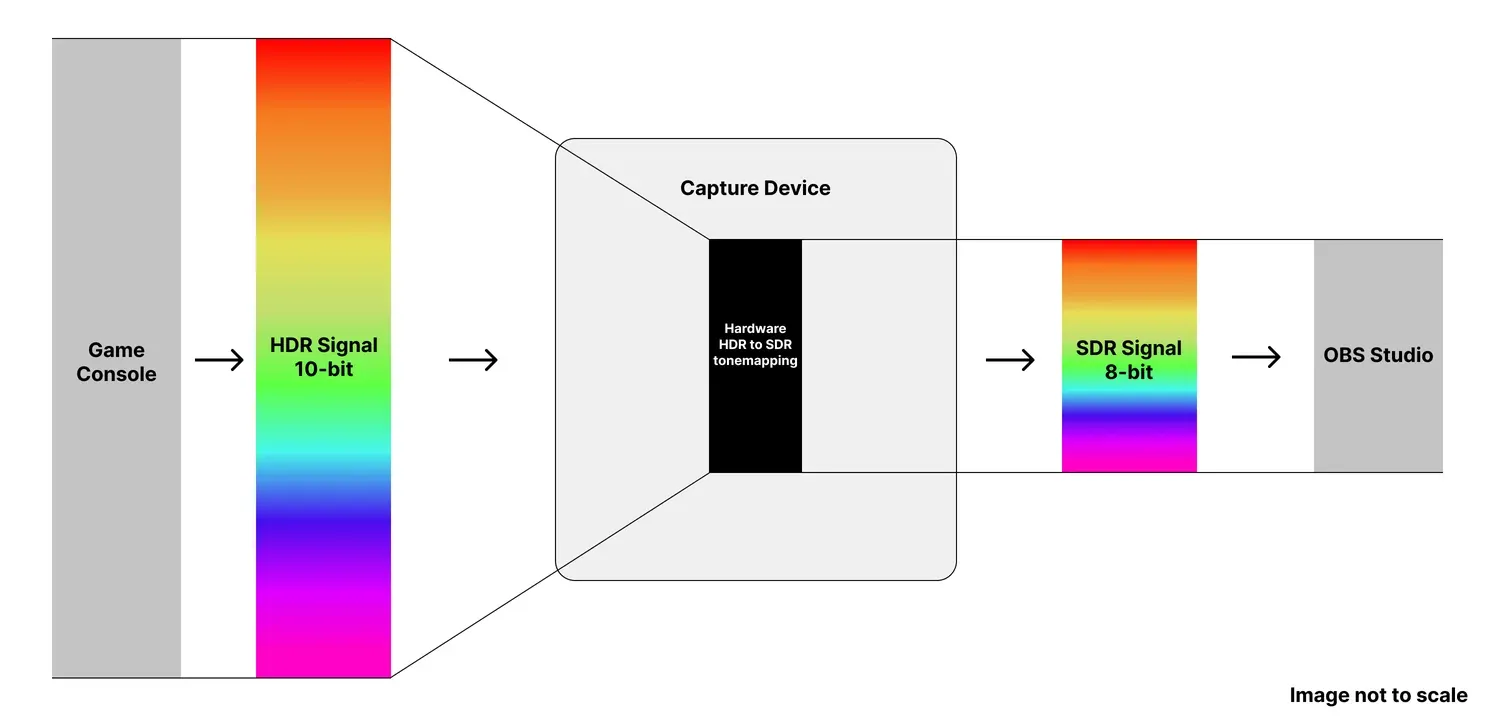
Why does HDR gameplay look different when captured? Learn how tonemapping works and which Elgato devices convert HDR to SDR automatically.
silk turtle
I don’t really understand what you said. I turned it off so it wouldn’t be so unsaturated.
Turning off hdr tone mapping made it overly saturized which is better then it being significantly under saturized imo
Atlest I’m 90% sure that’s what originally did it
Even so I’m just looking for help to fix it. It’s ugly and a pain on the eyes
past basin
If you turned off the HDR tonemapping while your console is outting HDR video, you need to use it with an app that was setup for HDR specifically
The tonemapping was probably what was resulting in saturation loss though, yes. But HDR and SDR are different colour formats, which is why the card has to try to convert it
Not all PCs, monitors or even streaming platforms support HDR yet.
So if you want full consistency turn off HDR on the Switch 2 itself
Otherwise if you don't want the HDR to SDR tonemapping on you need to make sure both your recording app of choice and PC monitor, support HDR ot you're going to have more issues
 native patrol
Hi everyone, I’m new here
And have been battling audio mixing on my own for about a week now
Was just wondering why I’m constantly picking up static on my set up and how I may resolve
I have a new capture card coming in the mail today (hopefully) it will be my third one this week.
But do you guys think it is possible to run a MacBook Pro with elgato hd60 and chat link pro cable and not have audio static on my streams. Currently running OBS and I also have a separate microphone for my laptop this will be on a ps5
past basin
native patrol
I have a new capture card coming in the mail today (hopefully) it will be my thi...
HD60, or HD60 X? The original HD60 isn't compatible with the newer Macbooks with Apple CPUs (M1 and newer). It might try to run in Rosettea2 mode, but that can result in weird issues if it runs at all
HD60 S+ and HD60 X are M1+ compatible, HD60 and HD60 S are not.
native patrol
past basin
HD60, or HD60 X? The original HD60 isn't compatible with the newer Macbooks wit...
I have an older MacBook at the moment
Where can I check the exact model of mine. I’ve watched some videos on this before but forget
past basin
Intel based? I think HD60 should work with the old game capture HD app if that's the case
native patrol
Yes, I believe mine is intel based
past basin
Yeah, you'll want the old app then - https://help.elgato.com/hc/en-us/articles/360027963512-Elgato-Game-Capture-HD-Software-Release-Notes-macOS
Elgato
Below is a comprehensive list of Elgato Game Capture HD software releases for macOS (OS X).
macOS (OS X) Release Notes - Software Download Links
2.11.14
Game Capture 2.11.14 for macOS
Up...
Should in theory work.
But you say you're getting static with this kind of setup?
silk turtle
past basin
Not all PCs, monitors or even streaming platforms support HDR yet.
So if you wan...
i tried this and it didnt work\
past basin
You turned it off for docked mode specifically right? It has two HDR options, one for docked mode, one for the internal panel
native patrol
past basin
But you say you're getting static with this kind of setup?
I have been with other capture cards (Amazon one and I just had the elgato 4ks)
 past basin
Iris graphics? I'm not 100% sure how well that will work - the app technically required AMD or NVidia graphics for the video encoding
native patrol
past basin
Iris graphics? I'm not 100% sure how well that will work - the app technically r...
You are referring to the older app?
past basin
Yes, the old game Capture HD
Hm. It's not actually listed in the HD60 requirements, but is in the HD60 S ones. Weird
native patrol
I purchased the HD60 because it looks like there is a device management software for it on the elgato website that allows you to change the audio to dialog or something along those lines
past basin
Game Capture HD App allows that, yes. HD60 doesn't work with newer apps like Elgato Studio or Capture Device Utility for macOS
But you also get stuck running Game Capture HD, since there's no direct use driver for HD60 like there would be for the newer 4K S (which uses the OS's UVC driver)
native patrol
I purchased the 4ks before realizing that so now I’m going in the direction of the HD60 in hopes that will work
My biggest issues has been when I connect chat link pro to controller it cuts all audio of game from OBS and I don’t know why
past basin
4K S should in theory work with that setup
native patrol
And when I’m not connect my audio from game is chopped or sounds like static. I also purchased a usb c dock thinking maybe it’s to much for the Mac book entering into its only two ports
past basin
It requires Elgato Studio to change the audio options, which only needs macOS 14.2 or newer
native patrol
past basin
4K S should in theory work with that setup
When I go into the application for 4ks it gives me no option to change audio to dialog
Doesn’t really allow me to change anything
 native patrol
Let me see this now
past basin
The icon they're using for those settings is becoming the bane of my existence
native patrol
Ok

Wow
So I should change this to analog audio since I’m running the chat link pro cable
?
past basin
Yes
Card won't auto swtich, but in analog mode it'll use the line in jack on the front where chat link connects
native patrol
Hmmm
On OBS it finally seems to be picking up the game audio
It should be picking up my mic also right?
past basin
No, Chat Link can't amp a headset mic
So it can't split it
Mic only goes to the console
native patrol
But it will pick up the chat audio of my party from in games
past basin
It should, yes. Anything you hear in the headset should go to the capture card
native patrol
I have an additionally microphone that will be linked to my pc
So my next question is I have a headset where the mic can be removed
past basin
(You might have to actually disable the macOS voice isolation mic mode though - that sometimes gets turned on and applied to the capture carD)
native patrol
Is there a way I hate the microphone connected to my pc can be picked up on the console?
I need to check if the audio is still choppy now I’m about to launch the stream and see
past basin
Yes, but it's not generally easy to setup and will require plugging a USB sound card into the console
What are you capturing with the card there anyway?
native patrol
past basin
What are you capturing with the card there anyway?
I’m capturing gameplay
native patrol
Ps5
past basin
Okay, PS5 works with most UAC based sound cards without much trouble
native patrol
It’s hard to tell if my audio is still choppy on twitch
past basin
That said there's two ways to do this depending on if you mic has a 3.5mm line out or not. If it does, and has built in mic monitoring (and you're not already using that jack) turn on the mic monitoring, run the mic's line out to a Line In on a USB soundcard in the PS5 with an aux cable (this may reuqire a ground loop isolator too, depending on the mic, to keep things from buzzing)(
native patrol
I feel like I barely hear the game
past basin
Check the mic icon in the top menu bar on the mac and make sure it's not set to voice isolation

 past basin
Hm. Maybe the intel ones don't have voice isolation
lone crypt
Is it not under the green camera icon?
past basin
I know on mine it's under a mic icon specifically, but maybe. You've got more mac experience than I
native patrol
lone crypt
Is it not under the green camera icon?
 past basin
Good to know, that's where it is, but it's already on standard
lone crypt
Check OBS, too in that menu
It tabs out the various apps with permission for cameras/mics
native patrol
Where do I go to check OBS?
lone crypt
It’s there in the menu you showed a picture of.
 lone crypt
There it is. OBS set to voice isolation
native patrol
So all three should be set to voice isolation?
lone crypt
☝️
native patrol
Okay just set them all to standard
Omg I’m not sure if I’m just imaging this but it seems like the static is gone
past basin
The static might have been noise that was only getting partly removed
native patrol
Think I’m just hearing the fan slightly
Maybe it can be fixed with a filter on OBS?
past basin
Maybe
For something steady like fan noise the bulit in RNNoise filter it lets you apply to the mic might be enough
Otherwise there are also plugins you can add like Voice Focus. https://www.elgato.com/ca/en/explorer/products/marketplace/voice-focus-make-any-microphone-sound-studio-ready/ (I'm unsure if you can apply the built in mac isolation to only a single device via OBS)
AI-powered noise reduction for any mic. Get clear, studio-quality sound for streaming, recording, and video calls.
native patrol
past basin
That said there's two ways to do this depending on if you mic has a 3.5mm line o...
Few more questions on the mic set up
I would need to buy a separate item to connect to the ps5 so the audio is transferred from my mic connected to the pc to ps5

 vale moat
hello everyone, i have the 4KS capture card. I have all my hdmi cables set up correctly, i am able to see my screen on the elgato studio app and my monitor I use to game, but I am not able to play on performance mode. Both of the monitors I use are above 120 hz. I am on playstation 5. Can anyone assist me? (my monitor is 1080p)
lone crypt
native patrol
You would have to check if the mic can be used in xlr mode and usb mode at the same time. And if so, then you would need a xlr audio interface to turn that xlr output into a usb connection the computer can use.
Wave xlr is elgato’s device for this, but there are many.
past basin
native patrol
I would need to buy a separate item to connect to the ps5 so the audio is transf...
You'd need the USB sound card for the PS5. Perferably with a Line In jack on it. It looks like the mic has a 3.5mm audio jack but you need to check the manual to be sure it can be used for mic monitoring (which is what we'd be kind of abusing to get a mic feed to the PS5)
lone crypt
Oh that’s an idea I hadn’t thought of; using the 3.5mm…
past basin
Yeah, I've got one here that I'll be testing the setup on my own system when I have some time, but I've seen other folks pull it off
Easier than trying to reroute the whole mess through the PC if they dont' need filters on the PS5 side
lone crypt
Yeah, use the direct monitoring port that they probably aren’t using for a setup like this..
past basin
vale moat
hello everyone, i have the 4KS capture card. I have all my hdmi cables set up co...
Do you mean the performance mode option is blocked out, or you lose signal when using it?
vale moat
i play apex legends. it will not give me the option to select the performance mode option. its locked on the 60 fps option.
past basin
lone crypt
Yeah, use the direct monitoring port that they probably aren’t using for a setup...
Yeah, biggest concern I have is it probably needs a Line In specifically since it's line voltage. So I grabbed a Soundblaster. . g3 I think it is, with a line in option when it was on sale.
past basin
vale moat
i play apex legends. it will not give me the option to select the performance mo...
Works fine when the card isn't there? If you run the 1440p test mode to resync the display options does anything change? Is 120Hz set to be available in the main video settings?
(we don't actually need 1440p just the quickest way to force the PS5 to resync)
vale moat
yea i use performance mode without the card if thats what you're asking and my monitor is 1080p 144 hz i believe...
i bought it a while ago
i clicked the test 1440p and it closed all my apps and i got the message "the connected hdmi device doesnt support 1440p output"
 wide osprey
my capture cards when i go into my library on the switch it makes a weird sound
past basin
vale moat
i clicked the test 1440p and it closed all my apps and i got the message "the co...
That's fine, it does indiate it resynced. 120 Hz mode is still showing on in the video settings on the PS5 itself?
past basin
wide osprey
my capture cards when i go into my library on the switch it makes a weird sound
Do you have a recording of the sound or more detail?
wide osprey
i dont have a recording but i can get you one some time
vale moat
past basin
That's fine, it does indiate it resynced. 120 Hz mode is still showing on in th...
 past basin
Good, good, it didn't outright block it at least
Give me a little bit, I've got to reconnect my own PS5 to get it up to check some settings - but there should be an option there somehwere that shows what supported modes the PS5 is actually seeing
vale moat
Ok
past basin
vale moat
Ok
While I'm trying to find the cables for this, what is your Input EDID mode set to for 4K S when you check in Elgato Studio?
 vale moat
 past basin
vale moat
past basin
vale moat
Huh, I thought 4K S defaulted to Display like 4K X does. Was that previously changed, intentionally? If not try setting it to display, and see if it gives you acceess to performance mode then
past basin
Might need to run that 1440p test or disconnec tthe HDMI and reconnect it again if the console doesn't pick up right away on the change
vale moat
i switched edid to display and its still not working. im going to try what you just told me now
it worked after i did the 1440p test
thank you so much!
past basin
Nice, glad you were able to get it sorted out
Now I've got to go see if I can finish hooking this mess back up - console's been offline since it's UPS died during a recent storm, still trying ot fix the snarl of power wires to bypass that 🙂
vale moat
wow good luck bro
past basin
Yeah, I just need to get these all sorted for the new UPS. Get the right things in the battery side of it. Should actully grab the label maker awhile I'm at this and label what cable is what to save time for future me
 fluid olive
Hey, so ive been trying to start streaming via ps5. I recently bought an elgato hd60x, I have everything plugged in correctly ( PS5 -> Capture Card Input) ( Secondary monitor for seeing ps5 -> Capture Card Output). I can see my PS5 screen on OBS but I cant see my PS5 screen on my secondary monitor. HDCP is off.
lone crypt
fluid olive
Hey, so ive been trying to start streaming via ps5. I recently bought an elgato ...
What’s the card’s EDID set to?
Do you have anything else connected to a different input port on the monitor the capture card output is connected to
fluid olive
the EDID is set to internal and no it’s just the hdmi connected to the capture card but it won’t pick up the ps5 signal
lone crypt
Change EDID to display.
And if it doesn’t work right away power cycle all the devices to make sure they update.
If that doesn’t work try EDID:merged.
fluid olive
i tried both, they don’t work
past basin
fluid olive
i tried both, they don’t work
PS5 doesn't always refresh when the EDID changes. Set it to Display again then either disconnect and reconnect the HDMI or run the 1440p mode test to trigger it to refresh display options.
 ruby cape
Using the Elgato 4k X in OBS. Are there any settings I should change here? Is hardware decoding a good thing to turn on?
 lone crypt
ruby cape
Using the Elgato 4k X in OBS. Are there any settings I should change here? Is ha...
lone crypt
ruby cape
Using the Elgato 4k X in OBS. Are there any settings I should change here? Is ha...
You'll probably want buffering.
Other than that, if it looks right then the defaults are fine
 tropic depot
W8 on my RMA product send to mee
ruby cape
lone crypt
You'll probably want buffering.
Other than that, if it looks right then the defa...
What's the benefit of buffering? I had issues with webcams with that turned on. If they lost connection it was impossible to reload them without unplugging the device
Thanks btw
lone crypt
ruby cape
What's the benefit of buffering? I had issues with webcams with that turned on. ...
in exchange for a small amount of latency. (Which shouldn’t matter to the capture, of course)
Buffers absorb some frame time inconsistency so the capture can have perfectly smooth frame timing.
ruby cape
Oh nice
And the same goes for all video capture devices? Or is that unique to capture cards
lone crypt
The principal is going to be the same for everything.
Even watching a video on YouTube. It buffers the data ahead so if your internet slows down it can keep playing smoothly through those momentary slowdowns.
Only in the case of a capture card it is real time so it can’t buffer whole seconds or minutes ahead.
It’s a few frames of buffer. A slight delay.
Audio systems have a buffer. Everything. Your computer display system has a buffer.
So unless you’re playing while watching the preview (which isn’t ideal) and playing a rhythm game or something where absolute latency is the most important thing,
Your system will be able to absorb a little inconsistency and capture smooth with the buffer on
fluid olive
past basin
PS5 doesn't always refresh when the EDID changes. Set it to Display again then ...
Hey this didn’t work either
 shut pagoda
hello i wanted to ask here like how do i add elgato studio to steam using the add non steam game function because i cant find the folder with the elgato studio exe
lone crypt
shut pagoda
hello i wanted to ask here like how do i add elgato studio to steam using the ad...
Is this a good idea? If steam thinks it’s a game won’t it prevent other games from launching while studio is running?
But that’s your business, I guess.
Press win key, start typing elgeto studio until it comes up, click open file location. This will show you the shortcut in the start menu, where you can click properties, and that will show you the path/file the start menu shortcut is launching, as well as any arguments.
shut pagoda
oh i cant do the open file location thingy

and i just want it on steam so i can quick open it bc im lazy
past basin
Studio is UWP app on Windows, find it with Task Manager instead as it's going to be in the protected Windows Apps folder

That location is going ot change every update too, the same way Discord does
lone crypt
shut pagoda
Oh wow, another thing we used to be able to easily do that windows 11 subtracted ….
In that case, your start menu should be in @user/appdata/local/microsoft/windows/start menu
Unless they moved that, too.
shut pagoda
past basin
Studio is UWP app on Windows, find it with Task Manager instead as it's going to...
this worked too
lone crypt
Yeah that’s why I’m saying follow the shortcut in start menu including arguments. Might work
past basin
lone crypt
Oh wow, another thing we used to be able to easily do that windows 11 subtracted...
Still works for non UWP (aka Windows Apps) programs.
lone crypt
That’s how I do a launch discord button on stream deck
past basin
The UWP apps are more locked down
lone crypt
Gotcha
shut pagoda
wel atleast i got my answer so gracias
 fast mango
hi guys, i wonder if you can help me. i recently bought a 4k s for my switch 2 for 1440p passthrough and recording. however i cannot get it to record and passthrough 1440p? when its connected to only the 4k s or only the monitor, it outputs 1440p but when i set it up for passthrough, elgato studio/the 4k s only detects and passthroughs 1080p
lone crypt
fast mango
hi guys, i wonder if you can help me. i recently bought a 4k s for my switch 2 f...
I bet This is edid setting. Change to display or merged, which ever you haven’t tried
fast mango
lone crypt
I bet This is edid setting. Change to display or merged, which ever you haven’t ...
i cannot see that option in studio, where do i go? i think im blind lol
lone crypt
Open the right side panel, button next to the settings cog
fast mango
jesus ok thanks, i see now...coming from the 4k capture that was not intuitive 😂
fast mango
i will spread the word
 maiden belfry
My ps5 audio wont work with obs using a chat link pro aswell tried doing the jack into the capture card and in the line in but when I go to hdmi audio i get no os5 audio and no obs audio
past basin
maiden belfry
My ps5 audio wont work with obs using a chat link pro aswell tried doing the jac...
You're using a Chat Link Pro, the card needs to be set to Analog audio using Elgato Studio or 4K Capture Utility. Setting will save on the card then so you can use it with OBS. You won't get audio on the HDMI if PS5 is outputting to Chat Link
maiden belfry
past basin
You're using a Chat Link Pro, the card needs to be set to Analog audio using Elg...
I have it on analog audio, and idk if it’s out putting to the chat link, but I got a arctis nova pro headset, so would the gamedac make it easier to get the audio on my obs I tried to do this couple months back but gave up and put it away
past basin
maiden belfry
I have it on analog audio, and idk if it’s out putting to the chat link, but I g...
Oh, if you'ore hooked up with a USB headset it mutes the analog out while you're using it.
In this case the Nova Pro is the way to go. Use the line out on the back of it, run Chat Link between the Line Out and card, just leave the headset jack empty, and make sure the ground loop isolator is on
You may have to set the Line Out mode on the DAC to stream (when on stream mode there's also a mini mixer when you press it in again that lets you set what goes to the line out to go to the capture card)
The Nova Pro line out is a bit quiet so you might have to apply a gain filter in OBS, or use the advanced audio to set it to like 150%
maiden belfry
past basin
Oh, if you'ore hooked up with a USB headset it mutes the analog out while you're...
Yeah idk this shiz not working idk if it’s me not being smart imma have to try to find a video or sum
past basin
Small chance of the Chat Link being a problem too - if you have a 3.5mm headset or headphones about plug into the headphone jack ont hat to see if you're getting sound from the Line Out
maiden belfry
past basin
Small chance of the Chat Link being a problem too - if you have a 3.5mm headset ...
At first I wasn’t even using the game dac I was just using the 3.5 mm jack and it wasn’t working idk
Swear there’s gotta be a better video that shows obs stuff too cause elgato don’t really show that on they YouTube
past basin
maiden belfry
At first I wasn’t even using the game dac I was just using the 3.5 mm jack and i...
PS5 was set to headset for the audio output, and the card was on Analog for input?
With the GameDAC involved it'll be usb headset now on the PS5 side
maiden belfry
Without the gamedac I had it on hdmi audio on ps and analog audio and I didn’t really try with the gamedac had ppl waiting to play for a bit before I work I’ll prob try to figure this out tmr morning
past basin
maiden belfry
Without the gamedac I had it on hdmi audio on ps and analog audio and I didn’t r...
If it's on HDMI audio on the PS5 it woudln't output to the Chat Link
maiden belfry
past basin
If it's on HDMI audio on the PS5 it woudln't output to the Chat Link
Well damn
past basin
PS5 does one audio stream per user, so if a headset is plugged in it all goes to that. If you force HDMI it won't go to the headset/chat link in turn
maiden belfry
I think you’re the person that tried helping me a couple months ago
past basin
Could be, I spend probably too much time on here
I went with the Nova Pros myself for dealing with the audio too
maiden belfry
Yeah I bought nova pros capture card group loop isolator and chat link pro just for this shi not to work for months lmao
past basin
Okay, let me give you a run down over how I'm setup. I'm on the wireless ones, but the gameDAC gen 2 should work the same way.
So GameDAC to PS5 on USB. Make sure it's set to use the right USB port as it only uses one USB port at a time.
Line OUT with the aux cable and ground loop isolator go to the card (can swap these with a Chat link to do the same thing, just leave the headset plug empty)
Capture card needs to be set to Analog audio mode.
GameDAC needs go to Line Out mode and select it to set it to Stream.
At that point any audio going to the GameDAC over USB should also be going to the line out, which should go to the capture card.
You may need to check Windows Sound settings if it's not (press windows key + R, type mmsys.cpl and press OK on the box that comes up - find the card on the recording tab and check properties, make sure it's not turned down or muted on the levelst ab).
If you're using OBS when you add the card, by default it adds it so audio only goes to stream and recording. If you want to hear it on the PC too use the advanced audio settings and set the monitor option to Monitor and Output.


If you're still not getting audio it's best to plug something into the line out jack to listen and see if the DAC is outputting the audio. We'd need to know if the issue is the DAC side, or the PC/capture card side
maiden belfry
past basin
Okay, let me give you a run down over how I'm setup. I'm on the wireless ones, ...
Instead of the ground loop can I use the chat link I don’t know where the isolator is I can’t lie
past basin
maiden belfry
Instead of the ground loop can I use the chat link I don’t know where the isolat...
Yeah, just make sure the Chat Link's own loop isolator is set to on
maiden belfry
Ok I’ll try this out tmr morning
past basin
Good luck with it
quartz tiger
Ok so I bought the new CC
But now it is tearing so much

This from my Gaming monitor

And this is from my 4k capture utility
It only does this in 2 games this far RDR2 and Diablo4
It seemed like HDmi cable issue
I added Elgato's own 8k Hdmi and everything works
Diablo IV had some little tearing still
in the TOP left corner of the monitor
frozen pollen
past basin
Check with the new Studio app instead of Capture Utility as well - for some card...
Unfortunately it is still having issues. Had 2 BSOD and struggled to recognize the card.
If I start the computer without it plugged it seemed as the issue was not there. Reading dmp files shows it is due to a faulty USB connection and I think my keyboard/mouse are fine.
I will keep testing but I’m wondering why this is happening
past basin
Mouse and keyboard aren't going to be a terribly good compairson as they often run at USB 2.0 or even 1.1 speeds, while a capture card running at USB 3.0 speed puts more load on the USB chipset in your setup. Were there any BIOS updates for the motherboard, or updated chipset drivers?
 gloomy creek
Hello
I'm facing an issue with the sound in my stream setup, can someone help me please ?, thanks
 signal smelt
I came here with a similar issue haha, I'm using a 4K S on my Macbook and the audio delay is pretty bad 😭
Does anybody know if there's a reliable fix for this or do I just have to connect my headphones directly to my Switch 2 if I want my audio and video synced?
I should mention that there's no issue with the video input whatsoever; I was actually presently surprised by the lack of visual delay. It's just the audio that's being finicky.
past basin
signal smelt
I came here with a similar issue haha, I'm using a 4K S on my Macbook and the au...
Where is the delay - only on the macbook, with the audio and video in recordings being desynced, or is it delayed compared to a display on the HDMI OUT of the card, but in sync for recording?
signal smelt
I'm not using the card's HDMI out because I only have one monitor (which my mac is plugged into), so the delay is in the default Elgato Studio preview window
If that makes sense
past basin
Hm, that's unexpected. The card is designed to keep the audio and video in sync from the HDMI input.
Do you get the same issue if you use a different app like Quicktime, Meld or OBS?
past basin
Should be able to iirc. It'll setup the same as HD60 X for that https://help.elgato.com/hc/en-us/articles/5706462847757-Elgato-Game-Capture-HD60-X-How-to-record-video-using-Quicktime-on-macOS
Elgato
This guide will go over how to record high quality video with Quicktime on macOS when using HD60 X.
Quicktime can record high quality video in either 720p60 or 1080p30 from HD60 X.
Requirement...
signal smelt
Awesome awesome tysm, I'll see if that'll help
past basin
I can't recall if it does audio monitoring but it should at least do a recording. Meld and OBS should allow audio monitoring if QuickTime doesn't though
signal smelt
okok
Also for the time being I'm not really trying to record anything, I just wanted to use the capture card to monitor my games through my mac cause I'm working with a small setup in my dorm 😭
past basin
Yeah, this is mostly a test to see if the issue is specifically coming form using Studio or not
How long is the delay you're seeing anyway?
signal smelt
I have quicktime open and there's no audio monitoring as far as I can tell
It just plays back my own mic's input
past basin
Ah, you might have to set the audio device to the capture card too, not just the video
signal smelt
past basin
How long is the delay you're seeing anyway?
Almost a full second
signal smelt
past basin
Ah, you might have to set the audio device to the capture card too, not just the...
Oh i see, lemme try that
I'm not seeing any place to change audio input in QT Player
Wait okay very strange development
The delay got a lot better in Elgato Studio by itself
past basin
huh
signal smelt
I didn't change anything but it's not as noticable anymore
past basin
Might want to restart the whold mac if you haven't already and see what happens. Maybe the os audio system is having a hiccup
signal smelt
That's probably a good idea
I'll do that rn
Thanks for the help btw
Sorry I'm kinda clueless lmao
past basin
All good, with and luck it'll clear up with a reboot if the delay is adjusting on it's own
past basin
No worries, glad it seems to have cleared up
maiden belfry
Ok I got audio in obs now is there anyway to make obs not hear my ps mic and only my pc mic im pretty sure its doubled up, and dont want it to be doubled for when im in a vc with people
Also thanks arcane the way you have it setup worked no problem
past basin
maiden belfry
Ok I got audio in obs now is there anyway to make obs not hear my ps mic and onl...
Yep, just go into the settings on the DAC again, when you'ore on the Line Out settings press in the dial again and you'oll get a mini mixer so you can remove the mic from what goes the line out that feeds the capture card


I really have to dust again this week it seems
In theory you can also set it to speakers intead of stream, but I've had some folks run into issues with that so I usually just suggest using the mini mixer
maiden belfry
Thank you so much
past basin
No worries, good luck with it
 robust notch
keep getting this even though it is, any fix?
 lone crypt
robust notch
keep getting this even though it is, any fix?
lone crypt
robust notch
keep getting this even though it is, any fix?
Yes, connect your 4kx to a usb 3.0 port with a 5gbps or faster cable.
 sage sapphire
Question for anyone who can answer. I have an Elgato 4K X that I’m trying to get setup on my iPad. My PC sadly died and this what I have to work with it. I have the card setup correctly but my Elgato Capture app isn’t seeing it on the list of devices. Any assistance is appreciated. Thank you.
lone crypt
sage sapphire
Question for anyone who can answer. I have an Elgato 4K X that I’m trying to get...
Did you follow the directions here and verify that your iPad is a usbc ipad and on the compatible ipadOS version?
Elgato
This article will guide you on recording using an iPad with Elgato 4K X.
Contents
Required Items
Setup steps
FAQs
Required Items
To use the 4K X for capturing content on your iPad, ensure y...
sage sapphire
lone crypt
Did you follow the directions here and verify that your iPad is a usbc ipad and ...
Yes, I confirmed those steps.
lone crypt
Don’t know, then; sorry.
Unless somebody knows better, open a ticket to #official-tech-support
past basin
sage sapphire
Question for anyone who can answer. I have an Elgato 4K X that I’m trying to get...
What specific iPad are you using? The cards may not work correcly with the USB 2.0 based A14 and A16, even though they have USB-C connectors.
Also how is it connected - using the original cable? No docks or hubs? Does the light on the card power on?
(my replies will be a bit delayed, I'm checking in between work projects)
 hearty otter
Hi, I am running into a problem and hoping someone can help. Machine #1 is my primary machine. It is 4K (3840x2160) and using Windows 10 pro. Machine #2 is a the same. Inside Machine #2 is installed the 4k60 Pro MkII card. I have the HDMI port output of #1 plugged into the HDMI input of the capture card in #2 . Both machines have 4K monitors connected to a displayport. I try to duplicate the display of #1 to #2 and it will not allow it. It WILL allow me to extend the monitor, which of course I do not want. (I stream thus #2 is taking the input from #1, processing it and streaming it to the internet to keep that load off the main system).
Any idea on this one? Have tried disconnected cables, reconnecting cables, rebooting, reinstalling 4k 60 and software for it and so on.
past basin
hearty otter
Hi, I am running into a problem and hoping someone can help. Machine #1 is my ...
Check for GPU driver updates. There was an NVidia driver release a few months ago that did exactly this. If you're a few months out of date on the GPU drivers, I'd start there, on the gaming setup.
hearty otter
past basin
Check for GPU driver updates. There was an NVidia driver release a few months a...
Drivers are current in all respects.
trying another reboot and cable swap..
hearty otter
This makes no sense at all... Two machines, identical in most respects, 2nd one has capture card. Both running same resolution, same sync rate and yet I can extend but not duplicate monitors to that 2nd machine via the capture card.
past basin
Is there a custom EDID set on the capture card in the streaming box? Also does setting EDID to internal and then restarting both systems have any effect, if it's not already on Internal?
hearty otter
past basin
Is there a custom EDID set on the capture card in the streaming box? Also does ...
Tried changing all that stuff.. Left it mainly default originally. Am reinstalling the software again now after manual deletion and registry clearing, as well as erroneous files left after uninstall if any. Waiting for reboot on second machine now, going to install again. Never seen this issue before and the only change was a video card upgrade. Should have been as simple as plugging the cables back in and that's it...
past basin
Was the the gpu on the gaming rig? If so you might try reinstalling the driver after running DDU to remove any traces of the old one if you weren't down that road already
hearty otter
Nope even with software uninstalled, it will not duplicate.
hearty otter
past basin
Was the the gpu on the gaming rig? If so you might try reinstalling the driver ...
GPU's on both machines. Primary is a 5070ti, the second is a 3070ti upgrade from the RTX 2070. Both are usually clean install of video drivers but might as well try that again...
hearty otter
Ok, I figured it out. There is some kind of conflict between Windows Display Settings, the Nvidia App and the Nvidia control panel AND the 4k Capture utility. The Nvidia APP finally was able to resolve whatever this is. But caused some other issues like scaling to 300% and other changes that had to be changed back. Basically do NOT use Windows Display Settings unless you really want to get confused and your system not function right when it comes to duplication to the 4k60 Pro MkII.
For some reason, the 4k60 Pro MkII kept forcing itself to be the primary monitor, which of course shuts down the other systems monitor or sets it to non priority depending. Even all the uninstalls, reinstalls, cable swaps and more would not change this. Even after I manually cleaned out files and registry entries.
Right now I have it working once again but still have two more monitors to now plug in and I dread what will happen when I do.. LOL
The other thing to note, the 4K60 Pro Mk II does NOT support 10 bitplanes but I do not know if that has any impact on this issue. Just wasted an entire day though trying to resolve what should have been a 5 minute change after installed a new video card.
hearty otter
One last note.. once you have it working again, you WILL have to also go into the app system options and reset your gsync, scaling and color options again. Otherwise it will use the defaults and not the GPU for those things.
frozen pollen
past basin
Mouse and keyboard aren't going to be a terribly good compairson as they often r...
They are all in beta and none mention the chipset. All updates since were for newer cpus, I’d be worried it would actually make things worse! I’ve narrowed it down to if I turn the pc on while plugged it crashes. So I’ve moved it to front IO so I can unplug everytime. But it still doesn’t feel right…
I was also experiencing a bug where pc would turn on but elgato would show blue light and not connect at all even if disconnecting and reconnecting.
frozen pollen
frozen pollen
They are all in beta and none mention the chipset. All updates since were for ne...
Would yoh like me to share the dmp file analysis results?
when i looked at the dmp files
I got something like this
DRIVER_POWER_STATE_FAILURE (9f)
A driver has failed to complete a power IRP within a specific time.
Arguments:
Arg1: 0000000000000003, A device object has been blocking an IRP for too long a time
Arg2: ffffcf84de5e4ca0, Physical Device Object of the stack
Arg3: ffff9088c466f000, nt!TRIAGE_9F_POWER on Win7 and higher, otherwise the Functional Device Object of the stack
Arg4: ffffcf84ea1c5770, The blocked IRP
not the same (i googled this rn)
past basin
I havn't got any debugging or analysis tools on this machine to read dump files at the moment. Might be something to pass to the #official-tech-support folks though.
If you're seeing power state errors specifically though, consider disabling Windows Power Management for the USB controller. I usually do this by using USB Device Tree Viewer https://www.uwe-sieber.de/usbtreeview_e.html
From there find your card on the list on the left and you'll see what controller (Green card icon) it's listed under. Right click that go to properties, and click the Change Settings option. Should give you a power management tab where you can disable Windows ability to change the power management. It's uncommon but this can cause issues with some products
So disabling it might be a place to start
 warped cypress
Do you think I should update to a newer capture card I currently own a hd 60 s
past basin
Depends on what you need it for
HD60 S still works fine if you only need 1080p60 in SDR
(and are on a Windows PC)
warped cypress
Yeah fair enough
Don’t wanna jump the gun and race out and buy a new one if I didn’t need to
 next wadi
yo anyone able to help me ?
past basin
Folks are in and out through the day, best to describe the issue you're having and details about the setup and if anyone knows they'll get back to you
next wadi
im trying to fix my chat link audio i cant hear and talk into my mic for game chat
past basin
next wadi
im trying to fix my chat link audio i cant hear and talk into my mic for game ch...
To confirm, folks can't hear you through the console game chat when Chat Link is connected? I want to clarify that because Chat Link doesn't split the mic, it's a passive cable and only splits the audio coming out from the console since it cannot amp the mic, so it's normal not to get your own voice on the PC side
It should still go to the console though
maiden belfry
someone says my stream audiio aint remotely close to my game sound
past basin
Did they describe how? Or do you have a clip or vod of it?
next wadi
yes so i have three audio sources i can use for a mic so the chat link i plug in is for me to be able to talk to game chat but its not picking up my audio from this headset but i also have like a studio mic and a Bluetooth headset which either one of those id rather speak into than the cheap one i plug into for the chat link i specifically only bought this cheap wired one for the chat link cause u cant do it with the Bluetooth headset
@past basin
past basin
next wadi
yes so i have three audio sources i can use for a mic so the chat link i plug in...
So you're not getting the audio that's going to the headset either? What capture card do you have, and did you already set it to Analog Audio Mode?
past basin
So to confirm it's only folks in game chat on the consle that can't hear you? Is the right end of the cable plugged into the console? Chat Link only gives mic to the short end, the one that has a plug with 4 metal parts, 3 black bands
next wadi
past basin
So to confirm it's only folks in game chat on the consle that can't hear you? I...
yes game chat and the 2 band part is plugged into the remote and the 3 band part is plugged into wired headset
ill send photo
past basin
The wired headset should be plugged into the headset plug on Chat Link, the 3 band end sholdn't go directly into your headset. the 2 band part goes into the capture card.
So if the two band is in the controller, that's the issue
next wadi
one sec gonna test it on game chat
yea that was it thnx gng u really top tier dnt let no one tell u dif
@past basin
past basin
Glad it sounds like you got it working!
 jolly girder
So, as I was currently trying to figure out something weird with the HD60S+ with OBS, they directed me to this server instead (there was also a link to make a ticket, but that page was considered old and is being re-directed through a chat bot, which doesn't quite feel the same as actually making a ticket would).
TL;DR, OBS would keep responding with this error DShow: HDevice::ConnectPins: failed to connect pins (0x800703E3): The I/O operation has been aborted because of either a thread exit or an application request at seemingly random times. This would halt the stream entirely until I reconnected the cable to it.
And when I checked for this error specifically, the one uniting cause on two separate threads were that they were both using the HD60S+.
My question is, is this somehow a known problem with the HD60S+ with either the stock cables, or something else with the Windows UVC driver, and if possible, is there a known solution for how to stop this from constantly occurring?
Maybe something is up with the "DirectShow" issue that it is linked to, which would mean something else entirely with my own PC.
Also, I don't exactly know when this started happening. But I do know that this seemed to be happening more regularly with the Switch 2 (and considering there is a pinned post about it, maybe that also has something to do with the problem).
If anything, I might end up considering getting the HD60X (just found out about Game Capture Neo, might get that instead) at some point, which seems to have less problems than the HD60S+ currently does.
jolly girder
Upon getting more info from the OBS crew with the error code I got from their program, they did reassure me that it was an issue related to the Elgato device and/or driver, so, I'll be trying to get in touch with anyone who might have an idea why this is happening.
Add.Context: 4K Capture Utility even crashes when the stream dies out, so that's a big problem.
past basin
jolly girder
Upon getting more info from the OBS crew with the error code I got from their pr...
Why is 4K Capture Utility even open while you're streaming? HD60 S+ is a UVC card, using the UVC driver from Windows. It should only be accessible from one app a a time. Are you using Stream Link or somethign instead of adding the card to OBS directly as a Video Capture Device?
jolly girder
past basin
Why is 4K Capture Utility even open while you're streaming? HD60 S+ is a UVC ca...
...Ah, I'm using "stream" incorrectly here. I meant passthrough. I was getting my terminologies mixed up.
past basin
Aside from that use 4K Capture Utility or Elgato Studio to make sure the card is on the latest firmware. It's generally a very stable card, excepting when there are USB oddities (eg, trying to run it on USB 2)
jolly girder
Like, when OBS is picking up on the passthrough capture, that ends up halting completely.
past basin
jolly girder
Like, when OBS is picking up on the passthrough capture, that ends up halting co...
I think you're still using the term passthrough wrong there. Passthrough is specifially the video that passes through the card to HDMI OUT for an attached monitor ot TV. Anything that goes over the USB conneciton and is viewed in OBS is preview or capture, not passthrough
jolly girder
Ohhhhh.
OK, thanks for clearing that up.
Yeah, it'd be the preview capture then.
Also, I didn't see anything in 4K Capture Utility to update my card, and I can't use Elgato Studio since I'm not running Windows 11 (using Win 10 IOT LTSC, because of personal grudges against how Win 11 is being handled right now).
past basin
The firmware should gnerally be 22.02.24 in 4KCU then
There hasn't been new firmware for HD60 S+ in a while so 4K Capture Utility should still have the latest for that card.
That said, are you running 4K Capture Utility and OBS at the same time?
jolly girder
Nope, I've only run one of those at a time.
jolly girder
past basin
The firmware should gnerally be 22.02.24 in 4KCU then
Ah OK, here it is. Yeah, my firmware is... old.
 past basin
Okay, because that shouldn't generally work (though there is the Steam Link feature that lets you set 4KCU as an NDI source, I usually suggesting using OBS directly)
hm
That might be correct if there was a different hardware revision for it
jolly girder
I can check my order time from when I got it from Amazon.
OK, it was back in October 2022.
past basin
You can hold down CTRL while opening settings to force the update button to show up. If you try to run the update then it should either update or confirm if it's up to date for that card

 past basin
Yeah, I'd give that a shot then. Disconnect HDMI cables going to it before udpating for best results, and when it's done it should ask you to disconnect the USB to the card then reconnect it to reset it
jolly girder
Should it be the HDMI cable that is going to my TV (output HDMI)?
past basin
I usually disconnect both to be safe. There's always an element of risk with a firmware update (even though it's pretty reliable with the newer cards). Best to remove any chances of issues
jolly girder
OK, I'll take out both output and input for safety. Thanks for clarifying.
Huh. That was a little odd. It said it failed to update the firmware... froze and crashed on me, but when I opened up 4K utility again... the firmware is now on the latest version...?
I hope that didn't corrupt something.
Either way, I'm gonna reconnect the USB cable to the card.
...OK, seems like it's fine. It isn't asking me to update it again.
past basin
It might have just failed the timeout before reconnecting
If it has issues you can flash it again the same way if you have time - sometimes we've found using a different USB port helps if it keeps failing, preferably one on a different USB controller on the motherborad if your computer has one
jolly girder
Looks to be doing fine about now.
 past basin
Hopefully that's all the root issue was, a firmware bug with the older version
Next thing I'd try if you keep having issues though is disabling the Power Manangement on the USB controller the card hooks into
jolly girder
I hope so too, because it wasn't just randomly stopping the preview capture on its own. Other programs on my PC that ran videos of some kind was doing it too.
Also, I do know they recommended to put EDID mode on "Display", but I realise that it cuts down my resolution from 1080p to 480p on my TV, which looked kinda bad.
past basin
Display should be passing on the EDID from your TV to whatever is connected. If it's stepping that down check that you're runing a HDMI 2.0 cable between the card and TV. Anyting in between there like splitters, adapters, AV Receviers could also trip it up
jolly girder
I'm using the stock cable that came with the card as the only USB cable that goes from the card to my PC. My TV doesn't use a USB cable at all, as that is purely HDMI.
past basin
Internal uses the card's EDID and Merged tries to merge both into one (but can have some issues, especially if the TV has anything odd int he HDMI Extension blocks in it's Extended Display Identification Data)
Yeah, that should have been HDMI 2.0 cable sorry
It's late here
jolly girder
Ohhh, I see.
past basin
That card actually needs USB 3.0 for correct operation, so that error was doubly wrong on my part
jolly girder
OK, cool. I am using that.
I believe then that the HDMI 2.0 cable I'm using is the output cable. The input cable, I didn't check to see what version it was.
I haven't done this initial setup since 2022, so I'm a little lost on the finer details.
past basin
But yeah, if it's dropping to 480p, odds are the display mode is failing to negtiate somewhere. Using another EDID mode is fine at along as everything is working
jolly girder
Yea. So I did try running a video player just as a test, and it froze up the capture preview again. I could try changing EDID to Internal to see if that does anything, but I doubt it. It seems like it wasn't a firmware problem on the card's side. At this point, it could be some weird driver on my PC (but that would be a pain to solve).
past basin
HD60 S+ is a standard USB Video Class (UVC) device, it uses the driver for UVC that comes with the OS
jolly girder
Yes, it is.
past basin
So driver issues are unlikely at least
Next thing I'd check though is power management for the card. I do that with USB Device Tree Viewer https://www.uwe-sieber.de/usbtreeview_e.html . Open the app, find the card on the left side list so you can see what USB Controller it's on (green card icons). Right click the controller, go to properties, and click Change Settings on the window that comes up. Should get a power management tab. Disable the options in there and restart
jolly girder
Alright.
past basin
Doesn't hurt to check for motherboard chipset drivers and BIOS/UEFI udpates if you haven't already
Or if you have a different USB 3.0 or faster cable around, you could test the card withi that to see if the cable is starting to go
jolly girder
My motherboard is most likely on its latest BIOS update already, because it's an old X570 from ASUS TUF Gaming. I don't know if it could be the USB cable or not, because it'd be a weird thing to be associated with.
As I'm doing that first part, I have to emphasise again that the preview does not freeze up on its own, AFAIK.
Like, if I don't touch any of those and I just let it run for my Switch 2, it's fine. But the instant one of my video players starts playing, then it completely locks up, and I can't get the signal to come back in unless I completely restart the capture card by replugging the USB cable. I did try changing USB ports when I first came across this problem, but that unfortunately didn't solve it.
past basin
Yeah, that's a bit of a tough one to narrow down if it's a system conflict.
Win 10 doesn't even have the option that lets you see what's making calls to the cameras (and capture cards) either.
jolly girder
The only thing that could potentially be the issue which could possibly very well be a significant problem... is if the video player that I'm using is trying to connect to the Elgato capture card at the same time.
But if that's the case, I wouldn't know how to stop them from seeing it, thus interrupting the signal.
past basin
GPU would get used for rendering video and could sometimes do weird stuff, but I'd expect that to have other conesquences or only happen while the encoder on it is in use
jolly girder
jolly girder
The only thing that could potentially be the issue which could possibly very wel...
I know MPC-HC uses inputs for some stuff, and it finds the Elgato Capture Card in its list.
past basin
In theory a secondary connection should jsut get a black screen anyway, instead of crashing the card
jolly girder
Yeah, I'm just tossing darts here for random ideas to the potential source of the problem.
Ah OK, I see the info here now.

Oh wait, I think I got the green card here now.

Yeah, so as I tried to check the host contoller for power management, I don't actually get a tab for it.
OK, I did actually find the Power Management tab when I clicked on the "USB Input Device" that holds the "HID-compliant vendor-defined device".
past basin
Huh, it should have been on that AMD USB 3.10 controller too
jolly girder
Yeah, it just doesn't appear there. The only tab that shows up is "Resources" which I can't do anything about.
past basin
Even after clicking the Change Settings? Tab is hidden unless that is selected
jolly girder
Yes.
past basin
Weird. I wonder if that's based on the chipset driver the PC is running

 jolly girder
Perhaps?
past basin
Win 10 might have stuck it somewhere else back int he day too. I know some of the power plan settings got moved between versions
jolly girder
Though as I'm looking at the info for my Power Management, I see this little descriptor for my host controller.
EnhancedPowerMgmtEnabled : 0
Maybe it's already off?
past basin
Maybe. Those AMD controllers can be weird anyway. THey're based on ASMedia designs that sometimes have quirks. I know a lot of the 10 Gbps ones needed both firmware and driver updates for things like audio to work right in some cases.
If you have more than one controller showing up you might try moving the card til it shows up on the other one later too
jolly girder
I do have multiple controllers showing up here, but the third controller is the one that is used for the back of my PC.

The first controller is an actual USB hub that sits in place for my microphone, mini desk fan, and charging my controllers.
And the second controller... isn't something I can readily access? Because the only port used there is for "AsusTek AURA LED", which is for stuff like my RAM sticks and motherboard itself.
past basin
Yeah might not be possible but it was worth checking. Those sometimes you can only tell what controller a port is under by connecting somethign to it and watching the app
jolly girder
Right.
I do know that the first controller also holds some of my other USB devices, like my TP-Link Wireless USB, and my SABRENT USB Audio device... but those are plugged into ports that aren't USB 3.0.
Either way, since nothing I'm doing here seems to be actually working, it might be more worth it at this point to swap my HD60S+ for a newer device like the Game Capture Neo that was in 2024.
It would certainly also prove if it truly was something wrong with my PC if multiple capture cards were doing the same thing.
But that'll have to wait, since I don't currently own multiple capture cards on me ATM.
And the monitor that I'm using for my Switch 2 ATM isn't something that supports 4K, or 120FPS.
maiden belfry
past basin
Did they describe how? Or do you have a clip or vod of it?
yes my bad it was fine for the first hour then it happened outta no where
sorry had something to do
This was reloadingveing delayed and the shooting it’s all
past basin
maiden belfry
This was reloadingveing delayed and the shooting it’s all
Even the shooting was fine at first though? You're using OBS right? Try muting the card's audio and adding it again as an audio input capture. Sometimes OBS can get weird hiccups pulling the cards audio though the video feed, but using the cards audio interface directly gets around it
maiden belfry
past basin
Even the shooting was fine at first though? You're using OBS right? Try muting...
Yea it wasn’t delayed for like an hour and a half
past basin
Yeah, sometimes having its audio as a direct audio source will let it better recover sync when something happens. That should usually fix the delay at least. If it doesn't also fix the gun make sure the console audio is 2Ch/Stereo
 bitter jolt
Hello! Hope everyone is having a great night. I am attempting something new to me and doing a dual pc setup for streaming. I am outputting my PC to an HD60X which is connected to a Macbook Pro. Everything works aside from audio. Picture looks great, but I can't get the audio to work at all. I am using Voicemeeter to output audio to the HD60X by combining my inputs to one output there.
Here are some troubleshooting steps I have taken.
- Ensured that the sample rate is consistent between all device settings and both machines.
- Ensured voice isolation was not turned on for the macbook.
- Audio mode is set to HDMI audio in the 4K Capture Utility on the Macbook.
- Added independent audio source in OBS on Macbook to ensure it wasn't the problem.
I also have a CamLink 4K that is working perfectly and the audio comes through fine if I add it as a source.
 pseudo hemlock
Why does this happen

 novel python
When i play skylanders imaginators on xbox it has lile 5 screens on it when i disconnect capture card its notmal
Hd60x
novel python
pseudo hemlock
Why does this happen
Very blurry
lone crypt
bitter jolt
Hello! Hope everyone is having a great night. I am attempting something new to m...
How about trying a different app. Like Elgato studio
warped ledge
pseudo hemlock
Why does this happen
Try a different usb 3.0 port, and turn off usb suspend, reboot and see id that helps.
warped ledge
bitter jolt
Hello! Hope everyone is having a great night. I am attempting something new to m...
In the windows settings, are you routing audio to the capture card? Wave Link 3.0’s Beta can also route it over. Voicemeeter can also route audio over too. Voice meter would need to be on both devices though.
The simple method, you just wanna make sure your audio is routing to your capture card
frozen pollen
past basin
I havn't got any debugging or analysis tools on this machine to read dump files ...
great idea! will give that a go
frozen pollen
past basin
I havn't got any debugging or analysis tools on this machine to read dump files ...
It reports overcurrent when I connect it to motherboard or front IO
past basin
That usually implies there's too many devices on the USB bus, or potentially a short in the cable used
frozen pollen
Actually
Actually I’ve reset the pc and plugged to front i/o first
It no longer reports overcurrent
Something about the mobo usb-c that just doesn’t work
past basin
Front USB is probably on a different controller if that's the case
If it' moves the cards load off of everything else on the first controller it would help
frozen pollen
past basin
If it' moves the cards load off of everything else on the first controller it wo...
What do you mean?
past basin
Your motherboard generally has one or more USB Controllers. Each controller has a limit on overall bandwidth and power. So if all the devices you have plugged in on the rear were on one controller it's possible it couldn't keep up. Usually front side ports are on a different controller than the rear when a system has more than one. So you likely moved the load of the capture card to a different controller so the first one isn't getting overloaded anymore
It's not as likely to see power overloads on newer boards, especially with ones like ATX 3.1 where there's an extra power connecter on the board so it can pull more power from the supply, but it does occasioanlly pop up
frozen pollen
past basin
It's not as likely to see power overloads on newer boards, especially with ones ...
I agree, this could be a reason. My mobo is msi pro b650 s wifi so I doubt it would be overloaded, but I would not be surprised if it was msi’s fault lol
The back has only mouse and keyboard connected so I still find it hard.
I’ve also read on reddit that the some devices have an issue with back connectors (as bios starts device after pc or something like that, while front io doesnt).
Just a shame I can’t use that usb port, it is the one with highest bandwidth and not as janky as connecting to the front
bitter jolt
warped ledge
In the windows settings, are you routing audio to the capture card? Wave Link 3....
Thank you for the response! I did eventually get it working last night, but it seems to be some sort of voodoo 😄
I am routing the audio to the capture card via Voicemeeter and then add the capture cards audio as a source to OBS on the Mac.
Steps I took before it started working:
- ChatGPT mentioned it could have been a USB enumeration issue, so I unplugged everything, turned of the gaming machine, then plugged the capture card into the Mac, then into the GPU on the gaming machine, then powered it on.
- Instead of routing audio for my desktop into a virtual cable, I routed it directly to Voicemeeter Input.
I think it was the latter step that made the biggest difference, but I still can't fully understand why since the mic input was also not transmitting to the capture card. Oh well, hopefully it doesn't happen again and I never have to troubleshoot it again 😄
warped ledge
bitter jolt
Thank you for the response! I did eventually get it working last night, but it s...
Glad it’s working! Also thanks for the details to help others with the same issue.
bitter jolt
warped ledge
Glad it’s working! Also thanks for the details to help others with the same issu...
No problem at all! Thanks again for the help!
warped ledge
bitter jolt
No problem at all! Thanks again for the help!
You’re Welcome!
 modern pagoda
im wondering if anyone can help... i have my Sony zv-1f plugged into Elgato camlink but camlink is not detecting the camera is plugged in... has anyone setup a zv 1f with camlink before? if so can you guide me through. its my first mirrorless camera setup and im having issues.
warped ledge
modern pagoda
im wondering if anyone can help... i have my Sony zv-1f plugged into Elgato caml...
checking hte list to see if it's compatible.
modern pagoda
it is
 warped ledge
modern pagoda
it is
warped ledge
modern pagoda
it is
do you have a dummy battery connected to it? I'm going to base it off this, but since you're isn't on the list, not 100% sure it will work, still I'd think it might fally under this.
 modern pagoda
warped ledge
do you have a dummy battery connected to it? I'm going to base it off this, but ...
modern pagoda
warped ledge
do you have a dummy battery connected to it? I'm going to base it off this, but ...
the zv-1f is just the zv-1
yes i have a dummy battery
warped ledge
modern pagoda
yes i have a dummy battery
what are your settings in camlink, or elgato studio app?
modern pagoda
according to reddit people have been using it with the camlink
and my camlink shows a solid white light
warped ledge
lens cap is off, and the camera is set to a mode for it?
 warped ledge
try a different usb 3.0 port, and disable usb suspend.
 coral rampart
Hey, everyone! I have a Game Capture 4K60 MK.2 that's been giving me trouble. It won't update firmware, for one (from Capture Utility software, it says it has 00.00.00, and from Elgato studio it says it has FPGA 19.9.27/Base 19.8.8/MCU 0.0.0) - updating through 4K Capture Utility application says it succeeds, but does not actually change the firmware it says I have after I restart, and updating through Elgato Studio tells me that it fails). My picture looks like this (attached) and I'm unsure what "Your 4K60 Pro may share capacity with other devices" really means; my motherboard (ASUS TUF Gaming B650-E) manual is sadly unhelpful so far.
 warped ledge
coral rampart
Hey, everyone! I have a Game Capture 4K60 MK.2 that's been giving me trouble. It...
warped ledge
coral rampart
Hey, everyone! I have a Game Capture 4K60 MK.2 that's been giving me trouble. It...
I want to say force a firmware update for the base, and then for the MCU in 4K Capture Utility, but honestly it's probably ideal for you to reach out to #official-tech-support
coral rampart
Yeah, I put in a ticket and then just came here to see if anyone else had ideas. Not sure how to force a firmware update; I can GET to where I'd force a firmware update, but I don't see anywhere to actually download the latest firmware file to do it with.
warped ledge
coral rampart
Yeah, I put in a ticket and then just came here to see if anyone else had ideas....
they are in a folder... however, Support is your best otion because they might have some diagnostics first, and then guide you.
coral rampart
Got it. Ah, well, I'll be patient for now, then. Thanks!
warped ledge
coral rampart
Got it. Ah, well, I'll be patient for now, then. Thanks!
You're welcome!
modern pagoda
 warped ledge
modern pagoda
warped ledge
modern pagoda
lens cap off?
modern pagoda
yeah
warped ledge
you have proper lighting for the camera?
warped ledge
modern pagoda
@past basin any ideas on this?
modern pagoda
i think it might just be the cable im using tbh
will be back in an hour to give updates
found the thread on reddit. someone using the same insignia micro hdmi to hdmi... and turns out its just a bad cable
modern pagoda
Turns out my cable was only rated for 1.2 gbps and I need a minimum of 5. So I picked up a 10gbps cable. We shall see.
warped ledge
modern pagoda
works really good now
glad to hear it!
 fickle orchid
Hi, could I get help from here? I got HD60 S+, It is not capturing sound.
past basin
What app are you using it with, and what device are you trying to capture (PS5, Switch, Xbox, Dual PC, etc)?
Also if it's a console is there a headset connected to it?
fickle orchid
past basin
What app are you using it with, and what device are you trying to capture (PS5, ...
Tablet, Legion Y700 Gen 4
past basin
. . . you're capturing using a tablet? Or you're trying to capture a tablet with the card?
Assuming the latter, what app are you using on th PC
past basin
Does the volume indicator move in OBS and you just don't hear it, or no sign of audio at all?
fickle orchid
I tried using Elgato 4K Capture Utility and Elgato Studio too
there is no sound in sound settings too.
past basin
And there's no headset or anything setup on the tablet right? Most of those only ouput audio to one device at a time, so if you have a headset or antying attached it won't send audio to your HDMI adapter
 past basin
If you connect the tablet directly to a TV or monitor with speakers, does the HDMI connection play audio then? It's important to check if you're actually getting audio out of the tablet via whatever adapter you're using
fickle orchid
past basin
If you connect the tablet directly to a TV or monitor with speakers, does the HD...
Yes, I tried the same HDMI Adapter on TV to directly mirror and used TV in passthrough port. In both scenario it outputs audio.
Also, If I use desktop for input port, It does sends audio.
It's just my tablet which isn't sending audio
past basin
So you can send audio over HDMI from the desktop to the card and the card gets that? That rules out most issues with the card itself at least
fickle orchid
yes there is no issue with card I think
past basin
Check that the tablet is set to stereo audio and not something like Dolby. Some TVs might handle dobly fine but the capture card expects Stereo/Linear PCM
(I have no idea where the audio settinsg are on that tablet though)
fickle orchid
I have turned off Dolby atmos but as soon as there is something that triggers sound activity, the Dolby Atmos icon shows up on notification bar even when Dolby Atmos is turned off
past basin
huh
You might need to check with Lenovo support about that tbh, if the option is off I've no idea why it's not taking for that
Worst case, does the tablet have a 3.5mm out? If so you can run an aux cable from that to the card and set the card to analog audio mode and bypass the HDMI audio entirely
fickle orchid
So, Dolby Atmos is the culprit here?
past basin
Hard to say for certain
But you know the card captures audio. And you know the tablet outputs audio to TVs. So I would suspect the most likely culprit to be the audio format used since the card is limited to stereo / PCM
fickle orchid
This tablet has 2 usb C ports, I tried using one for Video Out and another for Audio Out (AUX), But the device only prioritizes the USB 3.X one If used both at the same time.
fickle orchid
past basin
But you know the card captures audio. And you know the tablet outputs audio to ...
Does HD60X or other new card support audio with Dolby Atmos turned on?
past basin
No, any kind of dolby digital encoding is a rarity on capture cards
I'm actually not sure there are any that do atmos at all from any brand tbh
fickle orchid
oh, then I think I should do something about Dolby Atmos.
Or do you think something like USB C Anchor HUB does the job?
 past basin
Depends entirely on if the adapter or the tablet is what's setting the audio - though that looks to have a 3.5mm audio jack so it might let you get the analog audio using that
You might also be able to change the card's Input EDID mode to Internal. That should in theory tell the tablet that only Stereo audio is supported
fickle orchid
okay sir thank you
buoyant moss
Can't find any info on a quick search but is there any reason why my Elgato 4K X sometimes shows up as a different device in the Windows Sound settings?
As in, it sometimes shows as a different icon and with the name "Elgato 4K X-2" or something, as if it's a separate entity...?
past basin
It'll do that if you plug it into a different USB port, or if you swap the cable so it shows up as a 5 Gbps device instead of a 10. Some USB chipsets may also do it on their own when enumarating the device on your PC. eg, my laptop does 1, 2 and 3 for my Arctis Nova Pros, but doesn't happen on my desktop
buoyant moss
Yeah I didn't swap any cables, it just happened like 10 minutes ago when I joined Discord and then my microphone was suddenly not coming through anymore as Windows decided the "4K X - 2" would now be my default communication device 😄
 acoustic raft
Hi, has anyone else experienced this? I have a macOS Tahoe, Mac Studio m2 Ultra, the latest version of OBS, an ElGato Studio, and an ElGato 4K S graphics card. However, I'm having a terrible experience; one minute I'm capturing at 60fps, and in the same session it seems to drop to 10fps. See examples.
past basin
Is it happening in the preview too, or only the recordings?
acoustic raft
acoustic raft
past basin
Is it happening in the preview too, or only the recordings?
So, I went through several phases. In the beginning, it was preview, capture, and stream. Then I did several experiments, and then it was just preview; the stream and recording were perfect. After that, I did several experiments again, and now it's preview, stream, and recording as well.
******Sorry for any inconvenience, I'm Brazilian and I'm using a translator.
past basin
Okay, it is very unusual to have the problem shift around like that. Has the mac been fully shut down and restarted since you hit the issue?
Usually it's either recording/streaming (aka output) if it's something computer side or both output and preview if it was the connection or capture card. So I'd start by restarting the system if you haven't already.
And you say this issue gets both Elgato Studio and OBS? In OBS it's added as a Video Capture Device, correct?
(My replies may be a bit delayed, sorry - I'm working on something at the moment.
acoustic raft
past basin
Okay, it is very unusual to have the problem shift around like that. Has the ma...
Thank you for your reply. I've already restarted and disconnected the card. I have an HD60S+ that I used with Switch 1; I don't remember if I had this problem. I bought Switch 2 and wanted a new card specifically to stream in true 2K. I'm quite disappointed, rs

This was the last configuration I tested, but I've already tested all possible configurations, even the default one.
What I've noticed is that eventually it seems like I'm getting it right. However, after a while, it loses its flow on its own.
acoustic raft
I just tested the HD60 S+ and the FPS is stable, locked at 1080p. I used the presets, but I realize it needs to be good if I lock the 1080p value on the Switch2 screen.
 past basin
acoustic raft
I just tested the HD60 S+ and the FPS is stable, locked at 1080p. I used the pre...
past basin
acoustic raft
I just tested the HD60 S+ and the FPS is stable, locked at 1080p. I used the pre...
Does the 4K S work in 1080p mode? Both cards are 5 Gbps USB connections, that use the same UVC driver from the OS so it's very unusual for one to work and not the other
I wonder if the mac is objecting to 1440p for some reason
acoustic raft
past basin
Does the 4K S work in 1080p mode? Both cards are 5 Gbps USB connections, that u...
The 4k S also doesn't maintain the quality... is there any way to do a factory reset on the card? Could there be a problem with the firmware? Could it be a problem with the Switch2? Unfortunately, I don't have Windows to test it.
past basin
There's not really anything on the card to reset. What version of Elgato Studio do you have, and what firmware version is on the card?
Are there a lot of other USB devices competing for bandwidth? Eg, if your'e recording direct to an external drive, or have multiple cameras
acoustic raft


I have several external hard drives connected, a Thunderbolt monitor, all my USB ports are in use, but there is no USB hub.
past basin
There's still techincally a hub on the mainboard of the mac, called a root hub that could be overloaded, though it takes a lot lot to do so, and would be odd that the HD60 S+ wouldn't hit the same problem.
Is the preview still affected even if you're not recording?
acoustic raft
Yes, on the 4K S, even just receiving the signal, without recording, it presents the problem, both in OBS and ELGato Studio... I'm really giving up.
past basin
Not sure what's going on there - an M2 Ultra should more than blow that out of the water in terms of power, especially if the HD60 S+ worked fine. I can't save I've ever hit issues on my M3 MBP with it, and I know people who've run in on M1 hardware
You might want to run this by #official-tech-support or exhcnage it with the vendor. Could be a hardware fault
 brazen adder
Wave link 3 is confirmed to be hot garbage.
warped ledge
brazen adder
Wave link 3 is confirmed to be hot garbage.
it's in beta so if you're having issues report it on the reddit megathread
acoustic raft
past basin
Not sure what's going on there - an M2 Ultra should more than blow that out of t...
Muito Obrigado!!!
acoustic raft
past basin
Not sure what's going on there - an M2 Ultra should more than blow that out of t...
One more question, see if this makes sense: I configure the graphics card, open Mario Party Jamboree and it's clearly at 60 FPS, I close the game and open a Game Boy game within the Switch emulator and the FPS drops, I go back to Jamboree, it's bad, I reset the settings and it's good again, but not for long... can you imagine that?
past basin
acoustic raft
One more question, see if this makes sense: I configure the graphics card, open ...
Try turning off HDR on the console, the docked mode for it specifically. Also does the Gameboy emulator change the resolution the console runs at? Can't say I've ever tested that
acoustic raft
past basin
Try turning off HDR on the console, the docked mode for it specifically. Also d...
HDR was one of the first things I turned off. I also disabled 120Hz and VRR. But now I've given up. I spent from 10 AM until 10 PM today testing everything. Unless there's a setting I don't know about, I've already tried everything. I don't know what the conflict is. Anyway, I followed your advice and sent an email to support. Thank you for your attention.
 nocturne crest
I recently installed the 4k pro capture card into my pc, I don't unmute audio much on 4k capture utility but the last time I had it on with my hd60s the game audio was not pitched down
lone crypt
nocturne crest
I recently installed the 4k pro capture card into my pc, I don't unmute audio mu...
Can you restate the question, here.
I’m not able to understand what issue you’re having.
 warm olive
I have the el gato pro capture card ( the one that goes into the mobo )
I plugged a phone from hdmi to type c to use a a secondary cam,
But it always goes black
After Al couple minutes of starting stream
lone crypt
warm olive
I have the el gato pro capture card ( the one that goes into the mobo )
I plug...
There are a few different Elgato PCIe capture cards, so knowing which model you have might matter.
But for now, let's check first that the phone can send picture directly to a TV or monitor if you connect the adapter directly to the screen.
nocturne crest
lone crypt
Can you restate the question, here.
I’m not able to understand what issue you’r...
My game audio on ps5 is pitched down instead of being at normal pitch? I don't recall it sounding like that the last time I had audio unmuted on 4K Capture Utility. When I was using my HD60S Capture card instead of the 4K Pro
lone crypt
nocturne crest
My game audio on ps5 is pitched down instead of being at normal pitch? I don't r...
Ah ok,
That must be a mismatch of sample rate.
Make sure the computer is using 48khz and the sample rate in the capturing app is the same.
Because 48khz samples played back at 44.1khz will sound lower in pitch by a few notes b
 green cobalt
I'm having a really weird issue
I can get my Switch 2 to display to my TV with 4K passthrough and HDR perfectly fine. I swapped out the device connected to the capture card for my PS5. Now the capture card won't display the PS5. When i plug the Switch 2 back in it displays fine, and when i plug my PS5 into the TV directly it works fine
green cobalt
what would you do to fix it
lone crypt
green cobalt
I can get my Switch 2 to display to my TV with 4K passthrough and HDR perfectly ...
What is the EDID set to on the capture card?
And what model is it?
green cobalt
lone crypt
What is the EDID set to on the capture card?
And what model is it?
I figured it out. It was just that I forgot to turn HDCP off on my PS5 lol
lone crypt
Ah good. That’s an easy one
nocturne crest
lone crypt
Ah ok,
That must be a mismatch of sample rate.
Make sure the computer is using...
how do I set the sample rate on 4k capture utility?
elgato 4k capture card is at 48k hz

 soft crest
Hi guys, quick question, I’m using the 4k s capture card and want to project 1080P 120fps. Do I need to have both hdmi cables 2.0 compatible or not and if not how to I get it so the 4k s projects the 1080 p 120 fps from my ps5 to my monitor screen
lone crypt
nocturne crest
I don’t know. I don’t think there is a setting in 4kCU.
Check all other audio devices on the system and make sure they are all using the same sample rate.
If that doesn’t reveal a fix, check with a different app.
Try OBS or elgeto studio
lone crypt
soft crest
Hi guys, quick question, I’m using the 4k s capture card and want to project 108...
HDMI 1.3 to 1.4b are the minimum cable versions to support 1080p120
soft crest
lone crypt
HDMI 1.3 to 1.4b are the minimum cable versions to support 1080p120
yup ive got both of them, specifically a elgato provided one and a ps5 provided hdmi, so how to get this to project 120 fps instead of 60 fps?
lone crypt
soft crest
yup ive got both of them, specifically a elgato provided one and a ps5 provided ...
I think you console should be in charge of that…
Are you talking about the preview in the recording app, or the passthrough display?
soft crest
lone crypt
I think you console should be in charge of that…
Are you talking about the previ...
I mean in the recording app it’s 60 but it’s still 60 as well in the pass through display
lone crypt
Then it sounds like your console is sending 60.
Check the edid setting on the card, “display” or “merged” are usually the correct ones to use when a passthrough display is connected.
Then of course your display will need to be capable of 120hz…
With all that in place, it’s up to your source device to send 120hz signal.
soft crest
lone crypt
Check the edid setting on the card, “display” or “merged” are usually the correc...
Honestly mate love you I’ve been trying for 3 days to sort this out
Only issue is I’ve got it on performance now on my screen and it’s should be running 120 so would that be a hdmi issue now?
soft crest
lone crypt
Check the edid setting on the card, “display” or “merged” are usually the correc...
i sent u a dm of what my screen looks like for reference
lone crypt
You can share images here.
So what is the problem now? It sounded like it was fixed but then is it still not 120hz?
I got lost in there somehow
soft crest
yeah so its projecting fine now and its working but for some reason its capped off at 60
idk if ive done something wrong in the ps settings or whether its the hdmi cable etc
as of right now its just sat at 60 fps sort of going over to 64 then dropping again
lone crypt
Hmm ok well, are you sure the game sends higher than 60?
And the display is compatible?
Check by connecting directly to the display.
soft crest
yeah 100% been playing this game for ages and only now once i plugged in a capture card has it done this