#capture-cards
1 messages · Page 47 of 1
 past basin
 wild granite
Jesus this is a yikes
So okay, so I understand what your saying.
The chat link allows for the PS5 to record the other players audio, where as before the chat link. It would only record MY audio
past basin
wild granite
The chat link allows for the PS5 to record the other players audio, where as bef...
Withouth Chat Link you'd get NO audio, while a headset is attached
wild granite
So I wont be able to do... like.. Basically 4k recording and talk... Meaning lowkey OBS/Streamlabs is only needed to record the gameplay from the ps5 onto the computer.
Which in reality actually..? Doesnt this make the Elgato completely useless for me?
Oh no its not, cuz its for the chat link..
past basin
You'd generally use OBS or StreamLabs to add a PC mic into the feed to mix yourself back in. That way you get game audio and party audio from the PS5 and your own voice from the PC, into the same recording
wild granite
Okay but hear me out
If I bought like a $40 blue yeti mic right.
How would the people on PS5 hear me/
past basin
Through the headset mic
That still goes to the PS5 - but the PS5 does not play your own mic back to your own ears, which is why it doesn't wind up getting captured. Your Party will still hear it
wild granite
Thank you
past basin
No problem - the console audio output when a headset is involved trips up a lot of people
 warped ledge
I use a switcher, not a splitter.
 blissful sleet
warped ledge
I use a switcher, not a splitter.
blissful sleet
warped ledge
I use a switcher, not a splitter.
What Switcher do you use?
warped ledge
blissful sleet
What Switcher do you use?
DM me, and I’ll send you the info I have via Amazon.
Sent! 
past basin
I don't really see much choppiness in there. However if you're recording at 60fps you should not be running things at 144hz. You want to drop that to 120 generally, so it divides evenly into 60 so you don't get captures during a frame refresh that'd result in tearing. It could also affect smoothness if OBS is trying to filter out the offset, depending on your setup.
Since 144 refreshes a second divides into 60 frames per second to give you 2.4 refreshes a frame, it means you're going to have issues where that frame grab occasionally happens on a partially refreshed frame, which is what causes tearing. 120 divides into it by 2, so it always grabs a fully drawn frame instead, which should prevent the tears. OBS on local recording may also be trying to handle that for you in ways the capture card cannot since it can't access your GPU directly. It might also be part of why the full screen projector doesn't seem smooth if it drops partial frames (though usually that's a system resource issue dependingon the spec of the machine and what is currently using the GPU on it).
 zinc isle
Hello. I need some help.
I am using “elgato HD60X” and about every 3 seconds, I get noise running through the audio I am capturing.
I have replaced cables, updated various drivers, uninstalled nvidia broadcast, but no improvement.
I have attached the actual recorded file for your reference.
warped ledge
zinc isle
Hello. I need some help.
I am using “elgato HD60X” and about every 3 seconds, I ...
Have you tried a different usb 3.0 port?
 stuck trail
I have a Hisense 55" QLED 4K TV, which is rated for HDMI 2.0, my TV supports ALLM, VRR & maximum of 60fps, full RGB for SDR only & YUV420 HDR (color format). I have the Elgato 4K X, connected to the TV with both 8K cables rated for 48 gbps. The TV displays a black when the video transfer rate is set to "automatic", however OBS displays the signal, when setting the video transfer rate to "-1" & "-2" both OBS & the TV display the signal, however ALLM work. My issue is that my TV supports the ALLM feature & does the capture card, but when connected it doesn't turn on the feature. So, why doesn't Elgato 4K X work with the video transfer rate set to automatic? Also, side question; why does the Elgato 4K X need the HDCP off, I also record my PS3 & I can't do that as there is no toggle to turn off HDCP?
warped ledge
stuck trail
I have a Hisense 55" QLED 4K TV, which is rated for HDMI 2.0, my TV supports ALL...
HDCP needs to be off so that way you aren’t violating the copyright of movies
warped ledge
stuck trail
I have a Hisense 55" QLED 4K TV, which is rated for HDMI 2.0, my TV supports ALL...
I haven’t tried this on my PS five or the capture card yet, because I’m currently without a PC but I think @past basin might be able to guide you.
stuck trail
warped ledge
HDCP needs to be off so that way you aren’t violating the copyright of movies
So, there is no workaround to simply display the PS3 in general? I mean, I understand the legal issues of recording those applications, but without direct CFW I don't know of a way to change the HDCP.
warped ledge
stuck trail
So, there is no workaround to simply display the PS3 in general? I mean, I under...
Not that I’m aware of, but I do know that there is other ways around it.
past basin
stuck trail
So, there is no workaround to simply display the PS3 in general? I mean, I under...
The original way to record the PS3 was Game Capture HD because it could record Analog video - there's no HDCP on Analog video. So you can use an Analog to HDMI converter paired with a modern card to get the same result. Since there's no HDCP on it, there's nothing to bypass, . There are other ways but the mods have previously asked us not to discuss them here since it's an official brand server, and HDCP bypass isn't legal in a lot of places - this results in potential liability issues.
Aside from that you should not have to drop to YUV420 for the 4K X - that was only ever a limitation on HD60 S+. Make sure ALL the cables going from your console to the display are rated for HDMI 2.0 - I'd guess you've got a HDMI 1.4 somewhere in the mix at first glance. You may also want to try to change the EDID mode on the capture card in 4K Capture Utility, in the settings under the device tab to "Display" to see if it imporoves things, as you might have an EDID issue.
ALLM is trickier, it might get corrected with the EDID change - but generally I just suggest putting your TV into low latency mode manually since that's all ALLM does. If it has a gaming mode just set it and it'll have the same net result. Simlarly if you were just using the card by itself ALLM woudln't be needed at all since the card is always on low latency itself.
stuck trail
past basin
The original way to record the PS3 was Game Capture HD because it could record A...
Do you know where the EDID settings are in the program? I'm using the 4K Capture Utility program.
 past basin
Close settings again, wait for the app to stop saying please wait, otherwise not all the settings will load
stuck trail
past basin
Close settings again, wait for the app to stop saying please wait, otherwise not...
I've closed it & opened it again & again. OBS detects the Elgato 4K X, but other than the screenshot the Elgato Capture Utility won't see it other than the capture device & audio device.
past basin
Restart the app entirely, if it's still not loading settings hit the reset defaults button on there and restart the app again
stuck trail
past basin
Restart the app entirely, if it's still not loading settings hit the reset defau...
Sorry still no changes, I've done everything you've mentioned.
past basin
What version of 4K Capture Utility do you have there? It can be found on the general tab
stuck trail
1.7.14 (10283), it's still stuck on the "one moment please..." screen.
Rebooting the PC didn't fix anything.
stuck trail
This screen only appears only when I plug in the Elgato 4K X after the software is running. If I close & re-open it while it's plugged in the settings are gone. Also, the video still never displays in the software @past basin.
 past basin
You're showing an invalid firmware. Can you close settings then reopen it again while holding CTRL and see if it gives you the option to update the firmware?
stuck trail
past basin
You're showing an invalid firmware. Can you close settings then reopen it again...
 past basin
Okay, I'll be back at my apartment in a bit and we can look at that. You're going to need to hold Ctrl while hitting update too and then find the the firmware files in the 4K X installation directory
I can't remember the exact names, but can help more once I'm home. Make sure you grab the 4K X one specifically if you proceed before that
stuck trail
I think this is right one?

If it bricks the Elgato 4K X, by updating it manually this way, do you think the company I bought it through (Best Buy) will allow to replace it? I wasn't aware of any warranty options on the device before buying it.
past basin
stuck trail
I think this is right one?
That's the one. The issue here is you seem to have had invalid firmware out of the box, so if it comes to it shouldn't be a terrible problem returning it. If thre is go through official support for Elgato instead
stuck trail
past basin
That's the one. The issue here is you seem to have had invalid firmware out of ...
Alright well I'm gonna update it the way you mentioned it prior.
I checked the chart for the Elgato 4K X and the status LED's, it was blue the entire time throughout the update & until it failed, never had turned purple.
 past basin
Bah. Unplug it from the USB for 20-30 serconds. If it happens again try it in a different USB port
stuck trail
Tried with different cables, including USB A to C, different ports each time (4 ports tried) still no LED change on the Elgato 4K X, still same firmware failed error, however on my MacBook, no issues with connectivity or firmware updates.
The 4K software just refuses to work with the capture card on the PC.
 past basin
Did you try reflashing the firmware again on the mac to see if the error clears when connected to the PC then?
Also I think your Capture Device Utility might be out of date - I think it's on 1.3.1 now, whicch should include new firmware
stuck trail
1.3.0 was the one on the Elgato download page for mac, & yes I did flash it on the mac, still issues on the PC side
past basin
Checking something - because you're definitely not on the latest firmware
But you're right that is the latest Capture Device Utility on the download page
stuck trail
So how am I supposed to update to the latest firmware for the Elgato 4K X, if there is no manual update button on the Mac utility? Where would I go to download it then in that case?
past basin
That's what I was looking into the - mac app should be updating you to a newer firmware than the launch one you have
In theory 4K X should also have done it.
I'm worried the mac one is silently failing like the PC one and there's an issue with the card
past basin
stuck trail
So how am I supposed to update to the latest firmware for the Elgato 4K X, if th...
Honestly at this point I'd probably start a ticket to #official-tech-support just in case there is an issue with the card. the 23.xx.xx firmware is the launch one. The macOS app should be giving you one of the 24.xx.xx ones, as should 4K Capture Utility.
What actually happens when you try to update it with the mac app?
 alpine orchid
am i crazy .. does the hd60 x support capture > 1080p or no?
on best buy, the specs say
Maximum Supported Resolution (Video Capture) -- 1080p (Full HD)
on elgato's site, the hd60 x page says
1080P60 HDR Recording / 4K60 HDR10 Passthrough
but then if i scroll down to tech specs on the same page ..
CAPTURE RESOLUTIONS
2160p30, 1440p60, 1080p60, 1080p30, 1080i, 720p60, 576p, 480p
kinda confused why 1080p60 is being showcased if it's capable of 1440p60 and 2160p30
zinc isle
warped ledge
Have you tried a different usb 3.0 port?
Thanks for the advice.
My PC only has USB 3.2 (Type-A/Gen1), is this a problem that occurs when using anything other than USB 3.0?
warped ledge
zinc isle
Thanks for the advice.
My PC only has USB 3.2 (Type-A/Gen1), is this a problem t...
Have you disable usb suspend?
zinc isle
warped ledge
Have you disable usb suspend?
I tried disabling USB suspend as a test, but the symptoms did not change.
 half lantern
quick question , for windows xp recording do i need the audio output to be hdmi or use banana voice ?
 lone crypt
half lantern
quick question , for windows xp recording do i need the audio output to be hdmi ...
lone crypt
half lantern
quick question , for windows xp recording do i need the audio output to be hdmi ...
Need more detail to understand what you’re asking
half lantern
yes
i'm trying to record some videogames running on a old sistem from 2004
and that system is running windows xp
i'm using the 4k capture utility to record video and elgato sound utility to record sound , this combo works on windows 10 flawless but for windows xp i'm missing something to get sound
lone crypt
half lantern
i'm using the 4k capture utility to record video and elgato sound utility to rec...
The sound utility is on the windows xp computer? If that works, using it to copy the sound to the hdmi output?
half lantern
lone crypt
The sound utility is on the windows xp computer? If that works, using it to copy...
no , is it even compatible with xp ?
lone crypt
half lantern
no , is it even compatible with xp ?
I’d have to google like you to check, but I wouldn’t expect it to be.
Generally, sound utility is used to split the sound on the source device so that it can be playing on speakers or something IN ADDITION TO playing on the hdmi out.
But if you just set the windows xp computer to use the hdmi as its sound output it should work. If the GPU driver on xp is capable of that.
If it’s not, then you should select the computers analog sound output, and use a 3.5mm cable to patch that sound output to the analog input on the capture card.
Then use 4k capture utility on the recording pc and select analog audio as the capture card audio source.
half lantern
is video allowed here ? i recorded my screen
lone crypt
Yeah should be
half lantern
lone crypt
half lantern
My guess is that the GPU driver in windows xp isn’t able to see the hdmi port as an audio device.
So you can’t select it in sound capture.
But if the headphones work, you’re all set, just connect a 3.5mm cable from the headphone port to the capture card’s analog audio input.
Then, on the capture pc, open 4k capture utility and set the capture card to use analog audio input
half lantern
well still nothing
past basin
alpine orchid
kinda confused why 1080p60 is being showcased if it's capable of 1440p60 and 216...
Likely because 1080p is far more common than 1440p, and the 4K is limited to 30Hz. This was sepecially true when the card launcheed - keep in mind that some consoles like PS5 didn't even offer 1440p support when HD60 X launched.
However here's a more detailed list of the modes supported https://e.lga.to/HD60X_Resolution if that's what you were looking for.
half lantern
is line the right option ?
 past basin
half lantern
is line the right option ?
past basin
half lantern
is line the right option ?
Wait, is this a single PC setup with an XP machine instead of a Dual PC one?
past basin
Ah - typically for such a setup you'd run the HDMI output to another computer, and capture on that. Does your XP box even have enough power to encode video and game at the same time?
past basin
The capture card doesn't offer any performance benefit for video encoding, it just offers a HDMI input. Your GPU or CPU will still need to encode the captured video for recording
half lantern
my main pc is doing the encoding and xp machine is doing the gaming
past basin
Then no, this is not a single PC setup. It's a Dual PC setup
You should not be running 4K Capture Utility on the XP machine as a result
but I'm realzing that
that's a screeen cap of a win 10 box with XP up
no that I look at it ful l size. Threw me a minute sorry
half lantern
sorry didn't mean that
past basin
But no, you don't want Sound Capture selected there. Sound Capture in this case would be running on the XP machine - if you're outputting to HDMI you don't need to select anything there. If you're using 3.5mm aux you should be seeing a stereo line in jack that I don't see listed
half lantern
can't imagine an athlon64 4000+ single core cpu beeing able to encode anything
alpine orchid
past basin
Likely because 1080p is far more common than 1440p, and the 4K is limited to 30H...
thanks
unfortunately I upgraded my pc yesterday just to discover that my new x670e tomahawk motherboard has a longstanding issue of not detecting the hd60 pro.. and I can’t upgrade to a 4k pro because it requires x4 and the only other slot on my mb I can use (because of how large my gpu is) is my pcie_4 slot which runs at x2
so im hoping the hd60 x will be adequate for my needs to avoid having to disassemble my pc to replace the motherboard 🤦🏻♂️
half lantern
past basin
But no, you don't want Sound Capture selected there. Sound Capture in this case...
hdmi audio driver threws an error when i'm trying to install
past basin
Huh, I've not yet heard of an issue with X670e chipsets and HD60 Pro? Is it a bifurcation issue?
past basin
half lantern
hdmi audio driver threws an error when i'm trying to install
Ah - does the streaming PC have a blue audio jack for Line In on the sound card by any chance?
half lantern
past basin
Ah - does the streaming PC have a blue audio jack for Line In on the sound card ...
i think it does
past basin
Okay, you should be able to send the audio to a speaker out on the XP box and use an aux cable to get it to the Line In jack on the streaeming box if that's the case.
If you need to listen on the Xp box at thee samee time you'll probably want to add a headphone splitteer
alpine orchid
past basin
Huh, I've not yet heard of an issue with X670e chipsets and HD60 Pro? Is it a b...
Afaik it may be limited to just the x670e tomahawk, or at least x670e msi boards .. there’s a number of threads about it on reddit/msi forums
when I get back to my pc I’ll look them up and send over a few links if you’re curious
half lantern
past basin
Okay, you should be able to send the audio to a speaker out on the XP box and us...
my headphones can work with usb on xp
past basin
half lantern
my headphones can work with usb on xp
You'd need something to split the audio in XP to go to USB and 3.5mm at the same time if you're using headphones. So I see why you were talking about Voicemeeter up above
past basin
alpine orchid
Afaik it may be limited to just the x670e tomahawk, or at least x670e msi boards...
All good, if it's on the Elgato subreddit I'll find it soon enough. I've got to check in on that this afternoon
half lantern
i think i have an ideea for the hdmi driver to install
i use a older nvidia card to install it and the plug in the regular card
context xp machine gpu is a 980 ti
past basin
That'd likely work betteer than adding more softwaree to split the audio
past basin
Huh TIL, Voicemeeter DOES still have XP support on the latest versions. I figured it'd require an older one. Weird
half lantern
it does , it installed right away
past basin
You may still wind up using it to send the audio to the HDMI, since you've got a USB headset too. Windows doesn't have built in audio splitting. But yeah, you'd want to get an output working correctly first
half lantern
i don't remember nvidia working this bad with xp , on amd my monitor worked at 120 hz (hd 7750)
i tought i could use amd for display and nvidia for gameplay but that is way too much faffing around
 coarse granite
can i use a usb-c to normal usb for the HD60 X?
half lantern
update trick with older gpu didn't work , and tred everyaudio combination possible , back to watching youtube tutorials
past basin
It ships with a USB-C to USB-A cable
past basin
half lantern
update trick with older gpu didn't work , and tred everyaudio combination possib...
If you've got an aux cable and the line in, I'd switch to that instead. Run it from the speaker/headphone jack on the XP machine to the streaeming box Line In if it's there. It sound give the same net result as trying to get the audio over the HDMI and since your heeadset is USB, the 3.5mm speaker out should be free
half lantern
yeah i'll buy a cable tomorrow
getting the thing to work is getting the fun out
thanks
past basin
Good luck with it!
 delicate skiff
its back for revenge

 pulsar coyote
alright, so I have Elgato Cam Link 4K It works perfectly fine but on OBS and discord there always seem to be delay in the webcam. I’ve search so many ways to fix it and I don’t know how.
pulsar coyote
 vital haven
is it plugged into USB 3.0
vital haven
is it plugged into USB 3.0
Yes, I tried plugging it in something else and still continues to delay
vital haven
how much is the delay
pulsar coyote
vital haven
what capture card do you have?
pulsar coyote
Elgato Camlink 4k
vital haven
what resolution are you running
pulsar coyote
vital haven
what resolution are you running
where can I check
vital haven
your OBS canvas resolution, most likely
i'm unsure what your camera is/how to check specific to the cam

 pulsar coyote
I don't think it is because the camera is being fed as 4K
It could just be something with my PC I believe I don't know
vital haven
make it 1080p
or 1440p
https://youtu.be/-LEQCyfhPEc&t=23 what i am thinking is your issue

0:23 4K LATENCY DEMONSTRATION
0:44 1080P LATENCY DEMONSTRATION
This video demonstrates the significant video delay when using an Elgato CamLink 4K in 4K resolution. The delay only affects 4K resolution and there is only a tiny negligible delay in 1080p resolution.
The newer 2024 Elgato 4K X USB-C Game Capture device showed similar results wit...
vital haven
your cam is good enough on 1080p to still look solid
pulsar coyote
Yea I think it was just the settings tbh
vital haven
yeah the 4k card can capture it, but latency will come with it. if you can live with the latency, it'll still work fine
pulsar coyote
yea there's a little latency
I don't think it's really noticeable
only if you look at it for long
i changed the fps to match it
 daring hearth
Hey guys , do I have to connect iPad charger to HDMI adapter that is connected to elgato? Because the game audio is robotic in between , which is making me remove and plug the hdmi cable . Is there any other way around this ? Please help . Thank you
 hazy token
I just bought the capture card and plugged it in to my console what’s next
vital haven
hazy token
I just bought the capture card and plugged it in to my console what’s next
plug into your pc?
 ripe temple
daring hearth
daring hearth
Hey guys , do I have to connect iPad charger to HDMI adapter that is connected t...
ripe temple
daring hearth
daring hearth
Hey guys , do I have to connect iPad charger to HDMI adapter that is connected t...
anyone, any suggestions ?
half lantern
past basin
If you've got an aux cable and the line in, I'd switch to that instead. Run it ...
this worked , thanks
 carmine hornet
daring hearth
anyone, any suggestions ?
daring hearth
carmine hornet
daring hearth
anyone, any suggestions ?
daring hearth
thank you
daring hearth
I just need to know whether I have to connect the charger to the adapter ? It is not mentioned in the above steps .
past basin
daring hearth
I just need to know whether I have to connect the charger to the adapter ? It is...
Depends on the adapter, but generally no, as long as your iPad has enough battery to last as long as you're planning ot use it.
If you're getting audio distortion make sure whatever you're streaming from the iPad is plain uncompressed stereeo (aka Linear PCM), as things like Dolby encoding will mess up the audio signficiantly.
There amy also be causing on the host device that the capture card is connected too, but there's a lot of potential factors if that's the case, inclding what capture card you're using specifically.
 bold sphinx
I am struggling to figure out how to get the game audio to play thru my ps5 and capture to my stream with Obs
It’s been stressing me out
past basin
bold sphinx
I am struggling to figure out how to get the game audio to play thru my ps5 and ...
Do you have a headset conneceted to the PS5? Most consoles, including the PS5 will mute the HDMI audio output when a headset is connected. Generally the workaround is to use a Chat Link Pro with a wired headset to split the audio that goes to the headset jack instead.
 steady elm
bold sphinx
past basin
Do you have a headset conneceted to the PS5? Most consoles, including the PS5 w...
steady elm
bold sphinx
past basin
Do you have a headset conneceted to the PS5? Most consoles, including the PS5 w...
I’ve done that and it still won’t work
past basin
bold sphinx
I’ve done that and it still won’t work
You hooked up a Chat Link Pro with a wired headset? Did you set the capture card to Analog audio mode using 4K Capture Utility?
bold sphinx
past basin
You hooked up a Chat Link Pro with a wired headset? Did you set the capture car...
I don’t have a capture card with 4k capture utility
I did have it set to analog audio
past basin
bold sphinx
I don’t have a capture card with 4k capture utility
What card is it? If it's an older card that uses Game Capture HD, it has to be set to Analog in the settings for any card you're using it with (eg OBS), through the "Configure Video" option.
Only the newer cards that rely on 4K Capture Utliity save the setting on the card instead of in the driver
bold sphinx
past basin
What card is it? If it's an older card that uses Game Capture HD, it has to be ...
 past basin
bold sphinx
past basin
bold sphinx
Okay - what app are you trying to record with?
Also there's no Chat Link going into that?
bold sphinx
past basin
Okay - what app are you trying to record with?
OBS studio
bold sphinx
past basin
Also there's no Chat Link going into that?
I don’t have it plugged up right now
past basin
Okay, when it is plugged in you'll need to go into the source properties for the card in OBS, and when you hit the Configure Video button up top it should bring up the driver panel so you can se it to Analog audio for OBS too.
bold sphinx
past basin
Okay, when it is plugged in you'll need to go into the source properties for the...
It’s doing this now but still no sound when I record anything with audio playing
past basin
By default OBS adds new audio sources in Monitor Off mode, in case you already hear it somewhere. That means it only goes to stream and recordings by default. If you want to hear it thorugh OBS as well, hit the gear icon below those volume sliders and set the capture card's audio to Monitor & Output instead
bold sphinx
past basin
By default OBS adds new audio sources in Monitor Off mode, in case you already h...
I think it’s works now. I can hear the audio that’s on my PlayStation 5
past basin
Glad to hear it!
bold sphinx
So it shud stay that way all the time now?
Also when I play the game with my chat link plugged up to my headset the people I’m playing with will hear an echo.
 past basin
It should stay like that as long as you're using OBS. If you switch to another app you'll have to set it up there again too
bold sphinx
Ahh ok makes sense
past basin
As for the echo, does it have game audio or just your voice?
bold sphinx
past basin
As for the echo, does it have game audio or just your voice?
It’s a voice echo they can hear themselves
past basin
Check that the chat link cables are all plugged in securely and that the end that has the 4 metal contacts is the one going into the controller
If it's flipping it might connect the audio to the mic feed
bold sphinx
 bold sphinx
past basin
Check that the chat link cables are all plugged in securely and that the end tha...
bold sphinx
past basin
Check that the chat link cables are all plugged in securely and that the end tha...
Everything is all the way plugged in
past basin
Disconnect the headset, but leave the chat link in, and see if they still hear an echo
bold sphinx
I swapped both the the ends and they don’t hear the echo
past basin
Hm - looking at the photo the way it was setup there is correct. If you swapped it after that you'll probably not have the mic on the console (only the end with the 4 connectors gets mic, since splitting an unamped headset mic is a bad idea)
If that picture is after though, it should be fine
bold sphinx
past basin
If that picture is after though, it should be fine
It’s before
past basin
You'll probably have to swap it back then if you need to use the headset mic with the console
bold sphinx
past basin
You'll probably have to swap it back then if you need to use the headset mic wit...
Yeah I will
 umbral juniper
Can someone please explain this to me? Whats ideal for recording 1080p

 thick trail
Hi guys, I'm trying to use a Dual PC Streaming setup with the Elgato HD60s but sadly I can't get it to connect. I can't even get the capture card to show in OBS. I have the card plugged into my streaming and the HDMI port into my gaming, I see the white flash on the card, and I also did in NVIDIA control panel make sure my displays were extended but I still couldn't get the card on. Hope someone can help me, thanks!
past basin
umbral juniper
Can someone please explain this to me? Whats ideal for recording 1080p
It's going to be at least partly preference - though a full 60 Mbps is more what you'd use for 4K recording. I usually suggest somewhere between 12-20 based on how much hard drive space you want to use for the recordings. For perspective a Twitch stream generally runs at 6-8 (but you have to work about network there - you can set it a little higher for local recordings since you'll be mainly limited by your hard drive then).
past basin
thick trail
Hi guys, I'm trying to use a Dual PC Streaming setup with the Elgato HD60s but s...
HD60 S is an older card and requires a driver installation - have the drivers already been installed on the streaming PC? If not you can grab them from here: https://help.elgato.com/hc/en-us/articles/360027961152-Elgato-Hardware-Drivers Then restart OBS and it should show HD60 S an an option.
thick trail
past basin
HD60 S is an older card and requires a driver installation - have the drivers al...
hmmmm, I just installed those drivers and it still did the same thing:

like it's completely not being recognized in OBS at all. Not a "No Signal" screen or anything
past basin
Does it show up in Windows Device Manager? If you load up 4K Capture Utility does that see the card?
thick trail
Nevermind I fixed it! Turns out the issue was having camera permissions disabled in Windows 😭 THANK YOU! 🙏
past basin
Glad you manageed to track it down!
 somber warren
I was sent over since OBS people said that it's something to do with the capture card, and not OBS. Would anyone be willing to help?
past basin
somber warren
If your'e getting video performance like that on HD60 S+, the usual hiccup is the connection is running in USB 2.0 mode (later cards will correctly block video entirely when the USB is not up to speed). If that's the case anything above 720p will havee frame rate capture issues, and likely audio issues in many cases. Is the card connected to a USB 3.0 or fasster port, and using a USB 3.0 (5 Gbps / SuperSpeed) or faster cable?
somber warren
past basin
If your'e getting video performance like that on HD60 S+, the usual hiccup is th...
I'm pretty sure. One of the cables is a little older, and the other one says its Ultra high-speed. But this just recently started. It's been fine for the past several months. Does it matter what end the Elgato card is getting that Ultra High-speed connection? cause if so, it's in the "In" side
past basin
Ultra High Speed is a HDMI cable - you're worried about the USB cable here
If you want to double check the speed, you can use USB Tree Viewer from https://www.uwe-sieber.de/usbtreeview_e.html
Click your card on the left side and it'll show the connection speeds summary on the right side. All three of port, device and connection need to be showing as SuperSpeed for this to work correctly
somber warren
it says its running on a "Ultra High Speed 3.0 Revision Cable"
past basin
That's good - I'd still check the speed with the app though to be safe.
Also is it plugged directly into the computer? Passing it through hubs or adapters can slow it down too
somber warren
yes, the USB is connected to it
somber warren
past basin
That's good - I'd still check the speed with the app though to be safe.
Also is ...
may I join in a call to show you the results?
past basin
Screenshot into here is fine - I'm on the phone at the moment so can't get on a discord call
 past basin
Extend that one selection on the left that's not open. I don't see your HD60 S+ there so it's probably in there. You need to find and select the card to get the summary we need on the right
somber warren
past basin
Extend that one selection on the left that's not open. I don't see your HD60 S+...
It's on Port 5, but I'll get another picture with the things extended
 past basin
The second listed root hub still isn't open there
But mm see the card
Select that and see what shows on the right
somber warren
 somber warren
past basin
Select that and see what shows on the right
somber warren
past basin
Select that and see what shows on the right
done
past basin
Need the one that has port5 at the start
You're looking for a summary section with 3 speeds
Port, device and connection
somber warren
oh lord, the one with Port 5 has A LOT of info on it. like A LOT. I'm assuming that's the one?
past basin
Likely. You're only worried about the speed section, it'll be next to the resolutions
somber warren
would that be more towards the top of the section? or the lower part? I tried using the word "speed" to help the process of finding it but there are several areas that mention it and it looks close to the same thing. like its being repeated
 somber warren
1080 if i remember
past basin
Something I should have asked earlier - do you get the same stutter in the preview or only in a recording?
somber warren
it's on both
past basin
What if you try the card with 4K Capture Utility instead? If it's there too that rules out a lot of potential hiccups
somber warren
4k Capture Utility?
past basin
Elgato's recording app
you can get it at https://www.elgato.com/downloads

OSB is normally fine we just want to try the card with another app so we can rule out a lot of software issues
somber warren
okay, its currently downloading
past basin
Sounds good - that'll give us a good idea of some potential issues, and the app can be used to update the firmware for the card if needed.
It also shows the source resolution when it's running
somber warren
well, I need to first figure out how to get it to capture video since it's currently a black screen
past basin
Close OBS first - only one app at a time can access the card
Might have to restart the capture utility after that to get it to pick up
somber warren
Tested it. I works fine on the software you had me download
so what does that mean?
past basin
Means it's likely something to do with OBS or the configuration of the card in OBS
What's your OBS canvas size set to?
I want to rule out it scaling things up
somber warren
1920x1080

OKAY SO
I just tried to share my screen with my friend since she jumped in on a call with me. AND IT SOMEHOW FIXED ITSSELF
past basin
huh
I guess whatever software hiccup it was cleared out when OBS gettings restarted again to test 4K Capture
thick trail
I was able to fix the Elgato Streaming PC issue, but how do I get the Audio from my gaming pc to the streaming one? I’m confused how
somber warren
I'm actually so annoyed. Like, I'm happy I can continue my stream now, but I want to know how to fix this if it happens again...
This is why I can't get into coding. I will lose all my hair
But thank you for the help!
past basin
somber warren
This is why I can't get into coding. I will lose all my hair
Can confirm - code for a living, going grey :p
But yeah, keep an eye on it to see if it comes back - if you're lucky it only needs a full OBS restart
past basin
thick trail
I was able to fix the Elgato Streaming PC issue, but how do I get the Audio from...
This dpeneds on if you need to listen to it on the gaming PC or not.
Windows doesn't do audio splitting by default so if you need to also listen on the gaming PC you'll need either a software splitter, mixer or a hardware mixer or splitter.
somber warren
Can I have you added just in case? you've been very helpful and patient with me and I'm already dreading the next time it will happen. cause this isn't the first time it's happens either
past basin
Yeah - you can tag me. Keep in mind like most of the volunteers I'm in and out through the day though.
somber warren
I'm also on xbox btw, if you play any shooters
oh, for sure. I won't bug you. I'm also down to play any games if ya want
past basin
Heh, I used to game. But last year I had less than 10 hours on my xbox 😐 Changes at work at a lot of free time
Hoping this year that lets up
the backlog is getting pretty big >_>
thick trail
past basin
This dpeneds on if you need to listen to it on the gaming PC or not.
Windows doe...
hmmmm okay I see. I don't need to hear anything on my streaming pc since I'm not streaming I am only recording. So I should plug in a 3.55 aux from my gaming pc into the elgato? What should be the best option
somber warren
God speed solider o7
I'll add you regardless. I'd love to play a game of your choosing
past basin
thick trail
hmmmm okay I see. I don't need to hear anything on my streaming pc since I'm not...
Are you listening on the Gaming PC? If not, and you only need the audio to go to the streaming PC, you can just set the PC's audio out to the HDMI port and the streaming PC should pick it up
somber warren
I see you're a car person.. noted.. Okay, once again, THANK YOU VERY KINDLY GOOD SIR
thick trail
past basin
Are you listening on the Gaming PC? If not, and you only need the audio to go t...
yes I am listening on the gaming pc, and the gaming pc only. I do not need anything on the streaming pc, So just put the output tab to this and I'm fine?

also I do use the Elgato Wave 3 and Wave Link software for audio, not sure if that helps me or not but is there something else I should do for that?
past basin
thick trail
yes I am listening on the gaming pc, and the gaming pc only. I do not need anyth...
Uh, I'm assuming that's a typo? Since the original problem was getting the audio over to the streaming PC?
But yeha if you don't need the audio in the gaming PC itself you should just have to flip that to the HDMI output that goes tot the capture card
If you're using OBS or something you'd probably need to set the capture card to Monitor and Output in the advanced audio properties though so you can hear it on the streaming PC
That said if Wave Link is on your gaming PC you can setup dual PC audio with that fairly easy. If Wave Link is on the streaming PC, you'd probably want something like Elgato Sound Capture to split the audio on the gaming pc if needed.
thick trail
past basin
Uh, I'm assuming that's a typo? Since the original problem was getting the audi...
What I mean is: I have my headphones plugged into my wave 3 on my gaming pc. And yes I don’t know how to transport the audio to the streaming pc
past basin
Okay, if that's the case are you running the audio through Wave Link? If so you should just need to select the HDMI in the Stream Mix options in Wave Link to send a copy to the streaming PC over the HDMI the capture card is on
eg, send the games (or system audio) to a wave link input. Then you can monitor with your headphones and use stream mix to send a copy to the other pc
thick trail
past basin
Okay, if that's the case are you running the audio through Wave Link? If so you...
This helped! I was able to get the audio over thank you. Is there a way to separate the audio tracks? Like my microphone, game, and discord?
past basin
If you mean at the streaming PC, then not with that particular kind of setup - the idea with Wave Link is you'd mix it all at the source and send the finished product over.
If you need it all separate at the streaming PC you'd have to send over multiple feeds. You could use something like Voicemeeter's VBAN for that, to send multiple feeds over the network. Or run multiple actual cables over.
thick trail
past basin
If you mean at the streaming PC, then not with that particular kind of setup - ...
I see okay, thank you so much. I followed a few YouTube videos but they were all very confusing. Thank you so much for your help! 🙏
past basin
No problem, glad you've got it sorted out!
daring hearth
past basin
Depends on the adapter, but generally no, as long as your iPad has enough batter...
Is it because of cable issues ? Because when I unplug and replug the hdmi cable it is fine for sometime and it'll be stable for a few minutes or so and this repeats causing so many interrupts on stream . Kind of annoying. I'm using an elgato hd60 x, ipad air 5th gen .

Codm Update Testing new Weapon XM4 #codm #callofdutymobile #codmobile #br #mp #ranked
In this link if you check the timestamp 27:58 you can understand what's happening to my setup
 old orbit
Anyone know how to get my external headset mic to not have me hearing myself through my headset and it actually work with OBS elgato HD60 X? I have it working, I just don't understand why I can hear myself and how to fix that.
lone crypt
old orbit
Anyone know how to get my external headset mic to not have me hearing myself thr...
I expect that’s your headset feeding the mic back to you. Some heave a feature for that; it might be called direct monitoring or “side tone”, or something like that.
If you hear your voice in real time that has to be it.
If it’s delayed then it might be coming from OBS, in which case you just need to set that audio source to “output only” in advanced audio settings.
old orbit
lone crypt
I expect that’s your headset feeding the mic back to you. Some heave a feature f...
I had "listen to this device" enabled because that was picking up my mic in OBS with elgato is why I had that enabled, what am I supposed to do for it to be heard on my recording PCs obs and not be able to hear myself tho?
I have a razer blackshark v2 pro headset btw.
lone crypt
old orbit
I had "listen to this device" enabled because that was picking up my mic in OBS ...
I’m quite confused.
Let’s step back and describe your setup in detail so I can imagine what’s going on and find the solution.
But to start with, you shouldn’t have to use any “listen to this device on” setting, in most setups.
And again, the voice you hear, is it delayed, or in sync with you as you talk?
old orbit
It's in sync with when I talk.
lone crypt
Then that has to be your headset. Look up the manual to find how to turn this off.
old orbit
Ok.
lone crypt
Because if you were hearing it playing back out of OBS, it would be latent by enough time to sound like an echo to you.
old orbit
The being able to hear myself is only when I have "listen to this device" set to on when I don't have it on I don't hear myself.
lone crypt
Ah, so then you are hearing it on a delay.
You can turn off the listen to this device on, setting.
You don’t need that
old orbit
It must be the quickest delay ever then, I hear myself right as I am saying what I say with so little delay it doesn't sound at all like one.
lone crypt
Usually it would only bother you if it was slightly delayed, as happens in digital systems like this. So that delay is probably why you notice it at all
old orbit
Then again how do I have my elgato actually pick up my mic audio without being able to hear myself at all?
I have an Elgato HD60 X and the Razer BlackShark v2 pro headset.
lone crypt
Elgato is a brand.
You haven’t explained your setup….
Ah ok…
And the headset is connected to the computer, and both devices are added to OBS as sources?
old orbit
Yes I do.
I have my HD60 X connected to both my gaming and recording PC, I have the capture card added as a source to my recording PC's OBS, I have sound capture setup and installed and the in game audio is working, it's just my mic audio isn't picking up discord is also picking up when I have that set to elgato sound capture and not to my headset only because I sometimes have to for YouTube terms of service being obeyed reasons not include my discord audio.
It's just my mic that isn't picking up within that entire setup I just explained.
lone crypt
old orbit
I have my HD60 X connected to both my gaming and recording PC, I have the captur...
Ah ok, so the mic is connected to the game pc..
So you don’t have the mic added as a source in OBS… because it’s not connected to the computer running OBS.
These are the details.
Ok so the sound capture app can include your mic in the audio it’s sending to the capture card.
It might be in the advanced settings.
old orbit
I do have my mic included in sound capture app on my gaming PC.
I forgot to mention that my apologies.
lone crypt
Then it’s included in the audio being sent to the capture card…
old orbit
My literal audio input device is the USB sound card microphone.
lone crypt
In OBS
old orbit
No in my gaming PC sound capture app.
lone crypt
OBS on stream pc, has the capture card added as a source, including the audio.
Right?
old orbit
It was working perfectly fine prior to factory resetting but I needed to factory reset at some point because something seemed to be installed even tho PC checked myself and everything nothing was detected yet my Microsoft account 2fa enabled and everything was somehow getting hacked, so since I factory reset this has been an issue.
And yes including the audio, on my recording PC everything within the capture card is added as a source all in one source.
lone crypt
Ok great.
So now we go back to the game pc and the sound capture app
To make sure it has game audio and mic audio
old orbit
But when I try to use my mic audio without the "listen to this device" settingon, it won't pick up it flat out refuses to pick up in the recording that I am talking.
lone crypt
lone crypt
Ok great.
So now we go back to the game pc and the sound capture app
This. We are on this step
Turn off your listen to this device on settings. Because that will only confuse you
The sound capture app prevents the need for messing with that
old orbit
I have "What's your audio input?" As "Microphone (Razer USB Sound Card)" which is exactly what my headset's Microphone is called. My "Where do you want to hear your PC gameplay?" Is literally set to my PC's headset audio which is "Speakers (Razer USB Sound Card)" and "Which output is your Elgato Game Capture device connected to?" Is literally set to "HD60 X (Nvidia High Definition Audio)"
lone crypt
Your headset mic should be selected in the “live commentary” section.
Does yours not look like this?
old orbit
Wait I need to use game capture? Or just sound capture?
Because sound capture doesn't seem to have "live commentary" section at all in it for me at least.
Also, I'm using Elgato to record YT videos, not live stream so idk how much different that's supposed to be.
lone crypt
I don’t use these myself, since I have wave link,
But there isn’t any real difference if you’re recording or streaming.
It’s just about getting the audio combined into a mix and then sending that mix to your capture card, while also keeping the game audio on your headphones.
Sound capture is included as a part of game capture.
And looking at these screen shots in the manual, it just looks like that first window would be all you need
Game audio comes through your selected sound device in windows, so you hear it.
Then the game capture app also sends it to the capture card, as well as picks up your mic and includes that.
And allows you to control their volume and even to some auto-ducking when you talk.
Then you only need to click the cog for the advanced settings if you want to start adding things like party voice chat and music.
old orbit
Ok.
past basin
daring hearth
https://www.youtube.com/live/615F2nHO_Xo?feature=shared
I can't say I've seen a device pitch shift like that in recent memory. If you have a display or TV hooked up in passthrough (the HDMI Out on the card), does the audio also change there?
Does this only happen with specific games - it could be an issue with the audio mode on the device changing unexpectedly if the game uses a different audio mode than the tablet normally uses.
lone crypt
First suspicion with any pitch change is a sample rate mismatch. And the little glitches/gaps in the audio is where it's correcting for the time difference. In other words the audio samples are playing faster than they should, so there is a gap when it gets too far ahead and comes back to real-time.
And I've heard this before on discord voice chat; it was always the same users who would occationally experience their voice going all high pitched or low pitched. Then they would close and reopen discord and it would return to normal.
My guess is that an audio device in the system is changing sample rate on the fly and any app that can't cope with that until it's stopped and restarted will play back the audio samples at the wrong rate, and have those gaps.
As to why a device is changing sample rate I can only guess. could be an app calling for a different sample rate, or maybe the device briefly disconnecting and coming back but defaulting to a different rate. I really don't know,
But I can say that when this would happen on discord, it was consistently happening to the same few users, so I suspect it was something about their specific hardware and configuration. One of the most common users I heard this happen to was using voicemod... which does put more complications and virtual devices in the signal chain, so more stages along the way for a mismatch, or miscommunication about which sample rate is supposed to be used by the system.
I guess my suggestions would be to simplify as much as possible and make sure all devices are set to the same sample rate; probably 48khz.
past basin
Is there even a way to check the sample rate output on an iPad though?
I'd think along the same lines, but I'm still not overly familiar with checking outputs and the like on an iPad.
lone crypt
Acording to apple, ipad will always be 48k, unless a specific app calls for it to be something else. I would think something like logic pro might be an app that could change it.
past basin
That's what I was wondering about since in their sample the audio didn't change til the game loaded in
Based on when they usually reply I don't expect an update til late tonight/early morning though
lone crypt
Yeah, so because it was a pitch up, I think the game may be setting the ipad to 44.1khz, but the audio stream to the capture device was already established at 48k.
If that happened it could cause exactly what we hear. So maybe the solution is make sure the game is running before turning on the capture device. Or if OBS is being used, you can use the deactivate/reactivate button to do that quickly.
Or maybe it would work to just set the whole system to 44.1k before starting? Not sure.
old orbit
I just got back home and on from the gym is why I wasn't saying anything else, but if I do need game capture installed, where do I go to download it? I only have sound capture and 4k capture utility and wasn't sure if either of those installed the game capture already or not.
past basin
old orbit
I just got back home and on from the gym is why I wasn't saying anything else, b...
If you have Sound Capture you already have Game Capture HD. Sound Capture is only available bundled with Game Capture HD. But for reference, https://help.elgato.com/hc/en-us/articles/360027964072-Elgato-Game-Capture-HD-Software-Release-Notes-Windows
old orbit
Oh ok.
Do I need to use Game Capture HD to be able to for YouTube video recordings get my mic audio included though and it actually work?
past basin
old orbit
Do I need to use Game Capture HD to be able to for YouTube video recordings get ...
What are you looking to use Game Capure HD for here? That's typically only for configuring or using the capture card, and HD60 X is too new to work with it (excepting the mac version).
I only had a quick glance at what you were working at with jn there, but Sound Capture would go on the gaming PC, and if you wanted to include a mic in that feed (if your mic is on the Gaming PC), you'd need to use the Windows "Listen to this device" option to add the mic into the HDMI feed, since Sound Capture cannot mix that in.
If the mic is attached to your streaming PC though, just go into 4K Capture Utility and there's a mic settings section in the settings (gear in the top right) that you can setup the mic through. Similarly if you're using other apps like OBS Studio you can add the mic.
old orbit
past basin
I only had a quick glance at what you were working at with jn there, but Sound C...
The mic is attached to my gaming PC and I cannot seem to figure out why I can hear myself when I didn't have that issue before I factory reset my gaming PC and I wish I could figure out why. I had to factory reset because multiple Microsoft accounts of mine kept getting hacked and even after PC checking myself checking the consent page for my Microsoft account and doing other stuff to make sure, still couldn't figure out why that kept happening.
It only makes it to where I can hear myself when I have listen to this device enabled as an option.
It's a headset mic so I need to use it on my gaming PC to begin with.
past basin
old orbit
The mic is attached to my gaming PC and I cannot seem to figure out why I can he...
what mic are you using? Some of them have built in monitoring that goes through Windows Audio
Oh, just the headset mic?
old orbit
Yes.
The headset mic I said I'm using earlier if you did what you said you did you would've seen what I said it was earlier.
past basin
old orbit
The headset mic I said I'm using earlier if you did what you said you did you wo...
Like I said, I only had a quick look. I didn't go over everything you did with Jn
He's back there now though so I'll leave it to him, since he's looped in
lone crypt
I think they are setting listen to this device on... to the default audio device on the computer, so they are hearing playback of the mic.
old orbit
Ok, sorry if I came off as rude.
past basin
No worries
lone crypt
which is probably sending the audio to the capture card the same way.
So I think the sound capture app, or game capture, or whatever it is they should be using with HD60x.... is the solution. since they won't need to set any listen to this device on
In other words, turn off all those "listen to this device on" settings. And let the correct app, send the game auido and the mic audio to the HDMI output
old orbit
Yeah but when I set the audio input to my headset mic within Sound capture on my gaming PC, for some reason it won't just detect my audio.
I have the cords connected to the correct PCs and Monitors for the HD60X itself everything else works aside from the mic input audio for whatever reason.
lone crypt
and how is the game audio being routed to the capture card?
or I should say, to the HDMI output
Are you doing that by setting your default audio device to "listen to this device on"... set to the HDMI output to capture card?
old orbit
Looks like my HDMI output is set to my monitor. I've had it that way since before I factory reset and my game and discord audio still come through even now but no other device has ever had listen to this device enabled other than my headset mic and I turned that off earlier today.
lone crypt
I'm not understanding. HDMI is set to my monitor.
Maybe I'm wrongly assuming, but you're using a capture card, I assume your main display is mirrored to the HDMI output which is connected to the capture card.
Is that right?
old orbit
Yes, I'm using my HD60X elgato capture card, the HDMI output cord connecting the HD60X is connected to the monitor from that exact output.
I only did what I shown and told between the manual, website, and Elgato's YouTube on the way I have it set up.
lone crypt
Ok we're still not lining up on our language here. Or I still don't have the full picture of the setup
Game PC, capture/stream PC. right?
Two computers?
old orbit
And the only issue I am having is my mic won't get detected on the recording how much more simple do I need to explain it? My apologies if I'm coming off as rude, I just feel like we're going in circles.
old orbit
lone crypt
Two computers?
Yes two separate computers.
lone crypt
I understand that your mic isn't heard by the capture card, but we need the full picture of what's happening in order to correctly tell you how to get your mic included in the audio sent to the capture card.
OK so...
old orbit
One is for capturing gameplay using the HD60X which is an external Elgato capture card and the other one is for actually gaming.
lone crypt
Your game computer, has a display output going to a monitor. That's probably display port. Or is it HDMI? Does your GPU have more than one HDMI output?
You described your capture card as being routed to the monitor. are you using the passthrough for that? In other words, does your GPU connect to the capture card, and then a second HDMI cable from the passthrough output to the display monitor?
old orbit
My HDMI output is connected to an HDMI connection connecting to my monitor that I use to game.
lone crypt
Usually the passthrough is used by console players.
But on PC we can mirror the main display to a second output on the GPU. That's the HDMI that goes to the capture card.
So you computer is sending main display from the primary output which is usually a displayport connector. And then in windows the main display is mirrored to the HDMI output, which is connected to the capture card.
So your GPU has a cable going to the main display. and then a second cable going to the capture card.
Is that how yours is? Or do you just have one cable from the GPU?
old orbit
Mine does mirror my primary monitor to my 3rd monitor which is connected to my recording PC.
Would it be easier if I just sent a picture of my setup?
lone crypt
Capture cards appear as monitors to the computer. Yes. Ok.
So. What is your default audio device set as? In other words, where does your game audio go, so you can hear it?
old orbit
My game audio goes to elgato sound capture is what my PC's audio settings calls it idk if that's what it's supposed to be called, I just know that's what it says it defaults to.
lone crypt
So if you click on the sound volume icon, the device selected as the speaker is elgato sound capture?
old orbit
Yes.
lone crypt
I think that's wrong.... let me check something.
This may be the source of all confusion I was trying to get to. (or I don't understand the sound capture app, I'll find out)
old orbit
Ok.
lone crypt
This is difficult to figure out; it seems like elgato is margetting the HD60x toward console users. I can't find any direct setup instructions for dual PC, so they aren't straight up telling which app they want you to install to route the audio.
Some of those apps were replaced by 4k capture utility, so I'm not sure.
But anyway. I'm pretty sure you are not supposed to selct elgato sound capture as the destination for your windows audio. And likewise, if you were adding the mic to that using listen to this device on.... it would cause feedback of the mic as you heard... Because you're listening to the capture card audio, so there isn't a way to capture anything you're not hearing.
This is not how it's supposed to be done.
Can I ask, what directions you followed to set this up?
old orbit
All I simply did was install sound capture, setup the sound capture app to what my output device for game audio was and still is Razer USB Card, my mic audio input Razer USB Card, and the capture card it is set to HD60X that's all I did. The exact same way it shows for a setup for consoles is how I set my Elgato HD60X capture card for my dual PC setup.
lone crypt
Well console's don't have any audio device selection, or mic selection or anything. So you couldn't have just followed that if you did those things for sound. So I was trying to see what you followed to try to figure out what's going wrong.
Ok so let's start over. Assuming a fresh start. Your windows audio device should be your headset so you can hear the game, right?
Then we will be following this manual: https://help.elgato.com/hc/en-us/articles/360027963812-Elgato-Sound-Capture-Manual-and-User-s-Guide
Which includes a download link to the app at the end of the first section. I'll copy that link here: https://edge.elgato.com/egc/windows/egcw/3.70/final/GameCaptureSetup_3.70.56.3056_x64.msi
So do you follow me? Starting over. Just making the game work as normal on the computer for now. windows audio is routed to headset, and confirm that it's working... you can hear the audio of the game, you can NOT hear the mic in your headset.
Right? Are we there?
old orbit
lone crypt
So do you follow me? Starting over. Just making the game work as normal on the...
Yes.
lone crypt
Great. So now install that app linked above. And feel free to follow along the manual so we're looking at the same pictures
old orbit
lone crypt
Great. So now install that app linked above. And feel free to follow along the ...
Which one? The sound capture app? Or game capture?
lone crypt
sound capture app is part of game capture. Follow the link I posted right above
Let me know when you see the picture near the top of that manual page (I linked right above the download link)
old orbit
lone crypt
Let me know when you see the picture near the top of that manual page (I linked ...
What picture? I think I see one I just don't know what it's supposed to look like.
lone crypt

step one, the app is running. it sees your capture card. Yours should say HD60x at the top
old orbit
lone crypt
It says no capture devices found.
lone crypt
Great… haha….
Ok let’s see: could there be some version conflicts, like an old app that wasn’t uninstalled?
Can the app search for an update or anything?
old orbit
This is giving me too much of a migraine how annoying a simple damn mic input not working is being, imma just do recordings without mic audio ever again.
lone crypt
old orbit
This is giving me too much of a migraine how annoying a simple damn mic input no...
I’m being told that —in spite of this page saying it’s compatible— the app is wrong.
You want the 4k capture utility instead.
So. Apologies:
you can uninstall that app and get 4k capture utility instead
old orbit
lone crypt
I’m being told that —in spite of this page saying it’s compatible— the app is wr...
I have installed 4k capture utility, now what?
lone crypt
old orbit
I have installed 4k capture utility, now what?
Ok, I’m not sure.
I was just getting more info and corrections.
Apparently sound capture app is supposed to work, but not really this exact way, and not while inside game capture app. And it’s old and not really kept up anymore, and doesn’t work.
So then 4k capture utility is the modern, compatible app for this capture card, meant to be used for capturing without OBS. But I’m not really sure if it’s supposed to be able to mix sound and send to the capture card. I guess it’s more like a simpler OBS replacement. Not a dual pc solution.
So, the options for you as I see them:
get a mic that’s connected to your streaming pc and add it to OBS as a source.
Or, use voicemeter (a free audio mixer software, not from Elgato) to combine your game audio and mic audio on the game pc, and set it to the capture card as one feed.
past basin
Assuming this is a Dual PC setup - Sound Capture is fine one the gaming PC to SEND the audio to the HD60 X, sicne it only splits audio to go to HDMI, but it won't let you mix in a mic like you want to do, only the main PC audio. You'd want something like Voicemeeter (or Wave Link if you have an Wave USB product or Stream Deck+) to mix in the mic. On the streaming PC you'd use 4K Capture Utility or whatever you normally use like OBS for your streams/recording to do the actual capture. You wouldn't actually launch Game Capture HD at any point though, since it's not compatible with HD60 X, just use the Sound Capture app that goes with it.
Alternatively you can use Windows Sound Settings on the gaminc PC to force the mic onto the same HDMI output channel by going to the mic settings and choosing the Listen tab, set the mic to listen to and select the output to be the HDMI going to your capture card. This can be a pain to manage if you need to adjust the mic volume though, since you'd need to change it in Windows Sound Settings.
In the end though, best bets are like jnTracks says, a software mixer like Voicemetter with more control than Sound Capture, or a dedicated streaming mic. A third option is hardware mixer but that'd probably be more pricey than you'd want do deal with here.
old orbit
So literally could've just told me to do exactly this the entire time?

A simple "put the playback through this device: HD 60 X" answer could've worked instead of having to do all this hassle before with 4k capture utility, sound capture, and all the other applications.
I also myself didn't realize how stupid easy it was I knew it needed the listen to this device setting enabled I just couldn't for the life of me figure out if it was for the playback device supposed to be HD60 X or something else.
lone crypt
Hey I wasn’t dragging you through it because I think it’s fun. I was trying to follow the directions.
And you started by saying that was causing echo of your mic in headphones.
Anyway, so that’s working for you?
old orbit
lone crypt
Hey I wasn’t dragging you through it because I think it’s fun. I was trying to f...
It seems like it is, also I said it that way, because I had the "playback through this device" as my headset is why I was getting so confused.
Because I genuinely could hear it straight away in sync because of "playback through this device" being my headset.
lone crypt
Oh wow, so it was listening to itself….
Now I’m surprised the capture card could hear it, but…
I’m just gonna say hands off. If it’s working and stop asking questions! Haha
I do apologize though because, though I was confused and a little misinformed so I didn’t mean to; I started up the wrong tree with your issue right at the start. Because I thought that other app (or one of them) was the way to do it.
If I just asked to see which device you had the listen to setting on, I could have solved it.
old orbit
Ok.


 steep crystal
hazy token
steep crystal
hazy token
I'm guessing you'll need to switch Windows out of "S mode" (not sure what that is or what swapping will do) and then install the software.
past basin
S mode is a security and performance mode of Windows. It locks you to only MS Store apps. So you'll need to switch out of it, or use a different recording/streaming app from the Microsoft Store. There's a version of OBS Studio on the store for example.
I haven't seen S mode in so long I literally forgot it was a thing 😐
steep crystal
Had to look it up. It's a one way operation, so once you swap out of it you can't go back
past basin
True - the only way to get it back is wipe and reinstall the OS
hazy token
past basin
S mode is a security and performance mode of Windows. It locks you to only MS S...
💀 I bought this laptop last year 400$ needed it for research …I have no knowledge of this i5….
hazy token
steep crystal
Had to look it up. It's a one way operation, so once you swap out of it you can'...
I downloaded an app but says. O signal
 steep crystal
hazy token
I downloaded an app but says. O signal
steep crystal
hazy token
I downloaded an app but says. O signal
Do you have your console plugged in and turned on?
 lone crypt
Red light could be no signal, or maybe hdcp
 crisp slate
Can someone help me? I've been banging my head on my desk for the past 2 hours. I have an Elgato HD60X, and I'm trying to mirror my phone gameplay to OBS. I bought a $60 adapter, and the quality looks straight-up like dog sh."** The adpater is a https://www.amazon.com/HyperDrive-Portable-Essentials-Connectivity-Photographers/dp/B0CF2PPZ4M and i have an iphone 16 max

Introducing the HyperDrive Next 6 Port USB-C Hub - the portable travel gadget and connectivity solution for creators, editors, photographers, and more. With extended 4K60Hz monitor support for Mac, PC, and Chromebook, 6 ultra-fast ports, and lightning-fast data transfers, this travel-sized must-h...
hazy token
lone crypt
Red light could be no signal, or maybe hdcp
Switch the port now it says no signal instead of no device detected
lone crypt
hazy token
Switch the port now it says no signal instead of no device detected
Check hdcp on the console
lone crypt
crisp slate
Can someone help me? I've been banging my head on my desk for the past 2 hours. ...
Lists computers but not iPhones as compatible. Do you find any reviews saying this will work with this hub?
The Apple hdmi adapter is what I would have pointed you to. Or at least a dedicated one.
crisp slate
I bought the iPhone adapter my screen was quite literally grey
crisp slate
lone crypt
Lists computers but not iPhones as compatible. Do you find any reviews saying th...
Is it because I don’t have the hd60 4k version ?
Didn’t think it would make this much of a difference
lone crypt
Not sure. What screen resolution is it capturing? Possible that the orientation means this card can only capture a reduced res, with a lot of black space on the sides… not sure.
crisp slate
lone crypt
Not sure. What screen resolution is it capturing? Possible that the orientation ...
Illusion say 1080 60 fps
But it’s sooo dark
Compared to my phone and other recordings
lone crypt
is it portrait orientation? is it clarity and detail you're complaining about?
oh, dark... it could be HDR tone mapping
yeah so your phone has HDR,
crisp slate
iPhone 16 max pro
lone crypt
you already said that.
If the complaint is that it looks grey washed out or dark, it's probably HDR not tonemapping corectly to SDR
turn the HDR off or get a capture card that can map it correctly from an iphone, would be the solution
crisp slate
Yeah that didn’t seem to do the tricker either sighhhhh
It does say the video input though is 2160p105 hdr
 crisp slate
lone crypt
turn the HDR off or get a capture card that can map it correctly from an iphone,...
crisp slate
lone crypt
turn the HDR off or get a capture card that can map it correctly from an iphone,...
THANK YOUU
old orbit
lone crypt
I do apologize though because, though I was confused and a little misinformed so...
I got too busy to be able to say this earlier is why, but I apologize if I at any point in the conversation of me trying to get support and you trying to help came off as rude or angry, I wasn't mad at anyone here, just annoyed because it originally felt like we were going in circles because I already knew everything was working perfectly fine, but for some god forsaken reason until 4 or 5pm my time today, no one could figure out why it was echoing in sync or whatever.
daring hearth
past basin
I can't say I've seen a device pitch shift like that in recent memory. If you h...
I only play this game , do I have to change some settings ? Or can I contact the support team for help . What is your suggestion?
lone crypt
daring hearth
I only play this game , do I have to change some settings ? Or can I contact th...
We're feeling like this is probably something changing the audio sample rate on the fly from 48k to 44.1. What I read is that ipads will always be 48k unless an apps requests a different sample rate, so maybe the game is focing 44.1?
So maybe try having the game launched when you start the video stream to the capture card, or manually set the capture card or app recording with it to 44.1 and see what happens then.
daring hearth
Okay let me try that
I do the same after starting the stream only I open the game .
 quiet oasis
having a problem where my 4k capture program is stuck at one percent on volume mixer and i cant move it
daring hearth
lone crypt
We're feeling like this is probably something changing the audio sample rate on ...
I kept it at 44.1k and still it is happening. What to do now ?
lone crypt
daring hearth
I kept it at 44.1k and still it is happening. What to do now ?
Still pitch up?
Is it just this game?
I really don’t know, just trying to basic troubleshooting; isolate things.
 marble flax
Hey guys I brought an Elgato hd60 x to stream from my Xbox to tiktok twitch etc but using my Xbox headset mic, my voice is either quiet or stream can’t hear me at all but when using a ox mic the stream can hear my perfectly I have a chat link thinking that was the problem but it’s not. Anyone know what I’m doing wrong
lone crypt
marble flax
Hey guys I brought an Elgato hd60 x to stream from my Xbox to tiktok twitch etc ...
Chat link allows your stream to hear the game chat from your console, not your voice.
Chat link gets all audio produced by the console audio feed, but the console doesn’t play your voice back to you, so it’s not included.
You’ll need to add a mic to the streaming pc for viewers to hear your voice.
daring hearth
lone crypt
Still pitch up?
Is it just this game?
I really don’t know, just trying to basic...
I guess it is the game , even I don't know
daring hearth
lone crypt
Still pitch up?
Is it just this game?
I really don’t know, just trying to basic...
Yes , it is still the same. In between streams audio will go, then I've to replug the hdmi
past basin
marble flax
Hey guys I brought an Elgato hd60 x to stream from my Xbox to tiktok twitch etc ...
As Jn said, that's about normal. Xbox doesn't play your voice back outside the quiet mic monitoring effect, which is what you're probably hearing the few times you do hear it.
 tough ginkgo
Hey all, my 4k pro is only outputting to 720p. How can I fix this
The source is 1440p240 but the capture is 720p60
This is correct but its not actually showing this

 past basin
tough ginkgo
Hey all, my 4k pro is only outputting to 720p. How can I fix this
past basin
tough ginkgo
Hey all, my 4k pro is only outputting to 720p. How can I fix this
Do you mean it's only Capturing at 720p? That's normal when you push it all the way to 240Hz. It should still passthrough 1440p on the HDMI out.
It does the same thing if you push a 4K signal at 240 Hz - drops the resolution (to 1080p for 4K) on the capture side to keep up.
Drop the refresh rate to 144 or lower and you'll get full resolution capture back (I usually suggest 120 to reduce risk of tearing). See the supported modes chart here: https://e.lga.to/4K_Pro_Resolutions
 maiden birch
@past basin hey i recently bought a hd60x and im trying to stream 1440p but when i try clicking on "test output 1440p" it says HDMI device doesn't support 1440p, i also did not connect my monitor (which is ultrawide idk if that could be the issue) to the elgato thought hdmi but only via usb. U have any idea what is the issue here?
 past basin
If the monitor is plugged in the HDMI out, does it support 1440p?
maiden birch
past basin
If the monitor is plugged in the HDMI out, does it support 1440p?
if i plug hdmi out there is no signal
past basin
What are you plugging the HDMI out into when that happens, the monitor?
maiden birch
past basin
What are you plugging the HDMI out into when that happens, the monitor?
hdmi out is not plugged into anything
past basin
By default the HD60 X is set to merged EDID mode where it gets it's display modes from both itself and the monitor in the HDMI out. If they don't agree on a 1440p mode, you don't get a 1440p mode.
However if there's no monitor in the HDMI out port, try changing the EDID mode to Interal in 4K Capture Utility under the device tab in settings.
maiden birch
past basin
By default the HD60 X is set to merged EDID mode where it gets it's display mode...
i tried every resolution in the EDID settings but the only one that seams to work is internal 1080
past basin
Set that back to Internal and Default before you go setting specific resolutions, then disconnect and reconnect the PS5 and run the test
Also make sure you're using a HDMI 2.0 cable or better. The console comes with a 2.1, the card with a 2.0, but if you're using a different cable check the spec
maiden birch
past basin
Set that back to Internal and Default before you go setting specific resolutions...
doing that give me another problem, which is the freeze if set on live, plus the source is automatically set to hdr
 past basin
maiden birch
doing that give me another problem, which is the freeze if set on live, plus the...
past basin
maiden birch
doing that give me another problem, which is the freeze if set on live, plus the...
Disconnect and reconnect the card - leave it disconnected 15-20 seconds before you reconnect
maiden birch
idk of its supposed to be normal
past basin
And if it's still not playing nice restart the PC to get 4K Capture to detect the signal correctly
maiden birch
past basin
Disconnect and reconnect the card - leave it disconnected 15-20 seconds before y...
no way it worked
past basin
Glad to hear it
maiden birch
but no 120 hz
past basin
hm
maiden birch
how do i set it to 120 hz
past basin
Is HDR on?
maiden birch
yes
past basin
Does the source section up top still say HDR?
maiden birch
past basin
Does the source section up top still say HDR?
yep
past basin
Also is this in game? iirc the PS5 menus are always 60 hz
If it says HDR on the srouce it's on, on the PS5 too
maiden birch
 maiden birch
past basin
If it says HDR on the srouce it's on, on the PS5 too
maiden birch
past basin
If it says HDR on the srouce it's on, on the PS5 too
oh ur right
i disabled it tho
past basin
Make sure it's set to full off and didn't get reset while we were troubleshooting things
maiden birch
past basin
Make sure it's set to full off and didn't get reset while we were troubleshootin...
well it got reset back to on apparently
maiden birch
right but what about the 120
maiden birch
past basin
HD60 X caps at 60 hz when HDR is on
oh
past basin
So once you turn it off, you should just have to restart the game and be good to go
maiden birch
can i go 2160 with no hdr?
past basin
(unless the game has it's own mode settings)
Yes
Though you can only cap ture at 30fps with HD60 X like that
That has the chart for available modes
If you have a monitor in the HDMI Out port you can passthrough 4K60 to that (with or without HDR), but HD60 X will still only capture 30 hz in 4K mode.
maiden birch
i tried setting resolution to 1440p on the console and disabling hdr but it only reaches 60 fps
past basin
Oh wait you're not using passthrough are you, just capture.
The card will only get to 1440p60 for capture sorry (see the chart). I was mixing that bit up with 4K X
It'll pass through 1440p120 if there's a monitor in the HDMI OUT, but over the USB it can only capture up to 1440p60
 little canyon
Im planning on getting a capture card to capture my Ps4 any recommendations? I have seen the neo but don’t know if it would work! Thanks
 untold prairie
my neo used to play sound on my pc thru the 4k app but now it doesnt do it anymore, any ideas of what it could be_
past basin
untold prairie
my neo used to play sound on my pc thru the 4k app but now it doesnt do it anymo...
Usual hiccup is that you've plugged a headset into the PS5. This mutes HDMI audio from the console.
Followup is you enabled some sort of digital audio encoding like Dolby Digital or Atmos - the capture card expects stereo or linear PCM.
past basin
little canyon
Im planning on getting a capture card to capture my Ps4 any recommendations? I ...
Neo will work - however if you need to capture PS4 party chat you might be better off with HD60 X which has a analog audio jack for a line in feed for something like Chat Link. PS4 will mute HDMI audio when a headset is connected, so you can use a Chat Link to split a 3.5mm wired headset jack if needed - but Neo doesn't have an analog audio input for this. If your PC does that'd work in it's place though,
untold prairie
not sure if thats it but it says output is hdmi on the ps5
past basin
Check in the sound settings to make sure the audio is Linear PCM then
I'm assuming the volume indicator in the bottom right of 4K Capture Utility isn't moving at all right?
 past basin
If it's moving then Windows Audio might have your 4K Capture Utility muted. Go to the start menu and type in "Sound Mixer" and open that. Look for 4K Capture Utility make sure it's outputting on the right device and isn't muted (there may be a second entry for the Virtual device which is muted, that's fine - only one needs to be unmuted).
untold prairie
seems normal but its gray compared to others
 past basin
Huh. If the volume is moving you should be able to hear it then
untold prairie
cant really hear anything
past basin
Is your Windows default audio device set to the correct output?
untold prairie
yes
past basin
Well the app thinks it has sound, so if you're still not getting audio test with another app first like OBS
That'll at least confirm if the app is the issue - if it is reinstall it
untold prairie
would I hear the audio on my headphones if I put it on obs?
untold prairie
i dont have an output on my monitor
past basin
untold prairie
i dont have an output on my monitor
No set the audio monitoring option in OBS. In the advanced audio settings there's a colum called monitor. By default OBS adds things with audio monitoring off in case you already hear it. Set it to Monitor & Output
 fresh tapir
Does anyone know of any alternatives for the now-discontinued cam link pro (pcie) card? Im looking for at least 2, preferably 3-4 4k30 or 4k60 HDMI inputs (If I wanted 1080p Id just get a rodecaster video or atem mini), internal pcie card is ideal but open to other options
past basin
If you only need 2 or 3 4K30 inputs you could likely get by with mutiple single input capture cards in a pinch.
That said there's still some stock left for Cam Link Pro in some regions from the final restock, at elgato.com
fresh tapir
Unfortunately dont have that many pcie lanes available, but will check out some regional elgato stores
past basin
If PCIe is the cap, if you've got multiple USB controllers in the system (or 10,20 or 40 Gbps USB available), you could probably get away with a pair of externals like HD60 X too. Or even Cam Link 4Ks.
The most recent Cam Link 4K revision also adds 4K60 support
fresh tapir
Can look at USBs, while not the cleanest solution ill consider that one
untold prairie
past basin
No set the audio monitoring option in OBS. In the advanced audio settings there...
sorry, got a bit confused, waht would I have to do here?
 past basin
untold prairie
sorry, got a bit confused, waht would I have to do here?
past basin
untold prairie
sorry, got a bit confused, waht would I have to do here?
Wrong advanced settings sorry - open the one in the edit menu (or the gear icon on the audio mixer panel)
untold prairie
past basin
Wrong advanced settings sorry - open the one in the edit menu (or the gear icon ...
on obs do I add it as video capture or window capture from 4k
past basin
Add it as video capture
Since we think 4K Capture might be what's not playing nice here
untold prairie
now it doesnt register audio there

also should hdmi be set to tv in ps5 settings?
past basin
untold prairie
TV or AV Receiver usually. The latter lets you override the channels if it switches to 5.1 which the capture card will miss parts of
is 4K Capture Utility still open? If so close it and restart OBS
If it's still not showing audio there's two wayts to ttry to fix it First go into properties for the source and make sure the bottom dropdown is set to capture only. Other than that you can add the capture card again as an audio input capture
 mental kernel
Can anyone help with my problem? Ideally I want to stream using my PS5 using a custom PC to handle obs etc. However I do not want the PS5 party chat audio to be in the live stream. Products I have. PS5 pro. PC. 2 monitors. El Gato 4kx. Wave xlr. 2 mics( 1 xlr and another USB for the PS5). Chat link pro. Any help is appreciated. Discord isn't an option cause ps gamers like using psn party chat so I can't force everyone to join discord chat.
untold prairie
past basin
If it's still not showing audio there's two wayts to ttry to fix it First go in...
theres no capture card on my audio outputs
past basin
untold prairie
theres no capture card on my audio outputs
It'd be an Audio Input, not an output
untold prairie
added it but still no audio being captured
past basin
mental kernel
Can anyone help with my problem? Ideally I want to stream using my PS5 using a c...
You can set voice chat to a headset while sending the main audio to HDMI - this does have a limit that the main audio won't be in the headset though.
untold prairie
 past basin
untold prairie
added it but still no audio being captured
past basin
untold prairie
added it but still no audio being captured
And you already restarted everything?
untold prairie
I closed 4k
took cables in and out and it worked
its working on 4k too
maybe just had to take cables in and out
also
any way to hide taskbar in the 4k app?
past basin
Don't have the window maximized when you switch it to fullscreen. That bug's been there a couple versions, causing the task bar to show up. If it's not maximized it doesn't happen
Good to know the card just needed a full reset though it sounds like
mental kernel
past basin
You can set voice chat to a headset while sending the main audio to HDMI - this ...
this just confuses me. but i appreciate the help.
untold prairie
ty for the help <3
past basin
mental kernel
this just confuses me. but i appreciate the help.
Yeah - the PS5 doesn't really have much in the way of splititng the audio routing. And voice chat is fixed to headset. So you can only really set voice to the headset and the main audio to something else. Xbox is the only system that doesn't do this sort of thing iirc.
past basin
untold prairie
ty for the help <3
No problem, glad you got it sorted. Good luck with it!
mental kernel
past basin
Yeah - the PS5 doesn't really have much in the way of splititng the audio routin...
gotcha. thanks alot. i'll just have to mute people if they are being rude and stuff so the stream doesn't hear.
past basin
mental kernel
gotcha. thanks alot. i'll just have to mute people if they are being rude and st...
Yeah - only other way to do it would probably need you to have a mixer to mix the two things back together, or listen through the PC where you can mix the feeds for yourself - but that may result in some audio delay. Good look with it htough
mental kernel
thats what i was hoping using the wave xlr would do. run everything through pc and then tweak it there.
past basin
You could kind of do that, if your PC has a Line In jack you can use a chat link to get the headset audio to the PC, and set the main game audio to the HDMI feed. Since you have a USB mic for the PS5, that should still work and you can listen to it all thorugh the PC - but there would be delay.
It'd also be Wave Link, the app, not Wave XLR the device that'd let you do that. You'd basically add the capture card and the PC Line In jack to it to mix them back together on the PC and adjust for your monitor and stream mix to only have the voice chat in one
 near topaz
Hello, after months without using my 4K X, i'm going back to that subject, did Elgato do something about the ultrawide or nah?
I can't find infos or something that work...
Still crapy, streched, etc
past basin
near topaz
Hello, after months without using my 4K X, i'm going back to that subject, did E...
Did you update your card's firmware for Ultrawide support? And are you using one of the two officially supported Ultrawide resolutions?
near topaz
He say i'm on the last update, using a 3440x1440, so yeah i think
Using the EDID 4K X 3440x1440, it's streched as hell in OBS
And using 3440x1440 old one, still stuck at 100Hz
past basin
Does it work correctly in 4K Capture Utility?
Is the OBS canvas already set to match 3440x1440?
Also what monitor is it?

 fading latch
just got the HD60X and it's very Noice.
can i get another USB C to C cable instead of the A Cable though? I just tried another one i have and that doesn't work with it
past basin
Yes, just make sure that it's USB 3.0 or faster (5 Gbps or faster)
Most USB-C to C are USB 2.0 data speed
fading latch
got a link to one? all my cables are meant for my phone and doubt it will work for it
so far it's going well with the elgato. now to see how it works when both Game Capture HD and 4 Capture are on together.
fading latch
oh. found some screenshots of what i was saying earlier of Game capture HD messing with the screenshots distorted and whatnot


 past basin
fading latch
got a link to one? all my cables are meant for my phone and doubt it will work f...
past basin
fading latch
got a link to one? all my cables are meant for my phone and doubt it will work f...
https://www.elgato.com/spare-parts have them. Other than that any USB-IF certified cable is usually a safe bet. I usually go with Anker ones here if I need one other than the OEM cables since Canada doesn't have as wide a selection on sites like Amazon. Just makes sure the cable speed is at least 5 Gbps and the length less than 10ft and you should generally be fine.

Also huh. That looks like some kind of bandwidth issue for Game Capture HD
What was the card you were using with that again?
fading latch
HD 60 for old
little canyon
past basin
Neo will work - however if you need to capture PS4 party chat you might be bette...
Thanks!
fading latch
past basin
https://www.elgato.com/spare-parts have them. Other than that any USB-IF certif...
why less than 10FT?
fading latch
fading latch
HD 60 for old
Also. this mainly does that when the preview is turned off. could never figure out why it does this and why i have it turned on when i do screenshots. otherwise it will screenshot the last time it was on.
oh have another too. bit more severe
 past basin
fading latch
why less than 10FT?
past basin
fading latch
why less than 10FT?
USB 3.0 limit - past 3 meters, just under 10 ft, you start having issues with signal due to the way USB works. You can sometimes get around that with speciality "active" cables or converting to fiber or such, but I've also seen people try to sell standard USB 3.0 cables at like 15-20 ft which just wont get full speed.
USB 2.0 can hit 15 ft, but the faster you go the shorter the cable. Eg USB4 is only 2.6 feet.
past basin
fading latch
oh have another too. bit more severe
I've never seen that before myself. My first guess would be faulty HDMI cable with bleed over between the channels somehow, followed by problematic port on the card itself.
Though it could in theory be a driver issue - might be worth checking if you've got the lastest drivers (which for HD60 is a good bet given how old that card is), https://help.elgato.com/hc/en-us/articles/360027961152-Elgato-Hardware-Drivers
My money is on hardware issues there though.
Game Capture HD might be able to tell you in the settings if there's an update for your HD60's firmware too
 idle isle
Currently I am using HD60s mostly just to have audio in my computer headphones while I play on the HDMI source due to input delay. My issue is that the capture card hdmi output makes the game really pixilated. For example the hearts in TotK and BotW appear pixilated around the edges. I have tested the hdmi cables separately directly into the switch and no issues then. Are the cables not compatible with eachother or what else could be the issue?
fading latch
past basin
USB 3.0 limit - past 3 meters, just under 10 ft, you start having issues with si...
sad to see. was gonna buy one but guess not.
don't see an option for elgato store to do a Type C to C which sucks. but knowing i have a USB Type C to Mini USB cable for the CGHD might as well do it like that from now on
another question wondering about. if/when buy the Neo. can you connect both HD60X/Neo at the same time but switch which one you wanna look at? gonna use it to record my laptop "gameplay" and like to know if both can work
not sure if i explain that correctly or not...
past basin
fading latch
don't see an option for elgato store to do a Type C to C which sucks. but knowin...
Check the one in the Facecam Pro section. It's a USB 3.0 C to C, that should work
past basin
fading latch
another question wondering about. if/when buy the Neo. can you connect both HD60...
If you're using 4K Capture Utility you switch the active card in the device tab of settings. If you're using OBS or something similar you can add both and switch with a scene or other sort of toggle.
fading latch
interesting
past basin
Though keep in mind if you have multiple UBS cards you may want to make sure the host PC has more than one USB root hub in it (I think we covered that before, but just in case I forgot)
fading latch
more likely i would disconnect one of them before i would try to do that though. mainly want to know out of curiosity
resetting my old laptop and im hoping it WORKS this time so i can record my new laptop again. still sad it doesn't work with elgato. that was nice.
also ty for the cable. gonna get that later. be nice to have as an option too
CGHD uses bit more memory than 4K which is interesting to see.
 past basin
It does have some features that 4K Capture doesn't, like streaming ability, so not terribly surprising. Good to know though
 little blade
Apologies if I'm not posting in the correct channel. I am hoping to find others who have transcoded miniDV tapes via the elgato rca to usb dongle and elgato video capture software. I've successfully transcoded about 35 tapes... but now I run into the issue of PAL tapes not playing nice with the software. My camcorder plays the PAL tapes just fine via its viewfinder, but the software via Windows 11 is mostly producing a black and white image. Audio is fine. I spoke with Richard via the telephone from Elgato support and he told me that Windows 11 has introduced some new issues for this form of video capture. I've been able to transcode a couple PAL tapes fine, even being black and white is just fine, but now it seems my camcorder has had enough and it just isn't producing any image or sound at all, even from prior tapes that I successfully transcoded and I know for a fact do play fine. Not sure if the camcorder needs to cool down or what. Anyway, any input or tips are welcome.
past basin
I think that question would generally go into #camera-prompter with most of the camera stuff like Cam Link - but can't say I'm 100% on that.
Sadly little experience with that particular device and app myself. Though if you think it might be a software problem, if you're on Windows you can actually try recording with OBS instead to see if there's any difference (it'll still be using the same driver so unless the Windows update is breaking the app itself, it probably wont' change much but might still be worth a shot). Instructions on how to set that up are over at https://help.elgato.com/hc/en-us/articles/18421281165709-Elgato-Video-Capture-OBS-Studio-Setup-for-Windows-10-11
fading latch
great news. Reset my old laptop and now 4K Capture works but CGHD is still being a......pain to work. not really a problem for that but more in general being a pain
fading latch
It's connected and on. but it keeps doing the "connect your capture card to get started!" thing.

4K Capture works perfectly fine though
sad to see.
past basin
Might want to try replacing the cable on the older card if you haven't already - they don't last forever, especially if they get moved a lot or are stored long term with very sharp bends in the cable.
fading latch
it's the new USB C to Mini cable that it does it as well the one i got it with sadly.
fading latch
not sure if it's me or not. but it feels more difficult to edit/trim videos in 4K Capture than CGHD.
hazy token
Why is my game capture laggy asf???
 split cloak
I cant see my Output Monitor Through the screen... only through the 4k software?
can anyone help please?
past basin
hazy token
Why is my game capture laggy asf???
What kind of lag? Delay or sutter? What's the setup there?
past basin
split cloak
can anyone help please?
That usually indicates an EDID (basically display mode) mismatch with the monitor and card. Try going into the settings and under the device tab set the Input EDID mode to "Display"
split cloak
I had two HDMI ports on my lcd.. I tried the other port and it has worked thank you
past basin
fading latch
not sure if it's me or not. but it feels more difficult to edit/trim videos in 4...
It might be - they're fairly different apps for all that they are similar in purpose. The team does have a feature request form at #feature-request if there's specific editing tools you're missing from the old one, so you can let them know.
past basin
split cloak
I had two HDMI ports on my lcd.. I tried the other port and it has worked thank ...
Oh, that's even better. Glad you got it sorted out!
fading latch
past basin
It might be - they're fairly different apps for all that they are similar in pur...
gonna spend a bit looking over both to compare them in better detail this weekend. with my old laptop working again with it (least 4KGC) i can do a better comparison on my other laptop.
past basin
Good luck with it! Comparing your own setup is generally the best way to test any of these setups, with all the parts involved, so hopefully that helps you get it setup
past basin
What sort of setup are you using here? Dual PC, Console? Windows, mac? How is it connected. There's a number of things that can result in an echo so we'd need to know the details on the setup
Knowing the app you're using would help too
past basin
HDMI audio, Chat Link or something else?
Also I assume you're listening on a headset so the mic doesn't pick up your audio?
bold sphinx
Chat link
past basin
What console are you using it with?
bold sphinx
PS5
past basin
Okay, how is your OBS audio setup? Just the capture card feed and a mic? Or are there other elements?
past basin
i've got to step out there now, but make sure your OBS isn't including your Desktop audio if you're listening to the capture card audio on the PC, or it'll echo. That's the most common mistep here
bold sphinx
past basin
i've got to step out there now, but make sure your OBS isn't including your Desk...
The audio says elgato capture card on my pc
 mortal oasis
4k capture utility stuck on one moment please but obs works
hazy token
past basin
What kind of lag? Delay or sutter? What's the setup there?
Ahhh idk man the game play is hella off not smooth at all its like buffering in videos idk how explain it
lone crypt
hazy token
Ahhh idk man the game play is hella off not smooth at all its like buffering in ...
Check OBS stats panel to see if frames are dropping and where. Can analyze logs, too.
If it’s not OBS compositing or encoding it could be the capture card not having enough data speed with the port it’s on, or cable?
 naive fable
Hi, got an HD60 X and it keep frezzing while on stream
daring hearth
lone crypt
Still pitch up?
Is it just this game?
I really don’t know, just trying to basic...
hey, i'm still facing the pitch up . It is more frequent now, sometimes it even freezes the screen . Because of this Live streaming has become terrible . Any suggestions will be of great help . Thank you
lone crypt
daring hearth
hey, i'm still facing the pitch up . It is more frequent now, sometimes it even ...
Ah, sorry to hear that. I really don’t know much except that I think it’s got something to do with sample rate, the way the pitch goes up and there’s the gaps… like it’s playing the samples back too fast and then there is a gap while it waits for more samples to come in.
No idea what would cause that to happen and I don’t personally use any iPad with streaming to capture cards.
If you haven’t contacted #official-tech-support yet I would advise that. They might have some insight there.
daring hearth
@lone crypt i have reached out to the support team, but it is taking sometime for their response . They are reaching out via email and it takes atleast a day's time for each response
lone crypt
I know the feeling.
For what it’s worth, I had some contact with the team about my facecam neo and it took some time but eventually they sent be a reworked firmware that solved my issue.
So they do care and work hard for you!
daring hearth
okay, thanks man
warped ledge
naive fable
Hi, got an HD60 X and it keep frezzing while on stream
are you using a usb 3.0 port?
naive fable
warped ledge
are you using a usb 3.0 port?
yep
warped ledge
naive fable
yep
did you disable usb suspend on your pc
naive fable
oh what that ?
warped ledge
naive fable
oh what that ?
 naive fable
warped ledge
naive fable
warped ledge
alright so they were already disable so it not that
warped ledge
naive fable
alright so they were already disable so it not that
try a different usb 3.0 port
naive fable
i tried all of them already
warped ledge
naive fable
i tried all of them already
do you have anything plugged into the one next too it?
naive fable
no
warped ledge
naive fable
no
are your BIOS/Drivers and Windows Updates updated?
naive fable
yep, full updated the the latest version
warped ledge
naive fable
yep, full updated the the latest version
what speed are you getting in that port? use usb tree
naive fable
warped ledge
what speed are you getting in that port? use usb tree
downloading it right now
naive fable
warped ledge
what speed are you getting in that port? use usb tree
not sure what to look at
 warped ledge
Looking at his is part
 naive fable
warped ledge
Looking at his is part
naive fable
warped ledge
Looking at his is part
and is everything good ?
warped ledge
naive fable
and is everything good ?
@past basin
naive fable

warped ledge
naive fable
<:confusedtoasty:1142055778497347695>
please wait. 😉
 past basin
That looks like a good HD60 X connection, yes
past basin
bold sphinx
The audio says elgato capture card on my pc
That's not quite what I'm looking for there - I wanted to see the FULL OBS audio setup to see if we could see where the echo was coming from. Do you have a screenshot of the setup?
past basin
naive fable
and is everything good ?
That looks fine for speed connections. Is your Capture Card plugged right into the PC though? We've seen issues where using some hubs can cause connectivitiy issues and result in freezing.
Also do you get the same freezing if you make a sample recording with another app like 4K Capture Utility? That'd help us narrow down if it's some sort of configuration issue, or a card/connection issue.
naive fable
past basin
That looks fine for speed connections. Is your Capture Card plugged right into ...
Tired 4k too had the same issue
Could retry the one that are direclty on my motherboard
past basin
I'd give that a shot in case it's USB interference from the hub, or anything else you've got connected - it'll rule out a few potential issues if nothing else
naive fable
Okies, thanks
past basin
mortal oasis
4k capture utility stuck on one moment please but obs works
Try hitting the reset defaults button in 4K Capture's settings. 50% of the time that's all it takes it hitting that and restarting the PC to clear it up. You should also check the firmware version of the capture card while you're in there.
past basin
hazy token
Ahhh idk man the game play is hella off not smooth at all its like buffering in ...
Is it laggy in both preview and recordings/stream? If there's a resource limit most apps will let the preview suffer to make sure the recording or stream is smooth.
 willow flame
So I have a hd60x connected to an Xbox. Just had everything working fine
But im trying to adjust the audio settings, and to do that requires to go into an Xbox party chat. Which is the only thing I have done. But that seems to disable the capture card’s audio input? Any idea how to turn it back on?
past basin
willow flame
But im trying to adjust the audio settings, and to do that requires to go into a...
What audio setting are you tyring to adjust that requires party chat?
Aside from that in your main audio settings make sure you have the options for "Mute speaker audio when headset attached" off, and the option for Party Chat set to Headset and Speakers, if you've attached a headset for party chat. Otherwise the HDMI audio on the Xbox will be off (https://imgur.com/a/xbox-audio-settings-capture-card-Jmj9YhA)
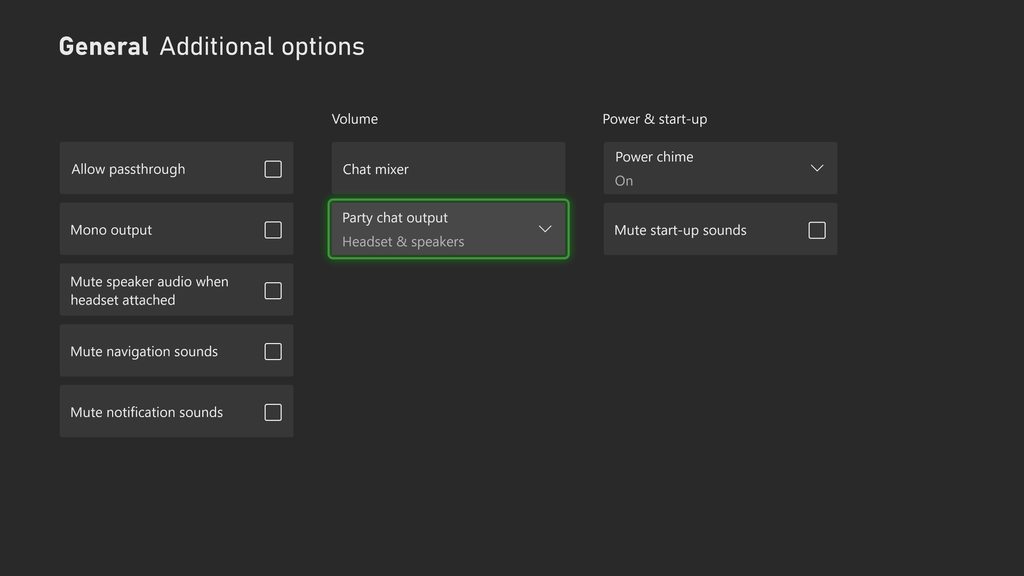
note those settings only work for Party Chat and Game Audio. If you need chats like in game proximity, lobby, or console discord, you'll need a chat link or similar solution to get the headset audio
willow flame
past basin
What audio setting are you tyring to adjust that requires party chat?
Aside from...
Chat mixer volume
It seems to be specifically tied to when I join / leave a party. This has happened before. Can’t remember how I got it to work again tho
past basin
Are you hooked up with a Chat Link cable or just the HDMI audio?
past basin
hm. If the audio still goes to the headset then it should still get captured. Does the headset cut out too? If so that sounds like an Xbox software issue
willow flame
No, it’s OBS just not picking it up
If I take the mic out of my controller, OBS recognizes it and responds
If I put it in, it responds
past basin
Huh - it's outputting analog audio, there's not really much it can do there that could cause an audio disconnect
Is the headset option in the Xbox audio set to stereo uncompressed still?
willow flame
Yeah
past basin
If not maybe it changes formats when you deal with the party chat
past basin
I mean, it should just work
willow flame
I adjusted the settings in a party chat
And it stopped working
This is not the first time
past basin
Wired headset into the chat link right?
willow flame
Yes
past basin
And it still works in that headset when the audio to the capture cuts off?
willow flame
The headset works
past basin
The Chat Link is just an analog splitter so as long as it gets audio it should still be sending audio to the capture card. But since the capture card is getting analog audio mode it shouldn't be cutting out at all from changing settings on the Xbox
It's not like digital where you've got to match the formats and sample rates. I'm a bit lost on what would do that
willow flame
Xbox party chats could handle conversion without a chat link cable tho
past basin
It's working normally outside party chat though right?
willow flame
No it stopped working
I don’t use party chat other than adjust my headset chat settings
past basin
willow flame
Xbox party chats could handle conversion without a chat link cable tho
They can - but if you're using the Chat Link the HDMI intake is off on the card, so that shouldn't be doing anything
willow flame
I’m just considering that the capture card is getting confused trying to make that transfer
past basin
Have you been transferring it between HDMI and Analog? it doesn't even try to do that automatially so unless it's failing after being manually swapped that shouldn't be an issue
I'd try disconnecting the card entirely for about 20-30 seconds to discharge it, and reconnect
See if it just needs a reset after whatever changed
willow flame
I wanna say all I did last time was mess around in the Xbox settings for like 5 minutes and it eventually turned back on
But I’ve unplugged it entirely
Going forward I’ll be sure to switch to HDMI and unplug the chat link cable before adjusting my chat settings 😮💨
past basin
I mean, it sholdn't matter. It's all analog audio the card shouldn't care about anything coming from the console as long as it's regular voltage (which the xbox shouldn't be able to go over anyway)
past basin
Any change after reconnecting things?
willow flame
Negative
past basin
Toggle the card to HDMI and back to Analog to see if that helps. If not do you have anything else you can plug into the card a moment so we can rule out input isssues? Phone, mp3 player, anything we can plug in with an aux cable / chat link
willow flame
I tried making a new audio input source in OSB, linking the elgato
And that’s picking up audio 🤔
Wtf
past basin
Somedays I swear OBS is haunted
willow flame
I don’t even think it’s picking up much audio
past basin
So it's getting audio but hte volume is low?
Check in the Windows Sound Settings that nothign reset the levels on the card. PRess Windows Key + R and type mmsys.cpl and press OK. Go to recording tab, find the card and check the properties. Make sure it's turned up on the level stab
willow flame
Volume was low but at times just non existent
Instead of recording and playing it back I just erased it and will try something similar
past basin
If that doesn't help try disabling Windows Audio Enchancements on the card. I could be that these somehow got toggled on and a filter like noise suppression is messing with the audio. Especially if you were able to hear just a bit of it.
You can do this by going into Windows Settings and checking under System > Sound and find your capture card. Go into it, and check at the bottom for any mention of audio enhancements or spatial audio (usually towards the bottom) and turn them off.
If neither are there, check the old Windows Sound Settings where the levels are. Press Windows Key + R, type mmsys.cpl and press ok. Go to the recording tab and find the capture card, then go to properties. Check for any enhancement or spatial audio tabs and disable anything in there, and check the advanced tab to see if there's any enhancements or spatial audio options to turn off there as well.
willow flame
It’s saying the capture card has no sound input
But if I switch it to HDMI, there’s sound input 🤔
So it’s clearly analog related
But analog does react when I unplug the link cable from any 3 ends 🤔🤔
past basin
I wonder if there's an issue with the Chat Link. Happen to have an aux cable you can run instead just to see if it picks up the audio then?
willow flame
Hold up
past basin
willow flame
But analog does react when I unplug the link cable from any 3 ends 🤔🤔
You mean the little static pop from the circuit breaking?'
willow flame
Yeah
That’s interesting
I did a much larger adjustment the first time, and was able to get it to work again like I mentioned. For whatever reason it took like 5 minutes
I moved the mixer setting thing over 1 (to max it out) and that alone was enough to quite literally not even display input
On my previous settings
I gave the elgato more dB of volume % and that was all I needed to do 🤔
past basin
huh
willow flame
Yeah, I guess the Xbox setting to make other peoples audio as loud as possible was just too powerful
But 1 marker away from that wasn’t enough 🤣🤣
Xbox settings suck 🤷🏼♂️
past basin
Yeah, Chat Mix can be picky since it turns down the game audio while turning up the voice when you adjust it that way (and vice versa). If you maxed it out I'm actually surprised you were getting headset audio. I'll have to make a note of that
willow flame
Right?
I kinda wish I did record the dummy copy input I made l; just to see what it was picking up 🤣
Xbox really could have better setting options
past basin
Console audio on a whole could have more audio options.
At least Xbox offers the ability to send game and party chat audio to both HDMI and headset at the same time (not not the other chats). None of the others can even do that
willow flame
I have it so when other people are speaking, Xbox is working to reduce 80% of the gameplay audio to pick up the speaking audio. On top of that, I have my chat mixer 1 away from being maxed out. And I’m still struggling to record other peoples audio with good volume
past basin
That does sound odd. Does the game you're playing have it's own audio volume you might be able to turn down instead?
 crimson chasm
Does anyone know if you can actually play games with the capture card only without using pass-through?
i mean because of the delay
past basin
Yes - the newest cards are like 30 ms delay. That's less than most TV's that aren't running in game mode, so it's prefectly playable for most things
Might be an issue for things like Rhythm games. But you're talking 2 frames at 60 Hz.
Older cards might be a bit longer, up to 60 or 80, but still playable in most cases, unless you go back to like the USB 2 cards
Exceptions to this are 4K60 S+, which was a standalone card first so has some extra delay, and 4K X when you're recording over MJPEG, as the compression adds a bit more delay
(in standard NV12 mode 4K X is around 30 ms though)
crimson chasm
past basin
Yes - the newest cards are like 30 ms delay. That's less than most TV's that ar...
which ones are the "newer" ones? And do you think playing stuff like mario kart online would be no issue?
I'm kind of scared and don't really know how much 30ms actually is.. I'm planning on playing on my "pc" with the elgato software rather than using pass through cause I don't want to switch monitor input settings all the time.. And also want to stream my game to my friends on discord
past basin
crimson chasm
which ones are the "newer" ones? And do you think playing stuff like mario kart ...
The newer ones are the ones still sold, generally. 4K X, 4K Pro, HD60 X.
LIke I said it works out to a two video frame delay (usuaully). You might not even notice it when looking for it
It's nothing like the really old cards that had like full second of delay
bold sphinx
past basin
That's not quite what I'm looking for there - I wanted to see the FULL OBS audio...
It might be becuz I have my snowball plugged up and active on Obs with the chat link cable connected to my headset,controller and capture card with the audio source active too.
I’m not home right now so I can’t show you how it looks in OBS
naive fable
past basin
I'd give that a shot in case it's USB interference from the hub, or anything els...
Well it seem that it work now, didnt freeze in several hours now, thanks :3
mortal oasis
past basin
Try hitting the reset defaults button in 4K Capture's settings. 50% of the time...
It wont let me do any of the update nor settings If I cant get video signal in to the app idk why and reset defult + restart doesnt work too
past basin
mortal oasis
It wont let me do any of the update nor settings If I cant get video signal in t...
What version of 4K capture utility do you have?
past basin
naive fable
Well it seem that it work now, didnt freeze in several hours now, thanks :3
Glad to hear it!
mortal oasis
past basin
What version of 4K capture utility do you have?
How do I check the version?
past basin
General tab in settings
 merry cliff
anyone know how to fix screen tearing on my stream
mortal oasis
past basin
General tab in settings
If u mean software version its 1.7.14
past basin
merry cliff
anyone know how to fix screen tearing on my stream
What refresh rate is your source? Most common cause of tearing is that you're using something like 144Hz that doesnt't divide cleanly into 60 for recording, resulting in a partial refresh causing tears every other frame.
past basin
mortal oasis
If u mean software version its 1.7.14
Hm. That is the most recent. If the reset options didn't do anything, I'd try reinstalling the whole app at this point (and when you remove it rename the 4K Capture Utility folder in %appdata%\Elgato to something like 4KCaptureOLD, and reboot the PC before reinstalling - don't delete it in case you need to put it back).
If it still doesn't work past that, reach out to the support team thorugh the links in #official-tech-support so they can take a look and see what's going on with the app
mortal oasis
past basin
Hm. That is the most recent. If the reset options didn't do anything, I'd try ...
Can I plug 4K X to my mac and update and set edid mode from there and use it with pc, will it work that way?
mortal oasis
past basin
If it still doesn't work past that, reach out to the support team thorugh the li...
And yech it doesnt work, I checked in privacy settings and it seems like 4K capture utility didnt even request access to camera and microphone
past basin
mortal oasis
And yech it doesnt work, I checked in privacy settings and it seems like 4K capt...
Yeah, if it's stuck on One Moment Please, it's still trying to load up the card - it has access to some options on there you can't get at through OBS and the like, so it's getting stuck loading in that part. With any luck the support team will be able to see why and get it back in sync.
mortal oasis
past basin
Yeah, if it's stuck on One Moment Please, it's still trying to load up the card ...
My situation is exactly like this: https://www.reddit.com/r/elgato/s/RiFsHwpDej
Reddit
Explore this post and more from the elgato community
mortal oasis
past basin
Yeah, if it's stuck on One Moment Please, it's still trying to load up the card ...
So, Can I plug 4K X to my mac and update and set edid mode from there and use it with pc, will it work that way?
past basin
mortal oasis
So, Can I plug 4K X to my mac and update and set edid mode from there and use it...
If you've got the mac there, that's worth a shot
The Capture Device Utility on mac can change most settings that 4K Capture can too - and they stay saved on the card
hazy token
lone crypt
Check OBS stats panel to see if frames are dropping and where. Can analyze logs,...
Ok?
hazy token
past basin
Is it laggy in both preview and recordings/stream? If there's a resource limit ...
Just the recording I’m using laptop i 5
Sounds hella terrible
As well
 normal relic
hey would anyone know why my obs stops picking up any audio from my hd60x when i plug in my headphones via the chatlink pro? i was orrigonally on streamlabs and this wasnt a issue
past basin
normal relic
hey would anyone know why my obs stops picking up any audio from my hd60x when i...
Is you HD60 X set to analog audio mode (has to be checked in 4K Capture Utility for PC, and Capture Device Utility for macOS). It's possible it's gotten reset. The card doesn't switch between HDMI and Analog automatically
past basin
hazy token
Sounds hella terrible
Will take a look a this when I'm free, tied up on voice at the moment.
 faint bridge
Need help connecting n64 to el gato.. I have a cable for my TV (I dont know what its called).. but its adapted to an HDMI
I have it hooked up and I can see the game on my monitor but dont see it at all on my game capture HD app or OBS app
past basin
faint bridge
I have it hooked up and I can see the game on my monitor but dont see it at all ...
What speicifc capture card do you have, and do you know what output resolution your converter has?
past basin
hazy token
Sounds hella terrible
What on earth. Can you confirm the specs on that laptop, or if not, the full model tag from the bottom of it? (Usually next tot he sticker). Also which capture card are you using there again?
merry cliff
past basin
What refresh rate is your source? Most common cause of tearing is that you're u...
my source is 360hz
past basin
I don't think any of the cards support 360 Hz - so I'm assuming this is dual PC in a cloned setup right? Check the refresh rate on the virtual display of the capture card on the Gaming PC to see what refresh rate that's running at.
In cloned setups the refresh rate of the monitor and cpature card can be different and the GPU sorts it out
merry cliff
past basin
I don't think any of the cards support 360 Hz - so I'm assuming this is dual PC ...
yea exactly
its cloned
dual pc
so im cooked?
virtual display on 60hzx
it says it can go up to 120hz but theres an asterisk
 past basin
You probably don't want Dynamic refresh rate on here as that lets it change it on it's own. Assuming you're recording at 60, set it to 60 and turn off dynamic refresh and see if that helps.
hazy token
past basin
What on earth. Can you confirm the specs on that laptop, or if not, the full mo...
Elgato hd60x Lenovoi core 5
past basin
hazy token
Elgato hd60x Lenovoi core 5
That's not the full spec - what's the model number on the bottom? Usually near the serial number
hazy token
Ahh ok

 past basin
hazy token
past basin
hazy token
Ah - that's what I was afraid of. That laptop doesn't meet the requirements for HD60 X (https://help.elgato.com/hc/en-us/articles/5293623183501-Elgato-Game-Capture-HD60-X-System-Requirements) under 4K Capture Utility. It doesn't have a dedicated GPU for encoding, and the CPU is a U series, meaning it's aimed at power saving, not performance. It doesn't meet the official system requirements.
That said, it DOES have a Intel QuickSync encoder on the CPU. 4K Capture Utility may not play nice with that, but you may be able to get something out of it with a video capture app that can use QSV (QuickSync Video), such as OBS Studio. I can't promise anything, but I'd give the other app a shot - nothing to lose since you already have the card. You can grab that one from https://www.obsproject.com .
OBS (Open Broadcaster Software) is free and open source software for video recording and live streaming. Stream to Twitch, YouTube and many other providers or record your own videos with high quality H264 / AAC encoding.
mortal oasis
past basin
If you've got the mac there, that's worth a shot
Thats nice, I have tried recording 4k60fps on my 4070 ti but if i go pass p5 settings encoding cant take it idk why
past basin
Encoder overload I'm assuming?
hazy token
past basin
Ah - that's what I was afraid of. That laptop doesn't meet the requirements for...
Thanks btw
faint bridge
past basin
What speicifc capture card do you have, and do you know what output resolution y...
I honestly dont know what converter I have.. I have the hd60s
 devout stirrup
Issue with Elgato 4K60 Pro and OBS - Brief Signal Loss 😦
I have my graphics card connected to the Elgato 4K60 Pro in my streaming PC. My monitor is directly connected to the output port of the Elgato.
Occasionally, during gameplay, the Elgato briefly loses connection for less than a second. In OBS, the "No Signal" screen from the Elgato appears for a very short moment. This doesn’t happen very often, but it’s frequent enough to be noticeable.
Another issue is that this also happens almost every time I set a YouTube video or other content to fullscreen in the browser.
Has anyone experienced something similar or have any idea what might be causing this?
 dense linden
I have an audio routing question -
IF I set my gaming pc to audio in through its STANDARD desktop audio, my HD60X doesn't get any of that feed.
If I set it to HD60X, my gaming pc loses all sound.
So I enable obs audio through direct sound.
-
everything sounds SUPER muddy. like audio doesnt come through right.
-
there's WILD delay between what I see on the gaming pc to what I hear.
I am running OBS 27.2.4, HD60X with 4K Capture utility, and I am routing all audio digitally, no analog audio utilities yet. (if anyone has recommendations lmk.)
lone crypt
dense linden
I have an audio routing question -
IF I set my gaming pc to audio in through i...
I think there are probably two things going on here.
First, if 4k capture utility can’t copy the system audio to the capture card, you can route a copy of your system audio to capture card by going to the windows sound devices control panel > click the properties of your default device (where the game sound goes) > listen tab > and then set “listen to this device on” to your capture card.
This will make all sound coming to the default sound device repeat to the capture card also.
There will be some sync offset needed in OBS on the stream pc to delay the video to line up with the audio since this will incur some latency.
Then about things being muddy, if you don’t have this anymore after doing the first fix then forget it, but sounding muddy probably means windows is doing some voice isolation on that sound device, assuming it’s a mic or something.
In the same sound devices control panel there are tabs for things like enhancements, which is where you can disable those thing.
dense linden
lone crypt
I think there are probably two things going on here.
First, if 4k capture utilit...
I got the muddy part sorted out. W11 Is dumb as hell. It has some kind of audio enhancement that auto turns on in settings and completely chalks audio out.
I'll try your first advice tomorrow I'd love to have it duplicate haha
Thank you so much.
lone crypt
dense linden
I got the muddy part sorted out. W11 Is dumb as hell. It has some kind of audio ...
Yeah that's the one. It does serve to clean up noisy mics if you have some built-in laptop mic. But obviously when the system mistakes a capture card for a mic (because it's an audio input device) and tries to filter out everything it doesn't think is a voice...
past basin
If you're getting wild delay, you can also try to mute the HD60 X, and add it again as an audio input captured device. OBS sometimes does weird things with UVC cards when it tries to pull the audio through the video with DirectShow. Mutting it and adding the audio interface directly usually fixes that. This often fixes extreme delay, drift, and sometimes sample rate mismatch static sound.
This will likely have the same net result as jnTrack's suggestion, but keep it separate from your Desktop audio.
Also generally leave the HD60 X set as Capture Only, not DirectSound, and turn on the audio monitoring for it under the advanced sound settings under the edit menu, or the gear icon on the audio mixer. It should be set to Monitor and Output if yuou want to hear it.
mortal oasis
Preview stutter with 4k X in obs but not in recordings any fix?
 spark light
can someone please give me a hand with my hd60S, it displays as a device in settings but won’t show up in any apps as a capture card
 past basin
spark light
can someone please give me a hand with my hd60S, it displays as a device in sett...
past basin
spark light
can someone please give me a hand with my hd60S, it displays as a device in sett...
If you haven't already, try installing the latest standalone driver for the card from here https://help.elgato.com/hc/en-us/articles/360027961152-Elgato-Hardware-Drivers and then restart 4K Capture.
Elgato
Elgato Hardware Drivers - Windows 10/11A UVC (USB Video Class) device is plug-and-play hardware that uses built-in Windows drivers, eliminating the need for proprietary installations. Devices like ...
past basin
mortal oasis
Preview stutter with 4k X in obs but not in recordings any fix?
If the recording is still smooth, this is usually resource overload - OBS will reduce the framerate on preview to keep the recording smooth. You may have to turn down whatever encoding your using if it's overloading the GPU or CPU.
 scarlet glen
So I really need help. Lately my capture card has been giving me black screens and idk why
lone crypt
scarlet glen
So I really need help. Lately my capture card has been giving me black screens a...
Black screens —not “no signal”, right?
If it’s black screens I think that means it’s losing connection to the computer or the data speed could be too low.
Have you reseated all the connections?
scarlet glen
lone crypt
Black screens —not “no signal”, right?
If it’s black screens I think that means ...
what do you mean reseated?
lone crypt
I mean pull them out and plug them back in to make sure the connections are good.
I think if it’s talking correctly to the computer but not getting an input signal, you’d see a gray “no signal” screen.
But just to be thorough, check HDCP on the source device, maybe that would be black instead of no signal.
scarlet glen
I already tried that. I feel like my capture card is going out of date. Its an HD60S
past basin
That has been End of Life for a few years, but should still work. What app are you using it with?
And what are you trying to capture?
scarlet glen
I'm using VLC to to view the games
I think its the usb cord but idk what other cord I can use that will work with it
past basin
Any USB 3.0 faster cord (5 Gbps+) with a USB plug should be fine
Also HD60 S is limited to 1080p60 so it might be worth checking that whatever you're capturing isn't going above that, as you'll get the same black screen if it does
 sweet hearth
Hello everyone!!
I am using Game Capture Neo
on a macbook air M2
to record with OBS Studio
my Switch
in the recordings, the sound of the game works and is correctly recorded
But I am not able to hear the game while I am going through my macbook
I am using a headset with a micro and I want the sound to come through my mac and to go in my headset
but again I can't hear it, only once I listen to the OBS recording
please help
thanks!!
lone crypt
sweet hearth
Hello everyone!!
I am using Game Capture Neo
on a macbook air M2
to record wit...
You can set your OBS capture card source to "monitor and output" in the advanced audio settings (right click on the obs mixer) and it will play the audio from that source back to your headphones. Be sure to select the headphones as the monitor device in OBS settings > audio
You're listening after the preview latency with that setup, but the only way to get around that would be to use the audio from the console's headphone jack, with a splitter that also sends it to the computer. The Capture neo doesn't have an analog input, so you'd need some audio interface to attached to the computer to receive that and add it to OBS as a separate audio source from the capture card.
 orchid kite
Hi Folks! looking for some support if that's okay don't wanna sound too demanding
I have a HD60S (a bit old I know) trying to record switch gameplay. I have set up the output and input all correctly but I'm running into some issue
The USB 3 cable that powers/connect the capture card when connected to my laptop is perfect. I can see all the output on OBS and everything
but when I plug in the usb 3 port into my switch dock when I dont want to record stream. it causes the game image to be really dark and hard to see
I know I can just unplug the capture card whenever I don't want to use it but it's really a lot of faf to plug/unplug cables
spark light
past basin
If you haven't already, try installing the latest standalone driver for the card...
i have downloaded all the ones needed and still no luck with it
past basin
Are there any errors on the card in Device Manager?
past basin
spark light
i have downloaded all the ones needed and still no luck with it
Also it's the HD60 S and not the HD60, right?
past basin
orchid kite
but when I plug in the usb 3 port into my switch dock when I dont want to record...
How dark are we talking? My first thought is it's tripping up the RGB range. If so you an try going into the Switch's TV settings and changing that setting
orchid kite
past basin
How dark are we talking? My first thought is it's tripping up the RGB range. I...
Just tried plugging in my ps5 and it's the same issue even with RGB settings on Limited and Full
I'm just going to try another one of my hdmi cables
so New HDMI still the same issue
past basin
And it only does this when using the Switch to power it for passthrough? Have anything else nearby you could power it with?
orchid kite
plugging it into the ps5 is the same issue
it looks like the passthrough needs usb type 3 but I'm not too sure
But I'm stumped. i swear on my old setup I did the exact same thing

 past basin
Oh that's way darker than I expected
orchid kite
ignore my messy desk while I'm doing cable gymanstics haha
past basin
Huh, apparently the PS5 USB ports are different speeds
The back ones are USB 3.x 10 Gbps
But the top front one is USB 2
orchid kite
I've tried the passthrough on both just to be sure but it's doing it on both kind of usb ports
past basin
And it doesn't do this when plugged into the computer, even if the app isn't running?
orchid kite
nope not at all even with obs and Elgato4k closed
past basin
I'm stumped - never tried to power a HD60 S with something else, but I'd not have expected this. Haven't heard tell of it with the newer cards
Does the PC have any "Always On" USB ports you could use instead of the Switch or PS5?
orchid kite
So @past basin I solved it, thank you very much
Not sure if I solved it more like dumb Luck but I appreciate your input either way
I unplugged my whole setup and tried again to see what the culprit was
Turns out it was my HDMI audio splitter
Not sure what it does but switching it to 2 channel mode stopped the issues with the dark screen

Again no idea why I’m just thankful it’s working
past basin
Ah, good to know you sorted it out!
spark light
past basin
Also it's the HD60 S and not the HD60, right?
yes its then HD60S and no i have no errors in device manager it says its running smoothly
past basin
spark light
yes its then HD60S and no i have no errors in device manager it says its running...
Does it show up in Device Manager twice, once under cameras and once under sound devices?
Camera related questions should go in #camera-prompter . What camera are you using there?
spark light
its not popping up in the camera no
past basin
Ah. It's likely stuck partway through driver install. Right click where it does show up, uninstall it, unplug it and reconnect it. It should try to reinstall the card then. If it's partly installed it won't install the missing camera component
spark light
do i delete the drivers when uninstalling it?
spark light
i uninstalled it and unplugged it and replugged back in
past basin
Give it 30 sec to a minute and check if it shows up under cameras
If it does, restart 4K Capture
past basin
What happens if you move it to another port? Any change?
spark light
nothing, all 3 ports
past basin
Does it show up in any other app like Windows Camera, OBS, etc?
past basin
What. Why is it saying HD60 not HD60 S. Uninstall it, delete the driver when it asks, disconnect it, then reboot the computer and reinstall the HD60 S driver to be safe before reconnecting it.
spark light
do i delete the 4k capture aswell?
do i just need to download the game capture hd60 s external?
now its coming up with this
 past basin
spark light
do i just need to download the game capture hd60 s external?
past basin
spark light
do i just need to download the game capture hd60 s external?
You should be fine with the HD60 S driver from the site before, yes
past basin
You disconnected and reconnected it after installing that driver?
past basin
Then yes, try reinstalling 4K Capture Utility
Flash white is good but just means the card successfully powered on.
spark light
okay ill try that now
 snow pasture
Hello, I’m having an issue and I’m not sure if my hd60x or obs is tweaking. Everything works fine when I’m in the us, but when I travel to Mexico, I can’t see my gameplay on obs. Can anyone help?
spark light
past basin
Then yes, try reinstalling 4K Capture Utility
does it matter if its plugged in or not when installing it all?
past basin
spark light
does it matter if its plugged in or not when installing it all?
Ideally install it while it's unplugged unless the app asks you to connect it
 past basin
For HD60 S yes. Though the 4K Capture Utility should be installing a copy too
spark light
ive installed both of those now
and plugged back in
its saying the same thing, error code 28
past basin
Can I get a pic of the top and bottom of that card? Something is off there
spark light
of the capture card?
past basin
Yeah
spark light

 spark light
past basin
Yeah
spark light
past basin
Yeah
that what you mean?
past basin
spark light
that what you mean?
Yes - the top says HD60 S but the model number on the bottom is for HD60. I've never seen that before. Try the HD60 Driver instead
fading latch
whats the difference between the HD60 and the HD60S?
spark light
i downloaded that and now its in sound video and game controllers again
but not in cameras
past basin
That's fine - is this a used or refurbised card by any chance?