#capture-cards
1 messages · Page 45 of 1
 past basin
 nocturne crest
yeah
past basin
It's not going red after that though is it?
nocturne crest
just stuck on this now
 past basin
hm. Try with 4K Capture Utility from https://www.elgato.com/downloads

see if the newer app tells us any more info
 obsidian kiln
Trying what you recommended for losing connection now. I do have a headset but it’s Bluetooth. I’ve seen a couple of different ways people work around audio but what is the best way for it to work?
nocturne crest
past basin
hm. Try with 4K Capture Utility from https://www.elgato.com/downloads
it just says no signal
past basin
Okay, that's somewhat more useful. Try a diffeerent HDMI cable if you have one, and make sure wheen you swapped the consoles you plugged it in the HDMI in in the card, not the out
past basin
obsidian kiln
Trying what you recommended for losing connection now. I do have a headset but i...
Bluetooth? So it's connected to the PC?
obsidian kiln
past basin
Bluetooth? So it's connected to the PC?
USB plugged into PlayStation and connects it wirelessly. I tried adjusting those settings and still nothing as well :/ same results. I can sit in the menu of the game but as soon as i load into a game it loses connection
past basin
Ah, wireless. Yeah. That'll still mute the HDMI output. Do you get the audio on the PC if you unplug that?
past basin
obsidian kiln
USB plugged into PlayStation and connects it wirelessly. I tried adjusting those...
120Hz mode, and VRR are already off? What resolution are you gaming at?
obsidian kiln
past basin
120Hz mode, and VRR are already off? What resolution are you gaming at?
That fixed it. In game settings I had set to prioritize performance instead of resolution. I’ll be at 60fps instead of 120 now but that fixed it. If I unplug my headset and put it into my computer I can hear all the game audio but slight delay between stream and actual
past basin
Yeah, there's no real way to easily capture wireless or USB headset audio from a console because that's all data, and the console mutes the audio. Best bet is a wired headset (or put the headset in wired mode if the wireless headset has it), and use a Chat Link. Then you can listen to the audio from the PS5's controller headset jack but split a copy to the capture card with the analog audio cable
obsidian kiln
I appreciate it! I truthfully don't know any good headsets I could get that I could use wired. I'll have a look around. Any suggestions?
 mortal oasis
Hd60x on mac select edid to internal doesnt show any resolution
past basin
obsidian kiln
I appreciate it! I truthfully don't know any good headsets I could get that I co...
Honestly, I'd check if your current headset can run in wired mode first - might save you another purchase.
past basin
mortal oasis
Hd60x on mac select edid to internal doesnt show any resolution
Since you're using an Internal EDID, is there a monitor in the HDMI Out port? If you check the macOS Privacy settingsf for cameras (which includes capture cards) does it allow the app you're trying to use access?
mortal oasis
Yes im using mac and pc setup and connect to monitor for pass through but it getting stutters in merge option
obsidian kiln
past basin
Honestly, I'd check if your current headset can run in wired mode first - might ...
I don’t believe my current headset can. I’ll look into it though and see
past basin
mortal oasis
Yes im using mac and pc setup and connect to monitor for pass through but it get...
Do you see stutter in the previews or just the recordings? Is this an intel or apple silicon mac?
mortal oasis
past basin
Do you see stutter in the previews or just the recordings? Is this an intel or ...
It does stutter in previews more but recording and streams stutter too just not as much as preview
past basin
What are you trying to capture with it?
I'd suggest disabling VRR if it's a VRR enabled console to see if it smoothes out
mortal oasis
past basin
I'd suggest disabling VRR if it's a VRR enabled console to see if it smoothes ou...
Just sdr non vrr gaming clips
past basin
Was it an intel mac or a apple silicon one (eg M1). Also what are you actually capturing with the card, console, dual PC, etc?
 calm sierra
@past basin @warped ledge thank you so much for your help last week. turns out my stream deck needed an upgrade. idk how or why that correlates, but we back now

jumped the gun, just a little. i got video, just needa figure out the audio
past basin
mortal oasis
Its m2 max capturing Pc with hd 60x 2k60
Sorry had to step out a bit. If you're seeing stutter on that setup, my first guess is your OBS is using the wrong buffering mode for the card. Go into the source for the card, and instead of letting it be on autiomatic set it manually. Try it each way and see if the stutter stops with either (I'd probably try it with the buffer on first)
past basin
calm sierra
jumped the gun, just a little. i got video, just needa figure out the audio
Any chance you have a headset directly conncted to the PS5? That'd stop HDMI audio out from the console which would keep the capture card from getting audio
Most common audio headache when capturing a PS5
 chilly oyster
So I’m using a dual pc with the hd60x and it seems my game image is minor blurry if you see here. Lot of pixelation too.


Left is game pc right is stream pc in 4k utility
And also my source in 4k is never 1080p60 it’s always 2160p or 1080p240
past basin
I don't really see any outright blur, but if you're pixel peeping like that you're likely going to see chroma subsampling (more details on what that is here: https://help.elgato.com/hc/en-us/articles/360027950532-Chroma-Subsampling-on-HDMI-Passthrough ) but basically the colour mapping is scaled down so you can fit the full video signal from a HDMI 2.0 connection (18 Gbps) over USB 3 (5 Gbps) among other reeasons. You'll see streaming platforms do the same thing - they pretty much all convert to 4:2:0 chroma instead of 4:4:4. This effect is most notable at high contrast edges, like HUD elements, or sharp lines where the character and background separate
(notee HD60 X doesn't do subsampling on passthrough like older cards, just on capture. That link just has a good eample of what it is)
chilly oyster
Ahhhh that was perfect thank you. So does that mean I need to get the internal 4k capture card to prevent this?
Being I’m using 2 pcs. I just want my image to be want I’m sending from my game pc with no change to visual or color
calm sierra
past basin
Any chance you have a headset directly conncted to the PS5? That'd stop HDMI au...
yeah lmao i went through the ps5 sound settings and saw it was connected to my mic. we good now
past basin
chilly oyster
Ahhhh that was perfect thank you. So does that mean I need to get the internal 4...
4K X also has 4:4:4 capture in some modes. But yes, HD60 X can do 4:2:2 at most, iirc. 4K X uses the extra bandwidth on a 10 Gbps USB 3.2 Gen 2 port to pull off more color mapping, same with the bandwidth on the PCIe based internalc cards
Also you'll want to use anothere app like OBS to setup the extra colour
chilly oyster
Color filter on the cap card?
past basin
4K X has a chart here (the second one) showing what modes can be used in RGB (4:4:4) https://e.lga.to/4K_X_Resolutions
That said if you're working with HDR you might see colour casts
As the card maps HDR to SDR normally. YOu can change that but it's a bit involved and a lot of streaeming platforms (if you're a streamer) dont' support HDR yet
But for pure 4:4:4 capture yeah, I'd go with an internal card if you can swing it. Thoguh 4K X offers MJPEG mode for capturing above 4K60, if you play in 4K. The internal 4K Pro can pass through above 4K60 but has to drop the resoluton if you go over 60hz to keep up (for the captured video, not hte passthrough)
mortal oasis
past basin
Sorry had to step out a bit. If you're seeing stutter on that setup, my first g...
How do I set buffer in the cards?
past basin
mortal oasis
How do I set buffer in the cards?
Under the source properties in OBS, there shoud be a buffer option.
I think it might just be a check on the mac? Windows is a drop down box.
mortal oasis
Theres only on/off option yech it does help in previews but added 3 sec delay but still stutter in recordings idk why
past basin
mortal oasis
Theres only on/off option yech it does help in previews but added 3 sec delay b...
By help, does it look normal now in the preview? It's possilble the cause for the recording and preview stutter are different things. So if preview is fine now we need to look at your encoding settings for the recordings
mortal oasis
past basin
By help, does it look normal now in the preview? It's possilble the cause for t...
Previously it does stutter without recording now it only stutter when recording/streams stutter
But it also only avaliable on video capture device source not capture card device source
 polar scarab
hello @past basin can u help me out
past basin
mortal oasis
But it also only avaliable on video capture device source not capture card devic...
That's correect - Capture Card Device source is more of a mac only legacy thing iirc (windows OBS doesn't have it). HD60 X is a UVC card and doesn't require drivers or anything so works just fine as a Video Capture Device.
past basin
mortal oasis
Previously it does stutter without recording now it only stutter when recording/...
Just to confirm there's no stutter in the preview now, just the recording right? What are your OBS encoding settings set to?
past basin
polar scarab
hello <@269997944671830017> can u help me out
Possibly, what's the issue you're hitting?
mortal oasis
past basin
Just to confirm there's no stutter in the preview now, just the recording right?...
It does happen after I tried projecting full screen to another monitor encoding is Hardware encoder h264
anychance my mac didnt provide enough power to hd60x?
past basin
It wouldn't geneerally power on then
Is your card plugged right into the mac? or are you using any kind of hub?

 past basin
polar scarab
help hd60 pro
past basin
polar scarab
help hd60 pro
Does it work in other apps? If so hit the Reset Defaults option in the settings for 4K Capture Utilityu
polar scarab
 warped ledge
What card?
warped ledge
What card?
hd60 pro
polar scarab
past basin
Does it work in other apps? If so hit the Reset Defaults option in the settings...

this popped up
but its been doing that all night
and ive rebooted
past basin
Try reinstalling the driver from here https://help.elgato.com/hc/en-us/articles/360027961152-Elgato-Hardware-Drivers then reboot again
polar scarab
past basin
Try reinstalling the driver from here https://help.elgato.com/hc/en-us/articles/...
still says 1 moment please
mortal oasis
past basin
Is your card plugged right into the mac? or are you using any kind of hub?
Straight in to mac with thunderbolt cable
But when I set power of mac to high It does get less stutter on rec/stream side just not previews
warped ledge
polar scarab
still says 1 moment please
After reinstalling the driver? Did you reboot?
polar scarab
warped ledge
After reinstalling the driver? Did you reboot?
yes maam
see it says it again
 warped ledge
polar scarab
yes maam
warped ledge
polar scarab
yes maam
Have you updates your bios/drivers for the mobo? Did try uninstalling, and remove the card, and reboot, reinstall, and power off, and install the card?
polar scarab
warped ledge
Have you updates your bios/drivers for the mobo? Did try uninstalling, and remov...
my bios up to date i tried uninstalling drivers and app reboot and reinstall still dont work idk what else to do
warped ledge
polar scarab
my bios up to date i tried uninstalling drivers and app reboot and reinstall sti...
Have you powered down your PC remove the card reinstall the card and see if it picks up
polar scarab
warped ledge
Have you powered down your PC remove the card reinstall the card and see if it p...
no i haven't but id rather not since my pc is in a rough spot to pick up and down
 gloomy badger
$25 Venmo/Amazon/PayPal/etc. to whoever can solve this darn issue with me...I will literally CRY if this gets solved as I've tried practically everything.
Preface:
I organized my stream room, so I had to unplug everything power/optical/etc., and replug back in...before doing so, everything was working normal, I carefully labeled EVERY CORD to ensure accuracy and efficiency when plugging back in, I safely shut down everything (even shutting off my PCs' PSUs before unplugging from wall), and successfully replugged everything back in again - no changes.
Upon doing so, I went to load up Streamlabs, and any scene with an Elgato 4k Capture Utility (4k60 Pro) and/or Elgato Cam Link, is black for 1-4 minutes, and then once those feeds come through, Streamlabs is very slow/clunky for another 1-2 minutes.
Additional Notes:
Task manager shows no heavy resource usage when this happens; this is NOT isolated to Streamlabs, as I downloaded OBS and the same thing occurs; all Elgato, Nvidia, and Windows drivers are up-to-date; I've reinstalled Streamlabs, 4k Capture Utility, and Camera Hub, I've unplugged the Cam Link and HDMI cords from my capture card and tried only doing one at a time (same issue persists); I DID move my USB-Cam Link into my gaming PC and installed Elgato Camera Hub + Streamlabs and everything works normal so it's something isolated on my Streaming PC; Heck, I even reinstalled WIndows (Reset my PC but keep my files). All thermals are also normal.
I opened up a support ticket with Elgato but no luck as of yet...I have spent the last 3 nights stuck on this (I'm a pretty technical guy as is, so this is reallllly stumping me).
Setup:
Gaming PC -> Stream PC via 4k60 Pro (Merged/Display/Internal settings all offer same issue...but then again, Cam Link does it too, so I think it's deeper than simply the Camera Hub or 4k Capture Utility software since both are giving the same issue.
I am open to any suggestions.....thank you in advanced.
 olive furnace
Hey the audio isnt coming thru on obs from my hd60. Any ideas??
It was working fine yesterday no idea whats up now
warped ledge
polar scarab
no i haven't but id rather not since my pc is in a rough spot to pick up and dow...
I would advise doing so as this might probably be something to do with the contact it’s making.
warped ledge
gloomy badger
**$25 Venmo/Amazon/PayPal/etc. to whoever can solve this darn issue with me...I ...
We’re here to help you don’t have to offer any payment. That’s in the #rules but as I had mentioned to another person, try removing the PCIE card when you power down and reset the card and see if it picks up the card and then reinstall the drivers.
warped ledge
olive furnace
It was working fine yesterday no idea whats up now
Is OBS set to monitor an output?
 glacial raven
4KX yellow light? Anyone know how to fix this?
 past basin
glacial raven
4KX yellow light? Anyone know how to fix this?
past basin
glacial raven
4KX yellow light? Anyone know how to fix this?
If you just updated it, unplug it for 30 sec and reconnect. Otherwise make sure it's in a USB 3.0 or faster port to get enough power
past basin
polar scarab
still says 1 moment please
Does it work with other apps like OBS, Windows Camera, etc? important to narrow down if it's the card or 4K Capture Utility that's having issues here
gloomy badger
warped ledge
We’re here to help you don’t have to offer any payment. That’s in the <#58155109...
My apologies for breaking #rules - I should have read them more thoroughly.
I just got done reinstalling Windows again (this time, I started from scratch...didn't save files), reseated all of my DIMMs, reseated my GPU, reseated my Capture Card, and reseated my Cam Link.
The issue still persists. I don't know what else it could be.
past basin
mortal oasis
But when I set power of mac to high It does get less stutter on rec/stream side ...
Hm. That's throwing me - the M series CPUs with hardware encoding generally perform pretty solidy. You're not trying to store it to external media like an external drive are you? Could be a storage bandwidth problem.
past basin
gloomy badger
**$25 Venmo/Amazon/PayPal/etc. to whoever can solve this darn issue with me...I ...
I can't say I've seen the video recover after several minutes of black screen before but that sounds like USB interference if it takes that long to sync up and then performs poorly. Does changing the USB ports or unplugging other USB devices improve the performance?
mortal oasis
past basin
Hm. That's throwing me - the M series CPUs with hardware encoding generally per...
Im kinda confused my self too I save directly in to local mac ssd and I dont know what to do now
past basin
How does it perform if you test it with Quicktime instead?
mortal oasis
You mean record with quick time?
past basin
YEah
You sould be able to close out OBS, and launch Quicktime and select the capture card as a source
polar scarab
past basin
Does it work with other apps like OBS, Windows Camera, etc? important to narrow...
no sir
glacial raven
past basin
If you just updated it, unplug it for 30 sec and reconnect. Otherwise make sure...
Trying now. Thanks
past basin
polar scarab
no sir
Check Windows Privacy settings, under cameras, since the card gets treated like a camera. Make sure Windows updates didn't reset that. Make sure both Apps and further down Desktop apps are allowed
gloomy badger
past basin
I can't say I've seen the video recover after several minutes of black screen be...
Cam link, no it happens regardless of the USB port it sits in, even if all other USB ports are unoccupied.
4k60 Pro Mk2 is PCIe pased and I only have a single slot, so I can't move it.
Regardless, this PC has ran perfectly for years w/o issue until now.
past basin
gloomy badger
Cam link, no it happens regardless of the USB port it sits in, even if all other...
Did you change out the HDMI cables with longer ones or run them along anything that causes electrical interference like your PC poweer supply?
gloomy badger
All of my cards (both power and optical) are running together in a cable management track, however, my PCs are right next to each other, so my HDMi cord going from Game PC to Stream PC is 1.5m long (see picture).

 past basin
I'm drawing a blank at the moment (though it's also 2:40 AM here). Might be time to open a ticket with #official-tech-support if you haven't alreeady
gloomy badger
Thanks for trying - I've had one open for a couple days, but no luck as of yet. 3-4 days into this issue and I figured it wouldn't hurt to ask yall for additional thoughts too just in case. I appreciate everyone trying.
mortal oasis
past basin
You sould be able to close out OBS, and launch Quicktime and select the capture ...
I tried but it forced me to 4k30 ,720 60 so I cant really compare that😂
 spare bear
I'm trying to use a camlink 4k to send some video signal from a main pc to a second pc, the steram is visible on elgato camera hub but it's just my main pc desktop, if I open an app the taskbar will update but the rest of the video is just my desktop
could anyone help?
 buoyant ingot
Can anyone help me set up my Elgato properly please I have it all connected but I no game volume and the quality isn’t good I’m using a mac
mortal oasis
past basin
You sould be able to close out OBS, and launch Quicktime and select the capture ...
And now even with buffering on preview is stuttering non stop but atleast record are not stuttering as much
And it says I have 0.2% encoder overload
warped ledge
buoyant ingot
Can anyone help me set up my Elgato properly please I have it all connected but ...
what software OBS? Did you monitor and output?
No, please don't ask stuff like that here. it's against the #rules
warped ledge
spare bear
could anyone help?
is it in 4K capture utility or camerahub, if it's camerahub ask in #camera-prompter 😉
warped ledge
mortal oasis
And it says I have 0.2% encoder overload
Mac right?
mortal oasis
warped ledge
Mac right?
Yep m2 max which shouldn’t be happening
warped ledge
mortal oasis
Yep m2 max which shouldn’t be happening
x264 right?
mortal oasis
Hardware encoder
warped ledge
mortal oasis
Hardware encoder
what else do you have running?
mortal oasis
Nothing just obs
warped ledge
mortal oasis
Nothing just obs
what are your OBS Settings?
gonna step away for a bit, but I'll be on later.
mortal oasis
2k 60 sdr
warped ledge
mortal oasis
2k 60 sdr
1440p?
mortal oasis
Yes
warped ledge
thanks, 1440p is a bit of a pain at times. @past basin encounter anything for a fix with the 1440p issues.
mortal oasis
Hd60x not hd 60s
warped ledge
correct, i am confirming it only outputs 1080p
mortal oasis
warped ledge
correct, i am confirming it only outputs 1080p
I dont think so
 buoyant ingot
warped ledge
what software OBS? Did you monitor and output?
buoyant ingot
warped ledge
what software OBS? Did you monitor and output?
Yes I have everything set up but it doesn’t capture in game audio
Like I can hear myself when I record from the speakers in the laptop
Also the quality just looks a little off in the recordings
warped ledge
mortal oasis
I dont think so
I missed that, thanks for the update on it. Let me research a few things, what are you capturing btw?
buoyant ingot
warped ledge
I missed that, thanks for the update on it. Let me research a few things, what a...
Whenever you get a chance let me know if you can help!
What do you mean by monitor?
Also I don’t have a chat link cord do I need this for audio?
warped ledge
buoyant ingot
Also I don’t have a chat link cord do I need this for audio?
Put your card in analog, and make sure your audio is going to your headset.
buoyant ingot
I think for some reason it’s connected to my laptops speakers
 stable radish
I am having trouble as my switch is not outputting a signal through passthrough on my 4k pro
stable radish
To emphasise my problem further. I am getting a signal on the 4k utility app on my pc. However, when I try to go to HDMI 2 on my monitor (the only other HDMI port on my monitor which my OUT Hdmi cable is plugged into) the screen goes black for a few seconds then shows a no signal message.
The screen goes black after I change the imput
warped ledge
stable radish
The screen goes black after I change the imput
what is your display setup? are you using a TV and Monitor, or 2 monitors, or 1 monitor and changing the input?
stable radish
warped ledge
what is your display setup? are you using a TV and Monitor, or 2 monitors, or 1 ...
I am using one monitor for both pc and switch changing the input between the two
warped ledge
mortal oasis
I dont think so
are you using HDR?
warped ledge
stable radish
I am using one monitor for both pc and switch changing the input between the two
this might be why it's going black as the hdmi needs to be active
warped ledge
stable radish
I am using one monitor for both pc and switch changing the input between the two
do you have a TV you can use as a second display?
stable radish
warped ledge
do you have a TV you can use as a second display?
I will be getting one in about an hour or so
I will update then
stable radish
warped ledge
this might be why it's going black as the hdmi needs to be active
this makes sense
your pfp is gorgeous btw :3
warped ledge
stable radish
this makes sense
yeah, that's more than likely the issue, but let me know how it turns out after.
warped ledge
stable radish
your pfp is gorgeous btw :3
pfp?
stable radish
profile photo
warped ledge
oh lol thanks!
stable radish
no problem! ^^
warped ledge
gotta be careful about saying stuff like that, others can take it wrong in the USA... still ty!
stable radish
Sowwy 
warped ledge
stable radish
Sowwy <:Sob:709200202048733235>
no worries. Hopefully you have a great Holiday! 
 mighty hinge
why does the 4k Utility Tool not have Volume controls in the software, the old HD software did
warped ledge
mighty hinge
why does the 4k Utility Tool not have Volume controls in the software, the old H...
the software is more of a utility for settings, and apps like OBS can control Vol.
mighty hinge
warped ledge
the software is more of a utility for settings, and apps like OBS can control Vo...
so my ears dont matter, should really make a vol contoller
warped ledge
mighty hinge
so my ears dont matter, should really make a vol contoller
they have one on the Stream Deck +, but Windows Vol control. Are you using 4K Capture Utility for recording? You can lower the Vol. in editing software. 😉
 placid ember
Hi! I purchased an HD60 Pro just over a year ago, and I’ve gone to use it, but all of a sudden, I’ve started getting no picture through it. I can hear sound, but there’s no video. I’ve tried swapping cables and also tested it using the Elgato 4K Capture Utility instead of OBS, but still no luck. Any ideas on how I can fix this or would it just be better to contact Elgato support?
It was initially showing a 'No Signal' sign in OBS, which it usually does when the console is starting up, but then it just went black and has stayed black since
past basin
Check that your console hasn't been set to go higher than 1080p 60Hz. HD60 Pro is a bit of an older card (discontinued 3 years ago) and won't allow you to use a resolution higher than 1080p at 60Hz.
If you try something liek 1440p or 120hz mode on thee console, you'll lose signal
If it's a Playstation, you should also cheeck that HDCP didn't get turned back on with a system update
placid ember
Checked all that, and nothing seems to have changed. It works fine with HDMI out straight to a monitor, but I still get no display in either OBS or the 4K Utility
past basin
Check that Windows Privacy Settings aren't blocking the card (it treats it like a cmaera)
Under windows settings in the privacy section, check that both apps and Desktop apps options are on
placid ember
Yep, and recent activity also shows each item being accessed, which I assume means Windows thinks it's working the way it's meant to
This is all it shows in windows settings too
 past basin
That doesn't mean it's working entirely as expected - but that list is good to reference to make sure nothing unexpected is making camera calls, since only one app at a time can use the camera
Try reinstalling the drivers with the latest copy from https://help.elgato.com/hc/en-us/articles/360027961152-Elgato-Hardware-Drivers
Someetimes it may help to uninstall the card from cameras and sound devices in Device Manager first
placid ember
List isn't showing anything out of the ordinary
Did try the drivers a little earlier but can try again and will give the device manager a look first
past basin
Don't forget to reboot after you reinstall the driver after that
placid ember
Same issue with the black screen :/
buoyant ingot
How to I fix the quality when I’m recording my Xbox gameplay
past basin
placid ember
Same issue with the black screen :/
Does 4k Capture Utility show a source in the top right when using it? Make sure obs and other apps are closed first
past basin
buoyant ingot
How to I fix the quality when I’m recording my Xbox gameplay
That depends a lot on what's wrong with it and what video encoding settings you're using
spare bear
Some games are capped to 60hz when I duplicate my normal display with my capture card display ]
placid ember
past basin
Does 4k Capture Utility show a source in the top right when using it? Make sure...
So It's started to show no signal again through obs and the 4K utility but is getting a signal through hdmi out and this is what 4K utility shows

 echo glacier
im having this problem where my capture card will show up fine on obs and on elgato, and even when i turn on my camera on discord and its set to my capture card it works fine, but then when i try to stream the capture card it won't load and it only has audio, anyway to fix this?
im talking about specifically when i share with this (the left one that says game capture hd60 X)
 past basin
placid ember
So It's started to show no signal again through obs and the 4K utility but is ge...
past basin
placid ember
So It's started to show no signal again through obs and the 4K utility but is ge...
Hm. It sees the card. My best guesss is still that something changed with the source signal and it no longer thinks it's compatible. Do you have anything else you can try to capture with the card to test that?
past basin
spare bear
Some games are capped to 60hz when I duplicate my normal display with my capture...
Make sure you're cloning the monitor to the card and not the card to the monitor. If you do it in the wrong order it can limit your max display modes to thee card's insteaed of the screens
past basin
echo glacier
im talking about specifically when i share with this (the left one that says gam...
You don't have t still open in one of the other apps do you? Only one app at a time can use the video feed.
echo glacier
past basin
You don't have t still open in one of the other apps do you? Only one app at a ...
yeah i dont
unless something could be using it in the background, is there a way to check that?
placid ember
past basin
Hm. It sees the card. My best guesss is still that something changed with the ...
I tried with my PS4, and the same issue occurred (double-checked that HDCP was off). Also, OBS is now just showing a black screen, but 4K Utility is showing 'No Signal.' It seems like it's just hating me at the moment
past basin
echo glacier
unless something could be using it in the background, is there a way to check th...
If you're on Windows 11, it'll list the capture cards as cameras and you can check in the Windows Privacy settings under the camera section to see what ahpps are using any cameras
past basin
placid ember
I tried with my PS4, and the same issue occurred (double-checked that HDCP was o...
You don't have both apps open at the same time right? And you checked that BOTH privacy settings were set to on for the cameras earlier, not just the one?
echo glacier
past basin
If you're on Windows 11, it'll list the capture cards as cameras and you can che...
yeah no apps are using it
past basin
echo glacier
yeah no apps are using it
Does turning off Discord's hardware accelleration help?
placid ember
past basin
You don't have both apps open at the same time right? And you checked that BOTH...
I always make sure to close the other before checking, and yes, I did check both privacy settings
echo glacier
past basin
Does turning off Discord's hardware accelleration help?
omg that worked
thank you so much lol i didnt expect that to do anything
past basin
No worries. Discord's hardware video encoding it a little spotty at times. It's rare that it is the issue, but does come up. Especially on non-Nvidia GPUs from what I hear. Good luck with it!
echo glacier
past basin
No worries. Discord's hardware video encoding it a little spotty at times. It'...
okok, ill keep it in mind if i have issues in the future, thanks again
past basin
placid ember
I always make sure to close the other before checking, and yes, I did check both...
Given it doesn't even show a source signal in 4K Capture, it looks mostly like the card doesn't see a signal at all. It might be time to reach out to support at #official-tech-support
You might be able to get some more info in the driver settings for the card (configure video in your OBS Source properties for example), but I don't hava HD60 Pro here to compare it to what you should be seeing in there. I know it can somtimes identify issues like HDCP or not enough PCIe bandwidth. But HD60 Pro is also only a PCIe 2.0 x1 card - if it was going to have issues working I'd expect the app not to see the card at all 😐
I can't reeally think of much else at the moment, unless you have secrutity software that also locks down the web cam access on the PC - but I've only ever run into that like twice ever.
placid ember
I appreciate all the help. It's just super weird, as it was working perfectly no more than 24 hours ago, but I'll reach out and see if they have any more information. Thank you!
past basin
Actually if you go into settings, under the device tab in 4K Capture Utility, there's no firmware updates for the card are there?
placid ember
 past basin
exit out of that for a moment and wait until it no longer says "One moment " before going into settings
If you go in right when the app loads it might not have synced up yet
placid ember
Same thing
past basin
What if you hold down Ctrl while opening settings?
placid ember
okay that's brought up a update firmware button but it gives me this error
 past basin
Hm. Yeah to restart the card you'd need to restart the PC. Ideally full shutdown then power or back on after like 30 seconds
placid ember
okay I'll give that a shot
placid ember
Okay, so after the shutdown, we now have a complete black screen in both, ahahaha, and still a firmware update failure
Seems like it's a super weird issue, so I’ve made a ticket to see if they have any other tips or recommendations. Once again, thank you for the help!
past basin
Yeah, issue seems a bit odd if nothing else with the setup changed. Hopefully the support team can sort it out or maybe see what's causng it in the logs
spare bear
how do I get audio through my capture card to a second pc? do I need high definition audio drivers installed on my main pc?
 worthy stirrup
I posted this in another channel but not sure if that was the right spot sorry
Are any capture cards able to output a 2752 x 2064 resolution?
 clear pollen
worthy stirrup
I posted this in another channel but not sure if that was the right spot sorry
...
clear pollen
worthy stirrup
I posted this in another channel but not sure if that was the right spot sorry
...
Most captured cards are designed to capture video in standard resolutions such as 1080 or 4k but not all capture cards offer custom or non standard resolutions like 2752x2064 however some higher end capture cards may supports a wide range of resolutions through software configurations.
 lone canyon
Hey , I just got a game capture neo today and I'm having a bit of an issue .
I have my ps5 plugged into the capture card , and then the card is connected to my monitor and my pc , however I'm not getting any passthrough to my monitor , and obs is showing a " No Signal " screen .
I have HDCP on , I checked my settings and it said 1.4
How can I get my capture card working ?
It also shows that same no signal screen in Windows 11 camera settings and the 4k video capture software
lone canyon
lone canyon
Hey , I just got a game capture neo today and I'm having a bit of an issue .
I h...
Oops , just found out I'm supposed to disable HDCP , ill try that
buoyant ingot
Can someone help me out please
I’m trying ti capture gameplay on my Xbox and you can’t hear the game audio and the quality of the video isn’t good.
past basin
spare bear
how do I get audio through my capture card to a second pc? do I need high defini...
Generally, yes, if you're trying to send the audio over on HDMI. You can also send the audio over via 3.5mm speeaker output using an aux cable to a Line In jack (usually blue). That said if you want to listen at the gaming computer at the same time you need a way to split the audio. Mixer apps like Wave Link (requires USB Wave Mic, Wave XLR or Streeam Deck+ on the gaming PC), or Voicemeeter can do it. Elgato Sound capture (bundled as part of the old Gamee Capture HD app) can also do it but more basic, only the audio out, no mixing in mics and the sort. In many cases if your audio is only going through the PC sound card, many have a Stereo Mix option you can pair with Windows "Listen To" options to copy the audio to the HDMI port too.
past basin
buoyant ingot
I’m trying ti capture gameplay on my Xbox and you can’t hear the game audio and ...
For the audio - do you have a headsset connected to the console? That generally mutes the HDMI audio (though Xbox can be setup to still send the Game Audio and official Party Chat to the HDMI - just not other chats like Discord of in game chats).
For the video there's a lot of different ways quality can be bad, can you be more specific with the issue?
 summer plover
i need help setting up the HD60X capture card
past basin
What specifically are you having trouble with?
past basin
You can - but genereally you only really want to do that if you have a dual PC setup (so you can offload video encoding from one PC to another)
Otherwise for Single PC setup it's ussually easier to use something like OBS with Game Capture or Display Capture
summer plover
as in 2 seperate pcs?
past basin
Yeah - video encoding has to be done by your CPU or GPU, so some folks will setup a dual PC setup so they can use the GPU/CPU on the second PC for their video encoding, and free up resources for gaming on the first PC
But essetially if you plug in the card to the GPU via HDMI it'll show up as another monitor and you can setup things from there
summer plover
i have, it shows up as another monitor but isnt showing inputs, just a black screen
past basin
Did you try cloning the screeen? Quickest way to do it is Windows Key + P and set it to duplicate
summer plover
yes but it wont show up in streamlabs
i got this card to help stream/record in higher quality
past basin
Adding a capture card won't increase the quality - it still uses your GPU or CPU for video encoding. Outside niche issues with games that block capture, using a capture card on a single PC doesn't generally offer any benefits
Does the card show up in other apps like 4K Capture Utility from https://www.elgato.com/downloads ? 4K Capture can sometimes give you better feedback on what's happening
Also what light is on, on the card? Red, Blue or white?
summer plover
blue
summer plover
past basin
Does the card show up in other apps like 4K Capture Utility from https://www.elg...
yes
it shows up in 4k
capture
but doesnt have audio
past basin
Was 4K Capture closed before you opened StreamLabs? Only one app at a time can use the card
summer plover
yes
past basin
summer plover
capture
Did you set the PC to send audio to the card as the default device? windows won't split the audio to go two places at once by default.
past basin
Ah, good to hear you got it sorted there
summer plover
ty
past basin
np, good luck with it!
buoyant ingot
past basin
For the audio - do you have a headsset connected to the console? That generally...
Yes would you be able to check you pm please.
I just got a new headset that, my old one was wireless. Now whenever I play the audio through my TV it captures it on the Elgato but when I plug in my headset to my controller it doesn’t capture the audio
Do I need to plug my headset into the Elgato instead of my controller?
past basin
For the basic audio you can change some XBox settings to stop that audo mute from happening. Turn off "Mute speeaker audio when headset attached" and set Party Chat to Headset & speakers https://imgur.com/a/xbox-audio-settings-capture-card-Jmj9YhA
For any other audio like in game chats you'd want to use a Chat Link Pro or similar device to split the audio going to the headset jack so you can feed one end to your headset and one to your capture card (which then has to be switched to Analog audio mode)
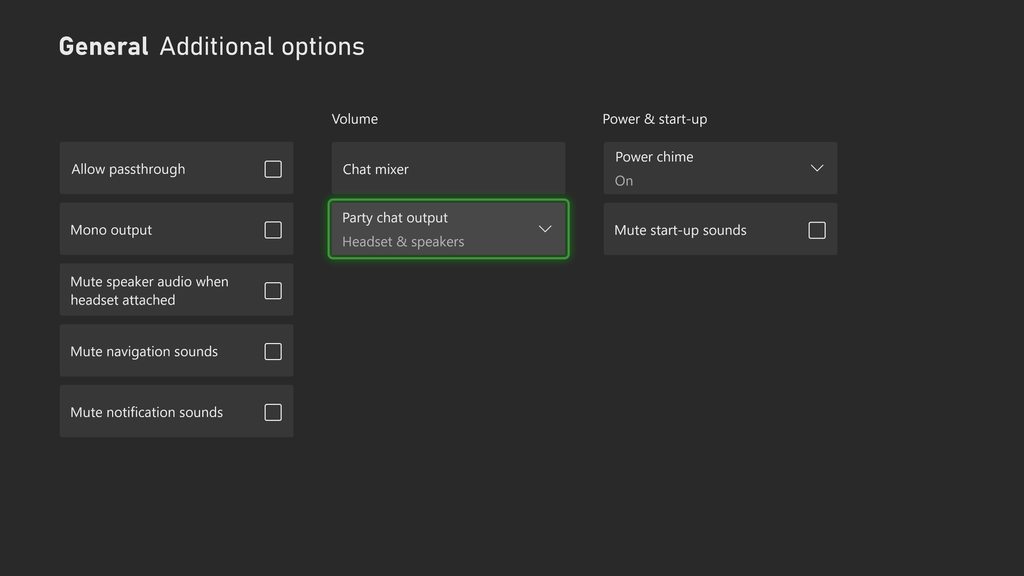
I'm headed to visit family at the moment so whatever you dm'ed me I'll have to check after.
Since I'm not at the PC
buoyant ingot
past basin
Since I'm not at the PC
I still can’t hear the game audio after I record

Am I missing something?
past basin
Scroll down the audio mixer, does the Video Capture Device volume slider move? Odds are you don't have OBS Audio monitoring on. Press the gear icon on the mixer and make sure the monitor setting for the capture card is set to Monitor and Output
buoyant ingot
 buoyant ingot
past basin
Scroll down the audio mixer, does the Video Capture Device volume slider move? ...
buoyant ingot
past basin
Scroll down the audio mixer, does the Video Capture Device volume slider move? ...
I don’t see that
past basin
Check propeerties for your capture card in the sources, make sure the bottom option for audio is set to Capture Only
buoyant ingot
past basin
Check propeerties for your capture card in the sources, make sure the bottom opt...
Okay so now the issue is that I can’t hear myself
buoyant ingot
past basin
Check propeerties for your capture card in the sources, make sure the bottom opt...
Actually that’s not an issue what if I want it to hear my game audio but not my party audio
worthy stirrup
clear pollen
Most captured cards are designed to capture video in standard resolutions such a...
What higher end capture cards are you thinking of?
mortal oasis
If I record at 2K 60 but my Monitor is 4K 60 which one do I set in edid internal?
 coral steppe
Anyone help me setup fifine sc3 with ps5+obs+elgato?
nocturne crest
past basin
Okay, that's somewhat more useful. Try a diffeerent HDMI cable if you have one,...
Sorry for the late response. Seems like this is the only other cable I got, which idk if it'd work

 hybrid onyx
hey, I just got this elgato game capture neo today for christmas, I've connected and setted everything up (including the use of the usb c cord that was given in the box) but I keep getting this in obs. I've tried every possible solution but nothing seems to work, is there anything else I could do to fix this? I'm trying to stream off of my switch

 dense eagle
Does anyone know how or if it’s possible to overlay face cam video while game capturing in the Elgato Capture App?
hybrid onyx
apparently its the same affect with my ps5 as well, i just tested
 west canopy
Is there a way to hook 3 devices into one capture card without switching ports?
 celest dust
Can anyone help me with this audio issue? The audio was fine out of the box but when I ended up tinkering with stuff on windows the sound quality sounds bad now
2 examples of the first clip having good quality but the second not so much
 lone crypt
celest dust
2 examples of the first clip having good quality but the second not so much
lone crypt
celest dust
2 examples of the first clip having good quality but the second not so much
Sounds like you might have set your sample rate below 44.1k.
Or some other effects like compression or eq, but my first guess is you changed the sample rate so there’s no high frequencies anymore.
lone crypt
dense eagle
Does anyone know how or if it’s possible to overlay face cam video while game c...
I don’t think so.
Compositing a scene with multiple devices is what OBS is for.
lone crypt
west canopy
Is there a way to hook 3 devices into one capture card without switching ports?
You could get a switcher, but people have trouble with cheap ones quite a lot, asking questions here. Probably many of them are incompatible or cause some issue. I’m not sure if any of them are sure to work.
Maybe something really fancy like a black magic switcher console!
lone crypt
hybrid onyx
hey, I just got this elgato game capture neo today for christmas, I've connected...
This screen indicates that the capture card is talking to the computer just fine, but the console is not sending a compatible signal. Check the settings on your console.
 severe ore
hi all, im thinking to buy an 4k pro or the 4k x
currently i am not sure which of the 2 i should buy due that my current motherboard has the second pcie x16 lane disabled due that im using an extra m.2...
I am planning to build a new pc in the future but wondering if any of you know motherboards for 9th gen ryzen where all pcie lanes can be working with all the m.2 slots while having access to wifi?
Or at this point is it just easier to go for the 4k x?
 craggy relic
i need help with my hd 60x
lone crypt
severe ore
hi all, im thinking to buy an 4k pro or the 4k x
currently i am not sure which o...
That’s a question for some motherboard experts!
But you’re doing the right thing by asking first.
Honestly, the usb versions are probably a safer bet. That’s what I would get if I was to buy a new card right now, even though I have pcie slots open. Just more flexible for who knows what comes down the road.
lone crypt
craggy relic
i need help with my hd 60x
You came to the right place
celest dust
lone crypt
Sounds like you might have set your sample rate below 44.1k.
Or some other effe...
How should I fix the equaliser if you don’t mind helping? Also is this through OBS or just Microsoft sound settings?
lone crypt
celest dust
How should I fix the equaliser if you don’t mind helping? Also is this through O...
If you have any effects in windows sound settings they should be disabled.
If you have effects in OBS they should probably be disabled, at least to check.
But again, my first guess is that you changed the sample rate to something below 44.1khz
Use 44.1 or 48
For all your devices
celest dust
Gimme one sec
celest dust
lone crypt
If you have any effects in windows sound settings they should be disabled.
If y...
would you mind hopping in a call or vc so you can show me? You can just type if you want
lone crypt
Not available for that.
hybrid onyx
lone crypt
This screen indicates that the capture card is talking to the computer just fine...
Yes, both settings for the switch and the capture card match
celest dust
lone crypt
Not available for that.
unfortunately I dont think this fixed the issue :/
thanks anyways
severe ore
lone crypt
That’s a question for some motherboard experts!
But you’re doing the right thin...
i currently have since ages the hd 60 s (+ i think) but it's starting to fail on me, need to unplug it and replug it back in to even see my ps5. and sometimes when i turn off my ps5 my pc like the freeze up when i close the 4k capture program 🥲 (not 100% if that is the cause but it happened few times already even tho my pc is rated above the recommend specs)
lone crypt
severe ore
i currently have since ages the hd 60 s (+ i think) but it's starting to fail on...
Hmm not sure what to say about that besides basic troubleshooting like reseat all connections and uninstall/reinstall the app. (Is the app up to date?)
Maybe see if OBS works better as a capture tool.
Freezing when the app closes makes me think some gremlins have gotten in there. Could be other issues with the computer that aren’t even related, and this is just a symptom.
But there aren’t moving parts in a capture card so there’s no reason it should perform any different now than it did to begin with.
More likely the problems are with your computer/software.
celest dust
lone crypt
Use 44.1 or 48
Do 'bits' matter?
craggy relic
g
severe ore
lone crypt
Hmm not sure what to say about that besides basic troubleshooting like reseat al...
i use obs to capture, but the software still need to be turned on if you want to have the view in obs right? atleast that was something in the past 🥲
 hot osprey
Elgato CC randomly stopped working, blinks blue once then blinks red a few times before hitting me with the good ol "Unknown USB Device (Invalid Device Configuration Descriptor)"
lone crypt
celest dust
Do 'bits' matter?
Shouldn’t. But I would make them all the same. 16 or 24
lone crypt
severe ore
i use obs to capture, but the software still need to be turned on if you want to...
No. I don’t think so.
If it’s an hd60S+ that’s a uvc device so it doesn’t need a driver on any computer.
The capture was needed for some early cards on macOS; cards that weren’t uvc.
I thought even the original hd60 was able to run on windows without anything extra, but maybe not
hot osprey
hot osprey
Elgato CC randomly stopped working, blinks blue once then blinks red a few times...
yall got any ideas
 tawny tangle
Who wants to help me beat the HD60 X into submission? lol
I wish my HD60s wouldn't have gone out on me..
it worked just fine
 mint quail
Yo can anyone help me with hd60 x
lone crypt
We’re all volunteers here. Post your questions in detail and whoever is available might have ideas and suggestions!
tawny tangle
Sounds good, thanks Tracks
mint quail
tawny tangle
whats your issue scrubby?
So I had watched the video on how to set up it up on my xbox and everything seems but I'm having a problem with recording my party chat audio but not my audio like mic or when I speak
and it seems like no videos are helping
tawny tangle
mint quail
So I had watched the video on how to set up it up on my xbox and everything seem...
what mic are you using? What headset?
You need to give them as much info as possible so that they can help
So Santa brought me a new monitor and the new HD 60 X for Christmas, yay!
My HD60s took its final breath about a week ago, so it was time to upgrade. I simply just moved all the cables from the 60s to the 60 X, and I cannot get audio to my Astro mixamp through my PC. So here is my audio setup:
HDMI Xbox Series S -> HDMI IN (El Gato HD 60 X)
HDMI OUT (El Gato HD 60 X) -> Gaming Monitor
4 pole 3.5mm cable running from front of El Gato HD 60 X to the STREAM port of the back of the Astro Mixamp Pro TR
USB cable from Astro Mixamp Pro TR to Gaming PC
Issue:
- There is no game audio from my Xbox Series S with the El Gato HD60 X like there was with the S
- With the S, I was able to move the mixamp dial left and right to toggle between discord chat/spotify music and Xbox game volume
- If I run the mixamp straight through to the console, I hear audio
- If I launch El Gato 4K Utility, I can hear game audio, but I cannot stream using OBS Studio/Streamlabs OBS as the capture card is already in use. 4KU is the only time I have no delay in game audio.
- With audio coming through 4KU, I have no ability to turn down PC volume in discord or anything else without doing it manually
- When I change audio in 4KU from HDMI Audio input to Analog input, I am met with a disgusting loud screetching sound
lone crypt
mint quail
So I had watched the video on how to set up it up on my xbox and everything seem...
Do you have a chat link cable?
This is usually needed with consoles and party chat.
That will capture game sound and party chat from your controller port, and then you need a mic connected to the computer to capture your voice.
past basin
MixAmp Pro TR will replace Chat Link in their setup. Though it should be going to the console, not the PC generally.
Because otherwise you have to run the controller to the MixAmp Aux port with a TRRS aux cable
So USB from MixAmp to console, and Stream port on the back of the MixAmp to the HD60 X, then set the card to Analog Audio mode using 4K Capture Utility (which saves to the card when set, unlike the old HD60 S), so you can use it with other apps oonce seetup
Do not forget when adding a source to OBS, if you want to hear it, and not just stream or recording, to setup audio monitoring in the Advanced Audio Properties from the Edit menu (the capture card should generally be set to Monitor & Output if you want to hear it on the PC as well - it defaults to Monitor off since you should already hear it from the MixAmp)
past basin
mint quail
So I had watched the video on how to set up it up on my xbox and everything seem...
Xbox shouldn't be letting you record your own voice, beyond the very quiet Mic Monitoring feature. How do you have things connected? HDMI only or using something like a Chat Link?
past basin
hot osprey
Elgato CC randomly stopped working, blinks blue once then blinks red a few times...
Try a different cable - generally make sure the cable it at least 5 Gbps (USB 3.0 / SuperSpeed). Checck the ports for signs of damage, debris or corrorision as well.
 carmine parrot
Hello, can someone help me?, i just got a Elgato 4k Pro for christmas, and i wanna have a 2160p but i cant find it in the options, and i dont know how to add custom res, does anyone know?
hot osprey
past basin
Try a different cable - generally make sure the cable it at least 5 Gbps (USB 3....
I fixed it I just needed to move the power cord to a different port
carmine parrot
My capture card wont work in 2160p, it will flicker and the sound get scratchy but 1440p no problemn
past basin
hybrid onyx
hey, I just got this elgato game capture neo today for christmas, I've connected...
The fact you're getting this screen indicates the card is connected to the computer fine, but it's having issues with the signal from the source. Try anothere HDMI cable, make sure the HDMI IN and HDMI OUT ports haven't been mixed up.
past basin
hot osprey
I fixed it I just needed to move the power cord to a different port
Yeah, that'd do it. Glad you were able to sort it out
past basin
carmine parrot
My capture card wont work in 2160p, it will flicker and the sound get scratchy b...
It works at lower resolutions and drops out at 2160p? Does your monitor use DSC (Display Stream Compression) above 1440p? I'm assuming there's a monitor in the HDMI Out port here for passthough?
Does your PC motherboard have x4 lanes of PCIe wired up on the slot you connected the card to?
carmine parrot
The only thing i did was connect the capture card to the pcie slot, no cables
past basin
? How are you connecting whatever you're trying to capture then?
 vivid pelican
Hey I have a problem that I have no idea what’s going on… Basically I want to connect an external capture card (the HD60S) between my laptop (doubling as a stream PC please don’t moan about how its bad and how I should just not do a dual PC streaming thanx for understanding) I put both the HDMI cable to my desktop GPU and the capture card “in” slot. I then connect the USB c to A male cable to a USB a female port into my laptop. Finally I connect the HDMI cable to my laptop hdmi port and the “out” port in my capture card. My first monitor (DP, 1080p@360) then just goes to the background windows default screen and then I can’t go on it the mouse just acts like it isn’t there and won’t go past my second monitor (HDMI, 1440p@144hz). if I then go to OBS on my laptop and try to add the video capture it shows HD60S game capture but it doesn’t show anything just black. How do I fix this?
past basin
carmine parrot
I have no idea how this works lol
Generally you plug whatever you're trying to capture into the HDMI In port on the card. Capture cards only give you a HDMI In port, they require something connected to actually capture anything
carmine parrot
well it is captureing, 1440p just not 2160p
past basin
carmine parrot
well it is captureing, 1440p just not 2160p
So you DID connect a HDMI cable to it afteer?
Otherwise you might be mixing the card up with Software capturee
carmine parrot
I have a hdmi from ps5 pro to capture card, and monitor to capture card
past basin
Okay, so there is a cable. Is there a monitor connected to the HDMI OUT of the card?
tawny tangle
past basin
Because otherwise you have to run the controller to the MixAmp Aux port with a T...
Was this in response to my question?
Mine is a two part type question. I'm just trying to hear audio from my Xbox as a stand alone for now, but additionally, want to be able to hear desktop alerts/music/etc. When I am streaming which is why I was running the mixamp to the PC, and utilizing the 3.5mm aux cable to capture game audio from xbox
past basin
vivid pelican
Hey I have a problem that I have no idea what’s going on… Basically I want to co...
HDMI OUT is meant for passthrough to a monitor or TV. Do not plug that cable into your laptop. It's optional if you don't have a display to connect there.
Aside from that, if you're just getting the background you didn't duplicate the display and your computer is just seeing the card as a second monitor. Setup display duplication or cloning. You can do this quickly on the gaming PC with Windows Key + P to select the duplicate option. That'll put the same image on both your main screen and the virtual screen that goes to the capture card.
carmine parrot
I just dont understand, 1440p 60fps runs perfect but 2160p, 60fps flicker and make scratchy sound
i have watched alot of guides on how to setup, the cable is right, and have 4k
past basin
tawny tangle
Was this in response to my question?
Mine is a two part type question. I'm jus...
MixAmp usually goes to the console via USB so you don't have to wire down your controller. You can run an aux cable from the PC Speaker out to the Aux port on the MixAmp to hear the streeam alerts. You may beed a Ground Loop Isolator if the line has buzzing noise while conneceted this way.
past basin
carmine parrot
I just dont understand, 1440p 60fps runs perfect but 2160p, 60fps flicker and ma...
Does the monitor in the HDMI Out support 2160p?
past basin
49" or 57"? The 49 does not
 past basin
It's a ultra wide 1440p variant. So the monitor itself may not support 4K/2160p. IF you unplug the monitor from the HDMI out on the capture card, you may be able to get 4K to the capture card though
 carmine parrot
the monitor without the capture card can do 4k
I can run 2160p on my ps5 pro without a problem, but with the capture card i cant now
past basin
Then it's downscaling since the panel physically can't handle 2160p. That might be tripping things up
What does the screen look like in 4K?
Both the monitor and the captured screen in the app
carmine parrot
Ill just stick to 1440p it still looks great
past basin
Sounds good. If you try for 2160p later you might need to change the EDID mode.
tawny tangle
past basin
MixAmp usually goes to the console via USB so you don't have to wire down your c...
so the Aux port on the front of the HD 60 X is no longer required to be used>
or do I need to keep that plugged into the stream port, and then run another cable to the Aux port of the mixamp?
from the PC
past basin
tawny tangle
so the Aux port on the front of the HD 60 X is no longer required to be used>
You'd run the stream port on the MixAmp into that
PC into the Aux, usually, and USB to the console
past basin
you can flip the console and PC but then you need an aux going to the controller which can be annoying
Good luck!
tawny tangle
past basin
Good luck!
if you were my wife, i'd kiss you..
I dont know how I got the Aux cable step mixed up...
thank you!
past basin
All good, glad you got it sorted out!
carmine parrot
wtf now it keeps going to source: 2160p59, even though its on 1440, so it wont go to 1440p
 past basin
carmine parrot
wtf now it keeps going to source: 2160p59, even though its on 1440, so it wont g...
past basin
carmine parrot
wtf now it keeps going to source: 2160p59, even though its on 1440, so it wont g...
When that happens, reboot the system. It usually only trips up like that right after the install or update to thee app
carmine parrot
I thought i was able to play in 4k, but tbf 1440p is still great
here is a recording of 1440p
past basin
carmine parrot
I thought i was able to play in 4k, but tbf 1440p is still great
Probably still can - but might need some setting changes to get things to play correctly
mint quail
tawny tangle
what mic are you using? What headset?
Right now I am using the one ear turtle beach
 strong ingot
Please someone help
vivid pelican
past basin
HDMI OUT is meant for passthrough to a monitor or TV. Do not plug that cable in...
Okay thanks, Ill try it later just don’t get why my first monitor just goes unusable and to the windows background. You don’t have to but it would be rlly helpful if you could say which cables go into which PC/laptop and the capture card
carmine parrot
It keeps doing it, every time i get it to do 1440p, when i restart my pc, it change the source to 2160p, and wont go back to 1440?
 sinful lotus
Having this weird issue with the HD60 X, whenever I directly stream it on discord as a capture device it'll just load forever and not actually pop up. I already have hardware acceleration off and all of my cables are connected properly. Any ideas?
Nevermind just fixed it, it apparently doesn't like me having that and capture utility running at the same time, good to know
 earnest ledge
Hey guys. I need help 😢
I bought a capture card neo and i try to use it on my xbox series s
after 5-10 seconds the signal gets lost. all my other usb devices lose their connection for a second and reconnect
dense eagle
lone crypt
I don’t think so.
Compositing a scene with multiple devices is what OBS is for.
Yea your right it doesn’t support it, did more research and camo studio is the iOS equivalent of OBS and supports two different video feeds
lone crypt
sinful lotus
~~Having this weird issue with the HD60 X, whenever I directly stream it on disc...
Yes only pcie capture cards can be addressed by more than one app at a time
warped ledge
earnest ledge
Hey guys. I need help 😢
I bought a capture card neo and i try to use it on my x...
Is Windows USB suspend turned off?
mint quail
lone crypt
Do you have a chat link cable?
This is usually needed with consoles and party ch...
Okay thanks
nocturne crest
it only mentions hd60x but would this also work on hd60s?
 lone crypt
Works with any hdmi device up to 2.1
nocturne crest
hd60s isnt 2.1 🗿
damn is there any replacement cables or anything for the hd60s?
wait does any regular hdmi 2.0 cable work?
warped ledge
nocturne crest
wait does any regular hdmi 2.0 cable work?
2.1 should be backwards compatible.
nocturne crest
ah
I think I misread jn's message thought they meant it supports 2.1 only since I googled it and it said hd60s doesnt support 2.1
my fault
warped ledge
nocturne crest
my fault
no worries.
 cerulean estuary
does anyone know what would cause my hdmi elgato 4k x audio to not work if i update windows
im on windows 11 23h2 right now and it worked perfectly then i updated to the latest and had to go back cause the sound stopped working
past basin
Check your Windows privacy settings for mics (includes capture card audio) to make sure the updated didn't change the settings and block your apps. It needs to allow bot apps, and Desktop apps, which are two different options
Beyond that check the settings in Windows Audio Settings for the capture card to make sure it didn't mute or turn down the levels for the card
 marble cosmos
Okay, I have a question... I have an Elgato HD60 (Attached to my retrotink, capturing to my laptop, passthrough to my second monitor), but the issue I'm having is that the borders are cropped off. It displays correctly in OBS...but not on my monitor. I've confirmed that the HDMI connecting directly to my monitor, it isn't cropped, it displays properly
Retrotink support had me try connecting directly because I assumed it was the monitor's fault, and it actually worked, so it's the elgato doing it
But this monitor doesn't have settings that I can change to try and fix the issue, the option to change custom scaling is grayed out (HP 2210m)
past basin
You're likely running into trouble because that older card doesn't support 4:3 aspect ratios, (eg it supports 480p only as 720x480, not 640x480). As a result your upscaler won't see 640x480 and will output 720x480 with the image centered by the sound of it
marble cosmos
Retrotink is outputting 1080p
And my OBS reads it as 1080P, but the passthrough is just messing up


I can get a splitter and just not use the elgato's passthrough but it's a bit annoying as my setup is so complicated as it is
so i wanna see if this can be solved somehow
it's a retrotink 4k, sorry for not clarifying
but i don't use 4k because elgato doesn't support that
celest dust
lone crypt
Shouldn’t. But I would make them all the same. 16 or 24
Never mind I fixed the issue, in sound settings there was a box ticked for using the recommended sound settings and literally just unticked it and It fixed
 swift ocean
so my capture card captures my party audio and game audio but not my controller headset mic, any way to fix this?
past basin
That's normal - your console doesn't play your own voice back, so there's nothing to capture. Similarly Chat Link Pro only splits the audio coming from the console, not the unamped mic, as that would cause issues - you'd want a powered system to amp the mic before splitting it.
Geneerally most people us a mic on the PC to mix the audio back in.
past basin
marble cosmos
I can get a splitter and just not use the elgato's passthrough but it's a bit an...
Splitters can cause a lot of issues with capture cards, especcially since it can only send the same signal to both ends and may mess with EDID negotiation and display modes. It might be worth a shot though.
I've no idea why your Retrotink iw cocnverting to 4:3 with letter boxing in 1080p mode if there's no scaling going on. If there is scaling going on, I've no idea why it wouldn't apply it when the capture card is setup there. If it was a newer card we could try adjusting the EDID that lists available display modes, but HD60 S is too old for that feature.
marble cosmos
past basin
Splitters can cause a lot of issues with capture cards, especcially since it can...
There is scaling going on, well, I also use vga to upscale to 1080p and it has the same problem, this particular setup is just 1080p-1080p but I was using it to prevent needing to buy switches/splitters with my current setup
The Retrotink 4k upscalers to 1920x1080
I don’t know where you’re getting 4:3 from
Even if the inputs are 4:3 the outputs shouldn’t be
 past basin
marble cosmos
I don’t know where you’re getting 4:3 from
past basin
marble cosmos
I don’t know where you’re getting 4:3 from
You mentioned retro gamnig with cropped off edges, so I was assuming 4:3 since tha's the most common issue with HD60 S and retro gaming. Now that I'm back at the PC and see aim image there, that looks like overscan. Does the retrotink have any overscan settings? sometimes the monitor may also have overscan options
marble cosmos
past basin
You mentioned retro gamnig with cropped off edges, so I was assuming 4:3 since t...
If I plug directly from the Retrotink into the monitor bypassing the elgato hd60 there is no overscan. The monitor has a custom resolution option which is grayed out
Google tells me that lots of people with this brand of monitor all say that the option is grayed out with no real resolution…
But like it isn’t the monitor causing the overscan or the Retrotink causing it, it’s the elgato
Could the edid negotiation thing be what’s causing it? I don’t know much about that
Since the pass through works basically the same as a splitter
past basin
marble cosmos
But like it isn’t the monitor causing the overscan or the Retrotink causing it, ...
It's likely an EDID issue - odds are the EDID for 1080p on the monitor and capture card differ slightly, but HD60 S doesn't have an adjustable EDID like newer models.
But I don't know enough about the retrotink to say for certain
What I do see seems to indicate it's normal in many render modes, because it scales up to vertical matching or uses integer scaling so there's a bit of bleed over. But I'm unsure why it works without the edge on the monitor then, unless the monitor normally handles oversccall and thee merged EDID from the capture card is throwing it off
 past basin
 zealous zealot
can anyone help me with my capture card HD 60 X with my PlayStation five?
zealous zealot
can anyone help me with my capture card HD 60 X with my PlayStation five?
Usual cause of that error is the USB connection is too slow. As you've got a HD60 X, and a mac, did you swap out the original USB-C to USB-C cable or use any adapters or docks that might have dropped the connection to USB 2.0 speeds?
Keep in mind the card needs a USB 3.0 cable / 5 Gbps connection to work correctly.
For mac users I usually suggest swapping out the whole cable with a USB-C to USB-C one of appropriate speed to prevent this. You can use an adapter in a pinch but most are USB 2.0 speed so you have to make sure the adapter is the right speeed. Same from replacement cables - most are only USB 2.0 speeed, especially if they're labelled as charging cables.
zealous zealot
sorry, but I'm dyslexic and I can't really read much what of what you're saying or understand it could you call instead or are you not able to?
I have a 3.1 wsb
usb
marble cosmos
past basin
It's likely an EDID issue - odds are the EDID for 1080p on the monitor and captu...
Unrelated to this a couple people who have had issues similar to this with that brand monitor have gotten it working by using a hdmi-dvi adapter, do you think that could solve it or am I wasting my money?
I had one ordered off Amazon, I tried to cancel when I figured out that it was an elgato issue not a monitor issue, but since it’s coming anyways I might try it if there’s a chance I’ll work…
 rapid prairie
Hello guys, just got my cam link 4K and paired it with my Canon 750D. It's working great but i can see some artefacts, like some lines forming in the movement. Can someone help me ?
strong ingot
Can anyone help me set up my capture card
lone crypt
It’s a community help channel where people help as their availability allows.
Questions with enough detail are easier to answer.
vivid pelican
When I plug a HDMI cable from my HD60S into my GPU's HDMI slot and the capture cards "in" port my first monitor (DP, 1080p@360hz) Just goes to the windows background after going black a few times and then I can only use my second monitor (HDMI, 1440p@144hz) and I cant move my mouse across to my first monitor, effectively rendering it useless. (Also when I plug the usb a male to usb C male into the capture card and my laptop - doubling as a streaming PC - and then go to OBS to add a video capture device when I select it, only black comes through on the preview window)
rapid prairie
rapid prairie
Hello guys, just got my cam link 4K and paired it with my Canon 750D. It's worki...
well its working now 🤷
strong ingot
Can anyone help me set up my capture card
lone crypt
vivid pelican
When I plug a HDMI cable from my HD60S into my GPU's HDMI slot and the capture c...
Capture cards appear as monitors to your GPU, so you’ll need to go into the display settings in windows to identify and arrange your monitors, including the capture card.
Have you done that?
Typically, you’ll want the capture card to be a mirror of the main display.
lone crypt
strong ingot
Can anyone help me set up my capture card
Again, not if you don’t ask a question and include enough detail.
vivid pelican
lone crypt
Capture cards appear as monitors to your GPU, so you’ll need to go into the disp...
Uh how do I set that up? Like I know how to change the resolution and placement of the monitors but apart from that im an idiot
strong ingot
lone crypt
Again, not if you don’t ask a question and include enough detail.
How do I set it up ? That’s what I’m asking
vivid pelican
strong ingot
How do I set it up ? That’s what I’m asking
Make of the card, dual PC/console/single PC, more general info
vivid pelican
What is the make of your capture card. The elgato [insert something here]
lone crypt
Have either of you gone through the setup information Elgato provides?
If so, please ask a question about a specific issue you couldn’t figure out while following the direction.
vivid pelican
lone crypt
Capture cards appear as monitors to your GPU, so you’ll need to go into the disp...
I want it to mirror the main display but as soon as I plug in the capture card the main display becomes usesless is my problem
lone crypt
vivid pelican
I want it to mirror the main display but as soon as I plug in the capture card t...
It sounds like windows is changing your main display when the card connects. Right click the desktop > display settings.
Use the detect and identify buttons to find your displays and arrange them, and set which one should be your main display and then which one should be a mirror of that. (The capture card)
vivid pelican
Ok ty il try that and feedback 🙂
lone crypt
Again, starting from the product page for the capture card you bought, Elgato has a lot of setup guidance already made.
If you’re coming here for help from community members, it really should be assumed that you’ve gone through this info and hopefully done some basic Google and troubleshooting and then still have a specific issue that you can describe and provide detail about.
lone crypt
strong ingot
Ok I wanna know where do my input and output go
And you didn’t get that from the setup guide on elgato’s site?
lone crypt
The ports on the card are labeled
strong ingot
Can you just tell me where do I put the output and input please
lone crypt
Assuming this is a usb capture card: The capture card is receiving a video feed from the game computer or console, and sending that by usb to the recording computer.
strong ingot
Can you say it less proper
Ok
I got it plugged in but it’s not connecting to my monitor
Bro
Can someone help I got everything plugged in but it not connecting to my monitors
Like my elgato isn’t connecting at all
lone crypt
I’m answering your questions the way I am because I know that the only way you’ll get your products set up and working is by understanding what they are doing and why. Which means we have to use clear language and not just list “plug an into b” without understanding why you’re doing it.
vivid pelican
Im back. Uh my HD60S now actually works as a display and I can rearrange it and clone it and use my first monitor and that. Problem is there’s nothing coming through on my streaming laptop. I have a HDMI cable plugged into my desktop and the “in” section of my capture the card, and then I have an old Nintendo pro controller cable acting as a usb a to c cable connected to my laptop. Problem is now that nothings coming through to my laptop when an add a video source just a black screen. I did the NVidia control panel clone display 1 (my first and main monitor, Display port, 1920x1080, 360hz) with display 3 (my HD60S). I don’t know there’s no video coming through. Anyone smart able to give a solution? Ty
past basin
vivid pelican
Im back. Uh my HD60S now actually works as a display and I can rearrange it and ...
Most controller cables are focused on charging not data bandwidth, you're most likely not getting enough speed on that cable. You'll get enough power for the card to turn on and likely do passthrough to a monitor and not much else
past basin
zealous zealot
I have a 3.1 wsb
So your USB CABLE is rated for USB 3.1?
Does that USB cable plug directly into the mac?
Do not use any adapters or hubs to test this.
Did you set the resolution in OBS for the card, or leave it automatic?
past basin
marble cosmos
Unrelated to this a couple people who have had issues similar to this with that ...
I couldn't say - it would probably force the EDID modes down to what's supported in DVI mode, but I'm not familiar enough with the hardware you're connecting to know if it would help here specifically, sorry. It's possible, but I couldn't guarantee it.
past basin
strong ingot
Can someone help I got everything plugged in but it not connecting to my monitor...
What do you mean it's not connecting to your monitors? What are you trying to capture? Is this a Dual PC Setup? A gaming console?
Which model of capture card did you get (as they have different instructions for some parts)? There's like a dozen different cards, some with different things you might have to set.
Generally most people are connecting consoles, with an external capture card, so HDMI goes from console to the HDMI IN port on the card, then from the HDMI OUT port on the card you connect the monitor. Then you just connect the card to USB (if it is an external) and run the capture software on your PC. If the card doesn't get power, no video goes through it.
vivid pelican
past basin
Most controller cables are focused on charging not data bandwidth, you're most ...
Where can I find a cable that will work then>
past basin
vivid pelican
Where can I find a cable that will work then>
Since it's HD60 S, it needs a USB 3.0 (5 Gbps) or faster cable. These might also be labelled SuperSpeed. If you can't find one locally or on Amazon, https://www.elgato.com/spare-parts has some.
Usually you can grab one at larger electronics stores like Best Buy though - just look for Data Transfer cables instead of charging ones.
 vivid pelican
past basin
Since it's HD60 S, it needs a USB 3.0 (5 Gbps) or faster cable. These might als...
vivid pelican
past basin
Since it's HD60 S, it needs a USB 3.0 (5 Gbps) or faster cable. These might als...
Ty
strong ingot
past basin
What do you mean it's not connecting to your monitors? What are you trying to c...
Yes I have a dual monitor with pc and ps5 and I have the hd60
Well
Know I’m having a problem when I connect all the cable it only capture pc not console
@past basin
 waxen eagle
🧐
past basin
strong ingot
Yes I have a dual monitor with pc and ps5 and I have the hd60
If you have the original HD60, try using Game Capture HD (https://help.elgato.com/hc/en-us/articles/360027964072-Elgato-Game-Capture-HD-Software-Release-Notes-Windows ). That old card isn't compatible with the new app.
I'm hearing reports that you may have to use an older release of some apps like OBS as well, due to changes they made. So if you're trying to use OBS, try version 29
marble cosmos
past basin
I couldn't say - it would probably force the EDID modes down to what's supported...
Using a HDMI-DVI adapter fixed the issue without tweaking any further settings
Strange
past basin
Go to know. It probably affeected the available display modes in the EDID lists
marble cosmos
It even transmits audio, which I was worried about
strong ingot
Like it’s connecting to my console not my pc rn @past basin
past basin
strong ingot
Like it’s connecting to my console not my pc rn <@269997944671830017>
Like the PC isn't getting video from the card into the capture app? But the console video is going though to the screen on the HDMI out?
Or are you trying to capture a second PC and when you move the setup over it doesn't work?
 tame arrow
streamlabs isnt picking up my hd60x audio anyone able to help
 alpine latch
Hello Im Using the Game Capture Neo, and the video works perfect, but the audio is cutting out like every second i dont know why, I already tried a lot of things like updating drivers, restarting the PC and restarting makes it works for a little time like aprox 15 mins and then again the same audio error, i did a clip of it on stream trying it for the first time, can someone help me
 cursive merlin
Hey got a problem here when trying to use HDMI passthrough on the 4k pro. Im trying to do HDR 1440p 240hz. For some reason when I do this it causes baaaaaad text fringing on my main monitor. Its a 1440p 360hz QD-OLED monitor and Ive just been using dp from main system to monitor and using display duplication to capture the image but I wanted to swap to passthrough so I could use HDR. The text fringing goes away when I set the edid mode to internal I can only do 1440p 144hz but the text fringing is gone. And if I do edid mode to display I can do the 1440p 240hz but the text fringing is insane
Anyone know of a fix for this?
zealous zealot
can someone help me with my HD 60 X because it's not working with stream labs and it keeps blinking red? I'm pretty sure I have it all right with the PS5 but I don't really know and it cost me a lot of money.
warped ledge
cursive merlin
Anyone know of a fix for this?
what do you mean the text is insane can you give more info please.
warped ledge
zealous zealot
can someone help me with my HD 60 X because it's not working with stream labs an...
HDCP is off right?
zealous zealot
what does that mean?
warped ledge
zealous zealot
what does that mean?
on your console.
zealous zealot
 zealous zealot
warped ledge
on your console.
zealous zealot
warped ledge
on your console.
oh yeah, it's off
warped ledge
zealous zealot
oh yeah, it's off
can you close streamlabs out and open up 4k capture utility please
cursive merlin
warped ledge
what do you mean the text is insane can you give more info please.
Extreme text fringing. Basically the edges of text look purple or blue depending on where they are on the monitor
warped ledge
cursive merlin
Extreme text fringing. Basically the edges of text look purple or blue depending...
is your monitor in HDR mode?
cursive merlin
warped ledge
is your monitor in HDR mode?
Yes
warped ledge
cursive merlin
Yes
and the 2nd one too?
cursive merlin
Yes
warped ledge
cursive merlin
Yes
can you post a screen shot
warped ledge
zealous zealot
you're on mac use the elgato utility. we're gonna check something.
zealous zealot
 warped ledge
zealous zealot
warped ledge
zealous zealot
update the firmware please
cursive merlin
 zealous zealot
 alpine latch
Hello Im Using the Game Capture Neo, and the video works perfect, but the audio ...
alpine latch
alpine latch
Hello Im Using the Game Capture Neo, and the video works perfect, but the audio ...
can i send a clip showing the problem of audio?
warped ledge
zealous zealot
thanks close this out, and make sure IN is connected to your Console, and Out to your Gaming Monitor/TV. Make sure the USB-C cable provided form elgato is connected to a thunderbolt port.
warped ledge
alpine latch
Hello Im Using the Game Capture Neo, and the video works perfect, but the audio ...
have you tried a differnet usb port?
alpine latch
im gonna try
zealous zealot
warped ledge
thanks close this out, and make sure IN is connected to your Console, and Out to...
I got that all correct, except I don't know what the Thunderbolt part means
warped ledge
zealous zealot
I got that all correct, except I don't know what the Thunderbolt part means
it's on the Mac
 warped ledge
zealous zealot
warped ledge
zealous zealot
yeah, looks like your adapter may not meet the required specs, if it does then soemthing else is wrong
zealous zealot
well, I'm pretty sure it does
warped ledge
can you do this without the hub?
zealous zealot
no it won't plug into my Mac
warped ledge
zealous zealot
no it won't plug into my Mac
what type of connector is it?
zealous zealot
I mean on the thing plugged into my Mac it says USB 3.1
warped ledge
zealous zealot
I mean on the thing plugged into my Mac it says USB 3.1
hmmm do you have a thunderbolt cable you can try?
zealous zealot
sadly no
warped ledge
zealous zealot
sadly no
@past basin any ideas?
zealous zealot
I'm sorry if this is making it hard, for you but I'm just not that good with capture cards and I don't really understand what you're saying

it just keeps blinking that at me
warped ledge
zealous zealot
it just keeps blinking that at me
unplug it for 1 min
zealous zealot
like from my MacBook
warped ledge
zealous zealot
like from my MacBook
the power to the card yes
zealous zealot
alright done
warped ledge
let is rest for 1 min
 warped ledge
zealous zealot
it's been a minute what should I do now?
warped ledge
zealous zealot
it's been a minute what should I do now?
plug back in.
zealous zealot
yep
warped ledge
zealous zealot
yep
any new changes
zealous zealot
it's still blinking red at me and it's saying the same thing it said on stream labs
warped ledge
zealous zealot
it's still blinking red at me and it's saying the same thing it said on stream l...
I'm hopping out for the night, but @past basin might be able to help.
I'm thinking the usb tree
alpine latch
warped ledge
have you tried a differnet usb port?
its working better now, i dont know why that usb caused problems if its 3.2 thanks
past basin
zealous zealot
Where did that cable come from? That looks like it has a black insert, meaning a USB 2.0 cable, though it also looks like an Elgato one. You didn't mix it up with a cable for a Stream Deck, mic or something else did you?
Is there a speed like USB 2.0 or 480 Mbps listed either end of the cable?
It'd look something like this on the USB-C side

And it should have a blue insert on the USB-A side like this

If there's a speed listed on it you can ignore the blue part though
Beyond that to check the USB Speeed, go to "About this Mac" in the Apple Icon of the menu>
Choose "More Info" at the bottom
This should bring up access to the System Report.
From there choose USB on the left.
Check through things on the right until you find the capture card
Look for Speed in the section below.
As I said earlier too, make sure the mac is not setup to try to capture video in a higher resolution than your Playstation outputs. Check your OBS Source for the capture card. It should be automatic usually, to prevent issues.
 queen saddle
i missed the black friday deal for the capture card. how much was it for the 60 and the 4k?
carmine parrot
My Elgato 4k Capture Utility program keeps changing my source resolution so everytime i boot up my ps5 pro and pc, i have to spent 5 minutes just to make it work, which is so annoying
I just want it to be 1440
 obsidian fable
Hi everyone, I recently got a 4K X capture card and when I stream on discord I do not hear any sound coming out. How can I fix this?
carmine parrot
obsidian fable
Hi everyone, I recently got a 4K X capture card and when I stream on discord I d...
Are you wathcing your own stream?
obsidian fable
carmine parrot
Are you wathcing your own stream?
No like there isn’t sound coming out of my PC, headphones or speakers
I’m using a switch if that makes a difference
marble cosmos
This is so strange… yesterday hdmi-dvi adapter was still providing sound to my monitor, but today, it is not
I wasn’t expecting it to but when it surprisingly worked I thought I was good
strong ingot
past basin
Like the PC isn't getting video from the card into the capture app? But the con...
Like when I put my ps5 input and pc output only my ps get the capture
past basin
PC output? The HDMI output on the card is for an external monitor (optional). The PC gets the capture signal over the USB connection. The card only captures what is connected to the HDMI input.
As the PlayStation cannot "get the capture" in assuming you mean it's the only thing you can capture. If you're trying to capture a second PC as well, you'll need to charge which device is connected to the HDMI input when you want to switch.
 valid vortex
So I just bought an HD60 X to replace my HD60 since I couldn't play with the sound delay, but now I'm getting zero sound. In '4K Capture Utility' and OBS there is zero movement on the bars.
For the device I have the USB C to A that it came with plugged into a USB 3.0 slot (getting video). I also have a Nintendo Switch connected in the 'HDMI In' and a monitor is connected to the 'HDMI Out', that is everything connected.
I checked my computer's Sound Settings and the 'Elgato HD60 X' is "Enabled" and the 'Levels' are not muted. I don't know what else could be the reason. Any advice?
huh
I can hear it if I unplug the HDMI Output
past basin
valid vortex
huh
I can hear it if I unplug the HDMI Output
Make sure the Switch isn't setup to use Dolby digital or something. That's the only thing that comes tom mind if the HDMI out being unplugged causes the audio to pickup - that the switch is changing to somehting other than basic stereo audio because the monitor or TV supports it (but the card won't and would lose audio)
valid vortex
past basin
Make sure the Switch isn't setup to use Dolby digital or something. That's the ...
I just switched it from 'Automatic' to 'Stereo' but that didn't seem to change anything
past basin
Hm. HDMI out shouldn't generally affect anything other than audio format. The usual headache is dealing with headsets. I've got to head out for family stuff but if I think of anything else that might trigger that I'll drop back later
valid vortex
I have a headset for my PC audio but using them essentially like speakers so I wouldn't think that would effect the capture device.
Thank you for trying
strong ingot
When I put pc in input and console output
All I see is my console screen and not my pc
past basin
strong ingot
When I put pc in input and console output
??? Why are you trying to put the console in output. Output is for OUT. HDMI out goes to a monitor if you need pass though, otherwise leave it empty
valid vortex
valid vortex
I have a headset for my PC audio but using them essentially like speakers so I w...
Okay, so I can hear the audio fine when I capture to Discord, using a monitor for output, which is really weird since it doesn't do that for 4K Utility Capture or OBS when connected to my monitor.
...
And now it seems to be working... I don't get it
craggy relic
Hey my capture card doesn’t capture audio on ps5 it’s an neo hd and like no party audio is coming from it either
Like does it capture audio
lone crypt
craggy relic
Hey my capture card doesn’t capture audio on ps5 it’s an neo hd and like no part...
Do you have a headset connected to the console? It will mute hdmi audio when it’s using a headset.
Use a chat link cable to split off your headset audio if you want to capture while using a headset on the controller.
craggy relic
What about like party audio
obsidian fable
obsidian fable
Hi everyone, I recently got a 4K X capture card and when I stream on discord I d...
Okay I did a test stream on discord and the audience can hear the audio from the switch but I can’t. What do I do?
lone crypt
craggy relic
What about like party audio
Whatever is coming through a wired headset, the chat link cable will allow you to capture that.
Oh but did you say it was a neo game capture? That might not have an analog audio in.
So the only way to capture audio is over hdmi, so you have to get your console to not mute that.
obsidian fable
Also when I stream on discord, how do I view my gameplay on switch?
lone crypt
obsidian fable
Also when I stream on discord, how do I view my gameplay on switch?
Easiest way would be to use the passthrough to a tv or monitor with speakers.
lone crypt
Or I guess you could route the analog from the chat link to a line input on the motherboard sound device.
strong ingot
@past basin im finna put it input
and not finna work
so for my output do i take hdmi out my pc or monitor
@lone crypt
@past basin

See
Can someone just dm and tell me where to put each hdmi cord bc ts not working
\w` 5z
When I use my display port now it’s just a black screen when I load up obs
past basin
strong ingot
Can someone just dm and tell me where to put each hdmi cord bc ts not working
The console goes to the HDMI IN. The USB goes to a USB 3.0 port (or faster) on the computer. The HDMI OUT can be left empty - or you can run it to another monitor or TV for HDMI Passthrough, where the card basically works like a splitter.
This was all in the setup docs you told Jn you already read
Can you confirm which process you followed?
past basin
obsidian fable
Also when I stream on discord, how do I view my gameplay on switch?
Ideally with HDMI passthrough by running the HDMI out of the card to another monitor or TV. You should be able to watch through Discord though, as long as discord is the active window
past basin
strong ingot
When I use my display port now it’s just a black screen when I load up obs
Why are you using a DisplayPort? What are you trying to capture? A console or a PC? I only see a single PC so I'm assuming this isn't a dual PC setup, so you wouldn't be using the capture card to capture the PC generally.
strong ingot
past basin
Why are you using a DisplayPort? What are you trying to capture? A console or ...
Bc It’s not capturing my pc
strong ingot
past basin
Why are you using a DisplayPort? What are you trying to capture? A console or ...
I have ps5 and pc
past basin
It can only capture one at a time
strong ingot
So how would I stream
past basin
You would use your streaming software? Something like OBS Studio. Add your capture card to it so you can capture the console. Just add your PC games to it for the PC side - it doesen't need a capture card for the PC side if it' s just one PC.
past basin
HDMI IN goes to the PS5. USB to the PC.
In OBS Studio, add a "Video Capture Device" to the sources, and choose the capture card
https://www.youtube.com/watch?v=27fYbUln-Vg can show you how to add the card to OBS

In this video we show you how to set up your Game Capture HD60 X with OBS Studio on Windows and macOS.
▼ Click "Show More" for details and features.
▼ HD60 X Highlights:
► 4K60 HDR10, 1440p120, 1080p120, 1080p240, VRR passthrough.
► High resolution 4K30 or 1080p60 HDR10 capture.
► No watermarks, no time limits, no subscriptions.
► Play in HD...
https://help.elgato.com/hc/en-us/articles/5329003032973-Elgato-Game-Capture-HD60-X-PlayStation-5-Setup This link has video and instructions for the rest of the PS5 setup with HD60 X if you're still having issues
Elgato
This article will guide you on connecting the PlayStation 5 to the Elgato Game Capture HD60 X.
Inputs and Outputs
HD60 X has one HDMI input, one HDMI output, one USB output, and one audio ...
strong ingot
I followed all the steps

And my pc other monitor ain’t connecting
That’s why I was using a display port
Bc my pc isn’t connecting so how imma get on obs
past basin
so the second screen is going connected straight to the PC and being used for apps like OBS?
Did you make sure you're using a port on the Graphics Card, and NOT one on the motherboard?
strong ingot
My hdmi isn’t connect to the pc
past basin
That's fine
You can use DisplayPort right to the monitor if that's the monitor you want OBS on
past basin
The whole monitor is black, or OBS's preview is black?
past basin
Make sure you only have one of those open at a time -only one app can use the capture card at a time, the rest get a black screen.
Aside from that, what colour is the light on the capture card?
 past basin
strong ingot
It’s capturing my gameplay
past basin
strong ingot
It’s capturing my gameplay
You do not neeed to have 4K Capture Utility open at the same time as OBS. Close it, THEN open OBS, or OBS will not get video
past basin
Ah, video is working there now?
past basin
No problem, glad we managed to sort it out. Good luck with it!
strong ingot
Ok
 lyric mountain
Hello! I'm using the elgato 4K X capture card to display my PS5 gameplay on my Apple Studio Display, and the computer i'm using is the M1 Macbook Pro Max. I have no clue why my PS5 refuses to display on OBS, please if anyone can help me with this i'll appreciate it very much, thank you!
 past basin
lyric mountain
Hello! I'm using the elgato 4K X capture card to display my PS5 gameplay on my ...
past basin
lyric mountain
Hello! I'm using the elgato 4K X capture card to display my PS5 gameplay on my ...
Did you already disable HDCP on the PS5?
lyric mountain
Yes!
past basin
What colour is the light on thee 4K X right now?
lyric mountain
White
past basin
Is the PS5 on? White generally indicates power but no signal
Red for signal issue, blue for good signal
lyric mountain
Yes, it plug in and the ps5 i glowing a white light.
past basin
Double check you didn't accidentially flip the HDMI In and HDMI Out connections on back of the card
lyric mountain
ps5 is for hdmi in, correct?
past basin
Yes, PS5 should go to HDMI In
lyric mountain
yup, it seem all good
past basin
Then if the card is still showing a white light, unplug it from USB for 30 seconds, and restart the PS5 while you're waiting to be safe
If it's still no go, swap the HDMI cables around
lyric mountain
OK, i'll do that thanks! it will take a min...
lyric mountain
Super sorry for the wait! Ran into some technical issues, i'm still having trouble. please give me a moment 😓
lyric mountain
past basin
If it's still no go, swap the HDMI cables around
I'll contact official tech support for this since I've tried everything and can't seem to get the PS5 to connect. Whatever the problem is, it seems really troublesome. Thank you so much for your help, though! 😊
past basin
lyric mountain
I'll contact official tech support for this since I've tried everything and can'...
Good luck with it - sounds mostly like the card isn't seeing the PS5 connected for some reason though.
Might be worth checking that there's no dirt or damage in the card's HDMI ports, and maybe eveen trying the PS5 in safe mode while it's all connecteed
lyric mountain
Alright, will do! thanks again!
lyric mountain
Hello! I was able to get the PS5 to display in OBS by tinkering around in the settings. Now, the new problem is there's no audio. 🥲
If anyone can help me with this i'll appreciate it very much, thank you!
Nvm I figured it out!! 🥳
 normal knoll
Hey I have the elgato hd60x and I followed the instructions on how to use it and I disabled HDCP and still does not work is there any solutions to this?
 hasty dagger
Hi guys, one question, how can I share the screen from my iPad pro m4 to the PC, I bought the 4k60 pro mk2 capture card ?
past basin
normal knoll
Hey I have the elgato hd60x and I followed the instructions on how to use it and...
Can you elaborate on "not work"? Does it have a red error light? What app are you using it with, and does it give you an error or just a black screen?
past basin
hasty dagger
Hi guys, one question, how can I share the screen from my iPad pro m4 to the PC,...
You'd need a USB-C to HDMI adapter for the iPad so you can mirror the screen to HDMI. Typically the Apple branded one is the most reliable for that kind of setup. Note that this does not work for HDCP protected content like streaming services that you might have on the iPad
normal knoll
past basin
Can you elaborate on "not work"? Does it have a red error light? What app are ...
It doesn’t show any signal on the 4k capture utility my monitor or my obs
past basin
Does it actually SAY No Signal, or just a black screen?
If it says no signal, it's coming from the card which means there's likely a resolution problem and the light on the card would be red for bad signal, or white if it doesn't see a signal at all
If it's a black screen instead, and the light is blue then check that your computer privacy settings for cameras are setup to allow access to both apps and desktop apps
 loud tundra
I am looking to purchase a Capture Card for PC Streaming to Twitch. I currently run off market Passthrough that captures a whole display. I use a two PC Stream setup. Does any of the elgato cards allow you to pick what application or game you can send to the stream PC. Like I want to stream a game and only have that game be sent to the capture card and to my stream PC where OBS is running.
I know I could setup dual OBS but thats a last option for me. Was hoping the capture cards could do that work instead.
 stray storm
does anyone know if the elgato hd60x picks up the signal from ossc VGA from dreamcast
or do i need something in between it like a toro box to make it work
lone crypt
loud tundra
I am looking to purchase a Capture Card for PC Streaming to Twitch. I currently...
That’s now how capture cards work; they capture an hdmi feed. The only way to do what you’re saying is to run OBS on the game pc and send the preview to the hdmi out > capture card.
But, why do you need this? Is the game not full screen?
If not you can still simply crop the source in OBS…
lone crypt
stray storm
does anyone know if the elgato hd60x picks up the signal from ossc VGA from drea...
Capture cards receive hdmi. Check the model specs to verify the resolution and frame rates they can capture.
 low quail
Hey I just recently purchased a 4k capture card, it’s my first time messing with these type of things so I’m a little lost. I got it hooked up to my Xbox one s and my Mac. I set it up to where I can control my discord audio, but my gameplay audio just doesn’t come through. Any help?
lone crypt
low quail
Hey I just recently purchased a 4k capture card, it’s my first time messing with...
Do you have a headset connected to the Xbox?
That will mute the hdmi audio
stray storm
lone crypt
Capture cards receive hdmi. Check the model specs to verify the resolution and f...
should be 480p
 fallow kiln
Hello,
I have a nearly blind grandma, and she sees a lot better on her IPad. Would it be possible to put a capture card into her TV, and stream onto her iPad?
Price of a solution doesn’t matter.
lone crypt
fallow kiln
Hello,
I have a nearly blind grandma, and she sees a lot better on her IPad. Wou...
What are you streaming onto the iPad that can’t just be watched on the iPad natively?
More detail: tvs don’t generally have an output, so there isn’t a feed from the tv that the capture card can use.
fallow kiln
lone crypt
What are you streaming onto the iPad that can’t just be watched on the iPad nati...
Its complicated. It need to be streamed from the TV to the ipad, since my grandpa have to watch on the tv aswell.
lone crypt
fallow kiln
Its complicated. It need to be streamed from the TV to the ipad, since my grandp...
Ok, so there’s no way to stream “from” a tv, since they don’t have hdmi outputs.
But you could capture the source feeding the tv.
So for example, I could put a capture card between my Apple TV and the tv… and capture its output. Hdcp might be an issue.
And then you need a computer to receive the capture and broadcast it on twitch and then it’s very delayed if it’s supposed to match the tv…
fallow kiln
Yeah, no. 😂
To complicated for them to use, incase its breaks down
Living 45 min away, so not possible to get to them fast
lone crypt
Much simpler, as I say, is for the iPad to be the source of the video.
Get an Apple TV box and the iPad can natively mirror itself to the appletv
 obsidian iron
Hey i have a problem: https://gyazo.com/78c23df33c7195e36c79300f9a9ea26a
My xbox is on 1080p60

i have changed it to everything
nothing works
Replugged, restartet... nothing
It worked an hour ago. but the quality in OBS was terrible so i tried to replug all cables and then this error came
lone crypt
obsidian iron
Hey i have a problem: https://gyazo.com/78c23df33c7195e36c79300f9a9ea26a
My xbo...
I can’t read that, but looks like it’s saying the signal is 540p119 instead of 1080p60…
What color is the light?

 lone crypt
No light means no power or no signal from the source device.
obsidian iron
ah when i plug it in its white
and then goes dark
it flashed 2 times white and goes black
lone crypt
obsidian iron
Device Connected
When Elgato Game Capture HD60 S connects to the computer, seven white lights will briefly flash twice, all at the same time.
Yeah it does exactly that 😄
lone crypt
If that’s all you get, then it’s not detecting a signal, right?
Do you see the passthrough on the tv?
obsidian iron
I think it detects a signal but a wrong one
i tried different hdmi cables now. nothing happens
if i switch to 720p on my xbox i only get a black screen
obs
i think somethings broken in the software
i can use obs
but in the elgato tool its says not supported????????
Audio wrks fine in elgato app
But the Quality in OBS is bad.
I cant do this anymore... If i switch anything screen goes black on both
obsidian iron
obsidian iron
Noe the exact settings like this before
Dont work now
I asume that the elagto is Broken now
lone crypt
obsidian iron
Oh you have them open at the same time?
You can’t do that. The card can’t be addressed by more than one app at the same time.
obsidian iron
i did it several times in the past bro
lone crypt
I think you set it to capture 540p in one or both of the apps, which locks it there. That’s probably why it looks bad in OBS.
Turn off other apps and reset the settings in OBS. (Or just delete and add the source again to get default.)
lone crypt
You just showed a video of try to access the capture in two apps. That’s going to mess it all up.
Close everything but OBS. Delete the source.
Add the video capture source again with no other apps open.
obsidian iron
lone crypt
You just showed a video of try to access the capture in two apps. That’s going t...
it worked in the past perfetly fine
BC i wanted sound and i didnt know i can get it from obs
lone crypt
Not with two apps, it didn’t.
The card doesn’t have that ability
lone crypt
What does “started Elgato” mean?
obsidian iron
the app
obsidian iron
yes
lone crypt
Ok if that’s the only thing trying to use the card then it should work.
Set it to the res you want
obsidian iron
works now...
Can the hd60 pro do 120fps passtrough? dont find it on the site
i wanted to switch since the hd60s cant to 120fps
lone crypt
That might be a discontinued product now, not sure.
The latest is the X series, so the 4kx would be the usb one
I’m sure that does 120hz. The higher spec ones can capture and pass through higher rest and/or higher refresh.
obsidian iron
obsidian iron
works now...
my hdmi switch must be broken then. BC i had 1080p120 on my xbox and for my monitor. The switch had a signal to elgato in 1080p60 for the last 6 months
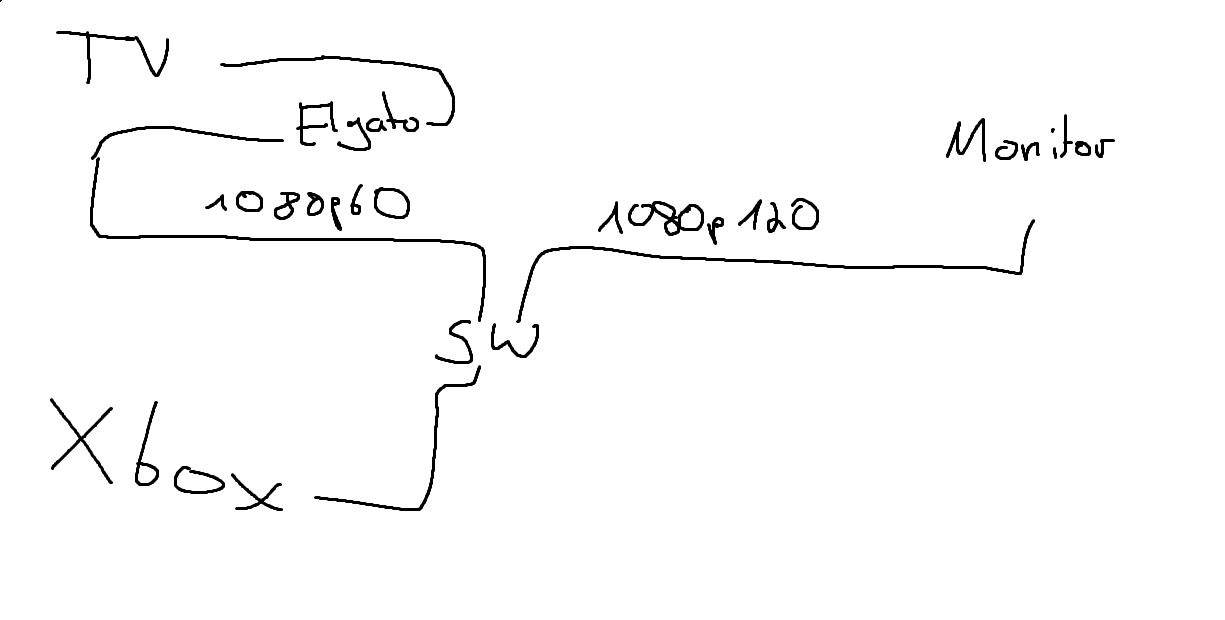 lone crypt
Adding a hdmi switch in the chain is a whole other can of worms. Who knows what it was doing, or if it was fooling the hd60 into capturing 60hz… might have been a brute force situation that wasn’t stable.
obsidian iron
but then must be the switch bad
I was tired switching the hdmi cable on my xbox when i wanted to play on my tv instead of monitor
So i did this 😄
lone crypt
Yeah that’s one of those things… unless it’s a fancy switch that does some scaling and stuff… it might be flaky or not work at all.
Always more sure to connect directly. We can’t really verify that any switch works or doesn’t. If you got it to work then maybe it does! But then it might not be stable and tomorrow just won’t work anymore.
 halcyon sphinx
I see you guys are talking about xbox through elgato hd60. I have a question.
I am running a Two PC setup, But to have the visual of the computer screen on my OBS on my streaming Pc from my Gaming PC I have it going through my 4k internal (PCIE) capture card. Works with no issues.
So I am thinking when I want to record or stream gameplay from PS5 I will just plug in ps5 into (in) on capture card and plug the (out) into the monitor I am playing on. or..... Did I do something wrong.
lone crypt
halcyon sphinx
I see you guys are talking about xbox through elgato hd60. I have a question.
I...
Yeah you have that right; you’ll be able to passthrough from the capture card’s out… to a tv or monitor.
You won’t need the game pc for that of course… because it’s a console!
halcyon sphinx
lone crypt
Yeah you have that right; you’ll be able to passthrough from the capture card’s ...
Lol well of course no game pc needed for that piece. However, I connected the cables. But no visual on Capture software on monitor.
lone crypt
halcyon sphinx
Lol well of course no game pc needed for that piece. However, I connected the ca...
Do you mean no passthrough to a tv, or no video capture feed?
Maybe the video format is not in the range it can accept? Variable refresh, hdr, high refresh rate… could all be factors.
halcyon sphinx
lone crypt
Do you mean no passthrough to a tv, or no video capture feed?
Maybe the video fo...
yeah no passthrough to tv or video capture feed.
Just doublechecked to see if HDCP was turned off on ps5. It is, and how can configure the video format to be in range? ]
halcyon sphinx
lone crypt
Do you mean no passthrough to a tv, or no video capture feed?
Maybe the video fo...
nvm it was the HDCP lol. Just checked on OBS. Visual came through
lone crypt
halcyon sphinx
yeah no passthrough to tv or video capture feed.
Just doublechecked to see if H...
Check the specs of your capture card to make sure what your console is ……
Ah there we go. The easy answer
halcyon sphinx
Gotta love easy answers lol
halcyon sphinx
lone crypt
Check the specs of your capture card to make sure what your console is ……
Ah the...
Question for you. The audio I can hear from my PS5 through the capture utility. But I cant hear it if I close Capture utility. Do you know if there is a audio lag? if not do you know if there is an issue with me having that open while playing/streaming? in obs?
 past inlet
I have a Samsung S24 Ultra and an Elgato HD60 X, but I can't get 120 FPS while the Elgato HD60 X is connected. What can I do to play at 120 FPS while Elgata HD60 X is connected?
lone crypt
halcyon sphinx
Question for you. The audio I can hear from my PS5 through the capture utility. ...
Umm. Well OBS preview does have some lag. It varies by card and by system, but it’s some number of frames.
Audio not being present in OBS on the video capture device, I guess can happen sometimes with certain configs…
You could try adding an audio capture source and select the capture card again.
So the capture card is a video source and an audio source. See if that does it
lone crypt
past inlet
I have a Samsung S24 Ultra and an Elgato HD60 X, but I can't get 120 FPS while t...
What’s your resolution?
Hd60x can passthrough 120hz up to 1440p
If you’re doing 4k it will only passthrough 60fps.
And it never captures over 60fps
past inlet
My Resolution is 1080p
I need to play at 120 FPS on my phone, but when I plug it in, the phone limits itself to 60 FPS. How can I fix this?
halcyon sphinx
lone crypt
Umm. Well OBS preview does have some lag. It varies by card and by system, but i...
I'm sorry just to clarify you mean to add an audio source into obs correct?
lone crypt
past inlet
I need to play at 120 FPS on my phone, but when I plug it in, the phone limits i...
Qoh it’s a phone? Well that might be a limitation of the phone then.
The hd60x can do 1080p120 so that’s not the issue.
lone crypt
halcyon sphinx
I'm sorry just to clarify you mean to add an audio source into obs correct?
Yeah so you have separate sources for video and for audio, if audio isn’t coming through on the video source.
That’s my idea anyway!
 hollow cipher
"I am using an Elgato Game Capture 4K60 Pro MK.2 to capture video from my gaming consoles (Switch, PS5, Steam Deck). I've noticed that when viewing the captured video through Elgato 4K Capture Utility or OBS, the colors appear incorrect (dark, off-colors) compared to when I connect the console directly to my TV.
While I can adjust the colors in the capture software, these settings don't seem to be saved consistently.
Is there a reliable way to fix the color inaccuracies when capturing with the Elgato 4K60 Pro MK.2?" Screenshots included.

 lone crypt
hollow cipher
"I am using an Elgato Game Capture 4K60 Pro MK.2 to capture video from my gaming...
lone crypt
hollow cipher
"I am using an Elgato Game Capture 4K60 Pro MK.2 to capture video from my gaming...
I bet that’s an hdr issue
Or maybe color space.
hollow cipher
lone crypt
I bet that’s an hdr issue
Thanks for the assist. Any tips on how to probably fix the HDR issue? I'll see if I have HDR on the Steam Deck on, but on the El Gato where would HDR be located?
lone crypt
A little outside of my base knowledge on that. I think the capture utility should have a setting for it. With OBS you could check different color space options for the video source and see if one of them looks more right.
craggy relic
i need help with my hd60x
normal knoll
past basin
Does it actually SAY No Signal, or just a black screen?
It actually says no signal
halcyon sphinx
lone crypt
Yeah so you have separate sources for video and for audio, if audio isn’t coming...
I gothu, have another question for you though. However i might have to type it in the wave audio chat
hollow cipher
lone crypt
A little outside of my base knowledge on that. I think the capture utility shoul...
No problem I'll look into it. Thank you.
past basin
normal knoll
It actually says no signal
Yeah, odds are it's having issues with the input signal then. What colour is the light on the card?
past basin
craggy relic
i need help with my hd60x
That's a statement, not a question. The voluneteers are in and out through the day - it helps to tell us specifically what problem you're having and if anyone is by that knows how to fix it, they'll reply then. 🙂
past basin
hollow cipher
Thanks for the assist. Any tips on how to probably fix the HDR issue? I'll see...
If it's only HDR that's the issue, 4K Capture Utility has an option for HDR recording in the recording tab in settings. For other setups like OBS you have to disable automatic tonemapping on the card and configure OBS.
To configure OBS, EposVox has a guide on it for both streaming and recording setups here: https://www.youtube.com/playlist?list=PLzo7l8HTJNK_HIUFhcIqOKSmlz0u0VJpB
To disable Tonemapping that auto converts to SDR for third party apps though, you need to go into 4K Capture Utility, hold down CTRL and open settings. Go to the device tab and uncheck the options that enabled tonemapping when the app closes.
Alternatively, turn off HDR on whatever you're recording and see if that helps. Keep in mind if you're streaming, at this time only YouTube supports HDR streaming.
 dim hatch
Hello, a friend is having this problem with the Camlink 4k and a Sony 6400 works with the original cables, we tried directly on various USBs, without an extension, with an extension and the camera in 1080p and in 4k.
example: https://www.twitch.tv/isarockets/clip/SuccessfulCleanSageDatBoi-p7bkprYMcnEfbfyL

I wasn't doing it before
(used translator)
 past basin
Are you on the latest 4K Capture Utility, and did you already update your GPU drivers like it suggested? It may be worth switching to the Studio drivers for the GPU if you're on the Game Ready ones.
spare bear
How can I use a capture card to record inside the BIOS and the Windows Install menu?
lone crypt
spare bear
How can I use a capture card to record inside the BIOS and the Windows Install m...
I’m thinking the mirrored display won’t work because windows does that. So I think for that you would need to have the hdmi be the primary display and use the passthrough of the card to feed the display.
(Rather than mirroring the main display in windows)
spare bear
lone crypt
I’m thinking the mirrored display won’t work because windows does that. So I thi...
aw so basically disable my main display and leave the capture card as the only display
and I can see the image through my second computer, that's quite smart
lone crypt
spare bear
aw so basically disable my main display and leave the capture card as the only d...
Well, not exactly; the capture card has a passthrough which can still feed your main display.
This will have much less latency than the preview on the second computer.
spare bear
lone crypt
Well, not exactly; the capture card has a passthrough which can still feed your ...
I'm using a camlink 4k to do everything, not sure if that one has passthrough
lone crypt
spare bear
I'm using a camlink 4k to do everything, not sure if that one has passthrough
Ah, a camlink isn’t a capture card. Meant to use with cameras that have hdmi out.
So yeah, if that works, the only way to see the computer output will be the preview in OBS.
If you get a real capture card, those are made to do this kind of thing better and more flexibly.
spare bear
lone crypt
Ah, a camlink isn’t a capture card. Meant to use with cameras that have hdmi out...
Yep, camlink does the job for me since the only thing I need is video and audio to my second pc, straight forward, smaller and cheaper
 magic wharf
@past basin Hello, I did everything and still the same issue
Changed the drivers, I'm on the current update for 4K Utility, restarted a few times and nothing
First time this ever happens
Cannot find anything online that actually helps
lone crypt
Do you have NDI installed on this computer?
Or a wireless vr headset, or…..
I’m trying to think of things that could have encoding threads occupied…
lone crypt
magic wharf
Cannot find anything online that actually helps
And just another silly check, if you look at task manager > performance > GPU. Do you see any activity on the video encoder?
magic wharf
lone crypt
And just another silly check, if you look at task manager > performance > GPU. D...
Ok so this morning after waking up the PC it started working again. What worries me is that I could not find what was causing the issue, nothing was using the GPU as video encoder
lone crypt
Ah good. Next I was gonna suggest DDU -ing the GPU driver.
past basin
If it happens again try uninstalling and grab 1.7.13 from here https://help.elgato.com/hc/en-us/sections/5126053814029-Elgato-4K-Capture-Utility-Release-Notes - seems a handful of folks had weird issues with the swtich to ffmpeg in 1.7.14. Thankfully it's pretty rare - withy any luck it won't come back
The previous version still used the older encoding setup instead
 brave oriole
Any help me pls?
waxen eagle
Please do not tag mods or users for support. It is a holiday weekend and if a user is able to assist they will when they have a chance.
 balmy slate
So I got a ps3 and want to record my gameplay with my 4k 60 pro 2, but I can only get audio and no video. I originally had no audio but now I have a splitter but no video
low quail
lone crypt
Do you have a headset connected to the Xbox?
That will mute the hdmi audio
Figured it out, is there any way I can hear my voice in discord while on the Xbox tho? When I plugged it into the elgato now my game audio works and I can hear everyone else in discord except myself
lone crypt
low quail
Figured it out, is there any way I can hear my voice in discord while on the Xbo...
If I understand you correctly…. You can’t ever hear your own voice unless your mic is feeding it back to you in real time. That’s just how digital audio works, because of latency.
It can’t happen any other way.
low quail
lone crypt
If I understand you correctly…. You can’t ever hear your own voice unless your m...
Got it, it’s cool I ended up plugging in a mic directly to my laptop to capture my audio separate from gameplay. I was just wondering
I just couldn’t figure out another way to record my own voice
lone crypt
Yeah that’s generally what’s recommended.
low quail
Got it
mortal oasis
Any new pcie cards announced this year?
 quartz reef
balmy slate
So I got a ps3 and want to record my gameplay with my 4k 60 pro 2, but I can onl...
quartz reef
balmy slate
So I got a ps3 and want to record my gameplay with my 4k 60 pro 2, but I can onl...
need a newer version console
balmy slate
quartz reef
need a newer version console
Oh I have all the consoles but last I checked ps4 and ps5 are not backwards compatible.
past basin
mortal oasis
Any new pcie cards announced this year?
4K Pro came out back in February, replacing the older 4K60 Pro Mk2.
mortal oasis
It still cant do 4k120 pass through while capturing 4k 60 man thats sad
past basin
brave oriole
Any help me pls?
If you're not ussing any of the effects, try using the raw camera feed, if the Virtual cameraa is glitching on you.
quartz reef
balmy slate
Oh I have all the consoles but last I checked ps4 and ps5 are not backwards comp...
ok
past basin
mortal oasis
It still cant do 4k120 pass through while capturing 4k 60 man thats sad
The 4K X can - though you'd need a 10 Gbps USB port for it instread of PCIe. Tradeoff is you can't capture HDR at all resolutions and no 8K passthrough. It's the price paid to handle the absurd data bandwidths, I guess.
past basin
balmy slate
So I got a ps3 and want to record my gameplay with my 4k 60 pro 2, but I can onl...
The PS3 has always enabled HDCP, unlike the PS4 and PS5 where this is an option you can turn off. That'll block the image.
Easiest option is analog video capture with something like Game Capture HD, using the PS3's analog cables (component or composite).
 wise nebula
Just wondering if I can some help, I have a Elgato HD60 X and Im not getting no sound from the Gaming PC, On the "4K Capture Utility" (On the Streaming PC but there is the video getting capture) theres no sound coming through at all.
I have the USB plugged into the Streaming PC and the HDMI going from my Gaming PC to the Capture card to the HDMI In
Things I have tried;
- New HDMI Cable
- Remove the Elgato HD60 Sound from Device Manager
- Reinstalled "4K Capture Utility"
Just out of ideas
lone crypt
wise nebula
Just wondering if I can some help, I have a Elgato HD60 X and Im not getting no ...
Do you have wave link. Or anything routing the sound do the capture card,
mortal oasis
past basin
The 4K X can - though you'd need a 10 Gbps USB port for it instread of PCIe. Tr...
My 4kx has washed out green tint problem and customer service told me that its a problem they trying to fix and tell me to refund it
wise nebula
lone crypt
Do you have wave link. Or anything routing the sound do the capture card,
No I dont have wave link
brave oriole
waxen eagle
Please do not tag mods or users for support. It is a holiday weekend and if a us...
My bad bro i was drinkin this time
lone crypt
wise nebula
No I dont have wave link
Well you need to route the sound of the game to the capture card through the hdmi signal, or run a 3.5mm analog cable or something.
This is what wave link is for.
You can do it with some other mixer like voicemeter if you don’t have wave link, though it’s not nearly as easy to learn.
 soft harbor
i have a little weird problem, i had the obs preview stutter but fixed it on my streaming pc by lowering the display from 4k to 1080p, is there any way i can increase it back to 4k resolution? using a 4k60 pro mk2 btw. gaming pc is 1080p 120hz cloned
lone crypt
soft harbor
i have a little weird problem, i had the obs preview stutter but fixed it on my ...
First, Why do you want to capture a 1080p feed at 4k?
But second, the answer is probably scaling the display mirror on the GPU.
That’s what I do on mine, to turn 1440p120 into 1080p60 that my HD60S+ can use.
So basically, decide what you want to capture, 4k60, or 1440p120, or 1080p120…
Scale the mirror to that. (I do this in nvidia control panel)
soft harbor
no i just want my streaming pc monitor at 4k so i can fit more things on there alerts obs music etc.
but yes i do have my gaming monitor and capture card both at 1080p 120hz
lone crypt
soft harbor
no i just want my streaming pc monitor at 4k so i can fit more things on there a...
Ok so yeah just capture at 1080p120, stretch the source to whatever size you want on the 4k canvas. You can set the OBS source scaling filter to get the best quality on the scaled image.
past basin
mortal oasis
My 4kx has washed out green tint problem and customer service told me that its a...
That's usually a compatibility issue with settings and hardware rather that hardware - but yeah, it's an absolute nightmare to resolve. Usually easier to apply a filter to remove the green cast a bit, but even that's not perfect. Someday I'm going to find a reliable cause and ressolution for that. It's fairly uncommon but if you hit it, it's usually consistent. 😐
Sometimes EDID settings, sometimes RGB rage, sometimes HDR, sometimes none of the above. I'm suprised you didn't hit the issue with the 4K Pro though if you went thaat way
 gentle gulch
ok so the capture card only turns on when the input hdmi is in the output port
past basin
gentle gulch
ok so the capture card only turns on when the input hdmi is in the output port
. . . what capture card are you using and how did you set everything up here? The HDMI OUT port should be entirely optional.
gentle gulch
Wait so how does it work maybe im confused
past basin
What card is it?
Generally your console (or whatever you're capturing) goes to the HDMI IN port on the card, and the USB or PCIe connection goes to the computer.
HDMI out acts like a splitter (calleed passthrough) so you can see things on an additional monitor or TV without the video processing of the capture card
So the HDMI OUT should be entirely optional
 tired rose
Hi Everyone, I currently use PS5 Share Button to Record or Record what happened and I use my Controllers built in mic as a microphone, unfortunately when I'm on the PS5 Discord Linked Party my PS5 share can't even get their audios so it makes me look like I'm talking to myself.
I've decided to start recording properly so I was looking at buying the Elgato 4K X External Capture Card & Chat Link Pro - Audio Adapter, for PS5 Capture Voice Chat, Gameplay Sound, Extra Long Cable, Sorry for copy n paste name but yeah and alongside that, The Audeze Maxwell Wireless PS5 Gaming Headset, I'm excited and ready to buy both but I'm wondering if the Elgato will be able to Record the Discord Party VC? I dont use PS5 Gamechat Party that much so its mostly always the Discord VC on the PS5 and would i have to connect the Elgato to anything else to start recording and stop recording or something? My PC is upstairs and I play downstairs on the PS5, Cheers and sorry for the long message and question!!
(please someone help me tho since I wanna buy both ASAP) 😭


 past basin
You're going to run into issues with a wireless headset - Chat Link Pro only works with wired 3.5mm headsets. That headset looks to support wired mode and ships with a TRRS aux cable though, so you can wire it to a Chat Link.
The PC being in another location is going to be a serious blockeer though
Do you have the ability to run a HDMI and 3.5mm cable to the PC, eg hole in the floor?
past basin
Just make sure it meets the minimum specs for HD60 X and it sshould be fine
tired rose
past basin
You're going to run into issues with a wireless headset - Chat Link Pro only wor...
Bruh I just wanted the best headset with mic
That i can use on PS5 and PC
And now there's issues?
tired rose
past basin
You're going to run into issues with a wireless headset - Chat Link Pro only wor...
What does that chat link cable do though?
It comes separately
As u can see in pic
past basin
You can still use it - just has to be in wired mode if you're going to capture it. PS5 (and most consoles) lock you to one audio stream per user. Connect a wireless headset and HDMI and wired headset jackss turn off, so no sound to caapture
Chat Link splits a wired headset jack on the PS5 controller
So one end can go to your headset and one goes to the capture card
tired rose
Ohh okay is that better?
past basin
This works around that one audio stream limit from the PS5 (note it only splits audio out not the headset mic as that doesn't get played back by the PS5)
Better in what way?
tired rose
Instead of making my mic wired to the PS5
Dude I'm in the gaming room
Tryna record from my couch
My PS5 is on the other side of the room next to the giant tv
😭
past basin
You'll still need to be able to run that 3.5mm cable up to the PC for recording. And a HDMI cable for the video.
tired rose
Aw man
past basin
Though if the laptop iss an option in that room it'd probably be easier
tired rose
Yeah okay so laptop in the room yeah
past basin
Have you considered using PS5 Remote Play on the PC upstairs and recording that with something like OBS? It's not as high quailty as capture card and will lock you at 1080p max, but it's usable, and you can leave the PS5 downstairs and still game and stream from the PC (and be AT the PC for controlling the stream and reading your chat).
Otherwise the laptop is your best bet with the card and Chat Link. Just keep in mind the headset needs to be used in wired mode, and the laptop needs to meet the minimum spec https://help.elgato.com/hc/en-us/articles/5293623183501-Elgato-Game-Capture-HD60-X-System-Requirements
tired rose
I'm not streaming
I'm just recording
Recording gameplay then edit then upload as video
soft harbor
lone crypt
Ok so yeah just capture at 1080p120, stretch the source to whatever size you wan...
sorry i dont know what you mean by 4k canvas 😦 mine is on 1080
lone crypt
Oh I guess I misunderstood. You said something was 4k, and at first you said you wanted to capture at 4k... but I guess none of that was right?
Ok carry on!
soft harbor
i just wanted to capture my gaming pc at 1080 while having my streaming pc monitor at 4k but it stutters on obs preview at that size sadly
tired rose
tired rose
Recording gameplay then edit then upload as video
@past basin ^ sorry also do i need 4K tv to Record the 4K or?
lone crypt
Oh so it's just computer can't keep up with OBS. this whole time I thought you were saying the capture card was stuttering
soft harbor
it has a 3950x and a 2080ti theres no way 😢 the slowdown in the preview drives me crazy
past basin
tired rose
<@269997944671830017> ^ sorry also do i need 4K tv to Record the 4K or?
If you're going to use the HDMI OUT passthrough, yes, as that limits the aavaiable display modes to match the device in the HDMI Output. If you're capturing without this direct to your laptop then no - but you'd have to play on the captured video feed on the laptop which isn't ideal, and may have 2-3 frames of video delay
past basin
soft harbor
it has a 3950x and a 2080ti theres no way 😢 the slowdown in the preview drives ...
4K Video Processing can be pretty intense in some cases - are there any effects like scaling filters applied on the capture card feed? Do you get stutter in the preview of other apps like 4K Capture Utility? Does that stutter in the preview also exist in recordings?
lone crypt
soft harbor
it has a 3950x and a 2080ti theres no way 😢 the slowdown in the preview drives ...
make sure the stats panel is showing in OBS and see which part of the process is dropping frames
soft harbor
past basin
4K Video Processing can be pretty intense in some cases - are there any effects ...
the only processing the screen is doing is running obs and 3 scenes no filters, capture utility does get a bit as well, id have to check recordings, obs does get a bit smoother with 4k capture open though
no dropped frames also
past basin
Since it's a 4K signal does putting it fullscreen on your 4K monitor affect it? Keep in mind that auto scaling to the preview window in OBS, or to fullscreen if the monitor isn't 4K can also affect performance as it counts as a scaling effect. Normally that's not really enough to cause what you're seeing in my experience though.
soft harbor
yea obs is full screen, i did go into nvidia control panel and changed scaling from display to gpu and its seems to have helped
tired rose
Okay so
For my solution
I'll buy another PS5 for upstairs
Have it right next to my PC
But yall
Will my pc work with Elgato 4K X?
My pc gpu is GeForce 1050 and 8 gig ram bruh
I can run obs n other stuff but idk

And I'm replacing these 2 with 1 Audeze Maxwell Wireless PS5 Gaming Headset or Xbox? Apparently Xbox can connect to PS5, PC and Mobile too?
lone crypt
That GPU does have the nvenc chip and can encode whatever you need it to.
Where you will be able to push it over the edge would be with cameras and browser sources in compositing in OBS. So you ll have to test and see how far you get with that.
But yes, the GPU can encode for you without issue.
tired rose
lone crypt
That GPU does have the nvenc chip and can encode whatever you need it to.
Where...
Sweet
All I'm doing is recording gameplay anyways
Nothing else
But how can I use my Audeze Maxwell Wireless?
lone crypt
tired rose
But how can I use my Audeze Maxwell Wireless?
This is about the console not sending audio over hdmi when a headset is connected, right?
Arcsane would be more expert here than me so his previous answer stands.
But As far as I know there is no way around that with a wireless headset. That’s a limitation of the console.
If you have a wired headset connected to the controller you can use a chat link pro cable, which is elgato’s solution to split the audio.
But there is no way to split audio with wireless.
If you get an elgato audio product and can run wave link then you could listen via the stream computer….
tired rose
Man this is so stupid
So now I need a wired headset
Can I make my Maxwell Wireless into wired?

Sweet
Okay so this is another good side
So okay I've got wired headset now basically
lone crypt
Wired in the sense that it can connect to the pc… so yeah in that case you’ll be listening to the audio through the preview window in OBS. Which does have some latency
It’s not analog, plugging into the headphone port of the controller. That’s what you could use chat link pro with.
past basin
tired rose
So now I need a wired headset
It ships with a 3.5mm TRRS cable, so you should be able to.
tired rose
Ugh
I'm so confused man
I just want to know if it would all work before I buy anything
So the only thing I'd need to do is buy ps5 for upstairs?
So it can connect next to my monitor?
Id need 2 monitors
1 elgato
1 on the PlayStation
Okay that's fine i kinda got that
lone crypt
If you want to use speakers on a tv connected to the passthrough, you’d be fine.
But if you are using a commentary mic on your recording, then you probably want headphones… and the only good way to use headphones while capturing a console, is analog wired headphones (not usb) with a chat link cable.
Right? @past basin ?
(I’m not a console expert so this is what I’m picking up from the rest of the crew)
past basin
Theee's some exceptions for Xbox, but in most cases yes.
There's also the Arctis Nova Pro Wireless headset. It has a Stream mode and an line out jack you can feed in a line in for audio capture. It's the only one I know of that works like having a Chat Link, while letting you use the headset wirelessly. As the base is powered it can also amp and split the mic feed unlike Chat Link.
magic wharf
Guys a question, does anyone know of an HDMI matrix switcher that is 4x2 and is able to connect to the elgato 4k pro with 4K 120fps?
past basin
Not offhand, but if you need 4K120 you need a HDMI 2.1 device. Look for ones labelled as HDMI 2.1, 48 Gbps or 8K60.
That said keep in mind switches can interfere with EDID negotiation between the capture card and source, so they're generally not suggested a mileage can vary a lot with them
tired rose
past basin
Theee's some exceptions for Xbox, but in most cases yes.
There's also the Arctis...
Oh ye
I wanted to buy that
But the mic isn't good
The audeze mic sounded way better
past basin
The Audeze works better for music and media too from what I hear. Arctis is pretty heavily gaming focused.
I have it solely beecause it's the only one I know of that I can stream with while still being wireless
(and I use a dedicated mic on the PC for recording anyway)
magic wharf
past basin
Not offhand, but if you need 4K120 you need a HDMI 2.1 device. Look for ones la...
Thank you!
 hexed kindle
Hey. A question.
Would you prefer capturing audio and video straight from capture utility or having OBS capture the card itself?
lone crypt
hexed kindle
Hey. A question.
Would you prefer capturing audio and video straight from captur...
Different strokes for different folks.
OBS composites other things into the video and has some other features and differences. But that’s the main one.
I have it all set up so even if I’m just capturing raw video I’m still going to use OBS. But if I never set up streaming scenes and stuff, maybe I’d use the simpler app.
hexed kindle
I see. For me, when capturing through obs, the audio starts to be delayed after some time, which is a bit annoying in the long run. Don't even get me started with the 4k capture utility - this app basically forces me to use OBS due to the many issues appearing in the app
If not for that audio delay then OBS would be perfect
lone crypt
hexed kindle
If not for that audio delay then OBS would be perfect
you may be having audio buffer errors that pile up in OBS. Evaluate your logs.
But that's not normal. That's not like a feature or limitation of OBS that it messes up audio and you just have to live with it.
 fiery terrace
4k60 pro... and OBS, audio all of a sudden stopped working in OBS today. restarted obs, pc and gaming pc and still nothing. reinstalled 4k60 pro software/drivers adn still not working... im at a loss
warped ledge
fiery terrace
4k60 pro... and OBS, audio all of a sudden stopped working in OBS today. restart...
Are the audio levels displaying or not movement?
fiery terrace
was no movement... i just restarted obs again for about the 5th time and all of a sudden it is back... no not entirely sure what changed or happened
 fading igloo
My New Elgato 4K PRO MK2 works great for few minutes but then starts to glitch out a blue hue.
If I unplug and reseat it, the colors seem to revert back to normal for a few minutes and then reverts back to this stage. Any advice would be great appreicated!

Another photo to greater show the blue/pink colors I am experiencing. Again, these revert back to normal if I unplug and reseat but only for a few minutes.
 past basin
If it starts fine then glitches, the usual culprits are HDMI cable, or hardware fault. I'd swap the cable first.
Do you have a monitor or TV in the HDMI OUT port of the card, and if so does it get thee same blue effect?
fading igloo
Thank you for reaching out! Unfortunately I can not even get it to display on the OUT side.
I did earlier when I first got it and it worked and then I unplugged it as I use OBS to view the game. It worked fine for a while then randomly started glitching out. I tried swapping out my HDMI cables around with no luck.
Currently I have my PS5 plugged into the IN slot and I am viewing the game through OBS
past basin
Hm. I'd check if the card has the latest firmware https://help.elgato.com/hc/en-us/articles/6096995750413-Elgato-Game-Capture-4K60-Pro-MK-2-Firmware-Update
fading igloo
I did that earlier. I believe I am at the latest firmware.
past basin
If it's 19.08.08 (MCU: 22.06.09 / FPGA 22.03.24), then yes
Any signs of dirt or damage in any of the HDMI ports?
 past basin
What you're seeing there is a missing green channel on the RGB, so all you see is blues, reds and purples.
That can happen if the cable or ports are impaired usually.
But if they're all good you might want to reeach out to #official-tech-support in case it's a hardware issue
Do you have anything onther than the PS5 you can try to capture to see if anything changes?