#capture-cards
1 messages · Page 26 of 1
 paper idol
 past basin
There shouldn't be any performance hit, no. Unsure on timestamps, I usually just leave it at default with no issues
paper idol
Alright I'll leave it off then since that's default! Idk how the DirectShow API works but hopefully it'll get updated to pull the correct audio format sometime soon
 elder anvil
May i ask my newest 4k pro just support 4k 120 10bit rbg, 4k 144 8bit rgb and 4k 240 yc not rgb 8bit, is that normal or how can i adjust the settings of 4k capture utility?
 astral vapor
I have a camlink 4k and a sony alpha 7 II the problem is when I start the computer and turn on the cam it doesn't recognize it straight away then I have to remove the camlink and plug it back in then it recognizes the cam again my mainboard is an asus x670e gaming
 upbeat hound
Hi all. Got a question here. Im running the elgato HD60 X with HDMI in, USB cable connected to laptop to pass video to obs.
Additionally, i have an AUX cable connected from a 2nd pc to the aux in on the capture card, i have the capture card configured to use analog audio.
However i am unable to get any sound into OBS when picking the elgato HD60 X as audio source.
Anyone here that could provide some advice for this? Im i trying to do something that this aux input wasnt intended for?
 eternal pollen
So if anyone has an Alienware AW3225QF 4K QD-OLED 240 hz monitor. You may know that you cannot use a capture card from a PS5 to that monitor because of DSC not being able to turn off.
I've sorta found an alternate way to stream.
What you can do is use PS remote play and make that window the capture window from OBS.
Then, you can still play natively on your PS5 through Whatever HDMI you've plugged Into.
It sucks dell won't fix this but that's the best solution atm.
Hope it helped someone
past basin
upbeat hound
Hi all. Got a question here. Im running the elgato HD60 X with HDMI in, USB cabl...
If you're adding devices to OBS, be aware that it adds them with audio monitoring off - meaning they go to stream and recording, but not play back to yourself by default. Make sure you're turning monitor on, if you need to hear it yourself. To do that go to the Advanced Audio Settings and set your capture card to Monitor and Output
Keep in mind as well that you need to send the audio from that second PC over the aux cable too - if you're trying to listen on the source PC you'll nee an app to split the audio to go two places at once. If you're listening on the stream PC it shoud be fine to just send it to the speaker out you're using.
past basin
astral vapor
I have a camlink 4k and a sony alpha 7 II the problem is when I start the comput...
Camera and Cam Link questions are best asked over in #camera-prompter since they tie into Camera Hub instead.
past basin
elder anvil
May i ask my newest 4k pro just support 4k 120 10bit rbg, 4k 144 8bit rgb and 4k...
Changing video formats isn't possible in 4K Capture Utility itself - you'd want to use a third party app like OBS Studio where you can select those options while setting up the srouce. If your video is getting locked with 10-bit in 4K Capture, odds are you have HDR recording enabled on the recording tab, as HDR10 requirest 10 bit colour. Turning that off it should record in 8bit
upbeat hound
past basin
If you're adding devices to OBS, be aware that it adds them with audio monitorin...
I did all this and still no sounds from the capture card.
It’s like the capture card isn’t transmitting the audio from the aux.
If I run the aux through another receiver into Obs I get sound just fine.
past basin
Check that it's not muted or turned down in the Windows Sound settings - Press Windows Key + R and type mmsys.cpl in the box that comes up and press okay. Go to the recording tab, find your HD60 X and check properties for it. Make sure it's not turned down or muted on the Levels tab.
If it's still not cooperating, you can also try turning off exclusive control options on the Advanced tab (And any Windows Audio Enhancements if they show up)
upbeat hound
I’m on a Mac, but I’ll see if there’s some comparable option to that
past basin
Ah, sorry didn't think to check the OS
MacOS check your privacy settings to make sure it's not blocking apps from using the audio thinking the card's audio feed is a mic

Elgato
It is possible that your Capture Card will not be recognized if you are using macOS Catalina, or recently updated your macOS to this version.
If you install any of the following devices you should ...
eternal pollen
@past basin moment of truth I got a 4K x. Let's see if it works on my Alienware 32 4K QD-OLED AW3225QF 🤕
IT WORKS!
lmk if you want a pic to confirm
 jaunty obsidian
TL;DR bought a PS5, my screen is my gaming laptop until I can get a 4K monitor or TV. I don’t have a desktop PC. I do have an HD60 S already. Should I upgrade my capture card, and if so should I do the 4K X or NEO?
 amber mesa
https://www.youtube.com/watch?v=a-LkOwb2qbQ&t=359s&ab_channel=Rasulov someone recommended this to me and it seems to have finally stopped for the time being after i followed the first two steps

Fix for Nvidia Broadcast, ShadowPlay the popping, crackling, cracking and sound distort. If you are having the same problem I have searched whole Internet and found solutions on Russian forums. Shared my solutions in this video. Hope it helps you!
Intro: 00:00
First solution: 00:54
Second solution: 03:27
Automate task manager: 05:59
amber mesa
so something I find interesting and confusing is that I just tried using my friend's HD60X and sure enough the noises are back and they're worse than the 4K X. And in OBS I'm not getting any audio at all. I just don't get it. Even though I found a "solution" to my problem with the 4K X I feel like it's not really fixed if this problem is still happening on another capture card that I know works on a different system
HD60 X Testing in 4k capture utility
past basin
eternal pollen
lmk if you want a pic to confirm
I'll take you word for it - no idea WHY it works if DSC is on though. But I suspect the DSC is enabled and not actually in use so it's probably just ignoring the flag.
past basin
jaunty obsidian
TL;DR bought a PS5, my screen is my gaming laptop until I can get a 4K monitor o...
Is the HD60 S giving you trouble? Only reason I would upgrade to the Neo over that right now is if you need to pass through 4K or HDR or something.
4K X is an easier thing to decide on though - do you want to be able to capture in 4K60 over USB or higher? Do you need to be able to capture HDR (rather than just pass it through?)
past basin
amber mesa
so something I find interesting and confusing is that I just tried using my frie...
Welcome to the world of Windows audio. There's a reason so many pro music folks are mac users. Windows audio is basically voodoo to get working when it doesn't want to 😦
amber mesa
past basin
Welcome to the world of Windows audio. There's a reason so many pro music folks ...
https://www.reddit.com/r/AMDHelp/s/tVMQFYbjkg here was another thing I found. I feel like this would make a lot of sense because everything is being hooked up via USB
 past basin
Could be - I know there's some audio issues with B450 chipsets
If that's the case you could probably add a USB card with PCIe to work around it, as that would have it's own chipset (avoid any ASMedia ones at the moment)
amber mesa
past basin
Could be - I know there's some audio issues with B450 chipsets
I saw another reddit post complaining about audio input for microphone being low and it made me realize that my mic audio seems to be lower too. It's something I noticed the other day and thought it was weird
amber mesa
past basin
If that's the case you could probably add a USB card with PCIe to work around it...
I don't think i can do this because my extra PCie slot isn't working. It isn't recognizing my mk.2 in the slot but will still display
 sleek saddle
Is there a fixing for the source and capture being stuck at 59fps instead of 60? this is on the 4k60 pro.
past basin
sleek saddle
Is there a fixing for the source and capture being stuck at 59fps instead of 60?...
59 is actually short for 59.94. It's bascially the broadcast standard for 60, which is used mostly by TVs. PC monitors tend to use 60 even. Though these days there's more overlap between both. Generally it's not something to worry about.
Some systems like PS5 will favour broadcast specs when available
 robust cypress
hello so my issue I'm having is with the Elgato Camlink 4k. So I bought a renewed Elgato Camlink 4k from amazon about two days ago. I am currently trying to use the Elgato Camlink and pair it up with my panasonic lumix g85. I checked the compatibility options and the lumix g85 works with the Elgato Camlink 4k. Also for additional information the lumix g85 takes only a micro hdmi. So I bought a micro hdmi to and hdmi wire that is 10ft. I tried putting them together in my pc to use for a webcam and it didn't not work. The software would say there is no signal and my camera LCD screen will be black and turns on for a second and turns back to completely black every few other seconds. But as soon as I unplug the micro hdmi out of my camera my LCD screen on my camera is completely fine and doesn't turn off anymore. Note also every time I plug my Elgato Camlink into my pc I see the light blinks twice and then the light is gone. I don't know if that light is suppose to be always constantly on just wanted to know. Also to add I read on the Elgato website too that for ideal length for capture cards etc is about 6.56 ft somewhere around there. So then I bought a new micro hdmi wire that is 6ft and measured it and it is exactly 6ft. Then I retried connecting everything to my pc again but to no success the same issues occurred. Also if you are curious if I have a clean hdmi output on my lumix g85 yes I do. I watched multiple videos on how to do it on the g85 and made sure it was turned off and double check that it was turned off. So I don't really know what the issue is here wither if its the camlink or the micro hdmi wire because my camera is fine and I've been owning it for a lot longer than any of the other items and had zero issues with it. Hopefully you can see why this can be a bit frustrating for me so hopefully I can get some type of help on this.
 fickle dragon
robust cypress
hello so my issue I'm having is with the Elgato Camlink 4k. So I bought a renewe...
fickle dragon
robust cypress
hello so my issue I'm having is with the Elgato Camlink 4k. So I bought a renewe...
Make sure your OS' privacy settings allow camera use. Windows or macos might be blocking the camera
fickle dragon
jaunty obsidian
TL;DR bought a PS5, my screen is my gaming laptop until I can get a 4K monitor o...
HD60 X is also in the middle there for 4K HDR passthrough with VRR for the future
If you never plan on getting a display to play on then you may still want Chat Link support with HD60 X or 4K X
robust cypress
fickle dragon
Make sure your OS' privacy settings allow camera use. Windows or macos might be ...
Yeah I was able to check my windows os settings and yeah it says that my camera does have access to apps
 balmy ruin
I can't seem to find any Elgato cam link pros anywhere here in the US but I have someone that can buy me one from japan and ship it to me. Will there be any sort of issues or should everything run normally?
 cold axle
Rookie question here. I went from capturing direct video on a Nintendo Switch to now capturing video on my PC. I haven't changed anything with the Elgado setup and what I did was a Display Capture, but the quality looks of the video looks pixelated, even when compared to the direct capture from the Switch. What am I doing wrong?
Is it because I should've done a game capture mode instead of display capture?
cold axle
Well, that's not it. Still looks lesser quality in motion
 warped ledge
balmy ruin
I can't seem to find any Elgato cam link pros anywhere here in the US but I have...
warped ledge
balmy ruin
I can't seem to find any Elgato cam link pros anywhere here in the US but I have...
Best to ask in #camera-prompter however they should work as normal.
warped ledge
cold axle
Is it because I should've done a game capture mode instead of display capture?
What capture card?
cold axle
warped ledge
What capture card?
HD60
Not sure if the only difference is that the game is running at 120+fps on the pc and the capture card isn't capturing that and that's why it looks grainy. I just figured coming over to PC, I would be able to capture a clearer / smoother picture than Switch gameplay
past basin
cold axle
Rookie question here. I went from capturing direct video on a Nintendo Switch to...
Are you trying to do a Display Capture of the Game Capture or 4K Capture Utility apps? You can install the HD60 Drivers and add your card directly to OBS as a Video Capture Device https://help.elgato.com/hc/en-us/articles/360027961152-Elgato-Gaming-Hardware-Drivers
You're also mentioning running a game at 120 fps - if you're trying to pass this through your HD60 it's going to fail because the card is an older one that caps at 60Hz.
cold axle
past basin
Are you trying to do a Display Capture of the Game Capture or 4K Capture Utility...
I'm not clear on the difference of the two options you just mentioned. If you could educate me on the best setup to capture a game that runs in application and not a full window mode, that would be great. I already have the HD60 drivers installed, how do I add my card directly?
Is it the video capture device option under the add button?
past basin
cold axle
Is it the video capture device option under the add button?
Yes, it'll show up when you add a new source as a Video Capture Device
Make sure you close Game Capture HD first
Only one app can use the card at a time
cold axle
ok great, I'll give that a try!
 formal pendant
Any chance I can share a link to my Reddit post from the official subreddit.
I had Matt from Elgato respond a few days ago but wanted to see if anyone else had any insight on possible issue
I would post here but it’s a thorough explanation and goes into detail.
past basin
formal pendant
Any chance I can share a link to my Reddit post from the official subreddit.
Reinstall the standalone driver from here - https://help.elgato.com/hc/en-us/articles/360027961152-Elgato-Gaming-Hardware-Drivers then reboot the computer before trying to use the card. Your console should not need to be on for the card to be detected by OBS. It sounds like the automatic driver update from 4K Capture Utility stalled out and failed so the standalone one should fix it
Elgato
Elgato Gaming Hardware Drivers - Windows 10/11
When you install Elgato Game Capture HD software for Windows 10/11 or Elgato 4K Capture Utility, the necessary drivers should automatically be i...
 slender lily
does 4k pro support 360hz 1440p passthrough?
fickle dragon
slender lily
does 4k pro support 360hz 1440p passthrough?
Up to 240hz for 1440p
slender lily
ty, but im still able to use clone to make the main screen at 360hz right?
fickle dragon
If it's 1440p240 + 1440p360, that should work fine with modern Windows 11.
Of course the OBS Projection method is always an option. OBS captures the game, then you project it to the capture card's extended display.
slender lily
fickle dragon
If it's 1440p240 + 1440p360, that should work fine with modern Windows 11.
ty
amber mesa
@past basin I have yet another update lol I did a stream today and I'm currently going through the clips I made any time there was an audio or visual glitch (15). There were some pops but I also noticed my Elgato Facecam stuttering A LOT. This was when I was using Virtual Camera or just the camera itself. My thinking is that it's not an audio issue anymore but rather something to do with the motherboard / usb ports like the reddit post I linked suggests, since i'm also having problems with my face cam too
I would like a second opinion on that theory
https://clips.twitch.tv/ProductiveSassyPassionfruitBatChest-scdq6SD7xBjDPEhM here's a clip of the stuttering. i made a clip every time I noticed something but I'm sure there's more

Twitch
Watch BFGC_Redgrave's clip titled "Rising Tide DLC! One Last Ride With Clive Rosfield :'( | !techissues | !Clip !Nexus !Command"
 tawny gyro
I have a usb type c dock for my setup its connected to a usb type 3.2 port i have 2 monitors connected 1 is 1440p at 60hz but is disabled the other is 1080p at 165hz is there a way I can just have it run like its on a 3.1 connection as im only recording 1080p 60fps from my Nintendo switch i have the 4k x capture card as it drops frames.
i have nothing else hooked up to the usb hub.
warped ledge
tawny gyro
I have a usb type c dock for my setup its connected to a usb type 3.2 port i hav...
the card should be directly to pc, not a hub.
tawny gyro
warped ledge
the card should be directly to pc, not a hub.
well i have a laptop with only 1 3.2 usb port is there a way to limit bandwith of things so that everyhing conforms sense i only need to record in 1080p 60 currently?
 gusty viper
Hello, I have a problem with my Elgato Cam Link 4K. When I plug in the Elgato, its LED is white and the Camera Hub software does not recognize it after searching, unplugging all ports except the Elgato, checking if it's a 3.0 port, re-downloading the software, restarting my PC, plugging in, unplugging, always the same problem. Moreover, in my device manager, it is displayed under the name "WestBridge" with a driver not installed error code (code 28) I already posted the same message on Reddit, sorry to bother
 green cobalt
also my elgato is very annoying.
whenever I loaded into P3 Reload and my PS5 temporarily went black, Elgato would temporarily go "No Signal" until the PS5 passed the black screen of like 3 secs
past basin
gusty viper
Hello, I have a problem with my Elgato Cam Link 4K. When I plug in the Elgato, i...
If tre device is showing up incorrectly like that, open a ticket with #official-tech-support
past basin
green cobalt
whenever I loaded into P3 Reload and my PS5 temporarily went black, Elgato would...
That's normal in most situations. When you go from the home menu into a game, a lot of time the display mode changes (especially since the home menus don't often make use of most display features). eg, sometimes the resolution will change, somtimes things like HDR, VRR or 120Hz mode enable. When that happens the HDMI actually disconnects a moment to resync with the new settings - on a capture card it takes a bit longer to resync, especially since it has to wait for the other devices to finish negotiation first. You can try to reduce the risk of it switching modes by turning off features like HDR, VRR, or 120Hz mode, and setting the resolution manually but there's a still a good change it'll do it.
 mortal tangle
Hi I'm from India
I wanted to get a 4k x for my series x but I can't seem to find it anywhere
Any idea when it'll be in stock on Amazon or anything?
warped ledge
mortal tangle
Hi I'm from India
I wanted to get a 4k x for my series x but I can't seem to fin...
the site has it https://www.elgato.com/us/en/p/game-capture-4k-x

Elgato
4K X is game capture at its best. Equipped with HDMI 2.1, our most powerful USB card lets you capture the latest titles up to 4K HDR10 at 144 FPS – with ultra-low latency VRR passthrough for ultra-smooth frame rates, no compromises.
mortal tangle
It doesn't ship to India
I meant is it available in India
Without me having to import it myself with the huge custom duties
warped ledge
mortal tangle
It doesn't ship to India
I meant is it available in India
Without me having to ...
seems only place currently is direct through elgato. as for your country directly, you might want to see if local shops are going to sell it. vs importing it.
warped ledge
green cobalt
whenever I loaded into P3 Reload and my PS5 temporarily went black, Elgato would...
this is standard for the capture card. mine does it too. think of the game loading as a tv signal change.
green cobalt
warped ledge
this is standard for the capture card. mine does it too. think of the game loadi...
thats fair
fickle dragon
It's also an issue for Xbox. Xbox doesn't show HDR on the main menu, so any time to open a game, the Xbox stops the video output temporarily to enable HDR and it will be no signal for a period. PS5 lets you run HDR permanently in the menu this avoiding that. But I think you need to enable it.
gusty viper
past basin
If tre device is showing up incorrectly like that, open a ticket with <#84249193...
In Discord or in elgato.com
warped ledge
gusty viper
In Discord or in elgato.com
If you click on #official-tech-support channel it takes you the correct links to fill out a ticket.
 shadow chasm
Has anyone had any issues with this past update? Now when I go to play I get this error on my monitor.

 warped raft
Does anyone know how to fix this? This is the first time ive had anyproblems with my capture card too. I have the HD60 X.
 past basin
shadow chasm
Has anyone had any issues with this past update? Now when I go to play I get thi...
past basin
shadow chasm
Has anyone had any issues with this past update? Now when I go to play I get thi...
Which card is this? HD60 X, 4K X, 4K60 Pro Mk2, and 4K Pro should all handle 1440p. We may just need to change a setting to get them playing nice - try going into 4K Capture Utility (if this is Windows, Capture Device Utility if it's mac), and go to settings, chance the EDID Input Mode to "Display" and see if that helps
past basin
warped raft
Does anyone know how to fix this? This is the first time ive had anyproblems wit...
What app are you using here? I'm assuming the issue is the format looks squished out?
past basin
amber mesa
https://clips.twitch.tv/ProductiveSassyPassionfruitBatChest-scdq6SD7xBjDPEhM her...
That happens in the preview too, I assume? If it's USB overload from both the card and the camera running you can try turning down the resolution of the camera to 720p - sice you're only taking up a small section of the 1080p frame, using the camera in 1080p is overkill (and might actually use a bit more resources as OBS scales is down, though that should be negligible)
warped raft
past basin
What app are you using here? I'm assuming the issue is the format looks squishe...
Im using the 4k Capture Utility
past basin
Give me a min, need to boot up my Xbox
shadow chasm
past basin
Which card is this? HD60 X, 4K X, 4K60 Pro Mk2, and 4K Pro should all handle 14...
4K60 Pro Mk2 I will give that a shot
past basin
warped raft
Im using the 4k Capture Utility
What's your Xbox's resolution set to?
 warped raft
past basin
What's your Xbox's resolution set to?
warped raft
past basin
What's your Xbox's resolution set to?
its stuck at 460p with the capture card
but without it its fine at 4k and 1080p
past basin
The Xbox won't let you override that?
warped raft
nope
past basin
Last time I saw this it was my own setup with a bad HDMI cable.
(I dropped something on the cable)
Have another cable you can try?
Or even just unplugging it and plugging it back in?
warped raft
😭 ill go find a new one and see if it works lol
warped raft
past basin
Or even just unplugging it and plugging it back in?
that just didnt work at all 😭
screen was BLACK
past basin
Fair enough - what happens if you set it to Internal? Same issue?
warped raft
past basin
Fair enough - what happens if you set it to Internal? Same issue?
internal?
past basin
Where you just set it to Display
If one option doesn't work, try the other basically
Also what console are you using?
(or is it a dual PC setup)
warped raft
past basin
Also what console are you using?
Xbox Series S
past basin
If internal doesn't do anything, set it back to merged and close out the menu
warped raft
internal didnt work
past basin
oh wait I've mixed the two of you up
warped raft
?
past basin
Sorry, yeah in your case I'd try the cable if changing EDID doesn't work
I'll be back in a minute - I clearly need coffee
warped raft
okay ill come back and tell you the results
past basin
Yeah good luck - hopeully tha'ts all it is a problematic cable.
amber mesa
past basin
That happens in the preview too, I assume? If it's USB overload from both the c...
I can try but honestly at this point i'm just replacing the motherboard. I'm going for either an msi b650 gaming plus wifi atx am5 motherboard or a MSI MAG X670E TOMAHAWK WIFI ATX AM5 Motherboard
warped raft
past basin
Yeah good luck - hopeully tha'ts all it is a problematic cable.
im back and its not the cord
past basin
Is there a monitor connected to the HDMI out of the card?
warped raft
OMG NVM
past basin
oh?
warped raft
so it was and it wasnt the cord
the cord was faulty
BUT
i also had to set the thing to internal
i still wouldnt have been able to do it without your help tho lol 😭
tysmmmmmm
past basin
Glad you got it sorted out!
 frosty breach

Lenovo IdeaPad 1 Student Laptop, Intel Dual Core Processor, 20GB RAM, 1TB SSD + 128GB eMMC, 15.6" FHD Display, 1 Year Office 365, Windows 11 Home, Wi-Fi 6, Webcam, Bluetooth, SD Card Reader, Grey
tawny gyro
frosty breach
Would this PC work with my HD 60X? https://www.amazon.com/Lenovo-IdeaPad-Student...
if it does it would be very low settings at 1080p perhaps not even 60fps
id look for anything with a gpu the more modern the better but 1080p 60 is an easyer target to hit intagrated graphics still are not quite there yet
if you can get something about 150$ more expensive it would be immensely better
something like this (as an example not something you might want to buy haveing looked into the product myself only useing the parts as refrence)
https://www.amazon.com/dp/B0BMWGFWNX?th=1

MSI GF63 Thin 11SC-693 15.6" Gaming Laptop, Intel Core i5-11400H, NVIDIA GeForce GTX 1650, 8GB Memory, 256GB NVMe SSD, Windows 11
 dusk apex
Can I connect my HD60s+ to my PC using a USB-C to USB-C cable (instead of the default USB-C to USB-A)? Has anyone tried this and does it work? Thanks before!
past basin
dusk apex
Can I connect my HD60s+ to my PC using a USB-C to USB-C cable *(instead of the d...
Yes, that'll work fine. Just make sure it's rated for at least 5 Gbps (USB 3.0) or faster. There's a lot of "charging" cables out there that only do USB 2.0
 warm knoll
So I'm looking into getting an elgato hd60 x or 4k x to be able to stream to friends in discord because I don't like the way remote play works to stream. Am I going to be able to talk completely fine and have the game audio play at the same time?
or is it going to have my voice echo
warped ledge
warm knoll
So I'm looking into getting an elgato hd60 x or 4k x to be able to stream to fri...
it depends on what you want to record at this point, do you rec in 4k, or 1080p?
warped ledge
warm knoll
or is it going to have my voice echo
are you looking for a high refresh rate like 144?
or just console?
warm knoll
just console
warped ledge
warm knoll
just console
1080p should be fine as I think Discord non nitro does 1080p. HD60x should be ok.
warm knoll
warped ledge
1080p should be fine as I think Discord non nitro does 1080p. HD60x should be ok...
I'm just not sure how it works and no matter what video I watch I still feel like I won't get a clear answer. I'm not entirely sure how this all works, but from what I'm understandning it's supposed to have me stream the elgato app game capture and hide the side bar? Would that only be streaming the game's audio as well as letting people hear me talk in a discord call?
warped ledge
warm knoll
I'm just not sure how it works and no matter what video I watch I still feel lik...
actually the device itself can be streamed now, you should be able to chat, and game with both audio working fine.
no need for the app to be streamed anymore when you can stream it directly from the device.
example
 warm knoll
Does that work with the hd60x as well or is it just the 4K?
warped ledge
warm knoll
Does that work with the hd60x as well or is it just the 4K?
it works with the hd60x, and the akx as well.
 cobalt summit
hey ya'll, am currently having audio troubles with elgato. I'm able to get my ps5 screen to show up when going from ps5 to hdmi splitter to capture card to computer, but can't get any audio.
its obs that I'm using btw
I'm seeing audio come through on the audio mixer and it seems to be from the ps5 but can't hear it in my headphones
heaphones are plugged into my computer
warped ledge
cobalt summit
heaphones are plugged into my computer
did you monitor and output?
cobalt summit
Ok last question
I've set everything up so that I have it all the way I want, with my webcam, chat overlay, etc. Last thing I want is to be able to see a screen with chat overlay without my webcam but stream the same version but with a webcam. Is that possible?
warped ledge
cobalt summit
I've set everything up so that I have it all the way I want, with my webcam, cha...
you could click the eye on the source and click again to show/hide, and a stream deck is ideal for this.
cobalt summit
warped ledge
you could click the eye on the source and click again to show/hide, and a stream...
if I use the eyeball to hide the source, it hides it for me personally, but will the stream itself still show my webcam?
nvm it doesn't. Is there a way to rectify this or do I need like some extra expensive equipment?
warped ledge
cobalt summit
nvm it doesn't. Is there a way to rectify this or do I need like some extra expe...
if you hide it, it hides it for the stream. not sure what you mean?
cobalt summit
warped ledge
if you hide it, it hides it for the stream. not sure what you mean?
I'm basically saying that for playing the game, I want to be able to look at just the game, and chat overlay. For my viewers, I want them to look at the game, chat overlay, and my webcam.
I only have 1 monitor
I'm trying to figure out how to use obs multiview
warped ledge
cobalt summit
I only have 1 monitor
yeah so you'd hide your cam when you want them to see the game
cobalt summit
warped ledge
yeah so you'd hide your cam when you want them to see the game
but I personally want to see the game all the time, I never want to have to look at the webcam.
But I want the viewers to see the webcam
warped ledge
cobalt summit
But I want the viewers to see the webcam
if your cam is on it will be on via your OBS. if you want it off, it makes off for your viewers. I mean you could turn off the preview mode, and use your output via Gaming Monitor ir TV for the game.
 cedar pumice
hey guys can someone help me with a problem?
warped ledge
cedar pumice
hey guys can someone help me with a problem?
what's the issue?
please fill this out.
 smoky mantleBOT
Looking for help? Please copy, paste, and fill out this template in order for our community to better help you:
**Device**:
**Software & Version**:
**Windows/Mac Version**:
**Console/Dual PC**: "this line is only for troubles with capture, camera, and lighting"
**Question/Issue**:```
- Note: This is a community tech help channel and **Official Elgato Support does not monitor this channel**. Posting your questions here does not guarantee that you'll receive help. We recommend filing a support ticket at <http://e.lga.to/help>.
- To contact Elgato Support via phone visit <http://help.elgato.com/hc/articles/360028242811-How-do-I-contact-Elgato-support-via-phone>.
- You can browse through our help articles here:
<https://help.elgato.com/>
Please remember that our members who are helping you troubleshoot are taking time out of their day to help and they are not staff. **Any disrespect to them will end up in a warning/ban.** Created by calucifer#0 (218276721516871693)
cedar pumice
Created by calucifer#0 (218276721516871693)
cedar pumice
i have to fill out that to ask?
cedar pumice
@warped ledge
 high island
Hello, I have problem that I think has been narrow down to a hardware issue, possible with the capture card itself. Please lmk you thoughts...
I'm getting lag in OBS, not just the the stream due to a slow network. It also says I'm pinned to 60 fps in the lower right. However, the video still looks laggy in the OBS preview window, which then also looks laggy on stream too.
I've tried lowering my bitrate and that doesn't seem to do anything at all, even if I choose a crazy low value. It also doesn't look like my CPU or GPU is being overwhelmed. I have gone through a lot of trouble shooting with OBS support, run configuration wizards etc, and everything is set up correctly. There does not seem to be any issue with OBS.
I also tested multiple USBC ports on my computer, and multiple cables. I thought maybe I didn't have a good enough cable so I got a Belkin Thunderbolt 4 capable of 40Gps. I got NO image/video from the capture card at all, but I did get sound. I also tried a random USBC cable and again got no video but did get sound. The only cable that "works" (and it's still the choppy looking video so not really working) is USBC cable that came wiht my ASUS ROG phone, which is really strange because I'm pretty sure it's not even as fast of a cable.
I'm using OBS 30.1.2 on an M1 Macbook Pro, running OS 12.5, and capturing a PS5 with an Elgato HD60 S+.
Could there be a problem with my capture card? Any ideas or help would be appreciated!
past basin
high island
Hello, I have problem that I think has been narrow down to a hardware issue, pos...
If you download Capture Device Utility from https://www.elgato.com/downloads , does it give you the option to change the USB transfer mode? If so try setting it to Isyncronous (and if that doesn't improve things, bulk)


 spring gyro
Hello. I’m having a small issue with OBS. When I turn on 4k utilities app I get sound but no visual on OBS when I open it. When OBS first I get a visual but then I open 4K utility app I get no sound. Is there something I’m missing?
warped ledge
cedar pumice
<@476160810457235466>
sorry, but without any info provided I can't help I'm not well verse in mind reading.
cedar pumice
@small magnet some info is i started using the elgato hd60 x today and i plugged everything in and when i look at my obs it does not show up under the video capture device. I was thinking it was the usb cord becuase the one i am using with it is not the one that came with the elgado I was just wondering if you think that could be the problem of why it’s not showing up
i’m using OBS 30.1.2 and on windows 10 and capturing a xbox series x with an Elagto HD60 x
high island
past basin
If you download Capture Device Utility from https://www.elgato.com/downloads , d...
I'll try it
past basin
spring gyro
Hello. I’m having a small issue with OBS. When I turn on 4k utilities app I get ...
Why are you trying to open both? The issue you're likely hitting here is that only one app can use the video feed from the card at a time. Normally to use it with OBS you'd add it directly as an OBS Source as a Video Capture Device.
If you can't hear the auido, you'd then turn on Monitor And Output for the card in the Advanced Audio Settings
past basin
cedar pumice
<@622272657924030494> some info is i started using the elgato hd60 x today and i...
USB cord could very well be the issue - make sure the cord you're using is a USB 3.0 or faster (5Gbps) cord. HD60 X won't work with a slower cord, and a LOT of cords out there today are "charging" cords that do high wattage, but slow data (USB 2.0 speed, 480 Mbps).
cedar pumice
oh ok thank you @past basin
past basin
USB Tree Viewer can give you more info - https://www.uwe-sieber.de/usbtreeview_e.html . There's a summary section that if your card is listed will tell you the speed everything is at
past basin
Everything should be SuperSpeed or SuperSpeedPlus for HD60 X
cedar pumice
ok
past basin
cedar pumice
i could send a picture of what the usb looks like
Any
 past basin
cedar pumice
i could send a picture of what the usb looks like
past basin
cedar pumice
i could send a picture of what the usb looks like
Any USB-C to USB-A or USB-C to USB-C cable of the right speed should work. Unfortuatnely unless there's a label on the cord it's hard to tell by looking at them
cedar pumice
 past basin
You may have to check the packaging for it. If you can't find the speed, the Tree Viewer will give you an idea. If port and device are superspeed (or mention a superspeed companion), and cable is Hi Speed, cable would be USB 2.0
cedar pumice
see how it doesn’t show up i’m guessing it’s the usb because the xbox is working with it but it does not show up in Obs
past basin
Yeah, odds are card isn't connecting right there. I'd check the cable for sure
past basin
Yeah - replace that with one you know is the right speed
And make sure it's going to a USB 3.0 or faster speed port on the computer
 past basin
I can see the insert on it is white - usually a USB 3.0 cable will have a blue plastic insert (though not always)
cedar pumice
yea that’s what i was thinking because the one that came with the elgado also is blue and i don’t know where that was so i just used one i found
past basin
Yeah, if it's just one that was sitting around it's probably a slower cable - or even a charging cable that doesn't have a data connection at all
cedar pumice
Ok thank you I will look to getting a 3.0 cable
past basin
Good luck - any 3.0, 3.1, 3.2 or USB4 cable should do fine. Just make sure it's at least 5Gbps on the packaging and you should be good
past basin
Most likely - HD60 X and HD60 S+ use the same cable. It doesn't give the exact spec in that pic though
Oh it does say HD60 X too - the line break threw me
cedar pumice
😂
past basin
You can get the originals from www.elgato.com/spare-parts too if you wind up having trouble getting one that works. But that one is probably fine since it outright says it'll work with the card
spring gyro
past basin
Why are you trying to open both? The issue you're likely hitting here is that o...
Oh ok. On my HD60 S I was able to open both with no problem.
But I’ll see when I get off work
past basin
Huh - you shouldn't have been able to with that one either. But that did have it's own driver instead of using UVC so it did work a little differently
There's a video on setting it up if that helps - https://www.youtube.com/watch?v=27fYbUln-Vg

In this video we show you how to set up your Game Capture HD60 X with OBS Studio on Windows and macOS.
▼ Click "Show More" for details and features.
▼ HD60 X Highlights:
► 4K60 HDR10, 1440p120, 1080p120, 1080p240, VRR passthrough.
► High resolution 4K30 or 1080p60 HDR10 capture.
► No watermarks, no time limits, no subscriptions.
► Play in HD...
Good luck
spring gyro
Thank you 🙏🏾
 rain niche
HDMI 1.4 can transfer/recieve 8 audio channels (7.1). Can Cam Link 4K recieve more that one stereo audio source?
warped ledge
rain niche
HDMI 1.4 can transfer/recieve 8 audio channels (7.1). Can Cam Link 4K recieve mo...
Best to ask in #camera-prompter
fickle dragon
rain niche
HDMI 1.4 can transfer/recieve 8 audio channels (7.1). Can Cam Link 4K recieve mo...
Single PCM stereo track
rain niche
fickle dragon
Single PCM stereo track
I see, thank you 😊
fickle dragon
rain niche
I see, thank you 😊
Do you have a camera that outputs multiple separate audio tracks over HDMI? My S5IIX can record four channels at once but doesn't send that over HDMI to my knowledge.
rain niche
I use my Cam Link 4K as capture card for my dual PC setup and wanted to send multiple stereo audio tracks from my gaming PC to my streaming PC over HDMI, but I guess it doesn't work as I hoped 😊
fickle dragon
Depending on the software you're using, NDI audio tracks could be an option. Sends audio as network packets to another PC.
It's a little advanced though
rain niche
Currently I'm using Voice meeter to be able to send separate audio sources via VBAN over Ethernet, but after a few hours of streaming I get a bit of delay for some audio, so I'm waiting for Wave Link software to enable multiple outputs so I can get a Cam Link PRO (when the new version is released) and have multiple HDMI connections and send audio sources over to my Streaming PC
fickle dragon
rain niche
Currently I'm using Voice meeter to be able to send separate audio sources via V...
It'll be the same version, just restocked. As far as Wave Link, can forward that. I know there's a lot of requests for more outputs in general
rain niche
fickle dragon
It'll be the same version, just restocked. As far as Wave Link, can forward that...
Yeah, the dream would be to get access to all the audio input from my gaming PC on my streaming PC, but just one or two more outputs would make a world of difference, for me 😄
tawny gyro
I've got some questions about the 4k x if I used a USB 3.2 gen 1 how would it effect the capture card?
tawny gyro
I'm not useing the full bandwith or at least I shouldn't be im doing 1080p 60
fickle dragon
tawny gyro
I've got some questions about the 4k x if I used a USB 3.2 gen 1 how would it ...
This article covers the limitations on 5gbps ports (Gen 1): https://help.elgato.com/hc/en-us/articles/23479175821069-Elgato-Game-Capture-4K-X-Supported-Resolutions-and-Frame-Rates
Elgato
This is a list of supported passthrough and capture resolutions. For each input resolution, the supported capture resolution is shown as supported by 4K X.
These resolutions and frame rates do no...
tawny gyro
Thx
warped ledge
fickle dragon
It'll be the same version, just restocked. As far as Wave Link, can forward that...
I think it’s only wave link stream, but can’t each be selected to route?
warped ledge
@hoary oak what card?
 hoary oak
warped ledge
<@502403661956251648> what card?
hoary oak
warped ledge
<@502403661956251648> what card?
HD60 X
 sour harbor
Device: Video capture Neo
Software & Version: 4K Capture Utility 1.7.12
Windows/Mac Version: Windows 11
Console/Dual PC: Dual Laptop
PC/Mac Specs: Dell Latitude 3420
Question/Issue: Hi, im trying to capture the bios from a dell laptop with the video capture neo, but it gives no signal. Does the neo have the requirements to do this? If not, would any of the other external capture devices be able to capture the bios?
past basin
Does the laptop output over the HDMI during the BIOS bootup? I've known some laptops that will only dipslay it on the internal panel if the lid is open. Do you know what resolution the BIOS boot screen is outputting at?
 dense kraken
Anyone help suggestions in setting up a 4K X to a ps5
And getting audio to work properly
warped ledge
dense kraken
And getting audio to work properly
I have a video in #community-resources that should help!
 vale mantle
Hello, I am having a problem with my elgato hd 60s when I open the elgato application It says PlayStation is it turned on connect to the Hdm input At the top right, it says game capture HD in red it is noted no signal everything is well connected. Do you have the solution or I don't understand I deleted the application I downloaded it again and it starts again
warped ledge
hoary oak
HD60 X
Sorry buddy, I fell asleep. Can you list the issue here please?
warped ledge
vale mantle
Hello, I am having a problem with my elgato hd 60s when I open the elgato applic...
Is HDCP off, and are you connected to a usb 3.0 port?
vale mantle
warped ledge
Is HDCP off, and are you connected to a usb 3.0 port?
yes for usb 3.0 it works early in the afternoon
warped ledge
vale mantle
yes for usb 3.0 it works early in the afternoon
It should always work. Unless you unplug it.
vale mantle
warped ledge
It should always work. Unless you unplug it.
It's good so it comes from my USB 3.0 port so thank you for responding
sour harbor
past basin
Does the laptop output over the HDMI during the BIOS bootup? I've known some la...
Im not sure, ill have to check when i can, but this already helps, thank you
hoary oak
warped ledge
Sorry buddy, I fell asleep. Can you list the issue here please?
For some reason the preview is low fps like 30 instead of 60 and the recording is even worse like 10fps :(
warped ledge
hoary oak
For some reason the preview is low fps like 30 instead of 60 and the recording i...
What are the settings, what app are you using?
hoary oak
warped ledge
What are the settings, what app are you using?
I'm using 4K utility
I haven't changed the settings it just broke suddenly a random day
dense kraken
Still confused
warped ledge
hoary oak
I haven't changed the settings it just broke suddenly a random day
Reset to default, and let’s start from there.
warm knoll
Is there something I have to mess with in discord to get the elgato to capture properly? it's just loading the entire time but it's capturing the game
and it's apparently cutting in and out on my capture utility
well i think i fixed the cutting out thing it was an output issue, but now i'm just not sure why it loads endlessly on discord
using hd60x
fickle dragon
warm knoll
well i think i fixed the cutting out thing it was an output issue, but now i'm j...
Is HD60 X still being used in 4KCU? HD60 X like other UVC type devices (HD60 S+, HD60 X, 4K X, Game Capture Neo, Cam Link) can't be used in multiple apps at once
Discord can't grab it because something else is using it possibly
warm knoll
i just downloaded it and it told me to use it
I found out what happened, discord was using it as a camera so it would just keep loading
although i can't hear any sound from it now
cedar pumice
@past basin i got the cable and it worked lets gooooo thank you for the help
 regal flicker
Can someone help?? everytime I try to select the 4k pro it deselects one of my monitors. I have tried multiple cables. if i deselect all monitors but my centre screen I can clone the 4k pro but once I turn the other 2 back on it goes back to unselecting/cloning the 4k pro. firmware is updated as well. this is on a 2pc set up where I was running a 4k60pro mk.s before with no issues

 warped ledge
regal flicker
Can someone help?? everytime I try to select the 4k pro it deselects one of my m...
warped ledge
regal flicker
Can someone help?? everytime I try to select the 4k pro it deselects one of my m...
Are you duplicating?
regal flicker
warped ledge
Are you duplicating?
duplicating what? I am trying to clone my ctr screen #1 to the 4k pro
warped ledge
regal flicker
duplicating what? I am trying to clone my ctr screen #1 to the 4k pro
Yeah, duplication is the route though. Vs clone.
 valid bloom
Hi I need help setting up my elgato HD60 x with my obs
my audio isn’t going thru
game audio & mic audio
regal flicker
warped ledge
Yeah, duplication is the route though. Vs clone.
I don't see why I would need to. had no issues before hand with the 4k60 pro mk.2. Either way I still can't select the capture card and have all 3 monitors selected in Nvidia control panel
fickle dragon
regal flicker
Can someone help?? everytime I try to select the 4k pro it deselects one of my m...
Are you using Nvidia Surround by chance?
warped ledge
fickle dragon
Are you using Nvidia Surround by chance?
Is there a different way with this?👀
regal flicker
fickle dragon
Are you using Nvidia Surround by chance?
No I am not
fickle dragon
warped ledge
Is there a different way with this?👀
More so that NV Surround complicates things because it generates a giant single image sent to three displays.
fickle dragon
regal flicker
No I am not
Hmm. Not sure based on the information provided, and without tinkering with it myself. Are you running them all at the max 175hz? or 144? I wonder if using the center display on the HDMI output of 4K Pro would be a more seemless option. But looks like that monitor is HDMI 2.0 and limited to 144hz on HDMI
regal flicker
fickle dragon
Hmm. Not sure based on the information provided, and without tinkering with it m...
yes they are all at 175hz... exact same settings aI had previously,
its as if Nvidia isn't allowing me to select 4 monitors all of a sudden
fickle dragon
Which is especially odd since I run four displays on that GPU. It's usually only a problem if you're doing more than 2 extremely high resolution displays like 4K240 or 8K due to the card virtually bonding outputs together to reach that.
However I don't run triple of the same model, mine's a bit mix and match
Have you only done this in NVCP, or also in the Windows display settings? Perhaps a driver update/reinstall may change the behavior
Your email is in that image 
Well I'd say try the driver update/reinstall and see if anything changes. I'll have to try connecting 4K Pro sometime to the output of this system again and see if I spot anything to help. I don't have three exact monitors to replicate exactly though
regal flicker
fickle dragon
Your email is in that image <:Looking:1072076550033395792>
Thxs
regal flicker
fickle dragon
Well I'd say try the driver update/reinstall and see if anything changes. I'll h...
I will throw the 4k60 mk.2 back in later to see if ot has the same issue. If not I will probably just return the 4k pro for another.
 west trout
Here’s the situation, I do dual pc stream and I have an HD 60S and I have a monitor that’s 1440p but when I connect my capture card, my game settings automatically changes to 1080p I need helppp
Is there anyone can help what capture card to get now so I can stream while having my game on 1440p resolution
Can anyone point me to the right capture card to upgrade to now?
past basin
west trout
Here’s the situation, I do dual pc stream and I have an HD 60S and I have a moni...
If you want to capture at 1440p and not just pass throught 1440p, then the two external ones that would work are HD60 X and 4K X
If you want to pass through 1440p and only capture 1080p, I believe Game Capture Neo also fits the bill
If you want internal cards, either 4K60 Pro Mk2, or 4K Pro.
 worthy agate
Does anybody know if the Cam Link 4k can transfer audio from your camera to your computer if you are live?
past basin
It can
regal flicker
fickle dragon
Well I'd say try the driver update/reinstall and see if anything changes. I'll h...
Swapped back to the 4k60pro mk2 and it works exactly as it should. Guess the 4k pro is defective.
 past basin
Check the resolution and refresh rate you were running the 4K Pro at were the same - some GPUs will cap out after a certain amount of screen space is rendered, and I notice the "4" in one of your previous pics looks like it was running a larger resolution than the other screens.
regal flicker
past basin
Check the resolution and refresh rate you were running the 4K Pro at were the sa...
I tried every resolution available between 60 and 175. Unfortunately Nothing worked on the 4k Pro
 spice hazel
Hey guys I was just wondering if anyone has an answer as to why in obs and on my new monitor the game seems to have a green tint to it, but if I open the capture utility the colors pop and look very vibrant. I've played around with limited and full colors, I've also done the firmware update on the capture card. I'm stuck at this point. I did order two new HDMI cables that are what is needed for the capture card. However I'm currently using the hdmi cable that came with the xbox which should be able to be used. Any answers PLEEEEEEEASE

 warped ledge
spice hazel
Hey guys I was just wondering if anyone has an answer as to why in obs and on my...
warped ledge
spice hazel
Hey guys I was just wondering if anyone has an answer as to why in obs and on my...
One looks like HDR is on.
spice hazel
warped ledge
One looks like HDR is on.
It should be on both, but also it looks like this on my monitor and hdr is for sure on
warped ledge
spice hazel
It should be on both, but also it looks like this on my monitor and hdr is for s...
Are they different monitors?
spice hazel
warped ledge
Are they different monitors?
No
past basin
Do you have HDR recording turned on in 4K Capture Utility? The card has built in tonemapping that turns on when you exist 4K Capture Utility (which maps the HDR back to SDR but can affect colour cast).
To get HDR into OBS, you need to turn off the tonemapper and you need to configure all your OSB colour spaces (eg switch from NV12 to P010, an from Rec 709 to one of the 2100s)
To turn off the tonemapper entirely, you need to hold down CTRL when opening settings in 4K Capture Utility and turn off the option that turns on tonemapping when you exit the app

As for the OBS setup, EposVox has a decent setup guide for setting OBS up for HDR
warped ledge
spice hazel
No
See what @past basin posted! This helps!
spice hazel
past basin
To turn off the tonemapper entirely, you need to hold down CTRL when opening set...
This option isn’t even an option in my capture utility
past basin
Did you hold CTRL while opening settings? It's normally hidden because if you don't know what you're doing HDR gets messy
Holding down CTRL when opening settings unlocks some options
 last mountain
Hi all! I think I am missing a step in setup but can't seem to figure it out.
I am on a dual pc setup with dual 1440p 165hz monitors. Gaming pc has one 1440p and stream pc has the other 1440p. My problem is; game pc is only displaying in 60Hz with no option to change to 165hz, so as you can guess, my resolution is kind of ass. Does anyone have a tip or trick that I am missing to have my game pc display back to 165Hz?
last mountain
last mountain
Hi all! I think I am missing a step in setup but can't seem to figure it out.
...
 past basin
Can we see the actual monitor? You're showing your HD60 X there, which is at 4K. Because it's a HDMI card it will cap 4K at 60Hz due to HDMI 2.0 bandwidth.
Is this a cloned setup or passthrough? (passthrough uses the HDMI out on the card)
past basin
Are you using the HDMI out port on your HD60 X to connect the display?
last mountain
past basin
Are you using the HDMI out port on your HD60 X to connect the display?
Yes
past basin
In that case it should not be showing a 2160p resolution if you're connecting a 1440p monitor to it.
Does anything actually come up on that monitor?
last mountain
Yeah, it works fine. The only issue is resolution
past basin
scroll down to scale and layout then and change the resolution back to 2560x1440
I assume you have one of those 1440p monitors that takes a 4K signal and downscales it if it's taking 2160p so you'll just have to override that
But you still won't get 165Hz - HD60 X is a HDMI 2.0 card, and is going to cap 1440p at 120hz. (see https://help.elgato.com/hc/en-us/articles/5293283235469-Elgato-Game-Capture-HD60-X-Supported-Resolutions)
Elgato
This is a list of supported Passthrough and Capture Resolutions. For each input resolution, the supported capture resolution is shown supported by HD60 X hardware.These resolutions and frame rates ...
last mountain
past basin
scroll down to scale and layout then and change the resolution back to 2560x1440
If I had two 1440p monitors on my gaming pc, I could bypass that cap, right?
past basin
last mountain
If I had two 1440p monitors on my gaming pc, I could bypass that cap, right?
Not two monitors - you'd generally clone the card instead of using it in passthrough. Basically hook the monitor directly to the computer instead, hook your HD60 X to the HDMI port on the GPU, then clone/duplicate the displays in Windows
That way GPU can handle the refresh rate difference between your actual monitor and the capture card
 thorn torrent
hi there, i have the hd60x connected with my xbox and laptop. since today i wont get any audio out of it (in obs) also the picture freezes or be black, on obs and capture utility. for a short time it works (picture) but then it happens again, screen freezes and still no audio
 lavish sierra
can neo capture card attach to a usb HUB with other neo products to the single iPAD usb-c port and work?
example setup
ipad with elgato app
connected to usb-c hub
connected to all new neo devices
tawny gyro
got a question here my preview is much more delayed i switched to a usb 3.2 gen 1 port for my 4k x
im only running it at 1080p 60 from my nintendo switch
the audio also lags out
it shouldnt be haveing issues at this resolution should it?
past basin
tawny gyro
got a question here my preview is much more delayed i switched to a usb 3.2 gen ...
3.2 Gen 1 is a 5Gbps conncetion - if you switched from a 10 Gbps one there's a good chance you're now using MJPG compression which could increase the latency. This shouldn't affect passthough. Audio is likely unrelate and a different issue. Is it fixed delay, or drifting? What app are you using, and how is your audio setup?
tawny gyro
obs
audio setup is fine its on a dock usb the audio not the capture card
passthough isnt an issue
its the preview audio
as i have it all going though my computer so i can have vc and game audio on my computer
so the hd60 x uses usb 3,0 why would the 4k x need compression for the same type of input
past basin
lavish sierra
can neo capture card attach to a usb HUB with other neo products to the single i...
Officially you're unlikely to see anyone recommending a dock or USB hub, but realistically you'll likely want one with Power Distribution so you can charge the iPad while it's in use too. Mileage may vary but it'd probably work - can't say 100%. Not sure how well the camera and capture card would share bandwidth though, but likely fine. You've mentioned all devices - keep in mind Stream Deck isn't iPad compatible as it needs an app on the host.
What resolution are you running at?
not all configs would use mjpg
past basin
yeah, 1080p should be fine at either 120 or 60 hz, over 5Gbps (assuming you're using the default NV12) https://help.elgato.com/hc/en-us/articles/23479175821069-Elgato-Game-Capture-4K-X-Supported-Resolutions-and-Frame-Rates
Elgato
This is a list of supported passthrough and capture resolutions. For each input resolution, the supported capture resolution is shown as supported by 4K X.
These resolutions and frame rates do no...
tawny gyro
NV12?
past basin
Default video encoding (instead of mjpg)
Unless you're changing stuff like setting up for HDR and using P010 or something you're unlikely to have changed that setting
tawny gyro
im not recording or streaming but
 past basin
Was the 4K X in a 10 Gbps port before though? Even the bandwidth change could affect the latency, since they're different cards with different chipsets
tawny gyro
heres my encoders
past basin
That's the streaming encoder settings - I'm talking about your source formatting
tawny gyro
past basin
Was the 4K X in a 10 Gbps port before though? Even the bandwidth change could a...
i see ya i needed the 10gigabit port
it was my only display out port for my dock so i had to make it used one of the other usb type A 3.2 gen 1 ports
i got a adapter for usb 3.2gen 2 usb type c to a though no idea if that would be a cause
it should just be connecting the lines
past basin
These ports are on the comptuer itself, right?
I'm a bit lost there since you mentioned the audio was going to the dock?
tawny gyro
past basin
I'm a bit lost there since you mentioned the audio was going to the dock?
ok so my speakers on on my dock and the switch is sending audio though its hdmi
yes but i have an adapter for one of them on my computer that the capture card is useing
because i only have 1 usb type c port
past basin
Ok, you mean your audio output is on the dock. Okay
How are you capturing the audio in OBS? If you're getting delay and pulling the audio thorugh the video capture device, mute that and add it again as an Audio Input Capture
As for the latecy, that's likely related to the move to 5Gbps instead of 10. It'll be a while befor eI can test that with my own setup
fickle dragon
It's also possible it's due to the controller. If the 10Gbps is based directly on the CPU, and the 5Gbps is running through a separate controller.
I wouldn't expect there to be a noticable difference. Measureable with test equipment? Maybe
lavish sierra
past basin
Officially you're unlikely to see anyone recommending a dock or USB hub, but rea...
Thanks. I'm highly interested. I have a spare iPad for testing but no neo products or hub. Just older Elgato products
Was hoping one day for chrome os support 🥺
past basin
I think Chrome OS has issues with locking out some external devices iirc. Most of the products also work with Android (unofficially).
 balmy gulch
I returned my 4k x today I'll just deal with the short comings that the 4k pro has, after all it does everything I can for the most part
tawny gyro
fickle dragon
It's also possible it's due to the controller. If the 10Gbps is based directly o...
Its possible I have a asus rog g15 strix amd advantage edition
R9 5900hx
tawny gyro
fickle dragon
It's also possible it's due to the controller. If the 10Gbps is based directly o...
my frame rate is also consistantly lower in the preview after a short time? 🤔
ill have to look into the controllers
dense kraken
So In need of Help setting up Elgato 4K X with ps5 to pc. So confusing
past basin
dense kraken
So In need of Help setting up Elgato 4K X with ps5 to pc. So confusing
What issues are you running into?
fickle dragon
We have a setup video for 4K X and PS5, if you watched it I'd be interested in knowing where you may be stuck so I can improve things in the future
past basin
So you can hear some sounds but not things like talking?
Do you mean NPCs in the game or people in voice chat?
dense kraken
Voice chat
past basin
As this is a PS5, how are you connecting your headset? If it's a wired headset, are you using a Chat Link Pro to capture the voice chat?
dense kraken
Yes
past basin
Did you set the 4K X to Analog Audio mode? Assuming you're using Windows, this is in 4K Capture Utility, under settings under the device tab. That tells the 4K X to use the analog audio jack you plug Chat Link Pro into
 dense kraken
Did that
past basin
To confirm the headset is a wired 3.5mm one that plugs into the Chat Link Pro itself right? Chat Link won't work if you're trying to setup a wireless or USB headset
And can you hear the voice chat in the headset?
past basin
Does it work correctly if you plug the headset directly into the controller instead of through Chat Link?
And is your PS5 set to use "Controller Headset" on the sound settings?

 dense kraken
Yes
past basin
dense kraken
I hear Gane audio just no one
That's not normal. Chat Link Pro is a passive cable - it can't separate audio. If you hear everything when connected without it, then you should hear everything with it connected. So if you hear voice when not using it, you should hear voice when you are using it.
To confirm the headset is a wired 3.5mm one - the kind that plugs into the controler itself, right? And this option, "Output to headphones" is set to All Audio, correct?
 dense kraken
Yup
past basin
What model is your headset?
dense kraken
I have 2 pulse 3d but I can also do wired with it also have a all wired steelseries Arctis nova 1P
past basin
There's a Pulse 3D? Did you remove the dongle from the Playstation? If you leave a wireless headset dongle connected it can mess with the audio routing, even if the headset it off, or in wired mode
past basin
Sorry that took me a moment to read - it sounded like you were removing a 3.5mm headset that plugged into a dongle. You mean you've plugged in the 3.5mm headset and also removed the wireless dongle.
And when Chat Link is connected you get game audio with no issues, but the voice chat doesn't work, even to the headset?
So you don't hear the voice chat in the headset when Chat Link Pro is connected - do you hear it in your audio capture on the computer?
 sterile schooner
Hi, all! I just got the capture card neo and am trying to capture my nintendo switch onto my mac. the video is working great but the audio is really crunchy and I’ve looked all over google and can’t find anything, any help?
warped ledge
sterile schooner
Hi, all! I just got the capture card neo and am trying to capture my nintendo sw...
are you creating 2 sources, one video mute video, and one audio input? also make sure your usb is 3.0.
 winged wasp
I just got the 4kx and for some reason it doesnt say elgato 4kx, it looks like a clone of my main display. is there a way to fix this?
 warped ledge
winged wasp
I just got the 4kx and for some reason it doesnt say elgato 4kx, it looks like a...
warped ledge
winged wasp
I just got the 4kx and for some reason it doesnt say elgato 4kx, it looks like a...
try duplicating vs clone
winged wasp
warped ledge
try duplicating vs clone
It automatically popped up like this, Im not too sure how to make it show that its the capture card
sterile schooner
warped ledge
are you creating 2 sources, one video mute video, and one audio input? also make...
i have the video capture that’s mute, the audio input that’s gathering the audio from the nintendo (which is what’s crunchy), and i’m using the usb that came with the capture card
warped ledge
winged wasp
It automatically popped up like this, Im not too sure how to make it show that ...
try duplicating vs cloning this should help. 🙂
warped ledge
sterile schooner
i have the video capture that’s mute, the audio input that’s gathering the audio...
are you connected to a usb 3.0 port on your pc/mac? also are you using a headset or no?
winged wasp
warped ledge
try duplicating vs cloning this should help. 🙂
what Im saying is I never cloned it and I dont know how to do either
warped ledge
winged wasp
what Im saying is I never cloned it and I dont know how to do either
here this should help 🙂
 sterile schooner
warped ledge
are you connected to a usb 3.0 port on your pc/mac? also are you using a headset...
sterile schooner
warped ledge
are you connected to a usb 3.0 port on your pc/mac? also are you using a headset...
i’m using an adapter to connect the usb to my mac bc the mac only has usb-c ports, and i tried with/without the headset and it’s the same problem
warped ledge
sterile schooner
i’m using an adapter to connect the usb to my mac bc the mac only has usb-c port...
so you're using a hub? it could be the hub. @past basin usb tree should be ideal right?
winged wasp
so its saying that its exteneded already and its still showing my monitor name instead of 4kx
warped ledge
winged wasp
so its saying that its exteneded already and its still showing my monitor name i...
no, change it to duplicate, or in here you can duplicate i only have 1 screen.
 sterile schooner
warped ledge
so you're using a hub? it could be the hub. <@269997944671830017> usb tree shoul...
sterile schooner
warped ledge
so you're using a hub? it could be the hub. <@269997944671830017> usb tree shoul...
I’m using a usb to usb-c adapter because otherwise I can’t plug it into my computer
warped ledge
sterile schooner
I’m using a usb to usb-c adapter because otherwise I can’t plug it into my compu...
Is this adapter capable of usb 3.0?
sterile schooner
warped ledge
Is this adapter capable of usb 3.0?
yes it is
winged wasp
let me rephrase my question I guess. I dont want to extend or duplicate my display. this is a dual pc set up and I want the 4kx to show up as its own monitor. how can I do that?
warped ledge
winged wasp
let me rephrase my question I guess. I dont want to extend or duplicate my displ...
Only thing you can do is clone or duplicate for pc recording.
warped ledge
sterile schooner
yes it is
How many posts do you have, and is you Mac plugged into a power cable?
winged wasp
warped ledge
Only thing you can do is clone or duplicate for pc recording.
I finally figured out the edid was set up as merged instead of internal from default
sterile schooner
warped ledge
How many posts do you have, and is you Mac plugged into a power cable?
i’m not sure what you mean by posts, but yes its plugged in, but i’ve also tried unplugging it and the problem persists
warped ledge
sterile schooner
i’m not sure what you mean by posts, but yes its plugged in, but i’ve also tried...
Sorry auto corrected ports.
sterile schooner
warped ledge
Sorry auto corrected ports.
there’s just one port on my adapter, two ports on the computer
warped ledge
sterile schooner
there’s just one port on my adapter, two ports on the computer
Try the other port, see if an improvement.
sterile schooner
warped ledge
Try the other port, see if an improvement.
the other adapter won’t capture the video
warped ledge
sterile schooner
the other adapter won’t capture the video
Is it the same speed?
 ivory storm
Device: Elgato Neo Capture Card
Software & Version: Not sure
Windows/Mac Version: 11
Console/Dual PC: Nintendo Switch to my computer.
Question/Issue: So I plugged the HDMI from my docked Nintendo Switch into the HDMI In, then the HDMI out into my computer monitor. I plugged the Elgato Neo Capture Card into a USB 3.2 on my computer. I'm getting video fine, but audio is not transmitting to my headset which is bluetooth paired to my computer. I'm getting audio from my monitor. Hoping to fix this.
Was able to get it working by going into my Sound Settings, More Sound Settings, Listen, Neo Game Capture, and telling it to "Listen to this device" then setting it to my headset.
past basin
What software are you using with the card? 4K Capture Utility? OBS?
Ah, that works too
ivory storm
I wasn't using any software as I just wanted to play games with it. I plan on trying to set up OBS later tonight.
I'm hoping setting up OBS for Twitch streaming isn't going to be too difficult.
past basin
Oh, yeah, of your're not using the listen to feature in Windows you'd need a capture app open to pay back the audio and video from the card
Listen to will let you run the audio without thatv right though the os though
OBS setup shouldn't be too bad - card gets added directly as a Video Capture Device
ivory storm
past basin
Oh, yeah, of your're not using the listen to feature in Windows you'd need a cap...
Maybe I should go ahead and try setting it up now then while it's fresh on my mind... won't lie this confused me a bit haha.
past basin
Don't turn on audio monitoring for the card if you already have the listen to feature running through, or it'll double up. It's off by default so that should be fine
I mention that mostly because a lot of guides will tell you to do it
But you've already got your audio setup to listen to
ivory storm
So it looks like it added it flawlessly, and I'm getting audio spikes on the Audio Mixer portion for the Neo Game Capture.
 past basin
Yeah, by default it will add the audio to go to recording and stream, so that's good
If you hadn't turned on listen to, you'd turn on audio monitor and get that though OBS too
ivory storm
My audio is being picked up in OBS, it's also going through my headset but for some reason it's still playing through my monitors speakers.
past basin
That's normal - it's going through the HDMI pass through to the monitor
ivory storm
Oh I wonder if I can turn that off. It's giving off a loud echo and my mic is picking it up.
past basin
Easiest solution is turn off the monitor speakers in the menus on the display or if it has a headphone jack on the monitor, plug something into it (like a dummy plug)
ivory storm
I never thought about it having a mute function but it did.
Awesome.. I think I got it set up. Now I can stream to 1 viewer like I normally do haha.
past basin
That's how everyone starts :). Good luck
ivory storm
Thank you again for all the help ❤️ ❤️
dense kraken
I guess I am completely missing something when setting up the 4K X w chat link pro
Can I please get some help
I am getting the game sound on the computer and the wired headset
I am getting video how to I get game chat to work
Please some one help me
I am trying to use this with the latest obs
dense kraken
Can setting up a Elgato 4K X capture card really be that hard to set up with a chatlink pro cable. I am trying to use obs. I get the video just fine. Even the sound of the ps5 is coming though to the wired headset and on the PC. Game audio seems to be working when I start streaming to YouTube. But I am get to find a way to get game chat to work.
Sorry for the new post just trying to get this worded correctly so it can be understood.
I am also to get discord to work with out even using chat link pro I just have to use 2 discords but the audio is not the same audio as it is in game not the same quality
 clear bear
I've never had this happen before and I don't know the fix. I had a dual PC setup and then went to one PC with 3 monitors. Going back to a dual PC system. I have a HD60S and for some reason, I can only go to 1080 and not 1440. Do I need a better capture card I assume?
past basin
clear bear
I've never had this happen before and I don't know the fix. I had a dual PC setu...
Yes, HD60 S caps at 1080p60. If you want 1440p, you'd want HD60 X, 4K X, 4K60 Pro Mk2, or 4K Pro.
Neo can also pass it through at 1440p I believe, but will only capture it at 1080
clear bear
past basin
Yes, HD60 S caps at 1080p60. If you want 1440p, you'd want HD60 X, 4K X, 4K60 P...
I’m ok with the capture being at 1080 but I can’t keep my monitor at 1440?
past basin
sorry when I put caps in that line I mean as in tops out at, not capture. HD60 S can't pass through 1440 either
 upbeat brook
Sorry if this is the wrong place for this! I've been having an issue with my HD60X capturing my ps5. I've attached a video of the sort of glitching i guess is the best way to put it. Anyone had this happen before? or am I missing something simple?
Only happens when I'm using 4K capture utility full screened
clear bear
past basin
sorry when I put caps in that line I mean as in tops out at, not capture. HD60 ...
Gotcha. Thank you
tawny gyro
fickle dragon
It's also possible it's due to the controller. If the 10Gbps is based directly o...
Would this force my stream to be at a lower frame rate as well? And cause the audio to lag out too? The latency is more or less something I can deal with but I'm not sure what's causeing these other 2
fickle dragon
tawny gyro
Would this force my stream to be at a lower frame rate as well? And cause the au...
Yes and No. The card exposes different framerates and resolution combinations depending on if you're connected to 5Gbps or 10Gbps. However, this just affects the list of options you can select.
Switching from 10 to 5Gbps wouldn't cause your FPS to become unstable or latency to increase.
tawny gyro
1080p 60 shouldn't be a problem for it I'm really starting to not know where to debug this
fickle dragon
1080p60 shouldn't be an issue, no. Have you opened a ticket with our support team?
tawny gyro
No I haven't ive been trying on my own to debug it.
fickle dragon
I'd say atleast to take the few minutes to submit something while you're trying out things. #official-tech-support
tawny gyro
Also do you have any recollection of discord not liking elgato streams
(Not what I'm streaming on but have used it with more issues in the past)
fickle dragon
Not to my knowledge. It's worked great every time we've demoed it in our video content.
You're choosing an Elgato device from the Capture Card list and not capturing 4K Capture Utility?
tawny gyro
Yes
Just the capture card
It seems to drop the resolution some and the fps get choppy after a bit
Even though I have perfect 1gigabit internet and a high end computer
On an ethernet connection
And if I restart the stream on discord it's perfectly fine
Then after a bit back to the old
I'm starting to think it's driver related with all these issues or computer related as in my device itself
I'll open a ticket though
 high citrus
Hi, I bough the 4K pro and the pass through doesn’t work i have tried plugging into 2 different type of monitors and had no luck. i've also tried switching around hdmi cables also and still no passthrough.
Plugging the PS5 directly into my monitor to check if it works fine even with a splitter attached.
i've also tried with using a shorter HdMI and still the same issue occurs.
i've tested the cable that was sent with the capture card plugged directly into my ps5 via monitor and seen no issue with cable.
i've tested input EDID mode on all settings but believe it should run on merged or display if it does not work correctly and still does not work
i've even tried setting the EDID internal to 1080p instead of default and same issue..
i've also tried installing latest drivers and no fix.
i've set my ps5 to the resolution 1920 x 1080 60hz
identical to my monitor along with taking HDR off
with HDCP disabled.
any other information you'd wish to know? have also tried testing with the ps4 and still no luck with getting any passthrough whatsoever.
the monitor registers when the hdmi is plugged in but the doesn't receive any image and goes into power saving mode as if the device is off.
the capture card is plugged into a pcie express x16 slot x4 speed 3.0 standard
and have reinstalled drivers multiple of times
past basin
What is the model of the monitor?
I'd like to bring up the manual to see if it's timings have any off quirks
tawny gyro
high citrus
Hi, I bough the 4K pro and the pass through doesn’t work i have tried plugging i...
do you have preview output though?
high citrus
@past basin LG e2770 its a pretty old monitor but ive tried with 3 other tv's also LG 32LQ630B6LA 32 and a hitachi 50 inch tv i have no idea of the model name of
high citrus
tawny gyro
do you have preview output though?
i get an output from the 4k utility and works fine from my pc end but when trying to check the source the hdmi is pluffed into nothing shows
tawny gyro
i have a similar issue i switched monitors (and hdmi cables because of that) and it worked
also it only worked some of the time for me so i have no idea whu it was like this in the first place
high citrus
what monitor are you currently using, would seem strange that the capture card doesn't work with specific models but my ps5 doesn't seem to have an issue
tawny gyro
un useing a sceptre 24" 1080p 165hz monitor
borderless edgeless gameing
i have 2 of them
and i switched to the other
is the passthough grey on your screen
like a void but not off
or do you have an oled
an oled would just be off anyway
high citrus
@tawny gyro cheers appreciate, i mean if that's really the issue i will prob refund the capture card and upgrade my monitor first incase the capture device could be faulty.
it recognises a deivce is plugged in but acts as if the device is off. still gives a black screen but rather then it telling me to check the signal of the hdmi cable when nothing is plugged in to another device it saids power saving mode instead
tawny gyro
so the screen is receveing no output not a grey screen?
that would look similar to no output
high citrus
@tawny gyro yeah no grey screen. just looks like device is powered off. i doubt it could be my power supply isn't powerful enough for only half of the capture card to work efficiently though
high citrus
past basin
I'd like to bring up the manual to see if it's timings have any off quirks
is there anywhere for me to find this manual also so i could check for myself.. I've been trying to get the device to work up to a week now and haven't got any reply back from elgato since sending them my log file since then either. this is my first elgato product but i'm considering on refunding incase it may just be a faulty product
past basin
high citrus
is there anywhere for me to find this manual also so i could check for myself.. ...
It'd be on the support page for the monitor itself.
If theyre' reviewing logs that usually takes several days iirc.
That said that looks like a standard 1080p screen with the expected timings.
Though it is solid PC 60Hz instead of broadcast 59.94. PS5 should support that htough
What I'd do right now is bump it back to EDID mode Display. Then after doing that physcially disconnect the PS5 HDMI cable and reconnect in (make sure the splitter you mentioned is not connected when you do this). That should force the PS5 to completely redetect the provided display modes - I've noticed my own doesn't always update correctly when I change EDID unless I unplug it and plug it back in
If it's still not playing nice, check the PS5 connected device info and see what's listed under 1080p mode

 high citrus
@past basin it was already set on display but after plugging them out. hasn't sorted out my issue unfortunately


and yh my ps5 or ps4 doesn't have an issue with displaying if plugged in directly.
past basin
I wonder if the card has an issue with the output port. It's unusual to see pass through problems like that.
Especialyl with mutliple monitors and multiple cables 😐
high citrus
yeah thats what i was thinking but wanted more clarification before refunding back the item since it was only bought a weeek ago
@past basin thank you for your support though, much appreciated
past basin
Good new is if it was an authorized reseller, there's a 2 year warranty you're only a week into! (but yeah, it might be faster if you can do a local exchange instead of waiting on a warranty RMA if you picked it up at a local store)
high citrus
amazon, they can just send me back refund soon as picked up
past basin
Fair. With any luck somethign will turn up in the logs and support will get back to you soon
If not at least you can plan for the next step
I can say that generally passthrough on it works fairly easy - if the capture software isn't on, it'll usually work as long as the card has power even. So having gone thorugh multiple EDIDs, montiors and cables, I can't think of anything else to suggest off top of my head. If I do, I'll ping you
high citrus
thank you @past basin
past basin
No worries, wish I had a better answer. Good luck with it!
 plain hazel
Can anyone help me, basically I’ve had an HD60 S+ for a while and it works fine on my regular monitor but today I went out and bought a new monitor and guess what it’s flashing a red light every time in OBS it shows the display for 1 second , flashes red, and goes to no signal in a repeated cycle.
I did also replug my “old” monitor to see and yup still works fine with the elgato
On my actual gameplay monitor screen it doesn’t show signal at all it just keeps flashing black
The gameplay monitor displays the pc and Xbox both fine on its own also
plain hazel
past basin
No worries, wish I had a better answer. Good luck with it!
I read a bit of your old mentions and saw that VRR doesn’t work and 120fps doesn’t but my old monitor worked with it
Visually it was 120fps as well definitely not 60
Very odd
past basin
HD60 S+ is outright not capable of 120, the chipset literally can't do it -it was a hardware limitation. High refresh rate support wasn't added til HD60 X
plain hazel
visually on the gaming monitor I could pull it up right now on my old monitor it plays in 120
past basin
Odds are HD60 S+'s refresh rate limit was correctly overriding the EDID with your old monitor and isn't merging right on the new one.
plain hazel
It records in 60 though
If I’m understanding correctly
I shouldn’t be able to play on the gaming monitor in 120fps either
past basin
It will drop your gaming monitor to 60Hz
plain hazel
That’s weird
past basin
Just because a monitor is 120Hz doesn't mean it has to be played that high
past basin
It literally cannot pass through 120Hz. Check your console for the current video settings and it should show 60
past basin

Elgato
PlayStation 5 and Xbox Series X/S have the capability to output high refresh rate video at 120Hz at various resolutions.
To maintain a 120Hz output from PlayStation 5 or Xbox Series X/S, the entir...
plain hazel
Yes I know that
This whole time I thought I was supposed to be able to play in 120 though since it lets me
past basin
Do you have a screenshot of the console running in 120Hz mode from the settings screen? And what firmware version is on that card?
plain hazel
I can literally turn on my stream rn
And send u a vid of me on 120
While streaming
past basin
Not the stream the actual display info screen
plain hazel
Yes I can show it in the console settings also
past basin
Twitch and most platforms squish you to 60 fps anyway
I'd like to see that, also the firmware version from 4K Capture Utility
 plain hazel
I was saying so that you know I’m using the elgato
past basin
That's why I'm worried it's a counterfit
What's the source console anyway?
If it's a PS5 or Series X I can run it through my own HD60 S+ to confirm the docs aren't just out of date
plain hazel
Series X
I believe it’s just my monitor
That lets me do it
Cuz my new one refuses
And that’s sad because my old monitors pixels are dying
Literally have to heat up my monitor to use it
That’s the only reason I got a new one
past basin
But yeah, was hoping to see this screen on the console - that's what mine looks like with HD60 S+.

Even with me telling it to ignore the connected monitor
Doesn't change
 past basin
But as for your new monitor change your EDID mode to Internal, or Display. One of those should work. Odds are since the monitor is so much newer than the HD60 S+ it supports EDID options are are preventing the default merged mode from operating
 plain hazel
 past basin
The hell
plain hazel
See
past basin
What's the firmware version on that card? 22.02.24 is the newest
plain hazel
Goat monitor
It’s the newest
I just updated it
Cuz i was tryna fix it
For my new monitor
past basin
Yes but there are internal revisions that result in different cards getting different versions - I want to see if it matches mine
So need the specific version
plain hazel
Hold up
past basin
(though so far I'm only aware of that affecting HD60 X)
 past basin
THat's telling you 20.10.13 is the latest? Is your 4K Capture Utility fully up to date?
That firmware is 2 years older than the one I have 😐
I would have expected new if it has a feature mine doesn't
plain hazel
Yea my utility is up to date I forgot that it doesn’t update the firmware lmao
I forgot about that
 plain hazel
 past basin
And to update it you held down CTRL when you opened settings to unlock the firmware update option?
plain hazel
Don’t mind them lil dust particles lol
past basin
(if you didn't probably don't - it could keep that 120 mode from working)
But yeah, change the EDID mode when the new monitor is in to override the display mode lilst the card sends to the monitor
That should help with it not working with the card
in particular I'd suggest trying internal
plain hazel
past basin
But yeah, change the EDID mode when the new monitor is in to override the displa...
But I don’t wanna play in 60fps
past basin
Also I should ask is the new monitor 1080p too?
past basin
plain hazel
But I don’t wanna play in 60fps
Does it actually work with the EDID mode changed? It might not even work
You'd want to see what it does first
plain hazel
past basin
Does it actually work with the EDID mode changed? It might not even work
Idek how to do that tbh
 plain hazel
So plug in my new monitor
Then try that
Ok
@past basin internal did not work
It just crashed my utility
I reopened and it’s on
But doesn’t work still
past basin
wtf. :\
plain hazel
U know what’s interesting though
I swapped the hdmi from the old monitor into the new one without touching anything else
Everything’s the same wires
And it showed display on my monitor for the first time
But it crashed my utility
And when I opened it back up the display went away
plain hazel
still shows internal
It’s either I bought a new monitor for no reason or I have to buy a 4k144 elgato
Another 220$
past basin
The monitor isn't 1440p is it?
warped ledge
past basin
The monitor isn't 1440p is it?
This has inconsistent results
past basin
Somethign I should have asked when you mentioned the card flashing red, does the signal show up on the monitor in passthrough?
plain hazel
The display shows up for 2 seconds on the utility
But doesn’t display the Xbox at all on the gaming monitor
plain hazel
plain hazel
The display shows up for 2 seconds on the utility
Then goes to no signal
It’s a repeated cycle of no signal and red flashing then showing signal
past basin
Ugh. 😐 I'd normally suggest trying to force the firmware to update this time - but I suspect if you do you may lose the 120 Hz passthrough with the old monitor
Not 100% though - since I've never seen that before to start with
 plain hazel
On my old 60hz tv it lets me display my Xbox in 120frames also (obviously it has 60hz visual)
plain hazel
warped ledge
Is the firmware updated?
No
plain hazel
warped ledge
USB 3.0 is the port connected right?
Yes
warped ledge
plain hazel
No
Might wanna try this
plain hazel
warped ledge
Might wanna try this
I mean if it’s not supposed to work then it’s probly just the monitor
That for some odd reason my old monitor lets me use it on 120
warped ledge
plain hazel
That for some odd reason my old monitor lets me use it on 120
Idk if it’s dsc, or maybe a firmware update may help. Might wanna try it.
warped ledge
plain hazel
After
No, only support can do that via #official-tech-support
Most of the time a firmware update fixes stuff. If you’re running custom this may be an issue.
plain hazel
warped ledge
Most of the time a firmware update fixes stuff. If you’re running custom this ma...
Ok I guess I’ll try it
@past basin literally did nothing
Same exact thing happening
past basin
Did it update to a 22.x.x firmware of some kind?
plain hazel
Yes
It’s on the latest update
The one u said
I think my old monitor works with it still

24" Curved Gaming Monitor 1920 x 1080 Full HD Resolution Up to 165Hz Refresh Rate AMD FreeSyncTM & G-Sync 2 x HDMI, 1 x DisplayPort
This is the exact monitor I have (my old one)
@past basin ^
past basin
Interesting.
does anything change if you set EDID to display instead of internal on the new one?
plain hazel
past basin
Interesting.
Could it be any of the specs on the monitor to allow it that
The one I sent if u look at the specs
past basin
No idea - maybe. But everything I know says no 120hz on the S+ so I don't even know what spec I'd be looking for.
As for the new one, not sure why it's not playing nice. What's the new model?
plain hazel
Also sceptre
I mean if I switched the console to 60hz I’m sure it’d probly display
I just don’t wanna play in 60fps
My eyeballs would probably bleed
past basin
I'd check it to see at least
plain hazel
So u want my eyeballs to bleed
past basin
As someone who grew up on the orignal NES I must now do the obligitory "You kids and your high refresh rates" :p
(yes I'm ancient)
plain hazel
I grew up on 60fps too lol
It’s just like
I’m too used to 120
Like I can watch tv in 60frames
But playing video games
Literally hurts my eyes so bad on 60fps
My first console was gamecube
Hold up bro
It’s not working on 60fps EITHER
HELP ME
now I’m really mad
past basin
See, that's what we needed to check. If it worked at all.
plain hazel
It doesn’t even work on 60fps
past basin
So that monitor isn't playing nice with the HD60 S+ in place at all.
What's the model on it?
plain hazel
I’ll send u it

24.5" Curved Gaming 240Hz Monitor 1920 x 1080 Full HD Resolution Up to 240Hz Refresh Rate 1ms MPRT AMD Freesync Premium 1500R Curvature
Now we know
It’s my Xbox
It’s not the old monitor
Because my Xbox lets me go on 60hz tvs too
When it shouldn’t
Because I’ve had it show unsupported mode in the past
But it doesn’t show that anymore
I used to always have to switch it between 60 and 120
But it doesn’t make me anymore
All makes sense now
Bruh

My display is up on my new monitor now
When I put it back in 120fps
But the utility froze
Classic
Ima try this in obs
plain hazel
Nah I have the goated xbox
Bruh it’s actually working
Hold on ima show u when my pixels stop dying
Cuz I switched my obs display to my old monitor
@past basin

Appreciate u for all the help
past basin
Witchcraft for sure. Glad you got it up and running at least
plain hazel
I figured the method out to make it work every time
I’m not sure if it’ll work for other people though
 latent jasper
Hello! Is there a USB 3.0 HUB that's good for my HD60s? My PC has a 3.0 hub. Just wanna get more than one slot.
past basin
Usually it you need more ports we'd suggest putting things other than the capture card into a hub, as it can increase risk of compatibility problems
I've used my HD60 X with a powered Insignia USB 3.0 hub, and an Anker USB 4 hub though, when I needed to. Mileage may vary though, and I don't have a HD60 S to compare to
warped ledge
plain hazel
Last 120fps user on hd60 s
it's a demon in the box...
warped ledge
plain hazel
I’m not sure if it’ll work for other people though
glad it's working
 misty dagger
my hd60s suddenly just doesnt work anymore. despite it being plugged in all correctly and my switch being on it doesnt recognise any of that

i dont even know where to start with this
the video will go to my monitor its hooked up to but nothing will show up on the program
misty dagger
im on windows 11
past basin
Does the card work if you use it with the newer 4K Capture Utility instead?
What lights are on the card?
misty dagger
past basin
What lights are on the card?
it glows white when i plug it in
misty dagger
past basin
Does the card work if you use it with the newer 4K Capture Utility instead?
no
past basin
What error does 4K Capture Give?
 past basin
Have you already restarted the computer to try and reset the connection to the card?
past basin
after that I'd run USB Tree Vewier (https://www.uwe-sieber.de/usbtreeview_e.html) to make sure the connection in the summary for the card shows that the port, device and connection are all running at SuperSpeed (USB 3.0)
misty dagger
misty dagger
ill try restarting my computer again
4k software is showing the same, the older one is now showing its connected but has no video
nvm it now says theres no connection to the switch/capture card
past basin
Make sure you're not running both the apps at the same time - only one can use the connection to the card at ocne
misty dagger
they were but niether is still working still
just back to "one moment please"
restarted my computer and opened only the older software and its showing nothing
closed it out and the newer one isnt showing anything either but it says its connected
past basin
And what did USB Tree Viewer show?
misty dagger
i didnt run it yet, im about to
do i download the viewer from the github page or the windows page?
past basin
The download link right at the top there
misty dagger
o im blind lol
past basin
Honestly like 30% of people I send the link to miss it 🙂
misty dagger
 past basin
Okay, click on the card itself and check the summary on the right

It should list at least SuperSpeed for all three of those speeds normally
misty dagger
it showing a completely different thing
 past basin
Click the listing in Port 3, sorry, not the bottom one - the bottom one is just showing the audio
There should be a summary section right before Device Information
 past basin
Is there no Summary section there?
is what my HD60 S+ looks like, S should have a similar section


 past basin
Tree Viewer probably resynced the connection when it was polling it for info I guess. That's a new one on me
 gritty moss
Okay I had a weird idea. I'm trying to find a way to use a 4K X to capture my Odyssey G9 display and since I obviously can't pass through the DisplayPort connection without using some crappy adapter or otherwise compromising on resolution or refresh rate I'm trying to go the route of mirroring the display to an HDMI output.
The 4K X and even the 4K Pro both state they do not support 4k@240hz. Fair enough, I don't even care to capture above 60fps anyways. What I'm wondering is can I output a 5120x1440 (counted the pixels, a bit less than 16:9 4K) at 240hz to the capture card and will it just capture at 60fps? I've been looking into EDID emulation and dummy plugs and I don't really know what supported resolutions and refresh rates are programmed into the 4K X or if it will even accept something trying to output beyond it.
 modern island
hey, i have an issue with my HD60 pro, from my understanding of it, its one of the few cards that has the ability to software encode, but its ONLY usable in the game capture HD software. (amd encoder is worse than the capture cards) and it works fine, thats not the issue. the issue im having is with audio. its delayed in stream. and im sort of losing my mind with it. here's a clip to show what im talking about. there doesnt seem to be a place in the elgato app to add a video delay. https://clips.twitch.tv/TriumphantPolishedPeafowlKeepo-pOgAPUvb3I9p8zbp

for context. im trying to stream the same computer im playing on. i cant use OBS because AMD's encoders are abysmal and look AWFUL, and it would force me to use AMD's encoder anyway, ruining the whole purpose of the capture card, i cant use the 4k capture utillity because that only streams with OBS. again, ruining the point of the capture card. i can stream from the Game Capture HD software with the encoder i need. but it gives me an audio delay right now. and i cant figure out why its delayed so i cant fix it. anyone have any ideas?
warped ledge
gritty moss
Okay I had a weird idea. I'm trying to find a way to use a 4K X to capture my Od...
Reach out to #official-tech-support for a custom EDID. Not all Ultrawide is supported yet. Currently they support the Xeneon monitor specs.
warped ledge
gritty moss
Okay I had a weird idea. I'm trying to find a way to use a 4K X to capture my Od...
Truth, I’m gonna have to to the same once I do a dual pc build.
gritty moss
warped ledge
Reach out to <#842491937038925865> for a custom EDID. Not all Ultrawide is suppo...
WHOAAA THEYLL GIVE ME A CUSTOM ONE?!
warped ledge
gritty moss
WHOAAA THEYLL GIVE ME A CUSTOM ONE?!
IDK you can ask.
 steel tinsel
Hello! Does anyone can help me how to capture a console Wii and stream it on TikTok on my pc?
I have the HD60 X
warped ledge
steel tinsel
I have the HD60 X
You’d need to convert the signal to HDMI. There are adapter cables for it.
steel tinsel
Yeah I have something that te RCA goes to hdmi but how do I stream it
Because I have the picture of the Wii on my monitor but when I open my TikTok studio to go live, it doesn’t show up the game
Idk where to where I need to connect the capture card :/
warped ledge
steel tinsel
Idk where to where I need to connect the capture card :/
The capture card only allows 1 app at a time to use it.
steel tinsel
warped ledge
The capture card only allows 1 app at a time to use it.
Yes Ik I have all the things but I just don’t know how to capture the game to the TikTok live
warped ledge
steel tinsel
Yes Ik I have all the things but I just don’t know how to capture the game to th...
are you using Live Studio?
steel tinsel
warped ledge
are you using Live Studio?
Yes
warped ledge
steel tinsel
Yes
did you select Capture Card for the source?
 steel tinsel
warped ledge
did you select Capture Card for the source?
steel tinsel
warped ledge
did you select Capture Card for the source?
No because idk how to even connect the thing. 😂
Like what cable I need to connect form where to where. I’m kinda new with all of this
warped ledge
steel tinsel
Like what cable I need to connect form where to where. I’m kinda new with all of...
Oh, IN connects to the Console, OUT to your TV/Gaming Monitor, and the USB to your Streaming PC's USB 3.0 port.
steel tinsel
warped ledge
Oh, IN connects to the Console, OUT to your TV/Gaming Monitor, and the USB to yo...
Let me see and I come back if I have trouble 😉
modern island
modern island
hey, i have an issue with my HD60 pro, from my understanding of it, its one of t...
assist pls
 wispy ledge
Hi, does anyone knows how to get Game Audio on a 4K 60PRO MK2. I have tried all the Youtube trouble shooting videos with NO success. I can get MIC input but No Game Audio OUT.
Please HELP...
warped ledge
wispy ledge
Please HELP...
did you monitor and output the audio in obs?
wispy ledge
warped ledge
did you monitor and output the audio in obs?
YES, its a Two PC set up.. BTW
warped ledge
wispy ledge
YES, its a Two PC set up.. BTW
did you do this on your streaming PC?
 wispy ledge
Yes, no success. Like that?

 steel tinsel
warped ledge
Oh, IN connects to the Console, OUT to your TV/Gaming Monitor, and the USB to yo...
steel tinsel
warped ledge
Oh, IN connects to the Console, OUT to your TV/Gaming Monitor, and the USB to yo...
Also do I need to have any app on my pc? Or I just connect everything ?
warped ledge
steel tinsel
Also do I need to have any app on my pc? Or I just connect everything ?
If you’re using TikTok live nothing else is needed.
steel tinsel
warped ledge
If you’re using TikTok live nothing else is needed.
Thanks!
I have another question
If I will do IRL streams on my phone with TikTok (or streamlabs TikTok) but I want to do a watch party of something on twitch, how can I stream the page on internet that I want to my phone ?
I have a MacBook
warped ledge
steel tinsel
I have a MacBook
I’m a bit lost, you want to stream to your phone?
steel tinsel
I’ll stream on my phone but just my face (irl) but is there a way to stream my computer or what I’m watching on my computer?
warped ledge
steel tinsel
I’ll stream on my phone but just my face (irl) but is there a way to stream my c...
Yeah, it’s a desktop source.
steel tinsel
warped ledge
Yeah, it’s a desktop source.
But how do I do it?
warped ledge
steel tinsel
But how do I do it?
You’d select Display Capture
 steel tinsel
warped ledge
You’d select Display Capture
steel tinsel
warped ledge
You’d select Display Capture
One sec. Remember the other thing I told u? I put the capture card but at some point it freezes the screen? What can it be
 stray storm
can someone please help me to get my hd60 to work
i updated windows 11 and ever since i updated elgato no longer works, no longer is detecting in game capture software
i've tried soo many times re plugging reinstalling the software and driver but nothing is working
there does seem to be another windows insider update so i will update it and see if it works then

this is what it does in device manager even tho i have installed the driver??

 arctic cobalt
Hello I've been having BSOD happening with my 4K60 PRO Mk.2, I've tried everything that I could find online from updating BIOS, CPU and GPU. I have the latest beta driver installed and updated to the latest firmware, and even went and bought a new one up at BestBuy to see if it would still do it with a brand new card and just had it happen again today. Stop code DRIVER_IRQL_NOT_LESS_OR_EQUAL and what failed SC0710.X64.SYS
past basin
stray storm
this is what it does in device manager even tho i have installed the driver??
Did you reinstall the driver specifically since upgrading to Win 11, or just the old app? (available from: https://help.elgato.com/hc/en-us/articles/360027961152-Elgato-Gaming-Hardware-Drivers)
If it still doesn't work, try finding it under sound devices and uninstalling that copy of it from Device Manager, then disconnect and reconnect it. Sometimes the older cards can get stuck with only one of the two parts getting the driver installed and it doesn't install the second part. Uninstalling the part that did get installed can unstick it.
Elgato
Elgato Gaming Hardware Drivers - Windows 10/11
When you install Elgato Game Capture HD software for Windows 10/11 or Elgato 4K Capture Utility, the necessary drivers should automatically be i...
past basin
arctic cobalt
Hello I've been having BSOD happening with my 4K60 PRO Mk.2, I've tried everythi...
If you've already swapped out the hardware and are still getting errors, check with #official-tech-support and open a ticket. They may have you try an older version of the driver as well, that only they would have links to, just in case it's a bug in the new version. Beyond that they'll likely want some info on the system so they can track down what's causing the crash.
Unfortunately it's hard to tell what causes that - if the card crashed it could be anything from a software conflict to a HDMI grounding problem 😦 You've already covered most of the common fixes, though you should check for Windows updates as well if you haven't.
arctic cobalt
Okay, will do thank you for your help @past basin.
 devout tapir
Hello guys, I have a problem with my capture card HD60X, whne I plug it in my computer it flashes red and does not give signal to my streamlabs obs. The console gives signal to my tv. I do not find the issue, I tried to plug in other usb ports they are 3.0.
 limber mist
devout tapir
Hello guys, I have a problem with my capture card HD60X, whne I plug it in my co...
limber mist
devout tapir
Hello guys, I have a problem with my capture card HD60X, whne I plug it in my co...
playstation? hdcp disabled?
limber mist
arctic cobalt
Hello I've been having BSOD happening with my 4K60 PRO Mk.2, I've tried everythi...
we're investigating these - please open a ticket at help.elgato.com
devout tapir
limber mist
playstation? hdcp disabled?
it is tuned off
limber mist
stray storm
what happens if you deinstall that one in the device manager and please hit the checkbox to delete the driver too - the latest one should get reinstalled by windows
limber mist
devout tapir
it is tuned off
you've mentioned the tv has picture - are you using the hdmi out of the device?
devout tapir
this is the error that I receive on streamlabs
 devout tapir
limber mist
you've mentioned the tv has picture - are you using the hdmi out of the device?
devout tapir
limber mist
you've mentioned the tv has picture - are you using the hdmi out of the device?
all the hdmi cables are in the right order
limber mist
what happens if you open the settings and select the internal mode for the edid?

hit apply when done
devout tapir
dont have this option available
 limber mist
devout tapir
dont have this option available
limber mist
devout tapir
dont have this option available
that option appears after a moment when the singal gets detected - the devices tells there should be a 4k input already - you don't have picture in our app nor in obs/windows camera app?
devout tapir
limber mist
that option appears after a moment when the singal gets detected - the devices t...
I get on streamlabs the option to use my capture card, but the message is telling me about the upscalling issue. And on the elgato app it sais that is a usb issue
 limber mist
ok let's have a look at the logs please open a ticket at help.elgato.com (at the bottom) and prepare the files https://help.elgato.com/hc/en-us/articles/360027964592-How-do-I-use-the-Elgato-Windows-Reporter-utility @devout tapir
Elgato
The Elgato Windows Reporter is a free utility that collects selected information from users of Elgato products. It's compatible with Windows 7, Windows 8, Windows 10, and Windows 11.Please Note: E...
@devout tapir and make sure our cable was used for usb - not every c-type is an usb3 one
stray storm
past basin
Did you reinstall the driver specifically since upgrading to Win 11, or just the...
i didn't upgrade to 11
i was using the hd60 on windows 11 just the other day
past basin
Oh, updated 11. I misread
 devout tapir
limber mist
<@268488459419648000> and make sure our cable was used for usb - not every c-typ...
devout tapir
limber mist
<@268488459419648000> and make sure our cable was used for usb - not every c-typ...
I tried with all kinds of cables and still happens
stray storm
this is the one i downloaded and installed it still didn't work
reinstalled video capture hd aswell
i noticed today after updating my laptop i got an error when windows started saying elgato audio driver missing
past basin
I just wanted to be sure you had the latest driver installed.
But as mentioned, try removing it from Device Manager entirely, to trigger it to reinstall. It usually shows up as at least to devices, a video one and an audio one. If one of those is connected and reporting okay, the driver for the other may not install correctly.
stray storm
yeah i did
past basin
As Rockenheim suggested you could even have it delete the driver when you do that so you can install it fresh
stray storm
i completeley removed from device manager restarted still the same thing
removed it then installed the new driver it still shows up like that in device manager
and when i try to install video capture hd software i get this

unless i click ignore i can't progress it, not sure what's going on here
been trying to get it to work for like 6 hours now lol
limber mist
stray storm
are you sure about the HD60? You are not using the previous one? Game Capture HD?
stray storm
 limber mist
stray storm
limber mist
stray storm
Thats the software
 past basin
Rockenheim is asking about the physical hardware
stray storm
no it's a hd60
it says it on the bottom of it
on the sticker
when i plug it in first it flashes white then red
devout tapir
limber mist
ok let's have a look at the logs please open a ticket at help.elgato.com (at the...
I have sent the ticket (2007368941)
limber mist
stray storm
didn't work
that should state HD60 also in the device manager - this one would be the driver for that https://gc-updates.elgato.com/windows/drivers/hd/download.php
stray storm
then in the software it shows no capture devices found
limber mist
devout tapir
I have sent the ticket (2007368941)
thx will have a look
stray storm
i will try, so do i just need to install this and it should work?
limber mist
stray storm
i will try, so do i just need to install this and it should work?
thats the idea - otherwise i could also have a look at your log files
stray storm
yes please
still shows like this

i guess i have to show the log at this point, how could i go about doing that
limber mist
devout tapir
I have sent the ticket (2007368941)
that doesn't look to good if you've tested different cables
stray storm
yep same thing
doesn't matter what cable
i get passthrough tho gameplay footage passes through but just nothing in obs or gamecapture hd
limber mist
devout tapir
I have sent the ticket (2007368941)
device is in fact detected as usb2 one - in the most cases this is related to the cable but could also be a broken soldering - other reasons are more like 1 in a million
stray storm
does it mean this thing actually broke
devout tapir
I tried on all usb ports with different cables
limber mist
devout tapir
I have sent the ticket (2007368941)
are you still in guarantee?
devout tapir
limber mist
are you still in guarantee?
Yes
stray storm
how do i show my log?
limber mist
devout tapir
Yes
good, so add your details there too, like adress and the bill so we can exchange that one for you - in some cases it can be faster to exchange with the local retailer or amazon
limber mist
stray storm
how do i show my log?
just a second
limber mist
stray storm
how do i show my log?
please open a ticket at help.elgato.com and prepare the files https://help.elgato.com/hc/en-us/articles/360027964592-How-do-I-use-the-Elgato-Windows-Reporter-utility - i need the number of the ticket
Elgato
The Elgato Windows Reporter is a free utility that collects selected information from users of Elgato products. It's compatible with Windows 7, Windows 8, Windows 10, and Windows 11.Please Note: E...
 past basin
Yes, the email form will walk you thorugh opening a ticket
limber mist
stray storm
it's like fill out everything and we continue then with emails
 dense pasture
limber mist
it's like fill out everything and we continue then with emails
dense pasture
limber mist
it's like fill out everything and we continue then with emails
@limber mist Could you tell me how to participate in the el hiro beta?
stray storm
well anyways submitted it
stray storm
limber mist
please open a ticket at help.elgato.com and prepare the files https://help.elgat...
ticket # is (2007369147)
limber mist
dense pasture
<@190025625447301120> Could you tell me how to participate in the el hiro beta?
if we have some available these are here: https://www.elgato.com/us/en/s/beta

Elgato
Become a beta tester to try our software before it’s released, and contribute to making it great.
dense pasture
limber mist
if we have some available these are here: https://www.elgato.com/us/en/s/beta
Thank you 🫶
limber mist
stray storm
ticket # is (2007369147)
could you try to unzip this folder and right click at the .inf file and hit install?
 warped ledge
@zinc tundra did you put the audio in analog?
 zinc tundra
warped ledge
<@932429061169504336> did you put the audio in analog?
zinc tundra
warped ledge
<@932429061169504336> did you put the audio in analog?
In the elgato 4k application? Yes
warped ledge
zinc tundra
In the elgato 4k application? Yes
Analog audio is going to be lower than digital. However audio should come through. Is it just low on your end to hear it? Or are your viewers having a hard time hearing it?
zinc tundra
warped ledge
Analog audio is going to be lower than digital. However audio should come throug...
I haven't gone live just yet haha. I recorded it through tiktok live video, listened back to it on VLC media player and I sound okay (clear etc) but the game audio seems a bit off!
I'm very new to this stuff so sorry for the lack of detail!
warped ledge
zinc tundra
I'm very new to this stuff so sorry for the lack of detail!
I can hop in later after work. It’s gonna be like after 8pm cst.
 warm shore
Can anyone give some advice?? So recently I’ve used the mix amp pro tr w my Xbox series x in replace of my elgato chat link pro because it has more customization ability, I’m kind of just like wondering do you guys prefer chat link pro or the mix amp pro? (I’m using the 4kx if that matters) curious to hear your guys opinions..
high citrus
has anyone encountered an issue where the passthrough doesn't work on a some displays but may work on another display .. n if so do you know what the cause may be? i feel my monitor doesn't work with the 4K pro capture device
high citrus
past basin
Though it is solid PC 60Hz instead of broadcast 59.94. PS5 should support that ...
i tested it out on a small tv monitor i had in the house and the passthrough worked, do you know if there are some monitors that don't work with passthrough as the 1 i am currently using won't display anything
they are both 1080p 60hz, only difference is the monitor that i tested with passthrough is smaller compared to my current monitor
past basin
high citrus
i tested it out on a small tv monitor i had in the house and the passthrough wor...
There are a handful that won't work even when you change the EDID modes - the only two that come to mind are a pair of Alienware ones that have DSC always enabled instead of just turning it in at high refresh rates and resolutions (the card cannot capture DSC signals though, so if it were stuck in DSC you wouldn't get video on the capture card either). You could try checking with #official-tech-support - they might be able to tell if there's a reason the signal isn't passing through.
stray storm
limber mist
could you try to unzip this folder and right click at the .inf file and hit inst...
tried that it gives me this

Fixed it myself
basically while i was installing the driver on the screen where it shows driver installed unplug elgato to finish installing so instead of that i just went into device manager clicked uninstalled then unplugged it replugged it and that worked
all working now cheers anyway
limber mist
stray storm
basically while i was installing the driver on the screen where it shows driver ...
yeah his might happen, this was the raw data from the installer which usually includes more files, anyway great that it works now!
stray storm
yeah idk why but windows update messed it up
 fallow nest
how can i get the audio to work on my capture card back to my wave 3 mic on my 2 pc setup
stray storm
I managed to route a line in cable back into my pc so I'm capturing the game audio that way
fallow nest
Can the line in work on the elgato wave 3 on a 2 pc setup
@waxen eagle i need help please
 waxen eagle
fallow nest
<@282765899746902026> i need help please
waxen eagle
fallow nest
<@282765899746902026> i need help please
Please don’t tag mods for tech support. You have been asked not to do this before.
fallow nest
I have no idea on how to get my wave 3 mic to work on my 2 pc setup
waxen eagle
Elgato
This guide will walk through how to send audio from a gaming PC to a streaming PC using Wave Link and a capture card in a dual PC streaming configuring.
Tip: This setup was simplified with the ...
fallow nest
does the mic have to be hooked up to the streaming pc or gaming pc
the wave link program does not show my capture card at all when i try to select it as a stream mix
why
I do not know how to explain what could be wrong with my problem
what am i missing to get this working
fallow nest
waxen eagle
https://help.elgato.com/hc/en-us/articles/360045679072-Wave-Link-Dual-PC-Streami...
i just need help
warped ledge
fallow nest
i just need help
please open a ticket with #official-tech-support or call for help. The artle should help you. Have a good day!
fallow nest
my parents do not allow me to call support people on the phone
its just my gaming pc thinks my capture card on my streaming pc is not really there unless i use obs only for my capture card
waxen eagle
The discord is not for official support, you can either contact support or you would need to wait till someone in the community is availble to assist.
fallow nest
i can't do support tickets because i do not have my part number for my wave 3 mic anymore
fallow nest
i tried everything okay with no such luck, i need a expert to help me
fallow nest
warped ledge
please open a ticket with <#842491937038925865> or call for help. The artle shou...
why won't you guys help me with this problem
warped ledge
fallow nest
why won't you guys help me with this problem
I do not work for the company. I am a member just like you. The Article guides you on the setup, if it is too much for you to do, reach out to support or have someone there who can help you. The Moderators have also spoken on this. Have a good day.
fallow nest
i did read the Article and its just my gaming pc won't pick up my capture card for audio at all
waxen eagle
fallow nest
i did read the Article and its just my gaming pc won't pick up my capture card f...
Toys, this is a community support channel. Users will help you on THEIR time not yours. If you can not wait for someone then you need to use official support. If you are unable to because of parents, then have your parents contact support.
 modest wedge
I need some help with setting up my HD60X to my monitor because when I plug the cables in it just says no HDMI signal
tickets seem long and too much info needed to write in when I could just ask someone here for help and get it word to word
jaunty obsidian
Do you have your cords in the right ports? The one to the monitor being in the out and the one from your source being in the in?
And is your HD60X plugged into an adequate port?
steel tinsel
Hello @warped ledge ! Can u help me with something?
modest wedge
jaunty obsidian
Do you have your cords in the right ports? The one to the monitor being in the o...
Yes I had them plugged in right
modest wedge
jaunty obsidian
And is your HD60X plugged into an adequate port?
And im fairly sure
Sorry for late reply and ping
The only thing I'm not sure if I'm plugging into the right area is the middle cord
And if I am then I have no clue what is preventing it from working
If I don't respond I may have fallen asleep just leave me a ping or dm if you have any advice or help
 next harbor
So I got a HD60X and I cannot get 4k capture to recognize it... I have the passthrough working, but it is saying usb communication issue
past basin
next harbor
So I got a HD60X and I cannot get 4k capture to recognize it... I have the passt...
The most common hiccup there is either the port on the PC is not a USB 3.0 or faster port, or if you swapped out the cable, or added an adapter or hub, something there is not USB 3.0 speed (cables being the most common - a lot of USB-C to USB-C ones for example are USB 2.0 but offer high wattage support for charging)
next harbor
the light is flashing red on the device
next harbor
past basin
The most common hiccup there is either the port on the PC is not a USB 3.0 or fa...
it's on a 3.0 port
past basin
Using the original cable with no hubs?
You can get more info on the USB issue by running USB Tree Viewer (https://www.uwe-sieber.de/usbtreeview_e.html). When you select the card it'll show you a summary on the side with device speed, port speed, and connection speed. All three of those need to be SuperSpeed or higher
next harbor
no hub. Not sure on original cable. it was given to me
past basin
USB tree viewer can help us tell that then.
If the port lists "companion port" at superspeed, and device at superspeed, but connection is high speed, 9 times out of 10 it's the cable
eg, it'll look something like this if it's the cable https://imgur.com/a/SQRdMLj
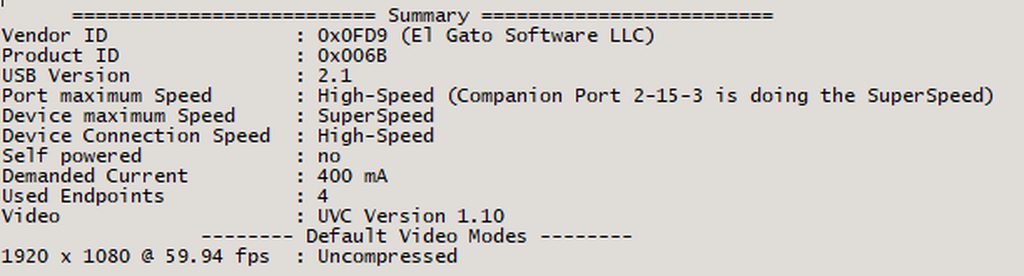
Ideally it should look more like this https://imgur.com/a/mZfrNv6 (the higher section is not required)
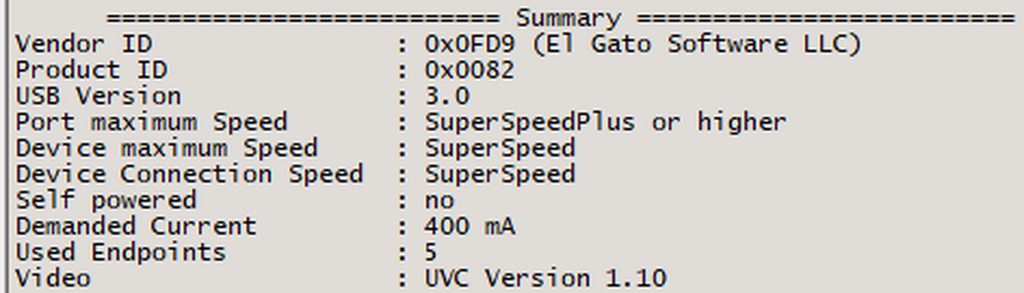 next harbor
 past basin
Yeah, I'd put money on that not being the original cable