
#capture-cards
1 messages · Page 24 of 1
 dim stirrup
 past basin
dim stirrup
why is diferent?
past basin
dim stirrup
why is diferent?
Is that the recording tab one on your streaming PC? That looks like the gaming PC one
dim stirrup
dim stirrup
why is diferent?
this pic is in the gaming pc
 warped ledge
did you select Recording's tab?
dim stirrup
recording tasb doesnt appear the capture card
 past basin
dim stirrup
this pic is in the gaming pc
past basin
dim stirrup
this pic is in the gaming pc
Do it on the streaming PC - that's where the capture card is. You're looking at the HDMI output on the GPU that's connected to your HD60 S+ there, not the card itself
dim stirrup
i find it
now, it should work in obs or I should do someting more?
should stablish as a default or something?
warped ledge
dim stirrup
should stablish as a default or something?
it should.
dim stirrup
ok
 vivid oriole
Hope someone can help me with this: Been trying my luck to capture ps3 footage with an HD60 X to OBS along with 'additional hardware' but to no success
past basin
vivid oriole
Hope someone can help me with this: Been trying my luck to capture ps3 footage w...
Check your additional hardware actually strips HDCP and isn't HDCP compliant. A lot of those devices eventually get reported by groups like MPAA and wind up revising the product to be compliant with HDCP instead of bypassing it to be able to keep selling it. It pops up fairly often that someone gets a recommended one and it no longer works like it used to because they revised it.
In a pinch you can use the component output of your PS3 with a HDMI adapter as there's no HDCP on the analog output. This is the way Game Capture HD used to do it, since it works around any potential legal issues.
vivid oriole
Been spending a good chunk of time trying to find a product with reviews that mentions it strips HDCP but to no luck
might go with your idea and get a component output
past basin
If it says compliant on the website for the product, it won't. It would have to say bypass or stripping. If it doesn't mention generally assume it's compliant since most regions eventually bar import on the other ones when groups complain.
But component is pretty hard to go wrong with - it won't be pure digital end to end but should still give you decent quality. And no pesky legal concerns as there's never any HDCP on there to get in the way
vivid oriole
I mostly just wanted to find a solution cos I wasted too much time waiting for these to come by delivery
i know a local game store, the next town over that might have component cables in stock
dim stirrup
warped ledge
it should.
well. It still not working 😭 Its so frustrating
Obs or the stream pc don't get the audio 🔉
warped ledge
@velvet basin over here
 velvet basin
warped ledge
<@490187443174113281> over here
velvet basin
warped ledge
<@490187443174113281> over here
Thank you for pointing me in the correct area
Hi guys I’m after a little help, I’m streaming from a Nintendo switch and I need some help on audio really what it is I use a usb headset for in game play but when it’s docked I can’t get my audio and mic to work through my capture card … I’ve tryed a chat link cable but had no joy… any help would be much appreciated
warped ledge
velvet basin
Hi guys I’m after a little help, I’m streaming from a Nintendo switch and I need...
I have a video about chat link, via #community-resources
velvet basin
warped ledge
I have a video about chat link, via <#837073573981323314>
I’ll have a look and let you know
velvet basin
warped ledge
I have a video about chat link, via <#837073573981323314>
I can’t find the right one vic I’m sorry
velvet basin
warped ledge
https://discord.com/channels/581549424518365226/837073573981323314/1216510477245...
I’m in there sorry what’s the video called
warped ledge
velvet basin
I’m in there sorry what’s the video called
the link is in the post. 🙂
velvet basin
warped ledge
the link is in the post. 🙂
It isn’t showing a link just community resources
warped ledge
velvet basin
It isn’t showing a link just community resources
do you see a blue hyper link?
velvet basin
warped ledge
do you see a blue hyper link?
Nope
warped ledge
velvet basin
Nope
should be there.
 velvet basin
warped ledge
should be there.
velvet basin
warped ledge
should be there.
I’ll have a look on the list again
velvet basin
velvet basin
I’ll have a look on the list again
Sorry posted in wong room again I’ve had a look at video and the Nintendo doesn’t have a aux on the controller
I’m getting stressed sorry
warped ledge
velvet basin
I’m getting stressed sorry
yeah it doesn't require chat link, but if you're using headphones, then you need to setup analog audio the vide shows you how to do this.
velvet basin
warped ledge
yeah it doesn't require chat link, but if you're using headphones, then you need...
And where would I find this option?
As I’m using a cheep capture card as I don’t have a lot of money for a good one, but I have the elgato chat link cable
Also the options that you show on video are not on ticktok studio
past basin
velvet basin
Sorry posted in wong room again I’ve had a look at video and the Nintendo doesn’...
Nintendo has an AUX output on the console itself, where you'd plug in headphones. Right next to the volume switch
If it's not an Elgato card this is not likely the best place to look for help - we don't know how non-elgato ones do their audio.
Do you have a blue Line In audio jack on the back of your computer? You can plug your Chat Link into that instead.
Using Line in would bypass needing to change any settings on the card.
 dusty gale
Hello, I was wondering if anyone could help with an issue I'm getting with the 4k x capture card. While playing, the audio has an issue were it sound like the game is under water.
I have the capture card taking the feed from my gaming PC and then it's fed into my main/streaming PC. I'm not using the pass through just mirroring the screen. The audio is then fed into the wave software as a source.
My thoughts are either Windows is doing something funny to the audio or I am only able to run at usb 3.1 as my mobo does not have usb 3.2 so not sure if that would make a difference, I am capturing at 4k60.
TLDR - captured game/pc sometimes sounds like it's under water.
Thanks!
past basin
Check that Windows Audio Enhancements and Spatial Audio are off. Options will look like this in Windows settings under system and sound, under your 4K X https://imgur.com/a/evkPsMP
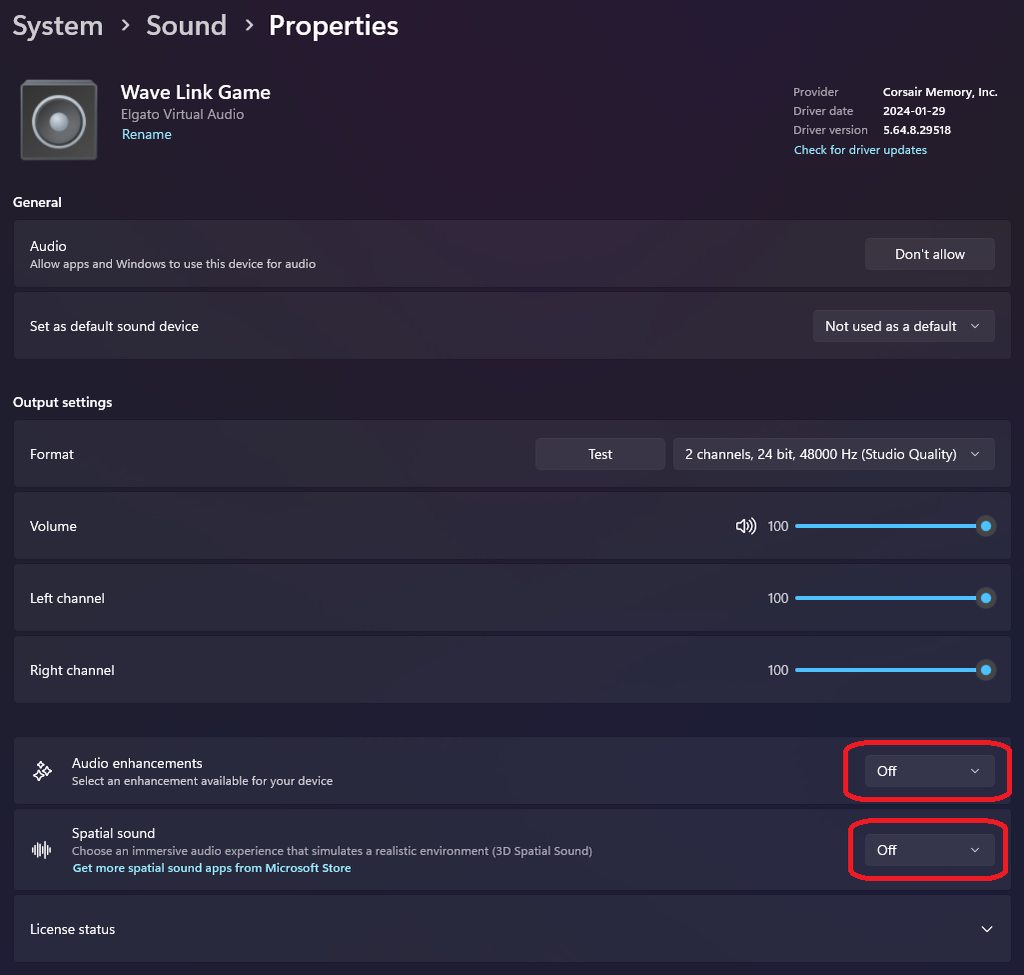
Beyond that check if your PC shipped with any noise cancellation apps
 rain lance
Hey everyone, currently having some issues with my HD60X. For context, I've been using it with my Xbox Series X for 4 months now, and I've never had issues prior to around last week. For some reason my HD60X isn't recording audio anymore on both OBS, as well as the 4k Capture Utility. For the record, all of my settings haven't been changed or touched, so those shouldn't effect the audio. If anyone has dealt with this, please lmk if it's fixable. Thanks.
warped ledge
rain lance
Hey everyone, currently having some issues with my HD60X. For context, I've been...
Unplug your cables and securely connect them.
 quaint maple
I don’t know where I should go with this but I’m using hd60x with chat link got everything setup with obs fire up a game first time and this keeps happening in different ways I need help I’m still new to this

I’m on series x using hd60x on obs with laptop hooked up to my tv
And chat link pro
rain lance
warped ledge
Unplug your cables and securely connect them.
That was the first thing I done, saw no improvement
warped ledge
rain lance
That was the first thing I done, saw no improvement
I have a video in #community-resources check the settings see if it helps.
warped ledge
quaint maple
And chat link pro
Please check in #community-resources I have a video showing a complete setup for OBS with chat link. It sounds though like you may need to change audio to analog.
 distant pilot
upon tech support and their reviewing of the hd 60s+ i was informed that the edid is whats causing the recording upon use of the 4k capture utility with the game capture hd60s+ to have the effects of distorted/blurry video quality and was advised to do an rma and i will get a replacement of the hd60x since they are no longer distributing the hd 60 s+
 modest olive
I bought a HD60 S and followed the steps, The xbox S game is showed on the monitor but when opening the software im told this https://file.coffee/u/TEZv6myevIupOyhn-UTOS.png Ive pluged up the pc usb to 3 different usb ports and nothing, what do I do?
 warped ledge
distant pilot
upon tech support and their reviewing of the hd 60s+ i was informed that the edi...
warped ledge
distant pilot
upon tech support and their reviewing of the hd 60s+ i was informed that the edi...
that is awesome!!!
warped ledge
modest olive
I bought a HD60 S and followed the steps, The xbox S game is showed on the monit...
this works with game capture HD, not 4k capture utility.

Elgato
Below is a comprehensive list of Elgato Game Capture HD software releases.Still using Windows 7? Download Game Capture 3.2 here.Please Note: Elgato Game Capture HD60 S and Elgato Game Capture 4K60 ...
quaint maple
warped ledge
Please check in <#837073573981323314> I have a video showing a complete setup fo...
Everything already set up man can you tell me why my tv looks like that? Please
warped ledge
quaint maple
Everything already set up man can you tell me why my tv looks like that? Please
I'm not a Man. I'm a Lady.
quaint maple
warped ledge
I'm not a Man. I'm a Lady.
Can you answer my question please??
warped ledge
quaint maple
Can you answer my question please??
after you address people properly. It comes off rude.
 quaint maple
I just come for help you throw me to a video that had nothing to do with what I asked earlier if I wanted to be rude I could have man I’m not saying man as in calling you a man idk why you acting like that for no reason I could have cussed anything I just asked a question
Can anyone else answer my previous question please cause she not helping
warped ledge
quaint maple
I just come for help you throw me to a video that had nothing to do with what I ...
I pointed you to the video for proper setup. Saying Man when you've watched it and know I'm a woamn is rude. I don't like it, nor take kindly too it. If you want my help, please apologize. Thanks
modest olive
warped ledge
this works with game capture HD, not 4k capture utility.
So what do I do?
warped ledge
modest olive
It should still work win 11, are you in 10, or 11?
distant pilot
warped ledge
that is awesome!!!
what kinda sucks is that elgato is not letting me keep the hd 60s+ although i have had it for over a year and the rma has been approved but i have to send back the hd 60s+ to get the replacement at no additional cost which is the bummer. so before i make that decision i will have to work an arrangement out with customer services
modest olive
warped ledge
It should still work win 11, are you in 10, or 11?
Win 10
warped ledge
distant pilot
what kinda sucks is that elgato is not letting me keep the hd 60s+ although i ha...
I understand, but you are getting an upgrade. At least they are workign with ya. 🙂
warped ledge
modest olive
Win 10
ok, do you have game capture HD?
modest olive
whats that?
 waxen eagle
quaint maple
Can anyone else answer my previous question please cause she not helping
waxen eagle
quaint maple
Can anyone else answer my previous question please cause she not helping
Is the issue the image being split? Might need a new cable
modest olive
warped ledge
ok, do you have game capture HD?
I have the HD60 S, an Xbox X and a pc Win 10
thats all I was told I needed to be able to stream from xbox to pc
warped ledge
modest olive
whats that?
yeah, this software works with your card. you can download it here. https://help.elgato.com/hc/en-us/articles/360027964072-Elgato-Game-Capture-HD-Software-Release-Notes-Windows
Elgato
Below is a comprehensive list of Elgato Game Capture HD software releases.Still using Windows 7? Download Game Capture 3.2 here.Please Note: Elgato Game Capture HD60 S and Elgato Game Capture 4K60 ...
modest olive
modest olive
I bought a HD60 S and followed the steps, The xbox S game is showed on the monit...
I did, as stated above it states nothing found,
warped ledge
modest olive
I did, as stated above it states nothing found,
but your using 4k capture utility, this is not compatible with this card.
modest olive
How do I change that?
warped ledge
modest olive
How do I change that?
download the one in the link. 🙂
modest olive
Newest version?
quaint maple
waxen eagle
Is the issue the image being split? Might need a new cable
I already used 3 different ones they all do the same thing but when I just do console to tv with cord it’s fine
warped ledge
modest olive
Newest version?
the 3.2 yes
modest olive
The newest is 3.70.56 do I not download that one?
quaint maple
quaint maple
I already used 3 different ones they all do the same thing but when I just do co...
And yes that’s the issue
waxen eagle
quaint maple
And yes that’s the issue
ok, you have swapped both cables?
quaint maple
waxen eagle
ok, you have swapped both cables?
Yes
warped ledge
modest olive
The newest is 3.70.56 do I not download that one?
if it says game capture then yes, but I see 3.2
waxen eagle
quaint maple
Yes
I would recommend opening a ticket with #official-tech-support it might need an rma or an update from them.
warped ledge
modest olive
The newest is 3.70.56 do I not download that one?
you're talking about this one?
 modest olive
Yes
warped ledge
modest olive
Yes
should be fine to use. 🙂
quaint maple
waxen eagle
I would recommend opening a ticket with <#842491937038925865> it might need an r...
Alright I’ll try that I appreciate it “man”
modest olive
warped ledge
should be fine to use. 🙂
Ok, downloading now will let you know if it works,
waxen eagle
quaint maple
Alright I’ll try that I appreciate it “man”
lets not do that please.
warped ledge
modest olive
Ok, downloading now will let you know if it works,
thanks keep me posted. 🙂
modest olive
warped ledge
thanks keep me posted. 🙂
Still saying no card found, also the video on youtube from elgato official of what im trying to do told me to download the other one which I had
 warped ledge
modest olive
Still saying no card found, also the video on youtube from elgato official of wh...
warped ledge
modest olive
Still saying no card found, also the video on youtube from elgato official of wh...
question, are you you connected to a usb 3.0 port?
modest olive
I would assume so, its on my pc. Idk how to check that
It fit correctly so yea probably 😂
warped ledge
modest olive
I would assume so, its on my pc. Idk how to check that
usb tree 🙂 also blue is 3.0 https://www.uwe-sieber.de/usbtreeview_e.html
modest olive
Its plugged in correctly I know because I see the game on my main monitor and when I unplug it from pc it goes to no signal
modest olive
warped ledge
usb tree 🙂 also blue is 3.0 https://www.uwe-sieber.de/usbtreeview_e.html
Ok
Yea my USB ports are blue
warped ledge
modest olive
Its plugged in correctly I know because I see the game on my main monitor and wh...
make sure IN is connected ot you r console/gaming PC, and OUT is connected to your TV/Gaming monitor. USB-C needs to connected to your Streaming PC's USB 3.0 port. Also if you're on a laptop, make sure your power cord is connected.
warped ledge
modest olive
Yea my USB ports are blue
are you using official elgato cables?
modest olive
warped ledge
make sure IN is connected ot you r console/gaming PC, and OUT is connected to yo...
It is, when I switched them around it went to no signal
modest olive
warped ledge
are you using official elgato cables?
Yea I believe so,
warped ledge
modest olive
Yea I believe so,
so the cables are routed correctly?
modest olive
Yes
warped ledge
modest olive
Yes
let's make sure we check each usb 3.0 port and see which one sees it.
modest olive
When I unplug it my game goes off the monitor so its gotta be reading right, theres a bar ontop of the card is there supposed to be a light there?
warped ledge
modest olive
When I unplug it my game goes off the monitor so its gotta be reading right, the...
there is a light strip in the card it can be white, or red.
modest olive
whats it mean when its not light? 😂
warped ledge
modest olive
whats it mean when its not light? 😂
that it may not be powered on, so use the USB tree to see.
@past basin can you assist with the power thing in that software. I still haven't played with it.
modest olive
This website loks weird, do I have to download another software???
warped ledge
modest olive
This website loks weird, do I have to download another software???
this is to see your usb ports, power etc...
past basin
USB Tree Viewer you mean? Yeah, give me a few minutes to get back to the PC
modest olive
I downloaded it and it shows my elgato is pluged into my port 5
warped ledge
past basin
USB Tree Viewer you mean? Yeah, give me a few minutes to get back to the PC
thanks buddy!

past basin
modest olive
When I unplug it my game goes off the monitor so its gotta be reading right, the...
Passthrough will work on the card as long as it is getting power. So it could still be a cable issue or port issue
modest olive
It does say this tho Device Manager Problem : 28 (CM_PROB_FAILED_INSTALL) is that a problem? 😬
warped ledge
modest olive
It does say this tho ```Device Manager Problem : 28 (CM_PROB_FAILED_INSTALL)``...
did you install the drivers as well? https://help.elgato.com/hc/en-us/articles/360027961152-Elgato-Gaming-Hardware-Drivers
Elgato
Elgato Gaming Hardware Drivers - Windows 10/11
When you install Elgato Game Capture HD software for Windows 10/11 or Elgato 4K Capture Utility, the necessary drivers should automatically be i...

top one shouldbe fine.
modest olive
No that wasnt in the tutorial I watched from elgato, Will do now
past basin
You also want to check the summary section to see what the three speeds are, if that doesn't fix it. USB Tree Viewer should show a port speed, a device speed and a conneciton speed
If they're not all at least superspeed you'll hit issues
modest olive
There all superspeed
warped ledge
past basin
You also want to check the summary section to see what the three speeds are, if ...
thanks buddy!
modest olive
Driver installed and now it worked!!! Thanks so much you too 😄
past basin
\o/
modest olive
Only question, is there a reason for the major green effect on the card? It shows green on the pc but on the device
 warped ledge
modest olive
Only question, is there a reason for the major green effect on the card? It show...
warped ledge
modest olive
Only question, is there a reason for the major green effect on the card? It show...
I don't see green.
modest olive
does the xbox ui not look green to you?
I might be blind or something idk 😂
Also how do I now connect this to OBS?
warped ledge
modest olive
Also how do I now connect this to OBS?
so you can only use the card in 1 software at a time. if you close out game capture you can set it up in OBS. My video though it show recent cards will still help for those older cards, but this one you don't need to do 2 sources should be fine with just the video source, and you wont have to mute it. via #community-resources
modest olive
warped ledge
so you can only use the card in 1 software at a time. if you close out game capt...
Could you link me to the message of the one Id need in #community-resources please?
warped ledge
modest olive
Could you link me to the message of the one Id need in <#837073573981323314> ple...
sure here you go! #community-resources message
modest olive
warped ledge
sure here you go! https://discord.com/channels/581549424518365226/83707357398132...
Ok I setup the source in obs, I believe I just have one last question for now. I have an xbox issued wireless headest / mic, It is a usb plugged up to my xbox, Will that still work through my OBS stream or can I now switch to my boom arm mic and good headset on my pc?
And if I do that will I still be able to hear xbox game audio?
warped ledge
modest olive
And if I do that will I still be able to hear xbox game audio?
are you doing party chat?
modest olive
I have a better audio setup for PC but xbox doesnt support it sadly so I want to switch to the pc one but dont want to lose out on the game audio
modest olive
warped ledge
are you doing party chat?
Sometimes its party but sometimes gamechat when we play cross platform
warped ledge
modest olive
Sometimes its party but sometimes gamechat when we play cross platform
you might want to get a chatlink/pro so you can use party chat. you'd follow the chatlink setup in the video if you get one. OBS requires a separate mic vs your headset in game.
warped ledge
modest olive
How much are those??

Elgato
Chat Link Pro lets you stream or record PS5, PS4, or Nintendo Switch voice and gameplay audio. Simply plug in, connect your controller and headset. Featuring a braided cable jacket for extra durability and a line isolator plus gold-plated connectors for o
modest olive
My pc mic is usb and headset is bluetooth, would that still work?
warped ledge
modest olive
My pc mic is usb and headset is bluetooth, would that still work?
well audio on a headset would need to be over HDMI or chatlink via analog. Not seen one with a bluetooth yet.
modest olive
Ok, Im not sure if I want to buy that yet, Will my xbox issued headset still work for now?
warped ledge
modest olive
Ok, Im not sure if I want to buy that yet, Will my xbox issued headset still wor...
if you want, you could connect your headset to your PC and use your headset as a monitoring device. Still, for you to use your headset while gaming, you'd more than likely will need a chatlink via party chat.
modest olive
So If I just keep it connected to my xbox my obs could hear my audio right?
Or I need the chatlink either way
warped ledge
modest olive
So If I just keep it connected to my xbox my obs could hear my audio right?
for a headset a chatlink is needed, unless you're routing all audio over HDMI.
test it out, see if you get sound.
modest olive
Well the headset is connected to my xbox and xbox is routed to the pc from the capture card hdmi 😅
There is an option for it in obs

Yea no not getting any audio on the outputs
warped ledge
modest olive
There is an option for it in obs
sweet! can you do a test recording while using your headset, and see if you can get audio on your recording?
warped ledge
modest olive
but not party audio
chatlink is needed then
modest olive
Awh damn, wish I had known that
warped ledge
modest olive
Awh damn, wish I had known that
that's ok, you could have them use Discord. You can route Discord to your OBS, via audio and that should work until you can get the cable.
modest olive
Im currently in a discord call on my xbox, but if I go to it on my pc I wouldnt be able to hear game
Assuming theres no way to hear the discord from xbox to obs?
warped ledge
modest olive
Assuming theres no way to hear the discord from xbox to obs?
I'd suggest using your headset as a monitoring device in OBS connected directly to your PC< and then route discord audio to OBS via PC. Then you could hear both.
modest olive
How do I set a monitoring device??
Does the chatlink require me to plug a jack into my controller aswell?
past basin
modest olive
My pc mic is usb and headset is bluetooth, would that still work?
No, Chat Link will not work with a USB or wireless headset or mic - not one that doesn't also have a 3.5mm jack at least.
For the Xbox you can split the game audio and party chat to go two places at once though, unlike most consonles, so you can at least capture that - but that doesn't work for in game chat or Discord.
To get those two at least, you need to turn off the options "Must speakers when headset attached" and set the party chat output to Headset & Speakers. (shown here https://imgur.com/a/Jmj9YhA)
And yes, Chat Link would go into your controller (Unless you have a base station or DAC for your headset with a 3.5mm output instead)

Long term you want either a wired headset and a Chat Link to split it like Vic was mentioning or if you want to stay wireless you'll need a wireless headset with a 3.5mm output on the base station that can actually output the audio at the same time (eg, Astro A50 or Steelseries Arctis Nova Pro).
modest olive
I hated a wired headset, sounds expensive. I wish I would have known all this before I started my capture card adventure I would have just stuck with normal streaming off my xbox 😂
warped ledge
past basin
Long term you want either a wired headset and a Chat Link to split it like Vic w...
thanks, I was thinking of the best way to say this simple. but wired for the win on this.
modest olive
Wired jacks are so cheap and one touch of it and your voice is crackling
past basin
I've not managed to break an Xbox wired jack yet
warped ledge
modest olive
Wired jacks are so cheap and one touch of it and your voice is crackling
the chatlink pro has an isolator.
past basin
Usually if you're going to break something it's the cable join inside your analog cable
The isolator is good. Long live the isolator
modest olive
for me If I touch the jack connected to the controller at all it will crackle my audio and turn off my headset
past basin
Then it's either damaged or the cable you're using with it is bad
That's definitely not normal.
(or something is inside it preventing good contact - that's less common though)
modest olive
Its been normal with almost any headset ive owned
warped ledge
past basin
That's definitely not normal.
agreed!
past basin
modest olive
Its been normal with almost any headset ive owned
It's it's happened with multiple headsets I'd suspect the jack in your controller as being defective
modest olive
Different controllers
past basin
😐 I've honestly never managed to have one go bad even since my 360. Though I did have a headset develop a bad cable near the jack after a couple years
Are these the modern model 1914 controllers?
modest olive
could be a result of cheap headsets, mine are around $90 I refuse to spend $200 on a headset
warped ledge
modest olive
could be a result of cheap headsets, mine are around $90 I refuse to spend $200 ...

i like expensive toys...

past basin
I wouldn't consider a $90 headset a cheap one
modest olive
I wouldnt either so idk
past basin
But I'm old. Back in my day . . . :p
warped ledge
past basin
I wouldn't consider a $90 headset a cheap one
agreed, it's not cheap
modest olive
My last wired was $90 and it did that
I just got this controller and console a month ago theres nothing wrong with the ports it was the first headset to be connected with it
past basin
If you have issues wire wired then the Astro A50 and Arctis Nova Pro will connect with USB instead and have a wired jack on their base station you can connect to instead. If the jack is the issue, the Steelseries GameDAC Gen 2 will plug in with USB too, and tive you a 3.5mm jack for a headset without using the controller, and another to feed your PC the console audio
warped ledge
past basin
If you have issues wire wired then the Astro A50 and Arctis Nova Pro will connec...
wondering when corsair makes a headset like this, with wave link...


modest olive
So right now, without having to buy anything else is there a way to get my discord or party audio included in the stream?
past basin
That'd be interesting - but mu spield about devices that support Wave Link is already long enough when I start adding Corsair Voyager laptops :p
past basin
modest olive
So right now, without having to buy anything else is there a way to get my disco...
Party audio you can get if you're using Xbox party chat. Discord, join on PC and capture it there.
warped ledge
past basin
That'd be interesting - but mu spield about devices that support Wave Link is al...
I love that portable little guy. I don't own one, but still cool functions.
past basin
In game chat is the headache - you might be able to get it with Xbox remote play if you have the app setup for remote controlling your console - but I can't remember if that keeps you from actually using the Xbox while it's active
modest olive
past basin
Party audio you can get if you're using Xbox party chat. Discord, join on PC an...
Joining discord on pc, stream would hear it but I wouldnt??
Also when I talk in discord, party, or just in game nothing is picked up on obs
warped ledge
past basin
In game chat is the headache - you might be able to get it with Xbox remote play...
I think you're more savy about xbox than I could be. I was a nintendo sony Lady. I have an Xbox Series X, but I never do party chat unless it's a PC game, so Discord. As for Xbox, it collects dust. Few games I play.
most stuff is on PC.
past basin
modest olive
Also when I talk in discord, party, or just in game nothing is picked up on obs
Not hearing the audio you speak into the console is normal, even with a chat link setup. You generally only capture the audio coming OUT of the console, and mix your own voice back in on the PC with your main streaming mic
Though XBox has mic monitoring you can try to mix your voice in, it doesn't usually get loud enough to be useful
past basin
warped ledge
I think you're more savy about xbox than I could be. I was a nintendo sony Lady....
All of my consoles are equally neglected these days 😄
modest olive
past basin
Not hearing the audio you speak into the console is normal, even with a chat lin...
So I have to use 2 mics for my stream to hear me??
warped ledge
modest olive
So I have to use 2 mics for my stream to hear me??
yeah
modest olive
will it pickup my friends in party?
warped ledge
 past basin
You can try the mic monitoring, but unless you have a dual connection headset, generally yes.
For getting yoru friends audio, if you're using a Chat Link setup you'd get it. If you're using Party Chat and setup the audio settings right ou can get it. For discord and in game chats, generally no (without ChatLink or other hardware).
modest olive
I wish chatlink was mentioned before I bought the card
past basin
Personally I use a Arctis Nova pro to work around most of this - it has a Line Out on the back that outputs the consoles audio, which can also be set to split out with the headset mic so you don't need a second mic.
modest olive
If I knew I had to buy a whole new headset and another tool I never would have bought the card
past basin
But that's an expensive workaround
Yeah - it's a common issue with all capture cards. Wireless headsets are a nightmare to try to capture
warped ledge
past basin
Personally I use a Arctis Nova pro to work around most of this - it has a Line O...
i like this idea!
past basin
PS5 and Switch won't even let you split any of the audio so you can't even get basic game audio if you use a headset with one of those
past basin
warped ledge
i like this idea!
Yes - USB to the console, 3.5mm to the analog jack on my HD60 X.
And another aux jack from my pc to the line in so I can get stream notices and stuff on the same headset
past basin
modest olive
I dont like the idea of a $280 headset tho
Which is why we usually recommend a wired setup - notably cheaper
modest olive
Id still need to buy a wired headset and a chatlink though?
warped ledge
modest olive
Id still need to buy a wired headset and a chatlink though?
does your headset have an audio jack?
modest olive
If I need all that I might just return the capture card
warped ledge
@past basin what would be ideal for this?
past basin
warped ledge
does your headset have an audio jack?
If it's the official Xbox one it only has wireless and USB mode. It does allow both Xbox wireless and Bluetooth to the PC at the same time so they could probably route ALL the audio through the PC to hear it, but the audio quality isn't great in dual mode
warped ledge
past basin
If it's the official Xbox one it only has wireless and USB mode. It does allow ...
know the steps to set that up?
past basin
warped ledge
<@269997944671830017> what would be ideal for this?
Basically just feed all the audio to speakers - I'm not sure how that would affect game chat though tbh
Since most of my Xbox gaming is offline
modest olive
If I gotta buy another headset and a audio link device Im just gonna send the card back atp thats too much for some good looking overlays 😭
past basin
Give me a minute, I'm booting up my setup to see if we can run remote console acces to capture audio while still playing on the Xbox
modest olive
Ok
warped ledge
I'm hopping off. Thanks again @past basin I'm binge Streaming Fallout in my Server.
past basin
Good luck with it!
modest olive
@past basin you know any good wired headsets for under $80? Im not trynna spend a whole lotta money I could return my wireless one since its fairly new and get a wired one but idk fs
past basin
Sorry was re-runnning some audio setup
You can use the Xbox remote control app and get audio from both that and the console at the same time, and still play from the console
You'll need to use something like OBS Studio and add an application audio capture for the remote play thing
past basin
modest olive
<@269997944671830017> you know any good wired headsets for under $80? Im not try...
For gaming headsets I tend to go with Arctis headsets - there's usually a few in that price range. Most well known names like Arctis, Turtle Beach, etc, have something in that price range
But I'd try capturing the remote play audio first to see if you can save a few dollars
(Don't mind that remote play's video is a little crunchy looking at times since you have the capture card to get higher quality video right from that)
modest olive
past basin
But I'd try capturing the remote play audio first to see if you can save a few d...
How do I do that?
past basin
You'll need the Xbox app for Windows (assuming you're on a Windows PC), then you have to set the xbox up for remote control. Give me a minute to find the docs on that
modest olive
past basin
For gaming headsets I tend to go with Arctis headsets - there's usually a few in...
dont see any with the price that have a mic
modest olive
past basin
You'll need the Xbox app for Windows (assuming you're on a Windows PC), then you...
ohh yea that
past basin
Generally if it's listed as headset instead of headphones it should have a mic
modest olive
I have done that but that removed the need for the capture card, that also required really fast internet speeds
past basin
Something like Arctis Nova 3 would do it
modest olive
past basin
Generally if it's listed as headset instead of headphones it should have a mic
I need a mic since xbox doesnt support usb mics
past basin
modest olive
I have done that but that removed the need for the capture card, that also requi...
You're not looking for cloud play though - you want remote play to your own console
Slightly different beast and doesn't need the faster internet
modest olive
past basin
Something like Arctis Nova 3 would do it
Thats still $120 by the time I buy the other thing and thats more than I even paid for the card
modest olive
past basin
You're not looking for cloud play though - you want remote play to your own cons...
oh yea then idk how to do that
past basin
That tells you how to set it up on the Xbox side
oh it has the Windows Device settings too
past basin
modest olive
Thats still $120 by the time I buy the other thing and thats more than I even pa...
Check prices on Nova 1P and Nova Prime then
Prices are a little off here in Canada so I can only gues at the US costs
modest olive
So uh xbox app says this but when I click the update button it says its fully updated 💀
 past basin
You can try restarting PC - it might have an update stuck with pending changes
Restarting will usually trigger those to finihs
modest olive
I just updated earlier, it was doing it before and still doing it now
past basin
If restarting doesn't fix it uninstall it and install it again from scratch
modest olive
Ok its redownloading now
modest olive
@past basin Its saying theres an error on there end when I try to install
what was the other option?
past basin
I've never seen the Xbox installer fail like that. Did it give you a specific error?
modest olive
past basin
I've never seen the Xbox installer fail like that. Did it give you a specific e...
Nah I dont believe so
past basin
Sadly I'm not sure how to fix that app since it installs from the ms store - you might have to check with Xbox support :/
modest olive
past basin
Sadly I'm not sure how to fix that app since it installs from the ms store - you...
yea, there supports ass so Ima live without it
I worked around by using my ffine microphone on my pc, can hear me but not the game people I dont think
Thanks for all the help tho!
 calm escarp
Hello everyone! i have a problem with my HD60X, i'm on usb a 3.0 and HDMI 2.1, in 4K utilities i have source 1080p120 but in recording it's block to 1080p60!?
calm escarp
and i have test with a 4K X and i have the same issue!
 limber mist
calm escarp
and i have test with a 4K X and i have the same issue!
limber mist
calm escarp
and i have test with a 4K X and i have the same issue!
Your 4K X can record in 1080p120, please use OBS, 4K Capture Utility is not made for HFR-Recording’s
calm escarp
limber mist
Your 4K X can record in 1080p120, please use OBS, 4K Capture Utility is not made...
ok thank you but this is also possible with the HD60 X normally!? OBS can allow me to just configure the elgato? because I use another software to record
 wild skiff
In this video on the official Elgato channel https://youtu.be/7jhA7VeSItE?si=NUEbm2Fsx3191DnV&t=207 it is explained how to use a headset and capture audio with a capture card.
Chapter 4 (3:27) is for my setup. Does this still work? I would like to know before i buy a 2nd controller and cables. if it still works, how exactly do i set this up? The video doesn't go in detail unfortunately.
past basin
Second controller generally works but you have to sign it in as a different user, so it doesn't generally work well for chat. Basically just run an aux cable from the controller to the line in on your card and set the card to analog audio mode
past basin
calm escarp
ok thank you but this is also possible with the HD60 X normally!? OBS can allow ...
It is unless you have a HDR signal. HDR will drop the capture to 60 fps on HD60 X
 proper ember
https://www.elgato.com/de/de/p/cam-link-pro is there a way to capture my game with my cam link pro?

Elgato
Als leistungsstarker Video-Mixer für Multikamera-Produktion ermöglicht dir Cam Link Pro, 4 HDMI-Signale von Kameras, Computern, Laptops, Tablets und mehr aufzuzeichnen. Streame oder filme in 4K oder 1080p60 und steuere Video-Feeds unabhängig voneinander.
past basin
Yes, it will work with most capture apps like OBS Studio and 4K Capture Utility
The main hiccup is there's no HDMI out on it, so you'd have to play on the captured video
proper ember
im sorry i dont understand it... can u send me a dm and explain it step by step. this would be awesome
past basin
I'm on working hours at the moment and won't be available for a call for most of the day
What specifically are you running into trouble with?
proper ember
past basin
What specifically are you running into trouble with?
My obs cant find my Video. I try to explain what i die Step by step. First i put the HDMI in my camlink and my Nintendo Switch Dock. Then i installed the capture Software and tried to get a Video on obs. There is nothing
past basin
Did you follow this? https://help.elgato.com/hc/en-us/articles/360059425871-Cam-Link-Pro-How-to-Setup-with-OBS-Studio
Elgato
This guide will go over how to setup Cam Link Pro with OBS Studio.
Requirements
Cam Link Pro installed in a desktop PC
Setup guide
4K Capture Utility 1.7.4 or newer installed
Download 4K ...
proper ember
past basin
Did you follow this? https://help.elgato.com/hc/en-us/articles/360059425871-Cam...
hmm i did everything right but i think my cam link is not detected
past basin
Try using the standalone driver from here - https://help.elgato.com/hc/en-us/articles/360027961152-Elgato-Gaming-Hardware-Drivers
Elgato
Elgato Gaming Hardware Drivers - Windows 10/11
When you install Elgato Game Capture HD software for Windows 10/11 or Elgato 4K Capture Utility, the necessary drivers should automatically be i...
proper ember
Nothing Wrong right?
 proper ember
past basin
Try using the standalone driver from here - https://help.elgato.com/hc/en-us/art...
proper ember
past basin
Try using the standalone driver from here - https://help.elgato.com/hc/en-us/art...
I installed it but nothing happend
past basin
proper ember
Nothing Wrong right?
Depends on the motherboard and how many PCIe lanes are actually wired to that slot
Does the device show up in 4K Capture Utility?
proper ember
Nope
past basin
What motherboard do you have? There might not be enough PCIe lanes available in that slot
proper ember
Aorus x570 Master
Omg i fixed it. I just need to Reset to default in the capture utility???😂😂
I Never Touched it
proper ember
Now i have it on obs, how can i see my Game on the Main Screen?
 past basin
Right click your source in OBS and choose Projector Fullscreen
rain lance
warped ledge
I have a video in <#837073573981323314> check the settings see if it helps.
Hey sorry for the incredibly late response to this, but I had a look at the videos and unfortunately I couldn't find anything involving my issue at the moment. Thanks for the help though, I'll try other methods and see if there's anything that could be blocking the audio.
warped ledge
rain lance
Hey sorry for the incredibly late response to this, but I had a look at the vide...
I’ll be available later. Maybe we can VC and figure it out.
rain lance
warped ledge
I’ll be available later. Maybe we can VC and figure it out.
Unfortunately I don't think I'll actually be available for a VC, but one interesting thing I've found is that for some reason it's gone from not getting audio to picking up a strange static noise. Still not sure
Never mind I actually ended up fixing it. Such a rudimentary issue as well...
warped ledge
rain lance
Never mind I actually ended up fixing it. Such a rudimentary issue as well...
Was it the cables?
rain lance
Nope, it was in fact the type of audio I had it on. In the 4K Capture Utility I had it set to analog rather than HDMI, which had interestingly enough affected all recording softwares using my HD60X
past basin
That's correct - Changing the option there changes it on the card. You could even take the card to another computer at that point and it'd stay set (so you can use this option with other apps like OBS Studio that can't change it themselves).
rain lance
This is incredibly useful to know for any future issues, I thought the software was only for recording
past basin
That's the primary purpose, but it's also used to change a few settings on the card and do firmware updates when needed
macOS users have Capture Device Utility for changing settings, but no first party recording app
On Windows it's both rolled into 4K Capture Utility
rain lance
I really do need to be more aware of how I use utility softwares sometimes, they have a lot more control than I actually thought
 dull ridge
Maybe it’s just me, maybe it’s more an OBS question but I’ll ask anyway:
My HD60x Preview of my gameplay on my PS5 seems to be displaying at 59.97 fps instead of true 60 fps like I do in the pass through. It didn’t seem this way about 2 weeks ago.
For the record, I’m on a M1 MacBook Pro with latest OS and updates for OBS
past basin
PS5 does tend to favor broadcast spec of 59.94 when available over PC spec of 60. I'm not sure you can override that without a custom EDID, unless the pass through monitor has an EDID compatibility mode
dull ridge
So odd. I feel like the framerate was a solid smooth 60 a few weeks ago. It wasn’t til recently I noticed a slight stutter like how you see between 59.94 and true 60
I hooked up the pass through to the same monitor and switched inputs - smooth 60 all the way. So it isn’t the monitor. Must be the processing thru OBS or the HD60x itself?
past basin
What sort of stutter are you seeing? If the card is switching to 59.94 correctly you shouldn't see anything. If the card is in true 60 while the PS5 sends 59.94, you should only see about 1 frame drop every 16 seconds

 reef zodiac
Is this on my streaming pc or gaming pc?
warped ledge
reef zodiac
Is this on my streaming pc or gaming pc?
streaming
reef zodiac
Also I do not have a playback speaker shown on my streaming pc for the hd60x
Just the mic
warped ledge
are you on the recording tab?
warped ledge
reef zodiac
Yes
does it have Listen Check marked?
warped ledge
reef zodiac
Yes
then audio should be routing over. 🙂
reef zodiac
It only seems to go through whenever on my main gaming pc my audio output is set to the hd60x
but I need it to be my headphones
warped ledge
ok, that's easy. 🙂
warped ledge
reef zodiac
but I need it to be my headphones
one sec
reef zodiac
Sure
warped ledge
reef zodiac
Sure
 warped ledge
reef zodiac
Sure
warped ledge
reef zodiac
Sure
choose your headset here.
reef zodiac
I dont have obs running on my gaming pc either, is that neccessary?
reef zodiac
warped ledge
choose your headset here.
My headset isnt connected to my streaming pc with the obs open
I was just changing the audio output on my main gaming pc to the hd60x and then I hear it from the external speakers hooked up to my streaming pc back to me
warped ledge
reef zodiac
My headset isnt connected to my streaming pc with the obs open
oh... OBS shouldn only be on your streaming pc.
reef zodiac
Oh really
warped ledge
reef zodiac
Oh really
yeah
reef zodiac
Would that be causing the audio problem
warped ledge
reef zodiac
Would that be causing the audio problem
i don't think so, but maybe.
reef zodiac
Because obs open on just my streaming pc displays my gaming pc screen just fine
Its just the audio that doesnt work
But I am able to get my mic working some how by going into the sound control panel and checking the listen button
warped ledge
reef zodiac
But I am able to get my mic working some how by going into the sound control pan...
actually, i got anothe work around, revert things back to normal. obe sec
reef zodiac
Sure sounds good thanks
Was also just trying to download realtek drivers to do a mixer to play through my headphones and the elgato hd60x playback as well
warped ledge
reef zodiac
Sure sounds good thanks
I want you to download 3.70.56, and only open sound capture on your gaming pc. https://help.elgato.com/hc/en-us/articles/360027964072-Elgato-Game-Capture-HD-Software-Release-Notes-Windows
Elgato
Below is a comprehensive list of Elgato Game Capture HD software releases.Still using Windows 7? Download Game Capture 3.2 here.Please Note: Elgato Game Capture HD60 S and Elgato Game Capture 4K60 ...
warped ledge
reef zodiac
Was also just trying to download realtek drivers to do a mixer to play through m...
what do you mean playback, like route audio to both pc's?
reef zodiac
Ahhh I see
Yeah I was very confused as I was watching vidoes and they said that the 4k game capture comes with the sound capture software but it never did
This now gives me the option to
warped ledge
reef zodiac
This now gives me the option to
yeah sound capture needs to be on the gaming pc, and side note, the mic on the gaming will not relay to the streaming, you need a separate mic just for your streaming.
reef zodiac
Huh its not popping up in my windows search, could that be interferring with the old game capture hd
Whoops spoke too soon
Found it
reef zodiac
warped ledge
yeah sound capture needs to be on the gaming pc, and side note, the mic on the g...
Ahh gotcha
Ok just opened the sound control panel and changed the preset to gaming
warped ledge
reef zodiac
Ahh gotcha
@past basin can go in depth on this, but but long story short, unless you wanna hear yourself.
reef zodiac
warped ledge
yeah sound capture needs to be on the gaming pc, and side note, the mic on the g...
Really? I think I found a work around
warped ledge
reef zodiac
Really? I think I found a work around
this is the ideal solution.
reef zodiac
I just went into my sound control panel and went into my microphone properties, clicked listen, but then changed where its "listening to" to the hd60x speakers on my gaming pc
Would this be adequate haha
Works perfectly now btw I think!
Appreciate the help so much
warped ledge
reef zodiac
Works perfectly now btw I think!
it is the one I'm use to doing, but sound capture and choosing pc is probably long run better.
reef zodiac
reef zodiac
I just went into my sound control panel and went into my microphone properties, ...
Also keeping my default main speakers to my headphones so I wont hear the mic
 strange brook
Is there a way to get other edid profiles
reef zodiac
hey yall everything is working fine just except in my valorant game for some reason it gives the option for a 3420 x 2160 display and acts like theres 2 monitors when i set them to merge, the main problem is that it wont let me play on that resolution let alone that i wouldnt want to play on that anyways as i have a 1920 x 1080 monitor, but also when i switch to the 1920 x 1080 option its very hard to alt tab as it tries to rescale to 3420 x 2160 for a second as it thinks that is my default resolution for some reason
warped ledge
strange brook
Is there a way to get other edid profiles
#official-tech-support can help with that
 plucky grove
how do i stream my other pc using another pc and capture card
cuz i press share screen and choose the capture device and it doesn't load
plucky grove
the capture card isn't detecting on obs aswell
i can choose the option to use the capture card
plucky grove
nvm got it working, now audio is issue.
 scarlet glen
I changed my Xbox but depth from 24 to 36 and now it's not capturing my Xbox at all.
warped ledge
plucky grove
nvm got it working, now audio is issue.
Scroll above, there is a fix for dual pc setups via audio with sound capture.
 green cobalt
I have a question
plucky grove
warped ledge
Scroll above, there is a fix for dual pc setups via audio with sound capture.
do you mean like 1 pc, 2 headsets?
i'm not recording
warped ledge
plucky grove
i'm not recording
It’s for routing audio
plucky grove
can i use wireless headsets
green cobalt
I have a HD60X. is it bad to set OBS and game capture on PC end to 1080p60(using a 4K144hz monitor) and set my PS5 to 4K120(using a 4K120hz TV)? I:m doing this when my PC supports VRR and my TV doesn:t support VRR. Since My TV doesn:t support VRR I can:t enable it in my PS5 settings
plucky grove
cuz i'm confusing myself, i wanna use discord on "streaming" pc for communication and sharing my screen and i want audio on one headset but for gaming and streaming pc
warped ledge
plucky grove
cuz i'm confusing myself, i wanna use discord on "streaming" pc for communicatio...
Sound capture can help with it
plucky grove
warped ledge
yeah sound capture needs to be on the gaming pc, and side note, the mic on the g...
.
green cobalt
I figured out my issue
warped ledge
green cobalt
I figured out my issue
Care to share
green cobalt
warped ledge
Care to share
i just had to remove 120hz on PS5 because I was playing a game that didnt use it anyways
reef zodiac
hey yall everything is working fine just except in my valorant game for some reason it gives the option for a 3420 x 2160 display and acts like theres 2 monitors when i set them to merge, the main problem is that it wont let me play on that resolution let alone that i wouldnt want to play on that anyways as i have a 1920 x 1080 monitor, but also when i switch to the 1920 x 1080 option its very hard to alt tab as it tries to rescale to 3420 x 2160 for a second as it thinks that is my default resolution for some reason
plucky grove
it should be in display settings of elgato app
send an ss of it, i had the problem today
reef zodiac
Sorry which elgato app theres a lot
Did u solve it?
I had problems describing it but to put simply it just thinks my main monitor displays native resolution is higher than it actually is
plucky grove
reef zodiac
Sorry which elgato app theres a lot
what card u got
plucky grove
reef zodiac
Oh yes I have that one
plucky grove
open it then settings
reef zodiac
Im not using discord on my streaming pc so cant ss but it just says the format which is 1080p
How would changing this setting affect the resolutions its offering in my nvidia control panel
I just need those to go away because the game dupping my monitor and the capture card together combines the two resolutions
 sour cave
Hello. I am having a large problem with my Elgato setup. I have everything plugged in properly the way I need it and I am having this happen. I have provided a wiring diagram of how I have everything setup. If I unplug the HDMI and plug it back in and goes back to normal for about 5 minutes then happens again.


Does anybody have an idea of what could be wrong?
 daring chasm
my capture card has suddenly stopped outputting audio
can anyone help
ok just needed updating
 pulsar stag
My capture card is causing the "bad driver installation" error in voicemeeter and I was told that the icon needs to be changed since it's reading as the same icon as cable output. What would the correct icon be?

 warped ledge
sour cave
Does anybody have an idea of what could be wrong?
warped ledge
sour cave
Does anybody have an idea of what could be wrong?
Could be your switcher.
past basin
Are you trying to install Voicemeeter on a PC that already has Elgato Sound Capture installed? Make sure Elgato Sound Capture is set to OFF before trying to install Voicemeeter as otherwise the two apps can fight over your default sound settings
Worst case, try uninstalling Game Capture HD (which is what installed Sound Capture) before installing Voicemeeter. Voicemeeter would generally replace Sound Capture in most cases.
 full harness
Do I need a Chat Link Pro to be able to have my headset audio (with the PS5/Console) and Capture card audio separate? Otherwise my audio just goes all into my PC or Headset one
past basin
If you're using a wired headset, Chat Link Pro will help here, yes.
PS5 only sends one audio stream per user, so if you plug in a headset it normally mutes the HDMI. If you force HDMI back on it mutes game audio in the headset. USing Chat Link lets you split the audio outside the control of the PS5 (though it doesn't split the mic, just the PS5 audio).
There's a couple other ways to do it too, but usually requires additional hardware.
If you don't need to pick up chat you can get game audio by signing in a second controller and using a regular aux cable instead (your capture card has to be set to analog audio if it's an eternal -use the blue line in audio jack on your computer if it's an internal).
rain lance
Okay so I'm back with another strange issue, for some reason whenever I'm in an Xbox party with one specific person, the game and party audio just immediately disappears.
When I'm recording, I mean
 random plank
Hi how do you record games on the 4K software without the flashback thing
I’m tryna record games on my software but only pops up oats flashback everytime I record something and want to see the videos
 white plinth
rain lance
Okay so I'm back with another strange issue, for some reason whenever I'm in an ...
white plinth
rain lance
Okay so I'm back with another strange issue, for some reason whenever I'm in an ...
With one specific person now thats strange maybe theyre haunted
rain lance
white plinth
With one specific person now thats strange maybe theyre haunted
On my life this fella joins the party and the audio just gets sucked into a blackhole
white plinth
rain lance
On my life this fella joins the party and the audio just gets sucked into a blac...
Ask him if he has a elgato capture card
rain lance
Trust me he doesn't, he doesn't even know what a capture card is
warped ledge
rain lance
Trust me he doesn't, he doesn't even know what a capture card is
How is your audio setup?
warped ledge
rain lance
Trust me he doesn't, he doesn't even know what a capture card is
I have a video showing how to capture using the chatlink pro. Via #community-resources but let me know a bit on this.
green cobalt
anyone know how to fix an audio delay. When I go to stream via Twitch i get no audio delay on my Elgato Wave 3 Mic, or on the stream itself. my PS5 game being captured via HD60X/OBS has no video delay, but one of my viewers said on my last stream that the game's audio is delayed by 2 seconds even though the games visuals are not delayed
anyone know of a solution. i use regular OBS with streamelements pluggin
rain lance
warped ledge
I have a video showing how to capture using the chatlink pro. Via <#837073573981...
Unfortunately I don't have a chatlink, however I'd probably have to mention that I never had issues like this before
warped ledge
rain lance
Unfortunately I don't have a chatlink, however I'd probably have to mention that...
What is your capture card, and setup info.
rain lance
My capture card is an HD60X, I bought it 4 months ago. My setup is an Xbox Series X, my computer for recording with OBS, and my microphone which is a Razer seirin V2
If you need to know PC specs, I'll gladly share
warped ledge
rain lance
If you need to know PC specs, I'll gladly share
How are you chatting with your buddy, via gaming?
rain lance
Yeah Xbox party
warped ledge
rain lance
Yeah Xbox party
through xbox, or on PC?
warped ledge
rain lance
Yeah Xbox party
Elgato
Xbox Series X/S and Xbox One X/S allow users to send party chat audio to two outputs at the same time. Both to your headset as well as to your TV/Capture Card. In this guide we will go through...
 gray ember
Hello. Random issue with my merged displays using a 4k60 mk2 capture card , when I first reboot my pc and launch a game it’s constantly switching back and forth between a black screen on my primary pc monitor but it shows up in OBS/other capture tools as normal video. This persists until I can manually reset my monitor, which makes it go away but then the refresh rate is locked at 144hz… until I disable adaptive sync in the monitor settings which makes it go back to 240hz
 tranquil blade
WELP. LOL After a bios update, and literally every other option possible we just ruled it out to be a corrupt file at the kernel level, that would require registry edit. So I backed up the drive, fully wiped it and got a fresh install of win10 pro running and now the PC is running better than ever. All ports fully functional again! Just figured Id update ya haha was up til 5am troubleshooting and was down to my last nerve tbh so I just said screw it and wiped it.
gray ember
gray ember
Hello. Random issue with my merged displays using a 4k60 mk2 capture card , when...
This is required EVERY reboot btw.
So it’s beyond frustrating lol rip
warped ledge
tranquil blade
WELP. LOL After a bios update, and literally every other option possible we just...
I k ow that experience well. I recently had to do the same for something entirely unrelated. Glad it’s sorted though!
warped ledge
gray ember
Hello. Random issue with my merged displays using a 4k60 mk2 capture card , when...
This is why… max is 144hz https://help.elgato.com/hc/en-us/articles/360033795231-Elgato-Game-Capture-4K60-Pro-MK-2-Supported-Resolutions-and-Frame-Rates
Elgato
Elgato Game Capture 4K60 Pro MK.2 supports many different resolutions and frame rates between 1080p and 2160p (4K). We have tested the common resolutions, but not every possible resolution and fra...
gray ember
warped ledge
This is why… max is 144hz https://help.elgato.com/hc/en-us/articles/360033795231...
Yes for passthrough, but it worked perfectly fine on 240hz previously, it said that was the refresh rate for the display. I’m not using passthrough
This issue just arose. I noticed something was off, screen seemed choppier after running a specific game that completely screwed with the settings on my monitor and flashed the screen black several times. Check refresh rate using one of those display websites and it did say 144, so I reset the monitor to default settings and turned off adaptive sync and it’s back to 240
And feels smooth per usual
Found a Reddit post from a few years back that Is describing a similar situation
 past basin
To confirm this is a dual PC setup, using a cloned HDMI output, correct?
My first recommendation is leave Adaptive Sync off. VRR tech doesn't always play nice with cloned displays
This is more true when games run in full screen and override the windows settings that would apply in borderless windowed
It's also possible the game crashed the driver or reset something - you can try removing the cloned setup and setting it up again. Sometimes I've seen the display that gets cloned get flipped during things like crashes and driver updates. It could cause Windows to decide the 144Hz 4K60 Pro Mk2 support is the primary display and clone that to the other - you can match down a refresh rate, but not up.
calm escarp
limber mist
Your 4K X can record in 1080p120, please use OBS, 4K Capture Utility is not made...
 spice mesa
Hello guys I have one question for you if you can help me out. My PC Specs are: RTX 2080 Super, Ryzen 7 3700x, 16GB Ram and the motherboard is B450 Aorus Elite. I wanted to ask you can my PC handle 4K Elgato Capture Card and can it even fit inside? Thanks in advance for answer
past basin
calm escarp
ok thank you but this is also possible with the HD60 X normally!? OBS can allow ...
OBS only configures the software for itself. If your other recording app does High Frame Rate you should be able to set that to 120fps too.
calm escarp
past basin
OBS only configures the software for itself. If your other recording app does H...
TY but HD60X can record 1080p120??
past basin
calm escarp
TY but HD60X can record 1080p120??
As long asyou don't need HDR, yes. It can record 1080p120 in SDR. See https://help.elgato.com/hc/en-us/articles/5293283235469-Elgato-Game-Capture-HD60-X-Supported-Resolutions
Elgato
This is a list of supported Passthrough and Capture Resolutions. For each input resolution, the supported capture resolution is shown supported by HD60 X hardware.These resolutions and frame rates ...
past basin
spice mesa
Hello guys I have one question for you if you can help me out. My PC Specs are: ...
Which 4K Capture card are you looking at? 4K60 Pro Mk2, 4K Pro, or 4K X? (I'm assuming not the 4K60 S+ as that's disconinued).
If the other PCIe slots are not in use, that boards looks to have a x4 PCIe slot that would take either 4K60 Pro Mk2 or 4K Pro
 amber veldt
Hello, I was wondering if anyone could help with an issue I'm having with 4k X. I’ve connected my PS4 with the capture card via HDMI, and my capture card with my iMac via USB-C. Video is working fine in but no sound is captured.
- in system preferences, 4K X is selected for sound input
- in OBS, both video and audio sources are added, with Monitor and Output selected
- in Elgato Capture Device Utility, if Analog Audio Input is selected, then I get an audio feed under audio mixer in OBS but still no sound, if HDMI Audio Input is selected, then I get NO audio feed under audio mixer in OBS
- in Elgato Capture Device Utility, Internal is selected for Input EDID Mode - no headphone nor chatlink in connected, I simply need it to capture the audio from my PS4 and play it from my iMac’s speakers
The same setup works perfectly fine with my HD60 S+ but, as soon as I swap it with 4K X, I get no audio at all.
TLDR - No audio is captured with 4K X but the same setup works perfectly fine with HD60 S+
Any help would be greatly appreciated.
Thanks!
spice mesa
past basin
Which 4K Capture card are you looking at? 4K60 Pro Mk2, 4K Pro, or 4K X? (I'm ...
Thanks for your answer! Well yeah there is one PCIe slot available under my GPU I hope it will fit right haha
past basin
amber veldt
Hello, I was wondering if anyone could help with an issue I'm having with 4k X. ...
Did you set your OBS to monitor the audio? By default OBS adds new audio sources with monitor off - only outputs to stream and recordings. Set your 4K X to Monitor & Output for that setting under the advanced audio settings (You'd probably previously done that with your HD60 S+, but the 4K X would need it setup from scratch too).
amber veldt
past basin
Did you set your OBS to monitor the audio? By default OBS adds new audio source...
Yea, I’ve tried both Monitor and Output and Monitor Only but still no luck
past basin
And you tried this while you were getting the audio showing on the meter while the card was in Analog mode, right?
amber veldt
past basin
And you tried this while you were getting the audio showing on the meter while t...
Yea. Just to confirm, given HDMI Out on the card is not connected to anything, I’m supposed to use Analog mode in my case, right?
past basin
No. You'd use HDMI any time you don't have an analog cable like a chat link or aux cable fed into the analog jack on the card.
HDMI Out is the HDMI passthrough port for connecting a monitor to watch on passthrough and is entirely optional
amber veldt
past basin
No. You'd use HDMI any time you don't have an analog cable like a chat link or ...
I see. Tho if I switch to HDMI mode, the audio meter in OBS doesn’t move at all
past basin
How is your PS4 connected? HDMI or something like a Chat Link? Is there any kind of headset involved?
amber veldt
past basin
How is your PS4 connected? HDMI or something like a Chat Link? Is there any ki...
No headset nor chat link, just HDMI directly to 4K X
past basin
Is there any audio at all? Could be a couple issues - I've seen a lot of folks recently get hit by noise cancelling apps that come pre-installed on their setups for example
That said I'd start by checking your Windows audio settings to make sure the card is turned up in the Levels, and not locked for exclusive control by another app
Press Windows Key + R, type mmsys.cpl, press Ok. Go to recording tab, find the card, go to properties for it. Make sure Levels are turned up and on the advanced tab remove the optiont hat lets apps that exclusive control of the device
If there's a section for Windows Audio Enhancements on the advanced tab turn that off too
amber veldt
No audio at all. I’m on a Mac but I have 4K X selected as audio input under system preferences
past basin


oh mac?
Did you add an additional Audio Input Capture for the card then?
MacOS does the audio a bit different so you have to add the card's audio directly
amber veldt
The thing is, the same setup (including the same HDMI and usb-c cables) works perfectly fine with HD60 S+, but as soon as I swap it with 4K X, I get no sound at all
past basin
Go to your scene, and unhide all the audio options on the audio panel. The HD60 S+ should exist there twice
amber veldt
past basin
Did you add an additional Audio Input Capture for the card then?
In OBS? Yes, I’ve added both video and audio and selected 4K x as sources
past basin
https://help.elgato.com/hc/en-us/articles/360036388751-Capture-Device-not-working-with-macOS-Adjusting-Privacy-Settings Make sure your OS isn't blocking the audio as a mic
Elgato
It is possible that your Capture Card will not be recognized if you are using macOS Catalina, or recently updated your macOS to this version.
If you install any of the following devices you should ...
amber veldt
past basin
Go to your scene, and unhide all the audio options on the audio panel. The HD60...
Unhided all

 amber veldt
past basin
https://help.elgato.com/hc/en-us/articles/360036388751-Capture-Device-not-workin...
amber veldt
past basin
https://help.elgato.com/hc/en-us/articles/360036388751-Capture-Device-not-workin...
Just double checked, I'm on Sonoma 14.4.1 and OBS has access to both my camera and microphone
past basin
Does it work if you try it with another app like Quicktime?
amber veldt
Video works fine, but still no audio
past basin
I'd go to the Sound settings for the mac then, and under input make sure the input volume for the 4K X is turned up
Beyond that might want to reach out to #official-tech-support - sadly mac audio isn't my strong suit
amber veldt
What if there's no input volume? There's input volume from other input sources but not 4K X

 past basin
Might be normal - I don't regularly use macs sadly. One of the other volunteers who does might have some input on it later though
amber veldt
I see. Anyway, thank you @past basin 🙏
past basin
 fallen latch
Is there anyway I can fix this?
fallen latch
Is there anyway I can fix this?
Try setting your card's EDID to Display. How you do this depends on the card and what operating system you're using
past basin
What capture card are you using, and what Operating System does your computer have? (win 10, win 11, macOS, etc)
past basin
In that case open 4K Capture Utilty, go to settings, and the Device tab. Set your Input EDID Mode to Display, and see if that improved the situation
 fallen latch
Do I have to download the elgato software?
past basin
To change that setting, yes
fallen latch
Or is that on OBS
fallen latch
past basin
To change that setting, yes
Okay thank you
past basin
This particular one isn't available through OBS
It will stay set on the card once set though
So it can be used with OBS once you change it
fallen latch
Okay I’ll get to you soon
fallen latch
past basin
So it can be used with OBS once you change it
Yh it worked I appreciate it
past basin
Glad you got it sorted!
fallen latch
Do I have to keep the software or can I delete it
past basin
You can uninstall it
fallen latch
Cool
 queen silo
Howdy all, I've been combing around for answers to this question and haven't really found one, I'm trying to use the preview window from Game Capture HD to stream my switch via a HD60 S capture card to stream to discord, but I don't want the audio from the preview to play for myself. I can't mess with windows app audio mixer setting as that also changes it for the the stream audio, is there any other way that may work?
 bronze oracle
Im having trouble with my Elgato HD60 S capture card i bought it a year ago havent used it in 3 months im Getting the message thats in that image when i launch Game Capture HD how can i fix this all of my USB ports are 3.1
 past basin
bronze oracle
Im having trouble with my Elgato HD60 S capture card i bought it a year ago have...
past basin
bronze oracle
Im having trouble with my Elgato HD60 S capture card i bought it a year ago have...
Double check that you're using a 5Gbps or faster USB cable as well - if you've had to replace the original cable, a common issue that most USB-A to USB-C cables you'll find in stores these days are charging cables - they're capable of high wattage but not high speed.
Als make sure there are no hubs or adapters in place that could be slowing things down.
past basin
queen silo
Howdy all, I've been combing around for answers to this question and haven't rea...
Try using an app like OBS Studio instead, where you can turn off audio monitoring
 lost crane
hi everyone i just installed my new internal capture card and when i open the 4k capture utility it displays "No capture devices found"
does anyone know how i can fix this
warped ledge
lost crane
does anyone know how i can fix this
Did you download the drivers for it?
Elgato
Elgato Gaming Hardware Drivers - Windows 10/11
When you install Elgato Game Capture HD software for Windows 10/11 or Elgato 4K Capture Utility, the necessary drivers should automatically be i...
lost crane
warped ledge
Did you download the drivers for it?
it worked thanks! i just tested recording something on my playstation and the recording is in 1080p when the monitor that is receiving the output is 2160p, how can i fix this?
warped ledge
lost crane
it worked thanks! i just tested recording something on my playstation and the re...
What PlayStation is it?

 bronze oracle
past basin
Double check that you're using a 5Gbps or faster USB cable as well - if you've h...
bronze oracle
past basin
Double check that you're using a 5Gbps or faster USB cable as well - if you've h...
I still got the USB cable that came with it
warped ledge
lost crane
for some reason it captures in 1080p60 when my recording settings are 2160p60
Check your ps5 video settings
lost crane
warped ledge
Check your ps5 video settings
i put the resolution on 2160p and the 4k capture utility says source is 2160p120 im not sure why i cant capture in 2160p
bronze oracle
past basin
Double check that you're using a 5Gbps or faster USB cable as well - if you've h...
In obs I'm getting the audio from my ps5 and it's video coming on the monitor just not getting video in obs
warped ledge
lost crane
i put the resolution on 2160p and the 4k capture utility says source is 2160p120...
I can help during my lunch via vc
So I’ll reach out then
lost crane
thank you
past basin
bronze oracle
In obs I'm getting the audio from my ps5 and it's video coming on the monitor ju...
If you're not getting USB 3.0 speeds that would be correct - it needs 3.0 speeds to get video.
Try using USB Tree Viewer (https://www.uwe-sieber.de/usbtreeview_e.html). Check the card, and look for the summary section. There will be a device max speed, a port max speed and a cable max speed. All three of those need to read SuperSpeed or SuperSpeed plus to work correctly. Knowing what they actually say for each will help narrow down the problem
bronze oracle
past basin
If you're not getting USB 3.0 speeds that would be correct - it needs 3.0 speeds...
 past basin
bronze oracle
past basin
bronze oracle
Fact the port indicates it has a companion port capable of superspeed is good - that actually means it's a super speed port running in 2.0 mode for compatibility. The fact the connection is High Speed is bad though.
If there are any adapters like USB-A to USB-C, any extensions, or any hubs, remove them. Check the ports and cables for signs of damage or debris. if they need to be cleaned out use a non conductive flat material, ideally while things are powered off. The cable could have degraded over time as well - they're only rated for so many bends, or the port plugs could have gotten dirty or something. If possible replace the cable with a different USB 3.0/3.1 cable or faster - it needs to be rated for at least 5Gbps of speed.
bronze oracle
past basin
Fact the port indicates it has a companion port capable of superspeed is good - ...
i have a microcenter around the corner u got a replacement cable i can buy
past basin
Any USB-A to USB-C cable that's at least 5 Gbps. They'll be labeled for USB 3.0, 3.1 or 3.2 generally.
And the speed should be in the fine print somewhere
Just avoid any that mention USB 2.0 or 480 Mbps
queen silo
past basin
Try using an app like OBS Studio instead, where you can turn off audio monitorin...
that prevents the discord stream from hearing it
bronze oracle
past basin
Fact the port indicates it has a companion port capable of superspeed is good - ...

would this work ?
past basin
That looks like it should work, yes
past basin
queen silo
that prevents the discord stream from hearing it
If you also need it to play for discord, then set the OBS Monitoring to on, and chance your OBS Monitoring device in settings under audio, advaned to something you don't listen to - so it'll play the audio somewhere you don't hear, but it still plays audio for Discord to hook
queen silo
ah
past basin
You could do the same thing with Game Capture HD really, but there you need to change it's output device using the Windows Sound mixer - bit easier to forget you've done that
warped ledge
lost crane
thank you
Items gonna have to wait until til after 7pm cst. I didn’t have time to help today.
bronze oracle
past basin
That looks like it should work, yes
just updating this incase anyone else have this problem it was my orignal cable that was the problem so i found my ps5 charging cable and hooked it up and boom my ps5 video showed up on OBS so if any have HD60 s needs to be hooked to a usb 3.0 get a ps5 charging cable as a replacement I really appreciate your time and Help
 hybrid raven
Can i stream with audio with 2 pcs via a capture card with a mic and headphones plugged in an audio interface connected to my game pc?
 paper idol
so this is probably a random question, but I'm getting an HD60 X from Amazon delivered tomorrrow and without opening the box, is there a way to know if I'll have the USB and HDMI cables with the Elgato branding on them? Would greatly help with organizing them
past basin
paper idol
so this is probably a random question, but I'm getting an HD60 X from Amazon del...
If it's like mine I believe it'll look like this. Newer boxes might have the updated cables
 paper idol
from what I've seen online, if it has the Nvidia G-Sync logo on the packaging it's more likely to have the newer cables? But I'm not sure if that guarantees it
past basin
hybrid raven
Can i stream with audio with 2 pcs via a capture card with a mic and headphones ...
Depends on the interface you're trying to use. You may also need some audio software on your gaming PC to split the audio to go to two places at once depending on the hardware you plan to use and how it's connected.
past basin
paper idol
from what I've seen online, if it has the Nvidia G-Sync logo on the packaging it...
I couldn't say for certain - I've had mine since before the G-Sync logo was added to the box. There's been a whole revision to the card since then. Same basic card, but has a different internal label and firmware. So if they were going to start using the new cables on HD60 X it'd be in that box.
I know 4K X has a Elgato logo on one cable end, and a speed rating on the othe
paper idol
past basin
I couldn't say for certain - I've had mine since before the G-Sync logo was adde...
Ooh interesting, is there a way to know if I have the newer revision like with the serial number on the box?
past basin
paper idol
Ooh interesting, is there a way to know if I have the newer revision like with t...
If you check settings in 4K Capture Utility, it'll show up as Elgato HD60 X. Mine is the older revision and shows up as Game Capture HD60 X
They should be functionally identical though
paper idol
past basin
If you check settings in 4K Capture Utility, it'll show up as Elgato HD60 X. Mi...
I'll be sure to look for that, and it should be okay for me to update the firmware on both of them?
past basin
Yes, if there's any available. Though they don't generally recommend updating the firmware unless you have issues - like most things if the firmware update gets interrupted or something the card could brick.
paper idol
Ahh okay, I'll make sure nothing interrupts it then, fingers crossed I get the newer revision and cables!
queen silo
past basin
You could do the same thing with Game Capture HD really, but there you need to c...
The previous thing worked actually, thankyou!
past basin
Glad you've got it sorted!
tranquil blade
Hey yall, quick question. The specs page of the 4K X Says it can record in 4K144, but the 4K capture utility only goes up to 4k60. Is there a way to set it higher?
or am i misunderstanding how it works
for clarity the source from my PC is 4K144
past basin
You'd want to use a different app like OBS Studio if you need to record in high frame rates like that
Sadly 4K Capture Utility doesn't support high frame rate capture
tranquil blade
okay thats what i figured. Im currently testing an hdmi splitter device that supports those high refresh rates but when i have both the 4kX AND my 4k120 display connected, they drop to lowest sum and do 4k60. but when either is individually connected they can get their correct framerate
im concerned that because the 4k capture software isnt telling the card to "go to 120fps" so to speak in recording terms, that the splitter thinks its still running at 60 and has to drop it down. I added it to obs and manuall set it to 120 fps but that didnt solve it either so im gonna call the company tm to try and straighten it out
past basin
Ah, yeah. We don't normally recommend splitters because it can play havoic with devices trying to set compatible modes. Ideally run the connection through the passthough (using the HDMI out on the card), so you don't hit that. Passthrough signal should max out to whatever the console or PC is outputting, while the card can capture it at lower settings as needed
eg, you can still pass through 4K120, while capturing at a lower refresh rate. For a list of modes see: https://e.lga.to/4K_X_Resolutions.
tranquil blade
So, the reason I want to use the splitter is to be able to use my gaming pc without having to power the capture card and not use passthrough. If I use passthrough then I have to keep the streaming pc on simultaneously and would like to have a workaround for that.
warped ledge
lost crane
i put the resolution on 2160p and the 4k capture utility says source is 2160p120...
Which capture card was it?
tranquil blade
past basin
eg, you can still pass through 4K120, while capturing at a lower refresh rate. ...
would using a custom EDID allow the card to "operate" at a higher recording rate?
okay custom EDIDs are WAY above my paygrade LMAO
past basin
tranquil blade
So, the reason I want to use the splitter is to be able to use my gaming pc with...
I use a powered USB 3.0 hub to work around this with my HD60 X, since it gets power from the AC adapter for the hub then, instead of the PC. You'd need a powered USB 3.2 Gen 2 (10Gbps) hub to do the same with 4K X without interfering with the max capability of the card though.
Ideally we suggest avoiding hubs when you can, but sometimes it's worth checking if they'll fix your issue.
tranquil blade
interesting. Its definitely worth a look. I appreciate it
past basin
Yeah, we normally try to avoid them where possible just to avoid compatibility issues that some can cause, but they have their place. If you hit any issues after though, first thing to test will always be remove the hub and see if the issue goes away
tranquil blade
Yeah its def something I will consider. just another device in the set up tho 😩 haha
past basin
Custom EDIDs wouldn't be something I'd try here. You're already going y have issues with the source device getting two EDIDs when it expects one from most splitters
Some other splitters will only send one EDID and who knows what one it will pick. And some it's either selectable, or you can actually set one on the splitter. Either way usually a higher headache of your dealing with multiple devices
tranquil blade
Yeah im mentally spent and need to recharge to tackle this tomorrow. The quoted splitter does output 144hz at 4k, but when the edid of it is set to duplicate and then i connect to thr card it force locks both the 4kx and my screen at 4k60. Im wondering if completing the passthrough signal on the 4kx would fix that. It would defeat the purpose of said splitter but i just want to better understand signal flow as well
hybrid raven
past basin
Depends on the interface you're trying to use. You may also need some audio sof...
Oh okay, I am using a Focusrite Scarlet solo with a usb-c connection
lost crane
warped ledge
Which capture card was it?
4k pro
 whole otter
hey all just a quick one, is this going to be quick enough for the 4K60S+:
 warped ledge
lost crane
4k pro
warped ledge
lost crane
4k pro
Today should be ok for a vc during my lunch. Right now isn’t ideal for me, but go ahead and DM me so I don’t forget.
past basin
hybrid raven
Oh okay, I am using a Focusrite Scarlet solo with a usb-c connection
Are you using the Solo just for the headphones, just for mic, or for both? Either way you'd want an app like Wave Link (since you have a mic and audio interface by the sounds of it, Stream Deck+ added to the gaming PC would work. Or Voicemeeter, a third party donationware app, to easily send audio including mic to both the gaming PC and Streaming PC at the same time.
You can also jury rig some stuff but setting your audio devices to "Listen to" in Windows Sound settings and telling them to list on the HDMI to send the audio over HDMI to the streaming PC, though that can be a bit harder to keep track of if you need to adjust things.
past basin
whole otter
hey all just a quick one, is this going to be quick enough for the 4K60S+:
It looks like it should - 4K60 S+ will need a 30 MB/s write speed and that one lists 130. That is a microSD card though so make sure it comes with an adapter to full size SD, or that you have one around.
There's a help articule on SD cards for that device here: https://help.elgato.com/hc/en-us/articles/360038696331-Elgato-Game-Capture-4K60-S-All-About-SD-Card-Use
Elgato
Elgato Game Capture 4K60 S+ can be used as a stand alone product, recording to SD Cards.
When using Elgato Game Capture 4K60 S+ for standalone SD Card recording, DO NOT connect it to a PC via USB. ...
hybrid raven
past basin
Are you using the Solo just for the headphones, just for mic, or for both? Eith...
Oh okay, thanks alot
paper idol
Would it be possible for me to get in contact with Elgato manufacturing?
past basin
Generally no - if manufacturing needs to be invovled in something you'd generally go through #official-tech-support , and they would raise any potential issues to engineering
paper idol
Ahh okay, I'll give them a phone call or send an email, thanks!
whole otter
past basin
It looks like it should - 4K60 S+ will need a 30 MB/s write speed and that one l...
cheers!
limber mist
@paper idol hi sry we're veeeeeeeeeeeery! busy right now, it's hard to keep up - feel free to DM me
paper idol
limber mist
<@83013905730768896> hi sry we're veeeeeeeeeeeery! busy right now, it's hard to ...
I was thankfully able to get the issue resolved but I appreciate the offer! ❤️
 tawny gyro
does anyone else get an issue where the fps just drops on the output for no reason and stays like that issue on the 4k X?
im playing on my nintendo switch
and at 1080p 60
dull ridge
My HD60x now previews at 59.94 instead of 60 in OBS I’ve noticed. Passthrough is still 60
 fickle dragon
dull ridge
My HD60x now previews at 59.94 instead of 60 in OBS I’ve noticed. Passthrough is...
fickle dragon
dull ridge
My HD60x now previews at 59.94 instead of 60 in OBS I’ve noticed. Passthrough is...
Is the source a console?
fickle dragon
Consoles will say "60hz" or "120hz". But in reality it's 59.94hz and 119.88hz. It's due to some old standards with TV called 'NTSC'. If you have a video camera, it will film in 29.97fps actually if you look at the files. It's just how they decide to do things.
PC or a mac can output specifically 60.00Hz as they have more control over their signal. Some things like TVs will just round up to 60 since people expect that.
So while it looks weird, it's entirely expected.
dull ridge
Ok. Could’ve sworn the preview was a full 60 a few weeks ago
fickle dragon
Are you referring to the OBS preview itself? You can change the canvas fps in Settings > Video
It lets you do fractional FPS like 59.94
Personally, I leave mine at 60, even if my capture card is 59.94. Since this means you'll get a duplicated frame every like 20 seconds if I recall which for streaming might as well be invisible.
tawny gyro
after a minamize on the newest version of the elgato software its like the preview fps is like 15 fps (doesnt always happen)
4k X
 fickle geode
Hello im pulling my hair out with my issue im having with my Elgato HD60 Capture card. ive dowloaded a driver and software to my streaming pc and have my input port Hdmi cord connected to my gaming pc. The Elgato software does not find my device and either does OBS Studios when i go to set it up as Video capture device, just my camera and Elgato stream Link. Im lost on this one and cant seem to find anything on it thats solved it yet. Can I use the Elgato hd60 For dual pc setup or does it have to be the hd S and up?
 fluid mauve
OK, so I'm not just having issues with the latest update, I've got a whole subscription right now. I just got off the phone with an Elgato rep, even he couldn't understand what was going on. This latest update stopped reading my 4K60 Pro card completely, even to the point that Windows isn't seeing it. However after I got off the phone with the rep, and got the email. I turned on the program to get a proper reading for it for their Ultility reporter, and it's now fully working. I guess one just has to give it time. Strange.
fluid mauve
fickle geode
Hello im pulling my hair out with my issue im having with my Elgato HD60 Capture...
You might want to call the Reps to see what's going on. That's what I had to do, and now everything is working perfectly now.
dull ridge
@fickle dragon I’ll check the settings and let you know
tawny gyro
is there a way to do audio only preview
that way if you have a low speed connection you can combine the computer audio with game audio
 grim kelp
Audio registers to PC and the elgato 4k capture program but wont register to OBS. Anyone any ideas?
tawny gyro
grim kelp
Audio registers to PC and the elgato 4k capture program but wont register to OBS...
Set your audio for hdmi audio
grim kelp
tawny gyro
Set your audio for hdmi audio
Have. Making progress now though. All coz some filters playing interference
 south fox
i cannot for my life figure out how to get lagless PS4 audio and still capture the audio in OBS
i either get lagless audio in earbuds and no capture in OBS or capture in OBS but latency
PS4 CUH-1001 and Slim, Focusrite 18i8, Elgato HD60x
the best ive been able to get is a USB -> 3.5mm adapter on the PS4 and then 3.5mm to 2x1/4 breakout cable into my 18i8s 3+4 analog but theres lots of static and i cant tell if its because the cable is crap and unshielded or if its because this isnt intended audio conversion
i have a 3.5mm -> 2xXLR cable coming in that i tried to make sure was shielded but idk, im honestly running out of options
dull ridge
fickle dragon
Are you referring to the OBS preview itself? You can change the canvas fps in Se...
Settings are set to 60. I guess it's just how the preview window is.
south fox
if i plug my phone into the breakout cable, i have no floor noise, and if i plug my earbuds into the USB to 3.5mm converter i have no floor noise, but the moment i connect the breakout cable to the USB converter i get ground noise. and if im using just my earbuds with the USB converter, the PS4 doesnt send audio to the Elgato via HDMI
south fox
when i go straight Elgato audio capture i have 200ms+ of delay, no solution ive found works
past basin
south fox
when i go straight Elgato audio capture i have 200ms+ of delay, no solution ive ...
200ms of audio delay is abnormal. Are you using OBS? There are issues with OBS at times if you pull the audio feed through the video feed because it winds up unable to adjust things like sample rate and sometimes gets massive delay. If that's what you're seeing, mute the main capture card source, and add the card's audio interface directly as an Audio Input Capture. HD60 X's audio delay should be matched to the HDMI decoding delay for the video.
If you're getting ground noise the other way you're setting up though, try adding a ground loop isolator to the setup
south fox
past basin
200ms of audio delay is abnormal. Are you using OBS? There are issues with OBS...
tried via OBS, Listen To This Device, many more
past basin
You'r getting 200ms of audio delay on Listen to this device? Can you check if that card is showing up in Windows Sound Settings with an option for Windows Audio Enhancements? The way I usually check is press windows key + R, type mmsys.cpl and OK. Find the card on the recording tab, check properties and see if Audio Enchancements is listed on the advanced tab. Audio enhancements is the only thing I can think of that would be adding latency on a direct pull from the card
It should only get around 30ms, paired to the HDMI decoding delay
south fox
when its Listen To This Device its more like, yeah, 25-50ms, but still noticeable
past basin
Ah, that's likely the delay to match the video decode then. If you're trying to bypass that you're going to want to use the audio interface or PC Line in.
south fox
and in a game like Bloodborne that makes a difference because theres no way to remap the Jump button, its the same as the Roll button
past basin
Are you playing on the captured video feed or a monitor on passthrough?
south fox
im using a video monitor to observe the game but it has no audio output
past basin
Ah, I understand. I think the Focusrite might still add a dozen or so ms delay over USB as well, though much shorter than what you're getting with the card - you'd probably want to add a ground loop isolator to the mix for that though since everything there is on the same AC circuit
That said, do you have a Chat Link cable? Those are basically a passive splitter cable so you can plug your IEMs into it, plug the cable into the controller then plug the split TRS plug into your capture setup. So you'd be able to hear on the IEMs with no latency, and still capture the audio
south fox
yeah the Focusrite is like, 5-10ms
south fox
past basin
That said, do you have a Chat Link cable? Those are basically a passive splitte...
no i dont
past basin
It's probably the easiest solution, especially if you get the Pro one that has the ground loop isolator built in. There are alternatives though, especially if you don't need to use voice chat with the PS5
Basically a headphone splitter, an aux cord, and a ground loop isolator will work if you don't need the mic
south fox
i dont need voice chat whatsoever
past basin
Ground loop isotlator is only important if you'll have the controller plugged in and charging while in use though. If the controller is connected to power while also connected to your audio feed, it'll make a ground loop
past basin
Oh I missed the but up there with the USB soundcard / adapter
Just plug a Chat Link adapter, or a makeshift one with teh headset splitter into that 3.5mm jack
will loo up those devices to see how they connect back in a min
south fox
actually plugged straight into the gamepad seems to get rid of a LOT of ground noise
gamepad -> interface
past basin
Yeah, gamepads will only produce ground loop effects if they're connected to power at the same time, normally
south fox
actually its even connected via power and still has less noise
past basin
Huh. Are the devices plugged into different AC outlets? Admittedly your 18i8 might have differnt grounding than the 4i4 and 2i2 I usually deal with
south fox
its plugged straight into the PS4
theres a bit of coil whine now, but its quieter than the static
if i unplug my DS4 from my PS4, will that add latency via the Bluetooth connection?
past basin
I need to double check that, but I think parts of that controller run on wireless even while it's plugged in
I might be thinking PS3
south fox
actually yeah i notice a tiny bit of latency
not sure if its placebo or not though
i might just send it and see
south fox
past basin
I need to double check that, but I think parts of that controller run on wireles...
a confirmation of this would be nice though
past basin
I found a spreadsheet from someone who tested it all - looks like it does run on wired, at less than 5ms and on bluetooth at 5-10 or 20+ depending on the type of connection. That testing is against a PC though, but does imply the wired connection will have the lower latency
south fox
50-10? or 5-10?
past basin
typo, yesh. 5-10
south fox
and what does "20+ depending on the type of connection" mean?
past basin
They tested against bluetooth and against the official sony adapter for PC
Oddly the sony one had higher latency so they listed it as 20+ms
south fox
fuggggggggggggggg
past basin
I should just link you the sheet - https://docs.google.com/spreadsheets/d/1KlRObr3Be4zLch7Zyqg6qCJzGuhyGmXaOIUrpfncXIM/

Google Docs
Detailed Results
Make,Model,Device,Original Controller System (Input),MiSTer / PC,Astro City Mini,Amazon,Android,iOS,Switch,Mobile,SNES,N64,Neo Geo Mini,NES Classic,SNES Classic,Wii Classic,TurboGrafx-16 Mini,Playstation Clasisic,Genesis Mini
2600-daptor,
But yeah, normally for this kind of audio passthrough, I'd use a Chat Link Pro (the pro one is nice as it has better cable sheathing and a ground loop isolator), some splitters, or a HDMI Audio extractor to feed your earbuds. Since you mentioned a USB to 3.5mm adapter for the console, any of those would work to get around having to run the IEMs through the PC and add latency
south fox
so something really annoying--i get this is more Sony support, but: when i plug the gamepad into the PS4, i get ground noise, even when the PS4 is unplugged
past basin
Huh, I knew the controllers get noisy when plugged in - but while the console is not plugged in is new. Even if the HDMI is disconnected? Because that could still ground the chassis over your connection through the capture card
south fox
oh, it was because of the HDMI, yeah
the moment i unplugged the HDMI it lost ground noise
past basin
Yeah, ground loops basically feel like voodoo sometimes
south fox
whats the difference between 273 and 274 on that list?
oh wait, i just realized
this is an input latency chart, does that convert the same to audio?
south fox
south fox
whats the difference between 273 and 274 on that list?
oh i see nvm
past basin
I'm only assuming the audio will correlate to the input latency. I haven't found a resource testing the audio only specifically yet
south fox
gotcha
30ms isnt aaaaawwwwwffffffuuuuuuuuuulllllllllllll
even 50ms
way better than 250 lmfao
seems to be 5-15ms actually
past basin
That doesn't sound too bad at least
I get more than that just off my 2i2

. . . though wait that's rount trip
I guess audio doesn't need to go round trip
south fox
yeah and i think half of the latency is the interface LMFAO
past basin
That tracks
south fox
im really mad because i forgot what but something convinced me the PS4 slim doesnt have gamepad audio-out capability lmfao
i love misinformation!!!!!!!!!!!!!!!!!
south fox
uuuuuuuuuggggggggggghhhhhhhhhhhhhhhhhhhhhhh
i remember now
if i use Remote Play (which i need to use my Guitar Hero controller) it disables the ability for Audio Out via gamepad
and this even applies to the CUH-1001
when using Remote Play i can only get Audio Out via USB -> 3.5mm
i bought a Chat Link Pro because its apparently cheaper than a ground loop isolator
fickle geode
fickle geode
Hello im pulling my hair out with my issue im having with my Elgato HD60 Capture...
Also I tried using Nintendo switch and I end up with the same exact results that obs doesn’t find it as a device except for Elgato screen link. Do I have a bad card?
 spare musk
past basin
spare musk
past basin
camlink would be #camera-prompter
past basin
fickle geode
Also I tried using Nintendo switch and I end up with the same exact results that...
If you check in Windows Device Manager, does the card show up at all there? typically it'll show under cameras
fickle geode
past basin
If you check in Windows Device Manager, does the card show up at all there? typ...
Game capture is in like sound and controller I think
past basin
It should wind up in both. If it's not uninstall the sound and controller version, disconnect the card, reinstall the driver, reboot the PC and reconnect the card.
I've seen issues where the driver won't activate correctly because it winds up seeing the audio interface already instlled
fickle geode
past basin
It should wind up in both. If it's not uninstall the sound and controller versi...
Alright I’ll do that when I get home!! Thank you!! Maybe I’m downloading the wrong software for it too but I’ve triple checked and I think I e got the right one. Would the hd60 and hd60 S use the same software?
past basin
HD60 uses Game Capture HD. HD60S can use either that or 4K Capture Utility. Both cards also have standalone drivers you can get here: https://help.elgato.com/hc/en-us/articles/360027961152-Elgato-Gaming-Hardware-Drivers
Elgato
Elgato Gaming Hardware Drivers - Windows 10/11
When you install Elgato Game Capture HD software for Windows 10/11 or Elgato 4K Capture Utility, the necessary drivers should automatically be i...
tawny gyro
i wish there was a way to have it so you could allocate bandwidth to devices on my usb type connection that way i can make sure my capture card has enough on my dock
fickle geode
past basin
HD60 uses Game Capture HD. HD60S can use either that or 4K Capture Utility. Bo...
aight so i did that and downloaded the hardware drivers and in device manager i double click on Game capture HD and it says the drivers for this device are not installed. (code 28 ) there are no compatible drivers for this device.
 past basin
tawny gyro
My software isn't showing my 6800M?
past basin
tawny gyro
My software isn't showing my 6800M?
That's going to show up as AMD Graphics generally since it's an AMS GPU.
tawny gyro
i have intagrated graphics that appear as that in every other software
past basin
That said 4K Capture Utility only has limited support for AMD as well.
That's why the system requirements for the app list NVidia. You might want to use an app like OBS Studio instead to get more control over the AMD based encoding
That Radeon graphics is most likely the integrated ones, unless you have both integrated and discrete AMD graphics on the same laptop
tawny gyro
i cant pipe the audio in obs unless you know how so i cant lessen to it
i have my speakers on my computer so i can have vc intagrated
past basin
fickle geode
aight so i did that and downloaded the hardware drivers and in device manager i ...
Yeah, if you didn't already do the uninstall, disconnect, reboot and reinstall to try to trigger that to redetect.
past basin
tawny gyro
i cant pipe the audio in obs unless you know how so i cant lessen to it
Turn on Audio Monitoring in OBS in the advanced audio. It adds new sources without audio monitor on and only sends them to stream or recording. Set the capture card to monitor and output in the advanced settings and you'll hear it on the computer too
fickle geode
past basin
Yeah, if you didn't already do the uninstall, disconnect, reboot and reinstall t...
Yeah I uninstalled it and rebooted and reinstalled and after installing I reconnected the card
past basin
fickle geode
Yeah I uninstalled it and rebooted and reinstalled and after installing I reconn...
Will it let you try to run the "update driver" wizard? Or is that locked out too?
past basin
past basin
Turn on Audio Monitoring in OBS in the advanced audio. It adds new sources with...
That said, unless you have two AMD GPUs in that laptop, the one you're seeing there is the integrated one.

 past basin
Not that one. Press the gear icon on your audio mixer panel
The one you're looking at there is way device your monitored audio plays on (if you change that restart OBS btw)
tawny gyro
ah found it thanks
fickle geode
In device manager I click update driver and it says windows could not find drivers for your device. Also when I plug the card back in it blinks white twice and once red inwards
past basin
White twice is normal boot up lights
Red is usually signal problem, though can sometimes be a USB connection issue
fickle geode
Does it have to be plugged into 2.0 usb? Or can it be connected to 3.0?
past basin
HD60 should work fine in both, though sometimes some 3.0 ports have compatibility issues is 2.0 mode. So if you actually have 2.0 ports you can try it there. Even trying a different 3.0 port might help trigger it to install the drivers
Have to step away a bit, will be back in a while
fickle geode
past basin
HD60 should work fine in both, though sometimes some 3.0 ports have compatibilit...
It blinks a red no matter where I plug it in and I believe all my ports are 3.0
fickle geode
fickle geode
It blinks a red no matter where I plug it in and I believe all my ports are 3.0
But with it plugged in it says drivers for this device not installed and that there are no compatible drivers for this device.
past basin
What app were you installing for it earlier?
fickle geode
I tried both of these but I’m wanting to use obs.

 fickle geode
past basin
What app were you installing for it earlier?
fickle geode
past basin
What app were you installing for it earlier?
And I only downloaded those for gigs cause nothing else was working
past basin
Video Capture is meant for the analog video capture device. 4K Capture won't work for older discontinued cards like HD60. Try Game Capture HD - https://help.elgato.com/hc/en-us/articles/360027964072-Elgato-Game-Capture-HD-Software-Release-Notes-Windows
Elgato
Below is a comprehensive list of Elgato Game Capture HD software releases.Still using Windows 7? Download Game Capture 3.2 here.Please Note: Elgato Game Capture HD60 S and Elgato Game Capture 4K60 ...
That's the app that was used with HD60
fickle geode
past basin
Video Capture is meant for the analog video capture device. 4K Capture won't wo...
Ok so I uninstalled everything and unhooked card from pc. Installed and download what you sent above here and when I open Game capture HD it says it don’t detect a device but when I close it and go into obs to set it up it does now finally give me the Elgato Game capture HD but it shows a black screen. Also when I plugged the card back in it only blinked white twice which is good so now I just don’t have video yet
 slender lily
does 4k60pro mk2 work with 1440 144hz passthrough? I only success with 1440 120hz
fickle geode
fickle geode
Ok so I uninstalled everything and unhooked card from pc. Installed and download...
So I have the right software now but still not detecting my device to show video.
 marble widget
I thought the new 4K PRO was able to do 1440p 165hz passthrough ?
It can do 4K240hz but not 1440p 165hz ? confused abt this
marble widget
nvm, running DP stright to monitor then using a single 2.1 to the 4KPRO Input, working good.
 amber mesa
I'm currently running into a bunch of audio issues with my 4K X. Right now everything sounds like it's underwater and there's an occasional popping noise. Can anyone help?
past basin
amber mesa
I'm currently running into a bunch of audio issues with my 4K X. Right now every...
Usually that happens because something on the PC is applying an effect to it (eg noice cancellation meant for vocals usually). First thing to do is turn off Windows Audio Enhancements if they're on. They tend to show up if you go to Windows Settings, System, Sound and choose your 4K X - they'd look something like this - set both Enhancements and Spatial Sound to off, if the options are there (not all effects use Enhancments so they might not be there, but it's the most common starting point) https://imgur.com/a/evkPsMP
past basin
fickle geode
So I have the right software now but still not detecting my device to show video...
Does it now show as a camera in the Windows Device Manager?
past basin
marble widget
nvm, running DP stright to monitor then using a single 2.1 to the 4KPRO Input, w...
Glad you got it sorted out.
amber mesa
past basin
Usually that happens because something on the PC is applying an effect to it (eg...
it does not appear to have those settings 😦
past basin
slender lily
does 4k60pro mk2 work with 1440 144hz passthrough? I only success with 1440 120h...
In theory yes, that should fit within it's capabilities, but there can be settings that cause issues - eg, if the monitor starts using DSC above 120, or if you've got an EDID set on the card that doesn't go above 120. Sometimes the monitor and card may not have a compatible timing with 144Hz and you'll actually have to set an EDID as well.
past basin
amber mesa
it does not appear to have those settings 😦
In that case, check in Windows Sound Settings which is another place they can show up - press Windows Key + R, type mmsys.cpl, and press ok. Go to the recording tab, find your 4K X and go to properties. Check if there's any enhancment options on the advanced tab
Aside from that is this by any chance a prebuilt desktop or a laptop? I know my MSI laptop I had to turn off not one but two audio apps that were trying to apply effects that shipped with the laptop
amber mesa
past basin
In that case, check in Windows Sound Settings which is another place they can sh...
i don't see any on here. I did, however, find a video that said to check on "listen to this device" which got rid of the underwater effect but not the popping
amber mesa
past basin
Aside from that is this by any chance a prebuilt desktop or a laptop? I know my...
it's pre built
past basin
What's the brand? Different OEMs use different apps for audio effects, so if that brand uses one we can probably find it. Also what app are you recording with to get the pops? If it's OBS sometimes that happens because it can't adjust the sample rate for a Video device and you can mute the capture card and add it again as an Audio Input Capture to work around it
amber mesa
err sorry it's not pre built. Custom built
it happens for both OBS and the 4k Capture
past basin
hm. Is it a B450 motherboard in it by any chance?
amber mesa
it's a B650
past basin
How frequent is the popping? Nearly constant or every few seconds? I've also heard tell of people resolving some sisues with 4K X audio crackle by turning down the Levels in the Windows Sound Settings
amber mesa
it's every few seconds. now it's back to the underwater effect because when i ticked the box the sound would play even when I shut off the programs
past basin
Yeah - that's what Listen To does - you can turn it on and not hear it by setting it to Listen To on another device you don't have anything connected to
amber mesa
either way it's also REALLY LOUD. and adjusting the volume did nothing
past basin
Did you adjust the volume or the levels? While they're linked, they're not the same thing
amber mesa
the volume
past basin
This is the one I was talking about -

Any other audio software you know of running on the machine? Nahimic, Sonar, etc?
amber mesa
i think that did it actually
i don't see how any other audio software could be running. my friend and I built this last saturday
I'm still hearing an occasional popping noise though :/
past basin
Popping usually crops up when there's an issue with sample rates. Sometimes with bit depth, or if there's a USB issue.
If you go to the advanced tab for the audio is it running at 48,000 Hz?
I also know mine sometimes gets audio artifacts if I run it through one of my hubs
instead of connecting it direct to the PC
amber mesa
past basin
If you go to the advanced tab for the audio is it running at 48,000 Hz?
yes
it's also connected directly to the PC via USB C
past basin
Anything change if you try it in a different USB port? Even a 5Gbps one for testing works if you have a cable to match
amber mesa
i had one other port but i wouldn't even get a signal
past basin
Huh, that's usual - all you should really have to do if you switch ports is restart 4K Capture Utility, or add the card again in OBS
And adding it as an audio input capture in OBS didn't have any effect?
Did the OBS logs show any sound related errors?
(available in the help menu)
It's also worth checking to see if the distortion is present in recordings too, or just the live view
amber mesa
right now it's passing through both audio input and desktop audio
whereas with my other capture card (4k60 MK 2) it was an audio input that would then be sent through to the desktop audio. so if i muted the audio input it wouldn't play on the desktop audio, if that makes sense
past basin
If you're using the Listen To option that tracks. Otherwise it should be working the same as the other capture cards (with the exception of also having an analog input if you were using a Chat Link or something, as 4K60 Pro you'd need to connect a Chat Link to a sound card instead).
It shouldn't be getting your desktop audio at all though
Unless you've connected the desktop via HDMI?
Is this a dual PC setup or console?
amber mesa
past basin
If you're using the Listen To option that tracks. Otherwise it should be workin...
i turned that off. and it's a console
past basin
I think I misread that bit about the desktop audio
If you're trying to be able to listen to the audio on the desktop while using OBS, make sure you set the card to "Monitor and Output" in the advanced audio options
by default OBS adds new sources with audio monitoring off in case you already hear it - so it only goes to stream and recording on "Monitor Off" mode
amber mesa
it should also be worth noting that i use the PS5 wireless headset and had it set so that all the audio would go through my desktop, then when i turn on my headset it all goes through there. i had the audio monitoring in advanced audio properties all set before but now no matter what I change it to the same thing happens
lol as i say that
so right now it's playing twice. once in the capture audio and once in desktop audio
unless i mute the capture audio then it only plays once
past basin
I'd double check that turning off "Listen to" actually took, as that would route it through Desktop audio. As would having another app that uses the card's audio open at the same time - even though only one app can pull video from the card at a time, multiple can pull the audio
amber mesa
figured it out. in video capture device i had it set to output desktop audio wave out
past basin
Ah, fair. I tend to forget that's an option
amber mesa
switched it to capture audio only and it's back to normal
but that crackling / popping sound is still there 😦
this is pretty much what started this whole thing in the first place lol
past basin
Now that the duplicate audio is fixed, I'd try adding it as an audio input capture, and putting that on monitor again. If that audio setting on the card was still on before it would have messed with trying to setup a separate audio feed
amber mesa
monitor and output or monitor only?
past basin
Monitor and Output
Monitor is audio you hear, Output goes to stream and recording so you likely want both
amber mesa
gotcha
and unfortunately those sounds are still there
also i really appreciate you helping me out with this. I've been dealing with this for HORUS
past basin
Hm. This is throwing me too - I'd probably do a test recording and check the OBS logs for errors after it (since it makes a new blank log every time you start) to see if it shows anything
I feel like I'm forgetting a thing to check, but it's not coming to me 😐
You might want to check this with #official-tech-support - if I can think of what I'm forgetting I'll ping you. But audio enhancements, additioanl audio software on the PC like Nahimic or Sonar, and the OBS bypass are the most common things to have to fix for popping audio
amber mesa
OBS Forums
I just bought an Elgato HD60 X capture card to stream from both my PS5 and Nintendo Switch. I've only set it up with my Switch so far but whenever I open OBS or Elgato's 4K capture utility software I hear frequent audio crackling and popping. I am using Elgato Wave Link as my audio mixer and I...
i just found this thread about the topic as well. I think i have something like this but i'm not 100% sure
past basin
Interesting. Yeah Nvidia Broadcast and it's VST can cause hiccups sometimes, depending on the setup. hopefully that's all it is
past basin
If Broadcast is installed just pressing hte start button and typing Broadcast would probably bring it up. It can be removed with Windows Add / Remove Programts options
It would depend on WHAT software you have if it wasn't NVidia broadcast though.
Might have been bundled with your motherboard driver package if it's a custom built (or installed buy the friend that setup it up)
Just in case we can't track it down tonight, #official-tech-support might be able to help too
amber mesa
it was just installed by my friend i'm pretty sure
do i need to delete the whole thing?
i have the control panel and geforce experience
past basin
GeForce Expereince should be fine, as should the control Panel
If it was the NVidia one it would be Listed as NVidia Broadcast or RTX Voice
amber mesa
i also downloaded the effects needed for the camera hub like ai background and ar effects
past basin
There are other apps that can do the same though - AMD has one. Some folks use Krisp (though that's a paid one so probably not one your friend would install)
Did you also download the audio effects one? That one isn't needed by Camera Hub but will be used by Wave Link if you have that and use the NVidia VST
amber mesa
amd chipset software?
slender lily
past basin
In theory yes, that should fit within it's capabilities, but there can be settin...
ty
past basin
Nah, if you had an AMD GPU they have a noise cancellation app too
amber mesa
past basin
Did you also download the audio effects one? That one isn't needed by Camera Hu...
i didn't download those since i don't have a wave link
 gaunt wyvern
amber mesa
i didn't download those since i don't have a wave link
gaunt wyvern
amber mesa
i didn't download those since i don't have a wave link
sorry theres a lot going on here so i might have overlooked it, did you try this yet? https://help.elgato.com/hc/en-us/articles/5406375649933-Elgato-Game-Capture-HD60-X-Firmware-Update
Elgato
This guide will walk through how to update the firmware of HD60 X on Windows.
If you are using a Mac, you can find the update instructions here.
Note: When performing a firmware update, it is...
amber mesa
yeah i updated the firmware already for the 4k x 🙂
past basin
There IS an update out for 4K X's firmware if you don't have it. Current version is 23.12.21. WIll only show up if you've upgraded to 4K Capture Utility 1.7.12
If you've got that one you're up to date though
Process is the same as the HD60 X article that was linked
amber mesa
yee i got those already
now that i think about it though... when i was updating the firmware i got a not responding message at the end and it force quit
but it was at the 100% for a hot minute
past basin
Eh if it's still working it's probably fine. If there was an issue and the update failed 4K Capture Utility would tell you the firmware is invalid generally.
amber mesa
2023-10-19_NVIDIA_AFX_SDK_Win_v1.3.0.22_Ada i did find this file from when i was downloading the stuff for the camera hub.
AHA! There is an audio effects here
i just got rid of one that said audio effects sdk. are there any more i should get rid of before restarting my pc?
 past basin
Not that I see in that list
amber mesa
it's still there 😦
past basin
Hm. I know there were some issues with the USB chipset on the B450 boards but that's the only one I know off offhand. And turning down levels didn't affect anything. Is it just the popping now or is the muffled sound still there?
amber mesa
it's just the popping sound. i uninstalled the files from the 17th and i still have it
past basin
Looking it up there's some posts like this - https://www.reddit.com/r/elgato/comments/1c6gfh5/can_anyone_help_me_understand_what_is_causing_my/
Which indicates an issue with some 10Gbps USB chipsets. If you run USB Tree Viewer ( https://www.uwe-sieber.de/usbtreeview_e.html ) is your 4K X connected under a ASMedia controller?
If so it might be worth getting a USB-A to USB-C cable and trying the card in a 5Gbps port unstead
amber mesa
past basin
Looking it up there's some posts like this - https://www.reddit.com/r/elgato/com...
if i understand this correctly it's USB xHCI Compliant Host Controller
amber mesa
past basin
If so it might be worth getting a USB-A to USB-C cable and trying the card in a ...
is there a particular one i should try using or just any one?
amber mesa
Okay so I think it finally stopped. I found another usb c port that was hidden that was 10 GBPS. It was playing for about a minute or so without any issues before my headset died. I'm going to look at it again tomorrow to make sure it's actually working. Thanks again for your help! @past basin
past basin
Ah, glad it looks like you sorted it. Had to step out a bit there sorry
Hopefully that's all it was
If not a 10Gbps cable would be best, but since most of your other ports are probably 5Gbps and you might only be using it for testing, those would work if a 10Gbps one isn't available
 opaque crescent
Just set up my stream pc now my 4k60 pro looks like this when in obs. I have all the right settings the only time it looks normal is when i change the elgato display refresh rate on my gaming computer to 60hz but when i open the game the refresh rate automatically changes back to 144hz leaving the capture card looking mostly green and only being able to capture a sliver of my gaming pc at the top. I wish to be able to record in 1440p 144hz anyone have an idea on why this is happening?
 past basin
This usually happens when your motherboard slot isn't correctly giving you x4 lanes of PCIe. the card requies PCIe 2.0 x4. If you have less than 4 lanes it doesn't get sufficient bandwidth, and winds up cutting off chunks of the screen - the higher the resolution and refresh rate the more bandwidth it needs, and the more it'll cutoff with a green screen if you don't have enough.
What motherboard do you have in that PC?
opaque crescent
past basin
What motherboard do you have in that PC?
GIGABYTE B650 AORUS Eite AX V2
past basin
I just checked that manual. That board only has one x16 slot for your GPU, and two x1 slots. It is not capable of running 4K60 Pro at full spec.

(Not unless you want to run it in the x16 slot and move your GPU to a slower one anyway - you probably don't want to run your GPU in an x1 slot though, that'd hurt performance)
opaque crescent
past basin
(Not unless you want to run it in the x16 slot and move your GPU to a slower one...
what would be the best resolution for this? A different kind of capture card?
past basin
I honestly can't gaurantee it'll work at all with that card, since it's under minimum spec, but you might get 1080p60 out of it.
The board does have 2 USB 3.2 Gen 2 ports on the back (type A slot), and motherboard headers for a 3.2 Gen 2 that could go to either USB-C or USB-A if it's wired up. So the 4K X external is an option. (Though if you want to use the Type-A slot you'll need to replace the 10 Gbps USB-C to USB-C cable it comes with, with a 10 Gbps USB-A to USB-C)
(HD60 X will do 1440p 120hz in SDR as well on 5Gbps, but isn't listed as supporting 144).
Oh . . resolution as in fix. Not as in screen. Yeah, ignore the first line there. It's 3:10 here. time for sleep soon I guess
But yeah, different type of card, you'll probably want an external for that setup
opaque crescent
past basin
But yeah, different type of card, you'll probably want an external for that setu...
Awesome will be getting the 4k X now thank you for pointing me in the right direction and the fast help very very much apperciated!
past basin
Good luck with it - don't forget the 10 Gbps cable (or faster) though, if your PC doesn't have a USB-C slot
opaque crescent
past basin
Good luck with it - don't forget the 10 Gbps cable (or faster) though, if your P...
Thank you!
amber mesa
past basin
Ah, glad it looks like you sorted it. Had to step out a bit there sorry
so quick update: I just played a few games of SF6 and it seems there's occasional small crackles and pops that are quieter than before, but I don't really notice unless I'm actively listening for it. not perfect but I guess it's good enough for the time being. I'll order a USB-A TO USB-C just for the hell of it and see if that makes it go away completely
 neon gulch
Quick question: When I start up my PS5 while the HD60S is connected, sometimes the monitor will stay black, but I can see all the capture on my laptop. The screen will stay black until I pull out the USB from my laptop and insert it again. Then I can see everything on my monitor.
Is there something I’m doing to cause this??
 pulsar horizon
neon gulch
Quick question: When I start up my PS5 while the HD60S is connected, sometimes t...
pulsar horizon
neon gulch
Quick question: When I start up my PS5 while the HD60S is connected, sometimes t...
i have that same issue when booting up the capture ultility its goes black i have to unplug and replug it for it to work
neon gulch
pulsar horizon
i have that same issue when booting up the capture ultility its goes black i hav...
Glad to know I'm not the only one, unfortunate to see it's only unplugging that works. Do you unplug from your Laptop/PC? Sometimes when I do that my laptop decides to reboot 😦 lol
pulsar horizon
neon gulch
Glad to know I'm not the only one, unfortunate to see it's only unplugging that ...
i unplug from capture device not from pc and replug then it works
neon gulch
pulsar horizon
i unplug from capture device not from pc and replug then it works
Okay, next time I'll try doing it from the capture card instead. Thank you for your help! 🙂
pulsar horizon
neon gulch
Okay, next time I'll try doing it from the capture card instead. Thank you for y...
no worries
 naive bluff
Probably a niche use case but has anyone moved from the HD60 X to the 4k60 for PSVR2? Just wondering if the capturing capabilities are much higher seeing as the headset can go up to 120hz
 hollow fiber
hello so does the elgato hd60 work with obs fine?
like can i stream with the normal hd60 without any issues?
i need a quick answer please
past basin
If you install the drivers for it, yes it should work fine
Elgato
Elgato Gaming Hardware Drivers - Windows 10/11
When you install Elgato Game Capture HD software for Windows 10/11 or Elgato 4K Capture Utility, the necessary drivers should automatically be i...
past basin
neon gulch
Okay, next time I'll try doing it from the capture card instead. Thank you for y...
If this keeps up you may want to try changint the EDID mode of the capture card in 4K Capture Utility (or Capture Device Utility for macOS)
warped ledge
naive bluff
Probably a niche use case but has anyone moved from the HD60 X to the 4k60 for P...
If you’re wanting 120hz HD60X, 4K X, and 4K Pro can passthrough 120hz, and VRR, but if you’ve wanted the 4K60 MK.2 only 120hz would, but not VRR.
neon gulch
past basin
If this keeps up you may want to try changint the EDID mode of the capture card ...
oo thank you! 🙂 I’ll have a look at that once I jump back on later!
 warm shore
Bro is it possible for anybody to help me with my elgato 4k x I cannot get it into 1440p 120 on my Xbox but if i don’t connect to the capture card and directly into the Xbox i get 1440p 120
If anyone can help me man I’d be so grateful
 formal pendant
Send a pik of everything connected and just explain how it’s hooked up
Just for anyone to see. Just to make sure all is good there.
Is your stream going to a Windows or Mac computer
formal pendant
It might be a cable issue
warm shore
But if I try to go 1440p 120 it tells my stuff isn’t compatible which is impossible
formal pendant
When you say directly into Xbox, do you mean have the stream on your Xbox and game on it too
Basically no computer ?
Like use built in Twitch or whatever Xbox uses
warm shore
That’s the thing tho, I’ve unplugged both HDMI cables and tried both , plugged it directly into my Xbox and they both work 1440p 120 fine
I have a standard pc with a gaming monitor and everything
So like one monitor for Xbox one monitor for pc
formal pendant
When you say bypass capture card, you mean gaming and streaming on one machine correct?
Like just using the Xbox
warm shore
I’m not more so talking about streaming I’m talking about specifically gaming in 120 hz 1440p , it won’t allow me to do that when i hook up the capture card
But if i hook it up directly to my Xbox it works perfectly fine
Which is weird
formal pendant
So your just trying to game on your Xbox
warm shore
I want to stream as well but I’m mainly worried about gaming right now yes
formal pendant
And have the game on your Xbox monitor
I guess I am little confused and I don’t want to frustrate you
warm shore
Okay hold on let me explain better
formal pendant
So if you want to try here and message me later. They know more
warm shore
Okay
formal pendant
I am not as smart as them lol but I have streamed using Elgatos capture cards using a 1X
Xbox1x
warm shore
Yeah i have a Xbox one x as well
formal pendant
And streaming to a MacBook Pro
warm shore
Have you gamed in 1440p 120hz ??
formal pendant
And having gameplay on a tv
No but I also have a gaming PC and currently game in 1440 240Hz
I have not games I 1440 120 Hz on Xbox
Or any console
warm shore
Tuff
formal pendant
However I do have both Sx and ps5
And I do have the Elgato my.2 capture card built into my PC
I have an LG B9 that I use when on console
I don’t exactly how high resolution and hz I can go
I think I can do 4K 60
But anyway try here. They know there stuff
If you need help, just message me. But give them time to respond if you want. I just don’t want to add any stress but if I have too, I’ll boot up my consoles and help anyway I can
What monitor are you using by the way
And your on a series X I am assuming
warm shore
I have an LG 27GP83B-B
And yes I’m on a series x
I can capture 1440p 120 without using the capture card, but if i plug the stuff into the capture card then now I’m restricted to 1080 120 or 1440 60hz which isn’t pose to be that way..
formal pendant
So you basically are just trying to game in that resolution and hz while connected to the card and not even trying to stream
warm shore
Yes I am trying to stream..
formal pendant
I know what you mean now lol i do that sometimes but i rarely game and dont strea@
Where do you stream too?
warm shore
Streamlabs,
formal pendant
WEBSITE