#capture-cards
1 messages · Page 22 of 1
 drowsy mango
1080p resolution works great, if put to 4K input lag feel like cloud gaming.
Just found out the problem, now I need a new Motherboard...
 warped ledge
drowsy mango
Just found out the problem, now I need a new Motherboard...
warped ledge
drowsy mango
Just found out the problem, now I need a new Motherboard...
What did you find out?
drowsy mango
warped ledge
What did you find out?
I used another brand for a capture card and I didn't check very well for the 4K X that it was USB C to USB C, so for now gonna stay at 1080p with USB 3 to USB C :/
I have a internal header but don't know what it does tbh
warped ledge
drowsy mango
I used another brand for a capture card and I didn't check very well for the 4K ...
There should be a usb tool. @past basin what’s that usb tree thing?
drowsy mango
I tried the capture card on my macbook with the right cable and it works flawlessly
 past basin
warped ledge
There should be a usb tool. <@269997944671830017> what’s that usb tree thing?
past basin
warped ledge
There should be a usb tool. <@269997944671830017> what’s that usb tree thing?
https://www.uwe-sieber.de/usbtreeview_e.html is the one
Find the card on the left side then check the summar on the right side. If something is running at SuperSpeed, it'll be USB 3.0 or faster

er didn't mean to flag that as a reply too sorry
If the port speed is Hi Speed, it's USB 2.0. If both the port and device are showing Super, but the connection is high or full, check your cable and make sure there are no hubs or anything
drowsy mango
let me check
Is it showing how it's connected ? Right now I use a USB (MB) to USB C (capture Card)
 past basin
Okay, you have a 5Gbps port, so you're going to be limited to using the card in 5Gbps mode. Bottom chart here tells you what modes the 4K X will run in on 5Gbps https://help.elgato.com/hc/en-us/articles/23479175821069-Elgato-Game-Capture-4K-X-Supported-Resolutions-and-Frame-Rates

Elgato
This is a list of supported passthrough and capture resolutions. For each input resolution, the supported capture resolution is shown as supported by 4K X.
These resolutions and frame rates do no...
SuperSpeedPlus would reflect for 10Gbps iirc, as it does for device max speed there
drowsy mango
When I tried the cable I got in the box it works great on my mac, but when using USB to USB c feel like I get some input lag when putting the card in 4K
So I need to use the USB C cable I got with the capture card
past basin
drowsy mango
When I tried the cable I got in the box it works great on my mac, but when using...
That might go away with the next firmware update - there's an issue right now where the 4K X runs at 5 Gbps on a mac intead of 10. No ETA on the firmare update but should be sometimes soon. Means the mac might be running the card in MJPG mode for some modes, increasing latency
Do you know what speed your USB-C to C cable is rated for?
That might also be 5Gbps
The card shipped with a 10Gbps USB-A to USB-C
drowsy mango
I don't get input lag in 4K resolution in OBS on my macbook while I do have input lag on my windows ^^
drowsy mango
past basin
Do you know what speed your USB-C to C cable is rated for?
I don't have a USB C port on my MB sadly so I used a USB 3.0 cable with a another brand I had to USB C in the elgato
past basin
That might also be partly a system problem. What you're getting isn't true input lag, it's video delay. Takes time for the card to process the HDMI into something the PC can use. Then it passes it off to the PC and it takes time for the software to show it on the screen. So things you're reacting to happend a little while ago, and then the video of your reaction is even further behind.
The amount of delay on the card should be extremely low, but some software configs can affect it
drowsy mango
It means that I need to change my motherboard
past basin
If you have a free PCIe slot of around x4, you can usually just add a USB 3.2 add in card
drowsy mango
I have a internal header to add a USB C 3.2 but I cannot use any PCIe Slot
4090 take all the space :/
past basin
Ah. No chance you still havbe the cable for the header is there? You may be able to buy a repalcement
drowsy mango
I will buy a replacement so I can use a USB C to USB C
For now the setup is a USB 3.0 to USB C for the capture card
So that's why 4K120 doesn't work well for me
When I use the cable I got with the capture card on my macbook it works great, no lag at all
past basin
Fair. Though you can get a header cable that should break out the header to USB-C as well
past basin
No worries, best of luck with it!
warped ledge
past basin
er didn't mean to flag that as a reply too sorry
thanks @past basin 
past basin
No worries.
I do need to find a better way to identify USB 3.2 Gen 2 vs 3.0 for those questions though.
MacOS just has a system report that outright tells you the connection speed
 craggy relic
Hey guys! New here because I am looking for a bit of help. I recently bought a hd 60x and it’s giving me issues with the ps5. I basically can’t stream any game at 120 hz because the signal loses connection to the capture card. Does anyone have any ideas?
I’ve been trying to figure this out for a week now and haven’t been getting much help
 willow wasp
Hello guys! I purchased HD60x and I’m trying to use it for screen capturing my ios device. But I’m hearing audio stuttering in capture software (Elgato 4K Capture Utility 1.7.11) . Idk why!
I just tried a test live stream to YouTube with OBS. Audio is clear, no stuttering issue on the stream.
past basin
craggy relic
Hey guys! New here because I am looking for a bit of help. I recently bought a h...
Two things will generally stop the card from getting a signal at 120Hz. Either having HDR on - card only supports HDR at 60Hz, or trying ti push 4K120 - Card only supports 4K at 60Hz passthrough because it's a HDMI 2.0 based card, and HDMI 2.0 doesn't have the bandwidth for 4K120 - thats why the new HDMI 2.1 cards launched earlier this year.
Assuming you're not playing at 4K, disable HDR on the PS5 and see if that helps.
past basin
willow wasp
Hello guys! I purchased HD60x and I’m trying to use it for screen capturing my i...
Not terribly familiar with iOS devices - do you know what sample rate it's trying to output audio at? (eg 44.1 kHz or 48). It's possible in 4K Capture Utility the sample rate on the card isn't matching, and OBS is adjusting for it.
If you wanted to just use OBS instead, you can also just set the card to "Monitor and Output" on the Advanced Audio Settings, so you can hear it through OBS.
craggy relic
past basin
Two things will generally stop the card from getting a signal at 120Hz. Either ...
My monitor allows foe 1080 at 120 hz
HDR is turned off on my ps5 and everytime I turn on mlb the show or cod it turns off signal bc those run at 120
But if I turn off 120 hz i am able to get signal
past basin
Hm. Card should support 1080p120.
Usually when troubljeshooting PS5 connections we start with turning off the odd HDMI feautres - HDR, 120Hz mode and VRR. Since you're after 120Hz mode, I'd just disable the other two to see if it improves anything.
You might also want to check the HDMI cables you're using - eg, run them both to the monitor from the PS5 directly in 120Hz mode to make sure they both have the bandwidth for it
craggy relic
So the cable I used to use was the one ps5 gave me which was the hdmi 2.1
That never gave me issues
The only new hdmi I am using is the one that came in the box with the hd60x
HDR is off and so is VRR
The origins ps5 hdmi never gave me issues
I think it’s the cord from the elgato hd 60x
past basin
It could be - that's why I was suggesting run that from the PS5 to the monitor to make sure it is working at 120Hz mode
If it works direct to the monitor for it, it shoulld work to the card
If it is the cable that came with the unit, #official-tech-support can replace it under warranty (or you can replace it with any other HDMI 2.0 or faster cable while you wait on that)
craggy relic
Well the hdmi before the capture card was the ps5 so that worked going straight. However, now I use the new hdmi to connect to my ps5 to hdmi in and use the original hdmi from out to the monitor
Could it be that the hdmi can’t send the signal to the card? Or is it that the original wire can’t send it to the monitor?
past basin
The PS5 cable should be fine if it worked before. Does the monitor still get a signal when you're in 120Hz mode and only the captured video stops? If so the cables are likely fine but we may need to change the EDID mode for your card
EDID's are display mode lists your monitor and capture card send out to the PS5. Normally the HD60X merges both - sometimes that goes wrong and some display modes stop working or only work with one thing or the other.
If you change the EDID mode in 4K Capture Utility under the settings, in the device tab, to "Internal" which only offers the PS5 the HD60X's modes, does the capture card work then, in 120Hz mode?
craggy relic
So I’ve talked to support and they told me to use display
That didn’t work
However the only thing I haven’t done was switch the wire given to me
 echo roost
Anyone good with Elgato HD60 X capture cards? moved over to a pc setup from a mac setup and now cant get capture card to work, just comes up with no signal. tried swapping all the cables, praying to the eldritch gods, swearing at it and everything else i can think of
also getting no pass through
past basin
Pass through should work as long as the card has power, generally. The exception being if it has an issue with an EDID conflict. What light is currently lit up on the card?
And what sort of device are you trying to capture with it?
past basin
Hm. White light is power, blue light for good signal. Is there a monitor on the passthrough port (HDMI Out)?
past basin
And if there is a monitor on it, is it the same one you were using with the mac setup?
past basin
Okay, we might be running into an EDID conflict. To test that, if you take the monitor off the HDMI out, then disconnect and reconnect the PS5, does the light turn blue on the card?
echo roost
Still white
past basin
Okay can you hook the PS5 straight up to that monitor for a moment to see if it kicks in without errors?
(bypass the card basically)
echo roost
it does yes, that one thing i tried earlier as the monitor is a wider one than my old monitor
past basin
That shouldn't matter too much - the screen might get letterboxed as I don't believe the PS5 supports Ultrawide, but should otherwise be fine
If you go into 4K Capture Utility, open setting and go to the device tab, try setting EDID input mode to "Internal" and see if anything changes
echo roost
yeah it looks a little odd but playable lol
past basin
I'm guessing the HD60X is basically failing to merge the monitor's modes with it's own so if we set EDID to internal it'll use the card's supported modes list to tell the PS5 what modes are supported. With any luck that'll sort it all out.
echo roost
No difference unfortunetly
past basin
What if you swap the two HDMI cables - basically want to make sure the one going between the PS5 and the capture card is okay
(you may want to set that EDID setting back to merged while we're at it)
echo roost
ok i now have a blue light but no video coming through
past basin
Swapping the cables got us a blue light? Okay that's a step in the right direciton. Is the EDID still set to Internal or back to merged?
echo roost
tried it with both settings
past basin
If you hook the monitor back up to the out (if it's not already) is there a signal? Given swapping the HDMI cable got us to at least a blue light you might not want to use the cable that wasn't getting us a that light before
I should confirm too - does this actually say No Signal in the software with the Elgato logo, or is it just a black screen? https://help.elgato.com/hc/en-us/articles/360027958672-Capture-Card-not-working-due-to-Windows-10-11-Privacy-Settings
Elgato
The Windows 10 April 2018 Update (1803) introduced new privacy settings that may interfere with certain capture cards and camera devices.Affected products:
FacecamCam LinkCam Link 4KGame Capture HD...
echo roost
In the software its now just a black screen
past basin
okay, check the privacy settings link above
Sometimes Windows will block it because it sees it as a camera
Blue light is a good first step - means the card thinks it's getting a valid HDMI signal (though the signal might not be compatible). The fact it was working on the mac before means we don't need to worry about the HDCP settings on the PS5. So now we might just be getting the signal blocked
IF that doesn't resolve it, set your EDID to display and see if the screen at least comes back on the monitor
echo roost
Checked the privacy settingas and they look correct, tried a different hdmi capble to the monitor and no change
past basin
If you're still in privacy settings can you check the recent acctivity section?
Could be another app is trying to use the camera
(and it only supports one at a time as do most UVC devices)
echo roost
on the activity log, the 4k capture utility looks like its constantly reconnecting to the camera
past basin
That's a good sign at least - nothing else popping up there?
echo roost
there was an obs studio when i had that open but thats it
past basin
That's already closed I assme?
echo roost
yeah
past basin
If you close 4K and open OBS does the card show up there?
Another thing you might try is manually setting the PS5's resolution (eg set it to 1080p manually to see what happens).
Just in case it's trying to choose a mode that's out of range for the card like 4K120
echo roost
just a black screen in obs
past basin
okay, I'd switch back then try a manual res on the PS5. I fyou don't want to hook it straight to the monitor again you can also try Safe Mode to set the resolution down. https://www.playstation.com/en-ca/support/hardware/safe-mode-playstation/
Learn how and when to access Safe Mode, a troubleshooting tool designed to help resolve data and display issues on PlayStation®5 consoles and PlayStation®4 consoles.
You can also try setting the HD60X to internal EDID and setting the option below that for EDID to 1080p which should in theory do the same thing
If the PS5 isn;t already set to a specific resolution anyway
echo roost
Still just a black screen
past basin
Okay, next thing I'd check here is the USB speed. Can you run USB Tree Viewer from https://www.uwe-sieber.de/usbtreeview_e.html
Find the HD60X and look for this section.

Make sure all three of those are SuperSpeed
echo roost
 past basin
Hm. So good signal (in theory). Good connection. Does 4K Capture give you a source signal up top like this?
 echo roost
without the HDR but yes
past basin
huh. So valid signal. Valid connection. Still a black screen. Privacy settings okay. Honestly I'd reboot the PC at this point just to make sure the card isn't still hooked by another app that was already terminated
echo roost
Restarted, still just a black screen
Thank you for your help but i gotta be up in morning with kids so will have to leave it for now. fingers crossed it decideds to work tomorrow
past basin
Fair enough, good luck with it! If it's not cooperating tomorrow there are almost always volunteers around here
echo roost
Thank you
craggy relic
craggy relic
However the only thing I haven’t done was switch the wire given to me
Update: I have switched wires and still no signal. Support has kept me on hold almost all day and there just hasn’t been any fix
craggy relic
Just fixed it
However another issue is that the chat link keeps cutting my mic in the party. Do I just need a new controller?
past basin
Chat Link isn't actually wired to split mic. Mic voltage is lower than line out, and Chat Link is a passive cable so it's not capable of mixing it into the main line. On top of that headset mics aren't amplified - splitting one can distort it and cause volume issues, espeically with the console side. As such Chat Link is only designed to split the outcoming audio from the console going to your headset.
If you check the wires you'll actually note that the end going into the controller has 4 metal contacts, for left, right, ground and mic (called a TRRS plug, Tip, Ring, Ring, Shield for the conenctor). The PC/Capture Card end is TRS, 3 contacts, and only does left, right, and ground.
Generally you want a dedicated mic for your stream. Though some headsets have amplification in their base stations or mixamps that can split their mic as well.
echo roost
So apparently i cant sleep so been looking at the issue some more, plugged the capture card back into the Mac where it had been working for the last 6 months and still no video coming through.
Also can i just check what the latest firmware version is as on the website it says 22.04.026 (MCU Version 22.04.08), but the 4k Utility states my firmware as 23.04.26 (MCU Version: 23.04.25)
past basin
23.04.26 is only available a newer revision (Rev2 iirc). If you have that revision 4K Capture will also show the card as Elgato HD60 X instead of the old label of Game Capture HD60 X
I don't like the fact it's suddenly not working on your mac though
Is the light on the card still solid blue?
past basin
Yeah that'll be the new revision then, shouldn't matter two much but the firmware will be different
I'd probably swap the HDMI cables back if this was all working with the Mac before. And put back the monitor it was originally on
craggy relic
past basin
Chat Link isn't actually wired to split mic. Mic voltage is lower than line out...
It was the controller. Everything works great, now I ran into a game audio issue where is very low and most of it isn’t being played
 balmy slate
Any idea why any time I boot up my ps5 through my 4k60 internal capture card I get a message saying input timing not supported by monitor?
 gaunt wyvern
balmy slate
Any idea why any time I boot up my ps5 through my 4k60 internal capture card I g...
gaunt wyvern
balmy slate
Any idea why any time I boot up my ps5 through my 4k60 internal capture card I g...
Try different edids
balmy slate
ok now I can see the game but not in the capture software. thats progress
balmy slate
the 4k one
gaunt wyvern
Can you submit a screenshot pls
balmy slate
actually wait is working now
literally cycled the EDID settings until it worked again. on the settings I started with
gaunt wyvern
Yeah sometimes it be like that. Im glad its working now
past basin
craggy relic
It was the controller. Everything works great, now I ran into a game audio issue...
Check if your PC has any noise cancellation running - espeically if it's a prebuilt. I know Dell, MSI, HP and Lenovo all ship with noise cancellation software these days that I have seen get auto applied to a capture card. I've also seen Windows Audio Enhancements get applied and do the same thing. Usually if it's noise cancellation you'll notice voices are mostly unaffected but music and effects are messed up. Windows Audio Enhancements seems to get it all. For the Windows built in stuff, if it's on for the capture card it'll looke like below. For pre-installed noise cancellation on the PC it'll depend on what kind of PC you have.
 past basin
balmy slate
literally cycled the EDID settings until it worked again. on the settings I star...
past basin
balmy slate
literally cycled the EDID settings until it worked again. on the settings I star...
Glad you got it sorted at least. EDIDs are basically lists of modes your monitor and capture card support that get sent to the console telling it what modes are available. Usually it defaults to merged whcih is both the monitor and capture card list, but sometimes it doesn't work. Display is monitor only, and internal tells it to use the capture card options only (or a specific one if you change the bottom option off default). If you cycled back to merged and it started working again it probably resynced the merged list.
 echo perch
Has anyone run into this issue with your capture: I am using the HD60x with my xbox series X and GoXLR mini + audio extractor. Games have been running fine (most recently playing Elden Ring, Witcher 3 and previously cyberpunk). I tried to load up the Cyberpunk DLC and during a high octane cutscene it completely shutdown my setup. My capture card kept freezing and caused my mic/audio to hard reset and close and the capture card would stop working. I thought initially it was a power overload problem since I have a usb extender for my gaming laptop so I shuffled things around but no dice again tonight. Any thoughts or suggestions?
past basin
No USB hubs or anything in the setup are there? And if there is, are they powered or unpowered hubs. Ideally if possible run the capture card right to the PC so it's not affecting either power or USB over the hub. If there are other devices that use high data like a camera, you might have to balance things to different ports depending on how many "root hubs" are on your motherboard. (In short it does sound like an overload of either data or USB to me as well - only other idea I have is something overheated and shorted the HDMI feed somehow, so check everything has enough air flow room, especially the Xbox)
echo roost
past basin
I'd probably swap the HDMI cables back if this was all working with the Mac befo...
Just tried everything back in the original setup, still no luck. I can tell it thinks its sending video through as the monitor isnt going into sleep mode, but all im getting is a blank screen
past basin
echo roost
Just tried everything back in the original setup, still no luck. I can tell it t...
Double check that HDCP didn't get re-enabled on the PS5 somehow, would be my next guess there.
Getting a black screen implies either the copy protection is on, or there's an incompatible signal (though most monitors will complain about that). For the latter the EDID changes were made before should help - specifically putting the EDID into display mode would normally get it to sync with the display even if it didn't sync with the card.
Turning off 120Hz mode, HDR and VRR on the PS5 can help us narrow down what's tripping it up as well
 lost crane
anyone know how to fix the 4K60 S+ randomlly stopping while recording on stand alone mode?
 sharp wing
I just checked the required specs for the 4k Pro Capture Card. Just want to make sure I don't understand it wrong. the Page states the following. My board manual states (for PCI_E4) only x1. Does it mean the card won't work on that specific PCI-Slot? And would only work on PCI_E1 as my 3080ti is on the PCI_E3 🤔

 past basin
That's correct - the card should work in either E1 or E3 there (provided there aren't any further notes below about lane counts changing depending on other connected devices like some boards do)
sharp wing
past basin
That's correct - the card should work in either E1 or E3 there (provided there a...
PCI_E1 is used by my 3080ti^^ Just checked it again. Iam not sure if the 4k Pro will fit 😄
 past basin
oof, yeah. That's a tight fit. Card might fit but you'd be blocking GPU airflow. Might be better off looking at the 4K X external
echo perch
past basin
No USB hubs or anything in the setup are there? And if there is, are they power...
I do have usb hubs in my setup and I just recently added a dslr camera to the hub. The hub has 7 extra usb spots and I’m using 5/7. That makes sense that the power draw of having the camera and the elgato on the hub together is causing an overload. I can definitely switch the around. Thank you for the help!
sharp wing
past basin
oof, yeah. That's a tight fit. Card might fit but you'd be blocking GPU airflo...
i just checked the Elgato page and there's a 3090ti , I know it's a different Model and size and so on but it doesn't seem to be a problem there... 😄
 past basin
echo perch
I do have usb hubs in my setup and I just recently added a dslr camera to the hu...
past basin
echo perch
I do have usb hubs in my setup and I just recently added a dslr camera to the hu...
You might hit data caps too if all those hubs with both your camera are feeding to the same Root Hub on your motherboard. (more info on how that works here:https://help.elgato.com/hc/en-us/articles/360042824631-Two-Elgato-USB-3-0-Devices-on-one-Computer-Two-USB-3-0-Root-Hubs-Needed ). You can use a too like USB Tree Viewer to find out what's connected to what root hub, since what ports go to what chip inside isn't always easily identifiable https://www.uwe-sieber.de/usbtreeview_e.html . Ideally put the camera and capture card on a setup so they're under different root hubs / controllers, since they're likely your biggest data users.
Elgato
If you want to use two Elgato USB 3.0 Devices on one computer at the same time, your computer will need to have two separate USB 3.0 Root Hubs or Host Controllers.
Elgato USB 3.0 Devices include:
E...
past basin
sharp wing
i just checked the Elgato page and there's a 3090ti , I know it's a different Mo...
Fair enough. good luck with it!
echo perch
past basin
You might hit data caps too if all those hubs with both your camera are feeding ...
Oh snap this is really helpful. Thanks so much!
 fading ledge
My Elgato HD60X is not working on my Laptop and I have 0 idea as to why.
I am using a 3.0 cable and have uninstalled and reinstalled the software multiple times with no success
I have tried the same capture card and cables on my desktop and it works. The only difference between the two computers is that the one that it works on has lower specs and runs on windows 10. While the one is doesn't work on has higher specs and runs windows 11
am using USB 3.0 Hubs aswell so it isn't an issue
 junior iris
Ive installed it and it seems to work fine


for some reason the recording looks washed out?
how can I fix this
past basin
Preview is fine but recording isn't?
You can try changing which Video encoder you're using to see if that helps
(in settings under the recording section)
past basin
fading ledge
am using USB 3.0 Hubs aswell so it isn't an issue
I'd try it direct to the laptop to be sure, some hubs can still cause compatibility issues, especially unpowered ones. Beyond that check that Windows Privacy settings aren't blocking it (since it shows up as a camera) - see: https://help.elgato.com/hc/en-us/articles/360027958672-Capture-Card-not-working-due-to-Windows-10-11-Privacy-Settings
Elgato
The Windows 10 April 2018 Update (1803) introduced new privacy settings that may interfere with certain capture cards and camera devices.Affected products:
FacecamCam LinkCam Link 4KGame Capture HD...
junior iris
past basin
You can try changing which Video encoder you're using to see if that helps
If I do amd hardware recording, it does not record.
it only seems to record when set to software
past basin
Ah, yeah, AMD is only covered by 4K Capture in certain configurations. You migh try another app like OBS Studio that offers more endcoder types to see if adjusting anything there helps
junior iris
and software encoding is causing it to be washed out in the recording?
past basin
It could be, depending on the options it has set internally. It's not uncommon for recordings to use different colours spaces and shift a bit if things don't match perfectly
You could even try playing the recoridng back in another app like VLC
junior iris
past basin
Ah, yeah, AMD is only covered by 4K Capture in certain configurations. You migh...
weird that it would just not support amd.
past basin
The system requirements list NVidia for a reason. It has support for the NVENC encoder, but only limited support for AMF's VCE and Intel's QSV
But again you can supplement that with 3rd party apps
junior iris
I’ll have to do testing with obs then
does the 4K pro do that thing where the color red bleeds?
and is there a way to fix that with obs or something
past basin
I'm honestly not quite sure what issue you're talking about
junior iris
color space
I think that it only does 4:4:2 normally?
not sure the exact numbers
chroma sampling
thats the term
fading ledge
past basin
I'd try it direct to the laptop to be sure, some hubs can still cause compatibil...
it is directly connected to the laptop and the camera is allowed for software
junior iris
 past basin
junior iris
color space
past basin
junior iris
color space
It should support 4:4:4. By default most capture cards actually use NV12 which is 4:2:0.
Ah, that's not red bleed, that's chroma subsampling - where all the colour data is compressed
junior iris
they say to use 3rd party apps to record in full color
past basin
it just shows up most at high contrast edges
junior iris
so obs is the way to go for me it seems
past basin
https://help.elgato.com/hc/en-us/articles/360027950532-Chroma-Subsampling-on-HDMI-Passthrough explains a bit more on chroma subsampling
Elgato
Chroma Subsampling is the process of selectively lowering the resolution of certain color channels to reduce the bandwidth required for an image or video. Chroma refers to Color, Subsampling refers...
junior iris
thats for the passthrough
past basin
(that's passthrough for older cards, but the subsampling effects are the same)
junior iris
Im using a splitter so it doesn’t matter tbh
past basin
4:2:0 is still 4:2:0, passthrough or capture. That's just the link I use that has an explaination for how it works
The card should pass thorugh 4:4:4 since the HD60S+ anyway
Only capture still has to worry about subsampling - and most online video services do it anyway
junior iris
thanks. I’ll take a look and see what I need to do
hopefully one day I get a new pc thats not amd lol
but I have to save up for that
past basin
Basically if using OBS there will be video format options. You'll want to use RGB which supports 4:4:4 when you setup the capture card source
past basin
fading ledge
it is directly connected to the laptop and the camera is allowed for software
What colour is the light on the capture card?
fading ledge
past basin
What colour is the light on the capture card?
Flashing Red
past basin
fading ledge
Flashing Red
That usually indicates a signal problem from the source. What are you trying to capture with it?
fading ledge
past basin
That usually indicates a signal problem from the source. What are you trying to...
nintendo switch
past basin
Huh. That's a hard one to get a mismatch on. Same cable and everything was used when you tested it with the other computer?
fading ledge
The weird thing is that it works completely fine at home
fading ledge
past basin
Huh. That's a hard one to get a mismatch on. Same cable and everything was use...
yep
Everything is the same
past basin
Is there a monitor connected in the HDMI out?
fading ledge
No monitor
past basin
In either location?
fading ledge
There's a monitor on the desktop at home
past basin
Does it connect to the capture card though?
past basin
Okay the difference might be the EDID settings (display modes the capture cards works with between the monitor and card, that get passed on to the Switch telling it what modes are supported). If you check the settings in 4K Capture Utility, under the tab for device, what is the EDID Input Mode set to?
fading ledge
 past basin
Give it a second sometimes that lags out
fading ledge
It's been on for about 3 mins
past basin
Close it and reopen
just the settings menu
not the app
If it still doesn't bring it up hold CTRL and open settings
fading ledge
Ok
fading ledge
past basin
If it still doesn't bring it up hold CTRL and open settings
It didn't
when I did CTRL and settings I now have an option to update firmware
past basin
ignore that for now
Your firmware is current anyway
It'll just tell you the same if you try to run the update
Is the Input EDID Mode Display or Merged at the moment?
Or is it Internal?
fading ledge
 past basin
of course. . . It should wind up looking like

(Except your revision is newer so the name is a little different and you have newer firmware)
It'll usually come up after 2-3 tries
fading ledge
wait mine doesn't say Game Capture
past basin
(if it doesn't come up at 1)
fading ledge
It just says Elgato
past basin
Yes, newer revision
fading ledge
Ok
past basin
Rev 0 and 1 list as Game Capture, Rev 2 as Elgato, iirc.
You also get a v23 firmware, I'm on an earlier revision that uses v22
if it doesn't come up in a few more tries we're going to check the USB speed the card is connecting at
past basin
I'd run USB Tree Viewer from here: https://www.uwe-sieber.de/usbtreeview_e.html
When you click on the card there's a summary on the right side that lists the speeds

We want to make sure everything is reporting SuperSpeed, which alights with USB 3.0/3.1
fading ledge
ok for some reason it is saying 2.1

which is strange cause it's plugged into the 3.1 Gen 2 USB port
 past basin
Companion port is the same physical port
It'll say that if the port is running in 2.0 mode for a cable
Is this the same USB cable you use at home?
fading ledge
yep
past basin
Companion port supports SuperSpeed, card supports SuperSpeed. Connection is only running at hi speed, which is USB 2.0. I suspect either you have an issue with that cable, or the port. If the cable is actually rated for at least 5Gbps, check for damaged pins, or dirt in the cable or ports.
But generally first thing I'd do is swap that whole cable if you have a USB 3.0 one around
(or faster)
fading ledge
pins don't seem to be damaged
past basin
If you've got a USB-C to USB-C 3.0 cable you can use that with the card too
fading ledge
past basin
But generally first thing I'd do is swap that whole cable if you have a USB 3.0 ...
Tried this and no dice
How would I go about cleaning the pins?
past basin
I use a small rubberized dental pick
It's non conductive and won't scratch the pins
The fact the card is only connecting at USB 2.0 speeds is likely why you cannot get video though
So usual culprit is cable, dirt, or having some sort of hub or adapter plugged in that only does 2.0 speeds
 static token
hey sorry I didnt want to bother during that whole conversation
but can someone help me real quick
i just want to know if the a50 headset will work the same as an a40 headset with mixamp
past basin
Do you mean to output audio from the stream port?
For capture?
If so, I believe it does (though sometimes you have to change the settings for the stream port with their app). The A50X does not though, as far as I'm aware. Might be a better qeestion for Astro or Logitech though.
past basin
No worries. I think it will - but if you're looking at buying one I'd double check it. Good luck with it!
 hidden spruce
Hi guys, I just got my new pc, planning on running a dual pc streaming setup using a elgato 4k pro, I've gotten the elgato to work but for some weird reason I cant run elgato + 3 monitors on my gaming pc, even tho iIcan run 4 monitors without issues, any ideas as to what can cause this?
i can run 4 monitors np, 3 monitors np, but whenever i activate the elgato it shuts one of the other 3 monitors off, at random, not the same one each time
This happens as soon as i select it in nvidia drivers
hidden spruce
also i cant figure out how to get game audio + mic sounds over via the elgato
currently i only get the monitor
echo roost
@past basin Thank you for all your assistance, tried adjusting every possible setting and then in the end took it back to Currys and got it replaced, plugged the new one in with exact same setup and cables and worked straight away, guessing something had gone wrong with the capture card somehow
past basin
Ah, glad you got it sorted at least. I was starting to wonder why it suddenly didn't work with the old setup.
echo roost
Yeah all i can guess is whilst swapping it to the new setup potentially something got knocked but wouldnt think it would be that fragile
although i will say the new one is running a slightly older firmware so dont know if that makes any difference, im now running 23.03.09/ MCU:23.03.11 compared to 23.04.26 (MCU Version: 23.04.25) on the one that wasnt working
dont know if that would effect anything just thought id mention it for you 🙂
warped ledge
hidden spruce
Im currently just getting the screen
Audio input as a source for the microphone, if you’re using wave link, and you want to route other sounds, it would be audio output per each channel. If you’re adding audio for the capture card, that would be an audio input as well. The video capture would be another source just for video. And you would mute that audio tied to the video that way dsync doesn’t happen.
hidden spruce
warped ledge
Audio input as a source for the microphone, if you’re using wave link, and you w...
I am using 4k pro
Can it not transmit sound?
Ive added it as a sound source but nothing is coming throgh
warped ledge
hidden spruce
Can it not transmit sound?
It does I actually have a video set up in #community-resources
hidden spruce
warped ledge
It does I actually have a video set up in <#837073573981323314>
Gonna check it out and see where the issue is
warped ledge
hidden spruce
Ive added it as a sound source but nothing is coming throgh
You’re gonna have to monitor and output
hidden spruce
warped ledge
You’re gonna have to monitor and output
I am really bad with this stuff, does that mean 2 hdmi cables between the pcs?
past basin
echo roost
although i will say the new one is running a slightly older firmware so dont kno...
Interesting. the MCU is higher, but the main firmware lower. I'll make a not of that to keep an eye out. Thanks!
past basin
hidden spruce
I am really bad with this stuff, does that mean 2 hdmi cables between the pcs?
No, Vic is talking about audio monitoring, not physical display monitors. In your advanced audio settings in OBS there's a monitor setting. Monitor is for you to monitor the audio - hear it yourself. Output goes to stream and recording. So if you want ot be able to hear audio coming from the capture card yourself and not just have it go to stream, set it to monitor and output
warped ledge
past basin
No, Vic is talking about audio monitoring, not physical display monitors. In yo...
Also realizing this is dual pc setup, they may have to check mark listen to transfer audio, or sound capture
past basin
warped ledge
Also realizing this is dual pc setup, they may have to check mark listen to tran...
Ah, true, if they want to setup manual monitor on the gaming PC. Good point
hidden spruce
I am the biggest clueless questinmark rn, im cluesless with this stuff, but ill try to explain myself here.
I have a hdmi going from my gaming PCs graphics card to the internal capture card in my streaming pc, ive downloaded the elgato drivers on the streaming pc.
I have currently nothing in the Output as idk what to put there and where it would go.. I am using wireless headset in the gaming pc with bot mic and sound but the streaming pc is currently only recieving/putting out the video, no mic or sound.
Any help on this matter?
Also whenever i activate the elgato on the gaming pc one of my 3 monitors deactivates at random, not the same one each time.. even tho i can run 4 monitors without an elgato i seem to only be able to run 2 with one.
Its all confusing to me
warped ledge
hidden spruce
Its all confusing to me
Did you duplicate the elgato?
hidden spruce
warped ledge
Did you duplicate the elgato?
Only for the screens, is there such thing for the audio i need to do aswell? I only watched some video before buying it and all he did was plug in the one cord and duplicate the elgato screen and boom good to go, but im having 3 issues instantly 😄
warped ledge
hidden spruce
Only for the screens, is there such thing for the audio i need to do aswell? I o...
On the streaming pc in sound/ advanced / in the card’s properties select listen. If not sound capture can work.
hidden spruce
warped ledge
On the streaming pc in sound/ advanced / in the card’s properties select listen....
so Listen in the elgato 4k pro recording device settings?
warped ledge
hidden spruce
so Listen in the elgato 4k pro recording device settings?
Yes
 wild skiff
Hi, i have the Elgato 4K X capture card. What is correct installation order for the card, capture software and drivers?
warped ledge
wild skiff
Hi, i have the Elgato 4K X capture card. What is correct installation order for ...
I have a video in #community-resources this card is plug’n’play no drivers, but OBS/4K capture utility, IN connects to Console, OUT to TV/Gaming Monitor, and USB-C to USB 3.2 on your PC’s mobo port. Should be a type C connector.
wild skiff
warped ledge
I have a video in <#837073573981323314> this card is plug’n’play no drivers, bu...
Will have a look at the video, thank you!
 tame storm
my iPad recording has the black bars due to the 1920x1080 resolution

any1 knows how to fix this
I cant seem to change the resolution even though my ipad is a higher resolution
better screenshot of what it looks like
 past basin
I don't believe that can actually be changed - it's an artifact of the iPads' screen mirroring function and the different aspect ration (should be noted in the fine printon the Apple HDMI Adapter). If you were to watch a Youtube video or something in fullscreen on it, you'd probably wind up with it suddenly switching to full 1080p for the HDMI feed, while the iPad starts indicating it's in Airplay mode. You could in theory load the video into something like OBS studio and setup a scene where you just drop the letterboxing off
But basically the problem is the letterboxing (black bars) are put there by the iPad, not the capture process
tame storm
so you’re basically saying that there’s no way for me to record iPad on full resolution
warped ledge
Hm…  Maybe we can chat after I get out of work. I want to tinker around a bit.
warped ledge
tame storm
so you’re basically saying that there’s no way for me to record iPad on full res...
I’m referring to you. Sorry, thought I hit reply.
tame storm
warped ledge
Hm… <a:Tense:916496819947700275> Maybe we can chat after I get out of work. I wa...
thanks 🙏
around when?
past basin
tame storm
so you’re basically saying that there’s no way for me to record iPad on full res...
Not that I'm aware of, but I also don't own an iPad so what I know is only from trying to help other folks - so I'll cede this to Vic and hope she has some ideas. Good luck with it!
But yeah, my usual understanding is the main screen gets letter boxed (how much depends on what model iPad), and when you play back media on it, that goes to full screen.
tame storm
past basin
Not that I'm aware of, but I also don't own an iPad so what I know is only from ...
yh you're correct, the resolution steps up when playing back media
but still within the 1920x1080 aspect ratio
so odd
past basin
Yeah, iPad screen mirroring is odd. Hopefully you and Vic can work out a solution though.
Someday I'll get my hands on an iPad to test this myself.
craggy relic
past basin
Check if your PC has any noise cancellation running - espeically if it's a prebu...
I did try and look but that’s not even an option for me. I was told to get a new chat link and it still doesn’t work. I’m lost
past basin
craggy relic
I did try and look but that’s not even an option for me. I was told to get a new...
What type of PC is it - I can see if I can identify what other apps might come on it that could trip things up
craggy relic
It is a dell xps 15 9520
I turned off audio enhancements and the chat link still doesn’t work
I’m using the capture card for my ps5
It’s not my audio jack either for the capture card
Bc we tested that
Guy on the phone said it was my chat link pro and I got a new one and there has been no fix
warped ledge
tame storm
around when?
6pm ish cst
past basin
Hmm. I'm seeing a few posts about the 9250 having issues with noise filtering, possibly related to the MaxxAudio software, or the RealTek driver Dell included. It looks like some folks get around it by uninstalling it and installing an older driver. https://www.reddit.com/r/DellXPS/comments/vocmbo/dell_xps_15_9520_audio_issues/
and this one https://www.reddit.com/r/DellXPS/comments/11kefd5/xps_15_9520_audio_noise_filtering_cutting_out/
 craggy relic
But it’s my ps5 connected to the capture card
When I connected a different audio source to the capture card with an aux it sounded good
past basin
Perhaps I'm missing a step here - does the audio sound fine in the headset connected to the ChatLink?
past basin
Do you have 3D or spatial audio turned on?
past basin
You can do that - but if you connect the headphones right to the PC, you lose the ability to use the mic on them with your PS5
craggy relic
So what’s the fix?
past basin
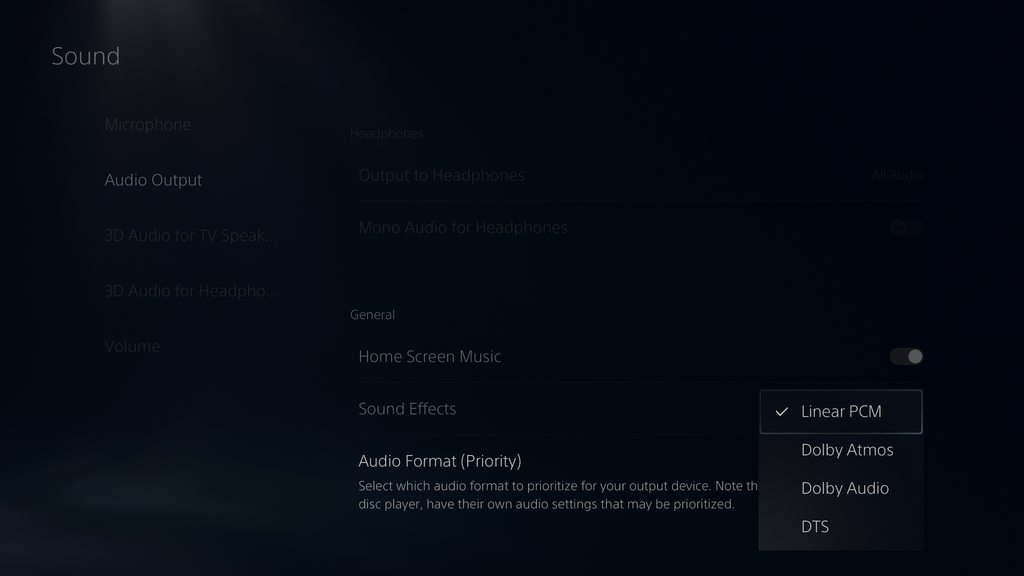
I'm still checking a few things - but if it sounds fine in the headset, and records fine from other sources, and only the PS5 is giving you trouble odds are it's a config issue. What headset are you using with it? does it support anything like Dolby encoding? As the caputre card won't - you'll want the audio set to 2ch Stereo
2ch Linear PCM on a PS5
craggy relic
Here is the video and how it’s sending audio through
 craggy relic
I’m running linear pcm
past basin
And you said you've connected other devices through the chat link to the capture card and they tested fine?
craggy relic
With just an aux cord
The guy from support said I needed a new chat link
I recieved a new one
past basin
If you run the PS5 controller to the capture card with just an aux cord, what happens?
craggy relic
And it still doesn’t work
It’s silent when the controller is connected to the capture card
And it can’t be the controller because the controller is a day new
past basin
Headset works fine in the cotnroller though?
past basin
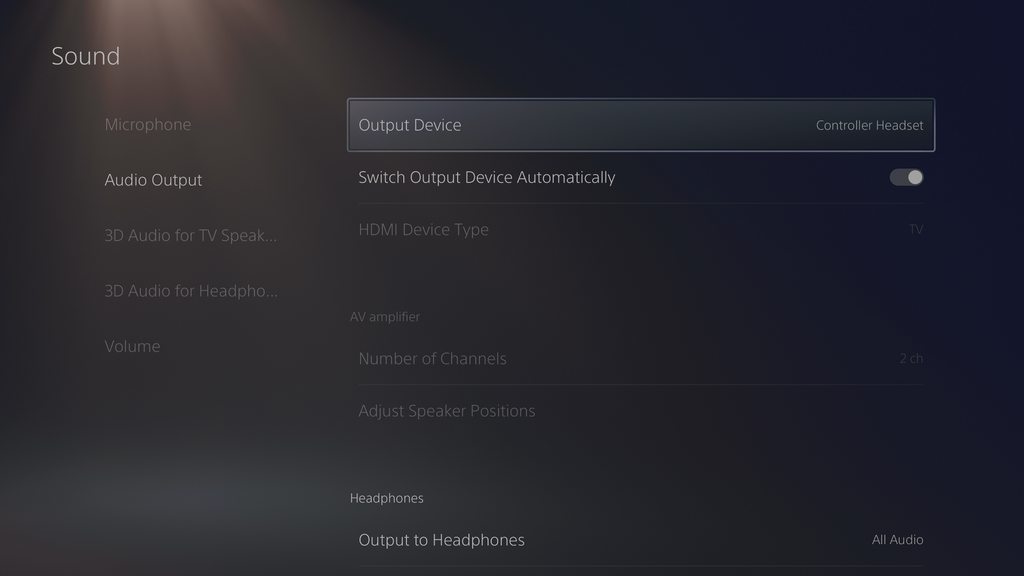
When you're connecting the Chat Link the 4 pole connetor (3 black bands) is the one going into the controller, correct?
Also what does this pagelook like when everything is connected? https://imgur.com/a/V1s8xIE
 craggy relic
Yes 3 black bands into controller
2 bands into capture
I’m now getting some audio currently
It’s sounding like it has an echo and isn’t clear at all
past basin
How loud is the PS5 controller output actually turned up?
 craggy relic
It’s fully up
past basin
That seems very unusual. If it's working for everything else but the PS5. Aux and ChatLink both don't work from the PS5 controller, but the Aux works with other devices. And the headset works through the controller. . . This is a wired only headset, right?
past basin
Okay, we can rule out a chunk of PC interference here quicky. If you switch the capture card back to HDMI instead of Analog, and unplug the headset / chat link, etc from the PS5, so it switches back to the HDMI feed, does the audio from the PS5 still come across distorted?
craggy relic
It’s doing this now
past basin
Put it back to analog and try something else into it with the aux again please
craggy relic
past basin
If you use the Chat Link like a aux cable does it work the same?
craggy relic
For the other computer?
The chat link is working from the computer to the capture
But it’s like only capturing voice
And barely any game
I’m watching an R6 game and the game sound is so low and I hear jynxzis voice fine
past basin
From computer to computer? Okay that sounds like noise cancellation. I've seen at least 3 other people hit similar issues this week. It lets voices through, and messed up everything else tyring to keep it quiet.
That said I've got to step out shortly for work - I'll check in shortly.
But you might want to look at this thread for the same computer https://www.reddit.com/r/DellXPS/comments/11kefd5/xps_15_9520_audio_noise_filtering_cutting_out/
Reddit
The chat link is basically an aux cable with a splitter so there's no filter in that at least - if there was it should get the voices too
craggy relic
Ok I think I installled the new driver
I can’t find the MAXX audio
It didn’t do anything
This is what I’m seeing

I think it could be the usb audio messing everything up
past basin
Robotic sounding? Happen to have a sample? That's usually a sample rate mismatch
If you just uninstalled maxxaudio you should make sure to reboot Windows too so the audio system resets
tame storm
tame storm
my iPad recording has the black bars due to the 1920x1080 resolution
so for reference btw:
the iPad screen is 2388x1668
the max resolution for the recording is 1920x1080
and after needing to crop the recording whats left is about 1660x930 🥴
tame storm
past basin
Robotic sounding? Happen to have a sample? That's usually a sample rate mismat...
btw, if this is an issue on apple side (like you implied) would the fix be buying a 12.9 inch iPad?
since it has a higher resolution that should be capable of doing 2560x1440 out of the box
(2732 x 2048)
past basin
Honestly I don't know the specifics of how apple scales the outputs on those - Apple does tend to scale things with certain ratios to keep the UI more readable, for example. That might be a better question for an Apple focused discord, or even their support or store. All I know is everyone seems to get tripped up by that scaling (though I only ever see folks here when they're tripped up so that might be a bias)
tame storm
well my theory is (If I cant put my own resolution for some stupid reason) that the base resolutions are 1920x1080 or 2560x1440
the iPad I have rn (11 inch) is 2388x1668 so just below 2560x1440 resulting in it needing to go all the way down to 1920x1080
the 12.9 inch iPad is 2732x2048 which is above 2560x1440 so it should scale better (to 2560x1440 instead of 1920x1080)
does that make sense?
I might take your advice and drop by an apple store ngl
their folks are smart but idk if they know about this stuff though
@past basin
past basin
Sounds good - Vic might still have some ideas when she's back too. I believe she has more experience with Apple products than I do
tame storm
yeah ideally I just want to put my own resolution ofc instead of being tied to 1920x1080
we’ll see
the fact that this issue has never rly been solved (afaik) baffles me tho
I legit spend like ~3 hours today researching on the topic and found nothing
past basin
I think some folks were hoping it was going to get fixed when apple added extended screen mode instead of mirroring, but as far as I know that just kept getting pushed off and if it was ever implemented never did fix the issue.
I guess more folks just use AirPlay and such than direct capture
Or apps like Screen Link (which was sadly discontinued earlier this year)
tame storm
yh
tame storm
warped ledge
6pm ish cst
I’m heading off for today (12 am for me) but if you have any suggestions I’d really appreciate it (read the msg above for more context)
warped ledge
tame storm
I’m heading off for today (12 am for me) but if you have any suggestions I’d rea...
Sure thing!
 hot jolt
I have 2 black bars on the side of my facecam with a camlink and using a sony zv1 camera, any ideas on making thoe go away?
warped ledge
hot jolt
I have 2 black bars on the side of my facecam with a camlink and using a sony zv...
Best to ask in #camera-prompter
tame storm
omd I actually fixed my issue
but on my laptop 😭
basically I hooked it up to my laptop, and the input source changed to 2160p instead of 1080p
so now I gotta hope to replicate is on my main pc ig 🤷♂️
warped ledge
I was working on it but screen link is the only one that seems to work for me.
tame storm
well im still having issues, its acting really weird
its not capturing anything
and for some reason the saturation is rly high?
nothing changed in settings
not as big of an issue bc I can adjust it manually ig
any1 know why it's not recording anything though?
well it works in obs ig
warped ledge
tame storm
well it works in obs ig
Ok, try unplugging everything for a min, maybe apply reset to default and then see if it fixes it.
tame storm
warped ledge
Ok, try unplugging everything for a min, maybe apply reset to default and then s...
well its rly hard to explain what I’m actually doing it ‘fix’ it (meaning it aint totally fixed but atleast the aspect ratio works)
but basically I need to plug the usb into a wrong usb port (not 3.0) then plug it back into a 3.0 port and then it shows a saturated but in a correct aspect ratio video
but everytime my pc turns off or anything it defaults back to the old (cropped) aspect ratio
warped ledge
tame storm
but everytime my pc turns off or anything it defaults back to the old (cropped) ...
Old cropped is actually correct, but you can Alt/resize to fit the aspect ratio in OBS, but 4K Capture Utility no. I don’t think Elgato has giving us that kind of tool yet, but you can voice it as a #feature-request
tame storm
nope look at this clip
tame storm
tame storm
oops here
thats the 4k capture utility
with the fixed aspect ratio
im not resizing anything here
ill record a more clear clip hold on
the long black pause is me unplugging the usb to the wrong usb port, and switching it back again
compare the two aspect ratio's (start/finish) and youll see what im talking about
 polar crypt
The 60HD S+ needs ubs 3.0 right?
past basin
Yes, the HD60 S+ needs USB 3.0 or faster
past basin
Glad you made some progress with it after!
Though that plug and unplug dance with the USB cable sounds like dark magic 🙂 Glad you at least got it working
 viscid arch
When I try to screen share my Capture Deivce (Elgato HD60X) on Discord it just inifinitly loads and never actually does anything. Anyone know a fix?

 warped ledge
viscid arch
warped ledge
viscid arch
Try a different usb 3.0 port, also do this and reboot. https://streamdecklabs.com/🧯-how-to-disable-windows-10-11s-usb-selective-suspend-setting/

Once you complete these steps, Windows will no longer power off USB devices connected to your computer, which will fix any problem are experiencing as a result of this Windows feature. Windows 10+ includes the USB selective suspend feature that lets you automatically put USB devices in a very low-power state when they’re not actively… Continue r...
sharp wing
I have a question on the Capture Utility. With the 4k Pro the resolution shown in the upper bar of the utility should state 4k,right? at "Source:"
viscid arch
warped ledge
Try a different usb 3.0 port, also do this and reboot. https://streamdecklabs.co...
I closed OBS, then screenshared and it worked lol
ty for the help tho
warped ledge
viscid arch
ty for the help tho
Glad it’s working!
 jovial snow
Hey uh… I just kinda joined here to get a recommendation on a capture card to get. I primarily want to stream retro consoles like my Wii, Wii U, GameCube and my Switch. I might also stream my Xbox Series X.
 analog willow
Anyone know why when connecting chat link to my controller the audio cuts in and out?
sharp wing
Is there some kind of HDMI switch or something that you can recommend? I'd like to have something on my desk to switch between my PS5 and my Nintendo Switch without having to plug-in and out the HDMI from my 4k Pro everytime.
 halcyon horizon
Using an OBS recording, I compared the raw audio output of my Switch to the audio from the capture card

Is this an accurate representation of the latency of the 4K60 Pro mk2? I'm not sure how else to measure latency
It's about ~8F at 60 FPS (so ~133ms)
 slender tundra
Anyone here have the 4Kx capture card?
halcyon horizon
halcyon horizon
Using an OBS recording, I compared the raw audio output of my Switch to the audi...
Small (and weird) update, just opening 4KCaptureUtility somehow improved the latency
Top pair is after opening (and closing) Utility / Bottom pair is before opening Utility
Also, selecting Game Capture 4K60 in OBS instead of the elgato output seems to have better latency

 dawn lava
I’m getting a black screen on my Elgato HD 60 S, I just got a brand new cord for it from Elgato. Any suggestions? I do realize I do not have a 3.0 port on my laptop.
HDMI cords are brand new as well
 night void
Trying to find a fix for my hd60x not grabbing my mic audio (Input)
gets audio from the game just fine
Was able to set it up very easily on a MacBook but now that I’m on a pc I fail to get it to work
to hear my own audio
Watched a ton of videos yesterday and failed to find a solution
warped ledge
jovial snow
Hey uh… I just kinda joined here to get a recommendation on a capture card to ge...
What kind of pc do you have?
warped ledge
analog willow
Anyone know why when connecting chat link to my controller the audio cuts in and...
It shouldn’t, but I have a video on setup in #community-resources
warped ledge
sharp wing
Is there some kind of HDMI switch or something that you can recommend? I'd like ...
I’m researching this for myself as well. Won’t be able to test out a few things until 2 weeks.
past basin
dawn lava
I’m getting a black screen on my Elgato HD 60 S, I just got a brand new cord for...
How are you planning to connect the HD60 S if you don't have a USB 3.0 port? That's part of the requirements for it. Are you 100% the laptop doesn't have USB 3.0? That's pretty common these days - but they're not always blue like the originals
warped ledge
halcyon horizon
It's about ~8F at 60 FPS (so ~133ms)
What are your pc specs? @past basin wanna grab this one?
warped ledge
past basin
How are you planning to connect the HD60 S if you don't have a USB 3.0 port? Th...
Very true. Maybe the usb tree can help.
dawn lava
past basin
How are you planning to connect the HD60 S if you don't have a USB 3.0 port? Th...
Didn’t know that they weren’t always blue, so now I have no idea. I do know that it’s an Asus something or other laptop.
And I know that I got specifically for gaming
warped ledge
night void
Watched a ton of videos yesterday and failed to find a solution
I do have a video in #community-resources that can help, but make sure you monitor and output the audio source in the audio mixer’s advanced audio properties
past basin
dawn lava
And I know that I got specifically for gaming
If it's a recent ASUS that you got for gaming it definitely should have a USB 3.0 port. There's usually a sticker with a model tag on the bottom that can be used to find the manual. That'll tell you which port is what
What app are you using it with? 4K Capture Utility, OBS Studio or something else?
halcyon horizon
warped ledge
What are your pc specs? <@269997944671830017> wanna grab this one?
Ryzen 3700x and 1070
past basin
halcyon horizon
Small (and weird) update, just opening 4KCaptureUtility somehow improved the lat...
That's very unusual. Using the card directly as a Video Capture Device should be getting you better latency than running it through 4K Capture Utility. You weren't trying to pass it through Screen Link or something were you?
But generally that card tests at around 60-70 ms at 1080p resolution in OBS
halcyon horizon
I didn’t even run it through 4K Utility
I merely opened and closed it and the latency improved
As a video capture device? I can’t recall if that’s my setup… Maybe I didn’t have it configured correctly?
I’ll test more later and report back
past basin
Ah, I may have misunderstood your setup.
It is worth noting that by default the capture card passes the video through a HDR tonemapper - if your source is in HDR this oculd affect latency. This turns off when 4KCU is open as the app does it's own tonemapping. OBS will also do it's own tonemapping. So that could explain the increase (though I wouldn't expect it to go quite that high)
Turning off HDR on the source would be the quickest test for that. If you need HDR and stream / record to a platform that supports it, there's a few settings to change to get it working with OBS
night void
warped ledge
I do have a video in <#837073573981323314> that can help, but make sure you moni...
Yeah they are but doesn’t bother to show
I ended up plugging in a secondary mic
But now dealing with audio de sync
night void
I mean it shows game audio and everything but doesn’t show my voice at all
past basin
sharp wing
Is there some kind of HDMI switch or something that you can recommend? I'd like ...
Officially Elgato doesn't recommend HDMI switches if you can avoid it, because some of them cause issues with things like EDID sync. Personally I use a Kinivo branded one with my HD60X with no trouble - but mileage can vary depending on your setup. Make sure you get one rated for HDMI 2.1 like your 4KPro to reduce the risk of compatibility issues (these may be listed as 8K60 or 48Gbps instead of HDMI 2.1). Because some of them CAN still cause issues, also check the return policy before buying.
 rain gazelle
Need help. Trying to use my Samsung S22 ultra with HD60 X capture card to stream on OBS studio. Currently have type c to HDMI cable to connect my phone to the capture card. Cant get anything to show up in OBS. Any workaround or specific way to get it to work?
past basin
Most Samsung Android devices have their HDCP (copy protection) always enabled. This blocks their video output from being captured. Short of finding a way to bypass the HDCP (legality on that differs depending on country), you're unlikely to get it working with a capture card.
rain gazelle
Darn it. Thanks for answering my question. I'll have to figure something out.
warped ledge
night void
I mean it shows game audio and everything but doesn’t show my voice at all
are you using a separate mic for your audience?
night void
past basin
Turning off HDR on the source would be the quickest test for that. If you need ...
I was forced to
On my mac I didn’t need to
would only need 1 mic for in-game and stream mic audio
past basin
That HDR comment was aimed at Gelatin, sorry.
But if you're on mac you should have the HDR tonemapper left on, on the card, or HDR turned off at the source - macOS's UVC driver doesn't support 10-bit capture needed for HDR.
(though the OS itself does if you can get pre-recorded video on there or are doing screen capture from content on the mac itself)
past basin
night void
would only need 1 mic for in-game and stream mic audio
What sort of mic setup are you using that works for both the capture and console on the mac? Most headsets don't allow the simultaneous connections needed for that (though a handful of higher end ones do).
night void
I used just a usb mic connected to my ps5
And had the headset connected through my controller
With chat link
past basin
How were you getting audio to the mac? Chat Link isn't wired to split the mic, only the audio out from the console.
Typically most folks in that setup plug the USB mic into the computer they're using for streaming and use a headset through Chat Link for the console (since it DOES pass the mic to the console, just not the computer side of the cable)
(if it was a mac laptop, you might have also been using the built in mic, that I believe will get added to OBS Studio by default)
night void
past basin
How were you getting audio to the mac? Chat Link isn't wired to split the mic, ...
I believe from the hdmi from the ps5
I def didn’t use a built in mac audio lol
Was my blue yeti connected straight to my ps5 usb ports
past basin
night void
I believe from the hdmi from the ps5
That shouldn't carry mic audio back, which is what's tripping me up here. The PS5 doesn't play back your own voice so it doesn't go over the HDMI. Likewise Chat Link doesn't split the headset mic. Did you run a cable from the Yeti's monitoring jack to split the audio that way?
night void
Nope
past basin
And you're sure it wasn't a built in mic on the mac or anything picking up? Does the headset run in dual connection mode with Bluetooth that might have been going to the mac?
night void
past basin
And you're sure it wasn't a built in mic on the mac or anything picking up? Doe...
No
Lol
Not sure why you can’t believe it lmfao
past basin
I just can't figure out how the PS5 would send the audio to the mac is all. Since you're running into the issue where it's not doing it for the PC, it would be good to figure out HOW it was working for the mac.
past basin
Actually. . . if the chat link were plugged in backwards it might do it.
The console end has a 4 contact TRRS plug that's commonly used on headsets
The mac's port would proabbly take that just fine. PC's might not
May need a headset splitter to use that end with the PC
(the end that normally goes to the computer/capture card only has three contacts, and doesn't carry the mic - but since you had the Yeti going to the PS5, you could flip it around and get headset on the computer).
Though that would also be if you plugged Chat Link right into the mac
static token
hello, I know this is not the right chat for this product but the logitech server is not answering was wondering if i can get help here
past basin
That's going to depend very much on what you need the help with
Doesn't hurt to ask, worst we're liable to do is point you back at Logitech.
static token
just need some help setting up my mixamp
i think i got it working now but im not 100% sure. Problem i was able to hear myself through the headset
and stream was alos able to hear me through my microphone but I dont want that as im using th elgato wave 3
past basin
What's it connected to? A console and the PC or just the PC?
Also is the headset connected to the jack on the front of the mixamp? (generally you don't run the headset to either of the back ones)
static token
yes setup is, aux cord from mixamp to back of pc (with ground loop isolator) to hear alerts and music ( still cant hear alerts ) then aux cord from (STREAM) port then into capture card. Then headset into front port. Also i had to use the optical adapter astro sells.
past basin
Okay, in that case you probably just need to plug the unit into the PC for a bit and configure the stream port to exclude mic using their command center app
static token
i did that
past basin
The aux cable you're using for the PC connection - is it a TRRS cable? 4 metal contacts, 3 black bands on the plug?
past basin
TRRS is the 4 pole one. Stands for Tip, Ring, Ring, shield. Standard stereo plugs are only TRS. The 4th contact is for mic
Hearing yourself through the headset, if it connected to the PC, may indicate that mic monitoring is on. You could also have an issue where the PC is only wired for a TRS jack and you need a headset splitter.
Which could bridge your mic with the ground
warped ledge
then an isolator is needed
static token
okay im following that , is there a way to turn the mic monitoring off ? im not sure if my PC is only wired for TRS. It is plugged into the "Line out" port. But the mixamp is mainly for console not PC
past basin
Oh right isolator. Is the isolator you're using on the PC conenction TRS or TRRS? If you're got a TRS isolator on the PC connection for the TRRS cable that could cause issues
past basin
static token
okay im following that , is there a way to turn the mic monitoring off ? im not ...
Depends on the app you're using. In OBS it'd be in advanced audio properties
static token
the isolator is TRS only two black rings
that could cause me being able to hear myself ?
past basin
It could be bridging the TRRS cable, yeah.
I'd try it without that to see
Otherwise it would just keep the headset mic from working with the PC (since it would drop the TRRS with the 4th connector for the mic)
static token
trying it out now without the isolator and aux cord from PC
stream can still hear my voice. Thats the only issue i have and i do not want that cuz im using an external mic
past basin
Okay, unplug the aux cable from the PC entirely for a moment. We need to see if your voice is getting there from the line going to the capture card or that aux connection
static token
it was already unplugged with the cord and isolator both unplugged and it still occurs
unplugged from both mixamp and PC
past basin
Okay, if you're still getting the audio for the headset mic from the stream port, then when you tried to reconfigure it with the app it sounds like it didn't take. I'd put the USB back on the PC again and check those settings
 past basin
Is this connected to a console, or just the one device going to the single PC here?
And if there's a console, is it an Xbox?
static token
this is USB connected to PC, Once i unplug it I will be plugging it into a PS5
past basin
I wonder if that setting doesn't save when you move it back to the PS5. I would expect it to, but don't have one of those on hand myself to test
static token
i also have "SIDE TONE" turned down on the astro software and that fixed the issue of me being able to hear myself
past basin
Ah. I didn't realize that was even an option on the Astro. Good to know
So, normally the PS5 won't play your own voice back at you, and now side tone is off. The AUX port is disconnected. So only the stream port could be carrying your mic back to the PC. Actually, if you disconnect that too, can you still hear your voice? Maybe we're just getting a different mic somewhere - maybe a webcam one?
static token
how shuld i test that ?
halcyon horizon
past basin
Turning off HDR on the source would be the quickest test for that. If you need ...
Well, if it's worth anything, separate tweaks to my VoiceMeeter setup combined with a restart of my computer significantly reduced the latency
Going to try running more tests but the delay may have been a temporary false alarm
past basin
static token
how shuld i test that ?
Disconnect both the stream and the aux cords from the PC and capture card, see if you still hear yourself.
(and the USB)
Basically just take the whole mixamp out of the equation. And make sure that the extra copy of your voice we're tracking down was actually coming from that
I've got to step out a few minutes but will be back shortly
static token
side tone is off so i dont hear myself at all
with or without the aux cords connected
past basin
Does the stream/recording output still hear the extra copy?
static token
past basin
I've got to step out a few minutes but will be back shortly
okay, thank you for your help so far hopefully i could figure this out. If you can still help later can you ping me ? I will be stepping out too
static token
past basin
Does the stream/recording output still hear the extra copy?
no becaause the "stream" aux is disconnected
past basin
static token
no becaause the "stream" aux is disconnected
That's good at least - means we were getting mic from the MixAmp even though you had it turned off. I'd check with logitech to make sure that setting saves on the Mixamp even when it's not connected to the PC
You can ping me - worst case I'm not around or busy. But one of the other volunteers may be able to help too
static token
logitech doesnt have a "support" so they havent been helping me at all at least in discord
warped ledge
static token
logitech doesnt have a "support" so they havent been helping me at all at least ...
I wonder if they have a Discord server
static token
they do im in it but no one is answring and they said that they wouldnt help much cuz they dont have "Support"
warped ledge
static token
they do im in it but no one is answring and they said that they wouldnt help muc...
seems sus, what about a contact support page on the website?
static token
yea im browsing through some atricles right now but still having no luck
jovial snow
warped ledge
What kind of pc do you have?
Can you answer what specifics you need? Also does it make a difference if I say I want an external one. I have to go and find the paper that has my specs. But I have a 3070 card, if that matters
warped ledge
jovial snow
Can you answer what specifics you need? Also does it make a difference if I say ...
well, if your preferance is external let's narrow it down a bit. are you only doing 1080p content or wanting to record in 4K or passthrough 4k144?
jovial snow
warped ledge
well, if your preferance is external let's narrow it down a bit. are you only do...
As long as my game doesn’t look pixelated or crap I’m fine. So 1080p is fine so long as it can record Wii U, Wiii, Switch, Xbox Series X and GameCube just fine
static token
trying everything i am not sure what is going on with this. Im wondering now if this is even something that can be changed @past basin
static token
Okay i think it might have something to do with my aux cords. What if I need a TRS cord and not a TRRS cord. You said the TRRS cords pic up mics right. Why wont a TRS cord work?
past basin
TRS cord just drops the mic because it only has 3 contants (and wires). Left, right and ground. TRRS has left, right, ground and mic
Stream jack should actually have standard TRS. Aux jack would need TRRS if you wanted to be able to use the headst's mic with the PC
Most devices switching to TRS just loses the mic feed, with no other issues. Some though it can cause unexpected behaviour (mostly on older gear before TRRS was common)
static token
well heres why i say that, im using a TRRS cable from the " stream " port and the other end is plugged into the capture card. what if this is picking up my headset mic and displaying it with the audio of the game. if i switch to a regular TRS aux cord wont this drop the mic input ?
And im not using the microphone on my headset for the desktop so that doesnt really matter to me . Just using it for the sound so i could hear alerts and music etc.
past basin
I couldn't say for certain. In theory it might - but it depends on if the mic is being mixed into the regular audio by the mixamp. You could test that by plugging different headphones or speakers into the stream jack to listen - if the mic is mixed in then the MixAmp is mixing it into the regular audio.
static token
past basin
I couldn't say for certain. In theory it might - but it depends on if the mic i...
still there /
past basin
If it's still there with the headphones in the stream port then the mixamp is mixing it in. Unfortunately other than turning it off with the app I'm not sure how else to get it to stop doing that, since I don't have one. Maybe turn the mic feed back on and off again. I'd check with Logitech support on that or maybe the astrogamin subreddit.
static token
well i havent tried it with headphones yet
past basin
the headphones won't pick up the mic so that means it's part of the regular stereo mix at that point. Maybe it could just need a firware update to fix the setting or something
static token
i. was asking if you were there
i tried a regular aux cord that wasnt a three pole and it still had the same thing so it wasnt the aux cord
astrogaming doesnt have a discord ?
where else do you think i could get help ?
past basin
Sorry, been back and forth for a while - it's late here, so have been finishing up chores for the night.
Do you mean a regular aux core that wasn't four pole? Reglar ones are three pole, headset ones are 4.
I was also suggesting the astro gaming subreddit. I have no idea if they have a discord or not, but they have a reddit.
static token
im on their reddit now
and i tried the one with two black lines and with three black lines. with either cord. Stream still hears me
static token
past basin
Sorry, been back and forth for a while - it's late here, so have been finishing ...
totally get the lateness i apologize for any disturbance. I hope i figure this out so i dont keep bothering you
thank you for your help you have been teaching me a lot
past basin
All good, sorry there's not much else I can do to help you figure out that mixamp. But at least it sounds like the rest of the streaming setup is wokring
craggy relic
Hello I got a question I can't hear the sound from my Elgato through OBS could maybe someone tell me how to correctly set it up?
past basin
In advanced audio settings, set your capture card to "monitor and output". By default OBS adds things with monitor off, in case you already hear it (monitor is for you to hear, output is recordings and stream)
craggy relic
I did that and there isn't anything happening

This is how I set it up right now
and still no sound sadly
past basin
Do you hear sound of you try an different app? What's connected to the capture card?
craggy relic
It's a Nintendo Switch
I hear a sound if I use the sound from the Video directly
but it is delayed then
past basin
Ah, that's a good sign at least as it rules out a number of issues
craggy relic
I managed to fix it
It was probably the Monitoring Settings
at least that's the only new thing I tried
past basin
Could be. Sometimes with OBS you need to restart for some audio settings to kick in too
Glad you got it sorted in any case.
 wise thorn
Have HD60S+. When I start 4K Capture Utility, LEDs on it go red and it says "USB communication problem". It's used with HP ZBook 17 G5 which has USB3.0 or higher on all ports. I've tried all ports with the supplied USB-C to USB-A cable. OBS Studio sees it, but framerate is terrible in 1080p. What can I try?
slender tundra
Hello everyone, does anyone know where the logs for 4Kx are located?
warped ledge
wise thorn
Have HD60S+. When I start 4K Capture Utility, LEDs on it go red and it says "USB...
I have a video in #community-resources for the recent cards, but it applies the same minus the audio setup for this card.
warped ledge
slender tundra
Hello everyone, does anyone know where the logs for 4Kx are located?
What kind of logs?
slender tundra
warped ledge
What kind of logs?
activity of the 4Kx itself or interaction with capture software
warped ledge
slender tundra
activity of the 4Kx itself or interaction with capture software
Hm… maybe #official-tech-support can help with that. We don’t work on the logs.
slender tundra
ha their support (no disrespect is awful). I will try them again thanks
wise thorn
warped ledge
I have a video in <#837073573981323314> for the recent cards, but it applies the...
Thx but this doesn't help me, since you don't get the same error message as me. The error message is blocking. I can't use the program, and it's not showing the capture. How do I get rid of the error message?
warped ledge
wise thorn
Thx but this doesn't help me, since you don't get the same error message as me. ...
What is the error message?
The usb communication error?
Are you on a laptop is desktop?
warped ledge
slender tundra
ha their support (no disrespect is awful). I will try them again thanks
I’d say email vs call if you felt disrespected. I’ve never had that issue with support.
wise thorn
warped ledge
Are you on a laptop is desktop?
Laptop, see original message.
the laptop ports are USB 3.0 and the cable is the original cable.
warped ledge
wise thorn
the laptop ports are USB 3.0 and the cable is the original cable.
Are you connected to a power source?
warped ledge
wise thorn
Laptop, see original message.
Honestly scrolling takes a bit because of other messages. I’ll usually just ask, most people are ok with just answering for help. We are members like you, so please just be understanding. Thanks
warped ledge
wise thorn
the laptop ports are USB 3.0 and the cable is the original cable.
@past basin do you have the info on the usb tree?
 shell hollow
My elgato HD60X keeps freezing in OBS and TikTok live studio
But only on the nintendo switch

Trying to close OBS / Tiktok live studio causes the program to stop responding
warped ledge
shell hollow
Trying to close OBS / Tiktok live studio causes the program to stop responding
what platform are you streaming too currently?
or both?
shell hollow
I’ll try that next time I’m live
Although the issues being occurring even with live studio closed
Before I installed it
wise thorn
warped ledge
<@269997944671830017> do you have the info on the usb tree?
If this was for me, I've disconnected everything except power, and tried all 3 USB 3.0 ports. Do you mean the USB devices tree in device manager?
warped ledge
wise thorn
If this was for me, I've disconnected everything except power, and tried all 3 U...
i think it's a program so we can see if the card is there. not devuce manager, but that would be a good place to start.
wise thorn
warped ledge
i think it's a program so we can see if the card is there. not devuce manager, b...
In device manager, the HD60S+ is registered as a camera, and properties for the driver says it's working correctly. Which is the USB tree program?
warped ledge
wise thorn
In device manager, the HD60S+ is registered as a camera, and properties for the ...
That's something I think @past basin know where it is. As for the Device Manager, uninstall it, and drivers, if ther eis an option, then remove it. Reboot, and then plug in. Keep me posted.
past basin
https://www.uwe-sieber.de/usbtreeview_e.html is the tree viewer app. Sorry haven't been at the PC
When you run it, select your card and look for the summary section on the right side (looks like this)https://imgur.com/a/h6KhVON
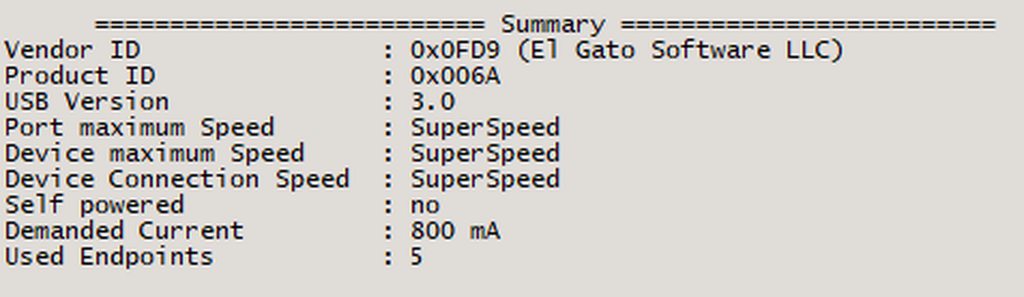
Device maxmimum speed will always be SuperSpeed on a HD60s+. Port speed if it supports USB 3.0 will be either SuperSpeed or will indicate a companion port supports SuperSpeed (Companion port is the same physical port running in a different mode - all USB 3.0 ports have a 2.0 companion for when a 2.0 device is plugged in). If both of those are SuperSpeed or support it, and the connection is still only Hi Speed or Full Speed, then you have an issue with the cable. Check ports and cable ends for damage or dirt (if they need to be cleaned use something soft and non-conductive like a rubber coated dental pick). Make sure there are no hubs or adapters in use that could be slowing it down and make sure the cable is rated for at least 5 Gbps (USB 3.0) - a lot of available cables these days are chargng cables that are high wattage, but only 2.0 speed. If the port itself isn't showing up as superspeed or having a companion and it should, check with the support team for your computer - could be something like a driver issue.
warped ledge
past basin
https://www.uwe-sieber.de/usbtreeview_e.html is the tree viewer app. Sorry have...
thanks!
wise thorn
past basin
When you run it, select your card and look for the summary section on the right ...
Thank you. This is the response.
========================== Summary =========================
Vendor ID : 0x0FD9 (El Gato Software LLC)
Product ID : 0x006B
USB Version : 2.1
Port maximum Speed : High-Speed (Companion Port 1-17 is doing the SuperSpeed)
Device maximum Speed : High-Speed
Device Connection Speed : High-Speed
Self powered : no
Demanded Current : 400 mA
Used Endpoints : 4
How do I know which physical port is port 17? Nothing else is connected to the ZBook via USB. The report of "2.1" doesn't match model specifications. They say I have 3x USB 3.0 and 2x Thunderbolt 3 USB-C ports.
past basin
You're in a USB 3.x port - the Companion port is the same physical port, just running in a different USB mode
Most likely issue here is cable - is this the original cable that came with the device?
wise thorn
past basin
Most likely issue here is cable - is this the original cable that came with the ...
According to the seller, yes. It says Superspeed on it. USB-C in the ElGato end and USB-A in the other end, blue inside.
past basin
Any chance you've got a spare on hand you could test with?
I've got to go grab one of my old hubs for a moment though - I didn't realize the device itself should show as Hi Speed - I thought that was fixed.
YEah, even in a USB 2.0 Hub the device should be showing SuperSpeed like this:

If you open 4K Capture Utility and go to settings, what firmware is on that device (it'll show in the device tab)
wise thorn
past basin
Any chance you've got a spare on hand you could test with?
Unfortunately I don't have another 3.0 cable handy. I have USB-C to USB-C cables for my mobile phones, but they give the same communication error message in 4K Capture Utility. I guess they are 2.0+charging.
Hopefully some shop has a proper cable tomorrow. I will ask specifically for compliance and bandwidth?
past basin
You want one that's at least 5Gbps
But I'm still not sure why your card shows Device Maximum Speed as High Speed. Even on a USB 2.0 cable it should show that is SuperSpeed
So I'd still check the firmware version on it
wise thorn
past basin
So I'd still check the firmware version on it
MCU: 19.10.19 FPGA: 66. The behavior is that when I plug it in, it forwards the HDMI perfectly to the other screen, when I open 4K CU it says wait a moment, then "USB communication issue detected", and if I then open OBS I get picture, but at 10 FPS or less @ 1080p.
past basin
Okay, that card is a bit behind on firmware updates
If you hold down CTRL while you open settings it should give you an option to update the firmware. (this is normally hidden because a bad or interrupted update can brick the card). But in your case the card is already not working as expected - if the cable tomorrow doesn't fix things, I would try updating the firmware
22.02.24 seems to be current for HD60S+

As for the passthrough (forwarding ot the other screen), that generally works as long as the card has power, even if the data link to the PC is down
wise thorn
Gotcha. Thanks again. Will try a new cable first. 
past basin
Good luck!
warped ledge
past basin
https://www.uwe-sieber.de/usbtreeview_e.html is the tree viewer app. Sorry have...
saved the link.
past basin
Heh, honestly I usually just google it myself. I should probably save it somewhere too
 soft trout
does anyone here use their ps5 thru their pc? as in, with a capture card? i can see my ps5 on my monitor and its hooked up, but i have no game audio. i know chatlink is for mic audio, but idc about thtat or streaming rn. i just want to be able to hear my pc and hear my ps5 games. my headset is connected to my pc.
warped ledge
soft trout
does anyone here use their ps5 thru their pc? as in, with a capture card? i can ...
please check out #community-resources I have a video for this. 🙂
 spiral basin
So i am having issues with my capture card and my playstation 5 console. Everytime i connect my capture card and set up everything for stream, Ill go to COD and itll turn off my tv, turn it back on, turn off and turn on to the game.. then when i go to the game; the game will be all messed up like in these ss.. I have the HD60X.. I recently got it like a month ago.. All my equipment are still new. The capture card works fine with other games, just not COD. Why is that?


 past basin
spiral basin
So i am having issues with my capture card and my playstation 5 console. Everyti...
past basin
spiral basin
So i am having issues with my capture card and my playstation 5 console. Everyti...
At first glance this looks like your setup is having issues with VRR. Turn off Variable Refresh Rate on the Xbox (settings > TV & Display Options > Video Modes) and see if that clears things up
past basin
Oh, same issue likely, just different location for the setting.
Let me see where is on the PS5
Under Screen and Video Settings on the PS5, under the Video Output section
spiral basin
past basin
Under Screen and Video Settings on the PS5, under the Video Output section
thank you ill try that!
spiral basin
past basin
At first glance this looks like your setup is having issues with VRR. Turn off ...
mine is already off so im not entirely sure
 past basin
spiral basin
mine is already off so im not entirely sure
past basin
spiral basin
mine is already off so im not entirely sure
Hm. I might try turning off 120Hz mode too - the split screen thing is usuall a timing issue that often tracks back to one of those two.
Beyond that you might try changing the card's EDID Input Mode to Display, or Internal to see if that changes anything (in settings, under device tab in 4K Capture Utility for Windows, in Capture Device Utility for macOS)
(though I have rarely seen that caused by a bad HDMI cable too - if that's the case it would show up running straight from the console to monitor though, if you wanted to test them)
 supple mural
i have a problem with the 4k utility software
it is showing a message which says "Another software is using the device"
and it doesn't show the screen of the playstation
it show me this
 past basin
This can happen because Windows sees capture cards as cameras - something might have defaulted to your capture card for it's main camera. Since only one app can use it at a time, thi s causes issues.
If it's Windows 11, press the Start button and type Camera Privacy. Check that deskop app access is on and then check the recent activity section to see what's actually using cameras

 supple mural
what i should do with the activity section??
it doesn't work
do you mind getting into a call so you explain me what should i do??
past basin
I sadly and checking in between work projects, so not available for a call at the moment
The arrow on the right side of the activity section should expand it
And you can find out what apps are likely using your camera/capture card.
If that doesn't clear anything up, try the card with another app like OBS Studio to see what happens there
 carmine sky
14.4.1 - 4K X still shows as 5Gbit USB connection on Mx Macs
 soft narwhal
I have the weirdest problem with my capture card... So when I start to play games with higher graphic theres a problem after around 5 minutes. My capture card starts to flicker and then says "no signal". This is so weird. This only started happening around March. Before that, i could play the same games with the same graphic and no problem. My Capture Card was fine..
I upgraded and downgraded my GPU Drivers, my Elgato 4K Capture Utility, my OBS with Plugins. I even checked my cables... This is so weird. I dont know what to check for now... :/ Anyone with the same issue or has anyone a solution?
warped ledge
soft narwhal
I have the weirdest problem with my capture card... So when I start to play game...
please fill this out
 smoky mantleBOT
Looking for help? Please copy, paste, and fill out this template in order for our community to better help you:
**Device**:
**Software & Version**:
**Windows/Mac Version**:
**Console/Dual PC**: "this line is only for troubles with capture, camera, and lighting"
**Question/Issue**:```
- Note: This is a community tech help channel and **Official Elgato Support does not monitor this channel**. Posting your questions here does not guarantee that you'll receive help. We recommend filing a support ticket at <http://e.lga.to/help>.
- To contact Elgato Support via phone visit <http://help.elgato.com/hc/articles/360028242811-How-do-I-contact-Elgato-support-via-phone>.
- You can browse through our help articles here:
<https://help.elgato.com/>
Please remember that our members who are helping you troubleshoot are taking time out of their day to help and they are not staff. **Any disrespect to them will end up in a warning/ban.** Created by calucifer#0 (218276721516871693)
soft narwhal
soft narwhal
I have the weirdest problem with my capture card... So when I start to play game...
Created by calucifer#0 (218276721516871693)
soft narwhal
soft narwhal
I have the weirdest problem with my capture card... So when I start to play game...
Device: Capture Card HD60 X
Software & Version: Elgato 4K Capture Utility 1.7.9
Windows/Mac Version: Windows 10
Console/Dual PC: Dual PC
Question/Issue: marked message above
warped ledge
soft narwhal
I have the weirdest problem with my capture card... So when I start to play game...
Change the EDID to Display see if that helps.
soft narwhal
warped ledge
Change the EDID to Display see if that helps.
Still happening... Just took longer now to start appearing :/
warped ledge
soft narwhal
Still happening... Just took longer now to start appearing :/
Try internal next
soft narwhal
warped ledge
Try internal next
sadly still happening.. :/
warped ledge
soft narwhal
sadly still happening.. :/
Try a different usb 3.0 port
 frosty breach
Will my HD60X be able to work with OBS's Game Capture input on Linux as if I was on a Windows machine?
I can see display just fine. Just trying to figure out sound.
past basin
It will work with OBS as a Video Capture Device. https://www.youtube.com/watch?v=27fYbUln-Vg

In this video we show you how to set up your Game Capture HD60 X with OBS Studio on Windows and macOS.
▼ Click "Show More" for details and features.
▼ HD60 X Highlights:
► 4K60 HDR10, 1440p120, 1080p120, 1080p240, VRR passthrough.
► High resolution 4K30 or 1080p60 HDR10 capture.
► No watermarks, no time limits, no subscriptions.
► Play in HD...
If you're trying to hear the sound, check that you've set the advanced audio settings for it to Monitor and Output.
OBS adds new devices with audio monitoring off (meaning they only go to recordings and stream, in case you already hear them)
frosty breach
made a typo, fixed
soft narwhal
warped ledge
Try a different usb 3.0 port
Tried that too, not helping. Weirdly when I open GeForce Experience the same problem happens. So i deleted, still happenend. Idk but maybe this fact helps in anyway
warped ledge
soft narwhal
Tried that too, not helping. Weirdly when I open GeForce Experience the same pro...
There is one more thing, reboot after this. https://streamdecklabs.com/🧯-how-to-disable-windows-10-11s-usb-selective-suspend-setting/
Once you complete these steps, Windows will no longer power off USB devices connected to your computer, which will fix any problem are experiencing as a result of this Windows feature. Windows 10+ includes the USB selective suspend feature that lets you automatically put USB devices in a very low-power state when they’re not actively… Continue r...
past basin
frosty breach
made a typo, fixed
I see the correction - generally it will work with any device that suppports UVC (USB Video Class). This includes most linux distros, and I've used my own with Ubuntu. This is not an officially supported way of running the card though, so Elgato can't help you set it up or troubleshoot, you would be relying entirely on community help if you run into trouble. You also won't have access to the 4K Capture Utility on Windows or the Capture Device Utility on macOS if you need to change EDID modes, or audio modes (though those settings stay set on the card if you can get access to a Mac or Windows device to change them).
soft narwhal
warped ledge
There is one more thing, reboot after this. https://streamdecklabs.com/%F0%9F%A7...
yea sadly no... 😦
warped ledge
soft narwhal
yea sadly no... 😦
are you using the original cables from elgato?
warped ledge
soft narwhal
yea sadly no... 😦
@past basin think it's ideal for him to run the usb tree tool to see the power?
soft narwhal
warped ledge
are you using the original cables from elgato?
yes
warped ledge
soft narwhal
yes
run this tool, and post the speed please. https://www.uwe-sieber.de/usbtreeview_e.html
past basin
I'd post the whole summary actully - you can screen shot it with Windows Key + Shift + S and select the area
warped ledge
past basin
I'd post the whole summary actully - you can screen shot it with Windows Key + S...
thanks buddy!
frosty breach
past basin
I see the correction - generally it will work with any device that suppports UVC...
That's good to know. My PC came with Windows 10 but I used a bootable usb to add Ubuntu to my PC. I use a boot manager (Grub) to boot between Ubuntu and Windows 10.
past basin
Should wind up looking something like this for a HD60X
 warped ledge
frosty breach
That's good to know. My PC came with Windows 10 but I used a bootable usb to add...
warped ledge
frosty breach
That's good to know. My PC came with Windows 10 but I used a bootable usb to add...
joking aside know a life hack to do this for Mac OS?
👀
frosty breach
warped ledge
joking aside know a life hack to do this for Mac OS?
I don't have a Mac. Never plan to get one
I'm guessing Apple makes it harder
warped ledge
frosty breach
I don't have a Mac. Never plan to get one
spoken like a true PC enthusiast

frosty breach
Do you have a Mac?
warped ledge
just having fun tonight, don't mind me.
warped ledge
frosty breach
Do you have a Mac?
I had one. lol
frosty breach
I see
warped ledge
I really was just playing around.
past basin
Joking aside I'm debating trying to track down at least a used one for support questions. Audio routing on a mac sounds completely foreign to me.
warped ledge
past basin
Joking aside I'm debating trying to track down at least a used one for support q...
it's actually very simple, but that means I need to bug my roomie to use hers. she's cool with it, but not thrileed I'd be on it.
past basin
Fair. My biggest concern when looking at them is the RAM though.
warped ledge
it's not like Windows routing, but more so app routing, and not all apps are gonna work right
100% anything 32gb or more is ideal 8gb of ram is a joke
frosty breach
Can you even add more storage on a Mac?
past basin
Testing already revealed the whole compressed unified memory efficiency thing apple tried to pull was crap. And most models start with unified RAM that only matches my GPU in th elaptop (8GB)
warped ledge
externally
frosty breach
makes sense
but my concern with Apple is that they like using as little ports as they can
like with the iPhone
warped ledge
if I could diy build a Mac, and run it like I do Windows, I'd be paying for the software uses only.
past basin
The industry laughed at them whtn the M3 Macbook Pro's launced with 8GB. Who gets a Pro laptop with 8GB?
Though that's still enough to run a capture card
warped ledge
I'm not about to build a 'Hackingtosh" given it was only on Intel's chipset.
frosty breach
then Apple laughed back when people actually bought it
warped ledge
past basin
The industry laughed at them whtn the M3 Macbook Pro's launced with 8GB. Who ge...
only if you're running that 1 app
past basin
I think they stopped making the 8GB pro because they sold so poorly after though. 8GB is still on the other models and I think still available in stock though
warped ledge
past basin
I think they stopped making the 8GB pro because they sold so poorly after though...
yeah, i made sure my roomies was built to last for what she uses it for
omg ms office on Mac OS is pricey
just a 32gb m2 mackbook air cost nearly 2k. i spent that in my beast build
this is why I don't like buying apple computers...
as for iPad Pro, and iPhone... yeah... every few years
past basin
warped ledge
just a 32gb m2 mackbook air cost nearly 2k. i spent that in my beast build
The Canadian pricing for it is terrifying
frosty breach
inflation?
warped ledge
frosty breach
inflation?
taxes
frosty breach
oh lol
past basin
Exchange rate, tax and customs fees
warped ledge
100%
once apple started soldering in ram chips it was the end of DIY with them pretty much
those all in ones, I was sad my screen died
then after 1 year of use mac mini died.
unless I can DIY it, nope...
but I do wanna make mac content...
so I'll bug my roomie when I'm ready
frosty breach
past basin
Exchange rate, tax and customs fees
Canada isn't living up to the stereotype
past basin
Which one?
frosty breach
past basin
Which one?
whatever Reddit says
Also, this was my working setup for OBS in Windows. I'm gonna try to replicate it on Ubuntu.
 frosty breach
It appears to work. Although I forgot why I needed the video capture device audio on Windows. I think it was to prevent any audio delays.
I think this should surely be fine, but I'm not sure if they'll be any audio delays.
 past basin
frosty breach
It appears to work. Although I forgot why I needed the video capture device audi...
past basin
frosty breach
It appears to work. Although I forgot why I needed the video capture device audi...
If there are you can add them back. But yes, sometimes OBS has issues controlling the audio device through the video feed on Windows, resulting in sync problems. Not sure if that also affects Linux since it's a completely different audio engine.
warped ledge
@soft narwhal please post here in the event I’m not available, or are just in case someone else might chime in. I don’t accept DM’s unless I say it’s ok too. Usually would if we needed to VC, but I’m certain you can post that info here.
soft narwhal
warped ledge
run this tool, and post the speed please. https://www.uwe-sieber.de/usbtreeview_...
I cant figure out how to see or send the speed
I only have a giant txt file with i think everything... Or should i just send that?
past basin
Screen shot the summary is fine. Windows key + shift+ s opens the snip tool so you can select just part of the screen to copy, then paste it into discord chat
soft narwhal
past basin
Screen shot the summary is fine. Windows key + shift+ s opens the snip tool so ...
Did i download the wrong thing? Theres so much to screenshot .-.
 past basin
I think you may have an old version
It should say this in the top left

This should be the new one -> https://www.uwe-sieber.de/files/UsbTreeView_x64.zip
The part you're looking for will be similar to this
 soft narwhal
past basin
The part you're looking for will be similar to this
soft narwhal
past basin
The part you're looking for will be similar to this
oh im sorry i dont know how i got an older version..
But this should be it ^^
 past basin
Good news, you appear to be getting a soild USB 3 connection
soft narwhal
past basin
Good news, you appear to be getting a soild USB 3 connection
thats good ^^ So it isnt the USB Port, my settings are correct.. What else could be making the issue?
past basin
Unless there's an actual defect with the port. Looking at your problem, that's fairly unusual. Normally the card shouldn't care too much about the complexity of the graphics going through it - HDMI is HDMI. ANd this only ever happens when playing games with complex graphics?
I know some folks did mention screen tearing after recent NVidia driver updates that they had to revert the GPU driver for
soft narwhal
past basin
Unless there's an actual defect with the port. Looking at your problem, that's ...
yea only when i play games with higher graphics and weirdly only after playing around for 5 Minutes.. The first minutes everything is smooth.. :/
I did upgrade and downgrade my GPU driver, could it be the latest Windows Update maybe?
past basin
Possible but unlikely. Have you reached out to the official support team on this one? #official-tech-support has info on where to go to open a ticket.
I can't think of any reason the card would loose sync after 5+ minutes offhand.
Maybe if it were overheating, but generally it's a passively cooled card, there's not really much that could overheat without a hardware issue
(unless it's resting on top of the PC that's getting hot too or next to a heating vent for the PC or something0
soft narwhal
past basin
Possible but unlikely. Have you reached out to the official support team on thi...
I reached out to the Elgato Support, i should get an Email, right? when i get an answer from them ^^
soft narwhal
past basin
(unless it's resting on top of the PC that's getting hot too or next to a heatin...
I could try putting a ventilator next to it
past basin
Yes, they'll email you - it might take a couple days. In the meantime, have you already tried the card in a different USB port?
soft narwhal
past basin
Yes, they'll email you - it might take a couple days. In the meantime, have you...
yes, tried that ^^
past basin
Might be an idea, but shouldn't be neccessary. I'd almost wonder if the GPU was overheating too - if you bypass the card do you ever see any hiccups with the video between the GPU and monitor?
soft narwhal
past basin
Might be an idea, but shouldn't be neccessary. I'd almost wonder if the GPU was...
not really. Yesterday i just notice that there was a little lag, when i looked in OBS but this could also come from the PC itself, with to many programs open at that time ^^
 gilded ember
https://www.reddit.com/r/elgato/comments/1bnyxvl/elgato_video_not_as_good_quality_as_passthrough/?utm_source=share&utm_medium=web3x&utm_name=web3xcss&utm_term=1&utm_content=share_button
can anybody shed some light in relation to this
 echo roost
Just out of curiosity, im wanting to multistream to twitch and tiktok but from a first look i need to use tiktok live studio for them and obs for twitch, is there a way to get the capture card shown on both apps with windows?
warped ledge
echo roost
Just out of curiosity, im wanting to multistream to twitch and tiktok but from a...
whoch capture card, cause the PCIE card might be able to handle it. I guess I could download TikTok LIve gain and test it out. truth, I only save verticla clips and post there.
 inner fable
Having an issue that is driving us absolutely mad.
My friend has the elgato HD60 x capture card and a GoPro hero 9. He is simply trying to get his OBS to detect the capture card and camera but it won’t. We have been to Walmart several times buying different cords, but no matter what we do, we cannot get the computer to detect the capture card (the only available download for this one from the website was downloaded and all drivers are installed).
What in the world is the issue?!
past basin
HD60 X should detect automatically, as it uses the OS UVC driver, and doesn't need any software installed. The instant it is plugged in it should show up as a USB webcam to Windows.
When you say it doesn't detect, can you check if it shows up in Windows Device Manager under Cameras at all? Does it show in the list of Video Capture Devices for OBS and just not detect signal, or is it outright unlisted?
inner fable
It does show up on device manager as a camera
This is one of two messages we get

Error messages
He can get audio just not video
Either that or “No signal”
Has tried 3 other devices in the same usb port with no issues so it’s not an issue with the port.
His webcam works with OBS without connecting the capture card
past basin
Were the three other devices USB 3.0 specific devices?
Not all hardware requires USB 3.0 data speeds
Also make sure there are no USB hubs between the card and PC, and that the cable you're using is a USB 3.0 or faster cord (5Gbps) as a lot of cords out there these days focus on charging and offer high wattage but only USB 2.0 speeds.
past basin
inner fable
Has tried 3 other devices in the same usb port with no issues so it’s not an iss...
I would also try this app: https://www.uwe-sieber.de/usbtreeview_e.html and find the summary for your card when it's plugged in. It should look something like this: https://imgur.com/a/mZfrNv6
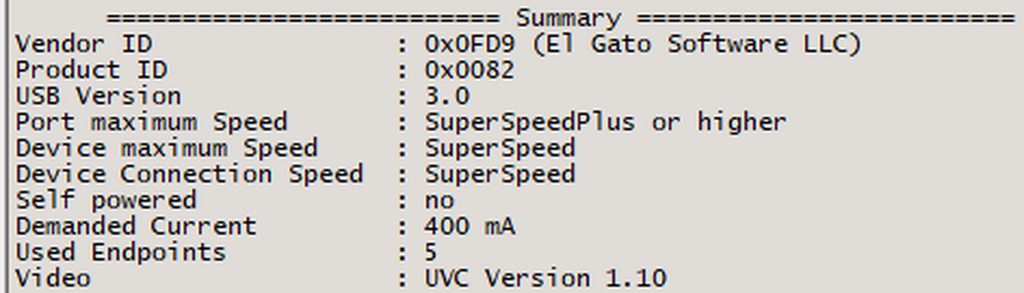
SuperSpeed indicates a USB 3 connetion. Plus indicates 10Gbps. You need at least SuperSpeed on all three speeds listed there.
If the Port lists a companion port with SuperSpeed that's also good, but indicates a likely issue with the cable
Hi Speed indicates USB 2.0. Full Speed indicates USB 1
craggy relic
Hey im wondering if anyone else has had this issue I jsut got the Elgato Facecam like 5 days ago and I've noticed since ive got it my fps in game is so much lower (even when im not streaming just have obs open) and it seems to be the longer I have obs open the lower and lower my frame rates get. For context I was using a logitech c922 for a year with no issues with a constant 270 stable fps in OW with all low settings now with this cam im struggling to even maintain 240 fps with constant drops below and it going as low as 190 the longer I stream (since I have a 240 hz monitor its just unusable rn)
echo roost
warped ledge
whoch capture card, cause the PCIE card might be able to handle it. I guess I co...
Hey Vic, im using the Elgato HD60 X capture card
hot jolt
is there a way to use the hd60X on the tiktok live studio and OBS? seems like i can only use that on one device only at a time
warped ledge
echo roost
Hey Vic, im using the Elgato HD60 X capture card
This card only allows 1 app at a time.
warped ledge
hot jolt
is there a way to use the hd60X on the tiktok live studio and OBS? seems like i ...
See above
warped ledge
craggy relic
Hey im wondering if anyone else has had this issue I jsut got the Elgato Facecam...
Check in #camera-prompter
craggy relic
warped ledge
Check in <#1080643564616286288>
which part ?
hot jolt
warped ledge
See above
is there a work around or something how would i go about being able to do this?
warped ledge
hot jolt
is there a work around or something how would i go about being able to do this?
Hm… a TikTok stream key, if you’re able too, and vertical plugin for OBS.
hot jolt
warped ledge
Hm… a TikTok stream key, if you’re able too, and vertical plugin for OBS.
Only a stream key?
warped ledge
hot jolt
Only a stream key?
Well the url and stream key vs live.
echo roost
Annoyingly tiktok dont want to give them out any more, probably so you use thier app
Weird that window only lets you use the camera in one app, on mac you can use it as many times as you want
hot jolt
rough, might look at source through obs then have tiktok look at that
 tender socket
Anyone here quickly? Desperate for some help asap 😭
Trying to setup my PS5 with my stream PC with an elgato 4k60 fps again, I’ve done this is the past all fine but there’s no audio coming through?
Video etc is fine, but it only goes through when I set this to HDMI not my blackshark headphones?

As you see audio goes through to stream but I can’t hear now
 past basin
tender socket
As you see audio goes through to stream but I can’t hear now
past basin
tender socket
As you see audio goes through to stream but I can’t hear now
This is expected behaviour of a PS5 when you connect a headset. They do a one audio stream per user model. So when you plug in a headset it disables your HDMI audio feed. When you switch that back manually, it disables the headset.
If this is a wired headset, use a Chat Link or Chat Link Pro cable to split the headset feed to the capture card, and set your capture card to "Analog" audio mode in 4K Capture Utility.
You may also be able to sign in a second controller if you have one and run an aux cable from the controller to the capture card the same way - this may require adding a ground loop isolator, if you plan to have the controller plugged into power to prevent buzz
past basin
carmine sky
14.4.1 - 4K X still shows as 5Gbit USB connection on Mx Macs
Related to this, check out this new post on the reddit from today - testing for 10 Gbps fix on macOS has now entered the public beta phase.
 cursive ravine
@past basin Hey, sorry for bothering you, you know where I could download Game Capture HD for Macs with Intel CPUs from the official site?
past basin
That should be on https://www.elgato.com/downloads - just click the mac filter in the top right of the list of programs, and if need be select the capture card you're using
 cursive ravine
past basin
That should be on https://www.elgato.com/downloads - just click the mac filter i...
cursive ravine
past basin
That should be on https://www.elgato.com/downloads - just click the mac filter i...
Game Capture HD's not on the downloads page
There's the Capture Device utility but it only supports the HD60S+ and the newer ones
past basin
Capture Device Utility is only for firmware changes and things like flipping the audio mode between HDMI and Analog and EDID modes, it's not an actual capture tool. Typically for that we now recommend OBS Studio or Quicktime player.
But you're right, it looks like it was recently removed from the downloads page (likely as it's been discontinued for a while). You can find it in the old release notes for it - https://help.elgato.com/hc/en-us/articles/360027963512-Elgato-Game-Capture-HD-Software-Release-Notes-macOS
Elgato
Below is a comprehensive list of Elgato Game Capture HD software releases for macOS (OS X).
macOS (OS X) Release Notes - Software Download Links
2.11.14
Game Capture 2.11.14 for macOS
Up...
Ah, sorry it is available under Downloads too, if you filter by the legacy card you're using
It's just not part of the "all downloads" group
 cursive ravine
Ah there you go
How do you access the option to update the device's firmware on Mac?@past basin
Like, what are the buttons you need to press, kinda like on Windows you need to press Ctrl to do it
past basin
Depends on what device you're working with, typically you open settings holding down CTRL.
But Game Capture HD is a discontinued app - if you have a card compatible with the newer tools, do not update firmware with Game Capture HD as it could actually install an older one and brick the card. (Unless you're attempting the fix people have mentioned to try and re-flash a bricked HD60S caused by doing exactly that)
cursive ravine
past basin
Depends on what device you're working with, typically you open settings holding ...
I'm on a Mac
past basin
By device I meant capture card
cursive ravine
past basin
Depends on what device you're working with, typically you open settings holding ...
I don't know whether you remember me or not, but mine's already bricked lol
past basin
Yeah - I thoughtI did, hence the bit about the fix for the HD60S
Been a while and I'm multi tasking at the moment so wasn't sure
cursive ravine
dw dw
Yeah I'm trying the Mac fix
hence why I'm trying to get it to show me the update button
past basin
Yeah, as far as I'm aware it's just holding down CTRL while opening settings. I've not used the mac version of Game Capture HD though
past basin
Option key apparently
Elgato
Elgato Game Capture software has a Settings section, which allows users to adjust how the hardware behaves.There is also a hidden, Advanced Settings mode that can help you Update Firmware.The firmw...
past basin
Fantastic to hear
cursive ravine
The switch audio issue's gone now as well
past basin
That's intereasting to hear
I had expected it would just get you back where you were to start with
warped ledge
cursive ravine
The switch audio issue's gone now as well
Yay!!! Glad it’s all working!!!
 vague prism
I just got a hd60x does anyone know why it looks like this?

I have HDR turned off and VRR off
vague prism
 next yew
i am absolutely struggling to setup a dual pc streaming setup with the 4k 60 mk.2 and would love somehelp
warped ledge
vague prism
I have HDR turned off and VRR off
Why are you flash banging me!


J/K I can help in about 20 mins
warped ledge
next yew
i am absolutely struggling to setup a dual pc streaming setup with the 4k 60 mk....
Can you post specs please, and issue.
vague prism
warped ledge
J/K I can help in about 20 mins
Thanks so much
next yew
warped ledge
Can you post specs please, and issue.
Gaming PC: 4090, Ryzen 9 7950x3d, 64GB Ram.
Stream PC; 2080, Ryzen 9 3900x, 32GB Ram, 4k 60 Mk.2
Issue: I'm able to get video from my gaming pc onto my streaming pc in obs, but im really struggling on figuring out how to get mic sound and game sound transfered over.
warped ledge
next yew
Gaming PC: 4090, Ryzen 9 7950x3d, 64GB Ram.
Stream PC; 2080, Ryzen 9 3900x, 32G...
try this for your card on your streamig PC, and see if that helps.
 warped ledge
next yew
Gaming PC: 4090, Ryzen 9 7950x3d, 64GB Ram.
Stream PC; 2080, Ryzen 9 3900x, 32G...
warped ledge
next yew
Gaming PC: 4090, Ryzen 9 7950x3d, 64GB Ram.
Stream PC; 2080, Ryzen 9 3900x, 32G...
is there anything else you might be using for sound?
vague prism
I'm back, had to switch out laundry
 strange mantle
Hello the chat link this branch directly on the Elgato HD60X card?
next yew
warped ledge
is there anything else you might be using for sound?
yeah, so i have a steelseries headset just plugged into my gaming pc. Just for general sound and what not. Then i have Shure sm7b run through a sterling h224 into the gaming pc as well. Is it possible to have them as the input/output for both the streaming and gaming pc?
warped ledge
next yew
yeah, so i have a steelseries headset just plugged into my gaming pc. Just for g...
what does Sonar allow you to do?
warped ledge
next yew
yeah, so i have a steelseries headset just plugged into my gaming pc. Just for g...
@past basin have any exp. with Sonar?
next yew
warped ledge
what does Sonar allow you to do?
not much that ive tried. It just splits the audio channels into 4 seperate parts.
past basin
warped ledge
<@269997944671830017> have any exp. with Sonar?
Enough to turn it off and hate it. (It's actually fine if you don't have multiple interfaces like I do)
warped ledge
I know there is a guide for wave link and sonar, but not directly with the capture card. try your sound settings and see if this works, if not sound capture is the next thing.
next yew
i did try to use wave link but i couldnt get it to work w/o a elgato mic and i only have the rgular streamdeck not the plus so no devices would connect
warped ledge
next yew
i did try to use wave link but i couldnt get it to work w/o a elgato mic and i o...
awe, save and get a plus.
next yew
yeah fs
vague prism
@warped ledge I also have been having problems with it freezing could the issues be related?
warped ledge
vague prism
<@476160810457235466> I also have been having problems with it freezing could th...
possibly.
warped ledge
vague prism
<@476160810457235466> I also have been having problems with it freezing could th...
wanna vc so you can share your screen?
give me like 10 mins though
warped ledge
vague prism
just let me know when you're ready
ready?
vague prism
yeah
warped ledge
vague prism
yeah
called
past basin
warped ledge
<@269997944671830017> have any exp. with Sonar?
Some. I've bypassed it entirely on my setup and fed it all through Wave Link though.
past basin
strange mantle
Hello the chat link this branch directly on the Elgato HD60X card?
Chat Link plugs directly into your HD60 X in the 3.5mm port, yes. Then you change the HD60 X audio mode to "Analog" using either 4K Capture Utility (Windows) or Capture Device Utility (macOS).
warped ledge
strange mantle
Hello the chat link this branch directly on the Elgato HD60X card?
I have a video showing how it all works in #community-resources
 ashen sigil
Quick question peeps. I am movng to a 2 PC stream setup shortly, so will be needing a capture card, Whats best than an Elgato capture card, since I have their XLR, mic and stream decks might aswell get there capture cards. My gaming monitor is a 165hz 1440p Monitor. Would it be better to get the 4K x or 4k pro? I don't need to record/capture in 4k, just 1440p 60fps. But it would need to support high refresh rate 1440p monitor output?
or would a cheaper product suffice?
warped ledge
ashen sigil
or would a cheaper product suffice?
it depends, are you wanting to record 4K144 or passthrough?
ashen sigil
warped ledge
it depends, are you wanting to record 4K144 or passthrough?
1440p passthrough, no need for 4k
recording or passthrough
warped ledge
ashen sigil
1440p passthrough, no need for 4k
4K Pro is ideal then, cause you can future proof.
The card can Passthrough 4K240
ashen sigil
Does the 4k x support 1440p 165 passthrough tho? Ofcourse I would rather go for the cheaper one, if it can do what I need? My worry is latency too ? hows the latency on the x?
warped ledge
ashen sigil
Does the 4k x support 1440p 165 passthrough tho? Ofcourse I would rather go for ...
Elgato
This is a list of supported passthrough and capture resolutions. For each input resolution, the supported capture resolution is shown as supported by 4K X.
These resolutions and frame rates do no...
warped ledge
ashen sigil
Does the 4k x support 1440p 165 passthrough tho? Ofcourse I would rather go for ...
4K Pro Matrix https://help.elgato.com/hc/en-us/articles/23479165158029-Elgato-Game-Capture-4K-Pro-Supported-Resolutions-and-Frame-Rates
Elgato
This is a list of supported passthrough and capture resolutions. For each input resolution, the supported capture resolution is supported by 4K Pro.
These resolutions and frame rates do not consi...
warped ledge
ashen sigil
Does the 4k x support 1440p 165 passthrough tho? Ofcourse I would rather go for ...
4K Pro is probably ideal
ashen sigil
ty
warped ledge
ashen sigil
ty
You're Welcome!
 drifting lily
Yo, I have a question in regards to Elgato HD60 x, does it require to have 2 HDMI 2.1 cables, one from the console to capture card to then from capture card to the monitor, or only one? I know I should look at the official documents, but I'm kind of busy.
warped ledge
drifting lily
Yo, I have a question in regards to Elgato HD60 x, does it require to have 2 HDM...
yes it's ideal
drifting lily
warped ledge
yes it's ideal
Thank you, would it cause any issues even if my monitor doesn't officially support HDMI 2.1?
warped ledge
drifting lily
Thank you, would it cause any issues even if my monitor doesn't officially suppo...
VRR wouldn't work
maybe cause chaos if it's not supported
drifting lily
Ah. I wouldn't use VRR anyway.. Would 240, 120, etc FPS option not work as well?
next yew
warped ledge
awe, save and get a plus.
hey, so i got the audio all crossed over and what not but now there is about a .5/1 second delay on the audio and my actual game. Do you know any way to fix this?
warped ledge
next yew
hey, so i got the audio all crossed over and what not but now there is about a ....
are you doing 2 OBS sources 1 video and 1 audio?
next yew
warped ledge
are you doing 2 OBS sources 1 video and 1 audio?
correct
warped ledge
next yew
correct
then there shouldn't be any delay
next yew
like, the audio on the stream is fine. But having it comeback to my headset is delayed on my end
 wooden vortex
Okay, so I am doing a 2pc setup for stream. One is my powerful gaming PC another is my girlfriend not so powerful PC. I will be streaming and gaming on my PC, but I want to also capture my girlfriends screen. For that I bought the HD60S, as 1920x1080 is enough for us for now. Let's call my PC A, and hers PC B. So today I tried recording our gameplay on OBS. I connected HDMI to B pc, to capture card and USB to A pc to USBC on capture card. I was able to record 5mins of 1hr long footage, as the capture card game footage just froze. Also I get no audio from capture card, what could be the issue?. Also we are both using Wave DX and WAVE XLR setups on both PCs.
 valid dove
hi im unable to get any audio from my ps5 to the elgato 4k capture. i have an elgato hd60 s+. I also have the elgato chat link cable and have that set up with a pair of earbuds. my issues started when i switched to the pulse 3d headset for some non stream gaming and then when i switched back to the capture card later i stopped being able to get game audio
warped ledge
next yew
like, the audio on the stream is fine. But having it comeback to my headset is d...
Hm… I’ll research a few things, but for now I’m asleep.