#Unusual compiling problem

1 messages · Page 1 of 1 (latest)

stray cipher
#

Okay. SO.

For some reason, the thing completely deleted the screenshots I posted. Not sure how long I need to wait to send images, but fine, I'll work around it.

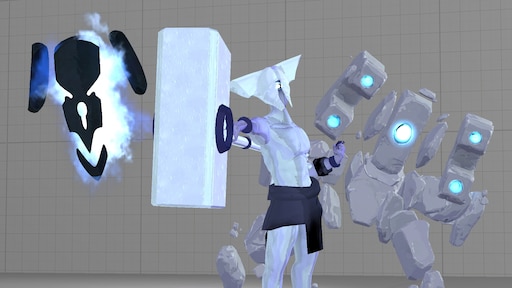
I'm trying to port THIS[https://steamcommunity.com/sharedfiles/filedetails/?id=2201787514] SFM model into Gmod to use as a playermodel. Nothing I wanna upload, just a personal fun little thing of my boy Mithrix. I was following a very helpful tutorial, this one Here[https://steamcommunity.com/sharedfiles/filedetails/?id=3394845385], up until I got to... well, compiling.

I dropped my QC file into crowbar, made sure everything was right, and hit compile. It was a very short compile log, but it didn't give me a single error. So I thought, okay, let's view him. I went into the output folder. And there is no mdl file.

I've tried no less than five times. It gives me no errors, but there's also no text flying down the screen like I would expect, and there is no .mdl output. Does anyone have any idea what could have caused this? Or how I could best go about undoing whatever this is that I've somehow screwed up? Again, I'm not sure what I'm doing or where I went wrong, or even how I'm supposed to start fixing this, so anything helps!

Welcome to the Ultimate GMod Model Porting Guide!

Never heard about Source engine ’s systems? Never used Blender ? Don’t worry.
This guide is perfect if you’re looking to port models int

valid light
#

You’re saying there wasn’t any text flying down the screen when you hit compile? Like nothing?
Copy paste what you do have from that window.

stray cipher
#

Alright, gimme a minute

stray cipher
#

Sorry it took so long, but here it is:

#

  Compiling "Model Template.qc" ...
    Output from compiler "C:\Program Files (x86)\Steam\steamapps\common\GarrysMod\bin\studiomdl.exe": 
      StudioMDL.exe (Nov  5 2025) - Garry's Mod Edition
      Adding filesystem addon 'c:\program files (x86)\steam\steamapps\common\garrysmod\garrysmod\addons\mithrix'
      qdir:    "c:\users\[My Profile]\onedrive\documents\gmod model port template\work folder\exported\"
      gamedir: "C:\Program Files (x86)\Steam\steamapps\common\GarrysMod\garrysmod\"
      g_path:  "Model Template.qc"
      Building binary model files...
      Working on "Model Template.qc"
      DMX Model c:\users\[My Profile]\onedrive\documents\gmod model port template\work folder\exported\MithrixMesh.dmx
    CROWBAR: Deleted empty temporary compile folder "C:\Program Files (x86)\Steam\steamapps\common\GarrysMod\garrysmod\models\mithrix".
  ... Compiling "Model Template.qc" finished. Check above for any errors.

... Compiling with Crowbar 0.74: "C:\Users\[My Profile]\OneDrive\Documents\Gmod Model Port Template\Work Folder\Exported\Model Template.qc" finished.```
#

But when I go to the destination folder... it's not there.

valid light
stray cipher
#

it. crashed?

valid light
#

hammer's vbsp does the same thing

stray cipher
#

okay, uhh, is there a way to. Stop it from doing that?

valid light
#

exits immediately out of the command line

#

If you want to check for yourself, look at the Windows Event Viewer under Application logs

#

should be an access violation most likely

stray cipher
#

windows event viewer, okay

valid light
#

Anyways. Something is throwing studiomdl off here and i'd wanna say, try uploading your work folder as a .zip here. Not sure if peacekeeper will let you

stray cipher
#

I'm... not sure which of these it is, or do I need to run it again?

valid light
#

Like this

#

That would just verify that it is indeed a crash and not something else

stray cipher
#

Aaaaaah, okay

#

yeah its an event 1000 app error

#
Faulting module name: studiomdl.exe, version: 2025.7.23.0, time stamp: 0x6911f2e8
Exception code: 0xc0000005
Fault offset: 0x0015b627
Faulting process id: 0x821C
Faulting application start time: 0x1DC6257E46333F2
Faulting application path: C:\Program Files (x86)\Steam\steamapps\common\GarrysMod\bin\studiomdl.exe
Faulting module path: C:\Program Files (x86)\Steam\steamapps\common\GarrysMod\bin\studiomdl.exe
Report Id: bf5e65c0-9240-4b17-820c-719d42e099fa
Faulting package full name: 
Faulting package-relative application ID: ```
#

this is what the general says

stray cipher
valid light
#

rip

#

wait

valid light
#

Source Filmmaker DMXes contain full scenes and aren't compatible with studiomdl

#

You'll need to re-export the DMX in Blender, so that it only contains the model.

#

(DMX is a container format, which contains other files)

stray cipher
#

I don't think I did? There was specifically a .smd file for Mithrix, I think. I'll see if it'll let me send the dmx file

#

I hope it does

#

Okay there's the mesh

#

I also have the proportions dmx and the collision model dmx if needed

#

And the qc file. almost forgot that existed for a sec

vast escarp
#

My guide is mentioned. So, I should be here.

Try using the compiler inside the template instead of Gmod one.

#

I’ll try compiling your files and find out what’s wrong when I’m free.

stray cipher
#

Which file is it? I tried opening all of the exe files, but none of them worked

vast escarp
#

See “Setting up” section.

#

At the Set up Crowbar subsection.

stray cipher
#

Ah, okay, I'll have to do that tomorrow (it's about 3 a.m for me ^^;)

vast escarp
#

I just tested it. The model is really messed up. seems like the lower body got duplicated.

stray cipher
#

Oh no

#

Not sure how I even managed that tbh

#

Okay, set up crowbar right this time, and I'm actually getting logs!

#
      ERROR: Aborted Processing on 'mithrix/mithrix_pm.mdl'
      ERROR: 'EXCEPTION_ACCESS_VIOLATION' (assert: 1)
      ERROR: Aborted Processing on 'mithrix/mithrix_pm.mdl'```
#

ah dammit not again

#

How did I get the duped lower body but not the upper body-

#

Actually how did I somehow screw this up THIS bad

#

Okay whered i accidently delete $maxverts

#

.. I? Didn't?

#

Ah boy

#

this is what happens when a blender noob tries to turn an sfm model into a playermodel without any real knowledge of blender

#

Wonder if I can replace the usual mesh with the original 7ish pieces. Because originally he had 7 meshes. Half his body, the other half of his body. the eye, helmet, the loincloth, his shoulder armor, and whatever stibs are

#

If its as easy as just swapping things out and then changing names before like. Going through and doing bodygroup pieces, I'll be able to do that no issue I think

vast escarp
#

Ya. I forgot to tell you that you should add bodygroups. Having a single mesh with too many poly is not going to work.

stray cipher
#

... Okay, I could be wrong, but I have a feeling the rest pose bones are not supposed to look like this

#

No I haven't figured out how to make them the weird prism thingies instead of balls

stray cipher
#

OKAY GOOD NEWS: I have made progress, he actually compiled and he has BONES IN THE VIEWER

Bad news... He looks like he had a stroke

#

His helmet, eye, cloth, armor, and maybe jewelry? Are animated

#

His main body isnt

#

I have a hunch, but I wanna ask someone who's probably a lot smarter than me first:

Is this a weight painting error, some kinda bone misalignment, or a combination?

#

Sidenote, the helmet and such does change position depending on the animation selected! As can be( poorly) seen here. It's the rest of him that's not cooperating.