#Gmod Crashing on start up(Arch Linux)
117 messages · Page 1 of 1 (latest)
 vast bay
 peak geode
change the game beta to 64 bits
chromium
and verify files
if none work, uninstall gmod, and install it back
it also none work , clear all your mods, and then start the game
vast bay
peak geode
it also none work , clear all your mods, and then start the game
still didint work
peak geode
maybe you're running out of memory, try updating your graphics card driver,
also
how many gigabytes do you have left?
in your disk where you have gmod downoladed
vast bay
peak geode
in your disk where you have gmod downoladed
over 50 gb
vast bay
peak geode
maybe you're running out of memory, try updating your graphics card driver,
I'll try that
vast bay
Nope
 zealous pier
@vast bay
if you're using the linux runtime
you need to use this fix:
GitHub
🛠 Automatic Patching/Updating of GMod CEF. Also fixes macOS/Linux launch issues - solsticegamestudios/GModCEFCodecFix
personally i recommend using ProtonGE (for raw input, which regular proton doesn't have)
and just not using the linux runtime at all
because facepunch has basically admitted that they don't give a fuck about linux
and the native client sucks
vast bay
Thanks I will try it rn
zealous pier
alr
if you decide to use protonge i can help you fix the initial problems like fonts being weird and stuff
vast bay
Which is Proton GE?
@zealous pier
I'm trying to get the best one so I can run it smoother
zealous pier

GitHub
Compatibility tool for Steam Play based on Wine and additional components - GitHub - GloriousEggroll/proton-ge-custom: Compatibility tool for Steam Play based on Wine and additional components
vast bay
How do I install it tho?
zealous pier
GitHub
Compatibility tool for Steam Play based on Wine and additional components - GitHub - GloriousEggroll/proton-ge-custom: Compatibility tool for Steam Play based on Wine and additional components
that's the installation guide
i forgot exactly how i did it
use the manual, native part
PLEASE NOTE: There are prerequisites for using this version of proton:
You must have the proper Vulkan drivers/packages installed on your system. VKD3D on AMD requires Mesa 22.0.0 or higher for the VK_KHR_dynamic_rendering extension. Check here for general driver installation guidance.
Manual
Native
This section is for those that use the native version of Steam.
Download a release from the Releases page.
Create a ~/.steam/root/compatibilitytools.d directory if it does not exist.
Extract the release tarball into ~/.steam/root/compatibilitytools.d/.
    tar -xf GE-ProtonVERSION.tar.gz -C ~/.steam/root/compatibilitytools.d/
Restart Steam.
Enable proton-ge-custom.
copied from the website
btw i can just give you a copy of my entire GarrysMod folder
idk if that'll work to just drop in
vast bay
I'm going to try this first
zealous pier
mk
vast bay
I'm in the building part
zealous pier
i'm using debian sid btw
vast bay
I'm on artix
vast bay
It's taking a WHILE tho
zealous pier
yeah lol
building from source takes forever
i tried to do a LFS install at one point and even though i was using a gaming laptop with an i5-11400H it still took well over 12 hours of just building
zealous pier
what happened
actually @vast bay look at this

MUO
Here's how you can install Proton GE—a fork of Valve's Proton—on any Linux distro, including SteamOS.
it says there's a separate version for arch that you can install with the AUR
idk if it's as good as the github one
but there's an easier install method for that too
vast bay
zealous pier
actually <@729420176067657820> look at this
Still doesnt work
vast bay
zealous pier
did it error?
it installed it just didint work
vast bay
zealous pier
launch steam from the terminal
try launching the game
then copy paste the entire output of the terminal here
@vast bay
also try verifying files if you haven't already
 distant frost
I had this problem too. This should solve the problem: https://www.solsticegamestudios.com/forums/threads/tutorial-gmod-cef-codec-fix-linux.1265/. If you dont have the hl.sh file in your garrys mod folder, re-install steam completely.

Forums | Solstice Game Studios
Step-by-step Guide to setting up GMod CEF Codec Fix on Linux
Note: Garry's Mod must be closed before following this guide.
If you are already on the [x86-64] branch, skip to step 5!
Other tutorials: Windows | macOS
Issues? Read the FAQ!
- Open Steam, then right click Garry's Mod from your...
distant frost
Make sure to turn off proton
zealous pier
i already told him that
i'm trying to get him to use protonge for the windows client bc it's just better in every way
distant frost
ok
vast bay
distant frost
I had this problem too. This should solve the problem: https://www.solsticegames...
I have the hl2.sh file
and hl2_linux
distant frost
Then the CEF Codec fix should work just fine if you follow the guide I posted.
vast bay
Alrighty
vast bay
distant frost
Then the CEF Codec fix should work just fine if you follow the guide I posted.
But to run it, after downloading patches, do I have to open the file every time and launch it from there?

It gives me this error for some reason
@distant frost
distant frost
Remote play?
vast bay
The game says it's running but it isn't
distant frost
Did you turn off proton?
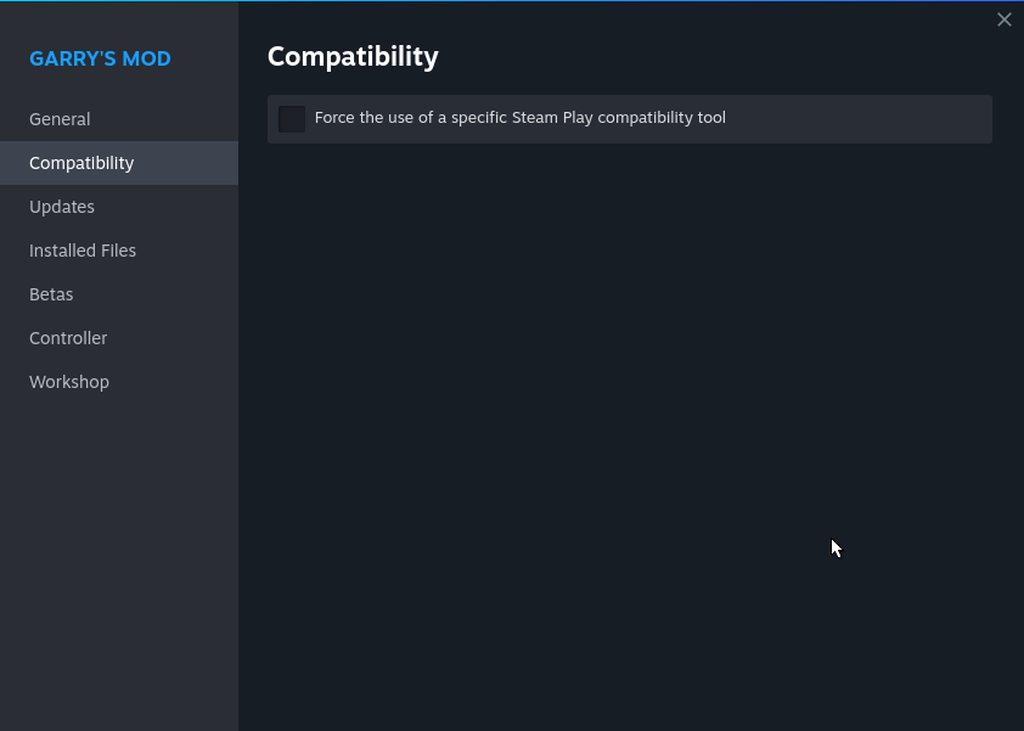 distant frost
Why does it launch remote play?
vast bay
@distant frost
distant frost
try disabling it under steam settings
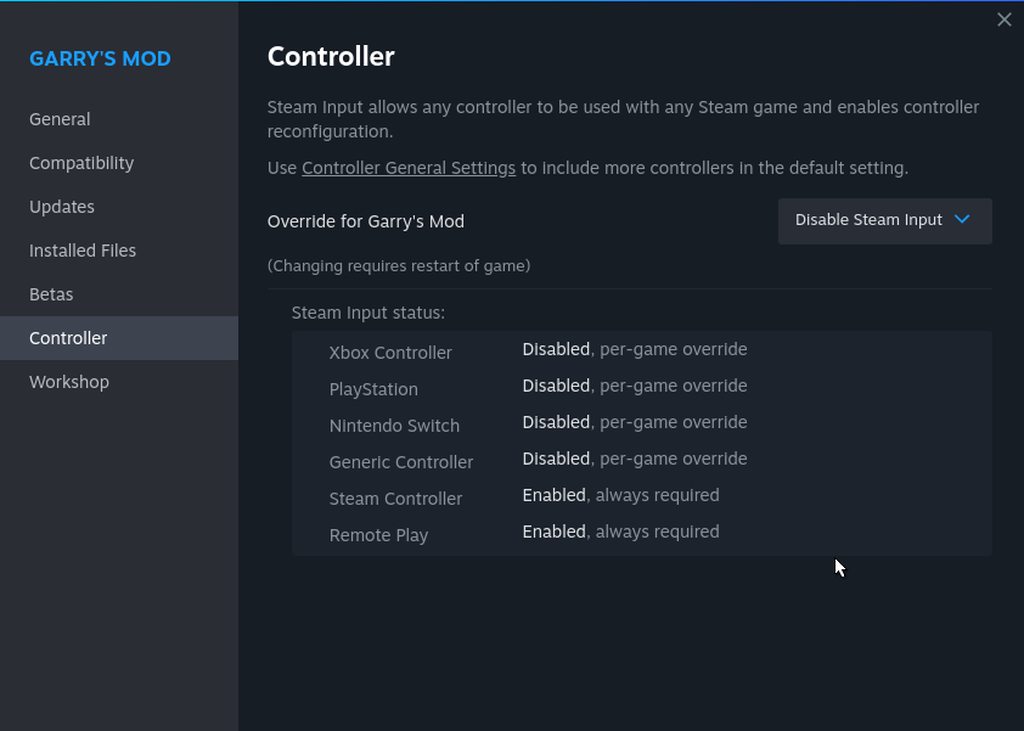 distant frost
Is it disabled here?
 vast bay
distant frost
Is it disabled here?
vast bay
distant frost
Is it disabled here?
I disabled it now, I'll see if it works
distant frost
okay
vast bay
distant frost
okay
so, I launched it, it says running but the actual window doesn't show up
I launched steam via console, gmod opens on my monitor (1920x1080) but the res is way too big and it wont let me change it 💀
vast bay
distant frost
try putting this in your launch options:
SDL_VIDEODRIVER=x11 %command%
Nope
sh: line 1: xdg-user-dir: command not found
BRefreshApplicationsInLibrary 1: 3ms
sh: line 1: xdg-user-dir: command not found
sh: line 1: xdg-user-dir: command not found
sh: line 1: xdg-user-dir: command not found
BuildCompleteAppOverviewChange: 288 apps
RegisterForAppOverview 1: 12ms
RegisterForAppOverview 2: 12ms
sh: line 1: xdg-user-dir: command not found
sh: line 1: xdg-user-dir: command not found
sh: line 1: xdg-user-dir: command not found
sh: line 1: xdg-user-dir: command not found
sh: line 1: xdg-user-dir: command not found
/bin/sh\0-c\0SDL_VIDEODRIVER=x11 /home/gabriele/.local/share/Steam/ubuntu12_32/
Mod/hl2.sh' -steam -game garrysmod\0
chdir "/media/gabriele/ssd/SteamLibrary/steamapps/common/GarrysMod"
ERROR: ld.so: object '/home/gabriele/.local/share/Steam/ubuntu12_32/gameoverlay
ERROR: ld.so: object '/home/gabriele/.local/share/Steam/ubuntu12_64/gameoverlay
ERROR: ld.so: object '/home/gabriele/.local/share/Steam/ubuntu12_32/gameoverlay
ERROR: ld.so: object '/home/gabriele/.local/share/Steam/ubuntu12_32/gameoverlay
pid 12600 != 12599, skipping destruction (fork without exec?)
sh: line 1: xdg-user-dir: command not found
SDL video target is 'x11'
Failed to load game_shader_dx6_client.so: (null)
Failed to load /media/gabriele/ssd/SteamLibrary/steamapps/common/GarrysMod/bin/
Failed to load /media/gabriele/ssd/SteamLibrary/steamapps/common/GarrysMod/garr
Failed to load game_shader_dx7_client.so: (null)
Failed to load /media/gabriele/ssd/SteamLibrary/steamapps/common/GarrysMod/bin/
Failed to load /media/gabriele/ssd/SteamLibrary/steamapps/common/GarrysMod/garr
Failed to load game_shader_dx8_client.so: (null)
Failed to load /media/gabriele/ssd/SteamLibrary/steamapps/common/GarrysMod/bin/
Failed to load /media/gabriele/ssd/SteamLibrary/steamapps/common/GarrysMod/garr
Failed to load game_shader_dx9_client.so: (null)
swap interval = 0 swap limit = 1
Could not load program cache file glbaseshaders.cfg
Could not find base GL shader cache file
Loaded program cache file "glshaders.cfg", total keyvalues: 3, total successful
Precache: Took 37 ms, Vertex 129, Pixel 7
ConVarRef mat_dxlevel doesn't point to an existing ConVar
Game_client.so loaded for "Garry's Mod"
[0924/114920.924621:WARNING:chrome_browser_cloud_management_controller.cc(87)]
MESA-INTEL: warning: Haswell Vulkan support is incomplete
libva error: /usr/lib/dri/iHD_drv_video.so init failed
[0924/114921.439248:WARNING:sandbox_linux.cc(393)] InitializeSandbox() called w
distant frost
strange
vast bay
Yeah
distant frost
The only thing I can think of is factory resetting gmod and trying again.
vast bay
warning: Unknown nb_ctl request: 4
warning: Unknown nb_ctl request: 4
warning: Unknown nb_ctl request: 4
warning: Unknown nb_ctl request: 4
This is what happends when I open the settings
Also this showed up
[0924/114352.849449:WARNING:chrome_browser_cloud_management_controller.cc(87)] Could not create policy manager as CBCM is not enabled.
[0924/114353.255898:WARNING:sandbox_linux.cc(393)] InitializeSandbox() called with multiple threads in process gpu-process.
[0924/114410.903868:WARNING:keyboard_code_conversion_x.cc(1462)] Unknown keycode:0
[0924/114920.924621:WARNING:chrome_browser_cloud_management_controller.cc(87)] Could not create policy manager as CBCM is not enabled.
[0924/114921.439248:WARNING:sandbox_linux.cc(393)] InitializeSandbox() called with multiple threads in process gpu-process.
It's in a "chromium.log" file
||@distant frost ||
I reinstalled gmod and now steam won't open and when i try to open it w console it says this
Successfully started bash
[gabriele@artix ~] $ steam
steam.sh[15703]: Running Steam on artix rolling 64-bit
steam.sh[15703]: STEAM_RUNTIME is enabled automatically
setup.sh[15777]: Steam runtime environment up-to-date!
steam.sh[15703]: Steam client's requirements are satisfied
[gabriele@artix ~] $
-- INSERT --
distant frost
maybe you should try to re-install steam completely
or ask someone with more experience than me
vast bay
@rocky apex maybe?


