#[SOLVED] DB development Tool connect to MariaDB Docker

92 messages · Page 1 of 1 (latest)

opaque minnow
#

Hi, I tried to make a connection locally self hosted Appwrite server (local server machine) to DB development tool (development machine) called Navicat, so based on the documentation the default values for DB are the ff.

MariaDB server user name. Default value is: 'user'.
_APP_DB_PASS    
MariaDB server user password. Default value is: 'password'.
_APP_DB_ROOT_PASS    
MariaDB server root password. Default value is: 'rootsecretpassword'.```

I tried it but got a connection failed. So there might be additional option I need to setup for me to access it to local network?
willow shale
#

You can add

ports:
      - ${MARIADB_PORT:-0.0.0.0:3306:3306}
#

To your docker compose

#

(wich is docker compose for dev - don't use it on prod)

opaque minnow
#

Sorry, but I just used the prebuilt docker image 🙂

willow shale
#

wich is configurate for production 🙂 np, you just need to change it

#

On prod we use 127.0.0.1:3306 and connect to mariadb via ssh tunnel

opaque minnow
#

I tried, run the default command provided with additional option -p 3306:3306
docker run -it --rm
--volume /var/run/docker.sock:/var/run/docker.sock
--volume "$(pwd)"/appwrite:/usr/src/code/appwrite:rw
--entrypoint="install"
appwrite/appwrite:1.3.4

#

not sure if im doing it right thought 😄

willow shale
#

I don't use docker alone, always with compose, so can't say if it's ok or not 😅

opaque minnow
#

I'll try to check if I can ssh the IP:port

#
ssh: connect to host 20.0.0.150 port 3306: Connection refused```
willow shale
#

You can't connect on mariadb directly with via ssh protocol :p

#

Wich GUI software do you use to manage mariadb ?

opaque minnow
#

I use Navicat Premium

willow shale
#

While you bind port 3306 now, try to connect on it

opaque minnow
willow shale
willow shale
opaque minnow
willow shale
#

You also need to open port on your server

opaque minnow
#

When I check the DOCKER status it seems like mariadb is not exposing the port publicly with the command i used

willow shale
#

You can use network utility for port scan (or use netcat on terminal)

opaque minnow
willow shale
#

Try via ssh tunnel

#

Should works

willow shale
opaque minnow
#

Okay, just a sec

willow shale
opaque minnow
#

network utility seems to no longer available on latest versions of macOS

willow shale
#

Try ssh tunnel, easier solution I thinks

opaque minnow
#

ssh: connect to host 20.0.0.150 port 22: Connection refused

#

maybe I need to change settings,

#

wait a sec

willow shale
#

Depends of you sshd config yes..

#

check /etc/ssh/sshd_config, smt like that

#

If appwrite is on external server (locally or remotly), easier is ssh tunnel

#

But you need to be able to connect, true 😄

opaque minnow
#

Yes, Im trying to find a way right now to access the server thru ssh connection

#

but i can acccess the appwrite server with no issue since the port is open on docker

willow shale
#

You use azure instance ?

opaque minnow
#
    --volume /var/run/docker.sock:/var/run/docker.sock \
    --volume "$(pwd)"/appwrite:/usr/src/code/appwrite:rw \
    --entrypoint="install" \
    appwrite/appwrite:1.3.4```
#

I used mac mini as a server

willow shale
#

But where is sthe server ?

#

Oh ok, cause 20.0.0 IP is for azure ^^

opaque minnow
#

Im not sure but it is my local IP

willow shale
#

try this command on terminal nc -l 20.0.0.150 3306

opaque minnow
#

nc: Can't assign requested address

willow shale
#

nc -zv 10.0.0.150 3306

#

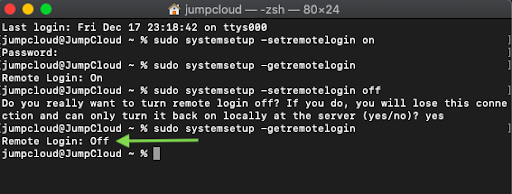
Long time not play with mac 😅 Remember that to enable ssh it's on preference, security tab, like that

#

Or, you can install Navicat on your mac mini 🤪

opaque minnow
#

Anyways I'll check what I can do enable ssh and let you know

willow shale
#

sudo systemsetup -setremotelogin on

opaque minnow
#

Yes, I did enabled this option via setting 🙂

#

I tried to restart the pc

opaque minnow
#

Hi @willow shale, Im now able to access using ssh

willow shale
#

Nice, now configure navicat to connect via ssh tunnel

opaque minnow
#

oaky, let me check

willow shale
#

Try to replace localhost with 127.0.0.1

opaque minnow
#

I think the problem is the port for mariadb is not open

willow shale
#

Possible yes. Try to localte docker-compose created by docker run

#

Or directly use docker compose

opaque minnow
#

Okay, so if I'll use docker compose I should pull the project locally right?

willow shale
#

Remove existing docker config

docker stop $(docker ps -a -q)
docker rm $(docker ps -a -q)
docker image prune -f
docker system prune -a
willow shale
#

And run docker compose up

opaque minnow
#

Awesome! I'll do that

willow shale
#

On .env, you need to adapt it (domain for ex)

opaque minnow
#

Hi, Just another question.
I want to access a database and show all the collections available and someone suggested that using custom function, so I tried to read the docs but I cant figure it out on my own ^_^

#

Is there better example I can follow 🙂

willow shale
opaque minnow
#

Thanks! its on server tabs

#

I think this will, just need to find a way to securely implement it together with the UI

willow shale
#

You can't list collection as client

#

This is why you need to create function

#

And with function you can manage permission, and call listCollections with api key

opaque minnow
#

Yes, but the application Im trying to create is a client app with user specific roles

willow shale
#

Try to implement "roles" as teams

#

If you achieve connection via DB tool, don't forgot to add [SOLVED] at begin of your post title

opaque minnow
#

Sure, im currently exploring all possibilities on appwrite

opaque minnow
#

[SOLVED]DB development Tool connect to MariaDB Docker