233 messages · Page 1 of 1 (latest)
 bright token
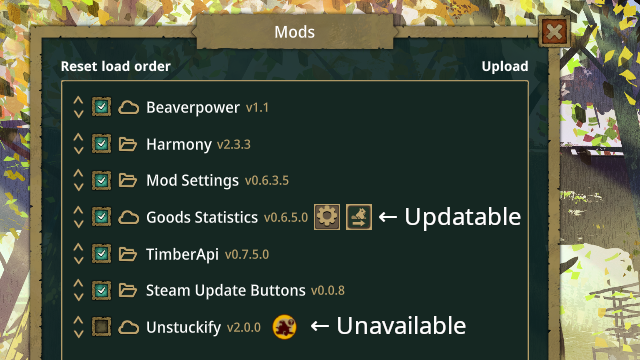
Adds buttons to allow Steam mods to be updated from the Mods menu
mod.io: https://mod.io/g/timberborn/m/steam-update-buttons
Steam: https://steamcommunity.com/sharedfiles/filedetails/?id=3358667560
Source: https://github.com/normanr/Timberborn-SteamUpdateButtons
Standalone alternative: ModUpdater by @foggy rover
Wishlist:
 left fractal
So how does this work now? you can see in steam that's not the last version?
Can you also update with it or trigger a force update after closing the game, or do you still need to verify game files
bright token
It compares the update time of the last time each item was downloaded vs what the server has as the last update time,
and then when you press the update button will ask Steam to update the mod
The Steam API has two different way to query for mods, one gives local data, and the other gives fresh data from the server,
so you can use this mod instead of verify game files,
at the moment it only has update one-item-at-a-time, but might be quicker than verifying game files
 scenic dragon
Nice idea!
scenic dragon
Btw, you've included "src" into the release. Is it intentional?
bright token
yea, I'll drop it in the next release, I've added everything to github now.
scenic dragon
Just ntoiced that after update, the mod version doesn't change in the list. Would be nice to have it change. Maybe even with a new icon, indicating that a restart is needed. Btw, your mad doesn't mark self as not existing on Steam, but I didn;t find it in Workshop.

And not only this. Checkout TimberCommons - it's local mod too.
bright token
yea, the mod doesn't display anything for local mods
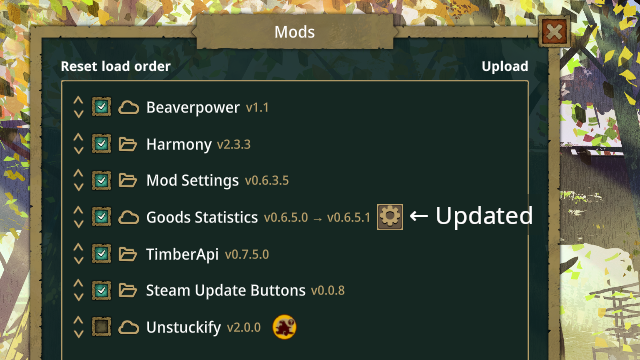
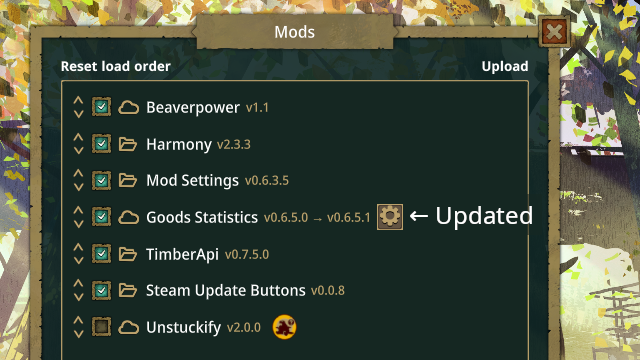
and agreed with the "show that the item was updated". I was thinking of showing something like: old versionnew version
scenic dragon
For the local mods, workshop_data.json file can be checked to see if the mod is on Steam or not. Not sure how useful it would be for the others, but for be it would be super convenient since I frequently switch local/workshop versions.
bright token
Unfortunately that doesn't help, because it's not comparing anything in workshop_data.json
scenic dragon
What's the call? What do you pass in teh request?
bright token
or I guess asked another way, how would that help / what should it do for local mods?
 lost pike
Local mods (from mods folder) , if contains mod.json are handled by Mod Manager....
scenic dragon
bright token
or I guess asked another way, how would that help / what should it do for local ...
It could:
bright token
It's asking the Steam Workshop API the "time updated" for the item, via GetItemInstallInfo (gives local value) and QueryUGCDetails (gives server value)
Unfortunately SteamUGCDetails doesn't contain any version information, only TimeUpdated (and TimeCreated)
which is why those are the values shown in Player.log
scenic dragon
Yeah, I forgot Workshop doesn't have versions at all.
bright token
Show mod version changes when downloads complete
lost pike
bright token
# Update: Version 0.0.8
Show mod version changes when downloads complete
time to check with new game update .... 😮
bright token
It's quiet subtle, but easier to do with limited time.
bright token
This may "just work" with update 6 as it's released, please let me know if there are any issues with it.
lost pike
steam update mods like crazy, but, not so good, so, cannot check the Update Button 😢
bright token
you mean that unsubscribe/subscribe dance is no longer required?
i.e. is Steam now correctly downloading mods when they get updated?
scenic dragon
Steam supposed to handle it seamlessly. It wasn't do stuff for the experimental branch, but for the main one it should. At least, it's what I heard 🙂
bright token
Don't crash if connection to Steam client is not found
lost pike
Nice, TY 👏 . Sorry that cannot test, I have an internet connection that is too good 😮
bright token
np, if it's working for you, then there's no change,
I finally got a 2nd copy purchased via Steam, and for some reason the game can't detect my Stream (all running under Linux)
lost pike
It's not that point. It suppose to test, but, in this case, cannot 😮
bright token
How would you test?
broken internet connection will not reproduce the error,
erorr was big nasty crash screen at startup
and player.log had "Native Crash Reporting" in it,
lost pike
YA, must wait to test until steam got broken ..
bright token
Adds an icon on the main menu "Mods" button if updates are available
Tidies up log messages to have a common prefix
Add tentative support for mods that support multiple versions.
bright token
Adds an update all button and tooltips
 woven spindle
you do have a steam account right?
im thinking if you would be up for me uploading it to steam and add you as a creator so when you get it to work you can upload 
bright token
I do (I've added it to my discord profile). If steam allows multiple authors for a mod then I think that would be okay.
woven spindle
it does see this as en example 🙂 https://steamcommunity.com/sharedfiles/filedetails/?id=3295429291
bright token
The docs at https://partner.steamgames.com/doc/features/workshop/implementation mention that SteamCmd can be used to upload workshop items, so I might try that.
Last time I tried using it, it was before I had access to the game on Steam, and nothing worked,
but I assume it will work now that the game is in my Library
bright token
@woven spindle Can you see, and does this work: https://steamcommunity.com/sharedfiles/filedetails/?id=3358667560
woven spindle
Can see it will test it later
bright token
thanks,
It's missing the mod tag
I wonder how much that matters to the game, hmmm
woven spindle
its found ingame so the tag probobly only do so its harder to find in the workshop
 bright token
I wonder what format kvtags is supposed to be in,
Also the only visiblity options are "Friends-only", "Hidden" or "Unlisted". Does that change after some review process?
bright token
I'd be surprised if it's because the tag is missing,
bright token
ahh, it's because my steam acct is still a limited account (I only have access to Timberborn via Family Library, so I've never bought anything directly in my acct)
woven spindle
its placed as unlisted right now?
if it will be then i can link to it in description as a way to fix problems :p
and later we can see how many have had problems with not updated mods by checking the downloaded amount 😛
bright token
It's Friends-only at the moment, and it won't let me change it.
bright token
Now on Steam as well: https://steamcommunity.com/sharedfiles/filedetails/?id=3358667560
Known issue: It doesn't have the "Mod" tag, so won't show up with the default filter
woven spindle
bright token
Known issue: It doesn't have the "Mod" tag, so won't show up with the default fi...
😛 added link to it from all my mods and give it as an alternetive to verify game files 🙂
bright token
The Mod tag has now been added, so it should appear in searches correctly.
bright token
Update 7 compatibility is blocked on Update 7 compatible TimberApi, so need to wait for that first
bright token
I have it working with update 7, but it requires new TimberAPI (the parts it requires seem to be working)
left fractal
bright token
I have it working with update 7, but it requires new TimberAPI (the parts it req...
This requried TimberApi
And you got TimberApi build in the end ?
left fractal
 good
good
I was thinking of uploading partial TimberApi, but since I might have a solution. It probably is fixed this weekend. Otherwise I upload a partial TImberApi anyway.
bright token
so for now I just copied the old version and deleted everything except the new dlls I needed
(TimberApi.dll, TimberApi.UIBuilderSystem.dll, TimberApi.UIPresets.dll)
I think there was only a single (unreachable code) warning between them,
but a buunch of errors and warnings on other dlls
left fractal
Oh for sure
Enough changed 
Alot just code style changed from out Timberborn though
bright token
yea, I had to move a bunch of stuff around for this mod, because stuff moved
The Bootstrapper bindings, and requirement to Export them was the biggest issue,
left fractal
bright token
The `Bootstrapper` bindings, and requirement to `Export` them was the biggest is...
I know right! took me a bit and then emka helped me
bright token
once I figured out what had happened and how to work around it, it was reasonably easy
I only had to add a single proxy function to export the functionailty that was broken,
bright token
bright token
bright token
Steam Update Buttons does work with latest update, but needs to have TimberAPI UIBuilder installed (TimberAPI itself is not yet updated to be compatable).
load order needs to be manually changed in the mod list too default load order is fine
scenic dragon
@bright token What do you use TAPI for? Button creation?
bright token
Yea, UI buttons
scenic dragon
This is kind of easy to overcome if you know the right USS class. Which buttons do you need? I can help.
scenic dragon
Can you ping me a link in the code where you create them?
scenic dragon
Give me 10 minutes, I'll make USS and the code.
bright token
I'd actually love some custom graphics. I only have the ones in place that I do as placeholders.
scenic dragon
I've spent like a week creating the Unity based UI design solution. Now it works. I create all styles and visual element in Unity and then compile them as an asset.
It may be overkill if you need just one button, but if you make dialogs - it's a deal breaker.
bright token
The USS isn't the issue. I was avoiding having to install Unity
I can do CSS half asleep, i'm sure USS would be easy enough
it looks pretty much identical
scenic dragon
What is the "Image.cs" file? Can't find it.
 bright token
UpdateAvailableImage.cs and UnavailableImage.cs
those are the 3 files that call UIBuilder.Create<T>()
is you search for uiBuilder.Build you can find where they're instantiated.
scenic dragon
Any request for a specific USS resource name?
bright token
I'm not sure how/where it would be used,
so osmething like SteamUpdateButtons or steam-update-buttons may work?
Should it be $somethingStyle.uss?
scenic dragon
Nope, it can be any name.
bright token
the game uses CoreStyle.uss, CommonStyle.uss, etc right?
I have SteamUpdaterConfigurator, so maybe SteamUpdaterStyle?
scenic dragon
Ah, good call. You probably don't want to attach the standard styles, so the defaults needs to be reset.
Only one of the 3 buttons has a click sound attached. Is it intentional?
bright token
only the Button has a click sound correct,
the other two images are not buttons, just indicators,
scenic dragon
    var style = _assetLoader.Load<StyleSheet>("UI/Views/SteamUpdateButtons");
    var template = _visualElementLoader.LoadVisualElement("SteamUpdateButtonsTemplate");
    template.styleSheets.Add(style);
Get children from the template visual element. Each child is the element as on the picture.
Or, you can create each element yourself;
    var style = _assetLoader.Load<StyleSheet>("UI/Views/SteamUpdateButtons");
    var element = new NineSliceButton();
    element.styleSheets.Add(style);
    element.AddToClassList("update-button");
Alas, custom USS are not supported by the game. So, you need to add the stylesheets explicitly after the asset is loaded. I'm going to spend some time fighting with it.
Sources, in case you need them.
scenic dragon
Well, getting elements from the template turned out to be not that strightforward. Since it's a custom style, it should be applied to every element there is being extracted:
    var style = _assetLoader.Load<StyleSheet>("UI/Views/SteamUpdateButtons");
    var template = _visualElementLoader.LoadVisualElement("SteamUpdateButtonsTemplate");
    var button = template.ElementAt(0) as Button;
    button.styleSheets.Add(style);
    var image1 = template.ElementAt(1);
    image1.styleSheets.Add(style);
    var image2 = template.ElementAt(2);
    image2.styleSheets.Add(style);
Not exactly simpler than making each control separately and adding stye/class.
bright token
might as well just make 3 different templates surely?
scenic dragon
It can work, but only if loading via asset loader: _assetLoader.Load<VisualTreeAsset>(). It's due to VisualElementLoader detaches the elements from the asset, and the style gets lost.
 serene ledge
steam update button works. doesnt crash game and updates (functions)
bright token
yep, as long as you have TimberAPI UIBuilder enabled too,
I may get around to updating it properly this weekend
serene ledge
ty so much. the update button makes updating so much easier
bright token
yea, I want to add some sort of indicator that it's "busy updating",
I forgot to backup the metadata before I did updates today though, so I'll have to wait for another day
I should do the backup now, so that I don't forget
done
bright token
I'm getting complaints on my mods that they haven't been updated for 0.7.1, 🥲 they're all grown up
bright token
bright token
Seems to work with 0.7.2.0, so I don't think any changes are needed.
bright token
bright token
 unborn haven
(Ignore the double arrows, the game and macOS see the same key-press when I take a screenshot with cmd-shift-4)
The download pending image must be nice, honestly. I was just thinking how it is hard to tell it's even doing anything
bright token
Especially when there are multiple mods to update
unborn haven
Yeah. Biggest pet peeve of mine with the mod stuff in this game is clicking ok on the initial mod screen does almost nothing visually to tell me it's loading. and it takes .. .time
unborn haven
I think they just "grey out" the okay button maybe? but even that isn't enough honestly
bright token
Just hide it 🙂
lost pike
bright token
Or tick each item as it loads
like showing the remaining mod to load (vanila load quite fast)
bright token
Yea that would work too
any idea what the slow part of the process is?
it's quite quick with some mods,
and anything but quick with others
unborn haven
I mean, it takes < 5 seconds so not really slow
but long enough that macOS gives me a spinning beachball
lost pike
Codeless mod are loading faster
bright token
ahh, ahaha, they're loaded no less than 3 times,
once just after loading mods, once before the main menu loads, and once when loading a game
example logs:
21:02:58 Loading emberpelts_win
21:03:06 Loaded in 00:00:08.1863255
21:03:06 Loading modmanagerui.bundle
21:03:06 Loaded in 00:00:00.0017231
21:03:06 Loading modsettings_win
21:03:06 Loaded in 00:00:00.0017510
luckly, don't have Water Beavers for U7, or the time will sky jump 🤔
bright token
I think I will format it more like:
21:06:57 AssetBundle.LoadFromFile: Loading emberpelts_win
21:07:06 AssetBundle.LoadFromFile: Loaded in 00:00:08.7714904
21:07:06 AssetBundle.LoadFromFile: Loading modmanagerui.bundle
21:07:06 AssetBundle.LoadFromFile: Loaded in 00:00:00.0017723
21:07:06 AssetBundle.LoadFromFile: Loading modsettings_win
21:07:06 AssetBundle.LoadFromFile: Loaded in 00:00:00.0016206
I could put the full path, but the filename is unique as far as I can tell
bright token
I have uploaded a version 0.1.1 for https://mod.io/g/timberborn/m/more-mod-logs which has additional logging for asset bundle and singleton loading
Please check it out and let me know if it breaks anything.
unborn haven
Oh, you didn't upload it to steam 😛 (Was going to see how the progress icons looked )
But nothing is crashing at least
Currently installed mods:
Modded: true, official
- Harmony (v2.3.3)
- More Mod Logs (v0.1.1)
- Construction Queue (v0.1.0)
- Iron Teeth Hazard Awareness Tails (v1.3)
- Mod Manager (v3.0.4)
- Mod Settings (v0.7.2.0)
- Goods Statistics (v0.7.2.0)
- Minimap (v0.7.2.0)
- Pipette Tool (v2.0.5)
- Plank Texture Swap (v1.0.1)
- POTAILTO (v1.5)
- TimberApi (v0.7.12.0)
- TimberApi UIBuilder (v1.0.0.1)
- Cutter Tool (v0.7.1.1)
- Steam Update Buttons (v0.1.4)
- Tool Finder (v0.0.5)
- Goods Tracing (v1.3.0)
- MoreGroups (v3.0.2.1) # This is a locally modified version
And then you should have much more verbose logs further down too
bright token
unborn haven
Oh, you didn't upload it to steam 😛 (Was going to see how the progress icons lo...
yea, I don't want to force it on everyone until it's been checked out by a couple of people here
unborn haven
Yeah, the logs are in fact verbose+++ 🙂
23:58:17 PipetteTool.PipetteTool.Load()...
23:58:17 PipetteTool.PipetteTool.Load() executed in 00:00:00.0013670
23:58:17 TimberApi.Tools.ToolGroupSystem.ToolGroupSpecService.Load()...
23:58:17 TimberApi.Tools.ToolGroupSystem.ToolGroupSpecService.Load() executed in 00:00:00.0332650
23:58:17 TimberApi.Tools.ToolSystem.ToolSpecService.Load()...
23:58:17 TimberApi.Tools.ToolSystem.ToolSpecService.Load() executed in 00:00:00.0503260
23:58:17 TimberApi.BottomBarSystem.BottomBarService.Load()...
23:58:17 TimberApi.BottomBarSystem.BottomBarService.Load() executed in 00:00:00.0246960
23:58:17 TimberApi.BottomBarSystem.BottomBarUiService.Load()...
23:58:17 TimberApi.BottomBarSystem.BottomBarUiService.Load() executed in 00:00:00.0004780
23:58:17 Cordial.Mods.CutterTool.Scripts.CutterToolService.Load()...
23:58:17 Cordial.Mods.CutterTool.Scripts.CutterToolService.Load() executed in 00:00:00.0006010
for example, is this looking correct for you?
left fractal
bright token
I have uploaded a version 0.1.1 for https://mod.io/g/timberborn/m/more-mod-logs ...
Didn't theo make this mod as well
bright token
theo? do you have a link?
left fractal
Hmm maybe it was yours all the time
Thought theo had it's own since he said someone to use it.
bright token
not sure. There are at least 6 theo's on this server
bright token
ahh, gotcha
maybe as one of the TImprove mods, but I don't see it mentioned anywhere
unborn haven
(I think theapologist's name is Luke?)
bright token
bright token
(This time backported the 0.1.4 and 0.1.5 changes for Update 6 too)
bright token
bright token
bright token
 digital saffron
Hey @bright token , thanks for the great mod! I have an idea for you. I have some mods that are no longer updated, some that I don't need anymore, and one that has vanished from Steam alltogether. Is it possible to add an UI button to manage mod subscriptions from within the game? Either like you add the update button with this mod you can add an (X => remove mod subscription) or an (S => go to Steam page) or make your own icons.
I hope since you know how to manipulate the load order UI that you can create this. If you have lots of mods, it may make things easier to manage 😉
bright token
I think it might be possible to unsubscribe, but I sort of want to stay away from adding functionality for that. Adding a direct link to the Steam page would be easier to do (maybe make the existing cloud clickable?)
If you want to unsubscribe from a mod that's unlisted I think you can do it from a subscriptions page: https://steamcommunity.com/id/$yoursteamid/myworkshopfiles/?appid=1062090&browsefilter=mysubscriptions
bright token
 digital saffron
Thanks, I'll check that. But I like your idea of making the cloud icon clickable and leading that to the steam page of the mod. I'm actually kinda surprised it didn't do that already 🙂
 dense schooner
This (and all my other mods) seem currently broken in experimental. Any patch/fix date estimate?
serene ledge
I was just using it the other day? Wonder if the recent hot fix broke it
bright token
dense schooner
This (and all my other mods) seem currently broken in experimental. Any patch/fi...
It seems to work fine for me (on 1.0.6.0). Can you provide a crash log?
serene ledge
Usually with updates, especially new versions, I turn off all mods except the update button. If the update button crashes I turn that off. Manual update (unsubscribe then subscribe again). Reload the the game with only the update button. Then if it crashes it's probably the mod. If it doesn't and works, then the remaining mods with updates will show up
 foggy rover
When I go offline on Steam, the update button for a mod still displays, when clicking on it nothing happens, and after 5 minutes you then remember that you went offline, go back online on Steam and now the button works. Yes I know its a PEBCAK bug
bright token
Does the log show anything interesting?
If there's an error, then I could probably surface it
foggy rover
Well, was going to check, but I guess you already updated it. 😆
 bright token
? Nope, no recent update
foggy rover
Never saw those icons before.
woven spindle
Maybe the cache was updated😉 (steam)
foggy rover
No idea what is happening. Went offline again, launched game, and now its back to "normal"? Lets see if the log catches anything, there is one pending update
There you go
I clicked the button 3 times
bright token
The icons are "couldn't find the mod on Steam"
foggy rover
Maybe Steam is doing some caching because I did the same thing now, and those icons did not show up
bright token
Yea, the cache probably expired
bright token
The result from SteamUGC.DownloadItem of True vs False indicates if it actually queued the update. So I could add a dialog box if it doesn't return True
bright token
@plucky tree The link to Steam Update Buttons on https://mod.io/g/timberborn/m/nederlands-taalpakket is incorrect, it should be to https://steamcommunity.com/sharedfiles/filedetails/?id=3358667560
(also the link for KnatteAnka.ExtendedFloodgates is in a different format, still works though)
bright token
heh, that's one way to fix it (by removing the text entirely)