#📋︱community-support
1 messages · Page 3 of 1
 fresh basin
 livid pond
?
fresh basin
If you can provide that screenshot that would be great!
fresh basin
 austere swan
why cant i use vulkan mod with lunar
austere swan
why cant i use vulkan mod with lunar
I don't believe it's compatible
 static ospreyBOT
If you cannot find a solution to your issue by searching the channels past messages, using Ctrl+F, please create a ticket at support.lunarclient.com
austere swan
fresh basin
I don't believe it's compatible
but why cant i use it
fresh basin
austere swan
but why cant i use it
it's not compatible
 frozen orbit
why i cant launch lunar with sodium
fresh basin
I don't beleive so at the moment anyways
 fresh basin
What does it show?
livid pond
Just normal
 livid pond
Even if I add mods it’s normal
static ospreyBOT
Version Addons Information
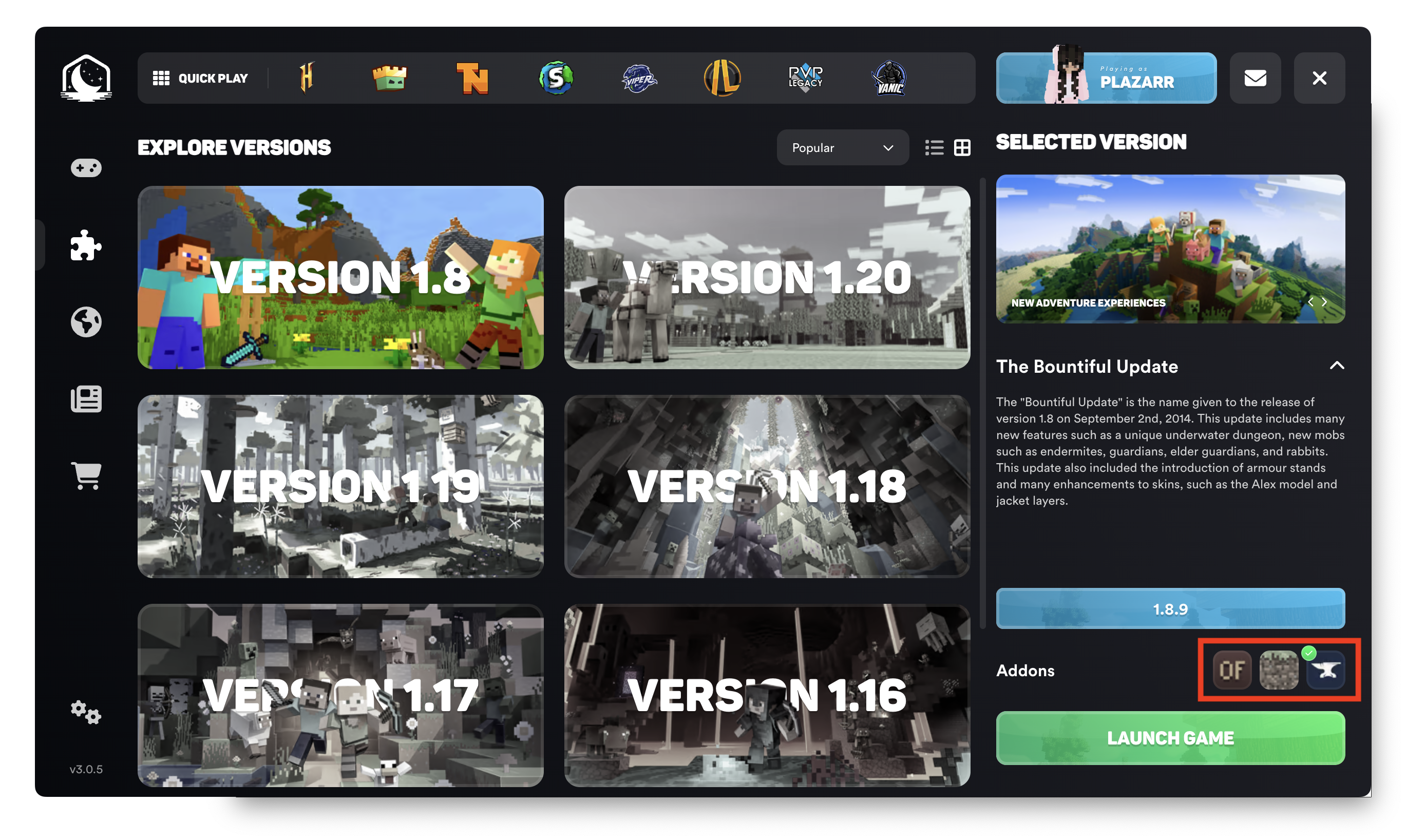
Version addons allow you to use our toolchain system to choose which mod loader you would like to use for Lunar Client.
These mod loaders have their own unique mods that are only accessible through them.
- 1.8.9 Forge: OptiFine, Replay Mod, SBA, NEU
- 1.12.2 Forge: OptiFine, Replay Mod
- 1.16.5 - 1.21.1 Fabric: Sodium, Iris, Indium, Replay Mod
- Latest minor versions only
- Noxesium on 1.19.4 and 1.20.1
Addons can be easily changed by going into the launch options menu and selecting the correct addon icon below the version number. See the screenshot for reference.
 fresh basin
👍 Let me know how that goes
frozen orbit
can someone help?

 fresh basin
frozen orbit
can someone help?
fresh basin
frozen orbit
can someone help?
Can you try disabling the old version (not delete) and relaunch?
frozen orbit
i did
fresh basin
#📩︱create-ticket so an agent can take a closer look !
static ospreyBOT
How do you create a ticket?
Step 1: Navigate to the #📩︱create-ticket channel and click the button to go to the support website. Alternatively, click here:
Step 2: Click “Sign Up” and create an account.
Step 3: Once you have created an account, click “New Support Ticket” as shown.
Step 4: Fill out all the relevant information regarding your issue or suggestion, submit and wait for a response.
If you require more assistance in creating a ticket, check out this video.
You will receive a reply in up to 48 hours, unless it is a Payment Support ticket in which case it may take longer.
livid pond
Demmons I got lunar to work now can i add modpacks to join my friends server and still have lunar stuff
fresh basin
livid pond
Demmons I got lunar to work now can i add modpacks to join my friends server and...
Great
glad to hear that worked
if you need anything else, don't hesitate to reach out.
livid pond
I do I just asked
livid pond
Can I still use th lunar menu in game
 livid pond
Can I still use th lunar menu in game
fresh basin
yes
static ospreyBOT
If you cannot find a solution to your issue by searching the channels past messages, using Ctrl+F, please create a ticket at support.lunarclient.com
 queen yarrow
It worked a bit better
 frozen sapphire
hello, i have a issue my menu is starting as normal menu even though I have the setting done right?


 frozen sapphire
not to say shit but that ui is dogshit
fresh basin
frozen sapphire
not to say shit but that ui is dogshit
If you have any suggestions on what you'd like to see different
feel free to make a suggestion
heres how :
static ospreyBOT
Would you like to make a suggestion for the Lunar Client?
To make a suggestion, simply head over to the #1070121335902175313 channel, and make a New Post. Please make sure your suggestion follows the Post Guidelines.
Alternatively, you can visit our support website at support.lunarclient.com, sign-up, and make a ticket explaining your suggestion there!
 eternal pulsar
how tf do i get that icon gone lol it constantly floats around when i got shaders on..
 fresh basin
eternal pulsar
how tf do i get that icon gone lol it constantly floats around when i got shade...
fresh basin
eternal pulsar
how tf do i get that icon gone lol it constantly floats around when i got shade...
This is a reported issue
sadly there is no fix for it right now
fresh basin
You could try a different shader in the meantime
eternal pulsar
its only with iris?
fresh basin
I have no ETA on when this will be fixed
I beleive its with shaders in general with certain cosmetics
eternal pulsar
mm okok ill just play without shaders until its fixed
 main trail


 static ospreyBOT
📢 Free Cosmetics? Here's How to Get Them!
- Launch into any version of Lunar Client.
- Hover over the 'link' button near the account manager (top-left), then click.
- Complete the prompts in your browser to claim your cosmetics!
Note that leaving the Discord server will remove these cosmetics.
 cobalt jungle
@fresh basin the guide didn't change nothing :(
fresh basin
What version and addon?
cobalt jungle
1.21.8 and fabric
 mild mica
eternal pulsar
how tf do i get that icon gone lol it constantly floats around when i got shade...
mild mica
eternal pulsar
how tf do i get that icon gone lol it constantly floats around when i got shade...
is that your lunar+ color?
 native iris
why my lunar crash when i start him
fresh basin
native iris
why my lunar crash when i start him
Do you get a crash message?
if so , can you provide a screenshot?
eternal pulsar
mild mica
is that your lunar+ color?
ye ig ?
fresh basin
cobalt jungle
1.21.8 and fabric
Sorry to hear, can you try making a ticket for this?
cobalt jungle
fresh basin
Sorry to hear, can you try making a ticket for this?
alr
native iris
fresh basin
if so , can you provide a screenshot?
 mild mica
eternal pulsar
ye ig ?
mild mica
eternal pulsar
ye ig ?
which version + shaders?
eternal pulsar
mild mica
which version + shaders?
1.21.10 iris shaders
queen yarrow
well i downloaded ferrite core i was able to play longer without lags but it started again
eternal pulsar
 wintry axle
Name of shader like BSL
wintry axle
Name of shader like BSL
 wintry axle
eternal pulsar
wintry axle
eternal pulsar
Hm nothing should be wrong
Try changing the shader version
Not game version shaders one
wintry axle
eternal pulsar
Wait are u using 2?
wintry axle
queen yarrow
well i downloaded ferrite core i was able to play longer without lags but it sta...
Lunar?
queen yarrow
wintry axle
Lunar?
Yess on the lunar client
mild mica
eternal pulsar
what if you just use complementary shaders - reimagined (do a fresh download from modrinth)
eternal pulsar
mild mica
what if you just use complementary shaders - reimagined (do a fresh download fro...
iill try it ltr dont feel like restarting game rn lolz
mild mica
you don’t have to restart your game to add shaders but no worries :)
basically it might be just a one off issue with your specific shader pack
eternal pulsar
o lol im so stupid how do i play for 4+yrs with mods and not know this lolll
eternal pulsar
mild mica
basically it might be just a one off issue with your specific shader pack
it prob is bcs i put on another and it didnt do it thats just a very taxing one but ill try different shaders when i dont feel like playing
ty for help
mild mica
ofc!
static ospreyBOT
If you cannot find a solution to your issue by searching the channels past messages, using Ctrl+F, please create a ticket at support.lunarclient.com
native iris
Why ???? pls help me
 fresh basin
native iris
Why ???? pls help me
fresh basin
native iris
Why ???? pls help me
Can you try these steps:
static ospreyBOT
Are you having trouble with logging into your Minecraft account?
Windows:
1. Fully close Lunar Client, using Task Manager's "End Task",
2. Open the official Minecraft launcher,
3. Log out of your Microsoft account, and then log back in,
4. Launch any version of Minecraft and connect to any server,
5. Close Minecraft and then re-open Lunar Client.
macOS:
1. Fully close Lunar Client, using Activity View,
2. Open the official Minecraft launcher,
3. Log out of your Microsoft account, and then log back in,
4. Launch any version of Minecraft and connect to any server,
5. Close Minecraft and then re-open Lunar Client.
queen yarrow
Guys please help me always when i play minecraft on lunar client i can play like for 10 minutes without lags and fps drops but after i get massive fps drops lags even tho i get 400 fps on minecraft. I downloaded several mods like sodium and ferriteCore but they didnt help me either. Always if i close the game there is a native crash log but ive put the crash log in mcl.ogs and it didnt show me any crashes. I updated my graphics drivers ( Nividia) and i allocated Minecraft 6GB Ram ( i have32 Gb ram so it should be fine) but it still dosent fix this issue and now im sitting here not knowing what to do can someone please dm me or help me here i would be so grateful and i appreciate every answer
 rapid pond
yo so when i launch my game i crash and it says incompatible mods but i disabled the ones i just downloaded and it still says that
fresh basin
rapid pond
yo so when i launch my game i crash and it says incompatible mods but i disabled...
Are all your mods up to date
fresh basin
queen yarrow
Guys please help me always when i play minecraft on lunar client i can play like...
Do you get a crash message?
If so can you provide a screenshot?
rapid pond
yeah it was worrking till like 30 mins ago when i downloaded the mods but i disabled those after the first crash
fresh basin
All of the new mods you added you disabled again?
rapid pond
yeah
rapid pond
yep it just says incompatible mods
queen yarrow
fresh basin
Do you get a crash message?
I get one but I’m not on my pc rn because it’s 23:54 in Germany but I’ll send them tmrw
rapid pond
sure js a sec
fresh basin
rapid pond
yep it just says incompatible mods
Hmm if you disabled them all? Can you launch as normal
fresh basin
queen yarrow
I get one but I’m not on my pc rn because it’s 23:54 in Germany but I’ll send th...
No worries 🙏 feel free to ping
rapid pond
its all normal but when its supposed to launch i get a crash
im launching rn js a sec
fresh basin
rapid pond
its all normal but when its supposed to launch i get a crash
With 0 mods?
rapid pond
 fresh basin
Can you try with 0 mods installed?
rapid pond
fresh basin
With 0 mods?
i have like 20 mods enabled but i had them before it started crashing
alr
fresh basin
👍
static ospreyBOT
📢 Free Cosmetics? Here's How to Get Them!
- Launch into any version of Lunar Client.
- Hover over the 'link' button near the account manager (top-left), then click.
- Complete the prompts in your browser to claim your cosmetics!
Note that leaving the Discord server will remove these cosmetics.
rapid pond
alr 0 mods enabled ima launch
fresh basin
Okay let me know how that goes
fresh basin
And if you enabled your mods now, does it still crash?
 sage edge
hello
rapid pond
ima try it will take a bit
fresh basin
rapid pond
ima try it will take a bit
No worries at all
fresh basin
sage edge
hello
Hey can I help with anything at all?
fresh basin
fresh basin
🙏 hopefully
queen yarrow
fresh basin
No worries 🙏 feel free to ping
Okay thank you
rapid pond
ima check logs if it crashes
fresh basin
rapid pond
ima check logs if it crashes
If you find anything you can show me too
fresh basin
🙏
rapid pond
TYY
rapid pond
yeah like idk why tht happened lwk
fresh basin
🤷
rapid pond
alr well ty ima go on mcpvp and hope it doesnt crash
fresh basin
If it does, ping me
rapid pond
alr
sage edge
thx
fresh basin
 no worries
 fresh basin
Hmmm interesting, if you were to relaunch does it not launch at all?
And go straight to the crash
rapid pond
ima try
like it launched normally when i told you but as soon as i hit a kid it js died
fresh basin
Could be worth checking (if it launches) if this happens on single player
rapid pond
ill see
fresh basin
Could be server related to why you’re crashing
fresh basin
Hmm, can you try a different server?
fresh basin
If it happens again, can you send your logs?
rapid pond
will do
 bronze relic
@fresh basin i have jams audio on but its not playing anything. be a goodboy and help me
fresh basin
bronze relic
<@528610458274365481> i have jams audio on but its not playing anything. be a go...
….
Try relaunching
eternal pulsar
i cant use video pop out with lunar?
fresh basin
eternal pulsar
i cant use video pop out with lunar?
Can you elaborate?
eternal pulsar
so like on yt u can popout a video meaning u can watch it in small while doing other things on other tabs
fresh basin
Does it work with Vanilla Minecraft?
eternal pulsar
but everytime i do it it does not show on my lunar but everywhere else it does
eternal pulsar
fresh basin
Does it work with Vanilla Minecraft?
yes and also with feather
fresh basin
Interesting, can you try enable borderless fullscreen? See if that helps
Right shift > mods > settings
static ospreyBOT
📢 Free Cosmetics? Here's How to Get Them!
- Launch into any version of Lunar Client.
- Hover over the 'link' button near the account manager (top-left), then click.
- Complete the prompts in your browser to claim your cosmetics!
Note that leaving the Discord server will remove these cosmetics.
eternal pulsar
fresh basin
Right shift > mods > settings
works now ty i thought my mod would do it but no
fresh basin
Perfect glad to hear that worked
 upper blaze
how can i get the hit color to look like badlions with just armor overlay enabled, no color customization
fresh basin
The settings don’t transfer from client to client, you could just use the badlion version
upper blaze
and is there a way to make it so u can hold W out of inventories
like on badlion i can hold W and when i close the inventory it walks fwd without having to repress
upper blaze
fresh basin
The settings don’t transfer from client to client, you could just use the badlio...
wait wdym
is there another setting in lunar besides the hit color mod which colors armor
 umbral seal
yo guys
\i bought another mc account and now when i log into mc with lunar it says connecting
can some1 help?i can screen share
@fresh basin
 normal sage
fresh basin
The settings don’t transfer from client to client, you could just use the badlio...
normal sage
fresh basin
The settings don’t transfer from client to client, you could just use the badlio...
omg staff how do I download free lunar client 2026 working no scam
 unique barn
is there a way to show my tiktok chat overlay over lunar client on full screen bc my chat dissapears unless im not in fullscreen/f11?
 analog sable
My mods dissapear everytime there is an update
and certain ones that i had arent popping up when i search them
 gritty nexus
yo i got an issue where it keeps installing an old version of sodium so my game crashes over and over
 north harbor
so my account got hacked which is called and im having trobble joining servers because when i do it says invalid game session but ive tried everything to fix it and i need help

i couldnt type it or it would do this Elzyyy
fresh basin
normal sage
omg staff how do I download free lunar client 2026 working no scam
Download lunar from the official website
Download Lunar Client, the most popular all-in-one modpack for all modern versions of Minecraft with countless mods, cosmetics, boosted frames, and a single installation.
gritty nexus
fresh basin
Download lunar from the official website
https://www.lunarclient.com/download
do yk anything abt the base-modpack thing?
static ospreyBOT
If you cannot find a solution to your issue by searching the channels past messages, using Ctrl+F, please create a ticket at support.lunarclient.com
gritty nexus
when u put the right version in then it gets deleted and i js cant play the game

 analog sable
wy do the mods dissapear after every update
 meager canyon
how do i disable these?
 wintry axle
meager canyon
how do i disable these?
wintry axle
meager canyon
how do i disable these?
Looks like skyhanni or smth like that?
 chilly karma
waypoints are buggin in hcf servers
 spare olive
gritty nexus
when u put the right version in then it gets deleted and i js cant play the game
spare olive
gritty nexus
when u put the right version in then it gets deleted and i js cant play the game
same
 signal barn
does dulkir mod not work on lunar I can't download it
like in the lunar client config it says incompatible
 lime oar
gritty nexus
when u put the right version in then it gets deleted and i js cant play the game
lime oar
gritty nexus
when u put the right version in then it gets deleted and i js cant play the game
im also having this
gritty nexus
lime oar
im also having this
i found a fix
transfer all ur mods to a custom profile and if u want to keep the lunar stuff js choose lunar 1.21.11 or whatever ur using then import the mods/exported profile
gritty nexus
spare olive
same
.
 plush relic
hey on snapshot 8 of lunar client, does anyone know how to access the friends list?
lime oar
gritty nexus
i found a fix
please share
gritty nexus
lime oar
please share
gotchu

wait hold on im slow
go to ur installation

then hit the settings in the top right and you go to export

export ur profile and once u have done that click the create profile at the boittom left

u can drag or search for it then the base-modpack wont affect ur launch and you can use normal lunar client

tell me if that works @lime oar
lime oar
gritty nexus
tell me if that works <@724688771924099123>
doing rn
 brazen tapir
why lunar doesnt add my account though i login
gritty nexus
brazen tapir
why lunar doesnt add my account though i login
uh js try to log in and log out and re log in
lime oar
@gritty nexus could you dm me your exported pack?
brazen tapir
gritty nexus
uh js try to log in and log out and re log in
i try it 3 times
gritty nexus
lime oar
<@1346265703707185273> could you dm me your exported pack?
uh i mean its gonna have all of my mods
lime oar
gritty nexus
uh i mean its gonna have all of my mods
thats fine i can edit it
brazen tapir
it still appear connecting
 gritty nexus
lime oar
thats fine i can edit it
gritty nexus
lime oar
thats fine i can edit it
wait so js like create a new profile with the wizard on the "Create New Profile" screen
gritty nexus
brazen tapir
it still appear connecting
restart pc myb and log in on the launcher screen not the instance
lime oar
my problem is it keeps trying to change the sodium version and it just never changes it
brazen tapir
gritty nexus
restart pc myb and log in on the launcher screen not the instance
i log on the launcher and start launching
gritty nexus
lime oar
my problem is it keeps trying to change the sodium version and it just never cha...
wait wym
lime oar
ive got addons like sodium extra and whatnot
gritty nexus
like ur sodium isnt updating?
lime oar
idk how to explain it but yeah ig its not updating
gritty nexus
k this is what i did
i removed the wrong sodium then put in the right one (the newer version)
then i exported the profile
then imported into the create a new profile and it wont be changed
 wispy breach
gritty nexus
i removed the wrong sodium then put in the right one (the newer version)
wispy breach
gritty nexus
i removed the wrong sodium then put in the right one (the newer version)
If you don’t want to make a new lunar profile you can just DISABLE the older version
And download the newer one
It is a known issue
And it will get improved in the future
For lunar profiles
It will not install bundled mods for you
gritty nexus
wispy breach
If you don’t want to make a new lunar profile you can just DISABLE the older ver...
no it will re-enable for me bc it is reuploaded by the base-mcpack that holds the nice mods like ferritecore sodium etc
it deletes the new version and adds the old version basically
wispy breach
gritty nexus
no it will re-enable for me bc it is reuploaded by the base-mcpack that holds th...
Because you deleted them.
static ospreyBOT
📢 Free Cosmetics? Here's How to Get Them!
- Launch into any version of Lunar Client.
- Hover over the 'link' button near the account manager (top-left), then click.
- Complete the prompts in your browser to claim your cosmetics!
Note that leaving the Discord server will remove these cosmetics.
wispy breach
I said disable them not delete them
wispy breach
Then you might do something wrong
You can try to upgrade those bundled mods
If the older version shows up
Then disable them
/preinstalledmods
Run this discord command to know more about the bundled mods
gritty nexus
wispy breach
You can try to upgrade those bundled mods
i tried to replace the preinstalled mods and that was just deleted and the old one was put in there
wispy breach
wispy breach
You can try to upgrade those bundled mods
.
gritty nexus
i mean mine is fixed so i dont rly need it ima js have to launch with my own profile
lime oar
@wispy breach i kep getting the same problem of me having sodium, me launching the game, it telling me to disbale sodium 0.8.12, i disable it, launch if, it wants 0.8.6 or something, i click auto fix, then launch, over and over and over again
wispy breach
lime oar
<@995518596329525338> i kep getting the same problem of me having sodium, me lau...
I’d say auto fix is a bit broken in this situation since it is based on your crash logs
Can you tell me how did you disable 0.8.12
lime oar
fun so the launch is broken
lime oar
wispy breach
Can you tell me how did you disable 0.8.12
i got into the setting and click the disable button
it keep reenabling the top one
 wispy breach
lime oar
it keep reenabling the top one
wispy breach
lime oar
it keep reenabling the top one
Click on the version drop down
Change it to the version you want
lime oar
wispy breach
Change it to the version you want
i want the latest version
wispy breach
lime oar
i want the latest version
can you check what the last few lines of your logs say?
click on that
 static ospreyBOT
📢 Free Cosmetics? Here's How to Get Them!
- Launch into any version of Lunar Client.
- Hover over the 'link' button near the account manager (top-left), then click.
- Complete the prompts in your browser to claim your cosmetics!
Note that leaving the Discord server will remove these cosmetics.
brazen tapir
why i logged account on launcher screen and started game
in game it doesnt appear my acc
still have to re login many times
 warm lantern
Cannot launch Lunar Client (not even the launcher) on Ubuntu 26.04. I tried making a ticket but since I cannot even launch the launcher, I don't have a log ID to provide in the ticket. Subsequently I got an automated email response saying they cannot help without a valid log. I provided errors in the ticket, along with other information. Will it still be investigated?
 tawdry grove
north harbor
tawdry grove
north harbor
Added you on Discord
 indigo charm
uhh can someone help me figure out my replay mod thing
i recorded some stuff with the replay mod thing but when i go to the replay thing it just shows a black screen and the bar doesnt move
 left ledge
I keep getting this error

 viscid turtle
i had the same thing it was because i was streaming on discord
left ledge
viscid turtle
i had the same thing it was because i was streaming on discord
i factory reseted my pc today so Idk what is going on now it worked find before
js gonna use feather until I find a fix honestly
 keen snow
can someone help me my better name visibility is not working in lunar
 tame widget
keen snow
can someone help me my better name visibility is not working in lunar
tame widget
keen snow
can someone help me my better name visibility is not working in lunar
use feather client
@ownner my luna client giving eror in set up TT😭
 rancid dawn
I tried adding my alt account to lunar, keeps saying this. Followed all the steps in /loginissues (didnt work), any servers I try join will say "invalid session", and idk what to do
It keeps telling me "invalid session".


@community please support me 😢
 umbral raptor
Has anyone had issues with adding mods in 1.89?
 austere silo
umbral raptor
Has anyone had issues with adding mods in 1.89?
austere silo
umbral raptor
Has anyone had issues with adding mods in 1.89?
This is because mod loading isn’t supported for lunar forge versions just yet. It’s a work in progress
austere silo
rancid dawn
I tried adding my alt account to lunar, keeps saying this. Followed all the ste...
If you tried completely restarting lunar through task manager, restarting pc, & waiting an hour before retrying, please make a ticket #📩︱create-ticket
umbral raptor
austere silo
This is because mod loading isn’t supported for lunar forge versions just yet. I...
that makes sense ive been trying to trouble shoot for weeks lol
do yk if theres any planned eta
yeah....
 warm lantern
Cannot launch Lunar Client (not even the launcher) on Ubuntu 26.04. I tried maki...
warm lantern
warm lantern
Cannot launch Lunar Client (not even the launcher) on Ubuntu 26.04. I tried maki...
.
 fathom birch
I'm trying load up minecraft with the mod squat grow, but everytime i open my launcher is crashes. I've got the right version and fabric API. What else do i need or doing wronng? Version 26.1.2 By the way. @austere silo
warm lantern
fathom birch
I'm trying load up minecraft with the mod squat grow, but everytime i open my la...
What error is there?
fathom birch
warm lantern
What error is there?
Let me check.
fathom birch
warm lantern
What error is there?
Its an Unknown Minecraft crash.
static ospreyBOT
If you cannot find a solution to your issue by searching the channels past messages, using Ctrl+F, please create a ticket at support.lunarclient.com
 slim smelt
My mouse is suddenly fine on lunar client, then I move my mouse alot in 360s then all of a sudden it has drift, when i spin my mouse in a 360 then let go it should stop but instead it goes and slows down slowly.
wintry axle
slim smelt
My mouse is suddenly fine on lunar client, then I move my mouse alot in 360s the...
Sir wth dym 😭
 wintry axle
 visual pawn
Why is it saying please try again
visual pawn
Why is it saying please try again
What kinda test is that
visual pawn
wintry axle
What kinda test is that
I'm just trying to sign in
wintry axle
visual pawn
I'm just trying to sign in
Perhaps it’s smth like.. mouse pressed or not check..?
visual pawn
wintry axle
Perhaps it’s smth like.. mouse pressed or not check..?
it's saying to press and hold and when the bar is filled a tick sign is coming and after loading for few secs it's saying please try again
 crimson forum
am i not able to load mods into 1.8.9
 calm bobcat
crimson forum
am i not able to load mods into 1.8.9
calm bobcat
crimson forum
am i not able to load mods into 1.8.9
Mine weren’t loading either
crimson forum
werent, or still arent
im just trying to use a hud mod so i can see hotkeys but theres no mods besides replay and forge

 wispy breach
crimson forum
wispy breach
crimson forum
custom mod loading is not supported on 1.8.9
crimson forum
ah
its there no possible way to get them in there, while still being able to use lunar
wispy breach
austere silo
This is because mod loading isn’t supported for lunar forge versions just yet. I...
I think solike has the answer to this question
static ospreyBOT
If you cannot find a solution to your issue by searching the channels past messages, using Ctrl+F, please create a ticket at support.lunarclient.com
 subtle prawn
Why can't I open version 1.8.9?
 fluid ridge
anyone is using cobbleverse modpack? for me its crashing
i have the logs if anyone can help me
subtle prawn
it only happens in this version and it crashes
 fluid ridge
anyone is using cobbleverse modpack? for me its crashing
fluid ridge
fluid ridge
anyone is using cobbleverse modpack? for me its crashing
this happens to me
 signal barn
how do I download dulkir mod on lunar
 fervent musk
fluid ridge
this happens to me
fervent musk
fluid ridge
this happens to me
if you are using mods your best bet is to disable them all and add them back one by one to see which is crashing it
fluid ridge
Alr
 lunar solstice
fluid ridge
this happens to me
lunar solstice
fluid ridge
this happens to me

 austere cobalt
Why does my game freeze everythime i open my inventory? https://medal.tv/games/minecraft/clips/mLxMEc6quCnDByVXi?invite=cr-MSwzN2wsNDgzODYwNjcw

Watch Untitled by marnixify and millions of other Minecraft videos on Medal. #minecraft
with any gui*
 granite jacinth
Bro
Why does lunar drops fps overtime like when I first started lunar it got me like 400fps now it barely gives me 100fps
Why does this happen and what is the fix?
 digital dove
granite jacinth
Why does lunar drops fps overtime like when I first started lunar it got me like...
digital dove
granite jacinth
Why does lunar drops fps overtime like when I first started lunar it got me like...
idk
 mighty cloak
Hello, so why isnt the potion effects icons displaying even tho I have all those kinda settings that turn them off I have all those mods OFF so why is this happening
tag me if you find a selution
 fathom bloom
hello i completed the medal quest and i reedemed the reward "pet" and i didn't get it inmy locker.
 autumn oar
fathom bloom
autumn oar
fathom bloom
why my cosmetic bugged
 mild mica
fathom bloom
why my cosmetic bugged
mild mica
fathom bloom
why my cosmetic bugged
it's a known bug that happens when using first person cosmetics with shaders
 fathom bloom
mild mica
it's a known bug that happens when using first person cosmetics with shaders
fathom bloom
mild mica
it's a known bug that happens when using first person cosmetics with shaders
?
mild mica
it's a bug, to fix it you can either unequip your flame hands or turn shaders off
 latent bronze
subtle prawn
Why can't I open version 1.8.9?
latent bronze
subtle prawn
Why can't I open version 1.8.9?
You I think ya gonna give that a try one more time. I experienced sam difficulty trying to sign in
static ospreyBOT
If you cannot find a solution to your issue by searching the channels past messages, using Ctrl+F, please create a ticket at support.lunarclient.com
 rapid elm
sm1 help me plzz
 fresh basin
rapid elm
sm1 help me plzz
fresh basin
rapid elm
sm1 help me plzz
Can you try launching your game as admin?
rapid elm
fresh basin
Can you try launching your game as admin?
alr lemme try
fresh basin
Let me know how that goes
rapid elm
fresh basin
Let me know how that goes
the problem remains the same
@fresh basin i've created a ticket on lunar's web
fresh basin
rapid elm
the problem remains the same
Sorry to hear can you try checking your RAM allocation
static ospreyBOT
How much ram should I allocate to Lunar Client?
To change your Lunar Client's allocated ram, head to the launcher's settings (bottom left) and look for "Allocated Memory".
- Allocate 1.0GB if your PC has 4.0GB installed,
- Allocate 2.0GB if your PC has 6.0GB installed,
- Allocate 3.0GB if your PC has 8.0GB installed,
- Allocate 4.0GB if your PC has more than 8.0GB installed.
fresh basin
If none of these steps work, waiting for a reply from a ticket is great
rapid elm
fresh basin
Sorry to hear can you try checking your RAM allocation
i have allocated 3gb of ram
fresh basin
How much does your system have?
rapid elm
8
fresh basin
That’s perfect. Can you try changing your DNS?
static ospreyBOT
Do you need to change your DNS?
**1. **Open the Control Panel and click on Network and Internet
2. Next click on Network and Sharing Center then Change Adapter Settings.
3. Right click on the network you are connected to and press Properties.
4. Click on Internet Protocol Version 4 and press Properties.
5. Write down the existing DNS for future reference, then click Use the following DNS server addresses.
6. Replace the addresses with 1.1.1.1 and 1.0.0.1.
7. Press OK, then Close and restart Lunar Client!
 fathom bloom
maybe its network issue
fresh basin
fathom bloom
maybe its network issue
Possible or sometimes it can be something blocking Lunar (like a firewall/ antivirus)
If that guide above doesn’t work, check your firewall and antivirus
rapid elm
fresh basin
If that guide above doesn’t work, check your firewall and antivirus
i even tried reinstalling clinet and disable firewall, but it still doesn't work
fathom bloom
you can unisnsall and install again
rapid elm
fathom bloom
you can unisnsall and install again
ye i did that 2nd time today
fresh basin
rapid elm
i even tried reinstalling clinet and disable firewall, but it still doesn't work
No worries, can you wait for a reply from the ticket you made? I’ve seen a few users experience this issue
An agent will get back to you asap
rapid elm
fresh basin
No worries, can you wait for a reply from the ticket you made? I’ve seen a few u...
alr no worries, tq for ur quick support 🙂
fresh basin
No worries, if you need anything else let me know 🙏
rapid elm
fresh basin
No worries, if you need anything else let me know 🙏
is this a bug or smtg?
fresh basin
Not too sure, it used to be connection related but I’ve seen a few users that experience this
It’s likely a bug of some description but reporting it via a ticket is the best way forward
They may have a fix that will resolve this issue 🙏
static ospreyBOT
If you cannot find a solution to your issue by searching the channels past messages, using Ctrl+F, please create a ticket at support.lunarclient.com
 grave turtle
9
 dim zephyr
hello
fresh basin
Hey can I help with anything at all?
 pale bridge
are staff applications open!?
 rough tartan
@fresh basin hey, my ticket has been stuck “being processed” for 12 days now could there be any reason for this?
granite jacinth
@austere silo \
granite jacinth
granite jacinth
Why does lunar drops fps overtime like when I first started lunar it got me like...
 mighty veldt
So i was using lunar for something because i didnt want change verisons in my normal mc launcher cause i needed a id code for a server and when i used it and returned back to my normal mc launcher myt fps randomly went down which hasnt happend until now when i use lunar
 celest charm
why cant i launch mod packs with lunar client? it keeps crashing
fresh basin
pale bridge
are staff applications open!?
Chatmod apps are
You can find out more #❓︱faq
fresh basin
rough tartan
<@528610458274365481> hey, my ticket has been stuck “being processed” for 12 day...
Sorry to hear about the delay..
Can you show me what the status of your ticket is?
Is it pending or?
static ospreyBOT
Why am I having FPS issues?
You can improve your FPS significantly by using a variety of different methods to optimize Minecraft.
You can view a detailed blog post written by the Lunar Client Team here, to assist you with the process 😎
fresh basin
granite jacinth
Why does lunar drops fps overtime like when I first started lunar it got me like...
Here’s a guide to help with FPS related issues
But if you have mods, that could cause some dipping
fresh basin
mighty veldt
So i was using lunar for something because i didnt want change verisons in my no...
Have you also tried the FPS guide above?
 earnest oriole
@fresh basin im still getting that issue
fresh basin
earnest oriole
<@528610458274365481> im still getting that issue
Sorry, can you remind me what it is? 😅
earnest oriole
my pack stuck on loading screen
fresh basin
Ah yes, can you send a screenshot again?
granite jacinth
bradar
deemons
i had exact same mods back when i had 400 fps when i first started lunar now i get 100\
earnest oriole
fresh basin
Ah yes, can you send a screenshot again?
u told me to inc my ram allocation frm 3 to 3.5 gb
fresh basin
granite jacinth
i had exact same mods back when i had 400 fps when i first started lunar now i ...
You could still try the FPS guide and then checking your RAM Allocation
static ospreyBOT
How much ram should I allocate to Lunar Client?
To change your Lunar Client's allocated ram, head to the launcher's settings (bottom left) and look for "Allocated Memory".
- Allocate 1.0GB if your PC has 4.0GB installed,
- Allocate 2.0GB if your PC has 6.0GB installed,
- Allocate 3.0GB if your PC has 8.0GB installed,
- Allocate 4.0GB if your PC has more than 8.0GB installed.
fresh basin
earnest oriole
u told me to inc my ram allocation frm 3 to 3.5 gb
Yeah and it’s just still forever loading?
earnest oriole
yea
 hollow quiver
boosteeeeddd woohoo
fresh basin
hollow quiver
boosteeeeddd woohoo
Yippe, you get a few perks you can find here
static ospreyBOT
What perks do I get for boosting the Discord?
Nitro boosting the Discord server will grant you these perks:
• Exclusive pink role and [Nitro] prefix.
• Access to exclusive text and voice channels.
• Bypass the level requirements for most #🎁︱giveaways.
hollow quiver
fresh basin
Yippe, you get a few perks you can find here
awesome!!!
rough tartan
fresh basin
Can you show me what the status of your ticket is?
i’ve had this status for a while now, i created another ticket a few days ago just in case the last one got lost but that ticket hasn’t been answered to either
 fresh basin
earnest oriole
yea
fresh basin
earnest oriole
yea
Does it happen on all versions?
fresh basin
rough tartan
i’ve had this status for a while now, i created another ticket a few days ago ju...
Is it the same person dealing with the ticket?
earnest oriole
yea ig i dint try other version
fresh basin
It should say who if you click on the ticket
rough tartan
fresh basin
Is it the same person dealing with the ticket?
yeah Limies
fresh basin
Can you click on the ticket and send a screenshot?
earnest oriole
and one more thing it doesnt matter who many times i del my 1.21.11 mods it just keep commng back
fresh basin
earnest oriole
yea ig i dint try other version
Can you try and let me know what happens?
It could be an issue with the mods causing the packs to not load, could you also try without mods
Let me know for both of these things 👍
earnest oriole
okie @fresh basin
fresh basin
Have you bumped the ticket by replying to the ticket?
fresh basin
earnest oriole
okie <@528610458274365481>
Perfect thank you 🙏
rough tartan
fresh basin
Have you bumped the ticket by replying to the ticket?
no i haven’t tried that, i occasionally press the update button though
mighty veldt
fresh basin
Have you also tried the FPS guide above?
I already tried the FPS fixes from the Lunar website, but nothing changed the issue is Lunar itself after using Lunar for a few minutes, then going back to normal Minecraft launcher tt started getting much lower FPS than before. Before using Lunar, everything was fine. It feels like Lunar changed some setting in the background because now even vanilla Minecraft has bad FPS.
earnest oriole
earnest oriole
and one more thing it doesnt matter who many times i del my 1.21.11 mods it jus...
@fresh basin wht abut this issue
fresh basin
rough tartan
no i haven’t tried that, i occasionally press the update button though
I don’t think that does anything on an agents end, a reply should bump it back to the top I believe
rough tartan
alright i’ll give it a try thank you
fresh basin
earnest oriole
<@528610458274365481> wht abut this issue
Try a different version and then relaunch
fresh basin
rough tartan
alright i’ll give it a try thank you
If you still encounter this, can you ping me and send me the ticket ID, I can try forwarding it
But it may also be the case as limies has forwarded it to someone else to look into (which may take longer to receive a reply)
So just keep that in mind 🙏
rough tartan
Alright i’ll keep that in mind, thank you for your help i’ll ping you if i don’t get a response over the next few days
fresh basin
Perfect let me know 🙏
static ospreyBOT
📢 Free Cosmetics? Here's How to Get Them!
- Launch into any version of Lunar Client.
- Hover over the 'link' button near the account manager (top-left), then click.
- Complete the prompts in your browser to claim your cosmetics!
Note that leaving the Discord server will remove these cosmetics.
 flat heart
why does replay mod not work
granite jacinth
fresh basin
You could still try the FPS guide and then checking your RAM Allocation
i did
fresh basin
How much do you have and how much are you allocating?
fresh basin
flat heart
why does replay mod not work
How so?
 balmy hinge
why doesnt my hitboxes show on lunar client im trying to do f3+b and it doesnt work,
i also tried going to the menu > lunar options > hitboxes but when i click to enable it it instantly disables it automatically
i tried reinstalling all my mods, i spent like max 1 hr uninstalling then reinstall each mod, and i tried just playing without mods entirely but nothing workedd
flat heart
fresh basin
How so?
in 1.21.11 its disabled so i have to download the modrinth replay mod but in 1.21 i can use replay without the mod
fresh basin
balmy hinge
why doesnt my hitboxes show on lunar client im trying to do f3+b and it doesnt w...
What version?
balmy hinge
fresh basin
What version?
1.21.11 fabric
fresh basin
balmy hinge
why doesnt my hitboxes show on lunar client im trying to do f3+b and it doesnt w...
Hmm can you see them on a new profile?
balmy hinge
fresh basin
Hmm can you see them on a new profile?
no
fresh basin
balmy hinge
no
Can you please make a ticket #📩︱create-ticket as I am unsure of what’s causing this
Sorry about that
fresh basin
flat heart
in 1.21.11 its disabled so i have to download the modrinth replay mod but in 1.2...
Can you provide a screenshot?
earnest oriole
Username: WasxhedLT3
UUID: 076b4b3e059c4a70bed7958a2901ce37
Launch ID: de8a6851-13e8-4c52-87db-e8c9d05a2317
Branch: master
Crash ID: null
Allocated Memory: 3591/8100
Resolution: 720x1280
Fullscreen: true
Subversion: 1.21.11
Module: fabric
Upload ID: LCLU-JJOJASEVRNLB
@fresh basin
fresh basin
earnest oriole
Username: WasxhedLT3
UUID: 076b4b3e059c4a70bed7958a2901ce37
Laun...
Can you try without mods?
balmy hinge
 fresh basin
If you haven’t already
fresh basin
balmy hinge
Do you use shaders?
balmy hinge
fresh basin
Do you use shaders?
i use iris but theyre not on rn
fresh basin
balmy hinge
i use iris but theyre not on rn
Can you see them in singleplayer?
 late wren
Hey is there a way to get badlion cosmetics with mods ore something so i can play normal lunar with badlion cosmetics
fresh basin
late wren
Hey is there a way to get badlion cosmetics with mods ore something so i can pla...
Nope sadly not
balmy hinge
single player, essential server, multiplayer servers, anywhere i cant see them
earnest oriole
fresh basin
Can you try without mods?
no mods = less fps
late wren
fresh basin
Sorry about that
Damn is there like a suggestions chanell?
fresh basin
balmy hinge
single player, essential server, multiplayer servers, anywhere i cant see them
Okay no worries, can you please make a ticket please?
fresh basin
late wren
Damn is there like a suggestions chanell?
Yep
static ospreyBOT
Would you like to make a suggestion for the Lunar Client?
To make a suggestion, simply head over to the #1070121335902175313 channel, and make a New Post. Please make sure your suggestion follows the Post Guidelines.
Alternatively, you can visit our support website at support.lunarclient.com, sign-up, and make a ticket explaining your suggestion there!
fresh basin
Here’s the guide
balmy hinge
fresh basin
Okay no worries, can you please make a ticket please?
im gonna rn
fresh basin
earnest oriole
no mods = less fps
Does it crash though?
fresh basin
balmy hinge
im gonna rn
If you need any further help, let me know
earnest oriole
not even lauching im waiting
balmy hinge
does it count as a general issue or bug report?
earnest oriole
fresh basin
Does it crash though?
no
fresh basin
earnest oriole
no
It’s likely an issue with one of your mods causing this crash
All I can suggest is adding them back in 1 or 5
(Depending how many mods you have)
To see which one’s causing this crash
fresh basin
balmy hinge
does it count as a general issue or bug report?
Bug
earnest oriole
@fresh basin which version do u use btw
fresh basin
Hm?
 static mist
hi guys
static ospreyBOT
If you cannot find a solution to your issue by searching the channels past messages, using Ctrl+F, please create a ticket at support.lunarclient.com
fresh basin
static mist
hi guys
Can I help with anything at all?

 ebon timber
how do i launch badlion on my lunar i just resetted my pc
fresh basin
ebon timber
how do i launch badlion on my lunar i just resetted my pc


Check these settings
fresh basin
 dim mica
it goes like this forever
dim mica
it goes like this forever
Can you add them?
dim mica
nope
fresh basin
What happens when you try?
ebon timber
omg thanks
dim mica
this
 fresh basin
dim mica
this
fresh basin
dim mica
this
What version is this on?
dim mica
1.21.11
fresh basin
ebon timber
omg thanks
No worries 🙏
fresh basin
dim mica
1.21.11
Can you on a different version
dim mica
idk
fresh basin
earnest oriole
im still getting crash
Without mods?
earnest oriole
no
with mods
i tried with out idk which one causing it i tried many time lauching with some but it was okie
then sudden got crashed and
1.21.1 has same issue where i cant change my pack without restarting
fresh basin
earnest oriole
1.21.1 has same issue where i cant change my pack without restarting
As I said, it’s likely a mod that’s causing this, you’ll have to remove them one by one and then fully remove the one causing the crash
fresh basin
dim mica
<@528610458274365481> js on 21.11
Interesting, if you relaunch this version does it still occur now?
dim mica
yeah
fresh basin
Do you have any mods enabled for this version?
dim mica
yeah
im tryin to disable the ones i didnt had before this started happenin
nothin is changin tho
ok so
yesterday it gave the same problem
but atsome point it fixed
and now its like this again
static ospreyBOT
If you cannot find a solution to your issue by searching the channels past messages, using Ctrl+F, please create a ticket at support.lunarclient.com
ebon timber
how do i use others people badlion profile
i put the folder into the blc profile folder and it doesnt work
fresh basin
It’s likely an issue with one of your mods then
Unfortunately, all I can suggest is to remove them and add them back to see what’s causing this issue
fresh basin
ebon timber
how do i use others people badlion profile
Did you make a new badlion profile first then add the folder?
Into the one that you created
(If that makes sense)
ebon timber
fresh basin
Did you make a new badlion profile first then add the folder?
no i just downloaded the folders and put them into the blc profile folder
last time it worked fine
nevermind turns out i wasnt using optifine
fresh basin
It works now?
 still ibex
does someone know how to fix that

 fresh basin
Is this with or without mods?
static ospreyBOT
Version Addons Information
Version addons allow you to use our toolchain system to choose which mod loader you would like to use for Lunar Client.
These mod loaders have their own unique mods that are only accessible through them.
- 1.8.9 Forge: OptiFine, Replay Mod, SBA, NEU
- 1.12.2 Forge: OptiFine, Replay Mod
- 1.16.5 - 1.21.1 Fabric: Sodium, Iris, Indium, Replay Mod
- Latest minor versions only
- Noxesium on 1.19.4 and 1.20.1
Addons can be easily changed by going into the launch options menu and selecting the correct addon icon below the version number. See the screenshot for reference.
fresh basin
Can you try without?
still ibex
It works without mods
so firstly it says i should get yet another config v3 version, and bc that didnt work i installed the mods that needs yet another config. and now this shows up
fresh basin
Interesting it could be a mod that’s causing this error
I’d suggest removing it for now
Or you could try make a ticket
Attach your logs too so an agent can take a look
static ospreyBOT
How do I find my Lunar Client logs?
1. Open the Lunar Client launcher.
2. Click on the Lunar Client dropdown at the top left corner.
3. Click on the Open Logs Folder button.
4. Click on either Launcher or Game Logs in the dropdown menu.
5. Look for the most recent file according to the Date Modified.
 still ibex
ok thanks ill do that
 honest snow
hey guys i am sure there was a option in lunar to change the skin by entering player name but i cant seem to find it now does anybody know where is that option? or it no longer exist
fresh basin
still ibex
ok thanks ill do that
Let me know how that goes
fresh basin
honest snow
hey guys i am sure there was a option in lunar to change the skin by entering pl...
In the cosmetic loader
Right shift > shirt icon scroll down
Skin changer you can input someone’s IGN
Keep in mind you may need to relog before anyone sees the change
static ospreyBOT
If you cannot find a solution to your issue by searching the channels past messages, using Ctrl+F, please create a ticket at support.lunarclient.com
 crude bough
fresh basin
Keep in mind you may need to relog before anyone sees the change
crude bough
fresh basin
Keep in mind you may need to relog before anyone sees the change
can u help me
crude bough
fresh basin
Sorry about that
okay ty
fresh basin
No worries
crude bough
fresh basin
No worries
is there a mod for color sat u know?
 iron shell
hi someone know why my Minecraft doesn't work?
I start it but is doesn't going?
I strated it at 12:45 last log on command center is at 12:45 too and now it's 13:12
and I restart launcher 5 times, all computer and nothing happened
fresh basin
iron shell
hi someone know why my Minecraft doesn't work?
I start it but is doesn't going?
...
Hmm I’m not too familiar with mods
fresh basin
iron shell
hi someone know why my Minecraft doesn't work?
I start it but is doesn't going?
...
What happens when you try launch?
Can you provide a screenshot?
iron shell
fresh basin
What happens when you try launch?
it loading and in random moment stoped
iron shell
fresh basin
Can you provide a screenshot?
I can do screenshots on my computer

I sent bad logs

 gaunt summit
honest snow
gaunt summit
honest snow
why the n word allowed 😭
 dim herald
I need help
My microsoft account got hacked
And the email changed
Is there a way for Lunar’s backend to see my account details
If cant, remove the subscription, all cosmetics and ban my account for compromised account
I really need help on this
 tender depot
Can someone join the server in my bio to help me with a giveaway? You can leave after joining, it’s just so the invite counts.
static ospreyBOT
If you cannot find a solution to your issue by searching the channels past messages, using Ctrl+F, please create a ticket at support.lunarclient.com
 celest charm
can someone help me find what the java crash code means?
 marsh yoke
 boreal stream
why is gold ingot bigger than iron
boreal stream
why is gold ingot bigger than iron
i havent played blc in a while but its probably from a uhc mod that makes stuff like heads and gold ingots larger for better visibility
 plucky marlin
yo why lunar client crashinbg
 tame grove
why?

 spice cove
why can't I use nvidia shadow play on this??


 storm spoke
 scenic jolt
<@1506354892409798819>
scenic jolt
<@1506354892409798819>
What’s the problem?
 twin warren
tame grove
why?
twin warren
tame grove
why?
try this: if you are using mods, disable them + allocate more ram to your game
twin warren
dim herald
I really need help on this
you should probably #📩︱create-ticket for that
rapid elm
@fresh basin tq for ur support problem fixed
 oak bronze
I can't complete the medal quest.
 digital sequoia
spice cove
why can't I use nvidia shadow play on this??
digital sequoia
spice cove
why can't I use nvidia shadow play on this??
update ur drivers
digital sequoia
oak bronze
I can't complete the medal quest.
why?
digital sequoia
tame grove
why?
i need to see the crash log
tame grove
digital sequoia
i need to see the crash log
1 sec
dim herald
twin warren
you should probably <#673624906201694219> for that
Well i did i want thrm to somehow ban the account
static ospreyBOT
If you cannot find a solution to your issue by searching the channels past messages, using Ctrl+F, please create a ticket at support.lunarclient.com
twin warren
dim herald
Well i did i want thrm to somehow ban the account
perfect
may i ask how the acc was compromised?
digital sequoia
dim herald
Well i did i want thrm to somehow ban the account
i wish u can send a ticket to fix ur brain, u were hacked so i think u got IQ issues
spice cove
digital sequoia
update ur drivers
alr
 proper saffron
how do i make it so lunar makes my zoomify wierd
spice cove
digital sequoia
update ur drivers
wait are you sure?
digital sequoia
spice cove
wait are you sure?
yes, ru gonna keep ur drivers old update?!
spice cove
digital sequoia
yes, ru gonna keep ur drivers old update?!
😭
alr ill trust yaholy fuck
its been a year since my last driver update
dim herald
twin warren
may i ask how the acc was compromised?
Bro someone said to join a server i was acrually dumb enoigh to join man
I hate my life
oak bronze
The lunar mission does not appear in the medal
twin warren
dim herald
Bro someone said to join a server i was acrually dumb enoigh to join man
damn that sucks
well gl w ur ticket
dim herald
They xant do anything
I will buy new mc account
And subscribe lunar+ there
Buy my hypixel levels all gone
oak bronze
oak bronze
The lunar mission does not appear in the medal
help
dim herald
Its not much but it takes time
tame grove
digital sequoia
i need to see the crash log
i allready send
tame grove
tame grove
0\
twin warren
dim herald
They xant do anything
oh you wanted to recover your mc account on lunar support?
oak bronze
The lunar mission does not appear in the medal (helpme)
digital sequoia
dim herald
And subscribe lunar+ there
bro ur wasting ur money
oak bronze
The lunar mission does not appear in the medal (helpme)
twin warren
dim herald
Nah like i want them to ban
you should try to contact microsoft support for that - if you give them enough information to verify it it you they can sometimes lock your account or even get it back ()
dim herald
digital sequoia
bro ur wasting ur money
Bruh
digital sequoia
dim herald
Bruh
u shouldn't have been hacked
dim herald
twin warren
you should try to contact microsoft support for that - if you give them enough i...
I will go try
 dim beacon
can someone help me cuz back i used to get 300+fps and now i get 60 hardly and fps stutter is way too much any help?
and i dont use vsync
fresh basin
rapid elm
<@528610458274365481> tq for ur support problem fixed
Perfect glad to hear it works now
fresh basin
iron shell
I can do screenshots on my computer
Try running your game as admin
twin warren
oak bronze
The lunar mission does not appear in the medal (helpme)
i dont have medal installed on my pc rn but i think you need to click somewhere in the top right and there it should show all the ongoing partnerships
still ibex
everytime i open my recource pack, and close it this happends, and t doesnt go away
 fresh basin
still ibex
everytime i open my recource pack, and close it this happends, and t doesnt go a...
fresh basin
still ibex
everytime i open my recource pack, and close it this happends, and t doesnt go a...
Try run your game as admin
still ibex
kk
fresh basin
Also check your ram allocation
static ospreyBOT
How much ram should I allocate to Lunar Client?
To change your Lunar Client's allocated ram, head to the launcher's settings (bottom left) and look for "Allocated Memory".
- Allocate 1.0GB if your PC has 4.0GB installed,
- Allocate 2.0GB if your PC has 6.0GB installed,
- Allocate 3.0GB if your PC has 8.0GB installed,
- Allocate 4.0GB if your PC has more than 8.0GB installed.
dim beacon
fresh basin
Perfect glad to hear it works now
can u help me aswell?
fresh basin
dim beacon
can u help me aswell?
What can I help with?
dim beacon
fresh basin
What can I help with?
can someone help me cuz back i used to get 300+fps and now i get 60 hardly and fps stutter is way too much any help?
and i dont use vsync
fresh basin
static osprey
Here’s how much you should allocate if you need further help, let me know
 oblique iron
how does fov changer work
 fresh basin
dim beacon
can someone help me cuz back i used to get 300+fps and now i get 60 hardly and f...
fresh basin
dim beacon
can someone help me cuz back i used to get 300+fps and now i get 60 hardly and f...
Can you try this guide?
static ospreyBOT
Why am I having FPS issues?
You can improve your FPS significantly by using a variety of different methods to optimize Minecraft.
You can view a detailed blog post written by the Lunar Client Team here, to assist you with the process 😎
oblique iron
even with everythign set the same i get massive fov jump between spritning and walking
fresh basin
oblique iron
even with everythign set the same i get massive fov jump between spritning and w...
Check your regular Minecraft FOV maybe?
fresh basin
dim beacon
yes i will
Let me know how it goes
oblique iron
fresh basin
Check your regular Minecraft FOV maybe?
set the same as well


nevermind i think i figured it out
fresh basin
Wait what are you wanting to do, no FOV sprint?
dim beacon
fresh basin
Let me know how it goes
there is explanation on optifine not forge...
 hasty wyvern
hey Deemons can you help me
fresh basin
dim beacon
there is explanation on optifine not forge...
Some settings should transfer between the two
fresh basin
hasty wyvern
hey Deemons can you help me
I am currently at work but I can try, how can I help
still ibex
@fresh basin thxx it works now
oblique iron
fresh basin
Wait what are you wanting to do, no FOV sprint?
i was trying to make it only go up by like 1 or 2 but im pretty sure it scales off of the difference from 70 and not just setting the number
fresh basin
still ibex
<@528610458274365481> thxx it works now
Glad to hear 🙏
hasty wyvern
fresh basin
I am currently at work but I can try, how can I help
I just linked account to discord 10 mins ago, and I haven't recieved any cosmetics
dim beacon
fresh basin
Some settings should transfer between the two
ill try that one
fresh basin
oblique iron
i was trying to make it only go up by like 1 or 2 but im pretty sure it scales o...
Did you say you figured it out now or no?
fresh basin
hasty wyvern
I just linked account to discord 10 mins ago, and I haven't recieved any cosmeti...
Relaunch your game
Let me know if that doesn’t work
fresh basin
dim beacon
ill try that one
👍 👍
 zinc stone
anybody knows how to fix this border sky issue in badlion client.....in lunar its works fine but low fps
 oblique iron
fresh basin
Did you say you figured it out now or no?
oblique iron
fresh basin
Did you say you figured it out now or no?
kind of but not really
fresh basin
oblique iron
kind of but not really
Just lower the speed FOV if it’s for the speed when walking
hasty wyvern
It worked Deemons
fresh basin
Well sprinting sorry
hasty wyvern
ty
fresh basin
hasty wyvern
It worked Deemons
Perfect glad to hear
static ospreyBOT
If you cannot find a solution to your issue by searching the channels past messages, using Ctrl+F, please create a ticket at support.lunarclient.com
oblique iron
https://medal.tv/games/minecraft/clips/mLEZXi2V7xmeInnZN?invite=cr-MSw3VHUsMjY3MDQ0NjY&v=6
well im not sure how to explain this

Watch Untitled by kai6451 and millions of other Minecraft videos on Medal. #minecraft
hasty wyvern
uhh demons, in the glint colorizer in lunar, is there a way to turn how intense the colored glint is?

 fast breach
how do i fix the lunar client memory going to about 90% and than going back down to about 13% (memory leak)
hasty wyvern
I think its theres a mod that fixes it
fast breach
whats it called ferritcore?
fast breach
o
twin warren
hasty wyvern
I think it is MemoryLeakFix
it was called memory leak fix in legacy versions
now its ferritecore
hasty wyvern
ohhh
fast breach
i have it but it still doesnt work
twin warren
try to use these jvm flags "-XX:+UseZGC -XX:+ZGenerational"
hasty wyvern
uhh, discord cosmetics bug?
 fast breach
?
twin warren
fast breach
i have it but it still doesnt work
and how much ram do you have allocated
fast breach
twin warren
and how much ram do you have allocated
8.2gb
twin warren
fast breach
8.2gb
how much do you have on your system
fast breach
twin warren
how much do you have on your system
32gb
twin warren
hasty wyvern
how do I fix this
you cant fix it at the moment
its a known bug with shaders and first person cosmetics
but i think they are working on a fix
fast breach
jorei what should i do i have 56 mods on 1.21.11
and also have ferritecore and it doesnt help
twin warren
fast breach
jorei what should i do i have 56 mods on 1.21.11
go to your profile settings, turn on advanced mode and put this in your jvm arguments "-XX:+UseZGC -XX:+ZGenerational"


 twin warren
hasty wyvern
ty for telling
twin warren
hasty wyvern
ty for telling
np
fast breach
what does that do
twin warren
fast breach
what does that do
it uses a newer garbage collector system for java (which is essentially more efficient memory management)
tell me if it helps
fast breach
so should i just put -XX:+UseZGC -XX:+ZGenerational or the n7umbers with how u did it
twin warren
no do not put the numbers they wont do anything anyways
fast breach
ok
twin warren
just the string i sent u
fast breach
this right
 twin warren
yes now click on the save icon on the right and relaunch
fast breach
ok
static ospreyBOT
If you cannot find a solution to your issue by searching the channels past messages, using Ctrl+F, please create a ticket at support.lunarclient.com
 maiden zodiac
what should I do if I try to launch the game and it says this
 fast breach
twin warren
yes now click on the save icon on the right and relaunch
fast breach
twin warren
yes now click on the save icon on the right and relaunch
tysm it worked im pretty suyre it goes from like 60% to like 30% and its stable thank you
twin warren
fast breach
tysm it worked im pretty suyre it goes from like 60% to like 30% and its stable ...
glad i could help
twin warren
maiden zodiac
what should I do if I try to launch the game and it says this
probably just create a ticket at #📩︱create-ticket and send them your crash log
fresh basin
Anyone need help?
 obsidian wraith
fresh basin
Anyone need help?
obsidian wraith
fresh basin
Anyone need help?
me
fresh basin
Sure what’s the issue?
fresh basin
oblique iron
https://medal.tv/games/minecraft/clips/mLEZXi2V7xmeInnZN?invite=cr-MSw3VHUsMjY3M...
Can you reset the settings and let me know if that helps?
 frank sierra
does installing a modpack in lunar also install the configs and options from that modpack?
fresh basin
Should do I’d assume
frank sierra
where would those configs be stored?
frank sierra
yes
fresh basin
C:\Users<YourName>.lunarclient\offline\multiver\instances\
You could check here
If this doesn’t work let me know
frank sierra
alr thx
fresh basin
👍
frozen orbit
When I launch Minecraft, another instance of Sodium pops up for no reason and the game crashes can someone help?
 frozen orbit
 fresh basin
frozen orbit
fresh basin
frozen orbit
What version and addon?
static ospreyBOT
If you cannot find a solution to your issue by searching the channels past messages, using Ctrl+F, please create a ticket at support.lunarclient.com
Version Addons Information
Version addons allow you to use our toolchain system to choose which mod loader you would like to use for Lunar Client.
These mod loaders have their own unique mods that are only accessible through them.
- 1.8.9 Forge: OptiFine, Replay Mod, SBA, NEU
- 1.12.2 Forge: OptiFine, Replay Mod
- 1.16.5 - 1.21.1 Fabric: Sodium, Iris, Indium, Replay Mod
- Latest minor versions only
- Noxesium on 1.19.4 and 1.20.1
Addons can be easily changed by going into the launch options menu and selecting the correct addon icon below the version number. See the screenshot for reference.
fresh basin
Sorry just which version
frozen orbit
1.21.1
fresh basin
Are you suing the correct version of sodium?
frozen orbit
yes
fresh basin
Can you send your logs?
frozen orbit
here?

 fresh basin
Hmmm it may be the sodium version you’re using causing issues with the mods you’re using
I’ll take a look at your logs when you send them over see what I can see
frozen orbit
check dms
 feral flicker
how to have a badlion in lunar client launcher
fresh basin
frozen orbit
check dms
Perfect just seen 2 moments
fresh basin
feral flicker
how to have a badlion in lunar client launcher


Check these screenshots
plucky marlin
atleast is this whats crashing it
maiden zodiac
what should I do if I try to launch the game and it says this
 plucky marlin
atleast is this whats crashing it
plucky marlin
plucky marlin
atleast is this whats crashing it
nvm i fixed it
queen yarrow
fresh basin
Try this version of sodium
hi i had a error where i had fps drops and lags even tho i have FerriteCore and sodium installed and you asked for the crash log.
I pasted the log in to mcl. ogs and it said 1 error
i cant send it here but i can send a screenshot


Idk if its really the issue of the fps drops and the lags
fresh basin
maiden zodiac
what should I do if I try to launch the game and it says this
Are you trying to load mods
fresh basin
frozen orbit
nvm its working now i deleted one mod
Great glad to hear it works now
fresh basin
queen yarrow
Can you make a ticket
Be sure to attach your logs so an agent can take a look
static ospreyBOT
How do I find my Lunar Client logs?
1. Open the Lunar Client launcher.
2. Click on the Lunar Client dropdown at the top left corner.
3. Click on the Open Logs Folder button.
4. Click on either Launcher or Game Logs in the dropdown menu.
5. Look for the most recent file according to the Date Modified.
queen yarrow
fresh basin
Can you make a ticket
Okay ill do it later
maiden zodiac
fresh basin
Are you trying to load mods
which mods
queen yarrow
and Thanks for trying to help
 shadow wagon
did the cobbleverse mod got fixed?
fresh basin
shadow wagon
did the cobbleverse mod got fixed?
Don’t believe so but you can always try
shadow wagon
ok
fresh basin
queen yarrow
Okay ill do it later
If you need further help let me know
static ospreyBOT
If you cannot find a solution to your issue by searching the channels past messages, using Ctrl+F, please create a ticket at support.lunarclient.com
fresh basin
maiden zodiac
which mods
Any mods at all
What version and addon are you trying to load
fresh basin
maiden zodiac
yea i have 40+ mods
Are you able to launch without mods?
It’s likely a mod that’s causing this crash
maiden zodiac
fresh basin
Are you able to launch without mods?
I'll check it out now
fresh basin
👍
maiden zodiac
yes i can
fresh basin
It’s likely a mod that’s causing this
Since you have so many mods, can you remove them all and add them back 10 at a time
And then if it crashes, remove them one at a time to see which is causing it
I’m sorry for any inconvenience
 young girder
how do ib get the free cosmetics
maiden zodiac
fresh basin
It’s likely a mod that’s causing this
ty
fresh basin
young girder
how do ib get the free cosmetics
For linking?
young girder
yess
fresh basin
Restart your game
young girder
okok
fresh basin
Your account seems to already be linked
fresh basin
maiden zodiac
ty
No worries
 hybrid pawn
why wont my scroll work?
young girder
so when i restart lunar will i have cosmetics?
fresh basin
young girder
so when i restart lunar will i have cosmetics?
Yeah should do
young girder
okk tysm
hybrid pawn
hybrid pawn
why wont my scroll work?
in lunar options
fresh basin
hybrid pawn
why wont my scroll work?
Check your settings right shift > mods > settings >
I believe that’s where it is :)
 desert skiff
help @fresh basin
 fresh basin
desert skiff
help <@528610458274365481>
fresh basin
desert skiff
help <@528610458274365481>
You need fabric to run lunar
fresh basin
hybrid pawn
hotbar scrolling?
Can you elaborate?
 desert skiff
fresh basin
You need fabric to run lunar
desert skiff
fresh basin
You need fabric to run lunar
i have it @fresh basin

 fresh basin
 hardy vortex
Can you make a ticket for this #📩︱create-ticket
An agent can take a closer look into this for you
Sorry about that
desert skiff
desert skiff
i have it <@528610458274365481>
@fresh basin
fresh basin
desert skiff
i have it <@528610458274365481>
When you click search, what does it show?
It should show you which mod is required for the game to run
desert skiff
see @fresh basin
 hardy vortex
fresh basin
An agent can take a closer look into this for you
hardy vortex
fresh basin
An agent can take a closer look into this for you
its okay
fresh basin
desert skiff
see <@528610458274365481>
Hmm does if show anything if you hover over the mod it’s saying is required?
hybrid pawn
i cant use my mouse wheel when trying to scroll thru lunar options, i been dragging this scroll button

and its not my mouse cause i can scroll w it here in discord
desert skiff
it says required by natural mb
fresh basin
hybrid pawn
i cant use my mouse wheel when trying to scroll thru lunar options, i been dragg...
Ah I see I’ll see if I can find the setting in a second for you
fresh basin
desert skiff
it says required by natural mb
Have you downloaded the correct version now?
desert skiff
fresh basin
Have you downloaded the correct version now?
yeah 1.21.11
fresh basin
 frail tendon
Am I welcomed
frail tendon
Am I welcomed
Welcome ! If you need help let me know, if not move to #💬︱general
fresh basin
desert skiff
yeah 1.21.11
Did you fix the issue or no?
 winter turret
how do i get cosmetics?
fresh basin
winter turret
how do i get cosmetics?
The linking account one?
winter turret
fresh basin
The linking account one?
idk man just any
hybrid pawn
fresh basin
Ah I see I’ll see if I can find the setting in a second for you
oh okay, thanks! i have restarted too, and it turns out just now i can scroll normally in minecraft settings but not lunar's
fresh basin
winter turret
idk man just any
If you don’t have those ones yet relaunch, if you do check out #🏆︱leveling #📸︱fit-check
And then check the medal quest maybe if you haven’t already
fresh basin
hybrid pawn
oh okay, thanks! i have restarted too, and it turns out just now i can scroll no...
What version is this happening on?
hybrid pawn
fresh basin
What version is this happening on?
im playing on 1.8.9 rn i havent tried other version
winter turret
fresh basin
If you don’t have those ones yet relaunch, if you do check out <#894949188524195...
Oh i got flame hands
fresh basin
hybrid pawn
im playing on 1.8.9 rn i havent tried other version
Okay no worries I’ll check soon and get back to you
static ospreyBOT
📢 Free Cosmetics? Here's How to Get Them!
- Launch into any version of Lunar Client.
- Hover over the 'link' button near the account manager (top-left), then click.
- Complete the prompts in your browser to claim your cosmetics!
Note that leaving the Discord server will remove these cosmetics.
 wispy breach
hybrid pawn
i cant use my mouse wheel when trying to scroll thru lunar options, i been dragg...
wispy breach
hybrid pawn
i cant use my mouse wheel when trying to scroll thru lunar options, i been dragg...
It is a known issue
It will be fixed soon
frail tendon
fresh basin
Welcome ! If you need help let me know, if not move to <#555932873803169794>
Ok thanks
desert skiff
desert skiff
see this
@wispy breach
hybrid pawn
wispy breach
It is a known issue
oh okay thank you
 pure stratus
my game crashes in like the first 20 minutes
hybrid pawn
wispy breach
It is a known issue
is this on all version? or just 1.8.9
 shy plover
Hey, I've Been Having This Issue After Downloading Lunar After a Few Months, My Items Either Flicker In My Inventory Or Disappear Completely, Does Anyone Have a Fix? :<
fresh basin
frail tendon
Ok thanks
No worries
 real bay
shy plover
Hey, I've Been Having This Issue After Downloading Lunar After a Few Months, My ...
real bay
shy plover
Hey, I've Been Having This Issue After Downloading Lunar After a Few Months, My ...
looks more like a server issue
queen yarrow
How long does it take until they answer my ticket in the support website. ( Just curious)
real bay
queen yarrow
How long does it take until they answer my ticket in the support website. ( Just...
can take up to 72 hours, but normally under 24
queen yarrow
real bay
can take up to 72 hours, but normally under 24
Oke thanks
visual pawn
why half of my rewinds stuck on a black screen?
 elder egret
can some1 pls help me. i cant start my game it keeps crashing
 light quartz
 old mason
i cant join my singleplayer server but its only when im using the vanilla perfected modpack and im on 1.21.11
wispy breach
hybrid pawn
is this on all version? or just 1.8.9
1.7-1.12
elder egret
elder egret
can some1 pls help me. i cant start my game it keeps crashing
@zinc viper @mild canopy @woven walrus
elder egret
elder egret
can some1 pls help me. i cant start my game it keeps crashing
help
help bro
help
heeeeelp
elder egret
fresh basin
If so send a screenshot
1sec
fresh basin
👍
 elder egret
fresh basin
What version?
elder egret
fresh basin
What version?
1.21.11
static ospreyBOT
Version Addons Information
Version addons allow you to use our toolchain system to choose which mod loader you would like to use for Lunar Client.
These mod loaders have their own unique mods that are only accessible through them.
- 1.8.9 Forge: OptiFine, Replay Mod, SBA, NEU
- 1.12.2 Forge: OptiFine, Replay Mod
- 1.16.5 - 1.21.1 Fabric: Sodium, Iris, Indium, Replay Mod
- Latest minor versions only
- Noxesium on 1.19.4 and 1.20.1
Addons can be easily changed by going into the launch options menu and selecting the correct addon icon below the version number. See the screenshot for reference.
elder egret
fabric
fresh basin
Do you have mods installed?
fresh basin
If so, can you try disabling them all and relaunching
fresh basin
It’s likely a mod that’s causing this can you make sure they’re all up to date
fresh basin
If they are, the only thing I can suggest is adding them back in bulks till it crashes to remove all the mods that are causing this issue
Or you could make a ticket so an agent can take a closer look
static ospreyBOT
How do I find my Lunar Client logs?
1. Open the Lunar Client launcher.
2. Click on the Lunar Client dropdown at the top left corner.
3. Click on the Open Logs Folder button.
4. Click on either Launcher or Game Logs in the dropdown menu.
5. Look for the most recent file according to the Date Modified.
How do you create a ticket?
Step 1: Navigate to the #📩︱create-ticket channel and click the button to go to the support website. Alternatively, click here:
Step 2: Click “Sign Up” and create an account.
Step 3: Once you have created an account, click “New Support Ticket” as shown.
Step 4: Fill out all the relevant information regarding your issue or suggestion, submit and wait for a response.
If you require more assistance in creating a ticket, check out this video.
You will receive a reply in up to 48 hours, unless it is a Payment Support ticket in which case it may take longer.
elder egret
ill make a ticket
 steady basin
why can't I log into the game? It's an update and that's it
 tawny imp
im trying to reinstall lunar to my faster drive my b drive but it just doesnt let me change?
 static ospreyBOT
Are you having trouble with logging into your Minecraft account?
Windows:
1. Fully close Lunar Client, using Task Manager's "End Task",
2. Open the official Minecraft launcher,
3. Log out of your Microsoft account, and then log back in,
4. Launch any version of Minecraft and connect to any server,
5. Close Minecraft and then re-open Lunar Client.
macOS:
1. Fully close Lunar Client, using Activity View,
2. Open the official Minecraft launcher,
3. Log out of your Microsoft account, and then log back in,
4. Launch any version of Minecraft and connect to any server,
5. Close Minecraft and then re-open Lunar Client.
fresh basin
steady basin
why can't I log into the game? It's an update and that's it
Try this guide above
fresh basin
tawny imp
im trying to reinstall lunar to my faster drive my b drive but it just doesnt le...
What does it do when you try?
old mason
i cant join my singleplayer server but its only when im using the vanilla perfected modpack and im on 1.21.11
tawny imp
fresh basin
What does it do when you try?
red circle with a cross in it
steady basin
static osprey
this?
fresh basin
steady basin
this?
Yes please
twin warren
elder egret
can some1 pls help me. i cant start my game it keeps crashing
according to your log the issue is caused by the mod "remove loading screen" which seems to not be compatible with lunars rendering
try removing that mod and see if it helps

 prime magnet
Can someone help i cant scroll on lunar
steady basin
fresh basin
Yes please
dont work
static ospreyBOT
If you cannot find a solution to your issue by searching the channels past messages, using Ctrl+F, please create a ticket at support.lunarclient.com
 unique meteor
is vulkan compatible with lunar?
twin warren
unique meteor
is vulkan compatible with lunar?
is it for the snapshot versions, but not the "vulkan mod", only the one built into minecraft directly
unique meteor
twin warren
is it for the snapshot versions, but not the "vulkan mod", only the one built in...
ohh, alr alr I was trying to download the vulkan mod for 26.1
twin warren
yeah thats not supported as of right now but i believe it should be in the future
 elder egret
twin warren
according to your log the issue is caused by the mod "remove loading screen" whi...
elder egret
twin warren
according to your log the issue is caused by the mod "remove loading screen" whi...
ur the goat
twin warren
elder egret
ur the goat
glad i could help 😁
twin warren
 inner halo
you need to install the mod "ukulib", which is required for ukus armor hud to run
inner halo
twin warren
you need to install the mod "ukulib", which is required for ukus armor hud to ru...
ok sec
this one ? @twin warren
 twin warren
yes

 twin warren
inner halo
<@1240277476056236076>
twin warren
inner halo
<@1240277476056236076>
ok this is a different crash than the first one - the issue was still resolved but this is a new one
can you send your crash log?
inner halo
yh so
inner halo
twin warren
can you send your crash log?
ok
 shut flower
My mouse scroll wheel doesn't work when I open the Lunar mods; the scroll wheel itself works perfectly in other situations. This only happens with the mods. How can I fix this?
 valid beacon
shut flower
My mouse scroll wheel doesn't work when I open the Lunar mods; the scroll wheel ...
valid beacon
shut flower
My mouse scroll wheel doesn't work when I open the Lunar mods; the scroll wheel ...
This is a known issue, will be fixed soon 🙂 (you have to use the slider at the right for now until this is fixed).
static ospreyBOT
If you cannot find a solution to your issue by searching the channels past messages, using Ctrl+F, please create a ticket at support.lunarclient.com
 molten marten
is vulkanmod usable for lunar? it should but its just sodium being funky.
 twin warren
molten marten
is vulkanmod usable for lunar? it should but its just sodium being funky.
twin warren
molten marten
is vulkanmod usable for lunar? it should but its just sodium being funky.
no, vulkanmod is currently not compatible with lunar
molten marten
twin warren
no, vulkanmod is currently not compatible with lunar
aw man
thanks though!
twin warren
np
old mason
I'm on 1.21.11 and when I launch my modpack and try to load into my singleplayer world, it crashes. pls help
it says saving world before it crashes
all mods are up to date too
twin warren
if you can send your crash log i can try to find the issue
twin warren
prime magnet
I am not able to use scroll wheel
 prime magnet
twin warren
prime magnet
twin warren
okay
old mason
twin warren
if you can send your crash log i can try to find the issue
ok wait
old mason
twin warren
if you can send your crash log i can try to find the issue
LCLU-JRUWHJBISRGG
still ibex
yoyo i got some mods on lunar 1.21 and my launcher crashed. Allthough the launchers that had the exact same mods worked like an hour ago
twin warren
old mason
LCLU-JRUWHJBISRGG
?
old mason
twin warren
?
thats what it says when i press upload logs when it crashes
 solar gull