#ComfyUI for Intel Arc using IPEX
1 messages · Page 14 of 1
 marsh spindle
3090 vanilla, 9sec 1.08 it/sec
a770 PG, 17sec 1.72 it/sec
exact numbers for same prompt (z-img)
 earnest grotto
gib sdxl
 reef ivy
I always found lowvram slowed performance on the a750. Haven't tested since like last May though.
earnest grotto
Lowvram makes the text encoder run on the cpu.
reef ivy
Maybe its because I force that with a custom node.
earnest grotto
It's slower than running it on the GPU, decently slower for qwen, not much slower for the various CLIPs and not much relatively slower for the text encoders of the fatter slower models like wan, qwen/edit, etc.
But it's also way faster than running out of VRAM
reef ivy
Hopefully will be able to mess with stuff again soon
Reserve vram always helped me never oom.
And sped up gguf speeds a ton
earnest grotto
If you ran out of vram, then reserve vram will be faster yes
If you don't, it will always be massively slower
marsh spindle
seems BTW they fixed current pytorch, 2.10.0+xpu now runs ok with alchemist (just did what Li suggested) im now on python 3.13.9 Pytorch Version 2.10.0+xpu
 lunar thicket
I am on an old 2.10 nightly
earnest grotto
doubt much will be different then
marsh spindle
i feel now that it just one sec slower, a little bit, interesting to compare what you guys think
earnest grotto
why no sdxl
marsh spindle
earnest grotto
why no sdxl
dont have it atm, which one would you like me to download? sdxl turbo?
earnest grotto
marsh spindle
dont have it atm, which one would you like me to download? sdxl turbo?
are you interested in doing anime art
marsh spindle
not exactly ) but if for science
earnest grotto
if you don't want to then you can just get base sdxl https://huggingface.co/stabilityai/stable-diffusion-xl-base-1.0/blob/main/sd_xl_base_1.0.safetensors
i just wanna know what your performance is, with the a770 and the 3090
marsh spindle
ok i'll just choode that sdxl_simple_example
marsh spindle
all right i did the tests, so: a770 intel "vanilla" 2.55 it/set (pt 2.10), a770 intel "downgraded" 2.69 it/sec (pt 2.9) and 3090 3.69 it/sec (again on 2.9.1)
earnest grotto
how many steps, and with euler?
you know what they say, run twice, measure the second time
comfy tends to skew the it/s on the first run
usually skewing them higher i think
 lunar thicket
earnest grotto
usually skewing them higher i think
lunar thicket
earnest grotto
usually skewing them higher i think
lower in my testing on the first run, and then subsequent runs all measure similar to eachother. At least for sdxl
earnest grotto
i see
odd that 2.10 is slower
that shouldn't be happening
and, i guess the b580 does indeed have 3090-tier speeds
hopefully int8 support comes to comfy kitchen sooner rather than later
with int8 and torch compile you can get z-image to be what, like 2x faster or more?
compile might take a bit of time to be fixed up for windows, or i wonder if things have improved now if 2.10 is also finally fixed for alchemist
marsh spindle
they also seems to have 2.11 (nightly)
earnest grotto
yeah
marsh spindle
earnest grotto
yeah
any point to install that how d you think
earnest grotto
you mean any point in using sdxl?
the point to download and try it was to know your performance, so I can know everything is fine
if you're asking for using it longer term, for realistic stuff there is no point in using it over z-image
and well, the base model doesn't do anime. but the anime finetunes of it are basically the best models currently for doing anime
marsh spindle
no i mean try 2.11
earnest grotto
if you think it might be faster then try it out
otherwise there won't be much difference
lunar thicket
earnest grotto
i see
odd that 2.10 is slower
What I was responding to was the "measure twice" comment; in my experience the first run is slower than the second run.
I wasn't commenting on the 2.10 pytorch or anything else
earnest grotto
marsh spindle
all right i did the tests, so: a770 intel "vanilla" 2.55 it/set (pt 2.10), a770...
this
slower
sometimes the first run is slower for me, i might've been mistaking that with the it/s it shows initially
don't remember anymore
marsh spindle
hehe but 2.11 does not work at all
earnest grotto
could just be today's nightly
marsh spindle
somehow i noticed these strings Intel devs did in comfyui cfg speeds up things considerably: --disable-ipex-optimize --bf16-unet
reef ivy
earnest grotto
If you ran out of vram, then reserve vram will be faster yes
Only 8gb VRAM so it was always faster lol. Sometimes had to adjust the number for different models etc. I think block swap fixes all that though, was only in kijais nodes last I tried though
Is 2.11 still broken on alchemist or did it finally get fixed
 somber trellis
@earnest grotto I got Qwen3 TTS working for a little on my xpu using AI (Despite the script being slower than cpu for some reason)
The quality of that TTS literally matches or trumps vibevoice 7b
and it's a 1.5b parameter model
I'm gonna keep trying to get good performance out of it. Right now though, it's pretty slow.
earnest grotto
somber trellis
The quality of that TTS literally matches ***or trumps*** vibevoice 7b
nice
somber trellis
Bet itt'l get better since qwen3-tts is an LLM. LLama-CPP should be able to run it
We already can build sycl llama-cpp from source
maybe ill try that route
somber trellis
This is with waves realtime-autotune added. Original audio above is Qwen3-TTS with transcribed cloning audio for Glados from the intro.
(random llm text, ignore that just listen to the voice quality)
somber trellis
Voice quality great, emotional quality? EH.
somber trellis
Actually, Qwen3-TTS has emotion control too. It might be the best all-round.
earnest grotto
@somber trellis What's the repo
somber trellis
earnest grotto
<@204342691964780546> What's the repo
get the 1.7b base model
that one is the one for voice cloning
voicedesign and customvoice are text based
somber trellis
earnest grotto
<@204342691964780546> What's the repo
I also dont believe I mentioned this, but a 100m parameter voice cloning model released before this one, and ive been using it since in games lmao
it runs on cpu so its no issue to run at sll
that 100m model is pocket tts
kyutais newest
not as good as qwen3 obv but its 17x smaller lmao
 idle siren
Hey guys, I'm new to this and I wanna know the latest and greatest way to run comfyui on Intel arc b580 gpu.. should I just run it via playground or there's other good way?
earnest grotto
You can use AIPG, and you can install it with my script ^ if you want only comfy
@idle siren
idle siren
@earnest grotto can u give me more info please
earnest grotto
What do you not understand
idle siren
What's AIPH
somber trellis
uh vik the current qwen3 models do not support emotion instruct
idle siren
*AIPG
somber trellis
HOWEVER
earnest grotto
AI PlayGround
somber trellis
^
This. They're releasing another model. Named Qwen3-TTS-25Hz-1.7B-VoiceEditing
idle siren
Oh.. thanks.. where will I get the script
earnest grotto
From the message I replied to that the arrow points at.
idle siren
@earnest grotto thanks I'll try it..
earnest grotto
somber trellis
uh vik the current qwen3 models do not support emotion instruct
cosyvoice was the last model i tried which supposedly does but i didn't test it that much. i just poked it a bit on modelscope
somber trellis
earnest grotto
cosyvoice was the last model i tried which supposedly does but i didn't test it ...
The upcoming voiceedit model will basically be a combine of the two other models qwen3 has, voicedesign (text input used to describe voice) and base (audio input used as reference)
earnest grotto
yes the issue says that
somber trellis
Which means we should be able to use a neutral expressive audio input, and then instruct it to any expression we want.
We could technically even take an angry voice, instruct it to be neutral
that would be interesting
earnest grotto
We should many things. We'll see how it pans out
I imagine it will mostly work with a neutral voice but am doubtful about making an angry voice neutral
somber trellis
https://github.com/kyutai-labs/pocket-tts btw is the small model im using
It's surprisingly good
earnest grotto
eeeeh, not quite there imo
 lament shale
earnest grotto
eeeeh, not quite there imo
lament shale
earnest grotto
eeeeh, not quite there imo
updated to the latest version and my old comfyui version breaks while vae decoding. Did you update the script later? and does the latest version of intel-comfy work good, because I may wanna just update it to the latest
earnest grotto
lament shale
updated to the latest version and my old comfyui version breaks while vae decodi...
Be more specific
Show errors, what model, etc.
lament shale
it was working just fine before I installed the latest driver
https://www.intel.com/content/www/us/en/download/785597/intel-arc-graphics-windows.html
there's no error log, comfy just disconnects
after i gen an image with an illustrious model, i tried it with amanatsu v1.1
earnest grotto
So you updated the drivers, not comfy?
lament shale
earnest grotto
What GPU, show the workflow
intel a750. it just disconnects
 earnest grotto
lament shale
intel a750. it just disconnects
earnest grotto
lament shale
intel a750. it just disconnects
What makes the "efficient" ksampler "efficient"
earnest grotto
lament shale
intel a750. it just disconnects
Open task manager. Switch to the performance tab (2nd tab), and to the GPU, while keeping both the RAM and the VRAM visible, like this. Make it crash and show what task manager shows
 earnest grotto
lament shale
and it's faster than normal ksampler
earnest grotto
lament shale
and it's faster than normal ksampler
If you don't know what makes it "efficient", it's better to not use it and learn to use regular comfy.
lament shale
which is odd, since i have been using this flow for half a year
earnest grotto
You do not need any custom nodes to do hires fix
Nor to do some of the common not great hacks to speed up things like 1.0 cfg at lower sigmas
lament shale
 earnest grotto
Use tiled VAE decode instead.
lament shale
earnest grotto
Use tiled VAE decode instead.
okay, that worked now
i genned a pic
what is the normal vae decode method instead of the tiled that made it crash
earnest grotto
When shared memory starts being used, that's because you ran out of VRAM
lament shale
oho
earnest grotto
VAE decoding large images will use massive amounts of VRAM
Tiled VAE decode uses far less VRAM
lament shale
are there any drawbacks or so they give the same output
reagrdless, thanks for the help Vik
appreciate it
earnest grotto
lament shale
are there any drawbacks or so they give the same output
The quality is the same. If you do not run out of VRAM, it will be slower.
somber trellis
earnest grotto
The quality is the same. If you do not run out of VRAM, it will be slower.
or just cpu vae decode if you dont want checkerboarding from tiled decode
The checkerboarding and padding from tiled vae decode really isnt bad tho
earnest grotto
yeah 2.10 is still broken for alchemist, just in a different way
2.11 nightly more broken
let's see if newer drivers help either of them
 amber fractal
Can anyone tell me how to add a model from huggingface.co as on the website I cannot seem to find the exact link that the Playground 3.0 is asking me for?
earnest grotto
amber fractal
Can anyone tell me how to add a model from huggingface.co as on the website I ca...
This is a comfy thread, are you asking how to use it in comfy or in aipg
amber fractal
well I am trying to add a model into AIPG but it tells me to give a link but cannot find the right link on any huggingface page
earnest grotto
amber fractal
well I am trying to add a model into AIPG but it tells me to give a link but can...
What model
earnest grotto
earnest grotto
ok, works now
@vivid moat It works now
amber fractal
earnest grotto
amber fractal
For example https://huggingface.co/sylvester-francis/typescript-slm-7b-reasoning...
This is completely unrelated to comfyui
Just use that link?
amber fractal
Sorry for the wrong thread
earnest grotto
Maybe this one actually https://discord.com/channels/554824368740630529/1265055106928476192
reef ivy
earnest grotto
ok, works now
So 2.11 works on alchemist with latest drivers? Nice
earnest grotto
2.10 does, honestly didn't try 2.11 as well but i expect it does now too
reef ivy
Nice, interesting that drivers fixed it and not an update to pytorch
earnest grotto
I may have been low on space as well. In either case, it has been updated and was crashing differently
And less
somber trellis
earnest grotto
ok, works now
huh wait does the latest nightly work
I can finally stop using 2.9.1?
I'll test the latest 2.11 nightly right now on the latest 8425 driver
somber trellis
Torch compile on windows still does not work on the latest
At least from what i can tel
somber trellis
@earnest grotto Traceback (most recent call last): File "C:\Users\dbs_5\Comfy_Intel\ComfyUI\execution.py", line 518, in execute output_data, output_ui, has_subgraph, has_pending_tasks = await get_output_data(prompt_id, unique_id, obj, input_data_all, execution_block_cb=execution_block_cb, pre_execute_cb=pre_execute_cb, v3_data=v3_data) File "C:\Users\dbs_5\Comfy_Intel\ComfyUI\execution.py", line 329, in get_output_data return_values = await _async_map_node_over_list(prompt_id, unique_id, obj, input_data_all, obj.FUNCTION, allow_interrupt=True, execution_block_cb=execution_block_cb, pre_execute_cb=pre_execute_cb, v3_data=v3_data) File "C:\Users\dbs_5\Comfy_Intel\ComfyUI\execution.py", line 303, in _async_map_node_over_list await process_inputs(input_dict, i) File "C:\Users\dbs_5\Comfy_Intel\ComfyUI\execution.py", line 291, in process_inputs result = f(**inputs) File "C:\Users\dbs_5\Comfy_Intel\ComfyUI\custom_nodes\ControlFlowUtils\ControlFlowUtils.py", line 2833, in garbage_collect torch.cuda.ipc_collect() File "C:\Users\dbs_5\Comfy_Intel\cenv\lib\site-packages\torch\cuda\__init__.py", line 1178, in ipc_collect return torch._C._cuda_ipc_collect() AttributeError: module 'torch._C' has no attribute '_cuda_ipc_collect'
on the latest nightly
found the line causing it, marked it out
My issues are only seemingly related to custom nodes. Now that they're fixed, it's operational.
 wicked fulcrum
amber fractal
well I am trying to add a model into AIPG but it tells me to give a link but can...
wicked fulcrum
amber fractal
well I am trying to add a model into AIPG but it tells me to give a link but can...
FYI AIPG 3.0 add models feature for chat has a bug. This will be fixed with beta in a couple of weeks.
Reason is, presets have filters the model list uses from a models.json file. We are fixing this so adding modelss gives you the option to tag the model duty the right data
somber trellis
I seem to be getting random issues with the latest nightly, where it just randomly closes itself.
I'm gonna go back to 2.9.1 for now.
Nevermind. The issue is not related to pytorch. I need to DDU.
somber trellis
Okay, guess this current driver isn't working right.
I just did a DDU, and both 2.9.1+xpu and 2.11.0+xpu just silent crash on the latest driver (8425).
Downgrading to latest WHQL driver and retrying.
somber trellis

Seems downgrading to the latest WHQL was the right choice. Three generations so far without crash.
earnest grotto
Fascinating, so opening Blender seems to cause training with kohya to frequently segfault
I guess one of the incessant memory management issues finally presented itself in a more reproducible state, though this will probably still take me a while to better isolate
Could be down to my specific blend file
Also could be something newly introduced with the latest driver because I'm pretty sure this didn't happen before
earnest grotto
Could even be GPU subdiv 🤔
reef ivy
somber trellis
<@311915623179485186> ```Traceback (most recent call last):
File "C:\Users\dbs...
Is it torchcompile not working or the comfy node? Its calling cuda there.
There is a command you can use to test torch compile, i forget where it was maybe on the nightly pytorch page. Sorry it has been so long since I have been able to sit down and mess with AI stuff
reef ivy
somber trellis
<@311915623179485186> ```Traceback (most recent call last):
File "C:\Users\dbs...
Run this and see if you get the same error https://docs.pytorch.org/docs/stable/notes/get_start_xpu.html#train-with-torch-compile
 somber trellis
reef ivy
Is it torchcompile not working or the comfy node? Its calling cuda there.
somber trellis
reef ivy
Is it torchcompile not working or the comfy node? Its calling cuda there.
It was tested via another script entirely outside of comfyui
somber trellis
I get the same exact type of error I get in 2.9.1.
somber trellis
reef ivy
Run this and see if you get the same error https://docs.pytorch.org/docs/stable/...
Running that script gave this error on 2.11+xpu
This error would not occur on Linux.
reef ivy
somber trellis
I get the same exact type of error I get in 2.9.1.
Did you ever do this stuff? #1193952640225267802 message i feel like 2.9 should work unless thats when it broke, last I used was 2.8 though
If that does work still, maybe someone could pin it for people. Let me know if it works
somber trellis
reef ivy
Did you ever do this stuff? https://discord.com/channels/554824368740630529/1193...
I tried the latest release of that loader, and I also tried to use 1.20.2
Neither of those fixed the issue, despite the oneapi environment being activated.
Could be on my end though if you wanna try testing it.
reef ivy
Its likely just broken then, I won't be able to try myself
I take it going back to 2.8 it works? Could also be one of those driver updates
 round stag
i'm a complete newbie in this
i'm facing this error while doing a fresh install of comfyui
Command: comfyui-backend startup
Exit Code: Unknown
Duration: 6.0s
Timestamp: 1/27/2026, 11:29:12 PM

Standard Error:
Adding extra search path checkpoints D:\Ai_Playground\AI Playground\resources\service\models\stable_diffusion\checkpoints
Adding extra search path clip D:\Ai_Playground\AI Playground\resources\service\models\stable_diffusion\checkpoints
Adding extra search path vae D:\Ai_Playground\AI Playground\resources\service\models\stable_diffusion\checkpoints
Adding extra search path unet D:\Ai_Playground\AI Playground\resources\service\models\stable_diffusion\checkpoints
Adding extra search path loras D:\Ai_Playground\AI Playground\resources\service\models\stable_diffusion\lora
Setting output directory to: C:\Users\Dhruvajyoti Dutta\Documents\AI-Playground\media
Checkpoint files will always be loaded safely.
Total VRAM 11940 MB, total RAM 16237 MB
pytorch version: 2.8.0+xpu
Set vram state to: LOW_VRAM
Device: xpu:0 Intel(R) Arc(TM) B580 Graphics
Using pytorch attention
Traceback (most recent call last):
  File "D:\Ai_Playground\AI Playground\resources\ComfyUI\main.py", line 148, in <module>
    import server
  File "D:\Ai_Playground\AI Playground\resources\ComfyUI\server.py", line 32, in <module>
    from app.frontend_management import FrontendManager
  File "D:\Ai_Playground\AI Playground\resources\ComfyUI\app\frontend_management.py", line 16, in <module>
    import requests
ModuleNotFoundError: No module named 'requests'```This looks like you were installing Intel's AI Playground, right? That uses comfyui but is its own front end. There is a section for it here: #1243956384052285560
Did you download it straight from their GitHub? It should simply install, from an exe.
round stag
lunar thicket
This looks like you were installing Intel's AI Playground, right? That uses comf...
i installed it from here
 lunar thicket
Oh I see the line in the installer is what is failing. Probably still best to move to #1265055106928476192 so the right eyes are on it
round stag
ah kk didnt know where to post the report thanks
lunar thicket
*This channel you were originally posting in is for comfyui sans AIPlayground. Which is what I moved on to after using AIPlayground for months
 coarse whale
ZIT base should work on the same workflow of the turbo right? For me images on same workflow look like this:

i tried with more steps CFG bug same result
any ideas?
coarse whale
fixed it was the turbo lora not working
coarse whale
i updated comfyui using the script, but the same workflow i used to use before that was taking li 10 gb vram now goes to shared gpu memory making it incredibly slow. What could be wrong? I updated also all custom nodes.

i tried both lowvram and lower vram. it seem the workflow now uses more ram than what it used to.
Tried a default workflow and same problem
earnest grotto
coarse whale
i updated comfyui using the script, but the same workflow i used to use before t...
Show the workflow
And say how you're launching Comfy
coarse whale
earnest grotto
Show the workflow
here is one, i tried also illustrious one that were not giving me any problems beofre and same thing
i always lunch thorugh here. Tired both lower and default

also tried through here

when i updated through the script i chose all the default options, aside from the one of installing additional cusotm nodes
I'm gonna try to install with pytorch nightly instead of stable and see if it makes a difference
coarse whale
nightly same problem
tried also 2.9 and the memory management works (don't go into shared) but i get a bug i used to get a while ago where some images (not all) are black on illustrious (but turbo is fine)
for reference this is the same error i used to get on 2.9 here: #1193952640225267802 message
in summary:
on stable and nightly memory management doesn't work and slows a lot down generation when it hits shared memory
on 2.9 it works but i get problems of black images with illustrious
earnest grotto
hmm, zimage does seem to use much less vram with 2.9 for me than it does with 2.10
no idea why, definitely something broken
earnest grotto
coarse whale
tried also 2.9 and the memory management works (don't go into shared) but i get ...
sadly, the random black images bug is fixed in 2.10 and not 2.9, so not much you can do
coarse whale
earnest grotto
sadly, the random black images bug is fixed in 2.10 and not 2.9, so not much you...
Does illustrious work for you on 2.10? For me it also uses much more VRAM exactly as zimage
earnest grotto
i haven't paid attention to its vram usage
coarse whale
Okay, I think for what I notice is not about the model but in general something not working with comfyui from 2.10 on VRAM usage
coarse whale
did they add some variables that use more v-ram that could be disabled?
earnest grotto
no clue
coarse whale
I dont find any mention online so maybe is something that just affects intel
earnest grotto
there are already a few longstanding intel-specific bugs
you should assume any odd severe issues (of the crash/leak/corrupted outputs/etc. kind) on non-nightly versions are intel issues
earnest grotto
earnest grotto
there are already a few longstanding intel-specific bugs
memory-related bugs
so another memory-related bug is even less surprising
coarse whale
is 2.11 a nightly or a stable?
earnest grotto
any error about mismatched tensor sizes or devices or whatever is of course someone else's problem
earnest grotto
coarse whale
is 2.11 a nightly or a stable?
nightly
coarse whale
In your opinion do you think something like this might get fixed in 2.11 or later? Or is it unlikely?
earnest grotto
i don't know the release schedules of pytorch and I don't know how far along 2.11 is but I'd assume,
unlikely in 2.11
possible in 2.12
too far into the future beyond that
if 2.11 is currently earlier than I'm assuming, it might get fixed in 2.11 too
coarse whale
Thanks, I don't follow them at all and I'm barely understanding how it works, so is good to get an external view. I will keep on ZIT on 2.9 for now
and test again the 2.11 in a month
 honest hull
coarse whale
i updated comfyui using the script, but the same workflow i used to use before t...
honest hull
coarse whale
i updated comfyui using the script, but the same workflow i used to use before t...
add --reserve-vram 6.0 to your launch arg python main.py --lowvram --reserve-vram 6.0
earnest grotto
huh, ok, comfy must've fixed performance with reserve-vram
the lowervram shortcut has reserve-vram as a launch argument if you don't want to edit things
coarse whale
honest hull
add --reserve-vram 6.0 to your launch arg `python main.py --lowvram --reserve-...
that doesn't seem to do anything for me, this is the bat file i launch it from:
cd /D "%~dp0"
call conda activate ./cenv
:: bmg does not need forced slicing
:: No additional environment settings needed for Windows
cd ./ComfyUI
python ./main.py --bf16-unet --disable-ipex-optimize --lowvram --reserve-vram 6.0
i added --reserve-vram 6.0 to the end but it still takes much more vram on 2.10
earnest grotto
coarse whale
that doesn't seem to do anything for me, this is the bat file i launch it from:
...
the lowervram batch file (and shortcut respectively) has reserve-vram
it helps when you're running out of vram
if you're not running out and stick to 2.9, it won't do much
it is basically mandatory for the bigger models like qwen or wan
coarse whale
yeah i thought it was a possible solution, didnt see you already included it in the lowervram shortcut
i mean i find it a bit annoying cause i cannot run my old illustrious workflow at the same resolution as before since in 2.9 is bugged and 2.10 consumes too much vram
but is not a big deal
earnest grotto
coarse whale
i mean i find it a bit annoying cause i cannot run my old illustrious workflow a...
which is why li is telling you to use reserve-vram
coarse whale
earnest grotto
which is why li is telling you to use reserve-vram
yeah but the workflow still uses more vram
earnest grotto
and reserve-vram will make it use less
coarse whale
at the price of speed?
earnest grotto
don't know what the speed will be
reserve-vram used to make speed worse when not running out of vram. now it doesn't. i don't run out of vram with sdxl either way so i can't test and see
so you test and see
just run the script and pick 2.10 and run with the lowvram shortcut, test and see, repeat for 2.9 and regular
coarse whale
i still run out of vram with the lowervram (which is 7 reserved)

during the k sampler
´should i increase the 7 or decrease it?
coarse whale
like before this run without using shared memory, is like a lot more vram used

this is weird no?
earnest grotto
how's the performance
coarse whale
really slow
earnest grotto
yeah alright, was worth a try
coarse whale
thanks for the help anyways!
honest hull
--bf16-unet --disable-ipex-optimize you probably don't need those anymore
if you are using Vik's scripts.. @earnest grotto is your script also applying disty0's workarounds ?? https://github.com/Disty0/ipex_to_cuda this helps with memory management..

GitHub
Adapt IPEX to CUDA. Contribute to Disty0/ipex_to_cuda development by creating an account on GitHub.
 fathom lichen
when i try to run python main.py --bf16-unet it says " File "C:\ComfyUI\app\assets\scanner.py", line 5, in <module>
import sqlalchemy
ModuleNotFoundError: No module named 'sqlalchemy'" any sollution
earnest grotto
honest hull
if you are using Vik's scripts.. <@311915623179485186> is your script also app...
Yes
@fathom lichen Install comfy using my script ^
fathom lichen
okay bro
fathom lichen
earnest grotto
<@817999819657314304> Install comfy using my script ^
Can u guide me if its possible
earnest grotto
What part of the instructions in that message do you not understand
earnest grotto
@fathom lichen well?
fathom lichen
It's done thanks bro
earnest grotto
honest hull
if you are using Vik's scripts.. <@311915623179485186> is your script also app...
Yes
earnest grotto
One of these is Flux 2 Klein 4B, the other is Z-Image
Man...
||Left is flux, right is z||


Granted I trained flux with just 0.59mp (768^2) images and z-image with both 0.25 (512^2) and 0.59
somber trellis
Left is clearly the better image.
Klein looks like a near-finished piece.
Z-image is giving that flash game drawing vibe
lmao

 earnest grotto
shame that it seems klein is basically sd3 2 in terms of duplicating people's limbs
i guess it shows that it was made by former SAI people
decoupled diffusion transformer never
earnest grotto
i can't believe a good anime model just got shadowdropped
just like that
and it's not even done training and is already on par with/better than(?) the sdxl finetunes
without any of the issues of neta or others
and 2b
damn
 slender zodiac
Which model ?
earnest grotto

We’re on a journey to advance and democratize artificial intelligence through open source and open science.
Native comfy support already (comfy likely already supported cosmos)
From my very limited testing, basically on par with any modern SDXL anime finetune but without the vpred fried colors / epspred incapability of bright/dark scenes, and with the sharpness the newer VAEs provide (qwen in this case), about the same speed but compile and other stuff will likely help that even more
And this already when anzhc is doing the flux2 vae adaptation of noobai
FINALLY some good new anime models
oh and of course, this has proper language understanding which the sdxl models of course lack, but unlike neta/yume it doesn't mysteriously ignore certain things or listen to them too little (like quality tags / artist styles, among others)
it is a bit undertrained and the anatomy is a bit iffy but hey, anatomy can already be iffy with sdxl anyways so whatever, it's only getting better
hopefully musubi tuner supports it soon, finally I might switch off of noobai vpred eqvae https://github.com/kohya-ss/musubi-tuner/issues/350
earnest grotto
hopefully the qwen instead of flux2 vae doesn't mean training loras is worse on it than sdxl 😐
somber trellis
earnest grotto
https://huggingface.co/circlestone-labs/Anima
Indeed. Been messing with this model.
It works with the wan 2.1 2xupscale vae, with comfyui-vaeutils node.

this is with the default sampler in their workflow, er_sde 100 steps cfg4 (easycache)
eh
 earnest grotto
Noobai Epspred 1.0 | Noobai Vpred 1.0 | Noobai Vpred EQ VAE experimental ver.
Netayume 4.0 | Noobai RF Flux2 VAE 0.3 | Anima Preview


That last one could probably benefit from non-booru prompts for lumina and anima but oh well

 coarse whale
I guess is cause anima doens't work on torch 2.9?
 earnest grotto
coarse whale
I guess is cause anima doens't work on torch 2.9?
earnest grotto
coarse whale
I guess is cause anima doens't work on torch 2.9?
Show the workflow
coarse whale

i got the model from here: https://huggingface.co/circlestone-labs/Anima/tree/main/split_files/diffusion_models
maybe i should try with the one on civitai instead
coarse whale
ok
earnest grotto
is your comfy up to date @coarse whale
 earnest grotto
I don't know what is causing this issue
So, we're going through various things that could be
coarse whale
this is the way right?
 earnest grotto
No.
earnest grotto
coarse whale
Your Comfy is old
earnest grotto
coarse whale
do i need to update it after running again the script to downgrade torch version...
Run the script from the same location you previously did when installing comfy, and it will update it. Keep pytorch the same, 2.9 works and you shouldn't downgrade.
coarse whale
thanks now is better, i only get an error on vae.
Can you send me a workflow you tried so i can test with that?

when you get the chance to, no hurry
earnest grotto
coarse whale
thanks now is better, i only get an error on vae.
Can you send me a workflow y...
Is this with the same workflow again
coarse whale
nevermind i tried again and it worked
it donest work with the tiled vae but i guess i dont need it
thanks for the help once again!
earnest grotto
You don't need most everything you've done in that workflow and the various parameters are off
e.g. 12 CFG is way too much
coarse whale
if you send me one i will use it!
earnest grotto

the model is high fidelity enough to not need upscaling
and if you were to upscale, you most likely shouldn't do it with usdu
coarse whale
what does "H,W (144, 113) should be divisible by spatial_patch_size 2" mean? I tried to switch width and height to have another aspect ratio
earnest grotto
it's supposedly not been trained too much on 1mp but it should work at higher resolutions better than sdxl models. for that matter, illustrious and by extension noobai have some training on higher resolutions so those too can be used more directly to upscale and you won't have to deal with ugly seams
earnest grotto
coarse whale
what does "H,W (144, 113) should be divisible by spatial_patch_size 2" mean? I t...
width and height should be divisible by 8, or probably even 16
since you were using some bad resolution with sdxl too,
```
1024x1024 1.0 or 1.0
1152x896 1.2857142857142858 or 0.7777777777777778
1216x832 1.4615384615384615 or 0.6842105263157895
1344x768 1.75 or 0.5714285714285714
1536x640 2.4 or 0.4166666666666667
These are the 1mp resolutions people train SDXL models on, and I imagine what this model was also trained on
coarse whale
thanks!
 proper knoll
Not sure this is the place but I've downloaded ai playground and when trying to install comfyui it keeps coming back saying failed 🤔
lunar thicket
proper knoll
Not sure this is the place but I've downloaded ai playground and when trying to ...
What version of AIPlayground?
also there is an #1243956384052285560 area 😁
proper knoll
lunar thicket
What version of AIPlayground?
also there is an <#1243956384052285560> area 😁
The latest version i believe
lunar thicket
what version
i am asking cause someone recently had this exact problem, said they had the latest, and in fact did not have the latest
installing the latest fixed the issue
proper knoll
Version 3.0.1-alpha
proper knoll
lunar thicket
what version
This is the error I keep getting
 lunar thicket
huh interesting.
It seems to be telling you exactly what to do though 🙃
is D an external drive or formatted with a weird file system or something?
proper knoll
Its an external drive yes
lunar thicket
try installing on an internal drive
Or, run that git command it told you to run, and try the install again on D
proper knoll
Well I just clicked install on the ai playground so where would I run the command 🤔
lunar thicket
if you don't want to learn about git, then just install AIPlayground on your internal drive.
You would run the git command from the command line. But the fact you asked where, that tells me you probably shouldn't mess around in command line, unless you wanna do a little homework. 😁
proper knoll
What's the difference running it on the internal drive ?
lunar thicket
Because it is an external drive there are all sorts of possibilities for why it would throw this error (if could be, i assume, as simple as having it formatted FAT32 instead of NTFS. Just a shot in the dark here).
But it would be highly unusual for your C drive (or any other internal drive) to report the same error since it was installed and configured with your machine. Or at least, most typically is.
Technically possible you could grab a random drive from a different computer and install it in your machine without formatting but its less common lol
proper knoll
OK I'll uninstall and try again
 umbral nimbus
Just want to send an apprectiation message to Vik and everyone else helping out the noobs. The script has some phenomenal ease of use and I'm glad I can get comfy as an Xe-core enjoyer
 somber trellis
@earnest grotto
earnest grotto
the new ace-step?
earnest grotto
bitrate still sounds lowish but definitely better
somber trellis
earnest grotto
bitrate still sounds lowish but definitely better
That is fixable
novasr (a stupid fast audio upscaling model)
could fix this
earnest grotto
hopefully it trains better than this
somber trellis
earnest grotto
hopefully it trains better than this
the lsd monster
vik i hope you realize
this is like the lowest of the barrel outputs from this model
the prompts i used are like 5 words long
it describes nothing
like if a random user tried to use ace step
Some of the examples shown here seem a lot better than these
Like, its nuts
like its almost as clear as suno 5 in this example
Got the workflow.
the aio turbo checkpoint's only 9.8gb
somber trellis
I had to use a custom node method of forcing it onto my xpu

lowvram kept shoving the clip encoder into cpu
now that its on my xpu, clip encoder takes very little time, a minute and a half or so
earnest grotto
somber trellis
lowvram kept shoving the clip encoder into cpu
that's what that does yes
somber trellis
earnest grotto
that's what that does yes
i know
but thank you for reminding me
id like to mention
that we can generate songs faster that we can listen to them
I am fairly impressed.
somber trellis
People on the huggingface page stated that the stable maximum is around 60-65 steps
default for this model is 8 steps
its so fast that theres no reason not to do this
I'm having issues with vae decode, though. Gonna force that on cpu
somber trellis
Fixed it myself. Made AI code me a tiled audio decode.
 somber trellis
This one was a failure, but interesting to listen to.
Mainly how I handled the lyrics.
somber trellis
I'm getting there, but I think I'm starting to understand a bit more on how to use this.
somber trellis
 somber harbor
Hello everyone, I've made it so that the text encoder starts reading in seconds (previously, everything worked through the processor and took a long time), but as soon as the finish occurs, this error occurs and the program crashes. I have 32 GB of RAM and a 16 GB graphics card
 earnest grotto
somber harbor
Hello everyone, I've made it so that the text encoder starts reading in seconds ...
earnest grotto
somber harbor
Hello everyone, I've made it so that the text encoder starts reading in seconds ...
Open task manager and pay attention to your ram and vram. 2nd tab. You can see both at once when you're looking at the gpu.
somber harbor
earnest grotto
Open task manager and pay attention to your ram and vram. 2nd tab. You can see b...
the amount of video memory occupied 15 GB, and the RAM was half-used
The chronology is as follows: After starting the generation and reading of the text encoder, the RAM was immediately filled, but the graphics card was idle. Later, the RAM became less, and the graphics card was loaded with 15 GB of VRAM. When the text encoder was read, the program crashed. How to avoid this, I really liked the model), but the text encoder takes 23 minutes to load on the processor (((
earnest grotto
If you installed comfy with my script, run it with the lowervram shortcut.
somber harbor
I will try to do this now and write about the results.
I tried it.... No changes(((
earnest grotto
Alright, I'll see for myself later
somber trellis
I've gotten the hang of Ace Step, for the most part.
It seems for now, changing the keyscale at all causes adverse results to the output.
But setting temperature in the clip encoder to 2, helps.
somber trellis
I finally got a song with a good brass-sounding instrument.
I changed the wording of what I used.
earnest grotto
2.8 ipex lowers anima (cosmos predict 2b) lora training speed from > ~5s/it to ~3.3s/it, and vram usage from 13gb to 11gb (incl. random garbage in the background; 12 rank, 1024^2 only)
impressive
earnest grotto
I'v heard the comfy implementation of ace-step 1.5 is scuffed in multiple ways compared to their gradio version, not that that is issue-free
Good chance it's their problem
somber trellis
earnest grotto
I'v heard the comfy implementation of ace-step 1.5 is scuffed in multiple ways c...
I don't know if anyone has worked on making the gradio interface useable on xpu
earnest grotto
it has at least some explicit xpu support in the code
installation though doesn't seem good
somber trellis
It's hella slow on Comfy when using the 4b lm to clip encode
So I'd really like to find a different method, especially since the only working model on my end is the turbo model in comfyui
earnest grotto
somber trellis
Yep, never noticed the requirements-xpu there
Well, that's probably because
It was literally just added (3 days ago)
good on them, or whoever did the pr
it also supposedly has a lot more features than are exposed in comfy
besides lora training which in itself could be pretty big
interesting that they also apparently have compile enabled by default for intel
somber trellis
earnest grotto
interesting that they also apparently have compile enabled by default for intel
which ill have to disable since it just implodes
on windows
a
earnest grotto
one of the people who did the commit, did it on windows
somber trellis
...
earnest grotto
**Tested Device**: Windows laptop with Ultra 9 285H integrated graphics.
somber trellis
Okay, is there an up-to-date guide to getting torch compile on windows working on Arc?
earnest grotto
wonder if it's because of battlemage or what or why it worked
somber trellis
Because I'll read it. And I'll do it.
earnest grotto
somber trellis
Okay, is there an up-to-date guide to getting torch compile on windows working o...
i have no idea and that's what i'm interested in maybe finding out at some point
the person also specifically used 2.8+ipex to test
earnest grotto
yeah it might be that it works with 2.8+ipex
earnest grotto
and broken afterwards
somber trellis
I never bothered returning to it
compile didnt seem worth using due to the precompile times
Yeah, okay. It's quite a lot faster through the gradio interface.
Lol
I'm going to downgrade to 2.8, I guess. Doesn't seem like 2.10 has anything notable.
And it has it's own prompt enhancer.
Cool
reef ivy
2.8 torch.compile definitely used to work. Not sure if it's actually faster than 2.10+ without it though.
somber trellis
 digital pond
hello i have installed comfyui from the python script, how do i install comfy maneger?
somber harbor
digital pond
hello i have installed comfyui from the python script, how do i install comfy ma...
Good evening, go to the custom nodes folder, run cmd from there, and copy - git clone https://github.com/Comfy-Org/ComfyUI-Manager.git
earnest grotto
digital pond
hello i have installed comfyui from the python script, how do i install comfy ma...
ComfyUI has come with a manager built-in for a long time, what do you need the external one for?
earnest grotto

noobai vpred eqvae experimental | anima preview
Hmm... I really gotta ponder the pg-13 thing now
I have another grid I'd like to post
well, not quite a grid but still
Well, I guess I'll pass.
Anima seems to struggle with smaller details like fingers and lacks a bit of knowledge on more obscure stuff. The kind of stuff I'd expect from a slightly undertrained model, it is a preview after all, but it's already really good
 fiery current
hey folks, does installing this makes any difference in comfyui?
 earnest grotto
fiery current
hey folks, does installing this makes any difference in comfyui?
earnest grotto
fiery current
hey folks, does installing this makes any difference in comfyui?
No. Save the space.
somber trellis
@earnest grotto Having an issue I've realized in both comfyui and the gradio ui implementations of ace-step
where the output gets more garbled the more generations you do
until you either "out of memory" or device lost
earnest grotto
somber trellis
where the output gets more garbled the more generations you do
I have no idea for now, sorry, but I'd expect this to be a bug with ace-step rather than intel. they may have done more fixes on their repo so update that and recheck
fiery current
earnest grotto
No. Save the space.
I have this problem with this version of portable comfyui: https://github.com/YanWenKun/ComfyUI-WinPortable-XPU. For some reason I can't get the server to be connected on my other devices. Tried --listen 0.0.0.0 multiple time, but still not working. Any way to make this work so that i can access comfy on my phone? FYI, I tried normal way of installing comfy,but an update borked that installation. SO i went for that xpu portable solution
earnest grotto
I have a script that sets it up for you as well, and can update ^
The author of the repo you linked mentions flux.1 doesn't work and doesn't mention installing disty's hijacks, or any equivalent monkey patching, so, it's worse
dunno why someone would install 40+ custom nodes but omit the GGUF ones
ah, nevermind, so they install the gguf ones but still can't get flux 1 to work?
sad for them
earnest grotto
fiery current
I have this problem with this version of portable comfyui: https://github.com/Ya...
And what IP are you connecting to through your phone?
fiery current
earnest grotto
And what IP are you connecting to through your phone?
my computers ip that show up on router, 192.168.0.200.
earnest grotto
fiery current
my computers ip that show up on router, 192.168.0.200.
Do ipconfig in any command prompt
Is that what's shown?
fiery current
same
fiery current
earnest grotto
Do `ipconfig` in any command prompt
Is that what's shown?
is there anything I do with this ui that pops up when initializing
 earnest grotto
I have not made or used this and I can't tell you anything about it. Keep launching with --listen, you do not and probably should not specify an IP after that.
fiery current
ok
wicked fulcrum
Hey all, looking for the message that links to the latest ComfyUI install instructions that uses xpu. I think the pinned messages are out of date - still use IPEX
earnest grotto
My script (3rd pinned message) is up to date
Otherwise, comfy has instructions in its readme https://github.com/Comfy-Org/ComfyUI?tab=readme-ov-file#intel-gpus-windows-and-linux
fiery current
any possibility of having a portable version for intel?
earnest grotto
The thing you linked me is already portable
The comfy structure my script creates can be called portable (it does not install anything outside its folder, though you can't move it willy nilly without needint to edit things)
fiery current
earnest grotto
The thing you linked me is already portable
I know but it kinda feels bugged and some of the scripts always report missing or backdated on it's console. Even comfyui crashes randomly
earnest grotto
And the comfy, on github, that you manually install, is also considered portable while not really being quite portable (you can't put it on a flash drive as the environment is in your PC's python install)
fiery current
you know what, scrap that. I am testing your setup script. Let's see how this one goes.
somber trellis
earnest grotto
And the comfy, on github, that you manually install, is also considered portable...
im assuming that could be resolved with a portable python install
then youd have your little on-the-go comfy instance
 warped tulip

something was wrong with me
im have cpu intel 10400f and arc b580 (titan noc oc)
Instead of comfy I'll probably just download Anacode
lunar thicket
I saw you were using Gemini. It is probably assuming you have Git installed, but your command prompt looks like you don't.
If you want to use Comfy use Vik's script here: https://github.com/a-One-Fan/ComfyUI-Intel-Installer-Script
as it says on that page, you will need to install git and miniconda
GitHub
Contribute to a-One-Fan/ComfyUI-Intel-Installer-Script development by creating an account on GitHub.
warped tulip
lunar thicket
If you want to use Comfy use Vik's script here: https://github.com/a-One-Fan/Com...
git and minicode downloaded
@lunar thicket sorry for ping
but please help
You can download the script from above, or from here, then right clicking and choosing "save as".
warped tulip
warped tulip
You can download the script from above, or from here, then right clicking and ch...
you'll explain what happens next
lunar thicket
run the script 😁
it is going to run in the console and prompt you with some options. When it is done you will have ComfyUI installed and Intel GPU compatible
warped tulip
lunar thicket
it is going to run in the console and prompt you with some options. When it is d...
only that it downloaded as a txt file, and I don't know what to do next
lunar thicket
warped tulip
only that it downloaded as a txt file, and I don't know what to do next
It should be a .py file which is a Python script.
Do you have python installed?
warped tulip
lunar thicket
It should be a .py file which is a Python script.
Do you have python installed?
yes the latest version
 lunar thicket
If so, you run it by opening a command prompt and typing:
python SCRIPTNAME.py
replace SCRIPTNAME with the actual name
warped tulip

I'm not an advanced user,
I wanted to try comfy ui, but I see it's not that easy
because the problems are at the installation stage
lunar thicket
lunar thicket
replace SCRIPTNAME with the actual name
@warped tulip
it is true that setting up ComfyUI is not a casual experience
If you still want to use it but want an even easier installation, you can install Intel's AIPlayground.
warped tulip
lunar thicket
it is true that setting up ComfyUI is not a casual experience
If you still wan...
I tried once but something didn't work out, I'll try it a second time at most
because this is the first time I'm trying to run AI on my computer
reef ivy
warped tulip
Replace "scriptname" with the actual name of the script
warped tulip
reef ivy
Replace "scriptname" with the actual name of the script
I installed it, just Intel AI Playground (less problems with it)
reef ivy
warped tulip
I installed it, just Intel AI Playground (less problems with it)
No doubt its good to use, but obviously won't be as up to date
wicked fulcrum
ComfyUI install setting in AI Playground updated.
TIP: For Intel Core Ultra you can remove or reduce reserve vRAM, but for dGPU this is important

 rough seal
With dedication for mr @earnest grotto. For his great instalation script :), thank you dude! 🙂
 earnest grotto
@rough seal No unsolicited friend requests, please.
If you have something to say say it here, if you have some reason to send me a friend request say it here or at least send a DM anyways
 neon tapir
does anyone have a problem with efficiency nodes installing?
Edit: found the fix in the cenv i needed to run
pip install "numpy<2"
reef ivy
Hey yall, is anyone doing professional work using local ai? Advertising, freelance, film/animation, art/design? If so what models are the best and would 8gb vram and 32gb ram be sufficient with upscaling etc. I have been out of the loop for months because of personal matters but will be hopping back in soon to see what is actually possible with modest hardware, starting with intel but maybe moving to Nvidia if its too cumbersome. (Too bad about the b770, maybe b70 if I can actually monetize one day)
reef ivy
Also would updating to 48gb(ddr4) even be worth the 130$+ price for 16gb or just upgrading to a new gpu with 12gb or 16gb?
lunar thicket
I only use it for goofing around
earnest grotto
reef ivy
Hey yall, is anyone doing professional work using local ai? Advertising, freela...
since you didn't get a response, i think it's safe to say no one does. if you want a model recommendation, flux 2 klein 4b and 9b for realistic image gen/editing, and consider qwen edit 2511 as well. lodestones (chroma author) is training a 4b not-chroma finetune, though I don't know what it's called. my interest is mostly anime models, and BFL are actively hostile towards that. they even made a tweet bragging about it and implicitly how they want businesses to be using their models (bragging about how flux 2 is less "vulnerable" than qwen image).
for video gen there's ltx2 but i haven't tried it.
IME 48gb does help decently over 32 but 16gb for $130 sounds too ridiculous to me and with an 8gb GPU you're likely better off getting a better GPU first, especially since the b580 at least is decently faster, and there's the 9060 xt 16gb / 5060 ti 16gb as well.
 queen osprey
I upgraded comfyui to v0.15.1 I have a770 16gb but I have older dell server dual xeons amd 128gb ddr4, I have it all working apart from when I try upscale it doesn't work
earnest grotto
There are tons of ways to upscale, how are you upscaling, what workflow, what are you doing
queen osprey
No mate I have never been able to do it pc crashes hard if I try
Its cause the dell sever I use didn't have resizeable bar till I made it have it
reef ivy
9060 xt and 5060 ti are just so overpriced now. 5070 is about the same, much more performance but not enough vram SMH.
earnest grotto
new ltx
reef ivy
Looks like it is both better and worse than 2.0 lol.
queen osprey
earnest grotto
There are tons of ways to upscale, how are you upscaling, what workflow, what ar...
Even the ai playground if i choose upscale it crashes
reef ivy
queen osprey
Even the ai playground if i choose upscale it crashes
upscale what, and to what size?
somber trellis
reef ivy
Looks like it is both better and worse than 2.0 lol.
He says, then I go in and try it.
🤷♂️
somber trellis
Better prompt + RIVE V49
somber trellis
@reef ivy I think the model is a clear improvement.
Using it alongside RIFE, makes it look very nice indeed at 640x480
reef ivy
I think slow motion is also one of the issues, but i also think that adding slow motion prompts to negative fixes it. I can onlu go by what I read from others though
earnest grotto
somber trellis
Better prompt + RIVE V49
pretty bassy audio for a not so impressive scene
earnest grotto
somber trellis
<@490291944841281547> I think the model is a clear improvement.
this one's pretty good though
reef ivy
reef ivy
I think slow motion is also one of the issues, but i also think that adding slow...
yeah, looking at some of the other generations, slow motion is a problem. Like the background will stay slowmotion even when the speech is at regular speed. But negative prompt seems like it can fix it easily
somber trellis
earnest grotto
pretty bassy audio for a not so impressive scene
it was quite literally the second generation ive ever done with the model, and the first with an LLM enhanced prompt
It's interesting, for sure.
somber trellis
somber trellis
@earnest grotto I don't think you need ipex_to_cuda anymore. I've removed the import entirely from model_management a while back. Your setup script still installs it from my knowledge.
I haven't had any OOMs in the last two comfyUI runs I've had
earnest grotto
somber trellis
<@311915623179485186> I don't think you need ipex_to_cuda anymore. I've removed ...
It has not been needed for basic comfy for a long time
It will be needed for custom nodes for a while
somber trellis
On the latest nightly
Oh. I didn't know some custom nodes needed it.
Apologies.
earnest grotto
A few of the ones my script installs might need it but I don't remember anymore. Most people do not use comfy's built-in device management and just resort to leaving things to be "cuda" or "cpu" or nothing. though some are not like that at least
the tts suite is good about it generally, though it's kinda per-model for some reason
Well, while I'm at it, I figure I might as well drop some pics in here


 proud lodge
Can someone please help me I did everything i have Arc A770

 proud lodge
im new so how do i use it and where to put it?
proud lodge
@earnest grotto how do i use this?
lunar thicket
proud lodge
im new so how do i use it and where to put it?
if you have conda/anaconda installed, and python installed, then you can just run the script from a commandline pointed at the directory you saved the script to. Where you save the script doesn't matter. You would type (without quotes):
"py Setup_ComfyUI_Intel.py"
Alternatively , if you have Py Launcher installed, you can run the script via a doubleclick on the script file.
The readme on here goes over it some more: https://github.com/a-One-Fan/ComfyUI-Intel-Installer-Script
GitHub
Contribute to a-One-Fan/ComfyUI-Intel-Installer-Script development by creating an account on GitHub.


 lunar thicket
proud lodge
mmm
lunar thicket
proud lodge
mmm
is this second log from after running the script?
proud lodge
yes
lunar thicket
it should generate some shortcuts for you to use. It looks like it is installed. So then, wherever you downloaded and ran the script, there should be links called "ComfyUI" and "ComfyUI_Lowervram"
running those turns on Comfy. Then you just need to open a browser and navigate to your local IP (all this will be written in the commandline)
 lunar thicket
doubleclick the "ComfyUI" one
if you run into VRAM problems, you can use the "ComfyUI_Lowervram" one
running models will use up a LOT of VRAM so its best you arent trying to do it while doing lots of other things
proud lodge
So how do i run the interface?
 lunar thicket
that looks like it ended in error. Hmm never seen anyone with this one yet
AttributeError: module 'torch.xpu.memory' has no attribute 'CUDAPluggableAllocator'
what version of python do you have installed?
lunar thicket
3.10.6?
proud lodge
yes
lunar thicket
that is pretty old. idk if that is relevant or not. but i might start there by updating python and rule that out
proud lodge
What version should i use
proud lodge
ok so do i uninstall 3.10.6 and try 3.13?
lunar thicket
proud lodge
ok so do i uninstall 3.10.6 and try 3.13?
ill be frank: at this point, once the script is installed, my usefulness is mostly at an end 😅 (except a couple times i saw a familiar error and could help)
Vik is the guru who wrote it. I just guide people to its use occasionally. My suggestion at updating Python is a total shot in the dark
proud lodge
Ok thanks for helping I really appreciate it
lunar thicket
my pleasure. one more question, what version of PyTorch did you select during install?
proud lodge
it didnt get that option
lunar thicket
🤔 it has to present that option
you cant finish installing ComfyUI (using Vik's script linked in those hyperlinks above!) without that option
proud lodge
now i get this when i try to run the script
 lunar thicket
hmm
when you installed Python did you have this highlighted line checked?
the yellow one about environment variables?

it looks like an environment variable problem
did you choose system32 for the Conda environment or was that default?
that is surprising to me (but i have never run the script in Windows)
generally speaking you shouldn't be doing anything in there
lunar thicket
what folder did you save to, and run from, 'Setup_ComfyUI_Intel.py'?
proud lodge
Document folder
lunar thicket
ok
well im not sure. I'm gonna say wait for Vik to reply to your ping. Hopefully my questions along the way are informative for him
proud lodge
Ok
earnest grotto
@proud lodge I've updated the script. Download it again, run it again, you can run it from the same location as last time so it's faster (it won't need to redownload things as much)
earnest grotto
proud lodge
So how do i run the interface?
.
In the location you ran it here.
As the instructions say, please run the script in some folder you have permissions for.
proud lodge
@earnest grotto i don't understand
 earnest grotto
proud lodge
<@311915623179485186> i don't understand
earnest grotto
proud lodge
<@311915623179485186> i don't understand

Please run it from inside the documents folder or some other place that does not need admin permissions. Like you did the first time.
NOT in system32.
Shift-right click the background of the folder you made it in
Open powershell/command prompt here
python ./Setup and then press tab to autocomplete
run it
proud lodge
i ran it here @earnest grotto
 earnest grotto
You ran powershell/command prompt/whatever from inside system32, pointing it to the script
If you decided to launch command prompt with admin permissions, that opens in system32 by default
proud lodge
@earnest grotto Can you remote into my pc
earnest grotto
no
earnest grotto
earnest grotto
Shift-right click the background of the folder you made it in
Open powershell/co...
.
If you're struggling this much running a command prompt, you should probably just use AI Playground instead. It's simpler.

Updated 02/13/2026 AI Playground, an easy-to-use Generative AI app suite for Intel AI PCs, powered by Intel Arc GPUs, either built-in Intel® Core™ Ultra Processors or via Intel® Arc™ discrete GPUs. AI Playground is available as an open-source project and packaged Windows desktop installer. NEW: An early alpha preview of AI Playground ...
proud lodge
@earnest grotto I will keep trying thanks for the help
earnest grotto
earnest grotto
Shift-right click the background of the folder you made it in
Open powershell/co...
Do this then ^
 earnest grotto
You did not press tab to autocomplete.
Press ctrl+z to exit
Pressing tab will autocomplete ./Setup to ./Setup_ComfyUI_Intel and save you a few seconds of typing and me the possible error of getting capitalization wrong or something
 earnest grotto
Just wait

 reef ivy
How is the new 'dynamic vram" stuff in comfyui? Does it even work on intel?
earnest grotto
reef ivy
How is the new 'dynamic vram" stuff in comfyui? Does it even work on intel?
it doesn't
same as comfy kitchen that added fp8 and nvfp4, without adding int8
(though comfy already did fp8)
somber trellis
Have any of you been able to get any higher than 640x480 with the distilled LTX 2.3?
 long karma
With the conoda method for installing, when i try to launch with "python main.py --bf16-unet", it gives me a bunch of errors. Does anyone know how to fix this
 lunar thicket
long karma
With the conoda method for installing, when i try to launch with "python main.py...
lunar thicket
long karma
With the conoda method for installing, when i try to launch with "python main.py...
what is conoda method?
your error mentions comfy-aimdo. This is explicitly Nvidia GPU only. The error states this, but also the comfy-aimdo project page states this too.
It also makes references to CUDA; this is Nvidia only.
Assuming you have an Arc GPU since you are in this server, you should not try to run Nvidia-only tools. You should probably uninstall this conoda method whatever it is.
reef ivy
I believe he meant conda
reef ivy
long karma
With the conoda method for installing, when i try to launch with "python main.py...
Use viks script from one of the pinned comments. It will install everything you need to get going. You can also just install the ai playground which has comfy under the hood.
reef ivy
somber trellis
Have any of you been able to get any higher than 640x480 with the distilled LTX ...
If i am not mistaken, you need that dynamic VRAM stuff in comfy, so if its not working you probably just oom.
https://github.com/Comfy-Org/ComfyUI/discussions/12699#discussioncomment-16036578 "we hope to support xpu as soon as possible." So there is hope
GitHub
Update: Dynamic Vram is now in stable ComfyUI. Like everyone else we have also been very annoyed by the recent hike in RAM prices. Hopefully this will offer some relief. Dynamic vram is the new Com...
somber trellis
reef ivy
https://github.com/Comfy-Org/ComfyUI/discussions/12699#discussioncomment-1603657...
I pray
I pray for the comfy gods to give us 1920x1080 intel arc ltx 3 videos
earnest grotto

anima lora trained on screenshots of a remaster of a ps2 game (ty the tasmanian tiger 2)
earnest grotto
Why Big Tech Is Abandoning Open Source (And Why We Are Doubling Down)

 X
·
reef ivy
X
·
reef ivy
My conspiracy had been they bought up all the ram not because they needed it but to make consumer ai more expensive and closed source seem more lucrative with monthly fees
wicked fulcrum
Got LTX2.3 working from AI Playground install of ComfyUI. Works nicely on B60
coarse whale
Tested again today with nightly pythorch, still really high vram use compared to 2.9, as 2 months ago
#1193952640225267802 message
earnest grotto
those artifacts at the end that everyone gets with the distilled model
man
somber trellis
im bluescreening every few gens
ive taken an alternate method of first pass at 1280x720 and downscale to 640x480 for second pass
tried 1280x720 second pass with latent upscale but its hella slow at like 5-10 minutes per it for 20 seconds of video.
earnest grotto
normally, attention is quadratic. that means 2x the data processed is 4x slower.
linear attention is linear, 2x the data is 2x slower.
linear attention models are dumber, however it should be way faster, and in either case they've done other stuff to make sure it's still a good video model and their results seem to surpass other video models so
in that vein, the constant memory kv cache should be helping performance a bunch too. i doubt comfy did kv caching up to this point for any of the other video models, if it didn't then this means even more speed, if it did then this means even less memory usage
somber trellis
earnest grotto
normally, attention is quadratic. that means 2x the data processed is 4x slower....
if it competes with ltx 2.3 while being essentially 10x smaller
then yeah people will be hyped if its decent enough
somber trellis

now we just need a san 22b
I'm still just waiting for dynamic vram
I genuinely hope that's the thing we need to do higher resolutions with higher framerates
still interesting to mess with
reef ivy
They have a distilled lora you can use with the full model and see if it doesn't have those artififacts. Have you checked out Banadoco discord and workflows and stuff people there have posted?
somber trellis
reef ivy
They have a distilled lora you can use with the full model and see if it doesn't...
it does
i already know because i first used dev + lora before i went to distilled
the same ending artifacts are there
reef ivy
You played with the lora weights?
somber trellis
reef ivy
You played with the lora weights?
Nope, just used the recommended.
reef ivy
somber trellis
Nope, just used the recommended.
Try and lower the weights and see if you get better results.
somber trellis
reef ivy
Try and lower the weights and see if you get better results.
I don't even have it anymore. I just swapped entirely over to distilled only, because it's faster.
I initially thought the latest driver whql was causing my problems, but actually the latest pytorch nightly seems to not work.
Latest driver + current stable or 2.9 works fine
earnest grotto
The answer eveyone is waiting for is here: there will be more open Qwen models!🚀
In Today's ModelScope DevCon @Nanjing, Jingren made a public appearance and confirmed that Alibaba is committed to continuously open-sourcing new Qwen and Wan models.
🌟Stay tuned!👀
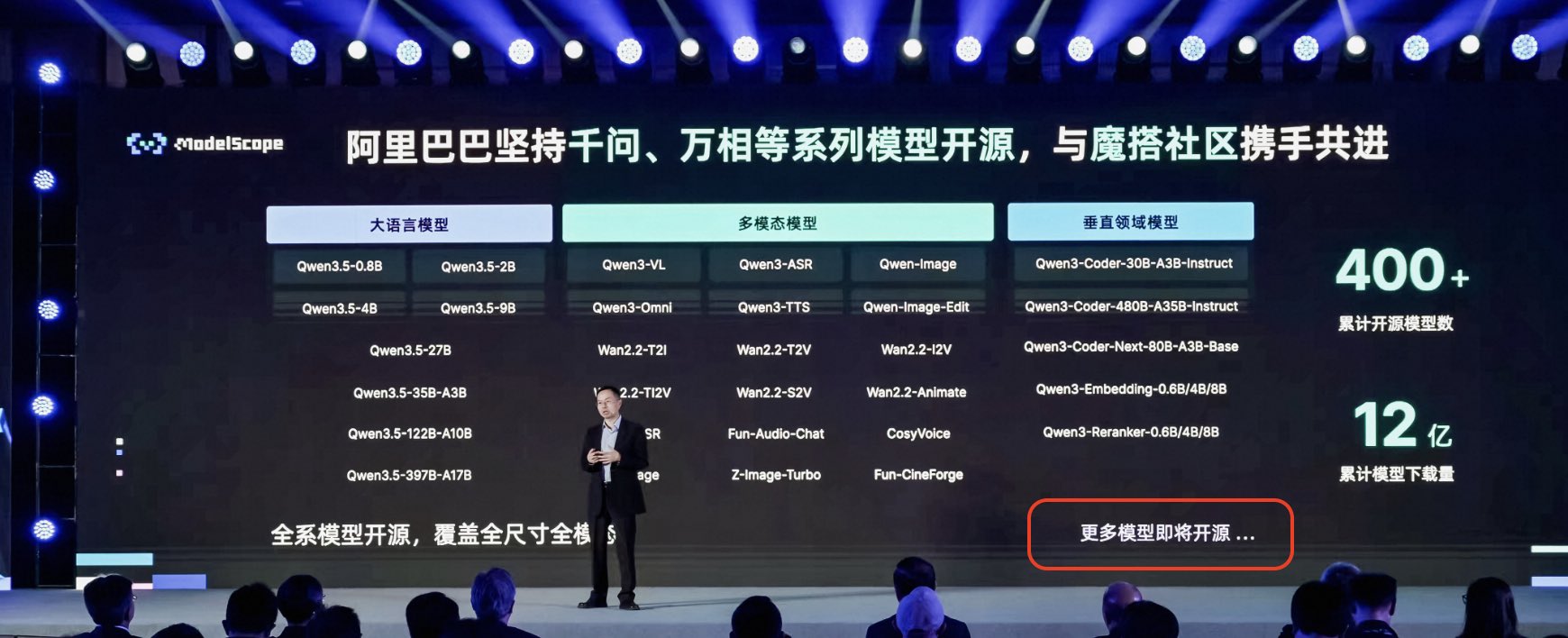 X
·
X
·
Say the line, Bart!
lunar thicket
Lmao stay tuned!
lunar thicket

We’re saying goodbye to Sora. To everyone who created with Sora, shared it, and built community around it: thank you. What you made with Sora mattered, and we know this news is disappointing.
We’ll share more soon, including timelines for the app and API and details on
X
·
adios
earnest grotto
putting the good in goodbye
reef ivy
gonna dedicate the resources to military propaganda I guess
earnest grotto
@somber trellis New TTS, this time by mistral, Voxtral tts
4b

We’re on a journey to advance and democratize artificial intelligence through open source and open science.
somber trellis
earnest grotto
<@204342691964780546> New TTS, this time by mistral, Voxtral tts
4b
guess who this is
somber trellis
earnest grotto
false alarm, apparently voice cloning is api only
somber trellis
earnest grotto
false alarm, apparently voice cloning is api only
rip
still awaiting dynamic vram support
 rancid root
Need help how to solve this issue
 reef ivy
rancid root
Need help how to solve this issue
reef ivy
rancid root
Need help how to solve this issue
Delete all that and just use this #1193952640225267802 message
 rancid furnace
Set-ExecutionPolicy -Scope CurrentUser -ExecutionPolicy RemoteSigned
earnest grotto
Anzhc and Bluevoll's (not-so-)noobai(-anymore) Flux 2 VAE RF adaptation of SDXL is getting even better
lunar thicket
What is an RF adaptation?
earnest grotto
The Flux 2 VAE is both higher quality than and more learnable for models than the SDXL, Flux 1, or (presumably) Qwen VAE (in particular, the SDXL VAE is much more learnable than Flux 1)
You can assume Rectified Flow is like a far better version of v-prediction - without the overcooked colors, while still not being limited to grey images like epsilon. They're reformulations of what exactly the model predicts (e.g. predicting the added noise vs predicting the clean image vs ...) and it turns out that makes quite a lot of difference
Training the model to learn a new VAE / new TE or any other bigger architectural change, like going from vpred/epspred to rectified flow, is adapting the model to that. takes a while

Here's BFL's graph of VAEs. I've heard Flux 1 is only marginally better than doing pixel-space diffusion
They just took Noobai and changed the VAE and trained it on rf instead of vpred/epspred (don't remember which noobai version they chose)
It's almost done learning. At this point it's getting pretty coherent
Anima is still more coherent despite it itself being decently undertrained on even 1024x1024 but it's still good stuff
due to rf, it can make nice good dark images without dying like noobai vpred often does
or various other specific compositions. I think eps models also struggle with image borders, which is sad because I like outside border (AKA the 3d border effect)
earnest grotto
Here's an example with an earlier version of mugen
IIRC, these are respectively: Noobai epspred, vpred, vpred with EQ VAE, Neta Lumina, earlier version of mugen (noobai rf flux2 vae 0.3), anima preview 1 (we are on preview 2)
likely due to natural language, neta and anima expect a bit more prompting to make the whole image dark but they very much can do it


you can see how epspred just flops like crazy
and vpred did do fine, this time. it's just that sometimes it doesn't do fine
second image is the first preview of anima, with more prompting
lunar thicket
"flops like crazy" lol I actually can not. Not sure what that means.
I mean I see different styles in all these. Some look a little wonky, like image #3 in particular, and #5 has some crazy going on
do you mean the difference in art style between the background and subject in #1? cause that is pretty clear
earnest grotto
It is not dark
It is supposed to be dark, in particular like #2, 3 and 5
lemme fetch the prompt
masterpiece, best quality, 1girl, solo, emilia \(re:zero\), white hair, long hair, purple eyes, white dress, detached sleeves, white thigh high boots, sitting against tree, outdoors, grass, tree, dark, black sky, chromatic aberration
lunar thicket
ohh the darkness of the image is all you are trying to show with these examples? Lol ok
earnest grotto
it is not a stylistic difference. there is nothing you can do prompt-wise to get noobai epspred or other ones like it to spit out a truly dark image
you can vae encode a pitch black image and denoise at 1.0 and will get a dark image
lunar thicket
now that i know chromatic aberration was part of your prompt i retract my comment on #5 lol
earnest grotto
top have VAEs that are too lossy to do visible chromatic abberration. bottom have VAEs that can do it
#5 has a very sketchy appearance because the previous version of mugen was very undertrained. undertrained models look like that, they're noisy
newer one is still slightly noisy, still has artifacts but is almost acceptable now
I'm training some loras to see how well it takes to them
earnest grotto
lr may have been a bit too high. In either case the model is still a bit too artifacty for my taste
noobai vpred eq vae
mugen
anima preview 2
I like that noobai does the eyes correctly consistently. that being said, it's exacerbating what most of the dataset contains which I'm not quite sure is a positive (same can be said for the facial expression that mugen does). Though anima does do the eyebrows correctly quite a bit. Anima might be too undertrained on 1024 to know that eyes can have detailed coloration, as it notably struggles with other small details like mikoto's tokiwadai emblem or beatrice's butterfly eyes or other stuff

otoh anima has the capacity to properly learn when fan artists screw up the long lock of hair
earnest grotto
nevermind, looks like anima's eyes issue was just a dataset problem from me keeping stuff around from pv1 to make the model not colossally forget everything
reef ivy
Hey guys, what is the recommended pytorch version now? Still issues with latest?
earnest grotto
earnest grotto
lr may have been a bit too high. In either case the model is still a bit too art...
I think 2.11 nightly still increased my VRAM usage when I tested it out training the middle lora here, compared to 2.9
lunar thicket
I think im on some 2.11 nightly still and it's been fine. I have not done any compare/contrast to see how it has affected my vram usage
 elfin current
Hi, I'm having problem installing ComfyUI due to ModuleNotFoundError: No module named 'sqlalchemy'. Can't seems to solve it on my own. Anyone knows how to fix this?
reef ivy
Check the pins and scroll to viks script, easiest way to install outside of using ai playground
elfin current
Did that but now I got "comfy-aimdo failed to load: Could not find module" when I tried to run it. Am I doing it wrong?
earnest grotto
elfin current
Did that but now I got "comfy-aimdo failed to load: Could not find module" when ...
There is nothing you can do about that warning, other than use comfy normally and forget about it because it doesn't break anything and comfy will work fine.
elfin current
So am I supposed to wait for the rest of it to run? Cause currently it's just stuck at that message and nothing seems to be happening.
earnest grotto
If you are using an HDD, you should consider an SSD.
elfin current
It's actually in my M.2.
I left it for more than 30mins and still nothing lol. Maybe I should go back to SD.Next, but I couldn't get Zimage to work there
earnest grotto
Are you on windows? I might test it later then
Run the script again, it could be some broken commit comfy had that got reverted/fixed
You don't need to change the location or delete anything
Running it from the same location will update faster
 river crater
Its weird, I can physically hear something (I guess the fans turning?) whenever comfy runs its queue
river crater
Actually it can't be the fans running
it sounds like a dvd being read from, or something moving
lunar thicket
coil whine? DVD being read gives that impression vaguely
river crater
is that what that sound is? I think it feels right
Mine ASrock challenger dual fans config. and from internet searhces, yeah seems like it is a coil whine issue. This is prob the first time ive ever heard of this
lunar thicket
river crater
Mine ASrock challenger dual fans config. and from internet searhces, yeah seems ...
Is your case on your desk?
I have that card (asrock challenger b580) and when I was testing it before closing it up, I could hear some faint coil whine. But once I closed it, and especially now that its under my desk, I don't hear it
anyways it is normal and fairly common
lunar thicket
hmm sounds pretty loud
That's gonna be a "is this too annoying for me to stand?" judgement call
river crater
its not to the point of where Im annoyed, but it gets very noticable during comfyui runs
its more of "Oh damn, is my GPU actually dying from this?" kind of reaction
earnest grotto
earnest grotto
Are you on windows? I might test it later then
Pretty late but, I tested again and I can't reproduce whatever issue
@river crater You're sure it's not windows scanning it or whatever?
honest hull
Portable ComfyUI zip for Intel Arc Graphics and Core Ultra series 1/2/3 processors with integrated Intel Arc graphics is now avaiable https://github.com/Comfy-Org/ComfyUI/releases/tag/v0.19.0
As well as integrated in ComfyUI Desktop 2.0 https://github.com/Comfy-Org/ComfyUI-Desktop-2.0-Beta

GitHub
What's Changed
LongCat-Image edit by @Talmaj in #13003
Add warning for users who disable dynamic vram. by @comfyanonymous in #13113
bump manager version to 4.1b8 by @ltdrdata in #13108
feat: L...

GitHub
Contribute to Comfy-Org/ComfyUI-Desktop-2.0-Beta development by creating an account on GitHub.
earnest grotto
honest hull
Portable ComfyUI zip for Intel Arc Graphics and Core Ultra series 1/2/3 processo...
You should probably pin this
honest hull
@earnest grotto you might want to update your script so that it can pull the standalone build directly, then apply your optimizations 😉 the setup should be much easier now
https://github.com/Comfy-Org/ComfyUI-Standalone-Environments/releases standalone ComfyUI can be found here, or you could use the portable one

GitHub
Contribute to Comfy-Org/ComfyUI-Standalone-Environments development by creating an account on GitHub.
earnest grotto
I'm not sure, I'll check it out. I generally don't use Comfy Desktop and there aren't really much optimizations that my script does, it just installs disty's hijacks, patches some issues that arise in comfy when using them, and patches a few custom nodes which I recently decided are redundant or too outdated now
Base comfy doesn't need disty's hijacks, they're mostly for custom nodes, and I'm not sure how much people install those with comfy desktop, though with how easy it is to install some maybe they do
honest hull
I actually really like ComfyUI Desktop, it's an electron app. If I choose one of the workflows from the templates it prompts me that models are missing, but with one click it downloads all the required models and put in the proper directory for you.
lunar thicket
Interesting news
earnest grotto
The prompt to download them exists on the web version though I can't convince it to pop up right now to check if it can put them in the right folders or just downloads them into the browser's downloads folder
It's more likely it just puts them into the downloads folder
earnest grotto
Comfy wants to drum up hype https://comfy.org/countdown
April 24 · 10:00 AM PT.

Another 16-32B video model, realism only, that takes like 20 minutes per gen and barely runs on my hardware?
reef ivy
Since it's comfy, probably some API stuff's. Makes me think I should wait to try it out again as everything will likely break after the update lol.
Maybe the vram optimizations for intel arc? 🥸 lol
slender zodiac
Cloud based computation to offload your data from you.
I mean, to offload your processing
earnest grotto

Building the AI creation engine for visual professionals
So apparently the countdown was for this...?
Not too bad, that would depend on how they spend it, but the countdown was a bit unwarranted IMO
reef ivy
well, that was definitely an announcement of all time. It's good they are doing good, but not sure why they had a countdown to tell us they are doing good lol.
 slender nymph
Hi people!
Returning ComfyUI user having some issues, hoping to ask if i missed something 🙂
I tired to install comfy again recently and getting this error, even with Comfy Desktop.
Had it working.... one or two months ago? But had to formatt the M.2 it was on.
If any other kind soul want to give tip to what i might have missed is greatly appreciated 🙂
- Redownload script and try again
- Deleted folder and tried again
- Uninstalled minicoda from my USER/minicoda3 folder and treid again
- Tried Comy Desktop, both 0.2 and 0.18, same thing.
- Tried on another drive, same thing.
The install says it is sucessful, could it be something with either latest build of comfy or intel driver something messed with?
 earnest grotto
slender nymph
Hi people!
Returning ComfyUI user having some issues, hoping to ask if i missed...
earnest grotto
slender nymph
Hi people!
Returning ComfyUI user having some issues, hoping to ask if i missed...
Which pytorch version
Which GPU
slender nymph
PS C:\Users\marcu> pip list | findstr "torch"
pytorch-triton-xpu 3.5.0
torch 2.9.1+xpu
torchaudio 2.9.1+xpu
torchvision 0.24.1+xpu
B580
have i forgotten to update pytorch? -,-
earnest grotto
slender nymph
PS C:\Users\marcu> pip list | findstr "torch"
pytorch-triton-xpu 3.5.0
to...
run my script again from the same location, no need to delete or move anything around, pick stable or nightly instead of 2.9, it will install faster, try again, say what happens
slender nymph
Usually run Stable when i do these install but ill test Nightly, one sec
i got that it completed but still same issue unfortunatly

 slender nymph
Should be the latest i think?
 earnest grotto
slender nymph
Should be the latest i think?
earnest grotto
slender nymph
Should be the latest i think?
You say the issue also happens with the Comfy desktop package?
If yes, would you like to try an older driver like 8250? https://www.intel.com/content/www/us/en/download/785597/869290/intel-arc-graphics-windows.html

Intel
This download installs Intel® Graphics Driver 32.0.101.8250 for Intel® Arc™ B-Series Graphics, Intel® Arc™ A-Series Graphics, and Intel® Core™ Ultra Processors with Intel® Arc™ Graphics.
slender nymph
earnest grotto
You say the issue also happens with the Comfy desktop package?
If yes, would you...
Looks to be pretty similar on Comfy desktop yeah, alot of fluff about extra search path but the error looks the same i think.
yeah could probably try on a older driver, long time since i downgraded graphics driver, know if i need to do any specific other than just run the installer?
earnest grotto
slender nymph
Looks to be pretty similar on Comfy desktop yeah, alot of fluff about extra sear...
Nothing special is necessary, you can just run the installer as-is
slender nymph
Well same issue unfortunatly, running the script again to see what happens after that

Nah same issue still, might look into doing a complete reinstall of Conda and Python later but that is gonna be a later thing to try.
Thank you for the assist so far! 🙂
earnest grotto
slender nymph
Nah same issue still, might look into doing a complete reinstall of Conda and Py...
Don't do those things
in the conda environment, a specific python version (3.10) is installed. your OS python doesn't matter
are you sure there is enough space on Q:
slender nymph
earnest grotto
are you sure there is enough space on Q:
Yeah should be 😄
 slender nymph
I did try it on my C:/USER but i can toss in the documents folder, sure
slender nymph
Installing the oldest version i can of Comfy desktop to test see if that runs.
earnest grotto
slender nymph
i got that it completed but still same issue unfortunatly
run comfy from the shortcut like this again, wait for it to crash
type in (or paste, but not with ctrl+v, use ctrl+shift+v)
python -c "import torch. print(torch.__version_\_)"
and press enter
show what it says
slender nymph
earnest grotto
run comfy from the shortcut like this again, wait for it to crash
type in (or pa...
seems to be in the cenv but get syntax error
(Q:\AI\Comfy_Intel\cenv) Q:\AI\Comfy_Intel\ComfyUI>python -c "import torch. print(torch._version_)"
File "<string>", line 1 import torch. print(torch._version_)
^
SyntaxError: invalid syntax
slender nymph
earnest grotto
replace . with ;
Diffrent message:
(Q:\AI\Comfy_Intel\cenv) Q:\AI\Comfy_Intel\ComfyUI>python -c "import torch; print(torch.version)"
Traceback (most recent call last):
File "<string>", line 1, in <module>
File "Q:\AI\Comfy_Intel\cenv\lib\site-packages\torch_init_.py", line 287, in <module>
load_dll_libraries()
File "Q:\AI\Comfy_Intel\cenv\lib\site-packages\torch_init.py", line 270, in _load_dll_libraries
raise err
OSError: [WinError 127] The specified procedure could not be found. Error loading "Q:\AI\Comfy_Intel\cenv\lib\site-packages\torch\lib\c10_xpu.dll" or one of its dependencies.
earnest grotto
go into Q:\AI\Comfy_Intel\cenv\lib\site-packages\torch\lib\, does c10_xpu.dll actually exist
 earnest grotto
`python -c "import torch; print(torch.__version__)"`
earnest grotto
earnest grotto
`python -c "import torch; print(torch.__version__)"`
conda install libuv
then try the above command again. we'll be using it to see if it's fixed
slender nymph
sorry for possible stupied question but i am tired now xD
Presuming while still in cenv?
slender nymph
yeah finnished, run the lnk from the command line?
 earnest grotto
well, that tells me nothing will change so I'll keep thinking of what else to add
Wanna try installing the latest MSVC redistributable as well? https://learn.microsoft.com/en-us/cpp/windows/latest-supported-vc-redist?view=msvc-170

This article provides download links for the latest Visual C++ Redistributable packages.
You are on x64.
slender nymph
earnest grotto
Wanna try installing the latest MSVC redistributable as well? https://learn.micr...
sure, seems i have it installed but ill try repair 😄

Same unfortunatly :/
earnest grotto
slender nymph
Same unfortunatly :/
do
pip list | findstr intel
and
pip list | findstr oneapi
and drop the results here
slender nymph
the oneapi seem empty

(Q:\AI\Comfy_Intel\cenv) Q:\AI\Comfy_Intel\ComfyUI>pip list | findstr intel
intel-cmplr-lib-rt 2025.3.2
intel-cmplr-lib-ur 2025.3.2
intel-cmplr-lic-rt 2025.3.2
intel-opencl-rt 2025.3.2
intel-openmp 2025.3.2
intel-pti 0.16.0
intel-sycl-rt 2025.3.2
(Q:\AI\Comfy_Intel\cenv) Q:\AI\Comfy_Intel\ComfyUI>pip list | findstr oneapi
(Q:\AI\Comfy_Intel\cenv) Q:\AI\Comfy_Intel\ComfyUI>pip list | findstr oneapi
(Q:\AI\Comfy_Intel\cenv) Q:\AI\Comfy_Intel\ComfyUI>
earnest grotto
yeah ok it's normal for there to be nothing oneapi
earnest grotto
slender nymph
(Q:\AI\Comfy_Intel\cenv) Q:\AI\Comfy_Intel\ComfyUI>pip list | findstr intel
inte...
just do pip list and paste everything here
slender nymph
earnest grotto
just do `pip list` and paste everything here
Here you go
earnest grotto
thanks
actually, better idea
do you wanna put the cenv in an archive and upload it somewhere and send it to me
Q:\AI\Comfy_Intel\cenv
This folder
slender nymph
Sure ill zip it and send you a message, about to pass out so you'll have a message tomorrow though xD
Thanks for the help so far!
Edit: assuming Mega should be fine?
slender nymph
Hey @earnest grotto , sent you a direkt message with the env zipped on mega 🙂

 slender nymph
its working?
earnest grotto
I'll check it out in 2 hours.
My expectation is, it will work for me and I'll have to figure out what is wrong on your end outside the conda environment
At that point, it might be a good idea to also try AI Playground, which will likely also fail, and so you can ask other peeps for help as well as the issue is likely broader than just some specific comfy install. But that's just my guess right now
Do you have an iGPU
I doubt that could be causing issues but still
In an absolute worst case scenario, installing the oneapi base toolkit (~40gb IIRC) and shoving activating it into the script to launch comfy might solve the issue, but the base toolkit should not be needed. it's just an issue that was happening when it was not activated and I suspect it could be similar
slender nymph
i would not be suprised if it works for you 😂
yeah ill go ahead and try that.
Should not have iGPU, doublechecked performance tab and does not indicate it.
Think there could be anyting that needs to be cleaned from the appdata folders if there is something old there causing issues?
earnest grotto
slender nymph
i would not be suprised if it works for you 😂
yeah ill go ahead and try that....
yeah ill go ahead and try that.
You mean AI Playground? Do try that
If you mean the basekit, don't try that, not before you see that AIPG also doesn't work, you ask in its support thread at least https://discord.com/channels/554824368740630529/1265055106928476192 and you are desperate to find a way to make things work anyways
earnest grotto
slender nymph
But hey, error keeps coming *flip table* 😂
slender nymph
earnest grotto
Post this in https://discord.com/channels/554824368740630529/1265055106928476192
I kinda went rouge but hey it worked xD
ill write what i did longer message
 earnest grotto
slender nymph
I kinda went rouge but hey it worked xD
ill write what i did longer message
earnest grotto
slender nymph
I kinda went rouge but hey it worked xD
ill write what i did longer message
anima is better than whatever sdxl anime finetune
though torch compile is iffy on windows and it helps anima's speed a lot
at least there is an official turbo lora now
slender nymph
earnest grotto
anima is better than whatever sdxl anime finetune
haha you just made me Jameson laugh that you first point that out directly xD
But that was the SDXL model i used last when i used this (its a old one that i liked the effect of when i started with AI... 2 years ago?)
What i did to try and fix it:
Uninstalled these both from system settings:
Python
Conda
Went manually to my user folder, deleted miniconda3 and .conda
went into Appdata.
local:
deleted folders realted to python + conda that was left behind, if i saw any Comfy folders they also got trashed.
Did not have anything related to any of these in locallow
Went into Roaming and deleted what i could find with python, conda, anaconda or miniconda and ComfyUI.
after that was deleted, did a reboot on my system, made a temp folder in q:/ai and put the script in there, ran it and worked perfect
earnest grotto
hmm, alright then, strange
oh well. get anima
i am, after all, training an anima lora right now
earnest grotto
earnest grotto
.
slender nymph
haha on my way, any recommendation or should i stick with the offical first and then check out trained checkpoints?
mostly gonna do DnD European horror stuff 🤔
earnest grotto
I don't use random aesthetic finetunes. If you can't come up with an artist that's close to the style you want, search for a lora
We’re on a journey to advance and democratize artificial intelligence through open source and open science.
slender nymph
earnest grotto
https://huggingface.co/circlestone-labs/Anima/tree/main/split_files
on its way 😉
 earnest grotto
slender nymph
on its way 😉
earnest grotto
slender nymph
on its way 😉
don't forget the text encoder and vae
anima uses gelbooru tag names, in case an artist is renamed on dan. which is great as dan is a pain to browse anyways
artist names are prefixed with @
you can't mix artists as well as with sdxl (clip-based) models
prompt weighting needs much higher numbers than you'd expect. 2.0 for anima is about equivalent to 1.35 or so
it understands natural language (you can say "x on left y on right"), it has a 16ch VAE so it's much sharper, and it has way better knowledge of tags with really low amounts of images
slender nymph
earnest grotto
it understands natural language (you can say "x on left y on right"), it has a 1...
oooooh that is nice, my previous experiance is with Forge with mostyl SDXL, did get good results but the results got funky when trying to explain positions
earnest grotto
you will likely want to open up danbooru's wiki on poses instead of thinking of a way to explain them in natural language
slender nymph
Prompt executed in 28.83 seconds
Second try with the "test" prompt that is in Comfy, that is not a bad result
earnest grotto
Anima is decently slower than SDXL. However at the same time, torch compile speeds it up almost 2x. That being said, even without torch compile, if you didn't choose to install a bunch of custom nodes with my script, get this https://github.com/ruwwww/comfyui-spectrum-sdxl
If you did choose to install custom nodes, it should be included
Use these settings. Stop_caching_step is your number of steps - 3 or so, e.g. for 35 it's 32, 33 is likely fine too though.

It says SDXL, it works for anima.
And this is the official turbo lora. 1.0 cfg, 8-16 steps. I don't like it very much outside of chibis https://civitai.com/models/2560840/anima-turbo-lora
Don't use both spectrum and the turbo lora, doesn't work well
slender nymph
earnest grotto
Anima is decently slower than SDXL. However at the same time, torch compile spee...
oh that looks intressting, i did skip all the extra nodes this time to have a slightly faster install, if i want to install them i should just rerun the script and select i want them right?
earnest grotto
Yes
You can also change your pytorch version this way. Newer pytorches increased VRAM usage for some reason, no idea why. I don't know if the nightly fixed this yet but it should still be an issue with stable, and not with 2.9
specific pytorch versions also might work better or worse with compile, however I couldn't get compile working on windows either way. I am on linux right now
slender nymph
earnest grotto
You can also change your pytorch version this way. Newer pytorches increased VRA...
Just a quick image and i do like the result straight out the gate.
probably gonna take some getting used to prompting a new model since i was used to SDXL back in the day but yay it works 🙂
 earnest grotto
tag-based prompting still works. anima is specifically trained on both
you can also mix them up
I guess, you were likely using epspred models. anima can make properly dark images so you don't need to fight it in prompting to have that
there's also a few extra custom tags, like most models do, and that's about it
all the custom tags there are, are the usual masterpiece, best quality, ... human score tags, pony aesthetic tags score_9, score_8, ... which are the only ones with underscores, year 2025 and so on, and newest, recent, mid, early, old
also devinatart/ye-pop images are prefixed with deviantart and a new line / ye-pop and a new line
slender nymph
That i honestly could not tell you if i used epspred models, not that experienced and had a long hiatus with this when i got my kid 2 years ago 😂
i did miss when pony got off (NO PUN INTENDED!) but yeah i do remember the masterpiece and things.
do you know if anima is good with "ugly" characters? i know there was trouble getting them to appear disfgured earlier, might still be an issue?
earnest grotto
noobai vpred came out about a year ago. before that all the anime models were epspred
earnest grotto
slender nymph
do you know if anima is good with "ugly" characters? i know there was trouble ge...
do you have any reference images for how you expect that to look
ugly, "ugly", and disfigured, are pretty different
slender nymph
earnest grotto
ugly, "ugly", and disfigured, are pretty different
fair 😂
no not currently any references, might come up when im prepping for my DND game but then i guess ill just have to try it out 😂
earnest grotto
if you're not sure how to prompt danbooru-tagged models, especially given you were talking about coming up with descriptions for poses,
Browse danbooru's tag wiki https://danbooru.donmai.us/wiki_pages/tag_group%3Aposture
While browsing gelbooru https://gelbooru.com for the actual images. danbooru forbids searching for >2 tags at the same time and searching for a few select tags
slender nymph
earnest grotto
if you're not sure how to prompt danbooru-tagged models, especially given you we...
will bookmark these, cheers!
Oh yeah these sites, i member!
earnest grotto
gel/dan need you to search with underscores, but do not use underscores when prompting (outside of score_)
lunar thicket
Doesn't prompting register an underscore equivalent to a space?
earnest grotto
No
They are different tokens
If you prompt an SDXL (CLIP) model with underscores, it too will perform worse
Just only slightly worse, rather than much worse like anima
similarly, anima is also more sensitive to out-of-order character/series/artist names and to typos than sdxl/clip
lunar thicket
earnest grotto
They are different tokens
What are the differences between tokens?
earnest grotto
Different tokens mean different things to the model
lunar thicket
Like if I did green_eyes instead of green eyes, SDXL doesn't equate those things?