#ComfyUI for Intel Arc using IPEX
1 messages · Page 10 of 1
 earnest grotto
 somber trellis
 main spear
I can see now what I need, I have to run it on a WSL with intel's Triton Backend
This is just the universe saying "Get an NVIDIA GPU......."
 formal tusk
I just use a symlink
earnest grotto
there is no point making symlinks when it's a feature already supported by comfy by default
if you can learn to make a symlink, you can edit a yaml file and add many locations much more easily
main spear
My problem right now is that when I make a wsl it doesn't read my gpu even though I have all the requirements
earnest grotto
earnest grotto
<@490291944841281547> do you want to explain your steps for getting compile work...
Also, ^
pretty sure you can get compile working on native windows. aaron had it working if i recall correctly. i just dunno how
main spear
From what i've been reading and what Grok and ChatCPT have told me, torch.compile doesn't work on native windows. And I have your script working on native windows, I didn't try installing it on a WSL2 though
The problem is clinfo doesn't read my gpu
earnest grotto
gork and chatgpt probably told you outdated info. compile wasn't a thing on windows in general (intel or nvidia) till recently. and i highly doubt they'd give you anything accurate about intel
earnest grotto
main spear
The problem is clinfo doesn't read my gpu
did you install the compute runtime?
there are a bunch of extra things you probably will need to install on wsl
i have not touched wsl in quite a while
main spear
I couldn't find the compute runtime or level zero for windows, it was all for Linux and Ubuntu
earnest grotto
yes, you're using wsl.
main spear
I meant to get complie working on native
I have OneAPI installed as well because I thought those came in the package but they do not
earnest grotto
search aaron's messages in this thread regarding compile on windows
earnest grotto
yes
if you're using my installer, 2.8 is nightly/experimental, dunno which i called it
you can run the script again from the same location as before and pick a different pytorch version. it will install the different version, faster than installing it anew
 reef ivy
earnest grotto
<@490291944841281547> do you want to explain your steps for getting compile work...
reef ivy
earnest grotto
<@490291944841281547> do you want to explain your steps for getting compile work...
#1193952640225267802 message this is how I got it working, not sure if its still necessary you can just try calling the setvars when starting your environment, if not then try that stuff
main spear
@reef ivy How did you get Wan vids to finish in less than 20mins? I switched to doing ltx cause they are faster but Wan has the quality I want but I tried some different work flows and it they all were taking 1hr sometimes longer
What did I miss? Do I need to add it to path?
oh it didn't show all the code
<pre>``` File "C:\Users\chris\OneDrive\Documents\ComfyUI\Comfy_Intel\cenv\lib\site-packages\triton\runtime\build.py", line 74, in _build
raise RuntimeError("Failed to find C++ compiler. Please specify via CXX environment variable.")
torch._inductor.exc.InductorError: RuntimeError: Failed to find C++ compiler. Please specify via CXX environment variable.
Set TORCHDYNAMO_VERBOSE=1 for the internal stack trace (please do this especially if you're reporting a bug to PyTorch). For even more developer context, set TORCH_LOGS="+dynamo"
print("Execution finished")
Execution finished```</pre>
reef ivy
main spear
<@490291944841281547> How did you get Wan vids to finish in less than 20mins? I ...
Lower frames and fp8 quant(if 14b i2v), gguf are slower and less consistent with speed. Try 49 frames also resolution size makes a difference. Also teacache and other techniques and causevid for lower steps and lower cfg now.
Check out the fusion x models also, haven't tried them personally but they have causevid and all that stuff merged. This is for 14b btw.
main spear
I think I got this working now, just added the call oneapi setvars in the activate.bat
 reef ivy
If it only needs the call then they added the needed files to the driver(which is what I thought but wasn't sure since I already did it lol)
earnest grotto
somber trellis
<@311915623179485186>
sad 🤷♂️
earnest grotto
Did i post that i was trying to get instantcharacter to work here? i guess i didn't, can't see scrolling up
well, it works now
https://cdn.discordapp.com/attachments/1091563787749953647/1385342584980770907/ComfyUI_00060_.png?ex=6855b852&is=685466d2&hm=9f291d995163f3c287ecd9d38a93e9d0b07c9cb82aa4c6e4ecde27db251af4b3&

I wonder if I should look into how comfy does inference and try to shove it in that. only the transformer, dinov2 siglip and the ipadapter remain done by diffusers, everything else is native
and for the better, flan gave me a prettier result, at least for this seed. regular t5 was having finger issues and bg was a bit worse
somber trellis
earnest grotto
Did i post that i was trying to get instantcharacter to work here? i guess i did...
InstantID solaire of astora
I wonder how versatile it is
earnest grotto
somber trellis
InstantID solaire of astora
whut?
somber trellis
earnest grotto
whut?
Does InstantID not work by using a reference image ?
Actually lemme set it up my end
earnest grotto
pretty sure all the -ID things are for faces specifically
somber trellis
earnest grotto
pretty sure all the -ID things are for faces specifically
Welp
reef ivy
Anybody tried vace or phantom for wan2.1 with one frame? One might work decent for consistent characters.
main spear
With the 13b vace t2v I can get pretty good quality in about 10-20min, the 14b vace takes about 40min-1hr but the loras I use work with vace even though they don't spefically say they do on civitai. I also use it in conjuction with CausVid. I've been trying to get it to work with tea cache and torch.complie but sometimes it works and sometimes it doesn't, and on the time it does work it doesn't really shorten anything. I think that's partly due to cauvid alreadly shortening it as much as it can be but I'm stiil tinkering with it
reef ivy
main spear
With the 13b vace t2v I can get pretty good quality in about 10-20min, the 14b v...
how many frames and resolution? GGUF or FP8? Try the fp8 scaled models from comfy as well. t2v might be a little slower than i2v (which i use) but I don't think it should take 20 minutes. Also put --reserve-vram 7 into the command line for comfy. (you can try different numbers but 7 is usually the sweet spot if on 8gb gpu like me)
 wicked fulcrum
main spear
With the 13b vace t2v I can get pretty good quality in about 10-20min, the 14b v...
wicked fulcrum
main spear
With the 13b vace t2v I can get pretty good quality in about 10-20min, the 14b v...
- @somber trellis for WAN 2.1 Vace are you using IPEX + PyTorch or straight PyTorch ie 2.7?
main spear
wicked fulcrum
+ <@204342691964780546> for WAN 2.1 Vace are you using IPEX + PyTorch or straigh...
I have Nightly installed so I can use the torch.complie but I havn't really seen a big difference with it so I might use the other verison that is in Vik's installer
earnest grotto
What do you mean by doesn't work, broken result or errors
IIRC, teacache and causvid might not mix
Also there's magcache which should be better than teacache
(Not that it would mix if it doesn't, but it'd be better in cases where teacache is effective. I haven't tried magcache)
main spear
I'll try to recreate the error it gives me, I think it's a memory problem but Idk. I tried asking Grok to try to and see if it was fixable but it ended up causing other errors so I reinstalled Comfy and haven't use wan2.1 yet. But I have 48gb or ram and i'm using the arc b580 12gb vram and I can see it does use the vram on most processes and occassionally it'll use cpu for other things like positive and negative prompts
main spear
Okay, maybe it was a compatibility issue with nightly, I installed the stable version in your installer and the issue isn't appearing anymore
reef ivy
Some nightly builds can randomly break since its actively being developed everyday
2.7 stable should support torch.compile now iirc
main spear
reef ivy
2.7 stable should support torch.compile now iirc
How do you get it working? I tried just following the same steps as the nightly build but got errors
spefically when using the WanVaceToVideo node
which was weird because I didn't even have it connected to that node
reef ivy
Native nodes? Or the wanwrapper? For wan wrapper you have to do a minor code edit.
main spear
reef ivy
Native nodes? Or the wanwrapper? For wan wrapper you have to do a minor code edi...
The wanwrapper
reef ivy
main spear
The wanwrapper
#1193952640225267802 message follow those instructions if you are on A series, battlemage shouldn't need it but maybe try it anyway. If you are on battlemage probably post your errors here and maybe one of us can help.
Also, you can try the latest nightly build and it might be fixed now if it was working before with the wrapper.
somber trellis
wicked fulcrum
+ <@204342691964780546> for WAN 2.1 Vace are you using IPEX + PyTorch or straigh...
Ipex+Pytorch. Pretty sure both can do wan though without issue
wicked fulcrum
WAN 2.1 Vace 14B GGUF Q3 - 512x512, 30 steps. Takes 35-40 minutes on A770

This is using PyTorch 2.7 no IPEX and the AI Playground install. Wondering if this is in what people are experiencing for times: 70.46 s/it. Video gen is pretty good consider lower res but time is slow. Any thoughts?
earnest grotto
I don't do videos, but there are a lot of speedups you can employ. Notably:
causvid - can be a lora kinda like lcm extracted from the finetune, or a finetune
teacache/magcache - those also apply to flux and other purely image models, decent speedups, magcache is a little newer and might not be as supported yet
self-forcing - basically cfg+step distillation, like flux schnell
I have this link for a self-forcing lora. No idea how effective it is
https://huggingface.co/Kijai/WanVideo_comfy/blob/main/Wan21_T2V_14B_lightx2v_cfg_step_distill_lora_rank32.safetensors

teacache slightly lowers quality (and might break if used with the other speedups). magcache supposedly retains much more quality with similar speedup
wicked fulcrum
Using teacache now and not sure it is speeding it up. Need to test to be sure
reef ivy
Teacache will speed it up, also torch.compile. teachache works by skipping steps so it speeds up as it goes, usually starts after third step
Also there is the merged fusion model that can run at fewer steps with even better quality (have not tried it myself yet though)
 rustic sonnet
High quality image editing no longer needs closed models
We release FLUX.1 Kontext [dev] - an open weights model for proprietary-level image editing performance. Runs on consumer chips.
✓ Open weights available
✓ Best in-class performance
✓ Self-serve commercial licensing
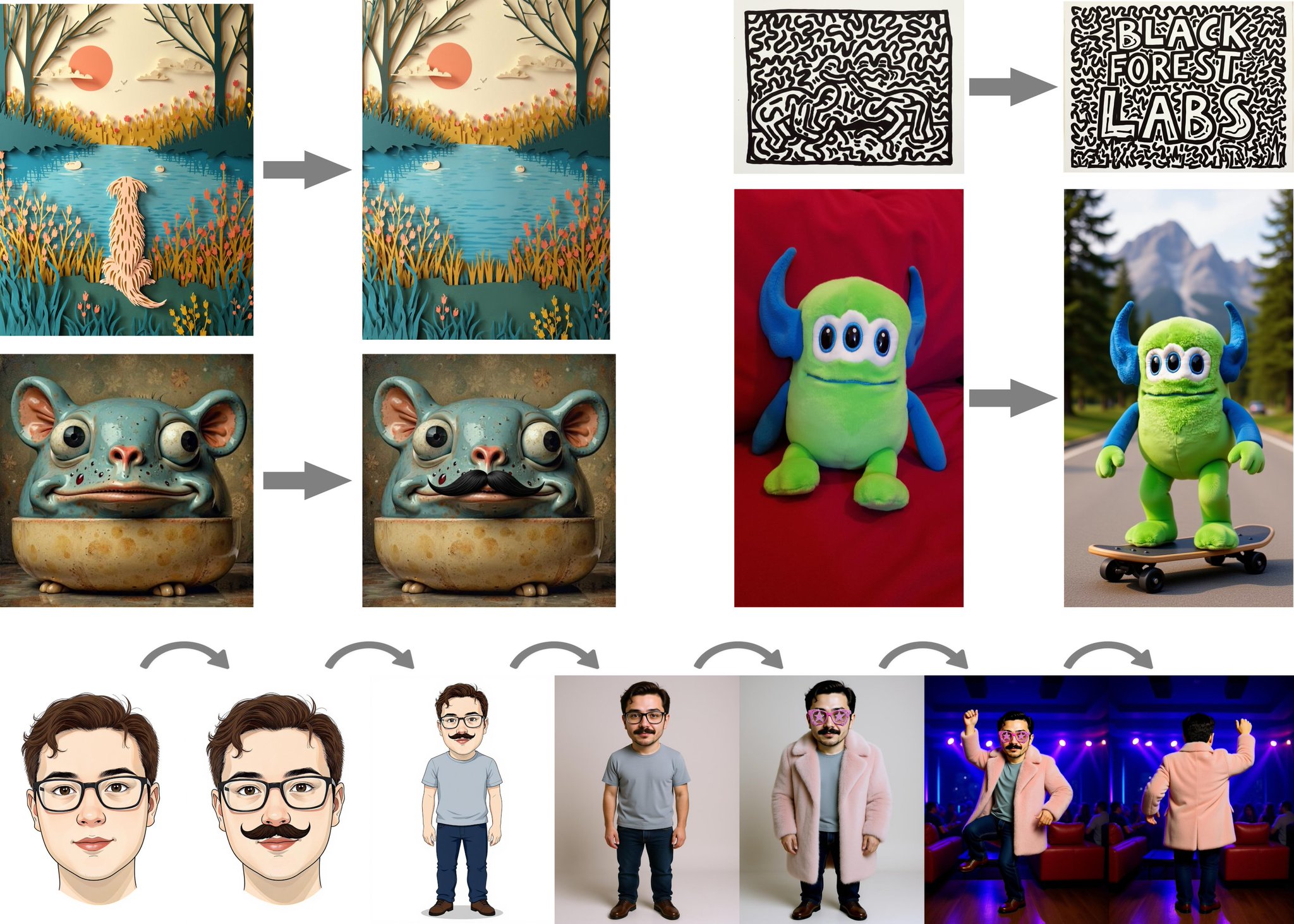
 X
·
somber trellis
wicked fulcrum
WAN 2.1 Vace 14B GGUF Q3 - 512x512, 30 steps. Takes 35-40 minutes on A770
X
·
somber trellis
wicked fulcrum
WAN 2.1 Vace 14B GGUF Q3 - 512x512, 30 steps. Takes 35-40 minutes on A770
Why are you using a Q3.
These lower GGUF quants for these models tend to actually be slower.
Q8 is always the way to go for image/video models.
also use teacache
In other news.
flux kontext dev released
rustic sonnet
So if I want to use comfyUI on Meteorlake IGPU, what would be the steps to install it
With the 4GB issue mitigation i mean
wicked fulcrum
somber trellis
Q8 is always the way to go for image/video models.
Ill try Q4 and Q8. My worry was, higher memory models would cause cause memory sharing to kick in and dramatically slow down inferencing
somber trellis
wicked fulcrum
Ill try Q4 and Q8. My worry was, higher memory models would cause cause memory s...
With reserve vram properly set, this actually doesn't seem to be the case.
In fact, memory swapping between sys and vram in arc's case seems to improve inferencing time.
wicked fulcrum
somber trellis
With reserve vram properly set, this actually doesn't seem to be the case.
In fa...
Hmm interesting. That's not been my experience. But Ive been focused elsewhere last couple months. At least with drivers from earlier this year my experience was when models are at the edge of GPU memory and shared memory kicks in, the copy process interrupts GPU compute time and can slow down inferencing 10X... with reserve vram set.
But I'll try higher vram models, and clear my assumptions. Thanks for the tip
somber trellis
Originally on 2.3.1 I used a --reserve-vram of 4.0, but as the drivers and comfyui itself changed I've had to increase it.
It was 4. Then 6.
Now it's 8.

Okay. Wow.
 earnest grotto
rustic sonnet
https://x.com/bfl_ml/status/1938257909726519640?t=U33R5RsvF8gddYKbWY3BhQ&s=19
earnest grotto
rustic sonnet
https://x.com/bfl_ml/status/1938257909726519640?t=U33R5RsvF8gddYKbWY3BhQ&s=19
finally
earnest grotto
rustic sonnet
So if I want to use comfyUI on Meteorlake IGPU, what would be the steps to insta...
You can use my script #1193952640225267802 message
Or AI Playground should also work
If you do use my script, make sure it tells you it's detected the iGPU right. I don't have an iGPU and am not entirely clear on what's what with them, but it should work
rustic sonnet
earnest grotto
You can use my script https://discord.com/channels/554824368740630529/1193952640...
Thanks mate
earnest grotto
Here's a link to AI playground https://game.intel.com/us/stories/introducing-ai-playground/
wicked fulcrum
somber trellis
Is this Kontext dev?
wicked fulcrum
rustic sonnet
So if I want to use comfyUI on Meteorlake IGPU, what would be the steps to insta...
MTL-H?
somber trellis
wicked fulcrum
Is this Kontext dev?
Yes.
somber trellis
so i just bigbrained something
combining both redux and flux kontext is pretty powerful
earnest grotto
are you asking because you want to try kontext?
somber trellis
earnest grotto
are you asking because you want to try kontext?
no i just downloaded it
im testing it out right now
wicked fulcrum
@rustic sonnet As Vik said, either follow his instructions to install ComfyUI or install AI Playground. MTL-H should work with most models. But the 4 gig memory chunk is part of Alchemist. A series GPUs like Arc in MTL-H have this limit. SDXL, Flux, LTXV, WAN 2.1 should all be good
Note AI Playground provides you ComfyUI as a backend where it's launched by AI Playground. With AI Playground running you can launch ComfyUI in a browser by going to localhost:49000.
You can change the version of ComfyUI in the AI Playground backend manager.. I believe by default it installs 3.3. You can change to update the latest which is 3.42. Doing this can break some AI Playground features. ie LTX-video image 2 video requires you add a field value to its workflow
Anytime you reinstall ComfyUI or AI Playground, it wipes out ComfyUI. So backup or move out ComfyUI Models directory before reinstall through AI Playground
earnest grotto
somber trellis
no i just downloaded it
I mean bionic, sorry
somber trellis
bruh


Flux Kontext Dev + Flux Redux = This

The prompt
was literally just
3D Hyperrealism
somber trellis
 rustic sonnet
earnest grotto
I mean bionic, sorry
rustic sonnet
earnest grotto
I mean bionic, sorry
Yea that's my intention, well I won't be at home for a while.
So just asking for future reference when I get home
earnest grotto
hmm
i expect a single image to take 5 minutes with that... or more?
teacache probably doesn't support it
yet
somber trellis
earnest grotto
teacache probably doesn't support it
teacache works with kontext
in fact it's already been quantized to q8
and works with most ofthe same nodes normal flux dev would
including redux


just like normal flux you can use dynamic thresholding
allowing you to use negative prompts with flux at the cost of speed
 wicked fulcrum
somber trellis
allowing you to use negative prompts with flux at the cost of speed
wicked fulcrum
somber trellis
allowing you to use negative prompts with flux at the cost of speed
Have you tried image to image editing using text prompts. "Remove sunglasses" etc
somber trellis
wicked fulcrum
Have you tried image to image editing using text prompts. "Remove sunglasses" e...

only at 30% completion
rustic sonnet
earnest grotto
hmm
i expect a single image to take 5 minutes with that... or more?
Not a problem
somber trellis
wicked fulcrum
Have you tried image to image editing using text prompts. "Remove sunglasses" e...

Definitely works
seems whatever transition node i used didnt line em up proper
somber trellis
oh i shoulda mentioned i did it in cfg 2 instead of 2.5
its why it looks more grainy and faded
earnest grotto
somber trellis
seems whatever transition node i used didnt line em up proper
are you sure the input's resolution is divisible by 8?
somber trellis
earnest grotto
are you sure the input's resolution is divisible by 8?
The input resolution is not always divisible by 8 since im using a 2x upscaler on multiple different aspect ratios, then it gets downsampled to 1MP resolution
sometimes it gives weird odd-integered resolutions
earnest grotto
that's probably why your images shift a bit
somber trellis
I probably should use the upscale to closest SDXL resolution node
that would instantly fix the problem
 earnest grotto
comfy will automatically pad if it's not perfectly divisible by 8
somber trellis
i bet they couldve made a much more close to artwork gordan if they just put more work into his model
earnest grotto
this can sometimes result in grey lines with sdxl. with flux, i dunno what the vae decodes that to but probably also greyish or pinkish
somber trellis
this repo has a node that has an resize node which auto upscales/downsamples images to the closest sdxl resolution
also these nodes are good for memory control
 reef ivy
somber trellis
allowing you to use negative prompts with flux at the cost of speed
reef ivy
somber trellis
allowing you to use negative prompts with flux at the cost of speed
How much speed loss?
somber trellis
reef ivy
How much speed loss?
40-50%
its quite a bit slower
but you get far more control
 reef ivy
Oof, a little too much for me. I guess for editing it would be worth it though
somber trellis

simply allows you to use cfgs higher than 1
and for normal cfg models it can allow you to go above normal cfg limits
effectively operating as an anti-burn node
reef ivy
Does the hyper loras work? For lower steps. Or forget the name
somber trellis
On Flux Kontext? No clue.
reef ivy
With flux i get images pretty quick with minimum quality loss with those turbo loras etc.
reef ivy
I honestly forget, I tried both and one was better than the other. Will have to check later
Been a minute since i used it

 tough wharf
Is it just me, After Driver update of my A770 16g from 6734 to 6881 all T2Image generations turned to shit,
HOWEVER Video generation has speed up so much like;
6881: around 8s/it - 10s/it.
6734: around 80s/it - 200s/it
(note: Im using the new Self Forcing model from Kijai)
Wth happened (im not complaining tho)
earnest grotto
you were running out of vram
you are not running out of vram now
keep track of your vram usage, use smaller models if you're running out
most programs use vram. they use a little, but if you have a lot of chromium tabs open those can start to add up to ~1gb
discord also uses something like 400mb I think?
tough wharf
earnest grotto
keep track of your vram usage, use smaller models if you're running out
wait, was the message for me?
But yea, Im not running out of Vram, it seems the model is fit everything on the gpu 12g-14g/16g when running the wf
note Previously Ive previously used the Selfforcing model on driver 6734
tough wharf
Very nice, Kudos to Intel for this update 😭 🙏
earnest grotto
show what's up with the images
tough wharf
tough wharf
Is it just me, After Driver update of my A770 16g from 6734 to 6881 all T2Image ...
I think its because Im running out of Vram on T2I
The Artifacting was my mis, I changed the sampler from Euler_A_Cfg++ to Euler A seems to have fix the issue,
but the significant slow down on T2I generation is very visible
previously before updating my driver (6734) T2I is pretty fast on this workflow like 140-180s per image.
All images below are with 6881 driver


 earnest grotto
Once the shared goes above 0, yea you're running out
tough wharf
This is now with Euler A sampler, it fixed the artifacting issue

I havent changed the settings on this workflow apart from the sampler
earnest grotto
use the tiled ksampler custom node, having upscaled with some esrgan model before it, 4x-ultrasharp2 is recent and good
tough wharf
This one?
 tough wharf
Ill make a sample workflow
earnest grotto
your image -> upscale image using model (the model being 4x-ultrasharp2) -> tiled vae encode -> tiled ksampler
wonder if kontext also benefits from flan t5
tough wharf
I feel like my gpu is not being fully utilize?


 earnest grotto
Did i post that i was trying to get instantcharacter to work here? i guess i did...
earnest grotto
earnest grotto
Did i post that i was trying to get instantcharacter to work here? i guess i did...
instantchar for comparison, the goggles actually look like goggles. But i'm gonna hope it's just an unlucky seed or something
tough wharf
earnest grotto
Compute dropdown
do you mean by manualy set the model compute dropdown?
 earnest grotto
sorry, i was a bit vague
earnest grotto
tough wharf
do you mean by manualy set the model compute dropdown?
these
 tough wharf
earnest grotto
What ARE these goggles man
tough wharf
earnest grotto
What ARE these goggles man
I can see you also use A770, how fast can you generate images?
earnest grotto
depends on many things
i don't want to oom right now so i've opted for q5 which slows it down
actually what model even
tough wharf
Oh it seems to be utilizing it then
 earnest grotto
i'm doing flux kontext rn
tough wharf
LMAO
 tough wharf
earnest grotto
i'm doing flux kontext rn
tough wharf
earnest grotto
i'm doing flux kontext rn
I heard Flux is mainly used for realistic images
Im not particularly interested with realistic image generations
so Im sticking to sdxl or illustrious
It took 15mins 
 earnest grotto
tough wharf
LMAO
earnest grotto
tough wharf
LMAO
You essentially just made a brand new image at an oversized resolution, and that's what happens when you do that (with sdxl/1.5)
Lower denoise (and steps since you won't need as many), e.g. to 0.5, your steps are already kinda low though. generally 28 is good, so i'd go for 14
different tiling strategies are faster or slower but have drawbacks
random is slowest but generally looks the best
you can also bump up the tile sizes to 1024x1024 since sdxl
ah, i didn't see there's nothing before it
you need to generate some image, use the tiled ksampler to upscale it, not to generate it outright
earnest grotto
earnest grotto
What ARE these goggles man
flan t5
 tough wharf
earnest grotto
you need to generate some image, use the tiled ksampler to upscale it, not to ge...
tough wharf
earnest grotto
you need to generate some image, use the tiled ksampler to upscale it, not to ge...
Ah, so thats why
so i assume the Tiled ksampler is best used for upscaling no?
earnest grotto
yes
tough wharf
But still the Images generation seems to really have been hit after the update to 6881 driver
This is with a workflow I used to test for a quick image before I updated my driver, usually it takes below 1 min to finish the execution


this took 200s
 earnest grotto
tough wharf
I heard Flux is mainly used for realistic images
Im not particularly interested ...
earnest grotto
tough wharf
I heard Flux is mainly used for realistic images
Im not particularly interested ...
Ideally, a good model will be able to do any task, and won't be "realistic" or "anime". Sadly we're not there yet. Any base model will skew towards being able to only do realistic stuff competently. With loras you can kinda get an actually decent style but it still lacks a lot of other knowledge you'd be getting from an anime finetune.
Inpainting models however are a massive step up in understanding, due to the context of the rest of the image being inpainted. Flux fill can inpaint pretty well.
And evidently kontext is also not too bad
Base SDXL is worse than flux.
Expect a Lumina 2 finetune by onoma (illustrious) soon™ and sd3.5 large by cagliostro (animagine) "q1 to q2 this year" (april to september)
earnest grotto
tough wharf
I can see you also use A770, how fast can you generate images?
1.95it/s just making a 1216x832 image with a lora with animagine 4.0 opt, euler ancestral
tough wharf
earnest grotto
your image -> upscale image using model (the model being 4x-ultrasharp2) -> tile...
the Tiled Method worked (Encode > Tiled Ksampler > Decode >)
The Vram stayed around 8gb to 10gb while on Tiled Ksampler

 tough wharf
earnest grotto
Ideally, a good model will be able to do any task, and won't be "realistic" or "...
tough wharf
earnest grotto
Ideally, a good model will be able to do any task, and won't be "realistic" or "...
Ive been seeing the buzz with kontext lately, How good and fast is it in your A770?
earnest grotto
many ways to get it faster or slower
i am using a q5 quant because i don't want to oom. that makes it slower than q8 or fp8
you can just do it without ooming but doing larger images+cfg starts eating vram
flux can do larger or smaller images without breaking, unlike SDXL, but only up to a certain point. since then I've seen at least 1 paper with an even better method for getting models to generalize to other resolutions even better than rotary embeddings so that can be something you can expect from future models
I'm not using teacache, yet, since i just wanted to see if it works
i get 10s/it
tough wharf
earnest grotto
i get 10s/it
Thats fast
With Teacache will it be faster I wonder?
earnest grotto
usually teacache is a ~2-3x speedup
tough wharf
Ive tried a workflow backthen using Teacache with wan2.1-14b, q5 k_m, It took me around an hour I think then it crash because of OOM
I think I will settle for self forcing models for now, since its fast
but downside is its 1.3 so not much loras I can play with
I hope they release a wan14b self forcing soon
earnest grotto
5.45s/it with q8
should try q4
with q8 and teacache, 2.6s/it
but on the brink of ooming
earnest grotto
earnest grotto
should try q4
7.1s/it
earnest grotto
On more testing, q4 is a bit too fried
reef ivy
tough wharf
Very nice, Kudos to Intel for this update 😭 🙏
Try --reserve-vram 7
Seems arc is slower when the model is not swapping to system ram, especially with gguf models
Or try kijais nodes with my little code edit and use block swap
#1193952640225267802 message
Also can't use gguf with kijai but 16gb should be enough for fp8 models
tough wharf
reef ivy
Try --reserve-vram 7
Hi, I have no problems with generating video generation
Like I said, After the update to 6881, It seems to have fix the issue of slowing down the video generation process or just simply going oom
tough wharf
tough wharf
this took 200s
what Im having the problem now is with image generation, if you scroll back a little, I mentioned why the upscale nodes have gotten slow on its generation process(5s/it)
Idk how to explain it anyfurther than that
Its just like that with my I2I or T2I workflows since the update to 6881 drivers
tho, Im not complaining since I want to generate videos too with my A770 😅
idk If I can share the videos I generated here, its a bit nsfw
tough wharf
reef ivy
Try --reserve-vram 7
Ill try this later bro
reef ivy
Yeah, not the place for nsfw stuff. I will check out comfy again soon and see what has changed.
earnest grotto
Seems CFG is needed to make anime goggles
somber trellis
earnest grotto
What ARE these goggles man
transparent versions of egads glasses
i hope you know who egad is
somber trellis
earnest grotto
On more testing, q4 is a bit too fried
anything but q8 isnt worth it (for visual models)
LLMs are generally fine at 6_K, any lower and they start to get that lobotomized feel
I don't know if 6_K is any good on visual models
I think it's best if we just wait for a method of low perplexity low bit quantization such as bitnet 1.58b but without the need for a full architecture re-train
that will revolutionize our capabilities
low-bit quants like 1.58b will allow us to run much larger model sizes, which in turn lowers perplexity as well as parameter count increases
 tough wharf
reef ivy
Try --reserve-vram 7
tough wharf
reef ivy
Try --reserve-vram 7
Just try this, It seems to have fix the issue of the USDU being slow wth
I also tried it with V2V self forcing(I havent noticed anything different with --reserve-vram parameter)

Thank you Vik, Aaron
Im back on the game now
 somber trellis
tough wharf
Thank you Vik, Aaron
Im back on the game now
somber trellis
tough wharf
Thank you Vik, Aaron
Im back on the game now
 earnest grotto
somber trellis
earnest grotto
somber trellis
Yellow filter :(
 queen remnant
any time i try to update comfyui either from comfyui manager or with the script it does this and never updates

i haven't made any manual changes myself and i've actually had to delete and reinstall it to get it to update in the past
earnest grotto
type in git stash and press enter
In a command prompt in comfyui's folder
I'll see why the script struggles to do that later
 valid escarp
any good yutube vids or courses to get started learning comfy ui?
queen remnant
i just deleted the file it was whining about and that seemed to get it to update but im guessing there are some changes made to the file in the comfy intel install script
earnest grotto
queen remnant
i just deleted the file it was whining about and that seemed to get it to update...
yes.
earnest grotto
valid escarp
any good yutube vids or courses to get started learning comfy ui?

ComfyUI
This tutorial will guide you through your first image generation with ComfyUI, covering basic interface operations like workflow loading, model installation, and image generation
I don't like most youtube videos on this topic.
valid escarp
thank you
earnest grotto
Probably worth noting here that these are a thing
https://huggingface.co/fal/Wojak-Kontext-Dev-LoRA
https://huggingface.co/fal/Plushie-Kontext-Dev-LoRA
https://huggingface.co/fal/Broccoli-Hair-Kontext-Dev-LoRA


Also normal flux dev loras might also work
earnest grotto
wonder why bfl didn't train it with flan
earnest grotto
queen remnant
any time i try to update comfyui either from comfyui manager or with the script ...
I can't reproduce whatever issue with updating comfy you say my script had
queen remnant
strange
i could try re-installing git to see if that fixes it
idr when i installed it
earnest grotto
somber trellis
I don't know if 6_K is any good on visual models
Down to Q4 has been fine for me with regular flux. aaron did some tests too. q3 starts to have noticeable artifacts and q2 is completely broken. Visual artifacts from too much quantization seem to usually manifest as blurryness, broken edges and lack of texture
The 2 images I posted were with Q5
reef ivy
With all my testings so far, LLM's, Video and Image modes, q4 is the cut off for good quality. It has a slight degredation but usually not noticable without comparison, but once you go down to q3 it gets burnt. However, the Fusion Wan model may have decent quality with q3 but I have not tested it myself.
earnest grotto
for flux kontext specifically i was having some issues with q4
i also haven't tried the 2 sd 3.5s and their quants
earnest grotto
earnest grotto
5.45s/it with q8
On linux, I could run Q8 kontext without ooming with 5.45s/it
Now on windows, Q8 kontext again. Without reserve-vram, it spills out ~1.5gb into shared memory and ends up with ~19s/it
with --reserve-vram 15, I'm at 4.7gb of vram and 7.45s/it
According to task manager. this seems pretty wrong but oh well
--reserve-vram 7, 11.4 gb used and 6.46s/it
--reserve-vram 3, 15.6gb used and approaching those linux speeds at 5.6s/it
also stumbled on a lucky seed where the goggles finally look like goggles without needing cfg
@reef ivy Do you wanna test a few different --reserve-vram values and note the flux quant you're using and the speed and vram usage you get? (+how much shared memory is used if it is)
seems to me more like it helped you not run out of vram, and with that, speed improved
I suspect reserve-vram 11 will give me about 8gb usage, let's find out
8.4, about there. 19-x it is
reef ivy
I may take some time and test it but probably not too soon. I will say latest drivers and pytorch have changed things alot, i guess they are working on how memory is managed. Honestly if we could get a native block swap it would be great for intel users
somber trellis
earnest grotto
Probably worth noting here that these are a thing
https://huggingface.co/fal/Woj...


 earnest grotto
Updated to latest driver, not seeing any change in either vram usage or speed
somber trellis
earnest grotto
Updated to latest driver, not seeing any change in either vram usage or speed
identical to me as well in terms of inference
I actually found a repo that implements some level of bitsandbytes support ontop of XPU
but it does seem to still work on the current nightlys
tested it via the repo
i dont know if it will be beneficial however
I looked further into the bitsandbytes issue
and theyre working on a multi-support backend (pytorch custom operator integration)
minimal requirements are promising

bnb 4-bit quantization and dequant as the minimum requirements for this
nvm i found the multi backend refactor
this might actually have full-on support as an experimental backend
i like how i bring this up now
and i search this discord channel and find 10 other people mentioning the same link
I got it to build from source just fine

torch 2.8.0 nightly
built bitsandbytes-0.47.0.dev0
oh hey i dont get the cuda121.dll error anymore
 rose fern
reef ivy
somber trellis
*oh hey i dont get the cuda121.dll error anymore*
rose fern
reef ivy
somber trellis
*oh hey i dont get the cuda121.dll error anymore*
yeah, i think I posted this a while back. It removes the error but last i checked still no 4bit support for intel.
rose fern


 earnest grotto
It loves to remove large HUD elements sometimes 🤔
 somber trellis
earnest grotto
It loves to remove large HUD elements sometimes 🤔
somber trellis
earnest grotto
It loves to remove large HUD elements sometimes 🤔
That's why I think using Redux with it makes sense.
Since you're getting additional context with it via a clip vision model

With a node like this, you can control the strength of it too to prevent it from overwriting everything else.

kratos with the wojak lora worked pretty well
i mean it works pretty well in general (thats me)
 earnest grotto
a bit too detailed imo
somber trellis
earnest grotto
a bit too detailed imo
there are both super-detailed wojaks
earnest grotto
and not enough wacky faces
 somber trellis

scarface

I think it did great on walter
but it kept his coat and hat the same
queen remnant
queen remnant
any time i try to update comfyui either from comfyui manager or with the script ...
interesting i got an OOM error and saw it was fixed in the next release, but this time trying to update through comfyui-manager gives me a completely different error:
...
RuntimeError: Native API failed. Native API returns: 38 (UR_RESULT_ERROR_OUT_OF_HOST_MEMORY)

Prompt executed in 00:13:14
[ComfyUI-Manager] Failed to checkout 'master' branch.
repo_path=F:\AI-NVMe\Comfy_Intel\ComfyUI
Available branches:
        master
ComfyUI update failed

[ComfyUI-Manager] Queued works are completed.
{'update-comfyui': 1}

After restarting ComfyUI, please refresh the browser.
sorry for interrupting lol
earnest grotto
queen remnant
interesting i got an OOM error and saw it was fixed in the next release, but thi...
You ran out of memory / windows driver is buggy
somber trellis
gguf ops.py
RuntimeError: Native API failed. Native API returns: 38 (UR_RESULT_ERROR_OUT_OF_HOST_MEMORY)
earnest grotto
If you were not looking at your vram, then you ran out
queen remnant
yea
earnest grotto
Don't run out
somber trellis
im still running the 2.8 nightlies
because it's still faster
than 2.7.10 ipex
anything under --reserve-vram 8 for me causes problems
for really big loads
earnest grotto
Use --reserve-vram x to use less vram, x being some number. my estimate, 19-x actual vram usage with a simple kontext workflow, down to about 4.7gb of vram at 15. obviously, slower, but not by much. stick with q8
queen remnant
hence why i was trying to update from 0.3.42 to 0.3.43, i was trying to get kontext to work and it ate huge chunks of memory every iteration until it eventually ran out
 somber trellis
earnest grotto
Use --reserve-vram x to use less vram, x being some number. my estimate, 19-x ac...
somber trellis
earnest grotto
Use --reserve-vram x to use less vram, x being some number. my estimate, 19-x ac...
15, though slower
is the most stable out of all of them for anything you wanna nitpick with
earnest grotto
kills sdxl performance
somber trellis
and the performance loss is around 40% compared to --reserve-vram 6.0
somber trellis
earnest grotto
kills sdxl performance
well if you can load the model onto vram fully then yeah reserve vram is gonna tank inference speed if it can no longer fit the model
for some reason as well btw
2.7.10 really doesnt like big workloads
even with --reserve-vram 8 it ends up stuttering my PC at high vram usage
idk about 2.3.1 since i havent touched it in forever
 somber trellis
queen remnant
this was on top of all of my vram being used on my a770 😭
somber trellis
queen remnant
this was on top of all of my vram being used on my a770 😭
what model is it that youre trying to run
kontext dev?
queen remnant
queen remnant
hence why i was trying to update from 0.3.42 to 0.3.43, i was trying to get kont...
kontext
earnest grotto
queen remnant
oof
Show the workflow
e.g. you probably don't need the t5 at fp16/bf16. or can use a q8 gguf of it
queen remnant
just an example workflow with the model loader swapped out with a unet loader for a q4_k_m gguf
 earnest grotto
welp... close some browser tabs i guess
there are smaller quants of the t5
imo q4 kontext gets a bit fried
queen remnant
im certain its an issue with comfyui itself, i was just having trouble updating is all
ran git pull origin master and that seemed to do something so i'll update here if its fixed after running the script again
earnest grotto
running out of ram is a buy more sticks, close other programs or use smaller models issue
 earnest grotto
I don't actually mind that it removed the binos
I do mind that it looks fried
Some different prompting (russian soldiers in a desert, blablabla) got it to be a bit less fried
am testing colorization rn. i think they didn't train it to colorize with colored dots which is pretty sad
mmm... driver crashed

 earnest grotto
If the gif compressed it too hard, this is the original
 queen remnant
ran `git pull origin master` and that seemed to do something so i'll update here...
queen remnant
queen remnant
ran `git pull origin master` and that seemed to do something so i'll update here...
can confirm this completely fixed the issue 👍
hes so handsome
 earnest grotto
Various prompts and these dots, vs colors in prompt


 earnest grotto
really getting the feeling that this needs more training, loras.
somber trellis

 earnest grotto
are you making the images yellow on purpose or is this just an ironic moment for bfl
90% sure kontext's license should also have that little clause about not training on outputs...
somber trellis
earnest grotto
are you making the images yellow on purpose or is this just an ironic moment for...

I don't see the yellowing you speak of.
earnest grotto
somber trellis
lots of the images you've posted are very yellow
earnest grotto
somber trellis
yellow lighting
earnest grotto
somber trellis
this one a lot
earnest grotto
somber trellis
brown, but that's dark yellow, really
somber trellis
earnest grotto
this one a lot
the original image is in a yellow room lmao
earnest grotto
i've played skyrim, i know, but it's yellower
somber trellis
well that image had no LUTs or filmgrain applied to it
earnest grotto
they're all slightly yellow or brown
somber trellis
it was a direct kontext dev output
earnest grotto
i'm not saying you did anything, i'm implying bfl trained on chatgpt outputs
 earnest grotto
you could probably just make the negative be "make the image yellow" and I'd expect that to get rid of it
but it's a peculiar sight nonetheless
earnest grotto
@fleet cape What do you mean by "optimized"
 late glen
What version of torch are you all using? I can't seem to get any version of flux kontext inc quants working for my a770. I've been using 2.7.1 + IPEX, is this not advised?
earnest grotto
late glen
What version of torch are you all using? I can't seem to get any version of flux...
What doesn't work and did you install using my script
late glen
earnest grotto
What doesn't work and did you install using my script
I'll give it a go. Haven't had a lot of issues with other models but this one crashes my system.
somber trellis
earnest grotto
What doesn't work and did you install using my script
Your script is windows-specific correct?
earnest grotto
somber trellis
Your script is windows-specific correct?
no
both windows and linux
earnest grotto
with what
somber trellis
i assume it works with normal windows and debian
Like why the hell is that bot able to remove pastes here
in a support and questions channel
earnest grotto
dm it
earnest grotto
i disabled 2.3 for linux because it was broken for me and i didn't figure out the issue at the time. in case you're wondering why it's not there
somber trellis
earnest grotto
i disabled 2.3 for linux because it was broken for me and i didn't figure out th...
no matter im going back to windows again
even with protonge mordhau gets less than half the framerate than windows 11 does
and that is one of the games i play most
somber trellis
windows really do be the only choice for games of that caliber huh
i am sad
id post sad seal gif but tenor doesnt work in here so

i do this every 6 months excited about trying linux again
only for something really stupid to break like openssl
that even pacman-static is like "hell nah i aint touchin this"
earnest grotto
i am even sadder about kontext
undertrained, over-lobotomized, or idk what they did but i'm losing hope. an ad for their training service? an ad for pro?
it's like altering/removing text and watermarks is the only thing it can do well
i haven't tried virtual try-on/swapping clothes/etc., but given I saw there's a lora for that on civit, that gives me the feeling it's bad at that too
somber trellis


Its not the greatest model no
its a flux that is worse at text to image but is better at image to image and not even by much
we already have models that outpace it closedsource
but ye 🤷♂️
earnest grotto
somber trellis
its a flux that is worse at text to image but is better at image to image and no...
It's that but also not merely that. They pretty clearly trained on 4o outputs a model that is competing with 4o, all while still having this nice little tidbit in their license: You may not use the Output to train, fine-tune or distill a model that is competitive with the FLUX.1 [dev] Model or the FLUX.1 Kontext [dev] Model
If the model is undertrained, them (fal, but still) having a lora trainer service ready on day one, not even training code, is even worse. We're supposed to train it ourselves to a decent state, and at that, who knows, maybe they'll get to make a better dataset from what the community finetunes it/makes loras with? For their whole spiel about NSFW in the license, I got an almost NSFW output because it's so bad at anime-ifying a furry rabbit person it made that into a regular skin person, not that I care about NSFW but evidently they do.
In the meantime, there was a new 3B model that popped up, Ovis-U1, claiming to be able to describe images, do text to image, and do edits
Tried their HF demo with images which IMO kontext anime-ified the best, and... I found out afterwards that it uses the sdxl vae. sad.


More yellow. People just can't stop training on 4o
I'm still hopeful that maybe there's something I'm missing with kontext but man...
I should also try cosxl again, though IIRC it was fairly bad
earnest grotto
oh, i should try ovis with kontext's big fails like that hl2 playground screenshot
ah, and ostris seems to have local training for it
somber trellis
changed up my kontext workflow a bit
changed versions of redux to the higher quality reflux redux model

initial load image upscale chain
dynamic thresholding and teacache for both higher quality and faster processing
disabled fluxkontextimagescale node
recommended by reddit because it was actually causing worse outputs
just gotta limit it to appropriate image sizes under a megapixel


also have two saving options, one that utilizes a LUT and filmgrain and one for clean output


also set cfg to 2, guidance to 2.


 somber trellis
 earnest grotto
Something feels uncanny about the lighting but this is definitely better than the overly yellow/brown results
earnest grotto
@teal monolith @rustic sonnet Still alive?
reef ivy
late glen
What version of torch are you all using? I can't seem to get any version of flux...
Is your comfy up to date?
somber trellis
 rustic sonnet
earnest grotto
<@649668372627456011> <@770918780133441566> Still alive?
rustic sonnet
earnest grotto
<@649668372627456011> <@770918780133441566> Still alive?
Well comfy doesn't even load the model(was getting OOM errors)
SDnext worked but also kept crashing because of OOM
earnest grotto
rustic sonnet
Well comfy doesn't even load the model(was getting OOM errors)
SDnext worked but...
What version of the model did you download, or you don't know
In either case, get one of the Q5 GGUFs, Q4 might start to get fried but also might not, not sure if it's just kontext's own issues at this point
https://huggingface.co/bullerwins/FLUX.1-Kontext-dev-GGUF/tree/main
 rustic sonnet
I used Q4 GGUF
earnest grotto
Hmm
rustic sonnet
How much Vram does Q4 use for you?
earnest grotto
I can make Q8 use 4.7. But I also have 48gb of regular RAM to spare
Right now, 34gb of RAM + 10.6 VRAM, with lots of chromium tabs, discord, Noita, buncha things open
I'll try Q4 in a bit
rustic sonnet
earnest grotto
I'll try Q4 in a bit
Tell me how much system ram and vram it takes
earnest grotto
7gb ram with everything closed. 11.3gb vram and 16.6gb ram with q4_k_m
reef ivy
rustic sonnet
Well comfy doesn't even load the model(was getting OOM errors)
SDnext worked but...
Are you using the "--reserve-vram x" x representing the number amount.
With regular flux, 8gb vram and 32gb ram I have been able to run it.
rustic sonnet
Well I've got only 18GB Ram usable (including vram)
earnest grotto
what happened to the other 14
reef ivy
Yeah not enough probably. I think my system can resever 24gb when adding ram to vram
rustic sonnet
earnest grotto
what happened to the other 14
System takes up the rest
Well I guess 19GB usable
When it hits 20GB the system starts lagging so much
And hitting swap memory more
reef ivy
Did you set that manually? I get 24gb shared video memory with 32gb ram and 8gbvram
rustic sonnet
I didn't set it manually
reef ivy
Strange, what gpu do you have?
rustic sonnet
I'm trying to run it on my MTL-H IGPU
 civic charm
Flux Dev with SDNQ UINT4 fully fits into A770's 16 GB VRAM on SDNext with offload mode = none / no offload / everything is on the GPU
Only issue is the VAE decode
reducing the vae tile size to 512 works
reef ivy
rustic sonnet
I'm trying to run it on my MTL-H IGPU
Oh okay, thats why. Adding ram is the best option, or trying even smaller quants but they burn too much below q4
earnest grotto
civic charm
Flux Dev with SDNQ UINT4 fully fits into A770's 16 GB VRAM on SDNext with offloa...
it's kontext, and an iGPU that shares 32gb ram with the rest of the system, but something's not quite right so it's closer to 20gb in practice (??? did microsoft do something?)
i could get <32gb of vram+ram but something's wrong here
my vram usage on windows has also been slightly higher. i could do q8 kontext on linux and not run out, barely 15gb, but same thing on windows and i run out
though i also noticed sdxl bumped up to ~2.3it/s 🤔
need a bit more testing, that was 832x1216
rustic sonnet
earnest grotto
it's kontext, and an iGPU that shares 32gb ram with the rest of the system, but ...
What i wanted to say is OS and all the other apps areusing 11-12GB, so comfy only gets the remaining 20GB
earnest grotto
You should be able to get that down to at least 7-8gb, unless there's something you absolutely want open
it can get down to ~2-4gb afaik but that needs some debloating
and idk, maybe you do use cortana
earnest grotto
earnest grotto
You should be able to get that down to at least 7-8gb, unless there's something ...
discord uses a fair bit of ram
vscode can use up a lot of ram, especially if you have many things open
krita doesn't use much ram
dunno what browser you use, i don't think chrome was good at keeping tabs around. I use vivaldi and it can unload tabs without closing them, or remember them when it's opened without loading them all
reef ivy
intel arc windows memory management is terrible. Only --reserve-vram helps or block swap in custom nodes.
somber trellis

I mean, this is pretty cool.

The ability for it to take multiple images or a spreadsheet as context
earnest grotto
It can do much more interesting interactions but you also need to beat it over the head and get lucky, evidently
somber trellis
i think using ic-light with it might be a good idea though
earnest grotto
Ideally you wouldn't even need ic-light
You'd just be able to relight with kontext itself
somber trellis
That however requires a second pass, wouldn't it.
Ic-light v1 being sdxl based might be a faster choice
earnest grotto
somber trellis
That however requires a second pass, wouldn't it.
yes? what's the issue
somber trellis
earnest grotto
yes? what's the issue
having a second pass isnt the issue
the time it takes to re-run kontext again on my hardware
i could just use
a flux schnell lora
i only say this because it takes 13s/it to run kontext with all the stuff i am using with it.
earnest grotto
I get about ~1:15 for a 1mp image with teacache. there doesn't seem to be much point in more steps and cfg doesn't save it when it refuses to work
I think it would take me about that long to load sdxl and gen with it, than gen with already loaded kontext
somber trellis
earnest grotto
I get about ~1:15 for a 1mp image with teacache. there doesn't seem to be much p...
cfg wont work without a thresholding node
flux is inherently designed to only use cfg1 and requires its fluxguidance nodes to handle it
its the same reason why no negative prompts work on it either

but yeah
only problem is youre doubling inference time with the thresholding node
benefits are however, is that you can now use a negative prompt with flux and also have more than 1CFG.
 earnest grotto
somber trellis
cfg wont work without a thresholding node
earnest grotto
somber trellis
cfg wont work without a thresholding node
Not what I'm referencing, and you don't need any special nodes for CFG to have an effect when the model isn't being stupid
somber trellis
earnest grotto
Not what I'm referencing, and you don't need any special nodes for CFG to have a...
certain seeds completely stop the model from outputting any edits
other than that the model has been editing for me fine
i was initially optimistic that this model would be better than base flux
but it doesnt seem like it is* it just seems like the same quality level but far better-tuned for image-to-image
earnest grotto
Anime-ifying an image. No CFG, 2.0 CFG "make the image brighter", 2.0 CFG "make the image darker". No thresholding or anything else
CFG is just interpolating 2 predicted noises (linear combination but basically that). You don't need any special nodes to do that. Dynamic thresholding might only be better for you because the images are more contrasty.


 somber trellis
earnest grotto
Anime-ifying an image. No CFG, 2.0 CFG "make the image brighter", 2.0 CFG "make ...
somber trellis
earnest grotto
Anime-ifying an image. No CFG, 2.0 CFG "make the image brighter", 2.0 CFG "make ...
it isnt just for CFG if it actively allows you to use and work with negative prompts
earnest grotto
When it refuses, there is no trickery you can do with its prediction to make it do what you want
earnest grotto
somber trellis
it isnt just for CFG if it actively allows you to use and work with negative pro...
"make the image brighter" and "make the image darker" are the negative prompts (the images are respectively darker and brighter)
somber trellis
earnest grotto
"make the image brighter" and "make the image darker" are the negative prompts (...
I am very confused by what you're trying to tell me.
So you have a normal ksampler workflow with those negative prompts in it
and it gave you the same outcome as if you would put it in positive?
(also this image didnt work properly on this seed)

Because I'm not using a samplecustomadvanced node workflow
earnest grotto
somber trellis
and it gave you the same outcome as if you would put it in positive?
The darker image had a negative prompt of "make the image brighter"
And the insanely bright image had a negative prompt of "make the image darker"
somber trellis
But I thought the point of using DynamicThresholding was because Flux is a distilled model.
earnest grotto
It can help, I'm not saying to not use it
It will most likely help with higher cfg. I've been sticking with low values
somber trellis
I might start doing the opposite and just go for an all-performance workflow
flux alpha 8-step lora and all
earnest grotto
I do not thing your generic negative prompt warrants cfg
It's also kinda nonsense for kontext. You'd want it to do the opposite edit, don't just throw words at it, though it does kinda work when you throw words at it
somber trellis
the prompt doesnt work at all without it for normal flux, i dont know about kontext
also i used redux to have myself not need to manually prompt the image, by utilizing a clip vision encoder
of course adding that in as well would probably give me better results however
earnest grotto
my cases where cfg makes it conform better to the positive have been kinda slim. usually i want more conformity when it's failing to edit, but then no cfg will save it
it's so wrong i can see it on the literal 1st step
"Place the girl in the left image together with the ones in the right image, while maintaing the composition and their look." (and many other variations of this prompt tried, incl. "image #1/2", getting left/right wrong, as well as differently colored backgrounds or different order)


I tried being specific with hair and eye color instead of "her", "girl", etc.
I guess I haven't tried too many seeds, only 2-3 or so
I'm gonna try thresholding with colorization to see if that's any better, might help there more 🤔
somber trellis
it just seems like certain seed values don't give the model the noise it wants
and it just completely botches the job, giving you a near identical output to the input
or a blurry mess
earnest grotto
the 2nd image is the 1st step
what its prediction then looks like
the blur is normal
but you can basically tell that the end result is going to be unchanged or borderline unchanged
ostris had some peculiar artifacts when training a lora for it (that went away after more training). so I wonder if loras will save it
somber trellis
earnest grotto
but you can basically tell that the end result is going to be unchanged or borde...
quite literally a blur of the two images side-by-side
lmao
earnest grotto

Training a big head LoRA with AI Toolkit. Download this big head LoRA https://huggingface.co/ostris/kontext_big_head_lora
AI Toolkit - https://github.com/ostris/ai-toolkit
Runpod - https://runpod.io?ref=h0y9jyr2
Support me - https://ostris.com/support
Comfy Workflow - https://gist.github.com/jaretburkett/4d43238cb567eba3e32e776323ecb740
(Don't get your hopes too high, this trainer has no block swap, we'll be waiting for kohya)

 earnest grotto
somber trellis
quite literally a blur of the two images side-by-side
earnest grotto
somber trellis
quite literally a blur of the two images side-by-side
The blurring is normal, it's what diffusion models all predict early on
somber trellis
earnest grotto
The blurring is normal, it's what diffusion models all predict early on
 earnest grotto
all its anime outputs are oddly bright, like how the realistic ones are oddly yellowish
i wonder what dataset that brightness came from
Here's for example, 1 step out of 20 with juggernaut xl v9, and al the 20, both with 1 cfg


The "negative" (empty) prompt prediction is much blurrier and greyer -> when subtracting, it essentially gives more contrast/color to the image, but we subtract enough so that doesn't destroy it -> the model can make a better prediction and you get a generally better result
kontext being distilled, is going to have much brighter predictions so subtracting them can burn the image much more easily, which is why you normally want to use thresholding I guess. but it's only more easily, it's not guaranteed it'll burn them


 somber trellis
 earnest grotto
Took a gander at what more kontext loras people have trained, and things are looking very very promising

just a funny thing i found as i was browsing
but there are good not so memey loras
earnest grotto

Omnigen 2 is pretty good
omnigen 2 is 4b
both omnigen 2 and ovis u1 are apache 2
ovis seems to be getting more attention despite being worse in general. i can see that sdxl vae smoothing people's images out
sadly i expect both will be ignored like lumina 2
somber trellis
earnest grotto
ovis seems to be getting more attention despite being worse in general. i can se...
ovis with high guidance seems to be latching onto words better than default guidance
earnest grotto
ovis is sdxl vae and omnigen 2 is some 16ch vae, dunno if flux or sd3 or other
i didn't prompt the text in the text box for any of them
somber trellis
kontext only won in this case
because its a bigger model
a finetune of ovis i bet would compete
earnest grotto
One ovis dev said they intend to make a bigger version https://github.com/AIDC-AI/Ovis-U1/issues/1#issuecomment-3017636930
GitHub
Very good job, may I ask how much VRAM and time it takes to run, and whether it supports editing multiple images and text
somber trellis
If they make a 12b model
earnest grotto
However IMO omnigen 2 currently just beats it
somber trellis
like flux
earnest grotto
Given the chroma dev's findings, flux doesn't even need to be 12b due to wasting ~3b params on nearly pointless stuff
IDK why ovis is getting more attention than omnigen when both are apache 2
somber trellis
ovis higher guidance gets quite close to the base image
at least thats what your comparison shows
earnest grotto
yes. thing is, the default guidance was too unrelated to the image, so I included multiple pics of me progressively cranking it up. they're multiple because it also gets fried
somber trellis
however the pillow and blanket in the back are overcontrasted and weird black splotchs
earnest grotto
I don't want to give the wrong impression that it's fried by default. in this case, it might be that it's undertrained on anime, however at the same time they had ghibli style as one of their prompts, so...
earnest grotto
Here's the default guidance (this kinda worked for non-anime images)
And a bit higher than the last image. absolutely fried

 earnest grotto
somber trellis
and kontext though getting the closest was just a lucky gen right
earnest grotto
somber trellis
and kontext though getting the closest was just a lucky gen right
Yeah. I am just surprised at how close it got, perfect text and everything
You've seen the unlucky HL2 image that did not want to get animeified at all
earnest grotto
However the lucky gen shows there's room to easily train it better
somber trellis
kontext is still most capable but if a model of similar size comes out with an apache license
that will change
lets see if ovis makes a bigger model
i myself am still kinda sad that there still arent any models opensource that can voiceclone as well as indextts, but with emotion
chatterbox sucks at maintaining dialects/accents, dia is still not good
openvoice s1 mini (FishTTS) is also meh
earnest grotto
I don't want bigger models
slower for everything, harder to train, for questionable benefits
there are ways to make the models better without ballooning parameter counts

arXiv.org
Diffusion models excel at generating high-dimensional data but fall short in training efficiency and representation quality compared to self-supervised methods. We identify a key bottleneck: the underutilization of high-quality, semantically rich representations during training notably slows down convergence. Our systematic analysis reveals a cr...

arXiv.org
Diffusion transformers have demonstrated remarkable generation quality, albeit requiring longer training iterations and numerous inference steps. In each denoising step, diffusion transformers encode the noisy inputs to extract the lower-frequency semantic component and then decode the higher frequency with identical modules. This scheme creates...
These are just 2 examples.
Both of these claim training speedups AND higher quality (FID isn't exactly quality but that's good)
I don't know every single paper out there. As you know, SD1.5 and SDXL struggle with changing resolutions, and Flux is better. This is due to an architectural improvement (rotary positional embeddings) rather than parameter counts. In that vein, I had seen a paper that touted even better generalization to higher resolution, but I forgot what it was
mm, another comes to mind, i think there was a paper about doing the diffusion at a lower and progressively increasing resolution, too
earnest grotto
earnest grotto
I don't know every single paper out there. As you know, SD1.5 and SDXL struggle ...
may have been this https://arxiv.org/html/2503.18719v1
reef ivy
Apparently the wanwrappwr got gguf support. Probably wont be able to test for who knows how long though.
wicked fulcrum
FYI New Blog post on how to get Flux.1 Kontext and Wan 2.1 VACE working with AI Playground v2.5.5 beta
https://game.intel.com/us/stories/update-ai-playground-to-run-flux-1-kontext-and-wan-2-1-vace-on-intel-ai-pcs/
reef ivy
I am seeing people using the 14b wan model to make images now and claiming its better than flux. Not sure exactly what lora or special models they are using though if any.
somber trellis
reef ivy
I am seeing people using the 14b wan model to make images now and claiming its b...
Those two.
I definitely wouldn't call it better than flux.
reef ivy
Would need to check it out, think its also much faster as well.
Gonna try the gguf with block swap now that kijai added support to the wrapper. Might even make gguf faster or at least more consistent
Gonna be a while before I can try though likely
earnest grotto
New hidream edit model that works at 1mp instead of 0.5mp, and potentially other improvements? https://huggingface.co/HiDream-ai/HiDream-E1-1

 craggy hinge
Hi all, are there any 3D generation options on IPEX or in other ARC-compatible libs?
earnest grotto
craggy hinge
Hi all, are there any 3D generation options on IPEX or in other ARC-compatible l...
IPEX is not necessary anymore.
Trellis works. I'd expect Hunyuan 2.0 and 2.1 to work.
However, personally I've just been using Hunyuan 2.5 (which is online, a service, although still free)
Since you talk about IPEX, you probably want to install Comfy using my script: #1193952640225267802 message
Which does a few things like add Disty's hijacks to Comfy so random nodes that hardcode references to "cuda" instead of using Comfy's device getter still work
You can use Hunyuan 2.5 here https://3d.hunyuan.tencent.com

 earnest grotto
Recently they added a remesher as well but I'm not liking the topology it produces, and the models 2.5 outputs are already kinda broken. This doesn't save much time from just using the model as a quick base

Although it is promising
craggy hinge
earnest grotto
Since you talk about IPEX, you probably want to install Comfy using my script: h...
Great work, it runs a way faster than common IPEX. But I failed to install trellis or Hunyuan 2.1. Base example workflow for 2.0 works fine. It's probably best to just wait for things to get better, i think.
earnest grotto
Yeah I don't think current local 3d model gen is good enough yet
But hopefully soon
somber trellis
driver 6972 seems to give garbled outputs when using a basic flux gguf workflow in comfy
Nevermind. This might not be a driver issue, as 6913 which worked for me before is now doing the same thing.
formal tusk
I've had some weirdness for the last week-ish across the board
 ripe pivot
updating to 0.2.2 somehow makes it this slow, which one where I suppose to update? nightly or stable?

that's very slow for imagegen
earnest grotto
ripe pivot
updating to 0.2.2 somehow makes it this slow, which one where I suppose to updat...
Scroll up and show a screenshot
ripe pivot
earnest grotto
Scroll up and show a screenshot

do I somehow prompt to my cpu or what?
earnest grotto
ripe pivot
Please show everything ComfyUI shows in the console
earnest grotto
ripe pivot
do I somehow prompt to my cpu or what?
yes
ripe pivot
earnest grotto
Please show everything ComfyUI shows in the console
On the boot?
earnest grotto
ripe pivot
On the boot?
yes
ripe pivot
earnest grotto
yes
 earnest grotto
ripe pivot
earnest grotto
ripe pivot
Is this screenshot with the ksampler or some random custom node
ripe pivot
ksampler, then again it works fine on previous version
upgrading to 0.2.2 changes thing
earnest grotto
ok, i'll check that out in a few hours
earnest grotto
ripe pivot
upgrading to 0.2.2 changes thing
I can't reproduce this, using the stable pytorch
it's possible you just hit a broken nightly and when you tried again there's a new nightly with that bug fixed
use the stable pytorch
ripe pivot
earnest grotto
use the stable pytorch
nothing changes even on stable pytorch
 earnest grotto
The first sample is always going to take a bit
ripe pivot
1st step take 2 minutes, before update that amount of times already on the step of detailer inpaint
earnest grotto
Show the workflow
Which shortcut are you launching with
 earnest grotto
Is this screenshot with the ksampler or some random custom node
earnest grotto
earnest grotto
Is this screenshot with the ksampler or some random custom node
.
you are using a random custom node
there is nothing regular about that workflow
ripe pivot
I mean it stuck on ksampler before any other nodes. I understand if it stuck on the custom nodes
earnest grotto
I see what the issue is, but in the future I need you to tell me when something is or isn't a custom node
ripe pivot
tbf I don't understand which one is the default or which one the custom
on reforge detailer kind of provided by default iirc so I assume it's just a default tool
 ripe pivot
so every nodes that has label on the right are custom right?
earnest grotto
ripe pivot
so every nodes that has label on the right are custom right?
yes
besides that, comfyui does not have face detection by default.
also most dedicated face detection models are bad for anime
they will often fail to detect anime faces
and you don't even need it that much for anime anyways, anime faces don't change that much with resolution, what will break with anime more often is smaller eyes not whole faces and doing the equivalent of hires fix is 99% of the time enough
earnest grotto
and your last tag isn't a thing
ripe pivot
That detection works fine. Doing hiresfix on one workflow will make the times spent longer for genning and detailer mainly to reduce inconsistency of the pupil especially when the character is quite niche
ripe pivot
earnest grotto
and your last tag isn't a thing
I had a gist, but it appears on the autotag so eh might as well try to see how the noise looks like
ripe pivot
earnest grotto
Should be fixed now
still the same
 ripe pivot
does disabling iGPU matter?
earnest grotto
no
earnest grotto
ripe pivot
still the same
This with 0.2.3 now?
earnest grotto
Did you install fresh? Also, DM me the model_management.py file (inside the comfy folder)
ripe pivot
I just run the script, since it did download overall I presume that's fresh install.
earnest grotto
hmm, everything looks fine now
earnest grotto
ripe pivot
still the same
Can you scroll up in this and show what's there
 earnest grotto
more up
ripe pivot
 earnest grotto
you don't need comfyui-manager
you can save those 18 seconds of loading
comfy has a built in manager now
ah, ok, I think I see the new issue
ripe pivot
do they? then again I don't know how to uninstall those
earnest grotto
ripe pivot
do they? then again I don't know how to uninstall those
you can just delete its folder in custom_nodes
ok, fixed. you can redownload the script but i haven't changed the version number
ripe pivot
Thanks it works fine now, the decode is slower than before but I assume that's the intel driver update ruining something again
formal tusk
Anyone working with the new Wan2.2 yet?
reef ivy
Nope, wanna try the 5b but everyone seems still focused on 14b. Hope to get to poke around with stuff again soon
earnest grotto
you mean 24b?
reef ivy
think it's still 14b model right?
 earnest grotto
@reef ivy No. It's a 27B model that has 14B active at a time (what the A is for). So you will need more regular RAM at least.
somber trellis
That's why it's A14B.
14 billion activated parameters during inference.
It will take the same processing power to run as a 14b model, but require more ram like vik said
@earnest grotto I just looked at the gguf quants for a14b wan2.2
For some reason it's 500 megabytes smaller than wan 2.1.
Hm. It's an MoE model with 2 experts.
Wan2.2 introduces Mixture-of-Experts (MoE) architecture into the video generation diffusion model. MoE has been widely validated in large language models as an efficient approach to increase total model parameters while keeping inference cost nearly unchanged. In Wan2.2, the A14B model series adopts a two-expert design tailored to the denoising process of diffusion models: a high-noise expert for the early stages, focusing on overall layout; and a low-noise expert for the later stages, refining video details. Each expert model has about 14B parameters, resulting in a total of 27B parameters but only 14B active parameters per step, keeping inference computation and GPU memory nearly unchanged.
I'm a moron I just understood how it works
It requires both the lownoise and highnoise models to function. If that's the case, then the actual model size combining the two is around 30.8 gigabytes for the Q8 GGUF versions of the models. It however only needs one loaded at a time to function, essentially making it the same resource requirements as Wan2.1, excluding storage.
It's a seperated MoE model.
reef ivy
earnest grotto
<@490291944841281547> No. It's a 27B model that has 14B active at a time (what t...
oh now I get what people were talking about when using some 2.1 models as a second pass, seems this is similar to how sdxl was when released with 2 models as one? interesting.
 coarse whale
Question, I installed comfyUI thorugh @earnest grotto script some months ago, it still works great, but I was wondering, should I update the install eventually? The manager for example says that there are more recent version of ComfyUI, can I update thourgh there or should I do it through the script somehow?
Or is it fine using and older version?
earnest grotto
download a newer version of the script and run it from the same location you last ran it
coarse whale
I dont need to delete anything?
earnest grotto
generally, comfyui updates add native support for newer models (e.g. kontext or possibly wan2.2)
earnest grotto
coarse whale
I dont need to delete anything?
you don't need to
coarse whale
Great, thank you so much!
earnest grotto
if you don't need newer models you don't need to update
earnest grotto
torch compile decided to work on linux and i got a pretty nice boost for lumina 2, from 1.6s/it -> ~0.95s/it
formal tusk
somber trellis
https://huggingface.co/collections/QuantStack/wan22-ggufs-6887ec891bdea453a35b95...
I'm a bit confused on how the GGUF format is used for the high / low noise - how are these used in a workflow? As I understand it, in the normal configuration the two are combined in a MOE model and loaded as a single safetensor model? How does this work when the MOE is split?\
somber trellis
formal tusk
I'm a bit confused on how the GGUF format is used for the high / low noise - how...
The comfy examples page has a normal non-gguf workflow you can swap the loaders out for gguf nodes.
formal tusk
somber trellis
The comfy examples page has a normal non-gguf workflow you can swap the loaders ...
Does one just load one or the other for high/low? Is there a sequential process or a dual model loader?
somber trellis

ignore the preview, it's broken
It loads the high-noise model first, inferences, sends the latents from the first ksampler to the second where the low-noise model gets loaded.
formal tusk
Thank you
somber trellis
I might try to use the q4 a14b models though.
Q8 is just a bit too big on the A770.
reef ivy
You can use gguf in the wrapper now, you just need to do that one edit i posted a while back to get it to work on intel(unless something changes I havent updated yet). Block swap seems more reliable than just using the reserve vram command
Wrapper usually makes everything a bit easier to use tbh.
coarse whale
What could this be for?
"Native API failed. Native API returns: 20 (UR_RESULT_ERROR_DEVICE_LOST)"
somber trellis
earnest grotto
coarse whale
What could this be for?
"Native API failed. Native API returns: 20 (UR_RESULT_ER...
Your driver crashed
You probably ran out of vram
Or, drivers can be a bit iffy on windows still.
If you haven't restarted your pc in a while, time to do so
win+ctrl+shift+b won't save you
I've mostly only had issues when kontexting for a while. I guess I used to have issues after about 200-1000 sdxl images but i kinda stopped doing that so i dunno if that's still a thing
earnest grotto
somber trellis
something happened at the start
somber trellis
earnest grotto
something happened at the start
looks like burn at the beginning
somber trellis
coarse whale
earnest grotto
If you haven't restarted your pc in a while, time to do so
Yeah restarting it fixed it, it does come back after circa 10 images, with illustrious, but it´s only with resolution >1500 x1500 px, so i guess thats the limit I have
craggy hinge
Hello again, everyone. Please tell me, is there any way to use two ARC 770s?
late glen
craggy hinge
Hello again, everyone. Please tell me, is there any way to use two ARC 770s?
I believe in a limited capacity? https://github.com/pollockjj/ComfyUI-MultiGPU

GitHub
This custom_node for ComfyUI adds one-click "Virtual VRAM" for any GGUF UNet and CLIP loader, managing the offload of layers to DRAM or VRAM to maximize the latent space of your c...
reef ivy
I wonder how the 48gb b60 will work
somber trellis
74 seconds per step on 640x480x74 wan 2.2 A14B, total 20 steps. Takes 25+ minutes to generate.
somber trellis
41 seconds per step, 640x480x81, total of 6 steps. Took less than eight minutes.
Using the lightx2v T2V 14B Wan 2.1 lora at 2 strength.
https://huggingface.co/QuantStack/FLUX.1-Krea-dev-GGUF/tree/main
https://bfl.ai/announcements/flux-1-krea-dev
Supposedly the purpose of this model is to overcome the "AI Look"
somber trellis
 cursive hull
how can i use GGUF , in Comfy GGUf loader in not poping-up , using Arc A750
reef ivy
I think its a custom node you need to get from the manager
formal tusk
cursive hull
how can i use GGUF , in Comfy GGUf loader in not poping-up , using Arc A750
GitHub
GGUF Quantization support for native ComfyUI models - city96/ComfyUI-GGUF
 boreal maple
Hi, i am looking for help to install compfyui in my laptop using Intel powered Arc gpu, but all i am getting is errors and cpu only version
🎯 Summary: Why It Doesn't Work (Yet)
🔧 Component ❌ Problem
PyTorch (on Windows) GPU (XPU) backend still experimental or missing
IPEX (Intel Extension for PyTorch) Current public builds mostly support CPU only
ComfyUI Designed for CUDA backend, no out-of-the-box support for Intel GPU
Your GPU (Arc) Based on Xe HPG, not yet fully integrated into PyTorch workflows
TorchDirectML / OpenVINO Works partially for inference, but not supported by ComfyUI pipeline
🕯️ The Major Roadblock in One Line:
Intel Arc GPUs lack stable, official PyTorch/XPU backend support on Windows, and ComfyUI doesn't yet support Intel's alternate GPU paths (SYCL, OpenVINO, DirectML).
✅ What Is Working Right Now?
Your CPU can run PyTorch + ComfyUI reliably.

You can install optimized CPU builds (e.g., torch==2.3.0) using Intel’s IPEX.

You can do inference, just a little slower.
What is your gpu? Try Vik's script in the pinned comments #1193952640225267802 message
Chatgpt is wrong as well, xpu is built into latest pytorch.
tough wharf
I wonder if some of yall are playing with wan2.2 on Arc cards
How's the speed and output?
reef ivy
Haven't had time, haven't even been able to mess with the fusionx and all the speed up lora's and models for wan2.1.
earnest grotto
@final mirage Run comfy with --reserve-vram 8, and say what happens
 final mirage
I'm having issues installing the IPEX support as described here
https://github.com/comfyanonymous/ComfyUI
Running these commands (as described in the docs)
pip install torch==2.3.1.post0+cxx11.abi torchvision==0.18.1.post0+cxx11.abi torchaudio==2.3.1.post0+cxx11.abi intel-extension-for-pytorch==2.3.110.post0+xpu --extra-index-url https://pytorch-extension.intel.com/release-whl/stable/xpu/us/ --extra-index-url https://pytorch-extension.intel.com/release-whl/stable/xpu/cn/
I get the following errors:
ERROR: No matching distribution found for torch==2.3.1.post0+cxx11.abi```

Any ideas what could be wrong?
GitHub
The most powerful and modular diffusion model GUI, api and backend with a graph/nodes interface. - comfyanonymous/ComfyUI
reef ivy
final mirage
I'm having issues installing the IPEX support as described here
https://github....
Use this way to install #1193952640225267802 message
Or try ai playground https://discord.com/channels/554824368740630529/1243956384052285560
reef ivy
Seems like 5b wan2.2 might be worse than 1.3b 2.1. I think it is a t2v and i2v in one? Might be why its worse trying to do both(could be wrong only been able to browse discord for examples)
final mirage
So I manage to install latest IPEX, now I'm getting the following
RuntimeError: XPU out of memory. Tried to allocate 115.99 GiB (GPU 0; 7.75 GiB total capacity; 6.05 GiB already allocated; 6.39 GiB reserved in total by PyTorch)
What's going on here? 115.99gb? I'm trying to run a gguf model under 7 gb with a ltx2v Lora. Before IPEX i could run it without running out of memory. Now I'm getting the above after IPEX installation.
Any ideas what could be causing the explosion of memory allocation?
reef ivy
You will probably need to show the entire error. This is a workflow you previously used on pytorch I assume?
final mirage
reef ivy
You will probably need to show the entire error. This is a workflow you previou...
I'll do some more tests later today and post more of the error. I don't remember there being more than this. But I'll check next time.
And yes. Same workflow and same hardware as before I installed IPEX. Had no vram issues then.
reef ivy
there can be issues if installing ipex on top of pytorch or vice versa, it's best to always make a clean environment if you didn't. If you updated anything it could be an issue with comfy or the nodes themselves. also make sure you have the --reserve-vram in command line with whatever amount works best
coarse whale
Question, png saves with comfyui looks a bit washed out/desaturated compared to how they look like in the web preview. Why is that? The thumbnail on window looks like the web interface, but when opening with the windows viewer or photoshop is washed out.
 earnest grotto
final mirage
So I manage to install latest IPEX, now I'm getting the following
```RuntimeErr...
earnest grotto
final mirage
So I manage to install latest IPEX, now I'm getting the following
```RuntimeErr...
Show the workflow
earnest grotto
coarse whale
Question, png saves with comfyui looks a bit washed out/desaturated compared to ...
Show the workflow
coarse whale
this is weird even copy pasting from photoshop to discord the colors change
maybe i have some probelms with the color profiles in window
every time I copy paste from snipping tool to some application it change the colors, I don´t think is comfyui fault

It was wrong color profile set up one windows sorry!
 nocturne fjord
reef ivy
Seems like 5b wan2.2 might be worse than 1.3b 2.1. I think it is a t2v and i2v ...
nocturne fjord
reef ivy
Seems like 5b wan2.2 might be worse than 1.3b 2.1. I think it is a t2v and i2v ...
The model is unusable below 720p resolution.
reef ivy
so far nobody has been able to fix the face issues with loras, they just get destroyed with 5b model apparently. Might be worth doing a second pass with the 1.3b maybe?
final mirage
earnest grotto
Show the workflow
Is there a good way to share workflows? (I'm new to comfyui)
earnest grotto
final mirage
Is there a good way to share workflows? (I'm new to comfyui)
workflow > export
or send a screenshot
reef ivy
If its not a custom one just link where you got it. I assume it is a downloaded one you are using since you are doing comparisons
earnest grotto
reef ivy
If its not a custom one just link where you got it. I assume it is a downloaded...
no
Don't link it or anything like that. Send or show the exact workflow you ran.
oops, ping
oh well

 somber trellis
 somber trellis
Kinda wish there were ways to make it as fast as possible on arc.
rn it takes 5 minutes with the q8 gguf
earnest grotto
things can most likely be faster with int8 or int4, just those aren't available in comfy
also there was a better alternative to teacache that popped up recently with supposedly almost zero degradation, however iirc unlike teacache or such, it was not training free not sure actually
apparently it works both with no cfg and decently high cfg? interesting
i wonder if sdnext has support for it with disty's quantization
civic charm
earnest grotto
i wonder if sdnext has support for it with disty's quantization
sdnext has support for qwen-image in dev branch
but you need to patch this line until diffusers fixes it: https://github.com/huggingface/diffusers/issues/12066
GitHub
Describe the bug In the new QwenImagePipeline method _get_qwen_prompt_embeds it does following: txt_tokens = self.tokenizer( txt, max_length=self.tokenizer_max_length + drop_idx, padding=True, trun...
this is for the balanced offload to work
qwen image doesn't really want to go below 6 bits
Also needs to enable dynamic atten either through compute settings or via the ipex force attention env var
intel's flash attention just fails to run with qwen-image
somber trellis
civic charm
intel's flash attention just fails to run with qwen-image
lmao im still using normal pytorch attention in comfyui
flash attention would be a nice speed boost
 glossy gyro
Is there a relevant docker for Comfyui IPEX?
earnest grotto
are you asking because you want simple setup for yourself or because you have 10 computers with arc and want to deploy to all of them
also, ipex by itself is not very relevant anymore. in fact, I think it's getting discontinued?
#intel-arc message
You can ask vipitis what he was talking about. to me, it just sounds plausible enough
glossy gyro
earnest grotto
are you asking because you want simple setup for yourself or because you have 10...
I wanted to simplify the installation.
ipex discontiunued, but what's the replacement?
earnest grotto
regular pytorch
#1193952640225267802 message
Here's a script to install comfyui for you.
You need conda and git installed and that's it.
And well, working graphics drivers of course
On linux, that entails working clinfo at least
glossy gyro
earnest grotto
https://discord.com/channels/554824368740630529/1193952640225267802/127546481113...
Ok, I just have a Linux machine, and in any case I need to build Docker with this script.
I just thought, maybe there is a ready solution, as for Ollama
earnest grotto
glossy gyro
Ok, I just have a Linux machine, and in any case I need to build Docker with thi...
and in any case I need to build Docker with this script
why
glossy gyro
earnest grotto
> and in any case I need to build Docker with this script
why
I have the concept of working NAS with Docker, as a targeted solution for the application.
But I can use LXC, which will violate homogeneity
hmm, found this project
https://github.com/YanWenKun/ComfyUI-Docker/tree/main/xpu-test
I hope this is what I need
glossy gyro
glossy gyro
hmm, found this project
https://github.com/YanWenKun/ComfyUI-Docker/tree/main/xp...
I tested, It works, without IPEX directly, there are exist ready dock images
reef ivy
Has there been anything notable in the pytorch-xpu development? Last big thing was triton/torch.compile. I heard flash attention was coming but apparently it's not actually making anything faster afaik.
civic charm
Flash atten is already here with PyTorch 2.7 and made it much faster
But base PyTorch performance is still awful compared to ipex 2.3
So flash attention wasn't enough of a speedup to close the gap
Also installing IPEX on top of PyTorch 2.6 / 2.7 / 2.8 halves your performance for some reason
And using non-blocking even once makes things slow down to a halt on Intel and corrupts your data
non-blocking is supposed to make things faster, not slower
This wasn't an issue with IPEX 2.3
reef ivy
So this is just slowdown for pytorch in general or intel/xpu/ipex specific slowdown?
civic charm
Intel specific
PyTorch slowdown is fixed on all others with PyTorch 2.6
And 2.7 runs much faster than everything before it on AMD
earnest grotto
civic charm
Also installing IPEX on top of PyTorch 2.6 / 2.7 / 2.8 halves your performance f...
When training a lumina 2 lora*, with 2.9 nightly and 2.8 I get ~11.1s/it, with 2.8+IPEX I get ~8.7s/it
*without the TE, 12 rank, lotsa random 1MP resolutions, 1 batch size, and with cache clearing before and after backward() because for some reason it both speeds it up AND reduces vram usage AND makes it so I don't randomly crash with a pseudo-OOM issue
which crashing was also happening when I tried to train for ace-step too
I'll try inference later but, I'm pretty sure my 2.8/2.9 performance is basically identical to 2.3+ipex
 lunar thicket
earnest grotto
When training a lumina 2 lora*, with 2.9 nightly and 2.8 I get ~11.1s/it, with 2...
lunar thicket
earnest grotto
When training a lumina 2 lora*, with 2.9 nightly and 2.8 I get ~11.1s/it, with 2...
2.8+IPEX sounds appreciably faster then?
earnest grotto
when training, a lumina 2 lora specifically, and on linux
for me
IIRC disty had some issues with SDXL lora training performance too. For me personally, I've had SDXL lora training performance go all over the place for seemingly no reason. Fresh boot, 5-6s/it, reboot, 5 again, reboot again, finally the expected 2.3s/it
I'll poke inference in comfy later but generally, I'm pretty sure my 2.3+ipex and 2.8/2.9 performance was the same. haven't tried 2.8+ipex for inference
on windows my training speeds were about 25% slower?
lunar thicket
This is why I was wondering about AI Playground moving off IPEX in the other channel. Feel like I am seeing mixed messages on IPEX vs native pytorch. But maybe it's not an issue for that workload
reef ivy
2.8 ipex seems pretty new, might not have been out back then. Might only be linux and training as well.
Quick question for anyone who would know, does ipex eventually get upstreamed to pytorch or are they separate?
civic charm
We might get a 2.9 release but 2.8 really is the last IPEX release.
It is pure PyTorch from now on.
 lunar thicket
Ahh well, that settles that 👍
 bold owl
civic charm
We might get a 2.9 release but 2.8 really is the last IPEX release.
bold owl
civic charm
We might get a 2.9 release but 2.8 really is the last IPEX release.
Wait, I know this is the ComfyUI thread, but does this affect Ollama serve also?
earnest grotto
inference speeds do look pretty bad though at a glance
2.15-2.2s/it for lumina 2 with 2.8+ipex, vs 1.6-1.7s/it with 2.9
1.8-1.85it/s for sdxl with 2.8+ipex vs 2.20-2.25it/s with 2.8
so yeah, substantially slower
earnest grotto
civic charm
Isn't ollama c++ / llamacpp based?
apparently go

well, nonetheless, no ipex for go either
lunar thicket
earnest grotto
2.15-2.2s/it for lumina 2 with 2.8+ipex, vs 1.6-1.7s/it with 2.9
1.6-1.7 with 2.9 seems good?
earnest grotto
It can get down to 1s/it with compile, probably even faster with other things like int8 if comfy had some support for that like sdnext does
though something's wrong with compile and if I keep changing resolutions, or... Prompt? It adds 100ms every time and gets slower and slower and I've even reached 3s/it. weird stuff.
bold owl
civic charm
IPEX is for PyTorch
Just going off the web site https://github.com/intel/ipex-llm?tab=readme-ov-file, wasn't sure.
earnest grotto
IPEX's discontinuation is with the goal of Intel putting the optimizations (or other features) directly into Pytorch
ipex-llm will continue to exist in some form I'm sure. it's also weird, not sure how exactly they integrate it into ollama/llamacpp and it seems you need custom intel builds to use it? 🤔
ipex-llm apparently existed prior to ipex as bigdl. still based on pytorch, among other things? so, it can become bigdl again, who knows
civic charm
i still don't understand why it was renamed to ipex-llm
It doesn't really have much to do with ipex
somber trellis
ipex versions on windows always seemed to be significantly slower and less operable than the normal pytorch nightlies for xpu
I can't run wan 2.2 properly on 2.8.1+ipex but I can with the 2.8/2.9 nightly
there are exceptions though
index tts runs better with the ipex version than the non-ipex version
somber trellis
current nightly's torchaudio isnt working for some reason so I'm on the stable 2.8 release
nocturne fjord
Does anyone know if this model could work on an Intel GPU? https://huggingface.co/tencent/Hunyuan-GameCraft-1.0

 earnest grotto
With block swapping, most likely
What I'm more concerned with is if it's actually supported in Comfy and how you will feed its inputs, especially given it will be nowhere near real time
nocturne fjord
earnest grotto
With block swapping, most likely
What I'm more concerned with is if it's actuall...
I think ComfyUI is not suitable for this kind of model. I mean, real-time rendering is not in the "spirit" of ComfyUI.
earnest grotto
This is not going to be anywhere near realtime on any consumer hardware
let alone an intel gpu
The model is tested on a machine with 8GPUs.
Minimum: The minimum GPU memory required is 24GB but very slow.
Recommended: We recommend using a GPU with 80GB of memory for better generation quality.
They most likely recommend 80GB not because you need 80GB but because those 8 GPUs are 8 H100s
somber trellis
@earnest grotto Isn't there another worldmodel released that they distilled for consumer gpus?
I need to find it.
Found it.
Doubt it will run well on our hardware though.
not gamecraft tho
 earnest grotto
people will optimize it
it just won't be fast enough, at least on intel
i'm sure there's always a guy with a 5090 around the corner
reef ivy
I wonder if intel could ever get something like sage attention?
earnest grotto
Technically possible for regular sage attention
2 and 3 use fp4/int4 hardware, speedup comes from that which I don't think current Intel GPUs have? So, on that basis, those won't be around for current gen. Maybe celestial though, I'd expect them to have 4 bit hardware
Realistically...? As things are right now, I don't see it happening
earnest grotto
Decided to test out Wan 2.2 with some anime. Honestly not as bad as I was expecting
about 343 seconds per
incl. 4-step lora
reef ivy
I think only 50 series has 4bit support but older nvidia still get sage attention 2 speedup i believe. Could be int4 but I think Intel can do that? Probably wrong about that though
Wan seems pretty on par or real close to paid models, for anime seems good from what I have seen might need loras or finetunes though not sure
earnest grotto
it needs loras because I do not intend on waiting for 1500 seconds instead
(25 minutes)
earnest grotto
reef ivy
I think only 50 series has 4bit support but older nvidia still get sage attentio...
I could be wrong on int4. don't remember
civic charm
reef ivy
I think only 50 series has 4bit support but older nvidia still get sage attentio...
RTX 2000, RX 7000 and anything after them has INT4
RTX 5000 series removed INT4 support and added FP4 instead
A770 does have INT8 and INT4 too
But INT8 via onednn / mkldnn quantized matmul (what pytorch uses) runs 2x slower than 16 bit for some reason
OneDNN is for the GPU and MKLDNN is for the CPU but the behavior is exactly the same on both
CPU runs INT8 2x slower than FP32 with MKLDNN
GPU runs INT8 2x slower than BF16 / FP16 with OneDNN
A770 supposed to run INT8 2x faster than 16 bit, not 2x slower
earnest grotto
civic charm
But INT8 via onednn / mkldnn quantized matmul (what pytorch uses) runs 2x slower...
that's pretty sad
somber trellis
earnest grotto
Decided to test out Wan 2.2 with some anime. Honestly not as bad as I was expect...
I have been messing with wan 2.2 a14b myself for a while now
on arc, I've been getting better results using the older lightx2v lora at 3 strength at high noise and 1 strength at low noise
horror btw ^
these gens however are 8 steps, taking 3 minutes and 36 seconds per inference, to 7 minutes 12 seconds for inferencing alone not including clip text encode or prompting (if youre using an llm like i am)
bold owl
somber trellis
these gens however are 8 steps, taking 3 minutes and 36 seconds per inference, t...
How interesting is the workflow?
somber trellis
bold owl
How interesting is the workflow?
It's actually just the native comfyui workflow with gguf and lora loaders
one lora is used
the old wan 2.1 lightx2v lora
strength 3 on high noise, strength 1 on low noise
 upbeat crow
somber trellis
upbeat crow
somber trellis
please keep it to 2 at a time, automod doesnt like it if its too much. Sorry it took this long to untime out
somber trellis
upbeat crow
please keep it to 2 at a time, automod doesnt like it if its too much. Sorry it...
no its fine
👍
It already warned me and I ignored it
lmao
I've mainly been rather interested in messing with wan though
It's really quite a good local model
reef ivy
Wan is amazing, can't wait to try out all the new stuff, haven't been able to mess around with it since before the fusionx finetune was released months ago.
earnest grotto
I increase resolution from 400k pixels to 500k pixels and time more than doubles from roughly 5 minutes to 11+ minutes. yeesh.