#ComfyUI for Intel Arc using IPEX
1 messages · Page 2 of 1
 earnest grotto
 unborn oriole
Can share your workflow? My A770 give me horrible quality
 unborn oriole
earnest grotto
unborn oriole
earnest grotto
Thanks it works!
 reef ivy
Nice! Thanks for the heads up!
4bit quality looks great to me, also I don't mind fine tuning images
reef ivy
AttributeError: module 'comfy.sd' has no attribute 'load_diffusion_model_state_dict'
maybe needs a comfy update
earnest grotto
there has been some big comfy update
search menu is drastically overhauled
the webui in general is slightly different
And of course, https://github.com/city96/ComfyUI-GGUF
reef ivy
got to work but it's still taking 2 minutes and I got some errors, tried to post the whole thing but it auto deleted. :\Stable diffusion\ComfyUI\custom_nodes\ComfyUI-GGUF\dequant.py:10: UserWarning: To copy construct from a tensor, it is recommended to use sourceTensor.clone().detach() or sourceTensor.clone().detach().requires_grad_(True), rather than torch.tensor(sourceTensor). data = torch.tensor(tensor.data)
maybe i will try with normal vram, and then try and just delete and reinstall the entire venv
also does this model have a seperate vae and text encoder
earnest grotto
yeah a bunch of things get randomly deleted in this chat
this one's just a warning and can most likely be ignored
reef ivy
okay, well this is actually slower than the fp8 for me. Went down to 512 and getting 15s/it lol.
unless this has a smaller clip model and/or vae available
get about 5s/it with fp8 schnell
okay, goes down to 9s/it with --normalvram but still slower than fp8. Maybe I will try and enable ipexoptimize again (but that caused so many issues before)
nope, even slower. 😦
 zealous atlas
That GGUF is the trick I have been waiting for. 768x768 10steps schnell just under 35s with A770 16gb.

Thank you all for sharing your tips.
reef ivy
Nice, I guess 6gb model is still too big for an a750
do you guys also get this warning/error? clip missing: ['text_projection.weight']
zealous atlas
reef ivy
Nice, I guess 6gb model is still too big for an a750
lowvram peaks at 9gb and highvram at 14gb.
zealous atlas
reef ivy
do you guys also get this warning/error? ```clip missing: ['text_projection.weig...
That error happens ever time even with commercial AI service that uses RTX A6000.
So it must be just a warning
reef ivy
gonna try and reinstall the comfy requirements and ipex requirements and see what happens.
reef ivy
zealous atlas
That error happens ever time even with commercial AI service that uses RTX A6000...
thanks, I feel like this model needs a different clip encoder or something.
reef ivy
one thing I can say, I think the initial load is at least faster. Nvm, looks like it was discord being open. Gonna retry 4bit
Also for you guys on a770 have you tried --normalvram? It may speed it up even more.
earnest grotto
is that new? Last I checked, comfy's default was the medvram equivalent and you need to specify low and high
With fp8, lowvram was consistently faster than without, on windows
by a LARGE margin
something like... 20s/it vs 6s/it? i don't remember, search my messages
earnest grotto
earnest grotto
is that new? Last I checked, comfy's default was the medvram equivalent and you ...
there does seem to be some big updating going on 🤔
reef ivy
--normalvram has always been a thing, maybe they made it a default at some point.
might have been needed early for ipex, but i've always used it lol. maybe I will try without it and see what happens. Also, maybe I will try highvram
 foggy nexus
Hi everyone, I've been trying for a few days to run Flux on my Intel ARC A750 8gb, but there's no way. Today I don't know why, but until yesterday my workflows are giving me no problems, yet I've worked so far with the run in this way: python main.py --bf16-unet.
Even though it's an 8GB it worked, today I tried again in this way: python main.py --fp8_e4m3fn-text-enc --fp8_e4m3fn-unet, but I still have the same memory problem on the card, I don't know if something is updated when the app starts. Do you have any idea how to solve it?

This is the error with Flux ...

 earnest grotto
earnest grotto
earnest grotto
@foggy nexus download the dev and/or schnell q4 gguf models https://huggingface.co/city96/FLUX.1-dev-gguf https://huggingface.co/city96/FLUX.1-schnell-gguf, install this custom node https://github.com/city96/ComfyUI-GGUF and use the above workflow
foggy nexus
earnest grotto
<@1086258230793085031> download the dev and/or schnell q4 gguf models <https://h...
I'm not using the portable version
 reef ivy
foggy nexus
Hi everyone, I've been trying for a few days to run Flux on my Intel ARC A750 8g...
reef ivy
foggy nexus
Hi everyone, I've been trying for a few days to run Flux on my Intel ARC A750 8g...
#1193952640225267802 message this is what I use for my a750. the gguf will work too but it's slower
another thing, if using schnell make sure you have the right vae. https://civitai.com/models/619167/flux1-schnell-vae

FLUX.1 [schnell] is a 12 billion parameter rectified flow transformer capable of generating images from text descriptions. For more information, pl...
reef ivy
foggy nexus
I'm not using the portable version
just go into comfy and download it from the manager, also git clone will work with all versions just go into the custom nodes folder
foggy nexus
Aaron this is my configuration, I got the error reported to SamplerCustomAdvanced step, usually I do not go over this step.

 reef ivy
foggy nexus
Aaron this is my configuration, I got the error reported to SamplerCustomAdvance...
reef ivy
foggy nexus
Aaron this is my configuration, I got the error reported to SamplerCustomAdvance...
Try starting the ui with --disable-ipex-optimize
Also if you are using the 16gb file version try the one I posted earlier that is like 11gb
 honest hull
foggy nexus
Aaron this is my configuration, I got the error reported to SamplerCustomAdvance...
honest hull
foggy nexus
Aaron this is my configuration, I got the error reported to SamplerCustomAdvance...
use the gguf model
launch webui with —bf16-unet —lowvram
also do pip install numpy==1.26.4
 somber trellis
That FP4 model is fascinating.
I'll be sure to tell people I know who have vram restrictions to give it another go with this.
somber trellis
I'm getting slower speeds too, despite being on an A770.
On 1280x720 images, it's around 4-5S/IT.
FP8 weights for both dev and schnell gave me around 2.5S/IT
At the cost of higher VRAM
I actually think I might know why this is, though.
The GGUF files. Are they still being fully loaded as FP16?
Unlike the "load diffusion model" node which allows you set a specific dtype, is that node just upcasting?
somber trellis
 somber trellis
 somber trellis
zealous atlas
That GGUF is the trick I have been waiting for. 768x768 10steps schnell just und...
somber trellis
zealous atlas
That GGUF is the trick I have been waiting for. 768x768 10steps schnell just und...
Huh? I was already able to do this on my a770 with the fp8 quant at 1024x1024...
And it was also faster.
 raw cairn
Thanks for posting that bat file, I tried to figure out how to make one myself but never had any luck making it work
reef ivy
I wonder if you could set the gguf node as model input into the unet mode to allow the fp8 output. Probably wouldn't work lol
reef ivy
raw cairn
Thanks for posting that bat file, I tried to figure out how to make one myself b...
No problem, took me a long time to figure it out. One of the best uses of chatgpt lol
honest hull
raw cairn
Thanks for posting that bat file, I tried to figure out how to make one myself b...
personal preference is to use miniforge/conda env. much better handling all those different environments for different projects 😉
somber trellis
Anyone got any ideas on how to make the gguf's any faster?
I'd have expected the fp4 to be far faster than fp8 safetensors
honest hull
the Q4 weight is for lower memory usage allowing you to generate images with higher res, and leaving more room for controlnet/lora etc
for fp8, if the comfyUI workflow VRAM requires more than physical VRAM allows.. it would start page swapping with disk and cause huge perf hit
execution is still in bf16
somber trellis
When you generate an image with the Q4 variant, how much VRAM does your GPU spike to?
honest hull
~12GB for 1024x1024, with --lowvram
somber trellis
Do you also get around ~4.68S/IT?
honest hull
something like that
somber trellis
Alright, then.
honest hull
there could be more optimization
reef ivy
What version if ipex are you all using? The one in requirements is def older than the latest
somber trellis
Still using the one in ipex-requirements.
🤷♂️ It works.
Is the newer verion any faster?
reef ivy
Yeah me too, just wondering if its slower
somber trellis
Does it work
reef ivy
It should work, but you have to install one api
somber trellis
base toolkit 2024.2.1
reef ivy
The one in requirements os a custom build with one api dlls included
somber trellis
You mean the Nuullll wheels?
reef ivy
Yeah
somber trellis
His latest one for xpus is this one https://github.com/Nuullll/intel-extension-for-pytorch/releases/tag/v2.1.10%2Bxpu

GitHub
The torch and intel_extension_for_pytorch wheels were re-packaged with extra dll dependencies on top of official IPEX v2.1.10+xpu release (Intel® Data Center GPU Flex Series, Intel® Data Center GPU...
Which is one in requirements
Also, I just realized this is a oneapi base toolkit 2024.0 wheel isnt it
reef ivy
Latest ipex is 2.1.40
somber trellis
It is, yes.
reef ivy
Another thing before I go to sleep, iteration speed slows down after the first generation with the gguf model for me. While fp8 speeds up
I may try and install the entire ipex and see id its better but want to see what others are using to see
honest hull
reef ivy
It should work, but you have to install one api
not neccessary, we can do pip install mkl-dpcpp mkl
somber trellis
Welp
aaron
I just swapped straight to the ipex from the page
and I'm getting 3.60s/it now
honest hull
NICE!
somber trellis
On a 1024x1024 image btw
I got 6s/it on 1920x1080
9g of vram usage

And q4_0 is completely fine.
As you can see.
reef ivy
Awesome man, will update tommorow.
reef ivy
honest hull
not neccessary, we can do pip install mkl-dpcpp mkl
Ahh okay, will try this out tomorrow. Appreciate it.
I had a feeling the older repo was causing some issues.


 zealous atlas
somber trellis
Huh? I was already able to do this on my a770 with the fp8 quant at 1024x1024...
zealous atlas
somber trellis
Huh? I was already able to do this on my a770 with the fp8 quant at 1024x1024...
I'm not an expert, I just try and tweak everything based on what I find online. The gguf is the first Flux version that gives me reliable results.
1024x1024 ~4.3s/it and 2 steps is good enough for testing prompts and seeds.
honest hull
😁 decent perf and we get to experience the latest models
more to come! thanks for joining the journey with Intel Arc graphics
earnest grotto
reef ivy
Latest ipex is 2.1.40
new ipex
nice, wonder what's new
mm, leak improvements
should try it out on windows now that I found out that there is an environment variable to enable caching
SYCL_CACHE_PERSISTENT
foggy nexus
honest hull
also do pip install numpy==1.26.4
I think could be usefull a full report, this is the packages list in my env, in message.txt .
Then, I use this command for the run:
python main.py --bf16-unet --lowvram --disable-ipex-optimize
Then, I attach my workflow and error, just to repeat my configuration: ARC A750 8Gb + Ryzen 5700G (internal APU disabled). Now it crash with the new message
"Error occurred when executing KSamplerGPU:
Expected a 'xpu' device type for generator but found 'cpu'"
Do not pay attention to KSamplerGPU, with KSampler it's the same...


 foggy nexus
I think could be usefull a full report, this is the packages list in my env, in ...
foggy nexus
foggy nexus
I think could be usefull a full report, this is the packages list in my env, in ...
Maybe I have to force to GPU the CLIP? Is the workflow correct?
earnest grotto
foggy nexus
I think could be usefull a full report, this is the packages list in my env, in ...
the cpu device type error means you oomed 🤔
earnest grotto
foggy nexus
Maybe I have to force to GPU the CLIP? Is the workflow correct?
you will just oom harder
foggy nexus
earnest grotto
the cpu device type error means you oomed 🤔
Sorry, I don't understand, what do you suggest?
earnest grotto
foggy nexus
I think could be usefull a full report, this is the packages list in my env, in ...
do:
git pull
pip install kornia
pip install spandrel```
This won't fix the ipex issue but it will fix other stuffYou might be ooming due to the 2 prompts. However, even if you didn't oom, you would get a completely broken result due to the 8 CFG. Flux won't work with CFG that high.
earnest grotto
earnest grotto
Here is an example workflow
Which does not do both a positive and negative prompt.
Or you can also set the CFG to 1.
Or 0.
Either of those make it so that only one of the prompts is ran, don't remember which is which
honest hull
yeah reduce cfg to 1
also I noticed increasing cfg slightly increases VRAM usages too..
foggy nexus
earnest grotto
You might be ooming due to the 2 prompts. However, even if you didn't oom, you w...
I just following the config reported into the repo of GGUF https://github.com/city96/ComfyUI-GGUF?tab=readme-ov-file

GitHub
GGUF Quantization support for native ComfyUI models - city96/ComfyUI-GGUF
honest hull
4 steps, cfg 1
earnest grotto
keep it at 1 like in the example
foggy nexus
honest hull
schnell model needs less steps
Could you send me a working workflow wit GGUF? I have to understand what you mean with "4 steps, cfg 1"...
earnest grotto
This cfg and these steps, in that node

 foggy nexus
honest hull
download this image and load in comfyui
foggy nexus
honest hull
download this image and load in comfyui
It seems to work now, I removed the ksamplergpu and inserted the standard ksampler, let's see how it ends 😄
 earnest grotto
Schnell works with 2-8 steps
You CAN run it with 35 but that's going to take ~10x longer
if it's still going slowly and probably at step 4/35, click the view queue button, click cancel, set the steps to 4, run it again
 foggy nexus
3 steps, not bad 😄
 earnest grotto
Unlike most other models, Flux respects capitalization


I think it matters if you want to reference stuff like Leonardo Da Vinci, and it matters quite a bit for text in the image
honest hull
foggy nexus
It seems to work now, I removed the ksamplergpu and inserted the standard ksampl...
launch ui with —bf16-unet and —lowvram
your VRAM consumption looks high
oh nvm, it’s a 8G A750
foggy nexus
honest hull
launch ui with —bf16-unet and —lowvram
this command seems better: python main.py --bf16-unet --disable-ipex-optimize, without --disable-ipex-optimize the app crash
zealous atlas
I found that default pytorch cross attention takes more vram and cause problems even with 16gb (occasionally causing half the speed until restart). I'm currently happy with: python main.py --bf16-unet --normalvram --use-quad-cross-attention --disable-ipex-optimize
flux1-schnell-Q5_1.gguf does work only slightly slower than flux1-schnell-Q4_0.gguf, but has better details and eyes.
reef ivy
what would be the best way to add the latest ipex to the requirements? Would I need to add the pip commands, or direct link to the downloads on the cache page? Just want to make it easier to remember to do it if I need to reinstall again later on
earnest grotto
reef ivy
what would be the best way to add the latest ipex to the requirements? Would I ...
Instructions are here https://intel.github.io/intel-extension-for-pytorch/index.html#installation?platform=gpu&version=v2.1.40%2Bxpu&os=windows&package=pip
This website introduces Intel® Extension for PyTorch*
foggy nexus
I have some node issue, do you know how to load in the right way the ultimateSDupscaler?
 reef ivy
yeah, I mean for just running the requirement-ipex.txt, instead of doing it manually each time.
earnest grotto
Seems that the new wheels have AOT baked in for the dGPUs and iGPUs, nice
So we won't be needing Nuulll's wheels anymore, or that environment variable I just found
earnest grotto
reef ivy
yeah, I mean for just running the requirement-ipex.txt, instead of doing it manu...
The requirements-ipex.txt here has outdated ipex wheels
earnest grotto
foggy nexus
I have some node issue, do you know how to load in the right way the ultimateSDu...
Did you install their requirements?
foggy nexus
earnest grotto
Instructions are here https://intel.github.io/intel-extension-for-pytorch/index....
already tested, no differences
earnest grotto
foggy nexus
already tested, no differences
What?
What do you mean
That was in response to Aaron
reef ivy
foggy nexus
I have some node issue, do you know how to load in the right way the ultimateSDu...
Try and uninstall the problem nodes and reinstall again
foggy nexus
earnest grotto
That was in response to Aaron
I say that I also tried with the intel package, but it didn't add anything, it gave me the same behaviors
foggy nexus
reef ivy
Try and uninstall the problem nodes and reinstall again
alredy tried
and "try fix" too
reef ivy
Try running the Comfyui requirements.txt, and then reinstalling Ipex afterwards. you could also delete the venv and reinstall the entire thing, i find that you need to install comfyui requirements first and then ipex
foggy nexus
https://github.com/ssitu/ComfyUI_UltimateSDUpscale/issues/100 seems that the issue is known

GitHub
I have an issue getting my UltimateSDUpscale to work from the Comfyui manager. Every time I try to download it says: "UltimateSDUpscale install failed: Bad Request" Causing it not to inst...
reef ivy
The last comment suggest trying a manual install, so I am guessing go to comfy extra nodes folder and then do a git clone of the sdupscale repo and see what happens.
I've been using it myself without issue so it should work
foggy nexus
reef ivy
The last comment suggest trying a manual install, so I am guessing go to comfy e...
I tried it right now, but it doesn't work
reef ivy
tried to pip install ipex in the venv but got an error when running now. OSError: [WinError 126] The specified module could not be found. Error loading "H:\Stable diffusion\ComfyUI\comfyui_env\lib\site-packages\torch\lib\backend_with_compiler.dll" or one of its dependencies.
guess I will try and reinstall the whole thing later
earnest grotto
reef ivy
tried to pip install ipex in the venv but got an error when running now. ```OSE...
From the link I sent you?
if yes, pip install dpcpp-cpp-rt mkl-dpcpp onednn
foggy nexus
after restart, same issue
 reef ivy
earnest grotto
From the link I sent you?
if yes, `pip install dpcpp-cpp-rt mkl-dpcpp onednn`
reef ivy
earnest grotto
From the link I sent you?
if yes, `pip install dpcpp-cpp-rt mkl-dpcpp onednn`
Yeah,its either I don't have conda or I need the entire oneapi installed i think.
earnest grotto
earnest grotto
From the link I sent you?
if yes, `pip install dpcpp-cpp-rt mkl-dpcpp onednn`
install these, say if it is still broken
reef ivy
I will see i did pip insall the mkl that li posted earlier so that may be it.
It said all requirements satisfied btw
reef ivy
still requirements satisfied
this is why I like installing from requirments lol, always run into issues when doing it manually.
gonna try and replace the versions in the ipex requirements with the links from the cached page and see what it does
earnest grotto
reef ivy
It said all requirements satisfied btw
That's not an issue, that means the thing is already installed
somber trellis
Has anyone here gotten the comfyui 3d pack to work?
I kinda wanted to try out meshanything v2 with some of the stuff they got there, but yeah 🤷♂️
earnest grotto
3d pack?
reef ivy
earnest grotto
That's not an issue, that means the thing is already installed
yeah, but it keeps erroring out so something must be wrong with the install
installed conda but command wasn't recognized in the venv, gonna redo it all
somber trellis
earnest grotto
3d pack?
Yes. It's a collection of nodes designed for running 3d models.
Sadly for me however they have it infested with cuda code
GitHub
An extensive node suite that enables ComfyUI to process 3D inputs (Mesh & UV Texture, etc) using cutting edge algorithms (3DGS, NeRF, etc.) - MrForExample/ComfyUI-3D-Pack
earnest grotto
woo magic strings
somber trellis
Something like that above + meshanything
can be enough to make a base mesh model for objects that look good
MeshAnything V2: Artist-Created Mesh Generation with Adjacent Mesh Tokenization
earnest grotto
oh boy, nevermind
some of their dependencies need cuda at a lower level, like pytorch3d
reef ivy
well, have no idea why it won't work. Maybe I can't use the venv?
honest hull
reef ivy
tried to pip install ipex in the venv but got an error when running now. ```OSE...
this needs libuv, you would need a conda env and do conda install libuv
if you are on windows, also install vs c++ redist
reef ivy
so instead of python -m venv comfyui_env, do conda?
somber trellis
no c
conda create -n "name of env" python=3.10.6
then
python -m pip install torch==2.1.0.post3 torchvision==0.16.0.post3 torchaudio==2.1.0.post3 intel-extension-for-pytorch==2.1.40+xpu --extra-index-url https://pytorch-extension.intel.com/release-whl/stable/xpu/us/```^ latest (windows)
reef ivy
okay, then how do I call the env on each run? is this a seperate venv or just the smae one with conda?
somber trellis
you just activate the venv with conda activate
and the name of the environment
conda activate "name of env"
then run comfy
python main.py --bf16-unet --disable-ipex-optimize --lowvram
reef ivy
okay, I will give this a shot. thanks, I appreciate it
just on another note, I do not like conda lol....

 earnest grotto
do:
```
git pull
pip install kornia
pip install spandrel```
This won't fix the i...
earnest grotto
earnest grotto
do:
```
git pull
pip install kornia
pip install spandrel```
This won't fix the i...
.
foggy nexus
solution: pip install spandrel, now it woks
 earnest grotto
do dat
earnest grotto
foggy nexus
solution: pip install spandrel, now it woks
and do
pip install opencv-python
foggy nexus
earnest grotto
and do
`pip install opencv-python`
why?
earnest grotto
Because this is most likely the dependency that whatever implements a canny node needs
foggy nexus
Requirement already satisfied 😄
 earnest grotto
alright, show the error then
after pulling and installing spandrel and kornia and restarting

 reef ivy
Only thing I hate more than conda is docker lol. 😓
okay so, pip install wouldn't overide the comfy requirements, so I replaced all the requirements with ipex with the new ones and it seems to finally start up.
annnnd....after all that....no change in speed lmao.
actually, its even slower. 🙂
earnest grotto
You will be able to do 1024^2 images with sdxl without artifacting
memory leaks might be better
there might be other fixed issues not in the changelog
e.g. stable cascade didn't work previously
reef ivy
Wirh flux fp8 went from 5s/it to 12s/it with 512*512
Gguf is like 30s/it
Torch audio no longer gives that annoying error though, so that is something i guess
Okay down to 6s on second run with fp8, so just a little bit slower
There is an update for gguf for comfyui though, will try to update again
reef ivy
Sdxl might actually be much faster now though. Interesting. Nope seems to get slower after each generation
reef ivy
Well, seems flux is just slower now even with older ipex, maybe an update with comfy changed something. Tired of messing with it now though. Edit yup, commit slowed it down
somber trellis
reef ivy
Well, seems flux is just slower now even with older ipex, maybe an update with c...
I actually got faster results.
With the 4_0 GGUF I'm now getting around 3.2S/IT
With FP8 e4m3fn I'm getting around identical speeds.
reef ivy
Yeah, seems to only be a750, or me. I checked out a commit from yesterday and fp8 speed is back to normal with older ipex
seems latest ipex likes to allocate a lot more ram
reef ivy
If anyone else on a750 tries this on windows let me know your speed.
somber trellis
reef ivy
Yeah, seems to only be a750, or me. I checked out a commit from yesterday and f...
even the 4_0 one takes more than 8gb of vram
reef ivy
gguf is slower than fp8 by alot most times for me. And updated ipex is even slower all around, (might be because of Conda tbh)
Would love to run Ipex without conda, i wonder how the null wheels work without it?
honest hull
null wheel packaged libuv, one api dependencies into those wheels
did you update your driver
somber trellis
It seems the highest resolution I can achieve with lowvram and q4_0 flux dev is 2560x1440
13S/IT.
reef ivy
honest hull
did you update your driver
I will try the latest driver, I honestly forget their was a new one.
reef ivy
Same with latest driver. New ipex is slower than old one, and eith both fp8 is faster than gguf 4bit
Hope someone with an a750 can test as well, and make sure its not just an error on my end.
honest hull
somber trellis
It seems the highest resolution I can achieve with lowvram and q4_0 flux dev is ...
that’s not bad
somber trellis
Until I hit the vae decode
honest hull
on A770 16GB i can get up to 2048x2048
honest hull
oh actually for that you could use the ipex hijacks from sdnext
somber trellis
I have it set up for ldm/modules/attention.py
Do I need to set it up anywhere else.
honest hull
slices 4GB into chunks
 honest hull
https://github.com/qiacheng/ComfyUI/pull/1
if you want you could follow this PR and copy the ipex hijacks folder and add one line of code in model_management.py
 somber trellis
And that will fix it for all future issues for base comfy?
from ipex_hijacks import hijacks
hijacks.ipex_hijacks()
ah I found it.
honest hull
😆 I haven’t tested for a long time.. but it was originally for initial ipex support stuff.. now that ipex is supported in the upstream repo I haven’t looked in to updating
honest hull
somber trellis
from ipex_hijacks import hijacks
hijacks.ipex_hijacks()
😁 two lines of code, my bad
somber trellis
Yep, it's just putting the hijacks folder in the same dir into the management py and referencing it
honest hull
yup, credit goes to @civic charm !!
somber trellis
If that is the case, Li...
Someone should probably make a new guide and/or commit it to the actual comfyui repo
honest hull
good point, but generally speaking the upstream repo worked just fine. We probably don’t need all of the hijack functions
4GB slice is still useful tho, and FP64 workaround
honest hull
community is moving super fast!
 civic charm
honest hull
https://github.com/qiacheng/ComfyUI/pull/1
if you want you could follow this PR...
civic charm
honest hull
https://github.com/qiacheng/ComfyUI/pull/1
if you want you could follow this PR...
those hijacks are kinda old tho
honest hull
haha back in Jan
civic charm
I hadn't considered ComfyUI before because of the StabilityAI influence
honest hull
do we have new ones in SDnext? we can try creating PR to comfy
somber trellis
ope so I just realized you gave me older hijacks when I thought they were newer

I didn't see the date lmao
civic charm
CondFunc is gone in the latest version
somber trellis
 honest hull
😆 if it works -> don’t update
civic charm
And multiple perf improvenments
somber trellis
But I already did.
Disty
If I were to update this to the later hijacks
Where would I grab the newer ones?
honest hull

GitHub
SD.Next: Advanced Implementation of Stable Diffusion and other Diffusion-based generative image models - vladmandic/automatic
civic charm
Either from SDNext or my own repo

GitHub
Adapt IPEX to CUDA. Contribute to Disty0/ipex_to_cuda development by creating an account on GitHub.
Speaking of, my own repo needs updating
honest hull
btw in case anyone is interested. IPEX 2.1.40 has MTL core ultra AOT now
and it has an oneDNN fix for systems with iGPU enabled, now we don’t need to disable iGPU
previous versions of ipex required iGPU to be disabled, other wise anything doing .to(“xpu:1”) would cause an “ can not create primitive” error. This should be fixed in 2.1.40
civic charm
civic charm
Speaking of, my own repo needs updating
Also new hijacks supports PyTorch nightlies
Tho they don't have AoT for ARC
somber trellis
Would I go into line 67 of model_management.py in comfyui and put
    import intel_extension_for_pytorch as ipex
    if torch.xpu.is_available():
        from ipex_to_cuda import ipex_init
        ipex_active, message = ipex_init()
        print(f"IPEX Active: {ipex_active} Message: {message}")
except Exception:
    pass

if torch.cuda.is_available():
    if hasattr(torch.cuda, "is_xpu_hijacked") and torch.cuda.is_xpu_hijacked:
        print("IPEX to CUDA is working!")
    torch_model.to("cuda")```

instead of
```try:
    import intel_extension_for_pytorch as ipex
    if torch.xpu.is_available():
        xpu_available = True
except:
pass```try:
import intel_extension_for_pytorch as ipex
if torch.xpu.is_available():
from ipex_to_cuda import ipex_init
ipex_init()
xpu_available = True
except:
pass
Oh, it quite literally is just the one line.
civic charm
mesagge stuff is to demonstrate what it returns on the github page
 honest hull
😌 Pytorch upstream support for Intel Arc is coming soon too, stay tuned.
currently available as source build https://github.com/pytorch/pytorch/releases/tag/v2.4.0

GitHub
PyTorch 2.4 Release Notes
Highlights
Tracked Regressions
Backward incompatible changes
Deprecations
New features
Improvements
Bug Fixes
Performance
Documentation
Developers
Security
Highlights
We...
somber trellis
 somber trellis
2560x1440

Attempting 3840x2160.
I expect this to take a few minutes.
2 minutes per iteration
It made a DS game at the top and destroyed the bottom half.

👍
reef ivy
somber trellis
Until I hit the vae decode
Try tiled vae
What do the hijacks do? Just make stuff faster or allow for higher resolution?
earnest grotto
honest hull
😌 Pytorch upstream support for Intel Arc is coming soon too, stay tuned.
curre...
nice
zealous atlas
I broke my old venv, so I reinstalled it with miniconda method and new ipex. Speed improvement was nice, but as bonus the fp8 version did start working more reliably. It think the version is from Kijai/flux-fp8
10s/image, 2 steps at 1024x1024
 reef ivy
So on the latest update of comfy I got fp8 to run at the same speed on new ipex as old, BUT only one time. Everytime after it was 2s slower. I really don't understand why. Haven't tried the older ipex yet with it.
I also added the ipex hijacks as well
zealous atlas
Yesterday I had to edit the prompt between each image or it did slow down at least 2x for no clear reason. New venv with miniconda 3.11 and new ipex have not had the same problem.
reef ivy
Is python 3.11 usuable now? I thought only 3.10 was supported
But yeah, I think the slowdown might be with the updates to comfy
Also, old ipex is 10x slower with new comfy update. I got tired and stopped messing around with it. Might be a new commit since then though.
 somber trellis
reef ivy
Also, old ipex is 10x slower with new comfy update. I got tired and stopped mes...
somber trellis
reef ivy
Also, old ipex is 10x slower with new comfy update. I got tired and stopped mes...
Alright, I want to basically help you get to where I am, so I will.
- Make a new conda environment, name it whatever. Ensure it's python 3.10.6
- git clone comfyui and install requirements.txt
- Install the latest Ipex (The latest ipex for arc gpu https://intel.github.io/intel-extension-for-pytorch/index.html#installation?platform=gpu) and the latest oneapi base toolkit 2024.2
- git clone https://github.com/Disty0/ipex_to_cuda into Comfyui's comfy subfolder
- Modify Line 67-74 in model_management.py inside the comfy subfolder to this:
    import intel_extension_for_pytorch as ipex
    if torch.xpu.is_available():
        from ipex_to_cuda import ipex_init
        ipex_init()
        xpu_available = True
except:
    pass```
GitHub
Adapt IPEX to CUDA. Contribute to Disty0/ipex_to_cuda development by creating an account on GitHub.
This website introduces Intel® Extension for PyTorch*


No, this is not 100% right. This is what I did when I restarted my comfyui install.
If there are any obvious and/or stupid issues I made when I did this, please point it out.

This setup runs 1024x1024 images with the 8_0 gguf variant of either schnell or dev at 2.79S/IT. Given that you are using an A770 that is.

Use the 4_0 model if you have an a750.
Of course, credits to Disty for his repo.
reef ivy
Hmm, the only thing I didn't do was install the entire oneapi base kit, I only pip installed in the conda env.
Also, I used miniconda, maybe that makes a difference?
Otherwise, I think the difference is with the a750. Hoping someone with the same gpu can try it out.
But I will try again with your steps one to one in that order and see what happens. Appreciate the help
reef ivy
also, i think that post should be pinned as the new install method
raw cairn
I guess it's actually time to update comfy then 😂 many thanks for the guide
earnest grotto
reef ivy
Hmm, the only thing I didn't do was install the entire oneapi base kit, I only p...
you don't need to do that if you install the mkl and such packages
earnest grotto
reef ivy
Also, I used miniconda, maybe that makes a difference?
the kind of conda doesn't make a difference
@reef ivy How much other stuff do you have open besides comfy
Any youtube videos playing?
Discord probably takes up 300mb of vram
got 100 tabs?
zealous atlas
reef ivy
Is python 3.11 usuable now? I thought only 3.10 was supported
It is the cpXXX number in .whl files. Intel has 3.8-3.11, Nuullll has only 3.10 and 3.11.
Here is my updated requirements-ipex.txt for 3.11
You also have to "conda install pkg-config libuv"
And if you run (only once) "conda init powershell" you can use powershell instead of anaconda prompt.
 wicked fulcrum
somber trellis
1. Make a new conda environment, name it whatever. Ensure it's python 3.10.6
2. ...
honest hull
wicked fulcrum
somber trellis
1. Make a new conda environment, name it whatever. Ensure it's python 3.10.6
2. ...
honest hull
GitHub
There has been a number of big changes to the ComfyUI core recently which should improve performance across the board but there might still be some bugs that slow things down for some people and I ...
reef ivy
earnest grotto
got 100 tabs?
I do lol, but they are all sleep so don't take up any vram. Discord will make it slower but this was without. I will try again today. Also, I have the 4gb fix you helped me with and not sure if that can conflict with the ipex hijacks? I may try some stuff today and see. But also, their is a speed difference just from the latest commits (the ones after the big update). Should say commits from yesterday
earnest grotto
civic charm
https://github.com/Disty0/ipex_to_cuda
.
This is a more convenient version of the 4gb fix
Use it instead
You won't need to go through any custom nodes that also need to work with more than 4gb
It will choose when to actually use the 4gb workaround so no performance reduction in <4gb cases
reef ivy
earnest grotto
This is a more convenient version of the 4gb fix
Thanks bro, appreciate the help.
somber trellis
Is it possible to get SVD XT running perfectly on Intel Arc?
I'm currently making horrors with SVD, and I can't seem to get up to the 25fps it recommends
somber trellis
I kinda wish I could push that tiny bit more out to get full-res.
reef ivy
I can try it out later, i've only been messing with animate diff so far
reef ivy
So latest comfy commits are just slower on a750 with flux. My guess its something to do with the change to lowvram. Feom 4s/it to about 6.8s/it with flux fp8 at 512*512.
Seems to take up over 32gb or ram too, uses up page file on first load.
reef ivy
this command in the installation of ipex seems to be broken conda install pkg-config libuv python -m pip install torch==2.1.0.post3 torchvision==0.16.0.post3 torchaudio==2.1.0.post3 intel-extension-for-pytorch==2.1.40+xpu --extra-index-url https://pytorch-extension.intel.com/release-whl/stable/xpu/us/
returns ERROR: Could not find a version that satisfies the requirement torch==2.1.0.post3 (from versions: 2.2.0, 2.2.1, 2.2.2, 2.3.0, 2.3.1, 2.4.0) ERROR: No matching distribution found for torch==2.1.0.post3
only way to install is to do it manually by adding the files directly from the cached page, did it from requirements
probably should be written like torch-2.1.0.post3+cxx11.abi-cp310-cp310-win_amd64.whl etc
hmm, seems even that isn't working with conda now.
yeah, conda is garbage lol.
 karmic jasper
I just tried to install it and guess what I'm also running into an error
ERROR: Wheel 'torch' located at C:\Users\username\AppData\Local\Temp\pip-unpack-b66orrze\torch-2.1.0.post3+cxx11.abi-cp311-cp311-win_amd64.whl is invalid.
reef ivy
that looks like it's trying find something on your system? the whl should be on intels site
karmic jasper
I was running:
pip install torch==2.1.0.post3 torchvision==0.16.0.post3 torchaudio==2.1.0.post3 intel-extension-for-pytorch==2.1.40+xpu --extra-index-url https://pytorch-extension.intel.com/release-whl/stable/xpu/us/
reef ivy
try python 3.10
dunno about miniforge tbh
I use miniconda. I had it install yesterday but not sure whats up now. Actually, i think conda updated
karmic jasper
😐
reef ivy
I hate conda, also docker. I just like to install things straight up or in python environment.
I always have massive issues with them
I think windows ipex actually needs conda too, like it won't run in regular python iirc
karmic jasper
well, i just can't install stuff... so much about trying flux...
reef ivy
if you want to try it, just do the requirements-ipex.txt method in the first pin
fp8 is faster than gguf
I am basically trying to test the ipex versions and see why it was slower for me with the latest ipex, but now it won't work. so gonna uninstall and reinstall conda again
somber trellis
fp8 used to be faster for me

q8_0 is 2.71S/IT for me.
q4_0 is slower, so is fp8.
reef ivy
I can test it again with old ipex, i got the speed back to normal by compltely reinstalling that env.
somber trellis
 reef ivy
hmm, haven't tried q8 just thought it would be too big
I feel like the gguf quants need some work, but since they seem to work well on nvidia probably won't happen lol
reef ivy
karmic jasper
well, i just can't install stuff... so much about trying flux...
also, pretty sure you need python 3.10 btw
karmic jasper
reef ivy
also, pretty sure you need python 3.10 btw
let's try that
reef ivy
somber trellis
q4_0 is slower, so is fp8.
have you also tired the other ones? q5 and q6?
karmic jasper
now im installing comfyui as per the pinned post. Never used comfyui though so this is gonna be interesting
reef ivy
Try the one from bob that uses the requirements.txt, their are two pinned the other uses conda
reef ivy
Also, there smaller gguf models q2 and q3 now
It should work, It was just a little slower on my a750 but that could have been my error
karmic jasper
so ive done everything in Dan's post but how do i even start comfyui now?
reef ivy
Is the conda command recognized in cmd?
If so conda activate 'name of your environment'
karmic jasper
that's done
File "C:\Users\username\miniforge3\envs\comfyui\lib\site-packages\torch\cuda\__init__.py", line 305, in _lazy_init
    raise AssertionError("Torch not compiled with CUDA enabled")
AssertionError: Torch not compiled with CUDA enabled
Then just start it as usuall inside the environment Python main.py --bf16-unet --disable-ipex-optimize
I think ipex didn't install then maybe, did you install ipex after the requirements.txt?
karmic jasper
Intel
Select your operating system, distribution channel and then download your customized installation of Intel® oneAPI.
reef ivy
somber trellis
q8_0 is 2.71S/IT for me.
Still slower than fp8, but q8 is 11s/it while q4 is 16 lol
reef ivy
karmic jasper
https://www.intel.com/content/www/us/en/developer/tools/oneapi/base-toolkit-down...
this conda install pkg-config libuv python -m pip install torch==2.1.0.post3 torchvision==0.16.0.post3 torchaudio==2.1.0.post3 intel-extension-for-pytorch==2.1.40+xpu --extra-index-url https://pytorch-extension.intel.com/release-whl/stable/xpu/us/
for one api do pip install dpcpp-cpp-rt mkl-dpcpp onednn
told you, i'ts a pain that method with conda. conda sucks lol
reef ivy
I wonder why these are so slow, q3 is 9s/it. Fp8 is 4s/it, q8 is faster than all q4 versions. Only q2 is faster than fp8 so far
But q2 quality is really bad lol
reef ivy
So at 512*512 q2 is the fastest at 2.3s/it but horrible quality. Q3 is 9s/it with okay quality. All q4 quants are now 16s/it, q5 and q6 are in the 20's, and q8 is 11s/it. Fp8 is 4s outside of the initial run which is like 12s-16s.


 honest hull
reef ivy
Then just start it as usuall inside the environment ```Python main.py --bf16-une...
honest hull
reef ivy
Then just start it as usuall inside the environment ```Python main.py --bf16-une...
you might also want to add —lowvram
reef ivy
oh yeah, I forgot that I was typing on my phone at the time.
raw cairn
somber trellis
No, this is not 100% right. This is what I did when I restarted my comfyui insta...
Hey, thanks again for the guide, finally got around to using it but there may be a few steps missing. My conda didn't have an option for a 3.10.6 environment, but it can easily be installed through the conda terminal by doing conda create --name py10 python=3.10.6 conveniently this also automatically creates the correct environment with the name of py10. From then you need to do these two steps provied by Aaron Jason here #1193952640225267802 message then you cd to the comfyui folder and from there it's possible to proceed with your guide as written
Side note: it's possible to easily launch comfyui through a bat file, I modified the one Aaron Jason provided since it wouldn't work with a conda environment @echo off cd /d "YOUR COMFY UI DIRECTORY HERE" call conda activate YOUR CONDA ENVIRONMENT NAME HERE python main.py --bf16-unet --lowvram --disable-ipex-optimize pause
 quartz kelp
I have encountered this error when reinstalling comfyui,
(comfyui_env) PS E:\Artifical\Fall24\ComfyUI> Python main.py --bf16-unet Traceback (most recent call last): File "E:\Artifical\Fall24\ComfyUI\main.py", line 83, in <module> import comfy.utils File "E:\Artifical\Fall24\ComfyUI\comfy\utils.py", line 20, in <module> import torch File "E:\Artifical\Fall24\ComfyUI\comfyui_env\Lib\site-packages\torch\__init__.py", line 139, in <module> raise err OSError: [WinError 126] The specified module could not be found. Error loading "E:\Artifical\Fall24\ComfyUI\comfyui_env\Lib\site-packages\torch\lib\backend_with_compiler.dll" or one of its dependencies.
dose anyone have any suggestions on how to correct this error? I have attached the log from powershell of the install.
unborn oriole
quartz kelp
I have encountered this error when reinstalling comfyui,
`(comfyui_env) PS E:\Ar...
try to use a nomal command line, not a powershell
raw cairn
quartz kelp
I have encountered this error when reinstalling comfyui,
`(comfyui_env) PS E:\Ar...
I had the same issue until I installed as I wrote just above your post
earnest grotto
Here's a script.
Download:
https://raw.githubusercontent.com/a-One-Fan/ComfyUI-Intel-Installer-Script/refs/heads/one/Setup_ComfyUI_Intel.py
Right click, save as. Put and run the script from somewhere inside your user folder, e.g. in Documents.
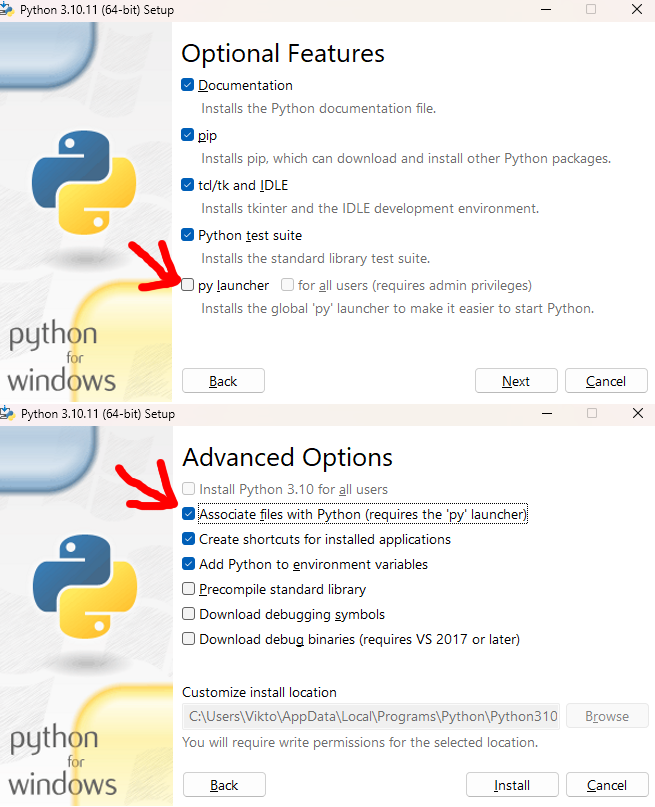
0.2.6p, python. If double clicking doesn't work, right click, open with python. If that doesn't work either, download a python installer, install/modify, tick py launcher and associate py files (see image below).
pic
You will need conda, miniconda or some such already installed, preferably in the default directory (C:/Users/You/miniconda3)
https://docs.anaconda.com/miniconda/install/#quick-command-line-install
Workflow for Flux.1 Dev 4-bit:
pic
 wicked fulcrum
earnest grotto
Here's a script.
Download:
https://raw.githubusercontent.com/a-One-Fan/ComfyUI-...
reef ivy
wicked fulcrum
earnest grotto
Here's a script.
Download:
https://raw.githubusercontent.com/a-One-Fan/ComfyUI-...
reef ivy
i think i see where I messed up with conda, i think i forgot to put the python version in when creating the env lol. 😅
reef ivy
So tried my own reinstall and viks bat file and, latest ipex is just slower with Flux than the older version on an a750 8gb.
It may be faster with other diffusion models though haven't tested them much.
My suggestion if you have an a750 or 8gb arc gpu, use the older requirements install method if wanting to use flux at a decent speed.
Fp8 is the fastest and goes from 4s/it to 6s/it with latest ipex. Only issue with fp8 is first generation is always slower, so I suggest doing a very small size file first just to load the model
As comparison q4 is about 13s/it on old ipex and over 16s/it with new. Q8 is 11 and 13 etc.
earnest grotto
reef ivy
It may be faster with other diffusion models though haven't tested them much.
It fixes a bug where 1024^2 SDXL images (as well as other very near 1MP images, and some other specific higher or lower pixel counts) will sometimes have broken horizontal lines
Well, .20 fixes that specifically IIRC but that's still a notable fix
reef ivy
Yeah, it may be good to have 2 env to use for flux
I don't fully understand why its slower with new ipex on 8gb but it is for some reason. I think sdxl might actually be faster with the new one. Very strange
earnest grotto
I can make it create other environments, convenient shortcuts, but I need specific versions
I still can't tell if it's even an ipex issue, or if it's caused by a newer comfy update or what
reef ivy
I don't really think it is necessary, i think its still usuable just much slower.
But if you want to he most optimized flux you should use the null whls.
For a770 i think the new ipex is better too, so until someone else with an a750 can test I will say its an issue with a750 and flux. Possibly a lowvram issue
Otherwise it could be me and my setup
quartz kelp
earnest grotto
Here's a script.
Download:
https://raw.githubusercontent.com/a-One-Fan/ComfyUI-...
this worked thanks!
 earnest grotto
quartz kelp
this worked thanks!
earnest grotto
quartz kelp
this worked thanks!
 raw cairn
earnest grotto
It fixes a bug where 1024^2 SDXL images (as well as other very near 1MP images, ...
raw cairn
earnest grotto
It fixes a bug where 1024^2 SDXL images (as well as other very near 1MP images, ...
ooh, the 1024 corruption bug is gone? no more need to do 1080?
earnest grotto
It's fixed with newer IPEX versions than .10. Which ones, I don't recall exactly, but with .40 it is fixed.
reef ivy
Just for an ease of use and kinda fun tip, if you guys didn't know you can make a short cut to your bat file and add it to your desktop and/or taskbar. And with a shortcut you can add an Icon for it you can custmize how you want etc. Then it's just a one click from your desktop.

You can also do this in linux, albeit its a bit more of a process to set up
raw cairn
earnest grotto
It's fixed with newer IPEX versions than .10. Which ones, I don't recall exactly...
Awesome, thanks
karmic jasper
Good evening, I'm gonna give setting up comfyui with flux another go. I just wish there was a unified guide cause right now I'm taking pieces from here and there and hoping for the best lol
karmic jasper
reef ivy
this ```conda install pkg-config libuv
python -m pip install torch==2.1.0.post3 ...
Yeah im getting the same error:
ERROR: Wheel 'torch' located at C:\Users\username\AppData\Local\Temp\pip-unpack-7hvr7p7w\torch-2.1.0.post3+cxx11.abi-cp310-cp310-win_amd64.whl is invalid.
karmic jasper
earnest grotto
Here's a script.
Download:
https://raw.githubusercontent.com/a-One-Fan/ComfyUI-...
i'll try yours now Vik as everything else failed
karmic jasper
unfortunately even after @earnest grotto 's script I had no luck.
C:\Users\username\Downloads\Comfy_Intel>start_lowvram.bat

C:\Users\username\Downloads\Comfy_Intel>call C:\Users\username\miniconda3/Scripts/activate.bat
Traceback (most recent call last):
  File "C:\Users\username\Downloads\Comfy_Intel\ComfyUI\main.py", line 86, in <module>
    import execution
  File "C:\Users\username\Downloads\Comfy_Intel\ComfyUI\execution.py", line 13, in <module>
    import nodes
  File "C:\Users\username\Downloads\Comfy_Intel\ComfyUI\nodes.py", line 21, in <module>
    import comfy.diffusers_load
  File "C:\Users\username\Downloads\Comfy_Intel\ComfyUI\comfy\diffusers_load.py", line 3, in <module>
    import comfy.sd
  File "C:\Users\username\Downloads\Comfy_Intel\ComfyUI\comfy\sd.py", line 5, in <module>
    from comfy import model_management
  File "C:\Users\username\Downloads\Comfy_Intel\ComfyUI\comfy\model_management.py", line 139, in <module>
    total_vram = get_total_memory(get_torch_device()) / (1024 * 1024)
  File "C:\Users\username\Downloads\Comfy_Intel\ComfyUI\comfy\model_management.py", line 108, in get_torch_device
    return torch.device(torch.cuda.current_device())
  File "C:\Users\username\Downloads\Comfy_Intel\cenv\lib\site-packages\torch\cuda\__init__.py", line 878, in current_device
    _lazy_init()
  File "C:\Users\username\Downloads\Comfy_Intel\cenv\lib\site-packages\torch\cuda\__init__.py", line 305, in _lazy_init
    raise AssertionError("Torch not compiled with CUDA enabled")
AssertionError: Torch not compiled with CUDA enabled```This was due to not havin the python number in the command i ran. Make sure you have conda 3.10.6
Viks script should take care of everything so my guess is wrong version of python in miniconda.
karmic jasper
reef ivy
Viks script should take care of everything so my guess is wrong version of pytho...
Vik's script seems to be creating 3.10 env
conda create -p ./cenv python=3.10 -y
reef ivy
What do you have installed?
karmic jasper
i assume if i run the scrip it installs that particular env doesn't it?
reef ivy
It should i think, but I already have miniconda installed on my system
karmic jasper
i do have miniforge installed but shouldn't it still create a 3.10 env then even if my main is newer?
reef ivy
I also have python 3.10.6 installed in my system as well
reef ivy
karmic jasper
i do have miniforge installed but shouldn't it still create a 3.10 env then even...
I don't have a clue about miniforge, I have never used it. If it doesn't create a conda env it won't work. Conda is necessary in windows
karmic jasper
as far as i know it is basically conda
reef ivy
Were there errors when running the script?
earnest grotto
hmm
karmic jasper
reef ivy
Were there errors when running the script?
nope
just when i try to run the .bat
reef ivy
According to google miniforge is a community driven project while miniconda is official from anaconda
earnest grotto
karmic jasper
Yeah im getting the same error:
```ERROR: Wheel 'torch' located at C:\Users\user...
Well, that's your issue
Or, an issue with Intel's CDN specifically
I dunno what's up with it
I recall having some issues when IPEX... .20 released? For a few days it was having problems downloading
In a few days I imagine this will go away
karmic jasper
i honestly no idea what's going on.
earnest grotto
In the meantime, I can download the wheels, reupload them on megaupload or something, you can install them manually
karmic jasper
cause that wasn't with vik's script
reef ivy
That is the only difference I see in our installation
karmic jasper
earnest grotto
In the meantime, I can download the wheels, reupload them on megaupload or somet...
yeah, im downloading them now and installing them manually...
reef ivy
I got the torch not compiled with cuda before, but it was because i didn't pip install one API, viks script should do that
earnest grotto
karmic jasper
yeah, im downloading them now and installing them manually...
Say if anything happens with that... but, don't expect a response soon
I will be off
karmic jasper
cheers mate, I appreciate that
earnest grotto
could also be your internet, things happen in cables
karmic jasper
earnest grotto
could also be your internet, things happen in cables
I don't think that's the problem unfortunately.
 primal hatch
how can i install Numpy?
 primal hatch
Can anyone help me to fix this 👀
primal hatch
bro please help me to install flux 😭
earnest grotto
earnest grotto
Here's a script.
Download:
https://raw.githubusercontent.com/a-One-Fan/ComfyUI-...
@primal hatch
primal hatch
earnest grotto
<@883307928055078943>
also not worked for me 😭
earnest grotto
what about it didn't work
primal hatch
let me explain
i have downloaded that powershell file and right click open with power shell but it automatically close every time
earnest grotto
type in powershell in the start menu, run it, cd to where you put the script, run the script from that and show what error it says
primal hatch
okay wait
earnest grotto
I think I might know what the issue is
You don't have conda, do you
primal hatch
i don't have conda 👀
 outer thunder
you should install it then
earnest grotto
primal hatch
how can i install?
 primal hatch
ohh okay
outer thunder
looking at your last screenshot I think you do have most dependencies set up though?
maybe you have numpy 2.0 or higher?
conda is recommended so you can isolate different environments but you seem to have packages installed into your base python environment
earnest grotto
outer thunder
maybe you have numpy 2.0 or higher?
that is the issue that causes that
outer thunder
yea
earnest grotto
However, the script needs to work. I'm expecting that people should be able to just run it and have it work.
primal hatch
conda installed successfully
outer thunder
try running pip install --force-reinstall "numpy < 2.0"
primal hatch
but i uninstalled the comfy ui let me install first
outer thunder
oh, then try with a fresh new environment with conda
so nothing leftover from your previous installation interferes with it
primal hatch
which python version is recommended?
outer thunder
3.11
primal hatch
i have 3.12.5
outer thunder
you can specify python version when creating conda envs
conda create -n comfyui python=3.11
like that
-n xyz
determines the name of the environment
you can activate this environment with
conda activate comfyui
after activating the environment you can install all the packages that you need to install according to comfyui's github page
primal hatch
earnest grotto
Here's a script.
Download:
https://raw.githubusercontent.com/a-One-Fan/ComfyUI-...
if i install with powershell can i use flux?
earnest grotto
yes
I made the powershell script precisely so you don't have to do what brick is saying to do right now
Just run and install
New numpy breaks things, it installs the last non-2.0 numpy
you need to run comfyui with specific arguments, it sets them up for you
You will want disty's hijacks, it does those too
outer thunder
ipex breaks with numpy 2.0 yea
earnest grotto
Not solely an ipex issue
outer thunder
breaks with latest version of oneapi too
earnest grotto

GitHub
Error occurred when executing PreviewImage: Numpy is not available File "E:\ComfyUI\ComfyUI_windows_portable\ComfyUI\execution.py", line 151, in recursive_execute output_data, output_ui =...
primal hatch
i just right click and open with powershell it shoes thes errors and then start to install

 earnest grotto
where is the script, where are you running it from
primal hatch
earnest grotto
where is the script, where are you running it from
i have download the powershell file and right click then open with power shell
outer thunder
where was it downloaded to
primal hatch
in E drive
outer thunder
do you have permissions to create files and folders there?
primal hatch
yes
earnest grotto
This or something else?
 outer thunder
try making a new empty folder, moving the script file there, and then running it
primal hatch
now it shows no error
 primal hatch
earnest grotto
This or something else?
primal hatch
earnest grotto
This or something else?
yes it woks. i did it in wrong way

 earnest grotto
hold on
primal hatch
ok
primal hatch
primal hatch
v
nothing happen
outer thunder
you need to initialize conda and add it to path
during conda installation it should have asked you if you wanted powershell set up for use with conda
oh you're using cmd
try typing conda into cmd
if nothing shows up it means cmd isnt set up for conda
earnest grotto
you don't need to do any of that
primal hatch
 earnest grotto
the setup script creates a bat file that will initialize conda for you
the bat file most likely fails due to being on a different drive
outer thunder
well the screenshots say otherwise
oh
spaces in path
it should be wrapped in quotes
yea you're right the script does detect conda path
but it doesnt seem to account for paths with spaces
earnest grotto
alright, fixed
I will upload a new one in a bit
primal hatch
What should I do now?
earnest grotto
wait a bit
outer thunder
if you want a quick fix
open the bat file with notepad
put " around C:/Users <omitted> activate.bat
so it's wrapped in quotation marks
primal hatch
outer thunder
if you want a quick fix
open the bat file with notepad
put `"` around `C:/Users ...
it woks fine now
outer thunder
nice
primal hatch
can i use flux now ?
primal hatch
Finally ohh !!!!
 primal hatch
thanks 
earnest grotto
get the fp8 version of flux, or one of the gguf ones
primal hatch
earnest grotto
get the fp8 version of flux, or one of the gguf ones
Already using fp8... But Is there any way to make more faster.
earnest grotto
primal hatch
Already using fp8... But Is there any way to make more faster.
get a 4 or 5 bit gguf version, and/or use schnell which is the flux equivalent for lightning/turbo models
lower quality, works with 3-5 steps
You might need this custom node, I dunno if gguf support got added to regular comfy https://github.com/city96/ComfyUI-GGUF
earnest grotto
reef ivy
q2, q3, q4, q8, and fp8.
You can see here a comparison of some of them
Alright, new script, thanks for sharing your issues @primal hatch
Let's see if I can put that into the pinned message
hmm
no embed
Oh well
Edited the pinned message anyways
primal hatch
just in 5 sec !!
 earnest grotto
There might be more quantized versions of the T5 floating around as well, if you want faster loading or prompts
primal hatch
i have generated this image 512x512 then upscale with 4x
reef ivy
primal hatch
just in 5 sec !!
Nice! what's your gpu?
primal hatch
reef ivy
Nice! what's your gpu?
A770
reef ivy
ah cool, yeah. A770 seems to be working real good with Flux
primal hatch
yes its really doing great job 🫣
 reef ivy
earnest grotto
There might be more quantized versions of the T5 floating around as well, if you...
reef ivy
earnest grotto
There might be more quantized versions of the T5 floating around as well, if you...
 earnest grotto
🤷
reef ivy
Found an fp4 model but it didn't work. The gguf encoder works just need to update comfy and the gguf node.
 devout tangle
somber trellis
and I'm getting 3.60s/it now
devout tangle
somber trellis
and I'm getting 3.60s/it now
which ipex version have you gone for? didnt quite get that
reef ivy
I belive he's using the newest ipex that is installed with the script, the older one is in the requirements-ipex.txt
somber trellis
devout tangle
which ipex version have you gone for? didnt quite get that
The latest
earnest grotto
Probably worth noting, on linux I'm getting ~2.5s/it for 1024^2 (fp8).
somber trellis
reef ivy
found these https://huggingface.co/city96/t5-v1_1-xxl-encoder-gguf/tree/main
I'm using this now.
My OCD however doesn't like that I'm using a Clip_L safetensors with two GGUFs.
reef ivy
you know, maybe i should try setting up comfy in wsl2 and see if it's faster...
I find there are speed inconsistencies with flux in windows. Sometimes seems I have to reinstall the entire env every update to get the full speed.
earnest grotto
reef ivy
you know, maybe i should try setting up comfy in wsl2 and see if it's faster...
It's possible it will be faster in wsl as well
But I'd also be on the lookout for spooky things happening if you run out of ram or vram
reef ivy
Yeah, I feel like flux uses more ram than it should sometimes. Might not be offloading stuff like it should.
devout tangle
earnest grotto
It's possible it will be faster in wsl as well
But I'd also be on the lookout fo...
hi, can you plz help me update ipex xpu to the latest version in linux?
earnest grotto
devout tangle
hi, can you plz help me update ipex xpu to the latest version in linux?
This website introduces Intel® Extension for PyTorch*
devout tangle
earnest grotto
https://intel.github.io/intel-extension-for-pytorch/index.html#installation?plat...
thank you very much
i thought conda update --all would do it but i was wrong
earnest grotto
honest hull
😌 Pytorch upstream support for Intel Arc is coming soon too, stay tuned.
curre...
soon
also if conda update decides to update numpy, that's bad
devout tangle
earnest grotto
soon
on my arc a730m with 12gb of vram it got 7s/it on flux , very slow, on sdxl models it did like 1s/it, i did everything except that Disty0 merge
earnest grotto
I'm pretty sure that won't speed it up, it's for other things like going over 4gb or not sifting through custom nodes' code if they decided to use "cuda"
flux is slow
try a more quantized version
maybe my older kernel doesn't like me ooming and that works better on newer ones
devout tangle
i used q4
earnest grotto
gib workflow
devout tangle
earnest grotto
maybe my older kernel doesn't like me ooming and that works better on newer ones
what kernel are you talking about? also who is gib?
earnest grotto
gib is not-quite-shorthand, or slang, for give
the kernel I'm on is 6.5.0-44-generic
devout tangle
earnest grotto
gib is not-quite-shorthand, or slang, for give
i'm on 6.10.3-061003-generic , linux mint
earnest grotto
give workflow
devout tangle
earnest grotto
give workflow
this?
earnest grotto
comfyui embeds its workflows (the node setup) into the images it generates by default
and you can drag an image over to its webpage to automatically load the workflow (if the image has one)
reef ivy
I wonder if the diffuser flux model from sdnext could be loaded into comfyui.
devout tangle
earnest grotto
comfyui embeds its workflows (the node setup) into the images it generates by de...
 reef ivy
devout tangle
i used q4
reef ivy
devout tangle
i used q4
try q8, it seems like it shouldn't be but it's faster than q4. Also try fp8 models
earnest grotto
Hmm, getting 3.5s/it with that monkey
do you maybe have a decently slow CPU?
I have a 3700x
Kinda doubt it but hey
You're running with lowvram, right
devout tangle
earnest grotto
Hmm, getting 3.5s/it with that monkey
12700h running on 65watts, 48gigs of ram, whats your card?
earnest grotto
16gb a770
devout tangle
it's prob my castrated a730m then
earnest grotto
ah, your gpu is mobile
devout tangle
yes
earnest grotto
probably that
devout tangle
i thought vram is more important like for llms
devout tangle
earnest grotto
probably that
thank you for your help
earnest grotto
devout tangle
i thought vram is more important like for llms
vram is important for most compute heavy things
llms, image generation, or blender, whatever
reef ivy
devout tangle
it's prob my castrated a730m then
Still faster with q4 than my a750
devout tangle
reef ivy
Still faster with q4 than my a750
its prob vram limitation in your case
reef ivy
I mean, fp8 and q8 are both faster than q4. At one point normalvram did speed up q4 but it stopped working.
earnest grotto
devout tangle
its prob vram limitation in your case
imagine a game with near-real time TTS, an LLM, maybe something more
the vram usage would be obscene... but then again, since consoles have so little to spare, it's probably going to be a while till such a game happens
man, just applying an llm in a smart way can make a drastically different game
people already seem to play text adventures with them, and that 2 minute papers video on some peeps' experiment with that idea...
devout tangle
earnest grotto
imagine a game with near-real time TTS, an LLM, maybe something more
the vram us...
i know it off topic but can you help me with this error, i used to get it a lot on comfy but currently it happens all the time on foookus on 4th image while generating, and eats up all ram
 devout tangle
earnest grotto
are you using the old fork of foocus or the regular one
devout tangle
earnest grotto
are you using the old fork of foocus or the regular one
regular one
earnest grotto
there might be some environment variable or such you can tweak to let the OS keep more files open at the same time, but that'd just delay it and it sounds like a bad idea
do a ulimit -n, note the number it shows you
should be 1024
then do, let's say ulimit -n 1048576
not a great thing to do
but it is what it is
might have icky yucky side effects
personally, I say just use flux through comfyui, which should be way better than all the stuff fooocus has set up to improve sdxl
devout tangle
earnest grotto
there might be some environment variable or such you can tweak to let the OS kee...
oh, didnt know stuff like that is possible, gonna try it, thx
you meant foocus in comfyui?
i use foocus for redacting photos and inpaint
earnest grotto
I mean using comfyui instead of fooocus
somber trellis
What is the best comfyui upscaler as of the moment that works on arc?
I tried supir v2 but jesus that is slow

 karmic jasper
so far, I have not been successful in setting up comfyui or forge for my A770. I managed to get Fooocus to work but not this.
earnest grotto
earnest grotto
Here's a script.
Download:
https://raw.githubusercontent.com/a-One-Fan/ComfyUI-...
@karmic jasper If you're on windows, ^
karmic jasper
earnest grotto
<@935137059939680346> If you're on windows, ^
I'll try it again sometime cause the first time I used it, i still had errors.
somber trellis
@earnest grotto Would you know how to fix this error with SUPIR's sampler?
FP8_Unet won't work with that on arc, because supposedly it isn't implemented.
earnest grotto
somber trellis
<@311915623179485186> Would you know how to fix this error with SUPIR's sampler?
supir takes latents directly? or what
i haven't used it
somber trellis

Supir takes latents in its sampler directly yes
My only problem is ram constraints
earnest grotto
are you launching comfy with the fp8e4m3fn argument or what
earnest grotto
hmm
somber trellis
I have a boolean on the node for supir activated that enables fp8
earnest grotto
well, disable that
somber trellis
...The point of me asking is if I can get it working.
Lol
I want fp8.
🤔
Mainly for the memory saving
somber trellis
I could do that, yes.
 left glacier
is it possible to train flux lora on A770?
left glacier
earnest grotto
As of right now, no
Because of lack of VRAM or because of architectural incompatibility?
earnest grotto
Because of softwaretual incompatibility
Exclusive or, VRAM
Loras can be trained for the quantized versions, AFAIK, but I don't think support is there for that for Arc, currently
Alternatively, if it had more or waaaay more vram, could train for less quantized ones (maybe, actually the 4gb issues might really come into play?)
earnest grotto
earnest grotto
Loras can be trained for the quantized versions, AFAIK, but I don't think suppor...
People do this with bitsnbytes, which currently does not support arc (and even amd support is, afaik, kinda up in the air)
idk how gguf works out
we can inference it
earnest grotto
devout tangle
what ipex version, did you update your comfy
left glacier
but we can train loras for SD with ARC. What makes flux special?
earnest grotto
The fact that it's 22gb
12b parameter model vs 2.something billion (SDXL) or ~0.8b (SD1.5)
devout tangle
earnest grotto
what ipex version, did you update your comfy
On latest xpu version, comfy is also the latest version, dev and shnell q4 are working fine though a bit slow
raw cairn
Can anyone confirm the correct placement of Disty's hijacks in the latest version of comfy? model_management.py has been updated so the lines aren't the same anymore
earnest grotto
Ok, updated script
you put it after the ipex import.
try:
    import intel_extension_for_pytorch as ipex
    _ = torch.xpu.device_count()
    xpu_available = torch.xpu.is_available()
\/
try:
    import intel_extension_for_pytorch as ipex
    from ipex_to_cuda import ipex_init
    ipex_init()
    _ = torch.xpu.device_count()
    xpu_available = torch.xpu.is_available()
keep the indentation intact
Or, use the script above
raw cairn
Thanks, and I tried the script but it just closes for me (I did open it and change the conda install path but no luck)
earnest grotto
raw cairn
Thanks, and I tried the script but it just closes for me (I did open it and chan...
You tried it before or now
raw cairn
Both
earnest grotto
Open a powershell window where the script is, run it from there, show what it says, I'll fix it
raw cairn
earnest grotto
Open a powershell window where the script is, run it from there, show what it sa...
Sorry for the delay, it seems like my system had disabled running unsigned scripts however the terminal closed before that error was even visible
earnest grotto
Alright, I'll add that to the instructions
earnest grotto
@snow gyro You've installed comfy? Have you downloaded flux
 snow gyro
earnest grotto
<@1231408801014612019> You've installed comfy? Have you downloaded flux
snow gyro
earnest grotto
<@1231408801014612019> You've installed comfy? Have you downloaded flux
No I have not yet was waiting till I heard back from someone about it.
earnest grotto
primal hatch
Finally ohh !!!!
.
earnest grotto
reef ivy
q2, q3, q4, q8, and fp8.
.
earnest grotto
somber trellis
.
earnest grotto
devout tangle
.
some random results from different people
And if you specifically want an example with text in an image,

The text below that looks japanese to me was not prompted for, presumably it's incoherent gibberish
the rest was very prompted for though
as in, it did not hallucinate a miku in a red circle with the arrow pointing there by itself
reef ivy
Flux prompt coherence is amazing, I need to get back to messing with it.
snow gyro
I installed Comfy with Bob Duffy's instructions without conda many times and finally had it working correctly but now I get numpy error. Successfully installed MarkupSafe-2.1.5 Pillow-10.4.0 aiohappyeyeballs-2.4.0 aiohttp-3.10.5 aiosignal-1.3.1 annotated-types-0.7.0 async-timeout-4.0.3 attrs-24.2.0 certifi-2024.7.4 charset-normalizer-3.3.2 colorama-0.4.6 einops-0.8.0 filelock-3.15.4 frozenlist-1.4.1 fsspec-2024.6.1 huggingface-hub-0.24.6 idna-3.8 intel_extension_for_pytorch-2.1.10+xpu jinja2-3.1.4 mpmath-1.3.0 multidict-6.0.5 networkx-3.3 numpy-2.1.0 packaging-24.1 psutil-6.0.0 pydantic-2.8.2 pydantic-core-2.20.1 pyyaml-6.0.2 regex-2024.7.24 requests-2.32.3 safetensors-0.4.4 scipy-1.14.1 sympy-1.13.2 tokenizers-0.19.1 torch-2.1.0a0+cxx11.abi torchsde-0.2.6 torchvision-0.16.0a0+cxx11.abi tqdm-4.66.5 trampoline-0.1.2 transformers-4.44.2 typing-extensions-4.12.2 urllib3-2.2.2 yarl-1.9.4
 earnest grotto
snow gyro
I installed Comfy with Bob Duffy's instructions without conda many times and fin...
earnest grotto
snow gyro
I installed Comfy with Bob Duffy's instructions without conda many times and fin...
pip install numpy==1.26.4
snow gyro
@earnest grotto I did but didn't work. I repaired python then add numpy==1.26.4 to requirements-ipex.txt and ran pip install -r requirements-ipex.txt again now it's working. how do I get Flux working now?
earnest grotto
snow gyro
<@311915623179485186> I did but didn't work. I repaired python then add numpy==1...
Do you have an a770 16gb or an 8gb gpu
(or just want to save on vram usage even if you have 16)
 plain idol
I also followed Bob Duffy's instructions without conda, it can run but always get block output image with default workflow + epicrealism model. DG2: A770 OS:win10 Driver: 101.5972 Any suggestion?
earnest grotto
plain idol
remove --bf16-vae, relaunch, retry, say what happens
reef ivy
snow gyro
<@311915623179485186> I did but didn't work. I repaired python then add numpy==1...
should just work, find any workflow and try it out and see.
honest hull
requirement-ipex.txt is outdated. we don't really need that anymore
it just has the links to install the wheels from nuullll
if we are using the latest ipex then we don't need that
plain idol
earnest grotto
remove `--bf16-vae`, relaunch, retry, say what happens
Same. Still black output.
earnest grotto
earnest grotto
Here's a script.
Download:
https://raw.githubusercontent.com/a-One-Fan/ComfyUI-...
@plain idol Reinstall with this ^, say what happens
If the script breaks in some way, closes immediately, whatever, say so
snow gyro
earnest grotto
(or just want to save on vram usage even if you have 16)
I have A770 16gb
earnest grotto
snow gyro
I have A770 16gb
snow gyro
earnest grotto
https://comfyanonymous.github.io/ComfyUI_examples/flux/#simple-to-use-fp8-checkp...
just wondering what is the dif between 8 bit & 16 bit version?
earnest grotto
16 bit requires 22gb (or, likely more) of vram and has slightly better quality
8 bit is worse quality, requires more than 11gb
how much exactly more, 🤷
resolution, other stuff going on
either way an a770 can run that and an a750 can't
if you do want to save on vram, or want faster load speeds, you get these (for example q4_0)
https://huggingface.co/city96/FLUX.1-schnell-gguf/tree/main
https://huggingface.co/city96/FLUX.1-dev-gguf/tree/main
And this addon
https://github.com/city96/ComfyUI-GGUF
snow gyro
earnest grotto
8 bit is worse quality, requires more than 11gb
how much exactly more, 🤷
resol...
do I also need the Flux Dev diffusion model weights?
earnest grotto
earnest grotto
https://comfyanonymous.github.io/ComfyUI_examples/flux/#simple-to-use-fp8-checkp...
Follow the instructions on this link
Dev is the one that works with 20-50 steps
Schnell means go fast in german, it's the one that works with 2-8 steps
snow gyro
earnest grotto
Follow the instructions on this link
ok. what step have you found that works well? also what is the average s/its, do you get? thank you.
earnest grotto
2.5s/it on linux, 6 on windows
snow gyro
earnest grotto
2.5s/it on linux, 6 on windows
ok. so I should get the Flux.1-dev-gguf correct?
earnest grotto
use a step count and model for however long you want to wait / the quality you're looking for
You can get whichever you want, the gguf ones are quantized more, they load faster, they have worse quality, they use way less vram
I'd say they're your best choice, but you will need to also install that custom node as well
See some of people's node setups here, download then drag an image over to comfyui in the browser
earnest grotto
reef ivy
q2, q3, q4, q8, and fp8.
e.g. this
snow gyro
earnest grotto
You can get whichever you want, the gguf ones are quantized more, they load fast...
which one of the dev-gguf do I get as there so many to choose from?
snow gyro
sorry I see now
earnest grotto
it's fine
snow gyro
@earnest grotto when I drag and drop one of the basketball pics to setup workflow I get this error
 earnest grotto
if you do want to save on vram, or want faster load speeds, you get these (for e...
earnest grotto
earnest grotto
if you do want to save on vram, or want faster load speeds, you get these (for e...
Install the custom node as well
snow gyro
I got working but somethings not right, it's slow and very bad quality images. I fixed the quality by putting steps to 30 but it's very slow at 18s/it. I have Intel I9-12900k, 32GB 6000 ram and A770 16GB running on Windows 10. ????
plain idol
earnest grotto
If the script breaks in some way, closes immediately, whatever, say so
Thanks for your suggestion. However, my env can't use Anaconda for some reason.
earnest grotto
snow gyro
I got working but somethings not right, it's slow and very bad quality images. I...
Drop a picture (not a screenshot, the outputs, from comfy's folder) here so we can see the nodes
earnest grotto
plain idol
Thanks for your suggestion. However, my env can't use Anaconda for some reason.
Say what specific error you're getting
plain idol
actually no obvious error show in terminal or UI. A770 vram and compute usage looks normal to me. Tried different IPEX version but still no good luck. Was guessing VAE problem but still same black output with --cpu-vae.

 earnest grotto
plain idol
actually no obvious error show in terminal or UI. A770 vram and compute usage ...
earnest grotto
plain idol
actually no obvious error show in terminal or UI. A770 vram and compute usage ...
link the model
plain idol
earnest grotto
link the model
link the model?? don't understand.
reef ivy
a750 can run the 8bit model, fp8 and gguf. Fp8 is slow on first generation then speeds up well enough to use it. Never tried the 16bit, might with enough system ram not sure how much can offload with lowvram.
earnest grotto
plain idol
link the model?? don't understand.
link where you downloaded the epicrealism_naturalSinRV1whatever model from
most likely civitai, give a link to the page
reef ivy
Also, try different models
plain idol
I've tried few SD1.5 model and re-download again epicrealism but still same result.

Could be this warning ? Saw some discussion about this warning and get black image as well. ComfyUI\comfyui\nodes.py:1498: RuntimeWarning: invalid value encountered in cast
img = Image.fromarray(np.clip(i, 0, 255).astype(np.uint8)). Not sure if you also have this warning? Torch and IPEX env: 2.1.0a0+cxx11.abi 2.1.10+xpu
[0]: _DeviceProperties(name='Intel(R) Arc(TM) A770 Graphics', platform_name='Intel(R) Level-Zero', dev_type='gpu, support_fp64=0, total_memory=15930MB, max_compute_units=512, gpu_eu_count=512)
https://github.com/comfyanonymous/ComfyUI/issues/3500 Tried "--force-upcast-attention" will download torch2.4 and break IPEX. Tried ComfyUI latest mainline and old version(b0ab31d) doesn't help. Can't get rid of "RuntimeWarning: invalid value encountered in cast img = Image.fromarray(np.clip(i, 0, 255).astype(np.uint8))" .
GitHub
m1 max /Users/weiwei/ComfyUI/nodes.py:1408: RuntimeWarning: invalid value encountered in cast img = Image.fromarray(np.clip(i, 0, 255).astype(np.uint8))
reef ivy
plain idol
Could be this warning ? Saw some discussion about this warning and get black ima...
What python version do you have installed? Also are you running it from the comfyui_env? call comfyui_env\Scripts\activate then run python main.py --bf16-unet --use-pytorch-cross-attention --disable-ipex-optimize
Also, for the latest you need to install anaconda if you want to use the scripts, I use miniconda. 3.10.6
plain idol
reef ivy
What python version do you have installed? Also are you running it from the com...
Thanks for your response. I am using python 3.10.6 and execute in python venv as image shows. Same result with --use-pytorch-cross-attention --disable-ipex-optimize.
 reef ivy
Hmm, are you on the latest drivers?
plain idol
Yes, I tried latest 101.5972 and older version 101.5382 suggested by IPEX installation page.
 reef ivy
are you installing manually or using the requirement-ipex.txt? if you are installing from the site you need conda installed.
The requierements-ipex.txt uses the null prebuilt whl's that have the conda files included
plain idol
I installed manually requirement-ipex.txt with METHOD 1 - CMD Window Install. Unfortunately anaconda is not accessible to my env.
does it mean METHOD 1 - CMD Window Install still need conda env?
reef ivy
You have to install it with something like miniconda
plain idol
ok, let me try again. good catch. 🙂
reef ivy
if you are using the requirements-ipex.txt to install comfy, you won't need conda. and it should work out the box after install. But you have to use the null whl's specifically
the requirements will automatically install this into the env https://github.com/Nuullll/intel-extension-for-pytorch/releases/tag/v2.1.10%2Bxpu
GitHub
The torch and intel_extension_for_pytorch wheels were re-packaged with extra dll dependencies on top of official IPEX v2.1.10+xpu release (Intel® Data Center GPU Flex Series, Intel® Data Center GPU...
if you install any other version over it, it won't work without conda
plain idol
I am using requirements-ipex.txt to install so should no need conda, right? Let me try https://github.com/Nuullll/intel-extension-for-pytorch/releases/tag/v2.1.10%2Bxpu again.
GitHub
The torch and intel_extension_for_pytorch wheels were re-packaged with extra dll dependencies on top of official IPEX v2.1.10+xpu release (Intel® Data Center GPU Flex Series, Intel® Data Center GPU...
plain idol
pytorch version: 2.1.0a0+cxx11.abi IPEX: 2.1.10+xpu Still got black output without error. Start to wonder if this is my card issue.
plain idol
Update: I change other A770 then everything works great.....
it's my card issue. Thanks for your help @reef ivy @earnest grotto
earnest grotto
if you've been using only linux with it, try looking into updating the firmware
i doubt that would fix it but you can try
reef ivy
glad you found the cause, that is strange. I wonder what kinda hardware issue would cause that? Most firmware was for hdmi. Also, you had 2 a770's?
zealous atlas
Sometimes I start getting black renders (or other weird issues with graphics), but restarting Windows has usually helped. My motherboard bios also has a stupid safety feature which does change it from Uefi mode to CMS mode, disabling ReBAR and causing performance issues.
plain idol
reef ivy
glad you found the cause, that is strange. I wonder what kinda hardware issue w...
Just tried my card 3Dmark time spy shows error message somehow so borrowed A770 from a friend for testing. So confirmed its my card problem and will try update fw later.
BTW, any suggestion for ComfyUI + Flux dev for A770 16GB? Tested Flux dev FP8 Checkpoint and it takes 5~6 min for a image.
earnest grotto
plain idol
BTW, any suggestion for ComfyUI + Flux dev for A770 16GB? Tested Flux dev FP8 C...
Run comfy with --lowvram. Use the schnell model if you want to wait less.
Do lower resolution images. Flux can do lower and higher resolution without breaking.
reef ivy
According to dan, gguf 8 is the fastest on a770 i think.
Although might be some new quants out since then
earnest grotto
reef ivy
glad you found the cause, that is strange. I wonder what kinda hardware issue w...
Another intel dev working on OneAPI stuff for Blender had no issues with an older firmware, but I had artifacts with OIDN with a newer one, IIRC. This got fixed, of course.
That being said... If furmark breaks, I doubt newer firmware's fixing that.
 earnest grotto
@spiral rover pip install numpy==1.26.4
 spiral rover
okay thank u
spiral rover
still the same after 3x restart
 reef ivy
Make sure to install inside the comfyui env environment. You can also try and delete and reinstall the environment
somber trellis
earnest grotto
Do lower resolution images. Flux can do lower and higher resolution without brea...
After testing, the resolutions really pan out from 256x256 to 1920x1920
Anything higher than 1920x1920 and the image will break
Anything lower than 256x256 causes weirdly cropped images
spiral rover
anyone know how to add facedetailer to reactor?
 earnest grotto
spiral rover
anyone know how to add facedetailer to reactor?
earnest grotto
spiral rover
anyone know how to add facedetailer to reactor?
Look up instructions on using it. There are most likely example workflows on its github
A quick search, if this is the node you're talking about, the instructions are there https://github.com/Gourieff/comfyui-reactor-node?tab=readme-ov-file#usage.

GitHub
Fast and Simple Face Swap Extension Node for ComfyUI - Gourieff/comfyui-reactor-node
spiral rover
earnest grotto
Look up instructions on using it. There are most likely example workflows on its...
thank you mateee
snow gyro
earnest grotto
Drop a picture (not a screenshot, the outputs, from comfy's folder) here so we c...
Thanks I got it working. I was messing around with Comfy Standalone Nvidia and got it working for Intel Arc GPU by deleting the Python embedded version 3.11.9 and replacing it with embedded Python 3.10.9 from Fooocus and using the created .bat files used to setup Fooocus and ipex requirements for Comfy with a few edits for Python embedded.
foggy nexus
Hi guys. I noticed that there are many nodes depending on pytorch and torchaudio version 2.4.0, but Intel pytorch and co. are only compiled up to version 2.1.0 for XPU (very old), do you have any solution? Do you know if anyone has already compiled version 2.4.0 for Intel Arc GPU?
reef ivy
afaik there is no 2.4 ipex for gpu, if you are on linux, i think you can just install pytorch and it's supported natively now though. I haven't had any depedency issues on 2.1.X though, not using anything that needs torch audio but 2.1.4 doesn't give any errors for torch audio anyway.
foggy nexus
I have the latest version 2.1.0, is there a new version that can be installed? Is it made by Intel?
devout tangle
how much vram does flux schnell use? the model is like 7gb for q4, how come it says i'm out of memory on 12gb card, res is 832x1248
also how come schnell q4 uses 12 gb vram, 48 gb of ram and 25 gb of swap? after closing terminal with flux ram usage is 2 gb without flux, it eats up everything, seems like memory leakage or smth
reef ivy
foggy nexus
I have the latest version 2.1.0, is there a new version that can be installed? I...
Latest version is 2.1.40 for gpu/xpu https://github.com/intel/intel-extension-for-pytorch/releases
GitHub
A Python package for extending the official PyTorch that can easily obtain performance on Intel platform - intel/intel-extension-for-pytorch
Viks script file should install this automatically for you for comfyui. The requirements-ipex will use the older build with nulls edits.
earnest grotto
reef ivy
afaik there is no 2.4 ipex for gpu, if you are on linux, i think you can just in...
I assume there will be no more IPEX, as with pytorch 2.4 support is going to be in pytorch by default
earnest grotto
honest hull
😌 Pytorch upstream support for Intel Arc is coming soon too, stay tuned.
curre...
.
https://pytorch.org/get-started/locally/ This page doesn't list OneAPI/OneDNN/XPU/whatever yet, so probably a bit later
zealous atlas
Here it says 2.4 supports only datacenter gpus and ARC support will be in 2.5: https://www.intel.com/content/www/us/en/developer/articles/tool/pytorch-prerequisites-for-intel-gpu/2-5.html#inpage-nav-2
These Intel Client GPUs and CPUs with integrated GPUs are supported for PyTorch 2.5 (and are not supported for PyTorch 2.4):
Intel® Core™ Ultra processor family with Intel® Graphics (Codename Meteor Lake)
Intel® Arc™ Graphics family (Codename DG2)
foggy nexus
reef ivy
Latest version is 2.1.40 for gpu/xpu https://github.com/intel/intel-extension-fo...
I have the latest version of Torch installed, but if you add something supported by Torch version 2.1.1 (this is the Intel extension 2.1.40!!) to your workflow, it doesn't work, that's a big limitation.
 earnest grotto
foggy nexus
I have the latest version of Torch installed, but if you add something supported...
earnest grotto
foggy nexus
I have the latest version of Torch installed, but if you add something supported...
ipex 2.1.40 uses torch 2.1.0
reef ivy
foggy nexus
I have the latest version of Torch installed, but if you add something supported...
When you install an extension check and see if it reinstalls torch or override anything, if so you need to reinstall ipex again. This is why the requiremens-ipex way is the easiest to use, but obviously it's a couple versions behind. If using the script, probably just need to call the environment and run the ipex pip install command
 glacial pebble
ho to jump to the install tutorial for the ComfyUI for intel arc ?
earnest grotto
earnest grotto
Here's a script.
Download:
https://raw.githubusercontent.com/a-One-Fan/ComfyUI-...
Here ^
If you're referring to discord not quite scrolling all the way... Keep trying. Dunno what else to tell you :(
reef ivy
Also just check the pinned messages


 potent tiger
cd
glacial pebble
Hello, maybe sopmeone can help me, i used ComfyUI with Intel ArcA770 and all was working good, then i installed the ComfyUI Manager an everything was still working good but then i installed SVD from the Manager and after this ComfyUI dont Work anymore.

 earnest grotto
glacial pebble
Hello, maybe sopmeone can help me, i used ComfyUI with Intel ArcA770 and all was...
earnest grotto
glacial pebble
Hello, maybe sopmeone can help me, i used ComfyUI with Intel ArcA770 and all was...
Do pip list | findstr torch, show the output

 glacial pebble
i Reinstalled everything again this time with METHOD 2: Anaconda Install , before i used Method 1, Comfy is working again but im not sure if want to try out SVD again ? maybe the same thig will happen, anyone is using ComfyUI with the Intel Arc and SVD ?
glacial pebble
Anyone knowing what happens now ? after Klicking Queue Promt this happend


is it even possible to create img to video with the intel arc and ComfyUI at the moment ? did anyone managed to do it ?
earnest grotto
glacial pebble
Anyone knowing what happens now ? after Klicking Queue Promt this happend
Show the stack trace from the command prompt
snow gyro
Does anyone with an Intel Arc GPU have to use a low VRAM argument when using ComfyUI, if so what argument do you use? Thank you.
earnest grotto
Depends on what I'm doing
e.g. you don't have to use lowvram with fp8 flux on an a770 16gb. But you should, it will be faster
If you're asking in regards to something specific, say what
glacial pebble
earnest grotto
Show the stack trace from the command prompt

 earnest grotto
glacial pebble
earnest grotto
glacial pebble
Open comfy/clip_vision.py in your favorite text editor, go to line 25, replace
image = torch.nn.functional.interpolate(image, size=(round(scale * image.shape[2]), round(scale * image.shape[3])), mode="bicubic", antialias=True)
with
image = torch.nn.functional.interpolate(image.to('cpu'), size=(round(scale * image.shape[2]), round(scale * image.shape[3])), mode="bicubic", antialias=True).to(image.device)```
and keep the indentation intactThank you very much the Problem seems to be Solved but another Problem showed up
"RuntimeError: Current platform can NOT allocate memory block with size larger than 4GB! Tried to allocate 11.07 GiB (GPU 0; 15.56 GiB total capacity; 5.10 GiB already allocated; 5.29 GiB reserved in total by PyTorch)
Prompt executed in 18.21 seconds"
earnest grotto
don't remove the stack trace
glacial pebble
earnest grotto
don't remove the stack trace
what you mean
earnest grotto
open a command prompt in comfyui's comfy folder
git clone https://github.com/Disty0/ipex_to_cuda
open comfy/model_management.py
dammit discord
earnest grotto
earnest grotto
```py
try:
import intel_extension_for_pytorch as ipex
_ = torch.xpu.dev...
this
Do this
glacial pebble
ok
earnest grotto
glacial pebble
what you mean
You posted an image of the stack trace, then removed it
glacial pebble
yes i removed it because it was so small, then i copy the text here because it was not much
snow gyro
earnest grotto
Depends on what I'm doing
I don't have to use lowvram argument, It was a general question for someone who has a GPU with less than 16GB VRAM. I'm in the end stages of creating a ComfyUI with embedded Python with ease of setup with .bat files to run to setup everything and I wanted to include a lowram.bat for the ones with lower vram than the A770 and that aren't able to use the normal vram setup. I've seen different posts as to which argument to use for lowvram and wanted to use the correct one in the .bat file. Thank you.
glacial pebble
where to put the "setup_comfy_ipex.ps1" ? does it matter where i run it ?
 cobalt oxide
Hello, im new here, first post instructions from this channel is still valid, or is there any updated version of it? thanks
glacial pebble
earnest grotto
this
i dit it but the problem still exist, maybe i made something wrong ?

i opened a command prompt in comfyui's comfy folder
and git cloned https://github.com/Disty0/ipex_to_cuda
then i changed the Entris to the ones you linked in the model_management.py
glacial pebble
if i set widh and height to 504 everything is working but if i make it higher for example 1024 x 502 this error show up, with an Intel Arc A770 and 16Gb. dont know if this is normal ?


 reef ivy
glacial pebble
i opened a command prompt in comfyui's comfy folder
and git cloned https://githu...
reef ivy
glacial pebble
i opened a command prompt in comfyui's comfy folder
and git cloned https://githu...
what does the line in the model management file look like? It could have been overwritten with an update
earnest grotto
earnest grotto
Here's a script.
Download:
https://raw.githubusercontent.com/a-One-Fan/ComfyUI-...
@cobalt oxide You can run this ^ script for a simple installation. You will need to have git and conda installed, the script will give you links if you do not
glacial pebble
reef ivy
what does the line in the model management file look like? It could have been o...
it looks like this
 glacial pebble
still have the Memory Error i dont know how ti fix it i :/
cobalt oxide
earnest grotto
<@186013736933392384> You can run this ^ script for a simple installation. You w...
Thank you, ill take a look, I was not able to make it work in windows or linux, native linux
earnest grotto
That's for windows
cobalt oxide
earnest grotto
That's for windows
yea, i saw the ps1 extension
earnest grotto
If you're on linux, follow some instructions:
git clone comfy
make a venv
sudo apt install intel-oneapi-dpcpp-cpp-2024.2=2024.2.1-1079 intel-oneapi-mkl-devel=2024.2.1-103 intel-oneapi-ccl-devel=2021.13.1-31
python -m pip install torch==2.1.0.post3 torchvision==0.16.0.post3 torchaudio==2.1.0.post3 intel-extension-for-pytorch==2.1.40+xpu oneccl_bind_pt==2.1.400+xpu --extra-index-url https://pytorch-extension.intel.com/release-whl/stable/xpu/us/ python -m pip install numpy==1.26.4
cobalt oxide
good, all with python 3.10.x , correct?
earnest grotto
yes
cobalt oxide
ok, taking notes, ill try this later, thanks your answer, ideally i would like to setup in both oses, will see
earnest grotto
make a script, alias, whatever to source some things for you before running comfy:
DPCPPROOT="/opt/intel/oneapi/compiler/latest"
MKLROOR="/opt/intel/oneapi/mkl/latest"
CCLROOT="/opt/intel/oneapi/ccl/latest"
MPIROOT="/opt/intel/oneapi/mpi/latest"
individual_sources="source $DPCPPROOT/env/vars.sh; source $MKLROOR/env/vars.sh; source $CCLROOT/env/vars.sh; source $MPIROOT/env/vars.sh"
and then you run comfy
python main.py --use-pytorch-cross-attention --bf16-unet
you can go into comfyui's comfy folder, git clone https://github.com/Disty0/ipex_to_cuda there
open model_management, find where intel_extension_for_pytorch is imported and do from ipex_to_cude import ipex_init and then ipex_init()
Comfy will run slightly faster on linux than on windows
cobalt oxide
I did use the script that comes with oneapi, I didnt remember the name, but I source it before everything else I think that defines those variables you are describing there
setvars or something in those lines is called
earnest grotto
that can cause issues if you don't install the full basekit i think
cobalt oxide
I got full basekit
One minor thing, is there any difference between CPU and dGPU configurations? or are just the same?, I got A770
earnest grotto
cobalt oxide
One minor thing, is there any difference between CPU and dGPU configurations? or...
what do you mean by configurations
cobalt oxide
if any dependency difference between iGPU or dGPU when creating the environment for ComfyUI, I saw you script take that in account, but is there any difference in linux installation?
earnest grotto
the windows version of ipex has a part of it prebuilt, and there's 2 prebuilt ones, one for iGPUs and one for arc dGPUs
In that case you will obviously want the dGPU one if you have a dGPU.
No such thing on linux. Having the iGPU enabled might cause issues, might not, dunno
cobalt oxide
In my case is not an issue, I got a ryzen CPU with no iGPU
earnest grotto
good
cobalt oxide
Thanks a lot for you answers!
snow gyro
@earnest grotto Is there any advantages of getting Comfy working with Python 3.11.9? Thanks.
earnest grotto
snow gyro
<@311915623179485186> Is there any advantages of getting Comfy working with Pyt...
doubt it
snow gyro
earnest grotto
doubt it
It wouldn't make it more compatible with newer requirements that things are requiring?
earnest grotto
the newer requirements I'm seeing, is pretty much mostly pytorch 2.4
different python version won't update to that, ipex currently is simply for 2.1.0
soon™️ intel support will be built-in, 2.4, 2.5, whatever, built-in
snow gyro
earnest grotto
the newer requirements I'm seeing, is pretty much mostly pytorch 2.4
ok. Does pytorch 2.1.4 help?
earnest grotto
Do not install random other pytorch versions, you will most likely break ipex
earnest grotto
earnest grotto
`python -m pip install torch==2.1.0.post3 torchvision==0.16.0.post3 torchaudio==...
.
When you install ipex, you're installing torch 2.1.0
snow gyro
@earnest grotto Ok.
glacial pebble
can anyone explain how "ipex_to_cuda" work ? no matter what i write in the "Model Management.py" i still get the 4GB error,. how can i change it from 4gb to 16gb ?

i can do exactly the same job with my RTX2060 on a Laptop with 6gb Vram without any Problem, why i get this Error Message with an Arc with 16Gb Vram ?
earnest grotto
@glacial pebble What's the custom node's github, model, whatever other things you have that are needed to reproduce that
and workflow
glacial pebble
earnest grotto
and workflow
it is very Simple, there are no Custom Nodes in this Workflow, i include a image, the details of the Used image are (2048x1024) (2,59MB) (.PNG)
my Systemspecs - Intel Arc A770 16Gb VRAM, Prozessor 12th Gen Intel(R) Core(TM) i5-12400F, and 32GB RAM. WIndows 11.
Installed Apps:
Conda3
Git
Intel OneAPI Base Toolkit
ComfyUI was installed with the (setup_comfy_ipex.ps1)
 earnest grotto
@glacial pebble Open comfy/ipex_to_cuda/hijacks.py
Replace
original_functional_linear = torch.nn.functional.linear
@wraps(torch.nn.functional.linear)
def functional_linear(input, weight, bias=None):
    if input.dtype != weight.data.dtype:
        input = input.to(dtype=weight.data.dtype)
    if bias is not None and bias.data.dtype != weight.data.dtype:
        bias.data = bias.data.to(dtype=weight.data.dtype)
    return original_functional_linear(input, weight, bias=bias)
with
original_functional_linear = torch.nn.functional.linear
def chunkylin(input, weight, bias, CHUNKS=4):
    chunksize = weight.size()[0] // CHUNKS
    lastchunk = weight.size()[0] % CHUNKS
    split_sizes = [chunksize + (i == (CHUNKS-1))*lastchunk for i in range(CHUNKS)]
    split_weights = torch.split(weight, split_sizes, dim=0)
    split_biases = [None for i in range(CHUNKS)] if bias is None else torch.split(bias, split_sizes)
    lin_results = [original_functional_linear(input, split_weights[i], split_biases[i]) for i in range(CHUNKS)]
    return torch.cat(lin_results, dim=-1)
@wraps(torch.nn.functional.linear)
def functional_linear(input, weight, bias=None):
    if input.dtype != weight.data.dtype:
        input = input.to(dtype=weight.data.dtype)
    if bias is not None and bias.data.dtype != weight.data.dtype:
        bias.data = bias.data.to(dtype=weight.data.dtype)
    return chunkylin(input, weight, bias=bias)
Say if it works
This will probably slow things down a bit
glacial pebble
earnest grotto
<@365870173724606474> Open comfy/ipex_to_cuda/hijacks.py
Replace
```py
original_...
it is working, i was able to create the video without the error, thank you very much, (Prompt executed in 171.39 seconds) yes it took a while, but for now i can work with it 🙂
earnest grotto
the slowdown I'm referring to, is that some things might take, let's say 5-10% longer
video is in general gonna take a while
no matter what
glacial pebble
ok, i try a bigger resolution then the same error apears
earnest grotto
show what the command prompt says
glacial pebble


with the rtx2060 and 6gb Vram i was able to create 2048x1024 and even larger but the error never came, but it took forever 🙂
i have another error now, with 1500x1024
(RuntimeError: Native API failed. Native API returns: -2 (PI_ERROR_DEVICE_NOT_AVAILABLE) -2 (PI_ERROR_DEVICE_NOT_AVAILABLE))
reef ivy
glacial pebble
i have another error now, with 1500x1024
(RuntimeError: Native API failed. Nati...
Probably need lowvram enabled. Did you manually install or use Vik's script? If not try his script and see if you get the same errors.
earnest grotto
earnest grotto
<@365870173724606474> Open comfy/ipex_to_cuda/hijacks.py
Replace
```py
original_...
@glacial pebble replace
original_functional_linear = torch.nn.functional.linear
def chunkylin(input, weight, bias, CHUNKS=4):
    chunksize = weight.size()[0] // CHUNKS
    lastchunk = weight.size()[0] % CHUNKS
    split_sizes = [chunksize + (i == (CHUNKS-1))*lastchunk for i in range(CHUNKS)]
    split_weights = torch.split(weight, split_sizes, dim=0)
    split_biases = [None for i in range(CHUNKS)] if bias is None else torch.split(bias, split_sizes)
    lin_results = [original_functional_linear(input, split_weights[i], split_biases[i]) for i in range(CHUNKS)]
    return torch.cat(lin_results, dim=-1)
with
original_functional_linear = torch.nn.functional.linear
def chunkylin2(input, weight, bias, CHUNKS=4):
    chunksize = input.size()[-1] // CHUNKS
    lastchunk = input.size()[-1] % CHUNKS
    split_sizes = [chunksize + (i == (CHUNKS-1))*lastchunk for i in range(CHUNKS)]
    split_inputs = torch.split(input, split_sizes, dim=-1)
    split_weights = torch.split(weight, split_sizes, dim=-1)
    lin_results = [original_functional_linear(split_inputs[i], split_weights[i], bias) for i in range(CHUNKS)]
    return torch.sum(torch.stack(lin_results), dim=0)
def chunkylin(input, weight, bias, CHUNKS=4):
    chunksize = weight.size()[0] // CHUNKS
    lastchunk = weight.size()[0] % CHUNKS
    split_sizes = [chunksize + (i == (CHUNKS-1))*lastchunk for i in range(CHUNKS)]
    split_weights = torch.split(weight, split_sizes, dim=0)
    split_biases = [None for i in range(CHUNKS)] if bias is None else torch.split(bias, split_sizes)
    lin_results = [chunkylin2(input, split_weights[i], split_biases[i]) for i in range(CHUNKS)]
    return torch.cat(lin_results, dim=-1)
He already has disty's hijacks, I'm adding stuff to them
earnest grotto
glacial pebble
i have another error now, with 1500x1024
(RuntimeError: Native API failed. Nati...
Either you ran out of VRAM, or some bug in ipex or the driver
Don't think I can help you with that one
earnest grotto
glacial pebble
with the rtx2060 and 6gb Vram i was able to create 2048x1024 and even larger but...
Nvidia have offloading to RAM, Intel... Not sure, kinda yes but also kinda no?
It's something someone else would have to implement
Try with lowvram like aaron says