#Mobile Feeders
1 messages · Page 1 of 1 (latest)
 tawny kraken
 modern slate
Comment on limitations: it is generally agreed that doing MLAT while in the receiver is in motion is a false dream, producing inaccurate results and all manner of errors. Stationary MLAT from a movable source is practical, and MLAT clients can be scripted to read a new set of coords at thread start, but not at runtime.
Readsb daemon has a mode to pull input from a standard gpsd module, and supports adsb decoding while mobile, with runtime coord updates.
 icy hull
I'd love to see a mobile app for feeding, even if it was something that had to feed into another backend somewhere first for processing. I've seen apps that can do personal view stuff but not feed other sites
tawny kraken
An ADSB mobile feeder is essentially the same as a fixed feeder, but with a couple of additions and possibly some modifications to the typical components. First, though, what is a mobile feeder? It could be vehicle mounted as in a car or a boat, or it could be man-portable as in a backpack, or perhaps just movable between fixed locations. The requirements for each are a bit different. Should it be overt as a good advertisement for the aircraft tracking hobby, or should it be somewhat covert to minimize potential confrontation with the authorities? Should it participate in multilateration (MLAT), or just be solely a straight ADSB feeder? The following paragraphs outline some of the requirements for each component of a mobile feeder.
- Antenna and RF cable. These components are the same as a fixed feeder, except that large antennas are probably only suitable for vehicle mounted systems. Of course, to minimize weight, cables as short as possible should be used. The antenna mounting is important to keep the antenna vertical while in motion. A covert use case should minimize the size of the antenna, and perhaps mount the antenna under clothing.
- Receiver (the SDR dongle). The dongle and associated bandpass filter and low noise amplifier can be exactly the same as a fixed feeder. Desirably, to minimize weight and space, choose one of the all-in-one SDR’s that incorporate a low noise amplifier, filter, and receiver in the same dongle package.
- Processor. Either a typical Pi small computer or a laptop computer or a good tablet can be used very effectively. They can be identical to the processors used in a fixed feeder. A small Pi or Nuc or tiny PC can be quite effective in a covert application. A laptop or tablet is useful because it incorporates other necessary components.
- Software. Most software can be identical to a fixed feeder, like the linux flavour selected, as well as the typical ADSB suite (readsb, tar1090, the feeder software of your choice, and so on). The MLAT feeder software is optional. Some modification to the MLAT system is essential so that the new location after movement will be used by the system. Rapidly moving mobile feeders cannot participate in MLAT; it just does not work. On the other hand, a portable feeder that only operates when stationary can easily be an MLAT feeder. In between, the jury is still out. How fast can a feeder move and still participate in MLAT? Is a walking pace too fast? Is a snail’s pace too fast? Experiments are needed.
- GPS Receiver. To update location, a GPS receiver is required. Small portable GPS pucks work well, or even a discrete GPS receiver can be connected. Most cellphones and some laptops have GPS receivers incorporated – those signals can be used by the feeder. Linux variants almost always have a GPS daemon to handle the GPS signals.
- Internet Connection. Unless your aim is merely to see aircraft in your immediate vicinity, it is necessary to send tracking data from the feeder to a tracking system like airplanes.live. A Wi-Fi connection is easiest, perhaps to some nearby accessible access point such as on board a large ship. Alternatively, it is possible to set up a Wi-Fi connection to a cell phone acting as a hotspot. A third alternative is to incorporate an LTE modem into the portable feeder. Other more exotic possibilities exist, like satellite data. None of these options will work in all situations, so it is important to carefully evaluate your own use case and desires.
- Display and Keyboard. You will need to control the feeder somehow, perhaps just to reboot the system. Similarly, a display is vital to see what the feeder is doing. Small, light, simple, rugged displays and keyboards are desirable. A laptop implementation has these components already integrated by the manufacturer. In a covert use case, having an open laptop or a tablet in operation is a good example of hiding in plain sight.
- Power Supply. All systems need electric power. High capacity portable power packs can provide extended usage time. Laptops already have integrated battery systems, sometimes very high capacity. In a vehicle application, connecting the system to an available power point can provide extremely long duration power. Beware, though, you may encounter different power standards in different places around the world if your use case involves long distance travel.
- Packaging. Different use cases have different packaging needs. Do not just hook up the hardware and haul it around in a jumble! For a manpack use case, you can get a backpacking frame and mount the hardware to it, perhaps in a bag, with the antenna on the top of the frame. For a portable use case where the feeder will not operate in motion, a Pelican (or equivalent) hard-side case works very well. The components can remain fully connected inside the case, with the antenna being mounted to a bulkhead connector on the case. The display can be inside the lid of the case. For a vehicle mount, it is possible to secure the components in accessible places and perhaps mount the antenna on a magnetic base. For a laptop, using a carry-bag with components preconnected inside is quite easy. For all packages, carefully consider heat dissipation. Packaging requires creativity!
Several persons have built mobile feeders or are in the process of doing so. Their systems are described below.
@left olive My custom built feeder box has a GPS in it. On boot it updates the GPS coordinates for MLAT.
Can hook up a button to GPIO that is a one-touch coord update.


@left olive said: Built that out myself. Added a second SDR a few months ago for UAT
A wee bit on the expensive side lol I think total this box was like ~$400.
The GPS antenna needed to fit a specific profile and match the env constraints of the rest of the box so it was like $130 ahaha. Been tested in -15F - 95F conditions. No issues and no throttling.
@fossil gazelle Would you please post some details about your mobile feeder?
tawny kraken
@amber needle said I'm getting ready to release some plans for a mobile unit. The 18650 battery holder by Geekworm is out of stock everywhere. I received conflicting answers from Geekworm on when they would be back in stock. Does anyone know of other great options for mobile power on a pi?
I have the geekworm X728 V2.5 (https://wiki.geekworm.com/X728) UPS with the X708-A1 (https://wiki.geekworm.com/X708-A1) 8-cell 18650 holder speced. I found the PiJuice Hat UPS (https://uk.pi-supply.com/products/pijuice-standard) with a 12000mAh battery (https://uk.pi-supply.com/products/pijuice-12000mah-battery?_pos=1&_sid=ecdc4ab40&_ss=r). I'm planning on proceeding with plans for both. The piJuice is shipping from the UK so I think its a good option for Europe. Maybe the only option if Geekworm doesn't stock up.

Pi Supply
PiJuice is an uninterruptible power supply solution (UPS) for the Raspberry Pi with smart features that will keep your Raspberry Pi running. Designed for the Raspberry Pi A+, B+, 2B, 3B and 3B+ and also compatible with Raspberry Pi Zero v1.3 and Raspberry Pi Zero Wireless.

Pi Supply
A 12,000 mAh Lithium Ion battery that can be used with the PiJuice HAT module. The PiJuice HAT comes with a 1820mAh as standard, so this 12,000mAh will give you a massive boost! Perfect for remote projects where you want to ensure PiJuice will keep running. Check out the PiJuice Battery Discharge Calculator to work o
 amber needle
There were errors made on this model but it is close to what we will launch : https://os1.flyovr.io/
icy hull
neat but it's missing the schematics!
😉
any thoughts on a smaller, screen-less version with wifi and a long battery?
or is that too easy to diy
amber needle
When we launch, I'll release everything. Build list, youtube instructions, 3D case model, etc... As far as a screenless with long battery life, we are launching an opensource project every quarter so it is something we could look at.
icy hull
I don't know how well it would work but it def would be neat to have a mobile version that can keep going with the vehicle off. That would get tricky for people who don't drive a lot however
amber needle
Oh! The next opensource project will be a vehicle version that plugs into your 12V power source. The small noolec SDRs would keep it reasonably small. Just need a mini GPS module.
icy hull
or maybe something that can get a location from your phone
like a webpage requesting location
amber needle
Yes, I would need help with that. If someone wants to help, absolutely.
modern slate
amber needle
Oh! The next opensource project will be a vehicle version that plugs into your 1...
Power from car, with battery to run when car is off, and power/filter logic to not crash the pi when the ignition switch throws and drops filth on the car 12V?
icy hull
amber needle
Yes, I would need help with that. If someone wants to help, absolutely.
tar1090 can do it already iirc, and also update it every so often if the page is open
 worthy schooner
Here's my thing. RPi4 in a SmartiPi Touch Pro case with 7" RPi touchscreen. Inside with the Pi 4 is a Waveshare 4-port USB Hat and Stratux 1090 & 978 dongles. I drilled 2 holes in the top of the case to mount the antenna connector jumpers that came with the dongles. Antennas are the ones that came with the dongles as well. In these photos being powered by and Anker Powerhouse 100.
The mounting between the case doesn't normally fold flat to the base so I got some Go Pro accessories since the mount/hinge is basically the same. I set it up so I can fold it flat. It's not perfect and some times I have to really tighten it to stop it flopping down, but it works. There are 2 mounting points in the case, the way I have it gives you access to the Pi USB ports, the other has it completely encased. I wanted access to the USB ports for keyboard and mouse, unfortunately that means I have a small flat USB cable that comes out of the case to attach to the USB Hat.
Case: https://www.amazon.com/gp/product/B08VSDCQM2
Hat: https://www.amazon.com/gp/product/B072Q5S1XH
Dangles: https://www.amazon.com/gp/product/B07K1GZMM9
I'm having issues getting the Stratux 978 to work lately so I might ditch that for a standard RTL-based one if one will fit.


I'll try to remember to get some inside photos as well
tawny kraken
worthy schooner
I'll try to remember to get some inside photos as well
How are you getting location information into the system? Hand typing each time you move?
worthy schooner
Yeah. Not ideal but it's more of a going on vacation, set it and just let it run type of thing so not a huge deal.
Some day I'll figure out an easier way
tawny kraken
worthy schooner
Some day I'll figure out an easier way
I am working on a direct GPS connection. My application will be on board a relatively slow moving ship. Based on some furtling around in all the (complex) MLAT software, I think it will tolerate a **bit **of motion, like for example a ship swinging at anchor. My coding skills are pretty non-existent, so I am struggling a bit with GPSd and libgps and all that. Oh well, no time like the present to learn. I think it will be possible to insert a new GPS location from time to time. If the ship is moving slowly enough, the system should work. I will probably include an MLAT shutoff if the outliers and timeouts get too large. I wonder if anyone has attempted a slow-moving MLAT? How fast is too fast?
amber needle
Maiden trial. Need to adjust gain but everything fits in the case. The pijuice gave me 4+ hours of runtime with my roof antenna. 100+ planes at any time. Not sure on battery life with 2 SDRS.


 fossil gazelle
tawny kraken
I am working on a direct GPS connection. My application will be on board a relat...
fossil gazelle
tawny kraken
I am working on a direct GPS connection. My application will be on board a relat...
My best calcuguesstimation is under 10 MPH, the server may not reject your data. ```# Get GPS location and set vars in /boot/adsb-config
GPSDATA=$( gpspipe -w -n 10 | grep -m 1 TPV)
LAT=$( echo "$GPSDATA" | jq .lat)
LON=$( echo "$GPSDATA" | jq .lon)
ALT=$( echo "$GPSDATA" | jq .alt)m
sed -i -E '/LATITUDE/s/^LATITUDE=./LATITUDE='${LAT}'/gI' /boot/adsb-config
sed -i -E '/LONGITUDE/s/^LONGITUDE=./LONGITUDE='${LON}'/gI' /boot/adsb-config
sed -i -E '/ALTITUDE/s/^ALTITUDE=.*/ALTITUDE='${ALT}'/gI' /boot/adsb-config
You have to edit the SED code above for all of you individual feeders and have some way of starting this command, and then restarting the MLAT feed(s).
You have to have GPSD installed with a USB GPS "puck"
You have to pipe GPSD to Tar1090 so your local map display shows your GPS location but this is not for MLAT```
I have to get back on my truck feeder, but other projects have intervened. Almost there.
 amber needle
I played with a bit using a cron and basic script. (My terms may be wrong.) It would push the readsb(?) Lat/lon update command every minute. I'm using a BN-808 for GPS. I'll have more info on how I'm achieving it in a week or so. I'm not attempting MLAT, just map location update.
fossil gazelle
This is the gui on a 7" touchscreen, It's an OP3LTS modified with an external Wifi Antenna, Holux GPS puck, and with the OnBoard touchscreen keyboard.. Ive been working on the mechanics of a quick to deploy antenna and now that is done. I have a PVC socket removeable attached to a cargo hold down in the truck bed that I leave in place. I have another bit above that hold down that has a clamping knob. I slide a telescopic painter's pole (3-7') through the top mount, sit in the socket below and clamp it. No tools required. No permanent mods to the truck. The antenna is an ADSB Ex 5.5 dBi antenna with a painter's pole adaptor.
fossil gazelle
amber needle
I played with a bit using a cron and basic script. (My terms may be wrong.) It w...
Map location update can be piped to tar1090 by GPSD. I'll try to find it again.
worthy schooner
Here's my insides

 nimble thicket
amber needle
I played with a bit using a cron and basic script. (My terms may be wrong.) It w...
nimble thicket
amber needle
I played with a bit using a cron and basic script. (My terms may be wrong.) It w...
if you add gpsd_in as a source to readsb, you can click "Update GPS location" in tar1090, and it'll periodically update. if you don't enable that setting, it'll update every page load.
#💻tech-support message
amber needle
nimble thicket
if you add gpsd_in as a source to readsb, you can click "Update GPS location" in...
Thanks!!
tawny kraken
fossil gazelle
My best calcuguesstimation is under 10 MPH, the server **may** not reject your d...
I think your calcuguesstimation of 10 MPH is pretty close, based on my examination of the MLAT server code. Some deliberate and necessary slop exists in the timing calculations, but what that translates into for mobile MLAT is hard to work out. I also appreciate your code example. That helps. I was considering just using something like sudo readsb-set-location <your lat> <your lon> basically embedded in a loop with a sleep command, probably sleep 30 or so. I had considered implementing this as a cron job, but the granularity of cron is one minute, which might be too long in a moving application. My GPS puck is an older BU-353S4, but it works and drivers exist. Use what ya got! I am using a Lenovo T410 laptop running Ubuntu as a processor / display / case / WiFi / keyboard / storage / battery / etc component. My philosophy is to let Lenovo do the integration of all that stuff. Dongle is an ADSBx Blue all-in-one SDR, with a puny Nooelec rubber-duck antenna. In my application on board a cruise ship, some degree of discreteness is important. The crew will confiscate transmitters, like ham radio transceivers. On the other hand, an innocuous looking laptop won't attract any attention. They will probably think the antenna is a WiFi antenna since the WiFi service on most ships is pretty spotty. A bigger problem for me will be the steel hull of the ship, and the very small window we will have. In addition, the ship definitely controls the Internet access. Feeding to airplanes.live might be impossible. They might even block Discord! 😱 Oh well, fun and games. I definitely appreciate the interchange of ideas, and particularly any **real **experience someone has when trying to do MLAT while in motion. Perhaps one of you with a man-pack feeder could take a walk around the block to find out when MLAT cuts you off. @amber needle @worthy schooner@nimble thicket
 lunar pollen
Little experiment I did a while back. As expected, noise was an issue even with a filter.

 tawny kraken
lunar pollen
Little experiment I did a while back. As expected, noise was an issue even with ...
tawny kraken
lunar pollen
Little experiment I did a while back. As expected, noise was an issue even with ...
Did you try mobile MLAT?
Your plane is probably too fast, though.
lunar pollen
I put it up 400ft in a loiter doing about 30mph
tawny kraken
lunar pollen
I put it up 400ft in a loiter doing about 30mph
Likely too fast, but was it? Did you see any MLAT results?
lunar pollen
I don't recall. This was 2yrs ago. I may revisit now that I know more but I still think noise is going to be an issue. Although my control is 2.4ghz, there is most likely other interference at play.

It seemed like the filter was doing a good job. Maybe it was just the antenna. If only I could get a bigger antenna in the plane. I was using a small dipole as seen in the picture
 tawny kraken
Perhaps as an experiment, turn on the feeder (including MLAT) in your plane and walk around the block.
lunar pollen
what would that do? I was just trying to see if I could get greater range by putting the antenna at 400ft AGL
tawny kraken
lunar pollen
what would that do? I was just trying to see if I could get greater range by put...
If you have MLAT turned on with a source of near-real-time location (i.e., a GPS), you **MIGHT **be able to do MLAT in motion. It is currently an open question how fast a feeder can move before MLAT craps out. Moving very fast, as in a car on a highway will definitely not work. How about a walking pace? Is that too fast? On the other hand, if your model airplane does not have near-real-time location, then you can't do in-motion MLAT at all.
lunar pollen
I see. For my test I was just trying to see what the theoretical range would be when putting the aircraft high. I wasn't concerned with MLAT or feeding for this test. I get better performance from my house so this test did not yield great results.
tawny kraken
lunar pollen
I see. For my test I was just trying to see what the theoretical range would be ...
As for "up high", Lothar intends to take his mobile to the top of Mauna Kea in Hawaii. Something like 13,500 feet, and he will probably set a record!
lunar pollen
tawny kraken
As for "up high", Lothar intends to take his mobile to the top of Mauna Kea in H...
That's awesome!
nimble thicket
tawny kraken
I think your calcuguesstimation of 10 MPH is pretty close, based on my examinati...
one of these days i'll actually modify the mlat client to read gpsd
fossil gazelle
nimble thicket
one of these days i'll actually modify the mlat client to read gpsd
When you do, will it support multiple feeds?
worthy schooner
Finally seem to have gotten my portable feeder fixed. Swapped the USB ports the 1090 & 978 sticks were in and it now it's working. And I swapped over to the airplanes.live image while I was at it
 stone sinew
lunar pollen
Little experiment I did a while back. As expected, noise was an issue even with ...
stone sinew
lunar pollen
Little experiment I did a while back. As expected, noise was an issue even with ...
Noise was from the motors and/or the ESC?
lunar pollen
stone sinew
Noise was from the motors and/or the ESC?
Possibly. I didn’t investigate any further
amber needle
I think the dual SDR is a bit much so I'll have a single SDR version to print. These fans are wrong, have the 3 wire fans on order.


 sudden phoenix
I have shown some progress pics of my mobile feeder over #𝝅-projects and finally wanted to share some "more permanent" pictures in here as well:


There is some size optimisation potential still left on the table! Directly connecting the USB power to the pin header of the Pi would enable me to move the SDR over the Pi itself, which would reduce the case width by another 20mm or so. That would also require the toggle switch to be removed (sorry Sammy). Also using a Pi 3 A+ would allow for a 10-15mm reduction of case length.
sudden phoenix
I played around with a GPS module today and I wanted to share some more info:

The GPS I am using is connected via Serial and requires some configuration to get working with readsb.
This guide was the primary reference: https://maker.pro/raspberry-pi/tutorial/how-to-use-a-gps-receiver-with-raspberry-pi-4
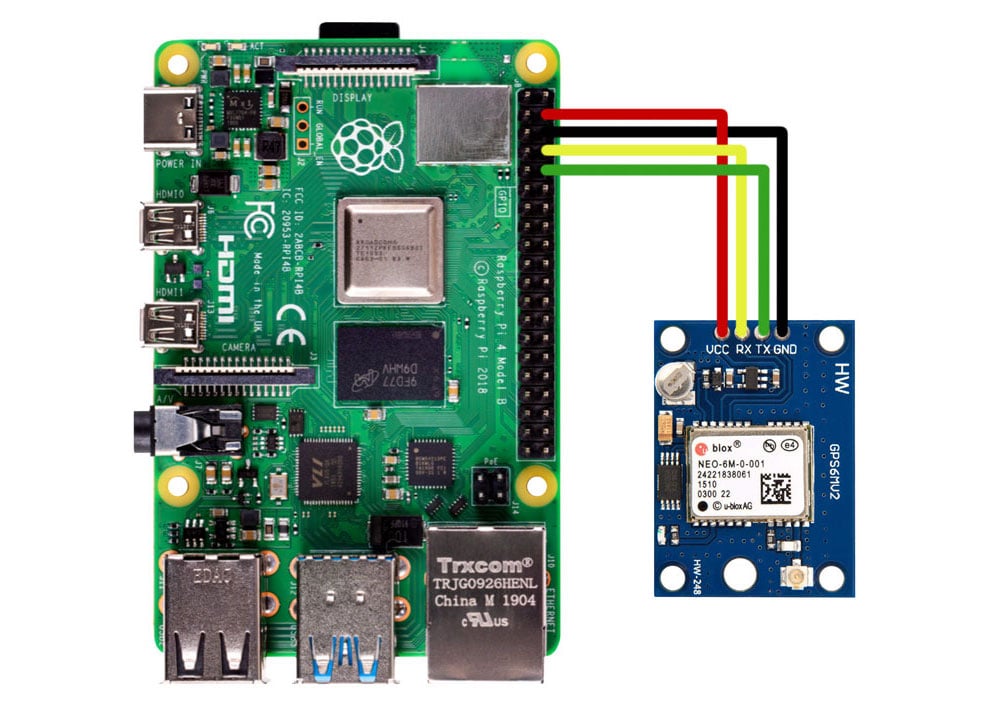
Maker Pro
Learn how to connect and configure a GPS receiver to your Raspberry Pi 4 for a variety of fun projects!
However, it required some more changes to get it to work:
- Connect the GPS module:

- Run
sudo raspi-config> Navigate to Interface Options > P6 or I6 - Serial > Log-In via Serial No, but use Serial Yes - (required for Pi3B only due to an issue with the serial port)
sudo nano /boot/config.txtand insertdtoverlay=pi3-disable-btsomwhere below the[all]line. This disables the bluetooth. - Install gpsd:
sudo apt-get install gpsd gpsd-clients - Check if a signal is received from the GPS via serial:
cat /dev/serial0 - Open
sudo nano /etc/default/gpsd, find the lineGPSD_OPTIONS=""and make itGPSD_OPTIONS="/dev/serial0" - Reboot the pi
- Test the GPS and the gpsd socket by running
sudo cgps -s> Information about the GPS location should appear. - Edit the readsb config to use the gpsd socket:
sudo nano /etc/default/readsbunderNET_OPTIONS=insert--net-connector 127.0.0.1,2947,gpsd_in. It needs to be inside the "". I placed it at the very end. - Restart readsb:
systemctl restart readsb.service. Now the position of readsb is updated automatically. - In TAR1090, open options and enable "Update GPS location". Now the point on the map moves whenever the GPS recognizes a new position.
And you are done! Now readsb and tar1090 update their position automatically and continously.
Next I will try to play around with the MLAT client. I hope I can get it to update it's location automatically as well.
modern slate
Let me try to mimic that good work 😄
pi4 with USB gps modem.
sudo apt install gpsd to get gps daemon
ls /dev/tty* to observe that /dev/ttyACM0 exists and is our GPS modem: sudo cat /dev/ttyACM0 returns text strings that feel like GPS
sudo nano /etc/default/gpsd, find the line GPSD_OPTIONS and make it GPSD_OPTIONS="/dev/ttyACM0"
sudo service gpsd restart (or reboot). 5s later cgps -s is now reporting numbers
sudo nano /etc/default/readsb, edit the NET_OPTIONS line to include --net-connector 127.0.0.1,2947,gpsd_in inside the quotes, as noted above,
sudo service readsb restart
mmmm.. journalctl -xeu readsb still reports the manually entered lat/long from /etc/default/readsb. a half second later it does mention the GPSD input tho
Oct 10 12:35:38 td5adsb readsb[2322066]: GPSD TCP input: Connection established: 127.0.0.1 port 2947
Oct 10 12:35:38 td5adsb readsb[2322066]: Found Rafael Micro R820T tuner
``` so maybe it is working?The dot on 1090 is not on the manually entered coordinates, so I guess it worked
sudden phoenix
Yeah, it shows the manually set coordinates first on my end as well, before then shwoing hte GPSD connection established.
modern slate
I wonder if your serial-port GPS could be configured with /etc/default/gpsd too, instead of replacing the systemd daemon with a manual one?
sudden phoenix
modern slate
I wonder if your serial-port GPS could be configured with /etc/default/gpsd too,...
Good idea! Turns out it can! I will adjust the instructions!
nimble thicket
sudden phoenix
2. Run `sudo raspi-config` > Navigate to Interface Options > P6 or I6 - Serial >...
slight tweak on my end - i have GPSD_OPTIONS="-n" so it's running without anyone connected (because i use it as a ntp stratum 0 source). and DEVICES="/dev/serial0" to configure the device
icy hull
sudden phoenix
This guide was the primary reference: https://maker.pro/raspberry-pi/tutorial/ho...
Well what module is it??
sudden phoenix
icy hull
Well what module is it??
Ahh, probably should have mentioned that! Just a cheap Beitian BN-220.
icy hull
Oh that is cheap. Damn now I want to order some…
nimble thicket
not cheap, but i really like this - https://store.uputronics.com/index.php?route=product/product&product_id=81
Raspberry Pi GPS/RTC Expansion Board
previous versions didn't have the RTC, but i guess the next PI has one, so it doesn't matter
fossil gazelle
I've used these: https://www.adafruit.com/product/746 has an onboard battery too.

We carry a few different GPS modules here in the Adafruit shop, but none that satisfied our every desire - that's why we designed this little GPS breakout board. We believe this is the ...
nimble thicket
yea, i've used the hat version of that too - PPS out is the discriminator for me and other modules
i think the ublox is a slightly better chip, but i'm going off memory instead of datasheets right now
 left olive
fossil gazelle
I've used these: https://www.adafruit.com/product/746 has an onboard battery too...
left olive
fossil gazelle
I've used these: https://www.adafruit.com/product/746 has an onboard battery too...
The hat version of this is the one I used for the boxes I built that you saw in the airframes server
sudden phoenix
Ended up adding an E-Ink Display to the case. It runs a simple Python program that shows some ADS-B stats (aircraft received, total aircraft received, range (if a GPS is available), as well as some others).
The initial Python Code is available on GitHub: https://github.com/JN-Husch/Portable-Receiver-Display
It is still rudimentary and the installation guide is very basic. But it should be able to get a similar setup running.
STL files for 3D printing are also available now: https://www.printables.com/model/720951-portable-pi-sdr-case

 trail haven
I have been running a standalone instance (no M-LAT) of an ADSB-X hack (done by others). It's in a Geekworm UPS case in the truck, and connected to the LAN in the truck. It works well, and so long as I have been able to save enough open street map tiles (the hack has the "off-line" map mode), it's fun to be stuck in accident-caused traffic jams in the mountains or desert, and see the Arizona DPS and/or med transport helos helping me bide my time.
fossil gazelle
trail haven
I have been running a standalone instance (no M-LAT) of an ADSB-X hack (done by ...
Nice! I'm still fooling with a cell connected feeder with a 7" touchscreen in my truck.
 faint niche
sudden phoenix
Ended up adding an E-Ink Display to the case. It runs a simple Python program th...
faint niche
sudden phoenix
Ended up adding an E-Ink Display to the case. It runs a simple Python program th...
Holy cow, that thing is amazing!