#Known Block Bugs
1 messages · Page 2 of 1
 cursive matrix
 dreamy thunder
 wind summit
I don't think the last one is a bug right? Even vanilla blocks do that
 tired forge
.
 honest wind
@dreamy thunder
Block that uses "flower_pottable" needs both a "geometry" and "material_instances" component.
This is thrown on preview when the block has minecraft:geometry and minecraft:material_instances defined in every permutation but not defined at root, preventing the block from loading if it's flower pottable but defines these for each permutation rather than at root. This can be worked around by defining them at root too, but if they are already defined they shouldn't need to be defined again.
minecraft:item_visual has the same requirement of having both these components defined but handles them being in permutations fine.
More importantly, this error is thrown and stops the blocks from loading even in format versions where this was allowed previously, breaking previously working behavior packs.
 cyan dawn
honest wind
<@905553488510079026>
```
Block that uses "flower_pottable" needs both a "geome...
cyan dawn
honest wind
<@905553488510079026>
```
Block that uses "flower_pottable" needs both a "geome...
Perhaps because the flower pottable can only be placed in the root directory, it ends up only reading the value in the root directory as well.
honest wind
cyan dawn
Perhaps because the flower pottable can only be placed in the root directory, it...
That would make sense, but minecraft:item_visual can also only be placed in root as well and reads permutations fine for its requirements.
dreamy thunder
I can look into it later if I feel like it. My stomach's kinda in a knot today.
dreamy thunder
honest wind
<@905553488510079026>
```
Block that uses "flower_pottable" needs both a "geome...
Wait, guh? Can you give me a code sample?
honest wind
dreamy thunder
Wait, guh? Can you give me a code sample?
I'd have to make one since the one I tested with is properitory, but add minecraft:flower_pottable to the root of a block, make sure minecraft:geometry and minecraft:material_instances are in every permutation but not root. Then repeat with minecraft:item_visual to see intended behavior.
dreamy thunder
Menu category requirement bug confirmed fixed.
dreamy thunder
honest wind
I'd have to make one since the one I tested with is properitory, but add `minecr...
Because this uses parser-level handling (so far as I'd guess), I'm going to assume this won't be fixed. But I still think it's exceptional enough to be noted.
 south berry
dreamy thunder
Menu category requirement bug confirmed fixed.
south berry
dreamy thunder
Menu category requirement bug confirmed fixed.
Which bug is that? is it the one that makes it so that if you dont have the menu category on the block/item it spams ur logs with errors
dreamy thunder
south berry
Which bug is that? is it the one that makes it so that if you dont have the menu...
Yeah. It's fixed now.
dreamy thunder
dreamy thunder
Because this uses parser-level handling (so far as I'd guess), I'm going to assu...
Eh, I'll throw it on the pile.
Thoughts on me reporting https://discord.com/channels/523663022053392405/1300114354129338408? It doesn't work with Vibrant Visuals.
 short glade
dreamy thunder
Thoughts on me reporting https://discord.com/channels/523663022053392405/1300114...
short glade
dreamy thunder
Thoughts on me reporting https://discord.com/channels/523663022053392405/1300114...
Yes please.
cyan dawn
dreamy thunder
[Atlas composition failing in Vibrant Visuals bug](https://report.bugs.mojang.co...
I just hope it doesn't work as expected.
honest wind
dreamy thunder
[Atlas composition failing in Vibrant Visuals bug](https://report.bugs.mojang.co...
I'm unable to recreate this in even Fancy graphics on my machine.
 honest wind
No, nothing
dreamy thunder
What machine?
honest wind
dreamy thunder
What machine?
 dreamy thunder
Weird. IDK.
honest wind
Nothing in Simple or RTX for me too

 dreamy thunder
@short glade, care to test my test?
short glade
Oh thats so weird.
It has something to do with in-game switching toggle?
Yeah it is.
@dreamy thunder@honest windBefore you enter the world, make sure your graphics mode is set to Fancy and in-game mode switching is turned off. You should now be able to see the apple.
dreamy thunder
!?
short glade
dreamy thunder
!?
dreamy thunder
short glade
No, I believed you. But… what???
Also, thanks a ton. I’ll amend my report.
short glade
I reckon it's part of Kayla's reasoning about instability.
I, don't even know if this is a Graphics bug or a Block bug.
cyan dawn
short glade
I, don't even know if this is a Graphics bug or a Block bug.
I think it's a little bit of everything.
honest wind
@dreamy thunder with #1420467056343519312 message it is now working in Fancy and I can now confirm it does not work in RTX.

 honest wind
@dreamy thunder another thing, it appears only Block.setType() can place multi blocks, and Block.setPermutation() always instantly destroys the multi block afterwards, making it impossible to set states when placing a multi block via the scripting API. It appears the only workaround is to use Dimension.runCommand() and set the states there, unless I am missing something.
short glade
dreamy thunder
[Atlas composition failing in Vibrant Visuals bug](https://report.bugs.mojang.co...
I presume this also applies for items yeah?
dreamy thunder
honest wind
<@905553488510079026> another thing, it appears only `Block.setType()` can place...
Hmm…
dreamy thunder
honest wind
<@905553488510079026> another thing, it appears only `Block.setType()` can place...
I’d poke one of the scriptures working on blocks. Ask them if it’s intentional.
honest wind
dreamy thunder
I’d poke one of the scriptures working on blocks. Ask them if it’s intentional.
It applies even if you don't specify the multi block part state
For example, when trying to set cardinal direction it breaks
dreamy thunder
honest wind
It applies even if you don't specify the multi block part state
@shadow schooner, any thoughts?
Should I file it?
 shadow schooner
That is by design, setting individual parts either through scripts or commands is not allowed as that breaks the internal logic that controls the multi block behaviour.
You are be able to get away with setting all parts to the same permutation state all at once, like for example if there is an on/off state you can toggle that state for all parts in a single event. Like in the example tutorial

A guide to data-driven multi-blocks in Minecraft: Bedrock Edition
honest wind
shadow schooner
You are be able to get away with setting all parts to the same permutation state...
Setting all parts at once seems to be failing on my end, that's what I am talking about. Could it be an issue that is fixed in preview? I am working in stable with the experimental toggle.
shadow schooner
What's the script look like?
honest wind
shadow schooner
What's the script look like?
I can't share it as its under NDA, but I can see if I can make a new one later.
I'm also not using beta APIs so I am finding the parts manually if that might be a contributing factor
shadow schooner
Yeah you really should you the beta method Block.getParts
honest wind
shadow schooner
Yeah you really should you the beta method `Block.getParts`
Is it safe to assume that will release at the same time as multi blocks leaves experimental?
shadow schooner
Try using that one and if it's still causing problems then write up a bug and we will go from there. But I am happy to report that all known multi block bugs were fixed last week so 🤞 this next preview should be all good.
Yes it will release when we release the feature from experimental. Probably in a later this month, not sure yet.
honest wind
shadow schooner
Try using that one and if it's still causing problems then write up a bug and we...
One more thing, what's the proper way to place a multi block at a location that isn't already a multi block, with a permutation set?
shadow schooner
Ideally you can place it by hand from an item or from a command like setblock but only if it's the part otherwise the command will fail. Technically you should be able to set them through scripts but you have to control all the parts and make sure their states are all correct and it's all done at once. I don't believe I ever tested that though, I always just used the getParts method to modify them. Maybe it is a real bug.
honest wind
shadow schooner
Ideally you can place it by hand from an item or from a command like setblock bu...
From what I was testing, setType() places the entire multi block, setPermutation() only places one part
shadow schooner
Yeah so for set permutation you need to manually set all parts with the setPermutation at their respective positions.
honest wind
shadow schooner
Yeah so for set permutation you need to manually set all parts with the setPermu...
Currently what I have is this:
        block.setType(typeId);
        for (const part of block.getParts()) {
          part.setPermutation(
            BlockPermutation.resolve(part.typeId, {
              ...states,
              ["minecraft:multi_block_part"]: part.getState(
                "minecraft:multi_block_part",
              ),
            }),
          );
        }
which just feels wrong
Ideally I feel set permutation should just set the permutation on all the parts by default, and similarly to set type if changing from a standard to multi block automatically place the rest of the parts automatically
shadow schooner
We had a debate about doing things implicitly with regards to multi blocks, in this case the setPermutation method can detect it's a multi-block and apply the same state to all parts. But we decided against things like that as it just opens us up for more bugs that are harder to track down in the future.
 subtle gate
I feel like a withStates method would make this a bit nicer (assuming states doesn't include the multi-block part state)
for (const part of block.getParts()) {
  part.setPermutation(part.permutation.withStates(states));
}
So is setType() placing the parts automatically a bug?
shadow schooner
No that's technically not a bug because under the hood it places the default permutation which is always the first part of multi block, and internally that places the remaining parts.
cyan dawn
shadow schooner
You are be able to get away with setting all parts to the same permutation state...
But the vanilla door only changes the top; only the state differentiates the top and bottom, which is defined in both parts.
cyan dawn
shadow schooner
Try using that one and if it's still causing problems then write up a bug and we...
There's just one bug missing, but if you say so, believe me, we'll have the fix very soon.
short glade
cyan dawn
But the vanilla door only changes the top; only the state differentiates the top...
I want to say its a legacy system.
If doors got the new trait like slabs did and exhibit different behaviour I would consider it a bug.
cyan dawn
short glade
If doors got the new trait like slabs did and exhibit different behaviour I woul...
Makes sense
 rancid raptor
@dreamy thunder some reported fixes
 cyan dawn
Now we just have to wait for it to stabilize.
dreamy thunder
Wow, if these are all fixed, that'd knock off almost 20% of all my remaining block bugs.
 wise halo
Question, is there an issue or a bug report regarding uv_lock on blocks such as stairs? When using minecraft:transformation it works only in (I'm pretty sure) the north and south directions, and messes up in the east and west directions. I am using Minecraft's cut copper texture for testing.
dreamy thunder
wise halo
Question, is there an issue or a bug report regarding `uv_lock` on blocks such a...
I'd tested uv_lock recently and found it worked in every case. But if you're seeing something I didn't, please do file it.
wise halo
dreamy thunder
I'd tested `uv_lock` recently and found it worked in every case. But if you're s...
Like on a stable release or preview? (I am currently on a stable release)
dreamy thunder
I tested mine on Preview, but it was last cycle, so… IDK.
wise halo
Ah, okay, I'll check again soon just to be sure
dreamy thunder
Selection box boundary bug confirmed fixed.
All known 1.26.20 format version parsing bugs confirmed fixed.
Flower pot interaction bug confirmed fixed.
Underwater placement sound bug confirmed fixed.
Multi-block missing selection bug confirmed fixed.
Multi-block placement filter survivability bug confirmed fixed.
Multi-block random offset bug confirmed fixed.
cyan dawn
Do the bugs shown in the preview count or not? Because there's a bug involving the new Sulfur Cube.
dreamy thunder
With custom block definitions?
cyan dawn
dreamy thunder
With custom block definitions?
No
dreamy thunder
Oh, this post is only for the add-ons engine, not Vanilla blocks.
cyan dawn
When you add a custom block to the sulfur cube that defines the texture using material_instances, it doesn't render in the mob, but defining it in blocks.json makes it render correctly.
dreamy thunder
Oh, that is related to custom block definitions.
dreamy thunder
cyan dawn
When you add a custom block to the sulfur cube that defines the texture using `m...
How do you make them pick up custom block items again?
short glade
dreamy thunder
How do you make them pick up custom block items again?
Giving them the proper tags.
dreamy thunder
Gimme one.
short glade
dreamy thunder
Gimme one.
https://wiki.bedrock.dev/items/vanilla-item-tags minecraft:sulfur_cube_archetype_bouncy

Bedrock Wiki
Learn about item tags that are built into the game and applied to vanilla items.

 short glade
I reckon it's because it's not considered a proper block.
The sulfur cubes use the new scale items thing.
cyan dawn
dreamy thunder
<@440685397073461258>, it's in there. It's just weirdly small. Someone file this...
So this would be a vanilla bug?
dreamy thunder
cyan dawn
So this would be a vanilla bug?
No, it indeed affects custom blocks. I misunderstood your "No" earlier.
dreamy thunder
short glade
The sulfur cubes use the new scale items thing.
What's that?
(I haven't followed anything entity related in a few months.)
short glade
  "enable_attachables": true,
  "held_item_scale": 2.8
I will note things like block entities do not render properly which is what I presume is happening with custom blocks.
dreamy thunder
Thanks.
I'm informing them about it internally.
Texture variation bugs confirmed fixed.
short glade
dreamy thunder
Texture variation bugs confirmed fixed.
What does the warning say now?
dreamy thunder
 dreamy thunder
I think the transformation component might be borked… again.
NEW: transformation component not scaling collision or selection box unless those latter components are explicitly defined.
 warm ice
dreamy thunder
I think the transformation component might be borked… again.
warm ice
dreamy thunder
I think the transformation component might be borked… again.
say it aint so 😭
dreamy thunder
Not sure about this other issue…
The transformation component is causing something weird to happen to models.
I think something happened when they tried fixing MCPE-236317.
It's almost like the pivot is in the wrong spot.
short glade
dreamy thunder
Showed it to my team, such a better clarity. We lost our mind trying to figure out if it was a parser issue or something.
dreamy thunder
Transformation scales are relative to the block space center by default, right?
Wait, let me fact check how all this works. I've gotta whip out my notes.
Yeah, can someone else look at this?
{
    "format_version": "1.26.20",
    "minecraft:block": {
        "description": {"identifier": "test:block3"},

        "components": {
            "minecraft:geometry": "geometry.tall_cube",
            "minecraft:material_instances": {"*": {"texture": "obsidian"}},
            "minecraft:transformation": {
                "scale": [1, 0.125, 1]
            }
        }
    }
}
{
    "format_version": "1.26.20",
    "minecraft:geometry": [
        {
            "description": {
                "identifier": "geometry.tall_cube",
                "texture_width": 16, "texture_height": 16
            },
            "bones": [
                {
                    "name": "root",
                    "cubes": [
                        {
                            "origin": [-8, -56, -8], "size": [16, 128, 16],
                            "uv": {
                                "south": {"uv": [0, 0], "uv_size": [16, 16]},
                                "north": {"uv": [0, 0], "uv_size": [16, 16]},
                                "west": {"uv": [0, 0], "uv_size": [16, 16]},
                                "east": {"uv": [0, 0], "uv_size": [16, 16]},
                                "up": {"uv": [16, 16], "uv_size": [-16, -16]},
                                "down": {"uv": [16, 16], "uv_size": [-16, -16]}
                            }
                        }
                    ]
                }
            ]
        }
    ]
}
The model is 128 units tall, centered on the block space center: (0, 8, 0). The transformation then scales the y by 1/8th. So it should just be a full block.
I'll file the incoming bugs over the next week as I get the chance. I'm just not sure about this MCPE-236317.
subtle gate
beforeOnPlayerPlace no longer seems to be preventing client placement prediction
Only when the custom component is applied in the permutations array, in the root components it disables it properly
subtle gate
There was a bug before where client side placement was always disabled if any custom component in any permutation had beforeOnPlayerPlace
This head block only applies the component when minecraft:block_face is "up"
Previously, even if the head wasn't being place on the up face, client placement would not occur
Now it's broken in the opposite way where it happens all the time
subtle gate
When a block that is being placed has a custom component with the onBeforePlayerPlace hook, it should not be placed on the client-side until this hook has ran on the server to avoid the placed permuta...
very descriptive bug report title
dreamy thunder
Looks like there are 2 bugs left to be reported.
- Transformation with no defined boxes causes each respectively to be unaffected.
- Sulfur cubes render custom blocks too small.
I can tackle them later if no one else gets to them.
subtle gate
there's also a culling issue with rotated cubes
a bit hard to reproduce

 subtle gate
There was a bug before where client side placement was always disabled if any cu...
subtle gate
subtle gate
There was a bug before where client side placement was always disabled if any cu...
btw this isn't related to default permutation, it happens even if the permutation condition is true
dreamy thunder
subtle gate
btw this isn't related to default permutation, it happens even if the permutatio...
That's still the default permutation, no?
subtle gate
These should be functionally identical, both applying the component to the default permutation (and every other permutation), but only the first would prevent client placement
"components": {
  "wiki:jisdijsoijd": {}
}
"permutations": [{
  "condition": "true",
  "components": {
    "wiki:jisdijsoijd": {}
  }
}]
Oh, I misunderstood. So it works as intended in root components but never in permutations, right?
subtle gate
yes
dreamy thunder
subtle gate
there's also a culling issue with rotated cubes
a bit hard to reproduce
If you can file it, let me know, and I'll post it.
subtle gate
going to check whether it's just specific render methods
only affects opaque and blend
dreamy thunder
dreamy thunder
- Transformation with no defined boxes causes each respectively to be unaffected...
A'ight, I'm gonna file these within the hour.
dreamy thunder
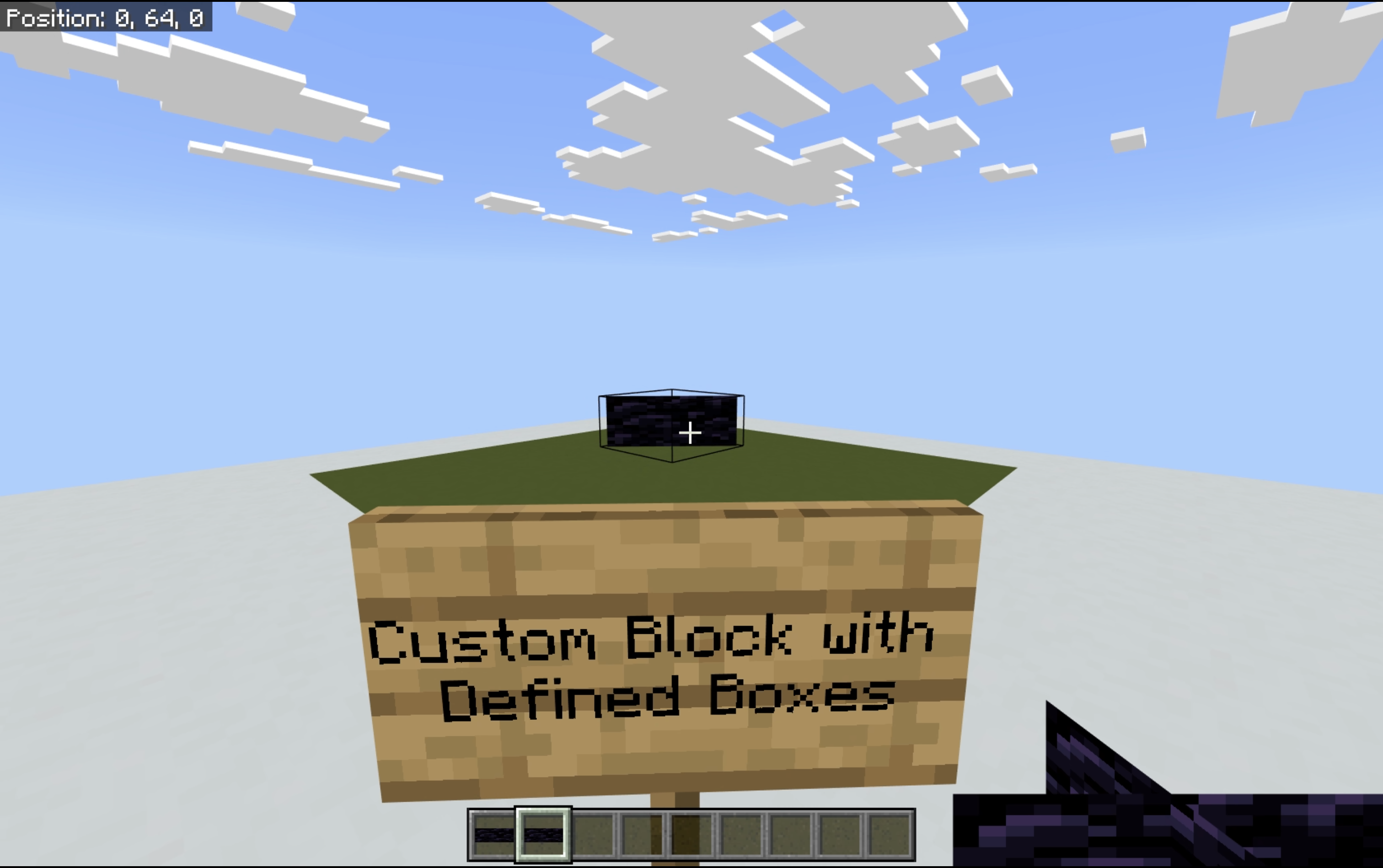
The minecraft:transformation component is not being applied correctly to boxes in custom blocks. If the following components aren’t defined, their behaviors (independently of one another) do not res...
dreamy thunder
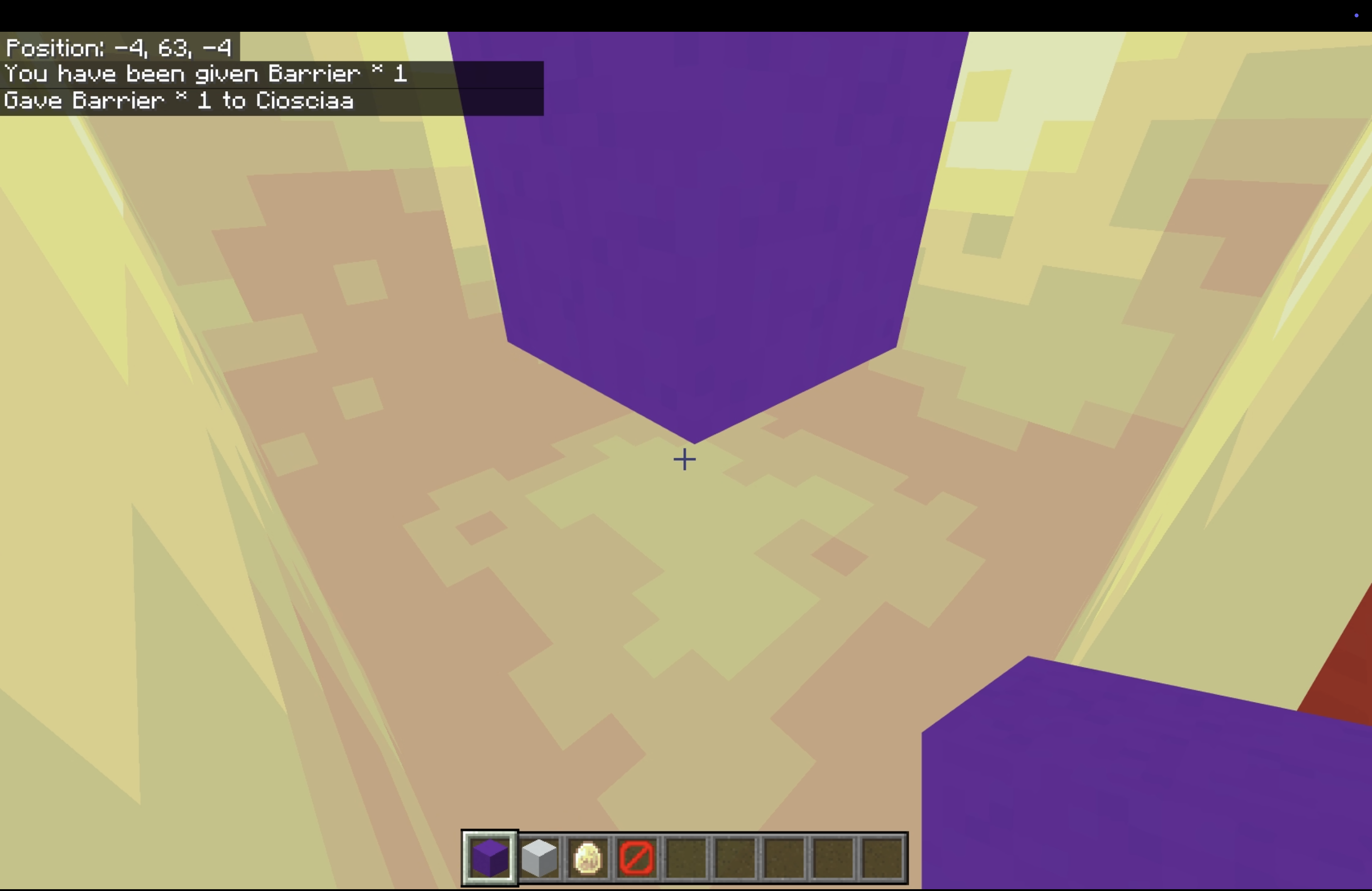
Custom blocks render at a much smaller scale than Vanilla blocks inside sulfur cubes.
Demonstration
The attached screenshots demonstrate this issue. Custom blocks are represented via purple and white ...
cyan dawn
dreamy thunder
[Sulfur cube custom block scaling bug](https://mojira.dev/MCPE-238028) filed.
Thanks
subtle gate
This bug doesn't seem to be included here (the minecraft:is_shears_item_destructible and minecraft:is_sword_item_destructible tags do not function)
https://bugs.mojang.com/browse/MCPE-189586
short glade
components -> minecraft:transformation -> minecraft:redstone_producer: this member was found in the input, but is not present in the Schema
Anyone got this before?
subtle gate
your redstone producer component is inside the transformation component?
short glade
That's...the issue, it wasn't.
Maybe a fluke? Just going to retest then.
Ok yeah, false alarm!
For 'format_version' >= 1.26.20 the block cannot define 'minecraft:redstone_producer' in the 'permutations' array and not define it in the base 'components' object
I wonder if this fixes the issue that you need the component in every permutation that has a transformation.
dreamy thunder
subtle gate
This bug doesn't seem to be included here (the `minecraft:is_shears_item_destruc...
Adding it in
honest wind
@dreamy thunder something I noticed about MCPE-225746, the issue appears to be client-side only, placing a block against the interactable block without sneaking when its an interactable permutation fails, placing a block against the interactable block without sneaking when its a non-interactable permutation works fine.
dreamy thunder
Interesting. You should comment that on the tracker.
honest wind
@dreamy thunder another one: blocks fail to load citing needs both material instances and geometry when one of those components is defined at root and the other at every permutation, example:
{
  "format_version": "1.26.10",
  "minecraft:block": {
    "description": {"identifier": "bug_matgeo:custom_block"},

    "components": {
      "minecraft:geometry": "minecraft:geometry.cross",
    },
    "permutations": [
      {
        "condition": "true",
        "components": {
          "minecraft:material_instances": {
            "*": {"texture": "obsidian"}
          }
        }
      }
    ]
  }
}
This is, unfortunately, working as intended.
short glade
Ugh, the amount of blocks that DIED when I upgraded...
honest wind
dreamy thunder
This is, unfortunately, working as intended.
..how so?
dreamy thunder
They said so.
honest wind
dreamy thunder
They said so.
that makes like no sense
seems like something to request re-review in #648555751438155776 tbh
short glade
Added block permutation component validation for geometry and material instance components. If you add one, you need to add the other.
Raises a warning for blocks with a format_version from before 1.26.0
Raises an error for blocks with a format_version of 1.26.0 and after
-# https://feedback.minecraft.net/hc/en-us/articles/42482730418445-Minecraft-Beta-Preview-26-0-27
Minecraft Feedback
Posted: 7 January 2026Information on Minecraft Preview and Beta:
These work-in-progress versions can be unstable and may not be representative of final version quality
Minecraft Preview is availabl...
honest wind
short glade
> Added block permutation component validation for geometry and material instanc...
does #1420467056343519312 message not have both though?
short glade
honest wind
does https://discord.com/channels/523663022053392405/1420467056343519312/1492298...
No. "Added block permutation component validation" "If you add one [in the permutation] you need to add the other [in the same permutation]."
honest wind
short glade
No. "Added block **permutation** component validation" "If you add one [in the p...
Then how come this works?
{
  "format_version": "1.26.10",
  "minecraft:block": {
    "description": {"identifier": "bug_matgeo:custom_block"},

    "components": {},
    "permutations": [
      {
        "condition": "true",
        "components": {
          "minecraft:geometry": "minecraft:geometry.cross"
        }
      },
      {
        "condition": "false",
        "components": {
          "minecraft:material_instances": {
            "*": {"texture": "obsidian"}
          }
        }
      }
    ]
  }
}
Plus, in [this](#1420467056343519312 message) example, all permutations do have it, permutations array specifies component overrides per permutations, but the final permutation generated still has the root components.
dreamy thunder
Yeah, it sucks. I wish they'd never added this. But cross-permutation stuff does work. It's just for root components.
This is definitely one of those cases where'd I'd wish they'd listen to the community.
subtle gate
wait did they re-add the permutations needing both geometry and material instances?
ugh
I thought they went back on this
[Blocks][error]-block_definitions | blocks/custom_glass.json | -> permutations[0] -> components: Block needs both a "geometry" and "material_instances" component.
Removed block permutation component validation for geometry and material instance components
https://feedback.minecraft.net/hc/articles/42820453290253
dreamy thunder
subtle gate
wait did they re-add the permutations needing both geometry and material instanc...
Is this in the new format version?
subtle gate
yes
dreamy thunder
Yeah, file it. That's a mistake. Make sure you reference their earlier decision.
subtle gate
honest wind
@dreamy thunder potential two bugs?
{
  "format_version": "1.26.10",
  "minecraft:block": {
    "description": {
      "identifier": "potential_bugs:custom_block",
      "traits": {
        "minecraft:placement_position": {
          "enabled_states": ["minecraft:block_face"]
        }
      }
    },
    "components": {
      "minecraft:geometry": "minecraft:geometry.cross",
      "minecraft:material_instances": {
        "*": {
          "texture": "obsidian"
        }
      }
    },
    "permutations": [
      {
        "condition": "query.block_state('minecraft:block_face') == 'down'",
        "components": {
          "minecraft:placement_filter": {
            "conditions": [
              {
                "allowed_faces": ["down"]
              }
            ]
          },
          "minecraft:transformation": {
            "rotation": [180, 0, 0]
          }
        }
      },
      {
        "condition": "query.block_state('minecraft:block_face') == 'east'",
        "components": {
          "minecraft:placement_filter": {
            "conditions": [
              {
                "allowed_faces": ["east"]
              }
            ]
          },
          "minecraft:transformation": {
            "rotation": [0, 0, 270]
          }
        }
      },
      {
        "condition": "query.block_state('minecraft:block_face') == 'north'",
        "components": {
          "minecraft:placement_filter": {
            "conditions": [
              {
                "allowed_faces": ["north"]
              }
            ]
          },
          "minecraft:transformation": {
            "rotation": [270, 0, 0]
          }
        }
      },
      {
        "condition": "query.block_state('minecraft:block_face') == 'south'",
        "components": {
          "minecraft:placement_filter": {
            "conditions": [
              {
                "allowed_faces": ["south"]
              }
            ]
          },
          "minecraft:transformation": {
            "rotation": [90, 0, 0]
          }
        }
      },
      {
        "condition": "query.block_state('minecraft:block_face') == 'up'",
        "components": {
          "minecraft:placement_filter": {
            "conditions": [
              {
                "allowed_faces": ["up"]
              }
            ]
          },
          "minecraft:transformation": {
            "rotation": [0, 0, 0]
          }
        }
      },
      {
        "condition": "query.block_state('minecraft:block_face') == 'west'",
        "components": {
          "minecraft:placement_filter": {
            "conditions": [
              {
                "allowed_faces": ["west"]
              }
            ]
          },
          "minecraft:transformation": {
            "rotation": [0, 0, 90]
          }
        }
      }
    ]
  }
}
minecraft:placement_filter is always using minecraft:block_face="down" for client prediction for placing, not whatever face you place it on, and (no idea when this became a thing) it prevents placements on other sides when defining allowed_faces without defining block_filter but doesn't break off when losing support, either in that scenario it should break off when in a place the client cannot place it, or allow the client to place in places that it can be supported from.
honest wind
honest wind
<@905553488510079026> potential two bugs?
```json
{
"format_version": "1.26.10...
This was tested in the latest preview fyi ^
dreamy thunder
Oh. I can look tomorrow.
dreamy thunder
honest wind
<@905553488510079026> potential two bugs?
```json
{
"format_version": "1.26.10...
Wait, is this related to the existing placement filter report then?
Because for placement, it only looks at the default permutation.
honest wind
dreamy thunder
Wait, is this related to the existing placement filter report then?
Which one?
honest wind
dreamy thunder
Because for placement, it only looks at the default permutation.
This is what I'm referring to.
honest wind
honest wind
This is what I'm referring to.
But the other thing is it also at some point started preventing placements on other sides when defining allowed_faces without defining block_filter, but only for placing not support requirement, similarly to the now fixed MCPE-237498, but for normal blocks rather than multi-blocks.
dreamy thunder
honest wind
This is what I'm referring to.
This one’s working as intended then. Even though it sucks.
dreamy thunder
honest wind
But the other thing is it also at some point started preventing placements on ot...
I’ll check this out later.
warm ice
subtle gate
I thought they went back on this
```
[Blocks][error]-block_definitions | blocks/...
Apologies for the churn/issues with this. Was not intentional and will be reverting it 🙂
short glade
warm ice
Apologies for the churn/issues with this. Was not intentional and will be revert...
Reverting the requirement or reverting the removal from the changelog.
warm ice
short glade
Reverting the requirement or reverting the removal from the changelog.
The first. After the revert you'll be allowed to use geometry or material instance components in permutations without being required to use the other.
short glade

dreamy thunder
warm ice
The first. After the revert you'll be allowed to use geometry or material instan...
Thanks! This will make development that much easier.
subtle gate
wait how did i miss this
Added BETA Boolean property firstUpdate to BlockComponentRedstoneUpdateEvent
scrumptious
dreamy thunder
subtle gate
wait how did i miss this
> Added BETA Boolean property firstUpdate to BlockCompo...
Does this fix it firing on block load?
subtle gate
Yes, it means you can filter those initial update events out
dreamy thunder
honest wind
<@905553488510079026> potential two bugs?
```json
{
"format_version": "1.26.10...
Yeah, I'm not seeing survivability filter working like at all unless block types are given. 🙁
short glade
Anyone have the bug report where block items make entities not recognize that block for behaviour AI?
honest wind
dreamy thunder
Yeah, I'm not seeing survivability filter working like at all unless block types...
Are you testing it in preview or stable? On my end it prevents placement but doesn't break when losing support.
I can try to make a dedicated world when I get a chance to make reproduction easier.
dreamy thunder
Preview (last week’s)
honest wind
@dreamy thunder there appears to be some sort of race condition issue where BlockComponentOnPlaceEvent.block can be minecraft:air if the block is broken in the same tick it is placed. This makes no sense, since minecraft:air (obviously) doesn't have the custom component so it probably either shouldn't fire or should return the actual block that was placed.
Reproduction:
- Apply the following to a custom component:
  onPlace(e) {
    if (e.block.isAir) {
      console.info("Something stupid detected.");
    }
- Apply the custom component on a block.
- Place the block on top of a powered repeating command block with the following command:
setblock ~ ~1 ~ air
It's really funny, you can see the stark difference when you make it invisible.
 dreamy thunder
- Rendering data bug confirmed fixed.
- Numeric state suggestions bug confirmed fixed.
Custom blocks support different rendering depending on context using the minecraft:item_visual component. Some undetermined issue is causing rendering to be incorrect in item contexts using this compo...
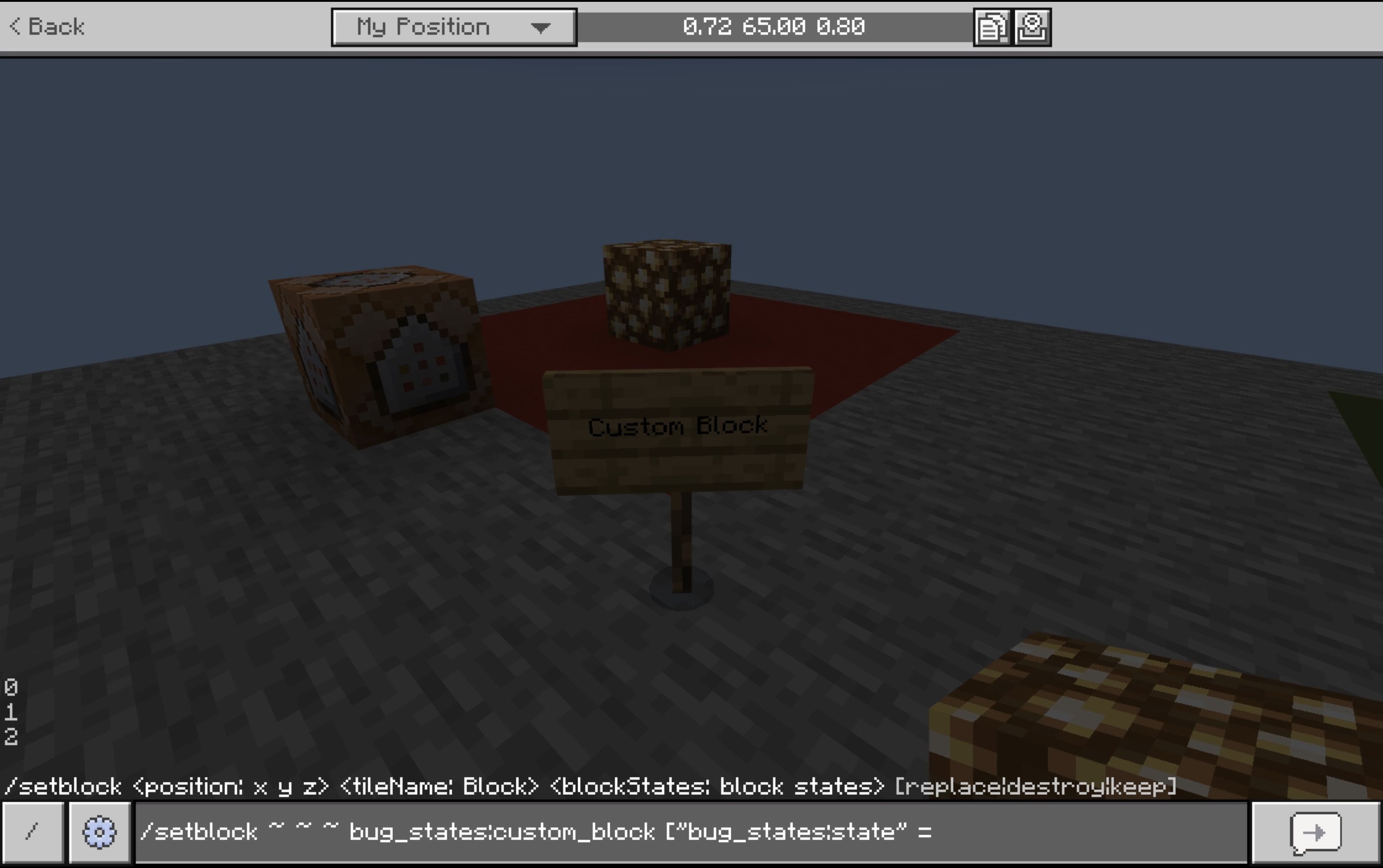
Auto-completions for numeric custom block states are incorrectly remapped to increment from 0 even if the state does not do such.
Demonstration
The attached image demonstrates this issue. The custom b...
Can anyone here test the attached world on MCPE-238028 for me? The reviewer is saying it's not working for them.
Oh. @cyan dawn, I just realized you were talking about that.
- Requirement of
movablecomponent confirmed fixed. - Allowance of random offset, movable, replaceable, and placement filter components in
permutationsconfirmed fixed.
cyan dawn
dreamy thunder
Can anyone here test the attached world on [MCPE-238028](https://report.bugs.moj...
My God, I went to open up the world and my game closed.
dreamy thunder
honest wind
<@905553488510079026> there appears to be some sort of race condition issue wher...
I actually think this might make sense, as the engine isn't saying that air has that custom component on it. It's an after event, so tick ordering isn't reliable.
Hmm…
cyan dawn
cyan dawn
My God, I went to open up the world and my game closed.
My game crashed, could it be the files in the dimension folder?
dreamy thunder
cyan dawn
My God, I went to open up the world and my game closed.
I re-exported. How's this look?
dreamy thunder
cyan dawn
My game crashed, could it be the files in the dimension folder?
I include those files in every one of my bug packs.
cyan dawn
dreamy thunder
I re-exported. How's this look?
Same thing... could it be because I'm on the latest preview?
dreamy thunder
No, they reported the same problem before this Preview.
But it's super weird that this loads for me.
cyan dawn
dreamy thunder
But it's super weird that this loads for me.
Really
dreamy thunder
Yeah, I'm in the world right now, haha.
 cyan dawn
dreamy thunder
Yeah, I'm in the world right now, haha.
cyan dawn
dreamy thunder
Yeah, I'm in the world right now, haha.
I tried using only BP and RP and my game crashed, meaning the problem isn't the world.
dreamy thunder
So weird.
cyan dawn
dreamy thunder
So weird.
Yes, I was right, it was the dimension folder. I deleted it and tried to enter again, and now my game didn't crash.
cyan dawn
cyan dawn
Yes, I was right, it was the dimension folder. I deleted it and tried to enter a...
For some reason, this folder is causing the beta to crash; perhaps this doesn't happen in the Preview.
honest wind
dreamy thunder
I actually think this might make sense, as the engine isn't saying that air has ...
IMO it feels implied that the block returned by the event is the block that triggered it not the block that is there
dreamy thunder
honest wind
IMO it feels implied that the block returned by the event is the block that trig...
Oh, no. I understand. And it technically is a reflection of the block instance… just at a later time.
dreamy thunder
dreamy thunder
I re-exported. How's this look?
Yeah, I'm not sure what's going on with dimension definitions. I think I need someone else to validate my pack. @cursive matrix, would you take a look at this? I just need you to try to open it, and let me know if it crashes.
I think maybe they broke dimension definitions? But only sometimes?
cursive matrix
Yeah give me a moment
Apologies for the delay, took a while of being stuck on "0kb of 0kb" for downloading the preview.
@dreamy thunder Tried loading the world 5 times on consecutive launches after importing, all crashed pretty imminently. Re-imported to the same results.
Could not load the world successfully even once.
dreamy thunder
Why is this working for me???
It’s supposed to be an exact reflection of the existing world.
This might go beyond dimension definitions.
dreamy thunder
Can anyone here test if they can just copy the dimension directory to any add-on of theirs and see if it breaks. Because if not… I guess we have a package installation issue???
dreamy thunder
Lots of parsing issues in the new format version. Gonna hold off on making note of those for a week.
 whole mauve
dreamy thunder
Can anyone here test if they can just copy the dimension directory to any add-on...
whole mauve
dreamy thunder
Can anyone here test if they can just copy the dimension directory to any add-on...
I can mess around later today.
@whole mauve ^
whole mauve
dreamy thunder
Can anyone here test if they can just copy the dimension directory to any add-on...
I can confirm that it crashes on the latest Preview
short glade
For the connection rules crash bug, is it also known that putting the has connection fence tag in permutations kills your game?
short glade
I couldn't see it in the bug report desc.
south berry
yeah idk if it happens for everyone but thats the reason i thought was breaking my stairs using bone vis and not seperate geos but either way works it was just the connections rules nukeing it
dreamy thunder
whole mauve
I can confirm that it crashes on the latest Preview
Okay, thanks. I guess I'll file something on this and update my existing bug reports. Literally all of them use the dimensions directory.
 stray ermine
Block items using beforeOnPlayerPlace and permutationToPlsce sometimes takes a tick for the block to update to the permutation being placed
I'll send a video soon
subtle gate
that's already here https://mojira.dev/MCPE-238017
When a block that is being placed has a custom component with the beforeOnPlayerPlace hook, it should not be placed on the client-side until this hook has ran on the server to avoid the placed permuta...
dreamy thunder
I finally filed the dimension definition crash report. I had to go back and link to it in comment on all of my bug reports, since all use dimension definitions to try to present the bugs in an isolated fashion.
Still gonna wait a day to see about possible 1.26.20+ parsing fixes. I'll also file the placement filter report then.
dreamy thunder
Snowlogging in multiblocks not working reportedly fixed.
cyan dawn
dreamy thunder
Snowlogging in multiblocks not working reportedly fixed.
Well, the sulfur bug persists, but at least now we can see the block, lol.
 subtle gate
MCPE-238086 is fixed
Within the block permutations array, the minecraft:geometry and minecraft:material_instances components should be able to be specified independently of each other, following a change made in Preview 2...
subtle gate
We could do with having access to the extra block layer with scripts
When you snowlog a custom block, events like onPlace will trigger for the snow layer that was placed in the block rather than the custom block that the event should be attached to
dreamy thunder
Okay, yeah, I just confirmed the bone_visibility thing. It accepts integers, objects, and strings. Integers shouldn't be allowed, but booleans should. This only applies to 1.26.20+.
@lusty abyss, it looks like the issue in my last message is indeed related to the new internal schema system. The generated json_schemas directory in the Vanilla samples repository reflects this. bone_visibility's additionalProperties points to a Molang value or a number. The latter should be a boolean.
warm ice
dreamy thunder
<@689222986082942977>, it looks like the issue in my last message is indeed rela...
Is this in a mojira issue?
honest wind
@dreamy thunder it seems minecraft:precipitation_interactions cannot be used in permutations for multi blocks anymore as of 26.30.25. This is probably intended but it wasn't on the changelog so I'm not for sure.
dreamy thunder
warm ice
Is this in a mojira issue?
In what way?
warm ice
dreamy thunder
In what way?
Like has it been reported or something you can link to me
dreamy thunder
warm ice
Like has it been reported or something you can link to me
God, I'm dumb. No, I haven't formally reported this one yet. Here's some code you can use to check real fast if you want:
{
  "format_version": "1.26.30",
  "minecraft:block": {
    "description": {
      "identifier": "test:block",

      "states": {"bug_states:state": [false, true]}
    },

    "components": {
      "minecraft:geometry": {
        "identifier": "geometry.block",
        "bone_visibility": {
          "root": false,
          "root2": true
        }
      },
      "minecraft:material_instances": {
        "*": {"render_method": "opaque", "texture": "glass"}
      }
    },
    "permutations": [
      {
        "condition": "q.block_state('bug_states:state')",
        "components": {
          "minecraft:material_instances": {
            "*": {"texture": "red_concrete"}
          }
        }
      }
    ]
  }
}
{
  "format_version": "1.26.10",
  "minecraft:geometry": [
    {
      "description": {
        "identifier": "geometry.block",
        "texture_width": 16, "texture_height": 16
      },

      "bones": [
        {
          "name": "root",

          "cubes": [
            {
              "origin": [-8, 0, -8], "size": [8, 8, 8],
              "uv": {
                "north": {"uv": [0, 0], "uv_size": [16, 16]},
                "south": {"uv": [0, 0], "uv_size": [16, 16]},
                "east": {"uv": [0, 0], "uv_size": [16, 16]},
                "west": {"uv": [0, 0], "uv_size": [16, 16]},
                "up": {"uv": [16, 16], "uv_size": [-16, -16]},
                "down": {"uv": [16, 16], "uv_size": [-16, -16]}
              }
            }
          ]
        },
        {
          "name": "root2",

          "cubes": [
            {
              "origin": [0, 8, 0], "size": [8, 8, 8],
              "uv": {
                "north": {"uv": [0, 0], "uv_size": [16, 16]},
                "south": {"uv": [0, 0], "uv_size": [16, 16]},
                "east": {"uv": [0, 0], "uv_size": [16, 16]},
                "west": {"uv": [0, 0], "uv_size": [16, 16]},
                "up": {"uv": [16, 16], "uv_size": [-16, -16]},
                "down": {"uv": [16, 16], "uv_size": [-16, -16]}
              }
            }
          ]
        }
      ]
    }
  ]
}
If you change the booleans for integers in the block definition, it'll work.
dreamy thunder
warm ice
Like has it been reported or something you can link to me
Here's the report: MCPE-238524.
Bone visibility type bug filed.
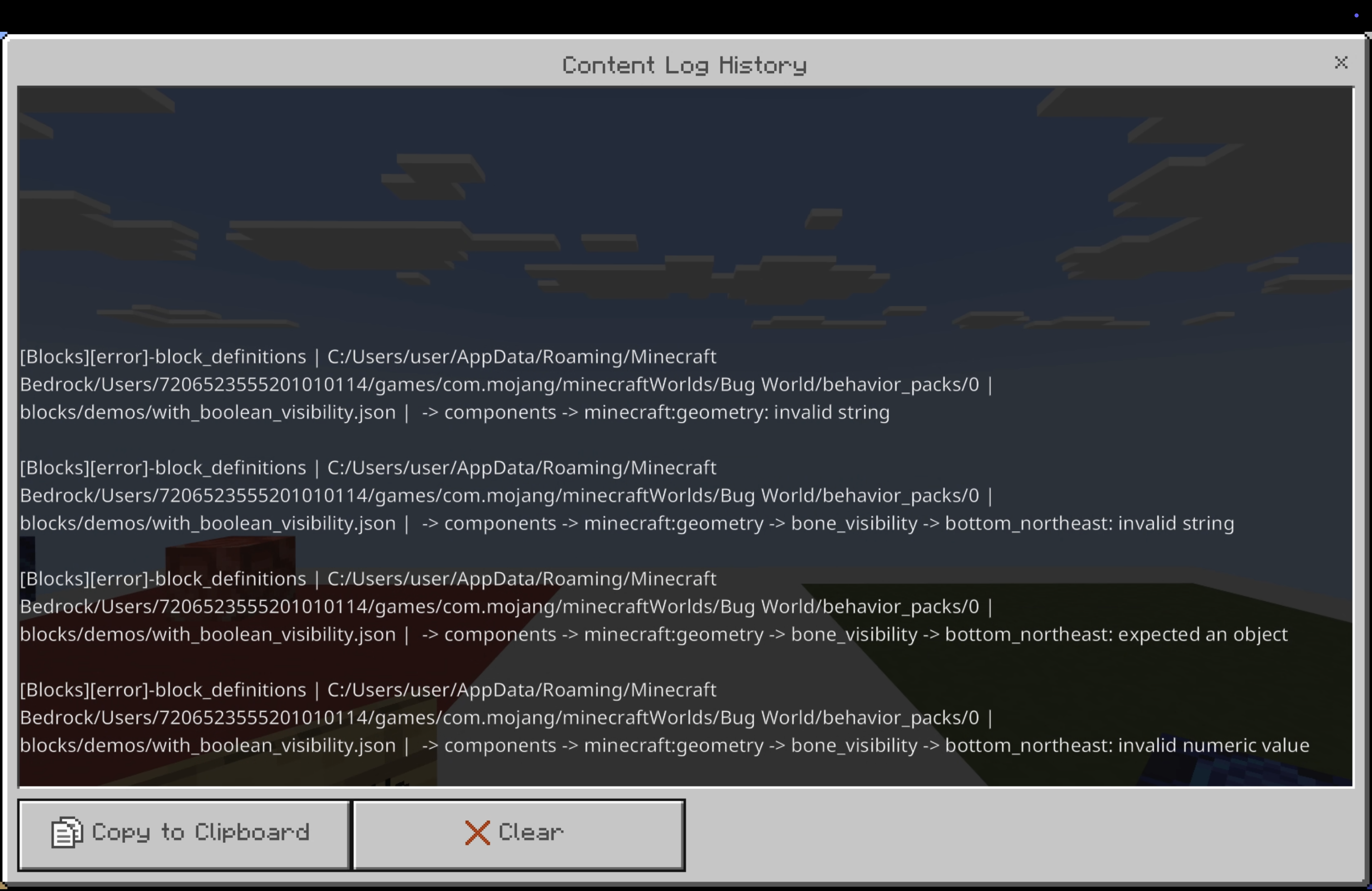
Starting with block definition format versions 1.26.20+, the minecraft:geometry component’s bone_visibility map values were changed to accept numbers instead of booleans. Numeric values make no sens...
Unfiled placement filter with no specified block list bug confirmed fixed.
Oh, what. The issue with snowlogging not updating doesn't occur on multi-blocks.
dreamy thunder
honest wind
<@905553488510079026> it seems `minecraft:precipitation_interactions` cannot be ...
This is a bug. See here:
Precipitation interactions only uses default permutation's values. (MCPE-237074)
honest wind
dreamy thunder
This is a bug. See here:
> Precipitation interactions only uses default permutat...
In the latest preview when used on multi blocks the block fails to load entirely.
Unless in root.
dreamy thunder
Does it not throw an error?
honest wind
dreamy thunder
Does it not throw an error?
It says something along the lines of "Precipitation interactions must be in root for multi blocks" (that is a summary I don't remember the exact error)
The phrasing of the error makes it sound intended, but this was never mentioned in the changelog.
dreamy thunder
Yeah, that's strange, but I'm gonna assume that's intentional.
Anyway, good catch.
I wonder why they didn't just go and restrict that for all types of custom blocks…
honest wind
dreamy thunder
I wonder why they didn't just go and restrict that for all types of custom block...
I think it had something to do with this:
- Added snow logging behavior for multi-blocks
subtle gate
Wait that item offset bug is a won't fix?
That makes so many types of vanilla block impossible to replicate without issues
short glade
subtle gate
Wait that item offset bug is a won't fix?
That makes so many types of vanilla bl...
Which one?
subtle gate

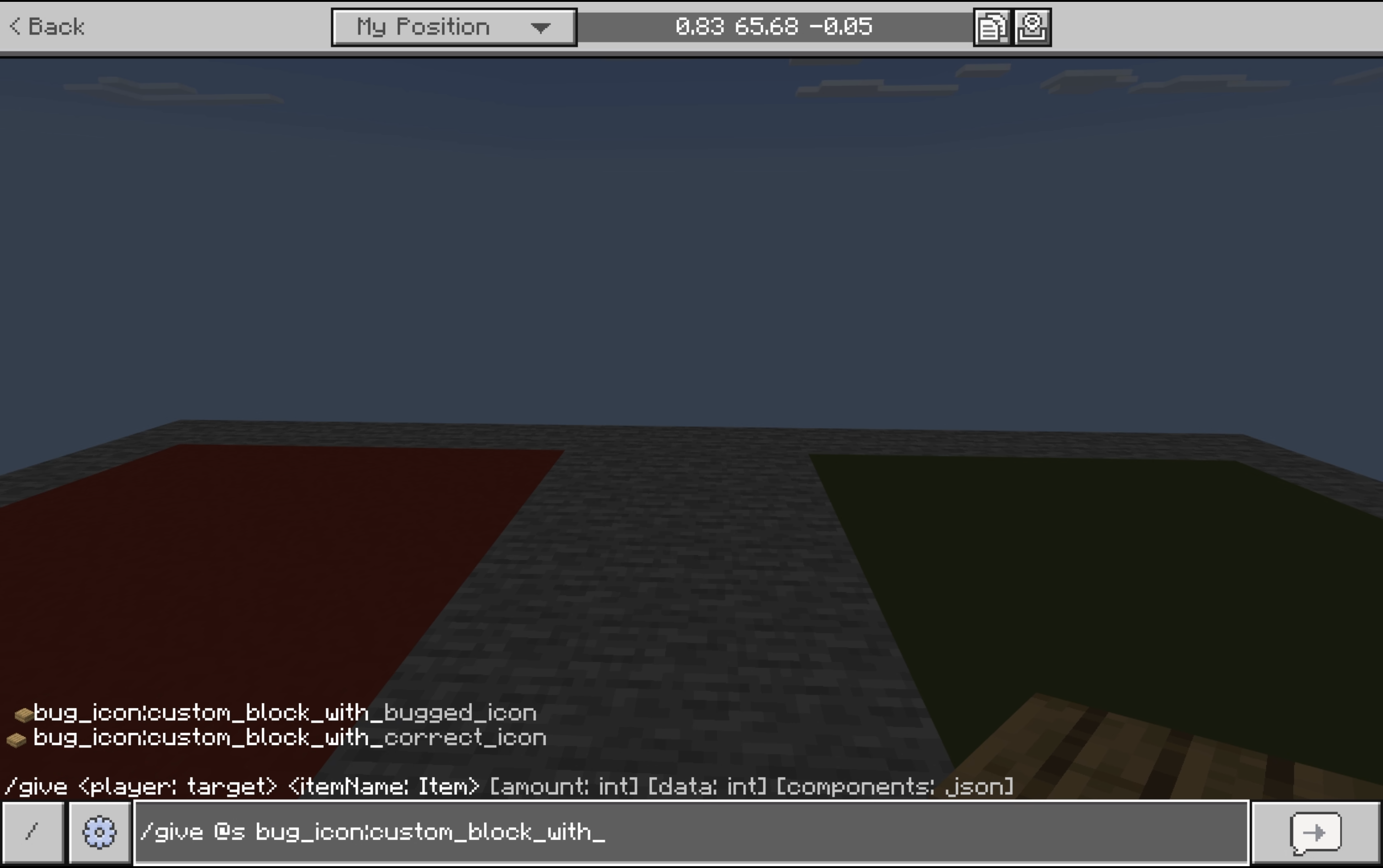
Custom block model definitions support defining item display transformations to change how the auto-generated icon for a block appears in various contexts. The GUI context supports a special property,...
cyan dawn
subtle gate
https://mojira.dev/MCPE-234752
It's really VERY strange that this is considered "won't fix," this mainly affects players with the Pocket UI, it doesn't affect the Classic UI, only the commands and pocket ui.
warm ice
subtle gate
Wait that item offset bug is a won't fix?
That makes so many types of vanilla bl...
I didn't originally look at this bug, but looking at what was called out its mentioned that bumping the version of the geometry file to 1.21.130 or above fixes this issue. Is that not the case from what everyone is seeing here?
subtle gate
they both have a geo format of 1.26.0
warm ice
Both block json files are using 1.26.0 correct, but the slab.json geometry file is using 1.21.120
subtle gate
subtle gate
https://mojira.dev/MCPE-234752
this is the trapdoor geometry used here
there's also the custom head pack download here https://wiki.bedrock.dev/blocks/custom-heads.zip
honest wind
@dreamy thunder I think I found the cause of @stray ermine['s problem](#1496176048981807176 message), it appears that when UV (both per-face and box) in a model is mapped outside the texture, it now bleeds onto neighboring atlas tiles. Previously, it would just not render anything past the texture.
subtle gate
that makes sense
I don't really think that's something that needs to be fixed, but a content warning for UVs that exceed the texture size would be nice
honest wind
subtle gate
that makes sense
I don't really think that's something that needs to be fixed, b...
It is kind of annoying that such a rendering failure gives no content log information on why it's occurring.
stray ermine
I'll look them over but I could've sworn none of my models do that
honest wind
stray ermine
I'll look them over but I could've sworn none of my models do that
(both per-face and box)
Could be this
subtle gate
might also be caused by zero-sized UVs at the edge of the texture
honest wind
subtle gate
might also be caused by zero-sized UVs at the edge of the texture
that too
The script I wrote that seems to fix it works by removing oversized and zero-sized UVs.
short glade
Is this due to them removing padding?
honest wind
short glade
Is this due to them removing padding?
It started in the same preview that removed padding, so probably.
stray ermine
honest wind
<@905553488510079026> I think I found the cause of <@541288948958232597>['s prob...
You know for the carpets I used bridges model viewer and manually edited the values until it looked fine
So like that is a very strong possibility in hindsight
Idfk about the leaves tho
dreamy thunder
subtle gate
this is the trapdoor geometry used here
there's also the custom head pack downlo...
My button looks right with 1.26.30 format version: no hacks/workarounds required.
NEW (credit to @severe crest): single block features do not trigger queued ticking on custom blocks
subtle gate
This was closed as working as intended but it would be nice if "propagates_power" would at least default to the value of "redstone_conductor" https://mojira.dev/MCPE-232715
Otherwise I feel like loads of people will have no clue why their consumer is acting like a conductor in some ways and not in others
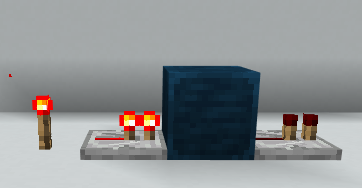
A custom block can be turned into a redstone conductor with the following minecraft:redstone_conductivity configuration:
"minecraft:redstone_conductor": {
"redstone_conductor": true
}This will allow...
subtle gate
dreamy thunder
My button looks right with `1.26.30` format version: no hacks/workarounds requir...
these have geo and block format version 1.26.30

also I just noticed whatever this is when opening/closing my inventory
 dreamy thunder
What the heck.
dreamy thunder
Wow, I'm not seeing this with any of my packs. What is happening here?
rancid raptor
dreamy thunder
Wow, I'm not seeing this with any of my packs. What is happening here?
Do you have any of the item_display_transformations attached to the geo?
rancid raptor
subtle gate
also I just noticed whatever this is when opening/closing my inventory
Heh?? tf
dreamy thunder
Yeah, I’ll double-check later.
rancid raptor
subtle gate
also I just noticed whatever this is when opening/closing my inventory
This is just cursed af lmao
Although, not surprising since they've been doing inventory API stuff, or if they are still doing it, which could be why there's so many new inventory bugs
honest wind
@dreamy thunder it appears that for square faces in a model, when uv_lock rotates them their pivot is the center of the face rather than the center of the block.
This was found by @wild mango.
 cunning tendon
I can see the case for this maybe not being a bug in the purest sense, but with the new changes to how embedded visuals work, you get an error if you don't have a geometry and material instance defined in components and your block is supposed to be flower pottable. Normally this wouldn't be an issue, but if you're trying to make (for example) a two block-tall plant flower pottable, and are using multiblock (which doesn't require a geometry or material instance defined in components, only in permutations) the game does not like that. I understand throwing an error if there isn't a texture defined for embedded visual whatsoever, but in the case where the block is a multiblock and I'm already defining an embedded visual geo and texture, it doesn't make sense to count that as an error imo
stray ermine
honest wind
<@905553488510079026> I think I found the cause of <@541288948958232597>['s prob...
Finally getting around to the models
And yeah Im 90% sure that was it
dreamy thunder
honest wind
<@905553488510079026> it appears that for square faces in a model, when `uv_lock...
Got a pic?
honest wind
dreamy thunder
Got a pic?
I do but I am unfortunately unable to share it. I'd have to create another.
cunning tendon
am I doing something wrong or is snow_log_no_collision (going to be snowlogging?) weird when you're using a random offset? searched the bug tracker and couldn't find it and searched what I hope was pretty thoroughly here to see if anyone else had found this but didn't spot any messages
cyan dawn
cunning tendon
am I doing something wrong or is `snow_log_no_collision` (going to be `snowloggi...
In previews 26.30 "Fixed a bug where custom blocks with random_offset would be put back in the center of its position when snowlogged."
cunning tendon
thank you sm I swear I was looking everywhere
didn't read the preview changelogs so didn't catch that
wise halo
Using blend as the render method in material instances with a reflective map PBR won't reflect at all on the model. Is this a limitation or a potential bug?
 sleek gorge
the ambient occlusion bug makes my addon almost unplayable
cyan dawn
sleek gorge
the ambient occlusion bug makes my addon almost unplayable
Hasn't this bug already been fixed?
cyan dawn
sleek gorge
is it?
Which format version are you using?
subtle gate
cyan dawn
Hasn't this bug already been fixed?
they've improved it signficantly, it still isn't fixed
cyan dawn
subtle gate
they've improved it signficantly, it still isn't fixed
Oh yea
sleek gorge
cyan dawn
Oh yea
if its full block yes, but if it isnt a full solid block kind of not
im tring to makee custom grass path and it so dark it become dark path
cyan dawn
sleek gorge
im tring to makee custom grass path and it so dark it become dark path
Oh
Well, it was better suited for blocks like plants.
subtle gate
plants don't have ambient occlusion, that was a separate bug related to ambient occlusion being applied when the block had it disabled
sleek gorge
sleek gorge
im tring to makee custom grass path and it so dark it become dark path
disabling it kinda workh
cyan dawn
subtle gate
plants don't have ambient occlusion, that was a separate bug related to ambient ...
Ah yes, so I really just got confused.
sleek gorge
except it now so bright
 dusk yacht
you may need to change the light_dampening component for that
honest wind
@dreamy thunder could be intended but multi blocks with block entities have a block entity for each part, and they do not stay in sync
cursive matrix
That seems intentional
like chests for example . . . I think are 2 separate tile entities when they are a double chest . . . at least they are on Java
rancid raptor
#1471950406178443275
cursive matrix
I remember messing with NBT stuff on bedrock and remember that being the case
dreamy thunder
Custom blocks rendering incorrectly inside sulfur cubes bug confirmed fixed.
Custom blocks render at a much smaller scale than Vanilla blocks inside sulfur cubes.
Demonstration
The attached screenshots demonstrate this issue. Custom blocks are represented via purple and white ...
dreamy thunder
@short glade, @subtle gate: can y'all post your issues from yesterday's Preview here when you get the chance? There are too many things for me to keep up with from the past 2 Previews.
dreamy thunder
Yeah, I'm not seeing n_way_visual_rotation working on any custom states. Doesn't seem to matter if I'm using integers or strings of any names, spans, or counts.
Oh, no. It just doesn't work with the hardcoded full block models.
And, ah, 16-way rotation is just unusable.
short glade
dreamy thunder
Oh, no. It just doesn't work with the hardcoded full block models.
#1503786081882083541 message
For anyone elsw wondering, WAI.
subtle gate
dreamy thunder
Oh, no. It just doesn't work with the hardcoded full block models.
I feel like specifically supporting it for 2/4 state values would make sense
dreamy thunder
subtle gate
I feel like specifically supporting it for 2/4 state values would make sense
Oh, that's funny. I just responsed to the guy with that. 😐
dreamy thunder
Wait, @severe crest, y’all are pretty confident the queued ticking single block feature bug was fixed?
dreamy thunder
NEW: lava_flammable works with format versions 1.26.20+ but doesn't error as unusable in early versions.
Issue in the docs for explosion_resistance:
Sets the explosion resistance for the block. Greater values result in greater resistance to explosions. The scale will be different for different explosion power levels. A negative value or 0 means it will easily explode; larger numbers increase level of resistance.
The property doesn't support negative values.
dreamy thunder
Issue in the docs for flammable component:
If set to true, default values are used (catch: 5, destroy: 20, same as planks).
I think it should probably note thattruedoes not set the lava flammability to the same as planks. It's set to"never"instead of"always".
honest wind
dreamy thunder
Issue in the docs for flammable component:
> If set to true, default values are ...
Could be that it would default to always only if the format version is the one that releases it or higher, which doesn't exist yet.
short glade
dreamy thunder
Issue in the docs for `explosion_resistance`:
> Sets the explosion resistance fo...
Are these ms docs or html docs? Ik sometimes they differ slightly. Or is it the schemas?
dreamy thunder
short glade
Are these ms docs or html docs? Ik sometimes they differ slightly. Or is it the ...
They all kinda point to the same idea.
They mentioned backwards-compatibility, but they should probably stick to consistency. Kinda weird the defaults act like planks… except this one property.
 grand oak
I'm not sure if this is already here or if it's intentional or something but rotation in item display transforms seems to rotate the shadow of the block as well?
 subtle gate
That is reported (https://mojira.dev/MCPE-235788) but you should probably change the orientation of your model so that you dont need to use display transforms
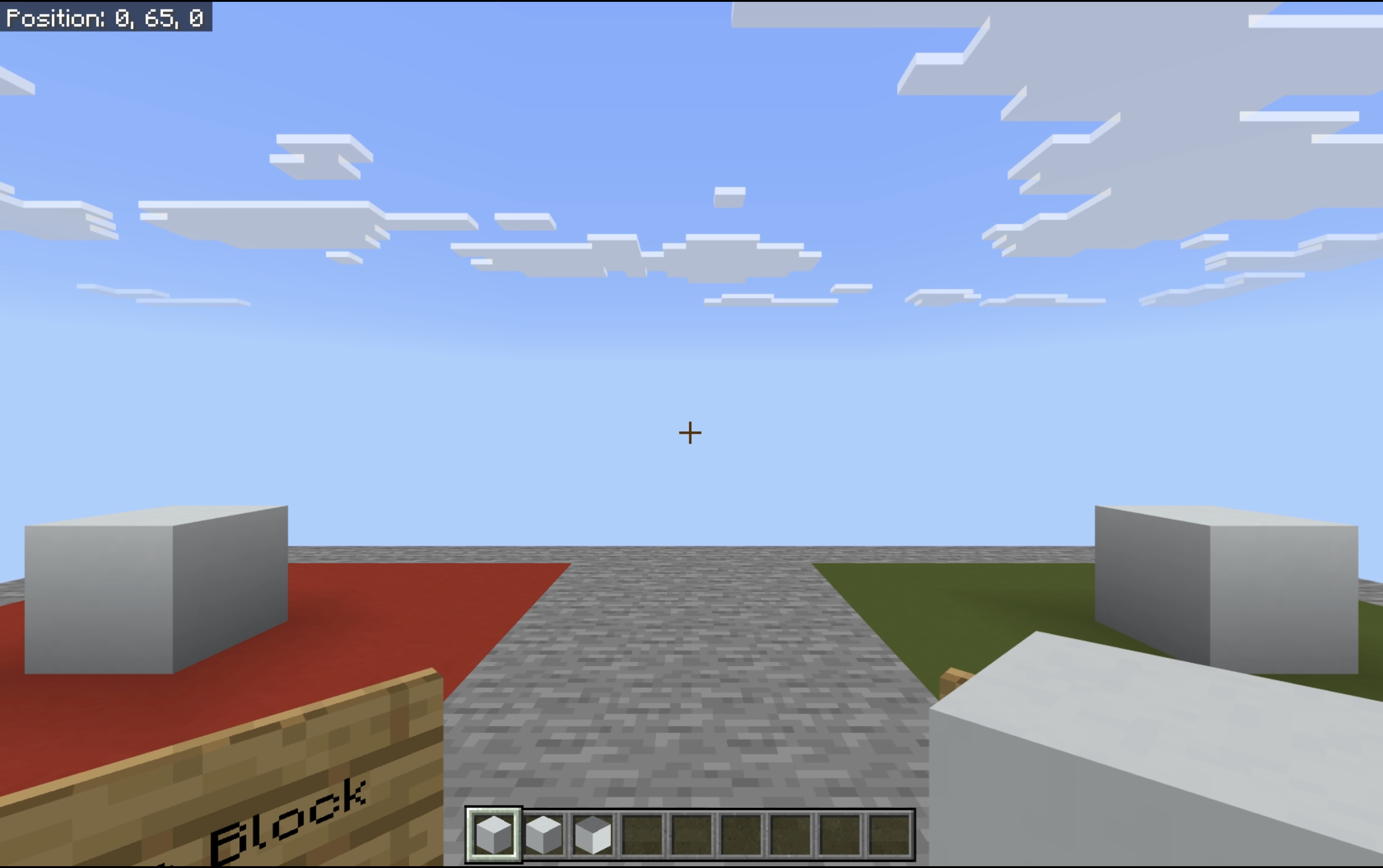
Face shading is applied to block model icons before transformations occur.
Demonstration
The following demo shows this bug in play:
In order, the blocks in the hotbar show a Vanilla block, a custom bl...
dreamy thunder
God, I hate this bug.
dreamy thunder
NEW: chest obstruction does not respect permutation differences in format versions before 1.26.
dreamy thunder
Ooh, some goodies there today.
dreamy thunder
- Client prediction flickering bug confirmed fixed.
When a block that is being placed has a custom component with the beforeOnPlayerPlace hook, it should not be placed on the client-side until this hook has ran on the server to avoid the placed permuta...
whole mauve
dreamy thunder
- [Client prediction flickering bug](https://mojira.dev/MCPE-238017) confirmed f...
This one was so annoying, really glad that it got fixed 
dreamy thunder
@dreamy thunder: NEW: zero-collision validation for snowlogging does not consider single-axis 0-size case or empty array case.
dreamy thunder
Okay, I finally ran into fit_to_frame not being fixed. 
cyan dawn
dreamy thunder
Okay, I finally ran into `fit_to_frame` not being fixed. <:pufferfish_angery:707...
beforeOnPlayerPlace appears to be triggering after the block is placed.
import { world, system, BlockPermutation, GameMode, EntityComponentTypes, EquipmentSlot } from '@minecraft/server';

system.beforeEvents.startup.subscribe(data => {
    data.blockComponentRegistry.registerCustomComponent("wypnt_bab:prevent_place_with_liquid_above", {
        beforeOnPlayerPlace: e => {
  const { block } = e;
  if (block?.isLiquid) {
    e.cancel = true; // prevents placing the block on liquids
  }
}
    });
});
I'm using this script and the positioning still happens, but it's canceled later.
This didn't happen a few versions ago.
cyan dawn
cursive matrix
Love the fact that you're using the old Update Block texture
Yes, the texture isn't ready yet, so I put this temporary one lol
 tacit hare
cyan dawn
tacit hare
cyan dawn
Only when using an item as block placer right? Although that’s what I found out. Wasn’t like this before, I believe
It does run before when using just the tile item
cyan dawn
tacit hare
Only when using an item as block placer right? Although that’s what I found out....
Actually, I haven't tested it in a block without replace_block_item.
cyan dawn
tacit hare
Only when using an item as block placer right? Although that’s what I found out....
Yea
@dreamy thunder So, one addition: the bug only occurs if it's a block with replace_block_item.
tacit hare
cyan dawn
Yea
Epic gamer moment
whole mauve
Not sure if this has been mentioned before, but ambient occlusion does not get applied underneath blocks with custom geometries.

 subtle gate
they've linked it to the full block geometry even though it should be a separate property
I don't think it's a bug, just more weird hardcoded stuff like how full block has to have unit cube culling
whole mauve
subtle gate
they've linked it to the full block geometry even though it should be a separate...
I swear I tried the full block one and it doesn’t have AO underneath at all as well
But yeah no, I don’t like how the full block geometry is forced to use unit cube culling shape. It would’ve been nice if we were at least able to set it to empty and then use the culling rules instead.
subtle gate
whole mauve
I swear I tried the full block one and it doesn’t have AO underneath at all as w...
only with the opaque render method i think
 zinc edge
cyan dawn
<@905553488510079026> So, one addition: the bug only occurs if it's a block with...
zinc edge
cyan dawn
<@905553488510079026> So, one addition: the bug only occurs if it's a block with...
Can the placement of vanilla blocks be intercepted through this interface?
whole mauve
Can anyone check if this is an issue on my end or if it could be a bug? This is the best example that I got. I have the culling conditions set to same_block and cull_against_full_and_opaque set to false.


 rancid raptor
whole mauve
Can anyone check if this is an issue on my end or if it could be a bug? This is ...
rancid raptor
whole mauve
Can anyone check if this is an issue on my end or if it could be a bug? This is ...
Is that glass block a full block? Or does it have a custom geometry?
Oh, I don't need to specify parts in culling
Ok good
whole mauve
rancid raptor
Is that glass block a full block? Or does it have a custom geometry?
It's a custom geometry
rancid raptor
Would you be able to send the geometry file?
subtle gate
I feel like they need to replace cull against full and opaque with something more general about culling shape
whole mauve
rancid raptor
Would you be able to send the geometry file?
This should include the block, geometry, and the culling file
cunning tendon
whole mauve
Can anyone check if this is an issue on my end or if it could be a bug? This is ...
Didn't tweak the culling, but just removed the culling_shape from the geometry section of the block file as I don't believe it's required. Worth noting this is on latest and I did change the format version to 1.26.20
 whole mauve
cunning tendon
Didn't tweak the culling, but just removed the `culling_shape` from the geometry...
whole mauve
cunning tendon
Didn't tweak the culling, but just removed the `culling_shape` from the geometry...
I appreciate that. And yeah, it works fine in stable but it seems to be broken in Preview

 cunning tendon
Likely a bug as I can't find any info on culling changes in the release notes for the current previews. At least it's working somewhere so it's not just impossible lol
cyan dawn
whole mauve
I appreciate that. And yeah, it works fine in stable but it seems to be broken i...
Strange, because they didn't change anything.
cyan dawn
cunning tendon
Likely a bug as I can't find any info on culling changes in the release notes fo...
Either submit a bug report or wait for @dreamy thunder to do it.
whole mauve
Something most likely broke with the release of Voxel Shapes. That's what I am assuming at least
subtle gate
They've removed unit cube culling from non-opaque blocks with the full block geometry
Only the opaque render method has it now
The content log still says that unit cube will be used if you define a culling shape though which is now wrong
I assume the reason double_sided doesn't have culling is because it stops rendering at half the render distance so it would leave holes
honest wind
@dreamy thunder not sure if it's intended but just like MCPE-237910, minecraft:geometry and minecraft:material_instances when checking if each other exist are too naïve to realize that both are defined when only one is defined at root but both are defined when you factor in all permutations. Additionally, this works both ways. It incorrectly accepts when only one is defined in a permutation and neither are in root, allowing defining one without the other.
If the first is intended I don't think the second is.
 thorn dove
Hey, I came across this 'bug', I am not certain if it's intended or not though.
Basically, the .north(), .south(), .east(), and .west() Block functions does not respect minecraft:cardinal_direction IF it exist.
I know it would make sense since not all blocks have cardinal directions (correct me if I am wrong) but it is a good tip to keep in mind.
I've just proven myself wrong 🤦♂️. The types of those functions seem to imply it only supports relative direction of the world. Maybe or maybe not IDEK anymore
subtle gate
Cardinal direction itself is just a block state, it doesn't affect functionality in any way.
The direction methods return the block in the world relative cardinal direction regardless of the block's transformation