
1 messages · Page 1 of 1 (latest)
 teal crypt
pkg up -y && termux-setup-storage && pkg install nodejs-lts
npm install -g acode-lsp ts-loader typescript typescript-language-server
cd /sdcard/ && touch undefined && pwd
mkdir -p Acode && cd Acode
npm install @minecraft/server @minecraft/server-ui
Open the same folder in Acode and create a test js file.
Start the server (LSP) in Termux by running:
acode-ls
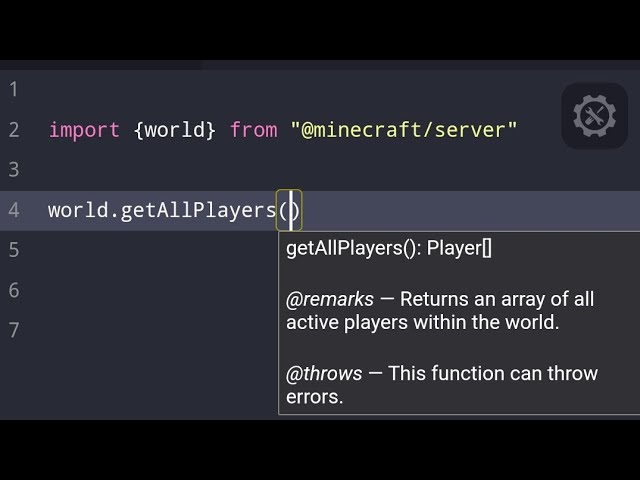
You will start to see auto-completions for Minecraft typings.
Android 12 or 10
Apps
Termux Package
NPM packages
Showcase video: Youtube
Here you go @prime thistle @regal wasp @peak zinc @sick hawk
 prime thistle
🔥
teal crypt
nope
 peak zinc

prime thistle
to update typing i just have to run npm command right?
teal crypt
yes
with cd /sdcard/ you can locate main storage then you can visit your folder to install your npm ver
 regal wasp
teal crypt
Here you go <@535658954777427993> <@1107163750781440021> <@523382130093457418> <...
regal wasp
teal crypt
Here you go <@535658954777427993> <@1107163750781440021> <@523382130093457418> <...
Oh my god
Amazing, thank you for making this
 forest saddle
What about Js completion
 gray dove
prime thistle
<@1248709361174315098>
gray dove
prime thistle
<@1248709361174315098>
gotcha, thanks
funny enough I recently downloaded termux
 cobalt sleet
Nice
gray dove
teal crypt
## Download Apps
1. **Termux**: Download from [here](https://github.com/termux/t...
it keeps repeating this message and spamming Acode with initiating typescript
 teal crypt
show full
gray dove
teal crypt
show full
 teal crypt
show acode logs, click floating settings icon
gray dove
acode has logs?
gray dove
teal crypt
show acode logs, click floating settings icon
I restarted it to see if the problem would be fixed, so its blank
teal crypt
you followed all the steps with success ?
gray dove
teal crypt
you followed all the steps with success ?
yes, then when I create a .js file it spams me with initializing typescript server
teal crypt
what you did list from start
gray dove
teal crypt
what you did list from start
what do you mean
 ionic meadow
I have the same error and did carefully followed the steps 😦
teal crypt
i want to to knwo the exact steps you guys did to find issue
gray dove
teal crypt
i want to to knwo the exact steps you guys did to find issue
all of them, then as I am about to test it, it doesn't work and spams me with initializing typescript language server
ionic meadow
Navigate to a folder : install @minecraft/server and @minecraft/server-ui.
Start acode-ls
Open a test.js file in Acode (in the same directory as node_modules).
Start typing
From there the error keep spamming
teal crypt
after running this do u see like this without errors ?
 ionic meadow
Yes. The errors start after I begin to type in the js file
teal crypt
start server then open app and send the first few errors
ionic meadow
There is no error if I don't type
gray dove
teal crypt
first ones
how do I start the server again
ionic meadow
These are the only errors
gray dove
do i need to repeat the process from the top
ionic meadow
You start the server by starting acode-ls
teal crypt
scroll up on that console to see errors
ionic meadow
I'll redo to check
gray dove
ionic meadow
You start the server by starting acode-ls
doesnt work that way for me
my Termux is back to normal, not inside the Acode directory anymore
ionic meadow
Yes it doesn't matter I think
teal crypt
yea
gray dove
when I type acode-ls nothing happens
teal crypt
minimize the console and send pic
ionic meadow
 teal crypt
yea so its not detecting typescript , run npm list - g in termux and send pic
ionic meadow
 gray dove
teal crypt
yea so its not detecting typescript , run npm list - g in termux and send pic
gray dove
teal crypt
yea so its not detecting typescript , run npm list - g in termux and send pic
nothing happens for me, is my termux bugged
gray dove
ionic meadow
how to I get inside the green directory
ionic meadow
My directory is in /sdcard/Acode/Minecraft/heads so I do :
cd /sdcard/Acode/Minecraft/heads
teal crypt
teal crypt
## Download Apps
1. **Termux**: Download from [here](https://github.com/termux/t...
you are in that directory
let me try on other phone
gray dove
ionic meadow
My directory is in /sdcard/Acode/Minecraft/heads so I do :
cd /sdcard/Acode/Mine...
still nothing, its just as if I'm typing a regular text
ionic meadow
But you have to adapt to your directories structure
teal crypt
works fine on other phone as well
teal crypt
lets start from scratch, delete acode data
gray dove
at this point you guys have lost me
teal crypt
and do as i say
ionic meadow
Ok
gray dove
teal crypt
lets start from scratch, delete acode data
uninstall or.. delete the folder we made
ionic meadow
teal crypt
and do as i say
I removed the data
teal crypt
first clear the acode app data from phone's app settings
gray dove
done
ionic meadow
Done
teal crypt
run this
pkg up -y && termux-setup-storage && pkg install nodejs-lts
and send full screen shot once done
as you already installed it it wont take time
ionic meadow
 teal crypt
next run this and then send screen shot
npm install -g acode-lsp ts-loader typescript typescript-language-server
ionic meadow
 ionic meadow
 teal crypt
mkdir -p Acode && cd Acode
npm install @minecraft/server @minecraft/server-ui
now Open Acode app for the first time allow all perms, and install these in seq
create a test.js file
start the server in termux with
acode-ls
close and reopen the acode app
gray dove
 teal crypt
if you see "typescript" here then your done,
 gray dove
teal crypt
if you see "typescript" here then your done,
gray dove
teal crypt
if you see "typescript" here then your done,
do we need to open that folder or..
teal crypt
teal crypt
mkdir -p Acode && cd Acode
npm install @minecraft/server @minecraft/server-ui
follow here
ionic meadow
 teal crypt
you started server ?
ionic meadow
Yes
 teal crypt
on top it says using typescript means its now detecting it, some thing iis wrong with your network
gray dove
 gray dove
teal crypt
scroll all the up
gray dove
teal crypt
scroll all the up
theres nothing more, that's all that's there
teal crypt
yea issue seems to be about server, its failing to host it
which android version you have
gray dove
teal crypt
which android version you have
I use a Chromebook, android 11
teal crypt
hmm should work then, move to termux https://discord.gg/HXpF69X maybe somone can help you to resolve the host issue
gray dove
teal crypt
hmm should work then, move to termux https://discord.gg/HXpF69X maybe somone can...
okay, any specific channel I can ask the question?
hmm, it was too good to be true 😞
teal crypt
gray dove
okay, any specific channel I can ask the question?
general channel
teal crypt
gray dove
hmm, it was too good to be true 😞
you are almost done just need to get the host fixed
 wind turtle
@teal crypt hey i installed it properly and im on step 4, where is the folder located?
teal crypt
Phone Storage/Acode
wind turtle
Nevermind, found it thank you
teal crypt
let me know if it works
wind turtle
teal crypt
let me know if it works
it connected but it doesnt show the autocompletions?
teal crypt
um?
wind turtle
teal crypt
um?

 teal crypt
reopen acode
wind turtle
teal crypt
reopen acode
nevermind i forgot to reload acode, anyways do i always do all steps everytime or do i just do the last step
teal crypt
just acode-lsp needs to be done everytime, make as many projects you want under Acode/ folder it will work for every file so no need to install npms again and again,
if you need to update npms in future then you can locate Acode by
cd /sdcard/Acode
and install new types by
npm i @minecraft/server
wind turtle
teal crypt
just acode-lsp needs to be done everytime, make as many projects you want under ...
Alright thank you very much!
Talking about this, are termux allowed to get android/data folder then open it on Acode? Im currently on Android 11
teal crypt
nope termux and Acode both cant access Android/data folder
you can use 3rd app called Automate as watcher, where you see folder for changes and then copy its content to Android/data
ionic meadow
What version of node you are in ?
prime thistle
how can i check node version?
for me its works perfectly
idk why its not workin for ya guys
wind turtle
skill issue
wind turtle
prime thistle
how can i check node version?
u can search how on google, its not pretty obscure
gray dove
wind turtle
skill issue
dont mock us
 sharp bluff
teal crypt
you can use 3rd app called Automate as watcher, where you see folder for changes...
sharp bluff
teal crypt
you can use 3rd app called Automate as watcher, where you see folder for changes...
I am using android version 14. Currently i cannot access Android/data folder contents using Automate. I already granted the manage files permission, or am i just doing something wrong?
ionic meadow
My conclusion is that this doesn't work on Android 14+
acode-ls / typescript-language-server doesn't seem able to start other process
Perhaps we have to change the install location of global node_modules. I'll try later
gray dove
sharp bluff
I am using android version 14. Currently i cannot access Android/data folder con...
try using zarchiver
gray dove
ionic meadow
My conclusion is that this doesn't work on Android 14+
acode-ls / typescript-la...
I think it starts from Android 11
sharp bluff
gray dove
try using zarchiver
I mean I can access it with a 3rd party file manager apps but with Automate, it cannot.
teal crypt
sharp bluff
I am using android version 14. Currently i cannot access Android/data folder con...
are you using the latest ver? also see apps feature list or ask owner about it, i dont have android 14 so cant say much about it, all we are trying to do is watch folder x for change and copy it to y try finding other app that can do this for you if Automate doesnt work
sharp bluff
ohhh okay, I thought you were bypassing Android/data with Automate with android 14, i misunderstood.
teal crypt
nah, as acode can't access data/ i suggested autoamate to do it but on android 12 i can access data/ with automate
 cloud current
@teal crypt


not working

It worked when I first installed it, then it didn't work.
teal crypt
disable battery optimization i guess
ionic meadow
Just tried to install all the packages not in global and realized it will be the cause it's in the termux data space.
So I keep getting:
Connecting to auto client: typescript-language-server ["--stdio"]
file:///data/data/com.termux/files/home/mynpm/node_modules/typescript-language-server/lib/cli.mjs:22503
          throw new Error(`tsserver process has exited (exit code: ${exitCode}, signal: ${signal}). Stopping the server.`);
          ^

Error: tsserver process has exited (exit code: 1, signal: null). Stopping the server.
    at TsClient.onExit (file:///data/data/com.termux/files/home/mynpm/node_modules/typescript-language-server/lib/cli.mjs:22503:17)
    at file:///data/data/com.termux/files/home/mynpm/node_modules/typescript-language-server/lib/cli.mjs:19177:20
    at file:///data/data/com.termux/files/home/mynpm/node_modules/typescript-language-server/lib/cli.mjs:18368:46
    at Set.forEach (<anonymous>)
    at file:///data/data/com.termux/files/home/mynpm/node_modules/typescript-language-server/lib/cli.mjs:18368:26
    at file:///data/data/com.termux/files/home/mynpm/node_modules/typescript-language-server/lib/cli.mjs:18081:46
    at Set.forEach (<anonymous>)
    at ChildProcess.<anonymous> (file:///data/data/com.termux/files/home/mynpm/node_modules/typescript-language-server/lib/cli.mjs:18081:26)
    at ChildProcess.emit (node:events:519:28)
    at ChildProcess._handle.onexit (node:internal/child_process:294:12)

Node.js v20.15.1
Closing process for 'typescript-language-serve
Battery optimization is disabled for me
cloud current
teal crypt
disable battery optimization i guess
How do I turn it off?
teal crypt
in phone settings > apps > termux > un restrict battey opt
cloud current
teal crypt
in phone settings > apps > termux > un restrict battey opt


It didn't happen
teal crypt
cloud current
reopen acode
cloud current
teal crypt
reopen acode
I tried but it didn't work
prime thistle
@teal crypt it does not shows me this kinda prompt for methods or anything and mind sharin your acode settings
 teal crypt
show full sccreen shot
cloud current
teal crypt
u should see typescript on bottom
That's it, I don't have it
teal crypt
executed every step successfully?
prime thistle
teal crypt
show full sccreen shot
for me its looks like this
 teal crypt
show logs, click on that floating icon
prime thistle
 prime thistle
@teal crypt
teal crypt
restart then show logs
cloud current
Yes it worked at first then it didn't work
prime thistle
teal crypt
restart then show logs
still same
teal crypt
? said re start everything then show logs so that I can see the issue
teal crypt
what about termux
prime thistle
Server listening on port 3030
Connecting to auto client: typescript-language-server ["--stdio"]
 teal crypt
everything seems fine to me maybe some other plugins creating issues
try to reset acode
gray dove
prime thistle
bruh
 vagrant kestrel
I would definitely enjoy utilizing this if Google hadn't implemented Scope Storage, making it a pain to deal with Android/data for testing purposes.
sharp bluff
Yep, me too. I miss android 9, it was peak for me.
teal crypt
vagrant kestrel
I would definitely enjoy utilizing this if Google hadn't implemented Scope Stora...
use Automate
 hot tartan
teal crypt
use Automate
hot tartan
teal crypt
use Automate
can it be used as regolith for Android?
teal crypt
What regolith does ?
sharp bluff
i think it's a productivity tool for minecraft bedrock development like synchronizing target directory to com.mojang, automated lang stuffs, and more
teal crypt
well yeah u can use Automate for sync
hot tartan
teal crypt
What regolith does ?
it's a program that copies your BP and RP folders to Minecraft's development folders
hot tartan
teal crypt
well yeah u can use Automate for sync
is that the app you are talking about?
 teal crypt
yes
vagrant kestrel
teal crypt
use Automate
Not sure what that is, but if it's intended purpose is to gain access to that directory then I'm sure it will fail because of Scope Storage.
hot tartan
teal crypt
well yeah u can use Automate for sync
nope it doesn't work
 vagrant kestrel
hot tartan
nope it doesn't work
vagrant kestrel
hot tartan
nope it doesn't work
I despise Scope Storage lol.
hot tartan
vagrant kestrel
I despise Scope Storage lol.
is there any work around?
vagrant kestrel
hot tartan
is there any work around?
Root, but mileage varies depending on what phone/rom you have. There really isn't a universal solution that I'm aware of. More like trial and error. Check out xda-developers.com and see what you can find on there which pertains to your device.
teal crypt
hot tartan
nope it doesn't work
grant perms
hot tartan
teal crypt
grant perms
it doesn't work, it just opens the files app, you think i haven't tried?
teal crypt
vagrant kestrel
Not sure what that is, but if it's intended purpose is to gain access to that di...
tested on a12 not and it works
teal crypt
hot tartan
it doesn't work, it just opens the files app, you think i haven't tried?
which android ver u have
hot tartan
12
vagrant kestrel
Android 12 as well.
teal crypt
maybe you have newer patch thats why, i have oct 1 2022 android 12
which mostly works
as soon i saw the newes i disabled auto update 😛
vagrant kestrel
June 2023 on my end.
I wouldn't mind upgrading my device to something nicer, but can't push myself to do it because of the restrictions Google is implementing now. So I'm at that point in my life where I will upgrade when it's absolutely necessary. Otherwise, don't care.
I used to do a lot of mobile development for when I was on the go, but it's getting tougher these days. Too many obstacles lol.
teal crypt
i heard some apps can still access them if so it means workarounds still exists for devs
vagrant kestrel
If so it's because of a change in their manifest for permissions. Probably related to MANAGE_EXTERNAL_STORAGE which I believe introduced in Android 11. Google has a very strict policy for any published apps using it from my understanding.
Infact, could probably decompile a file manager app, include the permission, recompile, sign with a bogus signature, then install as a third party application lol.
@hot tartan you could try that 😜
teal crypt
have you tried Wireless ADB
vagrant kestrel
I haven't, but I think ADB is restricted as well.
I'm tempted to try decompiling and modifying the manifest of one of these apps. I'm curious if it would work 🤔
I haven't seen anything mentioned about it on xda.
teal crypt
Automate do have that that perm manifest otherwise it wouldnt be possible to access those folder even on my ver
vagrant kestrel
Hmm, interesting.
teal crypt
they fixed the trick used by these devs i guess
vagrant kestrel
Well I know there was another permission you could use in the manifest which was "legacy" but Google said it was only temporary to allow the devs to make adjustments then they were removing it. So that permission was probably how they worked around it until Google stopped it.
teal crypt
top devs might still have other tricks which they dont share to avoid patch
vagrant kestrel
That's understandable
I still don't understand why they don't allow us to grant access on the user level.
teal crypt
copying ios ig
vagrant kestrel
It would still provide "security" while putting liability on the user if they manually grant it.
teal crypt
vagrant kestrel
Well I know there was another permission you could use in the manifest which was...
hmm
with otg u can still access everything
@vagrant kestrel https://xdaforums.com/t/access-android-data-and-android-obb-on-android-14-with-shizuku.4644152/

Shizuku(https://shizuku.rikka.app) is a tool that allows you to use certain system APIs without having to root your Android device. It works by granting adb shell permissions to a specific app on your device. This app then acts as a proxy between...
hot tartan
yeah, the only ways i can access the Android/data folder are by connecting my phone to a pc using a USB cable and the other using shizuku to allow Zarchiver to access them
both methods are helpless for automated management of files.
i have made a nodejs script that replicates exactly what regolith does but i have no way to run it on the Android/data folder
hot tartan
vagrant kestrel
<@592361918090706960> you could try that 😜
i have no idea to to compile an apk and the manifest of termux is in binary, which i can't read
vagrant kestrel
hot tartan
i have no idea to to compile an apk and the manifest of termux is in binary, whi...
apktool can decompile it and it would make the manifest readable to edit.
hot tartan
that's a pc app, i will give it a try when i get a new laptop
vagrant kestrel
teal crypt
<@825930528586727445> https://xdaforums.com/t/access-android-data-and-android-ob...
Yea, no luck there. Easy to set up, and even with something like ZArchiver being granted access to communicate with Shizuku, it still fails to modify the files.
Tested using the wireless debugging method via pairing and creating a proxy.
teal crypt
vagrant kestrel
Yea, no luck there. Easy to set up, and even with something like ZArchiver being...
like?
teal crypt
hot tartan
i have made a nodejs script that replicates exactly what regolith does but i hav...
with shisuku i can access Android in termux
vagrant kestrel
teal crypt
like?
I just set it up, then used ZArchiver to access the files and folders in android/data. That was feasible, but making changes in there was not allowed. Guess it's a hit and miss with devices.
Couldn't even create a new file in there lol.
teal crypt
try termux
hot tartan
teal crypt
with shisuku i can access Android in termux
how?
hot tartan
vagrant kestrel
Yea, no luck there. Easy to set up, and even with something like ZArchiver being...
no, it grants access to modify the files
teal crypt
hot tartan
how?
 hot tartan
can you link a tutorial?
vagrant kestrel
hot tartan
no, it grants access to modify the files
Yea I know, that's what I did. It still failed to accomplish that goal.
teal crypt
@hot tartan
vagrant kestrel
teal crypt
Looking at the directory isn't the issue I believe. Making changes to that path is where the problem comes in. Some seem to be able to do it, others can't. My guess is it may be in relation to how some of these ROM's are built by the OEM's.
🤷♂️
teal crypt
i can even create files
vagrant kestrel
Rip
teal crypt
paste these files in termux, edit the rish file and replace PKG with com.termux
then u can run commands by
sh rish -c "<command>"
use /sdcard/ to work with android files


 hot tartan
teal crypt
paste these files in termux, edit the rish file and replace PKG with com.termux ...
hot tartan
teal crypt
paste these files in termux, edit the rish file and replace PKG with com.termux ...
huh, that's really useful, thank you very much, let's hope it works.
teal crypt
let me know
hot tartan
teal crypt
let me know
i am getting this error
run.js: node: inaccessible or not found
these are my files.
 teal crypt
wats in run js
hot tartan
js code
teal crypt
show
hot tartan
teal crypt
show
it's valid js code but if you insist here it is: ```js
const fs = require("node:fs")
//Dangerous
const mc = "../Android/data/tempFolder/"
const spck = "Project/"
function get_folders(path) {
return fs.readdirSync(path, { withFileTypes: true })
.filter(item => item.isDirectory())
.map(item => item.name)
}
function copy() {
fs.cpSync(spck + "BP", mc + "dev_BP/" + "cosmos_bp", {recursive:true})
console.log("Copied BP")
fs.cpSync(spck + "RP", mc + "dev_RP/" + "cosmos_rp", {recursive:true})
console.log("Copied RP")
}
function clean(mc_path, spck_path) {
const folders = get_folders(mc_path)
fs.readdirSync(mc_path).forEach(item => {
const exists = fs.existsSync(spck_path + item)
const is_folder = folders.includes(item)
// clean the folder
if (exists && is_folder) clean(mc_path + item + '/', spck_path + item + '/')
// delete removed files and folders
if (!exists) fs.rmSync(mc_path + item,{recursive:true})
})
}
function run() {
//copy bp and rp
copy()
//delete removed files
clean(mc + "dev_BP/" + "cosmos_bp/", spck + "BP/")
console.log("Cleaned BP")
clean(mc + "dev_RP/" + "cosmos_rp/", spck + "RP/")
console.log("Cleaned RP")
}
run()
console.log("All Done")```
teal crypt
i dont see anywhere u used rish u doing sh rish -c node run.js?
hot tartan
teal crypt
i dont see anywhere u used rish u doing `sh rish -c node run.js`?
yes, that's the command i used
 teal crypt
write a bash script
hot tartan
what? why?
teal crypt
ur passing all the cmds to remote shell where node doesnt exist
u would need to work with bash script
hot tartan
teal crypt
ur passing all the cmds to remote shell where node doesnt exist
the bash script worked!
 hot tartan
my script is almost ready, i did it without ever knowing bash, so naturally it took me a long time
teal crypt
what is it
gray dove
vagrant kestrel
June 2023 on my end.
use zarchiver, they've found a work around
 atomic violet
I didnt know I needed this lmao
teal crypt
🤔
ionic meadow
I managed to make the lsp server works on my phone Android 14
1 - you have to use termux from the github page (as recommended on this post)
2- install termux-exec that fixes a problem with the shebangs links : https://github.com/termux/termux-exec/pull/24#issuecomment-1873059748
This is change to work around the Android 10 R^W violation (execution of binary files are not allowed).
See the README for more information.
Helping with testing
Help to test this would be great! F...
teal crypt
ionic meadow
I managed to make the lsp server works on my phone Android 14
1 - you have to ...
forest saddle
Java script completion?
teal crypt
supports both
forest saddle
Sorry
teal crypt
forest saddle
Dumb question
nah
forest saddle
So i need to download termux from the link
teal crypt
but its bit buggy, if you type and remove too fast it requires restart
teal crypt
forest saddle
So i need to download termux from the link
yes
forest saddle
Them download Acode from google play ?
forest saddle
That s good
forest saddle
Thank u man i really appreciate that @teal crypt
teal crypt
forest saddle
Thank u man i really appreciate that <@282965566858461185>
works?
prime thistle
forest saddle
Yes it works , but the description dosen't work
if ya long press method/property it will show discription
teal crypt
yea
teal crypt
sure
forest saddle
So
When i type . , I don't get auto completion until i write a letter
Is that normal
forest saddle
Works with vscode too ?
teal crypt
yes
forest saddle
Thank u very much
teal crypt
this triggers with letters cant do much about it
teal crypt
try with "acode lsp" plugin
forest saddle
teal crypt
try with "acode lsp" plugin
Ok
prime thistle
@teal crypt typing stopped workin and this is what shown in termux if i press enter it just force close termux
 teal crypt
prime thistle
<@282965566858461185> typing stopped workin and this is what shown in termux if ...
teal crypt
prime thistle
<@282965566858461185> typing stopped workin and this is what shown in termux if ...
what does "stop" means
prime thistle
teal crypt
what does "stop" means
as i opened acode the typing/intellisense were working for few seconds but after that it just stopped then showen that msg on termux
prime thistle
teal crypt
ahh seems like you didnt disabled battery settings
i did disabled battery settings but it seems that its enabled again, so do you know how can i disable that
teal crypt
how you did it show
prime thistle
well i added termux and acode as whitelist with adb shell
dumpsys deviceidle whitelist +com.termux same for acode package and now its working fine
teal crypt
k
 dense moat
it worked for the first time but when i closed both apps and it stopped so i tried to run it using cd /sdcard/ && touch undefined && pwd && cd Acode && acode-ls but when i went back to Acode it kept saying initilaizing typecsript language server... and the auto completion wasn't showing/working, im not really sure what's the problem here
forest saddle
Hey
The server got shutdown some times without any reason
Because i m not in termux app
How can i fix that ?
forest saddle
dense moat
it worked for the first time but when i closed both apps and it stopped so i tri...
+1
dense moat
oh, you too?
forest saddle
Yes
ionic meadow
Can you show the logs that appear in termux after the repeating "initializing typescript language server"
ionic meadow
forest saddle
The server got shutdown some times without any reason
Perhaps you can disable suspension of app in the termux's app settings
gray dove
ionic meadow
I managed to make the lsp server works on my phone Android 14
1 - you have to ...
does the autocompletion work for ya
ionic meadow
Yes.
Do you still unable to make it work?
Which version of Android are you running?
Do you have a screenshot or text version of the eventual traceback of acode-ls ?
gray dove
ionic meadow
Yes.
Do you still unable to make it work?
Which version of Android are you runn...
yeah, mine doesn't work so I gave up
how did you make yours work
ionic meadow
Since it worked for some people I had hopes. Then I tried to understand why acode-ls crash at initialization. I figured out that it comes from typescript-language-server/tsserver. Then I searched and stumbled upon posts talking about the shebangs I termux wasn't well linking (instruction in the first line of an executable file that tell the system where is to find node or python etc) then I find the bug report that gives a "fix".
From where you installed termux ? Play store or apk from GitHub?
Did try installing termux-exec?
gray dove
ionic meadow
Since it worked for some people I had hopes. Then I tried to understand why acod...
brain not understanding
info dump
@ionic meadow could you explain better
ionic meadow
Ok I'll try to give a shorter answer (sorry I am not very fluent in english):
acode-ls was crashing at initialization because the the lsp server used by acode-ls couldn't be started. And this was fixed for me by installing termux-exec
gray dove
ionic meadow
Ok I'll try to give a shorter answer (sorry I am not very fluent in english):
ac...
thanks, but where do I get this termux-exec
ionic meadow
In the last comment from the link I gave
You can try this before if you want :
termux-fix-shebang $(which typescript-language-server)
one sec
ionic meadow
termux-fix-shebang $(which tsserver)
do I install a new app called termux or do I do it in the termux I installed
ionic meadow
For me this wasn't working with termux from the play store
So I had to replace it with the termux from GitHub (link in the first post)
From where you installed termux ?
You can try the two command before eventually reinstalling termux
teal crypt
termux on playstore is dropped, also if it worked for the first time then everything is fine its just that somehow your termux is closing and unable to work in BG
ionic meadow
Oh I didn't know it already worked for ZaneTB
gray dove
ionic meadow
Oh I didn't know it already worked for ZaneTB
I havent tried it yet
to busy rn
gray dove
teal crypt
termux on playstore is dropped, also if it worked for the first time then everyt...
seriously, maybe that's why mine didnt work
teal crypt
that's why added installation step
 wise tide
@teal crypt you need to scroll all the way up add a link at bottom
 glacial vault
you have pins
wise tide
what pins
wise tide
Stuck here

 silk venture
You can't use the console while running one of those servers.
End cycle with control+Z
 cunning tinsel
Hey guys the completion dosent work until I type something which key is used to recommend things
Hey guys is there any way to disable other completion and only have the things that's required in minecraft for example world."DomStringMap" isn't required
teal crypt
wise tide
Stuck here
thats not stuck, its running the server in background
 copper flicker
@teal crypt
How to fix it

Request initialize failed with message: ENOENT: no such file or directory, stat '/sdcard/undefined'
copper flicker
 copper flicker
Okay
copper flicker
teal crypt
yea run this in termux
```
touch /sdcard/undefined
```
Can it work when not active
teal crypt
what do you mean by that ?
teal crypt
oh, no. you will have to start the server everytime
copper flicker
Ok
copper flicker
teal crypt
oh, no. you will have to start the server everytime
But then will said this
 teal crypt
you could write a boot script, which will auto start the server everytime the phone boots
teal crypt
copper flicker
But then will said this
you did what i said ?
copper flicker
teal crypt
you did what i said ?
Yea
I runned the command when started the server
teal crypt
check to see if the file exists, in filemanager
all you need is a file at the root level named undefined like this
 teal crypt
copper flicker
If exist then not have error?
teal crypt
copper flicker
If exist then not have error?
yea
keep it there
that somehow fix the issue
copper flicker
Ok
@teal crypt also have error when halfway I coding

The undefind file alr exist
Then what's the error
@teal crypt help me plz
teal crypt
Ignore errors if it works
copper flicker
Not working
copper flicker
teal crypt
Ignore errors if it works
When it working after few minutes it will not working again
Wait it seems like not error now ,but if have again I will tell U @teal crypt
copper flicker
It will stop sometimes @teal crypt
teal crypt
You will have to type slowly, otherwise it crashes the server
copper flicker
teal crypt
You will have to type slowly, otherwise it crashes the server
What
@teal crypt everytime this error throwed then autocompletion will not working
 teal crypt
try restarting everything
copper flicker
prime thistle
well i added termux and acode as whitelist with adb shell
`dumpsys deviceidle w...
I tried this but not working,how to remove termux from whitelist?
copper flicker
@teal crypt how to solve it ,it always stops working and keep throwing error
teal crypt
There will be errors, no matter what, I have them too. So as long as it works don't care a bout it
It might be cuz of battery optimization. Try removing background restrictions for the Termux app
prime thistle
copper flicker
I tried this but not working,how to remove termux from whitelist?
dumpsys deviceidle whitelist -com.termux
copper flicker
copper flicker
<@282965566858461185> everytime this error throwed then autocompletion will not ...
@teal crypt @prime thistle
How to fix this memory problem
Or how to increase memory limit
teal crypt
I don't have any idea about that. None of us faced memory issues, i don't know why you are facing it
copper flicker
teal crypt
I don't have any idea about that. None of us faced memory issues, i don't know w...
When I coding after few minutes then that will throw the erro
 bright wedge
wht is this?
 copper flicker
I can't use it now , although it does not have throw error but the autocompletion does not display
 primal wind
Thanks, it works pretty well. Sometimes it doesn't auto-complete, but you just have to close and reopen the file.

 golden current
teal crypt
## Download Apps
1. **Termux**: Download from [here](https://github.com/termux/t...
golden current
teal crypt
## Download Apps
1. **Termux**: Download from [here](https://github.com/termux/t...
.
 sonic lava
what for iphone?
 shut crag
teal crypt
Here you go <@535658954777427993> <@1107163750781440021> <@523382130093457418> <...
shut crag
teal crypt
Here you go <@535658954777427993> <@1107163750781440021> <@523382130093457418> <...
shortcut to the top just ignore this comment.
shut crag
teal crypt
## Download Apps
1. **Termux**: Download from [here](https://github.com/termux/t...
the 2nd command of Setup Termux shows "Error 404, not found"
teal crypt
shut crag
the 2nd command of Setup Termux shows "Error 404, not found"
Which one
shut crag
teal crypt
Which one
the "npm install -g acode-lsp ts-..."
teal crypt
shut crag
the "npm install -g acode-lsp ts-..."
Works
 shut crag
teal crypt
Works
shut crag
teal crypt
Works
just tried i miss writted.
But doesn't work, says "LPS UNKNOW (VERSION UNKNOW)" at the bottom, instead of the version used.
No errors on Eruda.
teal crypt
Hmm
 ebon frigate
teal crypt
## Download Apps
1. **Termux**: Download from [here](https://github.com/termux/t...
ebon frigate
teal crypt
## Download Apps
1. **Termux**: Download from [here](https://github.com/termux/t...
Going to reply because I don't want to scroll up any longer
vagrant kestrel
Original Post: #1263468963694903336 message
 chilly dew
ebon frigate
Going to reply because I don't want to scroll up any longer
chilly dew
ebon frigate
Going to reply because I don't want to scroll up any longer
THANK YOU BROTHER
 sick hawk


