#🌐map-discussion
1 messages · Page 57 of 1
 lucid furnace
 bright fern
@runic turtle cool
 runic turtle
I definitely didnt give the dwarves more resources than everyone else.
I just realized I disabled kingdom expansion, so the results will probably be boring.
runic turtle
Yeah, but I didnt connect the landmasses of the Four Civilizations.
bright fern
oH
runic turtle
Which means no contact with each other, hhh
bright fern
well then
lucid furnace
guys how do you download maps in android world box?
bright fern
enable it
 amber loom
how to install a map?
 keen hawk
Read the instructions in the pinned messages in this channel @lucid furnace @amber loom
runic turtle
True, I guess it'll just be an Age of Relative Peace until I return.
amber loom
i cannot open the files u said to read
runic turtle
Elves had the biggest continent, dwarves had the most resources, orcs had the smallest continent, and humans had the most average location. We shall see what they fo with themselves. Im actually curious if they'll actually fight each other for land when I turn on kingdom expansion, and just how big their villages will be-elves were already at 800 pop when I left
amber loom
its not work
bright fern
orcs bad lmaooooo
runic turtle
I kinda totally screwed the orcs forgetting I had expansion disabled lol, they have a glorified island
bright fern
good
amber loom
i cant goto that file location todownload maps
runic turtle
And were fluctuating between 80-120 population
 gusty needle
What is the biggest Earth map?
 worthy valley
about that eu4 map
I have had almost no free time
but I should have more then enough to do it now
keen hawk
I could do it myself if need be
worthy valley
i mean i've to redo it twice
worthy valley
once because i set the diffusion too high and i didn't make a backup with all the right adjustments made
second I actually had an pretty alright looking map but photoshop crashed and didn't save it
I did make a backup of it but the backup needs most of the adjustments redone
keen hawk
Since you pointed out using the .dds file as a base instead of terrain.bmp, it should make things much easier if I attempt to redo it myself
That said I'm still busy doing another map that is taking a long time to complete
keen hawk
It's not difficult
Just add rivers.bmp as a layer
Turn the pink and white colours into transparency
And just recolour the actual rivers into shallow water
you will of course have to scale up the base image first, however
Otherwise it won't work well
keen hawk
@sonic yacht Please add a map name and the size of the map as well
 austere ginkgo
How do I get to the thing so I can put the map on the game's data on android?
keen hawk
Read the pinned messages in this channel for instructions @austere ginkgo
austere ginkgo
It's not working
keen hawk
How is it not working
austere ginkgo
Its showing the blue in the save slot and when I click on it it just trying to make me save the map that automatically generates when you get on the game
keen hawk
If it shows up as blue, that just means you didn't include the preview.png file
Which is fine, the save should still work
austere ginkgo
And I did that but it didn't work
keen hawk
"Load" will still show up
austere ginkgo
None of that dose
keen hawk
Could you take a screenshot of the folder you placed the save file in?
keen hawk
Well that definitely shows the problem
It's supposed to be map.json and preview.png
Not map-1.json and preview-1.png
austere ginkgo
Oh ok thx
keen hawk
Rename both files
keen hawk
Not at all, that's why the Helpers exist
worthy valley
Thoughts?
Yeah I think it looks good
Will add different layers later
like winter
for siberia and north canada
keen hawk
I'm assuming you took the mountains from the terrain.bmp as a separate layer?
worthy valley
yes
keen hawk
Using the .dds as a base definitely worked out better
worthy valley
i put it in the thing have have worldbox running right now
and it came out pretty good
besides the rivers
some rivers got cut out entirely
keen hawk
that's pretty much par on course for those kinds of maps
Because the EU4 map is extremely wide, it will vastly scale down the map
Since the converter has a width limit
worthy valley
I know that but i have no idea what resolution is scales it down to
worthy valley
IThe resolution of the image is 2816 x 1024
keen hawk
One thing to cope with the disappearing rivers is to use the rivers.bmp to add the rivers as a separate layer, select the rivers by colour, then grow the selection by 1 pixel and fill it in
That will make the rivers wider in the image, but once it's scaled down by the converter, it will become 1px wide
And will thus preserve the rivers for the most part
worthy valley
oh my I actually saved the image as an PDD with the river layer
i can do it
i thought I was going to have to readd the river layer
keen hawk
Well there you go
runic turtle
As of this world's 21st millennium drawing near it's end, this is where it lies.
And thus, the Age of Expansion begins.
Sheesh, the orcs didnt hesitate to spread to the winds
Barely two hundred years have past and needless to say it seems the orcs are getting the strongest foothold.
runic turtle
YEp, the orcs have taken over. And a wildfire absolutely hideously nuked the elven population.
There are six hundred elves left.... And four thousand orcs.
@bright fern Since I was chitchattin with ya about this hours ago, I request your verdict on what to do. 
keen hawk
This channels is for talking about save file sharing and making maps, not for sharing what's happening in your game @runic turtle
runic turtle
Ah, sorry
runic turtle
Misunderstood the rooms purpose then, won't continue.
 radiant agate
How do I download saves because I don’t have the file!
worthy valley
Sorry about not posting the map
I just can't be bothered too
too many things are making me frustrated atm
but it is done
radiant agate
@keen hawk I did follow the instructions I searched the file and it keeps saying nothing shows up
keen hawk
It just means you haven't saved anything before
radiant agate
I have twice
radiant agate
Could someone make Middle Earth
 peak thunder
@radiant agate There already is a middle earth map just use the Discord search function
 loud tide
@peak thunder help
peak thunder
What device u on?
peak thunder
U have a file manager?
peak thunder
Ok and have you downloaded a preview (picture) and file of the map you want
go to Android\data\com.mkarpenko.worldbox\files\saves
loud tide
8 have downloaded it json
peak thunder
When you're at saves you should see save1
or save2, save 3, etc if you have premium
peak thunder
In which save slot ingame do you want the map?
loud tide
Save5
peak thunder
If you have a folder called save5 in saves go in it if you dont have a folder called save5 create a new folder in saves and call it ''save5''
peak thunder
If the save5 is empty put the preview (picture) and file of the map you want in save5
peak thunder
after you put the picture and file in save5 rename the picture to ''preview.png and rename the file to ''map.json''
loud tide
Ok thanks
 maiden hearth
how do i load in a map and in what file do i put the map???
 abstract crescent
there is a guide on how to do it in the pinned messages in #🌐map-downloads
just go to that channel and go in the pinned messages
there is a guide on how to do it
radiant agate
@peak thunder how do I use search on the IPhone app?
peak thunder
@radiant agate there should be a Glass inspector icon in the top right of your screen right next the members list. If you click that you need to select #🌐map-downloads and then search the map you want
 narrow barn
Hello how can I download save file for windows pc?
Idk where to put the map.jason file
 magic panther
Check the pinned messages in this channel.
 whole panther
I can't find the m.karpenko thing for android download, does anyone know what's going on?
peak thunder
it should be in the data folder
whole panther
I'm in the data folder, yet alas I cannot find it.
peak thunder
that's weird haven't heard of the issue before
whole panther
I'll double check, I've probably gone past it
peak thunder
ok
 arctic sphinx
so um whenever i install a map.json file it used to say map.json but now it says map and it has an internet explorer icon
i accidentally opened the file
so
yea
keen hawk
@whole panther Post a screenshot of it
whole panther
I managed to find it in the end, I was just being blind. Sorry for troubling you :)
peak thunder
np 👌
radiant agate
Why are people saying 20x20 is huge for a computer?
bright fern
everyone bad
radiant agate
Not for meh
keen hawk
Also, do not talk in #🌐map-downloads please
That's purely for sharing save files, not for chatting
peak thunder
anyone have any suggestions on what kind of map i should make?
bright fern
islands
all the islands
well i was going to do
the fallout 4 map
but you can try if you want
keen hawk
That doesn't really translate well into a worldbox map
peak thunder
so an archipelago @bright fern?
keen hawk
Ideally you'd want to use an image with clearly delineated colours
bright fern
just some tedious color work
keen hawk
Extremely tedious
bright fern
its not too bad if you're good at photoshop
from that image im clearing the grid lines rn
@peak thunder kinda yeah
but vary them in size and climate
works best for me
keen hawk
I mean sure, it's very simple to vastly reduce the number of colours in that image to make recolouring much easier
But the fact is there isn't much terrain diversity
bright fern
there is quite a bit
its just very similar shades so its hard to tell
since fallout4 is dead inside
keen hawk
That's the point
peak thunder
plains and forest look the same
keen hawk
It's all just devastated wasteland
bright fern
and you know how you create that in worldbox? burn everything
keen hawk
You also have the big issues of the highways, roads, and buildings
keen hawk
Ideally you'd have to convert it into soil in order for it to make sense
bright fern
nah
keen hawk
Otherwise you'll have all these splotches of mountains/hills blocking off land in the coastal areas
Thus rendering them largely uninhabitable for Worldbox
keen hawk
It's for Worldbox though
keen hawk
I just said read the pinned messages in this channel
bright fern
0of sorry
keen hawk
@bright fern Please add a map name and the map size as well
bright fern
Oh sorry
bright fern
these are some quality maps being posted
bright fern
 worn coral
thanks!
bright fern
And pinned
android download -download map json
-move the map json to any save file in "files" in "com.mkarpenko.worldbox"
-before moving the map json delete the old map json from save file you want to put the new map in
-when you load the game the map should be in the save file you put it in
Additional info:
-com.mkarpenko.worldbox is located in Internal Storage - Data -Android and look for it
-you should use some file manager
-do not delete the save in-game. Only delete the map json in the file manager
- rename file to map.json if the file appears as map_(number).json
@worn coral
worn coral
okok, thanks
bright fern
Np
bright fern
How do i download maps on ios
<@&632915577958039582>
My wifi suck so cant help you at moment
Ok
Its not your wifi
I checked the discord ping on another server
Its 10K
Oof
So yea my discord dont load
Courtesy of @Gaven1109
Save file sharing instructions for iOS:
- Download a file manager
- Find a map to download and save it in the file manager.
- Download a file injector (they’re not on the AppStore, so you must download it from the web).
- Once you have found one open it up and select WorlBox.
- Select the file of the map you wanna use (needs to be named map.json) then inject.
- Open up WorldBox and load the save
-WARNING! SAVED MAPS MAY GET DELETED
@bright fern
Thank you
File manager from app store?
Yes
Ok which one do you recommend?
I dont use any but i think any will be ok
Just dowoland first you see sorry 😭
@bright fern
peak thunder
@whole panther talk in here please and yes there are uk maps. You can find them by using the discord search function
 daring bone
@pearl jay Je n'aime pas ce nom
 pearl jay
@daring bone C'est normal, tu es français et je suis espagnol
peak thunder
pearl jay
@peak thunder can u help me with the saves?
peak thunder
I only know Android m8
daring bone
...
peak thunder
bruh what was that
bright fern
@!!!#5961 @!!!#5961 eng only here pls
pearl jay
@bright fern can u help me?
peak thunder
@severe berry dont talk in #🌐map-downloads talk in here and yes there are middle earth maps use the discord search function to find them
 severe berry
Ok sorry
peak thunder
np
peak thunder
@novel marlin talk in here please #🌐map-downloads is only for sharing maps
you can use the discord search function for maps. If the map you are looking for isn't there ask someone to make one for you 👌
 novel marlin
Okay
novel marlin
@peak thunder where do i ask for someone to do?
pearl jay
I located where the saves of pc are
For those who needed it, here u have. (the route should be similar to this) -> C:\Users\user\AppData\LocalLow\mkarpenko\WorldBox\saves
Enjoy!
bright fern
the routes are located in the pins, as well.
whole panther
@peak thunder will do, sorry!
peak thunder
👌
peak thunder
@maiden pagoda dont talk in #🌐map-downloads please and you can find plenty of maps using the discord search function
 maiden pagoda
Ah yes my bad
If need be sire, I will accept a firing squad punishment for my unruly sins.
 ionic estuary
@whole panther @severe berry @novel marlin @ionic frost dont talk in #🌐map-downloads
maiden pagoda
Who was looking for the UK map, there is one pinned in sharing
novel marlin
@peak thunder okay thank you
 restive timber
where is the save file location?
peak thunder
pc or android?
restive timber
nvm, i see the guide
peak thunder
@bright fern Is the map good?
peak thunder
do you play on pc, android or ios?
bright fern
I play on Android.
bright fern
Uh
 tribal ingot
I have
peak thunder
if you found one or downloaded one please tell me
bright fern
can u mod the gameboy color version
peak thunder
i hope so
bright fern
I think i cant find my file manager.
peak thunder
👌
bright fern
Ok
peak thunder
no go to Android\data\com.mkarpenko.worldbox\files\saves
bright fern
What the fu
peak thunder
first main storage
bright fern
Ok
bright fern
Ok
peak thunder
are you at saves?
peak thunder
so its main storage then android then date then com.mkarpenko.worldbox then files then saves
peak thunder
ok do you have premium?
bright fern
No
peak thunder
ok then you will only see save1
peak thunder
go into save1 and delete the preview (picture) and file of the world
peak thunder
then go back to home and then to downloads and select the preview (picture) or file of the Serbia map
map.json is the file
peak thunder
ok so you have the Serbia picture and map.json in save1?
peak thunder
go to downloads (its in the main screen) and select the serbia picture
when you have selected it go back to save1 and click place
bright fern
Ok
peak thunder
then do the same with the json map file of Serbia
peak thunder
hold it
peak thunder
yes
peak thunder
can i get a picture?
peak thunder
ok rename map(1).json to map.json you can do that by holding it and clicking rename
peak thunder
ok it should work now
if you go ingame and go to the save slots you should see the map
peak thunder
enjoy
bright fern
I Will now call you sensei
peak thunder
lol
bright fern
where i put maps in pc?
keen hawk
@silent plover Please include the preview.png image as well so that people actually know what they're downloading
keen hawk
Download the converter and just input it yourself?
 livid sundial
how
radiant agate
Good
keen hawk
@livid sundial Read the pinned messages in #🌐map-downloads and read Destring's post?
livid sundial
OK
Question
Do I need to use pip to install PIL?
@keen hawk
It's not installing
It's taking a long long time
keen hawk
???
All you literally need to do is to download the files
There's already a .exe file in the download
All you need to do is run it
And select the image you're trying to convert into a map
livid sundial
its stuck here
keen hawk
Extract the zip file into somewhere
livid sundial
Did it download on my PC?
keen hawk
Yes...
livid sundial
I can't find it
keen hawk
Have you tried looking in your downloads?
livid sundial
Yes
keen hawk
🤷
livid sundial
I'll reinstall it
Ok now it's downloading on my pc
Now I'm extracting it
OK now what @keen hawk
keen hawk
Just run the .exe file and select your image
livid sundial
Ok
keen hawk
You answered your own question
livid sundial
It works
thank you
wait
nvm
is this what it's supposed to look like? @keen hawk
 silent plover
.jpg.json? And preview.what? @livid sundial
livid sundial
¯_(ツ)_/¯
silent plover
It's just supposed to be .json
livid sundial
i'll change it
silent plover
And name it map.json
silent plover
Plus make the picture preview.png
keen hawk
Most of it is uninhabitable, of course
livid sundial
True
keen hawk
That's why directly converting images is not a good idea most of the time
bright fern
How can I do that on phone
keen hawk
Do what?
bright fern
Use others save files
keen hawk
Read the pinned messages here in this channel
peak thunder
@abstract bough dont talk in #🌐map-downloads please and there are some world maps pinned or you can use the discord search function to find more
livid sundial
The search method is broken
 grizzled vapor
Hi all! How can i dowloand maps? İm playing from iOS. Pls help
daring bone
)
livid sundial
c: enjoy my baby yoda map
peak thunder
i will
 pallid oasis
@livid sundial how did you convert those images into maps so quickly/efficiently?
keen hawk
Note that he was able to convert the images so quickly because he just directly converted the images as is
If you're trying to convert an actual map image with correct terrain in Worldbox, you still have to manually recolour the image before using the converter with it
 primal marlin
please made a map of mobile in Brazil
keen hawk
A few maps of South America have been made already @primal marlin
primal marlin
ok
livid sundial
what map should I make?
bright fern
e
 vague path
Did anyone tried to make Australia?
livid sundial
I'll make it
 obsidian cedar
?
obsidian cedar
I need to know how you can take mobile maps and put it into the game
livid sundial
read pins #🌐map-downloads
keen hawk
Or the pinned messages in this channel
obsidian cedar
All it says is pinned message and doesn’t have the message
keen hawk
The instructions are all literally just right there in the pinned messages
All you have to do is click the pin
livid sundial
@keen hawk May you pin my map please?
obsidian cedar
What IOS file injector do you recommend
livid sundial
Idk
obsidian cedar
@keen hawk what iOS file injector do you recommend
keen hawk
🤷
livid sundial
Are you gonna pin the map displaying Australia or is it not pinworthy?
I hope it is though
keen hawk
Personally I think it does need more manual editing
Because a lot of the terrain came out wrong
Note that Australia is nowhere near that green.
 thorny silo
Talented map makers
 long briar
radiant agate
long briar
radiant agate
Yesss
bright fern
How can I download the maps and use them? 🙂
peak thunder
pinned in #🌐map-downloads
peak thunder
@bright fern @thin flint @grizzled vapor @bright fern dont talk in #🌐map-downloads please
 thin flint
@peak thunder mhm
 acoustic rose
How do you download maps?
keen hawk
Read the pinned messages in this channel
keen hawk
@bright fern #🌐map-downloads is for sharing save files, as the name of the channel explicitly states, not merely for sharing screenshots
If you want to share screenshots of your world, do it in #📷worldbox-screenshots
bright fern
I was searching for the json
keen hawk
Read the pinned messages in this channel for the save directory
The map.json and the preview.png are both in the same folder
livid sundial
@primal marlin coming up lol
keen hawk
Post the preview.png file as the image preview, not a screenshot
Also include the map size and a map name as well
primal marlin
thank you ;D
 steady raft
i downloaded it to a windows 10 pc, what do i need to go to in order to drop the map file into the game. I couldnt find a saves file in the game folder
 obsidian kindle
a
 torpid gazelle
Quick question for the homies, would downloading a 20x20 map work if i tried to open it in mobile lol? I know it would probably crash my phone buuuuttttt...
bright fern
@torpid gazelle crashes mine, maybe if you have a superphone lol
 lean kite
Father you would be able to if you have a pc processor but good luck
torpid gazelle
Lol
lean kite
I dare your to try
lean kite
I get that
torpid gazelle
Brb gonna try this wish me luck
lean kite
😂
torpid gazelle
Lol
lean kite
I shall join you
bright fern
f in advance
lean kite
Let’s see if it works
torpid gazelle
Kk
lean kite
Oh
torpid gazelle
Ok im overwriting it now
lean kite
starts drum roll
lean kite
It worked?
lean kite
Oh
lean kite
Oof
bright fern
predicted
torpid gazelle
;(
lean kite
I recon 10x10 might be able to be handled
bright fern
10x10 is possible
torpid gazelle
Im ginna try that then
lean kite
15x15?
torpid gazelle
Maybe l
bright fern
idk about 15x15
torpid gazelle
Imma try 10x10 just to be safe
lean kite
How to do this on iPhone?
bright fern
its a wee more complicated than android but its in the pins of this channel
torpid gazelle
Can you mess with files on iphone?
torpid gazelle
good
Just get the map
Then
Go into your data file
Find worldbox
Go into saves
And it should be there
But iphones may work differently
i just cut the file and paste into the data
bright fern
iphones need a file injector and manager and stuff like that
lean kite
I saved it I’ll have to do it tommorow
torpid gazelle
Oof
bright fern
android have that stuff built in
torpid gazelle
F
lean kite
Ye I have a file manager but not an injector
bright fern
the injector is for you know replacing the file
torpid gazelle
Feels bad man
bright fern
i haven't personally done it on the iphone since i have pc and android
lean kite
I got google drive and Dropbox n some other stuff
torpid gazelle
ok
lean kite
Lol
lean kite
torpid gazelle
Yee
imma get the 10x10 file i will brb
Oof
Ok brb
I cant get an exact 10x10 so i will get someting close
Ok i got it
Imma test it now
HOLY CRAP IT WORKED
I got past the 7x7 border limit on mobile
 rancid reef
torpid gazelle
rancid reef
torpid gazelle
I got the baby yoda ma0
Map
It was a bit above 10x10
I think 10x13
It worked though
bright fern
yeah, pretty fun
torpid gazelle
Took a bit to load
bright fern
I used a worldmap on mobile and it lasts until every village gets several hundreds
and then its really really slow
obsidian cedar
Does anyone recommend a file injector for IOS?
@bright fern what file injector do u use
torpid gazelle
I just saw and you can't get one from the ios app store RIP iphone users
Gotta becareful for viruses when downloading online lol
bright fern
its better than not being able to download saves at all though
obsidian cedar
How much is WorldBox on pc
bright fern
8 usd
obsidian cedar
Not bad
 grand wolf
i click on download button and nothing happens. hmmm.....
keen hawk
@torpid gazelle Do note if you have at least 6GB of RAM on your phone, you'll be able to load a 20x20 map
 trail gulch
how do i put the map in the game?
keen hawk
Read the pinned messages in this channel
bright fern
How do I install maps onto my game?
keen hawk
Read the pinned messages in this channel
livid sundial
Should I make a 7x7 fully colonized map
keen hawk
Up to you
 gritty timber
i tried it didnt work
bright fern
@livid sundial can u make the austrilla map smaller for mobile?
livid sundial
I can
What is your timezone
Cause I might do it in the middle of the night for Australian time
bright fern
Oh im am Eastern Standard Time
bright fern
Thanks so much
Pls dm or ping me if u can. It will be easier for me to find it. Tyia
torpid gazelle
@bright fern just go to #🌐map-downloads
 hot wyvern
how do I pass a map ( if you can explain it to me in Spanish it would be great ❤️ )
gritty timber
i replaced the file
and it didnt work
for the mods
mod*
the Cody and @quick patrol Simple GUI mod
doesnt work when replaced
livid sundial
@bright fern Your map will be ready at 4:00PM EST
peak thunder
lol with a 100x100 map you wouldn't even be able to load it
 marsh turret
oh ye?
oh wait well
i don't have any problems with performance at 20x17 map so idk 40x40 could at least run
peak thunder
around 40x40 it stars getting weird so i suggest stopping there you could go to 50x50 if your pc is good
livid sundial
@bright fern I'm done
keen hawk
I'm fairly certain Australia isn't supposed to be that green, and doesn't have a forest in the middle
The "desert" areas are also supposed to be hills/mountains instead
livid sundial
I'm posting the save file rn
 lethal moon
Australia is supposed to be upside down SMH
torpid gazelle
Lol
livid sundial
How can I forget such a big requirement?
I'll be sure to turn all future Australian related stuff upside down
bright fern
@livid sundial beautiful "the friendly Australia" map👍
 waxen kite
Can one of you talented people make a mobile friendly map of the world of that’s possible
 rancid vapor
I don't understand it
keen hawk
The instructions there are already very detailed
All you have to do is follow the steps
worthy valley
@livid sundial The terrain on the australia map is wack, the australian outback is green but the coast is desert
keen hawk
That's because the map that was used is a topographic map, not a climate/biome map
Dark green is supposed to represent low lying areas
While the lightest areas are supposed to represent hills and mountains
Thus when it was converted into a map, that terrain came out wrong
bright fern
How can I get the downloaded map picture into the game?
keen hawk
Read the pinned messages in this channel for instructions
You need both the map.json and the preview.png in the same save folder
livid sundial
I don't like sand terrein
 sand mist
anyone got europe
 rigid cosmos
@sand mist check pinned messages in #🌐map-downloads
keen hawk
Read the pinned messages in this channel @sand mist
sand mist
somebody pinged me for that lol, but thanks
i don't have the pc version but mobile on pc and idk where the pc version is
keen hawk
Did you just admit to what I think you admitted to?
pallid oasis
can someone who is better at converting maps than me try and get a good one of the world map from warhammer fantasy?
i've tried but I suck
keen hawk
Already made it
Use discord's search function
Search for the warhammer map 20x13
It's this one: https://cdn.discordapp.com/attachments/535208693478981632/642200329995157518/preview.png

There's also one for just Ulthuan
 celest lava
 covert mirage
does anyone know how to download maps in pc
 sand hull
Pinned messages in #🌐map-downloads
covert mirage
ok thanks
sand hull
@worthy valley I wanted to ask something because of the mobile friendly america map you made once, I cant download it :(
Oh nvm
It worked somehow
novel marlin
Does anyone have the map of the world already with the countries?
 brittle glen
 sonic yacht
im just hoping nookrium uploads his american map
 acoustic tapir
hi guy how to put others people share file in world box
silent plover
Check pinned messages in #🌐map-downloads @acoustic tapir
acoustic tapir
ok
peak thunder
@bright fern dont talk in #🌐map-downloads and as for your idea Maxim said he wont go beyond medieval times so modern era stuff like tanks are very unlikely
bright fern
well that sucks (._.)
wel maybey if he makes a mod folder
were evryone could make mods
peak thunder
yea that would be a good idea for him to do
bright fern
ye but i dont really understand the fact that maxim wont make it sackbot said to me he will get mad if sackbot talks about ideas
@peak thunder do u know how to talk to maxim if i send him a mesage he wont awnser
peak thunder
well the thing is you really can't he is really busy with suggestions to add and almost never talks in the server
 mossy mountain
Where do i put the map file
sand hull
@bright fern talk in #🌐map-discussion, not #🌐map-discussion
bright fern
well someone tell maxim my suggestion wich is mod folder or planes and tanks
and firing weapons
thats my suggestion hope someone tells him that
obsidian cedar
I think they need to add boat warfare into the game
And they advance through the ages as they go
 upbeat wind
livid sundial
upbeat wind
livid sundial
I'm going to begin to make a lot of mobile friendly maps
Not everyone bought the game
What should I start with? Size and image.
waxen kite
What do you mean by image
waxen kite
Ya
livid sundial
I didn't draw them
waxen kite
Oh ok
 reef juniper
Which map?
 old yoke
Can someone make Europe map 10x10 populated?
 dusk rover
Have someone already made Poland map?
keen hawk
Use discord's search function
Well I just checked it myself and apparently no one has made it
Unsurprising considering Poland's shape and topography is quite bland
peak thunder
I'll make Poland
peak thunder
Just like my country 
keen hawk
You can just make a vaguely potato-shaped land and you could claim it's Poland
peak thunder
lol
 peak thunder
Not as flat as some other places at least
It has a few mountain area's but yea it's mostly flat
keen hawk
Tiny slivers in the south
dusk rover
XD
Baby yoda can you tag me then or pm?
Poland have a mountain at the bottom of the map so, yes but actually no
dusk rover
I live in those mountains
peak thunder
Sure imma start working on it now 👌
dusk rover
Oh wow, thanks a lot
dusk rover
But dont make it 20x20, my phone will die xD
peak thunder
🤣
dusk rover
@keen hawk all maps are hard if you need to shape them correctly xD
keen hawk
Not Poland though
keen hawk
Poland's borders are one of the absolute easiest to draw
And you barely even need to add mountain ranges
dusk rover
Idk, i have xiaomi redmi 5, and the europe and asia mao was lagging somethimes
@keen hawk imagine Kazakhstan
keen hawk
The only things easier to draw are certain US states
Since they're literally just rectangles
livid sundial
I would make Poland right now if I had my PC
keen hawk
See Kazakhstan is actually exciting to do
The borders aren't boring and the geography is varied
livid sundial
I'm currently on vacation and my computer cannot connect to wireless wifi
dusk rover
@livid sundial have a nice time man
dusk rover
Wooow, i didnt expect that even someone will try for me but i got 2 answers thanksss
livid sundial
I'm coming back in 1 week, 5 days.
keen hawk
Congratulations
dusk rover
@livid sundial still, its nice, and where are you btw?
peak thunder
Yea I just finished my Ireland map so I looked for new map to make and then I saw your message about Poland
livid sundial
I'm travelling to multiple countries. Right now I'm in Germany
dusk rover
@peak thunder if you are looking for countires to do, maybe UK is good
peak thunder
Yea I'm trying to make maps that haven't been done a lot
dusk rover
@livid sundial you can visit Poland if you havent yet
livid sundial
I think I'm going to France next
keen hawk
dusk rover
@keen hawk how large?
keen hawk
20x26
dusk rover
@peak thunder good luck!
livid sundial
That map is barely habitable
peak thunder
That's a lot of mountains
keen hawk
*hills
dusk rover
@livid sundial okey, so will you visit Paris?
keen hawk
Topographically accurate
livid sundial
Maybe
dusk rover
@keen hawk holy moly
livid sundial
My Australia maps were picked out of the internet
keen hawk
The image you used was definitely a topographic map, not a physical map of Australia
dusk rover
So you can just copy photo convert it and put it in game like a map?
livid sundial
Yes
keen hawk
If you used a physical map of Australia, the terrain would have come out correctly
livid sundial
How do I get that picture?
keen hawk
@dusk rover Do note that you still have to manually edit the image you're using for the converter
livid sundial
What do I search
keen hawk
Otherwise the image won't get converted to the right terrain
@livid sundial "Australia physical map"
livid sundial
Correct
dusk rover
I get it
livid sundial
Ok
Haracov I think you need python installed
I had to manually install Pillow using PIP
keen hawk
Wait you're right, topographic maps are being shown in the results instead
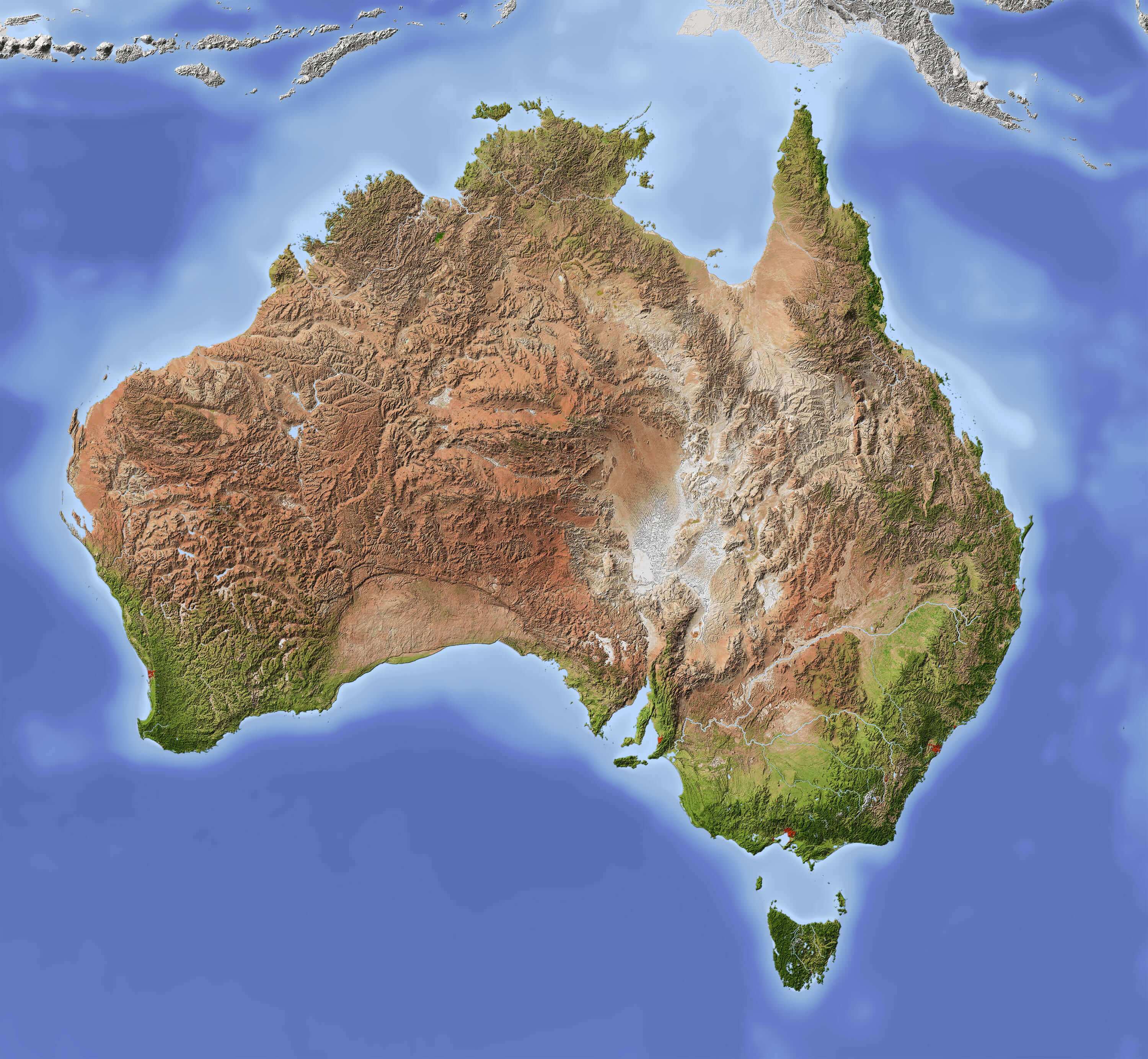 dusk rover
@livid sundial ill try it maybe when i come back home
keen hawk
Notice the massive swath of arid land
livid sundial
I think I saw that
How big is the map though
I think in saw it, but didn't do it because the image was too big
keen hawk
You can change the size of the map by simply resizing the image itself
Not a problem at all
livid sundial
How do I change the size
keen hawk
1000x1000 px = 20x20 in-game map size
livid sundial
I think that picture was over 1000x1000
livid sundial
Explain how
keen hawk
Even paint has that functionality
keen hawk
Well of course it does.
Same thing happens for the converter
Since it resizes large images as well
keen hawk
Anything beyond 1000px width gets rescaled by the converter back down to a max of 1000px
livid sundial
Am I allowed to tamper with the code of Destring's program?
keen hawk
If you know how to do it, why not
keen hawk
The width only
livid sundial
What about the height
livid sundial
Let me see
keen hawk
20x38
livid sundial
I will try to make it so you can choose the height and width of the map depending on the size of the picture for better quality
keen hawk
Make sure you apply the change in the .exe too
livid sundial
Am I allowed to re publish the code in containing my small edit and giving all credit to Destring's part
keen hawk
And if you're posting the file, include the other files in the original archive (such as the colour palette) and post it in #🌐map-downloads so I can pin it
Also if you can add other terrain, that would be nice as well
Such as farmland, lava, etc.
livid sundial
Wont lava burn nearby grass though?
keen hawk
It will.
livid sundial
I guess I'll try
keen hawk
But its edges will cool down immediately anyway
livid sundial
I'm not very fluent in the modules Destring used
keen hawk
You do know python right?
livid sundial
A little bit
livid sundial
I dont know what base64 is
Never used it
I'm not as good as Destring
Not even close
Although I think I do know how to automatically name the file map.json
keen hawk
English only please
dusk rover
Is it english or he wrote it on wrong chat?
keen hawk
Probably the latter
 supple gulch

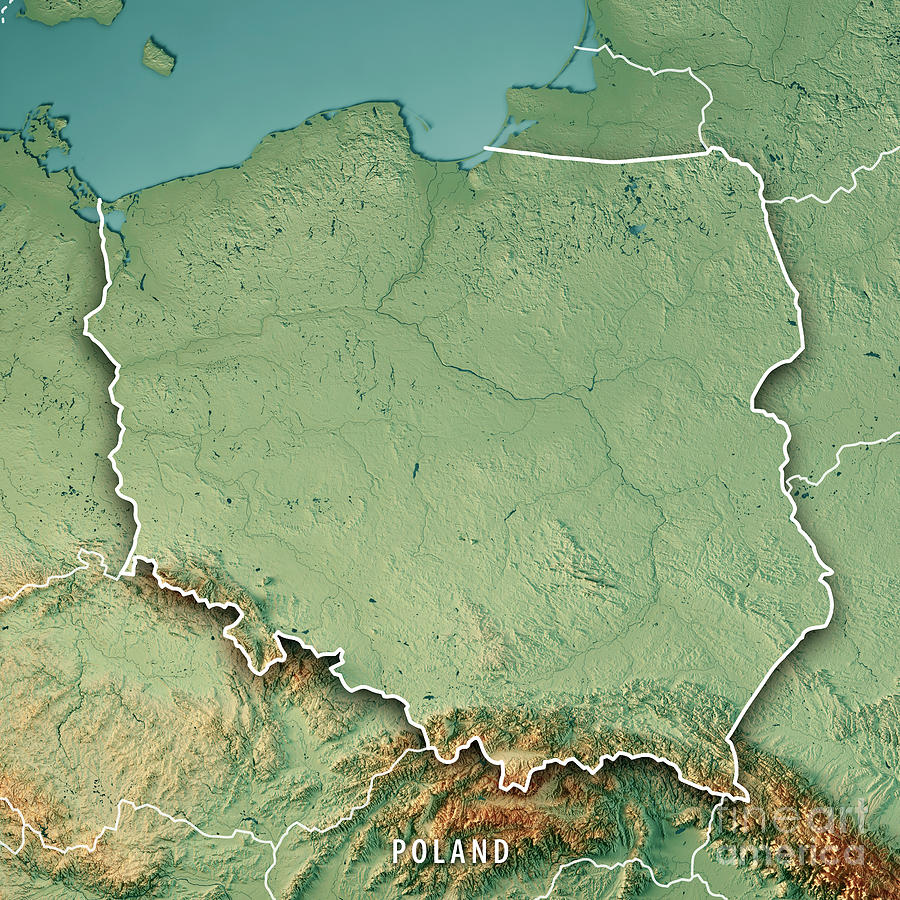


 dusk rover
Okey xD
keen hawk
@peak thunder Btw you should reverse the forest and soil tiles
peak thunder
why? is it wrong?
dusk rover
There is mostly forest i think
keen hawk
The plains should be in the low lying areas by the river valleys
The forests should represent the higher elevations and the interior of the island
 fresh warren
how i install maps?
dusk rover
Go to save files sharing and look at pinned comment
fresh warren
ok thanks 🙂
dusk rover
Np
 fickle ridge
how do you make pictures into maps
dusk rover
I go to sleep so @peak thunder if ull make it pm me or tag okey?
peak thunder
ok
keen hawk
@fickle ridge Go through the pinned messages in #🌐map-downloads and look for Destring's post
That contains the image-to-map converter as well as the instructions for using it
 pallid belfry
i mean ehm, the "saves" file should be in the "WorldBox" File right?
keen hawk
@peak thunder Why is it not surprising that the Poland map turned out like that
dusk rover
Thanks a lot @peak thunder
reef juniper
@jagged lintel Humans, Remnants of Dagbor, capitol Dagbor
 urban bloom
Here’s a question, how do I get save files onto my WorldBox via IPhone?
 novel blade
@jagged lintel orc, H-town
 crisp horizon
you cant yet
urban bloom
There is files, but there isn’t a worldbox data file
crisp horizon
@jagged lintel humans, baildon empire, capitol igork
then you cant as of right now battle boy
urban bloom
Alrigh
crisp horizon
the dev might add a proper easy way to share maps on all platforms i hope
anyone have a full world map?
 tidal vapor
Who any skinte map world 10/10
keen hawk
@tidal vapor Please include the preview.png in your post so that people can see what the map looks like before downloading
tidal vapor
Already do.
keen hawk
Also, don't talk in #🌐map-downloads
That channel is purely for uploading save files now
If you want to talk about save file sharing and creating maps, talk here
 inland turret
can someone make a Philippines' map on worldbox
bright fern
@bright fern look at #🌐map-downloads