#site-bugs
1 messages · Page 11 of 1
 sharp ore
 frosty cape
Because a lot of people are answering
@sharp ore @mellow sorrel can you please DM me
 mellow sorrel
ye
sharp ore
@spiral flame it is solved, the issue was in the webpage, it was displaying it as TMH{######} instead of THM{#######}.
 rare swallow

frosty cape
Want to say it was on purpose, but it was me rushing to get that challenge out
mellow sorrel
happy its fixed 😄
also on alfred i cant complete the last Task4
it says coming soon
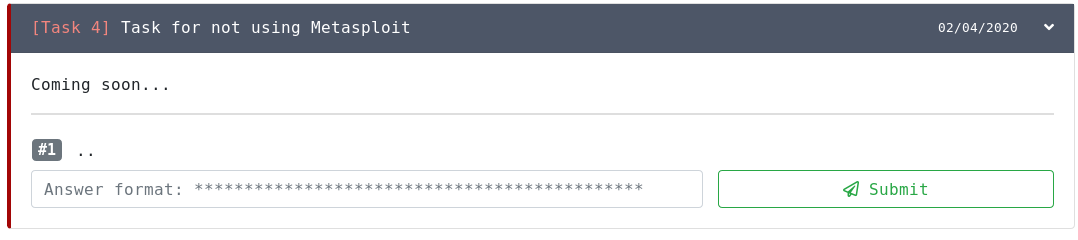
same with steelmountain
mellow sorrel
ah ok
 topaz venture
oh ahaha, nice bug lmao!
rare swallow
it's a feature
 short jackal
lol
 spiral flame
@mellow sorrel JP Flag1 fixed?
frosty cape
^ Yes
short jackal
Hey @frosty cape, how often do you check the hello@tryhackm email?
short jackal
I found few bugs/vulns
mellow sorrel
yes its fixed now @spiral flame
spiral flame
@frosty cape Also typing into the search bar before the page loads breaks search until you refresh
spiral flame
Bughunter is 2+ serious bugs
mellow sorrel
ah right
spiral flame
(and responsibly disclosing)
mellow sorrel
good
 worthy gulch
Layout issue: I thought I could no longer leave rooms that are cloneable. The button is hidden beneath the element below.
mellow sorrel
hi
where can i report a bug
on tryhackme
security bug
im coming for that bughunter title @frosty cape
 sly raft
email us at: hello@tryhackme.com
mellow sorrel
will do
mellow sorrel
sent 🙂
 hasty trellis
Linux Challenges [Task 3] Linux Functionality ### Please change flag file name.
spiral flame
@orchid remnant Flag is mistyped as TMH rather than THM or something
Oh and that's even weirder
 orchid remnant
Hmm, lemme check that 🙂 -- I've been sent the contents of the brackets, so that might well be it
You are quite correct @spiral flame -- that definitely explains why the hash in the brackets was matching up... 🤦♂️
I'll store that away for future reference
Surprised that the tolerance algorithm isn't fixing it though
spiral flame
Yeah so am I here
 hexed vault
There seems to be a bug at writeup submission. I tried submitting to HackPark [with and without the ? and what's after], It responds that it is not a valid URL:
https://medium.com/@nickbhe/tryhackme-hackpark-writeup-db34b7957bef?source=friends_link&sk=73a9b10db288192956a3c8d78ef7fdf5
 thorn briar
I'm doing hackpark and it looks like after I extend the machine time, I no longer able to connect to it after a while and need to re-deploy
frosty cape
Extending your machine time doesn't have any effect on the machine
The only thing I can suggest is making sure its not actually expired, try moving over to the VIP OpenVPN server and make sure you're not doing something that is killing the machine
thorn briar
vip openvpn server? 😛
frosty cape

TryHackMe
An online platform for learning and teaching cyber security, all through your browser.
"Switch VPN Server"
Download your new VIP config file
thorn briar
VIP is for subscribers ?
frosty cape
Subscribers only, yes
thorn briar
oh cool, didnt know
hexed vault
There seems to be a bug at writeup submission. I tried submitting to HackPark [with and without the ? and what's after], It responds that it is not a valid URL:
https://medium.com/@nickbhe/tryhackme-hackpark-writeup-db34b7957bef?source=friends_link&sk=73a9b10db288192956a3c8d78ef7fdf5
@hexed vault I removed "@" from the url and the submission worked.
 urban flame
Is HackPark a tad buggy? Not the room itself but the answer fields
 short osprey
There's a problem with the download link in 25daysofchristmas room task 8. It doesn't work
urban flame
Sweet, thanks @worthy stag. Just wanted to double check the * formats are correct 🙂
short osprey
@spiral flame oh sorry, I thought you got it from somewhere else, like an archive or smth 😅
 languid coral
Are the Room Blue with a bug in question 3 task 2? i am writing the correct answer but the mensage is "its incorrect"
?
 olive drum
@languid coral can you send the answer you are trying to put (with a spoiler)
languid coral
how do i put with spoiler? Only SPOILER answer SPOILER?
or there is a tag for this?
olive drum
tag || to the both sides of the word
languid coral
||RHOSTS||
olive drum
one required value. What is the name of this value? it's asking for single form
not plural, as you are trying
olive drum
all good :)
 crimson relic
Can't submit the flag on challenge 3 of Basic Steganography room
rare swallow
ben sounds like tom holland saying croissant https://www.youtube.com/watch?v=U2OtWuTS-XY
olive drum
he better say 'Ello love'
rare swallow
Tracer
 soft spindle
worthy gulch
soft spindle
worthy gulch
probably laziness because they've been busy with bigger fish, but yes, that should perhaps be limited a bit. Not a bug per say, though,
orchid remnant
Room: Toolsrus, T1Q8
When nikto is used against the second port, it returns a different server version than when used against the default port. Question either needs clarified to show this, or answer needs changed to reflect the server version found on the second port.
 exotic venture
The "Getting Started" box appears for me in my dashboard. I was told NinjaJc01 this is not expected behavior
Here is a video of how it appears
My username: Westar
(Maybe could be useful for debugging?)
It also happens when I disable cache in firefox inspector
spiral flame
(it seems to vary by user, appears for some and not for others? maybe because I completed it but it seems intermittent)
olive drum
'options' button is not working inside the KOTH game
olive drum
i did
let me try another browser
nope still no luck
can someone else try the 'options' button too?
 tribal knoll
Works for me
olive drum
i can't even inspect it
 frail vessel
Can't select option button, running firefox, nohing in inspect element either
frail vessel
Forever spinning green in top right corner
olive drum
- disabling no-script didn't do anything
 near raven
i got a brief error-message "down for development"
after that i can load pages tho however no buttoms are responsive within pages related to rooms.
frail vessel
There's no way to leave a game once you've joined it
rare swallow
^
a confirm button will be highly recommended @frosty cape something between the lines of : 'Are you sure you want to create a private room?'
frail vessel
Same issue as above, but it's preventing flag submision as well
 covert kernel
Hello all, is it just me but I can't click anywhere inside a room. I can't click Completed, I can unroll the Tasks 😢
worked find 15 minutes ago
I can click on options button though
near raven
no it aint just you
covert kernel
Ah ok. Well, all the best to the team 🙂
frosty cape
Same issue as above, but it's preventing flag submision as well
@frail vessel In KOTH or on THM?
rare swallow
near raven
thm
rare swallow
skids it's everywhere
@frosty cape sorry for the ping again but it seems like a lot of issues are happening
 round lance
Can't type or click anything in different rooms :/
rare swallow
something's borked
sly raft
what do you mean @round lance
near raven
skidy its in all rooms completed or trying to do. buttoms to change section or submit forms are just not responding. regardless if regular browser or incognito with all cookies/addons disabled
round lance
yeah
round lance
even if I leave and rejoin the room.
 stiff flicker
Same!
round lance
And dropdowns doesn't work either
round lance
Thanks :)
rare swallow
thank you ^^
near raven
awesome
stiff flicker
Thank you brotha!
near raven
Works, thanks
stiff flicker
It works! Thank you 
round lance
Thanks 
 dim wing
hlo...pls anyone help me with some of my doubt about this site?
i want subscription on this site for only a month ......if i pay for month would i got all paths open
or for particular path subscription
hey
olive drum
yes you will get everything regardless subscription time
orchid remnant
@dim wing subscribe and you get everything until the subscription expires.
 celest bronze
@orchid remnant there’s a semi unintended for the challenge room Jack, it’s owned by THM.
Don’t know how to relay the message, since I don’t know the exact room owner.
orchid remnant
It's one of @surreal kettle's, I believe, but it would be up to Skidy/Ashu to change it.
Zayotic is probably the one to query about whether it's unintended though -- hence the ping
celest bronze
Thank you, it’s nothing serious but takes the last step of fun away 😕
orchid remnant
Aw, that's no fun
frail vessel
Unable to select the green option buttin on koth
frosty cape
Really?
frail vessel
Yep
frosty cape
Which browser?
frail vessel
Firefox
frosty cape
Version?
frosty cape
Ah yes
I am able to reproduce
Thanks
Fixing now.
Ty for the screenshot, helped it
@frail vessel Refresh and try again please
frosty cape
Amazing, thanks for reporting:)
Wait woot?
Ahhh
I see, ty
Browsers act different with disabled inputs
spiral flame
@frosty cape This also explains the difference between chrome allowing copy/paste of answer fields and firefox not allowing it
frosty cape
Has there been any issues elsewhere on the platform?
@frail vessel Try again now, invitations should be selectable:)
 lost wagon
Not really a bug but more of a complaint about some engrish: To prevent cheating and ensure this game is realistic, everyone must the follow the rules: lose the 'the' between must and follow (koth rules btw)
 ornate moss
Do we still need this?
 marble quiver
Is anyone else experiencing login issues? I am fairly new to the service, but have successfully ssh'd into the room I was working on previously... now, my connection is timing out... My openvpn is connected (status is green on the config page), and I have terminated and relaunched the machine several times
spiral flame
!multivpn
 raw karmaBOT
 TryHackMe
• Step 1
Type ps aux | grep openvpn into your terminal and press enter
• Step 2
If there's more than one line (and the second doesn't have "grep" in it), do the following steps
• Step 3
Type killall openvpn into your terminal and press enter
• Step 4
Start the VPN with sudo openvpn <path-to-config>

From TryHackMe with ❤!
marble quiver
Thank you! I didn't realize there were separate channels, will do in the future
 tulip ingot
Hi, I just got the monthly subscription and hashcat does not work in the virtual Kali Linux. The error is "No devices found", I assume the problem is that there is no GPU for hashcat to use. Is there any way to use hashcat anyway from the provided Kali Linux?
orchid remnant
Try adding --force on at the end @tulip ingot?
orchid remnant
Np
exotic venture
Because of the "getting started" bug I'm currently enrolled in a room I don't have access to. I see no way of deleting it either
frosty cape
Because of the "getting started" bug I'm currently enrolled in a room I don't have access to. I see no way of deleting it either
@exotic venture What bug is this sorry?
exotic venture
I just subscribed so now I do have access. But it would still be a bug for people who aren't subscribed
frosty cape
That getting started popup should appear for everyone, it only goes if you've completed all of the rooms stated in it:)
exotic venture
When I clicked on the "Linux challenges" the room gets added to my rooms. But I didn't have access to that room yet because I wasn't subscribes. I find that a bit weird
 patent wedge
tryhackme site is not opening and if opens it takes too long why
waiting for an hour but nothing goes
round lance
I'm a student in switzerland, but the discount doesn't show up.
olive drum
 covert kernel
Hi everyone, in https://tryhackme.com/room/ice
under Task 3 > Question 1
They Answer is not working, no matter what i try. i finished the room, but i want i to finish 100% :))

TryHackMe
Deploy & hack into a Windows machine, exploiting a very poorly secured media server.
i guess they changed the name of "Vulnerability Type" at the CVE site.
so its not matching anymore with the searched answer by THM, but im not sure about that. 🙂
short jackal
the vuln type from cvedetails matches the answer I gave when I solved the room
are you sure you have the correct vulnerability and the correct type?
covert kernel
let me check again.
in cvedetails its says Exec Code Overflow under vuln types. its not working when i make that as an answer.
i tryd also arbitrary, remote, etc. nothing seems to work.
i dont want to post all answers here 🙂
short jackal
look at the amount of stars in the input field and also go on the page of the CVE
covert kernel
omg, got it. Thanks! 🙂
 tropic ore
TOR for beginners Task3 #3-> onion link not loading in tor.
olive drum
@tropic ore it is working.
press ctrl + L to generate a new connection and you'll be good
tropic ore
I get connection has timed out? When i try another onion link it works?
tropic ore
Strange, already tried new identity few times with same results. But will try again
Other onion links works fine here, but not that one for me
tropic ore
Got it working on another machine.
olive drum
good
 cerulean dawn
in the ICE Room (https://tryhackme.com/room/ice), Task 3 Question 1 asks to specify a vulnerability type. The hint specifies exactly where it is, but either the webpage changed or something happened (most likely with the wording of the flag)
TryHackMe
An online platform for learning and teaching cyber security, all through your browser.
I believe the asnwer should be "DoS Exec Code Overflow"
spiral flame
The wording is just slightly different
You're not using it as a DoS
and it expands one of the words
cerulean dawn
isn't the hint misleading nevertheless?
spiral flame
@rugged ermine
covert kernel
I imagine that's how it says it in the cve
 rugged ermine
You're not looking at the correct CVE
I believe it's specifically a Buffer Remote Overflow or something similar
rugged ermine
I believe I link the specific CVE later on in that room
cerulean dawn
yeah...youz are right...I was looking at the wrong CVE
rugged ermine
Fun fact, you can jump ahead in my rooms and usually find the answers to previous questions hehe
Didja find the right one?
cerulean dawn
I found the answer to the question, but now , that I have to find the right CVE, I realized I was looking at the wrong one
cerulean dawn
you did. I just wonder how I would look for vulnerabilities if I don't have "hints" ^^
if I go on cvedetails and search for Icecast I just find 2 vulns
cerulean dawn
oh...I did. it's none of the two
I'm having problems understanding the webpage, but don't worry...I'll figure it out
 crisp acorn
If I wanted to exploit a 2020 buffer overflow in the sudo program, which CVE would I use?
i was wondering if the question was a typo or if the 2019 is an exception or something
orchid remnant
Aha, that one is one of mine, is it not 😁
Nope, that's not a typo
It's designed to make you think
spiral flame
Public release vs CVE
orchid remnant
The CVE was discovered in 2019, but released publicly in 2020. It's listed as a 2020 vulnerability as a result, but the actual CVE number is still 2019
spiral flame
it's also a a really nice vuln
crisp acorn
ah ic
spiral flame
and also please delete the answer from that message
crisp acorn
oki ty
 plain tusk
Hi, dunno if this would be considered a bug per se, but I'm seeing a broken image on https://tryhackme.com/room/androidhacking101.
The image in question is https://media.licdn.com/dms/image/C5612AQGjrS_XAQaT5A/article-inline_image-shrink_1000_1488/0?e=1577923200&v=beta&t=v0R-BFASubjeXxXl1mh3cVsLj6NexAORmY9YWhuX4o0, and attempting to access it results in a 403 error in Firefox on Windows. This does not occur with other images on the page. I also have not seen this in any other rooms as far as I've seen.
Forgot to mention this image is the first image on the page, right under "What is android's SMALI code?" in Task 1.
-Sometimes- it looks like the image actually loads when I first refresh/load the page, but then quickly "breaks" again. For some reason, the image seems to load correctly with no problem in Chrome on the same machine using Windows 10, so it hasn't hampered my experience too much, but I don't know if it's something others have seen, or in any other rooms. I could provide images if needed.
TryHackMe
An online platform for learning and teaching cyber security, all through your browser.
Oh, maybe I'm accessing a cached version or something. The image's URL when accessed in Chrome is a Blogspot URL, and copying that image's URL into Firefox works fine, woops.
spiral flame
❤️
celest bronze
I got bloods on this room, and am the only to have compete it. I have been helping a few others to get through the challenges. For some reason, now they are getting more points than I am? Is this a bug, or intended.
spiral flame
I think it might still be broken
 worthy stag
That seems like a bug for sure
spiral flame
But yea bug
worthy stag
Scoring is just janky atm
 crisp moth
I dont know if it a bug but... in advent of cyber, when you ask for a password, if i dont type the first letter it s good too
exp : Password is : secure
if i type : ecure
it says it s good
tribal knoll
Yeah, answers use regex
worthy gulch
regex is never the answer
crisp moth
ok 😄
frosty cape
I got bloods on this room, and am the only to have compete it. I have been helping a few others to get through the challenges. For some reason, now they are getting more points than I am? Is this a bug, or intended.
@celest bronze Fixed, its how that room was set up
I am thinking of just having first blood on points.
Not 1st, 2nd 3rd.
celest bronze
I love that, thank you 😀
spiral flame
Downloads seem a bit dodgy for some people
 simple birch
Hello guys
at learning linux room i have to run a binary file to get the password for shiba2
user
orchid remnant
#room-help @simple birch
orchid remnant
Np 🙂
 drifting hill
hello, i believe the ssh password for pingu for the room "thecodcaper" is the wrong one, cracked the ssh password and its different from the intended one that is meant to be correct
orchid remnant
@drifting hill I have no idea what password you cracked, but the SSH password is written in plaintext...
drifting hill
really?
drifting hill
i cracked the ssh key in pingu/.ssh
covert kernel
How? I didn't encrypt it
orchid remnant
How on earth are you meant to "crack" an SSH key?
drifting hill
the priv key
covert kernel
@orchid remnantssh2john
orchid remnant
Bust a password off it?
covert kernel
Maybe?
covert kernel
I don't remember adding a password to the ssh key
drifting hill
hmmmmm i cracked the password in pingu/.ssh/id_rsa
guess i need to look harder for this ssh pw
covert kernel
Yeah I hid the ssh password pretty interestingly
worthy gulch
look on the right :p
frosty cape
Ahh ty, will fix
 visual oasis
hey when clicking on a hint and it contains the html code for a \ it doesn't work and just displays the code (spoiler because it is a hint)
spiral flame
@visual oasis I gotchu, submitted
visual oasis
ty ty
 quick solstice
I look at the write ups and my flag is true. I think, there is some problem about room "Basic Steganography" question 3.```I wrote this message to another room but I think this is the right place
Actually, Challenge 3 --> Question 1
worthy stag
Room still expires if you extend it at around 2minutes remaining
ornate moss
I did it at 6mins and 4 mins to test and had the same result
rare swallow
@quick solstice feel free to dm me the flag. I've completed the room ^^
no bugs with basic steganography
quick solstice
Yes,resolved thanks again
rare swallow
anytime ^^
 ancient sage
Hey team! I'm experiencing difficulties in room "Learn Linux". The first time i joined the room, everything was marked as "completed" and challenges were not there. I rejoined the room and the 10 last tasks were marked as "completed". The third time everything looked normal until i reached Task 18 which has duplicated challenges that won't accept the correct solution.
orchid remnant
And you've not done the room before (just to clarify) @ancient sage?
ancient sage
No i haven't
It will even duplicate and won't let me complete the "Read the above" challenges
orchid remnant
Hmm, sounds like that could be another authentication thing. @frosty cape:
Room progress potentially showing up from another user account.
Otherwise the room progress is just glitched 🤷♂️
 median sapphire
This happened to me as well, in the Mr Robot CTF room
orchid remnant
Hopefully Skidy will take a look and see what's going on in both cases 🙂
frosty cape
Hey team! I'm experiencing difficulties in room "Learn Linux". The first time i joined the room, everything was marked as "completed" and challenges were not there. I rejoined the room and the 10 last tasks were marked as "completed". The third time everything looked normal until i reached Task 18 which has duplicated challenges that won't accept the correct solution.
@ancient sage Which room is this in?
orchid remnant
(zthlinux, with Mr Robot also affected by the looks of things)
ancient sage
Room name: “Learn Linux” Code: zthlinux
rare swallow
I pointed that one before @hazy stratus

 hazy stratus
I think letters have been sanitized
rare swallow
You get it priced at £1
 jagged reef
I get a 504 Gateway Timeout every time I try to upload an .ova
spiral flame
Filter dropdowns will break, if you use them before the rooms load in hacktivities
https://tryhackme.com/room/hydra typo in this table, verborse

TryHackMe
Learn how to brute-force authentications services such as SSH and HTTP (POST).
 ocean mountain
more infrastructure than bug. and just my luck. I purchasd the THM subscription several days ago and since then the VPN either can't stay connected or the machine has deployment issues and doesn't respond. any others experiencing this or recommendations?
frosty cape
more infrastructure than bug. and just my luck. I purchasd the THM subscription several days ago and since then the VPN either can't stay connected or the machine has deployment issues and doesn't respond. any others experiencing this or recommendations?
@ocean mountain Are you connected to the VIP OpenVPN server?
ocean mountain
I am
frosty cape
The VPN shouldn't struggle to stay connected
Hm
Machines shouldn't struggle to respond either.
Is it in specific rooms you've experienced this?
ocean mountain
today, it's Fowsniff CTF, yesterday it was the Pickle Rick. the VPN connection comes and goes.
spiral flame
!multivpn
raw karmaBOT
TryHackMe
• Step 1
Type ps aux | grep openvpn into your terminal and press enter
• Step 2
If there's more than one line (and the second doesn't have "grep" in it), do the following steps
• Step 3
Type killall openvpn into your terminal and press enter
• Step 4
Start the VPN with sudo openvpn <path-to-config>
From TryHackMe with ❤!
ocean mountain
the services were flawless for the past 300-whatever days I've been using, up until this week. I haven't found it to be issues on my end with my network.
yeah, I checked the multi VPN issue and it's not that.
I see a #site-support, sorry about that.
frosty cape
Hm, thats really weird. Does your OpenVPN client output anything?
 wind dirge
Is there issues with Alfred? I've deployed it a couple of times in the last hour and cannot get a response. I've tested my connection to 'Steel mountain' and have had no problems.
spiral flame
It might not respond to pings as it's windows
wind dirge
It might not respond to pings as it's windows
@spiral flame I dont think I'm hitting it with nmap either... I'll try again
spiral flame
Nmap does a ping scan first
wind dirge
Nmap does a ping scan first
@spiral flame yeah, maybe its my side.
spiral flame
nmap -Pn will skip the ping
wind dirge
nmap -sS -sU -T4 -A -v 10.10.25.135
was using that
nevermind, it's my FW, allowing all on tun0 but not tun1
also some EBK, possibly.
sly raft
@ocean mountain if you're subscribed, you can always use the Kali machine :)
ocean mountain
That is true! I really should.
 wooden spire
how do you restart a room
if you broke something
and the instance is persisting
nevermind
im a dumbass
 hallow temple
Hi guys. I believe there is a platform bug with the final question of the final task in the red primer Nessus room. The program won't accept the correct answer (confirmed with @spiral flame )
orchid remnant
The notifications menu does not do GIFs
The link appears to be attempting to access a JPEG, which might explain it
 frigid path
The flag for Jurassic Park for task 1, q# 8 has been missing for ages, and a few people were asking about it.
 dawn marsh
hey guys
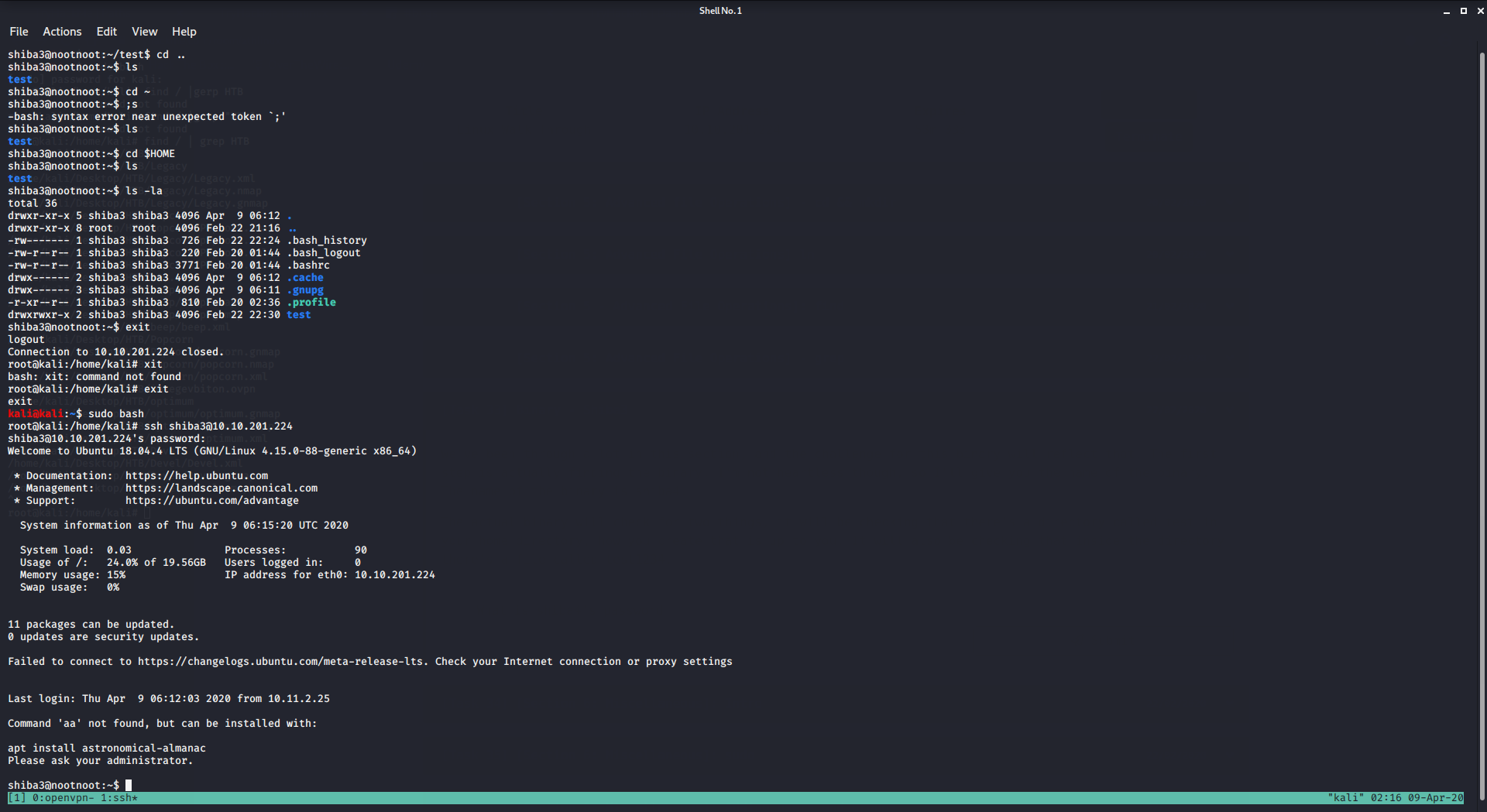
Linux Walk Through
[Task 33] Binary - Shiba3
is this normal?
i havent created the test folder , it was already there , and the binariy is missing i belbve
i belive *
rare swallow
no binary is missing, the room is perfectly fine
covert kernel
Hello, I have a minor bug to report on the User Profile page of your site.
When hovering over your username, it prompts a email configuration warning.
Just wanted to put it out here.
covert kernel
in my kali vm.... ‘my rooms’ are not loading.... but parrot vm is working perfect..... is it my vm problem?
Most likely, I just look at my rooms from my machines web browser.
 floral jewel
does anyone know how to decompress this
Raw profile type APP1 (xTXt deflate compressed): \ngeneric profile\n 34\n49492a0008000000010031010200070000001a000000000000005069636173610000\n
i got this after i went searching for metadata in a png file
covert kernel
By chance are you trying to look at the EXIF data?
 fresh tide
This room can't be completed.. is this how it was intended to be? Duplicate questions can't be answered completed. Stuck at 50%
https://tryhackme.com/room/openvpn
 rare swallow
it's a feature
frosty cape
This room can't be completed.. is this how it was intended to be? Duplicate questions can't be answered completed. Stuck at 50%
https://tryhackme.com/room/openvpn
@fresh tide Try again (refresh the page), this bug will be fixed next week.
fresh tide
Ok completed!
fresh tide
btw @frosty cape its still in my liked rooms not the rooms i completed
worthy gulch
rugged ermine
FYI it's not broken, you are not looking in the correct spot
worthy gulch
He looked everywhere, just the same as I did when it didn't work for me
covert kernel
u guys own tryhackme.me right
worthy gulch
Not all of us, but yes, some of the people here :p
 jade beacon
So I keep having this issue in hackpark where I loose connectivity to the box after a while. Today I noticed it was after about an hour, even though I added more time to it. This is the 3rd or 4th time this has happened already. My VPN is still running fine.
spiral flame
@jade beacon how close to expiry are you extending it?
jade beacon
I extended it right after deployment
Then again when it went to like 40 minutes.
Actually that second sentence applied to yesterday... but this is happening consistently
Waiting to see if it happens again... I have about 1 hr 18 minutes left
spiral flame
Sounds like it's nit extending
Lemme spin up a VM and I'll get back to you in an hour
jade beacon
sounds good
spiral flame
@jade beacon Approaching an hour now
jade beacon
🤞
spiral flame
@jade beacon Room is still up
jade beacon
wierd... I'm approaching the hour mark again... I'll let you know what happens
maybe check a few minutes after the hour as well
@spiral flame yup... lost it again
jade beacon
Not sure. I'll test a few others and let you know.
But yes, it happens almost immediately after the 1 hr mark.
It's a bit frustrating having to recreate my shells every hour
spiral flame
Yeah I can imagine, it's not intended behaviour
jade beacon
Ok, I'm running hackpark, metasploit, and steele mountain. I'll get back to you in about an hour
 rigid timber
Anyone having issues trying to join the Common Linux Privesc?
I am up on openvpn and can't ssh in to the box
spiral flame
@rigid timber I had it working about 5mins ago
rigid timber
I will try again, hopefully have some better luck
jade beacon
@spiral flame Update: metasploit and jack-of-all-trades stayed up, but I lost hackpark and steele mountain at the 1 hr mark.
spiral flame
Ok that's real wierd
jade beacon
Yep!
Is there the slightest possibility that it has something to do with adding time before the machine is fully booted?
(I assume that shouldn't matter though, based on how AWS works)
ocean mountain
deleted previous message because I thought I was wrong, but confirming Basic Steganography room Challenge 3 flag input is iffy.
rare swallow
@ocean mountain is is not
i completed that room fairly recent. make sure the characters you type are correct ^^
ocean mountain
well, I cheated by looking at a guide included in the room to confirm my suspicion
jade beacon
@spiral flame After another hour, the exact same thing happened (same two are file, other two are off). Is there a better place to report this?
ocean mountain
@rare swallow sent you a DM
rare swallow
i would advise to read the rules first ^^
ocean mountain
yeah, I see now. very anti-chatroom.
rare swallow
well you can just ask first ^^
ocean mountain
yup that was my mistake
rare swallow
i wouldn't have said no
jade beacon
@spiral flame Here you go:
Bug summary: Certain VMs seem to die after an hour, regarless of time being added to them.
Rooms Tested: HackPark, Steele Mountain, Jack-of-All-Trades, Metasploit
Details: Certain VMs, such as HackPark and Steele Mountain, die after an hour of depoyment, regardless of whether time was added or not. Others, such as Jack-of-All-Trades and Metasploit, did not die after the hour if time was added to them. Regardless of when the time was added (right after deployment or 20 minutes after) did not seem to matter.
User: rom58
Browser: Firefox 75.0 on Ubuntu 18.04.4 LTS (host machine)
Connection: Vip1 VPN server from Kali 2020.2 VM running in VirtualBox 6.0.18 r136238 (Qt5.9.5)
visual oasis
In the RP: Web Scanning room in the last section at question #8:
The name has changed so the answer can no longer be correctly answered
visual oasis
Still the correct answer is not one of the alerts as it used to be (according to the write up)
 jagged parcel
guys i'm new since 10 minutes lol i have some questions..
jagged parcel
allright thanks
visual oasis
:/
spiral flame
Repeatedly wnd reproducibly
visual oasis
yes
ornate moss
Clicking this button really fast produces some interesting results
Note: Dont use a autoclicker
Crashes the tab lmao
covert kernel
Someone must have gotten bored XD
near raven
retracted bugreport
frosty cape
Note: Dont use a autoclicker
@ornate moss Yeah I plan on revamping the whole task process at some point:)
olive drum
getting this after 100% upload
tried 2nd time already
(all the requirements for OVA are met)
frosty cape
Really weird, will revamp all the upload and task creation process after next week
rare swallow
hackback2019- https://tryhackme.com/room/hackback2019 task4 #5 does not accept the flag even though it's the correct one.
TryHackMe
This is a clone of our HackBack 2019 CTF event, which took place on 9th March.
orchid remnant
Day 4?
rare swallow
task 4
orchid remnant
Ignore me...
rare swallow
it's okay
rare swallow
it's not advent Muriburi
orchid remnant
I thought you were meaning AoC 😆
orchid remnant
I remember
Yeah, I think I already put the Jurassic Park thing into #685858111952781324
rare swallow
cool, just making sure
you should bring it up that it's on hackback too
and flag is wrong
i've completed jurassic anyway
orchid remnant
Fair
 reef galleon
In the advent of cyber room (aka 25 days of christmas), in task 22 for hydra, the challenge says to bruteforce an http-get form. It says as a hint If you've tried more than 30 passwords from RockYou.txt, you are doing something wrong!
However, the password was somewhere after line 905,000. (I found it from a back entrance in the server). Just to be sure, I put the password in a shortened version of rockyou and it worked. I didn't change anything else.
Also, going through the wordlist in reverse is even more than 900,00 attempts before the password.
So although I got the password, something's wrong
oh, and. I noticed the challenge gave a link to the rockyou wordlist. I thought that wordlist might have been modified so that the password was further up, but I downloaded it and it was the same as the one I had.
please ping
spiral flame
@reef galleon Known issue
Fixed in the standalone room. And you can get the flag once you got ssh
reef galleon
ah, so it wasn't a mistake
(that I could get it through ssh)
okay, makes sense. Well that's nice then
Maybe edit the hint or change the password so that it's further up the wordlist?
 dawn gull
spiral flame
dawn gull
spiral flame
@reef galleon known issue; wontfix. It's fixed in the standalone hydra room which is the same challenges
@dawn gull #room-help
reef galleon
oh I see. Well how about just changing the hint or task so people can know? Not everyone has discord
spiral flame
I'm powerlessness here and Skidy and Ashu are super busy fixing the site backend atm
 past cave
In the docs:
https://docs.tryhackme.com/docs/openvpn/troubleshooting/openvpn-troubleshooting/
There are links to http://localhost:3000/docs/openvpn/connecting/openvpn-connecting#connecting-via-windows and so on.
Don't think this is by design so 🙂
No Connectivity
spiral flame
@jade beacon admins suspect it's a VPN thing, the machines dieing
Next time it happens, ping me over an IP address and we'll see
 oak hare
Hello guys
I just try the challenge steel montain but when i try to start the service i get STartService Failed with error 1053
I also try to stop the service and restart it but nothing work
I think this is a bug ?
 smoky fossil
@spiral flame Mr.Robot CTF has a lot of connectivity issues
its not even pinging even after waiting for 15min and redeploying the machine and VPN
rare swallow
not all machines respond to ping
smoky fossil
they dont even boot
smoky fossil
yup
rare swallow
what did you get
smoky fossil
Mr.Robot is supposed to we a web chal .. it keeps loading until no connection
atleast for the first flag
@rare swallow says Host not up.. how do i even fix it
rare swallow
is that what you get on nmap?
check if you have more instances of your openvpn
!multivpn
raw karmaBOT
TryHackMe
• Step 1
Type ps aux | grep openvpn into your terminal and press enter
• Step 2
If there's more than one line (and the second doesn't have "grep" in it), do the following steps
• Step 3
Type killall openvpn into your terminal and press enter
• Step 4
Start the VPN with sudo openvpn <path-to-config>
From TryHackMe with ❤!
smoky fossil
!multivpn
raw karmaBOT
TryHackMe
• Step 1
Type ps aux | grep openvpn into your terminal and press enter
• Step 2
If there's more than one line (and the second doesn't have "grep" in it), do the following steps
• Step 3
Type killall openvpn into your terminal and press enter
• Step 4
Start the VPN with sudo openvpn <path-to-config>
From TryHackMe with ❤!
orchid remnant
No need to spam the command 🙂
smoky fossil
Same issues.. i even rebooted the machine
and nmap still says 0 hosts up
nvm it booted ]
oak hare
Hello guys
languid coral
guys, i am a noob or there is a bug on the response of question #3 of taks 2 on ICE?
i am pretty sure that i am writing the correct answer
sorry my bad.
its ok
 primal verge
sly raft
primal verge
sly raft
check the writeup if there's on for the room :))
orchid remnant
Interesting pop-up when submitting a write-up
worthy gulch
It says, "No comment"
worthy stag
That’s just ... showing disapproval
orchid remnant
😆
 sick ferry
Hey I was thinking of signing up as a student. But I was wondering if it's worth the money? Has anyone in here has done it?
Hey I was thinking of signing up as a student. But I was wondering if it's worth the money? Has anyone in here done it?
@sick ferry
exotic venture
I've completed alfred, however it doesn't show up as done in "My Rooms". This is probably because the "manual exploitation" part that was gonna be added was deleted.
covert kernel
Howdy doodies
i have connected to the openvpn stuff but how can i ssh into shiba1
Just follow the instructions @covert kernel
the instructions dont make sense dude
olive drum
they are pretty obvious
just re-read them again
you can also google "how to connect via ssh"
covert kernel
dont say they are obvious if they arent and why are you telling me what to do?
im sorry dude but i dont even know you
olive drum
because you are asking for help and I am pointing you to the right direction
so you can learn yourself
covert kernel
dude i ssh shiba1@Internal Virtual IP Address
orchid remnant
(As is his job and right as a mentor, I might add)
covert kernel
but i get right away a connection refused error
orchid remnant
Are you connected to the VPN?
covert kernel
yes
olive drum
what IP you use to ssh to?
olive drum
you need to use one provided after hitting the 'deploy' button
orchid remnant
Thats your own IP...
orchid remnant
Looks like it...
olive drum
yup
orchid remnant
Try deploying the machine and sshing into that.
covert kernel
It is not how you get into machines
Click the deploy button
And ssh into that IP
how do i deploy a machine
There's a green
Deploy button in the intro task
i have no intro task
covert kernel
ok i got it
i have a machine running now
ok thanks dudes- now watch your shit im gonna hack all of you
Ok then lol
orchid remnant
Right... 🤣
olive drum
try hack me
covert kernel
#1
How do you specify which shell is used when you login?
why do i get a question that heasnt even been discussed yet
isnt the answer this ? $SHELL
orchid remnant
@covert kernel
- That's a question for #room-help
- that's what the man pages are for
covert kernel
@covert kernel man pages were discussed in an earlier task
It's noted in that same task that if you're in doubt you should read them
It's also noted in the intro task you should have a willingness to Google any questions you don't know
im at task12- it explains superuser but than as question i get the above 1?
Yeah
Read the man page for su
 hollow haven
guys im having trouble with john
where do i put the salt
is it like this
salt:hash
or like this
hash:salt
lost wagon
@hollow haven That's a question for #room-help
rare swallow
this discord channel is around THM bugs
hollow haven
oh
lost wagon
(or hints)
rare swallow
and it seems more like a google question to be fair..
hollow haven
then i will copy and paste it somewhere else sorry
i did google it
but people say do this $hash$salt
and there is people who say
do this
hash:salt
median sapphire
Google harder?
hollow haven
i will try
median sapphire
@worldly pagoda #site-support
 dreamy lake
anyone had problems with repeater on the burp suite room?
spiral flame
@dreamy lake not a tryhackme bug, wrong channel
worthy gulch
@covert kernel
worthy gulch
you were up at this time the other day so now it's fixin' time
hexed vault
Also, in Basic Steganography, the flag for task three doesn't seem to work.
spiral flame
@hexed vault delete flag
rare swallow
it works fine ^^
i just answered the same thing like 5 times in the first day
there are possible 2 characters that you're getting wrong
rare swallow
For people that have issues with Basic Steganography. make sure that that your characters are correct. is that ||O|| or something else (It's wrong in 2 places). Especially if you are looking at Deskel's writeup.
Please don't delete the above. I would highly advise people to actually do the challenge ^^
covert kernel
there is a issue in the room Kenobi[Task 1][#2] it is asked how many ports are open 11 is the correct answer but 7 is requested
covert kernel
the question is: "Scan the machine with nmap, how many ports are open?"
spiral flame
Probably excludes RPC ports
worthy gulch
I remember this coming up before. It should be clarified.
spiral flame
It's a THM owned box right?
orchid remnant
Yeah
Skidy might even have done it under his own account from memory
Definitely an admin one though
spiral flame
Probably worth a clarification once they've fixed the site stuff
 merry rivet
If the site is not accepting my answer, is it counted as a bug ?
spiral flame
Depends if your answer is wrong
merry rivet
can you check it out ?
worthy gulch
Are you sure you're excluding all the stuff the question asks you to?
tribal knoll
That's not the correct answer
merry rivet
oke will dig deeper..
thank you.. I just saw 4 stars, and assumed i had the right answer.
worthy gulch
stilll 8998 other numbers it could've been ;)
merry rivet
now i got the right answer, sorry for bothering..
worthy gulch
no worries
spiral flame
@worthy gulch 9998, if you zero pad
worthy gulch
yeah, i started with that, but then I edited :p
It's not a pincode or something like that :D
merry rivet
could be 😄
hexed vault
I'm trying to solve the 8th task in "bof1" for 2 days now without success, went into crazy depths, and now I noticed that no one has solved it 😅 Can someone check this out?
 mint raven
Hey, I'm stuck in Linux Challenges room. Command flag11 doesn't seem to work.
celest bronze
https://tryhackme.com/room/webappsec101 -- admin panel is broken at /admin, it works at the link on bottom of the page.

TryHackMe
In this room, we will walk through how to testing an application in the perspective of a hacker/penetration tester
covert kernel
my kali machine won’t initialize
covert kernel
i managed to ssh into it without it finishing initialization. however the password for shiba1 isnt shiba1 lol
lost wagon
@covert kernel are you sure you're trying to login as shiba1? not as your local user? (ssh <ip> is wrong)
covert kernel
i was trying to do the “learn linux” room. and i managed to completely missed that the room deployed a box, and just assumed it was a user on my own kali box that i get for subscribing. but i looked at the users in that box and realized i’m dumb
sorry for bothering lol
 icy silo
Getting this Error in webappsec101 when trying to create a new user on the Admin Panel
lost wagon
@covert kernel no problem, happens to all of us
@icy silo see above, @celest bronze had the same yesterday and has a workaround(?? Looks like it at least)
icy silo
Ah thanks. Mb I should look if it has already been posted before I post haha.
 green frigate
Is this meant to have no answer guys? (best to check - i know it's simple)
lost wagon
yeah sometimes they don't need answers
green frigate
i know, wanted to check if this got missed. 🙂
lost wagon
with this question the answer could be too long.. or there are too many variations that would be correct 🙂
green frigate
gotcha.
lost wagon
(too long, as in.. whole sentences)
 finite fern
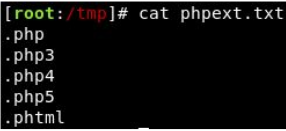
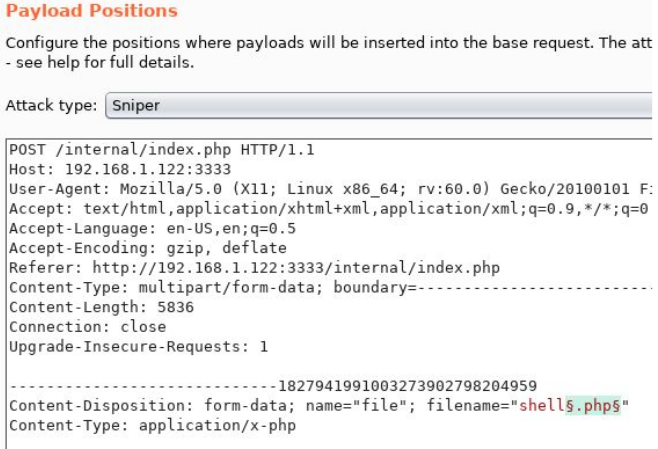
hi all - small bug in the 'vulnversity' room. You have to use burpsuite to look for file extensions that are allowed to be uploaded. For some weird reason, whenever I put the payload position as $.php$, $.php3$ etc, it didn't work. When I put the payload position as $php$, $php3$ , then it worked. I think the wording should probably be altered if this happens to anyone else. Thanks!
spiral flame
@finite fern that's not the payload options? It should be a list of extensions in intruder with a single blank
finite fern
I did use intruder @spiral flame . Not sure what you mean by single blank
spiral flame
@finite fern intruder allows you to change things in the payload. You just want to change the extension.
finite fern
that's what I did
I'll try and grab a screenshot, bear with me
Those screenshots show me following the instructions on the page. I put the $$ in intruder either side of the extension e.g $.php$. The results of the attack show the length is all the same... so even phtml gets marked as invalid
in this example, I put the $$ around the file extension only (not the . ). So test.$php$, and no '.' in the extension / payload list. And this time, the phtml shows a different response length in burp
In Task 4, #3 it shows this pic: https://i.imgur.com/ED153Nx.png which has the . before the extension. And this image: https://i.imgur.com/6dxnzq6.png showing $.php$ in intruder. Just saying that particular setup didn't work for me. Not a huge issue, but just letting you guys know 🙂
 deft cargo


 spiral flame
@deft cargo #room-help
 undone hemlock
@finite fern I had the same issue as you. You need to untick "URL-encode these characters" at the bottom of the payloads tab. Or remove . from the list of characters
Otherwise the payload request gets sent as filename=shell%2ephp etc
 abstract frost
TryHackMe
An online platform for learning and teaching cyber security, all through your browser.

 spiral flame
Ah, I see
rare swallow
lool
covert kernel
Lmfao
covert kernel
All your koth games
rare swallow
how do you get 17 flags out of 8
abstract frost

rare swallow
oh
covert kernel
So you can just make new flags
abstract frost
no no i found a sqli on tryhackme and i just add flags to their db
covert kernel
THM use mongo not SQL iirc
covert kernel
I'm going to take a punt and say that this is probably a known bug, but thought I'd flag it anyway - the VM expiry countdown seems to be consistently inaccurate for me - I had a notification that my VM was going to expire soon (and the timer still said 4m xxs left), but when I tried to add another hour, it had already timed out.
@covert kernel Time issues seem to come up quite often
The THM team is working to fix these issues
No bother - I now keep a timer on my phone to remind me, but thought it was worth mentioning. No complaints!
Always worthwhile to report an issue
😁
lost wagon
On WebAppSec101 ||when looking for other users, whenever you go to this endpoint /users/view.php?userid=3 it'll give you a blanc screen, no user, no website.. nothing.|| it actually gives a 404 not sure if intended or not, but it's an interesting thing 😛
@covert kernel does the bug @covert kernel is explaining have something to do with coming back to the 'room' page whenever going to a differen page(anywhere on the web?)... a good usecase is when you have links in the room (they don't open in a new tab, rather open in your active tab). when you go back (by pressing backspace or the dedicated button in your browser) it'll start at the max time again.
when pressing f5 it'll clear up the inconsistency
... or at least.. I'm having that problem :p
covert kernel
I think it might be a different issue - I've spotted the issue on pages i've not navigated away from at all (eg. the Kali page). Could have a similar source, but my intuition would just say that the issue I've had is with how the countdown is generated/presented on the webpage. But I may well be wrong!
lost wagon
hmmm.. I'm guessing our problems might have the same root cause 😛
frigid path
There's still an issue with the Jack box if I can dm someone?
 ripe viper
On shiba3 of https://tryhackme.com/room/zthlinux the directory + file required to be created was already there when I launched the VM, so it dumped the password without doing any work, I think this may be a bug?
 covert kernel
@ripe viper that is indeed an unfortunate bug
 still delta
Hi,
the "alfred" box seems to have been recently modified to add a new flag which was finally removed, except that I completed the box at that time (when the new flag was present but could not be completed) but now that it has been removed, the box is not valid :/
 rapid snow
@still delta I did this box recently. Read #4. See if that helps.
still delta
@rapid snow Sorry, what did you mean by "Read #4" ? (I never use discord ^^)
rapid snow
Task 3 number 4 on the box lol
still delta
@rapid snow Ah okay, but I did complete that question as well. All the questions is ok
rapid snow
You gotta read the question to find out why you cant see root.txt
Sounds like you missed a step.
still delta
"Question Done"
rapid snow
migrate
still delta
The answers aren't the problem. I finished the box.
It's just that initially when I did it there was a stage without MSF which is no longer present and that doesn't validate me the box.
 wispy storm
is this a bug where if u put right answer in the box and bunch of space after it it will still accept answer?
 solemn rivet
I have a problem with BP: Networking room - there are 4 tasks and they're supposed to have 12 questions each. But it shows me 24 instead of 12 - each questions is shown twice. I can't answer them or do anything else and because of that I can't complete the room - I'm stuck on 50%
I tried exiting the room and joining again, logging out etc. but nothing works
Is there something I can do to fix that?
olive drum
have you tried refreshing the page? @solemn rivet
solemn rivet
I have - I've also tried opening the room in a different browser, from a different device etc. - every "obvious" solution like that
solemn rivet
Thanks, questions don't show up twice anymore :)
But I have a different problem now 😄 - I answered all questions and it shows 100% completion, but the room is not actually marked as completed (maybe that's because I answered everything when it was in its broken state)
Reetering the room, refreshing the page etc. doesn't fix it (my username is: kordian)
frosty cape
can you try leaving and re-joining the room?
solemn rivet
I've tried already and unfortunately it doesn't help
Is it possible to just cancell my progress in this room and do it again from the beginning?
green frigate
Hey guys, in the Learn linux box it might be worth updating this paragraph. 🙂
in the rm section 🙂 task 26
rare swallow
?
green frigate
should say something like "It's worth noting that you need write permissions in order to delete the file. This means you can't just delete any file when logged in as a regular user."
rare swallow
@frail vessel fix your borked room
rare swallow
basic stego
also i'll submit a writeup for it in a bit
can you remove writeups?
because people seem to want to copy Deskel's flag at the end of the write up and they say the flag doesn't work
while he typed it incorrectly  @frail vessel
rare swallow
I've also submitted a write up for the room
frail vessel
Yeah, sorry I'm in between project meetings today, I'll get around to it later today or tomorrow
median sapphire
There's still an issue with the Jack box if I can dm someone?
@frigid path I've completed jack and did not encounter any issue.
 winged light
I think I ve found a bad ctrl-c/v for a screen caputre that is confusing: under /room/googledorking
it mentions domain “mywebsite.com” but the screen capture mention instead "anotherwebsite.com"
Or maybe I did not understood it well and this is not a mistake
topaz venture
Noted, thanks @winged light. It's not your understanding - slight mistake on my part 🙂 I'll update the room / diagram now.
But at the moment, assume that the diagram for "mywebsite.com" has "mywebsite.com" in the diagram and not "anotherwebsite.com" like it does currently
It shouldn't have any affect on answering the tasks - it's more for understanding the theory behind it all
winged light
you're welcome!
topaz venture
updated 🙂
 oblique lantern
I got a problem on KOTH, not sure what is happening but my name is in the king.txt I can curl on port 9999 to get my name but I have no point given on the website. I tried removing every script that change the flag still doesn't give any point. It the third that it happen to me today.
 scarlet holly
For people that have issues with Basic Steganography. make sure that that your characters are correct. is that ||O|| or something else (It's wrong in 2 places). Especially if you are looking at Deskel's writeup.
@rare swallow that helped!
 hushed flower
who is a beginner here as well and are there specific forums for each room because here looks really scattered
rare swallow
some of the rooms have a forum link but for most of them #room-hints and #room-help is where you should rely on in case you get stuck, @hushed flower
Some the rooms also have write ups if you like to look over those ^^
hushed flower
thanks @rare swallow yeah i know about the writeups but i wanted something more interractive ...
rare swallow
what do you mean by more interactive?
covert kernel
@hushed flower im a total beginner and here for my first help hopefully on the Linux privesc room.
anyone know why the hash password wont add to the new user account in linux privesc?
spiral flame
@covert kernel #room-help
covert kernel
yup saw that after i typed (head in hands).
 fast maple
Hi, for Hackback2019, task 4, I'm very sure I've got the correct first flag but the platform doesn't accept it.
worthy stag
Pretty certain the hackback rooms are glitched to a degree
 short brook
@spiral flame woa now that make sense, thx
covert kernel
does anyone here have pro? is it worth it?
spiral flame
@short brook Because I know the right answer and it's displaying with +7
covert kernel
is there loads more rooms?
spiral flame
Also pls delete screenshot
covert kernel
i can only see like 8 rooms in total and only like 5 are accessible for free
short brook
done @spiral flame
spiral flame
@covert kernel Yeah something's broken there
 pseudo meadow
@covert kernel Are you looking at 'My Rooms' or 'Hacktivities'?
Or something on the dashboard?
pseudo meadow
Look in Hacktivities. You'll see all the rooms listed.
On the dashboard at the top it lists 177 Public Rooms. You can click on Hacktivities and change the 'Show' drop-down to 'Free Rooms'
Then you click on the rooms you want to join and click the Join button in each room
spiral flame
You can also change it to subscriber only rooms if you want to see what you get for subscribing
As well as getting: Your own kali VM to remotely access, access to KOTH, more resources on every VM
covert kernel
thanks just seen theres a whole lot more in hacktivities
can anyone whos got pro explain why its worth it briefly?
rare swallow
check #522158404614225920 @covert kernel your question has been answered today if i recall well
olive drum
TryHackMe
An online platform for learning and teaching cyber security, all through your browser.
^
covert kernel
check #522158404614225920 @covert kernel your question has been answered today if i recall well
@rare swallow thank you i just seen it
rare swallow
^^
covert kernel
what rooms are you guys tackling now? and which are best for people learning?
pseudo meadow
Then work through the RP: BP: CC: and Advent of Cyber rooms, and the OpenVPN room if you're having trouble connecting
covert kernel
learn linux is think its a pro room 😭
 bleak wraith
Hello, fellas.. androidhacking101 has some missed pictures.. anyone to comment this?
@warped osprey maybe?
pseudo meadow
@covert kernel Learn Linux is a free room
covert kernel
i got it confused with linux challenges
im doing google dorking now
ill probably do that one next
pseudo meadow
Cool. You'll learn plenty of cool stuff in those rooms and when you get stuck, jump into the #room-help or #room-hints as there's been loads of recent talk the last couple of days about solving the challenges you find in there
covert kernel
thanks ill check it out
 warped osprey
Hello, fellas.. androidhacking101 has some missed pictures.. anyone to comment this?
@warped osprey maybe?
@bleak wraith fixed
covert kernel
is there anyone who knows which type of encrypt is this
RWFjaCBCYXNlNjQgZGlnaXQgcmVwcmVzZW50cyBleGFjdGx5IDYgYml0cyBvZiBkYXRhLg==
covert kernel
no bro i have tried ths
spiral flame
@covert kernel Wrong chat
olive drum
@covert kernel look at the number of '=' at the end
it should be just two
not =======
covert kernel
yes thts why i am saying
olive drum
RWFjaCBCYXNlNjQgZGlnaXQgcmVwcmVzZW50cyBleGFjdGx5IDYgYml0cyBvZiBkYXRhLg==
just use this
don't add anything
covert kernel
no bro after removing this === also not getting anything
spiral flame
@covert kernel Sounds like you need to do some research
covert kernel
yes bro u r right
spiral flame
@covert kernel So. Wrong chat. You've been told it's encoded. Go look into that. 
 is a state of mind
covert kernel
okk bro
olive drum
@abstract frost but how did you obtain a flag before the challenge started?
orchid remnant
(The flags are static from memory -- if you note them down you can use them next game)
 quick fiber
Hello everyone, i have a problem. I haven't suscription yet but i already join in a suscription room idk how.
quick fiber
so how do i remove this room from my rooms?
i mean, i can't access in because now I am redirected to the subscription page, so how i delete it from my rooms?
pseudo meadow
You'll just have to develop an addiction to THM, get a subscription and play it 😛
quick fiber
I already have addiction but no money
orchid remnant
It's a known bug @quick fiber
Right now you can't leave subscriber rooms
The fix should be coming out soon
quick fiber
Ok thanks.
covert kernel
Room bpvolatility : Task 4 : It says "You can pull this code either via SCP with the box above, your local volatility workstation, or via a download link attached to this task."
But there is no download link in the task 🙂
(I have the files, no problem, just to correct the label)
covert kernel
I've terminated and redeployed Alfred 3 times now and got root again 3 times (twice via the intended method and once via just using getsystem on Metasploit) and every time I get to root, there's no root.txt in the directory?
covert kernel
Sorry daddy.
 peak yew
Guys there is a problem on Advent Security Task 18 Day 13 - Retro CTF. The Privilege Escalation method is not working. I tried opening chrome and internet explorer before running the exe file as administrator but still i can't see applications.
olive drum
@peak yew find a room called 'retro' and read writeups there
it's a known 'issue' so you'll find a way around there
peak yew
i'm just looking them they say try reboot the machine until it works but is it really a solution?
nvm I guess i've found another way thx @olive drum
spiral flame
@covert kernel You skipped a step then
If you follow it, the process is explained and also WHY you need to do that step
short jackal
Hey admins, any update on a bugs i've sent over via email?
It's been almost two weeks and no response about the bugs so far...
spiral flame
@frosty cape
 earnest quarry
hi
fresh tide
My level is correct in my profile but in dashboard its showing level 3 progress?
median sapphire
@fresh tide Check #announcements
fresh tide
oh ok thanks!!!
is pastebin down as well? Cant check many writups or even just the site. is it only me who is facing this issue?
median sapphire
It's just you
urban flame
My timer just bugged out, I went from 33 mins to 4 mins, I added 1hr and now displaying 1hr 55 mins left
covert kernel
I think there's a problem on RP Nessus room. With a fresh install of the tool, it never finds vulnerabilities expected. @serene obsidian is having the same problem. Could someone check ?
lost wagon
There are some problems with the writeups showing up... the first one always shows twice and the first of the two hasn't been set up right... I think a js whoopsie:
lost wagon
it's on mutliple... (I saw what you did there @frosty cape )
lost wagon
? 😮 fixed it?
... yeah ok.. fixed it on one.. now the rest :p.. I found another one on nvm its just a different one from the same usertoolsrus @frosty cape
worthy stag
@frosty cape weekly releases are still coming up as blood by the testers once reset. See CatDog release is showing CMatic
spiral flame
Also I think we still keep the reset points
At least, before the reset I think we did
frosty cape
@frosty cape weekly releases are still coming up as blood by the testers once reset. See CatDog release is showing CMatic
@worthy stag Ah thats annoying, I'll have this fixed
 polar sapphire
Hey, there is a bug with the Awards! I just completed the Web Fundamentals room and no badge received yet!
spiral flame
Hmm, that should give you it
polar sapphire
I received the mails, but no notification on the website
My bad there is no notification for badges, only for level up, and mail for badges ;x
and I also checked again and I got them all
 barren flint
For the room "Linux Challenges" Task 3 Flag 11, the flag should be found in ~/.bashrc but is nowere to be found, maybe it has been removed after an update?
orchid remnant
@barren flint which user are you logged in as?
barren flint
i've tried as garry and as alice, both login that you have acess at this stage of the room
orchid remnant
Have you tried Bob?..
 winged jackal
Room jurassic park flag 4 is not where its supposed to be
barren flint
I did not