#site-support
1 messages · Page 243 of 1
 warped saffron
can someone help me

ive tried reinstalling netcat, updating whole system and what not
 verbal gyro
Hi, I have issues with the VPN servers, I am EUVIP1, I get traffic of 200B/S or 4.8 K/S, I basically can not load a simple site from try hack me, in order to finish the room. Now I don't have any internet problems because other sites are not a problem for me to load. It is kind frustrating that get a normal connection when the activity on tryhackme is small, but in this hour even with "VIP" I can't not perform at all.
 feral kiln
Hi! I'm having some trouble downloading the .ovpn file. on both the Europe servers i've been getting a 404 page the entire day. I tried regenerating the file but still doesn't work. Am I the only one?
 wide oasis
feral kiln
Hi! I'm having some trouble downloading the .ovpn file. on both the Europe serve...
wide oasis
wide oasis
feral kiln
Hi! I'm having some trouble downloading the .ovpn file. on both the Europe serve...
wide oasis
Try clearing browser cache and then try again after sometime?
feral kiln
can try, but so far it doesn't work on my windows pc, my virtual linux machine and my windows laptop
So i thought it'll be an issue everyone is having, and if not it might be something to do with my account
wide oasis
What do you mean "it doesn't work on my windows pc, my kali vm and windows laptop"?
 young bronze
Looks like West VIP may be having some issues.
wide oasis
feral kiln
On either free europe server
Might try later if you can
 sick ruin
i m having same problem atm
wide oasis
hsrhack - Please specify your problem
feral kiln
Ill stay patient then, Thanks a lot for the help
wide oasis
toaster - you also, please
sick ruin
404 error when downloading the openvpn file
wide oasis
young bronze
My Burp is failing to connect to the target machine. Getting multiple timeouts with a short fuzz. ICMP to the target box is very slow to respond and my ping is 216. It's possible the VM needs more resources. My ping to the west coast VIP is 81MS. Burpsuite box with Juice from OWASP
wide oasis
Sorry, no idea about it. Maybe staff can help you. (:
sick ruin
wide oasis
https://discord.com/channels/521382216299839518/521771811768107008/8699897681114...
ty that worked
 scenic torrentBOT
Gave +1 Rep to @wide oasis
 quasi wolf
im trying to connect to the server thru openvpn vut im getting an error
 viscid frost
quasi wolf
im trying to connect to the server thru openvpn vut im getting an error
viscid frost
quasi wolf
im trying to connect to the server thru openvpn vut im getting an error
yes, from which OS are you trying to connect?
quasi wolf
im using a kali linux vm
quasi wolf
yes
viscid frost
ok
run the command
sudo openvpn name_of_your_file
but before that, go to the location of the file
quasi wolf
ok
viscid frost
yeah do it and let me know
 viscid frost
yes
quasi wolf
now what
 naive dust
None of the vpn's are working properly right now for me.
quasi wolf
viscid frost
that means its working
ok
naive dust
Or ip a
viscid frost
there you will see the ip address after inet
viscid frost
naive dust
None of the vpn's are working properly right now for me.
ok let me try
naive dust
Ok
viscid frost
naive dust
Ok
What do you mean by not working?
naive dust
viscid frost
What do you mean by not working?
I tried connecting every vpn's from different countries on my openvpn but it's not working still
viscid frost
oh so it's not connecting?
naive dust
It says initialisation sequence completed but then when I ping or deploy any room it loses the packets
naive dust
When I tried using Europe vpn it is forwarded to 404 error while downloading the config file
viscid frost
oh
viscid frost
naive dust
When I tried using Europe vpn it is forwarded to 404 error while downloading the...
let me check
viscid frost
I can download both EU 1 and 2
naive dust
I still get 404 error
viscid frost
oh that's strange
naive dust
wide oasis
https://discord.com/channels/521382216299839518/521771811768107008/8699897681114...
I even follow this steps but it won't work.
For me
wide oasis
Clear browser cache?
naive dust
viscid frost
I can download both EU 1 and 2
When I am trying to download config file for eu 1 and eu 2 the request is forwarded to https://tryhackme.com/404 site.
naive dust
wide oasis
Clear browser cache?
Ok I am trying that
naive dust
wide oasis
Clear browser cache?
Still not working
viscid frost
oh man
wide oasis
Maybe you should try again later.
naive dust
In the case of us regular 1 it is downloaded successfully but it is not getting ping and more packets are lost there when I am connecting it
viscid frost
naive dust
In the case of us regular 1 it is downloaded successfully but it is not getting ...
I had a similar problem but it somehow got fixed automatically
naive dust
viscid frost
I had a similar problem but it somehow got fixed automatically
I even run the troubleshooting script but it is not working still for eu 1,eu 2,in 1,au 1
viscid frost
☹️
naive dust
wide oasis
Maybe you should try again later.
I think I should try later but right now I was doing the Superspam room and the vpn stopped working gradually when I got the shell and it was vanished as the vpn was stopped working and I can't connect it now as I have tried a lot of tries as mentioned in the troubleshooting problems as well Jabba told for 404 error as you mentioned man.
naive dust
Hello i can't download my OpenVPN config file. It could be me or the servers, i don't know for sure. Can you please have a look at it?
Ok I have found out that I can download the US config
 dreamy fractal
Same here, I have got a 404 when I try to get my VPN config
naive dust
Does the US one work for you?
dreamy fractal
Nop none of the server config work (Havn't tested VIP though)
dreamy fractal
Haha have fun
naive dust
Thanks man, have a nice one.
naive dust
wide oasis
https://discord.com/channels/521382216299839518/521771811768107008/8699897681114...
Thanks for the info mate, now i know what to do next time.
scenic torrentBOT
Gave +1 Rep to @wide oasis
dreamy fractal
Nice one, will try to logout/login
naive dust
I tried regenerating the config and changing the servers like 2 times with no luck, then the third time or some it worked.
dreamy fractal
Tried logout, all vpn configs failed but ONE (US-West-Regular-1), I will make do with that one!
naive dust
naive dust
I tried regenerating the config and changing the servers like 2 times with no lu...
Which vpn server you are using right now?
naive dust
naive dust
Which vpn server you are using right now?
US
US West regular 1 or US East regular 2
wide oasis
EU server should works fine if you try..
naive dust
I don't remember I can go check.
naive dust
wide oasis
EU server should works fine if you try..
It's not working still for me
naive dust
naive dust
Ok
For some reason i can't see it anymore, it is just on the EU-1
But that's not the one that i downloaded I'm pretty sure
naive dust
naive dust
They don't work for me either
404 error comes in when you download the config file for eu 1 and eu 2
Same here mate, I think the server's is having a bit of trouble right now.
Same for US ig
So if I was you i would just wait an hour and then come back.
And for IN also
Ohhh! The US-West-Regular-1 works
for me
Have you tried all this #site-support message
naive dust
naive dust
Ohhh! The US-West-Regular-1 works
It works for me sometimes but after sometimes it fails to connect when I am doing any room
naive dust
naive dust
Have you tried all this https://discord.com/channels/521382216299839518/52177181...
I have tried that either but it won't work for me
Like can you download the conifg?
If you can then it's the VPN servers that is down, again just wait some time and then come back.
naive dust
naive dust
Like can you download the conifg?
I can only download for US and IN but US West works fine sometimes whereas IN gets connected but when I see the access site it is not connected to the network.
naive dust
naive dust
I can only download for US and IN but US West works fine sometimes whereas IN ge...
Can you try to send me a picture
?
Just in a DM
naive dust
naive dust
Like can you download the conifg?
I will have to keep patience and wait till the issue is sort
naive dust
naive dust
I will have to keep patience and wait till the issue is sort
Sounds good
I have closed my device recently
Going on for some sleep
Well then, sleep well.
verbal gyro
Hi, I have issues with the VPN servers, I am EUVIP1, I get traffic of 200B/S or 4.8 K/S, I basically can not load a simple site from try hack me, in order to finish the room. Now I don't have any internet problems because other sites are not a problem for me to load. It is kind frustrating that get a normal connection when the activity on tryhackme is small, but in this hour even with "VIP" I can't not perform at all.
 languid hazel
hi please I dont get why m always redirected to 404 error page while trynna download my openvpn config ? 😐
wide oasis
languid hazel
still ntg , this is so frustrating
wide oasis
Try clearing browser cache..
languid hazel
tried , there is a problem with EU servers they dont work at all , I had to use USA server so I can connect to the box , really hope they fix that soon .
U can imagine how the respond speed it is when u r in africa nd u r connected to US
naive dust
I have tried all day - only two that works are India and US-West
 mellow comet
A question that was already asked some time ago but I want to check if there's something new or another possibility. It's about two vpn connections at the same time. I need that because I have a desktop with tryhackme page open and raspberry pi where I use the tools. I don't have a browser on the raspi, I could spawn one if I start kali with desktop environment, but due to performance considerations I don't really want that. So, if I start a machine on tryhackme, I have a problem if the machine has a webpage I need to view, check cookies and things like that. To use the tools I have close the vpn conn on the desktop and start it on the raspi and vice versa. My question, still no chance for 2 vpn connections at the same time ? I can live with it if there's no chance, there are other options, but it would be convenient if you use a headless version of kali on something like a raspberry pie
since I read about the problems with vpn? VPN EU-VIP-2 works fine here, only one connection though 😄
 cloud dirge
@mellow comet Yeah you can dual vpn. It will have a tun0 and a tun1 which you can verify via 'ip a'
I have run HTB and THM at the same time with success
You can either background the VPN with '&' or you can just have 2 terminal windows open both connected
You using openvpn for both connections?
mellow comet
yes, openvpn, but I think I didn't write it understandably 🙂 I thought about 2 vpn connections to thm at the same time, sorry
it's only allowed one, isn't it ?
cloud dirge
I guess you could, download 2 different VPN config files from different servers and run them?
Never tried in all honesty
mellow comet
I could try, I don;t want to do something that's not allowed or could hurt thm. I will give it a try though
cloud dirge
Ping a mod and ask them directly. They should know THM T&Cs
mellow comet
👍 thanks
 cinder dock
I am trying to use my machine for the labs. I know you need to use the VPN I for some reason never get a connection so I cannot download the config file.
 bronze vale
cloud dirge
I guess you could, download 2 different VPN config files from different servers ...
bronze vale
cloud dirge
I guess you could, download 2 different VPN config files from different servers ...
This doesn't work, you can only connect to one at one time, on top of that running two connections at once causes routing problems.
 frozen flare
Hey there! I'm having an interesting issue with the THM site. When attempting to load a room, it stalls and just sits on the spinning animation.
- I've cleared my cache and cookies.
- It does not occur when viewing the room while logged out.
- I noticed people were describing the same issue a few weeks ago, eg: #site-support message
- Dev console is this: https://i.imgur.com/DxhKfBU.png
My username is Tredecate, same as on Discord.
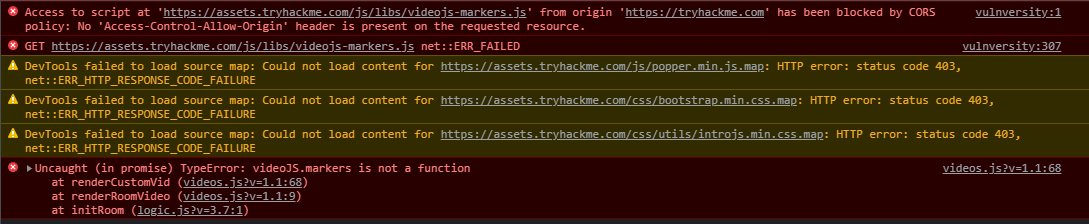 bronze vale
@deep trellis Infinite loading room bug screenshots if you need it 🙂 ^^
frozen flare
I was hoping to be productive for once 😂 This is what I get lol
 deep trellis
bronze vale
<@!243160021674754048> Infinite loading room bug screenshots if you need it 🙂 ^...
deep trellis
bronze vale
<@!243160021674754048> Infinite loading room bug screenshots if you need it 🙂 ^...
Thanks, I've fixed the issue in my development env. Will test it more and push it tomorrow:)
frozen flare
Glad to hear it'll be fixed for good! 😊
Is there any chance someone would be able to employ the temporary fix used for the ~120 people last time? I don't often get the motivation to do things and I was looking forward to finishing off a room I was working on 😅
bronze vale
Clear cache, log out of your account, try a different browser.
There isn't a current fix that works for everyone, sadly.
Apart from what will be pushed.
frozen flare
Oh, I didn't realize. Based on this ^ I figured @deep trellis used a temporary correction to get those accounts working again, since it took about 5 minutes.
I already tried the other things you mentioned. I'll wait for the push then I suppose 🙂
 earnest sphinx
when I do the vulnuniversity room, the nmap scan just hangs and says
that its doing the other scan and its 99% there but the scan just hangs.
root@ip-10-10-13-251:~# nmap -A -sC -p- 10.10.13.251
Starting Nmap 7.60 ( https://nmap.org ) at 2021-08-12 00:46 BST
Stats: 0:00:18 elapsed; 0 hosts completed (1 up), 1 undergoing SYN Stealth Scan
SYN Stealth Scan Timing: About 72.49% done; ETC: 00:46 (0:00:07 remaining)
Stats: 0:00:46 elapsed; 0 hosts completed (1 up), 1 undergoing SYN Stealth Scan
SYN Stealth Scan Timing: About 74.42% done; ETC: 00:47 (0:00:16 remaining)
Stats: 0:02:18 elapsed; 0 hosts completed (1 up), 1 undergoing SYN Stealth Scan
SYN Stealth Scan Timing: About 79.61% done; ETC: 00:48 (0:00:35 remaining)
Stats: 0:04:23 elapsed; 0 hosts completed (1 up), 1 undergoing SYN Stealth Scan
SYN Stealth Scan Timing: About 86.62% done; ETC: 00:51 (0:00:41 remaining)
Stats: 0:08:39 elapsed; 0 hosts completed (1 up), 1 undergoing SYN Stealth Scan
SYN Stealth Scan Timing: About 99.99% done; ETC: 00:54 (0:00:00 remaining)
Stats: 0:11:53 elapsed; 0 hosts completed (1 up), 1 undergoing SYN Stealth Scan
SYN Stealth Scan Timing: About 99.99% done; ETC: 00:57 (0:00:00 remaining)
wide oasis
You are scanning the attackbox IP and not of the deployed machine.
naive dust
Hello, i have a question about the premium pack.
With the premium pack can i use the 'virtual machine integrated' in all the challenges without the need to use open vpn?
 fading shore

 glossy sedge
wide oasis
Why sending this?
glossy sedge
wide oasis
Why sending this?
he sent em in other channels too #bug-bounty #site-bugs #infosec-general #873296260520640602
time to ping a mod 
wide oasis
Wuaahahahaa. Defo not a good idea to spam in all channels.
glossy sedge
@candid yacht hey have a look here please
 graceful garden
-warn @fading shore Please don't spam random images without context across the channels
scenic torrentBOT
⚠ Warned retali8#6211
viscid frost
😆
 sweet barn
about:room/xss
FYI the target machine seems to break after several seconds of actively scanning it using burp, even with a "light active" scan the machine repeatedly (tried it twice) stopped responding after ~30 seconds
just wanted to let you know
 viscid frost
naive dust
Hello, i have a question about the premium pack.
With the premium pack can i us...
viscid frost
naive dust
Hello, i have a question about the premium pack.
With the premium pack can i us...
yes
languid hazel
still the same problem with vpn connection -_______-
its been about a day now and still only AU/USW/IN servers are working 😦
 golden briar
I found it not doable to install nessus on the THM machine. It does not complete after one hour.
https://tryhackme.com/room/rpnessusredux
wide oasis
You don't have to install nessus on deployed machine but on your own kali vm (if you own one)
golden briar
Yeah, i do not have any, currently only working with the THM Kali. 😦
wide oasis
It should be installed on it already then.
golden briar
Oh? Because without a license key, it is not installed, isnt it?
wide oasis
Yeah, you need to have activation key.
 flint anvil
I don't wanna see the learning path here

I want to see my rooms, there used to be an exit option, not it is gone 😭
how can I go back?
naive dust
With the "Leave" button I believe

hello, I found a bug

It's normal, after 20k points there's nothing more so it keeps going >20k
See

profile says lever 13 (Discord: 0xC -Guru)
It takes time to refresh on your Discord profile
Discord is ok
but on THM, shouldn't say 0xC?
Send me your profile's URL
on TryHackMe
private, ok?
kk go on
 clear wadi
Am I the only one who can not download the files from the room OpenVas???
 signal barn
Hey! I can't download my OpenVPN File.... It just sais 404 An error occured: "Uh-oh, this page has been lost in the matrix". I've also tried this yesterday and it didn't work...
wide oasis
glossy sedge
naive dust
but on THM, shouldn't say 0xC?
Re-verify with the bot. It will update ur lvl
If ur 0xD on the site
wide oasis
clear wadi
Am I the only one who can not download the files from the room OpenVas???
There is no issue in downloading the files. Refresh the page and try again.
What error you got?
Maybe you need to talk to mod to unlink the token from your previous account (if this is possible) and then you can verify again with bot.
bronze vale
While using the TryHackMe site, if you come across a 404 error, pages hanging or the site crashing.
Please ping Horshark! Do not refresh your page, please:)
bronze vale
bronze vale
While using the TryHackMe site, if you come across a 404 error, pages hanging or...
bronze vale
Why would you want to do that? @hollow sentinel
cloud dirge
O.o
 hollow otter
sus
 vale steeple
Hi, When i deploy the machine and it show the IP of the deployed machine. But can't connect to it. Even can't ping the machine neither from OpenVPN nor using attackbox
I am doing task 26 [day21] of advent of cyber
tried terminate and start again but no luck
 loud wraith
Servers down?
 hollow sentinel
Someone? Can you guys help me
 fallen juniper
hollow sentinel
Can you track someone's ip adress through email?
fallen juniper
hollow sentinel
Can you track someone's ip adress through email?
First off you're not asking a "VPN and other technical questiosn related to TryHackMe" question. Second what ur asking is illegal
cloud dirge
fallen juniper
First off you're not asking a "VPN and other technical questiosn related to TryH...
Well... if you know what to look for you can find it legally. Like office 365 has logs.
But the reasons he is looking for them is super strange
fallen juniper
cloud dirge
Well... if you know what to look for you can find it legally. Like office 365 h...
I'm aware of that yes, we try and use our intuition when it comes to querying uses. There's a lot that goes into how we respond to someone.
A sketch-o-meter if u will
hollow sentinel
cloud dirge
But the reasons he is looking for them is super strange
Well I've been given a task by my school to find the cheaters
wide oasis
@bronze vale Sir, please handle this.
bronze vale
hollow sentinel
Well I've been given a task by my school to find the cheaters
Are you a student at your school, or do you work in IT?
hollow sentinel
Im the student
bronze vale
Yeah, no. We won't help you here.
Your school needs to get an IT department or contact someone who can do that.
hollow sentinel
But my school trust me for this
bronze vale
Doesn't matter, it's not something you should be dealing with.
wide oasis
Thankyou @bronze vale
 rocky flint
Can someone help me with logging in to the tryhackme server for Linux part 2, I am unable to enter the password from the training.
viscid frost
rocky flint
Can someone help me with logging in to the tryhackme server for Linux part 2, I ...
you mean ssh?
rocky flint
viscid frost
you mean ssh?
yes i do the first part which is ssh tryhackme@(IPaddress) then it ask to continue i put yes then it prompts for a password and it wont let me enter tryhackme
rocky flint
perfect Thank you!
viscid frost
no problem!
loud wraith
Vpn server and attack box offline? Cant connect to servers? Someone has same issue?
Second day in row now.
wide oasis
What do you mean by VPN server and attack box offline?
wide oasis
Are you trying to connect to vpn?
loud wraith
Vpn dont give me ip address where to connect. And attack box is offline
wide oasis
What is the error while connecting to VPN?
wide oasis
Regenerate the VPN pack and then try again. While Regenerating, wait for 2-3 minutes before attempt to connect again.
loud wraith
Already done it like 2 days in row now...
wide oasis
Changed vpn servers?
naive dust
loud wraith
Already done it like 2 days in row now...
Restart your pc or laptop
loud wraith
It will only give that 0.0.0.0
loud wraith
naive dust
Restart your pc or laptop
Done.
naive dust
loud wraith
Done.
For me it worked and I am using the eu 1 regular perfectly
loud wraith
Hmmm.. it worked on monday perfectly
wide oasis
You wanna share the screenshot? You gotta verify yourself first. Follow the link down below and share the screenshot of IP address given by vpn
!docs verify
 sharp bisonBOT

 TryHackMe
Verify your TryHackMe Profile!
From TryHackMe with ❤!
wide oasis
@loud wraith Verify yourself and let me know when you send the screenshot
naive dust
I only have one issue that is I can't add one hour to the machine which is deployed and the add one hour button doesn't work when I click it for increasing the time duration.
wide oasis
Have you reported this issue yet?
 wide oasis
This means the vpn server is working fine but you are not connected with it.
loud wraith
Ya, but cant get ip to connect
naive dust
wide oasis
Have you reported this issue yet?
Nope it's an issue I am facing today
wide oasis
loud wraith
Ya, but cant get ip to connect
Follow this room and you will be comfortable with it -https://tryhackme.com/room/openvpn .
 loud wraith
naive dust
Nope it's an issue I am facing today
loud wraith
naive dust
Nope it's an issue I am facing today
Can you get attack box online?
naive dust
loud wraith
Can you get attack box online?
I am not using attackbox as I am getting it for only one day because I don't have sub so
loud wraith
Attack box says all the time: Failed to connect to server.
naive dust
loud wraith
Attack box says all the time: Failed to connect to server.
Maybe they are fixing some things to get a better experience ig for the attackbox.
loud wraith
wide oasis
Follow this room and you will be comfortable with it -https://tryhackme.com/room...
Thanks got it!
scenic torrentBOT
Gave +1 Rep to @wide oasis
 final scarab
Hello, is there a new link or another way to update the country flag on the public profile page? This link shows 404 page and did not update my country flag.
wide oasis
@zealous yoke Hi again, as I was reading through Room creating overview doc and there is a link which shows the error "Page not Found". The link is https://docs.tryhackme.com/docs/rooms/creating-a-room. Thought to let you know. Thanks.
 haughty glacier
is this thm related or just general question
either way you could try learn it from this THM room - https://tryhackme.com/room/rptmux

TryHackMe
Learn to use tmux, one of the most powerful multi-tasking tools on linux!
if you have purely tmux questions tag me in #infosec-general and maybe I can help
viscid frost
haughty glacier
either way you could try learn it from this THM room - https://tryhackme.com/roo...
yes I was doing this room
and I faced this problem
should I move to infosec
haughty glacier
ok lets go over to #room-help
viscid frost
ok
 sinful gull
i am not able to extend the expire time of any machine, when i click on extend nothing happens,
haughty glacier
the widget that tells you the time, doesn't update when you click extend
but if you refresh the page, it should show the update timer
 toxic geode
haughty glacier
toxic geode
haughty glacier
are you doing a THM room?
 gritty walrus
I've tried 2 browsers and 2 machines but i can't add 1 hour to my vms?
 velvet swan
Is there a way to increase the performance on a browser machine?
 gusty wind
velvet swan
Is there a way to increase the performance on a browser machine?
gusty wind
velvet swan
Is there a way to increase the performance on a browser machine?
good question.. since a couple of days, attackbox is really slow..
maybe THM can generate another attackbox version without gui.. just a console.. it could be faster and userful to a lot of rooms.
velvet swan
gusty wind
good question.. since a couple of days, attackbox is really slow..
maybe THM can...
well that's the thing, i use my own machine when it comes to linux, but there r some rooms where windows tools in general r used that aren't cli
like im doing the malware introductory one rn cuz i really wanna get into malware, but this attackbox is utterly slow
i right click and it takes like 30 seconds to load 
nvm i just realized i can connect thru rdp, i cant read
 slate hedge
gusty wind
good question.. since a couple of days, attackbox is really slow..
maybe THM can...
slate hedge
gusty wind
good question.. since a couple of days, attackbox is really slow..
maybe THM can...
I would like it too. A cli is enought for many of the rooms, THM uses less resources and we have a faster shell.
 tardy veldt
Hello, I have problem with tryhackme "VulnUniversity"
whenever i deploy the machine i cant access the website using port ||3333||
it just keep loading forever and yes my vpn is on and i tried restarting the machine/ waiting a lot of time,also i can ping ip with ~50ms
sinful gull
gusty wind
good question.. since a couple of days, attackbox is really slow..
maybe THM can...
yah GUI uses lot of ram so CLI would be great and way faster than this current one
 crystal marlin
tardy veldt
Hello, I have problem with tryhackme "VulnUniversity"
whenever i deploy the mach...
crystal marlin
tardy veldt
Hello, I have problem with tryhackme "VulnUniversity"
whenever i deploy the mach...
Oh nvm, you said you waited a lot of time ^^
sinful gull
tardy veldt
Hello, I have problem with tryhackme "VulnUniversity"
whenever i deploy the mach...
you can try to re-generate openvpn file and try to connect again that works for me sometimes
tardy veldt
i did
sinful gull
try to change vpn server
sinful gull
tryhackme.com/access -> vpn -> select server -> download ".ovpn" done!
check your tun0 interface maybe you are not connected to vpn ?
tardy veldt
i said i'm connected. and i can ping the server
but cant curl http:/ip:3333 and also can't open it to my browser
i remember it did opened for 3 sec first time, after 10mins loading ofc. then it went back to load again
sinful gull
mmmmmmmm
tardy veldt
same problem after changing from eu2 to eu1
the problem is not from a task update or smthng right?
even in writeups once they get the port they just connect to the website
sinful gull
tardy veldt
even in writeups once they get the port they just connect to the website
yah, this same thing happens with me sometimes butttt.......
tardy veldt
for what reason u think is this? because other rooms works fine.My problem is with Vulnversity room. i thought its part of the challange but i can see all of the writeups they just connect to the http://ip:port
 verbal cypress
i'm experiencing some issue where i can't extend the machine time even if there's only 1 minute left
does anyone face the same issue
or how can i fix it?
 serene turret
Whenever i try to dowload my ovpn config i am redirected to some 404 page. Is this a bug or is there a way around it?
gusty wind
verbal cypress
i'm experiencing some issue where i can't extend the machine time even if there'...
sometimes time freeze.. to be sure the time you have, refresh the page often.
verbal cypress
gusty wind
sometimes time freeze.. to be sure the time you have, refresh the page often.
i get that too
but that's not my problem
the "add 1 hour" button doesn't work for me
gusty wind
verbal cypress
i get that too
but that's not my problem
the "add 1 hour" button doesn't work fo...
same solution.. refresh.. that's all I know. if it doesn't works, IDK.. sorry
verbal cypress
gusty wind
same solution.. refresh.. that's all I know. if it doesn't works, IDK.. sorry
yeah it doesn't work sadly
but thanks for the help
 thick oak
Any possible way to get a 1 day extension on my subscription? Was in the middle of Brainstorm and sub ran out. I get paid tomorrow, and plan to renew... I was in the zone 😦
@rigid oxide @deep trellis Any chance one of you gentlemen could assist me?
 hard citrus
@spare blaze Mate, refresh my page please. Cannot download my vpn. Thank you.
scenic torrentBOT
Gave +1 Rep to @spare blaze
 trail cedar
What is recommended more - the AttackBox, or Kali browser?
Also, are either of these able to persist and remain updated after I do so, or do I have to go through things like setting up burpsuite every time?
young bronze
Just wondering, but you're level 8 right?
What have you been using up to this point?
trail cedar
A bit of everything.
I RDP in, occasionally SSH, try using the AttackBox, use the Kali browser build etc. I like to be able to use a variety of options when I need to.
I'm mainly interested as persistence would be awesome, as well as knowing how often these machines are updated. It's the developer in me, I like to know these things.
naive dust
im trying to change country and i cannot would appreciate some help .
cloud dirge
@bronze vale Sorry to ping you like this but as you were the one I was talking to about slow speeds with THM, thought I should ping you again about it.
Tested with the Indian VPN file and I am getting the same slow speeds. Screenshot is the above pings with the Indian VPN file and the below ones are with the AU VPN file. Is this normal for an Australian to have these delays with the THM rooms?

 pulsar surge
Is there way to download a rooms file without having to log in to the attackboxs' browser? cause each time i do it just glitches out
viscid frost
pulsar surge
Is there way to download a rooms file without having to log in to the attackboxs...
What do you mean by a rooms file?
Files located on victim machines?
velvet swan
velvet swan
nvm i just realized i can connect thru rdp, i cant read
i tried thru rdp, it's laggy af
viscid frost
velvet swan
i tried thru rdp, it's laggy af
yes, if your host os is windows, you can try the Remote Desktop Connection in Windows
velvet swan
viscid frost
yes, if your host os is windows, you can try the Remote Desktop Connection in Wi...
im using remmina via linux
but it's very laggy
would it make much of a difference?
if i just used it on my normal main os
i was under the impression that u have to be connected to openvpn to connect
wide oasis
Some machines might be laggy when you connect via rdp..
velvet swan
yeah i noticed, i was just wondering if it was just something i was doing wrong or if there was a fix
viscid frost
velvet swan
if i just used it on my normal main os
yes you can try
viscid frost
velvet swan
i was under the impression that u have to be connected to openvpn to connect
yeah
 small nexus
i can't seem to add 1 hour to my machine time? is it just me or?
glossy sedge
small nexus
i can't seem to add 1 hour to my machine time? is it just me or?
do u mean attacker box or target machine
small nexus
glossy sedge
do u mean attacker box or target machine
target machine
i already tried switching browsers, and it doesn't seem to only happen with only 1 box
glossy sedge
how much time is remaning
small nexus
28mins
wide oasis
Name of the box?
glossy sedge
wide oasis
Name of the box?
ig site issue
small nexus
I did Windows Privilege escalation last night and now I'm doing intro x86
glossy sedge
as they are updating some stuff
small nexus
i see so its not me going crazy
wide oasis
Yeah, there were a user yesterday and they were having the same problem of not being able to increase the time of deployed instance.
viscid frost
yeah I was facing this problem too
 halcyon orbit
yup me too i cant increase the time
 brazen laurel
hey , is there anyone can help me ? i have a problem with subscription
glossy sedge
brazen laurel
hey , is there anyone can help me ? i have a problem with subscription
Hey , tell here if it's dosent reveal any personal information
brazen laurel
i can say but i you are not admin , you can't help me , my problem is about my account
glossy sedge
Ok then emailing support will resolve ur issue I guess
brazen laurel
it doesn't make discount to my student account, i already pay 10 dolar for one time, but still continue this issue
brazen laurel
glossy sedge
Ok then emailing support will resolve ur issue I guess
do you have mail adress ?
brazen laurel
thanks mate
glossy sedge
Wait
glossy sedge
brazen laurel
thanks mate
Regarding student discount?
glossy sedge
brazen laurel
yes
TryHackMe
Getting the Student Discount A 20% student discount is guaranteed to accounts created using a student e-mail address. TryHackMe supports all student e-mail
Read this before emailing
brazen laurel
okay ❤️
naive dust
I’m facing a problem as well
wide oasis
Please specify your problem.
naive dust
im not able to change country on my account
 foggy lily
The add 1 hour button doesn t work for me
I click it but nothing happens and a machine expired 😭
haughty glacier
if you refresh the page it should update the timer
it doesn'
t seem to add on dynamically unfortunately
but it should not actually expire
foggy lily
When i refresh the timer is not updated
small nexus
yep the timer is not working
 shadow pawn
There's a problem with tryhackme server I think. I cant ping machines on my own kali. Is anyone having this issue?
and cant extend the timer, too
 main karma
The add 1hr does not work
main karma
that is good to know lmao. I was wondering if I messed up something
main karma
shadow pawn
There's a problem with tryhackme server I think. I cant ping machines on my own ...
I can ping and hack boxes, but not extend the time
 echo bloom
there are few people above they had the same problem
main karma
It is a bit frustrating tho. I have to redo everything again lmao
shadow pawn
echo bloom
there are few people above they had the same problem
I tried generating new ovpn. and then start machine, but no luck. I'm a non-subscribe user though.
main karma
how much time have you been waiting for a ping?
shadow pawn
after starting the machine, at least 15 minutes.
echo bloom
shadow pawn
I tried generating new ovpn. and then start machine, but no luck. I'm a non-subs...
i don't seem to have any problem with pinging but it's the timer
shadow pawn
idk. But I can show you what's the situation right now
 frozen patrol
hey guys im about to working on AOC 2019 in Reverse Elf-ineering part. And when i wanted to compile the file using radare i got these output:
Process with PID 9723 started...
= attach 9723 9723
PTRACE_GETREGSET: No such device
bin.baddr 0x00400000
Using 0x400000
PTRACE_GETREGSET: No such device
asm.bits 64
PTRACE_GETREGSET: No such device
How can i fix this?thxx
wide oasis
#room-help or #room-hints would be appropriate channel to ask this question.
shadow pawn
Could anyone help me out about this machines problems? I'm about to lose my streak. Is this the right room for this kind of problems?
wide oasis
Yes, if you want to regain your streaks, drop a mail at support@tryhackme.com with following contents:
username: your_username
streak should be: your streak that was lost
email: your_mail_id
That's not the serious case right now i think. I cant ping the IP right now, even waiting for 20 minutes long. And tried with other rooms. 🙂
wide oasis
I think staff members are currently looking for this issue of not being able to add 1 hour and other issues.
shadow pawn
wide oasis
I think staff members are currently looking for this issue of not being able to ...
Thanks, that's good to hear.
main karma
shadow pawn
That's not the serious case right now i think. I cant ping the IP right now, eve...
is it a windows or linux box?
Because maybe it does not respond to ping
Have you tried to nmap with -Pn
shadow pawn
main karma
is it a windows or linux box?
Right now its windows.
wide oasis
Win boxes won't respond to pings
main karma
windows does not respond to icmp
wide oasis
If you can scan the win box with nmap and you get the scan result then box is working fine.
main karma
wide oasis
If you can scan the win box with nmap and you get the scan result then box is wo...
I agree. But if it tells you ```sh
Starting Nmap 7.91 ( https://nmap.org ) at 2021-08-13 14:19 CEST
Note: Host seems down. If it is really up, but blocking our ping probes, try -Pn
Nmap done: 1 IP address (0 hosts up) scanned in 3.09 seconds
I'm agree too. Tried -Pn flag 2 times 😦 Now its working with this flag.
shadow pawn
main karma
Because maybe it does not respond to ping
Thanks, btw
scenic torrentBOT
Gave +1 Rep to @main karma
main karma
Run it with sudo if it gives you no results with -Pn
 static lance
The metasploit room won't load but all other rooms load. Any help please?
viscid frost
static lance
The metasploit room won't load but all other rooms load. Any help please?
ow let me check
viscid frost
static lance
The metasploit room won't load but all other rooms load. Any help please?
It's loading properly, try clearing cache in your browser
static lance
viscid frost
It's loading properly, try clearing cache in your browser
Thank you! clearing the cache fixed it.
scenic torrentBOT
Gave +1 Rep to @viscid frost
naive dust
when i try to start a machine it says i already have a machine running in this room, but i dont... where could i terminate it ?
wide oasis
Are you terminating the machine in the same room from which you deploy the instance?
naive dust
i dont even see where can i terminate it.
i can't start it either, button is inactive for me.
wide oasis
Are you on your room page?
naive dust
yep
wide oasis
Refresh the page and see if it works
naive dust
damn, that is classic
turn it off and on sort of thing.
indeed information about vm appeared... thanks for reminding me that simple explanation is always most likely 🙂
viscid frost
naive dust
indeed information about vm appeared... thanks for reminding me that simple expl...
haha yeah
 ember grove
Hey howdy hey! Can I get my discord link token released from this account so I can apply it to my new account @gilded rock ?
Getting rid of this account because I'm tired of dms asking to buy it for the badges :^)
 gilded rock
👋
viscid frost
ember grove
Getting rid of this account because I'm tired of dms asking to buy it for the ba...
oh man that's a pain
young bronze
Does anyone know a way to speed up Page loads in Zap because it's waiting for the GoogleFonts to load?
Maybe disabling remote fonts?
viscid frost
young bronze
Does anyone know a way to speed up Page loads in Zap because it's waiting for th...
Are you talking about Manual Explore?
young bronze
Yeah, anything, it's taking forever for the page to load
viscid frost
young bronze
Yeah, anything, it's taking forever for the page to load
is it particular to that page?
young bronze
I've excluded fonts.googleapis, and it's just chugging :9
It's still waiting for it to load even after turning off remote fonts, it's still trying to make the connection
 young bronze
That is enabled to be excluded
So, it isn't showing up in Zap
but firefox is still trying to load it, until it times out
crystal marlin
 past schooner
When i try download configuration file to OpenVPN i got 404.
past schooner
When i try download configuration file to OpenVPN i got 404.
After regenerating the file you have to wait 3+ min before trying to download
past schooner
Hmm okey i will wait
 stone mural
I'm trying to work through the Nessus room right now, but I'm having trouble downloading Nessus on the Attackbox as it's detailed in the instructions in the room. The room mentions it's possible that if the download is stalling, then it means there's not enough space on the VM. Is there something I should delete from the Attackbox to free up space? It looks like other people are having the same issue
naive dust
when i go to access and try to download my vpn configuration, i get 404: Uh-oh, this page has been lost in the matrix.
something is clearly broken, as i can see that its not only me that has this issue.
haughty glacier
naive dust
when i go to access and try to download my vpn configuration, i get 404: Uh-oh, ...
did you check the pins in this channel?
haughty glacier
stone mural
I'm trying to work through the Nessus room right now, but I'm having trouble dow...
I don't really know, personally I just used a new virtual machine on my own system to do Nessus room/learn nessus, not sure how good the attackbox would be for it ;/
naive dust
haughty glacier
did you check the pins in this channel?
i did now.
stone mural
haughty glacier
I don't really know, personally I just used a new virtual machine on my own syst...
yeah, word, that's what I was afraid of : / I'm on my work computer so I don't really have access to a VM other than the attackbox
naive dust
@spare blaze i am getting 404 when trying to get my openvpn configs...
haughty glacier
stone mural
yeah, word, that's what I was afraid of : / I'm on my work computer so I don't r...
not able to install a vm on work computer?
stone mural
haughty glacier
not able to install a vm on work computer?
Probably not, I don't want to get flagged by IT lol. Like, it might be possible, but if I can access nessus without having to install an auxiliary VM that would be ideal
crystal marlin
naive dust
<@!170810389406285824> i am getting 404 when trying to get my openvpn configs...
Regenerate the config and then wait for 3+ min before downloading it
naive dust
crystal marlin
Regenerate the config and then wait for 3+ min before downloading it
i regenerated config 3 hours ago
crystal marlin
naive dust
i regenerated config 3 hours ago
Then select another server, regenerate the file and wait 3+ min
 tribal bloom
anyone able to help me out with this? i am trying to get a pgp key pair and upload it to ubuntu keyserver than download the public key. I used this website to generate a public key with my email address https://www.igolder.com/pgp/generate-key/ but when i try to upload it to ubuntu keyserver i am getting this message and dont know what that means or how to fix it.
im trying to upload pgp public key here https://keyserver.ubuntu.com/

OpenPGP Keyserver
gritty walrus
Hi All, My Add 1 Hour button isn't working any more. Tried 3 browsers and 2 machines over 2 days. Anyone got an idea please? thanks
naive dust
crystal marlin
Then select another server, regenerate the file and wait 3+ min
did that, still getting 404.
wide oasis
gritty walrus
Hi All, My Add 1 Hour button isn't working any more. Tried 3 browsers and 2 ma...
It is a site issue for now.
gritty walrus
wide oasis
It is a site issue for now.
ahh thanks
scenic torrentBOT
Gave +1 Rep to @wide oasis
 cosmic island
Does anyone have any tips for troubleshooting OpenVPN not connecting?
oh wait, no image perms ._.
wide oasis
You gotta verify yourself in order to share pictures. Follow the link down below to get verified.
!docs verify
sharp bisonBOT
TryHackMe
Verify your TryHackMe Profile!
From TryHackMe with ❤!
cosmic island
- In the "Message" box that appears, type
!verifythen paste in your Discord token, which can be found on your Profile in the "Other" section
My brain took a solid moment to process this, as I thought it meant your Discord auth token 😅
naive dust
@spare blaze what can be done to get openvpn config. i am unable to get that all day...
wide oasis
I should delete it now.
cosmic island
naive dust
<@!170810389406285824> what can be done to get openvpn config. i am unable to ge...
Here's what worked for me, I regenerated the file then switched servers in the dropdown within 5 seconds
It took me quite a bit of trial and error to figure it out
I still can't connect though, so that's pain
naive dust
i cant even get to my openvpn config , not even talking about conneting
i am getting 404
i tried regenerating, tried waiting for hours, regenerating again, switching servers , etc. pinging @spare blaze
nothing, all day, just nothing.
cosmic island
cosmic island
Here's what worked for me, I regenerated the file then switched servers in the d...
have you tried this?
naive dust
yeah, me too. and i am paying a subscription btw.
cosmic island
I'm completely stumped now...
naive dust
yeah your method shouldnt work
because you regenerate file and then switch different server
that shortly allows you to download config, but it doesnt work.
this needs to be properly fixed and work like it says, you renegerate and wait for sometime, then download without no 404's... @spare blaze i hope you can see that there are multiple users affected and are unable to download vpn configs...
cosmic island
also wow that connections thing is impressive
 glossy hull
Not that i`m too fussed. But when does sidepane on discord rank move up, think im still on 0XC when im 0XD on thm site.
its trivial
 spare blaze
Hey guys
Thank you for reporting our team will be looking into that error ASAP! 😄
( @naive dust )
scenic torrentBOT
Gave +1 Rep to @hollow sable
bronze vale
Hey there!
With our new API changes, our "update-timezone" URL has been moved.
To update the timezone/ country flag on your account to your current location, disable any incognito browser sessions/ VPN connections and click this link:
https://tryhackme.com/api/user/update-timezone
You do not see anything happen, but it should take you straight to your dashboard -- this means it has worked. If you receive a 404 error, your page hangs or there are any other errors, please ping me with a screenshot of your issue:)
Thanks and Happy Hacking
bronze vale
bronze vale
Hey there!
With our new API changes, our "update-timezone" URL has been moved.
...
 high lagoon
noob question but i cant get john the ripper to work with my options or commands
ive tried reading the manual page and watched videos how people use jtr but get errors
ive tried john --wordlist /usr/share/wordlists/rockyou.txt --format=raw-md5 crack.txt (crack.txt being where i saved 1 hash to crack)
and john --single --format=raw-md5 crack.txt and some others as well
 edgy vector
hello , i have a problem connecting to openvpn via VM linux with the active machine
can someone help me plz?
@here
edgy vector
well, I have connected via the linux machine with openvpn
on tryhackme it shows i am connected
when i go to a room and start attack machine
I have to copy the IP to see if it's working
and I am getting
Unable to connect error
etc
 nimble comet
1 sec
are you trying to connect to the Attack machine or to a Room's machine
the attack machine is an in-browser attack box, not a target
you want this:
 nimble comet
not this 😉
 edgy vector
you need a screenshot of the ifconfig to see if I'm running the open VPN
or that command where it says completed at the end
and never finished
nimble comet
the sudo openvpn <file>
edgy vector
ok one moment
nimble comet
can you ping the target machine (remember not to close the openvpn process)
actually.. do me a favour and do "ip a" and check if you don't have two vpns running
because that should be running on tun0 not tun1... so that's what I'm thinking
edgy vector
so I can ping the IP address, I get results so that is working
and when I write ip -a
ip a
I get eth0 lo tun0 and tun1
nimble comet
edgy vector
so I can ping the IP address, I get results so that is working
what room are you doing btw?
edgy vector
network services
nimble comet
ok, so you started the machine on Task 3, then what?
nimble comet
edgy vector
I get eth0 lo tun0 and tun1
should make sure that tun0 isn't a THM internal ip address, because if it is you're running 2 VPN and it'll cause trouble.
edgy vector
I've being doing tasks with the atack webbrowser until now but I want to do tasks on my vm linux from now on, is much better to learn
so I have downloaded open vpn, downloaded the files
connected
then open task 3 - press start machine
i wanted to know if it's working but when I paste the IP on my web browser is not connecting or saying to me anything
nimble comet
edgy vector
i wanted to know if it's working but when I paste the IP on my web browser is no...
do the task...
if it doesn't have an http web server it wont connect on port 80 which is what your browser is trying
not all machines have port 80 open 😉
edgy vector
one sec
ok so I have stopped the vpn on the machine, I had no tun0 or tun1
then i started again with my configuration, it shows with green on the top that I am connected to an IP
then when I go to room --> Start machine --> wait 1 min --> copy the ip and paste --> same unable to connect
nimble comet
 nimble comet
you have to read the instructions on the room, and follow them.
edgy vector
the ones from task 1 get connected?
nimble comet
no.. task 3 where you are...
edgy vector
ok i have read them already, I am at the answers
nimble comet
do the nmap scan then.
edgy vector
and when i try the smbclient thing on my linux machine
I get error
and I were to be connected to OpenVPN on thm I think I wouldn't get this error :))
sorry task 4 this is
nimble comet
do me a favour and try to do the nmap scan and show me the output...
also it's 3am here, I'm going to sleep soon
edgy vector
which nmap scan?
nimble comet
the one... on task.. 3
edgy vector
sorry to be confused but on the task 4 it's asking me to do the smbclient command, not the nmap
and when I do smbclient //10.10.10.2/secret -U suit -p 445
or
mbclient //$ip/profiles
I get do_connect: Connection to failed (Error NT_STATUS_NOT_FOUND)
sau
or
do_connect: Connection to 10.10.10.2 failed (Error NT_STATUS_IO_TIMEOUT)
nimble comet
because 10.10.10.2 is not the machine...
you seem unable to follow simple instructions.
I'm going to sleep now
please consider starting the room from the top
you're failing to understand what you are doing....
nimble comet
good night
nimble comet
go back to the top and start again.. try to understand it all before copy pasting things
nite
edgy vector
xd
naive dust
may a staff help me ive been asking a lot of times how can i change the country of my profile!
 sand olive
bronze vale
Hey there!
With our new API changes, our "update-timezone" URL has been moved.
...
sand olive
bronze vale
Hey there!
With our new API changes, our "update-timezone" URL has been moved.
...
^
@naive dust pls check message above
 mental dawn
Any idea why I cannot ping any of the machines from my local Kali box? I am connected via OpenVPN
All good I figured it out 😄
naive dust
edgy vector
and when I do smbclient //10.10.10.2/secret -U suit -p 445
your slashes are wrong, windows smb slash is \ not //
it should be \host\share
\\host\share
this doesnt look like vpn issue 😉
 twin bough
hey, not directly related to THM but why am i suddenly getting "USB device not recognised" on my actual computer when I run kali linux on virtualbox?
its also impacting my audio drivers?/bluetooth speaker connectivity on my real computer
wide oasis
More of a question for #infosec-general
twin bough
will forward, cheers
naive dust
@spare blaze thank you, issue is now resolved, works like a charm. i will spent all weekend learning 🙂 cheers , mate
scenic torrentBOT
Gave +1 Rep to @spare blaze
 coarse cliff
Hey, I have the following issue, since two days I am unable to extend the machine time by clicking on the yellow button, I have to wait for the machine to run out or terminate and start it again, is this a common issue?
naive dust
i heard yesterday people saying its a side wide issue.
viscid frost
coarse cliff
Hey, I have the following issue, since two days I am unable to extend the machin...
yeah it's not working
it's not common
 boreal dagger
Hello
I am having consistent issue not connecting with any of the box
regenerated VPN a dozen times but can't connect the box
only way remains use browser one
wide oasis
Have you wait for 3+ minutes after regenerating the vpn file and then download it?
boreal dagger
no
but why a wait
got it working
EU-VIP 1 doesn't work
but EU_VIP 2 worked
thanks anyway
wide oasis
boreal dagger
but why a wait
earnest sphinx
there's a constant issue where i try to access the web server on the room: steel mountain but I can't get in
( I just put in the IP address and it worked the first time) but thereafter it keeps saying unable to connect. It's like that for the room: alfred aswell
cosmic island
I'm still having trouble with connecting via OpenVPN
Downloading the file gets me a 404 most of the time (I've tried regen + wait) and when I do get a file, it doesn't work.
wide oasis
cosmic island
Downloading the file gets me a 404 most of the time (I've tried regen + wait) an...
@spare blaze Hi, good afternoon, can you look at this please. Thanks.
scenic torrentBOT
Gave +1 Rep to @cosmic island
nimble comet
naive dust
your slashes are wrong, windows smb slash is \\ not //
that's also not it.. he was trying to smbclient a machine that doesn't exist .... (needs to pay attention to the room details)
nimble comet
cosmic island
Downloading the file gets me a 404 most of the time (I've tried regen + wait) an...
post a screenshot of the the openvpn script, maybe it has some clues. Also make sure you're not running another VPN at the same time. Also, did you try switching VPN servers when regenerating the file?
cosmic island
nimble comet
post a screenshot of the the openvpn script, maybe it has some clues. Also make ...
Yes, I tried switching servers, multiple times. No luck there.
Would you prefer the log output for the WSL2 Ubuntu instance, or the Windows instance, or both?
bronze vale
Hey 👋
If anyone is still experiencing problems with the EU-1 OpenVPN server, please ping me.
cosmic island
bronze vale
Hey 👋
If anyone is still experiencing problems with the EU-1 OpenVPN server, ...
I am still having trouble. I have downloaded the file, but am getting a failure when I attempt to connect.
bronze vale
Send a screenshot of the output log?
cosmic island
bronze vale
Send a screenshot of the output log?

I'm assuming there's no sensitive data in the file, so here it is
bronze vale
When you run it using the OpenVPN gui, there should be a button to debug, can you screenshot the output from there?
cosmic island
bronze vale
When you run it using the OpenVPN gui, there should be a button to debug, can yo...
I don't see the debug option anywhere
bronze vale
I think it looks like this?
 cosmic island
That was the log file that I uploaded
bronze vale
Yeah but can you run the file, wait 10 seconds and then screenshot what is outputted
It just looks like some connection issues to the server, may need to wait 5-10 minutes for it to connect properly

 bronze vale
Which server is this?
cosmic island
bronze vale
Which server is this?
EU-Regular-1
bronze vale
Does 2 have the same issue?
cosmic island
Last time I tried, it did, but I was also experiencingt the 404 issue then
I'll try again.
cosmic island
bronze vale
Does 2 have the same issue?
Getting 404
I can't download the configuration file
bronze vale
Press regenerate, wait 2 minutes and try again:)
cosmic island
bronze vale
Do you have a mobile device?
yes, I do
bronze vale
Try going to https://tryhackme.com/access and see if you don’t get the same 404 errors

TryHackMe
An online platform for learning and teaching cyber security, all through your browser.
cosmic island
bronze vale
Try going to https://tryhackme.com/access and see if you don’t get the same 404 ...
Same error
bronze vale
@zealous yoke if you’re not busy can you try downloading the Eu2 VPN config file and see if you get a 404
 zealous yoke
I'm taking a look
 stiff tartan
@zealous yoke i kinda had a doubt about a question on the tryhackme courses on their website and there were no writeups.
the question is "What kind of a protocol is TCP"
bronze vale
Try asking in #room-help :)
stiff tartan
ohh cooll sorry
zealous yoke
Hey, what is the issue exactly? Downloading an d generating a vpn file from EU-Regular-2? @cosmic island
cosmic island
zealous yoke
Hey, what is the issue exactly? Downloading an d generating a vpn file from EU-R...
Yes
I can access tryhackme.com/access fine, but attempting to download a configuration file for EU-Regular-2 404s me
zealous yoke
Could you share a screenshot of your browsers console please? (: I'm able to download okay here on my side
cosmic island
zealous yoke
Could you share a screenshot of your browsers console please? (: I'm able to dow...
On the 404 page, or before I click download?
zealous yoke
before/as you click download please (:

 cosmic island
zealous yoke
Can I DM ?
cosmic island
zealous yoke
Can I DM ?
Sure.
zealous yoke
tyty
cosmic island
(also, i must say this is hilarious, well played)
 bronze vale
Thank you @zealous yoke 
scenic torrentBOT
Gave +1 Rep to @zealous yoke
 elder dew
Ovpn is super slow. This is how it looks.
 wide oasis
If you are getting "Initialization Sequence Complete" then everything is fine.
 stray cove
Which server is it, might be a bit of load
elder dew
Seems to have been my other vpn. So I guess I can't run both.
But...my security... T_T
stray cove
Yeah but you don't need to
elder dew
 stray cove
Tracert all the things
 zinc gulch
I'm unable to download the vpn config file.. just redirects me to a 404 page
any help?
 raw flint
Is there a way to serve files through openVPN, so that the target can connect and download it? Because I can't get it to work
viscid frost
raw flint
Is there a way to serve files through openVPN, so that the target can connect an...
yes
viscid frost
zinc gulch
I'm unable to download the vpn config file.. just redirects me to a 404 page
try regenerating and waiting for some time
also you can try with other servers
viscid frost
raw flint
Is there a way to serve files through openVPN, so that the target can connect an...
You want to transfer files to your target machine right?
raw flint
basically, yes
viscid frost
ok
you can do it in 2 days as far as I know
either with scp or by hosting a python server then using wget command
raw flint
I did already find a different solution, but if you know how to do it normally, that'd be great
in this case I needed to use a python server, but it kept not connecting
viscid frost
ok, you got a reverse shell? or you have the ssh credentials
raw flint
I had the ssh creds
viscid frost
ok then you can use scp
example:
scp file.txt remote_username@10.10.0.2:/remote/directory
raw flint
usually yes, but in this case the target had a crontab running a curl every minute. I redirected it through /etc/hosts
raw flint
eventually yes, but I had to ssh into my AttackBox and just killed the service already running on port 80, letting me then serve the file
kinda a pain in the ass
raw flint
cuz the service running on port 80 was the thing letting you view the machine in your webbrowser
viscid frost
raw flint
cuz the service running on port 80 was the thing letting you view the machine in...
which service are you talking about?
Can you please elaborate so that I can understand what is happening
raw flint
viscid frost
which service are you talking about?
I don't remember
raw flint
was this room:
https://tryhackme.com/room/overpass

TryHackMe
What happens when some broke CompSci students make a password manager?
And yes, I got into the machine
viscid frost
raw flint
was this room:
https://tryhackme.com/room/overpass
ok that's good
viscid frost
raw flint
And yes, I got into the machine
ok
good
you got the credentials
you got into the machine
Have you got user.txt?
raw flint
yes, was the last part I got stuck on. There was a crontab running a curl every minute and feeding the results into bash. You had to redirect it by editing /etc/hosts
but you're unable to do so with the attackbox, because port 80 is already occupied in the attackbox
viscid frost
can't you use another port?
raw flint
/etc/hosts doesn't allow specifying ports
raw flint
By the service that allows you to view the machine in the browser
raw flint
nope, have just used the attackbox so far
viscid frost
oh I would really recommend to setup a vm
personal vm with kali/parrot
it's great to have
Kali on Virtualbox
it's easy to setup
raw flint
Sounds like a good idea
viscid frost
yeah
I still didn't touch Overpass
I will try it by tomorrow
I will let you know
raw flint
It's fun, except for the last bit. That bit sucks
viscid frost
raw flint
It's fun, except for the last bit. That bit sucks
okk no more spoilers!
gilded rock
ember grove
Hey howdy hey! Can I get my discord link token released from this account so I c...
Bumping this! No rush on it either, whenever a mod is available :)
viscid frost
gilded rock
Bumping this! No rush on it either, whenever a mod is available :)
oh you still haven't got any reply, maybe try searching for old messages
gilded rock
Nah nothings changed (checked again) all is fine though, it's just a discord role 😉
gilded rock
I hate pinging, so apologies in advance, but @supple sonnet if you could help with the above I'd really appreciate you!
 supple sonnet
!tokenremove 303943082108518400
sharp bisonBOT
Done, no more entry with UID "303943082108518400".
supple sonnet
@gilded rock
gilded rock
Thanks!
supple sonnet

 shell loom
ok, its probably been asked somewhere, but I can't find it. I keep getting an error that I can only have 3 machines when I try to launch my attack box. I've signed out, I've ended my browser session, and cleared my cookies...still it persists...help
 magic echo
hello, how can i change my account's region?
zealous yoke
shell loom
ok, its probably been asked somewhere, but I can't find it. I keep getting an e...
It means that you have machines running in other rooms. Let me find the code snippet that allows you to view what machines you have running and where
With the new API changes, if you wish to terminate all machines that you have deployed (this includes the attackbox!), you can paste this code snippet in your browsers console:
fetch('/api/vm/running')
  .then(r => r.json())
  .then(vms =>
    vms.forEach(vm =>
      fetch('/api/vm/terminate', {
        method: 'POST',
        body: JSON.stringify({ code: vm.roomId }),
        headers: {
          'csrf-token': csrfToken,
          'Content-Type': 'application/json'
        }
      })
    )
  )
oh man this is wonderful
viscid frost
boreal dagger
Hello
you have to message the Tryhackme bot to get verified
viscid frost
viscid frost
you have to message the Tryhackme bot to get verified
oh you already got verified
magic echo
viscid frost
https://discord.com/channels/521382216299839518/521771811768107008/8758714334090...
tnx
viscid frost
raw flint
yes, was the last part I got stuck on. There was a crontab running a curl every ...
I was able to host a python server on port 80 without any problems, are you getting any errors when trying to host?
signal barn
Hey I need some help. I cant download my openvpn file, when I click "download configuration file" it just redirects me to a site with a 404 Error. I tried this a few days ago and nothing happened....
Please help.
viscid frost
signal barn
Hey I need some help. I cant download my openvpn file, when I click "download co...
Hey
Try to regenerate, then wait for 2/3 minutes, and then try to download
signal barn
Ok, I'ma try
viscid frost
signal barn
Ok, I'ma try
yeah
signal barn
still doesn't work... sadly
LOL it did work after changing Server's a few times....
Thanks! @viscid frost
scenic torrentBOT
Gave +1 Rep to @viscid frost
viscid frost
signal barn
LOL it did work after changing Server's a few times....
ahh great
 snow ginkgo
hi! is wireshark removed from the attackbox? there are many applications but wireshark is not installed. I'm in the Wireshark 101 room
nvm
nevermind the nevermind 😅
actually I have another question, that might solve the above one
Open Wireshark (see Cryillic's Wireshark Room for instructions) and perform a TCP Connect scan against port 80 on the target, monitoring the results. Make sure you understand what's going on. --> this is the task that I have right now. According to this, please let me know if I am understanding it wrong. The task requires me to activate Wireshark in target device, so I can monitor results, is that correct?
nvm (now for real)
viscid frost
You will always use wireshark on your device, not the target devices
snow ginkgo
viscid frost
You will always use wireshark on your device, not the target devices
Thanks
scenic torrentBOT
Gave +1 Rep to @viscid frost
snow ginkgo
But for testing, if you used Wireshark on target device, you can monitor packets also, just to see what it receives and returns, right? Though in real life situation makes no sense
viscid frost
snow ginkgo
But for testing, if you used Wireshark on target device, you can monitor packets...
yes ofcourse
that's why it's used in defense
snow ginkgo
Thanks
viscid frost
no problem!
 topaz token
I'm trying to do a reverse shell but every time I try to open the shell from the browser appears this error:
 viscid frost
topaz token
I'm trying to do a reverse shell but every time I try to open the shell from the...
viscid frost
topaz token
I'm trying to do a reverse shell but every time I try to open the shell from the...
I see
you are doing something wrong
What are you trying to do?
You are trying to get a reverse shell from a php file that you uploaded, right?
topaz token
yes
viscid frost
topaz token
the ip on the shell must be the one highlighted in green on tryhackme right?
yes
best is to check your ip address using ip addr
so are you putting the right ip?
 digital quartz
I'm trying to connect to openvpn in linux, it returns this while opening the configuration file. but when checking if it connected to tryhackme through openvpn it says I'm not connected
RTNETLINK answers: File exists
Sun Aug 15 19:27:07 2021 ERROR: Linux route add command failed: external program exited with error status: 2
Sun Aug 15 19:27:07 2021 /sbin/ip route add 10.16.0.0/16 metric 1000 via 10.17.0.1
RTNETLINK answers: File exists
Sun Aug 15 19:27:07 2021 ERROR: Linux route add command failed: external program exited with error status: 2
Sun Aug 15 19:27:07 2021 WARNING: this configuration may cache passwords in memory -- use the auth-nocache option to prevent this
Sun Aug 15 19:27:07 2021 Initialization Sequence Completed```
Above time (19:27 +0545) in your local time
·
viscid frost
digital quartz
I'm trying to connect to openvpn in linux, it returns this while opening the con...
ok you are connected , don't worry
Select the right server on Access page
or just sometimes refreshing works
viscid frost
digital quartz
```
RTNETLINK answers: File exists
Sun Aug 15 19:27:07 2021 ERROR: Linux route a...
if you see this, you don't have to worry
topaz token
viscid frost
so are you putting the right ip?
yes
viscid frost
select the right server and refresh here
 viscid frost
topaz token
yes
viscid frost
topaz token
yes
ok what about the port?
viscid frost
viscid frost
select the right server and refresh here
TryHackMe
An online platform for learning and teaching cyber security, all through your browser.
digital quartz
viscid frost
Select the right server on Access page
it didn't work
viscid frost
digital quartz
it didn't work
for which server did you download your config file?
digital quartz
it shows this
 topaz token
viscid frost
ok what about the port?
topaz token
viscid frost
ok what about the port?
I tryed to use 1234 and 4545 port
viscid frost
topaz token
I tryed to use 1234 and 4545 port
ok are you listening for it with netcat?
topaz token
yes
viscid frost
digital quartz
it shows this
did you download IN-Regular config?
digital quartz
viscid frost
did you download IN-Regular config?
yes
viscid frost
topaz token
yes
what command are you using?
topaz token
nc -lvp 1234
digital quartz
viscid frost
ok just try to access the target machines
I can't access
viscid frost
digital quartz
I can't access
What room are you completing?
digital quartz
viscid frost
What room are you completing?
owasp juice shop
viscid frost
digital quartz
I can't access
you should be able to
I just connected to the vpn
but it's showing that I am not connected
maybe it's a big
don't worry
topaz token
viscid frost
Are you using vm or attackbox?
my virtual box
digital quartz
can it be because I'm using windows subsystem for linux with GUI from RDP
topaz token
viscid frost
so are you connected to the vpn?
yes
viscid frost
topaz token
yes
How did you conenct?
viscid frost
digital quartz
can it be because I'm using windows subsystem for linux with GUI from RDP
I don't think so
 jaunty spruce
Not sure if this is tech support, but how do roles in this server work?
topaz token
viscid frost
How did you conenct?
with open vpn
viscid frost
jaunty spruce
Not sure if this is tech support, but how do roles in this server work?
if you verify, you get your role
 wind wedge
jaunty spruce
Not sure if this is tech support, but how do roles in this server work?
wind wedge
jaunty spruce
Not sure if this is tech support, but how do roles in this server work?
They're your level from the site
viscid frost
topaz token
with open vpn
From your windows os? or vm?
topaz token
vm
jaunty spruce
wind wedge
They're your level from the site
I understand, is it linked through the profile page onsite?
wind wedge
!docs verify
sharp bisonBOT
TryHackMe
Verify your TryHackMe Profile!
From TryHackMe with ❤!
viscid frost
topaz token
vm
did you connect from windows as well?
wind wedge
This is how you get roles
jaunty spruce
wind wedge
!docs verify
Thank you
scenic torrentBOT
Gave +1 Rep to @wind wedge
digital quartz
viscid frost
which task
very first I can't access the ip. I can technically use the browser based machine but its just I wanted to give openvpn a try for the first time
viscid frost
digital quartz
very first I can't access the ip. I can technically use the browser based machin...
you don't need to use the browser based machine
topaz token
viscid frost
did you connect from windows as well?
noo, i'm not connected
viscid frost
topaz token
noo, i'm not connected
ok
try restarting your vm
change port to something higher on your reverse shell
topaz token
ok
viscid frost
digital quartz
very first I can't access the ip. I can technically use the browser based machin...
can you dm me, I want to take a good look at it
viscid frost
topaz token
ok
yes
digital quartz
viscid frost
can you dm me, I want to take a good look at it
sure. I am trying to reinstall the files and try if it will work
viscid frost
digital quartz
sure. I am trying to reinstall the files and try if it will work
okk redownload it
topaz token
viscid frost
yes
Same problem
viscid frost
Do you have any firewall?
viscid frost
topaz token
I try to use the tryhackme vm
did it work with that?
topaz token
i'm trying now
viscid frost
topaz token
i'm trying now
What do you see when you type ip addr in your vm
topaz token
Same
 viscid frost
digital quartz
sure. I am trying to reinstall the files and try if it will work
viscid frost
digital quartz
sure. I am trying to reinstall the files and try if it will work
You type sudo killall openvpn , then you connect to the vpn again. It should work after that.
viscid frost
topaz token
Same
oho
php1.php?
are you not able to upload shell.php?
or try phtml, php5
topaz token
k

 topaz token
yes i did
viscid frost
Ok this is not room help, so I shouldn't be uploading those here
topaz token
now i see this
 viscid frost
topaz token
now i see this
viscid frost
topaz token
now i see this
ok try php5, phtml
viscid frost
wait its ok if its .php
viscid frost
topaz token
now i try phtml
no need
topaz token
ah ok
viscid frost
you have changed the hex values, that's enough
try .php
actually try restarting the target machine
topaz token
ok
viscid frost
yeah
Can you show the first few lines of your rev shell?
the part where you need to change
topaz token
i try to restart the target machine and it worked
viscid frost
topaz token
i try to restart the target machine and it worked
ok great!
sometimes we mess up somethings, and things stop working.
topaz token
thank you
 lyric wraith
hello can anyone help me with connecting the vpn, everytime I try to download the configuration file I get an error
magic echo
hello, when i am trying to connect to openvpn im getting this
2021-08-15 19:17:39 WARNING: Compression for receiving enabled. Compression has been used in the past to break encryption. Sent packets are not compressed unless "allow-compression yes" is also set.
2021-08-15 19:17:39 DEPRECATED OPTION: --cipher set to 'AES-256-CBC' but missing in --data-ciphers (AES-256-GCM:AES-128-GCM). Future OpenVPN version will ignore --cipher for cipher negotiations. Add 'AES-256-CBC' to --data-ciphers or change --cipher 'AES-256-CBC' to --data-ciphers-fallback 'AES-256-CBC' to silence this warning.
2021-08-15 19:17:39 OpenVPN 2.5.1 x86_64-pc-linux-gnu [SSL (OpenSSL)] [LZO] [LZ4] [EPOLL] [PKCS11] [MH/PKTINFO] [AEAD] built on May 14 2021
2021-08-15 19:17:39 library versions: OpenSSL 1.1.1k 25 Mar 2021, LZO 2.10
2021-08-15 19:17:39 Outgoing Control Channel Authentication: Using 512 bit message hash 'SHA512' for HMAC authentication
2021-08-15 19:17:39 Incoming Control Channel Authentication: Using 512 bit message hash 'SHA512' for HMAC authentication
2021-08-15 19:17:39 TCP/UDP: Preserving recently used remote address: [AF_INET]18.202.129.195:1194
2021-08-15 19:17:39 Socket Buffers: R=[212992->212992] S=[212992->212992]
2021-08-15 19:17:39 UDP link local: (not bound)
2021-08-15 19:17:39 UDP link remote: [AF_INET]18.202.129.195:1194
^C2021-08-15 19:18:01 event_wait : Interrupted system call (code=4)
2021-08-15 19:18:01 SIGINT[hard,] received, process exiting
can someone help me please?
warped saffron
viscid frost
did you add to your php file?
i have the same doubt too. so if we add the magic bytes to the start of the file itl be detected as the file which we specified in the magic bytes right? or should we use r2 or something like dat?
viscid frost
warped saffron
i have the same doubt too. so if we add the magic bytes to the start of the file...
by adding those bytes to the file it's being identified as gif
viscid frost
magic echo
hello, when i am trying to connect to openvpn im getting this
What command are you running?
warped saffron
so no need of r2?
viscid frost
warped saffron
so no need of r2?
you don't need r2 here
warped saffron
but u can do it with r2?
viscid frost
warped saffron
but u can do it with r2?
radare 2?
warped saffron
yea
viscid frost
radare 2 is for reverse engineering
your php file is open source ,why would you need radare 2
you need hexeditor
warped saffron
so its not possible to edit hex values wid r2?
viscid frost
warped saffron
so its not possible to edit hex values wid r2?
I haven't tried, so I can't say
warped saffron
i jus saw somewhere they used r2 for changin magicbytes dats y i asked
 latent badge
Im having an issue uploading a file for a room I've created. I get 504 errors. Can someone direct me to the correct resource for assistance?
viscid frost
oh
viscid frost
latent badge
Im having an issue uploading a file for a room I've created. I get 504 errors. C...
What do you mean by uploading file?

HexEd.it
HexEd.it is a free hex editor for Windows, MacOS, Linux and all other modern operating systems, which uses HTML5 and JavaScript (JS) technology to enable hexediting online, directly in your browser.
here is one good website for editing hex values