#site-support
1 messages · Page 202 of 1
 eager fulcrum
 blissful sleet
eager fulcrum
it needs a strong 5+ minutes to boot
blissful sleet
eager fulcrum
it needs a strong 5+ minutes to boot
thanks - yeah after 10 minutes I was able to login
sry for the incovenience tho, and thanks for the response 😉
eager fulcrum
if you're a subscriber, it will boot much faster
 forest dove
How do you finish the learning path? I cant get past 85
eager fulcrum
You need to finish all the tasks in all of the rooms in the path
eager fulcrum
Ok I'm pretty sure that's being looked in to
forest dove
Ight
 woven gale
Hi all more connection issues with throwback 😦
eager fulcrum
@vapid dawn Hi if you're about there's a few people having issues with Throwback rn
woven gale
traceroute to 10.200.7.138 (10.200.7.138), 30 hops max, 60 byte packets
1 10.50.5.1 (10.50.5.1) 20.300 ms 20.072 ms 21.230 ms
2 10.50.5.1 (10.50.5.1) 3087.144 ms !H 3087.170 ms !H 3087.170 ms !H
eager fulcrum
thanks Ashu ❤️
 vapid dawn
you might also have to reset that network/start it (if it's turned off)
 stuck moat
 naive dust
u are not alone.I have this problem too😕
 prisma lotus
@naive dust - I am having the same issue - I also noticed a "k" at the top of the page
it shows up in the source code as well
doubt it is related
but I am able to find the rooms and access them if I go to the Learn --> All Rooms area
 civic lodge
The rooms that are in the learning path are public, you should be able to see them and join them (unless they are sub only) by searching for them
prisma lotus
@civic lodge - I can confirm that it does work if you search and join
 crude root
I still have the same issue all my other Vm are closed and i spun up an attack box from thm and connected to vpn from there still not reaching anything
is it possible to do the same fix that as been done for tanktrack ? the subnet of my network is 100.200.22.0/24
naive dust
i noticed the K too
crude root
@eager fulcrum i was finally able to have acces , i had to vote twice for a network reset , after that all was good , wasn't a client-side issue but seems the throback network was broken !
 formal vigil
Hi everyone. New user here, I just started using the site over the weekend. Returning this afternoon to work on the "getting started" part of the offensive pentesting path at https://tryhackme.com/paths , but under Rooms I just have 5 lines that say "Loading...". I've tried in Firefox, a Firefox private window, and in Chrome. I've dropped and reconnected my OpenVPN connection. Any suggestions?

TryHackMe
An online platform for learning and teaching cyber security, all through your browser.
formal vigil
formal vigil
Hi everyone. New user here, I just started using the site over the weekend. Re...
I finished Tutorial, Vulnversity, and Blue without any issues. In fact I revisited Blue just this morning to polish up my documentation.
formal vigil
formal vigil
I finished Tutorial, Vulnversity, and Blue without any issues. In fact I revisi...
Oh I see the same issue discussed above now. I'll figure out what the next room in this path is and search for it
civic lodge
formal vigil
Hi everyone. New user here, I just started using the site over the weekend. Re...
try to clear your browser's cache
formal vigil
civic lodge
try to clear your browser's cache
Nope. Even getting the same thing on my work laptop (different OS)
civic lodge
i just said that because i saw skidy saying, idk then
formal vigil
no prob, always worth a shot 😉
 sand bough
@vapid dawn tried that, still didnnt work
 mellow hare
 silver ore
Finished the Metasploit room earlier this evening and started the Nessus and MITRE rooms answering a few questions in each. My questions answered count on the tracker for today is still zero (0). Logged out of the site and back in, also spun up a VM and logged in via browser on VM too to answer a couple of questions, still zero (0).
I did get the badge for finishing the Metasploit room, so that part still worked 🙂
 vale gorge
Howdy. Having issue. It's my first time using TryHack me and am having an issue with the Tutorial of deploying my first machine
vale gorge
😄
On this page, I don't get the red box that pops up with my IP address of the Attackbox. https://tryhackme.com/room/tutorial

TryHackMe
Learn how to use a TryHackMe room to start your upskilling in cyber security.
civic lodge
have you clicked the green deploy button at the top right?
vale gorge
 vernal ruin
vale gorge
On this page, I don't get the red box that pops up with my IP address of the Att...
vernal ruin
vale gorge
On this page, I don't get the red box that pops up with my IP address of the Att...
That will not be the IP Address of the attackbox btw, it will be the IP Address you are supposed to hack into, the machine you deploy
vale gorge
That's what I get for working all day and trying to do this 🙂
civic lodge
no worries
vale gorge
didn't realize start the box and deploy are diff
vernal ruin
Do what Termack said to deploy the machine, and use attackbox to access it
vale gorge
thanks much 🙂
civic lodge
many people get confused
 toxic python
vale gorge
kill me now
toxic python
vale gorge
kill me now
I refuse
vale gorge
Thanks guys. Really excited to do this hacking challenge
toxic python
Excited for you 
 soft bluff
hi! not sure why but i cant seem to see any advent of cyber 2 tasks. is it intended or am i supposed to go somewhere else
 tardy vessel
Its not live yet
 unreal geyser
does anyone use kali from VMware? because since a little while i cant seem to use nmap on thm machines.
with*
 placid mango
!vpnscript
 sharp bisonBOT
 TryHackMe
Use our VPN troubleshooting script to diagnose common issues!

From TryHackMe with ❤!
unreal geyser
Thanks
 strong storm
Hey peeps, I need help
While running gobuster, I can't use any wordlists
this is the message that it gives me...
"Error: error on running goubster: failed to get number of lines: read /usr/share/wordlists: is a directory"
Any thoughts???
vernal ruin
Are you supplying a directory instead of an actual wordlist like the error says
strong storm
I tried supplying a straight .txt file and it still wouldn't read it
If thats what you are referring to
I'm new to all of this, and I was just trying to follow the prompt that THM gave me
Is there a way of changing a directory to a wordlist? If so, how?
 glass bear
Is there a maintenance happening now?
glass bear
strong storm
I tried supplying a straight .txt file and it still wouldn't read it
Is your syntax like the below?
gobuster dir -u http://10.10.22.63/admin/ -w /usr/share/wordlists/dirbuster/directory-list-2.3-small.txt
glass bear
strong storm
I am just stupid
No, you're not. You just learned new stuff! 🙂
glass bear
strong storm
Thanks for the help though!!!
Keep it up!
glass bear
unreal geyser
does anyone use kali from VMware? because since a little while i cant seem to us...
I'm using this setup. What's the error?
 cunning reef
Hi guys, sorry the dum question but where I can start the Advent of Cyber 2? I can't see more about this
 wind wedge
cunning reef
wind wedge
wind wedge
cunning reef
wind wedge
Doesn’t start til 7-8pm GMT today
cunning reef
Thank you guys!
 knotty plinth
Suggestion: If you're using the VIP (subscriber only) VPN skip the CAPTCHA
Or if you're a subscriber
placid mango
What? For login page?
knotty plinth
For everything, it gets kinda annoying when you have to solve the CAPTCHA
Or it's just me being small brained 
placid mango
Complete the captcha?
 simple plover
I completed more then 10 time...
 long crystal
is it possiable to get refund for 2 month if i have not used them?
naive dust
i don't think so
 zealous yoke
long crystal
is it possiable to get refund for 2 month if i have not used them?
zealous yoke
long crystal
is it possiable to get refund for 2 month if i have not used them?
Email support@tryhackme.com
long crystal
zealous yoke
Email support@tryhackme.com
kk thx
 brazen token
I don't know if this is within the tech-support rules. But here I go. Any one know how the security is when using the openvpn solution?
 lime patio
simple plover
showing captcha again and again...
lime patio
simple plover
showing captcha again and again...
Same with me, i cannot enter the room 😦
 severe mortar
simple plover
I completed more then 10 time...
severe mortar
simple plover
I completed more then 10 time...
Did you fix the captcha issue? I’m having the same thing too after solving correctly
 lofty hornet
everything ok with the site?
lofty hornet
brazen token
I don't know if this is within the tech-support rules. But here I go. Any one kn...
medium to good
nothing special
naive dust
severe mortar
Did you fix the captcha issue? I’m having the same thing too after solving corre...
same here
tried a LOT
eager fulcrum
@brazen token the security of what, specifically?
naive dust
eager fulcrum
<@258898323371589632> the security of what, specifically?
the openvpn connection
eager fulcrum
Good at what?!
It's an encrypted connection between you and the TryHackMe network. That's all.
The encryption doesn't exactly matter
It doesn't touch your internet traffic either so it's not going to improve privacy.
brazen token
eager fulcrum
Good at what?!
Hi James,
I mean is everyone else connected to the network able to target me for an attack
naive dust
no @brazen token
 plain rivet
so.. this CAPTCHA thing, for every page that i try to access, i got to enter the captcha???
this was not happening until yesterday
anythign got changed ??
eager fulcrum
@brazen token Theoretically, yes. But the network is monitored and if someone attacks you it's literally illegal and TryHackMe take action.
What about?
Contact an admin
 waxen helm
i want to copy flag from active machine
severe mortar
plain rivet
so.. this CAPTCHA thing, for every page that i try to access, i got to enter th...
My workaround is to install google chrome inside Kali and that seems to work
plain rivet
severe mortar
My workaround is to install google chrome inside Kali and that seems to work
u mean the browser based machine correct?
waxen helm
when i try to copy flag from active machine it's auto paste on active machine's terminal
naive dust
select right click copy
waxen helm
civic lodge
oh, ctrl-c on the attack box?
yes
civic lodge
do what rick says 🙂
plain rivet
severe mortar
My workaround is to install google chrome inside Kali and that seems to work
but it should not keep asking when im already on THM vpn, right? just wondering
waxen helm
naive dust
select right click copy
when i right click it pasted on Active Machine's Terminal
civic lodge
the load on the site is a lot right now, the captcha can mitigate dos if people try to do it, i dont see it going away soon
but its just a captcha
no problem
civic lodge
waxen helm
when i right click it pasted on Active Machine's Terminal
screenshot please
plain rivet
civic lodge
but its just a captcha
true, but its kinda irritating when you have to enter for every page 😛 , but ya manageable 😛
civic lodge
waxen helm
oh i thought it was attackbox
well, allow clipboard access in the browser
i think
 fluid thunder
I only had to do the captcha once to get onto the site, then every page got accessible
eager fulcrum
@brazen token email support@tryhackme.com
brazen token
eager fulcrum
<@258898323371589632> email support@tryhackme.com
Thanks a lot. Have a great day 🙂
 livid pier
Hello. I'm having trouble creating account on the site. It's asking for Captcha, but there isn't one anywhere on the form.
civic lodge
if you refresh the captcha doesnt show up?
waxen helm
civic lodge
well, allow clipboard access in the browser
should i change my browser ?
civic lodge
i never use copy paste from browser vm so i dont know how to make it work sorry
zealous yoke
You need to use the slide out tray on the display to access the clipboard between your browser and machine @waxen helm
civic lodge
zealous yoke
You need to use the slide out tray on the display to access the clipboard betwee...
it isn't attackbox, its normal vm
zealous yoke
I’ll have to test when I get back
 lament gate
Is there someone that could reset my account to load attackbox? I did the task 3 tutorial. I am trying to do the x-mas day 1 but it says I can only load one attackbox preday.
fluid thunder
If you are not subscribed, you can only launch the attackbox once per day for 1 hour.
There are other ways to access the challenge. You can either set up your own virtual machine in VirtualBox or VMware or subscribe to get access to the full attackbox
 green geyser
Quick question, i did the Advent of Cyber-2 Day1, and i didnt get any 'Congratulations' is that normal?
 balmy cliff
Hi, same problem here. All tasks complete, but no "Congratulations".
green geyser
Guess thats normal then
wind wedge
There are still more tasks
balmy cliff
I put in the flag, but noticed that I had missed to click finish on the first task. Don't know if that has anything to do with it or if it's a bug
wind wedge
This is only the first day there are 24 more days/tasks to go
balmy cliff
Ok, so the whole event over 24 days is only a single room?
wind wedge
Yes there are 25 tasks a new task will be added each day til the 25th day
toxic python
go through the captcha
if youre not a robot it should be pretty straightforward
and then continue about your life
 graceful knot
It is not letting me go through
toxic python
what happens
graceful knot
This same page comes again
 hexed sundial
guys, i have a little bit of an issue with Attackbox, i think it keeps changing resolution all the time
did anyone had this behavior?
 zenith flax
Is there a way to change the payment method for a subscription?
toxic python
wait for sub to end and then pay different way next time
zenith flax
ok thanks
zealous yoke
Do you have multiple connections to your AttackBox open @hexed sundial? I.e. a connection in two tabs?
hexed sundial
nope, had just one,split screen, it worked fine at first but when i opened firefox it started to go crazy
basic IT solution worked=turn it off and on again
naive dust
anyone know why I lost all my progress on linux fundamentals 1 and 2?
i completed both and even still have the badge
but it says i haven't completed those rooms, since the learning paths were changed recently
eager fulcrum
naive dust
i completed both and even still have the badge
Did you complete it when it was a part of the Learn Linux room?
naive dust
yea i think so
naive dust
so did they shift that into the beginnier path ?
if that's the case ill just skip it bc it looks exactly the same material I completed, but it'll drive me nuts not "finsishing" the complete beginner paath
eager fulcrum
naive dust
if that's the case ill just skip it bc it looks exactly the same material I comp...
Just copy the answers over
naive dust
lol true, not a bad idea
eager fulcrum
Or use it to refresh your mind
naive dust
i just went through it, but that's a good idea too
 tranquil creek
to use gobuster on windows i need go on my pc?
naive dust
thankx
naive dust
fwiw learn linux is NOT the same as fundamentals
theres a lot of overlap but its not the same
im seeing stuff not on the LL room in the LF room
eager fulcrum
In which one?
eager fulcrum
Yes
naive dust
so its just shuffled around
eager fulcrum
It's exactly the same content
 brisk hornet
hey..I'm using attackbox, not a vm.. trying to set a tcpdump but there is no tun0 interface. what interface should i use?
I'm in telnet exploitation
zealous yoke
eth0
tun0 is the interface created by OpenVPN, the attackbox doesn't use OpenVPN hence why there's no tun0 (:
brisk hornet
well i thought so, that's why i mentioned i dont use a vm. thanks CMNatic!
zealous yoke
Any time!
The attackbox is placed directly in the internal network which is why there's a THM IP on eth0 👍
 fickle galleon
Can't connect to ip
eager fulcrum
fickle galleon
Can't connect to ip
Please provide more information
fickle galleon
I deployed the machine it gives me an IP address, when I go to that address it says this site can't be reached
It loads
Done
zealous yoke
Machines can take 5 minutes plust to fully boot up (especially for none subscribers), it's important to note that for future rooms, etc
 eager fulcrum
#infosec-general please
naive dust
restarted re-initialized everything and it helped, (i think I did a typo when I started the psql)
 vocal silo
Hello guys, can anybody help me with some tips regardingcopying a text from the AttackBox to the tryhackme website? I tried ctr+c/ctrl+shift+c but it doesn't work
wind wedge
Try maximising the size of the attackbox and get rid of split view
Should work after that make sure clipboard is enabled as well
zealous yoke
You need to use the slide-out tray for function keys and sharing clipboards @vocal silo
vocal silo
thanks a lot @zealous yoke @wind wedge ! It worked
zealous yoke
(: hf!
 broken widget
Hello, i can't connect to the advent challenge, I clicked on "Deploy" but the IP it gave me doesn't work on my browser... I tried to follow these steps : https://tryhackme.com/room/openvpn to connect with a VPN (I thought that was maybe the problem) but i get "connect:FAILURE". Can you help me ?
eager fulcrum
Where are you seeing that message?
eager fulcrum
Great
 lofty night
Hi guys, As I've mentioned couple days ago. I don't see the questions once I join the room. Is there anything I can try out to fix this? Already tried to use different browsers or to use website on my VM. Still the same thing 😦
eager fulcrum
Try leaving and rejoining the room please?
lofty night
Did that, If I leave the room I can see them just fine. But once I join again, they're gone
eager fulcrum
Yeah ok that's a weird one
lofty night
I was using THM couple months ago without any issues
eager fulcrum
I've put a message in the discord staff chat to see if anyone else has any ideas
Are you using any browser extensions that might be interfering?
lofty night
I'll try to turn them all off then
but I've used clean IE and the same thing happened
eager fulcrum
Perhaps try clearing cache/a hard refresh?
lofty night
Did that too
eager fulcrum
Tried relogging?
lofty night
I've tried various rooms and seems that there are some that works correctly. Like ninja skills
eager fulcrum
Does the issue happen in other rooms too?
lofty night
yes
eager fulcrum
Ok, you might need the admins to take a look in my opinion
Can I get you to email support@tryhackme.com and describe the issue in detail there with the steps you've tried please?
lofty night
Sure, will do, thank you
eager fulcrum
Hope that helps
 proven lava
Seems like the EU-Regular-2 config file is missing the cert and the key?
I just download this straight from the website
 undone axle
How can I download files from a machine I logged in with ssh?
civic lodge
undone axle
How can I download files from a machine I logged in with ssh?
you can use scp
if you have more questions about it continue in #infosec-general or if it's related to a room #room-help
 dusky finch
why am I constantly getting captcha challenges now? It makes the website nearly unusable. I'm on the VIP VPN, I'm not running any browser plugins...is it because of increased Advent of Cyber traffic?
civic lodge
yes
undone axle
civic lodge
you can use scp
I can't scp an id_rsa
proven lava
I keep getting TLS handshake failed error message from my Kali machine. I followed the help page on THM about this error and nothing works so far. The thm-troubleshoot script is giving me the below result. I also tried with all server and nothing worked. anyone know what I should do? or is there anything I haven't check yet?
civic lodge
show the output of sudo openvpn <vpnfile>
proven lava
TLS Error: TLS key negotiation failed to occur within 60 seconds (check your network connectivity)
I am rebooting my computer so a screenshot will take a second
eager fulcrum
Are you in Egypt?
proven lava
im in the US
 pure lance
civic lodge
<@!498274853665767435> try this https://discord.com/channels/521382216299839518/...
pure lance
civic lodge
<@!498274853665767435> try this https://discord.com/channels/521382216299839518/...
It worked thx 🙂 i was thinking about it but wasent sure
proven lava
I tried using kali on WSL2 and kali on VMware. Both didn't work
anything that I can do to fix it?
 thin acorn
Advent of Cyber (2019?); Task 14 [Day 9] Requests, supporting material "Christmas Scripting" found at https://docs.google.com/document/d/1FyAnxlQpzh0Cy17cKLsUZYCYqUA3eHu2hm0snilaPL0/edit
TLDR: Requesting Christmas Scripting example be updated. Line 15 and 16 should be commented out, right? Also, since the start of the paper talks about using python3, the example command should be python3 example.py, right? I received an error when trying python example.py.
Long version:
Being a noob, I wanted to follow the Christmas Scripting python example.
When I used python3 example.py, I received an error:
"...py:6: SyntaxWarning: "is not" with a literal. Did you mean "!="?
while(host is not ''):"
~~I tried to google this, but didn't have luck in troubleshooting. ~~
UPDATE: I updated line 6 to match the what the error message was saying. Removed the words 'is not' and put in their place '!='. I have heard python is helpful with it's error messages. It is! LOL
My other responses were 403. I think this is because of the new hCapthcha maybe?
My setup:
Python 3.8.6
pip 20.1.1 from /usr/lib/python3/dist-packages/pip (python 3.8)

Google Docs
Python & Requests Library Stuck? Join our Discord for help! https://discord.gg/wvfe3XJ Today, we’ll be looking at scripting with Python. Using scripts is an important part of practising security. The main reason to use scripts is for customisation and automation; you may want to perform acti...
 marble citrus
 ornate pilot
Why do I have to keep answering a CAPTCHA?
ornate pilot
Why do I have to keep answering a CAPTCHA?
was asking me the same question
ornate pilot
marble citrus
was asking me the same question
yeah its mildly annoying, this has never happened before
marble citrus
Thought my computer had malware or something
 hazy compass
is anyone else having problems with vpn?
hazy compass
openvpn gets stuc on 2020-12-01 20:16:28 VERIFY EKU OK, already tryied regenerating config file and changed location
proven lava
proven lava
I keep getting TLS handshake failed error message from my Kali machine. I follow...
Is there any fix to this that I can do ?
marble citrus
cool, thanks for letting us know
prisma lotus
I thought CloudFlair had started flailing again - thank you for the update @ember crest
 crisp cedar
hey there, I cant really install enum4linux on the browser machines. sudo apt-get install enum4linux seems to not find the file despite being whats suggested on the network services room of Beginner's path.
I tried updating samba, installing samba altogether, but same problem.
Whats even weirder is that under Miscelaneous tools, I find enum4linux there, and if I go to the path and run ./enum4linux.pl <options> <IP> it seems to work semi, fine
not sure if this is intended or not, or if I'm just doing something wrong
toxic python
That first one looks like it’s working to me?
It just isn’t able to get some of the info. And is missing some of the scripts from your path
crisp cedar
aye but I had to dig for it, like just using enum4linux is not recognized
toxic python
You can just add it to the path. But also, it’s just a perl script
crisp cedar
I first checked to see if it even existed with the find command and spotted him on that directory, and running it from the directory works, so long as it has ./ and .pl appended before-hand and after-hand
plus I dont really know how to add it to the path just yet
toxic python

GitHub
enum4Linux is a Linux alternative to enum.exe for enumerating data from Windows and Samba hosts. - CiscoCXSecurity/enum4linux
Gotcha no problem
crisp cedar
I'm uh... still pretty new to this, so sorry if this doesnt make much sense
toxic python
@zealous yoke maybe worth looking at?
toxic python
crisp cedar
I'm uh... still pretty new to this, so sorry if this doesnt make much sense
No worries! Really 🙂
I’m a bit busy. Hopefully another mentor can come help you with it
Or if cmn isn’t busy
lol ^
crisp cedar
nods alright, thank ya, and no rush, still getting a hang of the fundamentals so this might just be my noobishness XD
zealous yoke
It's a perl script in "/root/Desktop/Tools/Miscellaneous/enum4linx.pl" usage is perl enum4linux.pl in that directory (: @toxic python @crisp cedar
I can maybe add an alias for it on next update
 candid yacht
@crisp cedar could you give this a try? it's basically enum4linux rewritten in python with some added things
https://github.com/cddmp/enum4linux-ng#run

GitHub
A next generation version of enum4linux (a Windows/Samba enumeration tool) with additional features like JSON/YAML export. Aimed for security professionals and CTF players. - cddmp/enum4linux-ng
toxic python
zealous yoke
It's a perl script in "/root/Desktop/Tools/Miscellaneous/enum4linx.pl" usage is ...
Sounds good 🙂
crisp cedar
candid yacht
<@!161660934027214848> could you give this a try? it's basically enum4linux rewr...
that seems to work pretty well, thank ya!
candid yacht
crisp cedar
that seems to work pretty well, thank ya!
i'm glad to hear that! anytime
 brazen basalt
oh man does anyone else have a problem with OpenVPN taking an eternity to load?
thin acorn
only when I forget to use sudo
naive dust
Hey! Idk if this is the correct place to ask but I have a general question regarding nmap. I noticed that when I use the -sN flag, some ports don't show (usually some kind of windows smb), why is that?
crisp cedar
naive dust
Hey! Idk if this is the correct place to ask but I have a general question regar...
I'm pretty new at this so take anything I say with a grain of salt, but I believe its because that is a Null scan, that is, a malformed package technically given its mostly nothing and just header. A lot of services, specially in windows, have the firewall automatically throw out malformed packages.
from the furthernmap room:
 nocturne heath
ok im working on vulnuniversity and i cant get the reverseshell.php to connect
why would it be stuck like that
toxic python
#room-hints #room-help @nocturne heath
naive dust
crisp cedar
I'm pretty new at this so take anything I say with a grain of salt, but I believ...
Thank you ! 🙂
Aye! So I am working on setting up Proxy Chains in Kali- and according to the NetworkChuck, you put in the host IP and port for socks4. How do I get that host and port?
 tardy river
Hey! So i've recently started running into the issue where I can't get reverse shells to work when running openvpn. If i use the attackbox everything works fine. Not sure if it's an update with ParrotOS or msf6. Anyone else experience this in the past?
eager fulcrum
tardy river
Hey! So i've recently started running into the issue where I can't get reverse s...
Are you using a VM?
tardy river
@eager fulcrum i'm not. i have a laptop dedicate to hacking and development only
 somber pike
https://tryhackme.com/room/ctf
am unable to ping this machine
 lilac summit
Hey all. Big newbie here. Just completed my first day ( Advent of cyber 2 ) learned a lot already :))) my question would be: any possibility to change user name? Opened an account to try, now bought subscription but would like to have different username. Any possibility? Thanks in advance
wind wedge
Email support@tryhackme.com
lilac summit
Saw to email or go on discord. Ok will email them. Thanks
toxic python
lilac summit
Hey all. Big newbie here. Just completed my first day ( Advent of cyber 2 ) lea...
Congrats!! 🎊🎉🍾🎈
lilac summit
Thanks.
 past night
Hi.
So i'm trying to get started with TryHackMe, and i've entrolled in the path for "Complete beginner".
Once i'm in there, no rooms are showing. It just says "Loading..." on all of them, forever.
I've tried different browsers, cleared my cache/browser history and reconnected without any luck.
past night
Ok, guess i'll just have to wait.
sharp bisonBOT
 TryHackMe
What rooms should you do? A free guide for beginners
From TryHackMe with ❤!
civic lodge
or the modules in hacktivities
past night
Thanks 🙂 A lot of study and work to do i see, exciting.
knotty plinth
Anyone notice openvpn is recently just disconnecting?
eager fulcrum
@somber mason #infosec-general
knotty plinth
I'm connected and a few seconds later I'm disconnected (10.10.10.10 is unreachable)
The attackbox is also so laggy
eager fulcrum
knotty plinth
I'm connected and a few seconds later I'm disconnected (10.10.10.10 is unreachab...
!vpnscript
sharp bisonBOT
TryHackMe
Use our VPN troubleshooting script to diagnose common issues!
From TryHackMe with ❤!
 quick iron
Hello everyone! I have a problem where I VPN and lose my ability to connect to anything EXCEPT the network. I'm running kali on a virtual machine and running openvpn through the vm. I have another VPN for my work computer that works fine (different type of VPN on a macbook). I tried to run the script but it told me I didn't have internet and stopped. I can't even ping while I am in the VPN, but I can access the THM box I'm supposed to be attacking. Any help would be appreciated.
eager fulcrum
are you using the built in VPN manager, or the terminal program? @quick iron
quick iron
I did it with the built in, when i tried it with terminal it hung
i can try it again
ERROR: Cannot ioctl TUNSETIFF tun: Operation not permitted (errno=1)
^ that's new
oh wait, did i just forget to sudo
eager fulcrum
The built in VPN manager adds incorrect routes, it tries to route your internet traffic over the VPN
The THM VPN is designed to only handle traffic destined for THM
 brazen lily
Hello support. I just login and subscribed to advent of cyber2. When I started attackBox I could not connect to my IP address on Firefox
quick iron
ty @eager fulcrum
brazen lily
I lost my first day on this course
eager fulcrum
You shouldn't be using your IP
You need to be using the IP address that you get under Active Machine Information when you click deploy
brazen lily
You are right. Could you do anything to help me to try this lab again
I clicked on deploy
I am waiting the deploy up
Ip
naive dust
Ayooooooo what the heck is this??????
I just opened up my bash and i did a quick ls and saw those weird files
eager fulcrum
@naive dust #infosec-general
naive dust
Thank you
eager fulcrum
brazen lily
I am waiting the deploy up
Give it 2-7 minutes to boot
naive dust
migrating over
So what is considered tech support ? not to question your authority but, just curious?
what's the diff between tech support and info sec?
eager fulcrum
naive dust
So what is considered tech support ? not to question your authority but, just cu...
VPN and other technical questions related to TryHackMe
That's the channel topic
Typically site and VPN issues
naive dust
ah, i understood thank u
 turbid hamlet
anyone have issues with the room internal just timing out whenever you try to log in with the creds found during the scan?
 hasty torrent
anyone up here??
toxic python
What's up
hasty torrent
can I DM you? its an issue I was facing during submitting my own machine
toxic python
I have no control over that, but I can try to offer my advice, sure
hasty torrent
yes
when I was upload my vmware file as zip
it was hung
and I was waiting and waiting
but there are no upload or progress bar showing
toxic python
You shouldn't upload it as a zip, you upload as an OVA or something
hasty torrent
whether my file is getting uploaded or not
toxic python
there are directions somewhere, i dont remember the exact requirements or process
 wooden heart
Hey there i just completed the advent of cyber day 1 but didn't get a. Notification that i have completed this room can anyone help?
@toxic python
Can you help?
toxic python
there are 23 tasks left
1 is released each day
you haven't completed them all yet
you need to wait till the 25th to be done
wooden heart
Ok ok thanks🙂🥃
naive dust
Hey in advent of cyber 2 where it is asked to enter santa's cookie . I entered cookie of random user still it get accepted as correct answer
toxic python
answer tolerance
 spark apex
advent of cyber 2 the machine as been booting for over 10 minutes
actually it says it'll expire in 1h39 so it's been booting for 21 minutes
vernal ruin
Can you show us a screenshot
vernal ruin
spark apex
actually it says it'll expire in 1h39 so it's been booting for 21 minutes
It's not already booted ? Do you not see an IP Address
spark apex
vernal ruin
So, it's stuck at 28s ?
spark apex
no the IP address countdown is just looping
vernal ruin
You can terminate this one and deploy it again
 carmine cairn
how would i clear my openvpn connections?
sharp bisonBOT
TryHackMe
Learn how to look for duplicate instance of your OpenVPN connection.
• Step 1
Make sure you have setup your VPN connection correctly https://tryhackme.com/room/openvpn
• Step 2
Type ps aux | grep openvpn into your terminal and press enter
• Step 3
If there's more than one line (that don't start with "grep" or sudo), do the following steps
• Step 4
Type sudo killall openvpn into your terminal and press enter
• Step 5
Start the VPN with sudo openvpn <path-to-config>
From TryHackMe with ❤!
carmine cairn
thank you
 molten spire
hey, first time using TryHackMe... is it possible to copy text out of the in-browser AttackBox out to the host browser?
oh i see, it's being explicitly blocked by chrome
molten spire
aha! thanks
i edited the javascript to print the clipboard text to the console, but this is easier heh
 hard field
crisp cedar
hey there, I cant really install enum4linux on the browser machines. sudo apt-ge...
hard field
crisp cedar
hey there, I cant really install enum4linux on the browser machines. sudo apt-ge...
@ebon igloo
 ebon igloo
hard field
<@!207341768532819968>
ebon igloo
hard field
<@!207341768532819968>
its already installed on Kali
hard field
ok, when I did it the attackbox either didn't have it installed, or didn't have it in path, so I switched to VPN and my kali vm
 candid ravine
Soo, is there an official place to file bug reports that I am not seeing anywhere?
I'll try #site-bugs ...
 valid kindle
I'm on my windows machine at the moment and I installed OpenVPN and it shows I'm connected just fine, however when going to connect to one of the machines it times out
If anyone has run into this problem or has any advice lmk
naive dust
can you go to http://10.10.10.10
valid kindle
Yup
it seems to be challenge machine is timing out when trying to access or ping it
naive dust
which room
valid kindle
Advent of Cyber day 1, but the other day a machine I tried to spin up for one of the challenges I never was able to get it working
 scenic crow
hello
room furthernmap task no 14
There is a reason given for this -- what is it?
please give me answer for this
valid kindle
Alright, system reset seemed to fix the issue, that was strange
 quaint lichen
Is there a difference between the "attack machine' and the kali linux machine in the subscription service? I've always used the kali linux machine and wondering if I should be using the attack machine.
fluid thunder
The attack box is made by the THM team with a specific set of tools pre-installed
quaint lichen
gotchya, thanks
 drifting crater
hmm I added my schools proxy to my vpn but its still not connecting
is it smth I can fix or do I just have to deal with it?
vernal ruin
The event goes on for 24 more days(more tasks coming to the room, one each day)
You might have completed the task for today, but the room is not completed yet. It will show Congratulations Popup when you complete the last task, which will be released on 25th
Check Back each day and you will be able to see more tasks
What kind of error. Might want to elaborate ?
A Screenshot would help
vernal ruin
drifting crater
hmm I added my schools proxy to my vpn but its still not connecting
What do you mean, what's not working for you ?
drifting crater
Im on windows using the openvpn gui
well Im connected to my schools wifi and I have a proxy set up bc I wouldnt have internet without it
now when I try connect with OpenVPN it doesnt connect
then I saw a setting that would add the proxy to it
it doesnt work tho
here are my logs but its mostly just me trying to reconnect over and over and at the bottom is the error with the proxy
vernal ruin
What Server @slate sail
See if changing the server, regenerating the config, waiting 30 seconds and downloading it again helps with the issue
pioli- So, you are using a system proxy to get internet to your system?
vernal ruin
Not really sure how it's like with the GUI Client on windows, but
Have you tried editing your config accordingly https://openvpn.net/community-resources/connecting-to-an-openvpn-server-via-an-http-proxy/

OpenVPN supports connections through an HTTP proxy, with the following authentication modes.
drifting crater
I have dual boot with arch I can hop over real quick
 slate sail
vernal ruin
What Server <@!522115223369285643>
See if changing the server, regenerating the...
slate sail
vernal ruin
What Server <@!522115223369285643>
See if changing the server, regenerating the...
This worked. Thanks for the help.
vernal ruin
drifting crater
I have dual boot with arch I can hop over real quick
This should work with both Windows and Linux
drifting crater
oh
vernal ruin
You need to edit your .ovpn file as specified
vernal ruin
slate sail
This worked. Thanks for the help.

Also, what server were you using before regenerating ?
unreal geyser
.!verify isnt working for me
vernal ruin
unreal geyser
.!verify isnt working for me
What isn't working exactly
unreal geyser
vernal ruin
What isn't working exactly
it isnt updating my rank just completely ignores my text :c
drifting crater
so Ive added this to my file and Im getting an error message
[pioli@suckmyballs ~]$ sudo openvpn /opt/OpenVPN/pioliX000.ovpn
2020-12-02 09:49:07 WARNING: Compression for receiving enabled. Compression has been used in the past to break encryption. Sent packets are not compressed unless "allow-compression yes" is also set.
2020-12-02 09:49:07 DEPRECATED OPTION: --cipher set to 'AES-256-CBC' but missing in --data-ciphers (AES-256-GCM:AES-128-GCM). Future OpenVPN version will ignore --cipher for cipher negotiations. Add 'AES-256-CBC' to --data-ciphers or change --cipher 'AES-256-CBC' to --data-ciphers-fallback 'AES-256-CBC' to silence this warning.
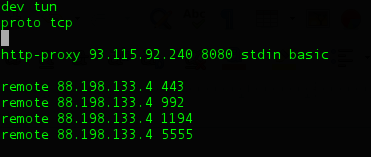
Options error: --http-proxy MUST be used in TCP Client mode (i.e. --proto tcp-client)
Use --help for more information.
ignore my host name lol
http-proxy must be used in tcp client mode
vernal ruin
Why are you still on UDP Tunnel
Have you not read through the guide properly
You need to do something like this
 drifting crater
ohh yea I forgot to add
proto tcp
ok no error message now
lets see if it connects
vernal ruin
You also need to delete any proto udp mentions
drifting crater
yea I replaced the udp with tcp
2020-12-02 09:52:13 HTTP proxy returned: 'HTTP/1.1 403 Forbidden'
ah
vernal ruin
I think you also need some server side magic if you want to pull that off, but not sure
vernal ruin
:)
 versed valve
I'm not sure if this is the right section to ask this (If not I'm sorry):
Is there a way to get the subscription discount for university students without using the university email address as the default THM mail?
 dry sail
Hey everyone, anyone having issues copy pasting between browser-based Attack box and host system?
versed valve
dry sail
Hey everyone, anyone having issues copy pasting between browser-based Attack box...
Same thing happened yesterday to many folks in the adventOfCyber2 room
dry sail
versed valve
Same thing happened yesterday to many folks in the adventOfCyber2 room
Dang, im unable to launch this on my main system so Im stuck with the browser.
versed valve
dry sail
Dang, im unable to launch this on my main system so Im stuck with the browser.
did you try to use the copy/paste html box on the left hand side in your attackbox?
dry sail
versed valve
did you try to use the copy/paste html box on the left hand side in your attackb...
I didnt even know this was a thing! Thanks @versed valve
versed valve
dry sail
I didnt even know this was a thing! Thanks <@!308583149800259595>
no problem 🙂
 scarlet moss
Advent cyber day 1 answered all questions yet its not reflecting as completed
scarlet moss
Okay got it.
 thorny kernel
I am trying to continue my learning path but the rooms do not load. Tried from my kali box and windows. Any help?
 torpid saffron
Is anyone experiencing issues with the rooms lately? Since yesterday when entering an answer to a question it becomes unresponsive
 left solstice
What time is day 2 going live 😄
 native goblet
is there something wrong with the THM network/machines?
i'm working on linux priv esc room atm, and the machine is unavailable after a few minutes
when i reboot, it is back, and i can work again but after a couple of minuts its gone again
left solstice
probs because of the many thousands doing the advent room
native goblet
damn, this is annoying, Advent 2 is not yet up i think
wind wedge
It is started yesterday
naive dust
@native goblet looks like a vpn problem
 golden nimbus
Hey! I'm new at this community and I started yesterday with de begginer path. I don't know if something is wrong but it shows the "Loading..." text and it does not charge the room.
Here is a pic. Can someone help me? Thx.
naive dust
try to reload the website
golden nimbus
naive dust
try to reload the website
Already did that 😦 I'm trying it since yesterday
naive dust
@zealous yoke could you take a look at this
zealous yoke
hi (: are there any errors in your web browsers console? This is a known bug that a code push tonight would hopefully resolve
vernal ruin
Meanwhile, these are the three rooms
https://tryhackme.com/room/startingoutincybersec
https://tryhackme.com/room/introtoresearch``` @golden nimbusMaybe some other getting started one, but it's almost the same stuff
left solstice
is there a quick way for me to check if my kali is connected to the openvpn?
like openvpn show connections or something?
naive dust
yes go to http://10.10.10.10
left solstice
I guess if it doesn't connect im not connected
vernal ruin
ip a should reveal a tun0 interface , but you should know if you are connected or not if you connect. You are not supposed to close the terminal after you get connected
!vpn
sharp bisonBOT
TryHackMe
Learn how to use OpenVPN to connect to our network!
From TryHackMe with ❤!
left solstice
vernal ruin
`ip a` should reveal a tun0 interface , but you should know if you are connected...
oh i thought i could close it
vernal ruin
left solstice
oh i thought i could close it
It terminated the connection
Leave it open in a terminal tab. you can background it, but it will only create confusion for you later on
left solstice
ok thanks dude
 rugged plinth
Has anyone had any issues where cloudflare comes up just before getting on to the Tryhackme website?
golden nimbus
vernal ruin
Meanwhile, these are the three rooms
```https://tryhackme.com/room/tutorial
http...
Thx a lot!
rugged plinth
rugged plinth
Has anyone had any issues where cloudflare comes up just before getting on to th...
Genuine questin!
golden nimbus
zealous yoke
hi (: are there any errors in your web browsers console? This is a known bug tha...
This are the errors that the console shows me
rugged plinth
Has anyone had any issues where cloudflare comes up just before getting on to the Tryhackme website?
I have no clue why it's coming up!
fluid thunder
Some cloudflare features have been enabled to balance the load that the site is experiencing because of the AoC event
If the captchas are getting annoying, look in #resources and install the mentioned "privacy-pass" (pinned in the channel) browser extension. That can help with reducing the times you need to select X number of airplanes
rugged plinth
@fluid thunder I don't recieve the captcha, I do though recieve for DDos checking your browser!
rugged plinth
fluid thunder
Some cloudflare features have been enabled to balance the load that the site is ...
That makes sense to me!
rugged plinth
fluid thunder
If the captchas are getting annoying, look in <#554713196804440101> and install ...
I've been wondering if this is an mtm attack or is the AoC event?
thorny kernel
every path is looking like this. any help?
fluid thunder
rugged plinth
I've been wondering if this is an mtm attack or is the AoC event?
I'm afraid I don't understand? The extension is neither a man in the middle nor part of the event ? It's just suggested if you're struggling with captchas
vernal ruin
golden nimbus
Thx a lot!
vernal ruin
rugged plinth
Not the extension I am referring to this!
That and to balance the load due to the event
fluid thunder
That is a common feature you'll find on lots of websites using cloudflare. It's a measure against different kinds of attacks
vernal ruin
It's a temporary thing iirc
rugged plinth
fluid thunder
I'm afraid I don't understand? The extension is neither a man in the middle nor ...
So it doesn't necessarily mean that I am infected because I have scanned my pc with an anti-virus (whatever help that can really do!)
fluid thunder
No it has nothing to do with that
rugged plinth
vernal ruin
That and to balance the load due to the event
@fluid thunder Thank you both for answering my query!
naive dust
comes out some time today
 wraith elm
i am very exicted to try it
 thorny cove
hey, i need some help, i can't connect via ssh in putty even after connecting the openvpn
ps i am a total noobie
naive dust
which room
thorny cove
linux basics 2nd room
naive dust
what error do you get
thorny cove
unable to acces
naive dust
screenshot please
thorny cove
thorny cove
yep
naive dust
what creds are you using?
naive dust
username and password
thorny cove
can't even put a password it blocks me from reaching that but the username is shiba2
like said in the room
naive dust
try and restart the room
naive dust
yes
thorny cove
allright i'll wait till i see the ip and i'll tell you
naive dust
okay
eager fulcrum
@thorny cove @naive dust The issue here is that Putty for Linux doesn't handle the name@host format, but it does on Windows
Use the command line to SSH in.
It's not an issue from the room
thorny cove
oh okay thanks
naive dust
@eager fulcrum i feel so dumb now
eager fulcrum
I mean you shouldn't really be using putty on linux
thorny cove
allright
 keen prawn
Hello there; yesterday I renewed my subscription but a hour later it got cancelled automatically without refunding. I have mailed many times and asked that what i need to do now but I got no response back.
naive dust
when did you sent a email @keen prawn
keen prawn
Yesterday and today
I have also tweeted but no response
eager fulcrum
keen prawn
Hello there; yesterday I renewed my subscription but a hour later it got cancell...
It tells you what you need to do
Go to your profile, try again
naive dust
patience is a virtue
keen prawn
It doesnt tell anything
eager fulcrum
it does in the email right there
keen prawn
It asks to re-subscribe
keen prawn
But they didnt refund the subscription fee
eager fulcrum
Banks take a couple of days to process and show refunds
keen prawn
How many days max or min?
lofty hornet
can't find the vpn sector
wind wedge
It shouldn’t take long to refund I would say about 24-72 hours
naive dust
vpn sector @lofty hornet ?
lofty hornet
ain't my current vpn connects and can't find the vpn sector of site
openvpn config file part of site
wind wedge
Hover over your profile picture then click access should be there
lofty hornet
wind wedge
Hover over your profile picture then click access should be there
tnx a lot
eager fulcrum
wind wedge
It shouldn’t take long to refund I would say about 24-72 hours
Nah, banks take forever
lofty hornet
never seen James kidding before 😄
i always remember James like "DID U GOOGLE THAT?"
but i really like him
cuz he is really helpful
 lone stone
anyone ever have issues with the site like showing a different rank on the dashboard than on my profile? or like rooms/learning paths missing
 kind plover
I can't seem to get my attackbox' public ip
zealous yoke
What's the internal ip @kind plover
kind plover
10.10.172.210
zealous yoke
ty bare with pls (:
kind plover
it just shows nan nan nan.. and then goes back to 1min
zealous yoke
63.35.210.239
kind plover
zealous yoke
ty bare with pls (:
yeah yeah don't worry.. wanted to report it before task2 started so that u get some leeway 🙂
zealous yoke
Not quite sure why it's had a bit of bug there 👀
lone stone
anyone ever have issues with the site like showing a different rank on the dashboard than on my profile? or like rooms/learning paths missing
naive dust
Hello everyone!
I just joined the CyberAdvent and finished the first Room. Unfortunately, I dont got the Certificate aswell as the "Congrats" for finishing the Room. I Anwered every Question correct (also the one without anything required) and it shows 100%. However, I can not progress or get the Certificate. Any help?
wind wedge
Please check the pins in #778305825797177374
Also there will be a new task added each day
The room is not complete
naive dust
Understood, thanks!
 valid solar
Hi, I don't seem to have any web access from the attack box. Can't get onto the CyberChef page or any anything else external except the christmas control centre! Am I missing anything obvious? Thanks.
naive dust
if your not a subscriber you cannot use internet on the attackbox
valid solar
Ah OK, didn't see that stated anywhere. Will set up the VPN instead.
eager fulcrum
valid solar
Ah OK, didn't see that stated anywhere. Will set up the VPN instead.
Alternatively you could just open a new tab and use cyberchef there?
valid solar
I couldn't let me copy-paste the hex out of the attach box or I would have done.
eager fulcrum
You can, using the sidebar
lone stone
what if the sidebar is missing for me
zealous yoke
 lone stone
ah i meant on the website, also just weird things like rank on dashboard showing different than on my public profile and showing im not connected to network when I am
eager fulcrum
lone stone
ah i meant on the website, also just weird things like rank on dashboard showing...
The next rank is the level up from your current level
To satisfy the "connect to our network" you need to download your config or something like that
eager fulcrum
Rooms cannot be down
Because you do not share instances
When you click deploy, that instance is yours and only yours
 radiant trellis
How long does it take to get verified?
sharp bisonBOT
TryHackMe
Verify your TryHackMe Profile!
From TryHackMe with ❤!
wind wedge
It's currently not working atm, Hors said he'll be fixing it tonight
radiant trellis
I see, thanks
left solstice
Is rooting android phone basically privesc?
wind wedge
 rough storm


 desert kindle
Hi, need help regarding VPN
I've downloaded the configuration file and followed instructions experiencing some SSL error
eager fulcrum
desert kindle
I've downloaded the configuration file and followed instructions experiencing so...
Regenerate your file on the site
Wait 30-60 seconds
Redownload
 sharp inlet
use sudo openvpn <path>
eager fulcrum
sharp inlet
use sudo openvpn <path>
That won't fix it
It's not a permissions issue.
Granted, you do require sudo, but that's not the issue shown
 tidal compass
Hey
tidal compass
okay thanks lemme try
tidal compass
eager fulcrum
It worked!Thanks alot
 tender mauve
Hello ! Anyone know how can I change my username ?
civic lodge
send an email to support@tryhackme.com
tender mauve
Okay thanks
desert kindle
@eager fulcrum thanks, that fixed the error. But TLS key negotiation is failed to occur. Although internet is working fine with browsing and other stuff
 surreal mist
i have completed overpass series but still haven't got the badge.
eager fulcrum
Did you complete it before the series was created?
Also I aim to release a new one in January
@desert kindle Are you in Egypt or another country that's likely to block VPN traffic?
surreal mist
eager fulcrum
Did you complete it before the series was created?
i think so
eager fulcrum
If you completed it before the series was created, you won't get the badge and you'll need to ask
Honestly, I'd recommend emailing support@tryhackme.com
Or wait until I release this next one 👀
 smoky forum
Hi! I made a subscription and a payment also, but I don't get the premium. Thanks for help! 🙂
zealous yoke
Hey sorry to hear that, usually it's automatically applied. Can you send an email to support@tryhackme.com w/ your THM username and proof of purchase (i.e. a receipt from paypal, etc) @smoky forum
zealous yoke
Wicked, thanks -- shouldn't be too much of a wait!
 dreamy silo
hey so, how do i go about using the student 20% off?
placid mango
!docs student
sharp bisonBOT
TryHackMe
Redeem your student discount!
From TryHackMe with ❤!
dreamy silo
i set it to gmail, can it be changed to my edu email?
eager fulcrum
Yep
dreamy silo
oh i see i can send an email from it
dreamy silo
oh ok
naive dust
Is there a quick simple way to terminate any active boxes in any room. Every time I finish a room I have to go back and terminate the box
naive dust
Sweet, thanks!
dreamy silo
eyy profile change worked
now to wait a week for my cheque
 silk crown
Any idea why my attack box would keep disconnecting my VNC connection? Worked fine since last week, but today (while doing the burp room) its disconnecting every 20 - 120 seconds it seems
also freezing like crazy.
I can use my own VM but just wanted to see if some kind of maintenance was going on or something.
naive dust
hey guys regarding the tryhackme bot is there any issues currently with it?
 craggy copper
Ye , i don't have a student email. school didn't give us one
eager fulcrum
!docs student
sharp bisonBOT
TryHackMe
Redeem your student discount!
From TryHackMe with ❤!
eager fulcrum
You'll need to email, as per the article
eager fulcrum
Email, and they'll sort something out 🙂
 velvet charm
Hey, I have a VM connected in the browser and I have a long flag which I can't copy, how to copy from browser VM to my computer??
eager fulcrum
There's a clipboard panel on the left hand side
velvet charm
I'm doing the Linux challenges
eager fulcrum
SSH in.
velvet charm
So I'm not sure how to do it from their VM
eager fulcrum
I've spoken to Skidy about a way to improve this
velvet charm
Oh ok
silk crown
Are the web based attackboxes configured with enough resources to handle burpsuite and also be stable? really, no clue why im getting disconnected so much. It's not my internet, the machine is freezing and i've terminated and started a new session but the problem prevails.
velvet charm
velvet charm
Hey, I have a VM connected in the browser and I have a long flag which I can't c...
Does anyone have any idea? Idk what to do 😦
 lapis sparrow
Hi, i live in a country that blocks vpn traffic is there anyway to bypass the vpn censorship ?
zealous yoke
https://media.discordapp.net/attachments/521771811768107008/783394525170761748/unknown.png?width=1224&height=586 @velvet charm
Use the slide-out tray on the left of the display
zealous yoke
silk crown
Are the web based attackboxes configured with enough resources to handle burpsui...
Yes they should be more then capable for this. The servers that handle the in-display are under a lot of load at the moment. You might have a better time by bypassing these and connecting to the VPN and using RDP (:
 twilit yoke
advent of cyber 2 : I launched the attack box it had a problem connecting and then said I can't launch it again the same day.. I completed day 1 over 24 hours ago any ideas?
silk crown
rgr, thanks for the info! Glad to know i'm not crazy
zealous yoke
We're working on scaling these up, but it unfortunately requires taking all the boxes offline essentially
Gotta wait for a bit more of a quiet time 😅
You can find the credentials for the RDP via https://tryhackme.com/my-machine 👍
twilit yoke
I'll give it a whirl thank you!
zealous yoke
😄
lapis sparrow
Can anybody help ?
toxic python
no clue until you ask your question
lapis sparrow
I live in a country that blocks vpn traffic is there anyway to bypass the vpn censorship ?
lapis sparrow
Egypt
 digital terrace
If I upgrade my account to Premium, do I need to redownload / regenerate my OpenVPN file?
Or does the system know I’m Pro and make deploying machines faster etc automatically?
 bronze vale
When you subscribe there is a new VPN profile that will appear. This is a VIP profile
lapis sparrow
Can't i use a proxy or something ?
bronze vale
You do not need to use it @digital terrace
zealous yoke
It's not something we can help with I'm afraid @lapis sparrow
digital terrace
bronze vale
When you subscribe there is a new VPN profile that will appear. This is a VIP pr...
Hmm, where? I’m still using the original ovpn file
bronze vale
Reference:
digital terrace
Perfect, thanks!
toxic python
lapis sparrow
Egypt
unfortunately we can't do anything about that
you can use the in browser machine, but we cannot get around your country's blocking of the VPN
toxic python
that too^
hasty torrent
anyone up here?
eager fulcrum
Just ask your question
hasty torrent
why is this so buggy? I tried uploading my machine like so many times and it gets stuck somewhere in the middle always in some percentage
eager fulcrum
It's not buggy for me. What do you mean by "it gets stuck somewhere"?
I've uploaded like 20 VMs
hasty torrent
like the first time I uploaded it was stuck at 23.47%
the next time it was in 10.98%
and the third time in 63.43%
I have been trying since so long to upload it
toxic python
Just gotta wait longer
hasty torrent
isnt 12 hours enough?
eager fulcrum
100% depends on your upload speed
hasty torrent
my upload speed is 20mbps
eager fulcrum
And the size of what you're uploading
eager fulcrum
What OS is it?
hasty torrent
Ubuntu
eager fulcrum
Because if that's Linux, you should be able to make it a LOT smaller
Server or desktop? Version?
eager fulcrum
2004 or 1904 won't convert
hasty torrent
convert to what?
eager fulcrum
After upload, your VM needs to be converted to AMI format on TryHackMe's end so it can exist on AWS
You need to follow the conversion requirements
hasty torrent
but why would someone go for old outdated machines?
eager fulcrum
Requirements for importing a VM into AWS EC2.
eager fulcrum
hasty torrent
but why would someone go for old outdated machines?
Blame AWS
This is not THM's fault
1804 is LTS.
It's still in support
Therefore not old or outdated.
hasty torrent
well 19.04 was also LTS
eager fulcrum
1904 was not LTS
eager fulcrum
hasty torrent
you dont upload machines as virtualization?
wat
hasty torrent
like HTB does?
eager fulcrum
eager fulcrum
hasty torrent
like HTB does?
What do you mean? You need to clarify.
toxic python
They’re all virtual machines they’re just hosted on AWS so you need to follow AWSs guidelines
toxic python
They’re all virtual machines they’re just hosted on AWS so you need to follow AWSs guidelines
toxic python
I don’t think AWS supports 20.04 yet. @eager fulcrum is that correct?
eager fulcrum
hasty torrent
I mean HTB accepts the 20.04 machines and all
Again, AWS requirements. Not THM.
Yes
Look at the list I posted...
Requirements for importing a VM into AWS EC2.
hasty torrent
looks like I will have to wait until they accept it
hasty torrent
yes
happened with me too
also the Day 1 task cookie submission part was broken too
it was accepting wrong answers as correct
past night
Would it be better to use Kali Linux VM than the AttackBox itself?
eager fulcrum
hasty torrent
also the Day 1 task cookie submission part was broken too
That's answer tolerance, and it's documented and been raised hundreds of times over the last week
past night
The attackbox is so slow
eager fulcrum
past night
The attackbox is so slow
Are you a subscriber?
past night
yes
 frank valley
I completed room without any issues AOC D1 all tasks went smooth for me
hasty torrent
cool
toxic python
past night
Would it be better to use Kali Linux VM than the AttackBox itself?
Whichever you prefer. I like my own VM cuz you get persistence and customization
past night
toxic python
Whichever you prefer. I like my own VM cuz you get persistence and customization
Does it include the same tools etc?
toxic python
As what? The attack box? No if you install kali it will come with the tools kali comes with. But you can install anything you want on it because it’s yours
past night
toxic python
As what? The attack box? No if you install kali it will come with the tools kal...
I'm not so experienced with Linux yet, so often when i'm trying to install new tools every now and then something wrong occurs.. Even though i followed the instructions straight forward. The attackbox was a good option, but i can't believe it should be so slow as a subscribing user..
eager fulcrum
sudo apt install that's all it takes
toxic python
As james said it’s load is really heavy right now cuz of AOC
But yea I get that installing stuff is a bit difficult at first when you don’t know what you’re doing
past night
eager fulcrum
`sudo apt install` that's all it takes
Yeah normally, not always though.
But even though i use that method, an error message sometimes occurs depending on what i'm trying to install.
toxic python
Imo you should get a VM and just go through the pains of learning. It’ll be worth it I promise 🙂
eager fulcrum
past night
Yeah normally, not always though.
But even though i use that method, an error me...
That shouldn't happen
past night
toxic python
Imo you should get a VM and just go through the pains of learning. It’ll be wort...
Yeah i guess you're right 🙂 Learn while doing
toxic python
You can always ask in #infosec-general here and someone will probably try to help!
past night
Thanks, i'll get started with the kali VM
 elder oak
hey guys i am having huge problems with reverse shells for some reason that i think stems from openVPN
i.e. i cannot get a tun0 ip from my VM but with powershell i can
and it is causing my nc listener to not receieve any traffic
elder oak
lemme give it a shot
 candid dove
I'm new so let me know if this isn't allowed here, but I was disconnected from the attackbox I was using so I started a new one and it looks like someone else is logged into it.(?)
torpid saffron
Got kinda of a big problem here when trying to continue on the beginner path:
ebon igloo
^^ same
 vernal rock
Same same.
 ember lily
same
vernal rock
Been having issues with THM site over the last week getting timeouts like this. I thought it was me, apparently not.
eager fulcrum
ebon igloo
cloudlare is having probs
Got a source on that?
past night
naive dust
@past night I have the same
vernal rock
Yeah, their servers must have crashed. I can't get logged back in either.
 violet vale
I just got that message too.
past night
I just connected with my openVPN, lol
 tawdry barn
500
past night
and right afterwards it crashed
tawdry barn
Not awesome
past night
sorry guys, my fault
 feral merlin
It is the Villain from Advent of Cyber 2!
violet vale
bunch of hackers in a room running a DDOS...
ebon igloo
eager fulcrum
Got a source on that?
its what I gathered
 ocean hatch
I just got the same message 😦
eager fulcrum
ebon igloo
its what I gathered
The image doesn't say CloudFlare is having issues, so it's probably not cloudflare?
vernal rock
eager fulcrum
The image doesn't say CloudFlare is having issues, so it's probably not cloudfla...
Agreed.
torpid saffron
Ironically I just finished watching S2 EP1 of Mr Robot and now the host lost connection lol
ebon igloo
eager fulcrum
The image doesn't say CloudFlare is having issues, so it's probably not cloudfla...
Yikes sorry
 maiden imp
Am I the only person with this issue?
tawdry barn
Nah we all have it
 burnt yew
Not
vernal rock
@maiden imp No
ocean hatch
maiden imp
Am I the only person with this issue?
nope
 muted sparrow
Whait
ocean hatch
guess its time to put tryhackme on the back burner for today and come back to it later 😦
 ashen lion
Getting it as well
ebon igloo
^^ same
elder oak
got a fatal error after using: openvpn --config <file-path>
vernal rock
Weirdly, my VPN is still working and I am connected to the box I was working on. Just can't hit their website.
ocean hatch
same, my reverse shell is still connected to the machine
tawdry barn
No issues with the vpnn
vernal rock
Mine is back up now.
torpid saffron
mine too
ocean hatch
did someone try to check if the domain name is affected and can still access the website using the iP address instead?
naive dust
Mine too
eager fulcrum
elder oak
got a fatal error after using: openvpn --config <file-path>
Sudo.
torpid saffron
looks like just a temp blip with the internal server
eager fulcrum
ocean hatch
did someone try to check if the domain name is affected and can still access the...
Cloudflare exists, and prevents that
feral merlin
It is back again fellas.
tidal compass
it is?
ocean hatch
eager fulcrum
Cloudflare exists, and prevents that
ahh gotcha
tawdry barn
Thats said, bypassing CF is doable
tidal compass
feral merlin
It is back again fellas.
awesome it is!!
eager fulcrum
tawdry barn
Thats said, bypassing CF is doable
Depends if the site is set up to explicitly avoid that.
feral merlin
Happy hacking to all!
torpid saffron
hmmm not quite
tawdry barn
True but that's unusual
eager fulcrum
Not when it's a cybersec company.
torpid saffron
struggling to join a room
vernal rock
It's still lagging a bit. They must be still having issues.
Just finished advent day 2, so I'm off until tomorrow. GL all.
tawdry barn
Ninja you exist on irc as well?
eager fulcrum
I exist on THM.
tawdry barn
I did mean the community
elder oak
ok i got openVPN on my kali machine and now have a tun0 but still am not receiving any traffic on my nc listener
elder oak
yes but this is a persistant issue with all reverse shells i have attempted
feel it needed to be brought to tech support
eager fulcrum
elder oak
yes but this is a persistant issue with all reverse shells i have attempted
it will be if you've been running your VPN on the host
elder oak
everything i have done the guys in AoC2 is correct
eager fulcrum
There's an explanation for it pinned in #room-help
elder oak
i posted a screenshot in AoC2 would you please take a look at it and tell me if im a fool or if i have a legit issue?
eager fulcrum
I'm staying out of that channel because people keep asking the same questions
Someone will help you, I'm sure
elder oak
okay i will keep banging away at it
thanks for helping me get the tun0 figured out tho 🙂
 worn wedge
I tried to enroll in the beginner pathway, but on the first page all the rooms just appear as "Loading..." Tried in both Chrome and FireFox
 void bramble
oh is there an issue with the vpn
 mystic spear
Anyone getting a lot of cloud flare checking browser when switching between pages on the site or cloud flare captcha when browsing site.
void bramble
ive been having trouble attempting advent room and linux priv esc room
my vpn wont lemme ping the deployed vm in the room
so i cant do anything with it
but if theres an issue then ill just have to wait i guess
eager fulcrum
!vpnscript
sharp bisonBOT
TryHackMe
Use our VPN troubleshooting script to diagnose common issues!
From TryHackMe with ❤!
dreamy silo
alright, ill try that whenever the "checking browser" thing goes away
always takes so long
naive dust
I noticed the K is now gone ontop of the web page of THM
wind wedge
What?
 solid phoenix
dreamy silo
solid phoenix
dreamy silo
Having this same issue, redownloaded the pack 3 times.
dreamy silo
2nd times the charm