#site-support
1 messages · Page 161 of 1
 minor venture
 eager fulcrum
That won't work
minor venture
oh
eager fulcrum
If the VPN is running in the VM, that VM can access stuff via the VPN
Your host cannot.
minor venture
let me reconnect
whats the solution so i cannot use tryhackme host connec to burpsuite ?
eager fulcrum
whats the solution so i cannot use tryhackme host connec to burpsuite ?
@minor venture Huh?
minor venture
can you help me i didnt get you
eager fulcrum
I don't understand what you're having a problem with now.
minor venture
i have my openvpn in vm ware and i have my burp in windows
how do i connect tryhackme ip to burp
eager fulcrum
What do you mean by tryhackme ip?
minor venture
host ip of one room
eager fulcrum
Ok, you can't
if your VPN is running inside a VM, that VM is connected to TryHackMe. Your host machine (Windows) is not.
minor venture
so i need to install openvpn in windows to make my burp connect to host ip add
eager fulcrum
Or use burp in the virtual machine like most people do.
 naive dust
hi can someone assist me with blue? new to pen testing
eager fulcrum
@naive dust Unless it's a technical issue, you probably want #room-help
Also, try to avoid asking to ask. Just ask the question instead
naive dust
well im running eternal blue exploit on the ip and it says its vulnerable to it but it keeps failing
eager fulcrum
#room-help @naive dust
 pastel tusk
Hello, I can't join a room. It says I am either already in this room or I am banned.
 hazy silo
Is the site offline?
eager fulcrum
Kinda
hazy silo
Yh bit slow, rooms are stuck with loading. same for the learning paths. Thanks for the response
 orchid shale
I'm finding learning paths are not loading at all...
 obtuse ridge
From last 4 to 5 days im trying to explain about my issue to him
But he is not understaning
eager fulcrum
Then maybe you're not explaining it right.
obtuse ridge
I have explaind all
eager fulcrum
@obtuse ridge Ok, this is #site-support not #complain-about-thm
Unless you are willing to try and get support, please don't use this channel to complain
orchid shale
@eager fulcrum - are you aware of the website loading issues?
eager fulcrum
@orchid shale Skidy is, yes
obtuse ridge
I need support which is being not answered on email
obtuse ridge
My point is clear i did pay for 1 month subs from 1st may to 1st june then why tryhackme deducted xx amount from my account on 5th may without my notice and approval
And he is not refunding that amount
orchid shale
My point is clear i did pay for 1 month subs from 1st may to 1st june then why tryhackme deducted xx amount from my account on 5th may without my notice and approval
@obtuse ridge 1st May is a Friday, perhaps the charge for your access didn't go through until the 5th...
obtuse ridge
It did
orchid shale
And he is not refunding that amount
@obtuse ridge Have you paid twice?
obtuse ridge
I did not pay twice i did payment once on 1st may by card 10$
On 5th may when i saw my bank statmemt what i see is tryhackme has deducted xx amount
 deep trellis
I did not pay twice i did payment once on 1st may by card 10$
@obtuse ridge DM me your email.
orchid shale
I did not pay twice i did payment once on 1st may by card 10$
@obtuse ridge Do you want the subscription - did you want premium?
deep trellis
Im pretty sure we've replied.
 grave leaf
Rusty, the team can handle it. Thanks for helping. 🙂
obtuse ridge
Yes you did replied me with your tnc
 rigid oxide
We do appreciate the sentiment of course @orchid shale ❤️
obtuse ridge
I dont want refund for 10$ which i payed for 1 month. Im asking for 5th may only
5th may transaction i did not made
It as deducted automatically by ttryhackme
@deep trellis i sent you email please check
Or if we can have call on skype let me know
If i take money from your account or if i steal from you how you will feel?
 short dune
Anyone else having any issues with the website ? Getting 504s
orchid shale
@deep trellis - when cancelling a subscription does it end at the original payment end date or immediately? I want to trial for a month without the auto renewal as I normally forget.
eager fulcrum
@short dune Yes, it's being fixed
short dune
Thanks
eager fulcrum
@orchid shale after the month you paid for
 simple beacon
Tryhackme seems to be really slow for me.
Is it because of the servers or my internet?
eager fulcrum
@simple beacon It's being fixed
simple beacon
oh okay
obtuse ridge
I want to highlight one point, let say if someone want to cancel auto renewal for subs then it should be canceld same time instead of waiting for end date. Since we have option which says to revoke changes which means card number will be stored till end date.
eager fulcrum
@obtuse ridge The card number is not stored
No payment details are stored by tryhackme
obtuse ridge
Then how auto renewal works?
eager fulcrum
Stripe.
eager fulcrum
TryHackMe doesn't store it.
 barren birch
Stripe does
obtuse ridge
Guys you need to check and get this thing resolved with stripe and one more thing strile also bypassess bank account verification page for transaction
 supple sonnet
@obtuse ridge contact stripe
obtuse ridge
Why should i contact stripe you are using there service for paymwnt
eager fulcrum
@obtuse ridge You were charged conversion fees, which is a normal thing.
supple sonnet
Stripe handles billing & payments
rigid oxide
@obtuse ridge please handle this via the email thread. As payment details are involved we'd rather keep this done via email. It's mostly a matter of privacy
obtuse ridge
I reached here since my case was not peoperly handled in email
rigid oxide
In this specific case, please understand we are trying to help however I will not entertain any further discussion in a public forum such as the community discord
We aren't out to get you here, we just want to help in a manageable way
obtuse ridge
I understand so dont you understand my request in my first email why i have to send multiple email to explain everything
eager fulcrum
That is how a conversation works.
rigid oxide
Please continue in email, this is your final warning.
We are trying to help, just we were and are handling it in email with you
obtuse ridge
I alwasy continued in email since my request was not handled properly then i had to reach here my point was clear.
rigid oxide
We are handling it to the best of our abilities via email and it will continue in that venue
Thank you for your patience in this instance of course ❤️
orchid shale
Website appears to be back up again 😄
 split fox
Hey am a complete beginner on tryhackme
but i have completed a few basic rooms a few hours ago
then i left for a while and shut my kali vm down and now i can't reach any machines i deplay
on the access page it say that i am connected
this is the output i got when setting up the vpn to see if something went wrong with it maybe
would be great if someone could help me
eager fulcrum
!multivpn
 sharp bisonBOT
 TryHackMe
• Step 1
Type ps aux | grep openvpn into your terminal and press enter
• Step 2
If there's more than one line (and the second doesn't have "grep" in it), do the following steps
• Step 3
Type killall openvpn into your terminal and press enter
• Step 4
Start the VPN with sudo openvpn <path-to-config>

From TryHackMe with ❤!
hazy silo
Had the same problem, this fixed it thanks
split fox
mhhh it did not do it for me tho XD
i did all those steps and i saw that they were killed
i also redownloaded the configuration file just in case
but I can still not reach the machine
eager fulcrum
@split fox What machine? How are you testing?
split fox
the one in the "learn linux" room
eager fulcrum
And the second question?
split fox
ping and ssh like in the example
eager fulcrum
You're not running it with sudo, are you?
You need to run openvpn as root using sudo
Also, in future show the full output
Not just 2 lines
route add failed is your issue
split fox
I am running it like this sudo openvpn /home/kali/Downloads/myusername.ovpn
eager fulcrum
Route add failed is the issue
Pretty sure that normally happens when you're running multiple VPNs
Show the full output when you run the command though
the ps aux | grep openvpn as well as the openvpn command if you can
eager fulcrum
@split fox That's connected.
split fox
oh thx @eager fulcrum now it worked for some reason
although i did these steps like 5 times XD
eager fulcrum
Because you restarted your VPN and got it working
 abstract quest
naive dust
abstract quest
naive dust
on what
 leaden token
@abstract quest email support@tryhackme.com
 scarlet geyser
Hello, I'm just wondering is there a way to spawn the web-browser kail linux from the us instead of the UK. I get really horrible lag/delay when typing a moving window boxes.
eager fulcrum
@scarlet geyser Not yet, soon
scarlet geyser
@eager fulcrum Okay, I can still work with it. Thanks for the quick reply!
scarlet geyser
Yeah I have my own on my desktop but when I'm away from it I use the browser
scarlet geyser
Okay, thanks I give it shot.
naive dust
hi
eager fulcrum
There's not 3
naive dust
I am struggling to connect
eager fulcrum
There's a sudo process, an openvpn process, and a grep process
naive dust
eager fulcrum
What do you mean by struggling to connect?
naive dust
how
eager fulcrum
!multivpn
sharp bisonBOT
TryHackMe
• Step 1
Type ps aux | grep openvpn into your terminal and press enter
• Step 2
If there's more than one line (and the second doesn't have "grep" in it), do the following steps
• Step 3
Type killall openvpn into your terminal and press enter
• Step 4
Start the VPN with sudo openvpn <path-to-config>
From TryHackMe with ❤!
eager fulcrum
Now start openvpn
naive dust
openvpn /root/Downloads/mynickname.ovpn right ?
eager fulcrum
Yes. Don't kill that process or background it
Start a new terminal window/tab
Control C in the VPN one to disconnect.
eager fulcrum
No
If you leave the tab running, you can switch to it and Control C to disconnect.
naive dust
No I mean, If ı close this tab, when close my pc, there will be still the vpn connection that I killed before
So If I want to reconnect again, should I repeat the same procces
or what ?
eager fulcrum
No
When you Control C in that terminal tab, the VPN disconnects and stops running.
naive dust
Hi I’m very new to this, using the Linux room and trying to connect to putty, but keep getting Network Error: connection timed out, anyone know why that could be?
eager fulcrum
Bad VPN
naive dust
Thanks, do you know how to fix that?
eager fulcrum
What OS are you running?
naive dust
Windows 🙂
sharp bisonBOT
TryHackMe
Learn how to use OpenVPN to connect to our network!
From TryHackMe with ❤!
naive dust
Yessir, completed that room but I couldn’t access the website at the end, I’m connected to openvpn
eager fulcrum
If you couldn't access the website at the end, that means you're not connected.
naive dust
It says I am in the openvpn connection box, that’s where I’m getting confused
eager fulcrum
Huh?
naive dust
It says I’m connected, but then I can’t access the website
It says I’m connected to the VPN*
eager fulcrum
What says you're connected?
naive dust
The box in the bottom right of my screen, when I hover over it, it says
OpenVPN GUI
Connected to : ***
And it gives me my assigned IP
eager fulcrum
You're not connected if you can't access any resources through the VPN
Simple as that
naive dust
Ok cool thanks :))
 lethal vortex
Hello,
If anyone could answer this it would be great.
I use applications that prohibit the use of VPNs while the app is open, once the download pack is connected is that only associated with THM or will it remain in the background on my device?
I have used connection packs elsewhere before but disconnected and deleted the pack each time, and this was via VM.
 open thorn
Can anyone help me with task 7 in the welcome room? I checked my VPN connection in the access menu, and it says that i am connected, but check connection website times out. Tried looking up a way to increase the timer before timeout occurs for Brave (the browser im running), but there seems to be no way of doing so.
naive dust
helo do i need to format my pc to install kali linux'?
 solid jungle
Surely that's harder to do
naive dust
its a shit laptop
solid jungle
Lol
solid jungle
Same as mine
 feral dock
Tech-support is not the place.
naive dust
bruuuh
solid jungle
😂
naive dust
cmon mate can u help me y or n
solid jungle
Oops
naive dust
do i need to format it??
solid jungle
Ye just go to the website i think there's instructions there
naive dust
😐
solid jungle
Oof
feral dock
Read the channel description.
 mortal vortex
hey, sorry to bother everyone, but I've got an issue when trying to ping a box when on the vpn
it just keeps timing out...
does anyone know how I can fix this?
 zealous yoke
Is it a Windows machine by any chance?
mortal vortex
zealous yoke
e.g. blue
mortal vortex
no it's the linux through
runthought*
argh
english
It's the linux runthrough
sorry
mortal vortex
it's been like that for a few mins now, just not doing anything
sharp bisonBOT
TryHackMe
• Step 1
Type ps aux | grep openvpn into your terminal and press enter
• Step 2
If there's more than one line (and the second doesn't have "grep" in it), do the following steps
• Step 3
Type killall openvpn into your terminal and press enter
• Step 4
Start the VPN with sudo openvpn <path-to-config>
From TryHackMe with ❤!
zealous yoke
coolio 🙂
zealous yoke
try with sudo at the beginning of each command
mortal vortex
kk
zealous yoke
more so, when you connect with openvpn make sure you put sudo infront of that too
mortal vortex
kk
zealous yoke
so sudo openvpn /path/to/config.ovpn
zealous yoke
there should be more output then that it'll take like 3 seconds
assuming it doesn't have any errors or warnings - yes
mortal vortex
oh, ok
well I haven't see anymore changes yet
I lied
okay let me get a screenshot
not bound?
zealous yoke
ah
regenerate your config, wait ~10 seconds, download the new file on https://tryhackme.com/access

TryHackMe
An online platform for learning and teaching cyber security, all through your browser.
zealous yoke
more then welcome 👍
mortal vortex
should I run the kill commands again?
zealous yoke
can do just to be sure 🙂
zealous yoke
ayy sick
mortal vortex
does that mean it has?
zealous yoke
yeah sounds like it!
zealous yoke
Try and ping the box 🙂
mortal vortex
cheers 🙂
 dull lark
I keep getting disconnecting issues, and I only have a small window before I lose connection, is this normal? (linux begginers) -- my VPN does say error "ping-restart" but when I do !multivpn I'm seeing a sudo version of the command and a non sudo command (finally a grep openven at the end), they're running the same config. I'm assuming it's normal?
 heady fjord
I can't upload the resources now. Do u know what's happening?
 vapid dawn
Logging in and out clears the upload issue :))
 carmine tiger
Hi all,
newbie here, I am connected with openvpn and keep getting this error
Note: Host seems down. If it is really up, but blocking our ping probes, try -Pn
Nmap done: 1 IP address (0 hosts up) scanned in 1.96 second
Whats the issue?
feral dock
@carmine tiger What machine are you doing? If it's a windows machine, then icmp requests are blocked by default.
carmine tiger
@feral dock https://tryhackme.com/room/blue on windows

TryHackMe
Deploy & hack into a Windows machine, leveraging common misconfigurations issues.
feral dock
Hmm, yes it's a windows machine, use -Pn in your nmap scan to skip host discovery.
carmine tiger
you mean always include -Pn in the command or just one time?
feral dock
Include -Pn in your command when your trying to scan a windows machine.
carmine tiger
I dont see the result I want with Pn included.
 hoary vector
why is John so damn slow?
 glossy horizon
hey guys, so basically I'm doing the beginner path right now and I subscribed so I have the kali machine in my browser. I'm learning burp suite, and the second task is asking to connect to a network using open vpn. Is it possible to do that through my kali machine without going thru openvpn ? Please help !
eager fulcrum
@glossy horizon Yes, the TryHackMe kali machine is already on the tryhackme network
glossy horizon
so what can I do to gain access to the server ?
so I can see the DVWA login page ??
zealous yoke
You just need to access the IP address / URL of the instance that you deploy ^
zealous yoke
As James said, the THM kali is on the same network so you can skip connecting to the VPN
glossy horizon
I only know SSH
eager fulcrum
You know how to use a browser.
zealous yoke
DVWA is a web application
glossy horizon
so thru the browser basically ?
zealous yoke
On the Kali VM, yes
glossy horizon
oh I see , so can I do this in firefox http:// Ip_address ?
zealous yoke
in Firefox installed on Kali aye 👍
glossy horizon
yes on Kali, but how do I type the DVWA website ip address into my browser ?
glossy horizon
okey it worked !
okey awesome !
thank you, I thought at first its gonna be slow
that's dope ! kali in a browser opening a browser lol
zealous yoke
👍 have fun!
 woven maple
hello everyone,
im trying to access vm through ssh but getting error as "permission denied(publickey)"
eager fulcrum
Then you're not mean to access it via SSH
woven maple
i also tried it with putty still error
no supported authentication methods available (server sent publickey)
eager fulcrum
@woven maple You're going to keep getting the same error
You're not meant to SSH into it
woven maple
@eager fulcrum im still a beginer, i was going through learn linux and followed same steps
eager fulcrum
You're SSHing into the wrong machine
woven maple
i used the same ip as in active machine info
eager fulcrum
You need to deploy the VM in learn linux
Not the OpenVPN one
You can't SSH into that one
They're different VMs
woven maple
i followed same steps mentioned to deploy vm
woven maple
how to deploy vm in learn linux
woven maple
im sorry but i cannot find task 1 in my rooms
eager fulcrum
I said go to the room FIRST
woven maple
dont be rude, im new to this ,which room
eager fulcrum
Learn Linux.
woven maple
ok
eager fulcrum
You're trying to complete Learn Linux. So that's the room you need to load.
 midnight wing
Lol
eager fulcrum


lethal vortex
Hello,
If anyone could answer this it would be great.
I use applications that prohibit the use of VPNs while the app is open, once the download pack is connected is that only associated with THM or will it remain in the background on my device?
I have used connection packs elsewhere before but disconnected and deleted the pack each time, and this was via VM.
@lethal vortex
Just bumping this as a lot of chat gone on since I posted
eager fulcrum
@lethal vortex I don't quite understand
the openvpn config file is just a file
It's up to you to connect or disconnect
If you're using a VM, the host OS can't tell the VM is using a VPN either
lethal vortex
guess its the connection to the vpn i unsure about, the app checks device while in use
If you're using a VM, the host OS can't tell the VM is using a VPN either
@eager fulcrum
think this has answered my Q ty
will just use a VM always
naive dust
is there a problem with vpn ? it's stopped and not work again
Sun May 24 19:28:46 2020 TLS Error: TLS key negotiation failed to occur within 60 seconds (check your network connectivity)
Sun May 24 19:28:46 2020 TLS Error: TLS handshake failed
eager fulcrum
Check your system time
eager fulcrum
Regenerate config
eager fulcrum
?
naive dust
eager fulcrum
Shouldn't matter
naive dust
HTB and Synack VPN Work fine
eager fulcrum
Doesn't matter
naive dust
is there any thing should i edit at the file ?
orchid shale
I'm having issues loading my learning paths again - I think it's struggling...
 wet turtle
is there a maintenance activity going on ? If yes, how long is it gonna take ?
orchid shale
is there a maintenance activity going on ? If yes, how long is it gonna take ?
@wet turtle Something similar happened yday and it was down to load. Hopefully someone will be along shortly to tell us todays issue 😄
wet turtle
@orchid shale thanks mate
 rugged lotus
site down for everybody else?
keep getting thrown to the cloudflare page showing tryhackme.com is down
eager fulcrum
Yes.
rugged lotus
first day today - off to a good start haha
wet turtle
can we get an ETA ?
naive dust
Doesn’t look like it’s working
 covert shell
having issues connecting to tryhackme ...
rugged lotus
yup just getting 504 errors
covert shell
They are using Cloudflare's Always Online, so you should be getting a "cache version" of the site
covert shell
This page (https://tryhackme.com/) is currently offline. However, because the site uses Cloudflare's Always Online™ technology you can continue to surf a snapshot of the site. We will keep checking in the background and, as soon as the site comes back, you will automatically be served the live version. Always Online™ is powered by Cloudflare | Hide this Alert```yes
covert shell
I should had used the word snapshot 🙂
eager fulcrum
But the content of the page requires the API
covert shell
@eager fulcrum thank you. is there an ETA on when the site is expected to be backup? do you know?
eager fulcrum
I'm a mod, not an admin
covert shell
got it
eager fulcrum
Admins are the people who run the site
covert shell
Tryhackme has successfully stolen me from HackTheBox
supple sonnet
neat!
covert shell
I think it's back
naive dust
PUTTY fatal error : no supported authentication methods available (server sent: publickey)
Anyone know where to go from here? Just trying to connect to a VM from the nmap room
I get a similar error trying to ssh with my cmd
zealous yoke
You're not supposed to SSH login to the VM for bpnmap @naive dust
zealous yoke
By using the nmap tool which the room is designed to teach you to use 🙂
A walkthrough room will tell you to login via SSH and specify what credentials if you need too
zealous yoke
Aye no worries pal!
 prisma trail
I just clicked deploy
zealous yoke
Are you connected to the VPN?
 zealous yoke
What are you trying to connect from? Windows? Linux? etc?
prisma trail
Windows.
zealous yoke
Task 7?
prisma trail
Yes.
zealous yoke
There's 6 tasks hehe
You've deployed it and connected with the vpn (green monitor icon like this)
zealous yoke
Oh
prisma trail
Soory wrong screenshot
zealous yoke
You're doing a different room
prisma trail
I am on "Welcome To TryHackMe" room I guess..
eager fulcrum
Link
zealous yoke
Yeah I gotcha. VM's take a couple of minutes to setup, it's like turning on your pc
prisma trail
Here task 7
zealous yoke
try visting the url in the task now that a few minutes have passed?
You need to press "Deploy"
prisma trail
I pressed deploy. Last time I waited 20 minutes (Believe me). Nothing happens.
Do I need VM (VMware) software installed?
eager fulcrum
What are you expecting to happen when you click deploy?
prisma trail
I guess the loading bar have to be 100%
zealous yoke
That's your progress throughout the room
not the VM
Deploy it, wait a couple of minutes, visit the IP address in your browser as per the instructions of the task
prisma trail
After pressing deploy what to do?
zealous yoke
It tells you
prisma trail
I visited the site they gave. me http://machine_ip/ this one .. page never loads...
I am trying from 6:00pm
eager fulcrum
You need to be connected to the VPN
prisma trail
I am connected
eager fulcrum
and MACHINE_IP gets filled in when you deploy the VM
naive dust
I actually had the same prob yesterday lol
eager fulcrum
with a 10.10.x.x IP address
prisma trail
I didn't get it. I press deploy then I open the machine_ip link then what??
@naive dust how you fixed it
zealous yoke
- Connect to VPN
- Press "Deploy"
- Visit the URL in your browser after about 5 minutes lets say
zealous yoke
I just done it so it works
zealous yoke
Yes
prisma trail
Thanks..
naive dust
How long did you wait after deploying the machine ?
zealous yoke
It takes between 3-5 minutes for non subscribers
prisma trail
I waited long before I came on this server
but after asking mr. @zealous yoke it worked
I am happy..
naive dust
Wahey I just got it there aswell
prisma trail
Thanks for helping. Sorry if I disturbed or annoyed you.
prisma trail
Can I ask one more thing?
zealous yoke
Read what the room asks you to do
It details every step you need to perform to login
prisma trail
Do I have to copy the ip given to me and paste it to new tab to open machine?
naive dust
Task 3&4 mate, I think they’re what you’re looking for
prisma trail
Believe me they said nothing there to open my machine.
naive dust
I did that room yesterday, it’s dead easy, holds your hand until almost the very end
prisma trail
Sir, I am very beginner.
naive dust
As am I, started yesterday bro
 flint widget
Task 4 tells you how to install and use PuTTY for accessing your deployed machine
prisma trail
Ok now I get it
eager fulcrum
Slow down, work through the tasks in order
prisma trail
Sorry. I am little lazy to read the task carefully. My bad
eager fulcrum
The VM needs some time to boot, which is why you don't access it until the later tasks
zealous yoke
Reading is very important
eager fulcrum
patience and reading will go a very long way
prisma trail
I get it now I will read carefully.
BTW thanks for tips. You guys are pro.
👍
What is the password?
eager fulcrum
All the details are in the room
prisma trail
mahir
prisma trail
Oh, I thought it saying me to put my username
eager fulcrum
Read carefully
prisma trail
Okay. My bad my bad
 finite dagger
Hi there, I just went through the Learn Linux room. How do I mark it as completed?
eager fulcrum
Complete all the tasks @finite dagger
finite dagger
The room has no tasks? I found the final flag in the vm
Well it has tasks but no way to mark them as completed
eager fulcrum
@finite dagger You don't mark them as completed
You complete them, answer all the questions, adn they get marked as completed.
You need to answer every question
finite dagger
I understand that, I've done a couple of other rooms but there are no questions to answer in this one
finite dagger
yes 43 tasks, none of them have inputs
eager fulcrum
They do.
feral dock
@finite dagger Please post a screenshot so we can better understand what you are trying to say.
eager fulcrum
The site seems to be having issues again
finite dagger
Nothing to click completed on, nowhere to put the flag.
have tried in two different browsers to confirm
 noble badger
Saw a room pop up earlier but now I can’t seem to find it. Looked like an interesting one. Can anyone help or confirm I’m not dreaming lol
It was called otti or osci or ossi something like this?
eager fulcrum
@noble badger You shouldn't have seen that one
@rigid oxide Any idea why it would have popped up?
noble badger
It came up public for like, 10 minutes? I had a read then went back to bed
Just came back to find it again and can’t see it
eager fulcrum
It should never have been made public @noble badger
rigid oxide
Shouldn't have popped up
eager fulcrum
I don't get site notifications on either of my accounts any more so
noble badger
No stress. I thought I was going crazy I couldn’t find it again
 coarse osprey
Hello ! when i try to connect my OpenVPN after like 1 min it says "failed to connect" or "failed to reconnect" and when it says that in the "console" or idk what it says "All TAP Windows adapters on this system are currently in use"
eager fulcrum
coarse osprey
ty
barren birch
@royal wedge Most machines you have to hack your way into
That one you've been given the username and password in the tasks
 nimble trail
Is there a issue with Vulnveristy? The http://<ip>:3333/internal page never finishes loading. If I stop the page loading, the page and upload prompt populate. But if I use it to try and upload the appropriate file, it never completes. I tried this a couple days ago and walked away from it because it was having issues. Any help is appreciated.
nimble trail
Ah, okay, I had switched from EU to the US one. I will try switching back. Thank you.
oooh I wasn't on the VIP one, let's see if that helps! 🙂
 cunning snow
Hi i have an issue with my account, is this the right place to call for help?
prisma trail
Yes. I got help. I guess you will get too.
eager fulcrum
@cunning snow Probably best to email support@tryhackme.com if it's account or billing related, rather than discussing it in a public channel
prisma trail
I need a little help. I am on learn linux room task08 the task said to run "cat a.txt" I entered it on the console but when I am trying it says no such directory. But the task show it will open a text file where it's written "Hello". Help..
eager fulcrum
@prisma trail #room-help
prisma trail
Oh, I forgot.
 heady basalt
Anyone know why i cant connect through a vpn on Ubuntu? Says cant load inline certificate file?
zealous yoke
You will need to regenerate you config file on the access page @heady basalt
 fresh oar
Hey, I am having a problem with OpenVPN connection, from what i can tell from the error messages it appears to be an SSL issue. I have tried regenerating my config with no luck.
naive dust
You say you have tried re-downloading the config file and then using the new one?
naive dust
Hmm
feral dock
@fresh oar Switch servers and regenerate config file.
It will fix the issue your having.
fresh oar
It will fix the issue your having.
@feral dock wizard. Issue resolved.
naive dust
im having issue with open vpn
└──╼ $Mon May 25 06:02:21 2020 OpenVPN 2.4.9 x86_64-pc-linux-gnu [SSL (OpenSSL)] [LZO] [LZ4] [EPOLL] [PKCS11] [MH/PKTINFO] [AEAD] built on Apr 21 2020
Mon May 25 06:02:21 2020 library versions: OpenSSL 1.1.1g 21 Apr 2020, LZO 2.10
Mon May 25 06:02:21 2020 OpenSSL: error:0909006C:PEM routines:get_name:no start line
Mon May 25 06:02:21 2020 OpenSSL: error:140AD009:SSL routines:SSL_CTX_use_certificate_file:PEM lib
Mon May 25 06:02:21 2020 Cannot load inline certificate file
Mon May 25 06:02:21 2020 Exiting due to fatal error
[1]+ Exit 1 sudo openvpn /home/failip420/Downloads/Failip420.ovpn
┌─[failip420@naive dust-virtualbox]─[~]
└──╼ $
feral dock
@naive dust Switch servers and regenerate config file.
naive dust
that worked
glossy horizon
Hey guys, sorry this might sound dumb. But what is the best way for me to run Kali on my mac shall I download VM ? and if so does it make my mac slower ? that's the only issue I'm really worried about. Because Kali in the browser is really slow for me :(\
feral dock
@slim tangle They are already subscibed judging by the fact they said that kali in the browser is really slow for them.
glossy horizon
yes I already subscribed ! it is ridiculously laggy !
 slim tangle
Hany
glossy horizon
also, I want to get used to the hard stuff.
zealous yoke
DM the TryHackMe both with your discord token given on your profile
In the formatting of:
lmao
glossy horizon
wait, what ?
zealous yoke
Send a message with !verify <replace with your token>
zealous yoke
To the TryHackMe bot to sync up your discord profile with your TryHackMe website profile 🙂
You don’t have too but you get colours and things
glossy horizon
nah it's alright, I don't need that atm
am trying to fix my Kali not get colors lol
still super noob tbh
 trail jay
Huh? Called me?
glossy horizon
lolol @trail jay
naive dust
``` ``` 20 packets transmitted, 20 received, 0% packet loss, time 19035ms
``` hi guys does the connection to the vpn affect my abillity to run an exploit on blue room ?@naive dust are you trying to connect with both at the same time?
barren birch
Ok, assuming you have it up in parrot, can you screenshot the results of ifconfig?
naive dust
I know that the vpn is only for a simultaneous connection
naive dust
assigns me an ip on the tun interface ....
of the range 10.8.37.x
barren birch
Perfect. Can you screenshot ps aux | grep openvpn?
 midnight fossil
Hi!
I'm new to linux and Cybersecurity and I've tried to use OpenVPN to connect.
I'm using Parrot OS.
The terminal stuck to Initialization Sequence Completed but still not connecting. What should I do?
eager fulcrum
That means it's connected
Show a screenshot of that terminal
And also "still not connecting" how are you checking?
midnight fossil
If I'm connected and try to connect to the ip that the room gave me, shouldn't it show me the page?
eager fulcrum
No because the access page is unreliable
midnight fossil
I mean look, I got this ip from Vulnversity 10.10.xxx.xx ( idk if I'm allowed to show you the ip 😄 ) and I have to use gobuster dir to find a directory and the ip si not working
eager fulcrum
Those IPs go away after the room terminates
eager fulcrum
So you can share them
midnight fossil
10.10.191.45
And I can't connect even If I'm connected to openvpn
And in order to use gobuster I have to access the page right?
midnight fossil
port is 3333
eager fulcrum
Find open ports, see what's running on them
Works on my machine
Show the output in your terminal that's running openVPN
midnight fossil
eager fulcrum
You're trying to go to 10.10.191.45:80
It won't load because there's not a webserver on port 80
midnight fossil
A
eager fulcrum
You said the port was 3333
midnight fossil
I'm dumb :))))
eager fulcrum
 exotic loom
After deploying machines, the machine is never on
eager fulcrum
What box?
eager fulcrum
It's your VPN, or the box doesn't respond to pings
exotic loom
No it says the host is down when I try to scan
eager fulcrum
Yes
exotic loom
I've faced this with 2 boxes now
eager fulcrum
That's what happens when it doesn't respond to pings
Nmap starts with a ping scan
What. Box.
eager fulcrum
Ok, that means it's a VPN issue.
exotic loom
I updated openvpn
I used a new configuration file
I tried hanging servers
Changing*
The access page shows that I'm connected
sharp bisonBOT
TryHackMe
• Step 1
Type ps aux | grep openvpn into your terminal and press enter
• Step 2
If there's more than one line (and the second doesn't have "grep" in it), do the following steps
• Step 3
Type killall openvpn into your terminal and press enter
• Step 4
Start the VPN with sudo openvpn <path-to-config>
From TryHackMe with ❤!
exotic loom
Wow thank you so much this worked
There were multiple processes of openvpn
I used killall and started it again and it worked
Thanks!
 unkempt quest
Anybody else having issues accessing deployed machines?
feral dock
@unkempt quest Are you connected to the vpn?
unkempt quest
Yes, even tested the VPN room and can connect to that one, just a specific box.
 tulip beacon
ah, im sorry
unkempt quest
Through the browser as suggested by the room via Machine IP
@eager fulcrum
eager fulcrum
What room?
unkempt quest
 unkempt quest
Doh
eager fulcrum
The room teaches you how to connect
unkempt quest
Yeah I tried putty earlier however this was when the VPN was down according to announcements, will try again
Cheers
 cobalt badger
I've completed this 100% but it is not showing as complete in my rooms. I have messaged and emailed but have not had any responses.
https://tryhackme.com/room/zthlinux#
eager fulcrum
@cobalt badger Leave and rejoin the room
cobalt badger
just tried that, no luck
eager fulcrum
Then there will be a question you haven't completed
Even if it doesn't require an answer
eager fulcrum
There's 43 tasks @cobalt badger
cobalt badger
yep, all done
eager fulcrum
@deep trellis send help
cobalt badger
@eager fulcrum the first image was to highlight that it says 100%, no way I can get all 43 on one image. I have however clicked the buttons in each question again to confirm they were accepted.
eager fulcrum
I tagged skidy
cobalt badger
rgr, ty
eager fulcrum
If you're certain every task is complete, wait for him to take a look really
cobalt badger
will do, thanks for your help
naive dust
my vpn is still disconnecting :/ can someone help me?
naive dust
i fine connect to vpn, when i run gobuster, it just drops after some minutes
eager fulcrum
!multivpn
sharp bisonBOT
TryHackMe
• Step 1
Type ps aux | grep openvpn into your terminal and press enter
• Step 2
If there's more than one line (and the second doesn't have "grep" in it), do the following steps
• Step 3
Type killall openvpn into your terminal and press enter
• Step 4
Start the VPN with sudo openvpn <path-to-config>
From TryHackMe with ❤!
eager fulcrum
Show us your terminal where the VPN is running
naive dust
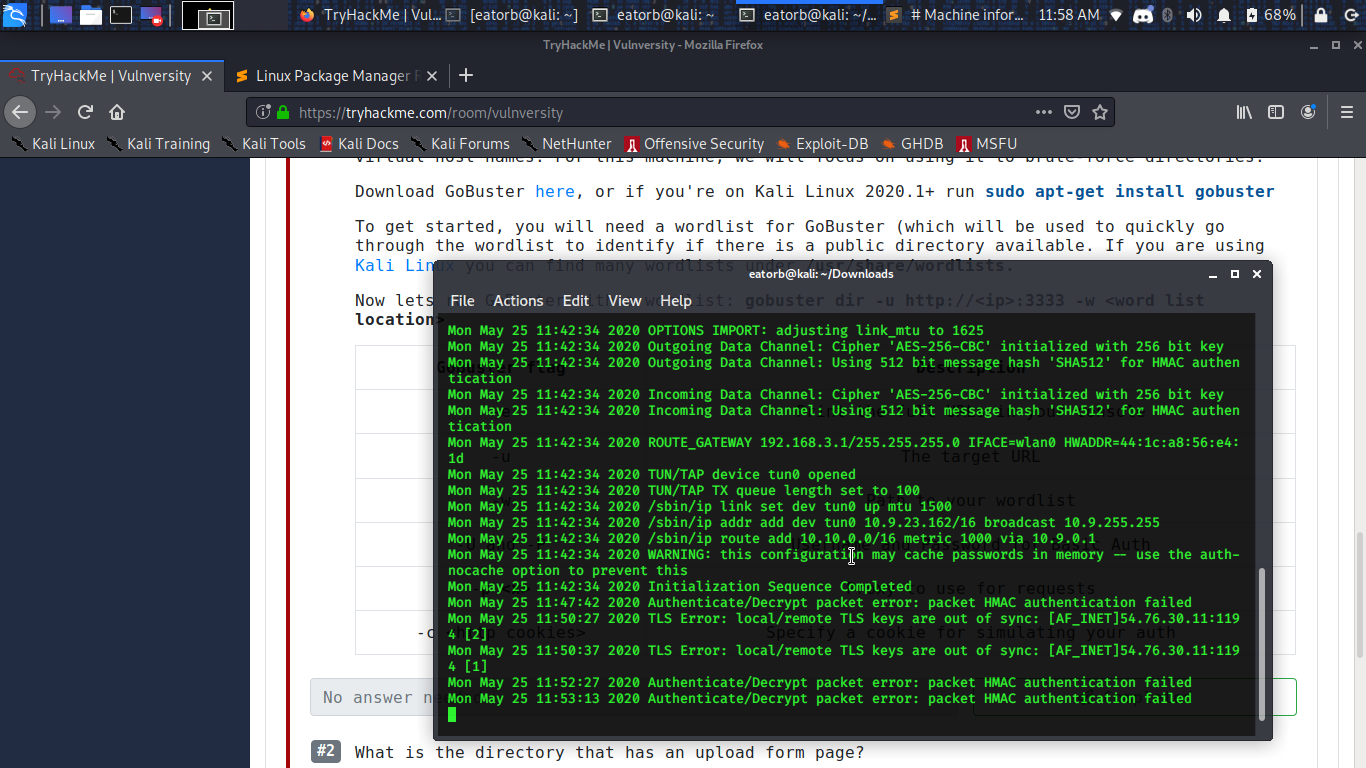 eager fulcrum
Reconnect
naive dust
alright
eager fulcrum
Sounds like you're asking for help
If you could be a little more specific, then we could try and sort it out for you
naive dust
vpn stop working yesterday , until now i can't connect it other vpn working fine
will send u the erro log
error
eager fulcrum
Send it here.
eager fulcrum
Check your system time.
eager fulcrum
Needs to be accurate within like a few seconds.
naive dust
SO ?
eager fulcrum
??
naive dust
what should i do bro
eager fulcrum
Fix your system time
Make sure you're not being blocked by your ISP
If you're in Egypt, you will be blocked.
naive dust
If you're in Egypt, you will be blocked.
@eager fulcrum why egypt blocked ?
eager fulcrum
Take it up with the Egyptian government
naive dust
xD
eager fulcrum
They block openvpn traffic
eager fulcrum
?
cobalt badger

The regressive Egyptian government has gone to great lengths to crack down on Internet Freedom. If you’re traveling through or living in that country,
try that
eager fulcrum
@naive dust TCP OpenVPN is coming soon to TryHackMe.
But for now, there is nothing you can do aside from complain at your government or try and get around it
I don't endorse breaking the law, so be careful
naive dust
okay thanks alot guys
 eternal shuttle
is it possible to setup my own VM with the same programs and stuff that you use in the courses?
barren birch
That's the normal way of doing it @eternal shuttle
Do you mean a pentesting VM, or a target VM?
eternal shuttle
a vm with kali linux like how the deployable one is on the website
eager fulcrum
Yes you can do that
barren birch
You can download the ISO from the Offensive Security website
Or a premade VM, if you don't fancy installing the ISO
Use it in something like VMware Player or VirtualBox
naive dust
Hi, i have a one small question, how long i should wait for email to re-password (forgot password)??
eager fulcrum
How long has it been?
naive dust
About 30min
eager fulcrum
Email support@tryhackme.com I guess
naive dust
But i dont understund why my current pass not work
eager fulcrum
Because it's not correct?
 tawny hare
Hi guys anyone knows about openvpn digital signature is unrecognized?
naive dust
4h earlier working fine
tawny hare
this is the error message
eager fulcrum
Show us the logs then
tawny hare
eager fulcrum
That's a different error
eager fulcrum
eager fulcrum
https://vpn.ac/knowledgebase/64/OpenVPN-Error-All-TAP-Windows-adapters-on-this-s...
Check the pins @tawny hare
eager fulcrum
Reinstall openvpn
eager fulcrum
You'll want to hack from a VM running on your system anyway
Installing tools on windows is bad
And that means you'll want to run the VPN from the VM
tawny hare
yes I was thinking to use linux from vm
tawny hare
thanks
eager fulcrum
I know it's a workaround.
 dry fern
Anyone have an issue with their in-browser kali machine where they were logged out to "REMOTE TRYHACKME" nd the creds supplied don't work?
dry fern
I've done that a few times and it re-deploys at the logon prompt
eager fulcrum
@deep trellis
naive dust
@eager fulcrum support@tryhackme.com? You sure? It's not like i don't believe you i want only confirm 😋
naive dust
I told you, i do not doubt i only confirm, twice 
eager fulcrum
Find information for yourself too.
If you don't want to trust what a mod says, then find the info
naive dust
As you say, thank for help 👍
eager fulcrum
If I lied, what difference is lying twice?
naive dust
If u told true, thet what A problem is to confirm that
naive dust
I will remember that 👍
dry fern
Ok, so I fixed it. Had to terminate, logout, close browser, clear cache, re-logon and then re-deploy. That worked
Maybe I was still logged somewhere in another tab or it was holding up in the browser cache. Anyways, appreciate the assist!
eager fulcrum
!multivpn
sharp bisonBOT
TryHackMe
• Step 1
Type ps aux | grep openvpn into your terminal and press enter
• Step 2
If there's more than one line (and the second doesn't have "grep" in it), do the following steps
• Step 3
Type killall openvpn into your terminal and press enter
• Step 4
Start the VPN with sudo openvpn <path-to-config>
From TryHackMe with ❤!
 gloomy hawk
Thank you
But shouldn't a VPN hide my public IP address
Why on the /access page it shows that I am not connected while I am
eager fulcrum
@gloomy hawk Access is bad, don't trust it.
Anonymising VPNs hide your public IP. This is a remote access VPN, like companies use. It also uses split tunnelling, so your web browsing goes via your normal route and not via thm
gloomy hawk
Ah thank you.
 frigid marlin
Hi helpful people,
I'm sitting here with my ubuntu, I've downloaded the USERNAME.opvn and added it to my VPN list(through GUI). I'm able to connect just fine, but I can't ping anything. I've tried different servers and regenerate 3 times. I don't have other VPN's active, beside my site2site (router to router).
frigid marlin
I just tried to get a log from /var/log/openvpn, but it's empty?
eager fulcrum
Output on the terminal then?
frigid marlin
I use GUI... Yes I feel ashamed.
eager fulcrum
Then the logs are available from the gui
frigid marlin
Found something, thanks to google: https://pastebin.com/62F72u2X
 frigid marlin
Hmm okay sorry 😦
gloomy hawk
Okay so I was doing a task and my SSH stopped responding, I terminated it and retrying to connect just timesout although i don't have more than one VPN running
eager fulcrum
Reconnect to the VPN
frigid marlin
I'm currently trying to use the terminal to connect. It for some reason now works. There must be something wrong with the way the OpenVPN gui does it. This is not a TryHackMe error. Sorry for the inconvenience, and thank s for your help Ninja
 earnest urchin
okay, so i did a the test room and it says im connected via vpn, but the result on a machine begs to differ.
had someone lese test it for me and they got i working so dont think my vpn is really working.
not quite sure where to go from here xD
I also tried switching VPN server, i also regenerated my configure file and redownloaded it.
 obsidian scaffold
@earnest urchin Where exactly are you hung up? Can't ping machine?
earnest urchin
i can nmap it but im not geting the result thats expected.
eager fulcrum
AKA you're not getting to nmap it
earnest urchin
i suppose.
obsidian scaffold
Well I'm pretty new but I'd guess that if your nmap gets anything other than "Host is down" then the VPN is working fine. Maybe verify the flags on nmap?
eager fulcrum
It's the VPN though
earnest urchin
it says host is up
eager fulcrum
Because you're losing the ACKs
earnest urchin
i get some info just not all. 😛
eager fulcrum
!multivpn
sharp bisonBOT
TryHackMe
• Step 1
Type ps aux | grep openvpn into your terminal and press enter
• Step 2
If there's more than one line (and the second doesn't have "grep" in it), do the following steps
• Step 3
Type killall openvpn into your terminal and press enter
• Step 4
Start the VPN with sudo openvpn <path-to-config>
From TryHackMe with ❤!
eager fulcrum
Connect to the VPN from one place with once process only
earnest urchin
oh...
i think i realized the issue.
or what could be the issue.
is it my host machine or virtual machine that nedes the vpn?
it would explain so muc hif its my virtual machine. because the tests i did if the website was working was on my host machine.
eager fulcrum
use the VPN on the VM
 prisma sparrow
I am having issues with openvpn. Refreshing the network information still gives a negative on the connection status
eager fulcrum
The access page should not be trusted
prisma sparrow
Okay, so even if my openvpn appears to be running smoothly, it might just be a problem with the network information thing?
eager fulcrum
If your VPN connection is working without issues, you're connected just fine
prisma sparrow
Okay, thanks. Im not supposed to run it with any options other than the config also?
prisma sparrow
Thanks man
 minor phoenix
hello
I cant see the join button on vulnersity
I have connected today
but the button doesnt pop up
is there anyone who can help me?
@eager fulcrum
barren birch
🍿
eager fulcrum
Please don't just tag mods when you need help.
minor phoenix
):
 zinc yoke
 barren birch
A rule for what?
minor phoenix
i have connected to vulnuniversity lab and I extended it couple times
but the join button doesnt come up
vpn is working fine
minor phoenix
yes but that was few hours ago
barren birch
Have you had that machine up for a few hours without doing anything with it?..
minor phoenix
now i want to do it again its not live and there is no ip
no i was having trouble
with burp suite
config
barren birch
Oh, go back to the first task and click Deploy
barren birch
Np 🙂
 flat sedge
How much data it(tryhackme wesite and hacking stuf) consumes?
I don't have broadband so i have to depend on mobile data.
supple sonnet
I'd imagine it highly depends
eager fulcrum
@flat sedge 100% depends what you're doing
flat sedge
2gb daily usege is enough for 1 or 2 daily task?
supple sonnet
it highly depends on the machine my guy
there could be a lot of scanning involved, or there could be a little bit of scanning
flat sedge
Ok another question, what should i use kali or parrot os?
supple sonnet
whatever you want
if you're concerned about bandwidth, THM's in browser Kali VM may be your best choice
flat sedge
I dont know How to set up ?
 patent nexus
im trying to connect to the tryhackme server but on the website im not connected
eager fulcrum
Don't trust the access page. Never trust the access page. @patent nexus
patent nexus
even if it says authetication failed?
eager fulcrum
That's not the access page
But you get authentication failures on sone packets because the VPNs are huge
patent nexus
right the access page is on the website it just has an x on it didnt know that i shouldnt trust it lmao
eager fulcrum
It kinda works
patent nexus
copy that lmao
eager fulcrum
!vpn
sharp bisonBOT
TryHackMe
Learn how to use OpenVPN to connect to our network!
From TryHackMe with ❤!
eager fulcrum
Room to test your vpn
patent nexus
what does it mean by flag on the deployed machine?
patent nexus
then i dont have to type anything for the answer?
 hearty bison
you have to type flag{stuff}
eager fulcrum
@patent nexus don't show flags
It's literally on the webpage though
Don't need to view source
patent nexus
sigh* im dumb