#site-support
1 messages · Page 32 of 1
 sterile tulip
 weary spindle
I think there is a problem with that, check out #1092490706385383524
sterile tulip
I dont have access to that
weary spindle
You can read the channel, just can't write.
 fiery inlet
can anyone teach me hacking
weary spindle
fiery inlet
can anyone teach me hacking
Have a read over #start-here
 polar bay
HI i am having trouble with my opevpn script. When I run the script i get an error that I am not connected to the internet
weary spindle
Is your VM connected to the internet?
weary spindle
polar bay
I am able to use discord right now to message
It's hard for any of us to tell if you're using Discord on your VM or host machine?
Can you take a screenshot of the VPN output please.
 weary spindle
In a separate window, can you ping 1.1.1.1?
 tribal burrow
1 or 10 ?
tribal burrow
ah that yea
polar bay
I get no output
tribal burrow
did you try regenerate vpn file?
weary spindle
polar bay
I get no output
Can you take a screenshot of the top right corner please?
 weary spindle
Can you turn right click the icon to the left of Discord, turn it off and back on again?
polar bay
done
weary spindle
Try re-connecting with the openVpn script.
What syntax are you using?
polar bay
sudo ~/Downloads/thm-troubleshoot
weary spindle
What about the VPN?
polar bay
sudo openvpn ~/Download/arcticm.ovpn
weary spindle
Try that again.
weary spindle
polar bay
sudo ~/Downloads/thm-troubleshoot
You might need to add ./ to the start of that
polar bay
should I kill all open vpn ? first
polar bay
i did, i still dont get the ip on the top left like when I normal connect to the vpn
top right
weary spindle
Because the VPN was failing before?
polar bay
Not sure what you mean

 hard wave
Hey Guys!
hard wave
I'm on Kali right now and can't install openvpn
weary spindle
hard wave
I'm on Kali right now and can't install openvpn
OpenVPN should already be installed.
hard wave
its not though
weary spindle
Are you sure?
hard wave
I'm sending a screenshot no
weary spindle
hard wave
I'm sending a screenshot no
You need to verify your THM account, to send screenshots.
!docs verify
 sharp bisonBOT

 TryHackMe
Verify your TryHackMe Profile!
From TryHackMe with ❤!
hard wave
!docs verify
sharp bisonBOT
TryHackMe
Verify your TryHackMe Profile!
From TryHackMe with ❤!
weary spindle
you need to follow the link.
 tropic gale
Why do I have this ?
 hard wave
 weary spindle
sudo apt-get install openvpn
Does that work?
hard wave


my system is up to date and the command doesn't work
is there anywhere else I can install openvpn form
from
hard wave

 digital dove
hi, im pretty new and im stuck on getting the ssh to work. it doesn't return anything and then after about a minute or so it times out and returns "connection closed by..."
im connecting using openvpn from my own virtual machine running parrotos
digital dove
okay worked it out, i was using two vpns 
 naive dust
How did you notice that? ps aux | grep openvpn?
tribal burrow
digital dove
okay worked it out, i was using two vpns <:facepalm:689626579500138554>
VPN stacking is no no good 🙂
naive dust
interesting
digital dove
naive dust
How did you notice that? ps aux | grep openvpn?
no i was running a vpn on my host and forgot about it
 opaque lagoon
More targeted at the UK folks, anyone had issues with using VPNs on Virgin Media broadband? Neither the THM VPN or the VPN to my home network are working at the minute and haven't been for a while now
is the results of trying to run the vpn
 bronze vale
opaque lagoon
More targeted at the UK folks, anyone had issues with using VPNs on Virgin Media...
bronze vale
opaque lagoon
More targeted at the UK folks, anyone had issues with using VPNs on Virgin Media...
Regenerate your VPN file
opaque lagoon
bronze vale
Regenerate your VPN file
Huh, fixed it. I'm not going to lie, given that my home vpn works on all but our virgin media network I just sort of assumed the issue was virgin when it happened with the thm one.
Thanks
 scenic torrentBOT
Gave +1 Rep to @bronze vale
bronze vale
opaque lagoon
Huh, fixed it. I'm not going to lie, given that my home vpn works on all but our...
Virgin does suck
opaque lagoon
I need to ring them up about it but I don't have an account number etc. because we don't manage the account. It's with virgin business and is managed by unihomes not us tenants
opaque lagoon
Yeah, going into the second year with this house 🙂
VPN stopped working out of nowhere and (the past two times I played with it) I got put on timeout or tripped our home server's fail2ban and got blacklisted either temporarily or until my dad unbanned me
Was a nightmare when fail2ban banned me bc I couldn't access the nextcloud server or my emails
bronze vale
If that’s your home VPN, I wouldn’t know
But your TryHackMe VPN there is an issue with your config, make sure to generate a new one or it won’t work in the next update
opaque lagoon
I think virgin is just blocking my vpn atm, pretty sure it's fine on everything else
bronze vale
Maybe

 hot venture
Anyone else able to access the Windows VM in https://tryhackme.com/room/sysmon ? The machine just loads and then i get a white screen. Or any windows-based VM for that matter.
 kindred violet
Guys
Can someone from the team help me reactivate my subscription? I’ve made the payment
 arctic phoenix
Hey everyone! In the Access page, under "Networks," it says I don't have access to any networks- however I'm currently in Wreath (trying to redownload the VPN file) and have completed Breaching AD.
Is there a reason why I'm not able to access the file?
Also is Wreath somehow subscriber-only or something? The reason I'm redownloading is because the OpenVPN file is not working.
 gloomy trellis
Anyone else having site performance issues on THM today?
 open otter
yup, haven't been able to launch a machine in almost 12 hours.
 thorny edge
yes, i am also experiencing long waits for machines to start, if they start at all. the website is also lagging when trying to complete questions
 elfin badger
it's 1 AM est, i'm experiencing site issues as well. A machine disconnect, questions lagging on completion, lag with site load. I'm guessing it's related to previous user's experience above.
 long elm
ls
weary spindle
arctic phoenix
Also is Wreath somehow subscriber-only or something? The reason I'm redownloadin...
Try leaving the room, then re joining.
 polar tide
thorny edge
yes, i am also experiencing long waits for machines to start, if they start at a...
polar tide
thorny edge
yes, i am also experiencing long waits for machines to start, if they start at a...
same here
 tall lantern
I can't even log in
 steep mesa
Hello all , do you experience some slow loading performance on tryhackme.com or is just me ?
 feral delta
steep mesa
Hello all , do you experience some slow loading performance on tryhackme.com or ...
feral delta
steep mesa
Hello all , do you experience some slow loading performance on tryhackme.com or ...
i also have that, its started from this morning.
everything is slow and glitching in icons and streaks
 gray oasis
steep mesa
Hello all , do you experience some slow loading performance on tryhackme.com or ...
gray oasis
steep mesa
Hello all , do you experience some slow loading performance on tryhackme.com or ...
I second this trouble. THM website is exhibiting moments of extreme slow performance and periods of time where images will not load.
Figured the tech gods were just trying to tell me to go to bed...
 coral crow
steep mesa
Hello all , do you experience some slow loading performance on tryhackme.com or ...
coral crow
steep mesa
Hello all , do you experience some slow loading performance on tryhackme.com or ...
yea pretty sur everyones getting it
naive dust
Is there a way to force reset a network room when I'm the only one there?
 fiery flame
#site-bugs message
Can someone help me with this
gray oasis
gray oasis
I second this trouble. THM website is exhibiting moments of extreme slow perform...
Oddly enough, I'm noticing THM running better over the THM OpenVPN connection.
Without OpenVPN up, THM site performance appears degraded...
weary spindle
gray oasis
Oddly enough, I'm noticing THM running better over the THM OpenVPN connection.
W...
VPN as no impact on your browsing.
 sweet jolt
i cant seem to open an openvpn connection on my kalipi "2023-05-13 14:07:37 ERROR: Cannot ioctl TUNSETIFF tun: Operation not permitted (errno=1)
2023-05-13 14:07:37 Exiting due to fatal error
"
how do i fix this?
weary spindle
Did you run it as sudo?
 proper onyx
Hi, fyi, website appears to be creaking. Not sure if it's me but scrolling the chat suggests not. Are you under attack or just super popular? (I guess it could be both!!)
From a behaviour perspective, some requests appear to get lost in space and timeout / spin indefinitely. Refresh seems to clear it. "Feels" like a load issue.
 elfin tide
Hey, i'm in Linux Fundamentals Part 1 but the virtual machine does not open, can anyone help?
 light vale
there seem to be some issues guys, maybe they are aware of it, give it a little time 🙂
 serene copper
Hello, Any ideas how to get the attack box back in the Jr. Penetration Tester - Intro to Offensive Security? Was there yesterday, not today.
gloomy trellis
They must have been having some problems. My daily activities wouldn’t show up on my public profile. I haven’t checked if they’re there today yet.
 solid path
Hello, I just got back back from 1 week vacantion and wanted to do the red team capstone challenge. Now it is blocked by a 7 day streak what is really frustrating. I'm a paying customer for years and in global top 100 what shows my commitment so I would really appriciate the possibility to start with this room. And if this really not possible, than at least keep it for a while so after the 7 day streak I can do this one.
 zinc trail
along also with the site issues , it says to me that my account is not renewed for this month and i can't resubscribe , and made sure with my issued card bank that the card is working fine and there is no issues with it .
~~since it is now more than 12 hours
please , any one from the mod team or admins or staff please , just make an announcement or something that you are might having some issues with the site and at least you are trying to fix it , just don't let your subscribers be in the dark not knowing what is happening.
at least if you are fixing the site , we don't load the site trying to connect and to give you some time to find the problem and fix it
thank you for your work~~
edit, found out the the pin and contacting support for it
 uneven wind
hi, so i can't join the Red Team Capstone Challenge because i currently have 0 streak but i already have the 365 streak badge so does your current streak need to be 7 to join?
also the verify bot seem to be broken for me
 dense bramble
uneven wind
hi, so i can't join the Red Team Capstone Challenge because i currently have 0 s...
dense bramble
uneven wind
hi, so i can't join the Red Team Capstone Challenge because i currently have 0 s...
Yes, the current streak needs to be 7 or more
There's time to build the streak and attempt the network
 limpid mountain
sweet jolt
i cant seem to open an openvpn connection on my kalipi "2023-05-13 14:07:37 ERRO...
limpid mountain
sweet jolt
i cant seem to open an openvpn connection on my kalipi "2023-05-13 14:07:37 ERRO...
I'm getting the same error message.
weary spindle
limpid mountain
I'm getting the same error message.
Are you running it as sudo?
limpid mountain
weary spindle
Are you running it as sudo?
yes
naive dust
What's the password for attackbox root account? One task needs me to use remmina.
dense bramble
naive dust
What's the password for attackbox root account? One task needs me to use remmina...
Click on the i in the bottom left corner, it'll tell you
naive dust
dense bramble
Click on the `i` in the bottom left corner, it'll tell you
Thanks. I'm in fullscreen mode and didn't see that bar.
scenic torrentBOT
Gave +1 Rep to @dense bramble
dense bramble
You're welcome 🙂
 zealous yoke
naive dust
What's the password for attackbox root account? One task needs me to use remmina...
zealous yoke
naive dust
What's the password for attackbox root account? One task needs me to use remmina...
hi, the password for the keyring which is what remmina is asking will be different from the password that is randomly generated for the AttackBox (from the i button as arth0s helpfully suggested). This is a bug I'm working on fixing. You can just dismiss the pop-up for the time being 🙂
gray oasis
weary spindle
VPN as no impact on your browsing.
Its strange but just sharing what I'm noticing. When the OpenVPN THM circuit is online from inside my Kali VM the THM website seems to be performing better vs without OpenVPN connection... 🤷🏻♂️
Correction: Kali running locally in Hyper-V
 winter nymph
Hi everyone is this a help section ?
weary spindle
winter nymph
Hi everyone is this a help section ?
For TryHackMe support, yes
limpid mountain
My AttackBox is always loading super slow. I have several assignments I need to complete asap because this is for a class and this is really hindering my ability to get things done. Are there any mods or staff that can troubleshoot with me now?
winter nymph
Oh sorry and where can i found the help section for help in os ?
weary spindle
limpid mountain
My AttackBox is always loading super slow. I have several assignments I need to ...
Are you ok the educational plan?
limpid mountain
weary spindle
Are you ok the educational plan?
I’m not sure exactly what the school has signed me up for, but it’s supposed to be a premium account.
gray oasis
limpid mountain
My AttackBox is always loading super slow. I have several assignments I need to ...
Ever tried to setup an attack box on your machine in Hyper-V and then use OpenVPN to connect to THM network?
limpid mountain
gray oasis
Ever tried to setup an attack box on your machine in Hyper-V and then use OpenVP...
I'm not sure what Hyper-V is, but am not opposed to trying if you could give me a few instructions on how to do that
 kindred spindle
is there any way for Red Team capstone challenge i have some technical error is there any way to solve this when i resister using ssh for the e-citizen the username is has an issue can any one help me
weary spindle
kindred spindle
is there any way for Red Team capstone challenge i have some technical error is ...
Have you tried a different user name? 👀
kindred spindle
no
gray oasis
limpid mountain
I'm not sure what Hyper-V is, but am not opposed to trying if you could give me ...
This depends on your local operating system. If your running Windows 11 then you already have access to Hyper-V and the ability to deploy Ubuntu with Enhanced Session support via the "Quick Create" wizard that will provide seamless copy/paste from VM to host.
This will get you started with Hyper-V:
https://techcommunity.microsoft.com/t5/educator-developer-blog/step-by-step-enabling-hyper-v-for-use-on-windows-11/ba-p/3745905
This will walk you through deploying Ubuntu:
https://www.thewindowsclub.com/how-to-install-linux-ubuntu-on-hyper-v-in-windows

TECHCOMMUNITY.MICROSOFT.COM
Hyper-V is a virtualization technology that is as valuable to college and university students as it is to developers and system administrators. Students can run many operating systems and apps on a single physical machine using Hyper-V virtual machines. This can be especially useful for computer sci...

The Windows Club
Learn how to install Linux Ubuntu on Hyper-V in Windows 11/10. Create a virtual network switch to install Ubuntu on Hyper-V.
limpid mountain
gray oasis
This depends on your local operating system. If your running Windows 11 then you...
will this work for windows 10?
oh forget it I see that the second link says win 10
thanks
gray oasis
limpid mountain
will this work for windows 10?
YES, as long as your fully up to date
gray oasis
You can also deploy Kali with a bit more elbow geese...
limpid mountain
gray oasis
You can also deploy Kali with a bit more elbow geese...
I tried this already
gray oasis
I would advise you to get the VM setup the way you like it, then shut it down, take a Checkpoint/snapshot in time of your VM, then boot the VM, and GO WILD.
Then when you're finished, shut it down, and apply the Checkpoint reverting any undesirable system changes, giving you a clean slate again.
 sterile bobcat
My room host is asking for a passwords on Linux fundamentals, i guess there is still issues right?
linuxfundpart1v1
 thorny steeple
hello i have a bug in room , i dont have picture , can u help me ? , on the other rooms i have the images
OWASP Juice Shop
 ebon thistle
Any idea why I can't purchase a premium account? Tried 2 cards and both said they were declined by the bank. Called the bank and they do not see anything coming through. Tried another browser, same thing. Something wrong w/ the payment system? Wanted to start some training this weekend.
 winter solstice
ebon thistle
Any idea why I can't purchase a premium account? Tried 2 cards and both said the...
winter solstice
ebon thistle
Any idea why I can't purchase a premium account? Tried 2 cards and both said the...
Kindly check Pinned Messages 📌
winter solstice
thorny steeple
hello i have a bug in room , i dont have picture , can u help me ? , on the oth...
!docs verify
So, that you can attach images here and describe your issue
sharp bisonBOT
TryHackMe
That topic does not exist!
Use !docs to list all of the available topics.
From TryHackMe with ❤!
ebon thistle
winter solstice
Kindly check Pinned Messages 📌
Thanks!!
scenic torrentBOT
Gave +1 Rep to @winter solstice
thorny steeple
!docs
sharp bisonBOT
TryHackMe
Here are all of the possible topics!
!docs url
Visit the help site
!docs verify
Learn how to sync your THM profile to Discord
!docs student
Learn about our student discount programme
!docs levels
View all the TryHackMe levels & point requirements
!docs room-creation
Get started with making TryHackMe room
!docs room-review
Learn about the TryHackMe room review process
!docs api
Read about the TryHackMe API
!docs koth
How to play TryHackMe's King of the Hill (KoTH)
!docs free-path
What rooms should you do? A free guide for beginners
!docs bug-bounty
Learn about TryHackMe's Bug Bounty Programme!
From TryHackMe with ❤!
thorny steeple
!docs url
sharp bisonBOT
thorny steeple
!docs verify
sharp bisonBOT
TryHackMe
Verify your TryHackMe Profile!
From TryHackMe with ❤!
thorny steeple
thorny steeple
hello i have a bug in room , i dont have picture , can u help me ? , on the oth...
ad block is disable

 fierce vine
!docs verify
sharp bisonBOT
TryHackMe
Verify your TryHackMe Profile!
From TryHackMe with ❤!
 crystal trail
uhhm running into an issue where the attackbox is just not loading it refuses to load up whenever I click start
 ivory spruce
thorny steeple
ad block is disable
ivory spruce
thorny steeple
ad block is disable
Can you copy the link to the image and try browsing to it? It may be getting blocked by something (e.g., your ISP, security policy on your machine, etc.).
 ivory spruce
I meant copying the link and pasting it on your browser.
thorny steeple
yes i copying the link and i have a error message : *the image cannot be displayed because it contains errors
thorny steeple
it's work if I use a vpn
 graceful moat
!docs verify
sharp bisonBOT
TryHackMe
Verify your TryHackMe Profile!
From TryHackMe with ❤!
bronze vale
naive dust
can someone help me out with VM issues? I can connect to rooms via http but not ssh or ping

attackbox is working tho
winter solstice
naive dust
can someone help me out with VM issues? I can connect to rooms via http but not ...
In your VM settings, could you please check whether the network is set to NAT or Bridged? Also, is the VPN connected?
naive dust
winter solstice
In your VM settings, could you please check whether the network is set to NAT or...
vpn is connected. im running bridged
i've also regenerated the vpn conf
winter solstice
naive dust
vpn is connected. im running bridged
Sorry, I am not sure why it was happening. Could you please check the output of the command 'ps aux | grep vpn'?
Maybe multiple vpns can cause this issue
naive dust
yeah, i do see multiple vpn's with different pids
winter solstice
Then run sudo killall vpn. It will kill all instances and you can try to connect to vpn and try ping the ip address
naive dust
winter solstice
Then run sudo killall vpn. It will kill all instances and you can try to connect...
for whatever reason that worked. thanks
i'm thinking sometimes if i pause my vm that could mess w the settings
winter solstice
Np. Anytime 🙂
Yeah, it happens. Also, please check if there are any other processes (PIDs) of the VPN running if you encounter the above issue in the future
 fleet dragon
Hey, can we change our edu mail into normal gmail after subscribing . For eg if i subscribe with edu email and after subscribing, can i change . edu email into normal email ?
 glacial anvil
hi i cannot access application (port 8888) in owasp top 10 room
 frank quiver
!docs url
sharp bisonBOT
frank quiver
Hello ^^ I still get the problem with the mtu and I cannot connect to thm network. I tried to regenerate it, change the server and even unistall/re-install openvpn. Can someone help me find the solution. (Please @ me)
 fleet dragon
Hey, can we change our edu mail into normal gmail after subscribing . For eg if ...
fleet dragon
fleet dragon
Hey, can we change our edu mail into normal gmail after subscribing . For eg if ...
Jabba please tell
zealous yoke
fleet dragon
Hey, can we change our edu mail into normal gmail after subscribing . For eg if ...
you can, but you'll lose the student discount
 willow bough
I completed the vulnversity room, but it shows as incomplete
 fleet dragon
zealous yoke
you can, but you'll lose the student discount
fleet dragon
zealous yoke
you can, but you'll lose the student discount
But i will already pay with . edu mail and then i will change email so how will i lose student discount
zealous yoke
Because your account needs to use a .edu/student email for the student discount to be applied
if you're not using the .edu/student email, you're not going to be eligible for the student discount
 versed owl
willow bough
I completed the vulnversity room, but it shows as incomplete
versed owl
willow bough
I completed the vulnversity room, but it shows as incomplete
i have the same bug
versed owl
 chilly pike
THM is aware 🙏
chilly pike
THM is aware 🙏

fleet dragon
zealous yoke
Because your account needs to use a .edu/student email for the student discount ...
I will login with student email id that is .edu domain and then i will purchase subscription with 20% off and after that can i change my account email ? From edu to normal gmail
zealous yoke
Yes, but again, you're going to lose the student discount when you next purchase a subscription
fleet dragon
Means after a year right
zealous yoke
if you purchase a year then yup 🙂
fleet dragon
I will purchase annual subscription so i will lose discount after 15 months right ?
Thanks Ben you cleared my doubt going to buy annual subscription
zealous yoke
fleet dragon
I will purchase annual subscription so i will lose discount after 15 months righ...
I believe so 🙂
zealous yoke
fleet dragon
Thanks Ben you cleared my doubt going to buy annual subscription
no worries!
 chilly kiln
hello
i have a problem with the machine provided by the website.
whenever i try starting the machine in windows fundamentals 1 it just shows a white screen
 trim stream
frank quiver
Hello ^^ I still get the problem with the mtu and I cannot connect to thm networ...
trim stream
frank quiver
Hello ^^ I still get the problem with the mtu and I cannot connect to thm networ...
been troubled by this problem for more than 2 weeks, please let me know if you solve it 🥹
I have question, Can I see content of fully completed "only with subscription" rooms if I will not pay for next month?
 deep iris
Hello there, I'm on the room "Lateral Movement and Pivoting" Task 3 "Spawning Processes Remotely". I have done everything, I'm connected as "t1_leonard.summers" but when i run the "Flag.exe" in the desktop it says "Sorry! You are still missing something. No flag for you yet. (7)".
Can i get some help pls ?
 exotic dove
frank quiver
Hello ^^ I still get the problem with the mtu and I cannot connect to thm networ...
exotic dove
frank quiver
Hello ^^ I still get the problem with the mtu and I cannot connect to thm networ...
and @trim stream does the vpn and rooms work regardless of the vpnscript error?
you can also try setting the MTU manually then rerun the vpnscript OR just run the vpn itself and see if you're connected to THM network (unless you've already tried)
cmd 1: sudo ip link set dev tun0 mtu 1500 then rerun vpnscript and try vpn file even if it errors
cmd 2: sudo ip link set dev tun0 mtu 1200 then rerun vpnscript and try vpn file even if it errors
if none worked try again after regenerating the vpn files from /access endpoint
also are you sure you have no internet issues/closed ports/firewalls blocking?
exotic dove
deep iris
Hello there, I'm on the room "Lateral Movement and Pivoting" Task 3 "Spawning Pr...
#room-help please
deep iris
exotic dove
<#522158539129618453> please
sorry
exotic dove
No worries :)
trim stream
- I am sure, I don't have any internet issues
2."does the vpn and rooms work regardless of the vpnscript error?" - rooms can be completed with AtackBox, but I'd like to use own machine - If you remember we tried to solve it before with manually setting the MTU, but it did not solve the problem
trim stream
exotic dove
and <@1106076955729739808> does the vpn and rooms work regardless of the vpnscri...
.
exotic dove
trim stream
1. I am sure, I don't have any internet issues
2."does the vpn and rooms work r...
Yea I remember we tried solving it manually with the MTU commands sadly it didn't work :
About 2. I meant can you run the vpn file (not the script) and access rooms (no using AttackBox)?
Have you tried different vpn servers? regenerating?
trim stream
exotic dove
Yea I remember we tried solving it manually with the MTU commands sadly it didn'...
- unfortunately no, getting same errors (showed in screenshot)
Have you tried different vpn servers? regenerating? - yes a lot of times
 exotic dove
do you have another device to test the file on? to make sure if it's from your network or device
One of the most common problems in setting up OpenVPN is that the two OpenVPN daemons on either side of the connection are unable to establish a TCP or UDP
I doubt it's MTU, it's just the servers can't connect to (as you mentioned you can't ping)
the script just can't ping with any MTU value while testing the mtu so it says it's an MTU issue but it's not
I am pretty sure the port is filtered out
 remote stratus
I seems there is a system-level issue right now.
I cannot start VPN to euro VIP as well as to Wreath network
it just happened like 30 minutes ago
does anyone have any idea?
exotic dove
sharp bisonBOT
TryHackMe
Contact us for support, teaching enquires and more!
From TryHackMe with ❤!
exotic dove
@split isle
 bold quiver
Any1 know how to fix the issue with openvpn 2.6.1-1 now ....data-ciphers already added but still wont connect
exotic dove
bold quiver
Any1 know how to fix the issue with openvpn 2.6.1-1 now ....data-ciphers already...
!vpnscript
sharp bisonBOT
TryHackMe
Use our VPN troubleshooting script to diagnose common issues!

From TryHackMe with ❤!
bold quiver
Ive tried avery server multiple reconfigures added fallback yet nothing connects ...after adding data-cipher ..getting compression warning etc...then exit code 3
exotic dove
put your ovpn file in the same dir as the this script and run the script
bold quiver
Kk
 bold quiver
....omg tun0 wasnt up 🤦...thanks yo much obliged @exotic dove
weary spindle
 pulsar trench
Can you take a screenshot of the full output please.
exotic dove
bold quiver
....omg tun0 wasnt up 🤦...thanks yo much obliged <@209720683809210368>
You're welcome 😉
 weary spindle
pulsar trench
weary spindle
pulsar trench
What syntax are you using?
pulsar trench
weary spindle
What syntax are you using?
sudo openvpn user.ovpn
weary spindle
pulsar trench
sudo openvpn user.ovpn
Can you nano your file and take a screenshot?
pulsar trench
sure sec
pulsar trench
weary spindle
Can you nano your file and take a screenshot?
 weary spindle
Are you able to regen your VPN and try again?
pulsar trench
weary spindle
Are you able to regen your VPN and try again?
i tried , no thing happen'
pulsar trench
weary spindle
Are you able to regen your VPN and try again?
 weary spindle
You look connected?
Can you do anything? (nmap etc)
pulsar trench
no
pulsar trench
weary spindle
And count how many tun* you have?
tun0
pulsar trench
weary spindle
And count how many tun* you have?
when connect to openvpn it seem there are 2
tun 0 and tun 1
 winter solstice
ps aux | grep vpn
Check the number of pid running. If it was more than 2
Then sudo killall vpn and try connecting to vpn
pulsar trench
winter solstice
`ps aux | grep vpn`
Check the number of pid running. If it was more than 2
Then ...

 pulsar trench
winter solstice
`ps aux | grep vpn`
Check the number of pid running. If it was more than 2
Then ...
pulsar trench
winter solstice
`ps aux | grep vpn`
Check the number of pid running. If it was more than 2
Then ...
same error 🙂
winter solstice
Vm network bridged or NAT?
pulsar trench
winter solstice
Vm network bridged or NAT?
bridge
weary spindle
winter solstice
Vm network bridged or NAT?
Why would that make a difference?
pulsar trench
weary spindle
Why would that make a difference?
+1
winter solstice
I don't know the correct explanation. But, I heard that the bridged network connects directly whereas nat seperate or isolates the network which makes it complex during vpn connection. Because I ran into this issue 2 years ago.
weary spindle
Bridged exposes your VM on the network.
winter solstice
Sorry, if I didn't explain correctly
weary spindle
It will still run a tunnel to THM.
winter solstice
pulsar trench
same error 🙂
Sorry, I don't know if maybe your connected network is blocking it. Could you please try connecting to a different network?
pulsar trench
winter solstice
Sorry, I don't know if maybe your connected network is blocking it. Could you pl...
wait i will check something

 weary spindle
Yup
pulsar trench
weary spindle
Yup
 weary spindle
Is your VM set to the correct time?
pulsar trench
i change it now
weary spindle
from me.
pulsar trench
 weary spindle
Can you do ip a s again for me please.
pulsar trench
i was open it in the morning no issues
then i go for 2 hours and now it not work
just tun 0 is up
weary spindle
Are there any others?
pulsar trench
yup eth 0
docker
lo
weary spindle
They're ok.
 weary spindle
Can you do ip route ?
 weary spindle
Have you tried restarting your VM?

 pulsar trench
weary spindle
That's working.
pulsar trench
weary spindle
That's working.
i know it should appear initilization success
 weary spindle
It does
 pulsar trench
its work!
weary spindle
Excellent!
Happy Hacking!
pulsar trench
how ?😂🥲💔💔💔💔💔💔💔💔
weary spindle
No idea, Let's blame DNS
pulsar trench
💔😂😂😂
thanks 🤍🤍🤍🤍
naive dust
@weary spindle can i ask for help too?😢
weary spindle
naive dust
<@958383130102870026> can i ask for help too?😢
Post here, I'm about to head out, I'll try check when I can, if not, someone else will help. 🙂
pulsar trench
weary spindle
Post here, I'm about to head out, I'll try check when I can, if not, someone els...
you are awesome
weary spindle
Unless it's quick.
weary spindle
pulsar trench
you are awesome
You're too kind, thank you.
scenic torrentBOT
Gave +1 Rep to @pulsar trench
naive dust
weary spindle
Post here, I'm about to head out, I'll try check when I can, if not, someone els...
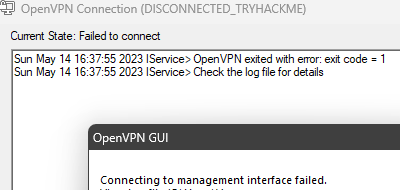
i'm having this error on windows
weary spindle
naive dust
https://i.imgur.com/Q6P5vdg.png
Is Windows your host?
naive dust
ok, i will try on a VM
weary spindle
If you need to use a windows for a room.
Use Remmina in Kali.
naive dust
weary spindle
If you need to use a windows for a room.
Use `Remmina` in Kali.
i will check that! Thank you!
scenic torrentBOT
Gave +1 Rep to @weary spindle
pulsar trench
i want to know how that happen ?
 weary spindle
That's what I use and it's one of the best RDP in IMo
naive dust
another dumb question, how can i shutdown a vpn connection of openvpn?
weary spindle
naive dust
another dumb question, how can i shutdown a vpn connection of openvpn?
On Kali or Windows?
naive dust
weary spindle
On Kali or Windows?
kali
weary spindle
naive dust
kali
sudo killall openvpn -9
 viral schooner
Hello ! i think i have a problem with version of ssl compared to the machine and i don't know how to fix it... Can someone help plz? Thanks 🙂
 weary spindle
Did you chmod it?
 tribal mason
can you check the id_rsa file whether it's fine or not
weary spindle
viral schooner
chmod 600
And did you get passphrase for it?
 naive dust
Alright, so I've been trying to get through the Linux Privilege Escalation room for the last 90 minutes and every 15 minutes, sometimes less, the machine expires. I thought it was just my instance from last night. But it's happening today too, after everything has been closed out, vpn restarted, all that
tribal mason
naive dust
Alright, so I've been trying to get through the Linux Privilege Escalation room ...
I suppose you click extend but It doesn't?
You can try refreshing the page before extending it
naive dust
sometimes it doesn't warn me it just end
tribal mason
naive dust
sometimes it doesn't warn me it just end
yeah sometimes javascript goes buggy
tribal mason
naive dust
That's the answer? sometimes javascript goes buggy?
perhaps
I'm sure they will fix it if something is wrong on the server side
If you feel something is wrong feel free to ask
naive dust
Just for the sake of someone seeing the issue in play
Here's the machine telling me it's going to expire soon, after 4 minutes of being up
And a screenshot of the site telling me I can't extend after such a short period of time

 tribal mason
Yeah try refreshing the page
If It happens again
(Also try clearing your cache as well)
limpid mountain
Wondering why it’s showing it’s disconnected? How can I resolve it?
 tribal mason
limpid mountain
Wondering why it’s showing it’s disconnected? How can I resolve it?
tribal mason
limpid mountain
Wondering why it’s showing it’s disconnected? How can I resolve it?
did you connect to the vpn correctly?
 misty field
 limpid mountain
tribal mason
did you connect to the vpn correctly?
limpid mountain
tribal mason
did you connect to the vpn correctly?
I’ve never had to connect through vpn before. But if this is the issue, how do I fix it?
tribal mason
limpid mountain
I’ve never had to connect through vpn before. But if this is the issue, how do I...
take a look at openvpn room (sorry im on phone hence I couldnt link it)
zealous yoke
!vpn
sharp bisonBOT
TryHackMe
Learn how to use OpenVPN to connect to our network!
From TryHackMe with ❤!
limpid mountain
tribal mason
take a look at openvpn room (sorry im on phone hence I couldnt link it)
Ok I’ll try there too but I have tried connecting with Openvpn and still having the same issues
tribal mason
limpid mountain
Ok I’ll try there too but I have tried connecting with Openvpn and still having ...
what is the updated issue?
limpid mountain
tribal mason
what is the updated issue?
It says it’s connected but then I try to put the ip address from THM into a browser and web page doesn’t load
tribal mason
limpid mountain
It says it’s connected but then I try to put the ip address from THM into a brow...
Can you access http://10.10.10.10/ while you are connected to the VPN?
limpid mountain
tribal mason
Can you access `http://10.10.10.10/` while you are connected to the VPN?
Yes and nothing loaded
tribal mason
limpid mountain
Yes and nothing loaded
Can you share your openvpn output?
limpid mountain
I will share when I get back home.
tribal mason
Okay, you can try openvpn troubleshooting script if you can't find me around
!vpnscript
sharp bisonBOT
TryHackMe
Use our VPN troubleshooting script to diagnose common issues!
From TryHackMe with ❤!
limpid mountain
sharp bison
Thank you I will try this and hopefully it works 🙏
naive dust
I am unable to access a machine(Wonderland) I am connected to the VPN and it confirms that on the access page


I used the troubleshoot script and this is the output
 ivory spruce
What do you mean when you say 'access'? Did you put the IP address in your browser?
naive dust
ivory spruce
What do you mean when you say 'access'? Did you put the IP address in your brows...
I tried pinging it, and using curl too, it times out
Oh it works now, it updated the cipher switch
naive dust
tribal mason
Yeah try refreshing the page
this did the job. It would appear that my snarkiness was unnecessary. Next time I'll do my best to exhaust my resources, before complaining
 signal junco
I am still getting an incomplete room in Vulnversity despite completing all the tasks
 random lion
my card kept declining and i was unable to make my monthly payment. i emailed support and haven’t gotten a response. now my subscription is cancelled and i have to pay $14 instead of $10 that i was supposed to be paying until october…..
dense bramble
signal junco
I am still getting an incomplete room in Vulnversity despite completing all the ...
It's a known bug #1092490706385383524
dense bramble
random lion
my card kept declining and i was unable to make my monthly payment. i emailed su...
When did you email?
random lion
dense bramble
When did you email?
either yesterday morning or the day before
dense bramble
random lion
either yesterday morning or the day before
It's the weekend
Please allow up to 3 days for support to respond, and they might currently be flooded with emails because of the new release
limpid mountain
tribal mason
Okay, you can try openvpn troubleshooting script if you can't find me around
Hey, just wondering if you are available rn? I just got home and have a question
Does anyone know what I do from here? Trying to run troubleshooting script in Kali
 dense bramble
limpid mountain
Does anyone know what I do from here? Trying to run troubleshooting script in Ka...
dense bramble
limpid mountain
Does anyone know what I do from here? Trying to run troubleshooting script in Ka...
it's asking for the path to your .ovpn file
limpid mountain
I put in my username.ovpn- but said config not located
Is it asking for the file config that should be downloaded from here? Because I’ve done that
 dense bramble
is it in the same directory?
limpid mountain
It’s in my downloads folder, yes
dense bramble
you're running the file from the home directory though
so the path you specify would be ~/Downloads/username.ovpn
limpid mountain
I tried that as well and still saying Config not located
dense bramble
try changing to the Downloads directory and running the script from there
limpid mountain
Sorry, I don’t know what you mean. Is that what I just did with the ~Downloads/username.ovpn?
dense bramble
I mean to do cd Downloads and then sudo ./thm-troubleshoot
limpid mountain
Just to make sure I’m understanding correctly: you’re saying that after it asks me to “enter the path to my config,” I type in “CD Downloads”, or are you saying I do that before typing in the first “chmod +X…” ?
Ok this is what I’m getting now

I’ve already tried regenerating the OpenVpn config, and I know for sure my system time is correct.
Not sure what the second option is asking though
dense bramble
limpid mountain
Is it asking for the file config that should be downloaded from here? Because I’...
it means when you go to this page, switch to a different VPN server, then back to the one you normally use and regenerate then
can you type in ip a s in the terminal and tell me how many tun* you have
 tawny aurora
@dense bramble do you know anything about troubleshooting on windows?
limpid mountain
This is what it says
 dense bramble
tawny aurora
<@752921660834709594> do you know anything about troubleshooting on windows?
dense bramble
tawny aurora
<@752921660834709594> do you know anything about troubleshooting on windows?
Unfortunately no, I've never used OpenVPN on Windows
tawny aurora
dense bramble
Unfortunately no, I've never used OpenVPN on Windows
Is Linux the recommended way to use OpenVPN?
limpid mountain
dense bramble
What if you run the script while you're trying to connect with the VPN
I can try that. What steps would I have to take to do that?
dense bramble
tawny aurora
Is Linux the recommended way to use OpenVPN?
Yes, Linux running in a virtual machine, it's not recommended to use your host OS
 dense bramble
limpid mountain
I can try that. What steps would I have to take to do that?
dense bramble
limpid mountain
I can try that. What steps would I have to take to do that?
No, there's nothing to set up there, all you need to do to connect is run sudo openvpn filename.ovpn
tawny aurora
dense bramble
Yes, Linux running in a virtual machine, it's not recommended to use your host O...
What would you recommend, ubuntu?
dense bramble
tawny aurora
What would you recommend, ubuntu?
I use Kali Linux, most of the tools come pre-installed there, the AttackBox runs Ubuntu and you could too, but you would have to spend a lot of time just installing tools
limpid mountain
dense bramble
No, there's nothing to set up there, all you need to do to connect is run `sudo ...
Ok. I’m super new to all this and really appreciate your help! Can you explain how to connect to the vpn? I’m assuming I would already need to have saved it somehow from somewhere (OpenVpn?)
dense bramble
limpid mountain
Is it asking for the file config that should be downloaded from here? Because I’...
You downloaded your file from here, no?
That's the file you run with the command above
limpid mountain
Ok thanks! I think I might be getting somewhere now…is it supposed to say this?
 dense bramble
limpid mountain
Ok thanks! I think I might be getting somewhere now…is it supposed to say this?
dense bramble
limpid mountain
Ok thanks! I think I might be getting somewhere now…is it supposed to say this?
Yes, and does it say Initialization Sequence Completed at the very end?
limpid mountain
That’s everything it says. At the beginning it says something about “cipher not set”. Is this maybe the issue?
 dense bramble
No, that part is fine there's nothing else, it seems by the image that you can scroll further down?
this is what the rest of the output would be
 limpid mountain
This is the very end
 dense bramble
I mean to do `cd Downloads` and then `sudo ./thm-troubleshoot`
dense bramble
dense bramble
I mean to do `cd Downloads` and then `sudo ./thm-troubleshoot`
okay, yeah, that's not working properly, go to the second terminal and try this now while the vpn is running
limpid mountain
Ok trying now
I got the Initialization Sequence Complete message. So this means I should be able to connect to THM from here now?
dense bramble
great!
you are connected now
you will be able to interact with any machines you start in rooms
limpid mountain
Ok awesome! And when you say interact with the machines I start in the rooms, I just need to enter the rooms ip address into the Kali terminal and work from there?
Just want to make sure I’m doing things properly
dense bramble
depends on what the rooms are teaching you, you can ping them using their IP, scan them with nmap, visit a website by the IP if there is one running
limpid mountain
Ok I see. I was doing the nmap and Network Services rooms. Trying to ping rn just to make sure it’s working. It’s taking a bit of time …is that normal?
 limpid mountain
Ok good! Looks like it connected just fine. Thanks so much for your help! So can I just delete the openvpn stuff since I can run this in my vm now?
dense bramble
if you just do ping IP, it does that indefinitely, you can do ping -c 4 IP (or any other number) to specify how many times to ping the machine so it doesn't do it endlessly
dense bramble
limpid mountain
Ok good! Looks like it connected just fine. Thanks so much for your help! So can...
you can remove the troubleshoot script if you want, but you will need your .ovpn file to connect
limpid mountain
Ok got it. Thanks again!
dense bramble
you're welcome 🙂
tawny aurora
How do I disconnect from the VPN on Linux?
I am running into an issue where I have the green checkmark which shows I am connected; however, I cannot connect to the link I am trying to access.
 faint sequoia
tawny aurora
How do I disconnect from the VPN on Linux?
I am running into an issue where I ha...
faint sequoia
tawny aurora
How do I disconnect from the VPN on Linux?
I am running into an issue where I ha...
ctrl+c in the window where the vpn is running, or sudo killall openvpn
naive dust
Lol waiting for ping to end is top tier beginner stuff. I can vaguely remember wondering the same thing
tawny aurora
@faint sequoia Could you help me with my other issue?
faint sequoia
tawny aurora
<@270179723416436738> Could you help me with my other issue?
can you be a bit more specific, are you trying to access a link hosted on the target machine or?
 oblique meadow
Hi, is there a way to verify account/get access to the advanced chat?
faint sequoia
oblique meadow
Hi, is there a way to verify account/get access to the advanced chat?
you're already verified, you get access at lv13 (0xD) or if you have certain certs
tawny aurora
I'm currently going through the OpenVPN room. I am on task 6 where I am supposed to check if I am connected. Currently I believe that I am. When I start the VPN I get "Initialization Sequence Completed." When I try to access 10.10.10.10 it gets stuck on loading. When I try to access http://MACHINE_IP I get "Server Not Found"
Here is my terminal window
 faint sequoia
tawny aurora
I'm currently going through the OpenVPN room. I am on task 6 where I am supposed...
faint sequoia
tawny aurora
I'm currently going through the OpenVPN room. I am on task 6 where I am supposed...
the link is meant have the ip address of the machine, you need to start the machine from the green start machine button on the task
tawny aurora
This one?
 faint sequoia
yeah
tawny aurora
This is what pops up:
 tawny aurora
I'm going to regenerate my config file and try again. No
faint sequoia
oh you need to be connected first
you can also check connectivity by pinging 10.10.10.10 if there's no packet loss then you're good
tawny aurora
yeah I just tried to ping it, there was 100% packet loss
faint sequoia
with the vpn running?
tawny aurora
yeah
sharp bisonBOT
TryHackMe
Use our VPN troubleshooting script to diagnose common issues!
From TryHackMe with ❤!
faint sequoia
try running that
tawny aurora
The .ovpn file is the config file right?
naive dust
Yeh
tawny aurora
This is where I have the two files:

But when I run the troubleshooting script it tells me to enter the path to my config, which I thought was /home/kali/downloads, but it cant locate the config
naive dust
Do ~/Downloads
 tawny aurora
sudo just gives me: "binary operator expected"
faint sequoia
can you show the exact command?
tawny aurora
 faint sequoia
sudo ./home/kali/Downloads/thm-troubleshoot
faint sequoia
faint sequoia
sudo ./home/kali/Downloads/thm-troubleshoot
did you try adding the full path?
faint sequoia
./home/kali/
tawny aurora
When I typed the command with sudo? I did type "./home/kali/Downloads/thm-troubleshoot"
oblique meadow
faint sequoia
you're already verified, you get access at lv13 (0xD) or if you have certain cer...
Hi, yes I have the ecPPT so wanted to know how to let someone know
faint sequoia
tawny aurora
When I typed the command with sudo? I did type "./home/kali/Downloads/thm-troubl...
ohh I see, I forgot it asks for config file specifically, there you need to add the path your ovpn file, so /home/kali/Downloads/{username}.ovpn
so first run sudo ~/Downloads/thm-troubleshoot
then when it asks for path to config put /home/kali/Downloads/{username}.ovpn
tawny aurora
That worked
faint sequoia
ok nice
tawny aurora
I thought I was going insane
faint sequoia
I forgot exactly how the script works so I got on my pc and ran it from here to make sure
tawny aurora
Okay so, my MTU value for tun0 was wrong. Which is funny cause I changed it to 1200 manually, but I guess it resets when I run the file. The troubleshooting script changed the MTU value permanently for my .ovpn file. Apparently it should work now
Holy it works
tawny aurora
Okay so, when I stop my virtual machine, I just restart the connection to open VPN using "sudo openvpn /path-to-file/file-name.ovpn" right?
faint sequoia
yup
tawny aurora
okay
and can I run tryhackme on my host machine and connect to the vpn there as well?
Or can I only access it on the vm?
faint sequoia
you can but don't run it in 2 places at once
the setup for windows is a bit different as well
faint sequoia
yeah you prob want to use kali for most things anyway
tawny aurora
Thank you for the help, I greatly appreciate it
faint sequoia
nw
faint sequoia
oblique meadow
Hi, yes I have the ecPPT so wanted to know how to let someone know
I think you can just ask a mod about that, but ping them here first before dming since there's a rule against unsolicited dms
oblique meadow
excuse my ignorance, how do I ping a mod?
faint sequoia
oblique meadow
Hi, yes I have the ecPPT so wanted to know how to let someone know
@chilly pike can you verify their cert for them?
hopefully right person to ping
chilly pike
👍
usually we say just ask when you see a mod actively in chat 🙂 ( rather than pinging )
as its not really an urgent type of thing. Just for future reference
faint sequoia
ah alright mb
chilly pike
not a problem, just for next time 🙂
frank quiver
frank quiver
Hello ^^ I still get the problem with the mtu and I cannot connect to thm networ...
Hi guys, sorry to bother you again but I don't have answer and I really want to continue on tryhackme
weary spindle
frank quiver
Hi guys, sorry to bother you again but I don't have answer and I really want to ...
Have you tried regen your config?
naive dust
frank quiver
Hi guys, sorry to bother you again but I don't have answer and I really want to ...
I've had this problem. this might help https://linuxhint.com/how-to-change-mtu-size-in-linux/
the syntax should be:
ifconfig eth0 mtu 1500 up
or replace eth0 with tun0 if that's the interface whose MTU you're trying to modify
weary spindle
You need a mod to unlink your previous account.
When you see one online, ask them nicely.
 crystal marlin
DM me about it please
 peak hemlock
Nothing happens after I click on start the machine on a room
weary spindle
Which room?
weary spindle
I just started a machine ok...
 elder mauve
ctf, learn rooms
peak hemlock
weary spindle
I just started a machine ok...
it's not working sir
please help us
plz
weary spindle
Which room?
 pastel tinsel
peak hemlock
all room
pastel tinsel
peak hemlock
all room
do you have any extensions on your browser?
 pearl pendant
Is there any other payment option that we can use except PayPal or credit card ?
tribal mason
pearl pendant
Is there any other payment option that we can use except PayPal or credit card ?
I guess no
What else will you use
pearl pendant
I am getting this error

There is enough money in my PayPal
@zealous yoke what you suggest
zealous yoke
I'm not sure if you can pay using paypal balance. Worth perhaps trying a different payment method like it says, or reaching out to paypal 👍
bronze vale
No, usually you can’t pay with PayPal balance as it’s reoccurring; ChargeBee likes to know that you can pay the reoccurring value
pearl pendant
There is no debit card option , i don’t have credit card
bronze vale
It’s the same field
pearl pendant
What should i do ?
bronze vale
Insert your debit card into the credit card section
pearl pendant
bronze vale
Insert your debit card into the credit card section
Okk
zealous yoke
if your debit card supports international payment & different currencies you should be fine
pearl pendant
zealous yoke
if your debit card supports international payment & different currencies you sho...
Yes it’s visa
pearl pendant
Let me check
zealous yoke
bronze vale
No, usually you can’t pay with PayPal balance as it’s reoccurring; ChargeBee lik...
thought that was the case. Thanks 🙂
scenic torrentBOT
Gave +1 Rep to @bronze vale
 bronze vale
Contact your bank
pearl pendant
bronze vale
Contact your bank
Bank said contact merchant 😭😅
Done
Thanks jabba & Ben
 steady sequoia
Hey , Anyone help me to fix my issue,
I am not able to complete the Path CompTIA Pentest + ,
Its showing like Vulnversity Room not completed yet,
https://tryhackme.com/room/vulnversity
But when i go inside this Room , it got completed
not able to fix that
exotic dove
steady sequoia
Hey , Anyone help me to fix my issue,
I am not able to complete the Path CompT...
they're working on a fix, hopefully soon it will be fixed
steady sequoia
Thanks man, Got it 👍 😋
 tired scroll
can someone explain this error message and a fix?

i understand theres something wrong with my hash file but idk hwo to fix
tried adding $6$ at the start same result
exotic dove
this is more of a #room-help , probably people can help you there :)
peak hemlock
guy's, I need help
peak hemlock
pastel tinsel
do you have any extensions on your browser?
yes
When I click on start machine on ALL room nothing pop up
my friend got same issue
pastel tinsel
peak hemlock
When I click on start machine on ALL room nothing pop up
what browser do you use?
peak hemlock
pastel tinsel
what browser do you use?
google chrome
pastel tinsel
peak hemlock
google chrome
can you try in a private session?
peak hemlock
pastel tinsel
can you try in a private session?
how
pastel tinsel
peak hemlock
how
ctrl+shift+n
 plucky salmon
Getting an error i'm already running 3 machines. Atm i'm running 1 machine and want to launch an attack box
I'm guessing there's still some other boxes running in the background ?
is there an overview where i can purge them ?
weary spindle
Are you a sub?
plucky salmon
oh yea but i just had to go back to a previous room 🙂 all good
and terminate them there
weary spindle
That's one way.
  .then(r => r.json())
  .then(vms =>
    vms.forEach(vm =>
      fetch('/api/vm/terminate', {
        method: 'POST',
        body: JSON.stringify({ code: vm.roomId }),
        headers: {
          'csrf-token': csrfToken,
          'Content-Type': 'application/json'
        }
      })
    )
  )```

This code run in your console will close ALL machines.Including the attackbox
https://tryhackme.com/api/vm/running
This link can show you all machines you're running.

TryHackMe
TryHackMe is a free online platform for learning cyber security, using hands-on exercises and labs, all through your browser!
plucky salmon
ah nice cheers!
 glacial hound
peak hemlock
When I click on start machine on ALL room nothing pop up
glacial hound
peak hemlock
When I click on start machine on ALL room nothing pop up
Hi, if you could share some screenshots that'd be awesome. Also, what error message are you getting in your console (dev tools)?
pastel tinsel
glacial hound
Hi, if you could share some screenshots that'd be awesome. Also, what error mess...
the guy is banned
and it's because it doesn't pop up in side view
glacial hound
pastel tinsel
the guy is banned
Banned from THM?
pastel tinsel
glacial hound
Banned from THM?
yup
pastel tinsel
glacial hound
Banned from THM?
bronze vale
glacial hound
Banned from THM?
Just the discord server, waiting on Ben to get their username on the website
steady sequoia
tired scroll
can someone explain this error message and a fix?
You mentioned hash type is Not matched to the Hash you given
 tawny aurora
!vpnscript
sharp bisonBOT
TryHackMe
Use our VPN troubleshooting script to diagnose common issues!
From TryHackMe with ❤!
tawny aurora
@hushed vigil follow the above link, it's what helped me last night
 hushed vigil
tawny aurora
<@963379781641072690> follow the above link, it's what helped me last night
hushed vigil
tawny aurora
<@963379781641072690> follow the above link, it's what helped me last night
alr i will try this
 tawny aurora
You can go into your .ovpn file and change the tun-mtu number to something else
hushed vigil
yea okay
tawny aurora
try around 1200
hushed vigil
okay thanks i think it worked
hushed vigil
tawny aurora
try around 1200
thank you
scenic torrentBOT
Gave +1 Rep to @tawny aurora
tawny aurora
Yeah np, I was stuck on it for like 3 hours last night and someone helped me

 ebon turtle
I am unable to login to my THM account or reset the password(emails never show up). Is anyone here able to help with that?
pearl pendant
ebon turtle
I am unable to login to my THM account or reset the password(emails never show u...
make sure you enter correct email & password & refresh your mail id once
ebon turtle
pearl pendant
make sure you enter correct email & password & refresh your mail id once
Drive died on me so I lost the keychain I used - I know the account email is correct since I get other messages to that e-mail(from THM even!), but the reset emails never make it to that e-mail I am a paid subscriber so it kinda sucks that I can't login/do anything.
pearl pendant
reset your email id password once
sometimes maybe verification email comes with delay
try again by rebooting your system
ebon turtle
Months of delay? This has been an ongoing issue
pearl pendant
ebon turtle
Months of delay? This has been an ongoing issue
Then please email at support@tryhackme.com with valid proof
ebon turtle
pearl pendant
Then please email at support@tryhackme.com with valid proof
What proof would you all like?
pearl pendant
and clear your email junkies & once reboot your system and try again
reboot can solve many problems
refresh your email
ebon turtle
pearl pendant
refresh your email
nothing
pearl pendant
pearl pendant
Then please email at support@tryhackme.com with valid proof
ebon turtle
Define "valid proof"
pearl pendant
ebon turtle
Define "valid proof"
you can share ss of where its written verification email sent , and there is no issue of people not receiving verification email . please check your email address , try to login your mail again or reset your email password and login into any other website where email verification is required so that we can confirm its issue of THM
fleet dragon
I am not getting subscriber batch please anyone tell 😢
tribal mason
fleet dragon
I am not getting subscriber batch please anyone tell 😢
you mean discord role?
pearl pendant
fleet dragon
I am not getting subscriber batch please anyone tell 😢
verify your token again
fleet dragon
tribal mason
you mean discord role?
Yes
fleet dragon
pearl pendant
verify your token again
Ok
fleet dragon
pearl pendant
verify your token again
Thanks
scenic torrentBOT
Gave +1 Rep to @pearl pendant
 lean grove
Hi, i have a matter I would like to discuss with a member of staff/admin/hr of tryhackme please - is there anyone available?
bronze vale
lean grove
Hi, i have a matter I would like to discuss with a member of staff/admin/hr of t...
Yes what's up?
 vapid kernel
Hello I am new in Tryhackbox and I can't solve a question pls help
winter solstice
vapid kernel
Hello I am new in Tryhackbox and I can't solve a question pls help
Hi, could you please describe the issue, such as which THM room you're referring to and what specific question you have? Additionally, please verify your TryHackMe account. By doing so, you can attach a screenshot here
!docs verify
sharp bisonBOT
TryHackMe
Verify your TryHackMe Profile!
From TryHackMe with ❤!
vapid kernel
winter solstice
Hi, could you please describe the issue, such as which THM room you're referring...
Thank you for your reply Finally I found the answer Thsnk you
scenic torrentBOT
Gave +1 Rep to @winter solstice
winter solstice
Np. Anytime 🙂
pulsar trench
hello there , any one have issue when submit answer in THM ?
weary spindle
Which room are you have an issue with?
 weary spindle
Have you tried to wait 5 min(s)?
pulsar trench
weary spindle
Have you tried to wait 5 min(s)?
yes
weary spindle
I've just entered answers in kenobi, everyone worked everytime.


 exotic dove
pulsar trench
exotic dove
pulsar trench
it happens to me sometimes, wait a little bit and it shall work
try another browser/try clear cache (might help)
pulsar trench
exotic dove
try another browser/try clear cache (might help)
open it from my phone also didnt work
exotic dove
:\ let's hope some time fixes it, hope you don't lost your streak and keep it up btw 👏
pulsar trench
exotic dove
:\ let's hope some time fixes it, hope you don't lost your streak and keep it up...
thanks you too
scenic torrentBOT
Gave +1 Rep to @exotic dove
exotic dove
pulsar trench
thanks you too
Thank you :)
scenic torrentBOT
Gave +1 Rep to @pulsar trench
 lean wasp
pulsar trench
thanks you too
lean wasp
pulsar trench
thanks you too
If your streak drops, you can message support and they will restore it.
 crisp orbit
Hello. I've been struggling with the vpn connections lately. Could not find any solution. I've tried every possible troubleshooting, the so called "vpnscript", tried to regen, download new vpn config file, changed servers, etc. None of this worked for me. I use Kali VM via Virtual box. Yesterday in the evening found a solution finally. Restored the snapshot to the moment when I had not used any vpn connection. Downloaded the config file and the connection was succesfull. Today the same problems again. But I noticed, that I face this vpn issue, after connecting to the HackTheBox VPN. Once there has been a connection to the HTB VPN, I cannot connect to the TryHackMe VPN server. Can somebody explain what the problem is or help with this? Tried to killall openvpn. Without a success.
pastel tinsel
crisp orbit
Hello. I've been struggling with the vpn connections lately. Could not find any ...
can you please send a screenshot of trying to run the vpn normally?
crisp orbit
one sec

 pastel tinsel
it's a bug with the certificate not being valid, I personally do not know the fix for this, @zealous yoke do you know anything?
 empty timber
Hi. I've been working through CompTIA Pentest+ and believe that I have completed it but Vulnversity is showing incomplete on the path yet it is complete in the room. Its stopping me getting my certificate!


 weak flower
empty timber
Hi. I've been working through CompTIA Pentest+ and believe that I have completed...
weak flower
weak flower
empty timber
Hi. I've been working through CompTIA Pentest+ and believe that I have completed...
it's a known issue, they're working on that
empty timber
OK thanks. I even tried resetting and redoing to see if I had missed something!
weak flower
np, I did the same when I tried to complete the path hahaha
pulsar trench
stil no response
any one can help?
there is no response when i click on any room to submit any answer
 winter solstice
pulsar trench
there is no response when i click on any room to submit any answer
winter solstice
pulsar trench
there is no response when i click on any room to submit any answer
I am not sure if my opinion would be a right solution. Just my guess
Did you tried clicking completed in your mobile or some other system of your account? If it works in your mobile or other system it means there is problem in your workstation if the issue persists there maybe issue in your account
pulsar trench
winter solstice
I am not sure if my opinion would be a right solution. Just my guess
Did you tri...
100% the issue in my account
exotic dove
pulsar trench
there is no response when i click on any room to submit any answer
can you try another room?
pulsar trench
exotic dove
can you try another room?
all the room are same issue
exotic dove
cc @zealous yoke maybe you can help here :)
exotic dove
pulsar trench
.
pulsar trench
thanks @exotic dove
scenic torrentBOT
Gave +1 Rep to @exotic dove
exotic dove
You're welcome :)
pulsar trench
 pastel tinsel
pulsar trench
pastel tinsel
pulsar trench
have you tried a different browser?
pulsar trench
yes
pastel tinsel
do you have any extensions?
pulsar trench
i try in browsers i have exten and without ... no thing happen
pastel tinsel
can you try and open console and press the button, to see what happens?
pulsar trench
pastel tinsel
can you try and open console and press the button, to see what happens?
which console
pastel tinsel
on the broswer
pulsar trench
i tried
 pulsar trench
i can play KOTH and i was submit flag!
but the rooms i cant
pastel tinsel
what does the console say when you try to submit on rooms
pulsar trench
pastel tinsel
what does the console say when you try to submit on rooms
i will provide u screenshot
 exotic dove
maybe relog and try again? clear cache?
pastel tinsel
exotic dove
maybe relog and try again? clear cache?
that's what we tested with different browsers 😄
exotic dove
oy yea true 😄
pulsar trench
exotic dove
maybe relog and try again? clear cache?
i tried
pastel tinsel
looks like a backend issue
exotic dove
restart your router 😄
pastel tinsel
@glacial hound
pulsar trench
pastel tinsel
looks like a backend issue
100%
crisp orbit
pastel tinsel
it's a bug with the certificate not being valid, I personally do not know the fi...
I've found a solution to the problem: if I connect to the VPN over TCP on my host machine, then there is no problem connecting to the VPN on the VM. Why is that so? Can somebody explain this? OS of the host machine is Windows 10
pastel tinsel
it was a problem from earlier
exotic dove
I thought Kyooty was talking about the certificate generating not the VPN's
pastel tinsel
crisp orbit
I've found a solution to the problem: if I connect to the VPN over TCP on my hos...
how is the vm said up?
crisp orbit
pastel tinsel
how is the vm said up?
What do you mean? You mean the network?
pastel tinsel
yeah, is it bridged or?
 craggy oracle
hi this is my first time and can you tell me everything about hack pleas
crisp orbit
pastel tinsel
yeah, is it bridged or?
No, it is NATted
pastel tinsel
crisp orbit
No, it is NATted
hmm, yeah that's funny then
crisp orbit
pastel tinsel
hmm, yeah that's funny then
yep, it is. Can it be that VirtualBox blocks UDP or maybe Windows? Or maybe Firewall?
pastel tinsel
no, both should work
weary spindle
craggy oracle
hi this is my first time and can you tell me everything about hack pleas
Have a read over #start-here
glacial hound
pulsar trench
i will provide u screenshot
Can you click on that arrow to see the detailed error? Or check the response in the network tab. Also, is this happening in all rooms?
Could you send me your username please
winter solstice
!vpnscript
sharp bisonBOT
TryHackMe
Use our VPN troubleshooting script to diagnose common issues!
From TryHackMe with ❤!
winter solstice
@prisma meteor
 prisma meteor
oh thanks
zealous yoke
crisp orbit
can you send me your VPN profile over DM please?
 bright kindle
Hello,
Can you please help in subscription related issues?
 molten haven
Hello,
I have an attack VM hosted by THM. I opened a simple webserver on port 8000 to deliver a payload. I did let it run for several minutes when I noticed a Django exploit from an IP from the Internet. How is that possible ? Aren't VM on internal network only ?
weary spindle
If you're a subscriber, no, they're public facing.
molten haven
Okay thanks, this is good to know !
pulsar trench
glacial hound
Could you send me your username please


 placid portal
hi guys, kinda oddly specific problem I am having on Firefox on Ubuntu 22.04 where my browser seems to hang after some time and I think I am mostly experiencing this on tryhackme site now that im pinning it down more and more. I have tried both the .deb version and builds version from firefox but both seem to experience the problem. about:support shows no issues with firefox. I am also pretty sure it's related to my system and not the actual site, but maybe something on here triggers it more. It's super annoying for me because burp proxy does not work as well with chrome and neither do i like certificate info as much in chrome
the thing is I avoid the firefox snap because it should never be a thing to begin with snaps, so I cannot test if the problem exists there, but the snap is default so probably what most people on ubuntu are also using
however this snap is notoriously slow and breaks native GNOME theme and functionality so I have to use a different one
anyone a better idea how to troubleshoot? only thing I could think of is gathering some kind of log and sending it off, im out of ideas
 spark spoke
placid portal
hi guys, kinda oddly specific problem I am having on Firefox on Ubuntu 22.04 whe...
spark spoke
placid portal
hi guys, kinda oddly specific problem I am having on Firefox on Ubuntu 22.04 whe...
its probably the system. Are you using ubuntu on a VM ?
placid portal
no, native, bare-metal
spark spoke
lol
placid portal
I seriously built my PC last december, I have a ryzen and everythign
should not be a resource problem
spark spoke
hows your background system like whatever youre doing, opening up terminals, other apps etc
any sort of lag ?
placid portal
no, its only FF, and only isolated to a certain window (with multiple tabs that freeze) but the other FF windows will be fine
the rest of my system is too
all the tabs will just become unresponsive and I can only close the whole window, kill all tabs, and start a new one
spark spoke
ok so heres the deal, you system is fine running ubuntu, its probably a firefox issue (maybe)
have you cleared your cookies and cache ?
placid portal
like I said I even tried a whole different version, so by virtue of that should also have no cookies and cache in that one anymore, I went from the .deb version (in ubuntu 22.04 and up the default apt get install firefox command will now install the snap) that is not default installed but I installed myself to a completely different firefox version, the ' builds' version, and both do this exact same thing
so both the .deb and builds version experience this behaviour
I am thinking of gathering a log and sending it to /r/firefox or a github or smth
spark spoke
have you tried updating your FF ?
what bout disabling the extensions ?
otherwise can you create a new profile ?
placid portal
the builds version that I installed should be most recent, the dev branch is a bit too new for me
currently all I have installed is Ublock origin
which again also works in windows browser
but I could try making a new profile I suppose
placid portal
well I just installed a totally new browser, which is kinda even more like a new profile no ?XD
there are no old profiles
but yea, ill try
placid portal
all good thanks for effort
lean grove
Hi, i have a matter I would like to discuss with a member of staff/admin/hr of tryhackme please - is there anyone available?
 frozen drift
hi
lean grove
hi, are you a THM staff member?
zealous yoke
lean grove
Hi, i have a matter I would like to discuss with a member of staff/admin/hr of t...
Hey, staff member here. What's up? If it's sensitive, you can DM me.
lean grove
Hi @zealous yoke , thanks - Ok so I purchased the annual premium on the 6th of May, as I had learnt that the price was going to increase on the 7th of May – TryHackMe took my payment (charging the old pricing), but did not upgrade my account… so I emailed support, still on the 6th of May, explaining the situation …. a few moments later my payment was automatically refunded.
Some days later I received the response to my email from THM – and that led to some emails back/forth – with the last response basically saying that because I had previously enquired about the price changes (on the 1st of May), but had decided to purchase near the deadline – then the situation was my fault and thus I needed to now subscribe on the new pricing.
scenic torrentBOT
Gave +1 Rep to @zealous yoke
lean grove
As soon as I read that I decided to reach out to some other THM representative, as this cannot be an “official” response – in the price increase statement it did not warn about any cost repercussions for having previously emailed to enquire more about the pricing … nor warn about the deadline being the day before the deadline – as that would not make sense!
 honest mauve
Yea, that sounds pretty rough - if it went down like you are saying.
Did you document all conversations?
lean grove
well yh its all over email, just cant post it here for all XD - happy to DM to staff though
honest mauve
Ben will sort you out hopefully, good luck 🙂
zealous yoke
lean grove
Hi <@106094485129162752> , thanks - Ok so I purchased the annual premium on the ...
I'll forward this on internally and see what can be done 🙂
lean grove
thanks guys - much appreciated! Please do let me know if there is anything I need to provide you with
lean grove
Hey @zealous yoke quick question... if you need to get in touch with me can you get my email internally? Or can I DM it to you? I dont check discord very often so that would be the best way to reach me..
zealous yoke
lean grove
Hey <@106094485129162752> quick question... if you need to get in touch with me ...
I can reply to you via email sure 🙂 send it over DM 👍
lean grove
zealous yoke
I can reply to you via email sure 🙂 send it over DM 👍
it says i need to add you... or is there another way? sorry I dont use discord very much
zealous yoke
lean grove
it says i need to add you... or is there another way? sorry I dont use discord ...
This means you have your DMs closed. Basically do the reverse of this: https://support.discord.com/hc/en-us/articles/217916488
Discord
Friends? Friends are great. Communities too. Things can get a little sticky when you get big bunches of friends and bigger communities, and some less-than-savory types join the fray. Luckily, we've...
you want them to look like this (slider toggled on)
 lean grove
ok done
bronze vale
lean grove
As soon as I read that I decided to reach out to some other THM representative, ...
No, this is me and that is correct.
We aren’t providing the old prices for users who tried to subscribe on the 6th of May and the subscription didn’t go through.
Support cannot change your subscription amount, (if we could) and if we did it for you, it would be fair for everyone else who tried to subscribe right before the price change and couldn’t I’m afraid. cc @zealous yoke
 trim nymph
Hello, I have been trying to get through the room Linux Fundamentals part 1, but everytime I attempt to load the in browser ubuntu linux machine it just displays a blank white screen. I have attempted to use different browsers and checked to make sure nothing was blocking it but still cant seem to figure it out.
 acoustic ice
Hi All - I have a reverse shell issue I'm hoping someone might have some input on. I brute forced my way into a Wordpress site in a test lab, and I can upload files via a plugin in the admin panel. I can get a reverse meterpreter shell.php on uploaded and it'll connect back to my listener, but I can't get any further. It won't even give me a whoami.
Any ideas what could be happening here?
fiery flame
trim nymph
Hello, I have been trying to get through the room Linux Fundamentals part 1, but...
Try to use vpn
I faced that issue, when I tried vpn it is gone
 low quartz
hi, what if im finished path offensive pentesting but in room vulnserity in progess not solve but im solved in room
im get certificate or not?
weary spindle
low quartz
hi, what if im finished path offensive pentesting but in room vulnserity in prog...
This is a #1092490706385383524
 soft zodiac
Hi, new here and im having an issue accessing the "Attack Box" in the Windows Fundamentals 1 room. It can't connect. Keep getting this.
"CONNECTION ERROR
The TryHackMe remote server is not currently reachable. Please check your network and try again"
Any help would be greatly appreciated! Thanks!
 lone spear
can anyone tell me where can i see my monthly points?
weak flower
lone spear
can anyone tell me where can i see my monthly points?
go to compete -> leaderboards and then you can adjust the filters to see your profile


in my case I can see I made 256 points this month
I don't know if you have another way of doing it so I hope that I helped you hehe🥺
lone spear
but with this filters i can't reach myself

i'm top 71 and only the top 50 appear
@weak flower
weak flower
lone spear
but with this filters i can't reach myself
oh, I don't know how to see the rest
weak flower
lone spear
but with this filters i can't reach myself
tugão? haha
lone spear
weak flower
tugão? haha
yes haha but don't talk in portuguese
the last time i found a portuguese guy here he took a warning for talking in another language besides english xD
weak flower
lone spear
the last time i found a portuguese guy here he took a warning for talking in ano...
oh let's not have another warning hahaha
lone spear
weak flower
oh let's not have another warning hahaha
yeah 🤣
 proven fulcrum
is the verify bot not working ?
lone spear
proven fulcrum
is the verify bot not working ?
i think so
i saw other guys reporting that too
 marble breachBOT
@silver orchid has been warned.
 compact heath
Hi tech-support needed regarding attacking and defending AWS path
How much we have to be paid for 3 user registration for AWS path
Tell me smooth proccess and all process to have that AWS path
weary spindle
compact heath
Hi tech-support needed regarding attacking and defending AWS path
You might need to contact them directly.
compact heath
From where someone asked me they will reply fastly at their discord server
weary spindle
Give your team practical, hands-on experience with our AWS pathway. We cover common AWS security flaws with realistic, gamified and scenario-based training.
compact heath
Yes i see that form now i am confused bcz in this form they saided training is not available for individules
And also they saided you have to fill the form
But i am confused bcz i am employee at xyz.security company and now i have to fill the form r my compnay ceo have to fill the form
weary spindle
This is just how it works, you might need to ask @zealous yoke
I can only tell you what I know, which isn't much.. But it's better than nothing.
zealous yoke
compact heath
How much we have to be paid for 3 user registration for AWS path
You need to be on the business offering, where the cost will be confirmed between the organisation administrator and your customer success representative
If you're looking to register individually, as you, you need to fil out the form
If you're interested as a business and not currently on our business offerings, you would need to fill out the form https://resources.tryhackme.com/attacking-and-defending-aws#fill-form
Give your team practical, hands-on experience with our AWS pathway. We cover common AWS security flaws with realistic, gamified and scenario-based training.
 lime dock
I am not really sure where to ask this. I have a question about, is people allowed to stream them going through learning paths on Twitch? If so, what is permitted and not permitted?
And another question, on the account it shows a discord token. Is it for authentication in the server?
weary spindle
lime dock
And another question, on the account it shows a discord token. Is it for authent...
Yes, you use the token verify on discord.
!docs verify
sharp bisonBOT
TryHackMe
Verify your TryHackMe Profile!
From TryHackMe with ❤!
lime dock
weary spindle
Yes, you use the token verify on discord.
Thanks! Is there anyone I can contact for the streaming questions? I was gunna go through the site but it says they wont be back till tomorrow. And also I went ahead and verified!
scenic torrentBOT
Gave +1 Rep to @weary spindle
bronze vale
lime dock
I am not really sure where to ask this. I have a question about, is people allow...
You can stream/ record, just don’t use any of the graphics on your thumbnails.
If a challenge says don’t record/ stream it, don’t record or stream it
I’m making an article regarding what you can and can’t do, just a little busy atm
lime dock
bronze vale
You can stream/ record, just don’t use any of the graphics on your thumbnails.
...
Ok thanks! I was gunna stream on Twitch just me doing the learning path stuff. Like the section with walking an application and the other stuff. I just rather be sure whats allowed cuz I dont want to get in trouble or break any TOS ^^
scenic torrentBOT
Gave +1 Rep to @bronze vale
acoustic ice
thanks
scenic torrentBOT
Gave +1 Rep to @smoky berry
 elder spindle
does someone else have problems with the openvpn access, even after running the toubleshoot script?
 formal shore
Is there any good LAN screen sharing solution?
I was lecturing with my classmates today. I found that the LAN would be abnormally stuck when more than five people were connected at the same time, but the network was not very crowded
bronze vale
This is for TryHackMe tech support
naive dust
Hello, is there a way to change the discord account liked to our thm account ?
 glad oyster
sharp bisonBOT
TryHackMe
glad oyster
sharp bisonBOT
TryHackMe
Verify your TryHackMe Profile!
From TryHackMe with ❤!
dense bramble
naive dust
Hello, is there a way to change the discord account liked to our thm account ?
if you have a different account linked, ping a mod and ask politely to have it unlinked
naive dust
dense bramble
if you have a different account linked, ping a mod and ask politely to have it u...
Thank you
scenic torrentBOT
Gave +1 Rep to @dense bramble
naive dust
@zealous yoke please can you unlick my Discord ? Thm username : LovePast
lime dock
bronze vale
I’m making an article regarding what you can and can’t do, just a little busy at...
Where will this be posted?
bronze vale
lime dock
Where will this be posted?
 formal moon
Hi there, I am currently working on the Red Team Capstone Challenge network. I have authenticated to the e-Citizen ssh server and there seems to be an issue with the email server (I can't seem to send screenshots, apologies). I'm trying to verify email access and the script is outputting an ssh error: ssh: connect to host 10.200.113.11 port 22: No route to host and performing a host discovery scan with nmap only shows the 10.200.113.250 server up
Is it possible that a reset is required? Haven't been able to access anything other than the e-Citizen ssh server

 formal moon
do you know how to verify my profile on here? that may be why i can't post screenshots
(sorry probably wrong channel for this)
 stiff ginkgo
 formal moon
ty!
it says i'm not the bot's friend or i don't share a server so i can't dm it
oof
bronze vale
You need to enable mutual server DMs
To manually enable direct messages from a particular server’s members, desktop users can right-click on the server’s icon in the left navbar and then choose Privacy Settings. A window with a toggle for enabling the feature will appear. On mobile, tap the server’s icon and then hit the three-dot icon toward the upper right of your screen. This option is the second toggle in the menu.
formal moon
thanks, got it done
appreciate it
is there a way to add other roles here?
did I miss that somewhere?
bright kindle
Hello @zealous yoke I activated Premium subscription 4 days ago but its not yet activated. I raised multiple tickets via chat support and sent multiple emails, But i didnt get any response from the support team. I have been charged for subscription but the premium is not activated. Is this something you can check and help me out please.
 quick basin
Hello I am trying to reactivate my premium and I got the email that said I would still have my previous price until the 1st October 2023 but it's only giving me the new updated annual price, any help would be appreciated
naive dust
Hi there, I'm trying to download my VPN profile, but it takes me to this page when I click "Download". Any ideas?


This link: https://tryhackme.com/vpn/get-config
Takes me here: https://tryhackme.com/404
TryHackMe
TryHackMe is a free online platform for learning cyber security, using hands-on exercises and labs, all through your browser!
naive dust
naive dust
Hi there, I'm trying to download my VPN profile, but it takes me to this page wh...
All good, just had go to here https://tryhackme.com/access
TryHackMe
TryHackMe is a free online platform for learning cyber security, using hands-on exercises and labs, all through your browser!
 solar finch
I have the 7 day streak badge. Where should I start with networks?
 wraith owl
This site can’t be reached10.10.189.15 took too long to respond.
Try:
Checking the connection
Checking the proxy and the firewall
Running Windows Network Diagnostics
ERR_CONNECTION_TIMED_OUT
when i try to access http://10.10.189.15/
weary spindle
wraith owl
This site can’t be reached10.10.189.15 took too long to respond.
Try:
Checking ...
Are you on the attackbox or VM?
wraith owl
weary spindle
Are you on the attackbox or VM?
attack box
weary spindle
wraith owl
This site can’t be reached10.10.189.15 took too long to respond.
Try:
Checking ...
what are you trying to do?
sweet jolt
Hi I have a genral and specific question, can you still do the paid subscriber rooms you entered after cancelling your subscription? and will the Red Team Capstone Challenge be completely inaccessible after the closing date for the competition? or can you simply finish it later on ur own time, like after you do the read team path, I haven.t done that yet so expect that if tried the challenge I'd get stuck sooner or later anyway. It be interesting and educative to return later with more knowledge on the subject.
otherwise joining it now b4 studying up first is probably pointless, and may even be frustrating lol
weary spindle
If you pay for a sub, then cancel, you will have access to the sub room, until it's past you're billing data
After that, you'll lose access to the sub content and VIP VPN.
Much like Netflix, you can't watch something you've watched before after your sub is cancelled.
sweet jolt
ah ok, and what if ur halfway the room, if you get a new sub, will you be able to continue where you left off, or will have to do the whole thing again from start?
And what about the challenge, do able with only the JR pentester path cert level, not much more, or no need to bother, and just do something more constructive at the level i am?
exotic dove
Enjoy it while it lasts
 fallow kayak
bright kindle
Hello <@106094485129162752> I activated Premium subscription 4 days ago but its ...
fallow kayak
bright kindle
Hello <@106094485129162752> I activated Premium subscription 4 days ago but its ...
Contact support at: support@tryhackme.com if you did not
answer time is usually around 2 days
bright kindle
fallow kayak
Contact support at: support@tryhackme.com if you did not
Thanks for the reply. I did . I did try all possible ways to contact support. No response.
scenic torrentBOT
Gave +1 Rep to @fallow kayak
dense bramble
sweet jolt
ah ok, and what if ur halfway the room, if you get a new sub, will you be able t...
All your progress will remain so if you sub again, you can pick up where you left off
dense bramble
sweet jolt
And what about the challenge, do able with only the JR pentester path cert level...
Honestly, I don't think it's doable without having done the red teaming path
It'll be available until June 5th and then only for business customers
dense bramble
bright kindle
Thanks for the reply. I did . I did try all possible ways to contact support. No...
You said you sent multiple emails, please give support time to respond, they will get to you, but if you email multiple times, the system automatically sends you to the end of the queue
bronze vale
bright kindle
Hello <@106094485129162752> I activated Premium subscription 4 days ago but its ...
Email once and wait for a response please, spamming the inbox will make your wait time longer.
sweet jolt
dense bramble
Honestly, I don't think it's doable without having done the red teaming path
thanks for replying, there's plenty of rooms for me to do and learn from without getting stuck or frustrated trying some challenge while lacking certain knowledge
scenic torrentBOT
Gave +1 Rep to @dense bramble
dense bramble
sweet jolt
thanks for replying, there's plenty of rooms for me to do and learn from without...
You can do some of the red teaming path and see if you can get initial access or follow along with the streams, but either way, you will still be able to watch the streams and read the write-ups after to see what techniques were used
hushed vigil
whats this program called?
 dense bramble
hushed vigil
whats this program called?
dense bramble
hushed vigil
whats this program called?
it's just a clipboard so you can copy things like commands to the Attackbox
lean grove
bronze vale
No, this is me and that is correct.
We aren’t providing the old prices for user...
If that's the case, then in the future please don't advertise that you are giving people until the 7th to subscribe... If by the 6th part of the system has moved on and you are not able to fulfil your publication. In no way whatsoever are customers responsible for not subscribing "early" ... There are no grey areas here...its either "on time" or "late" ... And anything before the 7th is on time ..
I understand that there may have been a lack of experience in terms of updating the site/payment/user system - as this was the first price increase... maybe that led to the bug (as my payment did go through and left my bank acc with the old pricing, but THM never upgraded my account)....But I just thought that it would be a logical courtesy to make up for the issue on your systems, by providing a discount code that would bring the price down to what I originally paid for... this would be fair for all those impacted by your glitch, who paid within the date/time announced.
anyways thanks for forwarding this @zealous yoke @honest mauve I know it seemed like a straightforward issue/solution .... but not the end of the world... definitely not impressed though!
scenic torrentBOT
Gave +1 Rep to @bronze vale
bronze vale
It wasn’t a bug, your card was blocked by our fraud detection system
Unfortunately, that’s not something we can control:)
 lofty compass
I can't seem to actually terminate a box?
I have a box I started that doesn't respond to pings or any scans, so I terminated it to try to re-spawn it, and when I click terminate it tells me it's terminated, but won't let me start a new instance. Refreshing the page after shows the box is still running.
 storm sun
when i use gobuster the percentages interupt the results
how do i fix that
its a bit hard to explain wihtout an image
i should ask that here right
or am i at the wrong channel
lean grove
bronze vale
Unfortunately, that’s not something we can control:)
I cant paste images here, so in the issue's email chain ive sent the screenshots of the money leaving my account (thus not blocked) and the error message I got on the THM website after my payment was taken ....showing a diverging value, before the 7th of May, between the website and the payment system (therefore bug)
furthermore, as you yourself mentioned, I was not the only one that experienced the issue - " it would be fair for everyone else who tried to subscribe right before the price change and couldn’t I’m afraid" @zealous yoke @honest mauve
Happy to let this go, but fact is that there was a bug and thus the fault is not on my side, as such please dont blame customers in this instance... it just makes it worse and THM is a great learning tool
bronze vale
For the record, I didn’t blame anyone 🙂
There isn’t a need for this to continue, I will not be responding to any further communications regarding this from any members of the community.
lean grove
you blamed my card getting blocked ...when payment was successfully taken and yet THM did not upgrade my account..
also, in your last email you said "As you enquired on the 1st of May, but didn't decide to make a payment until 1 hour before the subscription increase, we will not be looking to adjust your payment cost." thus blamed me for it.... when it was your system that updated before the announced time...
As per my last comment - this does not need to go further... enough has been demonstrated
 hybrid crystal
Copied from Soc Analyst1 room. Someone else is having an issue also. Anyone having an issue running the Velociraptor lab? I was able to complete Task 3 a few days ago and now I can't gain access through Chrome. I've opened the Ubuntu server and started Velociraptor based on commands.txt and see at the end: "velociraptor-v0.5.8-linux-amd64: error: startFrontend: x509: certificate has expired or is not yet valid: current time 2023-05-18T07:09:24-07:00 is after 2023-05-17T22:36:52Z" . In Chrome I see "site cannot be reached, 127.0.0.1 refused". Thanks!
zealous yoke
hybrid crystal
Copied from Soc Analyst1 room. Someone else is having an issue also. Anyone hav...
oooops looks like the ssl cert for the app has expired. I'll add this on my list to look at tomorrow 🙂
hybrid crystal
Great! Thanks!
zealous yoke
I'll let you know 🙂 NGL, I didn't even think about that when creating the box 
happy one year birthday to the VM? 
 visual minnow
` hydra -l oracle -P rockyou.txt 18.202.168.160 ssh -t 4
Hydra v9.4 (c) 2022 by van Hauser/THC & David Maciejak - Please do not use in military or secret service organizations, or for illegal purposes (this is non-binding, these *** ignore laws and ethics anyway).
Hydra (https://github.com/vanhauser-thc/thc-hydra) starting at 2023-05-18 18:46:52
[DATA] max 4 tasks per 1 server, overall 4 tasks, 14344399 login tries (l:1/p:14344399), ~3586100 tries per task
[DATA] attacking ssh://18.202.168.160:22/
[ERROR] target ssh://18.202.168.160:22/ does not support password authentication (method reply 4).
`
pastel tinsel
@chilly pike you might not be staff, but i don't think that's the correct ip
 broken bear
visual minnow
` hydra -l oracle -P rockyou.txt 18.202.168.160 ssh -t 4
Hydra v9.4 (c) 2022 b...
broken bear
visual minnow
` hydra -l oracle -P rockyou.txt 18.202.168.160 ssh -t 4
Hydra v9.4 (c) 2022 b...
which room is this for?
visual minnow
broken bear
which room is this for?
This is the case I don't know my room
But anyways I found vunrability
broken bear
visual minnow
This is the case I don't know my room
What? So you just randomly launched hydra at something on AWS?
broken bear
What vulnerability do you think you discovered? Where did you get this IP from?
visual minnow
broken bear
What vulnerability do you think you discovered? Where did you get this IP from?
From the open vpn thing app
Isn't that your virtual machine?
Like for hacking
broken bear
visual minnow
From the open vpn thing app
Why don't you describe, using your best words, what it is you're trying to do and the reasoning that makes you think you have discovered a vulnerability
visual minnow
So I don't know but I downloaded the openvpn application from the trihakme.com and I think this is the VPN or whatever thing that keeps your virtual machine running for free and so it showed me the IP address and I did some scanning with a nap then I found Port 22 TCP SSH opened and not filtered so, I grabbed the list of usernames that have SSH usually common usernames and I used program that runs brute force not a brute force but just checks the usernames to see if they are correct and I got two usernames that are correct, one was Oracle and two was guest. I couldn't log in using SSH@theIPaddress, so I'm not sure if there is another way I could log in
And I did get help with another person credits big credits for the person
broken bear
So you ran an attack against the VPN IP address found in your tryhackme ovpn config file? then found two 'common' ssh allowed names on that IP address?
This isn't a vulnerability, and it may actually be illegal.